Search Results: "bod"

19 September 2020

Russell Coker: Burning Lithium Ion Batteries

I had an old Nexus 4 phone that was expanding and decided to test some of the theories about battery combustion. The first claim that often gets made is that if the plastic seal on the outside of the battery is broken then the battery will catch fire. I tested this by cutting the battery with a craft knife. With every cut the battery sparked a bit and then when I levered up layers of the battery (it seems to be multiple flat layers of copper and black stuff inside the battery) there were more sparks. The battery warmed up, it s plausible that in a confined environment that could get hot enough to set something on fire. But when the battery was resting on a brick in my backyard that wasn t going to happen. The next claim is that a Li-Ion battery fire will be increased with water. The first thing to note is that Li-Ion batteries don t contain Lithium metal (the Lithium high power non-rechargeable batteries do). Lithium metal will seriously go off it exposed to water. But lots of other Lithium compounds will also react vigorously with water (like Lithium oxide for example). After cutting through most of the center of the battery I dripped some water in it. The water boiled vigorously and the corners of the battery (which were furthest away from the area I cut) felt warmer than they did before adding water. It seems that significant amounts of energy are released when water reacts with whatever is inside the Li-Ion battery. The reaction was probably giving off hydrogen gas but didn t appear to generate enough heat to ignite hydrogen (which is when things would really get exciting). Presumably if a battery was cut in the presence of water while in an enclosed space that traps hydrogen then the sparks generated by the battery reacting with air could ignite hydrogen generated from the water and give an exciting result. It seems that a CO2 fire extinguisher would be best for a phone/tablet/laptop fire as that removes oxygen and cools it down. If that isn t available then a significant quantity of water will do the job, water won t stop the reaction (it can prolong it), but it can keep the reaction to below 100C which means it won t burn a hole in the floor and the range of toxic chemicals released will be reduced. The rumour that a phone fire on a plane could do a China syndrome type thing and melt through the Aluminium body of the plane seems utterly bogus. I gave it a good try and was unable to get a battery to burn through it s plastic and metal foil case. A spare battery for a laptop in checked luggage could be a major problem for a plane if it ignited. But a battery in the passenger area seems unlikely to be a big problem if plenty of water is dumped on it to prevent the plastic case from burning and polluting the air. I was not able to get a result that was even worthy of a photograph. I may do further tests with laptop batteries.

16 September 2020

Steve Kemp: Implementing a FORTH-like language ..

Four years ago somebody posted a comment-thread describing how you could start writing a little reverse-polish calculator, in C, and slowly improve it until you had written a minimal FORTH-like system: At the time I read that comment I'd just hacked up a simple FORTH REPL of my own, in Perl, and I said "thanks for posting". I was recently reminded of this discussion, and decided to work through the process. Using only minimal outside resources the recipe worked as expected! The end-result is I have a working FORTH-lite, or FORTH-like, interpreter written in around 2000 lines of golang! Features include: To give a flavour here we define a word called star which just outputs a single start-character:
: star 42 emit ;
Now we can call that (NOTE: We didn't add a newline here, so the REPL prompt follows it, that's expected):
> star
*>
To make it more useful we define the word "stars" which shows N stars:
> : stars dup 0 > if 0 do star loop else drop then ;
> 0 stars
> 1 stars
*> 2 stars
**> 10 stars
**********>
This example uses both if to test that the parameter on the stack was greater than zero, as well as do/loop to handle the repetition. Finally we use that to draw a box:
> : squares 0 do over stars cr loop ;
> 4 squares
****
****
****
****
> 10 squares
**********
**********
**********
**********
**********
**********
**********
**********
**********
**********
For fun we allow decompiling the words too:
> #words 0 do dup dump loop
..
Word 'square'
 0: dup
 1: *
Word 'cube'
 0: dup
 1: square
 2: *
Word '1+'
 0: store 1.000000
 2: +
Word 'test_hot'
  0: store 0.000000
  2: >
  3: if
  4: [cond-jmp 7.000000]
  6: hot
  7: then
..
Anyway if that is at all interesting feel free to take a peak. There's a bit of hackery there to avoid the use of return-stacks, etc. Compared to gforth this is actually more featureful in some areas: Find the code here:

14 September 2020

Russ Allbery: Review: Who Do You Serve, Who Do You Protect?

Review: Who Do You Serve, Who Do You Protect?, edited by Maya Schenwar, et al.
Editor: Maya Schenwar
Editor: Joe Macar
Editor: Alana Yu-lan Price
Publisher: Haymarket Books
Copyright: June 2016
ISBN: 1-60846-684-1
Format: Kindle
Pages: 250
Who Do You Serve, Who Do You Protect? is an anthology of essays about policing in the United States. It's divided into two sections: one that enumerates ways that police are failing to serve or protect communities, and one that describes how communities are building resistance and alternatives. Haymarket Books (a progressive press in Chicago) has made it available for free in the aftermath of the George Floyd killing and resulting protests in the United States. I'm going to be a bit unfair to this book, so let me start by admitting that the mismatch between it and the book I was looking for is not entirely its fault. My primary goal was to orient myself in the discussion on the left about alternatives to policing. I also wanted to sample something from Haymarket Books; a free book was a good way to do that. I was hoping for a collection of short introductions to current lines of thinking that I could selectively follow in longer writing, and an essay collection seemed ideal for that. What I had not realized (which was my fault for not doing simple research) is that this is a compilation of articles previously published by Truthout, a non-profit progressive journalism site, in 2014 and 2015. The essays are a mix of reporting and opinion but lean towards reporting. The earliest pieces in this book date from shortly after the police killing of Michael Brown, when racist police violence was (again) reaching national white attention. The first half of the book is therefore devoted to providing evidence of police abuse and violence. This is important to do, but it's sadly no longer as revelatory in 2020, when most of us have seen similar things on video, as it was to white America in 2014. If you live in the United States today, while you may not be aware of the specific events described here, you're unlikely to be surprised that Detroit police paid off jailhouse informants to provide false testimony ("Ring of Snitches" by Aaron Miguel Cant ), or that Chicago police routinely use excessive deadly force with no consequences ("Amid Shootings, Chicago Police Department Upholds Culture of Impunity" by Sarah Macaraeg and Alison Flowers), or that there is a long history of police abuse and degradation of pregnant women ("Your Pregnancy May Subject You to Even More Law Enforcement Violence" by Victoria Law). There are about eight essays along those lines. Unfortunately, the people who excuse or disbelieve these stories are rarely willing to seek out new evidence, let alone read a book like this. That raises the question of intended audience for the catalog of horrors part of this book. The answer to that question may also be the publication date; in 2014, the base of evidence and example for discussion had not been fully constructed. This sort of reporting is also obviously relevant in the original publication context of web-based journalism, where people may encounter these accounts individually through social media or other news coverage. In 2020, they offer reinforcement and rhetorical evidence, but I'm dubious that the people who would benefit from this knowledge will ever see it in this form. Those of us who will are already sickened, angry, and depressed. My primary interest was therefore in the second half of the book: the section on how communities are building resistance and alternatives. This is where I'm going to be somewhat unfair because the state of that conversation may have been different in 2015 than it is now in 2020. But these essays were lacking the depth of analysis that I was looking for. There is a human tendency, when one becomes aware of an obvious wrong, to simply publicize the horrible thing that is happening and expect someone to do something about it. It's obviously and egregiously wrong, so if more people knew about it, certainly it would be stopped! That has happened repeatedly with racial violence in the United States. It's also part of the common (and school-taught) understanding of the Civil Rights movement in the 1960s: activists succeeded in getting the violence on the cover of newspapers and on television, people were shocked and appalled, and the backlash against the violence created political change. Putting aside the fact that this is too simplistic of a picture of the Civil Rights era, it's abundantly clear at this point in 2020 that publicizing racist and violent policing isn't going to stop it. We're going to have to do something more than draw attention to the problem. Deciding what to do requires political and social analysis, not just of the better world that we want to see but of how our current world can become that world. There is very little in that direction in this book. Who Do You Serve, Who Do You Protect? does not answer the question of its title beyond "not us" and "white supremacy." While those answers are not exactly wrong, they're also not pushing the analysis in the direction that I wanted to read. For example (and this is a long-standing pet peeve of mine in US political writing), it would be hard to tell from most of the essays in this book that any country besides the United States exists. One essay ("Killing Africa" by William C. Anderson) talks about colonialism and draws comparisons between police violence in the United States and international treatment of African and other majority-Black countries. One essay talks about US military behavior oversees ("Beyond Homan Square" by Adam Hudson). That's about it for international perspective. Notably, there is no analysis here of what other countries might be doing better. Police violence against out-groups is not unique to the United States. No one has entirely solved this problem, but versions of this problem have been handled with far more success than here. The US has a comparatively appalling record; many countries in the world, particularly among comparable liberal democracies in Europe, are doing far better on metrics of racial oppression by agents of the government and of law enforcement violence. And yet it's common to approach these problems as if we have to develop a solution de novo, rather than ask what other countries are doing differently and if we could do some of those things. The US has some unique challenges, both historical and with the nature of endemic violence in the country, so perhaps such an analysis would turn up too many US-specific factors to copy other people's solutions. But we need to do the analysis, not give up before we start. Novel solutions can lead to novel new problems; other countries have tested, working improvements that could provide a starting framework and some map of potential pitfalls. More fundamentally, only the last two essays of this book propose solutions more complex than "stop." The authors are very clear about what the police are doing, seem less interested in why, and are nearly silent on how to change it. I suspect I am largely in political agreement with most of the authors, but obviously a substantial portion of the country (let alone its power structures) is not, and therefore nothing is changing. Part of the project of ending police violence is understanding why the violence exists, picking apart the motives and potential fracture lines in the political forces supporting the status quo, and building a strategy to change the politics. That isn't even attempted here. For example, the "who do you serve?" question of the book's title is more interesting than the essays give it credit. Police are not a monolith. Why do Black people become police officers? What are their experiences? Are there police forces in the United States that are doing better than others? What makes them different? Why do police act with violence in the moment? What set of cultural expectations, training experiences, anxieties, and fears lead to that outcome? How do we change those factors? Or, to take another tack, why are police not held accountable even when there is substantial public outrage? What political coalition supports that immunity from consequences, what are its fault lines and internal frictions, and what portions of that coalition could be broken off, pealed away, or removed from power? To whom, institutionally, are police forces accountable? What public offices can aspiring candidates run for that would give them oversight capability? This varies wildly throughout the United States; political approaches that work in large cities may not work in small towns, or with county sheriffs, or with the FBI, or with prison guards. To treat these organizations as a monolith and their motives as uniform is bad political tactics. It gives up points of leverage. I thought the best essays of this collection were the last two. "Community Groups Work to Provide Emergency Medical Alternatives, Separate from Police," by Candice Bernd, is a profile of several local emergency response systems that divert emergency calls from the police to paramedics, mental health experts, or social workers. This is an idea that's now relatively mainstream, and it seems to be finding modest success where it has been tried. It's more of a harm mitigation strategy than an attempt to deal with the root problem, but we're going to need both. The last essay, "Building Community Safety" by Ejeris Dixon, is the only essay in this book that is pushing in the direction that I was hoping to read. Dixon describes building an alternative system that can intervene in violent situations without using the police. This is fascinating and I'm glad that I read it. It's also frustrating in context because Dixon's essay should be part of a discussion. Dixon describes spending years learning de-escalation techniques, doing hard work of community discussion and collective decision-making, and making deep investment in the skills required to handle violence without calling in a dangerous outside force. I greatly admire this approach (also common in parts of the anarchist community) and the people who are willing to commit to it. But it's an immense amount of work, and as Dixon points out, that work often falls on the people who are least able to afford it. Marginalized communities, for whom the police are often dangerous, are also likely to lack both time and energy to invest in this type of skill training. And many people simply will not do this work even if they do have the resources to do it. More fundamentally, this approach conflicts somewhat with division of labor. De-escalation and social work are both professional skills that require significant time and practice to hone, and as much as I too would love to live in a world where everyone knows how to do some amount of this work, I find it hard to imagine scaling this approach without trained professionals. The point of paying someone to do this work as their job is that the money frees up their time to focus on learning those skills at a level that is difficult to do in one's free time. But once you have an organized group of professionals who do this work, you have to find a way to keep them from falling prey to the problems that plague the police, which requires understanding the origins of those problems. And that's putting aside the question of how large the residual of dangerous crime that cannot be addressed through any form of de-escalation might be, and what organization we should use to address it. Dixon's essay is great; I wouldn't change anything about it. But I wanted to see the next essay engaging with Dixon's perspective and looking for weaknesses and scaling concerns, and then the next essay that attempts to shore up those weaknesses, and yet another essay that grapples with the challenging philosophical question of a government monopoly on force and how that can and should come into play in violent crime. And then essays on grass-roots organizing in the context of police reform or abolition, and on restorative justice, and on the experience of attempting police reform from the inside, and on how to support public defenders, and on the merits and weaknesses of focusing on electing reform-minded district attorneys. Unfortunately, none of those are here. Overall, Who Do You Serve, Who Do You Protect? was a disappointment. It was free, so I suppose I got what I paid for, and I may have had a different reaction if I read it in 2015. But if you're looking for a deep discussion on the trade-offs and challenges of stopping police violence in 2020, I don't think this is the place to start. Rating: 3 out of 10

3 September 2020

Molly de Blanc: All Animals Are Equal, Peter Singer

I recently read Disability Visibility, which opens with a piece by Harriet McBryde Johnson about debating Peter Singer. When I got my first reading for my first class and saw it was Peter Singer, I was dismayed because of his (heinous) stances in disability. I assumed All Animals Are Equal was one of Singer s pieces about animal rights. While I agree with many of the principles Singer discusses around animal rights, I feel as though his work on this front is significantly diminished by his work around disability. To put it simply, I can t take Peter Singer seriously. Because of this I had a lot of trouble reading All Animals Are Equal and taking it in good faith. I judged everything from his arguments to his writing harshly. While I don t disagree with his basic point (all animals have rights) I disagree with how he made the point and the argument supporting it. One of the things I was told to ask when reading any philosophy paper is What is the argument? or What are they trying to convince you of? In this case, you could frame the answer as: Animals have some of) the same rights people do. I think it would be more accurate though to frame it as All animals (including humans) have (some of) the same rights or even Humans are as equally worthy of consideration as animals are. I think when we usually talk about animal rights, we do it from a perspective of wanting to elevate animals to human status. From one perspective, I don t like this approach because I feel as though it turns the framing of rights as something you deserve or earn, privileges you get for being good enough. The point about rights is that they are inherent you get them because they are. The valuable thing I got out of All Animals Are Equal is that rights are not universal. When we talk about things like abortion, for example, we talk about the right to have an abortion. Singer asks whether people who cannot get pregnant have the right to an abortion? What he doesn t dig into is that the right to an abortion is really just an extension of bodily autonomy turning one facet of bodily autonomy into the legal right to have a medical procedure. I think this is worth thinking about more turning high level human rights into the mundane rights, and acknowledging that not everyone can or needs them.

1 September 2020

Russ Allbery: Review: Riot Baby

Review: Riot Baby, by Tochi Onyebuchi
Publisher: Tor.com
Copyright: January 2020
ISBN: 1-250-21476-9
Format: Kindle
Pages: 176
From Ella's childhood, she sees visions of the future. They come at first with nose bleeds and other physical symptoms, but their worst aspect is that they're sad and dark. Ella is black, as are those around her, and their futures are full of shootings and gangs, death and trouble. As she grows older, she develops her Thing: powers that let her bend, move, and destroy things with her mind, and later to become invisible, teleport, and reshape the world. Ella has superpowers. Ella is not the viewpoint character of most of Riot Baby, however. That is Kev, her younger brother, the riot baby of the title, born in South Central on the day of the Rodney King riots. Kev grows up in Harlem where they move after the destruction from the riots: keeping Ella's secret, making friends, navigating gang politics, watching people be harassed by the cops. Growing up black in the United States. Then Ella sees something awful in the future and disappears, and some time afterwards Kev ends up in Rikers Island. One of the problems with writing reviews of every book I read is that sometimes I read books that I am utterly unqualified to review. This is one of those books. This novella is about black exhaustion and rage, about the experience of oppression, about how it feels to be inside the prison system. It's also a story in dialogue with an argument that isn't mine, between the patience and suffering of endurance and not making things worse versus the rage of using all the power that one has to force a change. Some parts of it sat uncomfortably and the ending didn't work for me on the first reading, but it's not possible for me to separate my reactions to the novella from being a white man and having a far different experience of the world. I'm writing a review anyway because that's what I do when I read books, but even more than normal, take this as my personal reaction expressed in my quiet corner of the Internet. I'm not the person whose opinion of this story should matter. In many versions of this novella, Ella would be the main character, since she's the one with superpowers. She does get some viewpoint scenes, but most of the focus is on Kev even when the narrative is following Ella. Kev trying to navigate the world, trying to survive prison, seeing his friends murdered by the police, and living as the target of oppression that Ella can escape. This was an excellent choice. Ella wouldn't have been as interesting of a character if the story were more focused on her developing powers instead of on the problems that she cannot solve. The writing is visceral, immediate, and very evocative. Onyebuchi builds the narrative with a series of short and vividly-described moments showing the narrowing of Kev's life and Ella's exploration of her growing anger and search for a way to support and protect him. This is not a story about nonviolent resistance or about the arc of the universe bending towards justice. Ella confronts this directly in a memorable scene in a church towards the end of the novella that for me was the emotional heart of the story. The previous generations, starting with Kev and Ella's mother, preach the gospel of endurance and survival and looking on the good side. The prison system eventually provides Kev a path to quiet and a form of peace. Riot Baby is a story about rejecting that approach to the continuing cycle of violence. Ella is fed up, tired, angry, and increasingly unconvinced that waiting for change is working. I wasn't that positive on this story when I finished it, but it's stuck with me since I read it and my appreciation for it has grown while writing this review. It uses the power fantasy both to make a hard point about the problems power cannot solve and to recast the argument about pacifism and nonviolence in a challenging way. I'm still not certain what I think of it, but I'm still thinking about it, which says a lot. It deserves the positive attention that it's gotten. Rating: 7 out of 10

31 August 2020

Chris Lamb: Free software activities in August 2020

Here is another monthly update covering what I have been doing in the free software world during August 2020 (previous month): I uploaded Lintian versions 2.86.0, 2.87.0, 2.88.0, 2.89.0, 2.90.0, 2.91.0 and 2.92.0, as well as made the following changes:

Reproducible Builds One of the original promises of open source software is that distributed peer review and transparency of process results in enhanced end-user security. However, whilst anyone may inspect the source code of free and open source software for malicious flaws, almost all software today is distributed as pre-compiled binaries. This allows nefarious third-parties to compromise systems by injecting malicious code into ostensibly secure software during the various compilation and distribution processes. The motivation behind the Reproducible Builds effort is to ensure no flaws have been introduced during this compilation process by promising identical results are always generated from a given source, thus allowing multiple third-parties to come to a consensus on whether a build was compromised. The project is proud to be a member project of the Software Freedom Conservancy. Conservancy acts as a corporate umbrella allowing projects to operate as non-profit initiatives without managing their own corporate structure. If you like the work of the Conservancy or the Reproducible Builds project, please consider becoming an official supporter. This month, I:

diffoscope I made the following changes to diffoscope, including preparing and uploading versions 155, 156, 157 and 158 to Debian:

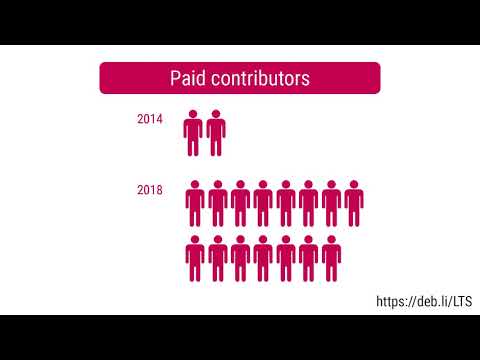
Debian Debian LTS This month I have worked 18 hours on Debian Long Term Support (LTS) and 12 hours on its sister Extended LTS project. You can find out more about the project via the following video:


Uploads to Debian

Russ Allbery: Review: Men at Arms

Review: Men at Arms, by Terry Pratchett
Series: Discworld #15
Publisher: Harper
Copyright: 1993
Printing: November 2013
ISBN: 0-06-223740-3
Format: Mass market
Pages: 420
Men at Arms is the fifteenth Discworld novel and a direct plot sequel to Guards! Guards!. You could start here without missing too much, but starting with Guards! Guards! would make more sense. And of course there are cameos (and one major appearance) by other characters who are established in previous books. Carrot, the adopted dwarf who joined the watch in Guards! Guards!, has been promoted to corporal. He is now in charge of training new recruits, a role that is more important because of the Night Watch's new Patrician-ordered diversity initiative. The Watch must reflect the ethnic makeup of the city. That means admitting a troll, a dwarf... and a woman? Trolls and dwarfs hate each other because dwarfs mine precious things out of rock and trolls are composed of precious things embedded in rocks, so relations between the new recruits are tense. Captain Vimes is leaving the Watch, and no one is sure who would or could replace him. (The reason for this is a minor spoiler for Guards! Guards!) A magical weapon is stolen from the Assassin's Guild. And a string of murders begins, murders that Vimes is forbidden by Lord Vetinari from investigating and therefore clearly is going to investigate. This is an odd moment at which to read this book. The Night Watch are not precisely a police force, although they are moving in that direction. Their role in Ankh-Morpork is made much stranger by the guild system, in which the Thieves' Guild is responsible for theft and for dealing with people who steal outside of the quota of the guild. But Men at Arms is in part a story about ethics, about what it means to be a police officer, and about what it looks like when someone is very good at that job. Since I live in the United States, that makes it hard to avoid reading Men at Arms in the context of the current upheavals about police racism, use of force, and lack of accountability. Men at Arms can indeed be read that way; community relations, diversity in the police force, the merits of making two groups who hate each other work together, and the allure of violence are all themes Pratchett is working with in this novel. But they're from the perspective of a UK author writing in 1993 about a tiny city guard without any of the machinery of modern police, so I kept seeing a point of clear similarity and then being slightly wrong-footed by the details. It also felt odd to read a book where the cops are the heroes, much in the style of a detective show. This is in no way a problem with the book, and in a way it was helpful perspective, but it was a strange reading experience.
Cuddy had only been a guard for a few days but already he had absorbed one important and basic fact: it is almost impossible for anyone to be in a street without breaking the law.
Vimes and Carrot are both excellent police officers, but in entirely different ways. Vimes treats being a cop as a working-class job and is inclined towards glumness and depression, but is doggedly persistent and unable to leave a problem alone. His ethics are covered by a thick layer of world-weary cynicism. Carrot is his polar opposite in personality: bright, endlessly cheerful, effortlessly charismatic, and determined to get along with everyone. On first appearance, this contrast makes Vimes seem wise and Carrot seem a bit dim. That is exactly what Pratchett is playing with and undermining in Men at Arms. Beneath Vimes's cynicism, he's nearly as idealistic as Carrot, even though he arrives at his ideals through grim contrariness. Carrot, meanwhile, is nowhere near as dim as he appears to be. He's certain about how he wants to interact with others and is willing to stick with that approach no matter how bad of an idea it may appear to be, but he's more self-aware than he appears. He and Vimes are identical in the strength of their internal self-definition. Vimes shows it through the persistent, grumpy stubbornness of a man devoted to doing an often-unpleasant job, whereas Carrot verbally steamrolls people by refusing to believe they won't do the right thing.
Colon thought Carrot was simple. Carrot often struck people as simple. And he was. Where people went wrong was thinking that simple meant the same thing as stupid.
There's a lot going on in this book apart from the profiles of two very different models of cop. Alongside the mystery (which doubles as pointed commentary on the corrupting influence of violence and personal weaponry), there's a lot about dwarf/troll relations, a deeper look at the Ankh-Morpork guilds (including a horribly creepy clown guild), another look at how good Lord Vetinari is at running the city by anticipating how other people will react, a sarcastic dog named Gaspode (originally seen in Moving Pictures), and Pratchett's usual collection of memorable lines. It is also the origin of the now-rightfully-famous Vimes boots theory:
The reason that the rich were so rich, Vimes reasoned, was because they managed to spend less money. Take boots, for example. He earned thirty-eight dollars a month plus allowances. A really good pair of leather boots cost fifty dollars. But an affordable pair of boots, which were sort of OK for a season or two and then leaked like hell when the cardboard gave out, cost about ten dollars. Those were the kind of boots Vimes always bought, and wore until the soles were so thin that he could tell where he was in Ankh-Morpork on a foggy night by the feel of the cobbles. But the thing was that good boots lasted for years and years. A man who could afford fifty dollars had a pair of boots that'd still be keeping his feet dry in ten years' time, while the poor man who could only afford cheap boots would have spent a hundred dollars on boots in the same time and would still have wet feet. This was the Captain Samuel Vimes 'Boots' theory of socioeconomic unfairness.
Men at Arms regularly makes lists of the best Discworld novels, and I can see why. At this point in the series, Pratchett has hit his stride. The plots have gotten deeper and more complex without losing the funny moments, movie and book references, and glorious turns of phrase. There is also a lot of life philosophy and deep characterization when one pays close attention to the characters.
He was one of those people who would recoil from an assault on strength, but attack weakness without mercy.
My one complaint is that I found it a bit overstuffed with both characters and subplots, and as a result had a hard time following the details of the plot. I found myself wanting a timeline of the murders or a better recap from one of the characters. As always with Pratchett, the digressions are wonderful, but they do occasionally come at the cost of plot clarity. I'm not sure I recommend the present moment in the United States as the best time to read this book, although perhaps there is no better time for Carrot and Vimes to remind us what good cops look like. But regardless of when one reads it, it's an excellent book, one of the best in the Discworld series to this point. Followed, in publication order, by Soul Music. The next Watch book is Feet of Clay. Rating: 8 out of 10

22 August 2020

Jelmer Vernooij: Debian Janitor: > 60,000 Lintian Issues Automatically Fixed

The Debian Janitor is an automated system that commits fixes for (minor) issues in Debian packages that can be fixed by software. It gradually started proposing merges in early December. The first set of changes sent out ran lintian-brush on sid packages maintained in Git. This post is part of a series about the progress of the Janitor.

Scheduling Lintian Fixes To determine which packages to process, the Janitor looks at the import of lintian output across the archive that is available in UDD [1]. It will prioritize those packages with the most and more severe issues that it has fixers for. Once a package is selected, it will clone the packaging repository and run lintian-brush on it. Lintian-brush provides a framework for applying a set of fixers to a package. It will run each of a set of fixers in a pristine version of the repository, and handles most of the heavy lifting.
The Inner Workings of a Fixer Each fixer is just an executable which gets run in a clean checkout of the package, and can make changes there. Most of the fixers are written in Python or shell, but they can be in any language. The contract for fixers is pretty simple:
  • If the fixer exits with non-zero, the changes are reverted and fixer is considered to have failed
  • If it exits with zero and made changes, then it should write a summary of its changes to standard out
If a fixer is uncertain about the changes it has made, it should report so on standard output using a pseudo-header. By default, lintian-brush will discard any changes with uncertainty but if you are running it locally you can still apply them by specifying --uncertain. The summary message on standard out will be used for the commit message and (possibly) the changelog message, if the package doesn t use gbp dch.
Example Fixer Let s look at an example. The package priority extra is deprecated since Debian Policy 4.0.1 (released August 2 017) see Policy 2.5 "Priorities". Instead, most packages should use the optional priority. Lintian will warn when a package uses the deprecated extra value for the Priority - the associated tag is priority-extra-is-replaced-by-priority-optional. Lintian-brush has a fixer script that can automatically replace extra with optional . On systems that have lintian-brush installed, the source for the fixer lives in /usr/share/lintian-brush/fixers/priority-extra-is-replaced-by-priority-optional.py, but here is a copy of it for reference:
 1
 2
 3
 4
 5
 6
 7
 8
 9
10
11
12
13
#!/usr/bin/python3
from debmutate.control import ControlEditor
from lintian_brush.fixer import report_result, fixed_lintian_tag
with ControlEditor() as updater:
    for para in updater.paragraphs:
        if para.get("Priority") == "extra":
            para["Priority"] = "optional"
            fixed_lintian_tag(
                para, 'priority-extra-is-replaced-by-priority-optional')
report_result("Change priority extra to priority optional.")
This fixer is written in Python and uses the debmutate library to easily modify control files while preserving formatting or back out if it is not possible to preserve formatting. All the current fixers come with tests, e.g. for this particular fixer the tests can be found here: https://salsa.debian.org/jelmer/lintian-brush/-/tree/master/tests/priority-extra-is-replaced-by-priority-optional. For more details on writing new fixers, see the README for lintian-brush. For more details on debugging them, see the manual page.
Successes by fixer Here is a list of the fixers currently available, with the number of successful merges/pushes per fixer:
Lintian Tag Previously merged/pushed Ready but not yet merged/pushed
uses-debhelper-compat-file 4906 4161
upstream-metadata-file-is-missing 4281 3841
package-uses-old-debhelper-compat-version 4256 3617
upstream-metadata-missing-bug-tracking 2438 2995
out-of-date-standards-version 2062 2936
upstream-metadata-missing-repository 1936 2987
trailing-whitespace 1720 2295
insecure-copyright-format-uri 1791 1093
package-uses-deprecated-debhelper-compat-version 1391 1287
vcs-obsolete-in-debian-infrastructure 872 782
homepage-field-uses-insecure-uri 527 1111
vcs-field-not-canonical 850 655
debian-changelog-has-wrong-day-of-week 224 376
debian-watch-uses-insecure-uri 314 242
useless-autoreconf-build-depends 112 428
priority-extra-is-replaced-by-priority-optional 315 194
debian-rules-contains-unnecessary-get-orig-source-target 35 428
tab-in-license-text 125 320
debian-changelog-line-too-long 186 190
debian-rules-sets-dpkg-architecture-variable 69 166
debian-rules-uses-unnecessary-dh-argument 42 182
package-lacks-versioned-build-depends-on-debhelper 125 95
unversioned-copyright-format-uri 43 136
package-needs-versioned-debhelper-build-depends 127 50
binary-control-field-duplicates-source 34 134
renamed-tag 73 69
vcs-field-uses-insecure-uri 14 109
uses-deprecated-adttmp 13 91
debug-symbol-migration-possibly-complete 12 88
copyright-refers-to-symlink-license 51 48
debian-control-has-unusual-field-spacing 33 66
old-source-override-location 32 62
out-of-date-copyright-format 20 62
public-upstream-key-not-minimal 43 30
older-source-format 17 54
custom-compression-in-debian-source-options 12 57
copyright-refers-to-versionless-license-file 29 39
tab-in-licence-text 33 31
global-files-wildcard-not-first-paragraph-in-dep5-copyright 28 33
out-of-date-copyright-format-uri 9 50
field-name-typo-dep5-copyright 29 29
copyright-does-not-refer-to-common-license-file 13 42
debhelper-but-no-misc-depends 9 45
debian-watch-file-is-missing 11 41
debian-control-has-obsolete-dbg-package 8 40
possible-missing-colon-in-closes 31 13
unnecessary-testsuite-autopkgtest-field 32 9
missing-debian-source-format 7 33
debhelper-tools-from-autotools-dev-are-deprecated 9 29
vcs-field-mismatch 8 29
debian-changelog-file-contains-obsolete-user-emacs-setting 33 0
patch-file-present-but-not-mentioned-in-series 24 9
copyright-refers-to-versionless-license-file 22 9
debian-control-has-empty-field 25 6
missing-build-dependency-for-dh-addon 10 20
obsolete-field-in-dep5-copyright 15 13
xs-testsuite-field-in-debian-control 20 7
ancient-python-version-field 13 12
unnecessary-team-upload 19 5
misspelled-closes-bug 6 16
field-name-typo-in-dep5-copyright 1 20
transitional-package-not-oldlibs-optional 4 17
maintainer-script-without-set-e 9 11
dh-clean-k-is-deprecated 4 14
no-dh-sequencer 14 4
missing-vcs-browser-field 5 12
space-in-std-shortname-in-dep5-copyright 6 10
xc-package-type-in-debian-control 4 11
debian-rules-missing-recommended-target 4 10
desktop-entry-contains-encoding-key 1 13
build-depends-on-obsolete-package 4 9
license-file-listed-in-debian-copyright 1 12
missing-built-using-field-for-golang-package 9 4
unused-license-paragraph-in-dep5-copyright 4 7
missing-build-dependency-for-dh_command 6 4
comma-separated-files-in-dep5-copyright 3 6
systemd-service-file-refers-to-var-run 4 5
copyright-not-using-common-license-for-apache2 3 5
debian-tests-control-autodep8-is-obsolete 2 6
dh-quilt-addon-but-quilt-source-format 2 6
no-homepage-field 3 5
font-packge-not-multi-arch-foreign 1 6
homepage-in-binary-package 1 4
vcs-field-bitrotted 1 3
built-using-field-on-arch-all-package 2 1
copyright-should-refer-to-common-license-file-for-apache-2 1 2
debian-pyversions-is-obsolete 3 0
debian-watch-file-uses-deprecated-githubredir 1 1
executable-desktop-file 1 1
skip-systemd-native-flag-missing-pre-depends 1 1
vcs-field-uses-not-recommended-uri-format 1 1
init.d-script-needs-depends-on-lsb-base 1 0
maintainer-also-in-uploaders 1 0
public-upstream-keys-in-multiple-locations 1 0
wrong-debian-qa-group-name 1 0
Total 29656 32209

Footnotes
[1]temporarily unavailable due to Debian bug #960156 but the Janitor is relying on historical data

For more information about the Janitor's lintian-fixes efforts, see the landing page

16 August 2020

Bits from Debian: Debian turns 27!

Today is Debian's 27th anniversary. We recently wrote about some ideas to celebrate the DebianDay, you can join the party or organise something yourselves :-) Today is also an opportunity for you to start or resume your contributions to Debian. For example, you can scratch your creative itch and suggest a wallpaper to be part of the artwork for the next release, have a look at the DebConf20 schedule and register to participate online (August 23rd to 29th, 2020), or put a Debian live image in a DVD or USB and give it to some person near you, who still didn't discover Debian. Our favorite operating system is the result of all the work we do together. Thanks to everybody who has contributed in these 27 years, and happy birthday Debian!

Gunnar Wolf: DebConf20 talk recorded

Following Antonio Terceiro s post on tips for using ffmpeg for editing video, I will also share a bit of my experience producing my video for my session in DebConf20. I recorded my talk today. As Terceiro mentioned, even though I m used to speaking in front of my webcam (i.e. for my classes and some smaller conferences I ve worked on during the COVID lockdown), it does feel a bit weird to present a live talk to nobody :- OK, one step back. Why are we doing this? Because our hardworking friends of the DebConf20 video team recommended so. In order to minimize connecitvity issues from the variety of speakers throughout the world, we were requested to pre-record the exposition part of our talks, send them to the video team (deadline: today 2020-08-16, in case you still owe yours!), and make sure to be present at the end of the talk for the Q&A session. Of course, for a 45 minute talk, I prepared a 30 minute presentation, saving time for said Q&A session. Anyway, I used the excellent OBS studiolive video mixing/editing program (of course, Debian packages are available. This allowed me to set up several predefined views (combinations and layouts of the presentation, webcam, and maybe some other sources) and professionally and elegantly switch between them on the fly. I am still a newbie with OBS, but I surely see it becoming a part of my day to day streaming. Of course, my setup still was obvious (me looking right every now and then to see or control OBS, as I work on a dual-monitor setup ) Anyway, the experience was very good, much smoother and faster than what I usually have to do when editing video. But just as I was finishing thanking the (future) audience and closing the recording I had to tell the camera, oh, fuck! The button labeled Start Recording Had not been pressed. So, did I just lose 30 minutes of my life, plus a half-decent delivered talk? No, fortunately not. I had previously been playing with OBS, and configured some things. The button I did press was Start Streaming . So, my talk (swearing included, of course) was dutifully streamed over to my YouTube channel. It seems up to five people got a sneak preview as to what will my DebConf participation be (of course, I ve de-listed the video). I pulled it with the always-handy youtube-dl, edited out my curses using kdenlive, and pushed it to the DebConf video server. Oh, make sure you follow the advice for recording presentations. It has all the relevant advice, the settings you should use, and much more welcome information if you are new to this. So Next week, DebConf20! Be there or be square!

14 August 2020

Keith Packard: picolibc-news

Picolibc Updates I thought work on picolibc would slow down at some point, but I keep finding more things that need work. I spent a few weeks working in libm and then discovered some important memory allocation bugs in the last week that needed attention too. Cleaning up the Picolibc Math Library Picolibc uses the same math library sources as newlib, which includes code from a range of sources: The original SunPro math code had been split into two levels at some point:
  1. IEEE-754 functions. These offer pure IEEE-754 semantics, including return values and exceptions. They do not set the POSIX errno value. These are all prefixed with __ieee754_ and can be called directly by applications if desired.
  2. POSIX functions. These can offer POSIX semantics, including setting errno and returning expected values when errno is set.
New Code Sponsored by ARM Szabolcs Nagy and Wilco Dijkstra's work in the last few years has been to improve the performance of some of the core math functions, which is much appreciated. They've adopted a more modern coding style (C99) and written faster code at the expense of a larger memory foot print. One interesting choice was to use double computations for the float implementations of various functions. This makes these functions shorter and more accurate than versions done using float throughout. However, for machines which don't have HW double, this pulls in soft double code which adds considerable size to the resulting binary and slows down the computations, especially if the platform does support HW float. The new code also takes advantage of HW fused-multiply-add instructions. Those offer more precision than a sequence of primitive instructions, and so the new code can be much shorter as a result. The method used to detect whether the target machine supported fma operations was slightly broken on 32-bit ARM platforms, where those with 'float' fma acceleration but without 'double' fma acceleration would use the shorter code sequence, but with an emulated fma operation that used the less-precise sequence of operations, leading to significant reductions in the quality of the resulting math functions. I fixed the double fma detection and then also added float fma detection along with implementations of float and double fma for ARM and RISC-V. Now both of those platforms get fma-enhanced math functions where available. Errno Adventures I'd submitted patches to newlib a while ago that aliased the regular math library names to the __ieee754_ functions when the library was configured to not set errno, which is pretty common for embedded environments where a shared errno is a pain anyways. Note the use of the word can in remark about the old POSIX wrapper functions. That's because all of these functions are run-time switchable between _IEEE_ and _POSIX_ mode using the _LIB_VERSION global symbol. When left in the usual _IEEE_ mode, none of this extra code was ever executed, so these wrapper functions never did anything beyond what the underlying __ieee754_ functions did. The new code by Nagy and Dijkstra changed how functions are structured to eliminate the underlying IEEE-754 api. These new functions use tail calls to various __math_ error reporting functions. Those can be configured at library build time to set errno or not, centralizing those decisions in a few functions. The result of this combination of source material is that in the default configuration, some library functions (those written by Nagy and Dijkstra) would set errno and others (the old SunPro code) would not. To disable all errno references, the library would need to be compiled with a set of options, -D_IEEE_LIBM to disable errno in the SunPro code and -DWANT_ERRNO=0 to disable errno in the new code. To enable errno everywhere, you'd set -D_POSIX_MODE to make the default value for _LIB_VERSION be _POSIX_ instead of _IEEE_. To clean all of this up, I removed the run-time _LIB_VERSION variable and made that compile-time. In combination with the earlier work to alias the __ieee754_ functions to the regular POSIX names when _IEEE_LIBM was defined this means that the old SunPro POSIX functions now only get used when _IEEE_LIBM is not defined, and in that case the _LIB_VERSION tests always force use of the errno setting code. In addition, I made the value of WANT_ERRNO depend on whether _IEEE_LIBM was defined, so now a single definition (-D_IEEE_LIBM) causes all of the errno handling from libm to be removed, independent of which code is in use. As part of this work, I added a range of errno tests for the math functions to find places where the wrong errno value was being used. Exceptions As an alternative to errno, C also provides for IEEE-754 exceptions through the fenv functions. These have some significant advantages, including having independent bits for each exception type and having them accumulate instead of sharing errno with a huge range of other C library functions. Plus, they're generally implemented in hardware, so you get exceptions for both library functions and primitive operations. Well, you should get exceptions everywhere, except that the GCC soft float libraries don't support them at all. So, errno can still be useful if you need to know what happened in your library functions when using soft floats. Newlib has recently seen a spate of fenv support being added for various architectures, so I decided that it would be a good idea to add some tests. I added tests for both primitive operations, and then tests for library functions to check both exceptions and errno values. Oddly, this uncovered a range of minor mistakes in various math functions. Lots of these were mistakes in the SunPro POSIX wrapper functions where they modified the return values from the __ieee754_ implementations. Simply removing those value modifications fixed many of those errors. Fixing Memory Allocator bugs Picolibc inherits malloc code from newlib which offers two separate implementations, one big and fast, the other small and slow(er). Selecting between them is done while building the library, and as Picolibc is expected to be used on smaller systems, the small and slow one is the default. Contributed by someone from ARM back in 2012/2013, nano-mallocr reminds me of the old V7 memory allocator. A linked list, sorted in address order, holds discontiguous chunks of available memory. Allocation is done by searching for a large enough chunk in the list. The first one large enough is selected, and if it is large enough, a chunk is split off and left on the free list while the remainder is handed to the application. When the list doesn't have any chunk large enough, sbrk is called to get more memory. Free operations involve walking the list and inserting the chunk in the right location, merging the freed memory with any immediately adjacent chunks to reduce fragmentation. The size of each chunk is stored just before the first byte of memory used by the application, where it remains while the memory is in use and while on the free list. The free list is formed by pointers stored in the active area of the chunk, so the only overhead for chunks in use is the size field. Something Something Padding To deal with the vagaries of alignment, the original nano-mallocr code would allow for there to be 'padding' between the size field and the active memory area. The amount of padding could vary, depending on the alignment required for a particular chunk (in the case of memalign, that padding can be quite large). If present, nano-mallocr would store the padding value in the location immediately before the active area and distinguish that from a regular size field by a negative sign. The whole padding thing seems mysterious to me -- why would it ever be needed when the allocator could simply create chunks that were aligned to the required value and a multiple of that value in size. The only use I could think of was for memalign; adding this padding field would allow for less over-allocation to find a suitable chunk. I didn't feel like this one (infrequent) use case was worth the extra complexity; it certainly caused me difficulty in reading the code. A Few Bugs In reviewing the code, I found a couple of easy-to-fix bugs. Time For Testing Once I had uncovered a few bugs in this code, I decided that it would be good to write a few tests to exercise the API. With the tests running on four architectures in nearly 60 variants, it seemed like I'd be able to uncover at least a few more failures: These new tests did find bugs. But not where I expected them. Which is why I'm so fond of testing. GCC Optimizations One of my tests was to call calloc and make sure it returned a chunk of memory that appeared to work or failed with a reasonable value. To my surprise, on aarch64, that test never finished. It worked elsewhere, but on that architecture it hung in the middle of calloc itself. Which looked like this:
void * nano_calloc(malloc_size_t n, malloc_size_t elem)
 
    ptrdiff_t bytes;
    void * mem;
    if (__builtin_mul_overflow (n, elem, &bytes))
     
    RERRNO = ENOMEM;
    return NULL;
     
    mem = nano_malloc(bytes);
    if (mem != NULL) memset(mem, 0, bytes);
    return mem;
 
Note the naming here -- nano_mallocr uses nano_ prefixes in the code, but then uses #defines to change their names to those expected in the ABI. (No, I don't understand why either). However, GCC sees the real names and has some idea of what these functions are supposed to do. In particular, the pattern:
foo = malloc(n);
if (foo) memset(foo, '\0', n);
is converted into a shorter and semantically equivalent:
foo = calloc(n, 1);
Alas, GCC doesn't take into account that this optimization is occurring inside of the implementation of calloc. Another sequence of code looked like this:
chunk->size = foo
nano_free((char *) chunk + CHUNK_OFFSET);
Well, GCC knows that the content of memory passed to free cannot affect the operation of the application, and so it converted this into:
nano_free((char *) chunk + CHUNK_OFFSET);
Remember that nano_mallocr stores the size of the chunk just before the active memory. In this case, nano_mallocr was splitting a large chunk into two pieces, setting the size of the left-over part and placing that on the free list. Failing to set that size value left whatever was there before for the size and usually resulted in the free list becoming quite corrupted. Both of these problems can be corrected by compiling the code with a couple of GCC command-line switches (-fno-builtin-malloc and -fno-builtin-free). Reworking Malloc Having spent this much time reading through the nano_mallocr code, I decided to just go through it and make it easier for me to read today, hoping that other people (which includes 'future me') will also find it a bit easier to follow. I picked a couple of things to focus on:
  1. All newly allocated memory should be cleared. This reduces information disclosure between whatever code freed the memory and whatever code is about to use the memory. Plus, it reduces the effect of un-initialized allocations as they now consistently get zeroed memory. Yes, this masks bugs. Yes, this goes slower. This change is dedicated to Kees Cook, but please blame me for it not him.
  2. Get rid of the 'Padding' notion. Every time I read this code it made my brain hurt. I doubt I'll get any smarter in the future.
  3. Realloc could use some love, improving its efficiency in common cases to reduce memory usage.
  4. Reworking linked list walking. nano_mallocr uses a singly-linked free list and open-codes all list walking. Normally, I'd switch to a library implementation to avoid introducing my own bugs, but in this fairly simple case, I think it's a reasonable compromise to open-code the list operations using some patterns I learned while working at MIT from Bob Scheifler.
  5. Discover necessary values, like padding and the limits of the memory space, from the environment rather than having them hard-coded.
Padding To get rid of 'Padding' in malloc, I needed to make sure that every chunk was aligned and sized correctly. Remember that there is a header on every allocated chunk which is stored before the active memory which contains the size of the chunk. On 32-bit machines, that size is 4 bytes. If the machine requires allocations to be aligned on 8-byte boundaries (as might be the case for 'double' values), we're now going to force the alignment of the header to 8-bytes, wasting four bytes between the size field and the active memory. Well, the existing nano_mallocr code also wastes those four bytes to store the 'padding' value. Using a consistent alignment for chunk starting addresses and chunk sizes has made the code a lot simpler and easier to reason about while not using extra memory for normal allocation. Except for memalign, which I'll cover in the next section. realloc The original nano_realloc function was as simple as possible:
mem = nano_malloc(new_size);
if (mem)  
    memcpy(mem, old, MIN(old_size, new_size));
    nano_free(old);
 
return mem;
However, this really performs badly when the application is growing a buffer while accumulating data. A couple of simple optimizations occurred to me:
  1. If there's a free chunk just after the original location, it could be merged to the existing block and avoid copying the data.
  2. If the original chunk is at the end of the heap, call sbrk() to increase the size of the chunk.
The second one seems like the more important case; in a small system, the buffer will probably land at the end of the heap at some point, at which point growing it to the size of available memory becomes quite efficient. When shrinking the buffer, instead of allocating new space and copying, if there's enough space being freed for a new chunk, create one and add it to the free list. List Walking Walking singly-linked lists seem like one of the first things we see when learning pointer manipulation in C:
for (element = head; element; element = element->next)
    do stuff ...
However, this becomes pretty complicated when 'do stuff' includes removing something from the list:
prev = NULL;
for (element = head; element; element = element->next)
    ...
    if (found)
        break;
    ...
    prev = element
if (prev != NULL)
    prev->next = element->next;
else
    head = element->next;
An extra variable, and a test to figure out how to re-link the list. Bob showed me a simpler way, which I'm sure many people are familiar with:
for (ptr = &head; (element = *ptr); ptr = &(element->next))
    ...
    if (found)
        break;
*ptr = element->next;
Insertion is similar, as you would expect:
for (ptr = &head; (element = *ptr); ptr = &(element->next))
    if (found)
        break;
new_element->next = element;
*ptr = new_element;
In terms of memory operations, it's the same -- each 'next' pointer is fetched exactly once and the list is re-linked by performing a single store. In terms of reading the code, once you've seen this pattern, getting rid of the extra variable and the conditionals around the list update makes it shorter and less prone to errors. In the nano_mallocr code, instead of using 'prev = NULL', it actually used 'prev = free_list', and the test for updating the head was 'prev == element', which really caught me unawares. System Parameters Any malloc implementation needs to know a couple of things about the system it's running on:
  1. Address space. The maximum range of possible addresses sets the limit on how large a block of memory might be allocated, and hence the size of the 'size' field. Fortunately, we've got the 'size_t' type for this, so we can just use that.
  2. Alignment requirements. These derive from the alignment requirements of the basic machine types, including pointers, integers and floating point numbers which are formed from a combination of machine requirements (some systems will fault if attempting to use memory with the wrong alignment) along with a compromise between memory usage and memory system performance.
I decided to let the system tell me the alignment necessary using a special type declaration and the 'offsetof' operation:
typedef struct  
    char c;
    union  
    void *p;
    double d;
    long long ll;
    size_t s;
      u;
  align_t;
#define MALLOC_ALIGN        (offsetof(align_t, u))
Because C requires struct fields to be stored in order of declaration, the 'u' field would have to be after the 'c' field, and would have to be assigned an offset equal to the largest alignment necessary for any of its members. Testing on a range of machines yields the following alignment requirements:
Architecture Alignment
x86_64 8
RISC-V 8
aarch64 8
arm 8
x86 4
So, I guess I could have just used a constant value of '8' and not worried about it, but using the compiler-provided value means that running picolibc on older architectures might save a bit of memory at no real cost in the code. Now, the header containing the 'size' field can be aligned to this value, and all allocated blocks can be allocated in units of this value. memalign memalign, valloc and pvalloc all allocate memory with restrictions on the alignment of the base address and length. You'd think these would be simple -- allocate a large chunk, align within that chunk and return the address. However, they also all require that the address can be successfully passed to free. Which means that the allocator needs to do some tricks to make it all work. Essentially, you allocate 'lots' of memory and then arrange that any bytes at the head and tail of the allocation can be returned to the free list. The tail part is easy; if it's large enough to form a free chunk (which must contain the size and a 'next' pointer for the free list), it can be split off. Otherwise, it just sits at the end of the allocation being wasted space. The head part is a bit tricky when it's not large enough to form a free chunk. That's where the 'padding' business came in handy; that can be as small as a 'size_t' value, which (on 32-bit systems) is only four bytes. Now that we're giving up trying to reason about 'padding', any extra block at the start must be big enough to hold a free block, which includes the size and a next pointer. On 32-bit systems, that's just 8 bytes which (for most of our targets) is the same as the alignment value we're using. On 32-bit systems that can use 4-byte alignment, and on 64-bit systems, it's possible that the alignment required by the application for memalign and the alignment of a chunk returned by malloc might be off by too small an amount to create a free chunk. So, we just allocate a lot of extra space; enough so that we can create a block of size 'toosmall + align' at the start and create a free chunk of memory out of that. This works, and at least returns all of the unused memory back for other allocations. Sending Patches Back to Newlib I've sent the floating point fixes upstream to newlib where they've already landed on master. I've sent most of the malloc fixes, but I'm not sure they really care about seeing nano_mallocr refactored. If they do, I'll spend the time necessary to get the changes ported back to the newlib internal APIs and merged upstream.

12 August 2020

Michael Stapelberg: Hermetic packages (in distri)

In distri, packages (e.g. emacs) are hermetic. By hermetic, I mean that the dependencies a package uses (e.g. libusb) don t change, even when newer versions are installed. For example, if package libusb-amd64-1.0.22-7 is available at build time, the package will always use that same version, even after the newer libusb-amd64-1.0.23-8 will be installed into the package store. Another way of saying the same thing is: packages in distri are always co-installable. This makes the package store more robust: additions to it will not break the system. On a technical level, the package store is implemented as a directory containing distri SquashFS images and metadata files, into which packages are installed in an atomic way.

Out of scope: plugins are not hermetic by design One exception where hermeticity is not desired are plugin mechanisms: optionally loading out-of-tree code at runtime obviously is not hermetic. As an example, consider glibc s Name Service Switch (NSS) mechanism. Page 29.4.1 Adding another Service to NSS describes how glibc searches $prefix/lib for shared libraries at runtime. Debian ships about a dozen NSS libraries for a variety of purposes, and enterprise setups might add their own into the mix. systemd (as of v245) accounts for 4 NSS libraries, e.g. nss-systemd for user/group name resolution for users allocated through systemd s DynamicUser= option. Having packages be as hermetic as possible remains a worthwhile goal despite any exceptions: I will gladly use a 99% hermetic system over a 0% hermetic system any day. Side note: Xorg s driver model (which can be characterized as a plugin mechanism) does not fall under this category because of its tight API/ABI coupling! For this case, where drivers are only guaranteed to work with precisely the Xorg version for which they were compiled, distri uses per-package exchange directories.

Implementation of hermetic packages in distri On a technical level, the requirement is: all paths used by the program must always result in the same contents. This is implemented in distri via the read-only package store mounted at /ro, e.g. files underneath /ro/emacs-amd64-26.3-15 never change. To change all paths used by a program, in practice, three strategies cover most paths:

ELF interpreter and dynamic libraries Programs on Linux use the ELF file format, which contains two kinds of references: First, the ELF interpreter (PT_INTERP segment), which is used to start the program. For dynamically linked programs on 64-bit systems, this is typically ld.so(8). Many distributions use system-global paths such as /lib64/ld-linux-x86-64.so.2, but distri compiles programs with -Wl,--dynamic-linker=/ro/glibc-amd64-2.31-4/out/lib/ld-linux-x86-64.so.2 so that the full path ends up in the binary. The ELF interpreter is shown by file(1), but you can also use readelf -a $BINARY grep 'program interpreter' to display it. And secondly, the rpath, a run-time search path for dynamic libraries. Instead of storing full references to all dynamic libraries, we set the rpath so that ld.so(8) will find the correct dynamic libraries. Originally, we used to just set a long rpath, containing one entry for each dynamic library dependency. However, we have since switched to using a single lib subdirectory per package as its rpath, and placing symlinks with full path references into that lib directory, e.g. using -Wl,-rpath=/ro/grep-amd64-3.4-4/lib. This is better for performance, as ld.so uses a per-directory cache. Note that program load times are significantly influenced by how quickly you can locate the dynamic libraries. distri uses a FUSE file system to load programs from, so getting proper -ENOENT caching into place drastically sped up program load times. Instead of compiling software with the -Wl,--dynamic-linker and -Wl,-rpath flags, one can also modify these fields after the fact using patchelf(1). For closed-source programs, this is the only possibility. The rpath can be inspected by using e.g. readelf -a $BINARY grep RPATH.

Environment variable setup wrapper programs Many programs are influenced by environment variables: to start another program, said program is often found by checking each directory in the PATH environment variable. Such search paths are prevalent in scripting languages, too, to find modules. Python has PYTHONPATH, Perl has PERL5LIB, and so on. To set up these search path environment variables at run time, distri employs an indirection. Instead of e.g. teensy-loader-cli, you run a small wrapper program that calls precisely one execve system call with the desired environment variables. Initially, I used shell scripts as wrapper programs because they are easily inspectable. This turned out to be too slow, so I switched to compiled programs. I m linking them statically for fast startup, and I m linking them against musl libc for significantly smaller file sizes than glibc (per-executable overhead adds up quickly in a distribution!). Note that the wrapper programs prepend to the PATH environment variable, they don t replace it in its entirely. This is important so that users have a way to extend the PATH (and other variables) if they so choose. This doesn t hurt hermeticity because it is only relevant for programs that were not present at build time, i.e. plugin mechanisms which, by design, cannot be hermetic.

Shebang interpreter patching The Shebang of scripts contains a path, too, and hence needs to be changed. We don t do this in distri yet (the number of packaged scripts is small), but we should.

Performance requirements The performance improvements in the previous sections are not just good to have, but practically required when many processes are involved: without them, you ll encounter second-long delays in magit which spawns many git processes under the covers, or in dracut, which spawns one cp(1) process per file.

Downside: rebuild of packages required to pick up changes Linux distributions such as Debian consider it an advantage to roll out security fixes to the entire system by updating a single shared library package (e.g. openssl). The flip side of that coin is that changes to a single critical package can break the entire system. With hermetic packages, all reverse dependencies must be rebuilt when a library s changes should be picked up by the whole system. E.g., when openssl changes, curl must be rebuilt to pick up the new version of openssl. This approach trades off using more bandwidth and more disk space (temporarily) against reducing the blast radius of any individual package update.

Downside: long env variables are cumbersome to deal with This can be partially mitigated by removing empty directories at build time, which will result in shorter variables. In general, there is no getting around this. One little trick is to use tr : '\n', e.g.:
distri0# echo $PATH
/usr/bin:/bin:/usr/sbin:/sbin:/ro/openssh-amd64-8.2p1-11/out/bin
distri0# echo $PATH   tr : '\n'
/usr/bin
/bin
/usr/sbin
/sbin
/ro/openssh-amd64-8.2p1-11/out/bin

Edge cases The implementation outlined above works well in hundreds of packages, and only a small handful exhibited problems of any kind. Here are some issues I encountered:

Issue: accidental ABI breakage in plugin mechanisms NSS libraries built against glibc 2.28 and newer cannot be loaded by glibc 2.27. In all likelihood, such changes do not happen too often, but it does illustrate that glibc s published interface spec is not sufficient for forwards and backwards compatibility. In distri, we could likely use a per-package exchange directory for glibc s NSS mechanism to prevent the above problem from happening in the future.

Issue: wrapper bypass when a program re-executes itself Some programs try to arrange for themselves to be re-executed outside of their current process tree. For example, consider building a program with the meson build system:
  1. When meson first configures the build, it generates ninja files (think Makefiles) which contain command lines that run the meson --internal helper.
  2. Once meson returns, ninja is called as a separate process, so it will not have the environment which the meson wrapper sets up. ninja then runs the previously persisted meson command line. Since the command line uses the full path to meson (not to its wrapper), it bypasses the wrapper.
Luckily, not many programs try to arrange for other process trees to run them. Here is a table summarizing how affected programs might try to arrange for re-execution, whether the technique results in a wrapper bypass, and what we do about it in distri:
technique to execute itself uses wrapper mitigation
run-time: find own basename in PATH yes wrapper program
compile-time: embed expected path no; bypass! configure or patch
run-time: argv[0] or /proc/self/exe no; bypass! patch
One might think that setting argv[0] to the wrapper location seems like a way to side-step this problem. We tried doing this in distri, but had to revert and go the other way.

Misc smaller issues

Appendix: Could other distributions adopt hermetic packages? At a very high level, adopting hermetic packages will require two steps:
  1. Using fully qualified paths whose contents don t change (e.g. /ro/emacs-amd64-26.3-15) generally requires rebuilding programs, e.g. with --prefix set.
  2. Once you use fully qualified paths you need to make the packages able to exchange data. distri solves this with exchange directories, implemented in the /ro file system which is backed by a FUSE daemon.
The first step is pretty simple, whereas the second step is where I expect controversy around any suggested mechanism.

Appendix: demo (in distri) This appendix contains commands and their outputs, run on upcoming distri version supersilverhaze, but verified to work on older versions, too. Large outputs have been collapsed and can be expanded by clicking on the output. The /bin directory contains symlinks for the union of all package s bin subdirectories:
distri0# readlink -f /bin/teensy_loader_cli
/ro/teensy-loader-cli-amd64-2.1+g20180927-7/bin/teensy_loader_cli
The wrapper program in the bin subdirectory is small:
distri0# ls -lh $(readlink -f /bin/teensy_loader_cli)
-rwxr-xr-x 1 root root 46K Apr 21 21:56 /ro/teensy-loader-cli-amd64-2.1+g20180927-7/bin/teensy_loader_cli
Wrapper programs execute quickly:
distri0# strace -fvy /bin/teensy_loader_cli & head cat -n
     1  execve("/bin/teensy_loader_cli", ["/bin/teensy_loader_cli"], ["USER=root", "LOGNAME=root", "HOME=/root", "PATH=/ro/bash-amd64-5.0-4/bin:/r"..., "SHELL=/bin/zsh", "TERM=screen.xterm-256color", "XDG_SESSION_ID=c1", "XDG_RUNTIME_DIR=/run/user/0", "DBUS_SESSION_BUS_ADDRESS=unix:pa"..., "XDG_SESSION_TYPE=tty", "XDG_SESSION_CLASS=user", "SSH_CLIENT=10.0.2.2 42556 22", "SSH_CONNECTION=10.0.2.2 42556 10"..., "SSHTTY=/dev/pts/0", "SHLVL=1", "PWD=/root", "OLDPWD=/root", "=/usr/bin/strace", "LD_LIBRARY_PATH=/ro/bash-amd64-5"..., "PERL5LIB=/ro/bash-amd64-5.0-4/ou"..., "PYTHONPATH=/ro/bash-amd64-5.b0-4/"...]) = 0
     2  arch_prctl(ARCH_SET_FS, 0x40c878)       = 0
     3  set_tid_address(0x40ca9c)               = 715
     4  brk(NULL)                               = 0x15b9000
     5  brk(0x15ba000)                          = 0x15ba000
     6  brk(0x15bb000)                          = 0x15bb000
     7  brk(0x15bd000)                          = 0x15bd000
     8  brk(0x15bf000)                          = 0x15bf000
     9  brk(0x15c1000)                          = 0x15c1000
    10  execve("/ro/teensy-loader-cli-amd64-2.1+g20180927-7/out/bin/teensy_loader_cli", ["/ro/teensy-loader-cli-amd64-2.1+"...], ["USER=root", "LOGNAME=root", "HOME=/root", "PATH=/ro/bash-amd64-5.0-4/bin:/r"..., "SHELL=/bin/zsh", "TERM=screen.xterm-256color", "XDG_SESSION_ID=c1", "XDG_RUNTIME_DIR=/run/user/0", "DBUS_SESSION_BUS_ADDRESS=unix:pa"..., "XDG_SESSION_TYPE=tty", "XDG_SESSION_CLASS=user", "SSH_CLIENT=10.0.2.2 42556 22", "SSH_CONNECTION=10.0.2.2 42556 10"..., "SSHTTY=/dev/pts/0", "SHLVL=1", "PWD=/root", "OLDPWD=/root", "=/usr/bin/strace", "LD_LIBRARY_PATH=/ro/bash-amd64-5"..., "PERL5LIB=/ro/bash-amd64-5.0-4/ou"..., "PYTHONPATH=/ro/bash-amd64-5.0-4/"...]) = 0
Confirm which ELF interpreter is set for a binary using readelf(1):
distri0# readelf -a /ro/teensy-loader-cli-amd64-2.1+g20180927-7/out/bin/teensy_loader_cli grep 'program interpreter'
[Requesting program interpreter: /ro/glibc-amd64-2.31-4/out/lib/ld-linux-x86-64.so.2]
Confirm the rpath is set to the package s lib subdirectory using readelf(1):
distri0# readelf -a /ro/teensy-loader-cli-amd64-2.1+g20180927-7/out/bin/teensy_loader_cli grep RPATH
 0x000000000000000f (RPATH)              Library rpath: [/ro/teensy-loader-cli-amd64-2.1+g20180927-7/lib]
and verify the lib subdirectory has the expected symlinks and target versions:
distri0# find /ro/teensy-loader-cli-amd64-*/lib -type f -printf '%P -> %l\n'
libc.so.6 -> /ro/glibc-amd64-2.31-4/out/lib/libc-2.31.so
libpthread.so.0 -> /ro/glibc-amd64-2.31-4/out/lib/libpthread-2.31.so
librt.so.1 -> /ro/glibc-amd64-2.31-4/out/lib/librt-2.31.so
libudev.so.1 -> /ro/libudev-amd64-245-11/out/lib/libudev.so.1.6.17
libusb-0.1.so.4 -> /ro/libusb-compat-amd64-0.1.5-7/out/lib/libusb-0.1.so.4.4.4
libusb-1.0.so.0 -> /ro/libusb-amd64-1.0.23-8/out/lib/libusb-1.0.so.0.2.0
To verify the correct libraries are actually loaded, you can set the LD_DEBUG environment variable for ld.so(8):
distri0# LD_DEBUG=libs teensy_loader_cli
[ ]
       678:     find library=libc.so.6 [0]; searching
       678:      search path=/ro/teensy-loader-cli-amd64-2.1+g20180927-7/lib            (RPATH from file /ro/teensy-loader-cli-amd64-2.1+g20180927-7/out/bin/teensy_loader_cli)
       678:       trying file=/ro/teensy-loader-cli-amd64-2.1+g20180927-7/lib/libc.so.6
       678:
[ ]
NSS libraries that distri ships:
find /lib/ -name "libnss_*.so.2" -type f -printf '%P -> %l\n'
libnss_myhostname.so.2 -> ../systemd-amd64-245-11/out/lib/libnss_myhostname.so.2
libnss_mymachines.so.2 -> ../systemd-amd64-245-11/out/lib/libnss_mymachines.so.2
libnss_resolve.so.2 -> ../systemd-amd64-245-11/out/lib/libnss_resolve.so.2
libnss_systemd.so.2 -> ../systemd-amd64-245-11/out/lib/libnss_systemd.so.2
libnss_compat.so.2 -> ../glibc-amd64-2.31-4/out/lib/libnss_compat.so.2
libnss_db.so.2 -> ../glibc-amd64-2.31-4/out/lib/libnss_db.so.2
libnss_dns.so.2 -> ../glibc-amd64-2.31-4/out/lib/libnss_dns.so.2
libnss_files.so.2 -> ../glibc-amd64-2.31-4/out/lib/libnss_files.so.2
libnss_hesiod.so.2 -> ../glibc-amd64-2.31-4/out/lib/libnss_hesiod.so.2

10 August 2020

Arnaud Rebillout: GoAccess 1.4, a detailed tutorial

GoAccess v1.4 was just released a few weeks ago! Let's take this chance to write a loooong tutorial. We'll go over every steps to install and operate GoAccess. This is a tutorial aimed at those who don't play sysadmin every day, and that's why it's so long, I did my best to provide thorough explanations all along, so that it's more than just a "copy-and-paste" kind of tutorial. And for those who do play sysadmin everyday: please try not to fall asleep while reading, and don't hesitate to drop me an e-mail if you spot anything inaccurate in here. Thanks! Introduction So what's GoAccess already? GoAccess is a web log analyzer, and it allows you to visualize the traffic for your website, and get to know a bit more about your visitors: how many visitors and hits, for which pages, coming from where (geolocation, operating system, web browser...), etc... It does so by parsing the access logs from your web server, be it Apache, NGINX or whatever. GoAccess gives you different options to display the statistics, and in this tutorial we'll focus on producing a HTML report. Meaning that you can see the statistics for your website straight in your web browser, under the form of a single HTML page. For an example, you can have a look at the stats of my blog here: http://goaccess.arnaudr.io. GoAccess is written in C, it has very few dependencies, it had been around for about 10 years, and it's distributed under the MIT license. Assumptions This tutorial is about installing and configuring, so I'll assume that all the commands are run as root. I won't prefix each of them with sudo. I use the Apache web server, running on a Debian system. I don't think it matters so much for this tutorial though. If you're using NGINX it's fine, you can keep reading. Also, I will just use the name SITE for the name of the website that we want to analyze with GoAccess. Just replace that with the real name of your site. I also assume the following locations for your stuff: If you have your stuff in /srv/SITE/ log,www instead, no worries, just adjust the paths accordingly, I bet you can do it. Installation The latest version of GoAccess is v1.4, and it's not yet available in the Debian repositories. So for this part, you can follow the instructions from the official GoAccess download page. Install steps are explained in details, so there's nothing left for me to say :) When this is done, let's get started with the basics. We're talking about the latest version v1.4 here, let's make sure:
$ goaccess --version
GoAccess - 1.4.
...
Now let's try to create a HTML report. I assume that you already have a website up and running. GoAccess needs to parse the access logs. These logs are optional, they might or might not be created by your web server, depending on how it's configured. Usually, these log files are named access.log, unsurprisingly. You can check if those logs exist on your system by running this command:
find /var/log -name access.log
Another important thing to know is that these logs can be in different formats. In this tutorial we'll assume that we work with the combined log format, because it seems to be the most common default. To check what kind of access logs your web server produces, you must look at the configuration for your site. For an Apache web server, you should have such a line in the file /etc/apache2/sites-enabled/SITE.conf:
CustomLog $ APACHE_LOG_DIR /SITE/access.log combined
For NGINX, it's quite similar. The configuration file would be something like /etc/nginx/sites-enabled/SITE, and the line to enable access logs would be something like:
access_log /var/log/nginx/SITE/access.log
Note that NGINX writes the access logs in the combined format by default, that's why you don't see the word combined anywhere in the line above: it's implicit. Alright, so from now on we assume that yes, you have access log files available, and yes, they are in the combined log format. If that's the case, then you can already run GoAccess and generate a report, for example for the log file /var/log/apache2/access.log
goaccess \
    --log-format COMBINED \
    --output /tmp/report.html \
    /var/log/apache2/access.log
It's possible to give GoAccess more than one log files to process, so if you have for example the file access.log.1 around, you can use it as well:
goaccess \
    --log-format COMBINED \
    --output /tmp/report.html \
    /var/log/apache2/access.log \
    /var/log/apache2/access.log.1
If GoAccess succeeds (and it should), you're on the right track! All is left to do to complete this test is to have a look at the HTML report created. It's a single HTML page, so you can easily scp it to your machine, or just move it to the document root of your site, and then open it in your web browser. Looks good? So let's move on to more interesting things. Web server configuration This part is very short, because in terms of configuration of the web server, there's very little to do. As I said above, the only thing you want from the web server is to create access log files. Then you want to be sure that GoAccess and your web server agree on the format for these files. In the part above we used the combined log format, but GoAccess supports many other common log formats out of the box, and even allows you to parse custom log formats. For more details, refer to the option --log-format in the GoAccess manual page. Another common log format is named, well, common. It even has its own Wikipedia page. But compared to combined, the common log format contains less information, it doesn't include the referrer and user-agent values, meaning that you won't have it in the GoAccess report. So at this point you should understand that, unsurprisingly, GoAccess can only tell you about what's in the access logs, no more no less. And that's all in term of web server configuration. Configuration to run GoAccess unprivileged Now we're going to create a user and group for GoAccess, so that we don't have to run it as root. The reason is that, well, for everything running unattended on your server, the less code runs as root, the better. It's good practice and common sense. In this case, GoAccess is simply a log analyzer. So it just needs to read the logs files from your web server, and there is no need to be root for that, an unprivileged user can do the job just as well, assuming it has read permissions on /var/log/apache2 or /var/log/nginx. The log files of the web server are usually part of the adm group (though it might depend on your distro, I'm not sure). This is something you can check easily with the following command:
ls -l /var/log   grep -e apache2 -e nginx
As a result you should get something like that:
drwxr-x--- 2 root adm 20480 Jul 22 00:00 /var/log/apache2/
And as you can see, the directory apache2 belongs to the group adm. It means that you don't need to be root to read the logs, instead any unprivileged user that belongs to the group adm can do it. So, let's create the goaccess user, and add it to the adm group:
adduser --system --group --no-create-home goaccess
addgroup goaccess adm
And now, let's run GoAccess unprivileged, and verify that it can still read the log files:
setpriv \
    --reuid=goaccess --regid=goaccess \
    --init-groups --inh-caps=-all \
    -- \
    goaccess \
    --log-format COMBINED \
    --output /tmp/report2.html \
    /var/log/apache2/access.log
setpriv is the command used to drop privileges. The syntax is quite verbose, it's not super friendly for tutorials, but don't be scared and read the manual page to learn what it does. In any case, this command should work, and at this point, it means that you have a goaccess user ready, and we'll use it to run GoAccess unprivileged. Integration, option A - Run GoAccess once a day, from a logrotate hook In this part we wire things together, so that GoAccess processes the log files once a day, adds the new logs to its internal database, and generates a report from all that aggregated data. The result will be a single HTML page. Introducing logrotate In order to do that, we'll use a logrotate hook. logrotate is a little tool that should already be installed on your server, and that runs once a day, and that is in charge of rotating the log files. "Rotating the logs" means moving access.log to access.log.1 and so on. With logrotate, a new log file is created every day, and log files that are too old are deleted. That's what prevents your logs from filling up your disk basically :) You can check that logrotate is indeed installed and enabled with this command (assuming that your init system is systemd):
systemctl status logrotate.timer
What's interesting for us is that logrotate allows you to run scripts before and after the rotation is performed, so it's an ideal place from where to run GoAccess. In short, we want to run GoAccess just before the logs are rotated away, in the prerotate hook. But let's do things in order. At first, we need to write a little wrapper script that will be in charge of running GoAccess with the right arguments, and that will process all of your sites. The wrapper script This wrapper is made to process more than one site, but if you have only one site it works just as well, of course. So let me just drop it on you like that, and I'll explain afterward. Here's my wrapper script:
 1
 2
 3
 4
 5
 6
 7
 8
 9
10
11
12
13
14
15
16
17
18
19
20
21
22
23
24
25
26
27
28
29
30
31
32
33
34
35
36
37
38
39
40
41
42
43
44
45
46
47
48
49
50
#!/bin/bash
# Process log files /var/www/apache2/SITE/access.log,
# only if /var/lib/goaccess-db/SITE exists.
# Create HTML reports in $1, a directory that must exist.
set -eu
OUTDIR=
LOGDIR=/var/log/apache2
DBDIR=/var/lib/goaccess-db
fail()   echo >&2 "$@"; exit 1;  
[ $# -eq 1 ]   fail "Usage: $(basename $0) OUTPUT_DIRECTORY"
OUTDIR=$1
[ -d "$OUTDIR" ]   fail "'$OUTDIR' is not a directory"
[ -d "$LOGDIR" ]   fail "'$LOGDIR' is not a directory"
[ -d "$DBDIR"  ]   fail "'$DBDIR' is not a directory"
for d in $(find "$LOGDIR" -mindepth 1 -maxdepth 1 -type d); do
    site=$(basename "$sitedir")
    dbdir=$DBDIR/$site
    logfile=$d/access.log
    outfile=$OUTDIR/$site.html
    if [ ! -d "$dbdir" ]   [ ! -e "$logfile" ]; then
        echo "  Skipping site '$site'"
        continue
    else
        echo "  Processing site '$site'"
    fi
    setpriv \
        --reuid=goaccess --regid=goaccess \
        --init-groups --inh-caps=-all \
        -- \
    goaccess \
        --agent-list \
        --anonymize-ip \
        --persist \
        --restore \
        --config-file /etc/goaccess/goaccess.conf \
        --db-path "$dbdir" \
        --log-format "COMBINED" \
        --output "$outfile" \
        "$logfile"
done
So you'd install this script at /usr/local/bin/goaccess-wrapper for example, and make it executable:
chmod +x /usr/local/bin/goaccess-wrapper
A few things to note: As is, the script makes the assumption that the logs for your site are logged in a sub-directory /var/log/apache2/SITE/. If it's not the case, adjust that in the wrapper accordingly. The name of this sub-directory is then used to find the GoAccess database directory /var/lib/goaccess-db/SITE/. This directory is expected to exist, meaning that if you don't create it yourself, the wrapper won't process this particular site. It's a simple way to control which sites are processed by this GoAccess wrapper, and which sites are not. So if you want goaccess-wrapper to process the site SITE, just create a directory with the name of this site under /var/lib/goaccess-db:
mkdir -p /var/lib/goaccess-db/SITE
chown goaccess:goaccess /var/lib/goaccess-db/SITE
Now let's create an output directory:
mkdir /tmp/goaccess-reports
chown goaccess:goaccess /tmp/goaccess-reports
And let's give a try to the wrapper script:
goaccess-wrapper /tmp/goaccess-reports
ls /tmp/goaccess-reports
Which should give you:
SITE.html
At the same time, you can check that GoAccess populated the database with a bunch of files:
ls /var/lib/goaccess-db/SITE
Setting up the logrotate prerotate hook At this point, we have the wrapper in place. Let's now add a pre-rotate hook so that goaccess-wrapper runs once a day, just before the logs are rotated away. The logrotate config file for Apache2 is located at /etc/logrotate.d/apache2, and for NGINX it's at /etc/logrotate.d/nginx. Among the many things you'll see in this file, here's what is of interest for us: In the config file, there is also this snippet:
prerotate
    if [ -d /etc/logrotate.d/httpd-prerotate ]; then \
        run-parts /etc/logrotate.d/httpd-prerotate; \
    fi; \
endscript
It indicates that scripts in the directory /etc/logrotate.d/httpd-prerotate/ will be executed before the rotation takes place. Refer to the man page run-parts(8) for more details... Putting all of that together, it means that logs from the web server are rotated once a day, and if we want to run scripts just before the rotation, we can just drop them in the httpd-prerotate directory. Simple, right? Let's first create this directory if it doesn't exist:
mkdir -p /etc/logrotate.d/httpd-prerotate/
And let's create a tiny script at /etc/logrotate.d/httpd-prerotate/goaccess:
1
2
#!/bin/sh
exec goaccess-wrapper /tmp/goaccess-reports
Don't forget to make it executable:
chmod +x /etc/logrotate.d/httpd-prerotate/goaccess
As you can see, the only thing that this script does is to invoke the wrapper with the right argument, ie. the output directory for the HTML reports that are generated. And that's all. Now you can just come back tomorrow, check the logs, and make sure that the hook was executed and succeeded. For example, this kind of command will tell you quickly if it worked:
journalctl   grep logrotate
Integration, option B - Run GoAccess once a day, from a systemd service OK so we've just seen how to use a logrotate hook. One downside with that is that we have to drop privileges in the wrapper script, because logrotate runs as root, and we don't want to run GoAccess as root. Hence the rather convoluted syntax with setpriv. Rather than embedding this kind of thing in a wrapper script, we can instead run the wrapper script from a [systemd][] service, and define which user runs the wrapper straight in the systemd service file. Introducing systemd niceties So we can create a systemd service, along with a systemd timer that fires daily. We can then set the user and group that execute the script straight in the systemd service, and there's no need for setpriv anymore. It's a bit more streamlined. We can even go a bit further, and use systemd parameterized units (also called templates), so that we have one service per site (instead of one service that process all of our sites). That will simplify the wrapper script a lot, and it also looks nicer in the logs. With this approach however, it seems that we can't really run exactly before the logs are rotated away, like we did in the section above. But that's OK. What we'll do is that we'll run once a day, no matter the time, and we'll just make sure to process both log files access.log and access.log.1 (ie. the current logs and the logs from yesterday). This way, we're sure not to miss any line from the logs. Note that GoAccess is smart enough to only consider newer entries from the log files, and discard entries that are already in the database. In other words, it's safe to parse the same log file more than once, GoAccess will do the right thing. For more details see "INCREMENTAL LOG PROCESSING" from man goaccess. systemd]: https://freedesktop.org/wiki/Software/systemd/ Implementation And here's how it all looks like. First, a little wrapper script for GoAccess:
 1
 2
 3
 4
 5
 6
 7
 8
 9
10
11
12
13
14
15
16
17
18
19
20
21
22
23
24
25
26
27
28
29
30
31
32
#!/bin/bash
# Usage: $0 SITE DBDIR LOGDIR OUTDIR
set -eu
SITE=$1
DBDIR=$2
LOGDIR=$3
OUTDIR=$4
LOGFILES=()
for ext in log log.1; do
    logfile="$LOGDIR/access.$ext"
    [ -e "$logfile" ] && LOGFILES+=("$logfile")
done
if [ $ #LOGFILES[@]  -eq 0 ]; then
    echo "No log files in '$LOGDIR'"
    exit 0
fi
goaccess \
    --agent-list \
    --anonymize-ip \
    --persist \
    --restore \
    --config-file /etc/goaccess/goaccess.conf \
    --db-path "$DBDIR" \
    --log-format "COMBINED" \
    --output "$OUTDIR/$SITE.html" \
    "$ LOGFILES[@] "
This wrapper does very little. Actually, the only thing it does is to check for the existence of the two log files access.log and access.log.1, to be sure that we don't ask GoAccess to process a file that does not exist (GoAccess would not be happy about that). Save this file under /usr/local/bin/goaccess-wrapper, don't forget to make it executable:
chmod +x /usr/local/bin/goaccess-wrapper
Then, create a systemd parameterized unit file, so that we can run this wrapper as a systemd service. Save it under /etc/systemd/system/goaccess@.service:
[Unit]
Description=Update GoAccess report - %i
ConditionPathIsDirectory=/var/lib/goaccess-db/%i
ConditionPathIsDirectory=/var/log/apache2/%i
ConditionPathIsDirectory=/tmp/goaccess-reports
PartOf=goaccess.service
[Service]
Type=oneshot
User=goaccess
Group=goaccess
Nice=19
ExecStart=/usr/local/bin/goaccess-wrapper \
 %i \
 /var/lib/goaccess-db/%i \
 /var/log/apache2/%i \
 /tmp/goaccess-reports
So, what is a systemd parameterized unit? It's a service to which you can pass an argument when you enable it. The %i in the unit definition will be replaced by this argument. In our case, the argument will be the name of the site that we want to process. As you can see, we use the directive ConditionPathIsDirectory= extensively, so that if ever one of the required directories does not exist, the unit will just be skipped (and marked as such in the logs). It's a graceful way to fail. We run the wrapper as the user and group goaccess, thanks to User= and Group=. We also use Nice= to give a low priority to the process. At this point, it's already possible to test. Just make sure that you created a directory for the GoAccess database:
mkdir -p /var/lib/goaccess-db/SITE
chown goaccess:goaccess /var/lib/goaccess-db/SITE
Also make sure that the output directory exists:
mkdir /tmp/goaccess-reports
chown goaccess:goaccess /tmp/goaccess-reports
Then reload systemd and fire the unit to see if it works:
systemctl daemon-reload
systemctl start goaccess@SITE.service
journalctl   tail
And that should work already. As you can see, the argument, SITE, is passed in the systemctl start command. We just append it after the @, in the name of the unit. Now, let's create another GoAccess service file, which sole purpose is to group all the parameterized units together, so that we can start them all in one go. Note that we don't use a systemd target for that, because ultimately we want to run it once a day, and that would not be possible with a target. So instead we use a dummy oneshot service. So here it is, saved under /etc/systemd/system/goaccess.service:
[Unit]
Description=Update GoAccess reports
Requires= \
 goaccess@SITE1.service \
 goaccess@SITE2.service
[Service]
Type=oneshot
ExecStart=true
As you can see, we simply list the sites that we want to process in the Requires= directive. In this example we have two sites named SITE1 and SITE2. Let's ensure that everything is still good:
systemctl daemon-reload
systemctl start goaccess.service
journalctl   tail
Check the logs, both sites SITE1 and SITE2 should have been processed. And finally, let's create a timer, so that systemd runs goaccess.service once a day. Save it under /etc/systemd/system/goaccess.timer.
[Unit]
Description=Daily update of GoAccess reports
[Timer]
OnCalendar=daily
RandomizedDelaySec=1h
Persistent=true
[Install]
WantedBy=timers.target
Finally, enable the timer:
systemctl daemon-reload
systemctl enable --now goaccess.timer
At this point, everything should be OK. Just come back tomorrow and check the logs with something like:
journalctl   grep goaccess
Last word: if you have only one site to process, of course you can simplify, for example you can hardcode all the paths in the file goaccess.service instead of using a parameterized unit. Up to you. Daily operations So in this part, we assume that you have GoAccess all setup and running, once a day or so. Let's just go over a few things worth noting. Serve your report Up to now in this tutorial, we created the reports in /tmp/goaccess-reports, but that was just for the sake of the example. You will probably want to save your reports in a directory that is served by your web server, so that, well, you can actually look at it in your web browser, that was the point, right? So how to do that is a bit out of scope here, and I guess that if you want to monitor your website, you already have a website, so you will have no trouble serving the GoAccess HTML report. However there's an important detail to be aware of: GoAccess shows all the IP addresses of your visitors in the report. As long as the report is private it's OK, but if ever you make your GoAccess report public, then you should definitely invoke GoAccess with the option --anonymize-ip. Keep an eye on the logs In this tutorial, the reports we create, along with the GoAccess databases, will grow bigger every day, forever. It also means that the GoAccess processing time will grow a bit each day. So maybe the first thing to do is to keep an eye on the logs, to see how long it takes to GoAccess to do its job every day. Also, maybe you'd like to keep an eye on the size of the GoAccess database with:
du -sh /var/lib/goaccess-db/SITE
If your site has few visitors, I suspect it won't be a problem though. You could also be a bit pro-active in preventing this problem in the future, and for example you could break the reports into, say, monthly reports. Meaning that every month, you would create a new database in a new directory, and also start a new HTML report. This way you'd have monthly reports, and you make sure to limit the GoAccess processing time, by limiting the database size to a month. This can be achieved very easily, by including something like YEAR-MONTH in the database directory, and in the HTML report. You can handle that automatically in the wrapper script, for example:
sfx=$(date +'%Y-%m')
mkdir -p $DBDIR/$sfx
goaccess \
    --db-path $DBDIR/$sfx \
    --output "$OUTDIR/$SITE-$sfx.html" \
    ...
You get the idea. Further notes Migration from older versions With the --persist option, GoAccess keeps all the information from the logs in a database, so that it can re-use it later. In prior versions, GoAccess used the Tokyo Cabinet key-value store for that. However starting from v1.4, GoAccess dropped this dependency and now uses its own database format. As a result, the previous database can't be used anymore, you will have to remove it and restart from zero. At the moment there is no way to convert the data from the old database to the new one. If you're interested, this is discussed upstream at [#1783][bug-1783]. Another thing that changed with this new version is the name for some of the command-line options. For example, --load-from-disk was dropped in favor of --restore, and --keep-db-files became --persist. So you'll have to look at the documentation a bit, and update your script(s) accordingly. Other ways to use GoAccess It's also possible to do it completely differently. You could keep GoAccess running, pretty much like a daemon, with the --real-time-html option, and have it process the logs continuously, rather than calling it on a regular basis. It's also possible to see the GoAccess report straight in the terminal, thanks to libncurses, rather than creating a HTML report. And much more, GoAccess is packed with features. Conclusion I hope that this tutorial helped some of you folks. Feel free to drop an e-mail for comments.

Arnaud Rebillout: GoAccess 1.4, a detailed tutorial

GoAccess v1.4 was just released a few weeks ago! Let's take this chance to write a loooong tutorial. We'll go over every steps to install and operate GoAccess. This is a tutorial aimed at those who don't play sysadmin every day, and that's why it's so long, I did my best to provide thorough explanations all along, so that it's more than just a "copy-and-paste" kind of tutorial. And for those who do play sysadmin everyday: please try not to fall asleep while reading, and don't hesitate to drop me an e-mail if you spot anything inaccurate in here. Thanks! Introduction So what's GoAccess already? GoAccess is a web log analyzer, and it allows you to visualize the traffic for your website, and get to know a bit more about your visitors: how many visitors and hits, for which pages, coming from where (geolocation, operating system, web browser...), etc... It does so by parsing the access logs from your web server, be it Apache, NGINX or whatever. GoAccess gives you different options to display the statistics, and in this tutorial we'll focus on producing a HTML report. Meaning that you can see the statistics for your website straight in your web browser, under the form of a single HTML page. For an example, you can have a look at the stats of my blog here: https://goaccess.arnaudr.io. GoAccess is written in C, it has very few dependencies, it had been around for about 10 years, and it's distributed under the MIT license. Assumptions This tutorial is about installing and configuring, so I'll assume that all the commands are run as root. I won't prefix each of them with sudo. I use the Apache web server, running on a Debian system. I don't think it matters so much for this tutorial though. If you're using NGINX it's fine, you can keep reading. Also, I will just use the name SITE for the name of the website that we want to analyze with GoAccess. Just replace that with the real name of your site. I also assume the following locations for your stuff: If you have your stuff in /srv/SITE/ log,www instead, no worries, just adjust the paths accordingly, I bet you can do it. Installation The latest version of GoAccess is v1.4, and it's not yet available in the Debian repositories. So for this part, you can follow the instructions from the official GoAccess download page. Install steps are explained in details, so there's nothing left for me to say :) When this is done, let's get started with the basics. We're talking about the latest version v1.4 here, let's make sure:
$ goaccess --version
GoAccess - 1.4.
...
Now let's try to create a HTML report. I assume that you already have a website up and running. GoAccess needs to parse the access logs. These logs are optional, they might or might not be created by your web server, depending on how it's configured. Usually, these log files are named access.log, unsurprisingly. You can check if those logs exist on your system by running this command:
find /var/log -name access.log
Another important thing to know is that these logs can be in different formats. In this tutorial we'll assume that we work with the combined log format, because it seems to be the most common default. To check what kind of access logs your web server produces, you must look at the configuration for your site. For an Apache web server, you should have such a line in the file /etc/apache2/sites-enabled/SITE.conf:
CustomLog $ APACHE_LOG_DIR /SITE/access.log combined
For NGINX, it's quite similar. The configuration file would be something like /etc/nginx/sites-enabled/SITE, and the line to enable access logs would be something like:
access_log /var/log/nginx/SITE/access.log
Note that NGINX writes the access logs in the combined format by default, that's why you don't see the word combined anywhere in the line above: it's implicit. Alright, so from now on we assume that yes, you have access log files available, and yes, they are in the combined log format. If that's the case, then you can already run GoAccess and generate a report, for example for the log file /var/log/apache2/access.log
goaccess \
    --log-format COMBINED \
    --output /tmp/report.html \
    /var/log/apache2/access.log
It's possible to give GoAccess more than one log files to process, so if you have for example the file access.log.1 around, you can use it as well:
goaccess \
    --log-format COMBINED \
    --output /tmp/report.html \
    /var/log/apache2/access.log \
    /var/log/apache2/access.log.1
If GoAccess succeeds (and it should), you're on the right track! All is left to do to complete this test is to have a look at the HTML report created. It's a single HTML page, so you can easily scp it to your machine, or just move it to the document root of your site, and then open it in your web browser. Looks good? So let's move on to more interesting things. Web server configuration This part is very short, because in terms of configuration of the web server, there's very little to do. As I said above, the only thing you want from the web server is to create access log files. Then you want to be sure that GoAccess and your web server agree on the format for these files. In the part above we used the combined log format, but GoAccess supports many other common log formats out of the box, and even allows you to parse custom log formats. For more details, refer to the option --log-format in the GoAccess manual page. Another common log format is named, well, common. It even has its own Wikipedia page. But compared to combined, the common log format contains less information, it doesn't include the referrer and user-agent values, meaning that you won't have it in the GoAccess report. So at this point you should understand that, unsurprisingly, GoAccess can only tell you about what's in the access logs, no more no less. And that's all in term of web server configuration. Configuration to run GoAccess unprivileged Now we're going to create a user and group for GoAccess, so that we don't have to run it as root. The reason is that, well, for everything running unattended on your server, the less code runs as root, the better. It's good practice and common sense. In this case, GoAccess is simply a log analyzer. So it just needs to read the logs files from your web server, and there is no need to be root for that, an unprivileged user can do the job just as well, assuming it has read permissions on /var/log/apache2 or /var/log/nginx. The log files of the web server are usually part of the adm group (though it might depend on your distro, I'm not sure). This is something you can check easily with the following command:
ls -l /var/log   grep -e apache2 -e nginx
As a result you should get something like that:
drwxr-x--- 2 root adm 20480 Jul 22 00:00 /var/log/apache2/
And as you can see, the directory apache2 belongs to the group adm. It means that you don't need to be root to read the logs, instead any unprivileged user that belongs to the group adm can do it. So, let's create the goaccess user, and add it to the adm group:
adduser --system --group --no-create-home goaccess
addgroup goaccess adm
And now, let's run GoAccess unprivileged, and verify that it can still read the log files:
setpriv \
    --reuid=goaccess --regid=goaccess \
    --init-groups --inh-caps=-all \
    -- \
    goaccess \
    --log-format COMBINED \
    --output /tmp/report2.html \
    /var/log/apache2/access.log
setpriv is the command used to drop privileges. The syntax is quite verbose, it's not super friendly for tutorials, but don't be scared and read the manual page to learn what it does. In any case, this command should work, and at this point, it means that you have a goaccess user ready, and we'll use it to run GoAccess unprivileged. Integration, option A - Run GoAccess once a day, from a logrotate hook In this part we wire things together, so that GoAccess processes the log files once a day, adds the new logs to its internal database, and generates a report from all that aggregated data. The result will be a single HTML page. Introducing logrotate In order to do that, we'll use a logrotate hook. logrotate is a little tool that should already be installed on your server, and that runs once a day, and that is in charge of rotating the log files. "Rotating the logs" means moving access.log to access.log.1 and so on. With logrotate, a new log file is created every day, and log files that are too old are deleted. That's what prevents your logs from filling up your disk basically :) You can check that logrotate is indeed installed and enabled with this command (assuming that your init system is systemd):
systemctl status logrotate.timer
What's interesting for us is that logrotate allows you to run scripts before and after the rotation is performed, so it's an ideal place from where to run GoAccess. In short, we want to run GoAccess just before the logs are rotated away, in the prerotate hook. But let's do things in order. At first, we need to write a little wrapper script that will be in charge of running GoAccess with the right arguments, and that will process all of your sites. The wrapper script This wrapper is made to process more than one site, but if you have only one site it works just as well, of course. So let me just drop it on you like that, and I'll explain afterward. Here's my wrapper script:
 1
 2
 3
 4
 5
 6
 7
 8
 9
10
11
12
13
14
15
16
17
18
19
20
21
22
23
24
25
26
27
28
29
30
31
32
33
34
35
36
37
38
39
40
41
42
43
44
45
46
47
48
49
50
#!/bin/bash
# Process log files /var/www/apache2/SITE/access.log,
# only if /var/lib/goaccess-db/SITE exists.
# Create HTML reports in $1, a directory that must exist.
set -eu
OUTDIR=
LOGDIR=/var/log/apache2
DBDIR=/var/lib/goaccess-db
fail()   echo >&2 "$@"; exit 1;  
[ $# -eq 1 ]   fail "Usage: $(basename $0) OUTPUT_DIRECTORY"
OUTDIR=$1
[ -d "$OUTDIR" ]   fail "'$OUTDIR' is not a directory"
[ -d "$LOGDIR" ]   fail "'$LOGDIR' is not a directory"
[ -d "$DBDIR"  ]   fail "'$DBDIR' is not a directory"
for d in $(find "$LOGDIR" -mindepth 1 -maxdepth 1 -type d); do
    site=$(basename "$sitedir")
    dbdir=$DBDIR/$site
    logfile=$d/access.log
    outfile=$OUTDIR/$site.html
    if [ ! -d "$dbdir" ]   [ ! -e "$logfile" ]; then
        echo "  Skipping site '$site'"
        continue
    else
        echo "  Processing site '$site'"
    fi
    setpriv \
        --reuid=goaccess --regid=goaccess \
        --init-groups --inh-caps=-all \
        -- \
    goaccess \
        --agent-list \
        --anonymize-ip \
        --persist \
        --restore \
        --config-file /etc/goaccess/goaccess.conf \
        --db-path "$dbdir" \
        --log-format "COMBINED" \
        --output "$outfile" \
        "$logfile"
done
So you'd install this script at /usr/local/bin/goaccess-wrapper for example, and make it executable:
chmod +x /usr/local/bin/goaccess-wrapper
A few things to note: As is, the script makes the assumption that the logs for your site are logged in a sub-directory /var/log/apache2/SITE/. If it's not the case, adjust that in the wrapper accordingly. The name of this sub-directory is then used to find the GoAccess database directory /var/lib/goaccess-db/SITE/. This directory is expected to exist, meaning that if you don't create it yourself, the wrapper won't process this particular site. It's a simple way to control which sites are processed by this GoAccess wrapper, and which sites are not. So if you want goaccess-wrapper to process the site SITE, just create a directory with the name of this site under /var/lib/goaccess-db:
mkdir -p /var/lib/goaccess-db/SITE
chown goaccess:goaccess /var/lib/goaccess-db/SITE
Now let's create an output directory:
mkdir /tmp/goaccess-reports
chown goaccess:goaccess /tmp/goaccess-reports
And let's give a try to the wrapper script:
goaccess-wrapper /tmp/goaccess-reports
ls /tmp/goaccess-reports
Which should give you:
SITE.html
At the same time, you can check that GoAccess populated the database with a bunch of files:
ls /var/lib/goaccess-db/SITE
Setting up the logrotate prerotate hook At this point, we have the wrapper in place. Let's now add a pre-rotate hook so that goaccess-wrapper runs once a day, just before the logs are rotated away. The logrotate config file for Apache2 is located at /etc/logrotate.d/apache2, and for NGINX it's at /etc/logrotate.d/nginx. Among the many things you'll see in this file, here's what is of interest for us: In the config file, there is also this snippet:
prerotate
    if [ -d /etc/logrotate.d/httpd-prerotate ]; then \
        run-parts /etc/logrotate.d/httpd-prerotate; \
    fi; \
endscript
It indicates that scripts in the directory /etc/logrotate.d/httpd-prerotate/ will be executed before the rotation takes place. Refer to the man page run-parts(8) for more details... Putting all of that together, it means that logs from the web server are rotated once a day, and if we want to run scripts just before the rotation, we can just drop them in the httpd-prerotate directory. Simple, right? Let's first create this directory if it doesn't exist:
mkdir -p /etc/logrotate.d/httpd-prerotate/
And let's create a tiny script at /etc/logrotate.d/httpd-prerotate/goaccess:
1
2
#!/bin/sh
exec goaccess-wrapper /tmp/goaccess-reports
Don't forget to make it executable:
chmod +x /etc/logrotate.d/httpd-prerotate/goaccess
As you can see, the only thing that this script does is to invoke the wrapper with the right argument, ie. the output directory for the HTML reports that are generated. And that's all. Now you can just come back tomorrow, check the logs, and make sure that the hook was executed and succeeded. For example, this kind of command will tell you quickly if it worked:
journalctl   grep logrotate
Integration, option B - Run GoAccess once a day, from a systemd service OK so we've just seen how to use a logrotate hook. One downside with that is that we have to drop privileges in the wrapper script, because logrotate runs as root, and we don't want to run GoAccess as root. Hence the rather convoluted syntax with setpriv. Rather than embedding this kind of thing in a wrapper script, we can instead run the wrapper script from a [systemd][] service, and define which user runs the wrapper straight in the systemd service file. Introducing systemd niceties So we can create a systemd service, along with a systemd timer that fires daily. We can then set the user and group that execute the script straight in the systemd service, and there's no need for setpriv anymore. It's a bit more streamlined. We can even go a bit further, and use systemd parameterized units (also called templates), so that we have one service per site (instead of one service that process all of our sites). That will simplify the wrapper script a lot, and it also looks nicer in the logs. With this approach however, it seems that we can't really run exactly before the logs are rotated away, like we did in the section above. But that's OK. What we'll do is that we'll run once a day, no matter the time, and we'll just make sure to process both log files access.log and access.log.1 (ie. the current logs and the logs from yesterday). This way, we're sure not to miss any line from the logs. Note that GoAccess is smart enough to only consider newer entries from the log files, and discard entries that are already in the database. In other words, it's safe to parse the same log file more than once, GoAccess will do the right thing. For more details see "INCREMENTAL LOG PROCESSING" from man goaccess. systemd]: https://freedesktop.org/wiki/Software/systemd/ Implementation And here's how it all looks like. First, a little wrapper script for GoAccess:
 1
 2
 3
 4
 5
 6
 7
 8
 9
10
11
12
13
14
15
16
17
18
19
20
21
22
23
24
25
26
27
28
29
30
31
32
#!/bin/bash
# Usage: $0 SITE DBDIR LOGDIR OUTDIR
set -eu
SITE=$1
DBDIR=$2
LOGDIR=$3
OUTDIR=$4
LOGFILES=()
for ext in log log.1; do
    logfile="$LOGDIR/access.$ext"
    [ -e "$logfile" ] && LOGFILES+=("$logfile")
done
if [ $ #LOGFILES[@]  -eq 0 ]; then
    echo "No log files in '$LOGDIR'"
    exit 0
fi
goaccess \
    --agent-list \
    --anonymize-ip \
    --persist \
    --restore \
    --config-file /etc/goaccess/goaccess.conf \
    --db-path "$DBDIR" \
    --log-format "COMBINED" \
    --output "$OUTDIR/$SITE.html" \
    "$ LOGFILES[@] "
This wrapper does very little. Actually, the only thing it does is to check for the existence of the two log files access.log and access.log.1, to be sure that we don't ask GoAccess to process a file that does not exist (GoAccess would not be happy about that). Save this file under /usr/local/bin/goaccess-wrapper, don't forget to make it executable:
chmod +x /usr/local/bin/goaccess-wrapper
Then, create a systemd parameterized unit file, so that we can run this wrapper as a systemd service. Save it under /etc/systemd/system/goaccess@.service:
[Unit]
Description=Update GoAccess report - %i
ConditionPathIsDirectory=/var/lib/goaccess-db/%i
ConditionPathIsDirectory=/var/log/apache2/%i
ConditionPathIsDirectory=/tmp/goaccess-reports
PartOf=goaccess.service
[Service]
Type=oneshot
User=goaccess
Group=goaccess
Nice=19
ExecStart=/usr/local/bin/goaccess-wrapper \
 %i \
 /var/lib/goaccess-db/%i \
 /var/log/apache2/%i \
 /tmp/goaccess-reports
So, what is a systemd parameterized unit? It's a service to which you can pass an argument when you enable it. The %i in the unit definition will be replaced by this argument. In our case, the argument will be the name of the site that we want to process. As you can see, we use the directive ConditionPathIsDirectory= extensively, so that if ever one of the required directories does not exist, the unit will just be skipped (and marked as such in the logs). It's a graceful way to fail. We run the wrapper as the user and group goaccess, thanks to User= and Group=. We also use Nice= to give a low priority to the process. At this point, it's already possible to test. Just make sure that you created a directory for the GoAccess database:
mkdir -p /var/lib/goaccess-db/SITE
chown goaccess:goaccess /var/lib/goaccess-db/SITE
Also make sure that the output directory exists:
mkdir /tmp/goaccess-reports
chown goaccess:goaccess /tmp/goaccess-reports
Then reload systemd and fire the unit to see if it works:
systemctl daemon-reload
systemctl start goaccess@SITE.service
journalctl   tail
And that should work already. As you can see, the argument, SITE, is passed in the systemctl start command. We just append it after the @, in the name of the unit. Now, let's create another GoAccess service file, which sole purpose is to group all the parameterized units together, so that we can start them all in one go. Note that we don't use a systemd target for that, because ultimately we want to run it once a day, and that would not be possible with a target. So instead we use a dummy oneshot service. So here it is, saved under /etc/systemd/system/goaccess.service:
[Unit]
Description=Update GoAccess reports
Requires= \
 goaccess@SITE1.service \
 goaccess@SITE2.service
[Service]
Type=oneshot
ExecStart=true
As you can see, we simply list the sites that we want to process in the Requires= directive. In this example we have two sites named SITE1 and SITE2. Let's ensure that everything is still good:
systemctl daemon-reload
systemctl start goaccess.service
journalctl   tail
Check the logs, both sites SITE1 and SITE2 should have been processed. And finally, let's create a timer, so that systemd runs goaccess.service once a day. Save it under /etc/systemd/system/goaccess.timer.
[Unit]
Description=Daily update of GoAccess reports
[Timer]
OnCalendar=daily
RandomizedDelaySec=1h
Persistent=true
[Install]
WantedBy=timers.target
Finally, enable the timer:
systemctl daemon-reload
systemctl enable --now goaccess.timer
At this point, everything should be OK. Just come back tomorrow and check the logs with something like:
journalctl   grep goaccess
Last word: if you have only one site to process, of course you can simplify, for example you can hardcode all the paths in the file goaccess.service instead of using a parameterized unit. Up to you. Daily operations So in this part, we assume that you have GoAccess all setup and running, once a day or so. Let's just go over a few things worth noting. Serve your report Up to now in this tutorial, we created the reports in /tmp/goaccess-reports, but that was just for the sake of the example. You will probably want to save your reports in a directory that is served by your web server, so that, well, you can actually look at it in your web browser, that was the point, right? So how to do that is a bit out of scope here, and I guess that if you want to monitor your website, you already have a website, so you will have no trouble serving the GoAccess HTML report. However there's an important detail to be aware of: GoAccess shows all the IP addresses of your visitors in the report. As long as the report is private it's OK, but if ever you make your GoAccess report public, then you should definitely invoke GoAccess with the option --anonymize-ip. Keep an eye on the logs In this tutorial, the reports we create, along with the GoAccess databases, will grow bigger every day, forever. It also means that the GoAccess processing time will grow a bit each day. So maybe the first thing to do is to keep an eye on the logs, to see how long it takes to GoAccess to do its job every day. Also, maybe you'd like to keep an eye on the size of the GoAccess database with:
du -sh /var/lib/goaccess-db/SITE
If your site has few visitors, I suspect it won't be a problem though. You could also be a bit pro-active in preventing this problem in the future, and for example you could break the reports into, say, monthly reports. Meaning that every month, you would create a new database in a new directory, and also start a new HTML report. This way you'd have monthly reports, and you make sure to limit the GoAccess processing time, by limiting the database size to a month. This can be achieved very easily, by including something like YEAR-MONTH in the database directory, and in the HTML report. You can handle that automatically in the wrapper script, for example:
sfx=$(date +'%Y-%m')
mkdir -p $DBDIR/$sfx
goaccess \
    --db-path $DBDIR/$sfx \
    --output "$OUTDIR/$SITE-$sfx.html" \
    ...
You get the idea. Further notes Migration from older versions With the --persist option, GoAccess keeps all the information from the logs in a database, so that it can re-use it later. In prior versions, GoAccess used the Tokyo Cabinet key-value store for that. However starting from v1.4, GoAccess dropped this dependency and now uses its own database format. As a result, the previous database can't be used anymore, you will have to remove it and restart from zero. At the moment there is no way to convert the data from the old database to the new one. If you're interested, this is discussed upstream at [#1783][bug-1783]. Another thing that changed with this new version is the name for some of the command-line options. For example, --load-from-disk was dropped in favor of --restore, and --keep-db-files became --persist. So you'll have to look at the documentation a bit, and update your script(s) accordingly. Other ways to use GoAccess It's also possible to do it completely differently. You could keep GoAccess running, pretty much like a daemon, with the --real-time-html option, and have it process the logs continuously, rather than calling it on a regular basis. It's also possible to see the GoAccess report straight in the terminal, thanks to libncurses, rather than creating a HTML report. And much more, GoAccess is packed with features. Conclusion I hope that this tutorial helped some of you folks. Feel free to drop an e-mail for comments.

9 August 2020

Charles Plessy: Thank you, VAIO

I use everyday a VAIO Pro mk2 that I bought 5 years ago with 3 years of warranty. It has been a few months that I was noticing that something was slowly inflating inside. In July, things accelerated to the point that its thickness had doubled. After we called the customer service of VAIO, somebody came to pick up the laptop in order to make a cost estimate. Then we learned on the phone that it would be free. It is back in my hands in less than two weeks. Bravo VAIO !

8 August 2020

Thorsten Alteholz: My Debian Activities in July 2020

FTP master This month I accepted 434 packages and rejected 54. The overall number of packages that got accepted was 475. Debian LTS This was my seventy-third month that I did some work for the Debian LTS initiative, started by Raphael Hertzog at Freexian. This month my all in all workload has been 25.25h. During that time I did LTS uploads of: I started to work on python2.7 as well but stumbled over some hurdles in the testsuite, so I did not upload a fixed version yet. This month was much influenced by the transition from Jessie LTS to Stretch LTS and one or another workflow/script needed some adjustments. Last but not least I did some days of frontdesk duties. Debian ELTS This month was the twenty fifth ELTS month. During my allocated time I uploaded: Like in LTS, I also started to work on python2.7 and encountered the same hurdles in the testsuite. So I did not upload a fixed version for ELTS as well. Last but not least I did some days of frontdesk duties. Other stuff In this section nothing much happened this month. Thanks a lot to everybody who NMUed a package to fix a bug.

Fran ois Marier: Setting the default web browser on Debian and Ubuntu

If you are wondering what your default web browser is set to on a Debian-based system, there are several things to look at:
$ xdg-settings get default-web-browser
brave-browser.desktop
$ xdg-mime query default x-scheme-handler/http
brave-browser.desktop
$ xdg-mime query default x-scheme-handler/https
brave-browser.desktop
$ ls -l /etc/alternatives/x-www-browser
lrwxrwxrwx 1 root root 29 Jul  5  2019 /etc/alternatives/x-www-browser -> /usr/bin/brave-browser-stable*
$ ls -l /etc/alternatives/gnome-www-browser
lrwxrwxrwx 1 root root 29 Jul  5  2019 /etc/alternatives/gnome-www-browser -> /usr/bin/brave-browser-stable*

Debian-specific tools The contents of /etc/alternatives/ is system-wide defaults and must therefore be set as root:
sudo update-alternatives --config x-www-browser
sudo update-alternatives --config gnome-www-browser
The sensible-browser tool (from the sensible-utils package) will use these to automatically launch the most appropriate web browser depending on the desktop environment.

Standard MIME tools The others can be changed as a normal user. Using xdg-settings:
xdg-settings set default-web-browser brave-browser-beta.desktop
will also change what the two xdg-mime commands return:
$ xdg-mime query default x-scheme-handler/http
brave-browser-beta.desktop
$ xdg-mime query default x-scheme-handler/https
brave-browser-beta.desktop
since it puts the following in ~/.config/mimeapps.list:
[Default Applications]
text/html=brave-browser-beta.desktop
x-scheme-handler/http=brave-browser-beta.desktop
x-scheme-handler/https=brave-browser-beta.desktop
x-scheme-handler/about=brave-browser-beta.desktop
x-scheme-handler/unknown=brave-browser-beta.desktop
Note that if you delete these entries, then the system-wide defaults, defined in /etc/mailcap, will be used, as provided by the mime-support package. Changing the x-scheme-handler/http (or x-scheme-handler/https) association directly using:
xdg-mime default brave-browser-nightly.desktop x-scheme-handler/http
will only change that particular one. I suppose this means you could have one browser for insecure HTTP sites (hopefully with HTTPS Everywhere installed) and one for HTTPS sites though I'm not sure why anybody would want that.

Summary In short, if you want to set your default browser everywhere (using Brave in this example), do the following:
sudo update-alternatives --config x-www-browser
sudo update-alternatives --config gnome-www-browser
xdg-settings set default-web-browser brave-browser.desktop

5 August 2020

Holger Levsen: 20200805-debconf7

DebConf7 This tshirt is 13 years old and from DebConf7. DebConf7 was my 5th DebConf and took place in Edinburgh, Scotland. And finally I could tell people I was a DD :-D Though as you can guess, that's yet another story to be told. So anyway, Edinburgh. I don't recall exactly whether the video team had to record 6 or 7 talk rooms on 4 floors, but this was probably the most intense set up we ran. And we ran a lot, from floor to floor, and room to room. DebConf7 was also special because it had a very special night venue, which was in an ex-church in a rather normal building, operated as sort of community center or some such, while the old church interior was still very much visible as in everything new was build around the old stuff. And while the night venue was cool, it also ment we (video team) had no access to our machines over night (or for much of the evening), because we had to leave the university over night and the networking situation didn't allow remote access with the bandwidth needed to do anything video. The night venue had some very simple house rules, like don't rearrange stuff, don't break stuff, don't fix stuff and just a few little more and of course we broke them in the best possible way: Toresbe with the help of people I don't remember fixed the organ, which was broken for decades. And so the house sounded in some very nice new old tune and I think everybody was happy we broke that rule. I believe the city is really nice from the little I've seen of it. A very nice old town, a big castle on the hill :) I'm not sure whether I missed the day trip to Glasgow to fix video things or to rest or both... Another thing I missed was getting a kilt, for which Phil Hands made a terrific design (update: the design is called tartan and was made by Phil indeed!), which spelled Debian in morse code. That was pretty cool and the kilts are really nice on DebConf group pictures since then. And if you've been wearing this kilt regularily for the last 13 years it was probably also a sensible investment. ;) It seems I don't have that many more memories of this DebConf, British power plugs and how to hack them comes to my mind and some other stuff here and there, but I remember less than previous years. I'm blaming this on the intense video setup and also on the sheer amount of people, which was the hightest until then and for some years, I believe maybe even until Heidelberg 8 years later. IIRC there were around 470 people there and over my first five years of DebConf I was incredible lucky to make many friends in Debian, so I probably just hung out and had good times.

3 August 2020

Holger Levsen: 20200803-debconf5

DebConf5 This tshirt is 15 years old and from DebConf5. It still looks quite nice! :) DebConf5 was my 3rd DebConf and took place in Helsinki, or rather Espoo, in Finland. This was one of my most favorite DebConfs (though I basically loved them all) and I'm not really sure why, I guess it's because of the kind of community at the event. We stayed in some future dorms of the universtity, which were to be first used by some European athletics chamopionship and which we could use even before that, guests zero. Being in Finland there were of course saunas in the dorms, which we frequently used and greatly enjoyed. Still, one day we had to go on a trip to another sauna in the forest, because of course you cannot visit Finland and only see one sauna. Or at least, you should not. Another aspect which increased community bonding was that we had to authenticate using 802.10 (IIRC, please correct me) which was an authentication standard mostly used for wireless but which also works for wired ethernet, except that not many had used it on Linux before. Thus quite some related bugs were fixed in the first days of DebCamp... Then my powerpc ibook also decided to go bad, so I had to remove 30 screws to get the harddrive out and 30 screws back in, to not have 30 screws laying around for a week. Then I put the harddrive into a spare (x86) laptop and only used my /home partition and was very happy this worked nicely. And then, for travelling back, I had to unscrew and screw 30 times again. (I think my first attempt took 1.5h and the fourth only 45min or so ;) Back home then I bought a laptop where one could remove the harddrive using one screw. Oh, and then I was foolish during the DebConf5 preparations and said, that I could imagine setting up a team and doing video recordings, as previous DebConfs mostly didn't have recordings and the one that had, didn't have releases of them... And so we did videos. And as we were mostly inexperienced we did them the hard way: during the day we recorded on tape and then when the talks were done, we used a postprocessing tool called 'cinelerra' and edited them. And because Eric Evans was on the team and because Eric worked every night almost all night, all nights, we managed to actually release them all when DebConf5 was over. I very well remember many many (23 or 42) Debian people cleaning the dorms thoroughly (as they were brand new..) and Eric just sitting somewhere, exhausted and watching the cleaners. And everybody was happy Eric was idling there, cause we knew why. In the aftermath of DebConf5 Ben Hutchings then wrote videolink (removed from sid in 2013) which we used to create video DVDs of our recordings based on a simple html file with links to the actual videos. There were many more memorable events. The boat ride was great. A pirate flag appeared. One night people played guitar until very late (or rather early) close to the dorms, so at about 3 AM someone complained about it, not in person, but on the debian-devel mailinglist. And those drunk people playing guitar, replied immediatly on the mailinglist. And then someone from the guitar group gave a talk, at 9 AM, and the video is online... ;) (It's a very slowwwwwww talk.) If you haven't been to or close to the polar circles it's almost impossible to anticipate how life is in summer there. It get's a bit darker after midnight or rather after 1 AM and then at 3 AM it get's light again, so it's reaaaaaaally easy to miss the night once and it's absolutly not hard to miss the night for several nights in a row. And then I shared a room with 3 people who all snore quite loud... There was more. I was lucky to witness the first (or second?) cheese and whine party which at that time took place in a dorm room with, dunno 10 people and maybe 15 kinds of cheese. And, of course, I met many wonderful people there, to mention a few I'll say Jesus, I mean mooch or data, Amaya and p2. And thanks to some bad luck which turned well, I also had my first time ever Sushi in Helsinki. And and and. DebConfs are soooooooo good! :-) I'll stop here as I originally planned to only write a paragraph or two about each and there are quite some to be written! Oh, and as we all learned, there are probably no mosquitos in Helsinki, just in Espoo. And you can swim naked through a lake and catch a taxi on the other site, with no clothes and no money, no big deal. (And you might not believe it, but that wasn't me. I cannot swim that well.)

Arnaud Rebillout: GoAccess 1.4, a detailed tutorial

GoAccess v1.4 was just released a few weeks ago! Let's take this chance to write a loooong tutorial. We'll go over every steps to install and operate GoAccess. This is a tutorial aimed at those who don't play sysadmin every day, and that's why it's so long, I did my best to provide thorough explanations all along, so that it's more than just a "copy-and-paste" kind of tutorial. And for those who do play sysadmin everyday: please try not to fall asleep while reading, and don't hesitate to drop me an e-mail if you spot anything inaccurate in here. Thanks! Introduction So what's GoAccess already? GoAccess is a web log analyzer, and it allows you to visualize the traffic for your website, and get to know a bit more about your visitors: how many visitors and hits, for which pages, coming from where (geolocation, operating system, web browser...), etc... It does so by parsing the access logs from your web server, be it Apache, NGINX or whatever. GoAccess gives you different options to display the statistics, and in this tutorial we'll focus on producing a HTML report. Meaning that you can see the statistics for your website straight in your web browser, under the form of a single HTML page. For an example, you can have a look at the stats of my blog here: http://goaccess.arnaudr.io. GoAccess is written in C, it has very few dependencies, it had been around for about 10 years, and it's distributed under the MIT license. Assumptions This tutorial is about installing and configuring, so I'll assume that all the commands are run as root. I won't prefix each of them with sudo. I use the Apache web server, running on a Debian system. I don't think it matters so much for this tutorial though. If you're using NGINX it's fine, you can keep reading. Also, I will just use the name SITE for the name of the website that we want to analyze with GoAccess. Just replace that with the real name of your site. I also assume the following locations for your stuff: If you have your stuff in /srv/SITE/ log,www instead, no worries, just adjust the paths accordingly, I bet you can do it. Installation The latest version of GoAccess is v1.4, and it's not yet available in the Debian repositories. So for this part, you can follow the instructions from the official GoAccess download page. Install steps are explained in details, so there's nothing left for me to say :) When this is done, let's get started with the basics. We're talking about the latest version v1.4 here, let's make sure:
$ goaccess --version
GoAccess - 1.4.
...
Now let's try to create a HTML report. I assume that you already have a website up and running. GoAccess needs to parse the access logs. These logs are optional, they might or might not be created by your web server, depending on how it's configured. Usually, these log files are named access.log, unsurprisingly. You can check if those logs exist on your system by running this command:
find /var/log -name access.log
Another important thing to know is that these logs can be in different formats. In this tutorial we'll assume that we work with the combined log format, because it seems to be the most common default. To check what kind of access logs your web server produces, you must look at the configuration for your site. For an Apache web server, you should have such a line in the file /etc/apache2/sites-enabled/SITE.conf:
CustomLog $ APACHE_LOG_DIR /SITE/access.log combined
For NGINX, it's quite similar. The configuration file would be something like /etc/nginx/sites-enabled/SITE, and the line to enable access logs would be something like:
access_log /var/log/nginx/SITE/access.log
Note that NGINX writes the access logs in the combined format by default, that's why you don't see the word combined anywhere in the line above: it's implicit. Alright, so from now on we assume that yes, you have access log files available, and yes, they are in the combined log format. If that's the case, then you can already run GoAccess and generate a report, for example for the log file /var/log/apache2/access.log
goaccess \
    --log-format COMBINED \
    --output /tmp/report.html \
    /var/log/apache2/access.log
It's possible to give GoAccess more than one log files to process, so if you have for example the file access.log.1 around, you can use it as well:
goaccess \
    --log-format COMBINED \
    --output /tmp/report.html \
    /var/log/apache2/access.log \
    /var/log/apache2/access.log.1
If GoAccess succeeds (and it should), you're on the right track! All is left to do to complete this test is to have a look at the HTML report created. It's a single HTML page, so you can easily scp it to your machine, or just move it to the document root of your site, and then open it in your web browser. Looks good? So let's move on to more interesting things. Web server configuration This part is very short, because in terms of configuration of the web server, there's very little to do. As I said above, the only thing you want from the web server is to create access log files. Then you want to be sure that GoAccess and your web server agree on the format for these files. In the part above we used the combined log format, but GoAccess supports many other common log formats out of the box, and even allows you to parse custom log formats. For more details, refer to the option --log-format in the GoAccess manual page. Another common log format is named, well, common. It even has its own Wikipedia page. But compared to combined, the common log format contains less information, it doesn't include the referrer and user-agent values, meaning that you won't have it in the GoAccess report. So at this point you should understand that, unsurprisingly, GoAccess can only tell you about what's in the access logs, no more no less. And that's all in term of web server configuration. Configuration to run GoAccess unprivileged Now we're going to create a user and group for GoAccess, so that we don't have to run it as root. The reason is that, well, for everything running unattended on your server, the less code runs as root, the better. It's good practice and common sense. In this case, GoAccess is simply a log analyzer. So it just needs to read the logs files from your web server, and there is no need to be root for that, an unprivileged user can do the job just as well, assuming it has read permissions on /var/log/apache2 or /var/log/nginx. The log files of the web server are usually part of the adm group (though it might depend on your distro, I'm not sure). This is something you can check easily with the following command:
ls -l /var/log   grep -e apache2 -e nginx
As a result you should get something like that:
drwxr-x--- 2 root adm 20480 Jul 22 00:00 /var/log/apache2/
And as you can see, the directory apache2 belongs to the group adm. It means that you don't need to be root to read the logs, instead any unprivileged user that belongs to the group adm can do it. So, let's create the goaccess user, and add it to the adm group:
adduser --system --group --no-create-home goaccess
addgroup goaccess adm
And now, let's run GoAccess unprivileged, and verify that it can still read the log files:
setpriv \
    --reuid=goaccess --regid=goaccess \
    --init-groups --inh-caps=-all \
    -- \
    goaccess \
    --log-format COMBINED \
    --output /tmp/report2.html \
    /var/log/apache2/access.log
setpriv is the command used to drop privileges. The syntax is quite verbose, it's not super friendly for tutorials, but don't be scared and read the manual page to learn what it does. In any case, this command should work, and at this point, it means that you have a goaccess user ready, and we'll use it to run GoAccess unprivileged. Integration, option A - Run GoAccess once a day, from a logrotate hook In this part we wire things together, so that GoAccess processes the log files once a day, adds the new logs to its internal database, and generates a report from all that aggregated data. The result will be a single HTML page. Introducing logrotate In order to do that, we'll use a logrotate hook. logrotate is a little tool that should already be installed on your server, and that runs once a day, and that is in charge of rotating the log files. "Rotating the logs" means moving access.log to access.log.1 and so on. With logrotate, a new log file is created every day, and log files that are too old are deleted. That's what prevents your logs from filling up your disk basically :) You can check that logrotate is indeed installed and enabled with this command (assuming that your init system is systemd):
systemctl status logrotate.timer
What's interesting for us is that logrotate allows you to run scripts before and after the rotation is performed, so it's an ideal place from where to run GoAccess. In short, we want to run GoAccess just before the logs are rotated away, in the prerotate hook. But let's do things in order. At first, we need to write a little wrapper script that will be in charge of running GoAccess with the right arguments, and that will process all of your sites. The wrapper script This wrapper is made to process more than one site, but if you have only one site it works just as well, of course. So let me just drop it on you like that, and I'll explain afterward. Here's my wrapper script:
 1
 2
 3
 4
 5
 6
 7
 8
 9
10
11
12
13
14
15
16
17
18
19
20
21
22
23
24
25
26
27
28
29
30
31
32
33
34
35
36
37
38
39
40
41
42
43
44
45
46
47
48
49
50
#!/bin/bash
# Process log files /var/www/apache2/SITE/access.log,
# only if /var/lib/goaccess-db/SITE exists.
# Create HTML reports in $1, a directory that must exist.
set -eu
OUTDIR=
LOGDIR=/var/log/apache2
DBDIR=/var/lib/goaccess-db
fail()   echo >&2 "$@"; exit 1;  
[ $# -eq 1 ]   fail "Usage: $(basename $0) OUTPUT_DIRECTORY"
OUTDIR=$1
[ -d "$OUTDIR" ]   fail "'$OUTDIR' is not a directory"
[ -d "$LOGDIR" ]   fail "'$LOGDIR' is not a directory"
[ -d "$DBDIR"  ]   fail "'$DBDIR' is not a directory"
for d in $(find "$LOGDIR" -mindepth 1 -maxdepth 1 -type d); do
    site=$(basename "$sitedir")
    dbdir=$DBDIR/$site
    logfile=$d/access.log
    outfile=$OUTDIR/$site.html
    if [ ! -d "$dbdir" ]   [ ! -e "$logfile" ]; then
        echo "  Skipping site '$site'"
        continue
    else
        echo "  Processing site '$site'"
    fi
    setpriv \
        --reuid=goaccess --regid=goaccess \
        --init-groups --inh-caps=-all \
        -- \
    goaccess \
        --agent-list \
        --anonymize-ip \
        --persist \
        --restore \
        --config-file /etc/goaccess/goaccess.conf \
        --db-path "$dbdir" \
        --log-format "COMBINED" \
        --output "$outfile" \
        "$logfile"
done
So you'd install this script at /usr/local/bin/goaccess-wrapper for example, and make it executable:
chmod +x /usr/local/bin/goaccess-wrapper
A few things to note: As is, the script makes the assumption that the logs for your site are logged in a sub-directory /var/log/apache2/SITE/. If it's not the case, adjust that in the wrapper accordingly. The name of this sub-directory is then used to find the GoAccess database directory /var/lib/goaccess-db/SITE/. This directory is expected to exist, meaning that if you don't create it yourself, the wrapper won't process this particular site. It's a simple way to control which sites are processed by this GoAccess wrapper, and which sites are not. So if you want goaccess-wrapper to process the site SITE, just create a directory with the name of this site under /var/lib/goaccess-db:
mkdir -p /var/lib/goaccess-db/SITE
chown goaccess:goaccess /var/lib/goaccess-db/SITE
Now let's create an output directory:
mkdir /tmp/goaccess-reports
chown goaccess:goaccess /tmp/goaccess-reports
And let's give a try to the wrapper script:
goaccess-wrapper /tmp/goaccess-reports
ls /tmp/goaccess-reports
Which should give you:
SITE.html
At the same time, you can check that GoAccess populated the database with a bunch of files:
ls /var/lib/goaccess-db/SITE
Setting up the logrotate prerotate hook At this point, we have the wrapper in place. Let's now add a pre-rotate hook so that goaccess-wrapper runs once a day, just before the logs are rotated away. The logrotate config file for Apache2 is located at /etc/logrotate.d/apache2, and for NGINX it's at /etc/logrotate.d/nginx. Among the many things you'll see in this file, here's what is of interest for us: In the config file, there is also this snippet:
prerotate
    if [ -d /etc/logrotate.d/httpd-prerotate ]; then \
        run-parts /etc/logrotate.d/httpd-prerotate; \
    fi; \
endscript
It indicates that scripts in the directory /etc/logrotate.d/httpd-prerotate/ will be executed before the rotation takes place. Refer to the man page run-parts(8) for more details... Putting all of that together, it means that logs from the web server are rotated once a day, and if we want to run scripts just before the rotation, we can just drop them in the httpd-prerotate directory. Simple, right? Let's first create this directory if it doesn't exist:
mkdir -p /etc/logrotate.d/httpd-prerotate/
And let's create a tiny script at /etc/logrotate.d/httpd-prerotate/goaccess:
1
2
#!/bin/sh
exec goaccess-wrapper /tmp/goaccess-reports
Don't forget to make it executable:
chmod +x /etc/logrotate.d/httpd-prerotate/goaccess
As you can see, the only thing that this script does is to invoke the wrapper with the right argument, ie. the output directory for the HTML reports that are generated. And that's all. Now you can just come back tomorrow, check the logs, and make sure that the hook was executed and succeeded. For example, this kind of command will tell you quickly if it worked:
journalctl   grep logrotate
Integration, option B - Run GoAccess once a day, from a systemd service OK so we've just seen how to use a logrotate hook. One downside with that is that we have to drop privileges in the wrapper script, because logrotate runs as root, and we don't want to run GoAccess as root. Hence the rather convoluted syntax with setpriv. Rather than embedding this kind of thing in a wrapper script, we can instead run the wrapper script from a [systemd][] service, and define which user runs the wrapper straight in the systemd service file. Introducing systemd niceties So we can create a systemd service, along with a systemd timer that fires daily. We can then set the user and group that execute the script straight in the systemd service, and there's no need for setpriv anymore. It's a bit more streamlined. We can even go a bit further, and use systemd parameterized units (also called templates), so that we have one service per site (instead of one service that process all of our sites). That will simplify the wrapper script a lot, and it also looks nicer in the logs. With this approach however, it seems that we can't really run exactly before the logs are rotated away, like we did in the section above. But that's OK. What we'll do is that we'll run once a day, no matter the time, and we'll just make sure to process both log files access.log and access.log.1 (ie. the current logs and the logs from yesterday). This way, we're sure not to miss any line from the logs. Note that GoAccess is smart enough to only consider newer entries from the log files, and discard entries that are already in the database. In other words, it's safe to parse the same log file more than once, GoAccess will do the right thing. For more details see "INCREMENTAL LOG PROCESSING" from man goaccess. systemd]: https://freedesktop.org/wiki/Software/systemd/ Implementation And here's how it all looks like. First, a little wrapper script for GoAccess:
 1
 2
 3
 4
 5
 6
 7
 8
 9
10
11
12
13
14
15
16
17
18
19
20
21
22
23
24
25
26
27
28
29
30
31
32
#!/bin/bash
# Usage: $0 SITE DBDIR LOGDIR OUTDIR
set -eu
SITE=$1
DBDIR=$2
LOGDIR=$3
OUTDIR=$4
LOGFILES=()
for ext in log log.1; do
    logfile="$LOGDIR/access.$ext"
    [ -e "$logfile" ] && LOGFILES+=("$logfile")
done
if [ $ #LOGFILES[@]  -eq 0 ]; then
    echo "No log files in '$LOGDIR'"
    exit 0
fi
goaccess \
    --agent-list \
    --anonymize-ip \
    --persist \
    --restore \
    --config-file /etc/goaccess/goaccess.conf \
    --db-path "$DBDIR" \
    --log-format "COMBINED" \
    --output "$OUTDIR/$SITE.html" \
    "$ LOGFILES[@] "
This wrapper does very little. Actually, the only thing it does is to check for the existence of the two log files access.log and access.log.1, to be sure that we don't ask GoAccess to process a file that does not exist (GoAccess would not be happy about that). Save this file under /usr/local/bin/goaccess-wrapper, don't forget to make it executable:
chmod +x /usr/local/bin/goaccess-wrapper
Then, create a systemd parameterized unit file, so that we can run this wrapper as a systemd service. Save it under /etc/systemd/system/goaccess@.service:
[Unit]
Description=Update GoAccess report - %i
ConditionPathIsDirectory=/var/lib/goaccess-db/%i
ConditionPathIsDirectory=/var/log/apache2/%i
ConditionPathIsDirectory=/tmp/goaccess-reports
PartOf=goaccess.service
[Service]
Type=oneshot
User=goaccess
Group=goaccess
Nice=19
ExecStart=/usr/local/bin/goaccess-wrapper \
 %i \
 /var/lib/goaccess-db/%i \
 /var/log/apache2/%i \
 /tmp/goaccess-reports
So, what is a systemd parameterized unit? It's a service to which you can pass an argument when you enable it. The %i in the unit definition will be replaced by this argument. In our case, the argument will be the name of the site that we want to process. As you can see, we use the directive ConditionPathIsDirectory= extensively, so that if ever one of the required directories does not exist, the unit will just be skipped (and marked as such in the logs). It's a graceful way to fail. We run the wrapper as the user and group goaccess, thanks to User= and Group=. We also use Nice= to give a low priority to the process. At this point, it's already possible to test. Just make sure that you created a directory for the GoAccess database:
mkdir -p /var/lib/goaccess-db/SITE
chown goaccess:goaccess /var/lib/goaccess-db/SITE
Also make sure that the output directory exists:
mkdir /tmp/goaccess-reports
chown goaccess:goaccess /tmp/goaccess-reports
Then reload systemd and fire the unit to see if it works:
systemctl daemon-reload
systemctl start goaccess@SITE.service
journalctl   tail
And that should work already. As you can see, the argument, SITE, is passed in the systemctl start command. We just append it after the @, in the name of the unit. Now, let's create another GoAccess service file, which sole purpose is to group all the parameterized units together, so that we can start them all in one go. Note that we don't use a systemd target for that, because ultimately we want to run it once a day, and that would not be possible with a target. So instead we use a dummy oneshot service. So here it is, saved under /etc/systemd/system/goaccess.service:
[Unit]
Description=Update GoAccess reports
Requires= \
 goaccess@SITE1.service \
 goaccess@SITE2.service
[Service]
Type=oneshot
ExecStart=true
As you can see, we simply list the sites that we want to process in the Requires= directive. In this example we have two sites named SITE1 and SITE2. Let's ensure that everything is still good:
systemctl daemon-reload
systemctl start goaccess.service
journalctl   tail
Check the logs, both sites SITE1 and SITE2 should have been processed. And finally, let's create a timer, so that systemd runs goaccess.service once a day. Save it under /etc/systemd/system/goaccess.timer.
[Unit]
Description=Daily update of GoAccess reports
[Timer]
OnCalendar=daily
RandomizedDelaySec=1h
Persistent=true
[Install]
WantedBy=timers.target
Finally, enable the timer:
systemctl daemon-reload
systemctl enable --now goaccess.timer
At this point, everything should be OK. Just come back tomorrow and check the logs with something like:
journalctl   grep goaccess
Last word: if you have only one site to process, of course you can simplify, for example you can hardcode all the paths in the file goaccess.service instead of using a parameterized unit. Up to you. Daily operations So in this part, we assume that you have GoAccess all setup and running, once a day or so. Let's just go over a few things worth noting. Serve your report Up to now in this tutorial, we created the reports in /tmp/goaccess-reports, but that was just for the sake of the example. You will probably want to save your reports in a directory that is served by your web server, so that, well, you can actually look at it in your web browser, that was the point, right? So how to do that is a bit out of scope here, and I guess that if you want to monitor your website, you already have a website, so you will have no trouble serving the GoAccess HTML report. However there's an important detail to be aware of: GoAccess shows all the IP addresses of your visitors in the report. As long as the report is private it's OK, but if ever you make your GoAccess report public, then you should definitely invoke GoAccess with the option --anonymize-ip. Keep an eye on the logs In this tutorial, the reports we create, along with the GoAccess databases, will grow bigger every day, forever. It also means that the GoAccess processing time will grow a bit each day. So maybe the first thing to do is to keep an eye on the logs, to see how long it takes to GoAccess to do its job every day. Also, maybe you'd like to keep an eye on the size of the GoAccess database with:
du -sh /var/lib/goaccess-db/SITE
If your site has few visitors, I suspect it won't be a problem though. You could also be a bit pro-active in preventing this problem in the future, and for example you could break the reports into, say, monthly reports. Meaning that every month, you would create a new database in a new directory, and also start a new HTML report. This way you'd have monthly reports, and you make sure to limit the GoAccess processing time, by limiting the database size to a month. This can be achieved very easily, by including something like YEAR-MONTH in the database directory, and in the HTML report. You can handle that automatically in the wrapper script, for example:
sfx=$(date +'%Y-%m')
mkdir -p $DBDIR/$sfx
goaccess \
    --db-path $DBDIR/$sfx \
    --output "$OUTDIR/$SITE-$sfx.html" \
    ...
You get the idea. Further notes Migration from older versions With the --persist option, GoAccess keeps all the information from the logs in a database, so that it can re-use it later. In prior versions, GoAccess used the Tokyo Cabinet key-value store for that. However starting from v1.4, GoAccess dropped this dependency and now uses its own database format. As a result, the previous database can't be used anymore, you will have to remove it and restart from zero. At the moment there is no way to convert the data from the old database to the new one. If you're interested, this is discussed upstream at [#1783][bug-1783]. Another thing that changed with this new version is the name for some of the command-line options. For example, --load-from-disk was dropped in favor of --restore, and --keep-db-files became --persist. So you'll have to look at the documentation a bit, and update your script(s) accordingly. Other ways to use GoAccess It's also possible to do it completely differently. You could keep GoAccess running, pretty much like a daemon, with the --real-time-html option, and have it process the logs continuously, rather than calling it on a regular basis. It's also possible to see the GoAccess report straight in the terminal, thanks to libncurses, rather than creating a HTML report. And much more, GoAccess is packed with features. Conclusion I hope that this tutorial helped some of you folks. Feel free to drop an e-mail for comments.

Next.

Previous.