Search Results: "tim"

5 April 2013

Michal Čihař: Unknown phpMyAdmin features - server monitoring

phpMyAdmin has in last year received various useful features, which are not that well known. I've decided to give them some promotion before releasing phpMyAdmin 4.0. The server monitoring part is already present since phpMyAdmin 3.5, but some of the parts were further improved in 4.0. Server monitor Server monitor (as you can see on picture above or on demo server) allows you to follow server status in real time. Besides predefined charts, you can choose to follow any of MySQL server status variables or some system parameters. If you see something weird in the charts, you can select interval and inspect slow or general query log (if you have enabled it). This can help you finding most problematic queries for your server. Server configuration advisor Advisor (on picture above or on demo server) is another way to improve server performance - it comes with extensive set of rules, which can help you tuning performance for your workload. Your server has to be running for significant time to give some reasonable recommendations (so don't expect these on the demo server, which is restarted quite often). However it is still recommended to read server documentation before doing any adjustments, as the setting might have some side effects, which will affect your workload as well. Of course these are not magic pill to cure your unresponsive server, but can help you a lot in finding possible bottlenecks.

Filed under: English Phpmyadmin 0 comments Flattr this!

Daniel Pocock: Quickstart: Integrating SIP support into any application with reSIProcate

Today's applications are more dynamic and interactive than ever before, typically offering the user many ways to collaborate or get live data about their community or environment as they need it. Two open standards exist with a broad focus on real-time messaging and session control, SIP and XMPP (Jabber). Both of them have been supercharged by the development of technologies like WebRTC that makes every browser into a communications endpoint. Here, we look at integrating SIP into any C++ application (either client or server). We use the industry standard SIP stack reSIProcate. The quickest way to get started is with a Debian, Ubuntu or Fedora development environment. reSIProcate is conveniently packaged on all those platforms (for Fedora, it is not yet in yum and must be built from the tarball using rpmbuild). Getting the environment set up Once you have Debian or Ubuntu installed, just do:
# apt-get build-dep resiprocate
# apt-get install libresiprocate-1.8-dev
This will install all the necessary tools, libraries and header files. Headers are under /usr/include/resip Writing some code The object orientated nature of C++ is heavily leveraged by reSIProcate, and this makes it easy to code. The stack is based on a callback paradigm: you create some objects based on well-defined interfaces, give your objects to the stack, and put the stack into a loop. The stack will call your object when some event occurs (e.g. new incoming call, new text message) The easiest way to see this in practice is to browse the test cases. The test cases under the resip/dum(mirrored on github) section of the source tree provide good high-level examples of the type of code an application writes when using reSIProcate in an existing application. Sending a SIP text message Based on the basicMessage test case, I've created a trivial piece of code below to send a text message over SIP. The whole demo project is uploaded into github, see the README for instructions on how to build and run. Here, we have a quick look at the one object in the demo, it is notified on the progress of the SIP text message:
class ClientMessageHandler : public ClientPagerMessageHandler  
public:
   ClientMessageHandler()
      : finished(false),
        successful(false)
    
    ;
   virtual void onSuccess(ClientPagerMessageHandle, const SipMessage& status)
    
      InfoLog(<<"ClientMessageHandler::onSuccess\n");
      successful = true;
      finished = true;
    
   virtual void onFailure(ClientPagerMessageHandle, const SipMessage& status, std::auto_ptr<contents> contents)
    
      ErrLog(<<"ClientMessageHandler::onFailure\n");
      successful = false;
      finished = true;
    
   bool isFinished()   return finished;  ;
   bool isSuccessful()   return successful;  ;
private:
   bool finished;
   bool successful;
 ;
int main(int argc, char *argv[])
 
   // boilerplate initialisation code...
...
   NameAddr naTo(to.c_str());
   ClientPagerMessageHandle cpmh = clientDum.makePagerMessage(naTo);
   Data messageBody("Hello world!");
   auto_ptr<contents> content(new PlainContents(messageBody));
   cpmh.get()->page(content);
...
 
</contents></contents>
Going further with reSIProcate

4 April 2013

Andrew Pollock: [life/repatexpat] Day #3 of repatriation

Not content with just one day of driving all over town, Kristy came back for another day of it. I decided that rather than specifically shopping, I needed to do some of the more bureaucratic stuff, so that I could ensure things like the electricity could get put on in my name. I determined that in order to get the electricity in my name, I'd need to provide either a driver's licence number or Medicare card number. Unfortunately I remember separating my expired ACT licence and Medicare cards from my other random cards while I was packing up my temporary apartment in the US, but I can't for the life of me recall what I did with them, so our first port of call was the Department of Transport in Zillmere to get a new licence. Talk about a painless experience. The most annoying thing was that on Wednesdays they open at 9:30am instead of 8:30am. We got there at 9:10am. I had Zoe with me, and Kristy had her daughter, and they happily played while we waited outside. I just had to fill out a fairly simple form, and I was called up promptly and there were no problems at all. In under 30 minutes of walking in the door, we were driving away with a temporary licence. Vastly different from my experience with the DMV. I'll get the genuine article in the mail in a few weeks. Then we headed over to Westfield Chermside to go to Medicare, Medibank Private, and as I was growing frustrated with how long my mobile phone number was taking to port from Telstra to Internode, a Telstra Shop to try and get a replacement Telstra SIM. This is where I ran into more of a bureaucratic brick wall. For Medicare, I wanted to get my own Medicare card (and number) again, instead of a shared one, and so I essentially had to re-apply. They wanted more than just a passport entry stamp and something with an address on it. They wanted specific documents with an address on it, and an offer letter to show I was employed, so I had to leave there empty handed. Medibank Private was even worse. In a "shut up and take my money!" kind of moment, they told me to prematurely unsuspend a suspended policy, I needed to request a document from the Department of Immigration that showed my international movements to confirm that I was indeed back in the country. I've always found this somewhat ironic, given I'm sitting in front of a Medibank Private employee when they're telling me this, and I'm trying to give them money. So I left there empty handed as well. I grabbed some cutlery and crockery from Big W. The Telstra Shop had a 45 minute wait, and as I didn't want to over-stretch Zoe, we headed back to my parents. I took the opportunity to open an electricity account with AGL, now that I had a driver's licence number. Zoe declined to take a nap, and was having a good time playing with Kristy's daughter, and they both wanted to stay at my parent's place, so we left them there and dashed over to Ikea to rectify the bed slat issue. While we were at Ikea, my number finally ported across and my phone started working, which was a huge relief. Being uncontactable during a period of many interactions with random people was highly frustrating for me. Not having mobile Internet access for a few days of extreme mobility showed how much my phone is an extension of my brain. I also picked up a bunch of other random stuff from Ikea, stools that hadn't been in stock the day before, drinking glasses, that sort of thing. We then dropped all that off at the apartment before heading back to my parents' place. So it was another busy day of running all over town, and again, I'm very grateful to Kristy for volunteering her time to make it happen. Most notable accomplishments: complete bed for Zoe, electricity, and a working mobile phone.

Andrew Pollock: [life/repatexpat] Day #2 of repatriation

This was the first "normal" (i.e. not part of the Easter "long weekend") day. As it happened, Easter Monday was surprisingly retail-friendly anyway. My friend Kristy picked me up in the morning, and we dropped past the real estate agent for my apartment to see if the tenants had happened to drop the keys back yet (they hadn't) and then we went to Ikea and bought a bed for Zoe a bunch of other random stuff. I also bought a bed frame and mattress while we were at the neighbouring Logan MegaCentre (it's not a bad shopping centre) The bed frame is wooden and is taking 6-8 weeks to be made, so in the meantime, because I bought a mattress from them, they're lending me a mattress base. That's getting delivered on Saturday. We then headed over to Harvey Norman in Fortitude Valley. We'd just got started there when the real estate agent called to say the tenants had dropped the keys back, so we stopped and headed back over to meet the property manager at the apartment and get the keys. After that, we headed back to Harvey Norman and bought a fridge, TV, and a bunch of small appliances, and then headed back to the apartment to do some Ikea assembly. We'd just about finished putting Zoe's bed together when we discovered we'd gotten the wrong width slats for her bed. It turns out there are two widths of the "Sultan Lade" slats, and they're right next to each other in the warehouse. We'd picked up from the correct location, but I think the piles had become jumbled. Lesson learned: cross check the SKU as well as the pickup location. It was a long day, and I was enormously grateful to Kristy for driving me all over the place, and generally helping me shop. I think it ended up being a 15 hour day for her.

Bernhard R. Link: Git package workflows

Given the recent discussions on planet.debian.org I use the opportunity to describe how you can handle upstream history in a git-dpm workflow. One of the primary points of git-dpm is that you should be able to just check out the Debian branch, get the .orig.tar file(s) (for example using pristine-tar, by git-dpm prepare or by just downloading them) and then calling dpkg-buildpackage. Thus the contents of the Debian branch need to be clean from dpkg-source's point of view, that is do not contain any files the .orig.tar file(s) contains not nor any modified files. The easy way The easiest way to get there is by importing the upstream tarball(s) as a git commit, which one will usually do with git-dpm import-new-upstream as that also does some of the bookkeeping. This new git commit will have (by default) the previous upstream commit and any parent you give with -p as parents. (i.e. with -p it will be a merge commit) and its content will be the contents of the tarball (with multiple orig files, it gets more complicated). The idea is of course that you give the upstream tag/commit belonging to this release tarball with -p so that it becomes part of your history and so git blame can find those commits. Thus you get a commit with the exact orig contents (so pristine-tar can more easily create small deltas) and the history combined.. Sometimes there are files in the upstream tarball that you do not want to have in your Debian branch (as you remove them in debian/rules clean), then when using this method you will have those files in the upstream branch but you delete them in the Debian branch. (This is why git-dpm merge-patched (the operation to merge a new branch with upstream + patches with your previous debian/ directory) will look which files relative to the previous upstream branch are deleted and delete them also in the newly merged branch by default). The complicated way There is only a way without importing the .orig.tar file(s), though that is a bit more complicated: The idea is that if your upstream's git repository contains all the files needed for building your Debian package (for example if you call autoreconf in your Debian package and clean all the generated files in the clean target, or if upstream has a less sophisticated release process and their .tar contains only stuff from the git repository), you can just use the upstream git commit as base for your Debian branch. Thus you can make upstream's commit/tag your upstream branch, by recording it with git-dpm new-upstream together with the .orig.tar it belongs to (Be careful, git-dpm does not check if that branch contains any files different than your .orig.tar and could not decide if it misses any files you need to build even if it tried to tell). Once that is merged with the debian/ directory to create the Debian branch, you run dpkg-buildpackage, which will call dpkg-source which compares your working directory with the contents of the .orig.tar with the patches applied. As it will only see files not there but no files modified or added (if everything was done correctly), one can work directly in the git checkout without needing to import the .orig.tar files at all (altough the pristine-tar deltas might get a bit bigger).

Daniel Pocock: Comparing packaging workflows in Debian and beyond

My blog post yesterday about Debian's git packaging workflows was meant to help fill some gaps in the documentation of this process, one of the most significant being the diagram. I was surprised to find that some people felt my post argues that distribution tarballs are a must-have or that separate repositories are the optimal solution. In fact, my post was more a reflection of how things are being done, and it is great to see contributions from Joey, Russ and Thomas proposing ways to integrate the workflow in a single repository and also raising questions about the future of tarballs. Some of the changes outlined by Russ only entered the tools after many people were already using the workflow I have described. Given the rise of collaboration, through collab-maint and packaging teams, it is more important than ever that workflows and tools are easily understood and documented. This lets new contributors (including people new to Debian) jump in more quickly and with less risk of disruption. It would be great to see some of these latest ideas covered more thoroughly with diagrams and I'm happy for people to rip-off my dia source file for my own diagram and amend it as they please (under the generous terms of the GPL v3) A look at other packaging systems With the role of the tarball in people's sights, it's worth looking outside Debian for a moment:
  • Android packaging is radically different. All packages have a single integer version number. The pretty version number displayed to the user is meaningless. Due to the continuously increasing integer version, and the way that database schemas are versioned, it is not really possible to even keep multiple release branches in a repository. For an example, see the version in the Lumicall AndroidManifest.xml and the database upgrade function. Google Play/Android Market makes no rules about how a project manages its code. f-droid, the open source market for apps, builds projects like Lumicall directly from git, it relies on them having an ant build file in the standard format generated by the SDK.
  • OpenCSW does not keep upstream tarballs at all. They keep a single git repository for tracking all packages. Each package is built from a Makefile (sample), and their tool suite takes care of downloading the upstream sources (using a URL specified in the Makefile) and verifying against checksums tracked in the repository (sample). The common style of the Makefiles makes it very easy for somebody familiar with the tools to work on just about any of the packages, and anybody who knows how to write a Makefile can start quickly.
Of course, these are just a few examples. These days, software is distributed in many different ways, whether it is a runnable VM image or an embedded device implanted during surgery.

Thomas Goirand: Git packaging workflow

Seeing what has been posted recently in planet.d.o, I would like to share as well my thoughts and work-flow, and tell that I do agree with Joey Hess on many of his arguments. Especially when he tells that Debian fetishises upstream tarballs. We re in 2013, at the age of Internet, and more and more upstream authors are using Git, and more and more they don t care about releasing tarballs. I ve seen some upstream authors who simply stopped doing so completely, as a Git tag is really enough. I also fully agree than disk space and network speed isn t much of a problem these days. When there are tags available, I use the following debian/gbp.conf:
[DEFAULT]
upstream-branch = master
debian-branch = debian
upstream-tag = %(version)s
compression = xz
[git-buildpackage]
export-dir = ../build-area/
On many of my packages, I now just use Git tags from upstream if they are available. To make it more easy, I now nearly always use the following piece of code in my debian/rules files:
DEBVERS         ?= $(shell dpkg-parsechangelog   sed -n -e 's/^Version: //p')
VERSION         ?= $(shell echo '$(DEBVERS)'   sed -e 's/^[[:digit:]]*://' -e 's/[-].*//')
DEBFLAVOR       ?= $(shell dpkg-parsechangelog   grep -E ^Distribution:   cut -d" " -f2)
DEBPKGNAME      ?= $(shell dpkg-parsechangelog   grep -E ^Source:   cut -d" " -f2)
DEBIAN_BRANCH   ?= $(shell cat debian/gbp.conf   grep debian-branch   cut -d'=' -f2   awk ' print $1 ')
GIT_TAG         ?= $(shell echo '$(VERSION)'   sed -e 's/~/_/')
get-upstream-sources:
        git remote add upstream git://git.example.org/proj/foo.git   true
        git fetch upstream
        if ! git checkout master ; then \
                echo "No upstream branch: checking out" ; \
                git checkout -b master upstream/master ; \
        fi
        git checkout $(DEBIAN_BRANCH)
make-orig-file:
        if [ ! -f ../$(DEBPKGNAME)_$(VERSION).orig.tar.xz ] ; then \
                git archive --prefix=$(DEBPKGNAME)-$(GIT_TAG)/ $(GIT_TAG)   xz >../$(DEBPKGNAME)_$(VERSION).orig.tar.xz ; \
        fi
        [ ! -e ../build-area ] && mkdir ../build-area   true
        [ ! -e ../build-area/$(DEBPKGNAME)_$(VERSION).orig.tar.xz ] && cp ../$(DEBPKGNAME)_$(VERSION).orig.tar.xz ../build-area   true
Packaging a new upstream VERSION now means that I only have to edit the debian/changelog, do ./debian/rules get-upstream-source so that I get new commits and tags, then git merge -X theirs VERSION to import the changes, then finally invoke ./debian/rules make-orig-file to create the orig.tar.xz. My debian branch is now ready for git-buildpackage. Note that the sed with the GIT_TAG thing is there because unfortunately, Git doesn t support the ~ char in tags, and that most of the time, upstream do not use _ in version numbers. Let s say upstream is releasing version 1.2.3rc1, then I simply do git tag 1.2.3_rc1 1.2.3rc1 so that I have a new tag which points to the same commit as 1.2.3rc1, but that can be used for the Debian 1.2.3~rc1-1 release and the make-orig-file. All this might looks overkill at first, but in fact it is really convenient and efficient. Also, even though there is a master branch above, it isn t needed to build the package. Git is smarter than this, so even if you haven t checked out upstream master branch from the upstream remote, make-orig-file and git-buildpackage will simply continue to work. Which is cool, because this means you can store a single branch on Alioth (which is what I do).

Michal &#268;iha&#345;: phpMyAdmin translations status

phpMyAdmin 4.0-rc1 is out and it's really time to work on translations if you want them to be ready for final release.. So let's look at which translations are at 100% right now (new ones are bold): Almost complete: As you can see, there is still lot of languages missing, this might be your opportunity to contribute to phpMyAdmin. Also you are welcome to translate phpMyAdmin 4.0 using translation server. If your language is already fully translated and you want to help as well, you can translate our documentation as well.

Filed under: English Phpmyadmin 0 comments Flattr this!

Bits from Debian: Improvements in Debian's core infrastructure

Thanks to a generous donation by Bytemark Hosting, Debian started deploying machines for its core infrastructure services in a new data center in York, UK. This hardware and hosting donation will allow the Debian Systems Administration (DSA) team to distribute Debian's core services across a greater number of geographically diverse locations, and improve, in particular, the fault-tolerance and availability of end-user facing services. Additionally, the storage component of this donation will dramatically reduce the storage challenges that Debian currently faces. The hardware provided by Bytemark Hosting consists of a fully-populated HP C7000 BladeSystem chassis containing 16 server blades: and several HP Modular Storage Arrays: with 108 drive bays in total, mostly 500GB SATA drives, some 2TB, some 600GB 15kRPM SAS, providing a total of 57 TB. 57 TB today could host roughly 80 times the current Debian archive or 3 times the Debian Snapshot archive. But remember both archives are constantly growing!

Russ Allbery: Debian packaging of Git upstreams

Since there's a discussion of packaging software for Debian that uses Git upstream on Planet Debian right now, I wanted to weigh in and advocate for my current workflow for this situation, which I'm quite fond of. It's worth noting that I'm also upstream for quite a few of the packages I maintain, all in Git, and I use (almost) exactly the same structure for packaging my own software as for packaging anyone else's. So I have some experience with both sides of this. First off, I completely agree with Joey: if upstream is already using Git, there's no reason not to base the Debian packaging on the upstream repository, and many, many reasons to do so. One of the biggest advantages is that when repositories share a common basis and have been regularly merged, you can easily cherry-pick commits, which is wonderful for security releases and situations where you need a quick bug fix from an unreleased upstream branch. I make very heavy use of this when packaging OpenAFS. I do, however, like to base the Debian packaging on the released tarball, if for no other reason than that's the artifact that other people can more easily confirm. Yes, you can do the same thing with a Git tag, but the tarball is what upstream considers a release, so if one is available, I think it makes the most sense to base the packaging on it. I do this even for my own software. Thankfully, it's not that difficult to do both. Sam Hartman was the one who showed me this technique, and (after I used a manual script for some time for a couple of packages) Guido G nther incorporated the support into git-import-orig. The key idea is to still import the tarball into the upstream branch, but instead of making that import a simple commit, you make it a merge commit referencing the upstream release tag or commit from their Git repository. This means that you still get the exact contents of the release tarball on the upstream branch (and pristine-tar works as normal), but that branch is also based on the full upstream line of development. Therefore, so is your packaging branch (master or what have you) since you merge upstream into it. You can then charry-pick and take advantage of all of the normal Git features when following upstream development. This is dead simple to do with git-import-orig. Just add the upstream repository as a remote for your Git repository, make sure it's up to date with git fetch and you have the upstream tags, and then pass the flag --upstream-vcs-tag <tag> to git-import-orig whenever importing the upstream release tarball. git-import-orig will handle the construction of the merge commit for you and everything will just work, exactly like it normally does with git-buildpackage except with a more complete history. This support was added in git-buildpackage 0.6.0~git20120324, so it's available in unstable and testing. (I was going to update my notes on Debian packaging with Git to include this information before posting this, but I see that it will require some restructuring and quite a few changes to that document and I don't have time tonight. Hopefully soon.)

Andrew Pollock: [life/repatexpat] Day #4 of repatriation -- delivery central

Today was spent at my apartment with Zoe. Harvey Norman were scheduled to deliver the fridge, washing machine and TV. Someone from Telstra was scheduled to come out and monkey with the MDF to get the naked ADSL happening, and my desk was scheduled to be delivered. My parents drove us over in the morning, with some of our suitcases. Zoe was very happy with her new room and bed. I was going to get a 1 hour advance warning of Harvey Norman coming, so we all went for a little walk around the neighbourhood to explore. It turns out there's a convenience store right next door, which is, well extremely convenient. I won't need to even hop in the car to get last minute bread or milk or anything like that. Very happy about that. There's also a really gorgeous little boutique deli/gourmet grocery that is easily within walking distance. The neighbourhood is indeed very nice. Mid-morning, Brent dropped around with his daughter to say hi. Zoe had a good time playing with her as well, and we went out for lunch at the Hawthorne Garage. At the end of lunch, Harvey Norman called to say they'd be an hour away, which was well timed. Zoe declined to nap again, so we just hung out waiting for the delivery. In the middle of them delivering, the desk delivery happened as well, and then as Brent was leaving, the Telstra guy turned up, so it all happened at once. I set up the TV and DVD player and Zoe happily christened it all by watching some Play School DVDs, and then my Dad came back and picked us up. So the apartment is now almost habitable. I just need my bed. That's scheduled for Saturday. I'm planning on sleeping there on Saturday night. In the furniture department, I'm still lacking a sofa, a dining table and something to put the TV on. Leah has volunteered to help me shop tomorrow, but I'm starting to think I should focus on resolving the lack of a car, then I can do any further shopping myself. Nick had set me up with a car wholesaler who was going to search for a used Subaru Forester for me, but so far he hasn't turned anything up, so I'm thinking I need to widen my net a little and use some other avenues as well. I'd really wanted for the car finding to be outsourced as much as possible so I could focus on other things, but it's not looking like that's going to be the case, and I really need mobility. I got a notification from Internode after I'd left today that the Internet should now be working, so I need to configure the ADSL router when I next get a chance and confirm that's the case, then I'm all sorted for being technologically able to work from home.

3 April 2013

Sylvain Le Gall: Sekred a password helper for puppet.

Puppet is a nice tool but it has a significant problem with passwords: This lead to complex situation and various workaround that more or less work: Most of these workarounds are complex, don't allow you to share the password you have set easily and most of the time are stored in another place than the target node. So I have decided to create my own solution: sekred (LGPL-2.1). The idea of sekred is to generate the password on the target node and made it available to the user that needs it. Then the user just have to ssh into the host and get the password. Pro: Cons: Let see some concrete examples. Setting mysql root password This is a very simple problem. When you first install mysql on Debian Squeeze, the root password is not set. That's bad. Let set it using sekred and puppet.
node "mysqlserver"  
  package  
    ["mysql-server",
     "mysql-client",
     "sekred"]:
      ensure => installed;
   
  service  
    "mysqld":
      name => "mysql",
      ensure => running,
      hasrestart => true,
      hasstatus => true;
   
  exec  
    "mysql-set-root-password":
      command => "mysqladmin -u root password $(sekred get root@mysql)",
      onlyif => "mysql -u root",  # Trigger only if password-less root account.
      require => [Service["mysqld"], Package["mysql-client", "sekred"]];
   
 
And to get the root password for mysql, just login into the node "mysqlserver":
$> sekred get root@mysql
Cie8ieza
Setting password for SSH-only user This example is quite typical of the broken fully automated scenario with passwords: - you setup a remote host only accessible through SSH - you create a user and set its SSH public key to authorize access - your user cannot access its account because SSH prevent password-less account login! In other word, you need to login into the node, set a password for the user and mail him back.... That defeats a little bit the "automation" provided by puppet. Here is what I do with sekred:
define user::template ()  
  user  
    $name:
      ensure => present,
      membership => minimum,
      shell => "/bin/bash",
      ....
   
  include "ssh_keys::$name"
  # Check password less account and set one, if required.
  $user_passwd="$(sekred get --uid $name $name@login)"
  exec  
    "user-set-default-password-$name":
      command => "echo $name:$user_passwd   chpasswd",
      onlyif => "test \"$(getent shadow $name   cut -f2 -d:)\" = \"!\"",
      require => [User[$name], Package["sekred"]];
   
 
So the command "test \"$(getent shadow $name cut -f2 -d:)\" = \"!\"" test for a password-less account. If this is the case, it creates a password using sekred get --uid $name $name@login and set it through chpasswd. Note that $user_passwd use a shell expansion that will be evaluated when running the command only, on the host. The --uid flag of sekred assign the ownership of the password to the given user id. So now the user (foo) can login into the node and retrieve its password using sekred get foo@login. Try it! Sekred was a very short project but I am pretty happy with it. It solves a long standing problem and helps to cover an extra mile of automation when setting up new nodes. The homepage is here and you can download it here. Feel free to send patches, bugs and feature requests (here, login required).

Julien Danjou: Hy, Lisp in Python

I've meant to look at Hy since Paul Tagliamonte started to talk to me about it, but never took a chance until now. Yesterday, Paul indicated it was a good time for me to start looking at it, so I spent a few hours playing. But what's Hy? Python is very nice: it has a great community and a wide range of useful libraries. But let's face it, it misses a great language. Hy is an implementation of a Lisp on top of Python. Technically, Hy is built directly with a custom made parser (for now) which then translates expressions using the Python AST module to generate code, which is then run by Python. Therefore, it shares the same properties as Python, and is a Lisp-1 (i.e. with a single namespace for symbols and functions). If you're interested to listen Paul talking about Hy during last PyCon US, I recommend watching his lightning talk. As the name implies, it's only a few minutes long. <iframe allowfullscreen="allowfullscreen" class="shadow" frameborder="0" height="374" src="http://www.youtube.com/embed/1vui-LupKJI?wmode=transparent&amp;autohide=1&amp;egm=0&amp;hd=1&amp;iv_load_policy=3&amp;modestbranding=1&amp;rel=0&amp;showinfo=0&amp;showsearch=0#t=16m14s" width="500"></iframe> Does it work? I've been cloning the code and played around a bit with Hy. And to my greatest surprise and pleasure, it works quite well. You can imagine writing Python from there easily. Part of the syntax smells like Clojure's, which looks like a good thing since they're playing in the same area. You can try a Hy REPL in your Web browser if you want. Here's what some code look like:
(import requests)

(setv req (requests.get "http://hy.pault.ag"))
(if (= req.status_code 200)
(for (kv (.iteritems req.headers))
(print kv))
(throw (Exception "Wrong status code")))

This code would ouput:
('date', 'Wed, 03 Apr 2013 12:09:23 GMT')
('connection', 'keep-alive')
('content-encoding', 'gzip')
('transfer-encoding', 'chunked')
('content-type', 'text/html; charset=utf-8')
('server', 'nginx/1.2.6')
As you can see, it's really simple to write Lispy code that really uses Python idioms. There's obviously still a lots of missing features in Hy. The language if far from complete and many parts are moving, but it's really promising, and Paul's doing a great job implementing every idea. I actually started to hack a bit on Hy, and will try to continue to do so, since I'm really eager to learn a bit more about both Lisp and Python internals in the process. I've already send a few patches on small bugs I've encountered, and proposed a few ideas. It's really exciting to be able to influence early a language design that I'll love to use! Being a recent fan of Common Lisp, I tend to grab the good stuff from it to add them into Hy.

Joey Hess: upstream git repositories

Daniel Pocock posted The multiple repository conundrum in Linux packaging. While a generally good and useful post, which upstream developers will find helpful to understand how Debian packages their software, it contains this statement:
If it is the first download, the maintainer creates a new git repository. If it has been packaged before, he clones the repository. The important point here is that this is not the upstream repository, it is an independent repository for Debian packaging.
The only thing important about that point is that it highlights an unnecessary disconnect between the Debian developer and upstream development. One which upstream will surely find annoying and should certainly not be bothered with. There is absolutely no technical reason to not use the upstream git repository as the basis for the git repository used in Debian packaging. I would never package software maintained in a git repository upstream and not do so. The details are as follows: So using the upstream git repository is valuable. And there is absolutely no technical value, and plenty of potential friction in maintaining a history-disconnected git repository for Debian packaging.

Daniel Pocock: The multiple repository conundrum in Linux packaging

I'm involved with a number of free software projects as both a developer and as the maintainer of packages for various distributions such as Debian (which also feeds packages to Ubuntu) and OpenCSW. I regularly come across the following situations:
  • Developers of great software who would like to see it packaged, distributed and promoted conveniently through platforms like Debian
  • Users of Linux distributions who are keen to use free software if it is presented in a convenient and accessible manner they are familiar with.
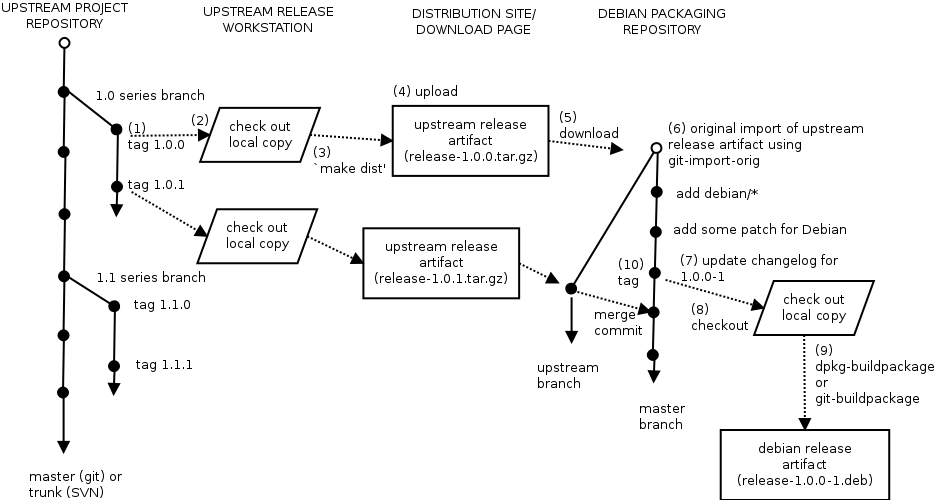
Sadly, despite everybody having the best intentions, there is sometimes a chasm separating these two groups of people. Upstream developers are often busy developing new features and don't have time to work on the intricacies of packaging. I hope that by sharing a few of my own experiences I can help more developers get their software packaged more easily. Fortunately, a number of great tools like git-buildpackage have emerged for streamlining the packaging process, but this has also created more confusion for developers who have their own git repositories and don't quite understand how the Debian git repository and patching process relates to their own repository. The autotools world Here, I focus on autotools based software, because this type of software has it's own peculiar issues when packaging. In particular, these issues appear when using a version control system to track upstream releases. Some of the concepts can be applied to the study of regular Makefile or cmake projects as well. Here is a diagram giving an overview: Let's work through each of the steps in the diagram: The upstream release
  1. The developer/release manager updates the version number in
    configure.ac
    (sometimes called configure.in) and tags the code. (Usually this tag is on a dedicated release branch.)
  2. The developer checks out a copy of the code from the tag into a fresh working directory
  3. The developer runs the autoreconf/automake tools, usually from a bootstrap script. These tools create a number of new files that don't exist in the project repository. Finally, the developer runs
    make dist
    , which puts all the files,
    including the generated files, into a distribution tarball. It is worth emphasizing this point: the tarball is not just an archive of the files from the repository/tag, it also contains a number of
    files generated by autotools.
  4. The developer uploads the tarball to a web site such as the Sourceforge download page. Usually a release announcement is made now containing checksums for the tarball.
At this point, the upstream developer's work is done and packaging teams from various projects such as Debian will take over. Sometimes, the upstream developer is also building the packages and continues
onto the next steps himself: Packaging
  1. The package is downloaded by the package maintainer
  2. If it is the first download, the maintainer creates a new git repository. If it has been packaged before, he clones the repository. The important point here is that this is not the upstream repository, it is an independent repository for Debian packaging. The maintainer uses the git-import-orig tool to import the upstream tarball into the packaging repository. The git-import-orig tool captures an exact snapshot of the upstream release tarball contents in a branch called upstream. One point where the Debian repository differs fundamentally from the upstream repository is that all files from the tarball will be tracked in the Debian git repository, even those automatically generated files that were created by autotools and don't exist in the upstream repository.
  3. The maintainer creates or updates the various artifacts for packaging. These files are kept on the master branch, and the tarball contents from the upstream branch are merged into master to create packages.
  4. When the maintainer feels the code is ready, he will check out a clean copy of the repository to build the package from.
  5. The maintainer executes a tool such as git-buildpackage or regular dpkg-buildpackage, which creates the *.deb files.
  6. The files are checked with a tool like lintian and some manual testing/installation. If all is OK, a tag is made in the packaging repository, with a suffix appended to the upstream version number to indicate which iteration of the package it applies to.
AttachmentSize
release-packaging-workflow.dia3.97 KB

2 April 2013

Jon Dowland: GSettings

With GNOME 3, if you want to override a setting with a new site default, assuming your app has been updated to use the new gsettings API and doesn't still use the old gconf one, the best guide on what to do is still Ross Burton's blog post from two years ago, although you can find most of what you need to know buried deep in the GSettings C API specification, which is not the first place I would have looked (lesson learned!) Note: In this context I'm in the role of systems administrator, rather than distributor/vendor or software author. Whereas you are generally advised to use gsettings itself and not poke at the backend (dconf for Linux), the documentation seems to point sysadmins towards dconf hackery rather than gsettings. However gsettings worked for me, and I got nowhere with dconf direct. Some caveats worth knowing about: Today I had to create 40 guest accounts on our 70-seat Linux cluster, including randomly generate passwords, set up persistent storage on our NFS server, etc.; quickly. As a nice-to-have I also wanted to add some application icons to the GNOME 3 "Favourite Apps" menu for the guests. Would you like to guess which of those jobs was the easier of the two?

Wouter Verhelst: Switching away from mutt

After having used mutt for about a decade, I decided it's time I move away from it, for various reasons that I won't go into here. I've been evaluating thunderbird^Wicedove now for a few weeks, but I can already see I won't keep using it forever, because I find too many issues with it:

  1. I can't tell the thing that I never ever ever want to write HTML-formatted emails. While there is an option "Compose messages in HTML format" in the "Account settings" dialog, that only seems to impact the behaviour of the client upon "new mail", not its reply behaviour, forcing me to go to Options->Format and switch it off.
  2. To make matters worse, the HTML editor and the plain-text editor are not the same dialog. That means it is not possible to switch on HTML formatting if it wasn't on originally (not a problem for me, but I can imagine it being a problem for others), but also that the fugly quoting style (vertical line next to the text) of the HTML editor is not removed when you switch from HTML to plain-text. Further on, it has issues when you want to remove white space, where it will remove entire quoting levels rather than just an empty line. This is horrible, horrible behaviour.
  3. While there is support for multiple email addresses connected to the same IMAP account, it does appear that there is no support for automatically choosing the right email address based on user-defined rules, such as "which mail folder are we currently in". Having to remember that I need to select the right mail address is tiresome and error-prone; e.g., when I'm in a Debian-related mail folder, I want my mail client to use my Debian mail address automatically. It appears the only way in which icedove can automatically select sender addresses is by checking the recipient list in the To: and Cc: headers for any of its configured mail addresses, and using that to decide what to put in the from: header.
Any one of the above would eventually be enough for me to grow tired of icedove and switch to something else; but the three combined mean that I'll be looking for something else fairly soon. Suggestions are, of course, welcome.

Jonathan McDowell: Building a new house server

I've moved (only a couple of blocks from where I was before), and as the new place has Webpass I've reluctantly given up my Sonic.net connection, along with its static IPv4 address and ISP IPv6 tunnel. Hard to resist a 200Mb/s ethernet connection for the same price I was paying for 18Mb/s ADSL2 though. However that leaves my DGN3500 router somewhat inappropriate for providing my net connection. Freed from the need for an ADSL/cable router I decided it was time to build an all in one house server (I'm a believer in as few always on boxes as possible). I already had a nettop acting as a media box, but wanted to build something that would handle: Probably in that order if it turns out I'm asking too much. The intention is the box is the only one that always needs to be on, so I wanted it to be low power consumption. I also wanted the option of hooking it up to the TV if it turned out to have enough grunt, so the case needed to be something suitable for the living room. I like Intel's approach to graphics drivers, in particular the existence of Free video acceleration support, so I went with an Intel Core i3-3220T as the processor. It's a 35W Ivybridge processor with HD 2500 graphics, plus I got it for a decent price. For the case I chose a CFI A2059. There's a local supplier I was able to pick it up from, it has a couple of large fans which helps keeps the noise down while keeping things cool and as I was aiming for backup / file sharing being more important than a media box the 2 hot swap bays tipped the balance away from an AV style case. The small case limits the motherboard options. I wanted twin GigE ports so the external was entirely separate from the internal (my switch does VLANs so I could have made do with a single port, but with a 200Mb/s connection I didn't really want to share the port). The Gigabyte GA-H77N-WIFI seemed to fit the bill, with the added advantage of a built in WiFi card (an Intel 2230 in a mini PCI-E slot) which leaves the PCI-E slot free for either a TV tuner or a second WiFi card to cover 5GHz. I maxed out the board with 2 8G G.SKILL DDR3-1600 DIMMs. I normally go Crucial because I've found them reliable, but these were slightly cheaper and available from the same place as the motherboard. Finally I added a Seagate ST4000DM000 for storage. It actually came from a Backup Plus that Costco were selling for about $20 less than the bare drive sells for. The plan is to add at least another 1T drive to RAID1 the most important bits (or possibly a 2T - it depends which of my existing drives I can tidy stuff off most easily). Of course it's running Debian and I took the opportunity to try out the RC1 Wheezy image. For extra giggles I did an EFI install; this all worked fine except I didn't end up with grub-efi installed at the end, instead I had grub-pc. I booted with legacy BIOS enabled and followed Tanguy's switch to UEFI boot instructions. Further notes on software setup to follow...

Russ Allbery: Review: An Election

Review: An Election, by John Scalzi
Publisher: Subterranean
Copyright: 2010
Printing: 2012
ISBN: 1-59606-496-X
Format: Kindle
Pages: 24
This is another story from the Subterranean Scalzi Super Bundle that probably doesn't justify a full review, particularly since this time it's a short story and not even a novelette, but as with the others it's been independently published on the Kindle (and is still available that way for 99 cents). So by my obsessive internal consistency that matters only to me, it gets a full review anyway. I was mildly surprised to find that this was actually my second reading, and now vaguely remember that Subterranean had actually sponsored the story's appearance on Scalzi's blog as an advertising experiment. So I originally read the story from Scalzi's blog, and if you don't really want to pay money for it, you still can as well. Along with a couple of ads that appear to have bit-rotted. The chief feature of An Election is the background: a world in which aliens and humans are intermingled in a political district, going about their lives against a background of rather extreme multispecies diversity. The protagonist, David, decides to run for the upcoming city council special election, despite living in a district that's minority-human and that hasn't seen a human councilor in forty-four years. (David also happens to be a gay man, which goes entirely unremarked in the story and is, in fact, entirely unremarkable given the excitingly diverse characteristics of his alien neighbors. I thought that was a nice touch.) He of course appears to stand no chance, particularly when one of the city bosses decides to run as well, but ends up with a campaign advisor almost by accident and determinedly attempts to connect with his neighbors and earn their votes. This felt quite typical to me of Scalzi's humor writing. The protagonist is a good-hearted person who gets in rather over his head but is still determined to do the right thing, while not taking anything too seriously. The background humor is never particularly threatening and tends towards slapstick and banter. I found it similar in tone to most of Agent to the Stars, although of course much shorter. As usual, Scalzi's grasp of conversational banter is probably the strongest part of the story; the dynamic between David, his husband James, and his campaign advisor brought several chuckles for me. This is slight but enjoyable. I wouldn't go out of my way to read it, but it's a good story to toss into a bundle of other work, and I remember it holding my interest when reading it on-line. (Which is rare; usually I fail to finish any fiction I try to read in a browser unless it's extremely short.) Rating: 6 out of 10

1 April 2013

Andrew Pollock: [life/repatexpat] On Queensland electricity retailers

So one of the first things I need to do when I get my apartment today is get the electricity on. I've actually already ordered ADSL, which shows you what I think is more important, but without electricity, there is no Internet... It would appear that in 2007, Queensland opened up its electricity and gas markets to "full retail competition". According to Energex, they do the generation, distribution, and the retailer handles connections, disconnections, billing and green energy. I still need to deal directly with Energex for power outages, reporting faulty street lights, requesting a tree that's near power lines be trimmed, and so on. So if the retailers have no say in what price they're paying for the electricity that's being generated by Energex, I'm struggling to see what their point is. I guess they get to differentiate on customer service, but really, that's it? It was also really hard to find a canonical list of retailers to choose from. I would have thought that'd be linked off Energex's "Choosing your electricity retailer" page, but no, it's buried in the FAQ. Now it comes down to a case of doing a comparison between 11 retailers and trying to choose one. Or just going with the first one on the list. It's just electricity, people. It's a utility. I do not want to expend as much time on choosing an electricity retailer as I would my ISP (interestingly, it looks like Dodo has gotten in on the electricity retailing act). But one could say that an upside of having jet lag and being awake since 3am, is that one has time to comparison shop the 11 electricity retailers, except I won't. I'll just write this blog post instead. I have heard of one horror story, where a homeowner returned to living in his house, and had a nightmare time with one retailer because the previous occupants had an outstanding debt with that retailer, and he was trying to get a connection going with a different retailer, and lots of hilarity ensued. Except it wasn't hilarious. So I'll have to keep an eye on that. My current thought is to go with AGL, because What's pretty crazy is that at no point from quickly skimming AGL's landing page for Queensland pricing is there any indication of kWh or an actual price for anything. There's lots of noise about discounts, and flexibility, and other nonsense, but it seems like the actual cost of energy is so buried, it's incredible. It seems to be all about locking in on a contract, which is somewhat amazing. This is just electricity, but they seem to have turned this into a mobile phone plan type of situation. Amazing. After more digging, it looks like I can pay 5.5 cents per kWh for 100% green energy. Maybe.

Next.

Previous.