Search Results: "he"

26 May 2016

Iustin Pop: First run in 2016

Today I finally ran a bit outside, for the first time in 2016. Actually, for even longer the first run since May 2015. I have been only biking in the last year, so this was a very pleasant change of pace (hah), even if just a short run (below 4K). The funny thing is that since I've been biking consistently (and hard) in the last two months, my fitness level is reasonable, so I managed to beat my all-time personal records for 1 Km and 1 mile (I never sprint, so these are just 'best of' segments out of longer runs). It's probably because I only did ~3.8Km, but still, I was very surprised, since I planned and did an easy run. How could I beat my all-time PR, even better than the times back in 2012 when I was doing regular running? Even the average pace over the entire run was better than my last training runs (~5Km) back in April/May 2015, by 15-45s. I guess cross-training does work after all, at least when competing against myself

Lisandro Dami n Nicanor P rez Meyer: Do you want Qt5's QWebEngine in Debian? Do you have library packaging skills? If so, step up!

So far the only missing submodule in Debian's Qt5 stack is QtWebEngine. None of us the current Qt maintainers have the time/will to do the necessary stuff to have it properly packaged.

So if you would like to have QtWebEngine in Debian and:

Then you are the right person for this task. Do not hesitate in pinging me on #debian-kde, irc.oftc.net.

Michael Prokop: My talk at OSDC 2016: Continuous Integration in Data Centers Further 3 Years Later

Open Source Data Center Conference (OSDC) was a pleasure and great event, Netways clearly knows how to run a conference. This year at OSDC 2016 I gave a talk titled Continuous Integration in Data Centers Further 3 Years Later . The slides from this talk are available online (PDF, 6.2MB). Thanks to Netways folks also a recording is available: This embedded video doesn t work for you? Try heading over to YouTube. Note: my talk was kind of an update and extension for the (german) talk I gave at OSDC 2013. If you re interested, the slides (PDF, 4.3MB) and the recording (YouTube) from my talk in 2013 are available online as well.

Norbert Preining: Shotwell vs. digiKam

How to manage your photos? That is probably the biggest question for anyone doing anything with a photo camera. As resolutions of cameras grow, the data we have to manage is growing ever. In my case I am talking about more than 50000 photos and videos measuring up to about 200Gb of disk space, constantly growing. There are several photo management softwares out there, I guess the most commonly used ones are Shotwell for the Gnome desktop, digiKam for the KDE world, and FotoXX. I have not used Shotwell and digiKam for quite some time, and collect here my experiences of strength and weaknesses of the two programs. FotoXX seems to be very powerful, too, but I haven t tested it till now.
shotwell-digikam There is no clear winner here, unfortunately. Both have their strength and their weaknesses. And as a consequence I am using both in parallel. Before I start a clear declaration: I have been using Shotwell for many years, and have myself contributed considerable code to Shotwell, in particular the whole comment system (comments for photos and events), as well as improved the Piwigo upload features. I started using digiKam some month ago when I started to look for offloading parts of my photo library to external devices. Since then I have used both in parallel. Let us start with what these programs say about themselves: Shotwell is declared as a Photo Manager for Gnome 3, with the following features: digiKam says about itself that it is an advanced digital photo management application for Linux, Windows, and Mac-OSX. It has a very long feature page with a short list at the beginning: Now that sounds like they are very similar, but upon using them it turns out that there are huge differences, that can easily be summed up in a short statement:
Shotwell is Gnome 3 that means get rid of functionality. digiKam is KDE that means provide as much functionality as possible.
Now before you run after me with a knife because you do not agree with me on the above, either read on, or stop reading. I am not interested in flame wars over Gnome versus KDE philosophy. I have been using Gnome since many years, and tried to convince myself to G3 for more than a year until I threw out all of it but selected programs but their number is going down. Let us look at those aspects I am using: organization, offline, sharing, editing. Organization In Shotwell, your photos are organized into events, independent from their location on disk. These events can have title and comment and collect a set of related photos. In my case I often have photos from two or more cameras (my camera and mobile, photos of friends), which I keep in separate directories within a main directory for the event. For example I have a folder 2016/05.21-22.Climbing.Tanigakadake with two sub-folders Norbert (for my photos) and Friend (for my friends photos). In Shotwell all the photos are in the same event, which is shown with title 05.21-22 Tanigakawadake Climbing within the 2016 year and May month.
shotwell-events So in short Shotwell distinguishes between disk layout and album/event names. In digiKam there is a strict connection between disk layout and album names 1:1. Albums are directories. One can adjust the viewer to show all photos of sub-albums in the main album, and by this one can achieve the same effect of merging all photos of my friend and myself. The good thing in this approach is that one can easily have sub-albums: Imagine a trip to three different islands of Hawaii during one trip. This is something easy to achieve in digiKam, but hard in Shotwell.
digikam-albums Other organization methods Both Shotwell and digiKam support tags, including hierarchical tags and rating (0-5 stars). Shotwell has in addition a quick flag action that I used quite often for initial selecting photos, as well as accepted and rejected. digiKam also has so called picks (no pick, reject, pending, accepted), and colors (not used by now). Both programs have some face detection support, but also this I haven t used. So in the organization respect there is no clear winner. I like the Event idea of Shotwell, or better, the separation of events from the disk structure. But on the other hand, Shotwell does not allow for sub-albums, which is also a pain. No clear winner draw Offline storage That is simple: Shotwell: forget it, not reasonably possible. One can move parts to an external HD, then unplug it, and Shotwell will tell you that all the photos are missings. And when you plug the external HD in, it will redetect them. But this is not proper support, just a consequence of hash sum storage. Also separation into several libraries (online and offline) is not supported. On the other hand, digiKam supports multiple libraries, partly offline, without a hinch. I would love to have this feature in Shotwell, because I need to free disk space, urgently!!! Clear winner: digiKam Sharing Again here my testing is very restricted I am using my own Piwigo installation exclusively. Here Shotwell is excellent in providing support for various features: upload to existing category, create new category, resize, optionally remove tags, add comments to albums and photos, etc. (partly implemented by me
shotwell-piwigo On the other hand digiKam has a very barebone interface to Piwigo you can upload photos to an existing album and resize them, but that is already everything. One also needs to say that the list of supported services in digiKam is by far longer than the one in Shotwell, but the main services (usual suspects) are supported in both.
digikam-piwigo Clear winner: Shotwell (but I haven t tested other upload services). Editing The editing capabilities of Shotwell are again very restricted: red eyes, resize, levels, .
shotwell-editing digiKam here is more like a photo editor software with loads of tools and features. I haven t even explored all the options maybe I can get rid of GIMP, too?
digikam-editing Clear winner: digiKam Conclusions While I am still working with both, I actually would love to move completely to digiKam. I simply cannot stand the Gnome 3 philosophy of reducing functionality to a minimal for dummy users. There is a market for that, sure, but I am not one of it. Unfortunately, the missing Event support, and much more the completely minimal support for Piwigo sharing in digiKam is a big show stopper at the moment. Even after testing the upcoming digiKam 5.0 version for some time, I didn t see any improvement wrt to sharing. That leaves me with the only option to continue working with both programs, and hope to get a new bigger SSD before the current one runs out of space. Of course I could start hacking into the digiKam source maybe I do this when I have a bit more time to add proper Piwigo support.

Kevin Avignon: GSoC16: First coding week

Hey guys, I won t say yet again that it has been too long because it really was. I ll try to keep my blog updated weekly concerning a program I m doing with Google this summer. It s called the Google Summer of Code (GSoC). Basically, it s meant for students to be able to contribute on an open Continue reading GSoC16: First coding week

25 May 2016

Petter Reinholdtsen: Isenkram with PackageKit support - new version 0.23 available in Debian unstable

The isenkram system is a user-focused solution in Debian for handling hardware related packages. The idea is to have a database of mappings between hardware and packages, and pop up a dialog suggesting for the user to install the packages to use a given hardware dongle. Some use cases are when you insert a Yubikey, it proposes to install the software needed to control it; when you insert a braille reader list it proposes to install the packages needed to send text to the reader; and when you insert a ColorHug screen calibrator it suggests to install the driver for it. The system work well, and even have a few command line tools to install firmware packages and packages for the hardware already in the machine (as opposed to hotpluggable hardware). The system was initially written using aptdaemon, because I found good documentation and example code on how to use it. But aptdaemon is going away and is generally being replaced by PackageKit, so Isenkram needed a rewrite. And today, thanks to the great patch from my college Sunil Mohan Adapa in the FreedomBox project, the rewrite finally took place. I've just uploaded a new version of Isenkram into Debian Unstable with the patch included, and the default for the background daemon is now to use PackageKit. To check it out, install the isenkram package and insert some hardware dongle and see if it is recognised. If you want to know what kind of packages isenkram would propose for the machine it is running on, you can check out the isenkram-lookup program. This is what it look like on a Thinkpad X230:
% isenkram-lookup 
bluez
cheese
fprintd
fprintd-demo
gkrellm-thinkbat
hdapsd
libpam-fprintd
pidgin-blinklight
thinkfan
tleds
tp-smapi-dkms
tp-smapi-source
tpb
%p
The hardware mappings come from several places. The preferred way is for packages to announce their hardware support using the cross distribution appstream system. See previous blog posts about isenkram to learn how to do that.

24 May 2016

Carl Chenet: Tweet your database with db2twitter

Follow me also on Diaspora*diaspora-banner or Twitter You have a database (MySQL, PostgreSQL, see supported database types), a tweet pattern and wants to automatically tweet on a regular basis? No need for RSS, fancy tricks, 3rd party website to translate RSS to Twitter or whatever. Just use db2twitter. A quick example of a tweet generated by db2twitter: db2twitter The new version 0.6 offers the support of tweets with an image. How cool is that? db2twitter is developed by and run for LinuxJobs.fr, the job board of th french-speaking Free Software and Opensource community. banner-linuxjobs-small db2twitter also has cool options like; db2twitter is coded in Python 3.4, uses SQlAlchemy (see supported database types) and Tweepy. The official documentation is available on readthedocs.

Mike Gabriel: Arctica Project: The Telekinesis Framework, coming soon...

The Arctica Project is a task force of people reinventing the realm of remote desktop computing on Linux. One core component for multimedia experience in remote desktop / application scenarios is the to-be-reloaded / upcoming Telekinesis Framework. Telekinesis provides a framework for developing GUI applications that have a client and server side component. Those applications are visually merged and presented to the end user in such a way that the end user's user experience is the same as if the user was interacting with a strictly server side application. Telekinesis mediates the communication between those server side and client side application parts. As a reference implementation you can imagine a server side media player GUI (TeKi-aware application) and a client side video overlay (corresponding TeKi-aware service). The media player GUI "remote-controls" the client side video overlay. The video overlay receives its video stream from the server. All these interactions are mediated through Telekinesis. A proof of concept has been developed for X2Go in 2012. For the Arctica Server, we are currently doing a (much cleaner!) rewrite of the original prototype [1]. See [2] for the first whitepaper describing how to integrate Telekinesis into existing remote desktop solutions. See [3] for a visual demonstration of the potentials of Telekinesis (still using X2Go underneath and the original Telekinesis prototype). The heavy lifting around Telekinesis development and conceptual design is performed by my project partner Lee from GZ Nianguan FOSS Team [4]. Thanks for continuously giving your time and energy into the co-founding of the Arctica Project. Thanks for always reminding me of doing benchmarks!!! light+love,
Mike [1] http://code.x2go.org/gitweb?p=telekinesis.git;a=summary
[2] https://github.com/ArcticaProject/ArcticaDocs/blob/master/Telekinesis/Te...
[3] https://www.youtube.com/watch?v=57AuYOxXPRU
[4] https://github.com/gznget

Thorsten Alteholz: Debian and the Internet of Things

Everybody is talking about the Internet of Things. Unfortunately there is no sign of it in Debian yet. Besides some smaller packages like sispmctl, usbrelay or the 1-wire support in digitemp and owfs, there is not much software to control devices over a network. With the recent upload of alljoyn-core-1504 this might change. The Alljoyn Framework, where the Alljoyn Core is just one of several modules, lets devices and applications detect each other and communicate with one another over a D-Bus like message bus. The development of the framework has been started by Qualcomm some years ago and is meanwhile managed by the AllSeen Alliance, a nonprofit consortium. The software is licensed under the ISC license. This first upload is just the first step of a long journey. Other modules that compose the framework and already have a released tarball are related to lightning products, gateways to overcome the boundaries of the local network and much more. In the near future it is also planned to have modules that attach Z-Wave-, ZigBee- or Bluetooth-devices to the Alljoyn bus. So all in all, this looks like an exciting task and everybody is invited to help maintaining the software in Debian.

Michal Čihař: Gammu release day

There has been some silence on the Gammu release front and it's time to change that. Today all Gammu, python-gammu and Wammu have been released. As you might guess all are bugfix releases. List of changes for Gammu 1.37.3: List of changes for python-gammu 2.6: List of changes for Wammu 0.41: All updates are also on their way to Debian sid and Gammu PPA. Would you like to see more features in Gammu family? You an support further Gammu development at Bountysource salt or by direct donation.

Filed under: Debian English Gammu python-gammu Wammu 0 comments

Alberto Garc a: I/O bursts with QEMU 2.6

QEMU 2.6 was released a few days ago. One new feature that I have been working on is the new way to configure I/O limits in disk drives to allow bursts and increase the responsiveness of the virtual machine. In this post I ll try to explain how it works. The basic settings First I will summarize the basic settings that were already available in earlier versions of QEMU. Two aspects of the disk I/O can be limited: the number of bytes per second and the number of operations per second (IOPS). For each one of them the user can set a global limit or separate limits for read and write operations. This gives us a total of six different parameters. I/O limits can be set using the throttling.* parameters of -drive, or using the QMP block_set_io_throttle command. These are the names of the parameters for both cases:
-drive block_set_io_throttle
throttling.iops-total iops
throttling.iops-read iops_rd
throttling.iops-write iops_wr
throttling.bps-total bps
throttling.bps-read bps_rd
throttling.bps-write bps_wr
It is possible to set limits for both IOPS and bps at the same time, and for each case we can decide whether to have separate read and write limits or not, but if iops-total is set then neither iops-read nor iops-write can be set. The same applies to bps-total and bps-read/write. The default value of these parameters is 0, and it means unlimited. In its most basic usage, the user can add a drive to QEMU with a limit of, say, 100 IOPS with the following -drive line:
-drive file=hd0.qcow2,throttling.iops-total=100
We can do the same using QMP. In this case all these parameters are mandatory, so we must set to 0 the ones that we don t want to limit:
     "execute": "block_set_io_throttle",
     "arguments":  
        "device": "virtio0",
        "iops": 100,
        "iops_rd": 0,
        "iops_wr": 0,
        "bps": 0,
        "bps_rd": 0,
        "bps_wr": 0
      
    
I/O bursts While the settings that we have just seen are enough to prevent the virtual machine from performing too much I/O, it can be useful to allow the user to exceed those limits occasionally. This way we can have a more responsive VM that is able to cope better with peaks of activity while keeping the average limits lower the rest of the time. Starting from QEMU 2.6, it is possible to allow the user to do bursts of I/O for a configurable amount of time. A burst is an amount of I/O that can exceed the basic limit, and there are two parameters that control them: their length and the maximum amount of I/O they allow. These two can be configured separately for each one of the six basic parameters described in the previous section, but here we ll use iops-total as an example. The I/O limit during bursts is set using iops-total-max , and the maximum length (in seconds) is set with iops-total-max-length . So if we want to configure a drive with a basic limit of 100 IOPS and allow bursts of 2000 IOPS for 60 seconds, we would do it like this (the line is split for clarity):
   -drive file=hd0.qcow2,
          throttling.iops-total=100,
          throttling.iops-total-max=2000,
          throttling.iops-total-max-length=60
Or with QMP:
     "execute": "block_set_io_throttle",
     "arguments":  
        "device": "virtio0",
        "iops": 100,
        "iops_rd": 0,
        "iops_wr": 0,
        "bps": 0,
        "bps_rd": 0,
        "bps_wr": 0,
        "iops_max": 2000,
        "iops_max_length": 60,
      
    
With this, the user can perform I/O on hd0.qcow2 at a rate of 2000 IOPS for 1 minute before it s throttled down to 100 IOPS. The user will be able to do bursts again if there s a sufficiently long period of time with unused I/O (see below for details). The default value for iops-total-max is 0 and it means that bursts are not allowed. iops-total-max-length can only be set if iops-total-max is set as well, and its default value is 1 second. Controlling the size of I/O operations When applying IOPS limits all I/O operations are treated equally regardless of their size. This means that the user can take advantage of this in order to circumvent the limits and submit one huge I/O request instead of several smaller ones. QEMU provides a setting called throttling.iops-size to prevent this from happening. This setting specifies the size (in bytes) of an I/O request for accounting purposes. Larger requests will be counted proportionally to this size. For example, if iops-size is set to 4096 then an 8KB request will be counted as two, and a 6KB request will be counted as one and a half. This only applies to requests larger than iops-size: smaller requests will be always counted as one, no matter their size. The default value of iops-size is 0 and it means that the size of the requests is never taken into account when applying IOPS limits. Applying I/O limits to groups of disks In all the examples so far we have seen how to apply limits to the I/O performed on individual drives, but QEMU allows grouping drives so they all share the same limits. This feature is available since QEMU 2.4. Please refer to the post I wrote when it was published for more details. The Leaky Bucket algorithm I/O limits in QEMU are implemented using the leaky bucket algorithm (specifically the Leaky bucket as a meter variant). This algorithm uses the analogy of a bucket that leaks water constantly. The water that gets into the bucket represents the I/O that has been performed, and no more I/O is allowed once the bucket is full. To see the way this corresponds to the throttling parameters in QEMU, consider the following values:
  iops-total=100
  iops-total-max=2000
  iops-total-max-length=60
bucket The bucket is initially empty, therefore water can be added until it s full at a rate of 2000 IOPS (the burst rate). Once the bucket is full we can only add as much water as it leaks, therefore the I/O rate is reduced to 100 IOPS. If we add less water than it leaks then the bucket will start to empty, allowing for bursts again. Note that since water is leaking from the bucket even during bursts, it will take a bit more than 60 seconds at 2000 IOPS to fill it up. After those 60 seconds the bucket will have leaked 60 x 100 = 6000, allowing for 3 more seconds of I/O at 2000 IOPS. Also, due to the way the algorithm works, longer burst can be done at a lower I/O rate, e.g. 1000 IOPS during 120 seconds. Acknowledgments As usual, my work in QEMU is sponsored by Outscale and has been made possible by Igalia and the help of the QEMU development team. igalia-outscale Enjoy QEMU 2.6!

23 May 2016

Daniel Pocock: PostBooks, PostgreSQL and pgDay.ch talk

PostBooks 4.9.5 was recently released and the packages for Debian (including jessie-backports), Ubuntu and Fedora have been updated. Postbooks at pgDay.ch in Rapperswil, Switzerland pgDay.ch is coming on Friday, 24 June. It is at the HSR Hochschule f r Technik Rapperswil, at the eastern end of Lake Zurich. I'll be making a presentation about Postbooks in the business track at 11:00. Getting started with accounting using free, open source software If you are not currently using a double-entry accounting system or if you are looking to move to a system that is based on completely free, open source software, please see my comparison of free, open source accounting software. Free and open source solutions offer significant advantages: flexibility, businesses can choose any programmer to modify the code, and use of SQL back-ends, multi-user support and multi-currency support are standard. These are all things that proprietary vendors charge extra money for. Accounting software is the lowest common denominator in the world of business software, people keen on the success of free and open source software may find that encouraging businesses to use one of these solutions is a great way to lay a foundation where other free software solutions can thrive. PostBooks new web and mobile front end xTuple, the team behind Postbooks, has been busy developing a new Web and Mobile front-end for their ERP, CRM and accounting suite, powered by the same PostgreSQL backend as the Linux desktop client. More help is needed to create official packages of the JavaScript dependencies before the Web and Mobile solution itself can be packaged.

Enrico Zini: I chipped in

I clicked on a random link and I found myself again in front of a wired.com popup that wanted to explain to me what I have to think about adblockers. This time I was convinced, and I took my wallet out. I finally donated $35 to AdBlock. (And then somebody pointed me to uBlock Origin and I switched to that.)

Petter Reinholdtsen: Discharge rate estimate in new battery statistics collector for Debian

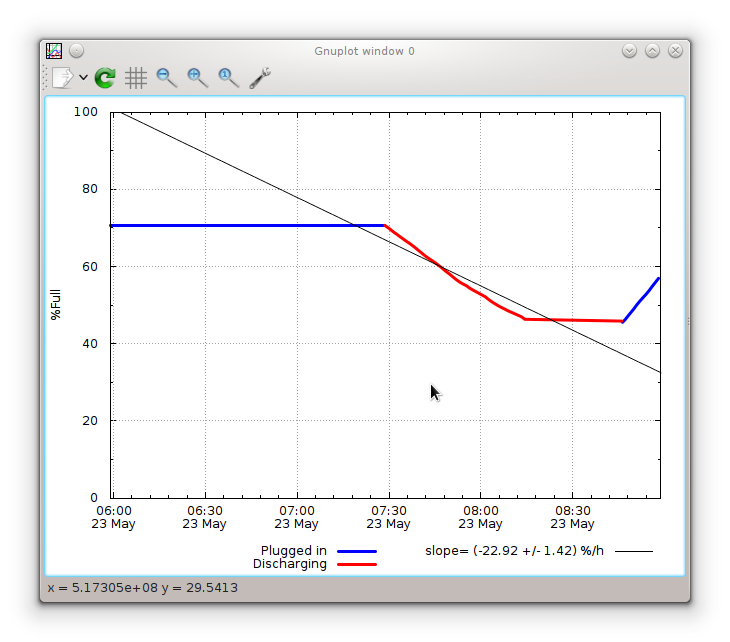
Yesterday I updated the battery-stats package in Debian with a few patches sent to me by skilled and enterprising users. There were some nice user and visible changes. First of all, both desktop menu entries now work. A design flaw in one of the script made the history graph fail to show up (its PNG was dumped in ~/.xsession-errors) if no controlling TTY was available. The script worked when called from the command line, but not when called from the desktop menu. I changed this to look for a DISPLAY variable or a TTY before deciding where to draw the graph, and now the graph window pop up as expected. The next new feature is a discharge rate estimator in one of the graphs (the one showing the last few hours). New is also the user of colours showing charging in blue and discharge in red. The percentages of this graph is relative to last full charge, not battery design capacity.

The other graph show the entire history of the collected battery statistics, comparing it to the design capacity of the battery to visualise how the battery life time get shorter over time. The red line in this graph is what the previous graph considers 100 percent:
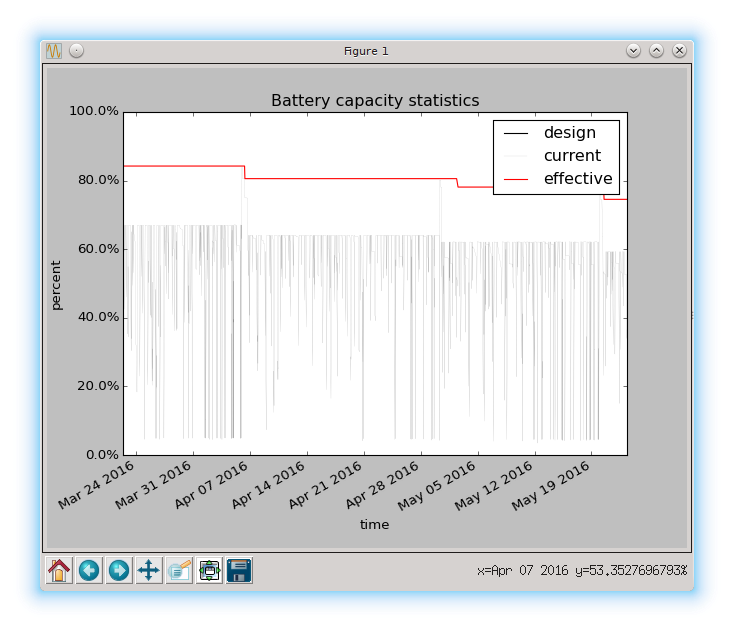
In this graph you can see that I only charge the battery to 80 percent of last full capacity, and how the capacity of the battery is shrinking. :( The last new feature is in the collector, which now will handle more hardware models. On some hardware, Linux power supply information is stored in /sys/class/power_supply/ACAD/, while the collector previously only looked in /sys/class/power_supply/AC/. Now both are checked to figure if there is power connected to the machine. If you are interested in how your laptop battery is doing, please check out the battery-stats in Debian unstable, or rebuild it on Jessie to get it working on Debian stable. :) The upstream source is available from github. Patches are very welcome. As usual, if you use Bitcoin and want to show your support of my activities, please send Bitcoin donations to my address 15oWEoG9dUPovwmUL9KWAnYRtNJEkP1u1b.

22 May 2016

Reproducible builds folks: Reproducible builds: week 56 in Stretch cycle

What happened in the Reproducible Builds effort between May 15th and May 21st 2016: Media coverage Blog posts from our GSoC and Outreachy contributors: Documentation update Ximin Luo clarified instructions on how to set SOURCE_DATE_EPOCH. Toolchain fixes Other upstream fixes Packages fixed The following 18 packages have become reproducible due to changes in their build dependencies: abiword angband apt-listbugs asn1c bacula-doc bittornado cdbackup fenix gap-autpgrp gerbv jboss-logging-tools invokebinder modplugtools objenesis pmw r-cran-rniftilib x-loader zsnes The following packages have become reproducible after being fixed: Some uploads have fixed some reproducibility issues, but not all of them: Patches submitted that have not made their way to the archive yet: Reproducibility-related bugs filed: Package reviews 51 reviews have been added, 19 have been updated and 15 have been removed in this week. 22 FTBFS bugs have been reported by Chris Lamb, Santiago Vila, Niko Tyni and Daniel Schepler. tests.reproducible-builds.org Misc. This week's edition was written by Reiner Herrmann and Holger Levsen and reviewed by a bunch of Reproducible builds folks on IRC.

Antonio Terceiro: Adopting pristine-tar

As of yesterday, I am the new maintainer of pristine-tar. As it is the case for most of Joey Hess creations, it is an extremely useful tool, and used in a very large number of Debian packages which are maintained in git. My first upload was most of a terrain recognition nature: I did some housekeeping tasks, such as making the build idempotent and making sure all binaries are built with security hardening flags, and wrote a few automated test cases to serve as build-time and run-time regression test suite. No functional changes have been made. As Joey explained when he orphaned it, there are a few technical challenges involved in making sure pristine-tar stays useful in the future. Although I did read some of the code, I am not particularly familiar with the internals yet, and will be more than happy to get co-maintainers. If you are interested, please get in touch. The source git repository is right there.

21 May 2016

Petter Reinholdtsen: French edition of Lawrence Lessigs book Cultura Libre on Amazon and Barnes & Noble

A few weeks ago the French paperback edition of Lawrence Lessigs 2004 book Cultura Libre was published. Today I noticed that the book is now available from book stores. You can now buy it from Amazon ($19.99), Barnes & Noble ($?) and as always from Lulu.com ($19.99). The revenue is donated to the Creative Commons project. If you buy from Lulu.com, they currently get $10.59, while if you buy from one of the book stores most of the revenue go to the book store and the Creative Commons project get much (not sure how much less). I was a bit surprised to discover that there is a kindle edition sold by Amazon Digital Services LLC on Amazon. Not quite sure how that edition was created, but if you want to download a electronic edition (PDF, EPUB, Mobi) generated from the same files used to create the paperback edition, they are available from github.

20 May 2016

Zlatan Todori : 4 months of work turned into GNOME, Debian testing based tablet

Huh, where do I start. I started working for a great CEO and great company known as Purism. What is so great about it? First of all, CEO (Todd Weaver), is incredible passionate about Free software. Yes, you read it correctly. Free software. Not Open Source definition, but Free software definition. I want to repeat this like a mantra. In Purism we try to integrate high-end hardware with Free software. Not only that, we want our hardware to be Free as much as possible. No, we want to make it entirely Free but at the moment we don't achieve that. So instead going the way of using older hardware (as Ministry of Freedom does, and kudos to them for making such option available), we sacrifice this bit for the momentum we hope to gain - that brings growth and growth brings us much better position when we sit at negotiation table with hardware producers. If negotiations even fail, with growth we will have enough chances to heavily invest in things such as openRISC or freeing cellular modules. We want to provide in future entirely Free hardware&software device that has integrated security and privacy focus while it is easy to use and convenient as any other mainstream OS. And we choose to currently sacrifice few things to stay in loop. Surely that can't be the only thing - and it isn't. Our current hardware runs entirely on Free software. You can install Debian main on it and all will work out of box. I know I did this and enjoy my Debian more than ever. We also have margin share program where part of profit we donate to Free software projects. We are also discussing a lot of new business model where our community will get a lot of influence (stay tuned for this). Besides all this, our OS (called PureOS - yes, a bit misfortune that we took the name of dormant distribution), was Trisquel based but now it is Debian testing based. Current PureOS 2.0 is coming with default DE as Cinnamom but we are already baking PureOS 3.0 which is going to come with GNOME Shell as default. Why is this important? Well, around 12 hours ago we launched a tablet campaign on Indiegogo which comes with GNOME Shell and PureOS as default. Not one, but two tablets actually (although we heavily focus on 11" one). This is the product of mine 4 months dedicated work at Purism. I must give kudos to all Purism members that pushed their parts in preparation for this campaign. It was hell of a ride. Librem11 I have also approached (of course!) Debian for creation of OEM installations ISOs for our Librem products. This way, with every sold Librem that ships with Debian preinstalled, Debian will get donation. It is our way to show gratitude to Debian for all the work our community does (yes, I am still extremely proud Debian dude and I will stay like that!). Oh yes, I am the chief technology person at Purism, and besides all goals we have, I also plan (dream) about Purism being the company that has highest number of Debian Developers. In that terms I am very proud to say that Matthias Klumpp became part of Purism. Hopefully we soon extend the number of Debian population in Purism. Of course, I think it is fairly known that I am easy to approach so if anyone has any questions (as I didn't want this post to be too long) feel free to contact me. Also - in Free software spirit - we welcome any community engagement, suggestion and/or feedback.

19 May 2016

Matthew Garrett: Your project's RCS history affects ease of contribution (or: don't squash PRs)

Github recently introduced the option to squash commits on merge, and even before then several projects requested that contributors squash their commits after review but before merge. This is a terrible idea that makes it more difficult for people to contribute to projects.

I'm spending today working on reworking some code to integrate with a new feature that was just integrated into Kubernetes. The PR in question was absolutely fine, but just before it was merged the entire commit history was squashed down to a single commit at the request of the reviewer. This single commit contains type declarations, the functionality itself, the integration of that functionality into the scheduler, the client code and a large pile of autogenerated code.

I've got some familiarity with Kubernetes, but even then this commit is difficult for me to read. It doesn't tell a story. I can't see its growth. Looking at a single hunk of this diff doesn't tell me whether it's infrastructural or part of the integration. Given time I can (and have) figured it out, but it's an unnecessary waste of effort that could have gone towards something else. For someone who's less used to working on large projects, it'd be even worse. I'm paid to deal with this. For someone who isn't, the probability that they'll give up and do something else entirely is even greater.

I don't want to pick on Kubernetes here - the fact that this Github feature exists makes it clear that a lot of people feel that this kind of merge is a good idea. And there are certainly cases where squashing commits makes sense. Commits that add broken code and which are immediately followed by a series of "Make this work" commits also impair readability and distract from the narrative that your RCS history should present, and Github present this feature as a way to get rid of them. But that ends up being a false dichotomy. A history that looks like "Commit", "Revert Commit", "Revert Revert Commit", "Fix broken revert", "Revert fix broken revert" is a bad history, as is a history that looks like "Add 20,000 line feature A", "Add 20,000 line feature B".

When you're crafting commits for merge, think about your commit history as a textbook. Start with the building blocks of your feature and make them one commit. Build your functionality on top of them in another. Tie that functionality into the core project and make another commit. Add client support. Add docs. Include your tests. Allow someone to follow the growth of your feature over time, with each commit being a chapter of that story. And never, ever, put autogenerated code in the same commit as an actual functional change.

People can't contribute to your project unless they can understand your code. Writing clear, well commented code is a big part of that. But so is showing the evolution of your features in an understandable way. Make sure your RCS history shows that, otherwise people will go and find another project that doesn't make them feel frustrated.

(Edit to add: Sarah Sharp wrote on the same topic a couple of years ago)

comment count unavailable comments

Next.

Previous.