Search Results: "tin"

25 July 2015

Norbert Preining: PiwigoPress release 2.30

I just pushed a new release of PiwigoPress (main page, WordPress plugin dir) to the WordPress servers. This release incorporates some new features, mostly contributed by Anton Lavrov (big thanks!) piwigopress-logo The new features are: I also checked that the plugin runs with the soon to be released WordPress 4.3, and fixed a small problem with the setting of albumpicture not being saved. That s all, enjoy, and leave your wishlist items and complains at the issue tracker on the github project piwigopress.
Email this to someonePrint this pageShare on FacebookShare on Google+Tweet about this on TwitterShare on LinkedInFlattr the author

Michal Čihař: Migrating phpMyAdmin from SourceForge.net

Some time ago we've decided to move phpMyAdmin out of SourceForge.net services. This was mostly motivated by issues with sf.net bundling crapware with installers (though we were not affected), but also we've missed some features that we would like to have and were not possible there. The project relied on SourceForge.net with several services. The biggest ones being website and downloads hosting, issue tracking and mailing lists. We've chosen different approach for each of these. As first, we've moved away website and downloads. Thanks to generous offer of CDN77.com, everything went quite smoothly and we now have HTTPS secured website and downloads, see our announcement. Oh and on the way we've started to PGP sign the releases as well, so you can verify the download. Shortly after this SourceForge.net was hit by major problems with infrastructure. Unfortunately we were not yet completely ready with rest of the migration, but this has definitely pushed us to make progress faster. During the outage, we've opened up issue tracker on GitHub, to be able to receive bug reports from our users. On the background I've worked on the issue migration. The good news is that as of now almost all issues are migrated. There are few missing ones, but these will be hopefully handled in upcoming days as well. Last but not least, we had mailing lists on SourceForge.net. We've shortly discussed available options and decided to run own mail server with these. It will allow us greater flexibility while still using well know software in background. Initial attempts with Mailman 3 failed, so we got back to Mailman 2, which is stable and easy to configure. See also our news posts for official announcement. Thanks to SourceForge.net, it has been great home for us, but now we have better places to live.

Filed under: English phpMyAdmin 0 comments

Steve Kemp: We're in Finland now.

So we've recently spent our first week together in Helsinki, Finland. Mostly this has been stress-free, but there are always oddities about living in new places, and moving to Europe didn't minimize them. For the moment I'll gloss over the differences and instead document the computer problem I had. Our previous shared-desktop system had a pair of drives configured using software RAID. I pulled one of the drives to use in a smaller-cased system (smaller so it was easier to ship). Only one drive of a pair being present make mdadm scream, via email, once per day, with reports of failure. The output of cat /proc/mdstat looked like this:
md2 : active raid1 sdb6[0] [LVM-storage-area]
      1903576896 blocks super 1.2 2 near-copies [2/1] [_U]
md1 : active raid10 sdb5[1] [/root]
      48794112 blocks super 1.2 2 near-copies [2/1] [_U]
md0 : active raid1 sdb1[0]  [/boot]
      975296 blocks super 1.2 2 near-copies [2/1] [_U]
See the "_" there? That's the missing drive. I couldn't remove the drive as it wasn't present on-disk, so this failed:
mdadm --fail   /dev/md0 /dev/sda1
mdadm --remove /dev/md0 /dev/sda1
# repeat for md1, md2.
Similarly removing all "detached" drives failed, so the only thing to do was to mess around re-creating the arrays with a single drive:
lvchange -a n shelob-vol
mdadm --stop /dev/md2
mdadm --create /dev/md2 --level=1 --raid-devices=1 /dev/sdb6 --force
..
I did that on the LVM-storage area, and the /boot partition, but "/" is still to be updated. I'll use knoppix/similar to do it next week. That'll give me a "RAID" system which won't alert every day. Thanks to the joys of re-creation the UUIDs of the devices changed, so /etc/mdadm/mdadm.conf needed updating. I realized that too late, when grub failed to show the menu, because it didn't find it's own UUID. Handy recipe for the future:
set prefix=(md/0)/grub/
insmod linux
linux (md/0)/vmlinuz-3.16.0-0.bpo.4-amd64 root=/dev/md1
initrd (md/0)//boot/initrd.img-3.16.0-0.bpo.4-amd64
boot

24 July 2015

Vincent Sanders: NetSurf developers and the Order of the Phoenix

Once more the NetSurf developers gathered to battle the forces of darkness, or as they are more commonly known web specifications.
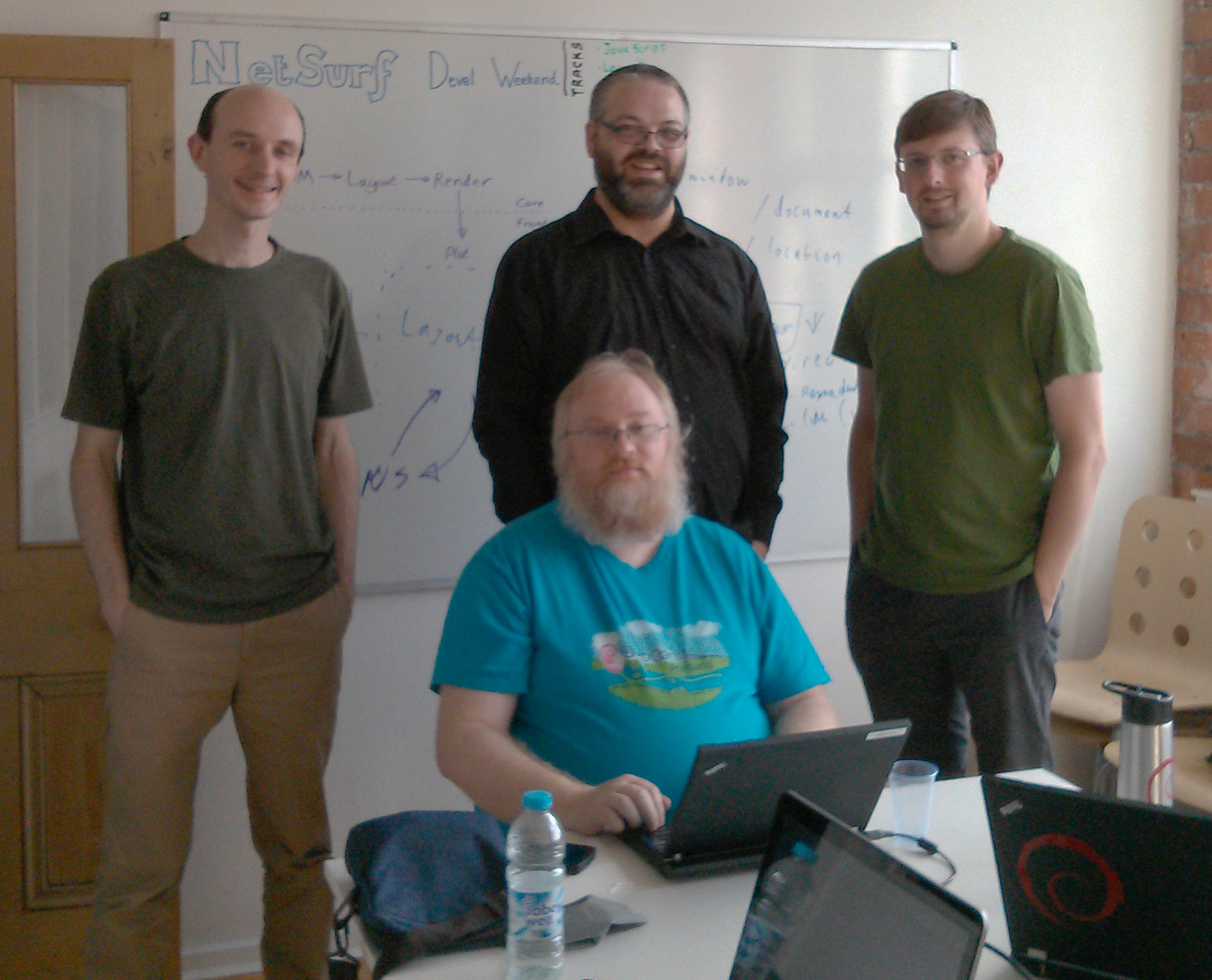
Michael Drake, Vincent Sanders, John-Mark Bell and Daniel Silverstone at the Codethink manchester officesThe fifth developer weekend was an opportunity for us to gather in a pleasant setting and work together in person. We were graciously hosted, once again, by Codethink in their Manchester offices.

Four developers managed to attend in person from around the UK: Michael Drake, John-Mark Bell, Daniel Silverstone and Vincent Sanders.

The main focus of the weekends activities was to address two areas that have become overwhelmingly important: JavaScript and Layout.

Although the browser obviously already has both these features they are somewhat incomplete and incapable of supporting the features of the modern web.
JavaScriptThe discussion started with JavaScript and its implementation. We had previously looked at the feasibility of changing our JavaScript engine from Spidermonkey to DukTape. We had decided this was a change we wanted to make when DukTape was mature enough to support the necessary features.

The main reasons for the change are that Spidermonkey is a poor fit to NetSurf as it is relatively large and does not provide a stable API guarantee. The lack of a stable API requires extensive engineering to update to new releases. Additionally support for compiling on minority platforms is very challenging meaning that most platforms are stuck using version 1.7 or 1.85 (current release is version 31 with 38 due).

We started the move to Duktape by creating a development branch, integrating the Duktape library and open coding a minimal implementation of the core classes as a proof of concept. This work was mostly undertaken by Daniel with input from myself and John-Mark. This resulted in a build that was substantially smaller than using Spidermonkey with all the existing functionality our tests cover.

The next phase of this work is to take the prototype implementation and turn it into something that can be reliably used and covers the entire JavaScript DOM interface. This is no small job as there are at least 200 classes and 1500 methods and properties to implement.
LayoutThe layout library design discussion was an extensive and very involved. The layout engine is a browsers most important component. It takes all the information processed by the CSS and DOM libraries, applies a vast number of involved rules and produces a list of operations that can be rendered.

This reimplementation of our rendering engine has been in planning for many years. The existing engine stems from the browsers earliest days more than a decade ago and has many shortcomings in architecture and implementation we hope to address.

The work has finally started on libnslayout with Michael taking the lead and defining the initial API and starting the laborious work of building the test harness, a feature the previous implementation lacked!
The second war beginsFor a war you need people and it is a little unfortunate that this was our lowest ever turnout for the event. This is true of the project overall with declining numbers of commits and interest outside our core group. If anyone is interested we are always happy to have new contributors and there are opportunities to contribute in many areas from image assets, through translations, to C programming.

We discussed some ways to encourage new developers and try and get committed developers especially for the minority platform frontends. The RISC OS frontend for example has needed a maintainer since the previous one stepped down. There was some initial response from its community, culminating in a total of two patches, when we announced the port was under threat of not being releasable in future. Unfortunately nothing further came from this and it appears our oldest frontend may soon become part of our history.

We also covered some issues from the bug tracker mostly to see if there were any patterns that we needed to address before the forthcoming 3.4 release.

There was discussion about recent improvements to the CI system which generate distribution packages from the development branch and how this could be extended to benefit more users. This also included authorisation to acquire storage and other miscellaneous items necessary to keep the project infrastructure running.

We managed over 20 hours of work in the two days and addressed our current major shortcomings. Now it just requires a great deal of programming to complete the projects started here.

Martin Michlmayr: Congratulations to Stefano Zacchiroli

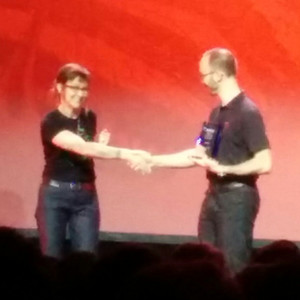
Stefano Zacchiroli receiving the O'Reilly Open Source Award I attended OSCON's closing sessions today and was delighted to see my friend Stefano Zacchiroli (Zack) receive an O'Reilly Open Source Award. Zack acted as Debian Project Leader for three years, is working on important activities at the Open Source Initiative and the Free Software Foundation, and is generally an amazing advocate for free software. Thanks for all your contributions, Zack, and congratulations!

23 July 2015

Antoine Beaupr : Is it safe to use open wireless access points?

I sometimes get questions when people use my wireless access point, which, for as long as I can remember, has been open to everyone; that is without any form of password protection or encryption. I arguably don't use the access point much myself, as I prefer the wired connection for the higher bandwidth, security and reliability it provides. Apart from convenience for myself and visitors, the main reason why I leave my wireless access open is that I believe in a free (both as in beer and freedom) internet, built with principles of solidarity rather than exploitation and profitability. In these days of ubiquitous surveillance, freedom often goes hand in hand with anonymity, which implies providing free internet access to everyone. I also believe that, as more and more services get perniciously transferred to the global internet, access to the network is becoming a basic human right. This is therefore my small contribution to the struggle, now also part of the R seau Libre project. So here were my friends question, in essence:
My credit card info was stolen when I used a wifi hotspot in an airport... Should I use open wifi networks? Is it safe to use my credit card for shopping online?
Here is a modified version of an answer I sent to a friend recently which I thought could be useful to the larger internet community. The short answer is "sorry about that", "it depends, you generally can, but be careful" and "your credit card company is supposed to protect you".

Sorry! First off, sorry to hear that our credit card was stolen in an airport! That has to be annoying... Did the credit card company reimburse you? Normally, the whole point of credit cards is that they protect you in case of theft like this and they are supposed to reimburse you if you credit card gets stolen or abused...

The complexity and unreliability of passwords Now of course, securing every bit of your internet infrastructure helps in protecting against such attacks. However: there is a trade-off! First off, it does makes it more complicated for people to join the network. You need to make up some silly password (which has its own security problems: passwords can be surprisingly easy to guess!) that you will post on the fridge or worst, forget all the time! And if it's on the fridge, anyone with a view to that darn fridge, be it one-time visitor or sneaky neighbor, can find the password and steal your internet access (although, granted, that won't allow them to directly spy on your internet connection). In any case, if you choose to use a password, you should use the tricks I wrote in the koumbit wiki to generate the password and avoid writing it on the fridge.

The false sense of security of wireless encryption Second, it can also give a false sense of security: just because a wifi access point appears "secure" (ie. that the communication between your computer and the wifi access point is encrypted) doesn't mean the whole connection is secure. In fact, one attack that can be done against access points is exactly to masquerade as an existing access point, with no security security at all. That way, instead of connecting to the real secure and trusted access point, you connect to an evil one which spies on our connection. Most computers will happily connect to such a hotspot even with degraded security without warning. It may be what happened at the airport, in fact. Of course this particular attack would be less likely to happen if you live in the middle of the woods than an airport, but it's some important distinction to keep in mind, because the same attack can be performed after the wireless access point, for example by your countryside internet access provider or someone attacking it. Your best protection for your banking details is to rely on good passwords (for your back account) but also, and more importantly, what we call end-to-end encryption. That is usually implemented using the "HTTPS" with a pad lock icon in your address bar. This ensures that the communication between your computer and the bank or credit card company is secure, that is: that no wifi access point or attacker between your computer and them can intercept your credit card number.

The flaws of internet security Now unfortunately, even the HTTPS protocol doesn't bring complete security. For example, one attack that can be done is similar to the previous one and that is to masquerade as a legitimate bank site, but either strip out the encryption or even fake the encryption. So you also need to look at the address of the website you are visiting. Attackers are often pretty clever and will use many tricks to hide the real address of the website in the address bar. To work around this, I always explicitly type my bank website address (https://accesd.desjardins.com/ in my case) directly myself instead of clicking on links, bookmarks or using a search engine to find my bank site. In the case of credit cards, it is much trickier because when you buy stuff online, you end up putting that credit card number on different sites which you do not necessarily trust. There's no good solution but complaining to your credit card company if you believe a website you used has stolen your credit card details. You can also use services like Paypal, Dwolla or Bitcoin that hide your credit card details from the seller, if they support the service. I usually try to avoid putting my credit card details on sites I do not trust, and limit myself to known parties (e.g. Via Rail, Air Canada, etc). Also, in general, I try to assume the network connection between me and the website I visit is compromised. This forced me to get familiar with online security and use of encryption. It is more accessible to me than trying to secure the infrastructure i am using, because i often do not control it at all (e.g. internet cafes...). Internet security is unfortunately a hard problem, and things are not getting easier as more things move online. The burden is on us programmers and system administrators to create systems that are more secure and intuitive for our users so, as I said earlier, sorry the internet sucks so much, we didn't think so many people would join the acid trip of the 70s. ;)

Elena 'valhalla' Grandi: A Makefile for OpenSCAD projects

A Makefile for OpenSCAD projects

When working with OpenSCAD to generate models for 3D printing, I find it convenient to be able to build .stl and .gcode files from the command line, expecially in batch, so I've started writing a Makefile, improving it and making it more generic in subsequent iterations; I've added a page on my website http://www.trueelena.org/computers/howto/makefile_for_openscad_projects.html to hosts my current version.

Most of my projects use the following directory structure.


Running make will generate stl files for all of the models; make gcode adds .gcode files using slic3r; make build/object1.stl and make build/object1.gcode also work, when just one model is needed.


# Copyright 2015 Elena Grandi
# This work is free. You can redistribute it and/or modify it under the
# terms of the Do What The Fuck You Want To Public License, Version 2,
# as published by Sam Hocevar. See http://www.wtfpl.net/ for more details.

BUILDDIR = build
CONFDIR = conf
SRCDIR = src

SLIC3R = slic3r

VPATH = $(SRCDIR):$(BUILDDIR)

STL_TARGETS = $(patsubst $(SRCDIR)/%.scad,$(BUILDDIR)/%.stl,$(wildcard $(SRCDIR)/*.scad))
GCODE_TARGETS = $(patsubst $(SRCDIR)/%.scad,$(BUILDDIR)/%.gcode,$(wildcard $(SRCDIR)/*.scad))

.PHONY: all gcode clean
all: $(STL_TARGETS)

gcode: $(GCODE_TARGETS)

$(BUILDDIR)/%.stl: %.scad $(SRCDIR)/lib/*
mkdir -p $ BUILDDIR
openscad -o $@ $<

$(BUILDDIR)/%.gcode: %.stl $ CONFDIR /basic.ini
$ SLIC3R --load $ CONFDIR /basic.ini $<

clean:
rm -f $ BUILDDIR /*.stl $ BUILDDIR /*.gcode


This Makefile is released under the WTFPL:


DO WHAT THE FUCK YOU WANT TO PUBLIC LICENSE
Version 2, December 2004

Copyright (C) 2004 Sam Hocevar <sam@hocevar.net>

Everyone is permitted to copy and distribute verbatim or modified
copies of this license document, and changing it is allowed as long
as the name is changed.

DO WHAT THE FUCK YOU WANT TO PUBLIC LICENSE
TERMS AND CONDITIONS FOR COPYING, DISTRIBUTION AND MODIFICATION

0. You just DO WHAT THE FUCK YOU WANT TO.

Daniel Pocock: Unpaid work training Google's spam filters

This week, there has been increased discussion about the pain of spam filtering by large companies, especially Google. It started with Google's announcement that they are offering a service for email senders to know if their messages are wrongly classified as spam. Two particular things caught my attention: the statement that less than 0.05% of genuine email goes to the spam folder by mistake and the statement that this new tool to understand misclassification is only available to "help qualified high-volume senders". From there, discussion has proceeded with Linus Torvalds blogging about his own experience of Google misclassifying patches from Linux contributors as spam and that has been widely reported in places like Slashdot and The Register. Personally, I've observed much the same thing from the other perspective. While Torvalds complains that he isn't receiving email, I've observed that my own emails are not always received when the recipient is a Gmail address. It seems that Google expects their users work a little bit every day going through every message in the spam folder and explicitly clicking the "Not Spam" button: so that Google can improve their proprietary algorithms for classifying mail. If you just read or reply to a message in the folder without clicking the button, or if you don't do this for every message, including mailing list posts and other trivial notifications that are not actually spam, more important messages from the same senders will also continue to be misclassified. If you are not willing to volunteer your time to do this, or if you are simply one of those people who has better things to do, Google's Gmail service is going to have a corrosive effect on your relationships. A few months ago, we visited Australia and I sent emails to many people who I wanted to catch up with, including invitations to a family event. Some people received the emails in their inboxes yet other people didn't see them because the systems at Google (and other companies, notably Hotmail) put them in a spam folder. The rate at which this appeared to happen was definitely higher than the 0.05% quoted in the Google article above. Maybe the Google spam filters noticed that I haven't sent email to some members of the extended family for a long time and this triggered the spam algorithm? Yet it was at that very moment that we were visiting Australia that email needs to work reliably with that type of contact as we don't fly out there every year. A little bit earlier in the year, I was corresponding with a few students who were applying for Google Summer of Code. Some of them also observed the same thing, they sent me an email and didn't receive my response until they were looking in their spam folder a few days later. Last year I know a GSoC mentor who lost track of a student for over a week because of Google silently discarding chat messages, so it appears Google has not just shot themselves in the foot, they managed to shoot their foot twice. What is remarkable is that in both cases, the email problems and the XMPP problems, Google doesn't send any error back to the sender so that they know their message didn't get through. Instead, it is silently discarded or left in a spam folder. This is the most corrosive form of communication problem as more time can pass before anybody realizes that something went wrong. After it happens a few times, people lose a lot of confidence in the technology itself and try other means of communication which may be more expensive, more synchronous and time intensive or less private. When I discussed these issues with friends, some people replied by telling me I should send them things through Facebook or WhatsApp, but each of those services has a higher privacy cost and there are also many other people who don't use either of those services. This tends to fragment communications even more as people who use Facebook end up communicating with other people who use Facebook and excluding all the people who don't have time for Facebook. On top of that, it creates more tedious effort going to three or four different places to check for messages. Despite all of this, the suggestion that Google's only response is to build a service to "help qualified high-volume senders" get their messages through leaves me feeling that things will get worse before they start to get better. There is no mention in the Google announcement about what they will offer to help the average person eliminate these problems, other than to stop using Gmail or spend unpaid time meticulously training the Google spam filter and hoping everybody else does the same thing. Some more observations on the issue Many spam filtering programs used in corporate networks, such as SpamAssassin, add headers to each email to suggest why it was classified as spam. Google's systems don't appear to give any such feedback to their users or message senders though, just a very basic set of recommendations for running a mail server. Many chat protocols work with an explicit opt-in. Before you can exchange messages with somebody, you must add each other to your buddy lists. Once you do this, virtually all messages get through without filtering. Could this concept be adapted to email, maybe giving users a summary of messages from people they don't have in their contact list and asking them to explicitly accept or reject each contact? If a message spends more than a week in the spam folder and Google detects that the user isn't ever looking in the spam folder, should Google send a bounce message back to the sender to indicate that Google refused to deliver it to the inbox? I've personally heard that misclassification occurs with mailing list posts as well as private messages.
Daniel Pocock: Recording live events like a pro (part 1: audio)

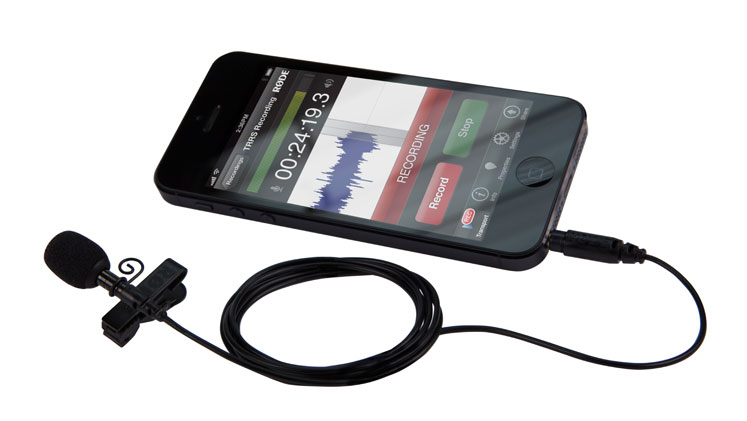
Whether it is a technical talk at a conference, a political rally or a budget-conscious wedding, many people now have most of the technology they need to record it and post-process the recording themselves. For most events, audio is an essential part of the recording. There are exceptions: if you take many short clips from a wedding and mix them together you could leave out the audio and just dub the couple's favourite song over it all. For a video of a conference presentation, though, the the speaker's voice is essential. These days, it is relatively easy to get extremely high quality audio using a lapel microphone attached to a smartphone. Lets have a closer look at the details. Using a lavalier / lapel microphone Full wireless microphone kits with microphone, transmitter and receiver are usually $US500 or more. The lavalier / lapel microphone by itself, however, is relatively cheap, under $US100. The lapel microphone is usually an omnidirectional microphone that will pick up the voices of everybody within a couple of meters of the person wearing it. It is useful for a speaker at an event, some types of interviews where the participants are at a table together and it may be suitable for a wedding, although you may want to remember to remove it from clothing during the photos. There are two key features you need when using such a microphone with a smartphone:
  • TRRS connector (this is the type of socket most phones and many laptops have today)
  • Microphone impedance should be at least 1k (that is one kilo Ohm) or the phone may not recognize when it is connected
Many leading microphone vendors have released lapel mics with these two features aimed specifically at smartphone users. I have personally been testing the Rode smartLav+ Choice of phone There are almost 10,000 varieties of smartphone just running Android, as well as iPhones, Blackberries and others. It is not practical for most people to test them all and compare audio recording quality. It is probably best to test the phone you have and ask some friends if you can make test recordings with their phones too for comparison. You may not hear any difference but if one of the phones has a poor recording quality you will hopefully notice that and exclude it from further consideration. A particularly important issue is being able to disable AGC in the phone. Android has a standard API for disabling AGC but not all phones or Android variations respect this instruction. I have personally had positive experiences recording audio with a Samsung Galaxy Note III. Choice of recording app Most Android distributions have at least one pre-installed sound recording app. Look more closely and you will find not all apps are the same. For example, some of the apps have aggressive compression settings that compromise recording quality. Others don't work when you turn off the screen of your phone and put it in your pocket. I've even tried a few that were crashing intermittently. The app I found most successful so far has been Diktofon, which is available on both F-Droid and Google Play. Diktofon has been designed not just for recording, but it also has some specific features for transcribing audio (currently only supporting Estonian) and organizing and indexing the text. I haven't used those features myself but they don't appear to cause any inconvenience for people who simply want to use it as a stable recording app. As the app is completely free software, you can modify the source code if necessary. I recently contributed patches enabling 48kHz recording and disabling AGC. At the moment, the version with these fixes has just been released and appears in F-Droid but not yet uploaded to Google Play. The fixes are in version 0.9.83 and you need to go into the settings to make sure AGC is disabled and set the 48kHz sample rate. Whatever app you choose, the following settings are recommended:
  • 16 bit or greater sample size
  • 48kHz sample rate
  • Disable AGC
  • WAV file format
Whatever app you choose, test it thoroughly with your phone and microphone. Make sure it works even when you turn off the screen and put it in your pocket while wearing the lapel mic for an hour. Observe the battery usage. Gotchas Now lets say you are recording a wedding and the groom has that smartphone in his pocket and the mic on his collar somewhere. What is the probability that some telemarketer calls just as the couple are exchanging vows? What is the impact on the recording? Maybe some apps will automatically put the phone in silent mode when recording. More likely, you need to remember this yourself. These are things that are well worth testing though. Also keep in mind the need to have sufficient storage space and to check whether the app you use is writing to your SD card or internal memory. The battery is another consideration. In a large event where smartphones are being used instead of wireless microphones, possibly for many talks in parallel, install a monitoring app like Ganglia on the phones to detect and alert if any phone has weak wifi signal, low battery or a lack of memory. Live broadcasts and streaming Some time ago I tested RTP multicasting from Lumicall on Android. This type of app would enable a complete wireless microphone setup with live streaming to the internet at a fraction of the cost of a traditional wireless microphone kit. This type of live broadcast could also be done with WebRTC on the Firefox app. Conclusion If you research the topic thoroughly and spend some time practicing and testing your equipment, you can make great audio recordings with a smartphone and an inexpensive lapel microphone. In subsequent blogs, I'll look at tips for recording video and doing post-production with free software.

22 July 2015

Sven Hoexter: moto g falcon CM 12.1 nightly - eating the battery alive

At least the nightly builds from 2015-07-21 to 2015-07-24 eat the battery alive. Until that one is fixed one can downgrade to cm-12.1-20150720-NIGHTLY-falcon.zip. The downgrade fixed the issue for me. Update: I'm now running fine with the build from 2015-07-26.

Cyril Brulebois: D-I Stretch Alpha 1

Time for a quick recap of the beginning of the Stretch release cycle as far as the Debian Installer is concerned: (On a related note, I ve started tweeting rather regularly about my actions, wins & fails, using the #DebianInstaller hashtag. I might try and aggregate my tweets as @CyrilBrulebois into more regular blog posts, time permitting.) Executive summary: D-I Stretch Alpha 1 is released, time to stretch a bit! Stretching cat (Credit: rferran on openclipart)

James McCoy: porterbox-logins

Some time ago, pabs documented his setup for easily connecting to one of Debian's porterboxes based on the desired architecture. Similarly, he submitted a wishlist bug against devscripts specifying some requirements for a script to make this functionality generally accessible to the developer community. I have yet to follow up on that request mainly due to ENOTIME for developing new scripts outright. I also have my own script I had been using to get information on available Debian machines. Recently, this came up again on IRC and jwilk decided to actually implement pabs' DNS alias idea. Now, one can use $arch-porterbox.debian.net to connect to a porterbox of the specified architecture. Preference is given to debian.org domains when there are both debian.org and debian.net porterboxes, and it's a simple use first listed machine if there are multiple available porterboxes. This is all well and good, but if you have SSH's StrictHostKeyChecking enabled, SSH will rightly refuse to connect. However, OpenSSH 6.5 added a feature called hostname canonicalization which can help. The below ssh_config snippet allows one to run ssh $arch-porterbox or ssh $arch-porterbox.debian.net and connect to one of the porterboxes, verifying the host key against the canonical host name.
Host *-porterbox
  HostName %h.debian.net
Match host *-porterbox.debian.net
  CanonicalizeHostname yes
  CanonicalizePermittedCNAMEs *-porterbox.debian.net:*.debian.org

Orestis Ioannou: GSoC Debsources midterm news

Midterm evaluations have already passed and I guess we have also reached a milestone since last week I finished working on the copyright tracker and started the patch tracker. Here's the list of my reports on soc-coordination for those interested Copyright tracker status Copyright tracker Most of the functionalities of the copyright tracker are already merged. Specifically navigating in the tracker, rendering the machine readable licenses, API functionalities such as obtaining the license of a file searching by checksum or by a package / version / path or obtaining the licenses of many files at once and their respective views. Some more functionalities are still under review such as filling the database with copyright related information at update time, using the database to answer the aforementioned requests, license statistics in the spirit of the Debsources ones and exporting a license in SPDX format. Its going to be pretty exciting when those pull requests are going to be merged since the copyright tracker will be full and complete! Meanwhile I started working on the patch tracker. Patch tracker My second task is the implementation of a patch tracker. This feature existed in Debian but unfortunately died recently. I have already started revising the functionalities of the old patch tracker, started identifying target users, creating use stories and cases. Those should help me list the desired functionalities of the tracker, imagine the structure of the blueprint and start writing code to that end. It is going to be a pretty exciting run of 1 month doing this as my knowledge on the Debian packaging system is not that good just yet. I hope that until Debconf some of the functionalities of the patch tracker are going to be ready. Debconf My request for sponsorship for Debconf was accepted and I am pretty excited since this is going to be my first Debconf attendance. I am looking forward meeting my mentors (Zack and Matthieu), the fellow student working on Debsources (Clemux) as well as a lot of other people I happen to chat occasionaly during this summer. I ll arrive on Friday 14th and leave on Sunday 23. Debconf 2015

21 July 2015

Dmitry Shachnev: GNOME Flashback 3.16 available in archive, needs your help

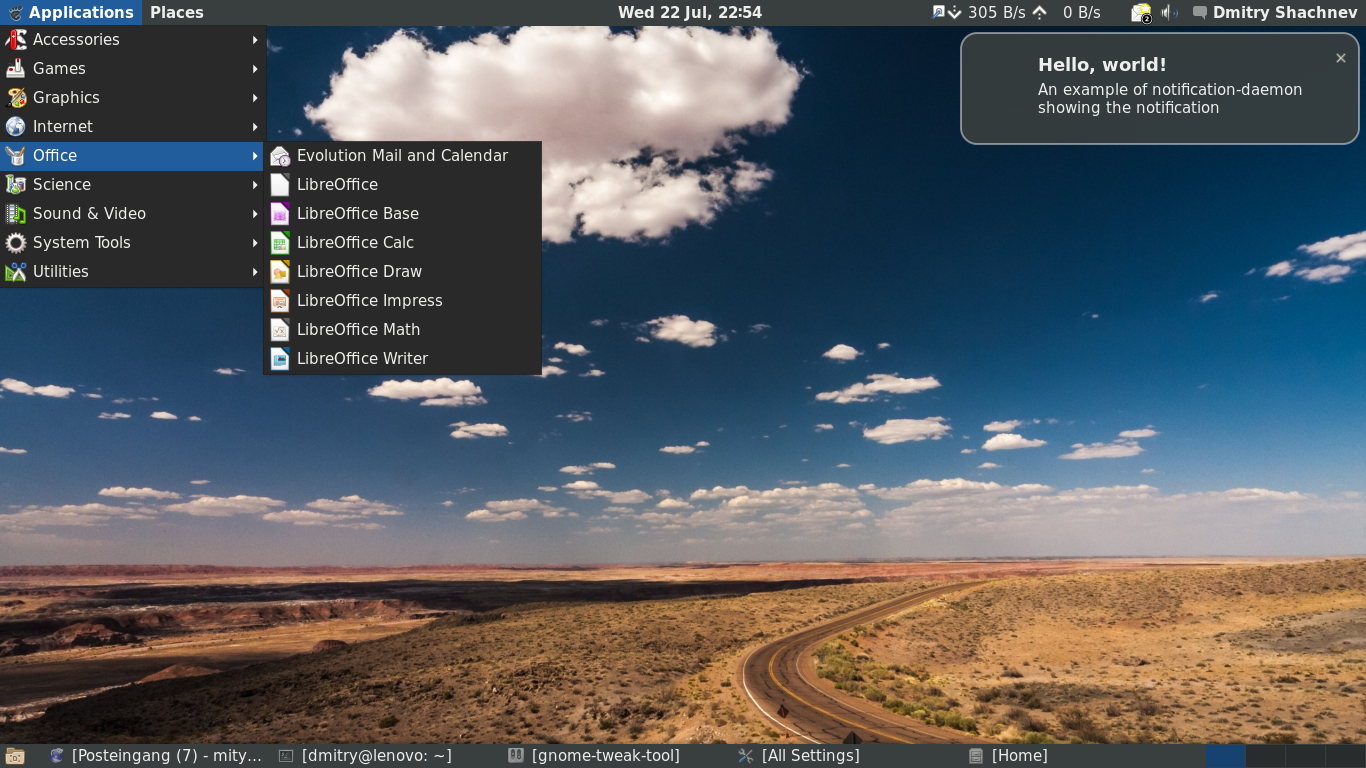
Some time ago GNOME Flashback 3.16/3.17 packages landed in Debian testing and Ubuntu wily. GNOME Flashback is the project which continues the development of components of classic GNOME session, including the GNOME Panel, the Metacity window manager, and so on. Screenshot The full changelog can be found in official announcement mail by Alberts and in changelog.gz files in each package, but I want to list the most imporant improvements in this release (compared to 3.14): Sounds interesting? Contribute! If you are interested in helping us, please write to our mailing list: gnome-flashback-list@gnome.org. The current TODO list is:
  1. Notification Daemon needs GTK notification support.
  2. GNOME Flashback needs screenshot, screencast, keyboard layout switching and bluetooth status icon.
  3. Fix/replace deprecated function usage in all modules.
  4. libstatus-notifier get it in usable state, create a new applet for gnome-panel.

Jonathan Dowland: New camera

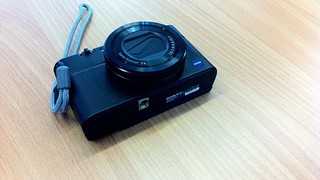
Sony RX100-III
Earlier in the year I treated myself to a new camera. It's been many years since I bought one, which was a perfectly serviceable Panasonic FS-15 compact, to replace my lost-or-stolen Panasonic TZ3, which I loved. The FS-15 didn't have a "wow" factor and with the advent of smartphones and fantastic smartphone cameras, it rarely left a drawer at home. Last year I upgraded my mobile from an iPhone to a Motorola Moto G, which is a great phone in many respects, but has a really poor camera. I was given a very generous gift voucher when I left my last job and so had the perfect excuse to buy a dedicated camera. I'd been very tempted by a Panasonic CSC camera ever since I read this review of the GF1 years ago, and the GM1 was high on my list, but there were a lot of compromises: no EVF... In the end I picked up a Sony RX 100 Mark 3 which had the right balance of compromises for me. I haven't posted a lot of photos to this site in the past but I hope to do so in future. I've got to make some alterations to the software first. Post-script: Craig Mod, who wrote that GF1 review, wrote another interesting essay a few years later: Cameras, Goodbye, where he discusses whether smartphone cameras are displacing even the top end of the Camera market.

Martin Michlmayr: Debian archive rebuild on ARM64 with GCC 5

I recently got access to several ProLiant m400 ARM64 servers at work. Since Debian is currently working on the migration to GCC 5, I thought it would be nice to rebuild the Debian archive on ARM64 to see if GCC 5 is ready. Fortunately, I found no obvious compiler errors. During the process, I noticed several areas where ARM64 support can be improved. First, a lot of packages failed to build due to missing dependencies. Some missing dependencies are libraries or tools that have not been ported to ARM64 yet, but the majority was due to the lack of popular programming languages on ARM64. This requires upstream porting work, which I'm sure is going on already in many cases. Second, over 160 packages failed to build due to out-of-date autoconf and libtool scripts. Most of these bugs have been reported over a year ago by the ARM64 porters (Matthias Klose from Canonical/Ubuntu and Wookey from ARM/Linaro) and the PowerPC porters, but unfortunately they haven't been fixed yet. Finally, I went through all packages that list specific architectures in debian/control and filed wishlist bugs on those that looked relevant to ARM64. This actually prompted some Debian and upstream developers to implement ARM64 support, which is great!

Jonathan McDowell: Recovering a DGN3500 via JTAG

Back in 2010 when I needed an ADSL2 router in the US I bought a Netgear DGN3500. It did what I wanted out of the box and being based on a MIPS AR9 (ARX100) it seemed likely OpenWRT support might happen. Long story short I managed to overwrite u-boot (the bootloader) while flashing a test image I d built. I ended up buying a new router (same model) to get my internet connection back ASAP and never getting around to fully fixing the broken one. Until yesterday. Below is how I fixed it; both for my own future reference and in case it s of use any any other unfortunate soul. The device has clear points for serial and JTAG and it was easy enough (even with my basic soldering skills) to put a proper header on. The tricky bit is that the flash is connected via SPI, so it s not just a matter of attaching JTAG, doing a scan and reflashing from the JTAG tool. I ended up doing RAM initialisation, then copying a RAM copy of u-boot in and then using that to reflash. There may well have been a better way, but this worked for me. For reference the failure mode I saw was an infinitely repeating:
ROM VER: 1.1.3
CFG 05
My JTAG device is a Bus Pirate v3b which is much better than the parallel port JTAG device I built the first time I wanted to do something similar. I put the latest firmware (6.1) on it. All of this was done from my laptop, which runs Debian testing (stretch). I used the OpenOCD 0.9.0-1+b1 package from there. Daniel Schwierzeck has some OpenOCD scripts which include a target definition for the ARX100. I added a board definition for the DGN3500 (I ve also send Daniel a patch to add this to his repo). I tied all of this together with an openocd.cfg that contained:
source [find interface/buspirate.cfg]
buspirate_port /dev/ttyUSB1
buspirate_vreg 0
buspirate_mode normal
buspirate_pullup 0
reset_config trst_only
source [find openocd-scripts/target/arx100.cfg]
source [find openocd-scripts/board/dgn3500.cfg]
gdb_flash_program enable
gdb_memory_map enable
gdb_breakpoint_override hard
I was then able to power on the router and type dgn3500_ramboot into the OpenOCD session. This fetched my RAM copy of u-boot from dgn3500_ram/u-boot.bin, copied it into the router s memory and started it running. From there I had a u-boot environment with access to the flash commands and was able to restore the original Netgear image (and once I was sure that was working ok I subsequently upgraded to the Barrier Breaker OpenWRT image).

20 July 2015

Niels Thykier: Performance tuning of lintian, take 2

The other day, I wrote about our recent performance tuning in lintian. Among other things, we reduced the memory usage by ~33%. The effect was also reproducible on libreoffice (4.2.5-1 plus its 170-ish binaries, arch amd64), which started at ~515 MB and was reduced to ~342 MB. So this is pretty great in its own right But at this point, I have seen what was in Pandora s box . By which, I mean the two magical numbers 1.7kB per file and 2.2kB per directory in the package (add +250-300 bytes per entry in binary packages). This is before even looking at data from file(1), readelf, etc. Just the raw index of the package. Depending on your point of view, 1.7-2.2kB might not sound like a lot. But for the lintian source with ~1 500 directories and ~3 300 non-directories, this sums up to about 6.57MB out of the (then) usage at 12.53MB. With the recent changes, it dropped to about 1.05kB for files and 1.5kB for dirs. But even then, the index is still 4.92MB (out of 8.48MB). This begs the question, what do you get for 1.05kB in perl? The following is a dump of the fields and their size in perl for a given entry:
lintian/vendors/ubuntu/main/data/changes-file/known-dists: 1077.00 B
  _path_info: 24.00 B
  date: 44.00 B
  group: 42.00 B
  name: 123.00 B
  owner: 42.00 B
  parent_dir: 24.00 B
  size: 42.00 B
  time: 42.00 B
  (overhead): 694.00 B
With time, date, owner and group being fixed sized strings (at most 15 characters). The size and _path_info fields being integers, parent_dir a reference (nulled). Finally, the name being a variable length string. Summed the values take less than half of the total object size. The remainder of ~700 bytes is just overhead . Time for another clean up: Which leaves us now with:
lintian/vendors/ubuntu/main/data/changes-file/known-dists: 698.00 B
  _path_info: 24.00 B
  date_time: 56.00 B
  name: 123.00 B
  parent_dir: 24.00 B
  size: 24.00 B
  (overhead): 447.00 B
Still a ~64% overhead, but at least we reduced the total size by 380 bytes (585 bytes for entries in binary packages). With these changes, the memory used for the lintian source index is now down to 3.62MB. This brings the total usage down to 7.01MB, which is a reduction to 56% of the original usage (a.k.a. the-almost-but-not-quite-50%-reduction ). But at least the results also carried over to libreoffice, which is now down to 284.83 MB (55% of original). The chromium-browser (source-only, version 32.0.1700.123-2) is down to 111.22MB from 179.44MB (61% of original, better results expected if processed with binaries). In closing, Lintian 2.5.34 will use slightly less memory than 2.5.33.
Filed under: Debian, Lintian

Matthew Garrett: Your Ubuntu-based container image is probably a copyright violation

Update: A Canonical employee responded here, but doesn't appear to actually contradict anything I say below.

I wrote about Canonical's Ubuntu IP policy here, but primarily in terms of its broader impact, but I mentioned a few specific cases. People seem to have picked up on the case of container images (especially Docker ones), so here's an unambiguous statement:

If you generate a container image that is not a 100% unmodified version of Ubuntu (ie, you have not removed or added anything), Canonical insist that you must ask them for permission to distribute it. The only alternative is to rebuild every binary package you wish to ship[1], removing all trademarks in the process. As I mentioned in my original post, the IP policy does not merely require you to remove trademarks that would cause infringement, it requires you to remove all trademarks - a strict reading would require you to remove every instance of the word "ubuntu" from the packages.

If you want to contact Canonical to request permission, you can do so here. Or you could just derive from Debian instead.

[1] Other than ones whose license explicitly grants permission to redistribute binaries and which do not permit any additional restrictions to be imposed upon the license grants - so any GPLed material is fine

comment count unavailable comments

Daniel Pocock: RTC status on Debian, Ubuntu and Fedora

Zoltan (Zoltanh721) recently blogged about WebRTC for the Fedora community and Fedora desktop. https://fedrtc.org has been running for a while now and this has given many people a chance to get a taste of regular SIP and WebRTC-based SIP. As suggested in Zoltan's blog, it has convenient integration with Fedora SSO and as the source code is available, people are welcome to see how it was built and use it for other projects. Issues with Chrome/Chromium on Linux If you tried any of FedRTC.org, rtc.debian.org or meet.jit.si using Chrome/Chromium on Linux, you may have found that the call appears to be connected but there is no media. This is a bug and the Chromium developers are on to it. You can work around this by trying an older version of Chromium (it still works with v37 from Debian wheezy) or Firefox/Iceweasel. WebRTC is not everything WebRTC offers many great possibilities for people to quickly build and deploy RTC services to a large user base, especially when using components like JSCommunicator or the DruCall WebRTC plugin for Drupal. However, it is not a silver bullet. For example, there remain concerns about how to receive incoming calls. How do you know which browser tab is ringing when you have many tabs open at once? This may require greater browser/desktop integration and that has security implications for JavaScript. Whether users on battery-powered devices can really leave JavaScript running for extended periods of time waiting for incoming calls is another issue, especially when you consider that many web sites contain some JavaScript that is less than efficient. Native applications and mobile apps like Lumicall continue to offer the most optimized solution for each platform although WebRTC currently offers the most convenient way for people to place a Call me link on their web site or portal. Deploy it yourself The RTC Quick Start Guide offers step-by-step instructions and a thorough discussion of the architecture for people to start deploying RTC and WebRTC on their own servers using standard packages on many of the most popular Linux distributions, including Debian, Ubuntu, RHEL, CentOS and Fedora.

Next.

Previous.