Search Results: "nate"

9 September 2023

Dirk Eddelbuettel: RcppFarmHash 0.0.3 on CRAN: Small Update

A minor maintenance release of the RcppFarmHash package is now on CRAN as version 0.0.3. RcppFarmHash wraps the Google FarmHash family of hash functions (written by Geoff Pike and contributors) that are used for example by Google BigQuery for the FARM_FINGERPRINT digest. This releases farms out the conversion to the integer64 add-on type in R to the new package RcppInt64 released a few days ago and adds some minor maintenance on continuous integration and alike. The brief NEWS entry follows:

Changes in version 0.0.3 (2023-09-09)
  • Rely on new RcppInt64 package and its header for conversion
  • Minor updates to continuous integration and README.md

If you like this or other open-source work I do, you can sponsor me at GitHub.

This post by Dirk Eddelbuettel originated on his Thinking inside the box blog. Please report excessive re-aggregation in third-party for-profit settings.

7 September 2023

Dirk Eddelbuettel: x13binary 1.1.57-4 on CRAN: Minor Update

Release 1.1.57-4 of the x13binary package providing the X-13ARIMA-SEATS program by the US Census Bureau arrived earlier on CRAN. This release sets an explicit download timeout option value at the request of CRAN who, just like everybody else, were bitten a little by the instability at GitHub this week. Courtesy of my CRANberries, there is also a diffstat report for this release showing changes to the previous release. If you like this or other open-source work I do, you can sponsor me at GitHub.

This post by Dirk Eddelbuettel originated on his Thinking inside the box blog. Please report excessive re-aggregation in third-party for-profit settings.

Thorsten Alteholz: My Debian Activities in August 2023

FTP master This month I accepted 347 and rejected 39 packages. The overall number of packages that got accepted was 349. Debian LTS This was my hundred-tenth month that I did some work for the Debian LTS initiative, started by Raphael Hertzog at Freexian. During my allocated time I uploaded: The open CVE for ffmpeg was already fixed in a previous upload and could be marked as such.
I also started to work on amanda and did some work on security-master. Last but not least I did some days of frontdesk duties and took part in the LTS meeting. Debian ELTS This month was the sixty-first ELTS month. During my allocated time I uploaded: Yeah, finally openssl1.0 was uploaded! I also started to work on amanda, but for whatever reason the package does not build in my chroot. Why do I always choose the packages with quirks? Last but not least I did some days of frontdesk duties. debian-printing This month I tried to update package hplip. Unfortunately upstream added some new compressed files that need to appear uncompressed in the package. Even though this sounded like an easy task, which seemed to be already implemented in the current debian/rules, the new type of files broke this implementation and made the package no longer buildable. There is also an RC-bug waiting that needs some love. I still hope to upload the package soon. This work is generously funded by Freexian! Other stuff Unfortunately $job demanded lots of attention this month, so I only uploaded: Due to the recent license change of Hashicorp, I am no longer willing to spend time working on their products. I therefore filed RM-bugs for golang-github-hashicorp-go-gcp-common, golang-github-hashicorp-go-tfe, golang-github-hashicorp-go-slug and golang-github-hashicorp-terraform-json.
As there seemed to be others involved in golang-github-hashicorp-terraform-svchost and golang-github-hashicorp-go-azure-helpers, I only orphaned both packages. I hope OpenTF will be successful!

6 September 2023

Dirk Eddelbuettel: RcppInt64 0.0.1 on CRAN: New Package!

Happy to share that a new package RcppInt64 arrived on CRAN earlier today after a brief one-day inspection round. RcppInt64 collects some of the previous conversions between 64-bit integer values in R and C++, and regroups them in a single package. A single header is provided. It actually offers two interfaces: both a more standard as<>() converter from R values along with its companions wrap() to return to R, as well as more dedicated functions from and to . A key difficulty faced when supporting 64 bit integer payloads is that R has no proper type for it so the standard template-based approaches use by Rcpp do not apply. To carry 64 bit integers, the clever approach by Jens Oehlschl gel and his bit64 package is used. However, its use of a double to transport the int64 payload means we must take care to not uninentionally interpret the double variables as, well, double. So we use an simple S3 class in R, and check for it. With some care (as provided by these helper functions) this works well. The RcppInt64 packages contains both an example function, as well as an entire example package to demonstrate how to use these facilities in your package. We hope others will find this useful. If you like this or other open-source work I do, you can sponsor me at GitHub.

This post by Dirk Eddelbuettel originated on his Thinking inside the box blog. Please report excessive re-aggregation in third-party for-profit settings.

1 September 2023

Simon Josefsson: Trisquel on ppc64el: Talos II

The release notes for Trisquel 11.0 Aramo mention support for POWER and ARM architectures, however the download area only contains links for x86, and forum posts suggest there is a lack of instructions how to run Trisquel on non-x86. Since the release of Trisquel 11 I have been busy migrating x86 machines from Debian to Trisquel. One would think that I would be finished after this time period, but re-installing and migrating machines is really time consuming, especially if you allow yourself to be distracted every time you notice something that Really Ought to be improved. Rabbit holes all the way down. One of my production machines is running Debian 11 bullseye on a Talos II Lite machine from Raptor Computing Systems, and migrating the virtual machines running on that host (including the VM that serves this blog) to a x86 machine running Trisquel felt unsatisfying to me. I want to migrate my computing towards hardware that harmonize with FSF s Respects Your Freedom and not away from it. Here I had to chose between using the non-free software present in newer Debian or the non-free software implied by most x86 systems: not an easy chose. So I have ignored the dilemma for some time. After all, the machine was running Debian 11 bullseye , which was released before Debian started to require use of non-free software. With the end-of-life date for bullseye approaching, it seems that this isn t a sustainable choice. There is a report open about providing ppc64el ISOs that was created by Jason Self shortly after the release, but for many months nothing happened. About a month ago, Luis Guzm n mentioned an initial ISO build and I started testing it. The setup has worked well for a month, and with this post I want to contribute instructions how to get it up and running since this is still missing. The setup of my soon-to-be new production machine: According to the notes in issue 14 the ISO image is available at https://builds.trisquel.org/debian-installer-images/ and the following commands download, integrity check and write it to a USB stick:
wget -q https://builds.trisquel.org/debian-installer-images/debian-installer-images_20210731+deb11u8+11.0trisquel14_ppc64el.tar.gz
tar xfa debian-installer-images_20210731+deb11u8+11.0trisquel14_ppc64el.tar.gz ./installer-ppc64el/20210731+deb11u8+11/images/netboot/mini.iso
echo '6df8f45fbc0e7a5fadf039e9de7fa2dc57a4d466e95d65f2eabeec80577631b7  ./installer-ppc64el/20210731+deb11u8+11/images/netboot/mini.iso'   sha256sum -c
sudo wipefs -a /dev/sdX
sudo dd if=./installer-ppc64el/20210731+deb11u8+11/images/netboot/mini.iso of=/dev/sdX conv=sync status=progress
Sadly, no hash checksums or OpenPGP signatures are published. Power off your device, insert the USB stick, and power it up, and you see a Petitboot menu offering to boot from the USB stick. For some reason, the "Expert Install" was the default in the menu, and instead I select "Default Install" for the regular experience. For this post, I will ignore BMC/IPMI, as interacting with it is not necessary. Make sure to not connect the BMC/IPMI ethernet port unless you are willing to enter that dungeon. The VGA console works fine with a normal USB keyboard, and you can chose to use only the second enP4p1s0f1 network card in the network card selection menu. If you are familiar with Debian netinst ISO s, the installation is straight-forward. I complicate the setup by partitioning two RAID1 partitions on the two NVMe sticks, one RAID1 for a 75GB ext4 root filesystem (discard,noatime) and one RAID1 for a 900GB LVM volume group for virtual machines, and two 20GB swap partitions on each of the NVMe sticks (to silence a warning about lack of swap, I m not sure swap is still a good idea?). The 3x18TB disks use DM-integrity with RAID1 however the installer does not support DM-integrity so I had to create it after the installation. There are two additional matters worth mentioning: I have re-installed the machine a couple of times, and have now finished installing the production setup. I haven t ran into any serious issues, and the system has been stable. Time to wrap up, and celebrate that I now run an operating system aligned with the Free System Distribution Guidelines on hardware that aligns with Respects Your Freedom Happy Hacking indeed!

Paul Wise: FLOSS Activities August 2023

Focus This month I didn't have any particular focus. I just worked on issues in my info bubble.

Changes

Debugging
  • Investigated test failures after Debian pybuild distutils update

Issues

Review
  • Debian BTS usertags: changes for the month

Administration
  • Debian IRC: rescue an alternate channel and make it harder to join accidentally
  • Debian wiki: unblock IP addresses, approve accounts, update emails for accounts

Communication
  • Respond to queries from Debian users and contributors on the mailing lists and IRC

Sponsors The libpst work was sponsored. All other work was done on a volunteer basis.

31 August 2023

Ian Jackson: Conferences take note: the pandemic is not over

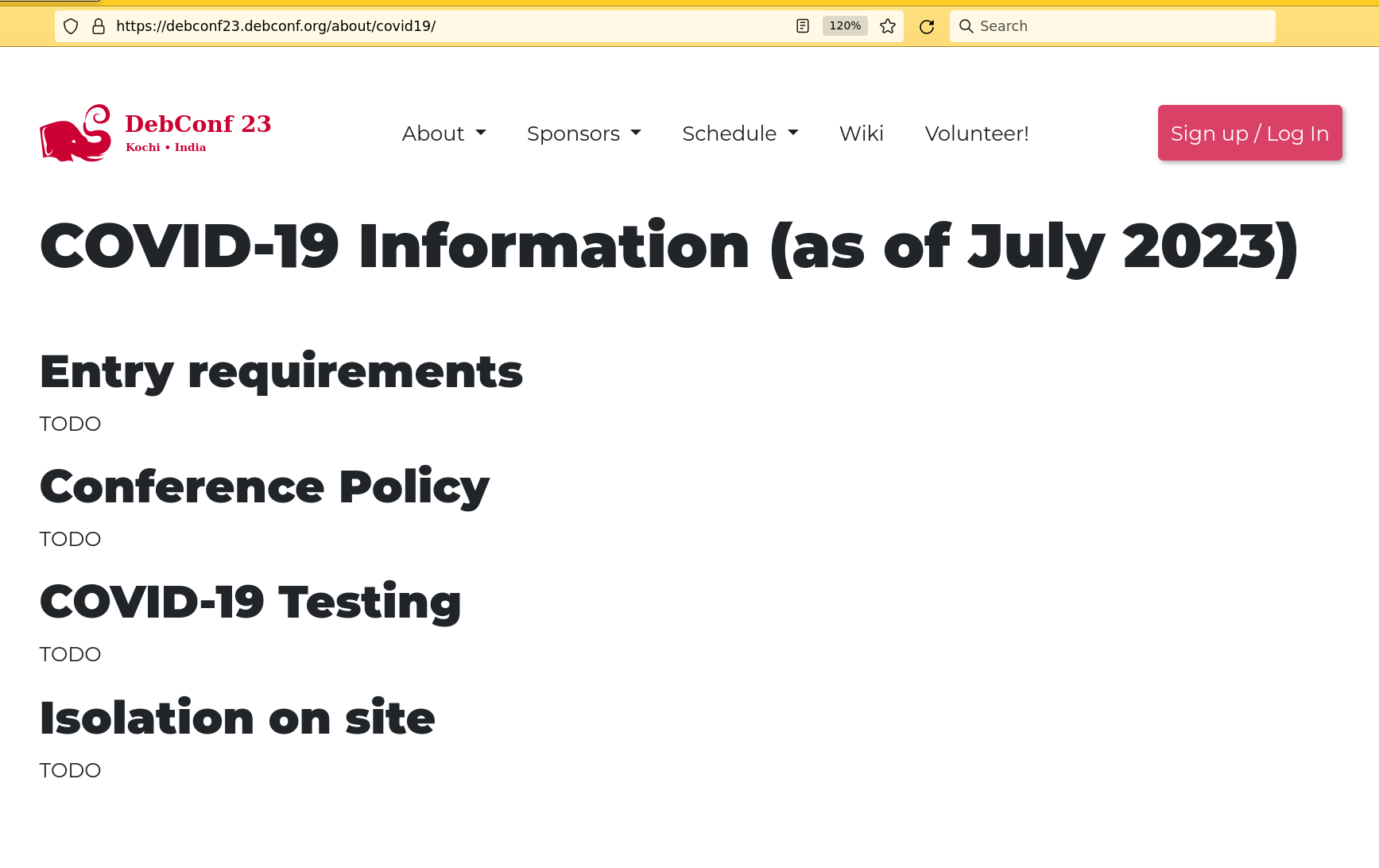
Many people seem to be pretending that the pandemic is over. It isn t. People are still getting Covid, becoming sick, and even in some cases becoming disabled. People s plans are still being disrupted. Vulnerable people are still hiding. Conference organisers: please make robust Covid policies, publish them early, and enforce them. And, clearly set expectations for your attendees. Attendees: please don t be the superspreader. Two conferences This year I have attended a number of in-person events. For Eastercon I chose to participate online, remotely. This turns out to have been a very good decision. At least a quarter of attendees got Covid. At BiCon we had about 300 attendees. I m not aware of any Covid cases. Part of the difference between the two may have been in the policies. BiCon s policy was rather more robust. Unlike Eastercon s it had a much better refund policy for people who got Covid and therefore shouldn t come; also BiCon asked attendees to actually show evidence of a negative test. Another part of the difference will have been the venue. The NTU buildings we used at BiCon were modern and well ventilated. But, I think the biggest difference was attendees' attitudes. BiCon attendees are disproportionately likely (compared to society at large) to have long term medical conditions. And the cultural norms are to value and protect those people. Conversely, in my experience, a larger proportion of Eastercon attendees don t always have the same level of consideration. I don t want to give details, but I have reliable reports of quite reprehensible behaviour by some attendees - even members of the convention volunteer staff. Policies Your conference should IMO at the very least: The rules should be published very early, so that people can see them, and decide if they want to go, before they have to book anything. Don t recommend that people don t spread disease Most of the things that attendees can do to about Covid primarily protect others, rather than themselves. Making those things recommendations or advice is grossly unfair. You re setting up an arsehole filter: nice people will want to protect others, but less public spirited people will tell themselves it s only a recommendation. Make the rules mandatory. But won t we be driving people away ? If you don t have a robust Covid policy, you are already driving people away. And the people who won t come because of reasonable measures like I ve asked for above, are dickheads. You don t want them putting your other attendees at risk. And probably they re annoying in other ways too. Example of something that is not OK Yesterday (2023-08-30 13:44 UTC), less than two weeks before the conference, Debconf 23 s Covid policy still looked like you see below. Today there is a policy, but it is still weak.
Edited 2023-09-01 00:58 +01:00 to fix the link to the Debconf policy.


comment count unavailable comments

30 August 2023

Dirk Eddelbuettel: RcppArmadillo 0.12.6.3.0 on CRAN: New Upstream Bugfix

armadillo image Armadillo is a powerful and expressive C++ template library for linear algebra and scientific computing. It aims towards a good balance between speed and ease of use, has a syntax deliberately close to Matlab, and is useful for algorithm development directly in C++, or quick conversion of research code into production environments. RcppArmadillo integrates this library with the R environment and language and is widely used by (currently) 1092 other packages on CRAN, downloaded 30.3 million times (per the partial logs from the cloud mirrors of CRAN), and the CSDA paper (preprint / vignette) by Conrad and myself has been cited 549 times according to Google Scholar. This release brings bugfix upstream release 12.6.3. We skipped 12.6.2 at CRAN (as discussed in the previous release notes) as it only affected Armadillo-internal random-number generation (RNG). As we default to supplying the RNGs from R, this did not affect RcppArmadillo. The bug fixes in 12.6.3 are for csv reading which too will most likely be done by R tools for R users, but given two minor bugfix releases an update was in order. I ran the full reverse-depenency check against the now more than 1000 packages overnight: no issues. armadillo processing CRAN processed the package fully automatically as it has no issues, and nothing popped up in reverse-dependency checking. The set of changes for the last two RcppArmadillo releases follows.

Changes in RcppArmadillo version 0.12.6.3.0 (2023-08-28)
  • Upgraded to Armadillo release 12.6.3 (Cortisol Retox)
    • Fix for corner-case in loading CSV files with headers
    • For consistent file handling, all .load() functions now open text files in binary mode

Changes in RcppArmadillo version 0.12.6.2.0 (2023-08-08)
  • Upgraded to Armadillo release 12.6.2 (Cortisol Retox)
    • use thread-safe Mersenne Twister as the default RNG on all platforms
    • use unique RNG seed for each thread within multi-threaded execution (such as OpenMP)
    • explicitly document arma_rng::set_seed() and arma_rng::set_seed_random()
  • None of the changes above affect R use as RcppArmadillo connects the RNGs used by R to Armadillo

Courtesy of my CRANberries, there is a diffstat report relative to previous release. More detailed information is on the RcppArmadillo page. Questions, comments etc should go to the rcpp-devel mailing list off the Rcpp R-Forge page. If you like this or other open-source work I do, you can sponsor me at GitHub.

This post by Dirk Eddelbuettel originated on his Thinking inside the box blog. Please report excessive re-aggregation in third-party for-profit settings.

29 August 2023

Matthew Garrett: Unix sockets, Cygwin, SSH agents, and sadness

Work involves supporting Windows (there's a lot of specialised hardware design software that's only supported under Windows, so this isn't really avoidable), but also involves git, so I've been working on extending our support for hardware-backed SSH certificates to Windows and trying to glue that into git. In theory this doesn't sound like a hard problem, but in practice oh good heavens.

Git for Windows is built on top of msys2, which in turn is built on top of Cygwin. This is an astonishing artifact that allows you to build roughly unmodified POSIXish code on top of Windows, despite the terrible impedance mismatches inherent in this. One is that until 2017, Windows had no native support for Unix sockets. That's kind of a big deal for compatibility purposes, so Cygwin worked around it. It's, uh, kind of awful. If you're not a Cygwin/msys app but you want to implement a socket they can communicate with, you need to implement this undocumented protocol yourself. This isn't impossible, but ugh.

But going to all this trouble helps you avoid another problem! The Microsoft version of OpenSSH ships an SSH agent that doesn't use Unix sockets, but uses a named pipe instead. So if you want to communicate between Cygwinish OpenSSH (as is shipped with git for Windows) and the SSH agent shipped with Windows, you need something that bridges between those. The state of the art seems to be to use npiperelay with socat, but if you're already writing something that implements the Cygwin socket protocol you can just use npipe to talk to the shipped ssh-agent and then export your own socket interface.

And, amazingly, this all works? I've managed to hack together an SSH agent (using Go's SSH agent implementation) that can satisfy hardware backed queries itself, but forward things on to the Windows agent for compatibility with other tooling. Now I just need to figure out how to plumb it through to WSL. Sigh.

comment count unavailable comments

27 August 2023

Shirish Agarwal: FSCKing /home

There is a bit of context that needs to be shared before I get to this and would be a long one. For reasons known and unknown, I have a lot of sudden electricity outages. Not just me, all those who are on my line. A discussion with a lineman revealed that around 200+ families and businesses are on the same line and when for whatever reason the electricity goes for all. Even some of the traffic lights don t work. This affects software more than hardware or in some cases, both. And more specifically HDD s are vulnerable. I had bought an APC unit several years for precisely this, but over period of time it just couldn t function and trips also when the electricity goes out. It s been 6-7 years so can t even ask customer service to fix the issue and from whatever discussions I have had with APC personnel, the only meaningful difference is to buy a new unit but even then not sure this is an issue that can be resolved, even with that. That comes to the issue that happens once in a while where the system fsck is unable to repair /home and you need to use an external pen drive for the same. This is my how my hdd stacks up
/ is on dev/sda7 /boot is on /dev/sda6, /boot/efi is on /dev/sda2 and /home is on /dev/sda8 so theoretically, if /home for some reason doesn t work I should be able drop down on /dev/sda7, unmount /dev/sda8, run fsck and carry on with my work. I tried it number of times but it didn t work. I was dropping down on tty1 and attempting the same, no dice as root/superuser getting the barest x-term. So first I tried asking couple of friends who live nearby me. Unfortunately, both are MS-Windows users and both use what are called as company-owned laptops . Surfing on those systems were a nightmare. Especially the number of pop-ups of ads that the web has become. And to think about how much harassment ublock origin has saved me over the years. One of the more interesting bits from both their devices were showing all and any downloads from fosshub was showing up as malware. I dunno how much of that is true or not as haven t had to use it as most software we get through debian archives or if needed, download from github or wherever and run/install it and you are in business. Some of them even get compiled into a good .deb package but that s outside the conversation atm. My only experience with fosshub was few years before the pandemic and that was good. I dunno if fosshub really has malware or malwarebytes was giving false positives. It also isn t easy to upload a 600 MB+ ISO file somewhere to see whether it really has malware or not. I used to know of a site or two where you could upload a suspicious file and almost 20-30 famous and known antivirus and anti-malware engines would check it and tell you the result. Unfortunately, I have forgotten the URL and seeing things from MS-Windows perspective, things have gotten way worse than before. So left with no choice, I turned to the local LUG for help. Fortunately, my mobile does have e-mail and I could use gmail to solicit help. While there could have been any number of live CD s that could have helped but one of my first experiences with GNU/Linux was that of Knoppix that I had got from Linux For You (now known as OSFY) sometime in 2003. IIRC, had read an interview of Mr. Klaus Knopper as well and was impressed by it. In those days, Debian wasn t accessible to non-technical users then and Knoppix was a good tool to see it. In fact, think he was the first to come up with the idea of a Live CD and run with it while Canonical/Ubuntu took another 2 years to do it. I think both the CD and the interview by distrowatch was shared by LFY in those early days. Of course, later the story changes after he got married, but I think that is more about Adriane rather than Knoppix. So Vishal Rao helped me out. I got an HP USB 3.2 32GB Type C OTG Flash Drive x5600c (Grey & Black) from a local hardware dealer around similar price point. The dealer is a big one and has almost 200+ people scattered around the city doing channel sales who in turn sell to end users. Asking one of the representatives about their opinion on stopping electronic imports (apparently more things were added later to the list including all sorts of sundry items from digital cameras to shavers and whatnot.) The gentleman replied that he hopes that it would not happen otherwise more than 90% would have to leave their jobs. They already have started into lighting fixtures (LED bulbs, tubelights etc.) but even those would come in the same ban  The main argument as have shared before is that Indian Govt. thinks we need our home grown CPU and while I have no issues with that, as shared before except for RISC-V there is no other space where India could look into doing that. Especially after the Chip Act, Biden has made that any new fabs or any new thing in chip fabrication will only be shared with Five Eyes only. Also, while India is looking to generate about 2000 GW by 2030 by solar, China has an ambitious 20,000 GW generation capacity by the end of this year and the Chinese are the ones who are actually driving down the module prices. The Chinese are also automating their factories as if there s no tomorrow. The end result of both is that China will continue to be the world s factory floor for the foreseeable future and whoever may try whatever policies, it probably is gonna be difficult to compete with them on prices of electronic products. That s the reason the U.S. has been trying so that China doesn t get the latest technology but that perhaps is a story for another day.

HP USB 3.2 Type C OTG Flash Drive x5600c For people who have had read this blog they know that most of the flash drives today are MLC Drives and do not have the longevity of the SLC Drives. For those who maybe are new, this short brochure/explainer from Kingston should enhance your understanding. SLC Drives are rare and expensive. There are also a huge number of counterfeit flash drives available in the market and almost all the companies efforts whether it s Kingston, HP or any other manufacturer, they have been like a drop in the bucket. Coming back to the topic at hand. While there are some tools that can help you to figure out whether a pen drive is genuine or not. While there are products that can tell you whether they are genuine or not (basically by probing the memory controller and the info. you get from that.) that probably is a discussion left for another day. It took me couple of days and finally I was able to find time to go Vishal s place. The journey of back and forth lasted almost 6 hours, with crazy traffic jams. Tells you why Pune or specifically the Swargate, Hadapsar patch really needs a Metro. While an in-principle nod has been given, it probably is more than 5-7 years or more before we actually have a functioning metro. Even the current route the Metro has was supposed to be done almost 5 years to the date and even the modified plan was of 3 years ago. And even now, most of the Stations still need a lot of work to be done. PMC, Deccan as examples etc. still have loads to be done. Even PMT (Pune Muncipal Transport) that that is supposed to do the last mile connections via its buses has been putting half-hearted attempts

Vishal Rao While Vishal had apparently seen me and perhaps we had also interacted, this was my first memory of him although we have been on a few boards now and then including stackexchange. He was genuine and warm and shared 4-5 distros with me, including Knoppix and System Rescue as shared by Arun Khan. While this is and was the first time I had heard about Ventoy apparently Vishal has been using it for couple of years now. It s a simple shell script that you need to download and run on your pen drive and then just dump all the .iso images. The easiest way to explain ventoy is that it looks and feels like Grub. Which also reminds me an interaction I had with Vishal on mobile. While troubleshooting the issue, I was unsure whether it was filesystem that was the issue or also systemd was corrupted. Vishal reminded me of putting fastboot to the kernel parameters to see if I m able to boot without fscking and get into userspace i.e. /home. Although journalctl and systemctl were responding even on tty1 still was a bit apprehensive. Using fastboot was able to mount the whole thing and get into userspace and that told me that it s only some of the inodes that need clearing and there probably are some orphaned inodes. While Vishal had got a mini-pc he uses that a server, downloads stuff to it and then downloads stuff from it. From both privacy, backup etc. it is a better way to do things but then you need to laptop to access it. I am sure he probably uses it for virtualization and other ways as well but we just didn t have time for that discussion. Also a mini-pc can set you back anywhere from 25 to 40k depending on the mini-pc and the RAM and the SSD. And you need either a lappy or an Raspberry Pi with some kinda visual display to interact with the mini-pc. While he did share some of the things, there probably could have been a far longer interaction just on that but probably best left for another day. Now at my end, the system I had bought is about 5-6 years old. At that time it only had 6 USB 2.0 drives and 2 USB 3.0 (A) drives.
The above image does tell of the various form factors. One of the other things is that I found the pendrive and its connectors to be extremely fiddly. It took me number of times fiddling around with it when I was finally able to put in and able to access the pen drive partitions. Unfortunately, was unable to see/use systemrescue but Knoppix booted up fine. I mounted the partitions briefly to see where is what and sure enough /dev/sda8 showed my /home files and folders. Unmounted it, then used $fsck -y /dev/sda8 and back in business. This concludes what happened. Updates Quite a bit was left out on the original post, part of which I didn t know and partly stuff which is interesting and perhaps need a blog post of their own. It s sad I won t be part of debconf otherwise who knows what else I would have come to know.
  1. One of the interesting bits that I came to know about last week is the Alibaba T-Head T-Head TH1520 RISC-V CPU and saw it first being demoed on a laptop and then a standalone tablet. The laptop is an interesting proposition considering Alibaba opened up it s chip thing only couple of years ago. To have an SOC within 18 months and then under production for lappies and tablets is practically unheard of especially of a newbie/startup. Even AMD took 3-4 years for its first chip.It seems they (Alibaba) would be parceling them out by quarter end 2023 and another 1000 pieces/Units first quarter next year, while the scale is nothing compared to the behemoths, I think this would be more as a matter of getting feedback on both the hardware and software. The value proposition is much better than what most of us get, at least in India. For example, they are doing a warranty for 5 years and also giving spare parts. RISC-V has been having a lot of resurgence in China in part as its an open standard and partly development will be far cheaper and faster than trying x86 or x86-64. If you look into both the manufacturers, due to monopoly, both of them now give 5-8% increment per year, and if you look back in history, you would find that when more chips were in competition, they used to give 15-20% performance increment per year.
2. While Vishal did share with me what he used and the various ways he uses the mini-pc, I did have a fun speculating on what he could use it. As shared by Romane as his case has shared, the first thing to my mind was backups. Filesystems are notorious in the sense they can be corrupted or can be prone to be corrupted very easily as can be seen above  . Backups certainly make a lot of sense, especially rsync. The other thing that came to my mind was having some sort of A.I. and chat server. IIRC, somebody has put quite a bit of open source public domain data in debian servers that could be used to run either a chatbot or an A.I. or both and use that similar to how chatGPT but with much limited scope than what chatgpt uses. I was also thinking a media server which Vishal did share he does. I may probably visit him sometime to see what choices he did and what he learned in the process, if anything. Another thing that could be done is just take a dump of any of commodity markets or any markets and have some sort of predictive A.I. or whatever. A whole bunch of people have scammed thousands of Indian users on this, but if you do it on your own and for your own purposes to aid you buy and sell stocks or whatever commodity you may fancy. After all, nowadays markets themselves are virtual. While Vishal s mini-pc doesn t have any graphics, if it was an AMD APU mini-pc, something like this he could have hosted games in the way of thick server, thin client where all graphics processing happens on the server rather than the client. With virtual reality I think the case for the same case could be made or much more. The only problem with VR/AR is that we don t really have mass-market googles, eye pieces or headset. The only notable project that Google has/had in that place is the Google VR Cardboard headset and the experience is not that great or at least was not that great few years back when I could hear and experience the same. Most of the VR headsets say for example the Meta Quest 2 is for around INR 44k/- while Quest 3 is INR 50k+ and officially not available. As have shared before, the holy grail of VR would be when it falls below INR 10k/- so it becomes just another accessory, not something you really have to save for. There also isn t much content on that but then that is also the whole chicken or egg situation. This again is a non-stop discussion as so much has been happening in that space it needs its own blog post/article whatever. Till later.

25 August 2023

Ian Jackson: I cycled to all the villages in alphabetical order

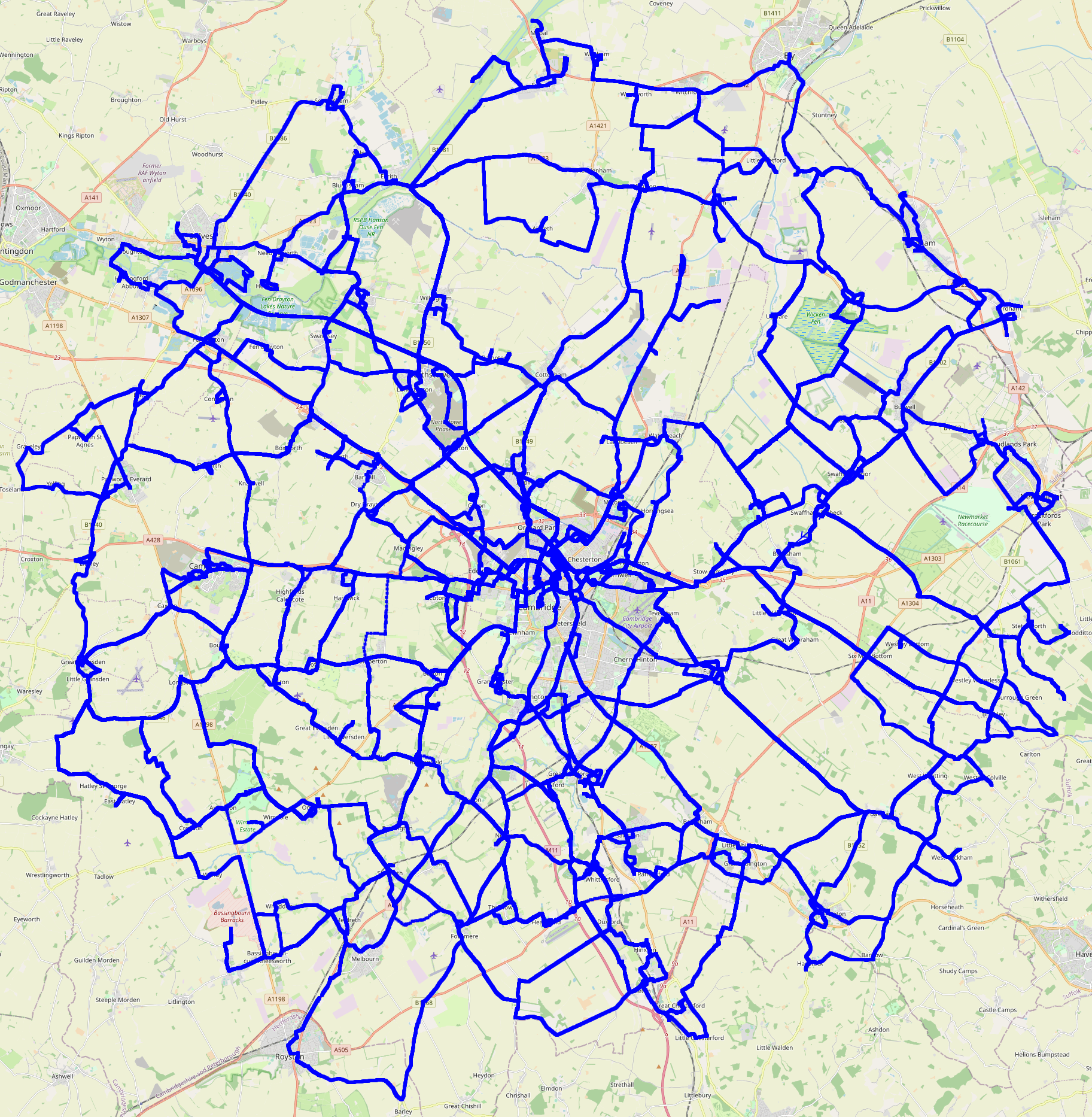
This last weekend I completed a bike rides project I started during the first Covid lockdown in 2020: I ve cycled to every settlement (and radio observatory) within 20km of my house, in alphabetical order. Stir crazy In early 2020, during the first lockdown, I was going a bit stir crazy. Clare said you re going very strange, you have to go out and get some exercise . After a bit of discussion, we came up with this plan: I d visit all the local villages, in alphabetical order. Choosing the radius I decided that I would pick a round number of kilometers, as the crow flies, from my house. 20km seemed about right. 25km would have included Ely, which would have been nice, but it would have added a great many places, all of them quite distant. Software I wrote a short Rust program to process OSM data into a list of places to visit, and their distances and bearings. You can download a tarball of the alphabetical villages scanner. (I haven t published the git history because it has my house s GPS coordinates in it, and because I committed the output files from which that location can be derived.) The Rides I set off on my first ride, to Aldreth, on Sunday the 31st of May 2020. The final ride collected Yelling, on Saturday the 19th of August 2023. I did quite a few rides in June and July 2020 - more than one a week. (I d read the lockdown rules, and although some of the government messaging said you should stay near your house, that wasn t in the legislation. Of course I didn t go into any buildings or anything.) I m not much of a morning person, so I often set off after lunch. For the longer rides I would usually pack a picnic. Almost all of the rides I did just by myself. There were a handful where I had friends along: Dry Drayton, which I collected with Clare, at night. I held my bike up so the light shone at the village sign, so we could take a photo of it. Madingley, Melbourn and Meldreth, which was quite an expedition with my friend Ben. We went out as far as Royston and nearby Barley (both outside my radius and not on my list) mostly just so that my project would have visited Hertfordshire. The Hemingfords, where I had my friend Matthew along, and we had a very nice pub lunch. Girton and Wilburton, where I visited friends. Indeed, I stopped off in Wilburton on one or two other occasions. And, of course, Yelling, for which there were four of us, again with a nice lunch (in Eltisley). I had relatively little mechanical trouble. My worst ride for this was Exning: I got three punctures that day. Luckily the last one was close to home. I often would stop to take lots of photos en-route. My mum in particular appreciated all the pretty pictures. Rules I decided on these rules: I would cycle to each destination, in order, and it would count as collected if I rode both there and back. I allowed collecting multiple villages in the same outing, provided I did them in the right order. (And obviously I was allowed to pass through places out of order, without counting them.) I tried to get a picture of the village sign, where there was one. Failing that, I got a picture of something in the village with the village s name on it. I think the only one I didn t manage this for was Westley Bottom; I had to make do with the word Westley on some railway level crossing equipment. In Barway I had to make do with a planning application, stuck to a pole. I tried not to enter and leave a village by the same road, if possible. Edge cases I had to make some decisions: I decided that I would consider the project complete if I visited everywhere whose centre was within my radius. But the centre of a settlement is rather hard to define. I needed a hard criterion for my OpenStreetMap data mining: a place counted if there was any node, way or relation, with the relevant place tag, any part of which was within my ambit. That included some places that probably oughtn t to have counted, but, fine. I also decided that I wouldn t visit suburbs of Cambridge, separately from Cambridge itself. I don t consider them separate settlements, at least, not if they re conurbated with Cambridge. So that excluded Trumpington, for example. But I decided that Girton and Fen Ditton were (just) separable. Although the place where I consider Girton and Cambridge to nearly touch, is administratively well inside Girton, I chose to look at land use (on the ground, and in OSM data), rather than administrative boundaries. But I did visit both Histon and Impington, and all each of the Shelfords and Stapleford, as separate entries in my list. Mostly because otherwise I d have to decide whether to skip (say) Impington, or Histon. Whereas skipping suburbs of Cambridge in favour of Cambridge itself was an easy decision, and it also got rid of a bunch of what would have been quite short, boring, urban expeditions. I sorted all the Greats and Littles under G and L, rather than (say) Shelford, Great , which seemed like it would be cheating because then I would be able to do Shelford, Great and Shelford, Little in one go. Northstowe turned from mostly a building site into something that was arguably a settlement, during my project. It wasn t included in the output of my original data mining. Of course it s conurbated with Oakington - but happily, Northstowe inserts right before Oakington in the alphabetical list, so I decided to add it, visiting both the old and new in the same day. There are a bunch of other minor edge cases. Some villages have an outlying hamlet. Mostly I included these. There are some individual farms, which I generally didn t count. Some stats I visited 150 villages plus the Lords Bridge radio observatory. The project took 3 years and 3 months to complete. There were 96 rides, totalling about 4900km. So my mean distance was around 51km. The median distance per ride was a little higher, at around 52 km, and the median duration (including stoppages) was about 2h40. The total duration, if you add them all up, including stoppages, was about 275h, giving a mean speed including photo stops, lunches and all, of 18kph. The longest ride was 89.8km, collecting Scotland Farm, Shepreth, and Six Mile Bottom, so riding across the Cam valley. The shortest ride was 7.9km, collecting Cambridge (obviously); and I think that s the only one I did on my Brompton. The rest were all on my trusty Thorn Audax. My fastest ride (ranking by distance divided by time spent in motion) was to collect Haddenham, where I covered 46.3km in 1h39, giving an average speed in motion of 28.0kph. The most I collected in one day was 5 places: West Wickham, West Wratting, Westley Bottom, Westley Waterless, and Weston Colville. That was the day of the Wests. (There s only one East: East Hatley.) Map Here is a pretty picture of all of my tracklogs:
Edited 2023-08-25 01:32 BST to correct a slip.


comment count unavailable comments

22 August 2023

Scarlett Gately Moore: KDE: A Day in the Life the KDE Snapcrafter Part 2

KDE MascotKDE Mascot
Much to my dismay, I figured out that my blog has been disabled on the Ubuntu planet since May. If you are curious about what I have been up to, please go to the handy links -> and read up! This post is a continuation of last weeks https://www.scarlettgatelymoore.dev/kde-a-day-in-the-life-of-the-kde-snapcrafter/ IMPORTANT: I am still looking for a super awesome team lead for a super amazing project involving KDE and Snaps. Time is running out and well the KDE world will be a better a better place if this project goes through! I would like to clarify, this is a paid position! A current KDE developer would be ideal as it is a small team so your time will be split managing and coding alike. If you or anyone you know might be interested please contact me ASAP! Snaps: I am wrapping up the 23.04.3 KDE applications release! Head on over to https://snapcraft.io/search?q=KDE and enjoy! We are now up to 180 snaps! PIM snaps will be slowly rolling in as they go through manual reviews for D-Bus. Snapcraft: minor fix in qmake plugin found by ruff. Launchpad: I almost have approval for per application repository snapcraft files, but I have to prove it will work to our benefit and not cause loads of polling etc. So I have been testing various methods of achieving such a task, and so far I have come up with launchpads ability to watch and download release tarballs into a project. I will then need to script getting the tarball and pushing it to a bzr branch from which I can create a proper snap recipe. Unfortunately, my proper snap recipe fails! Hopefully a very helpful cjwatson will chime in, or if anyone wants to take a gander please chime in here: https://bugs.launchpad.net/launchpad/+bug/2031307 As reality sets in that my project may not happen if I don t find anyone, I need help surviving until I find work or funding to continue my snap work ( still much to do! ) If you or anyone else you know enjoys our snaps please consider a donation, anything helps! Please share! Thank you for your consideration!

21 August 2023

Melissa Wen: AMD Driver-specific Properties for Color Management on Linux (Part 1)

TL;DR: Color is a visual perception. Human eyes can detect a broader range of colors than any devices in the graphics chain. Since each device can generate, capture or reproduce a specific subset of colors and tones, color management controls color conversion and calibration across devices to ensure a more accurate and consistent color representation. We can expose a GPU-accelerated display color management pipeline to support this process and enhance results, and this is what we are doing on Linux to improve color management on Gamescope/SteamDeck. Even with the challenges of being external developers, we have been working on mapping AMD GPU color capabilities to the Linux kernel color management interface, which is a combination of DRM and AMD driver-specific color properties. This more extensive color management pipeline includes pre-defined Transfer Functions, 1-Dimensional LookUp Tables (1D LUTs), and 3D LUTs before and after the plane composition/blending.
The study of color is well-established and has been explored for many years. Color science and research findings have also guided technology innovations. As a result, color in Computer Graphics is a very complex topic that I m putting a lot of effort into becoming familiar with. I always find myself rereading all the materials I have collected about color space and operations since I started this journey (about one year ago). I also understand how hard it is to find consensus on some color subjects, as exemplified by all explanations around the 2015 online viral phenomenon of The Black and Blue Dress. Have you heard about it? What is the color of the dress for you? So, taking into account my skills with colors and building consensus, this blog post only focuses on GPU hardware capabilities to support color management :-D If you want to learn more about color concepts and color on Linux, you can find useful links at the end of this blog post.

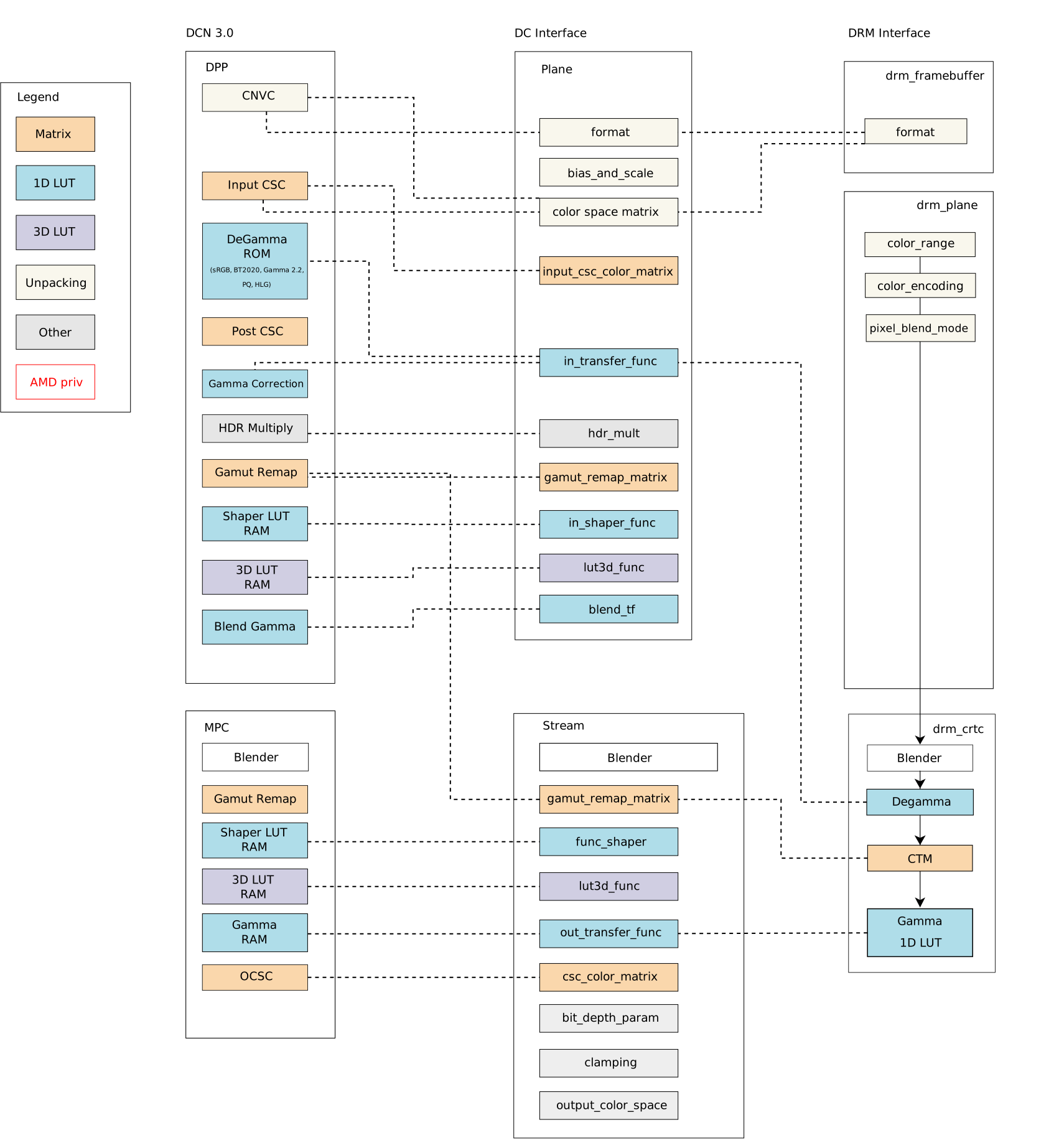
Linux Kernel, show me the colors ;D DRM color management interface only exposes a small set of post-blending color properties. Proposals to enhance the DRM color API from different vendors have landed the subsystem mailing list over the last few years. On one hand, we got some suggestions to extend DRM post-blending/CRTC color API: DRM CRTC 3D LUT for R-Car (2020 version); DRM CRTC 3D LUT for Intel (draft - 2020); DRM CRTC 3D LUT for AMD by Igalia (v2 - 2023); DRM CRTC 3D LUT for R-Car (v2 - 2023). On the other hand, some proposals to extend DRM pre-blending/plane API: DRM plane colors for Intel (v2 - 2021); DRM plane API for AMD (v3 - 2021); DRM plane 3D LUT for AMD - 2021. Finally, Simon Ser sent the latest proposal in May 2023: Plane color pipeline KMS uAPI, from discussions in the 2023 Display/HDR Hackfest, and it is still under evaluation by the Linux Graphics community. All previous proposals seek a generic solution for expanding the API, but many seem to have stalled due to the uncertainty of matching well the hardware capabilities of all vendors. Meanwhile, the use of AMD color capabilities on Linux remained limited by the DRM interface, as the DCN 3.0 family color caps and mapping diagram below shows the Linux/DRM color interface without driver-specific color properties [*]: Bearing in mind that we need to know the variety of color pipelines in the subsystem to be clear about a generic solution, we decided to approach the issue from a different perspective and worked on enabling a set of Driver-Specific Color Properties for AMD Display Drivers. As a result, I recently sent another round of the AMD driver-specific color mgmt API. For those who have been following the AMD driver-specific proposal since the beginning (see [RFC][V1]), the main new features of the latest version [v2] are the addition of pre-blending Color Transformation Matrix (plane CTM) and the differentiation of Pre-defined Transfer Functions (TF) supported by color blocks. For those who just got here, I will recap this work in two blog posts. This one describes the current status of the AMD display driver in the Linux kernel/DRM subsystem and what changes with the driver-specific properties. In the next post, we go deeper to describe the features of each color block and provide a better picture of what is available in terms of color management for Linux.

The Linux kernel color management API and AMD hardware color capabilities Before discussing colors in the Linux kernel with AMD hardware, consider accessing the Linux kernel documentation (version 6.5.0-rc5). In the AMD Display documentation, you will find my previous work documenting AMD hardware color capabilities and the Color Management Properties. It describes how AMD Display Manager (DM) intermediates requests between the AMD Display Core component (DC) and the Linux/DRM kernel interface for color management features. It also describes the relevant function to call the AMD color module in building curves for content space transformations. A subsection also describes hardware color capabilities and how they evolve between versions. This subsection, DC Color Capabilities between DCN generations, is a good starting point to understand what we have been doing on the kernel side to provide a broader color management API with AMD driver-specific properties.

Why do we need more kernel color properties on Linux? Blending is the process of combining multiple planes (framebuffers abstraction) according to their mode settings. Before blending, we can manage the colors of various planes separately; after blending, we have combined those planes in only one output per CRTC. Color conversions after blending would be enough in a single-plane scenario or when dealing with planes in the same color space on the kernel side. Still, it cannot help to handle the blending of multiple planes with different color spaces and luminance levels. With plane color management properties, userspace can get a more accurate representation of colors to deal with the diversity of color profiles of devices in the graphics chain, bring a wide color gamut (WCG), convert High-Dynamic-Range (HDR) content to Standard-Dynamic-Range (SDR) content (and vice-versa). With a GPU-accelerated display color management pipeline, we can use hardware blocks for color conversions and color mapping and support advanced color management. The current DRM color management API enables us to perform some color conversions after blending, but there is no interface to calibrate input space by planes. Note that here I m not considering some workarounds in the AMD display manager mapping of DRM CRTC de-gamma and DRM CRTC CTM property to pre-blending DC de-gamma and gamut remap block, respectively. So, in more detail, it only exposes three post-blending features:
  • DRM CRTC de-gamma: used to convert the framebuffer s colors to linear gamma;
  • DRM CRTC CTM: used for color space conversion;
  • DRM CRTC gamma: used to convert colors to the gamma space of the connected screen.

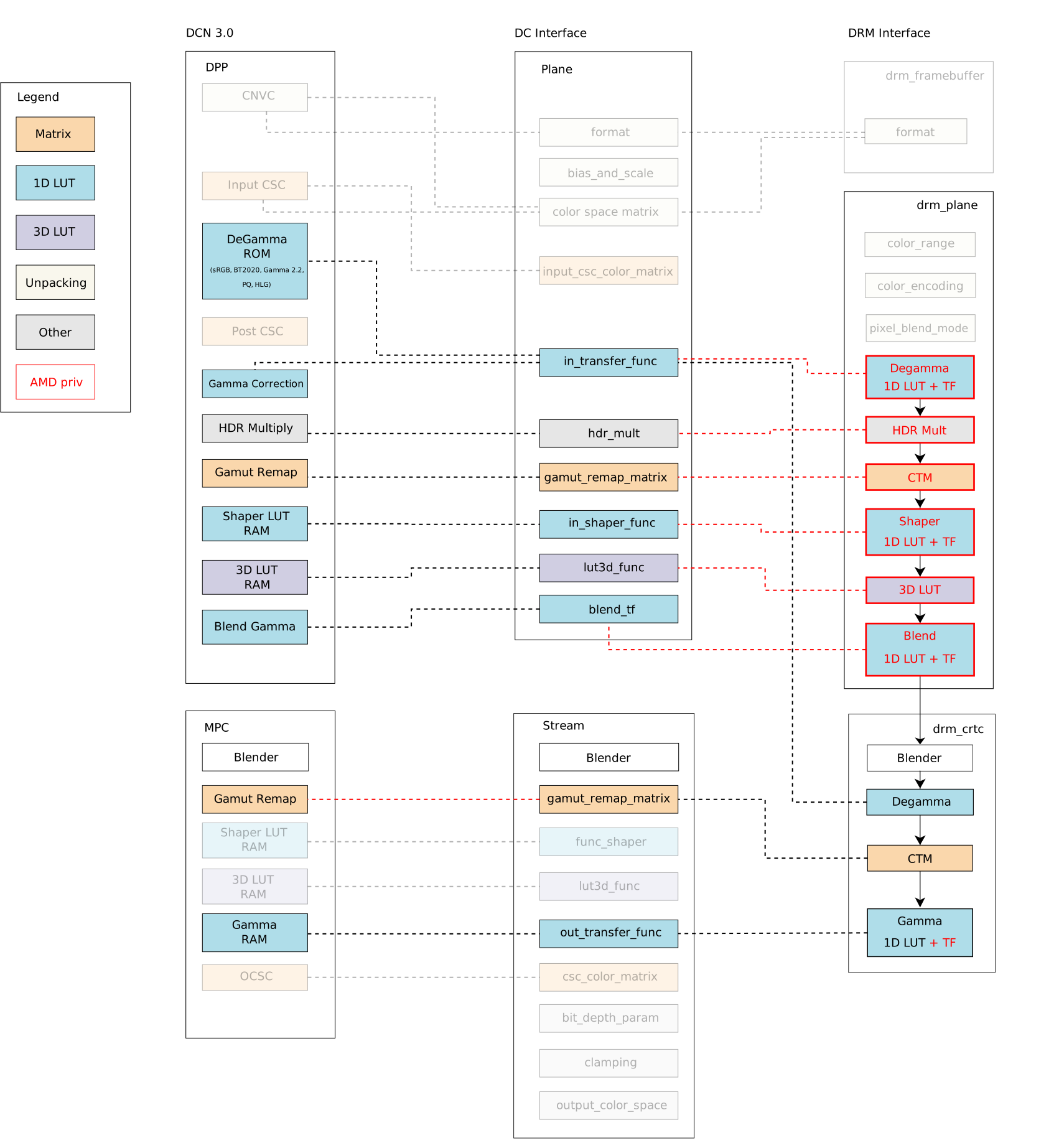
AMD driver-specific color management interface We can compare the Linux color management API with and without the driver-specific color properties. From now, we denote driver-specific properties with the AMD prefix and generic properties with the DRM prefix. For visual comparison, I bring the DCN 3.0 family color caps and mapping diagram closer and present it here again: Mixing AMD driver-specific color properties with DRM generic color properties, we have a broader Linux color management system with the following features exposed by properties in the plane and CRTC interface, as summarized by this updated diagram: The blocks highlighted by red lines are the new properties in the driver-specific interface developed by me (Igalia) and Joshua (Valve). The red dashed lines are new links between API and AMD driver components implemented by us to connect the Linux/DRM interface to AMD hardware blocks, mapping components accordingly. In short, we have the following color management properties exposed by the DRM/AMD display driver:
  • Pre-blending - AMD Display Pipe and Plane (DPP):
    • AMD plane de-gamma: 1D LUT and pre-defined transfer functions; used to linearize the input space of a plane;
    • AMD plane CTM: 3x4 matrix; used to convert plane color space;
    • AMD plane shaper: 1D LUT and pre-defined transfer functions; used to delinearize and/or normalize colors before applying 3D LUT;
    • AMD plane 3D LUT: 17x17x17 size with 12 bit-depth; three dimensional lookup table used for advanced color mapping;
    • AMD plane blend/out gamma: 1D LUT and pre-defined transfer functions; used to linearize back the color space after 3D LUT for blending.
  • Post-blending - AMD Multiple Pipe/Plane Combined (MPC):
    • DRM CRTC de-gamma: 1D LUT (can t be set together with plane de-gamma);
    • DRM CRTC CTM: 3x3 matrix (remapped to post-blending matrix);
    • DRM CRTC gamma: 1D LUT + AMD CRTC gamma TF; added to take advantage of driver pre-defined transfer functions;
Note: You can find more about AMD display blocks in the Display Core Next (DCN) - Linux kernel documentation, provided by Rodrigo Siqueira (Linux/AMD display developer) in a 2021-documentation series. In the next post, I ll revisit this topic, explaining display and color blocks in detail.

How did we get a large set of color features from AMD display hardware? So, looking at AMD hardware color capabilities in the first diagram, we can see no post-blending (MPC) de-gamma block in any hardware families. We can also see that the AMD display driver maps CRTC/post-blending CTM to pre-blending (DPP) gamut_remap, but there is post-blending (MPC) gamut_remap (DRM CTM) from newer hardware versions that include SteamDeck hardware. You can find more details about hardware versions in the Linux kernel documentation/AMDGPU Product Information. I needed to rework these two mappings mentioned above to provide pre-blending/plane de-gamma and CTM for SteamDeck. I changed the DC mapping to detach stream gamut remap matrixes from the DPP gamut remap block. That means mapping AMD plane CTM directly to DPP/pre-blending gamut remap block and DRM CRTC CTM to MPC/post-blending gamut remap block. In this sense, I also limited plane CTM properties to those hardware versions with MPC/post-blending gamut_remap capabilities since older versions cannot support this feature without clashes with DRM CRTC CTM. Unfortunately, I couldn t prevent conflict between AMD plane de-gamma and DRM plane de-gamma since post-blending de-gamma isn t available in any AMD hardware versions until now. The fact is that a post-blending de-gamma makes little sense in the AMD color pipeline, where plane blending works better in a linear space, and there are enough color blocks to linearize content before blending. To deal with this conflict, the driver now rejects atomic commits if users try to set both AMD plane de-gamma and DRM CRTC de-gamma simultaneously. Finally, we had no other clashes when enabling other AMD driver-specific color properties for our use case, Gamescope/SteamDeck. Our main work for the remaining properties was understanding the data flow of each property, the hardware capabilities and limitations, and how to shape the data for programming the registers - AMD color block capabilities (and limitations) are the topics of the next blog post. Besides that, we fixed some driver bugs along the way since it was the first Linux use case for most of the new color properties, and some behaviors are only exposed when exercising the engine. Take a look at the Gamescope/Steam Deck Color Pipeline[**], and see how Gamescope uses the new API to manage color space conversions and calibration (please click on the image for a better view): In the next blog post, I ll describe the implementation and technical details of each pre- and post-blending color block/property on the AMD display driver. * Thank Harry Wentland for helping with diagrams, color concepts and AMD capabilities. ** Thank Joshua Ashton for providing and explaining Gamescope/Steam Deck color pipeline. *** Thanks to the Linux Graphics community - explicitly Harry, Joshua, Pekka, Simon, Sebastian, Siqueira, Alex H. and Ville - to all the learning during this Linux DRM/AMD color journey. Also, Carlos and Tomas for organizing the 2023 Display/HDR Hackfest where we have a great and immersive opportunity to discuss Color & HDR on Linux.

20 August 2023

Dirk Eddelbuettel: RcppRedis 0.2.4 on CRAN: Maintenance

Another minor release, now at 0.2.4, of our RcppRedis package arrived on CRAN yesterday. RcppRedis is one of several packages connecting R to the fabulous Redis in-memory datastructure store (and much more). RcppRedis does not pretend to be feature complete, but it may do some things faster than the other interfaces, and also offers an optional coupling with MessagePack binary (de)serialization via RcppMsgPack. The package has carried production loads on a trading floor for several years. It also supports pub/sub dissemination of streaming market data as per this earlier example. This update is (just like the previous one) fairly mechanical. CRAN noticed a shortcoming of the default per-package help page in a number of packages, in our case it was matter of adding one line for a missing alias to the Rd file. We also demoted the mention of the suggested (but retired) rredis package to a mere mention in the DESCRIPTION file as a formal Suggests: entry, even with an added Additional_repositories, create a NOTE. Life is simpler without those, The detailed changes list follows.

Changes in version 0.2.4 (2023-08-19)
  • Add missing alias for RcppRedis-package to rhiredis.Rd.
  • Remove Suggests: rredis which triggers a NOTE nag as it is only on an Additional_repositories .

Courtesy of my CRANberries, there is also a diffstat report for this this release. More information is on the RcppRedis page. If you like this or other open-source work I do, you can sponsor me at GitHub.

This post by Dirk Eddelbuettel originated on his Thinking inside the box blog. Please report excessive re-aggregation in third-party for-profit settings.

18 August 2023

Scarlett Gately Moore: KDE: A day in the life of the KDE snapcrafter!

KDE MascotKDE Mascot
As mentioned last week, I am still looking for a super awesome team lead for a super amazing project involving KDE and Snaps. Time is running out and well the KDE world will be a better a better place if this project goes through! I would like to clarify, this is a paid position! A current KDE developer would be ideal as it is a small team so your time will be split managing and coding alike. If you or anyone you know might be interested please contact me ASAP! On to snappy things I have achieved this week: Most 23.04.3 is done, I am just testing them now. New applications: kmymoney ( Thanks Carlos! ), kde-dev-utils, and kxstitch ( Thanks Jeremy! ) With that said, I have seen on the internets candidate channel apps being promoted. Please use this channel with utmost care as they are being tested and could quite possibly be very broken! Still working on some QML issues with kirigami platform not found. I have begun the launchpad build issues journey and have been kindly pointed to using snap recipes on launchpad so we aren t doing public uploads which creates temporary recipes to build and cannot be bumped priority wise. So I have sent the request into the kde-devel arena to revisit having per repository snapcraft files ( rejected in the past ) as they do with flatpak files. So far I am getting positive feedback and hopefully this will go through. Once it does I can move forward with fully automating application new releases. Hooray! This week I jumped into the xdg-desktop-portals rabbithole while working on https://bugs.kde.org/show_bug.cgi?id=473003 for neochat. After fixing it with adding plug password-manager-service I am told that auto-connect on that one is discouraged and the libsecret should work out of the box with portals. I found and joined just in time a snapcrafter google meet and we had a long conversation spitballing and testing our portal support. At least in Neon it appears to be broken. I now have some things to do and test to see that we get this functional. Most of our online apps are affected. For now though snap connect neochat:password-manager-service :password-manager-service does work. Auto-connect was rejected as it exposes to much. Understandable. I have started a new thread on the KDE forums for users to ask any questions, or let me know of any issues you may have related to snaps here: https://discuss.kde.org/t/all-things-snaps-questions-concerns-praise/4033 come join the conversation! In the snapcraft arena I have fixed my PR for the much needed qmake plugin! This should be merged and rolled out in the very near future! I would like to continue my hard work on snap things regardless of the project going through. Unfortunately, to do so, I must ask for donations as life isn t free. I am working on self sufficiency but even that costs money to get started! KDE snaps are used by 1.7 million active devices! I do ask that if you use KDE snaps and find my work useful, or know someone that does, to please consider donating to keep my momentum going. There is still much work to be done with Qt6 rolling out. I would like to work on the KDE Plasma snap and KDE PIM suite of apps ( I have started on this ). Even if you can t help, please share! Thank you for your consideration! I have a new donation form for anyone that doesn t like gofundme here:
Gofund me:

Dirk Eddelbuettel: #43: r2u Faster Than the Alternatives

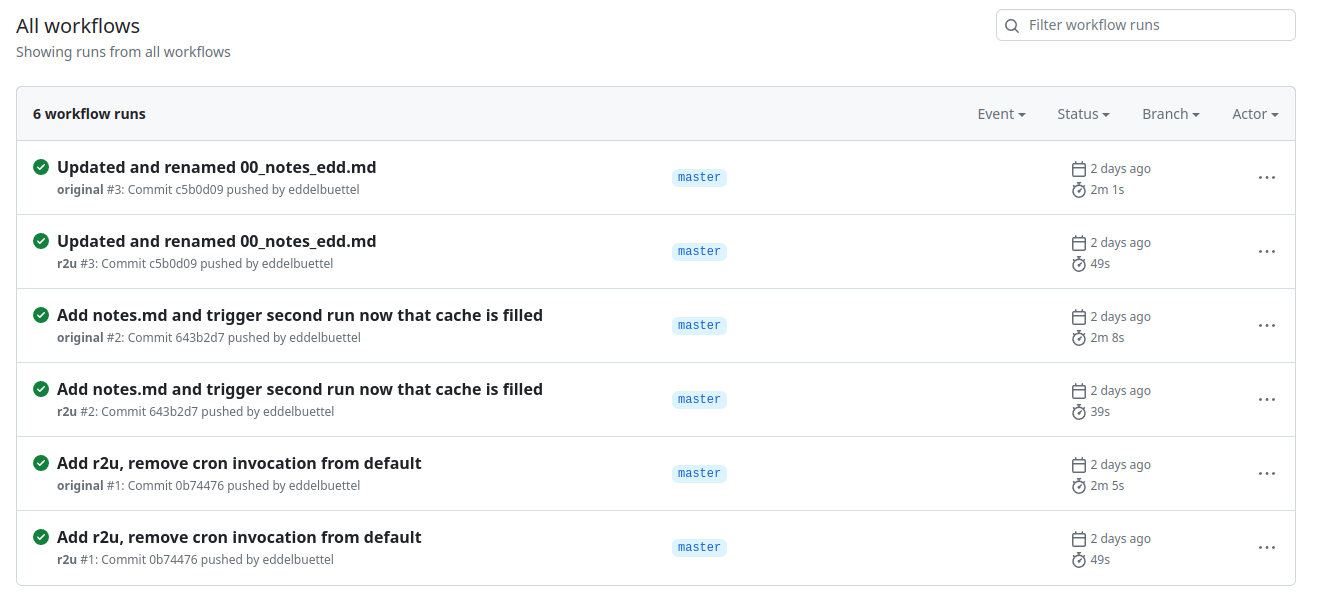
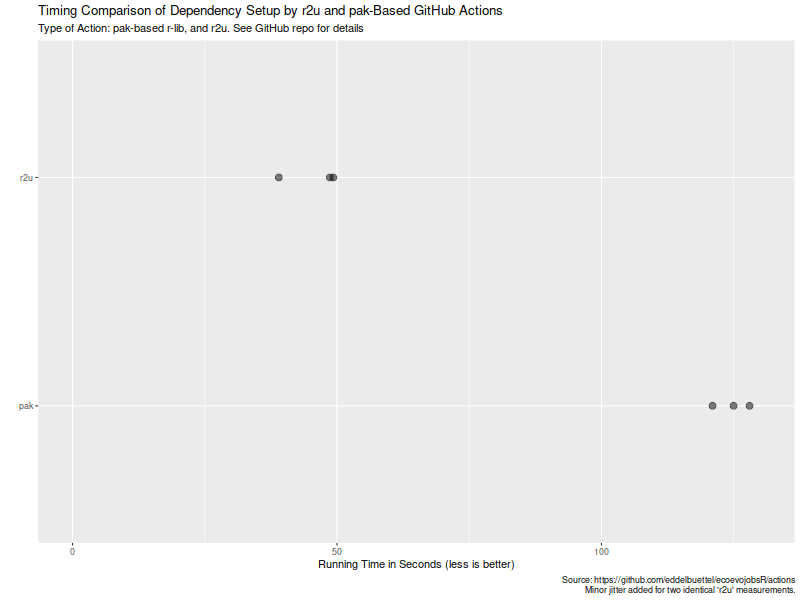
Welcome to the 43th post in the $R^4 series. And with that, a good laugh. When I set up Sunday s post, I was excited enough about the (indeed exciting !!) topic of r2u via browser or vscode that I mistakenly labeled it as the 41th post. And overlooked the existing 41th post from July! So it really is as if Douglas Adams, Arthur Dent, and, for good measure, Dirk Gently, looked over my shoulder and declared there shall not be a 42th post!! So now we have two 41th post: Sunday s and July s. Back the current topic, which is of course r2u. Earlier this week we had a failure in (an R based) CI run (using a default action which I had not set up). A package was newer in source than binary, so a build from source was attempted. And of course failed as it was a package needing a system dependency to build. Which the default action did not install. I am familiar with the problem via my general use of r2u (or my r-ci which uses it under the hood). And there we use a bspm variable to prefer binary over possibly newer source. So I was curious how one would address this with the default actions. It so happens that the same morning I spotted a StackOverflow question on the same topic, where the original poster had suffered the exact same issue! I offered my approach (via r2u) as a comment and was later notified of a follow-up answer by the OP. Turns our there is a new, more powerful action that does all this, potentially flipping to a newer version and building it, all while using a cache. Now I was curious, and in the evening cloned the repo to study the new approach and compare the new action to what r2u offers. In particular, I was curious if a use of caches would be benficial on repeated runs. A screenshot of the resulting Actions and their times follows. Turns out maybe not so much (yet ?). As the actions page of my cloned comparison repo shows in this screenshot, r2u is consistently faster at always below one minute compared to new entrant at always over two minutes. (I should clarify that the original actions sets up dependencies, then scrapes, and commits. I am timing only the setup of dependencies here.) We can also extract the six datapoints and quickly visualize them. Now, this is of course entirely possibly that not all possible venues for speedups were exploited in how the action setup was setup. If so, please file an issue at the repo and I will try to update accordingly. But for now it seems that a default of setup r2u is easily more than twice as fast as an otherwise very compelling alternative (with arguably much broader scope). However, where r2u choses to play, on the increasingly common, popular and powerful Ubuntu LTS setup, it clearly continues to run circles around alternate approaches. So the saying remains: r2u: fast, easy, reliable. If you like this or other open-source work I do, you can now sponsor me at GitHub.

This post by Dirk Eddelbuettel originated on his Thinking inside the box blog. Please report excessive re-aggregation in third-party for-profit settings.

Originally posted 2023-08-13, minimally edited 2023-08-15 which changed the timestamo and URL.

17 August 2023

Jonathan Carter: Debian 30th Birthday: Local Group event and Interview

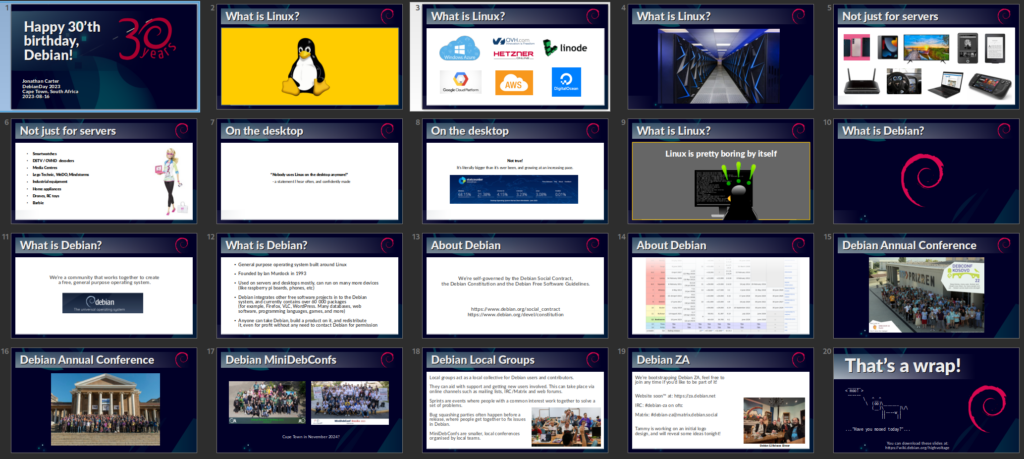
Inspired by the fine Debian Local Groups all over the world, I ve long since wanted to start one in Cape Town. Unfortunately, there s been many obstacles over the years. Shiny distractions, an epidemic, DPL terms these are just some of the things that got in the way. Fortunately, things are starting to gain traction, and we re well on our way to forming a bona fide local group for South Africa. We got together at Woodstock Grill, they have both a nice meeting room, and good food and beverage, also reasonably central for most of us.

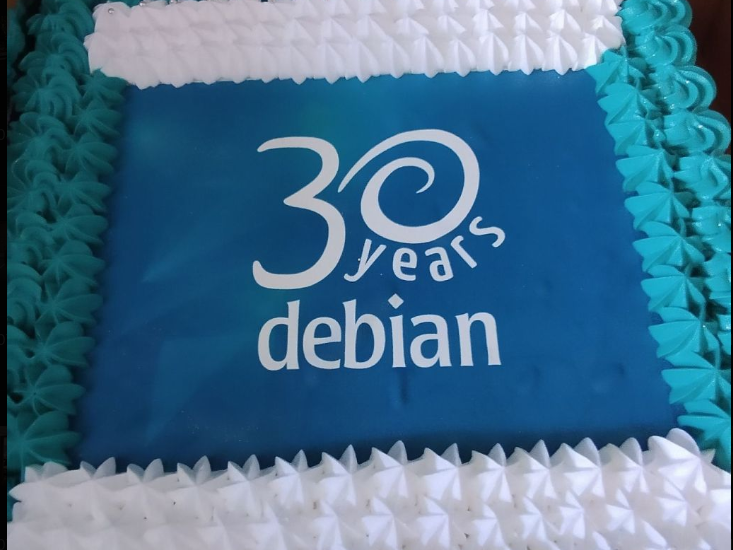
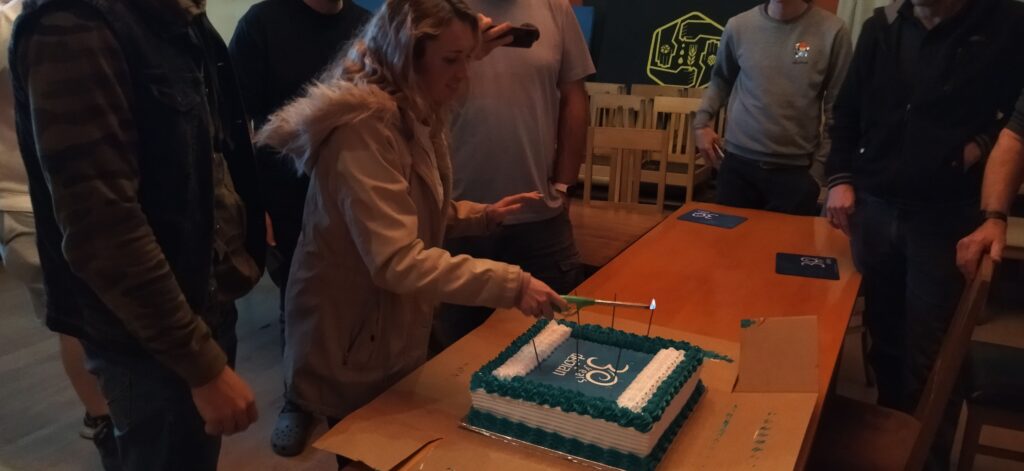
Cake Starting with the important stuff, we got this Debian cake made that ended up much bigger than we expected, at least we all got to take some home too! (it tasted great too)

Yes, cake.

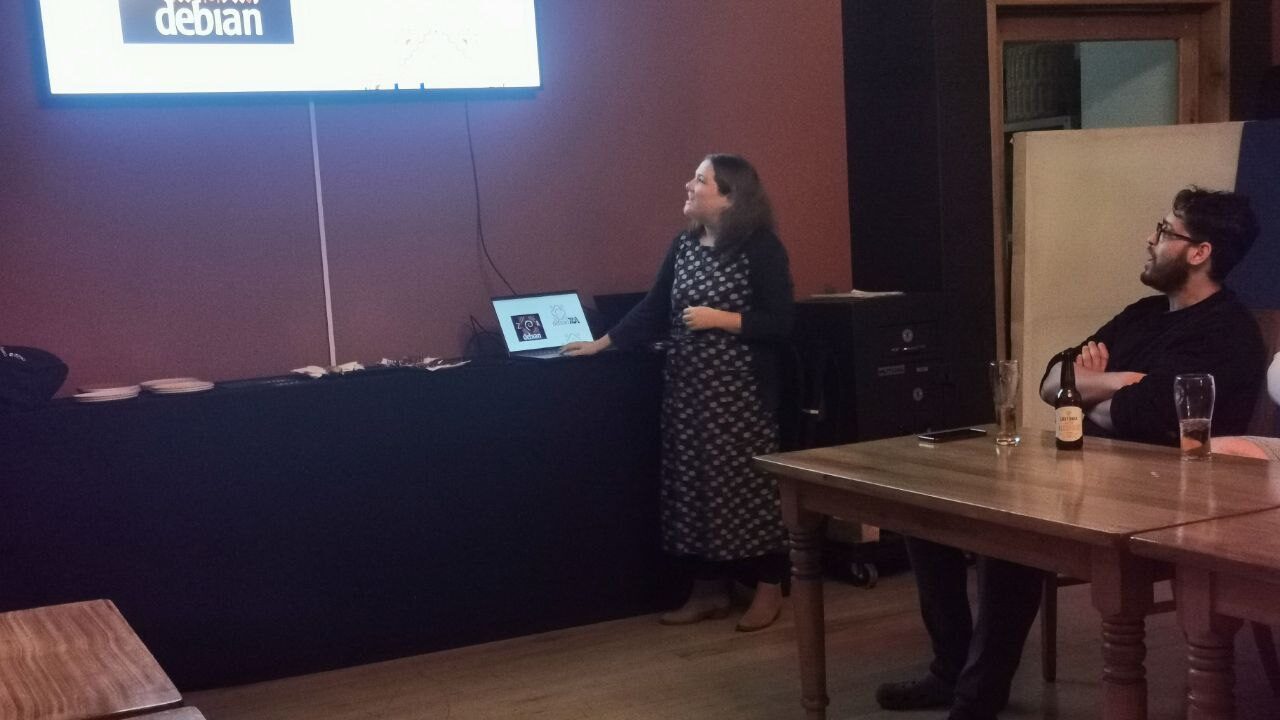
Talk This event was planned very last minute, so we didn t do any kind of RSVP and I had no idea who exactly would show up, so I went ahead and prepared one of my usual introduction to Linux and Debian talks, and how these things are having an impact on the world out there. I also talked a bit about the community and how we intend to grow our local team here in South Africa. It turned out most of the audience were already experienced Linux users, but I was happy to see that they were very enthusiastic about the local group concept!
While reading through some material to find some inspiration for this talk, I came across an old quote from the original Debian Manifesto that I found very poignant again, so I feel compelled to share (didn t use it in my talk this time though since I didn t cover much current events): The time has come to concentrate on the future of Linux rather than on the destructive goal of enriching oneself at the expense of the entire Linux community and its future. Ian Murdock, 1994

Debian-ZA logo Tammy spent some time creating a whole bunch of logo concepts, that she presented to us. They aren t meant as final logo choices, but as initial concepts, and they worked well to invoke a very lively discussion about logos and design!
Here are just some of her designs that I cherry picked since they were the most discussed. We still haven t decided if it will be Debian ZA or Debian-ZA or Debian South Africa, although the latter will probably cause least confusion internationally.
Personally, the last one on this image that I referred to as the carpet is my personal favourite :-)

Happy Birthday Song John and Heila wrote a happy birthday song. After seeing the lyrics (and considering myself an amateur lyricist) I thought it was way too tacky and I told John to put it away. But when the cake came out, someone said we should sing! and the lyrics quickly re-emerged and was handed out to everyone. It s also meant to be a loopy clip for the upcoming DebConf23. I ll concede that it worked out alright in the end! You judge for yourself:

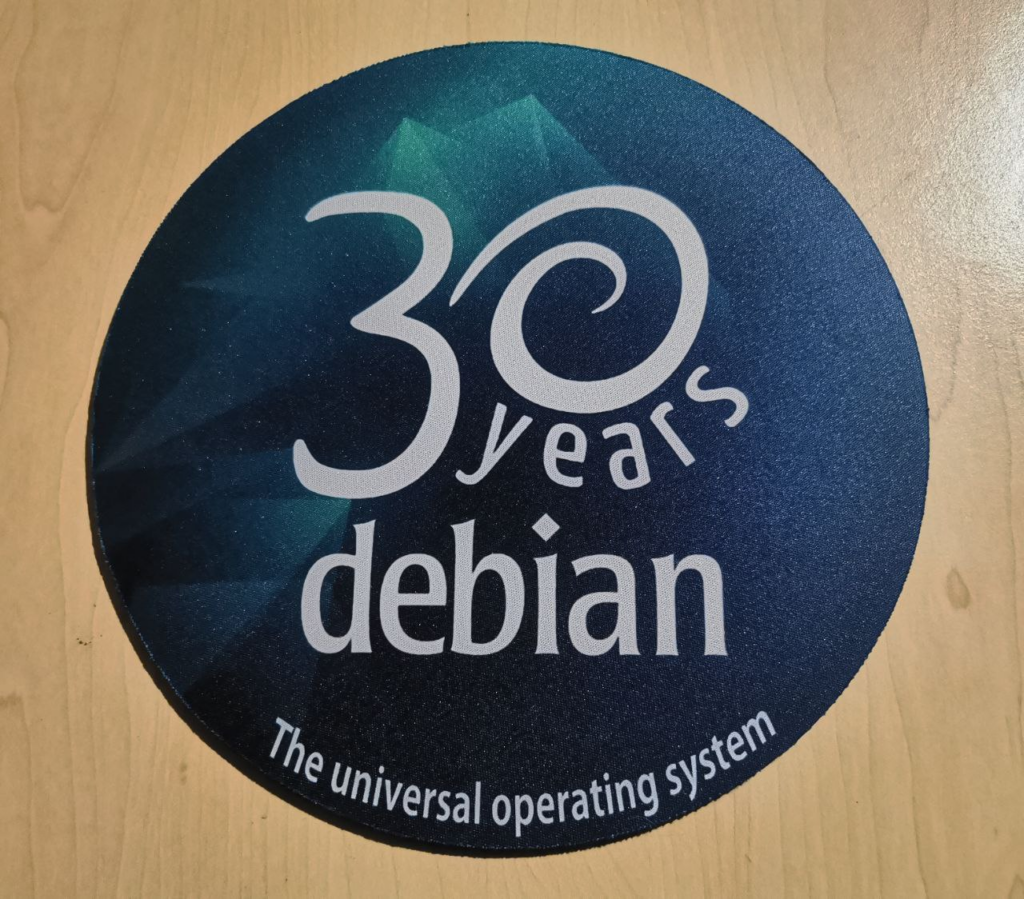
Mousepads People still use mousepads? That was my initial reaction when Heila told me that she was going to make some commemorative 30 year Debian mousepads for our birthday event, and they ended up being popular. It s probably a safer surface to put dev boards on than on my desk directly, so at least I do have a use for one!

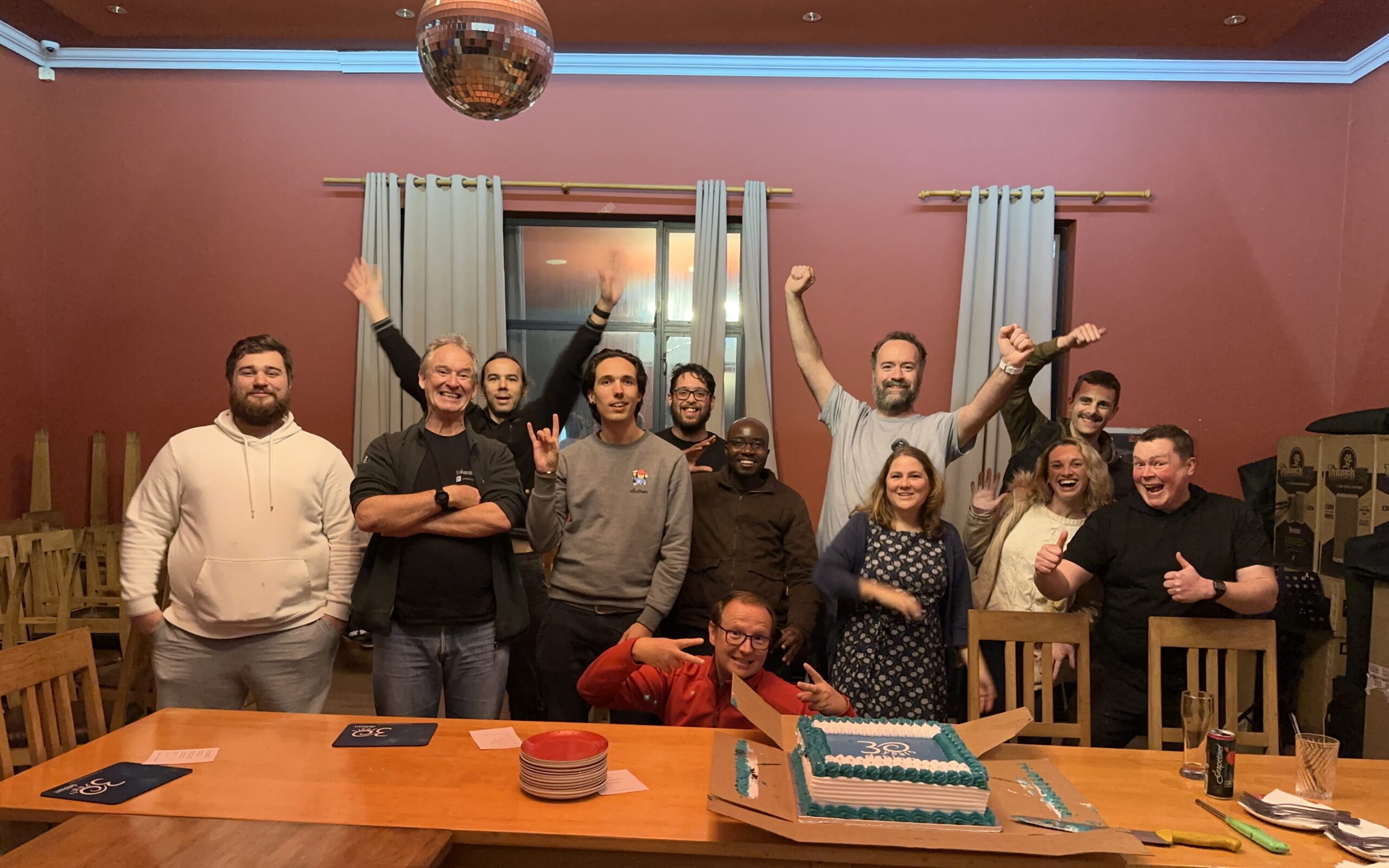
Group Photo The group photo, complete with disco ball! We should ve taken this earlier because it was already getting late and some people had to head back home. Lesson learned for next time!

30th Birthday Interview with The Changelog I also did an interview with The Changelog for Debian s 30th birthday. It was late, and I haven t had a chance to listen to it yet, so I hope their producers managed to edit something coherent out of my usual Debian babbling:

More later There s so much more I d like to say about Debian, the last 30 years, local groups, the eco-system that we find ourselves in. And, Lemmy! But I ll see if I can get an instance up over the weekend and will then talk about that some more another time.

16 August 2023

Wouter Verhelst: Perl test suites in GitLab

I've been maintaining a number of Perl software packages recently. There's SReview, my video review and transcoding system of which I split off Media::Convert a while back; and as of about a year ago, I've also added PtLink, an RSS aggregator (with future plans for more than just that). All these come with extensive test suites which can help me ensure that things continue to work properly when I play with things; and all of these are hosted on salsa.debian.org, Debian's gitlab instance. Since we're there anyway, I configured GitLab CI/CD to run a full test suite of all the software, so that I can't forget, and also so that I know sooner rather than later when things start breaking. GitLab has extensive support for various test-related reports, and while it took a while to be able to enable all of them, I'm happy to report that today, my perl test suites generate all three possible reports. They are: Additionally, I also store the native perl Devel::Cover report as job artifacts, as they show some information that GitLab does not. It's important to recognize that not all data is useful. For instance, the JUnit report allows for a test name and for details of the test. However, the module that generates the JUnit report from TAP test suites does not make a distinction here; both the test name and the test details are reported as the same. Additionally, the time a test took is measured as the time between the end of the previous test and the end of the current one; there is no "start" marker in the TAP protocol. That being said, it's still useful to see all the available information in GitLab. And it's not even all that hard to do:
test:
  stage: test
  image: perl:latest
  coverage: '/^Total.* (\d+.\d+)$/'
  before_script:
    - cpanm ExtUtils::Depends Devel::Cover TAP::Harness::JUnit Devel::Cover::Report::Cobertura
    - cpanm --notest --installdeps .
    - perl Makefile.PL
  script:
    - cover -delete
    - HARNESS_PERL_SWITCHES='-MDevel::Cover' prove -v -l -s --harness TAP::Harness::JUnit
    - cover
    - cover -report cobertura
  artifacts:
    paths:
    - cover_db
    reports:
      junit: junit_output.xml
      coverage_report:
        path: cover_db/cobertura.xml
        coverage_format: cobertura
Let's expand on that a bit. The first three lines should be clear for anyone who's used GitLab CI/CD in the past. We create a job called test; we start it in the test stage, and we run it in the perl:latest docker image. Nothing spectacular here. The coverage line contains a regular expression. This is applied by GitLab to the output of the job; if it matches, then the first bracket match is extracted, and whatever that contains is assumed to contain the code coverage percentage for the code; it will be reported as such in the GitLab UI for the job that was ran, and graphs may be drawn to show how the coverage changes over time. Additionally, merge requests will show the delta in the code coverage, which may help deciding whether to accept a merge request. This regular expression will match on a line of that the cover program will generate on standard output. The before_script section installs various perl modules we'll need later on. First, we intall ExtUtils::Depends. My code uses ExtUtils::MakeMaker, which ExtUtils::Depends depends on (no pun intended); obviously, if your perl code doesn't use that, then you don't need to install it. The next three modules -- Devel::Cover, TAP::Harness::JUnit and Devel::Cover::Report::Cobertura are necessary for the reports, and you should include them if you want to copy what I'm doing. Next, we install declared dependencies, which is probably a good idea for you as well, and then we run perl Makefile.PL, which will generate the Makefile. If you don't use ExtUtils::MakeMaker, update that part to do what your build system uses. That should be fairly straightforward. You'll notice that we don't actually use the Makefile. This is because we only want to run the test suite, which in our case (since these are PurePerl modules) doesn't require us to build the software first. One might consider that this makes the call of perl Makefile.PL useless, but I think it's a useful test regardless; if that fails, then obviously we did something wrong and shouldn't even try to go further. The actual tests are run inside a script snippet, as is usual for GitLab. However we do a bit more than you would normally expect; this is required for the reports that we want to generate. Let's unpack what we do there:
cover -delete
This deletes any coverage database that might exist (e.g., due to caching or some such). We don't actually expect any coverage database, but it doesn't hurt.
HARNESS_PERL_SWITCHES='-MDevel::Cover'
This tells the TAP harness that we want it to load the Devel::Cover addon, which can generate code coverage statistics. It stores that in the cover_db directory, and allows you to generate all kinds of reports on the code coverage later (but we don't do that here, yet).
prove -v -l -s
Runs the actual test suite, with verbose output, shuffling (aka, randomizing) the test suite, and adding the lib directory to perl's include path. This works for us, again, because we don't actually need to compile anything; if you do, then -b (for blib) may be required. ExtUtils::MakeMaker creates a test target in its Makefile, and usually this is how you invoke the test suite. However, it's not the only way to do so, and indeed if you want to generate a JUnit XML report then you can't do that. Instead, in that case, you need to use the prove, so that you can tell it to load the TAP::Harness::JUnit module by way of the --harness option, which will then generate the JUnit XML report. By default, the JUnit XML report is generated in a file junit_output.xml. It's possible to customize the filename for this report, but GitLab doesn't care and neither do I, so I don't. Uploading the JUnit XML format tells GitLab which tests were run and Finally, we invoke the cover script twice to generate two coverage reports; once we generate the default report (which generates HTML files with detailed information on all the code that was triggered in your test suite), and once with the -report cobertura parameter, which generates the cobertura XML format. Once we've generated all our reports, we then need to upload them to GitLab in the right way. The native perl report, which is in the cover_db directory, is uploaded as a regular job artifact, which we can then look at through a web browser, and the two XML reports are uploaded in the correct way for their respective formats. All in all, I find that doing this makes it easier to understand how my code is tested, and why things go wrong when they do.

15 August 2023

Dirk Eddelbuettel: #41: Using r2u in Codespaces

Welcome to the 41th post in the $R^4 series. This post draws on joint experiments first started by Grant building on the lovely work done by Eitsupi as part of our Rocker Project. In short, r2u is an ideal match for Codespaces, a Microsoft/GitHub service to run code locally but in the cloud via browser or Visual Studio Code. This posts co-serves as the README.md in the .devcontainer directory as well as a vignette for r2u. So let us get into it. Starting from the r2u repository, the .devcontainer directory provides a small self-containted file devcontainer.json to launch an executable environment R using r2u. It is based on the example in Grant McDermott s codespaces-r2u repo and reuses its documentation. It is driven by the Rocker Project s Devcontainer Features repo creating a fully functioning R environment for cloud use in a few minutes. And thanks to r2u you can add easily to this environment by installing new R packages in a fast and failsafe way.

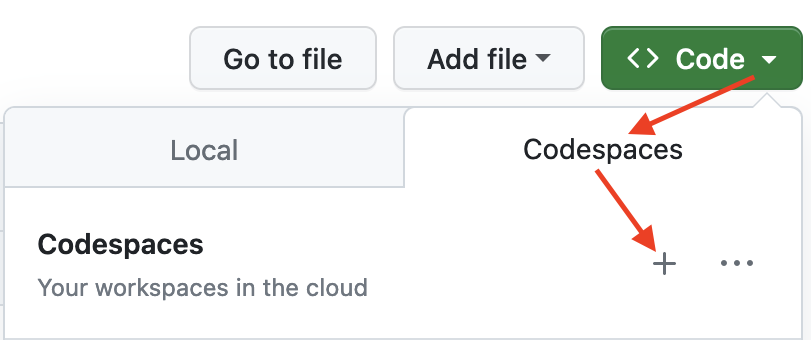
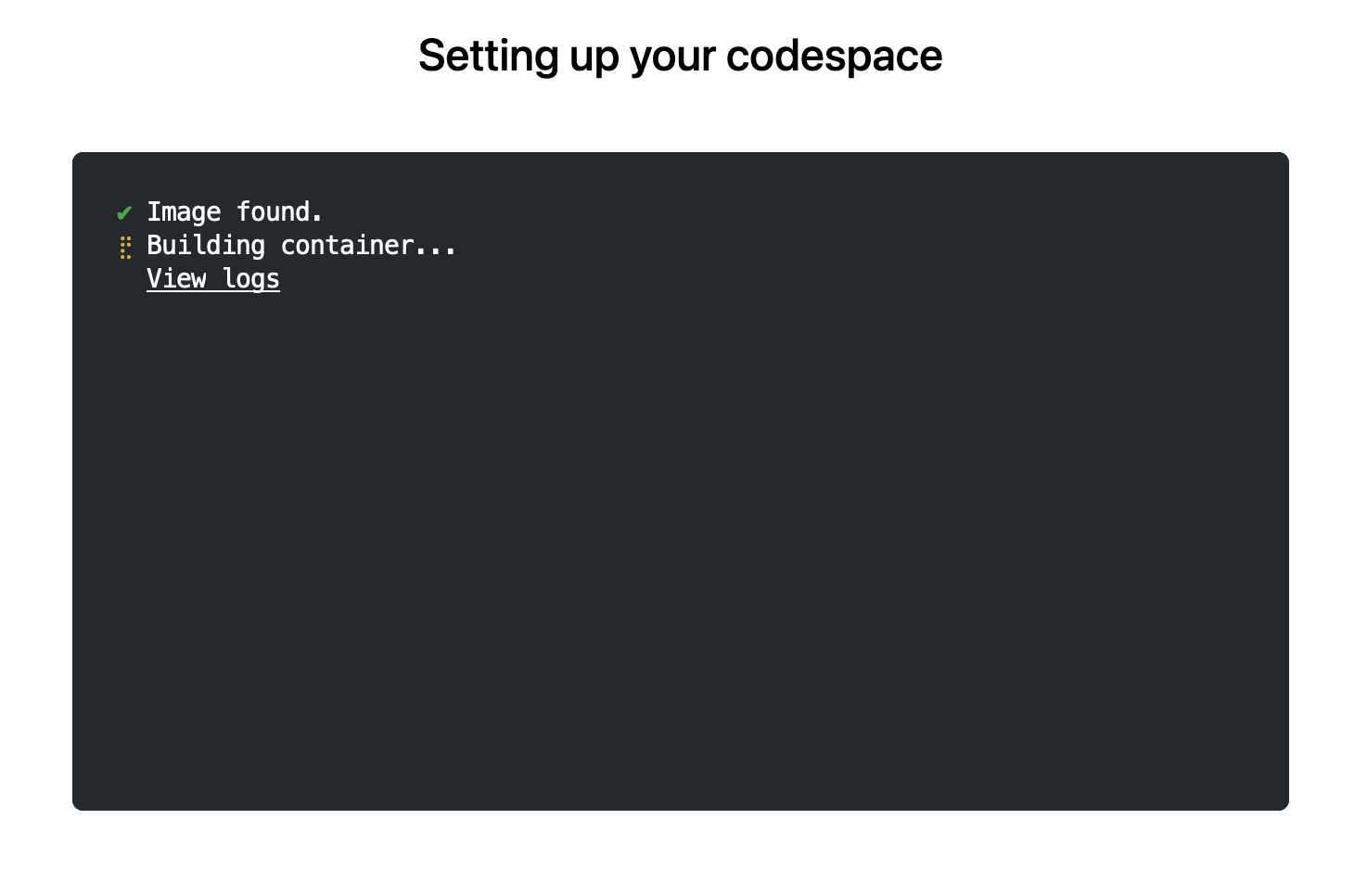
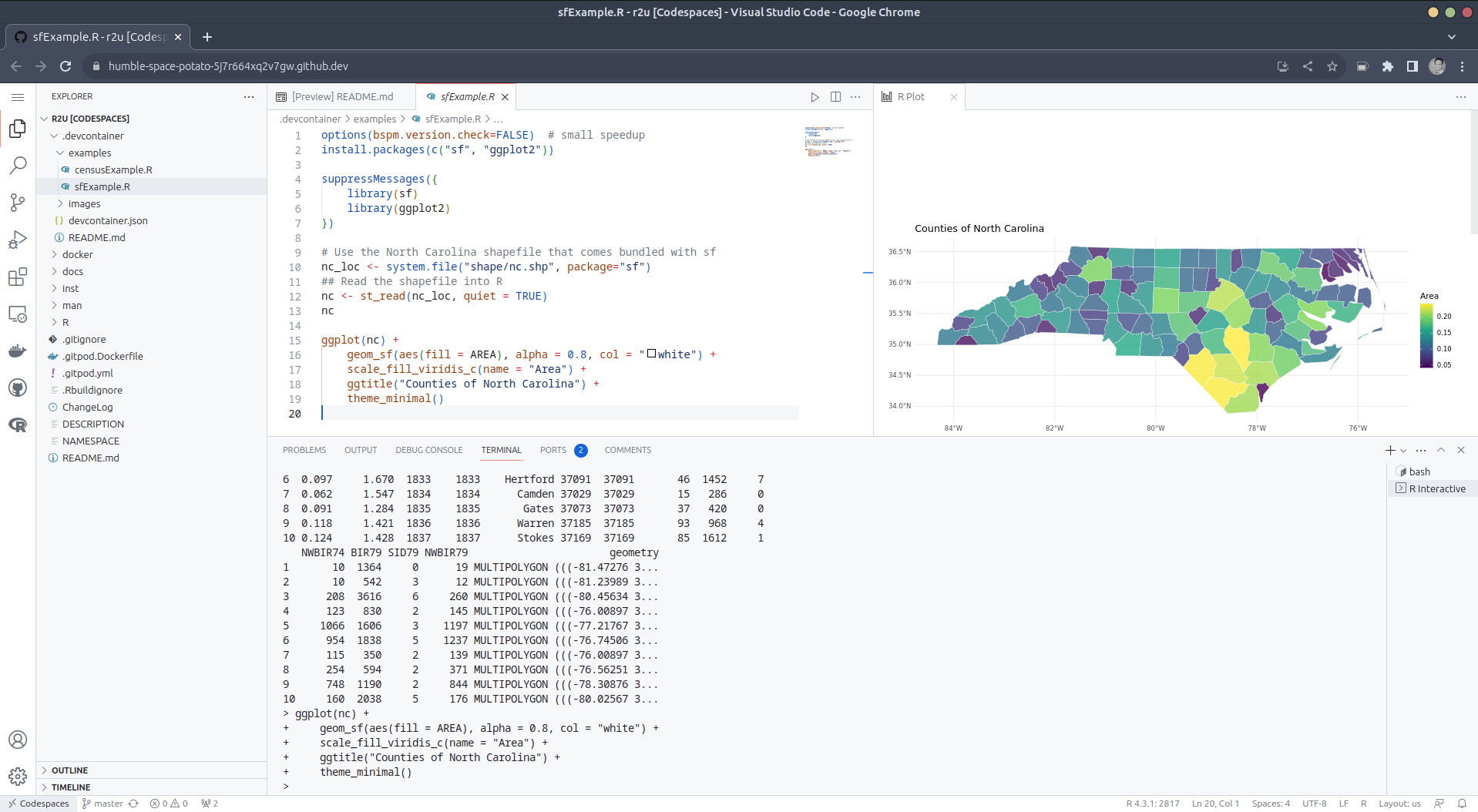
Try it out To get started, simply click on the green Code button at the top right. Then select the Codespaces tab and click the + symbol to start a new Codespace. The first time you do this, it will open up a new browser tab where your Codespace is being instantiated. This first-time instantiation will take a few minutes (feel free to click View logs to see how things are progressing) so please be patient. Once built, your Codespace will deploy almost immediately when you use it again in the future. After the VS Code editor opens up in your browser, feel free to open up the examples/sfExample.R file. It demonstrates how r2u enables us install packages and their system-dependencies with ease, here installing packages sf (including all its geospatial dependencies) and ggplot2 (including all its dependencies). You can run the code easily in the browser environment: Highlight or hover over line(s) and execute them by hitting Cmd+Return (Mac) / Ctrl+Return (Linux / Windows). (Both example screenshots reflect the initial codespaces-r2u repo as well as personal scratchspace one which we started with, both of course work here too.) Do not forget to close your Codespace once you have finished using it. Click the Codespaces tab at the very bottom left of your code editor / browser and select Close Current Codespace in the resulting pop-up box. You can restart it at any time, for example by going to https://github.com/codespaces and clicking on your instance.
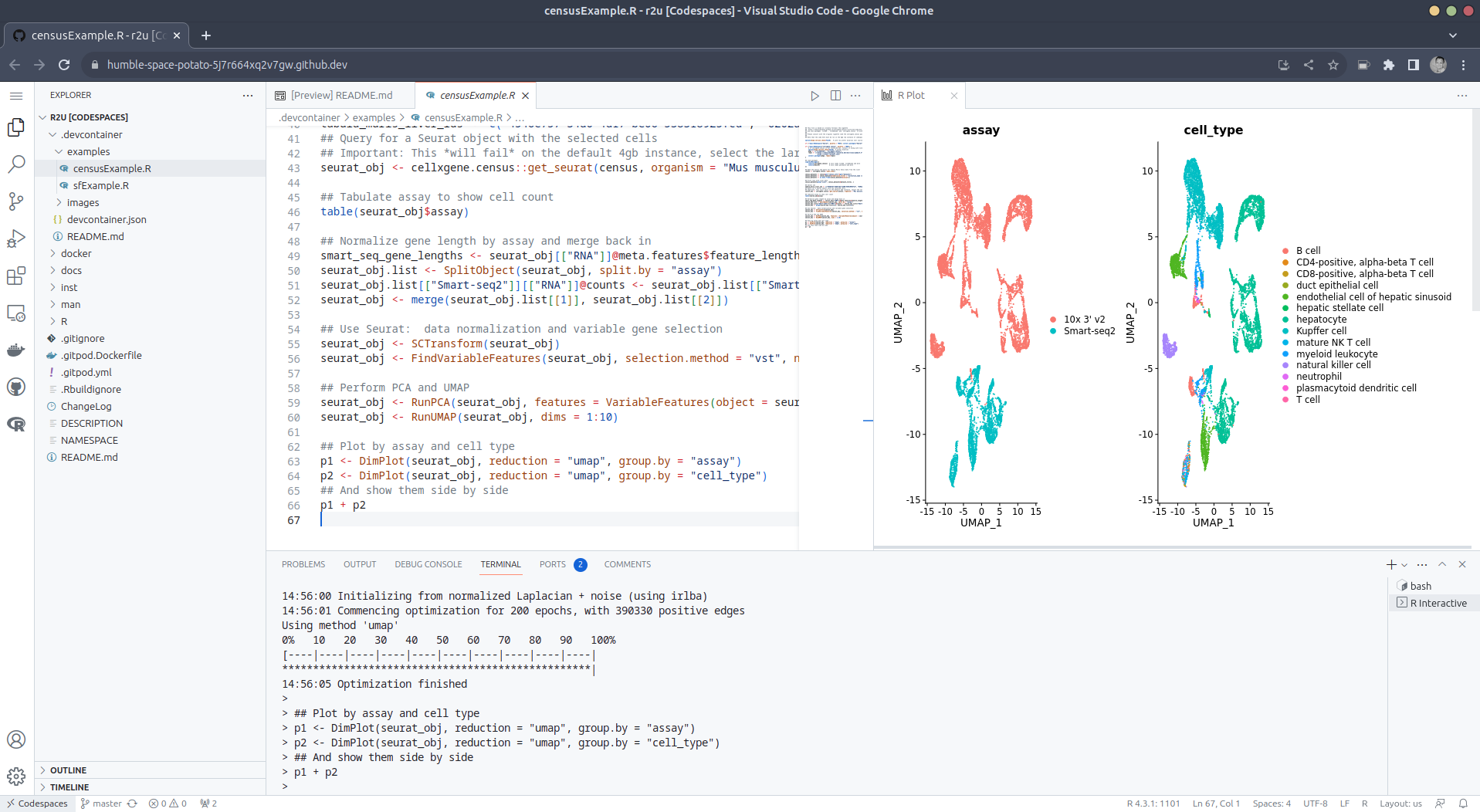
Extend r2u with r-universe r2u offers fast, easy, reliable access to all of CRAN via binaries for Ubuntu focal and jammy. When using the latter (as is the default), it can be combined with r-universe and its Ubuntu jammy binaries. We demontrates this in a second example file examples/censusExample.R which install both the cellxgene-census and tiledbsoma R packages as binaries from r-universe (along with about 100 dependencies), downloads single-cell data from Census and uses Seurat to create PCA and UMAP decomposition plots. Note that in order run this you have to change the Codespaces default instance from small (4gb ram) to large (16gb ram).

Local DevContainer build Codespaces are DevContainers running in the cloud (where DevContainers are themselves just Docker images running with some VS Code sugar on top). This gives you the very powerful ability to edit locally but run remotely in the hosted codespace. To test this setup locally, simply clone the repo and open it up in VS Code. You will need to have Docker installed and running on your system (see here). You will also need the Remote Development extension (you will probably be prompted to install it automatically if you do not have it yet). Select Reopen in Container when prompted. Otherwise, click the >< tab at the very bottom left of your VS Code editor and select this option. To shut down the container, simply click the same button and choose Reopen Folder Locally . You can always search for these commands via the command palette too (Cmd+Shift+p / Ctrl+Shift+p).

Use in Your Repo To add this ability of launching Codespaces in the browser (or editor) to a repo of yours, create a directory .devcontainers in your selected repo, and add the file .devcontainers/devcontainer.json. You can customize it by enabling other feature, or use the postCreateCommand field to install packages (while taking full advantage of r2u).

Acknowledgments There are a few key plumbing pieces that make everything work here. Thanks to:

Colophon More information about r2u is at its site, and we answered some question in issues, and at stackoverflow. More questions are always welcome! If you like this or other open-source work I do, you can now sponsor me at GitHub.

This post by Dirk Eddelbuettel originated on his Thinking inside the box blog. Please report excessive re-aggregation in third-party for-profit settings.

Originally posted 2023-08-13, minimally edited 2023-08-15 which changed the timestamo and URL.

13 August 2023

Dirk Eddelbuettel: #41: Using r2u in Codespaces

Welcome to the 41th post in the $R^4 series. This post draws on joint experiments first started by Grant building on the lovely work Eitsupi as part of our Rocker Project. In short, r2u is an ideal match for Codesspaces, a Microsoft/GitHub service to run code locally but in the cloud via browser or Visual Studio Code. This posts co-serves as the README.md in the .devcontainer directory as well as a vignette for r2u. So let us get into it. Starting from the r2u repository, the .devcontainer directory provides a small self-containted file devcontainer.json to launch an executable environment R using r2u. It is based on the example in Grant McDermott s codespaces-r2u repo and reuses its documentation. It is driven by the Rocker Project s Devcontainer Features repo creating a fully functioning R environment for cloud use in a few minutes. And thanks to r2u you can add easily to this environment by installing new R packages in a fast and failsafe way.

Try it out To get started, simply click on the green Code button at the top right. Then select the Codespaces tab and click the + symbol to start a new Codespace. The first time you do this, it will open up a new browser tab where your Codespace is being instantiated. This first-time instantiation will take a few minutes (feel free to click View logs to see how things are progressing) so please be patient. Once built, your Codespace will deploy almost immediately when you use it again in the future. After the VS Code editor opens up in your browser, feel free to open up the examples/sfExample.R file. It demonstrates how r2u enables us install packages and their system-dependencies with ease, here installing packages sf (including all its geospatial dependencies) and ggplot2 (including all its dependencies). You can run the code easily in the browser environment: Highlight or hover over line(s) and execute them by hitting Cmd+Return (Mac) / Ctrl+Return (Linux / Windows). (Both example screenshots reflect the initial codespaces-r2u repo as well as personal scratchspace one which we started with, both of course work here too.) Do not forget to close your Codespace once you have finished using it. Click the Codespaces tab at the very bottom left of your code editor / browser and select Close Current Codespace in the resulting pop-up box. You can restart it at any time, for example by going to https://github.com/codespaces and clicking on your instance.

Extend r2u with r-universe r2u offers fast, easy, reliable access to all of CRAN via binaries for Ubuntu focal and jammy. When using the latter (as is the default), it can be combined with r-universe and its Ubuntu jammy binaries. We demontrates this in a second example file examples/censusExample.R which install both the cellxgene-census and tiledbsoma R packages as binaries from r-universe (along with about 100 dependencies), downloads single-cell data from Census and uses Seurat to create PCA and UMAP decomposition plots. Note that in order run this you have to change the Codespaces default instance from small (4gb ram) to large (16gb ram).

Local DevContainer build Codespaces are DevContainers running in the cloud (where DevContainers are themselves just Docker images running with some VS Code sugar on top). This gives you the very powerful ability to edit locally but run remotely in the hosted codespace. To test this setup locally, simply clone the repo and open it up in VS Code. You will need to have Docker installed and running on your system (see here). You will also need the Remote Development extension (you will probably be prompted to install it automatically if you do not have it yet). Select Reopen in Container when prompted. Otherwise, click the >< tab at the very bottom left of your VS Code editor and select this option. To shut down the container, simply click the same button and choose Reopen Folder Locally . You can always search for these commands via the command palette too (Cmd+Shift+p / Ctrl+Shift+p).

Use in Your Repo To add this ability of launching Codespaces in the browser (or editor) to a repo of yours, create a directory .devcontainers in your selected repo, and add the file .devcontainers/devcontainer.json. You can customize it by enabling other feature, or use the postCreateCommand field to install packages (while taking full advantage of r2u).

Acknowledgments There are a few key plumbing pieces that make everything work here. Thanks to:

Colophon More information about r2u is at its site, and we answered some question in issues, and at stackoverflow. More questions are always welcome! If you like this or other open-source work I do, you can now sponsor me at GitHub.

This post by Dirk Eddelbuettel originated on his Thinking inside the box blog. Please report excessive re-aggregation in third-party for-profit settings.

Next.

Previous.