Search Results: "ema"

22 October 2023

Jamie McClelland: Users without passwords

About fifteen years ago, while debugging a database probem, I was horrified to discover that we had two root users - one with the password I had been using and one without a password. Nooo! So, I wrote a simple maintenance script that searched for and deleted any user in our database without a password. I even made it part of our puppet recipe - since the database server was in use by users and I didn t want anyone using SQL statements to change their password to an empty value. Then I forgot about it. Recently, I upgraded our MariaDB databases to Debian bullseye, which inserted the mariadb.sys user which . doesn t have a password set. It seems to be locked down in other ways, but my dumb script didn t know about that and happily deleted the user. Who needs that mariadb.sys user anyway? Apparently we all do. On one server, I can t login as root anymore. On another server I can login as root, but if I try to list users I get an error:
ERROR 1449 (HY000): The user specified as a definer ( mariadb.sys @ localhost ) does not exist
The Internt is full of useless advice. The most common is to simply insert that user. Except
MariaDB [mysql]> CREATE USER  mariadb.sys @ localhost  ACCOUNT LOCK PASSWORD EXPIRE;
ERROR 1396 (HY000): Operation CREATE USER failed for 'mariadb.sys'@'localhost'
MariaDB [mysql]> 
Yeah, that s not going to work. It seems like we are dealing with two changes. One, the old mysql.user table was replaced by the global_priv table and then turned into a view for backwards compatibility. And two, for sensible reasons the default definer for this view has been changed from the root user to a user that, ahem, is unlikely to be changed or deleted. Apparently I can t add the mariadb.sys user because it would alter the user view which has a definer that doesn t exist. Although not sure if this really is the reason? Fortunately, I found an excellent suggestion for changing the definer of a view. My modified version of the answer is, run the following command which will generate a SQL statement:
SELECT CONCAT("ALTER DEFINER=root@localhost VIEW ", table_name, " AS ", view_definition, ";") FROM information_schema.views WHERE table_schema='mysql' AND definer = 'mariadb.sys@localhost';
Then, execute the statement. And then also update the mysql.proc table:
UPDATE mysql.proc SET definer = 'root@localhost' WHERE definer = 'mariadb.sys@localhost';
And lastly, I had to run:
DELETE FROM tables_priv WHERE User = 'mariadb.sys';
FLUSH privileges;
Wait, was the tables_priv entry the whole problem all along? Not sure. But now I can run:
CREATE USER  mariadb.sys @ localhost  ACCOUNT LOCK PASSWORD EXPIRE;
GRANT SELECT, DELETE ON  mysql . global_priv  TO  mariadb.sys @ localhost ;
And reverse the other statements:
SELECT CONCAT("ALTER DEFINER= mariadb.sys @localhost VIEW ", table_name, " AS ", view_definition, ";") FROM information_schema.views WHERE table_schema='mysql' AND definer = 'root@localhost';
[Execute the output.]
UPDATE mysql.proc SET definer = 'mariadb.sys@localhost' WHERE definer = 'root@localhost';
And while we re on the topic of borked MariaDB authentication, here are the steps to change the root password and restore all root privielges if you can t get in at all or your root user is missing the GRANT OPTION (you can change ALTER to CREATE if the root user does not even exist):
systemctl stop mariadb
mariadbd-safe --skip-grant-tables --skip-networking &
mysql -u root
[mysql]> FLUSH PRIVILEGES
[mysql]> ALTER USER  root @ localhost  IDENTIFIED VIA mysql_native_password USING PASSWORD('your-secret-password') OR unix_socket; 
[mysql]> GRANT ALL PRIVILEGES ON *.* to 'root'@'localhost' WITH GRANT OPTION;
mariadbd-admin shutdown
systemctl start mariadb

Daniel Lange: Removing the New Event Button from Thunderbird v115 Calendar

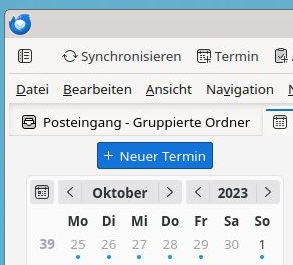
Thunderbird in Debian stable (Bookworm) has received Thunderbird v115.3.1 as a security update. With it comes "Supernova", a UI redesign. There is a Mozilla blogpost with a walk-through of the new UI. Unfortunately it features a super eye-catching "New Message" button that - thankfully - can be disabled. Even the whole space above the email folder pane can be recovered by disabling the folder pane header at Burger Menu ( ) -> View -> Folders -> Folder Pane Header. Unfortunately there is no way to remove the same eye-catching "New Event" button for the Calendar view via a UI setting. Thunderbird New event button, German locale This needs a user CSS file to override the button as non-visible. To make it process the user CSS Thunderbird needs a config setting to be enabled:
  1. Burger Menu ( ) -> Settings -> General
  2. Scroll down all the way
  3. Click the Config editor... button on the bottom right
  4. Accept that hell will freeze over because you configure software
  5. Search for toolkit.legacyUserProfileCustomizations.stylesheets
  6. Toggle the value to true to enable the user CSS
You can manually add user_pref("toolkit.legacyUserProfileCustomizations.stylesheets", true); to ~/.thunderbird/abcdefgh.default/prefs.js to the same effect (do this while Thunderbird is not running; replace abcdefgh with your Thunderbird profile ID). Now create a new directory ~/.thunderbird/abcdefgh.default/chrome/, again replacing abcdefgh with your profile ID. Inside the new directory create a userChrome.css file with the following content:
/* Hide Calendar New Event button */
#primaryButtonSidePanel
display: none !important;
Restart Thunderbird. And enjoy less visual obstruction when using the Calendar.

Russell Coker: Brother MFC-J4440DW Printer

I just had to setup a Brother MFC-J4440DW for a relative. They were replacing an old HP laser printer that mysteriously stopped printing as dark as it should, I don t know whether the HP printer had worn out or if the HP firmware decided to hobble it to make them buy a new printer. In either case HP is well known for shady behaviour with their printer firmware and should be avoided. The new Brother printer has problems when using wifi and auto DNS. I don t know how much of that was due to the printer itself and how much was due to the wifi AP provided by Foxtel. Anyway it works better with Ethernet and a fixed address (the wifi AP didn t allow me to set a fixed address). I think the main thing was configuring CUPS to connect via the IP address and not use Avahi etc. One problem I had with printing was that programs like Chrome and LibreOffice would hang for about a minute before printing, that turned out to be due to /etc/cups/lpoptions having the old printer (which had been removed) listed as the default. It would be nice if the web configuration for cups would change that when I set the default printer. CUPS doesn t seem to support USB printing. If it is possible to get this printer to print via USB then I welcome a comment describing how to do it. Scanning only seems to work on Ethernet not on USB, the command for scanning that I ended up with was scanimage -d escl:http://10.0.0.3:80 . Again I welcome comments from anyone who has had success in scanning via USB. There are probably some Linux users who would find it really inconvenient to setup a network interface specifically for printing. It s easy for me as I have a pile of spare ethernet cards and a box of cables but some people would have to buy this. Also it s disappointing that Brother didn t include an Ethernet cable or a USB cable in the box. But if that makes it cheaper I can deal with that. The resolution for scanning is only 832*1163 and it s black and white, I think that generally scanning in printers is a bad idea, taking a photo with a phone is a better way of scanning documents. Generally this printer works well and is cheap at only $299, a price for disposable hardware by today s standards. There are Debian packages from Brother for the printer. The scanner package looks like it just configures scanimage, and I m not sure whether the stock version of CUPS in Debian will do it without the Brother package. One thing I found interesting is that the package mfcj4440dwpdrv has the following shell code in the postinst to label for SE Linux:
if [ "$(which semanage 2> /dev/null)" != '' ];then
semanage fcontext -a -t cupsd_rw_etc_t '/opt/brother/Printers/mfcj4440dw/inf(/.*)?'
semanage fcontext -a -t bin_t          '/opt/brother/Printers/mfcj4440dw/lpd(/.*)?'
semanage fcontext -a -t bin_t          '/opt/brother/Printers/mfcj4440dw/cupswrapper(/.*)?'
if [ "$(which restorecon 2> /dev/null)" != '' ];then
restorecon -R /opt/brother/Printers/mfcj4440dw
fi
fi
This is the first time I ve seen a Debian package from a hardware vendor with SE Linux specific code. I can t just add those rules to the Debian policy as that would make the semanage commands fail to add an identical context spec will break the postinst. In the latest policy I m uploading to Debian/Unstable (version 2.20231010-1) there are the following 3 lines to deal with this, the first was already there for some time and the other 2 I just added:
/opt/brother/Printers/([^/]+/)?inf(/.*)?        gen_context(system_u:object_r:cupsd_rw_etc_t,s0)
/opt/brother/Printers/[^/]+/lpd(/.*)?   gen_context(system_u:object_r:bin_t,s0)
/opt/brother/Printers/[^/]+/cupswrapper(/.*)?   gen_context(system_u:object_r:bin_t,s0)
The Brother employee(s) who added the SE Linux code to their package are welcome to connect to me on LinkedIn.

21 October 2023

Dirk Eddelbuettel: qlcal 0.0.8 on CRAN: QuantLib 1.32 Updates

The eighth release of the still fairly new qlcal package arrivied at CRAN today. qlcal delivers the calendaring parts of QuantLib. It is provided (for the R package) as a set of included files, so the package is self-contained and does not depend on an external QuantLib library (which can be demanding to build). qlcal covers over sixty country / market calendars and can compute holiday lists, its complement (i.e. business day lists) and much more. This release brings updates from the just-released QuantLib 1.32 version. It also avoids a nag from R during build ( only specify C++14 if you really need it ) but switching to a versioned depends on R 4.2.0 or later. This implies C++14 or later as the default. If you need qlcal on an older R, grab the sources, edit DESCRIPTION to remove this constraint and set the standard as before in src/Makevars (or src/Makevars.win).

Changes in version 0.0.8 (2023-10-21)
  • A small set of updates from QuantLib 1.32 have been applied
  • The explicit C++14 compilation standard has been replaced with an implicit one by relying on R (>= 4.2.0)

Courtesy of my CRANberries, there is a diffstat report for this release. See the project page and package documentation for more details, and more examples. If you like this or other open-source work I do, you can now sponsor me at GitHub.

This post by Dirk Eddelbuettel originated on his Thinking inside the box blog. Please report excessive re-aggregation in third-party for-profit settings.

Russell Coker: More About the PineTime

Since my initial review of the PineTime 10 days ago [1] I ve used it in more situations. My initial tests were done connecting to a Huawei Nova 7i [2], I am now using it with a Huawei Mate 10 Pro. I ve also upgraded the PineTime from version 1.11 (from memory) of the Infinitime software that runs on the watch to version 1.13 [3]. To upgrade it I had to download the file pinetime-mcuboot-app-dfu-1.13.0.zip to the Android phone and then use the File Installer option of the GadgetBridge Android app to upload it. The zip file does NOT need to be extracted first, I don t know if GadgetBridge extracts it before upload or if the PineTime firmware has a copy of unzip, but it just works. Version 1.13 is purported to take less battery, I haven t directly verified this as I turned on the new feature of measuring my pulse 24*7 which significantly increases battery use. The end result is that the battery is being used up at about the same rate as before, overall adding a new battery-hungry feature while reducing battery use for other things to compensate is a good thing and strongly suggests that battery use has decreased overall. I have noticed that now with a different phone and different version of the firmware it doesn t reconnect as reliably. Sometimes I need to turn bluetooth on the watch off and on before it works (which indicates an issue with the firmware) and sometimes I need to turn bluetooth off and on on the phone which indicates a phone issue. Also I often unlock my phone to find the GadgetBridge notification saying that it s disconnected and it usually connects fine, but I get the impression it s often disconnected. Does the Mate 10 Pro have a problem that triggers a bug in the PineTime? Does the 1.13 version of InfiniTime have a problem that triggers a bug in the Mate 10 Pro? Are they both independently buggy? Is the new version of InfiniTime just disconnecting when it s not doing stuff to save battery and triggering bugs that weren t obvious before? I ve tested the media control which basically works, sometimes it gets out of sync and displays the name of the previous track which is annoying. The PineTime is IP67 rated and there are reports on Reddit of people wearing it in the shower and swimming pool. I wouldn t recommend those things although it should work OK. It might be an option for controlling music when in the bath or when having a pool party. When the watch is running normally and displays a new notification it s not possible to swipe it away. You have to go to the notifications menu afterwards to swipe them which I find annoying. Also the notification of an inbound call remains in the notification list indefinitely while I think a more appropriate action is to have it disappear in an amount of time where it s already been answered or gone to voicemail. Voicemail timeouts are as low as 15 seconds so having the notification disappear after 1 minute would be reasonable. I have configured my PineTime to take 2 taps on the screen to wake up. I previously had it set to 1 tap and had problems with accidentally doing something it registered as a tap while in bed and waking me up. Also I found that if I want to turn the screen on when my hands are dirty so I don t want to touch it with a finger then tapping it on my nose works well. Apparently it is programmed to ignore taps on large areas so I can t wake it with my elbow. I ve setup a PineTime for an elderly relative who is greatly enjoying it. I don t expect them to flash new firmware or do any other complex things, but they are doing well with using the device. They are considering getting a different band as they don t like rubber. I m sure their local jeweler has some leather and metal bands that could fit. There is a design on Thiniverse for a PineTime case [4], this could be used for making an adaptor to fit a PineTime to a greatly different type of band, an instrument console, etc. Generally I think the PineTime is an OK smart watch for someone who s not into FOSS for it s own sake. My relative could have been happy with a slightly cheaper watch, but it s still significantly cheaper than the Samsung and Apple options so it s not particularly expensive. A benefit for them is that having the same type of SmartWatch as me they will get better tech support.

20 October 2023

Freexian Collaborators: Debian Contributions: Freexian meetup, debusine updates, lpr/lpd in Debian, and more! (by Utkarsh Gupta, Stefano Rivera)

Contributing to Debian is part of Freexian s mission. This article covers the latest achievements of Freexian and their collaborators. All of this is made possible by organizations subscribing to our Long Term Support contracts and consulting services.

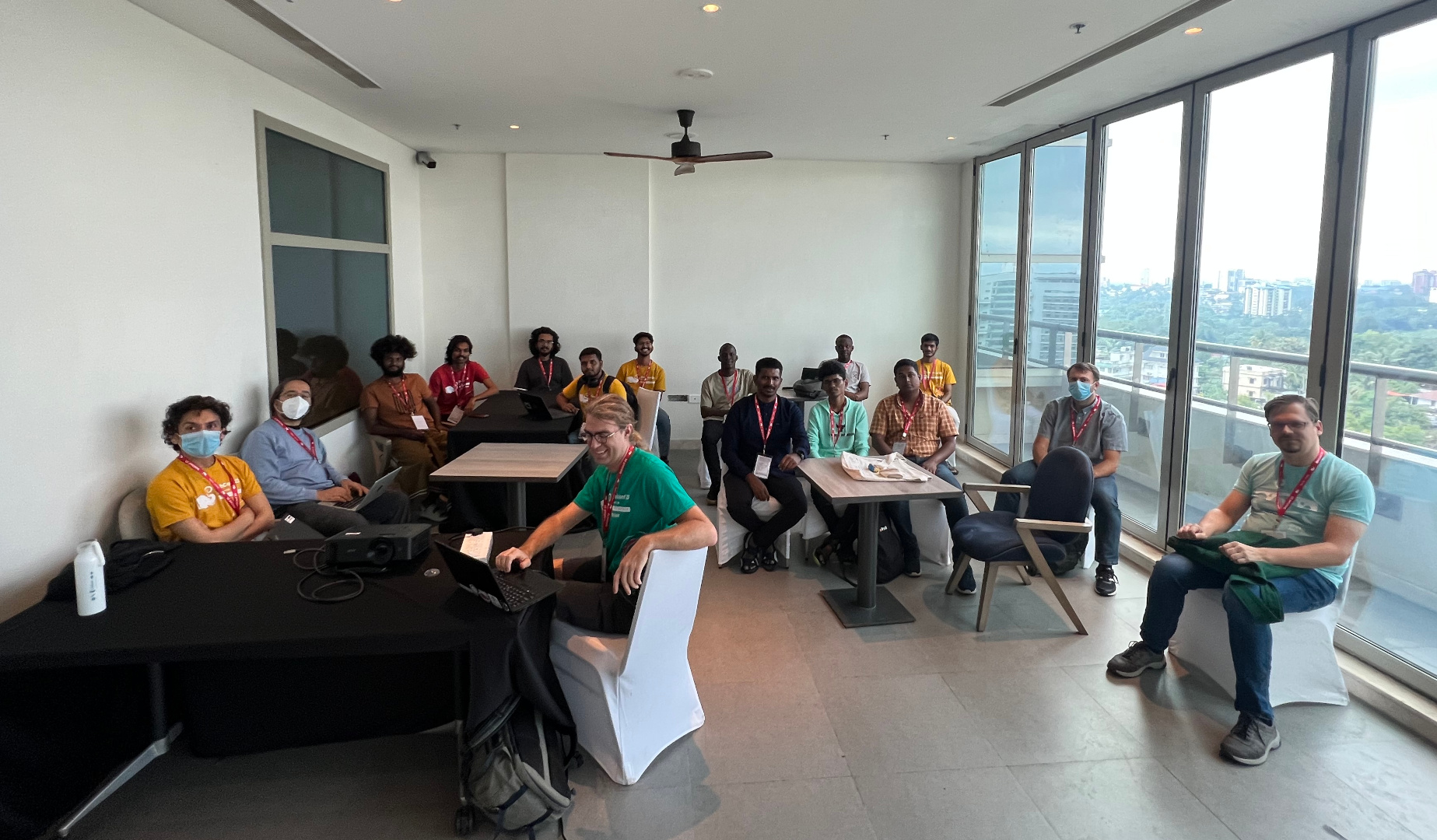
Freexian Meetup, by Stefano Rivera, Utkarsh Gupta, et al. During DebConf, Freexian organized a meetup for its collaborators and those interested in learning more about Freexian and its services. It was well received and many people interested in Freexian showed up. Some developers who were interested in contributing to LTS came to get more details about joining the project. And some prospective customers came to get to know us and ask questions. Sadly, the tragic loss of Abraham shook DebConf, both individually and structurally. The meetup got rescheduled to a small room without video coverage. With that, we still had a wholesome interaction and here s a quick picture from the meetup taken by Utkarsh (which is also why he s missing!).

Debusine, by Rapha l Hertzog, et al. Freexian has been investing into debusine for a while, but development speed is about to increase dramatically thanks to funding from SovereignTechFund.de. Rapha l laid out the 5 milestones of the funding contract, and filed the issues for the first milestone. Together with Enrico and Stefano, they established a workflow for the expanded team. Among the first steps of this milestone, Enrico started to work on a developer-friendly description of debusine that we can use when we reach out to the many Debian contributors that we will have to interact with. And Rapha l started the design work of the autopkgtest and lintian tasks, i.e. what s the interface to schedule such tasks, what behavior and what associated options do we support? At this point you might wonder what debusine is supposed to be let us try to answer this: Debusine manages scheduling and distribution of Debian-related build and QA tasks to a network of worker machines. It also manages the resulting artifacts and provides the results in an easy to consume way. We want to make it easy for Debian contributors to leverage all the great QA tools that Debian provides. We want to build the next generation of Debian s build infrastructure, one that will continue to reliably do what it already does, but that will also enable distribution-wide experiments, custom package repositories and custom workflows with advanced package reviews. If this all sounds interesting to you, don t hesitate to watch the project on salsa.debian.org and to contribute.

lpr/lpd in Debian, by Thorsten Alteholz During Debconf23, Till Kamppeter presented CPDB (Common Print Dialog Backend), a new way to handle print queues. After this talk it was discussed whether the old lpr/lpd based printing system could be abandoned in Debian or whether there is still demand for it. So Thorsten asked on the debian-devel email list whether anybody uses it. Oddly enough, these old packages are still useful:
  • Within a small network it is easier to distribute a printcap file, than to properly configure cups clients.
  • One of the biggest manufacturers of WLAN router and DSL boxes only supports raw queues when attaching an USB printer to their hardware. Admittedly the CPDB still has problems with such raw queues.
  • The Pharos printing system at MIT is still lpd-based.
As a result, the lpr/lpd stuff is not yet ready to be abandoned and Thorsten will adopt the relevant packages (or rather move them under the umbrella of the debian-printing team). Though it is not planned to develop new features, those packages should at least have a maintainer. This month Thorsten adopted rlpr, an utility for lpd printing without using /etc/printcap. The next one he is working on is lprng, a lpr/lpd printer spooling system. If you know of any other package that is also needed and still maintained by the QA team, please tell Thorsten.

/usr-merge, by Helmut Grohne Discussion about lifting the file move moratorium has been initiated with the CTTE and the release team. A formal lift is dependent on updating debootstrap in older suites though. A significant number of packages can automatically move their systemd unit files if dh_installsystemd and systemd.pc change their installation targets. Unfortunately, doing so makes some packages FTBFS and therefore patches have been filed. The analysis tool, dumat, has been enhanced to better understand which upgrade scenarios are considered supported to reduce false positive bug filings and gained a mode for local operation on a .changes file meant for inclusion in salsa-ci. The filing of bugs from dumat is still manual to improve the quality of reports. Since September, the moratorium has been lifted.

Miscellaneous contributions
  • Rapha l updated Django s backport in bullseye-backports to match the latest security release that was published in bookworm. Tracker.debian.org is still using that backport.
  • Helmut Grohne sent 13 patches for cross build failures.
  • Helmut Grohne performed a maintenance upload of debvm enabling its use in autopkgtests.
  • Helmut Grohne wrote an API-compatible reimplementation of autopkgtest-build-qemu. It is powered by mmdebstrap, therefore unprivileged, EFI-only and will soon be included in mmdebstrap.
  • Santiago continued the work regarding how to make it easier to (automatically) test reverse dependencies. An example of the ongoing work was presented during the Salsa CI BoF at DebConf 23.
    In fact, omniorb-dfsg test pipelines as the above were used for the omniorb-dfsg 4.3.0 transition, verifying how the reverse dependencies (tango, pytango and omnievents) were built and how their autopkgtest jobs run with the to-be-uploaded omniorb-dfsg new release.
  • Utkarsh and Stefano attended and helped run DebConf 23. Also continued winding up DebConf 22 accounting.
  • Anton Gladky did some science team uploads to fix RC bugs.

17 October 2023

Russ Allbery: Review: A Hat Full of Sky

Review: A Hat Full of Sky, by Terry Pratchett
Series: Discworld #32
Publisher: HarperTrophy
Copyright: 2004
Printing: 2005
ISBN: 0-06-058662-1
Format: Mass market
Pages: 407
A Hat Full of Sky is the 32nd Discworld novel and the second Tiffany Aching young adult novel. You should not start here, but you could start with The Wee Free Men. As with that book, some parts of the story carry more weight if you are already familiar with Granny Weatherwax. Tiffany is a witch, but she needs to be trained. This is normally done by apprenticeship, and in Tiffany's case it seemed wise to give her exposure to more types of witching. Thus, Tiffany, complete with new boots and a going-away present from the still-somewhat-annoying Roland, is off on an apprenticeship to the sensible Miss Level. (The new boots feel wrong and get swapped out for her concealed old boots at the first opportunity.) Unbeknownst to Tiffany, her precocious experiments with leaving her body as a convenient substitute for a mirror have attracted something very bad, something none of the witches are expecting. The Nac Mac Feegle know a hiver as soon as they feel it, but they have a new kelda now, and she's not sure she wants them racing off after their old kelda. Terry Pratchett is very good at a lot of things, but I don't think villains are one of his strengths. He manages an occasional memorable one (the Auditors, for example, at least before the whole chocolate thing), but I find most of them a bit boring. The hiver is one of the boring ones. It serves mostly as a concretized metaphor about the temptations of magical power, but those temptations felt so unlike the tendencies of Tiffany's personality that I didn't think the metaphor worked in the story. The interesting heart of this book to me is the conflict between Tiffany's impatience with nonsense and Miss Level's arguably excessive willingness to help everyone regardless of how demanding they get. There's something deeper in here about female socialization and how that interacts with Pratchett's conception of witches that got me thinking, although I don't think Pratchett landed the point with full force. Miss Level is clearly a good witch to her village and seems comfortable with how she lives her life, so perhaps they're not taking advantage of her, but she thoroughly slots herself into the helper role. If Tiffany attempted the same role, people would be taking advantage of her, because the role doesn't fit her. And yet, there's a lesson here she needs to learn about seeing other people as people, even if it wouldn't be healthy for her to move all the way to Miss Level's mindset. Tiffany is a precocious kid who is used to being underestimated, and who has reacted by becoming independent and somewhat judgmental. She's also had a taste of real magical power, which creates a risk of her getting too far into her own head. Miss Level is a fount of empathy and understanding for the normal people around her, which Tiffany resists and needed to learn. I think Granny Weatherwax is too much like Tiffany to teach her that. She also has no patience for fools, but she's older and wiser and knows Tiffany needs a push in that direction. Miss Level isn't a destination, but more of a counterbalance. That emotional journey, a conclusion that again focuses on the role of witches in questions of life and death, and Tiffany's fascinatingly spiky mutual respect with Granny Weatherwax were the best parts of this book for me. The middle section with the hiver was rather tedious and forgettable, and the Nac Mac Feegle were entertaining but not more than that. It felt like the story went in a few different directions and only some of them worked, in part because the villain intended to tie those pieces together was more of a force of nature than a piece of Tiffany's emotional puzzle. If the hiver had resonated with the darker parts of Tiffany's natural personality, the plot would have worked better. Pratchett was gesturing in that direction, but he never convinced me it was consistent with what we'd already seen of her. Like a lot of the Discworld novels, the good moments in A Hat Full of Sky are astonishing, but the plot is somewhat forgettable. It's still solidly entertaining, though, and if you enjoyed The Wee Free Men, I think this is slightly better. Followed by Going Postal in publication order. The next Tiffany Aching novel is Wintersmith. Rating: 8 out of 10

15 October 2023

Russ Allbery: Review: A Killing Frost

Review: A Killing Frost, by Seanan McGuire
Series: October Daye #14
Publisher: DAW
Copyright: 2020
ISBN: 0-7564-1253-6
Format: Kindle
Pages: 351
A Killing Frost is the 14th book in the October Daye urban fantasy series and a direct plot sequel to the events of The Brightest Fell. You definitely cannot start here. This review has some relationship spoilers here for things that you would be expecting after the first five or six books, but which you wouldn't know when reading the first few books of the series. If you haven't started the series yet but plan to, consider skipping this review; if you haven't started reading this series, it will probably be meaningless anyway. Finally, events seem to have slowed, enough trauma has been healed, and Toby is able to seriously consider getting married. However, no sooner is the thought voiced than fae politics injects itself yet again. In order to get married without creating potentially substantial future problems for herself and her family, Toby will have to tie up some loose ends. Since one of those loose ends is a price from the Luidaeg that has been haunting her family for decades, this is easier said than done. The Brightest Fell had a very unsatisfying ending. This, after a two book interlude, is the proper end to that story. I picked this up when I had a bunch of stressful things going on and I wanted to be entertained without having to do much work as a reader. Once again, this series delivered exactly that. The writing is repetitive and a bit clunky, McGuire hammers the same emotional points into the ground, and one does wonder about Toby's tendency to emulate a half-human battering ram, but every book has me engrossed and turning the pages. Everyone should have at least one book series on the go that offers reliable, low-effort entertainment. The initial lever that McGuire uses to push Toby into this plot (fae marriage requirements that had never previously been mentioned) felt rather strained and arbitrary, and I spent the first part of the book grumbling a bit about it. However, there is a better reason for this complication that is revealed with time, and which implies some interesting things about how the fae see heroes and how they use them to solve problems. Now I'm wondering if McGuire will explore that some more in later books. This is the "all is revealed" book about Simon Torquill. As we get later into the series, these "all is revealed" books are coming more frequently. So far, I'm finding the revelations satisfying, which is a lot harder than it looks with a series this long and with this many hidden details. There are a few directions the series is taking that aren't my favorite (the Daoine Sidhe obsession with being the Best Fae is getting a bit boring, for example), but none of them seem egregiously off, and I'm deeply invested in the answers to the remaining questions. Toby hits a personal record here for not explaining the dangerous things she's doing because people might talk her out of it. It makes for a tense and gripping climax, but wow I felt for her friends and family, and substantial parts of that risk seemed unnecessary. This is pointed out to her in no uncertain terms, and I'm wondering if it will finally stick. Toby's tendency to solve complicated problems by bleeding on them is part of what gives this series its charm, but I wouldn't mind her giving other people more of a chance to come up with better plans. I did not like this one as well as the previous two books, mostly because I prefer the Luidaeg-centric stories to the Daoine-Sidhe-centric stories, but if you're enjoying the series to this point, this won't be an exception. It's a substantial improvement on The Brightest Fell and did a lot to salvage that story for me, although there are still some aspects of it that need better explanations. Followed by When Sorrows Come. As usual, there is a novella included in at least the Kindle edition. "Shine in Pearl": I was again hoping for more Gillian, but alas. Instead, and breaking with the tendency for the novellas to be side stories unrelated to the main novel, this fleshes out Simon's past and the other primary relationship driving the novel's plot. It's... fine? The best parts by far are the scenes from Dianda's viewpoint, which are just as refreshingly blunt as Dianda is elsewhere. Neither of the other two characters are favorites of mine, and since the point of the story is to describe the tragedy that is resolved in the plot of the main novel, it's somewhat depressing. Not my favorite of the novellas; not the worst of them. (6) Rating: 7 out of 10

14 October 2023

Ravi Dwivedi: Kochi - Wayanad Trip in August-September 2023

A trip full of hitchhiking, beautiful places and welcoming locals.

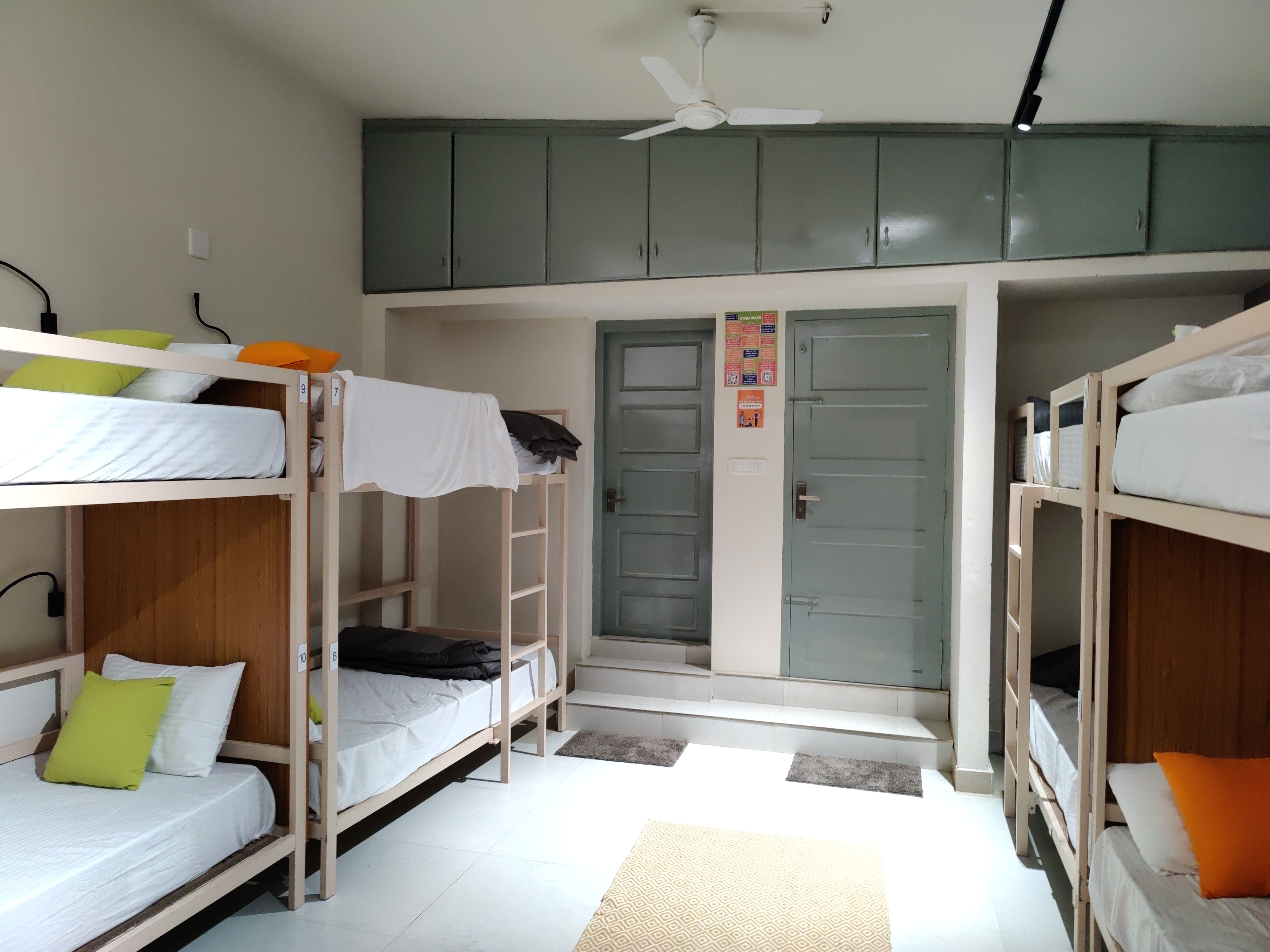
Day 1: Arrival in Kochi Kochi is a city in the state of Kerala, India. This year s DebConf was to be held in Kochi from 3rd September to 17th of September, which I was planning to attend. My friend Suresh, who was planning to join, told me that 29th August 2023 will be Onam, a major festival of the state of Kerala. So, we planned a Kerala trip before the DebConf. We booked early morning flights for Kochi from Delhi and reached Kochi on 28th August. We had booked a hostel named Zostel in Ernakulam. During check-in, they asked me to fill a form which required signing in using a Google account. I told them I don t have a Google account and I don t want to create one either. The people at the front desk seemed receptive, so I went ahead with telling them the problems of such a sign-in being mandatory for check-in. Anyways, they only took a photo of my passport and let me check-in without a Google account. We stayed in a ten room dormitory, which allowed travellers of any gender. The dormitory room was air-conditioned, spacious, clean and beds were also comfortable. There were two bathrooms in the dormitory and they were clean. Plus, there was a separate dormitory room in the hostel exclusive for females. I noticed that that Zostel was not added in the OpenStreetMap and so, I added it :) . The hostel had a small canteen for tea and snacks, a common sitting area outside the dormitories, which had beds too. There was a separate silent room, suitable for people who want to work.
Dormitory room in Zostel Ernakulam, Kochi.
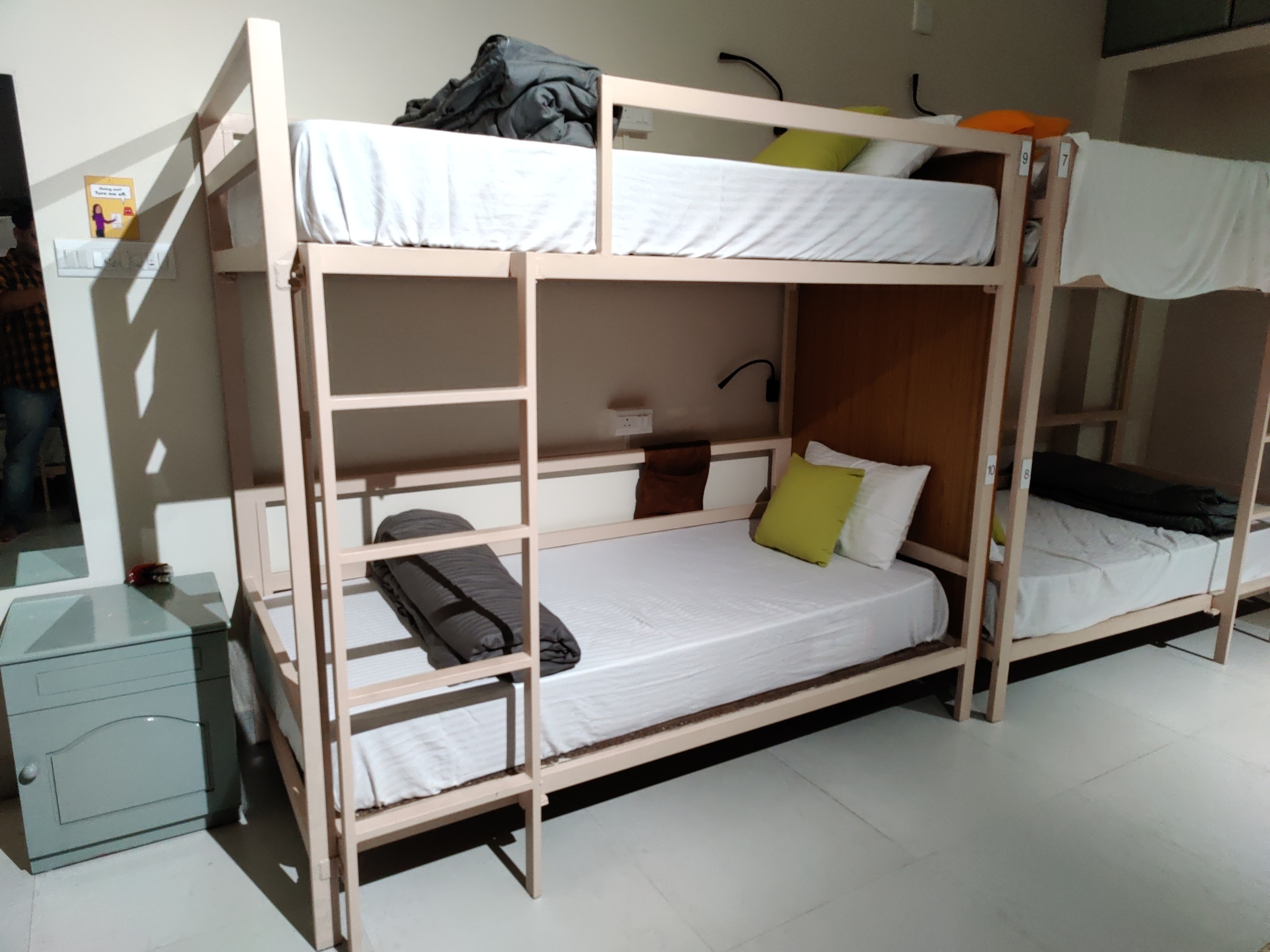
Beds in Zostel Ernakulam, Kochi.
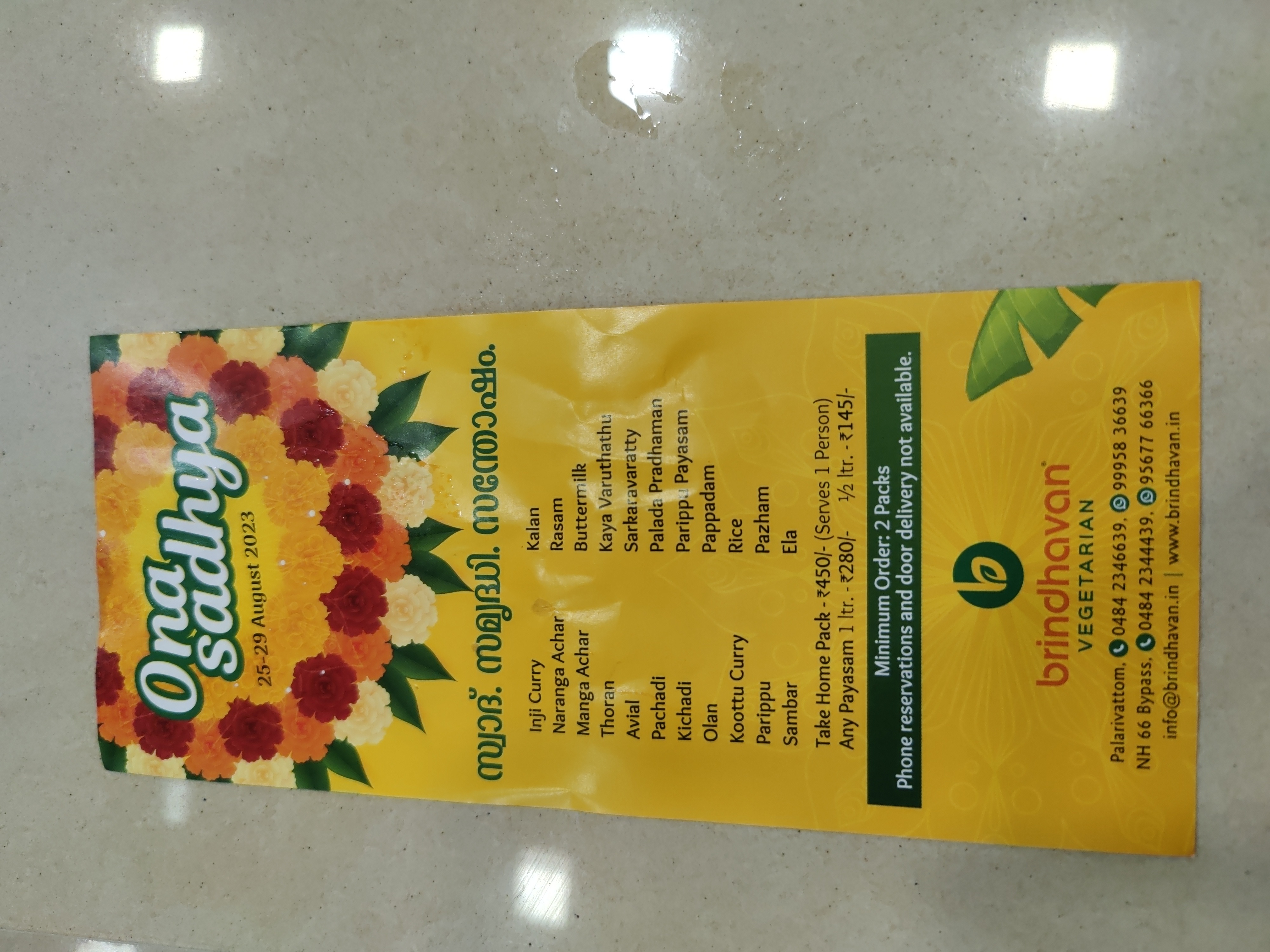
We had lunch at a nearby restaurant and it was hard to find anything vegetarian for me. I bought some freshly made banana chips from the street and they were tasty. As far as I remember, I had a big glass of pineapple juice for lunch. Then I went to the Broadway market and bought some cardamom and cinnamon for home. I also went to a nearby supermarket and bought Matta brown rice for home. Then, I looked for a courier shop to send the things home but all of them were closed due to Onam festival. After returning to the Zostel, I overslept till 9 PM and in the meanwhile, Suresh planned with Saidut and Shwetank (who met us during our stay in Zostel) to go to a place in Fort Kochi for dinner. I suspected I will be disappointed by lack of vegetarian options as they were planning to have fish. I already had a restaurant in mind - Brindhavan restaurant (suggested by Anupa), which was a pure vegetarian restaurant. To reach there, I got off at Palarivattom metro station and started looking for an auto-rickshaw to get to the restaurant. I didn t get any for more than 5 minutes. Since that restaurant was not added to the OpenStreetMap, I didn t even know how far that was and which direction to go to. Then, I saw a Zomato delivery person on a motorcycle and asked him where the restaurant was. It was already 10 PM and the restaurant closes at 10:30. So, I asked him whether he can drop me off. He agreed and dropped me off at that restaurant. It was 4-5 km from that metro station. I tipped him and expressed my gratefulness for the help. He refused to take the tip, but I insisted and he accepted. I entered the restaurant and it was coming to a close, so many items were not available. I ordered some Kadhai Paneer (only item left) with naan. It tasted fine. Since the next day was Thiruvonam, I asked the restaurant about the Sadya thali menu and prices for the next day. I planned to eat Sadya thali at that restaurant, but my plans got changed later.
Onam sadya menu from Brindhavan restaurant.
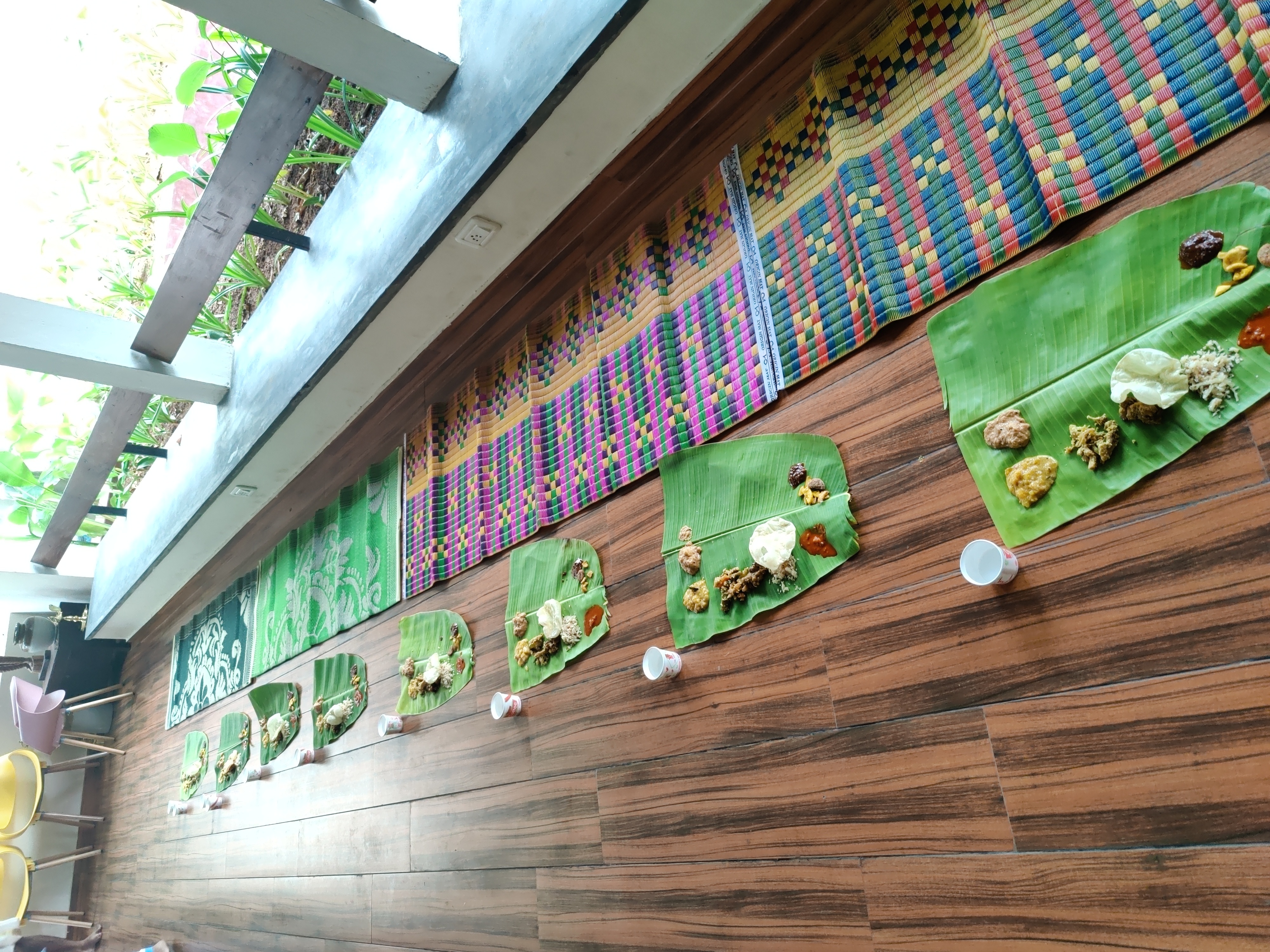
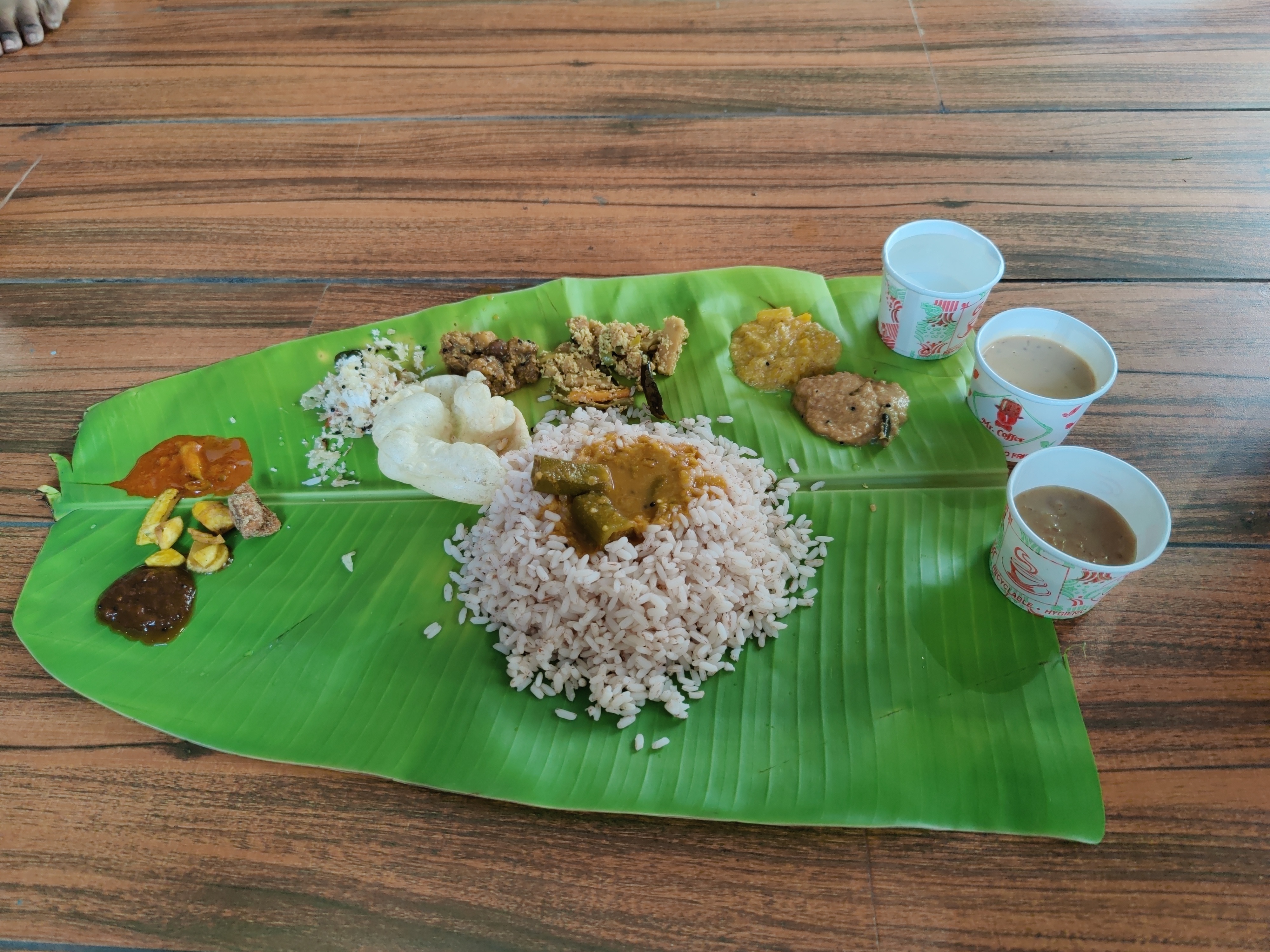
Day 2: Onam celebrations Next day, on 29th of August 2023, we had plan to leave for Wayanad. Wayanad is a hill station in Kerala and a famous tourist spot. Praveen suggested to visit Munnar as it is far closer to Kochi than Wayanad (80 km vs 250 km). But I had already visited Munnar in my previous trips, so we chose Wayanad. We had a train late night from Ernakulam Junction (at 23:30 hours) to Kozhikode, which is the nearest railway station from Wayanad. So, we checked out in the morning as we had plans to roam around in Kochi before taking the train. Zostel was celebrating Onam on that day. To opt-in, we had to pay 400 rupees, which included a Sadya Thali and a mundu. Me and Suresh paid the amount and opted in for the celebrations. Sadya thali had Rice, Sambhar, Rasam, Avial, Banana Chips, Pineapple Pachadi, Pappadam, many types of pickels and chutneys, Pal Ada Payasam and Coconut jaggery Pasam. And, there was water too :). Those payasams were really great and I had one more round of them. Later, I had a lot of variety of payasams during the DebConf.
Sadya lined up for serving
Sadya thali served on banana leaf.
So, we hung out in the common room and put our luggage there. We played UNO and had conversations with other travellers in the hostel. I had a fun time there and I still think it is one of the best hostel experiences I had. We made good friends with Saiduth (Telangana) and Shwetank (Uttarakhand). They were already aware about the software like debian, and we had some detailed conversations about the Free Software movement. I remember explaining the difference between the terms Open Source and Free Software . I also told them about the Streetcomplete app, a beginner friendly app to edit OpenStreetMap. We had dinner at a place nearby (named Palaraam), but again, the vegetarian options were very limited! After dinner, we came back to the Zostel and me and Suresh left for Ernakulam Junction to catch our train Maveli Express (16604).

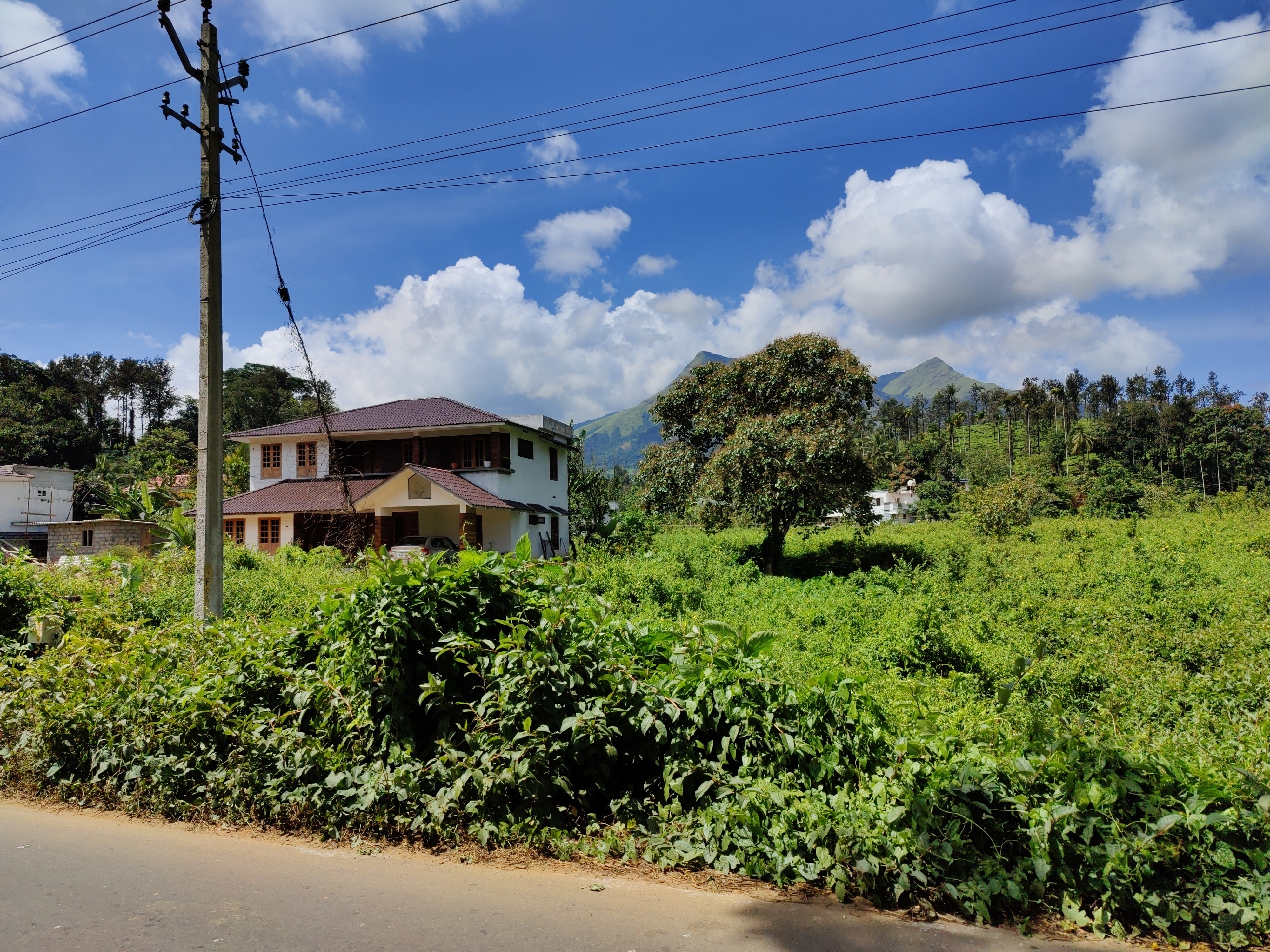
Day 3: Going to Wayanad Maveli Express was scheduled to reach Kozhikode at 03:25 (morning). I had set alarms from 03:00 to 03:30, with the gap of 10 minutes. Every time I woke up, I turned off the alarm. Then I woke up and saw train reaching the Kozhikode station and woke up Suresh for deboarding. But then I noticed that the train is actually leaving the station, not arriving! This means we missed our stop. Now we looked at the next stops and whether we can deboard there. I was very sleepy and wanted to take a retiring room at some station before continuing our journey to Wayanad. The next stop was Quilandi and we checked online that it didn t have a retiring room. So, we skipped this stop. We got off at the next stop named Vadakara and found out no retiring room was available. So, we asked about information regarding bus for Wayanad and they said that there is a bus to Wayanad around 07:00 hours from bus station which was a few kilometres from the railway station. We took a bus for Kalpetta (in Wayanad) at around 07:00. The destination of the buses were written in Malayalam, which we could not read. Once again, the locals helped us to get on to the bus to Kalpetta. Vadakara is not a big city and it can be hard to find people who know good Hindi or English, unlike Kochi. Despite language issues, I had no problem there in navigation, thanks to locals. I mostly spent time sleeping during the bus journey. A few hours later, the bus dropped us at Kalpetta. We had a booking at a hostel in Rippon village. It was 16 km from Kalpetta. On the way, we were treated with beautiful views of nature, which was present everywhere in Wayanad. The place was covered with tea gardens and our eyes were treated with beautiful scenery at every corner.
We were treated with such views during the Wayanad trip.
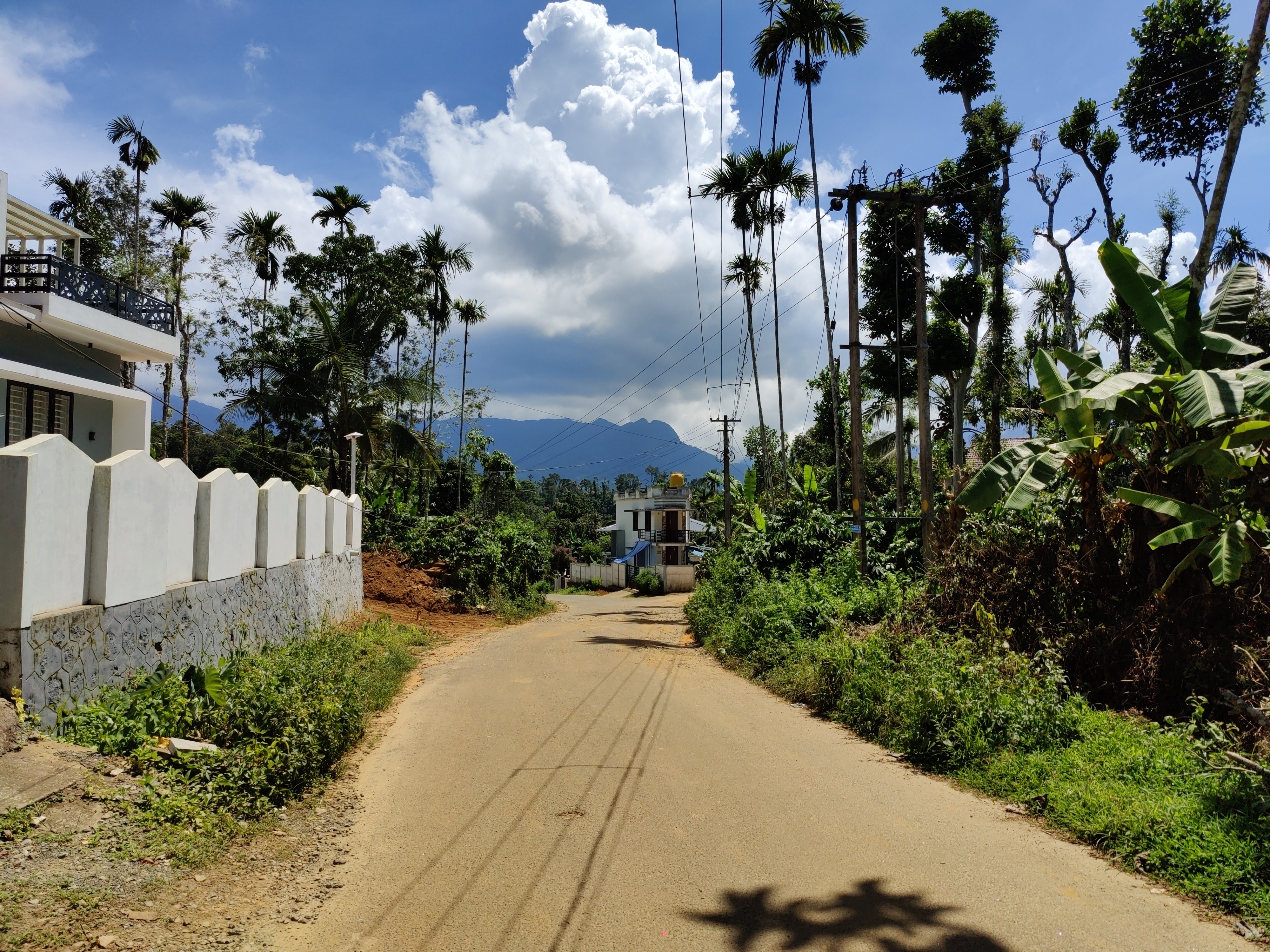
Rippon village was a very quiet place and I liked the calm atmosphere. This place is blessed by nature and has stunning scenery. I found English was more common than Hindi in Wayanad. Locals were very nice and helped me, even if they didn t know my language.
A road in Rippon.
After catching some sleep at the hostel, I went out in the afternoon. I hitchhiked to reach the main road from the hostel. I bought more spices from a nearby shop and realized that I should have waited for my visit to Wayanad to buy cardamom, which I already bought from Kochi. Then, I was looking for post office to send spices home. The people at the spices shop told me that the nearby Rippon post office was closed by that time, but the post office at Meppadi was open, which was 5 km from there. I went to Meppadi and saw the post office closes at 15:00, but I reached five minutes late. My packing was not very good and they asked me to pack it tighter. There was a shop near the post office and the people there gave me a cardboard and tapes, and helped pack my stuff for the post. By the time I went to the post office again, it was 15:30. But they accepted my parcel for post.

Day 4: Kanthanpara Falls, Zostel Wayanad and Karapuzha Dam Kanthanpara waterfalls were 2 km from the hostel. I hitchhiked to the place from the hostel on a scooty. Entry ticket was worth Rs 40. There were good views inside and nothing much to see except the waterfalls.
Entry to Kanthanpara Falls.
Kanthanpara Falls.
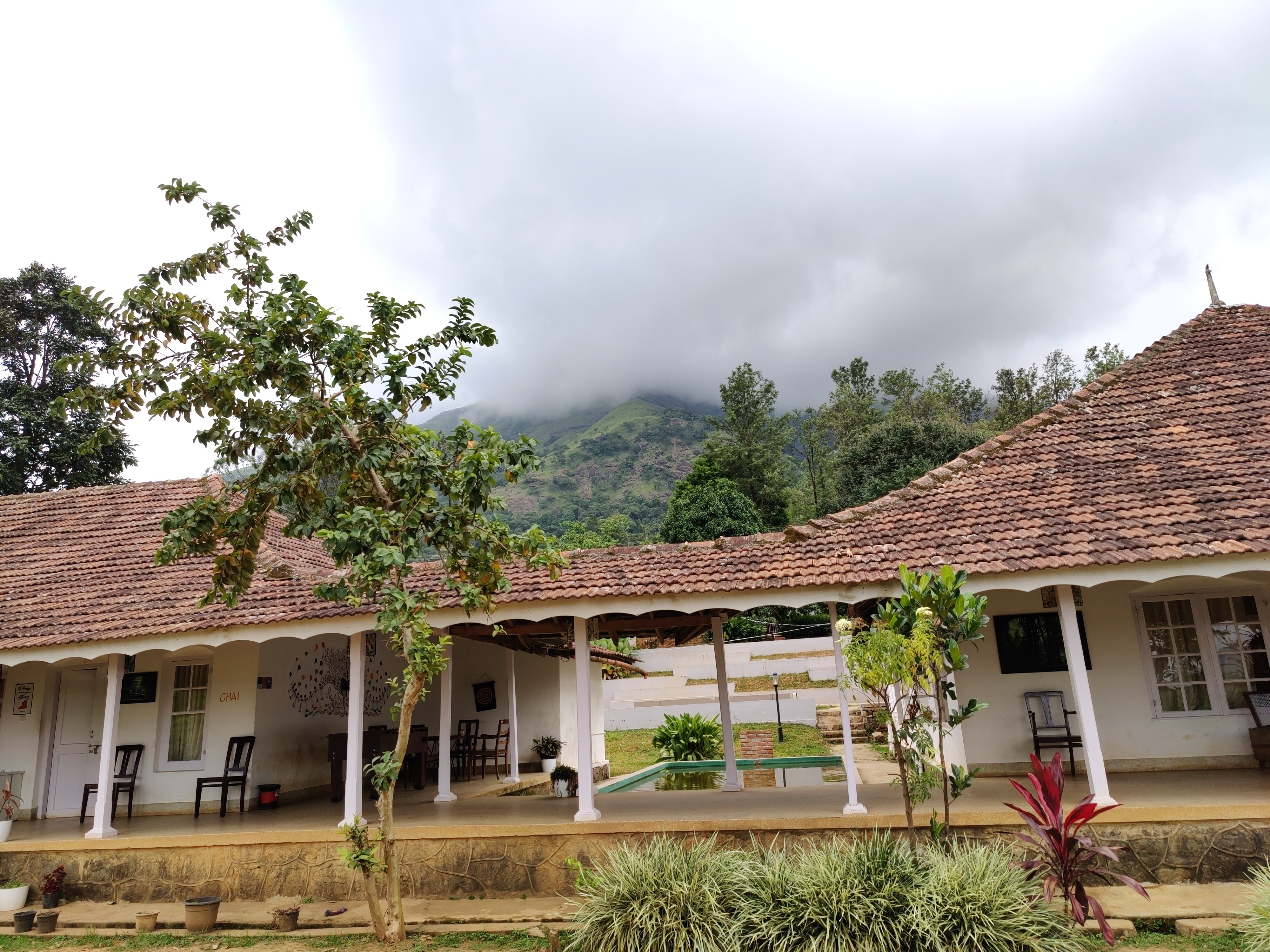
We had a booking at Zostel Wayanad for this day and so we shifted there. Again, as with their Ernakulam branch, they asked me to fill a form which required signing in using Google, but when I said I don t have a Google account they checked me in without that. There were tea gardens inside the Zostel boundaries and the property was beautiful.
A view of Zostel Wayanad.
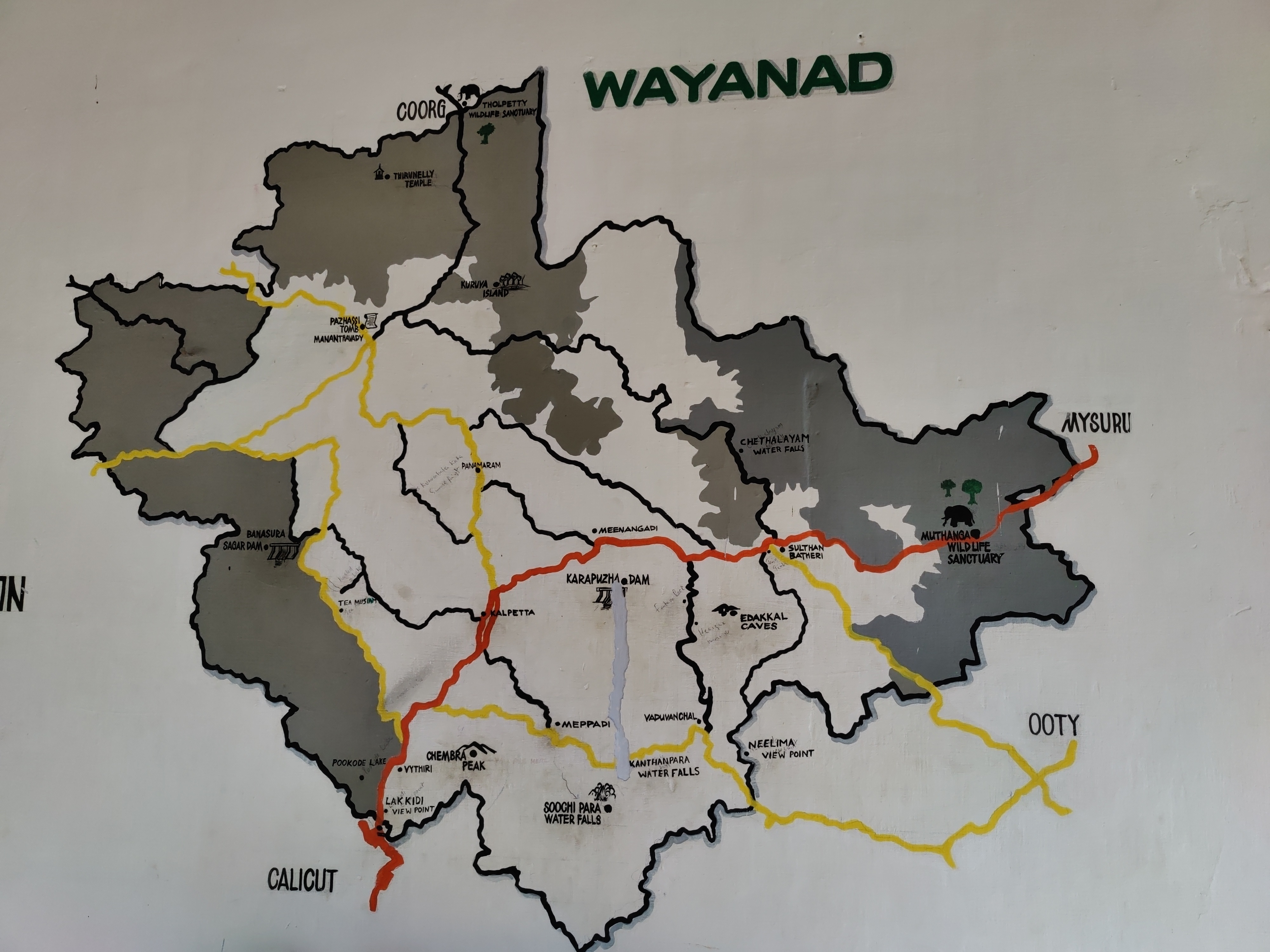
A map of Wayanad showing tourist places.

A view from inside the Zostel Wayanad property.
Later in the evening, I went to Karapuzha Dam. I witnessed a beautiful sunset during the journey. Karapuzha dam had many activites, like ziplining, and was nice to roam around. Chembra Peak is near to the Zostel Wayanad. So, I was planning to trek to the heart shaped lake. It was suggested by Praveen and looking online, this trek seemed worth doing. There was an issue however. The charges for trek were Rs 1770 for upto five people. So, if I go alone I will have to spend Rs 1770 for the trek. If I go with another person, we split Rs 1770 into two, and so on. The optimal way to do it is to go in a group of five (you included :D). I asked front desk at Zostel if they can connect me with people going to Chembra peak the next day, and they told me about a group of four people planning to go to Chembra peak the next day. I got lucky! All four of them were from Kerala and worked in Qatar.

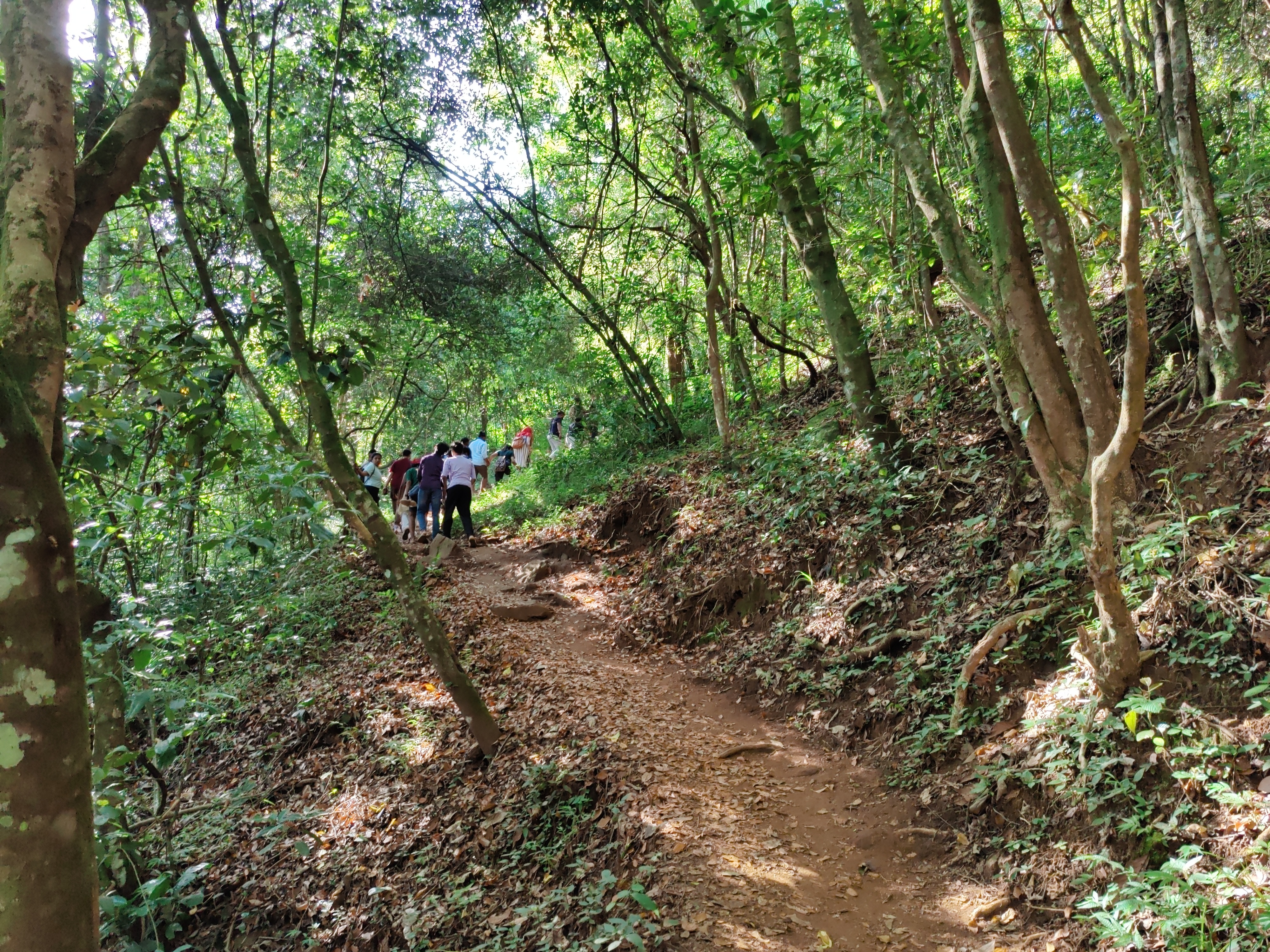
Day 5: Chembra peak trek The date was 1st September 2023. I woke up early (05:30 in the morning) for the Chembra peak trek. I had bought hiking shoes especially for trekking, which turned out to be a very good idea. The ticket counter opens at 07:00. The group of four with which I planned to trek met me around 06:00 in the Zostel. We went to the ticket counter around 06:30. We had breakfast at shops selling Maggi noodles and bread omlette near the ticket counter. It was a hot day and the trek was difficult for an inexperienced person like me. The scenery was green and beautiful throughout.
Terrain during trekking towards the Chembra peak.
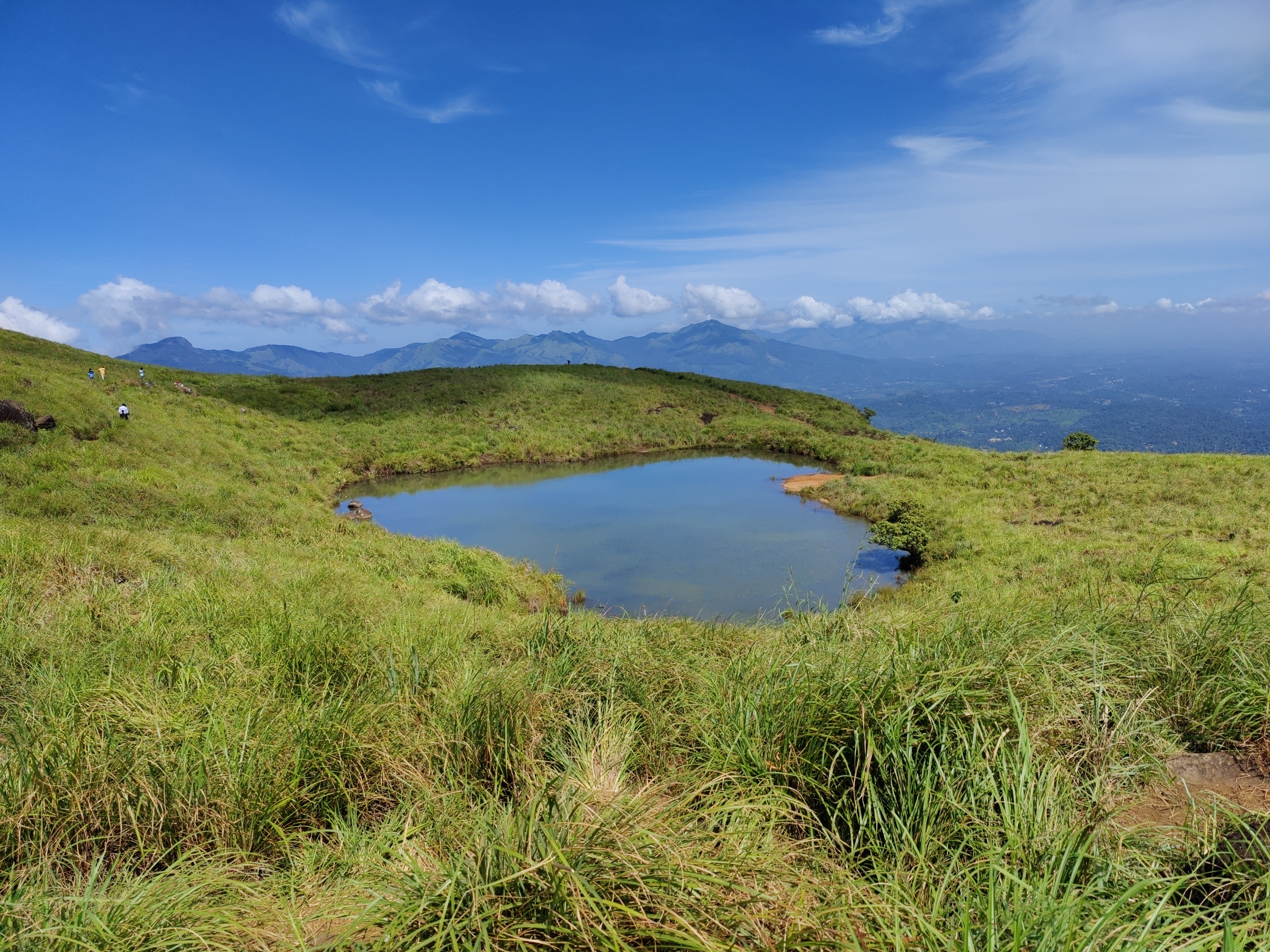
Heart-shaped lake at the Chembra peak.
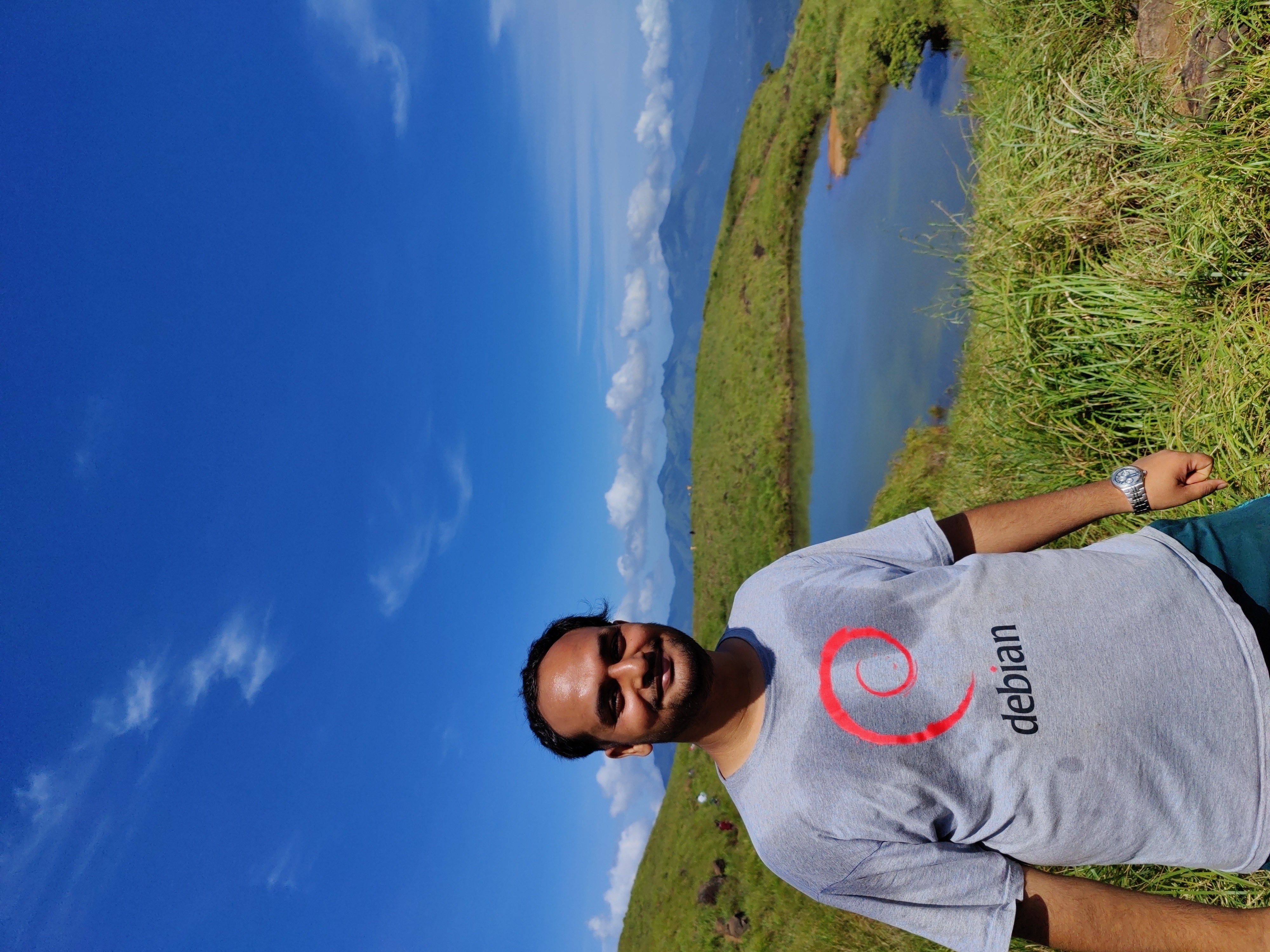
Me at the heart-shaped lake.
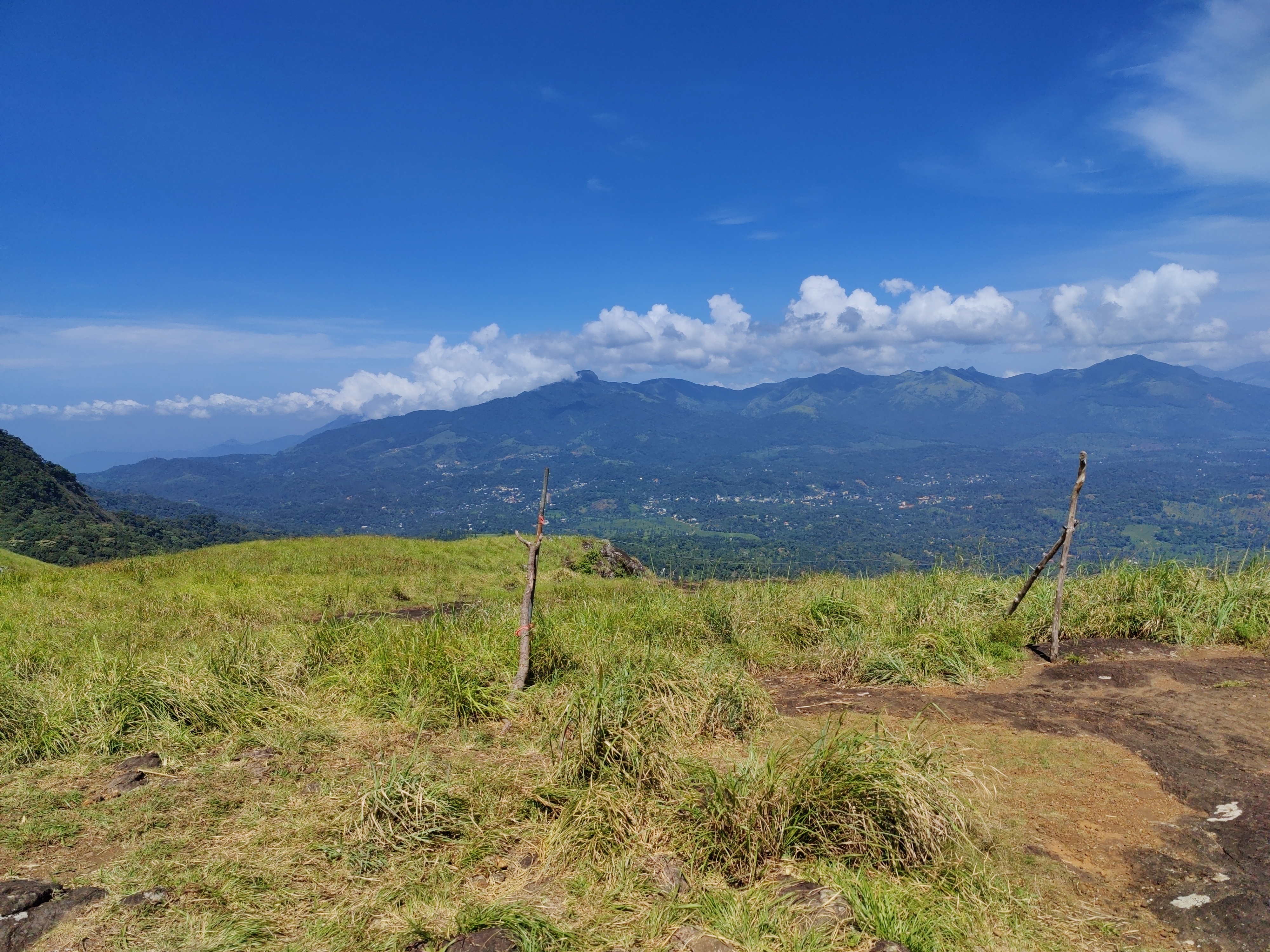
Views from the top of the Chembra peak.

View of another peak from the heart-shaped lake.

While returning from the trek, I found out a shop selling bamboo rice, which I bought and will make bamboo rice payasam out of it at home (I have some coconut milk from Kerala too ;)). We returned to Zostel in the afternoon. I had muscle pain after the trek and it has still not completely disappeared. At night, we took a bus from Kalpetta to Kozhikode in order to return to Kochi.

Day 6: Return to Kochi At midnight of 2nd of September, we reached Kozhikode bus stand. Then we roamed around for something to eat. I didn t find anything vegetarian to eat. No surprises there! Then we went to Kozhikode railway station and looked for retiring rooms, but no luck there. We waited at the station and took the next train to Kochi at 03:30 and reached Ernakulam Junction at 07:30 (half hours before train s scheduled time!). From there, we went to Zostel Fort Kochi and stayed one night there and checked out next morning.

Day 7: Roaming around in Fort Kochi On 3rd of September, we roamed around in Fort Kochi. We visited the usual places - St Francis Church, Dutch Palace, Jew Town, Pardesi Synagogue. I also visited some homestays and the owners were very happy to show their place even when I made it clear that I was not looking for a stay. In the evening, we went to Kakkanad to attend DebConf. The story continues in my DebConf23 blog post.

12 October 2023

Jonathan McDowell: Installing Debian on the BananaPi M2 Zero

My previously mentioned C.H.I.P. repurposing has been partly successful; I ve found a use for it (which I still need to write up), but unfortunately it s too useful and the fact it s still a bit flaky has become a problem. I spent a while trying to isolate exactly what the problem is (I m still seeing occasional hard hangs with no obvious debug output in the logs or on the serial console), then realised I should just buy one of the cheap ARM SBC boards currently available. The C.H.I.P. is based on an Allwinner R8, which is a single ARM v7 core (an A8). So it s fairly low power by today s standards and it seemed pretty much any board would probably do. I considered a Pi 2 Zero, but couldn t be bothered trying to find one in stock at a reasonable price (I ve had one on backorder from CPC since May 2022, and yes, I know other places have had them in stock since but I don t need one enough to chase and I m now mostly curious about whether it will ever ship). As the title of this post gives away, I settled on a Banana Pi BPI-M2 Zero, which is based on an Allwinner H3. That s a quad-core ARM v7 (an A7), so a bit more oompfh than the C.H.I.P. All in all it set me back 25, including a set of heatsinks that form a case around it. I started with the vendor provided Debian SD card image, which is based on Debian 9 (stretch) and so somewhat old. I was able to dist-upgrade my way through buster and bullseye, and end up on bookworm. I then discovered the bookworm 6.1 kernel worked just fine out of the box, and even included a suitable DTB. Which got me thinking about whether I could do a completely fresh Debian install with minimal tweaking. First thing, a boot loader. The Allwinner chips are nice in that they ll boot off SD, so I just needed a suitable u-boot image. Rather than go with the vendor image I had a look at mainline and discovered it had support! So let s build a clean image:
noodles@buildhost:~$ mkdir ~/BPI
noodles@buildhost:~$ cd ~/BPI
noodles@buildhost:~/BPI$ ls
noodles@buildhost:~/BPI$ git clone https://source.denx.de/u-boot/u-boot.git
Cloning into 'u-boot'...
remote: Enumerating objects: 935825, done.
remote: Counting objects: 100% (5777/5777), done.
remote: Compressing objects: 100% (1967/1967), done.
remote: Total 935825 (delta 3799), reused 5716 (delta 3769), pack-reused 930048
Receiving objects: 100% (935825/935825), 186.15 MiB   2.21 MiB/s, done.
Resolving deltas: 100% (785671/785671), done.
noodles@buildhost:~/BPI$ mkdir u-boot-build
noodles@buildhost:~/BPI$ cd u-boot
noodles@buildhost:~/BPI/u-boot$ git checkout v2023.07.02
...
HEAD is now at 83cdab8b2c Prepare v2023.07.02
noodles@buildhost:~/BPI/u-boot$ make O=../u-boot-build bananapi_m2_zero_defconfig
  HOSTCC  scripts/basic/fixdep
  GEN     Makefile
  HOSTCC  scripts/kconfig/conf.o
  YACC    scripts/kconfig/zconf.tab.c
  LEX     scripts/kconfig/zconf.lex.c
  HOSTCC  scripts/kconfig/zconf.tab.o
  HOSTLD  scripts/kconfig/conf
#
# configuration written to .config
#
make[1]: Leaving directory '/home/noodles/BPI/u-boot-build'
noodles@buildhost:~/BPI/u-boot$ cd ../u-boot-build/
noodles@buildhost:~/BPI/u-boot-build$ make CROSS_COMPILE=arm-linux-gnueabihf-
  GEN     Makefile
scripts/kconfig/conf  --syncconfig Kconfig
...
  LD      spl/u-boot-spl
  OBJCOPY spl/u-boot-spl-nodtb.bin
  COPY    spl/u-boot-spl.bin
  SYM     spl/u-boot-spl.sym
  MKIMAGE spl/sunxi-spl.bin
  MKIMAGE u-boot.img
  COPY    u-boot.dtb
  MKIMAGE u-boot-dtb.img
  BINMAN  .binman_stamp
  OFCHK   .config
noodles@buildhost:~/BPI/u-boot-build$ ls -l u-boot-sunxi-with-spl.bin
-rw-r--r-- 1 noodles noodles 494900 Aug  8 08:06 u-boot-sunxi-with-spl.bin
I had the advantage here of already having a host setup to cross build armhf binaries, but this was all done on a Debian bookworm host with packages from main. I ve put my build up here in case it s useful to someone - everything else below can be done on a normal x86_64 host. Next I needed a Debian installer. I went for the netboot variant - although I was writing it to SD rather than TFTP booting I wanted as much as possible to come over the network.
noodles@buildhost:~/BPI$ wget https://deb.debian.org/debian/dists/bookworm/main/installer-armhf/20230607%2Bdeb12u1/images/netboot/netboot.tar.gz
...
2023-08-08 10:15:03 (34.5 MB/s) -  netboot.tar.gz  saved [37851404/37851404]
noodles@buildhost:~/BPI$ tar -axf netboot.tar.gz
Then I took a suitable microSD card and set it up with a 500M primary VFAT partition, leaving the rest for Linux proper. I could have got away with a smaller VFAT partition but I d initially thought I might need to put some more installation files on it.
noodles@buildhost:~/BPI$ sudo fdisk /dev/sdb
Welcome to fdisk (util-linux 2.38.1).
Changes will remain in memory only, until you decide to write them.
Be careful before using the write command.
Command (m for help): o
Created a new DOS (MBR) disklabel with disk identifier 0x793729b3.
Command (m for help): n
Partition type
   p   primary (0 primary, 0 extended, 4 free)
   e   extended (container for logical partitions)
Select (default p):
Using default response p.
Partition number (1-4, default 1):
First sector (2048-60440575, default 2048):
Last sector, +/-sectors or +/-size K,M,G,T,P  (2048-60440575, default 60440575): +500M
Created a new partition 1 of type 'Linux' and of size 500 MiB.
Command (m for help): t
Selected partition 1
Hex code or alias (type L to list all): c
Changed type of partition 'Linux' to 'W95 FAT32 (LBA)'.
Command (m for help): n
Partition type
   p   primary (1 primary, 0 extended, 3 free)
   e   extended (container for logical partitions)
Select (default p):
Using default response p.
Partition number (2-4, default 2):
First sector (1026048-60440575, default 1026048):
Last sector, +/-sectors or +/-size K,M,G,T,P  (534528-60440575, default 60440575):
Created a new partition 2 of type 'Linux' and of size 28.3 GiB.
Command (m for help): w
The partition table has been altered.
Calling ioctl() to re-read partition table.
Syncing disks.
$ sudo mkfs -t vfat -n BPI-UBOOT /dev/sdb1
mkfs.fat 4.2 (2021-01-31)
The bootloader image gets written 8k into the SD card (our first partition starts at sector 2048, i.e. 1M into the device, so there s plenty of space here):
noodles@buildhost:~/BPI$ sudo dd if=u-boot-build/u-boot-sunxi-with-spl.bin of=/dev/sdb bs=1024 seek=8
483+1 records in
483+1 records out
494900 bytes (495 kB, 483 KiB) copied, 0.0282234 s, 17.5 MB/s
Copy the Debian installer files onto the VFAT partition:
noodles@buildhost:~/BPI$ cp -r debian-installer/ /media/noodles/BPI-UBOOT/
Unmount the SD from the build host, pop it into the M2 Zero, boot it up while connected to the serial console, hit a key to stop autoboot and tell it to boot the installer:
U-Boot SPL 2023.07.02 (Aug 08 2023 - 09:05:44 +0100)
DRAM: 512 MiB
Trying to boot from MMC1
U-Boot 2023.07.02 (Aug 08 2023 - 09:05:44 +0100) Allwinner Technology
CPU:   Allwinner H3 (SUN8I 1680)
Model: Banana Pi BPI-M2-Zero
DRAM:  512 MiB
Core:  60 devices, 17 uclasses, devicetree: separate
WDT:   Not starting watchdog@1c20ca0
MMC:   mmc@1c0f000: 0, mmc@1c10000: 1
Loading Environment from FAT... Unable to read "uboot.env" from mmc0:1...
In:    serial
Out:   serial
Err:   serial
Net:   No ethernet found.
Hit any key to stop autoboot:  0
=> setenv dibase /debian-installer/armhf
=> fatload mmc 0:1 $ kernel_addr_r  $ dibase /vmlinuz
5333504 bytes read in 225 ms (22.6 MiB/s)
=> setenv bootargs "console=ttyS0,115200n8"
=> fatload mmc 0:1 $ fdt_addr_r  $ dibase /dtbs/sun8i-h2-plus-bananapi-m2-zero.dtb
25254 bytes read in 7 ms (3.4 MiB/s)
=> fdt addr $ fdt_addr_r  0x40000
Working FDT set to 43000000
=> fatload mmc 0:1 $ ramdisk_addr_r  $ dibase /initrd.gz
31693887 bytes read in 1312 ms (23 MiB/s)
=> bootz $ kernel_addr_r  $ ramdisk_addr_r :$ filesize  $ fdt_addr_r 
Kernel image @ 0x42000000 [ 0x000000 - 0x516200 ]
## Flattened Device Tree blob at 43000000
   Booting using the fdt blob at 0x43000000
Working FDT set to 43000000
   Loading Ramdisk to 481c6000, end 49fffc3f ... OK
   Loading Device Tree to 48183000, end 481c5fff ... OK
Working FDT set to 48183000
Starting kernel ...
At this point the installer runs and you can do a normal install. Well, except the wifi wasn t detected, I think because the netinst images don t include firmware. I spent a bit of time trying to figure out how to include it but ultimately ended up installing over a USB ethernet dongle, which Just Worked and was less faff. Installing firmware-brcm80211 once installation completed allowed the built-in wifi to work fine. After install you need to configure u-boot to boot without intervention. At the u-boot prompt (i.e. after hitting a key to stop autoboot):
=> setenv bootargs "console=ttyS0,115200n8 root=LABEL=BPI-ROOT ro"
=> setenv bootcmd 'ext4load mmc 0:2 $ fdt_addr_r  /boot/sun8i-h2-plus-bananapi-m2-zero.dtb ; fdt addr $ fdt_addr_r  0x40000 ; ext4load mmc 0:2 $ kernel_addr_r  /boot/vmlinuz ; ext4load mmc 0:2 $ ramdisk_addr_r  /boot/initrd.img ; bootz $ kernel_addr_r  $ ramdisk_addr_r :$ filesize  $ fdt_addr_r '
=> saveenv
Saving Environment to FAT... OK
=> reset
This is assuming you have /boot on partition 2 on the SD - I left the first partition as VFAT (that s where the u-boot environment will be saved) and just used all of the rest as a single ext4 partition. I did have to do an e2label /dev/sdb2 BPI-ROOT to label / appropriately; otherwise I occasionally saw the SD card appear as mmc1 for Linux (I m guessing due to asynchronous boot order with the wifi). You should now find the device boots without intervention.

Reproducible Builds: Reproducible Builds in September 2023

Welcome to the September 2023 report from the Reproducible Builds project In these reports, we outline the most important things that we have been up to over the past month. As a quick recap, whilst anyone may inspect the source code of free software for malicious flaws, almost all software is distributed to end users as pre-compiled binaries.
Andreas Herrmann gave a talk at All Systems Go 2023 titled Fast, correct, reproducible builds with Nix and Bazel . Quoting from the talk description:

You will be introduced to Google s open source build system Bazel, and will learn how it provides fast builds, how correctness and reproducibility is relevant, and how Bazel tries to ensure correctness. But, we will also see where Bazel falls short in ensuring correctness and reproducibility. You will [also] learn about the purely functional package manager Nix and how it approaches correctness and build isolation. And we will see where Bazel has an advantage over Nix when it comes to providing fast feedback during development.
Andreas also shows how you can get the best of both worlds and combine Nix and Bazel, too. A video of the talk is available.
diffoscope is our in-depth and content-aware diff utility that can locate and diagnose reproducibility issues. This month, Chris Lamb fixed compatibility with file(1) version 5.45 [ ] and updated some documentation [ ]. In addition, Vagrant Cascadian extended support for GNU Guix [ ][ ] and updated the version in that distribution as well. [ ].
Yet another reminder that our upcoming Reproducible Builds Summit is set to take place from October 31st November 2nd 2023 in Hamburg, Germany. If you haven t been before, our summits are a unique gathering that brings together attendees from diverse projects, united by a shared vision of advancing the Reproducible Builds effort. During this enriching event, participants will have the opportunity to engage in discussions, establish connections and exchange ideas to drive progress in this vital field. If you re interested in joining us this year, please make sure to read the event page, the news item, or the invitation email that Mattia Rizzolo sent out recently, all of which have more details about the event and location. We are also still looking for sponsors to support the event, so please reach out to the organising team if you are able to help. Also note that PackagingCon 2023 is taking place in Berlin just before our summit.
On the Reproducible Builds website, Greg Chabala updated the JVM-related documentation to update a link to the BUILDSPEC.md file. [ ] And Fay Stegerman fixed the builds failing because of a YAML syntax error.

Distribution work In Debian, this month: September saw F-Droid add ten new reproducible apps, and one existing app switched to reproducible builds. In addition, two reproducible apps were archived and one was disabled for a current total of 199 apps published with Reproducible Builds and using the upstream developer s signature. [ ] In addition, an extensive blog post was posted on f-droid.org titled Reproducible builds, signing keys, and binary repos .

Upstream patches The Reproducible Builds project detects, dissects and attempts to fix as many currently-unreproducible packages as possible. We endeavour to send all of our patches upstream where appropriate. This month, we wrote a large number of such patches, including:

Testing framework The Reproducible Builds project operates a comprehensive testing framework (available at tests.reproducible-builds.org) in order to check packages and other artifacts for reproducibility. In August, a number of changes were made by Holger Levsen:
  • Disable armhf and i386 builds due to Debian bug #1052257. [ ][ ][ ][ ]
  • Run diffoscope with a lower ionice priority. [ ]
  • Log every build in a simple text file [ ] and create persistent stamp files when running diffoscope to ease debugging [ ].
  • Run schedulers one hour after dinstall again. [ ]
  • Temporarily use diffoscope from the host, and not from a schroot running the tested suite. [ ][ ]
  • Fail the diffoscope distribution test if the diffoscope version cannot be determined. [ ]
  • Fix a spelling error in the email to IRC gateway. [ ]
  • Force (and document) the reconfiguration of all jobs, due to the recent rise of zombies. [ ][ ][ ][ ]
  • Deal with a rare condition when killing processes which should not be there. [ ]
  • Install the Debian backports kernel in an attempt to address Debian bug #1052257. [ ][ ]
In addition, Mattia Rizzolo fixed a call to diffoscope --version (as suggested by Fay Stegerman on our mailing list) [ ], worked on an openQA credential issue [ ] and also made some changes to the machine-readable reproducible metadata, reproducible-tracker.json [ ]. Lastly, Roland Clobus added instructions for manual configuration of the openQA secrets [ ].

If you are interested in contributing to the Reproducible Builds project, please visit our Contribute page on our website. However, you can get in touch with us via:

Freexian Collaborators: Monthly report about Debian Long Term Support, September 2023 (by Santiago Ruano Rinc n)

Like each month, have a look at the work funded by Freexian s Debian LTS offering.

Debian LTS contributors In September, 21 contributors have been paid to work on Debian LTS, their reports are available:
  • Abhijith PA did 10.0h (out of 0h assigned and 14.0h from previous period), thus carrying over 4.0h to the next month.
  • Adrian Bunk did 7.0h (out of 17.0h assigned), thus carrying over 10.0h to the next month.
  • Anton Gladky did 9.5h (out of 7.5h assigned and 7.5h from previous period), thus carrying over 5.5h to the next month.
  • Bastien Roucari s did 16.0h (out of 15.5h assigned and 1.5h from previous period), thus carrying over 1.0h to the next month.
  • Ben Hutchings did 17.0h (out of 17.0h assigned).
  • Chris Lamb did 17.0h (out of 17.0h assigned).
  • Emilio Pozuelo Monfort did 30.0h (out of 30.0h assigned).
  • Guilhem Moulin did 18.25h (out of 18.25h assigned).
  • Helmut Grohne did 10.0h (out of 10.0h assigned).
  • Lee Garrett did 17.0h (out of 16.5h assigned and 0.5h from previous period).
  • Markus Koschany did 40.0h (out of 40.0h assigned).
  • Ola Lundqvist did 4.5h (out of 0h assigned and 24.0h from previous period), thus carrying over 19.5h to the next month.
  • Roberto C. S nchez did 5.0h (out of 12.0h assigned), thus carrying over 7.0h to the next month.
  • Santiago Ruano Rinc n did 7.75h (out of 16.0h assigned), thus carrying over 8.25h to the next month.
  • Sean Whitton did 7.0h (out of 7.0h assigned).
  • Sylvain Beucler did 10.5h (out of 17.0h assigned), thus carrying over 6.5h to the next month.
  • Thorsten Alteholz did 14.0h (out of 14.0h assigned).
  • Tobias Frost did 13.25h (out of 16.0h assigned), thus carrying over 2.75h to the next month.

Evolution of the situation In September, we have released 44 DLAs. The month of September was a busy month for the LTS Team. A notable security issue fixed in September was the high-severity CVE-2023-4863, a heap buffer overflow that allowed remote attackers to perform an out-of-bounds memory write via a crafted WebP file. This CVE was covered by the three DLAs of different packages: firefox-esr, libwebp and thunderbird. The libwebp backported patch was sent to upstream, who adapted and applied it to the 0.6.1 branch. It is also worth noting that LTS contributor Markus Koschany included in his work updates to packages in Debian Bullseye and Bookworm, that are under the umbrella of the Security Team: xrdp, jetty9 and mosquitto. As every month, there was important behind-the-scenes work by the Front Desk staff, who triaged, analyzed and reviewed dozens of vulnerabilities, to decide if they warrant a security update. This is very important work, since we need to trade-off between the frequency of updates and the stability of the LTS release.

Thanks to our sponsors Sponsors that joined recently are in bold.

11 October 2023

Russell Coker: The PineTime

I have just got a PineTime smart watch [1] from Pine64. They cost $US27 each which ended up as $144.63 Australian for three including postage when I ordered on the 16th of September, it s annoying that you can t order more than 3 at a time to reduce postage costs. The Australian online store Kogan has smart watches starting at about $15 [2] with Bluetooth and support for phone notifications so the $48.21 for a PineTime doesn t compare well on just price and features. The watches Kogan sells start getting into high resolution at around the $25 price and many of them have features like 24*7 heart monitoring that the PineTime lacks (it just measures when you request it). No-one would order a PineTime for being cheap or having lots of features, you order it because you want open hardware that allows you to do things your way. Also the PineTime isn t going to be orphaned while it s likely that in a few years most of the cheap watches sold by Kogan etc won t support the new phones running the latest version of Android. The screen of the PineTime is 240*240 resolution (about 260dpi) with 64k colors. The screen resolution is lower than some high-end smart watches but higher than most phones and almost all monitors. I doubt that much benefit could be gained from higher resolution. Even on minimum brightness the screen is easy to read on all but the brightest sunny days. The compute capabilities are 4.5MB of flash storage, 64k of RAM, and a 64MHz CPU this can t run Linux and nothing like it will run Linux for a long time. I ve had the PineTime for 6 days now, I charged it once and it s now at 55% battery. It looks like it will last close to 2 weeks on a single charge and it s claimed that a newer firmware will make the battery last longer. Software The main Android app for using with the PineTime is GadgetBridge which I installed from the f-droid repository. It had lots of click-through menus for allowing access to various Android features (contacts, bluetooth, draw over foreground, location, and more) but after that it was easy to setup. It was the first bluetooth device I ve used which had a 6 digit PIN for connecting to a phone. Initially I used the PineTime with my Huawei Nova 7i [3]. The aim is to eventually have it run from my PinePhonePro but my test of the PinePhonePro didn t go as well as hoped [4]. Now I m using it on my Huawei Mate 10 Pro. It comes with InfiniTime [5] installed as the default firmware, mine had 1.11.0 which is a fairly recent version. I will probably upgrade it soon to get the better power optimisation and weather alerts in the watch face. I don t have any plans to use different watch firmware and I don t have any plans to contribute to firmware development I just can t hack on every FOSS project around it s better to do big contributions to a small number of projects. For people who don t want the default firmware the Wasp-OS project seems interesting as it s written in Python [6], I don t like Python but it s very popular. Python is particularly popular in ML development, it will be interesting to see if Wasp-OS becomes a preferred platform for smart watches that talk to GPT servers. Generally the software works well, one annoyance is that when a notification goes away on the phone it remains on the PineTime and has to be manually dismissed. It would be nice if clearing notifications on the phone would clear them on the PineTime too. The music control works with RocketPlayer on Android, it displays the track name and has options for pause/play and skipping forward and backward one track. Annoyingly the current firmware doesn t allow configuring the main screens, from the primary screen you swipe down for notifications, right for settings, up for menus, and there s nothing defined for swipe left. I d like to make swipe left the command to get to music control. Hardware It has a detachable band that appears to be within the common range of watch bands. According to the PineTime Wiki page [7] there are a selection of alternate bands that will fit it, but some don t because the band is recessed into the watch. It is IP67 rated which means you can probably wear it while swimming. The charging contacts are exposed on the bottom of the case which means that any chemicals left by pool water can be cleaned off and also as they are apparently not expected to be harmed by sweat and skin oil there shouldn t be a problem charging it. I have significant experience using a Samsung Galaxy S5 Mini which is rated at IP67 in swimming pools. I had two problems with the S5 Mini when getting out of the pool, firstly water in the headphone socket made the phone consider that it was in headphone mode and turn off the speakers and secondly it took hours to become dry enough to charge and after many swims the charge rate dropped presumably due to oxide on the contacts. There are reports of success when swimming with a PineTime. Generally it feels well made and appears more solid than the cheapest Kogan devices appear to be. Conclusion If I wanted monitoring for medical reasons then I would choose a different smart watch. I ve read about people doing things like tracking their body stats 24*7 and trying to discover useful things, the PineTime is not a good option for BioHacking type use. However if I did have a need for such things I d probably just buy a second smart watch and have one on each wrist. The PineTime generally works well. It s a pity it has fewer hardware features than closed devices that are cheaper. But having a firmware that can be continually improved by the community is good. The continually expanding use of mobile phone technology devices for custom use in corporations (such as mobile phone in custom case for scanning prices etc in a supermarket) has some potential for use with this. I can imagine someone adding some custom features to a PineTime for such use. When a supermarket chain has 200,000 employees (as Woolworths in Australia does) then paying for a few months of software development work to make a smart watch do specific things for that company could provide significant value. There are probably some business opportunities for FOSS developers to hack on extra hardware on a PineTime and write software to support it. I recommend that everyone who s into FOSS buy one of these. Preferably make a deal with two friends to get the minimum postage cost.

Russell Coker: PinePhone Status

4 months ago I got my PinePhonePro [1]. Since then I have got SE Linux working on it to the stage of allowing it to boot correctly with Debian/Unstable, login with the user_t domain (minimum privilege for the graphical user) and make and receive calls. I finished getting SE Linux working reasonably well 3 days ago and most (but not all) of the SE Linux policy is in Debian now. I ve been getting good at Github PRs and I m sending a lot of policy upstream, so the next version of Debian will have a much smaller diff from the upstream Refpolicy. I have been running the PinePhone with Plasma Mobile because I prefer KDE, I would run GNOME/Phoc if it gave significantly better functionality. 3 days ago I moved my main SIM (the one with the number that people call about work etc) to my PinePhone and tried running it as my main phone. Today I gave up on that. My Android History The last phone I had that did everything I needed was a Huawei Mate 10 Pro that I bought refurbished in June 2019 for $389. The Mate 10 Pro runs Android with the Google Play store and has been quite unremarkable which is presumably why I forgot to blog about it when I got it, it was a slight upgrade over the Huawei Mate 9 [2] that I had used for 2 years before that. In April 2022 I tried using a Huawei Nova 7i as my main phone without Google Play programs or services [3]. That experiment was a failure as I couldn t get NextCloud to work for Calendaring and Contacts. It could be that I stuffed something up when trying that, but I put more skill and effort into trying to get it to work than most people ever would. The Nova 7i is a very slick phone, faster and nicer than the Mate 10 Pro (as expected being 2 years newer) while also having ridiculously long battery life. The Nova 7i when always on running the SchildiChat Matrix client and the Conversations Jabber client it will use less than 10% battery in a 8 hour work day. As nice as the Nova 7i is for the core functions I still need to have Play Store apps for LinkedIn, Twitter, Facebook, Zoom, etc. Which meant connecting the Mate 10 Pro via Wifi. As slick as the Nova 7i is for non-Google stuff running it and the Mate 10 Pro is a medium amount of pain for a small amount of freedom. So now I have for the moment abandoned the Nova 7i and gone back to the Mate 10 Pro. What I will try to do is to either forcibly install Google Play on the Nova 7i to make it my proprietary phone or to install an open distribution of Linux (IE not Android) to make it at least a small tablet which incidentally is much more powerful than a PinePhonePro. Issues With the PinePhonePro The battery charges very slowly (as much as 50 hours estimated charge time) and discharges fast. When used in a typical way in Caffeine mode to stop suspend so I can ssh to it etc it won t come close to lasting an 8 hour day. Also it will only take 5V charging and ideally wants 5V 3A charging which most chargers won t do. The charging speed over regular USB ports is very slow, sometimes stating it will take as much as 50 hours to charge. A phone that gets below 50% charge in less than 4 hours and can t be charged at a reasonable speed from a USB port on a laptop or monitor is going to be a major pain to use in the office. I don t think this can be fixed in software, we can alleviate it by making software more CPU efficient and by enabling various hardware sleep modes more effectively but the slow charging is a hardware issue that can t be fixed. The phone call quality is poor. Usually when on a call I hear static and sometimes the person at the other end appears to hear nothing. Also the UI for calls is different from Android which makes it take longer to answer a call and gives more missed calls. The UI issue is a combination of software and habits, both of which can be changed. But the call quality may be a hardware issue. I don t know if it s a hardware issue specific to my phone or something related to the PinePhonePro on the Telstra network. Clicking on notification in the drop-down doesn t take me to the app. I don t know if this is regarded as a bug by the Plasma-Mobile developers. Also notifications aren t displayed on the lock screen and there doesn t seem to be a configuration option to enable this. The Plasma-Mobile configuration for the wifi hotspot is difficult. There is no button for it in the drop-down menu (called Quicksettings in Plasma-Mobile) and no way of easily determining whether it s in hotspot or wifi client mode. This isn t an insurmountable problem and the worst-case is that I could write a script to do it, but it s still annoying. There is apparent support in the desktop version of KDE for syncing contacts from Google and I could probably get that working (although I failed last time I tried on the desktop), but it is a pain. Conclusion Most of the problems are software related and therefore I can get involved in solving them. I plan to keep working on these things. If all the software had worked in an ideal manner then I would have spent more time investigating the hardware issues of battery life and charge time and the quality of calls. I now have my Librem5 [4] running Debian so I will be able to compare call quality with the PinePhonePro. If I m unable to get the PinePhonePro working adequately then maybe making the Librem5 my main phone will be an option. I hope that by early next year I will be able to make another test at using a FOSS phone my main phone. In the mean time I can still work on convergence and other things.

10 October 2023

Russ Allbery: Review: Chilling Effect

Review: Chilling Effect, by Valerie Valdes
Series: Chilling Effect #1
Publisher: Harper Voyager
Copyright: September 2019
Printing: 2020
ISBN: 0-06-287724-0
Format: Kindle
Pages: 420
Chilling Effect is a space opera, kind of; more on the genre classification in a moment. It is the first volume of a series, although it reaches a reasonable conclusion on its own. It was Valerie Valdes's first novel. Captain Eva Innocente's line of work used to be less than lawful, following in the footsteps of her father. She got out of that life and got her own crew and ship. Now, the La Sirena Negra and its crew do small transport jobs for just enough money to stay afloat. Or, maybe, a bit less than that, when the recipient of a crate full of psychic escape-artist cats goes bankrupt before she can deliver it and get paid. It's a marginal and tenuous life, but at least she isn't doing anything shady. Then the Fridge kidnaps her sister. The Fridge is a shadowy organization of extortionists whose modus operandi is to kidnap a family member of their target, stuff them in cryogenic suspension, and demand obedience lest the family member be sold off as indentured labor after a few decades as a popsicle. Eva will be given missions that she and her crew have to perform. If she performs them well, she will pay off the price of her sister's release. Eventually. Oh, and she's not allowed to tell anyone. I found it hard to place the subgenre of this novel more specifically than comedy-adventure. The technology fits space opera: there are psychic cats, pilots who treat ships as extensions of their own body, brain parasites, a random intergalactic warlord, and very few attempts to explain anything with scientific principles. However, the stakes aren't on the scale that space opera usually goes for. Eva and her crew aren't going to topple governments or form rebellions. They're just trying to survive in a galaxy full of abusive corporations, dodgy clients, and the occasional alien who requires you to carry extensive documentation to prove that you can't be hunted for meat. It is also, as you might guess from that description, occasionally funny. That part of the book didn't mesh for me. Eva is truly afraid for her sister, and some of the events in the book are quite sinister, but the antagonist is an organization called The Fridge that puts people in fridges. Sexual harassment in a bar turns into obsessive stalking by a crazed intergalactic warlord who frequently interrupts the plot by randomly blasting things with his fleet, which felt like something from Hitchhiker's Guide to the Galaxy. The stakes for Eva, and her frustrations at being dragged back into a life she escaped, felt too high for the wacky, comic descriptions of the problems she gets into. My biggest complaint, though, is that the plot is driven by people not telling other people critical information they should know. Eva is keeping major secrets from her crew for nearly the entire book. Other people are also keeping information from Eva. There is a romance subplot driven almost entirely by both parties refusing to talk to each other about the existence of a romance subplot. For some people, this is catnip, but it's one of my least favorite fictional tropes and I found much of the book both frustrating and stressful. Fictional characters keeping important secrets from each other apparently raises my blood pressure. One of the things I did like about this book is that Eva is Hispanic and speaks like it. She resorts to Spanish frequently for curses, untranslatable phrases, aphorisms, derogatory comments, and similar types of emotional communication that don't feel right in a second language. Most of the time one can figure out the meaning from context, but Valdes doesn't feel obligated to hold the reader's hand and explain everything. I liked that. I think this approach is more viable in these days of ebook readers that can attempt translations on demand, and I think it does a lot to make Eva feel like a real person. I think the characters are the best part of this book, once one gets past the frustration of their refusal to talk to each other. Eva and the alien ship engineer get the most screen time, but Pink, Eva's honest-to-a-fault friend, was probably my favorite character. I also really enjoyed Min, the ship pilot whose primary goal is to be able to jack into the ship and treat it as her body, and otherwise doesn't particularly care about the rest of the plot as long as she gets paid. A lot of books about ship crews like this one lean hard into found family. This one felt more like a group of coworkers, with varying degrees of friendship and level of interest in their shared endeavors, but without the too-common shorthand of making the less-engaged crew members either some type of villain or someone who needs to be drawn out and turned into a best friend or love interest. It's okay for a job to just be a job, even if it's one where you're around the same people all the time. People who work on actual ships do it all the time. This is a half-serious, half-comic action romp that turned out to not be my thing, but I can see why others will enjoy it. Be prepared for a whole lot of communication failures and an uneven emotional tone, but if you're looking for a space-ships-and-aliens story that doesn't take itself very seriously and has some vague YA vibes, this may work for you. Followed by Prime Deceptions, although I didn't like this well enough to read on. Rating: 6 out of 10

9 October 2023

Aigars Mahinovs: Figuring out finances part 1

I have been managing my finances and getting an overview of where I am financially and where I am going month-to-month for a few years already. That means that I already have a method of doing my finances and a method of thinking about them. So far this has been supported by a commerical tool called MoneyWiz. I was happy to pay them for the ability to have a solid product and be able to easily access my finances from my phone (to enter cash transactions directly in the field) and sync data across multiple devices with their cloud offering. However, MoneyWiz development stalled. So much so that they stopped updating their Android app and cancelled web version plans to just focus on a iPhone and MacOS clients. And even there the development did not seem very successful over the last year. So I am cancelling their subscription, extracting all my data (as CSV) and looking for alternatives. So let's start with the basics - what I want from finace software?
  • Open source and self-hosted
  • Accounts to represent real accounts in my bank, credit cards, cash account
  • Transactions to represent money moving in/out/between accounts
  • Tree of categories for transactions to categorise spending
  • Category reports on arbitrary time periods
  • Ability to see the expected balance on each account at any historic point in time from given transactions
  • Ability to do a corrective transaction - hmm, I don't know what happened, but right now I have X in cash
  • Adding past transactions before a corrective transaction should not change balance after correction
  • Ability to automatically import transactions from my bank
  • Ability to plan future, recurring transactions
  • Incoming transactions from bank import should be auto-matched with planned recuring transactions
  • Ability to see missed planned recurring transactions
  • Ability to see value deviations in planned recuring transactions
  • Ability to manually match a transaction with a planned recurring transaction for that month or skip a month
  • Ability to see a projected balance on my accounts at any future date given planned transactions
  • Credit card fully refilling its current (negative) balance to zero (from a given account) should be a plannable transaction
  • Accessible from multiple devices, like Linux, Android, iPhone, MacOS. Most likely that means web-based
  • Achiving accounts without loosing their past transactions with active accounts
  • API to access data, so that I could wire that up to a Home Assistant dashboard
I don't care about currencies (thanks Euro!), localization, taxes and double-entry bookkeeping. I don't have much use for tags, budgets or savings targets. It could be useful to be able to track stock investment values (but I do have a pretty good from the bank that does that anyway). And tracking loans (incoming and outgoing) could be a worthwhile thing as well, but that can also be simulated with separate accounts for each loan. Tracking refundable expenses (like medical expenses that insurances should refund later on) would also be nice. Could also be simulated by having a separate expense category (Medical - refundable) and putting the refund as a negative expense into that category. One weird feature that I really like is having transfer transactions that have arbitrary incoming and outgoing dates. For some transactions it is a simple transfer delay - money leaves the account A on Friday and only appears in the destination account B on Monday morning. However, this can also happen the other way around - a few credit cards I have seen work in a way that on 14th of each month the balance of the credit card gets reset to zero and then a week later the negative balance that was on that credit card gets taken from the base account that the card is bound to. So the money leaves the base account a week later than it arrives in the credit card account. Financial systems really are magic sometimes :D Ideally that should be represented by a single transaction with two dates - one date when money leaves one account and another date when it arrives in a different account, so that balances on both accounts in the days between would be correct (as in matching what the bank says they were on those dates). And it should automatch such transaction from bank data imports. And predict its value from the negative balance of the credit card. And a pony! But in worst case this could be simulated using a separate "In transfer" account. When I am thinking about my finances, the key metric for me is - how much will I spend this month - both in fixed spending (rent, Internet and phone bills, health insurance, subscriptions, ...) and in variable spending (groceries, eating out, clothing, ...). In theory that should be trivial, but in practice a simple calendar month view will fail because a bunch of fixed expenses occur at the month end/start boundary and can happen either at the end of previous month or at start on next month, depending on how the weekends happen to fall and how the systems of various providers decided to do direct debits this month. So 1st of month is not a good snapshoting time. Any date between 6th (last possible days for monthly bills) and 20th (earliest possible salary day) would be a better cut off point. Looking at the balance of my main account at that time point lets me know what was the difference between income and expenses for the past month. And that is the number I want the financial app to be able to predict as soon as possible. And additional complication is the way credit cards work here. The expenses booked to a credit card after 14th of September will only appear in the main account on 20th of October and thus will actually only count towards the expenses of month of October. That makes it very confusing to see a larger overspend in the main account on 6th of October and then use the categories to try to figure out where the money went, because all the spending that happened on the credit card after the 14th of September should not really be looked at in that context, but spending on the main account or cash account should be counted all the way to 6th of October. :D I am not optimistic that any finance software would able to doea with this mess correctly. So far I am tending to consider Firefly III which has most of what I need and looks great and well maintained, but has the tiny drawback of being written in PHP, so that basically excludes me from ability to contribute anything beyond ideas and feedback. :D I already did a quick test of Firefly via local Docker containers, so the next step would be to try to set it up as a production instance (using the same always-on mini PC that is running my Home Assistant instance), get the database up and working, get the Firefly III itself up and running, get account importer working for bank connection, import historical transactions from there, setup my categories and recurring transactions, import past data dumped out of MoneyWiz and see if this works well and gives me the insights I need. If you know a better solution, please let me know on any social or email channel!

8 October 2023

Niels Thykier: A new Debian package helper: debputy

I have made a new helper for producing Debian packages called debputy. Today, I uploaded it to Debian unstable for the first time. This enables others to migrate their package build using dh +debputy rather than the classic dh. Eventually, I hope to remove dh entirely from this equation, so you only need debputy. But for now, debputy still leverages dh support for managing upstream build systems. The debputy tool takes a radicially different approach to packaging compared to our existing packaging methods by using a single highlevel manifest instead of all the debian/install (etc.) and no hook targets in debian/rules. Here are some of the things that debputy can do or does: There are also some features that debputy does not support at the moment: There are all limitations of the current work in progress. I hope to resolve them all in due time.

Trying debputy With the limitations aside, lets talk about how you would go about migrating a package:
# Assuming here you have already run: apt install dh-debputy
$ git clone https://salsa.debian.org/rra/kstart
[...]
$ cd kstart
# Add a Build-Dependency on dh-sequence-debputy
$ perl -n -i -e \
   'print; print " dh-sequence-debputy,\n" if m/debhelper-compat/;' \
    debian/control
$ debputy migrate-from-dh --apply-changes
debputy: info: Loading plugin debputy (version: archive/debian/4.3-1) ...
debputy: info: Verifying the generating manifest
debputy: info: Updated manifest debian/debputy.manifest
debputy: info: Removals:
debputy: info:   rm -f "./debian/docs"
debputy: info:   rm -f "./debian/examples"
debputy: info: Migrations performed successfully
debputy: info: Remember to validate the resulting binary packages after rebuilding with debputy
$ cat debian/debputy.manifest 
manifest-version: '0.1'
installations:
- install-docs:
    sources:
    - NEWS
    - README
    - TODO
- install-examples:
    source: examples/krenew-agent
$ git add debian/debputy.manifest
$ git commit --signoff -am"Migrate to debputy"
# Run build tool of choice to verify the output.
This is of course a specific example that works out of the box. If you were to try this on debianutils (from git), the output would look something like this:
$ debputy migrate-from-dh
debputy: info: Loading plugin debputy (version: 5.13-13-g9836721) ...
debputy: error: Unable to migrate automatically due to missing features in debputy.
  * The "debian/triggers" debhelper config file (used by dh_installdeb is currently not supported by debputy.
Use --acceptable-migration-issues=[...] to convert this into a warning [...]
And indeed, debianutils requires at least 4 debhelper features beyond what debputy can support at the moment (all related to maintscripts and triggers).

Rapid feedback Rapid feedback cycles are important for keeping developers engaged in their work. The debputy tool provides the following features to enable rapid feedback.

Immediate manifest validation It would be absolutely horrible if you had to do a full-rebuild only to realize you got the manifest syntax wrong. Therefore, debputy has a check-manifest command that checks the manifest for syntactical and semantic issues.
$ cat debian/debputy.manifest
manifest-version: '0.1'
installations:
- install-docs:
    sources:
    - GETTING-STARTED-WITH-dh-debputy.md
    - MANIFEST-FORMAT.md
    - MIGRATING-A-DH-PLUGIN.md
$ debputy check-manifest
debputy: info: Loading plugin debputy (version: 0.1.7-1-gf34bd66) ...
debputy: info: No errors detected.
$ cat <<EOF >> debian/debputy.manifest
- install:
    sourced: foo
    as: usr/bin/foo
EOF
# Did I typo anything?
$ debputy check-manifest
debputy: info: Loading plugin debputy (version: 0.1.7-2-g4ef8c2f) ...
debputy: warning: Possible typo: The key "sourced" at "installations[1].install" should probably have been 'source'
debputy: error: Unknown keys " 'sourced' " at installations[1].install".  Keys that could be used here are: sources, when, dest-dir, source, into.
debputy: info: Loading plugin debputy (version: 0.1.7-2-g4ef8c2f) ...
$ sed -i s/sourced:/source:/ debian/debputy.manifest
$ debputy check-manifest
debputy: info: Loading plugin debputy (version: 0.1.7-2-g4ef8c2f) ...
debputy: info: No errors detected.
The debputy check-manifest command is limited to the manifest itself and does not warn about foo not existing as it could be produced as apart of the upstream build system. Therefore, there are still issues that can only be detected at package build time. But where debputy can reliably give you immediate feedback, it will do so.

Idempotence: Clean re-runs of dh_debputy without clean/rebuild If you read the fine print of many debhelper commands, you may see the following note their manpage:
This command is not idempotent. dh_prep(1) should be called between invocations of this command Manpage of an anonymous debhelper tool
What this usually means, is that if you run the command twice, you will get its maintscript change (etc.) twice in the final deb. This fits into our single-use clean throw-away chroot builds on the buildds and CI as well as dpkg-buildpackage s no-clean (-nc) option. Single-use throw-away chroots are not very helpful for debugging though, so I rarely use them when doing the majority of my packaging work as I do not want to wait for the chroot initialization (including installing of build-depends). But even then, I have found that dpkg-buildpackage -nc has been useless for me in many cases as I am stuck between two options:
  • With -nc, you often still interact with the upstream build system. As an example, debhelper will do a dh_prep followed by dh_auto_install, so now we are waiting for upstream s install target to run again. What should have taken seconds now easily take 0.5-1 minute extra per attempt.
  • If you want to by-pass this, you have to manually call the helpers needed (in correct order) and every run accumulates cruft from previous runs to the point that cruft drowns out the actual change you want to see. Also, I am rarely in the mood to play human dh, when I am debugging an issue that I failed to fix in my first, second and third try.
As you can probably tell, neither option has worked that well for me. But with dh_debputy, I have made it a goal that it will not self-taint the final output. If dh_debputy fails, you should be able to tweak the manifest and re-run dh_debputy with the same arguments.
  • No waiting for dpkg-buildpackage -nc nor anything implied by that.
  • No self-tainting of the final deb. The result you get, is the result you would have gotten if the previous dh_debputy run never happened.
  • Because dh_debputy produces the final result, I do not have to run multiple tools in the right order.
Obviously, this is currently a lot easier, because debputy is not involved in the upstream build system at all. If this feature is useful to you, please do let me know and I will try to preserve it as debputy progresses in features.

Packager provided files On a different topic, have you ever wondered what kind of files you can place into the debian directory that debhelper automatically picks up or reacts too? I do not have an answer to that beyond it is over 80 files and that as the maintainer of debhelper, I am not willing to manually maintain such a list manually. However, I do know what the answer is in debputy, because I can just ask debputy:
$ debputy plugin list packager-provided-files
+-----------------------------+---------------------------------------------[...]
  Stem                          Installed As                                [...]
+-----------------------------+---------------------------------------------[...]
  NEWS                          /usr/share/doc/ name /NEWS.Debian           [...]
  README.Debian                 /usr/share/doc/ name /README.Debian         [...]
  TODO                          /usr/share/doc/ name /TODO.Debian           [...]
  bug-control                   /usr/share/bug/ name /control               [...]
  bug-presubj                   /usr/share/bug/ name /presubj               [...]
  bug-script                    /usr/share/bug/ name /script                [...]
  changelog                     /usr/share/doc/ name /changelog.Debian      [...]
  copyright                     /usr/share/doc/ name /copyright             [...]
[...]
This will list all file types (Stem column) that debputy knows about and it accounts for any plugin that debputy can find. Note to be deterministic, debputy will not auto-load plugins that have not been explicitly requested during package builds. So this list could list files that are available but not active for your current package. Note the output is not intended to be machine readable. That may come in later version. Feel free to chime in if you have a concrete use-case.

Take it for a spin As I started this blog post with, debputy is now available in unstable. I hope you will take it for a spin on some of your simpler packages and provide feedback on it.  For documentation, please have a look at: Thanks for considering PS: My deepest respect to the fakeroot maintainers. That game of whack-a-mole is not something I would have been willing to maintain. I think fakeroot is like the Python GIL in the sense that it has been important in getting Debian to where it is today. But at the same time, I feel it is time to let go of the crutch and find a proper solution.

Sahil Dhiman: Lap 24

Twenty-four is a big number. More than one/fourth (or more) of my life is behind me now. At this point, I truly feel like I have become an adult; mentally and physically. Another year seem to have gone by quickly. I still vividly remember writing 23 and Counting and here I m writing the next one so soon. Probably the lowest I felt ever on my birthday; with loss of Abraham and on the other hand, medical issues with a dear one. Didn t even felt like birthday was almost here. The loss of Abraham, taught me to care for people more and meet cherish everyone. I m grateful for all the people who supported and cared for me and others during times of grief when things went numb. Thank you! Also, for the first time ever, I went to office on my birthday. This probably would become a norm in coming years. Didn t felt like doing anything, so just went to office. The cake, wishes and calls kept coming in throughout the day. I m grateful for the all people around for remembering :) This year marked my first official job switch where I moved from MakeMyTrip to Unmukti as a GNU/Linux Network Systems engineer (that s a mouthful of a job role, I know) where I do anything and everything ranging from system admin, network engineering, a bit of social media, chronicling stuff on company blog and bringing up new applications as per requirement. Moving from MMT to Unmukti was a big cultural shift. From a full-blown corporate with more than 3 thousand employees to a small 5-person team. People still think I work for a startup on hearing the low head count, though Unmukti is a 13 year old organization. I get the freedom to work at my own pace and put my ideas in larger technical discussions, while also actively participating in the community, which I m truly grateful of. I go full geek here and almost everyone here is on the same spectrum, so things technical or societal discussions just naturally flow. The months of August-September again marked the Great Refresh. For reasons unforeseen, I have had to pack my stuff again and move, albeit to just next door for now, but that gave me the much need opportunity to sift through my belongings here. As usual, I threw a boatload of stuff which was of no use and/or just hogging space. My wardrobe cupboard finally got cleaned and sorted, with old and new clothes getting (re)discovered. The Refresh is always a pain with loads of collating stuff in carry worthy bags and hauling stuff but as usual, there s nothing else I can do other than just pack and move. This year also culminated our four plus years of work for organizing annual Debian conference, DebConf to India. DebConf23 happened in Kochi, Kerala from 3rd September to 17th September (including DebCamp). First concrete work to bring conference to India was done Raju Dev who made the first bid during DebConf18 in Hsinchu, Taiwan. We lost but won during the next year bid at DebConf19 Curitiba, Brazil in 2019. I joined the efforts after meeting the team online after DebConf20. Initially started with the publicity team, but we didn t need much publicity for event, I was later asked to join sponsors/fundraising team. That turned out to be quite an experience. Then the conference itself turned to be a good experience. More on that in an upcoming DebConf23 blog post, which will come eventually. After seeing how things work out in Debian in 2020, I had the goal to become a Debian Developer (DD) before DebConf23, which gave me almost three years to get involved and get recognized to become a DD. I was more excited to grab sahil AT debian.org, a short email with only my name and no number of characters after it. After, quite a while, I dropped the hope of become a DD because I wasn t successful in my attempts to meaningfully package and technically contribute to the project. But people in Debian India later convinced me that I have done enough to become a Debian Developer, non uploading, purely by showing up and helping around all for the Debian conferences. I applied and got sponsored (i.e. supported) for my request by srud and Praveen. Finally, on 23rd Feb, I officially became part of Debian project as 14th (at the moment) Debian Developer from India. Got sahil AT debian.org too :) For some grace, I also became a DD before DebConf23. Becoming a DD didn t change anything much though, I still believe, it might have helped secure me a job though. Also, worth mentioning is my increased interest in OpenStreetMap (OSM) mapping. I heavily mapped this year and went around for mapathon-meetups too. One step towards a better OSM and more community engagement around it. Looking back at my blog, this year around, it seems mostly dotted with Debian and one OSM post. Significant shift from the range of topics I use to write about in the past year but blogging this year wasn t a go-to activity. Other stuff kept me busy. Living in Gurugram has shown me many facades of life from which I was shielded or didn t come across earlier. It made me realize all the privileges which has helped me along the way, which became apparent while living almost alone here and managing thing by oneself.

6 October 2023

Emanuele Rocca: Custom Debian Installer and Kernel on a USB stick

There are many valid reasons to create a custom Debian Installer image. You may need to pass some special arguments to the kernel, use a different GRUB version, automate the installation by means of preseeding, use a custom kernel, or modify the installer itself.
If you have a EFI system, which is probably the case in 2023, there is no need to learn complex procedures in order to create a custom Debian Installer stick.
The source of many frustrations is that the ISO format for CDs/DVDs is read-only, but you can just create a VFAT filesystem on a USB stick, copy all ISO contents onto the stick itself, and modify things at will.

Create a writable USB stick
First create a FAT32 filesystem on the removable device and mount it. The device is sdX in the example.
$ sudo parted --script /dev/sdX mklabel msdos
$ sudo parted --script /dev/sdX mkpart primary fat32 0% 100%
$ sudo mkfs.vfat /dev/sdX1
$ sudo mount /dev/sdX1 /mnt/data/
Then copy to the USB stick the installer ISO you would like to modify, debian-testing-amd64-netinst.iso here.
$ sudo kpartx -v -a debian-testing-amd64-netinst.iso
# Mount the first partition on the ISO and copy its contents to the stick
$ sudo mount /dev/mapper/loop0p1 /mnt/cdrom/
$ sudo rsync -av /mnt/cdrom/ /mnt/data/
$ sudo umount /mnt/cdrom
# Same story with the second partition on the ISO
$ sudo mount /dev/mapper/loop0p2 /mnt/cdrom/
$ sudo rsync -av /mnt/cdrom/ /mnt/data/
$ sudo umount /mnt/cdrom
$ sudo kpartx -d debian-testing-amd64-netinst.iso
$ sudo umount /mnt/data
Now try booting from the USB stick just to verify that everything went well and we can start customizing the image.

Boot loader, preseeding, installer hacks
The easiest things we can change now are the shim, GRUB, and GRUB s configuration. The USB stick contains the shim under /EFI/boot/bootx64.efi, while GRUB is at /EFI/boot/grubx64.efi. This means that if you want to test a different shim / GRUB version, you just replace the relevant files. That s it. Take for example /usr/lib/grub/x86_64-efi/monolithic/grubx64.efi from the package grub-efi-amd64-bin, or the signed version from grub-efi-amd64-signed and copy them under /EFI/boot/grubx64.efi. Or perhaps you want to try out systemd-boot? Then take /usr/lib/systemd/boot/efi/systemd-bootx64.efi from the package systemd-boot-efi, copy it to /EFI/boot/bootx64.efi and you re good to go. Figuring out the right systemd-boot configuration needed to start the Installer is left as an exercise.
By editing /boot/grub/grub.cfg you can pass arbitrary arguments to the kernel and the Installer itself. See the official Installation Guide for a comprehensive list of boot parameters.
One very commong thing to do is automating the installation using a preseed file. Add the following to the kernel command line: preseed/file=/cdrom/preseed.cfg and create a /preseed.cfg file on the USB stick. As a little example:
d-i time/zone select Europe/Rome
d-i passwd/root-password this-is-the-root-password
d-i passwd/root-password-again this-is-the-root-password
d-i passwd/user-fullname string Emanuele Rocca
d-i passwd/username string ema
d-i passwd/user-password password lol-haha-uh
d-i passwd/user-password-again password lol-haha-uh
d-i apt-setup/no_mirror boolean true
d-i popularity-contest/participate boolean true
tasksel tasksel/first multiselect standard
See Steve McIntyre s awesome page with the full list of available settings and their description: https://preseed.einval.com/debian-preseed/.
Two noteworthy settings are early_command and late_command. They can be used to execute arbitrary commands and provide thus extreme flexibility! You can go as far as replacing parts of the installer with a sed command, or maybe wgetting an entirely different file. This is a fairly easy way to test minor Installer patches. As an example, I ve once used this to test a patch to grub-installer:
d-i partman/early_command string wget https://people.debian.org/~ema/grub-installer-1035085-1 -O /usr/bin/grub-installer
Finally, the initrd contains all early stages of the installer. It s easy to unpack it, modify whatever component you like, and repack it. Say you want to change a given udev rule:
$ mkdir /tmp/new-initrd
$ cd /tmp/new-initrd
$ zstdcat /mnt/data/install.a64/initrd.gz   sudo cpio -id
$ vi lib/udev/rules.d/60-block.rules
$ find .   cpio -o -H newc   zstd --stdout > /mnt/data/install.a64/initrd.gz

Custom udebs
From a basic architectural standpoint the Debian Installer can be seen as an initrd that loads a series of special Debian packages called udebs. In the previous section we have seen how to (ab)use early_command to replace one of the scripts used by the Installer, namely grub-installer. It turns out that such script is installed by a udeb, so let s do things right and build a new Installer ISO with our custom grub udeb.
Fetch the code for the grub-installer udeb, make your changes and build it with a classic dpkg-buildpackage -rfakeroot.
Then get the Installer code and install all dependencies:
$ git clone https://salsa.debian.org/installer-team/debian-installer/
$ cd debian-installer/
$ sudo apt build-dep .
Now add the grub-installer udeb to the localudebs directory and create a new netboot image:
$ cp /path/to/grub-installer_1.198_arm64.udeb build/localudebs/
$ cd build
$ fakeroot make clean_netboot build_netboot
Give it some time, soon enough you ll have a brand new ISO to test under dest/netboot/mini.iso.

Custom kernel
Perhaps there s a kernel configuration option you need to enable, or maybe you need a more recent kernel version than what is available in sid.
The Debian Linux Kernel Handbook has all the details for how to do things properly, but here s a quick example.
Get the Debian kernel packaging from salsa and generate the upstream tarball:
$ git clone https://salsa.debian.org/kernel-team/linux/
$ ./debian/bin/genorig.py https://git.kernel.org/pub/scm/linux/kernel/git/stable/linux-stable.git
For RC kernels use the repo from Linus instead of linux-stable.
Now do your thing, for instance change a config setting by editing debian/config/amd64/config. Don t worry about where you put it in the file, there s a tool from https://salsa.debian.org/kernel-team/kernel-team to fix that:
$ /path/to/kernel-team/utils/kconfigeditor2/process.py .
Now build your kernel:
$ export MAKEFLAGS=-j$(nproc)
$ export DEB_BUILD_PROFILES='pkg.linux.nokerneldbg pkg.linux.nokerneldbginfo pkg.linux.notools nodoc'
$ debian/rules orig
$ debian/rules debian/control
$ dpkg-buildpackage -b -nc -uc
After some time, if everything went well, you should get a bunch of .deb files as well as a .changes file, linux_6.6~rc3-1~exp1_arm64.changes here. To generate the udebs used by the Installer you need to first get a linux-signed .dsc file, and then build it with sbuild in this example:
$ /path/to/kernel-team/scripts/debian-test-sign linux_6.6~rc3-1~exp1_arm64.changes
$ sbuild --dist=unstable --extra-package=$PWD linux-signed-arm64_6.6~rc3+1~exp1.dsc
Excellent, now you should have a ton of .udebs. To build a custom installer image with this kernel, copy them all under debian-installer/build/localudebs/ and then run fakeroot make clean_netboot build_netboot as described in the previous section. In case you are trying to use a different kernel version from what is currently in sid, you will have to install the linux-image package on the system building the ISO, and change LINUX_KERNEL_ABI in build/config/common. The linux-image dependency in debian/control probably needs to be tweaked as well.
That s it, the new Installer ISO should boot with your custom kernel!
There is going to be another minor obstacle though, as anna will complain that your new kernel cannot be found in the archive. Copy the kernel udebs you have built onto a vfat formatted USB stick, switch to a terminal, and install them all with udpkg:
~ # udpkg -i *.udeb
Now the installation should proceed smoothly.

4 October 2023

Russ Allbery: Review: The Last Watch

Review: The Last Watch, by J.S. Dewes
Series: Divide #1
Publisher: Tor
Copyright: 2021
ISBN: 1-250-23634-7
Format: Kindle
Pages: 476
The Last Watch is the first book of a far-future science fiction duology. It was J.S. Dewes's first novel. The station of the SCS Argus is the literal edge of the universe: the Divide, beyond which there is nothing. Not simply an absence of stars, but a nothing from a deeper level of physics. The Argus is there to guard against a return of the Viators, the technologically superior alien race that nearly conquered humanity hundreds of years prior and has already returned once, apparently traveling along the Divide. Humanity believes the Viators have been wiped out, but they're not taking chances. It is not a sought-after assignment. The Sentinels are the dregs of the military: convicts, troublemakers, and misfits, banished to the literal edge of nowhere. Joining them at the start of this book is the merchant prince, cocky asshole, and exiled sabateur Cavalon Mercer. He doesn't know what to expect from either military service or service on the edge of the universe. He certainly did not expect the Argus to be commanded by Adequin Rake, a literal war hero and a far more effective leader than this post would seem to warrant. There are reasons why Rake is out on the edge of the universe, ones that she's not eager to talk about. They quickly become an afterthought when the Argus discovers that the Divide is approaching their position. The universe is collapsing, and the only people who know about it are people the System Collective would prefer to forget exist. Yes, the edge of the universe, not the edge of the galaxy. Yes, despite having two FTL mechanisms, this book has a scale problem that it never reconciles. And yes, the physics do not really make sense, although this is not the sort of book that tries to explain the science. The characters are too busy trying to survive to develop new foundational theories of physics. I was looking for more good military SF after enjoying Artifact Space so much (and still eagerly awaiting the sequel), so I picked this up. It has some of the same elements: the military as a place where you can make a fresh start with found family elements, the equalizing effects of military assignments, and the merits of good leadership. They're a bit disguised here, since this is a crew of often-hostile misfits under a lot of stress with a partly checked-out captain, but they do surface towards the end of the book. The strength of this book is the mystery of the contracting universe, which poses both an immediate threat to the ship and a longer-term potential threat to, well, everything. The first part of the book builds tension with the immediate threat, but the story comes into its own when the crew starts piecing together the connections between the Viators and the Divide while jury-rigging technology and making risky choices between a lot of bad options. This is the first half of a duology, so the mysteries are not resolved here, but they do reach a satisfying and tantalizing intermediate conclusion. The writing is servicable and adequate, but it's a bit clunky in places. Dewes doesn't quite have the balance right between setting the emotional stakes and not letting the characters indulge in rumination. Rake is a good captain who is worn down and partly checked out, Mercer is scared and hiding it with arrogance and will do well when given the right sort of attention, and all of this is reasonably obvious early on and didn't need as many of the book's pages as it gets. I could have done without the romantic subplot, which I thought was an unnecessary distraction from the plot and turned into a lot of tedious angst, but I suspect I was not the target audience. (Writers, please remember that people can still care about each other and be highly motivated by fear for each other without being romantic partners.) I would not call this a great book. The characters are not going to surprise you that much, and it's a bit long for the amount of plot that it delivers. If you are the sort of person who nit-picks the physics of SF novels and gets annoyed at writers who don't understand how big the universe is, you will have to take a deep breath and hold on to your suspension of disbelief. But Dewes does a good job with ratcheting up the tension and conveying an atmosphere of mysterious things happening at the edge of nowhere, while still keeping it in the genre of mysterious technology and mind-boggingly huge physical phenomena rather than space horror. If you've been looking for that sort of book, this will do. I was hooked and will definitely read the sequel. Followed by The Exiled Fleet. Rating: 7 out of 10

Next.

Previous.