Norbert Preining: Switching from NVIDIA to AMD (including tensorflow)
 I have been using my Geforce 1060 extensively for deep learning, both with Python and R. But the always painful play with the closed source drivers and kernel updates, paired with the collapse of my computer s PSU and/or GPU, I decided to finally do the switch to AMD graphic card and open source stack. And you know what, within half a day I had everything, including Tensorflow running. Yeah to Open Source!
 Preliminaries
So what is the starting point: I am running Debian/unstable with a AMD Radeon 5700. First of all I purged all NVIDIA related packages, and that are a lot I have to say. Be sure to search for nv and nvidia and get rid of all packages. For safety I did reboot and checked again that no kernel modules related to NVIDIA are loaded.
Firmware
Debian ships the package
Preliminaries
So what is the starting point: I am running Debian/unstable with a AMD Radeon 5700. First of all I purged all NVIDIA related packages, and that are a lot I have to say. Be sure to search for nv and nvidia and get rid of all packages. For safety I did reboot and checked again that no kernel modules related to NVIDIA are loaded.
Firmware
Debian ships the package amd-gpu-firmware but this is not enough for the current kernel and current hardware. Better is to clone git://git.kernel.org/pub/scm/linux/kernel/git/firmware/linux-firmware.git and copy everything from the amdgpu directory to /lib/firmware/amdgpu.
I didn t do that at first, and then booting the kernel did hang during the switch to AMD framebuffer. If you see this behaviour, your firmwares are too old.
Kernel
The advantage of having open source driver that is in the kernel is that you don t have to worry about incompatibilities (like every time a new kernel comes out the NVIDIA driver needs patching). For recent AMD GPUs you need a rather new kernel, I have 5.6.0 and 5.7.0-rc5 running. Make sure that you have all the necessary kernel config options turned on if you compile your own kernels. In my case this is
CONFIG_DRM_AMDGPU=m
CONFIG_DRM_AMDGPU_USERPTR=y
CONFIG_DRM_AMD_ACP=y
CONFIG_DRM_AMD_DC=y
CONFIG_DRM_AMD_DC_DCN=y
CONFIG_HSA_AMD=y
/etc/apt/sources.list.d/rocm.list:
deb [arch=amd64] http://repo.radeon.com/rocm/apt/debian/ xenial main
/etc/apt/trusted.d/rocm.asc.
After that apt-get update should work.
I did install rocm-dev-3.3.0, rocm-libs-3.3.0, hipcub-3.3.0, miopen-hip-3.3.0 (and of course the dependencies), but not rocm-dkms which is the kernel module. If you have a sufficiently recent kernel (see above), the source in the kernel itself is newer.
The libraries and programs are installed under /opt/rocm-3.3.0, and to make the libraries available to Tensorflow (see below) and other programs, I added /etc/ld.so.conf.d/rocm.conf with the following content:
/opt/rocm-3.3.0/lib/
ldconfig as root.
Last but not least, add a udev rule that is normally installed by rocm-dkms, put the following into /etc/udev/rules.d/70-kfd.rules:
SUBSYSTEM=="kfd", KERNEL=="kfd", TAG+="uaccess", GROUP="video"
video group to access the GPU.
Up to here you should be able to boot into the system and have X running on top of AMD GPU, including OpenGL acceleration and direct rendering:
$ glxinfo
ame of display: :0
display: :0  screen: 0
direct rendering: Yes
server glx vendor string: SGI
server glx version string: 1.4
...
client glx vendor string: Mesa Project and SGI
client glx version string: 1.4
...
pip3 install tensorflow-rocm
>> import tensorflow as tf
>> tf.add(1, 2).numpy()
2020-05-14 12:07:19.590169: I tensorflow/stream_executor/platform/default/dso_loader.cc:44] Successfully opened dynamic library libhip_hcc.so
...
2020-05-14 12:07:19.711478: I tensorflow/core/common_runtime/gpu/gpu_device.cc:1247] Created TensorFlow device (/job:localhost/replica:0/task:0/device:GPU:0 with 7444 MB memory) -> physical GPU (device: 0, name: Navi 10 [Radeon RX 5600 OEM/5600 XT / 5700/5700 XT], pci bus id: 0000:03:00.0)
3
>>
staff, which normally own /usr/local/lib/R)
$ R
...
> install.packages("tensorflow")
..install_tensorflow() since Tensorflow is already installed and functional!
With that done, R can use the AMD GPU for computations:
$ R
...
> library(tensorflow)
> tf$constant("Hellow Tensorflow")
2020-05-14 12:14:24.185609: I tensorflow/stream_executor/platform/default/dso_loader.cc:44] Successfully opened dynamic library libhip_hcc.so
...
2020-05-14 12:14:24.277736: I tensorflow/core/common_runtime/gpu/gpu_device.cc:1247] Created TensorFlow device (/job:localhost/replica:0/task:0/device:GPU:0 with 7444 MB memory) -> physical GPU (device: 0, name: Navi 10 [Radeon RX 5600 OEM/5600 XT / 5700/5700 XT], pci bus id: 0000:03:00.0)
tf.Tensor(b'Hellow Tensorflow', shape=(), dtype=string)
>Vulkan is a new generation graphics and compute API that provides high-efficiency, cross-platform access to modern GPUs used in a wide variety of devices from PCs and consoles to mobile phones and embedded platforms.Several games are using the Vulkan API if available and it is said to be more efficient. There are Vulkan libraries for Radeon shipped in with mesa, in the Debian package
mesa-vulkan-drivers, but they look a bit outdated is my guess.
The AMDVLK project provides the latest version, and to my surprise was rather easy to install, again by following the advice in their README. The steps are basically (always follow what is written for Ubuntu):
- Install the necessary dependencies
- Install the Repo tool
- Get the source code
- Make 64-bit and 32-bit builds
- Copy driver and JSON files (see below for what I did differently!)
/usr/share/vulkan/icd.d/radeon* shipped by Debians mesa-vulkan-drivers package.
Finally I deviated a bit by not editing the file /usr/share/X11/xorg.conf.d/10-amdgpu.conf, but instead copying to /etc/X11/xorg.conf.d/10-amdgpu.conf and adding there the section:
Section "Device"
        Identifier "AMDgpu"
        Option  "DRI" "3"
EndSection/usr/lib. So what I did is:
- copy the driver files to /opt/amdvkn/lib, so I have now there
/opt/amdvlk/lib/i386-linux-gnu/amdvlk32.soand/opt/amdvlk/lib/x86_64-linux-gnu/amdvlk64.so - Adjust the location of the driver file in the two JSON files
/etc/vulkan/icd.d/amd_icd32.jsonand/etc/vulkan/icd.d/amd_icd64.json(which were installed above under Copy driver and JSON files) - added a file
/etc/ld.so.conf.d/amdvlk.confcontaining the two lines:/opt/amdvlk/lib/i386-linux-gnu /opt/amdvlk/lib/x86_64-linux-gnu
With all that in place, I can run my usual set of Steam games (The Long Dark, Shadow of the Tomb Raider, The Talos Principle, Supraland, ) and I don t see any visual problem till now. As a bonus, KDE/Plasma is now running much better, since NVIDIA and KDE has traditionally some incompatibilities. The above might sound like a lot of stuff to do, but considering that most of the parts are not really packaged within Debian, and all this is rather new open source stack, I was surprised that in half a day I got all working smoothly. Thanks to all the developers who have worked hard to make this all possible.

 Earlier this year, I was supposed to participate to
 Based on the latest released version of Dovecot, 2.3.10, I have made a package starting from the current Debian packaging and adjusted to the newer upstream. The package builds on Debian Buster (10), Testing, and Unstable on i386 and x64 archs. The packages are available on OBS, as usual:
For Unstable:
Based on the latest released version of Dovecot, 2.3.10, I have made a package starting from the current Debian packaging and adjusted to the newer upstream. The package builds on Debian Buster (10), Testing, and Unstable on i386 and x64 archs. The packages are available on OBS, as usual:
For Unstable:

 Here is my monthly update covering what I have been doing in the free software world during April 2020 (








 TLDR:
TLDR:  Intel's Dynamic Platform and Thermal Framework (DPTF) is a feature that's becoming increasingly common on highly portable Intel-based devices. The adaptive policy it implements is based around the idea that thermal management of a system is becoming increasingly complicated - the appropriate set of cooling constraints to place on a system may differ based on a whole bunch of criteria (eg, if a tablet is being held vertically rather than lying on a table, it's probably going to be able to dissipate heat more effectively, so you should impose different constraints). One way of providing these criteria to the OS is to embed them in the system firmware, allowing an OS-level agent to read that and then incorporate OS-level knowledge into a final policy decision.

 Sometimes, in our day-to-day-interactions, communication becomes disruptive,
resembling a chain of reactions to reactions to reactions. Sometimes we lose the
capacity to express our ideas and feelings. Sometimes communication just gets stuck,
maybe conflict breaks out. When we see these same patterns over and over again, this
might be due to the ever same roles that we adopt and play. Learnt in
childhood, these roles are deeply ingrained in our adult selves, and acted out
as unconscious scripts. Until we notice and work on them.
This is a post inspired by contents from my mediation training.
In the 1960s, Stephen Karpman has thought of a model of human communication
that maps the destructive interactions which occur between people. This map is known as the
Sometimes, in our day-to-day-interactions, communication becomes disruptive,
resembling a chain of reactions to reactions to reactions. Sometimes we lose the
capacity to express our ideas and feelings. Sometimes communication just gets stuck,
maybe conflict breaks out. When we see these same patterns over and over again, this
might be due to the ever same roles that we adopt and play. Learnt in
childhood, these roles are deeply ingrained in our adult selves, and acted out
as unconscious scripts. Until we notice and work on them.
This is a post inspired by contents from my mediation training.
In the 1960s, Stephen Karpman has thought of a model of human communication
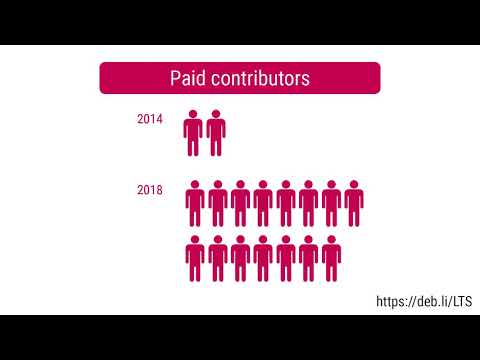
that maps the destructive interactions which occur between people. This map is known as the  In March 2020, I have worked on the Debian LTS project for 10.25 hours (of 10.25 hours planned).
LTS Work
In March 2020, I have worked on the Debian LTS project for 10.25 hours (of 10.25 hours planned).
LTS Work
 Here is my monthly update covering what I have been doing in the free software world during March 2020 (
 TL;DR: The zoom meeting link you have probably look like this: