Search Results: "tim"

30 June 2013

Lars Wirzenius: Oops: Making sure your backups work

It's 9 in the evening. Do you know if your backups work? Do you know when you last made a successful backup of all of your data? Do you know whether you can restore from that backup? If not, how well can you sleep? You should verify your backups, and do it regularly, not just when you first set up the backup system. Verification means doing whatever you need to do to ensure all of your precious data has been backed up and can be correctly restored from the backups. The simplest way to do that is to restore all your data, and compare it with your live data, and note any differences. That requires you have enough free disk space to restore everything, but it's the almost the only way to be really sure. It's also a great way to ensure the restoring actually works. If you don't test that, don't be sure you can do it when needed. Some backup software has a verification mode, which doesn't actually write the restored data to disk, but compares it with live data directly. This can save space, and can be a reasonable compromise, but you should test actual restoring as well. You could do that by restoring only some of the live data, perhaps choosing files randomly for each test. If you have the disk space to do a complete restore, doing so is a great way to excercise your disaster recovery process in general. Here's one way of doing it: How often should you do that? That, again, depends on how you feel about your data, and how much you trust your backup tools and processes. If it's really important that you can recover from a disaster, you need to verify more frequently. If data loss is merely inconvenient and not life-changingly disastrous, you can verify less often.

Russ Allbery: Random haul

A random book haul, for no particular reason other than that it had been a while and several books came out that I have been eagerly awaiting (in one case for many years): Ann Aguirre Wanderlust (sff)
Ann Aguirre Killbox (sff)
Ann Aguirre Doubleblind (sff)
Ann Aguirre Aftermath (sff)
Ann Aguirre Endgame (sff)
Yoon Ha Lee A Conservation of Shadows (sff collection)
M.J. Locke Up Against It (sff)
China Mi ville Railsea (sff)
Chris Moriarty Ghost Spin (sff)
Paul Nahin An Imaginary Tale (non-fiction) Yes, Ghost Spin finally exists, and I have held it in my hands. Now if I can just remember what was happening in Spin State and Spin Control. I may just have to re-read them, which would be such a hardship.... The explanation of all the Aguirre purchases is that if you say sensible things amid the latest round of obnoxious sexism in the SFF community, and particularly when anonymous cowards claim your writing is obviously bad because of what you say, there are people like me who may well buy your entire series, new, as a show of support. Particularly if it was already on their radar as something to read. I already had the first book, but I bought all the rest sight unseen, based just on the strength of her commentary and some of the things other people have said about the books. This afternoon, I finished reading Grimspace, the first in the series, and now I'm delighted that I already have the others in hand. Excellent stuff; a bit trying on suspension of disbelief in a few spots, but the pacing was so good I didn't care. Review coming eventually when I catch up further. Yoon Ha Lee is my absolute favorite SF short fiction author writing currently, and that's saying something since I generally don't like short fiction. I've been eagerly awaiting her first collection ever since I heard it had gone to print. Also, in the context of picking up eight more SF novels or collections by women, I want to note just how irritating it is when people claim that women don't write science fiction. I read quite a lot of science fiction, and I haven't had any trouble finding female authors. I haven't even needed to try; the books I read run about half female authors with no special attention or effort on my part. If someone honestly hasn't heard of those writers, I have a bunch of suggestions in my collected book reviews, but too often it seems less a plea for help and more a rhetorical point about how science fiction is somehow more naturally male. Which is complete bullshit, and I have the library and reviews to prove it. Last year I read 13 unambiguous science fiction novels by women (not counting any fantasy). Some of them I liked, some of them I didn't, some of them were more believable than others, and some of them were harder (in the sense of being more scientifically plausible) than others just like the 11 science fiction novels, not counting fantasy, by men that I read in the same time frame. So far this year, I've reviewed one science fiction novel by a woman and two by men, and I have two more by women (and one by a man) waiting to be reviewed. I'm not doing anything special, just reading what's published, what's been recommended to me, and what wins awards. Anyone else can do exactly the same thing.

29 June 2013

Cyril Brulebois: My first Perl module

Look! A tiny TARDIS-powered release, as if we were a few years back, when Perl was hype! It s called IPC::GimpFu and abstracts talking to Gimp s script-fu server, making it possible to run a few commands/scripts without having to care too much about Gimp s start-up time, and without having to deal manually with the script-fu server protocol. At the moment, it was mainly tested against a local server, and without caring much about the reply (there s the nasty #583778 anyway), and it needs some polishing to make reports from CPAN testers greener Source is at http://git.mraw.org/ (git clone git://git.mraw.org/ipc-gimpfu). More on the reasons why I needed this module and those Gimp filters in a later post.

Daniel Leidert: Getting the TP-Link TL-WN772N(C) USB WLAN stick to work

After installing Debian wheezy on the N54L microserver I wanted to setup a stable WLAN connection. The stick should have out-of-the-box kernel support. First I bought a cheap ISY IWL 2000 N150 WLAN USB micro adapter (probably a branded Belkin F7D1102). I contains a Realtek chipset and although it did seem to work on my laptop with Sid running, I did not get it to work on the server. I refused to download and compile third-party software. So I searched this site. I got the impression, that the "only" recent chipsets with reasonable support in the Linux kernel are Atheros chipsets(?). Checking the local suppliers I decided to buy a TP-Link TL-WN722NC USB stick. I've downloaded the firmware-atheros package and loaded the ath9k_htc module and voil , the stick is running:

ath9k_htc 48534 0
ath9k_common 12728 1 ath9k_htc
ath9k_hw 322112 2 ath9k_common,ath9k_htc
ath 21370 3 ath9k_hw,ath9k_common,ath9k_htc
mac80211 192806 1 ath9k_htc
cfg80211 137243 3 ath,mac80211,ath9k_htc
usbcore 128741 5 ehci_hcd,ohci_hcd,usbhid,ath9k_htc

[..]
Bus 001 Device 003: ID 0cf3:9271 Atheros Communications, Inc. AR9271 802.11n
Device Descriptor:
bLength 18
bDescriptorType 1
bcdUSB 2.00
bDeviceClass 255 Vendor Specific Class
bDeviceSubClass 255 Vendor Specific Subclass
bDeviceProtocol 255 Vendor Specific Protocol
bMaxPacketSize0 64
idVendor 0x0cf3 Atheros Communications, Inc.
idProduct 0x9271 AR9271 802.11n
bcdDevice 1.08
iManufacturer 16 ATHEROS
iProduct 32 USB2.0 WLAN
iSerial 48 12345
bNumConfigurations 1
[..]
To setup the connection I decided to install the network-manager package and write the configuration file myself:

[connection]
id=<myID>
uuid=<myUUID>
type=802-11-wireless
autoconnect=true

[802-11-wireless]
ssid=<mySSID>
mode=infrastructure
mac-address=<myMACADDR>
seen-bssids=<myBSSIDS>
security=802-11-wireless-security

[802-11-wireless-security]
key-mgmt=wpa-psk
psk=<myPASSPHR>

[ipv4]
method=auto

[ipv6]
method=auto

[..]
wlan1 IEEE 802.11bgn ESSID:"<ESSID>"
Mode:Managed Frequency:2.467 GHz Access Point: <MACADDR>
Bit Rate=54 Mb/s Tx-Power=20 dBm
Retry long limit:7 RTS thr:off Fragment thr:off
Encryption key:off
Power Management:off
Link Quality=49/70 Signal level=-61 dBm
Rx invalid nwid:0 Rx invalid crypt:0 Rx invalid frag:0
Tx excessive retries:0 Invalid misc:61 Missed beacon:0
[..]
The connection comes up and it seems pretty stable. After two weeks of operation there were still no connection losses or time outs. After lease time has been reached, the IP address gets renewed. And that's it! The stick runs perfectly fine for me and I'm happy with it.

Russ Allbery: remctl 3.5

remctl is the middleware layer that we use all over the place at Stanford. It's a simple GSS-API client/server application that provides a very low-weight way of running a specific command using GSS-API authentication and strong ACL checking. The primary point of this release is to fix a very long-standing occasional data corruption issue. Due to the way that the remctl server checked for the completion of a command, a command that produced a lot of output immediately before exiting could have the end of its output cut off when sending it back to the client. That's fixed in this release. Also in this release, I finally figured out the thread-safe way of specifying to the GSS-API layer which Kerberos ticket cache to use for authentication. This means that the remctl_set_ccache API is now thread-safe if there were Kerberos libraries available during the remctl build and gss_krb5_import_cred was supported. I also fixed the way that the Perl modules are versioned, which resulted in a one-time move backwards of the module versions from Perl's perspective (from 3.4 to 3.05). Hopefully that won't be a problem for anyone. The Perl module version will match the package version with an adjustment so that it sorts properly as a number from here on. You can get the latest version from the remctl distribution page.

28 June 2013

Lars Wirzenius: Who knows what evil lurks in the data of men? Security aspects of backups

You're not the only one who cares about your data. A variety of governments, corporations, criminals, and overly curious snoopers are probably also interested. (It's sometimes hard to tell them apart.) They might be interested in it to data in order to find evidence against you, blackmail you, or just curious about what you're talking about with your other friends. They might be interested in your data from a statistical point of view, and don't particularly care about your specifically. Or they might be interested only in you. Instead of reading your files and e-mail, or looking at your photos and videos, they might be interested in preventing your access to them, or to destroy your data. They might even want to corrupt your data, perhaps by planting child porn in your photo archive. You protect your computer as well as you can to prevent these and other bad things from happening. You need to protect your backups with equal care. If you back up to a USB drive, you should probably make the drive be encrypted. Likewise, if you back up to online storage. There are many forms of encryption, and I'm unqualified to give advice on this, but any of the common, modern ones should suffice except for quite determined attackers. Instead of, or in addition to, encryption, you could ensure the physical security of your backup storage. Keep the USB drive in a safe, perhaps, or a safe deposit box. The multiple backups you need to protect yourself against earthquakes, floods, and roving gangs of tricycle-riding clowns, are also useful against attackers. They might corrupt your live data, and the backups at your home, but probably won't be able to touch the USB drive encased in concrete and buried in the ground at a secret place only you know about. The other side of the coin is that you might want to, or need to, ensure others do have access to your backed up data. For example, if the clown gang kidnaps you, your spouse might need access to you backups to be able to contact your MI6 handler to ask them to rescue you. Arranging safe access to (some) backups is an interesting problem to which there are various solutions. You could give your spouse the encryption passphrase, or give the passphrase to a trusted friend or your lawyer. You could also use something like libgfshare to escrow encryption keys more safely.

Vincent Bernat: lan o: a task launcher powered by cgroups

A few months ago, I was looking for a piece of software to spawn long-running tasks on behalf of some daemon with the benefit of the tasks not being interrupted when this daemon is restarted. Here are the specifications: The last requirement explains why tasks are not spawned directly by the daemon requesting them: its complexity or the way it needs to be operated may need frequent restarts. Even if it is possible to re-execute a daemon while keeping its children, like stateful re-exec support in Upstart, this is quite difficult: internal state should be serialized and restored. Part of this state can be contained into a third-party library. While Upstart or systemd seemed to be good candidates for this purpose, I didn t find a straightforward way to run arbitrary tasks without any privilege1. Here comes lan o2. It is a very simple task launcher. It can run any tasks, stop them and check if they are still running. It leverages cgroups in recent Linux kernels and avoids the use of any daemon.

Quick tour Before looking at how lan o works, let s have a look at how it can be used. To avoid usage conflicts, each task is run in the context of a namespace that needs to be initialized:
$ sudo lanco testns init -u $(id -un) -g $(id -gn)
This is the only command that needs to be run as root. Subsequent ones can be run as a normal user. Let s run some task:
$ lanco testns run first-task openssl speed aes
$ lanco testns check first-task && echo "Still running"
Still running
$ lanco testns ls
testns
   first-task
      28456 openssl speed aes 
  
The output of the task is logged into a file:
$ head -3 /var/log/lanco-testns/task-first-task.log
Doing aes-128 cbc for 3s on 16 size blocks: 8678442 aes-128 cbc's in 2.85s
Doing aes-128 cbc for 3s on 64 size blocks: 2478283 aes-128 cbc's in 2.99s
Doing aes-128 cbc for 3s on 256 size blocks: 628105 aes-128 cbc's in 3.00s
If the task is too long, we can kill it:
$ lanco testns run first-task openssl speed aes
$ lanco testns stop first-task
You cannot run a task that already exists or kill a task that does not exist:
$ lanco testns run first-task openssl speed aes
2013-06-09T22:50:34 [WARN/run] task first-task is already running
$ lanco testns stop second-task
2013-06-09T22:50:45 [WARN/stop] task second-task is not running
Thanks to the use of cgroups, lan o is able to track multiple processes even when they are forking away3:
$ lanco testns run second-task sh -c \
>  "while true; do (sleep 30 &)& sleep 1; done"
$ lanco testns ls
testns
   first-task
      28456 openssl speed aes 
   second-task
      29572 sh -c while true; do (sleep 30 &)& sleep 1; done 
      29575 sleep 30 
      29593 sleep 30 
      29596 sleep 30 
      29599 sleep 30 
      29622 sleep 30 
      29644 sleep 1 
      29645 sleep 30 
  
$ lanco testns stop second-task
$ lanco testns check second-task   echo "Killed!"
Killed!
Also, there is a top-like command (lanco testns top): lanco top

Using cgroups Control groups (cgroups) is a mechanism to partition a set of tasks and their future children into hierarchical groups with a set of parameters.

Hierarchy Let s start with the hierarchical stuff first. To create a new hierarchy, you have to mount the cgroup filesystem on some empty directory. Usually, cgroups hierarchies are setup in /sys/fs/cgroups which is a tmpfs filesystem:
# mount -t tmpfs tmpfs /sys/fs/cgroup -o nosuid,nodev,noexec,relatime,mode=755
Now, we can create our first hierarchy:
# cd /sys/fs/cgroup
# mkdir my-first-hierarchy
# mount -t cgroup cgroup my-first-hierarchy -o name=my-first-hierarchy,none
# ls -1 my-first-hierarchy
cgroup.clone_children
cgroup.event_control
cgroup.procs
notify_on_release
release_agent
tasks
We ll see later the purpose of none. The most interesting file is tasks. It contains the PIDs of all processes in our group. Since there are currently no sub-group, all processes are part of it. Let s create a sub-group and attach a process to it:
# mkdir first-child
# cd first-child
# ls -1
cgroup.clone_children
cgroup.event_control
cgroup.procs
notify_on_release
tasks
# echo $$ > tasks
# cat tasks
23184
23311
# cat /proc/$$/cgroup 
9:name=my-first-hierarchy:/first-child
8:perf_event:/
7:blkio:/
6:net_cls:/
5:freezer:/
4:devices:/
3:cpuacct,cpu:/
2:cpuset:/
1:name=systemd:/user/bernat/1
We have added our shell to the new cgroup. Moreover, all its children will also be part of this group. This explains why we have two tasks: the shell and cat. The last command is quite interesting: for each hierarchy, it shows which cgroup the task belongs to. For a given hierarchy, each task is exactly in one group. The most useful features of lan o are done using just this: a namespace is a named hierarchy and each task is enclosed into a cgroup so it can be tracked properly.

Subsystems A subsystem makes use of the task grouping provided by cgroups to assign resources to a set of tasks. Each available subsystem can only be in one hierarchy, so the usual way to setup things is to assign a hierarchy for each subsystem4. Let s have a look at the cpuset subsystem: it allows to assign tasks to specific CPUs and memory nodes (for NUMA systems). Let s suppose we have 4 cores and we want to assign the first core to common system tasks and the three remaining ones to nginx:
# cd /sys/fs/cgroup
# mkdir cpuset
# mount -t cgroup cgroup cpuset -o cpuset
# echo 0-3 > cpuset/cpuset.cpus
# echo 0 > cpuset/cpuset.mems
# mkdir cpuset/system
# echo 0 > cpuset/system/cpuset.cpus
# echo 0 > cpuset/system/cpuset.mems
# for task in $(cat cpuset/tasks); do
>    echo $task > cpuset/system/tasks
> done
# mkdir cpuset/nginx
# echo 1-3 > cpuset/nginx/cpuset.cpus
# echo 0 > cpuset/nginx/cpuset.mems
# for task in $(pidof nginx); do
>    echo $task > cpuset/nginx/tasks
> done
The first mount is not needed if something else (like systemd) has setup the appropriate subsystem. Now, even if some system process is going crazy, it won t affect the performance of your webserver. The kernel comes with a more complete documentation if you need additional details on cgroups. There are high level tools to manipulate them, like the tools provided by libcg, but they are currently quite buggy and invasive.

Use in lan o Here are the features used by lan o:
  • For each namespace, a specific named hierarchy is created.
  • By setting the appropriate permissions on the hierarchy, an unprivileged user can create subgroups.
  • Each submitted task has its own sub-group for tracking purpose.
  • Actions can be executed when a task terminates by using the release agent mechanism5.
  • The cpuacct subsystem is used to track CPU usage: a group is created in this subsystem for this purpose.

  1. Both systemd and Upstart are difficult to run without being PID 1 and without being root. They both support user sessions but this requires to use them as PID 1 as well. I discovered later than runit would have been a good fit: it does not require to be PID 1, it does not need to be run as root and the service directory can be specified by an environment variable. It could have been tweaked to meet the above requirements.
  2. Lan o means launcher in esperanto. The unusual diacritic on the letter c is not present in many web fonts, so the rendering may be a little odd.
  3. Linux cgroups do not provide any facility to kill a whole group. We need to iterate through the processes and kill them one by one. lan o does not try to freeze processes before killing them and therefore may be inefficient against violent fork bombs.
  4. The cpu and cpuacct subsystems are the notable exception. There seems to be little use to keep them in separate hierarchies, so they are part of the same hierarchy.
  5. Unfortunately, only one global release agent per hierarchy can be used. Since lan o provides with the ability to execute an arbitrary command when a task terminates, the command needs to be stored on the filesystem for the release agent of the namespace to execute it.

Niels Thykier: Optimizing autodie

After converting Lintian to using autodie, I was a bit trouble by the effects it had on Lintian s (start-up) performance. This overhead accumulated to at least a 1s when checking packages. Indeed, I am not the first to complain about this problem. For those who have not heard of it, autodie is a Perl pragma that basically alters subs and built-ins from a check return value for errors -sub (e.g. like C) to throws exception on error -sub (e.g. like Python). So, you can replace open( ) or die with open( ) when autodie is in effect. autodie achieves this by exporting a little sub that wraps the target sub (or built-in). This little wrapper is compiled[1] into the importing package. The problem with this solution is that it ends up compiling these subs once per importing package. Secondly, all of these wrappers are wrapped in something called a leak guard . As autodie is a lexical pragma it is not permitted to leak across file boundaries. The leak guards take care of that by doing a runtime check of the caller and reverting to the original sub/built-in if a leak occurred. These leak guards were also compiled into the importing package. It is probably not much of a surprise to anyone that autodie spent quite a bit of its runtime compiling these wrappers and their leak guards. Together with upstream, I have addressed some of these problems. The first optimization was to allow some wrappers for built-ins to be reused that does not take glob or bareword arguments[2]. Secondly, we started using closures to generate the leak guards. Combined these two effectively cut the load time in half for subsequent loads of autodie, though it did have a negative effect on the call overhead for these wrappers (~1s for 1M calls). That landed in autodie v2.18. The extra runtime overhead of v2.18 was basically caused by the leak guard being split into two (a small closure, which called the real leak guard with an extra argument). We managed to merge these two parts into one without (too much) loss of code maintainability. With that, the call overhead of these wrappers dropped by ~3s (for 1M calls) and thus the wrappers in autodie v2.20 were even faster than the ones in v2.17. Beyond these improvements, I have sent upstream several patches (still pending review) that will improve the performance of autodie even further. If merged, we are looking at another 1.5s (per 1M calls) removed and almost a factor 4 reduction on the load time of autodie. This factor 4 comes from lazily compiling the wrapper on demand, so some of the price is moved to the call overhead. That said, it is a net gain since it is highly unlikely that every module using autodie will use every single wrapped built-in (how often do you use both read and sysread in the same module)? [1] It is compiled via a call to eval using some template code. [2] For the rest of the built-ins, it could probably just use Symbol::qualify to qualify bareword filehandles. Perhaps that will come in a future version of autodie. :)

Justus Winter: Getting into the mood - my second week

tl; dr version: shutdown works, Debian GNU/Hurd booting using sysvinit:
Loading GNU Mach ...
Loading the Hurd ...
GNU Mach 1.3.99-486
AT386 boot: physical memory map from 0x0 to 0x9f400
AT386 boot: physical memory map from 0x100000 to 0x1fffe000
AT386 boot: physical memory from 0x0 to 0x1fffe000
Enabling FXSR
pcibios_init : BIOS32 Service Directory structure at 0xfcff0
pcibios_init : BIOS32 Service Directory entry at 0xfc7ba
pcibios_init : PCI BIOS revision 2.10 entry at 0xfc78c
Probing PCI hardware.
ide: Intel 82371 PIIX3 (dual FIFO) DMA Bus Mastering IDE
    Controller on PCI bus 0 function 9
ide: BM-DMA feature is not enabled (BIOS), enabling
    ide0: BM-DMA at 0xc100-0xc107
    ide1: BM-DMA at 0xc108-0xc10f
hd0: got CHS=762/128/63 CTL=c8 from BIOS
hd0: QEMU HARDDISK, 3001MB w/256kB Cache, CHS=762/128/63, DMA
hd2: QEMU DVD-ROM, ATAPI CDROM drive
ide0 at 0x1f0-0x1f7,0x3f6 on irq 14
ide1 at 0x170-0x177,0x376 on irq 15
Floppy drive(s): fd0 is 1.44M
FDC 0 is a S82078B
probing scsi 5/22: Adapteco1542FInvalidiaddresseforishpnt.with 1542.
Invalid address for shpnt with 1542.
probing scsi 18/22:AWesternxDigitalAWD-7000nFailed9initialization of WD-7000 SCSI card!
probing eata on/1f0EATA0:Daddress 0x1f04in3use, skipping probe.
probing eata on 170EATA0: address 0x170 in use, skipping probe.
probing scsi 21/22: Iomega7parport ZIP drive ppa: Version 1.42
ppa: Probing port 03bc
ppa: Probing port 0378
ppa:         SPP port present
ppa:         PS/2 bidirectional port present
ppa: Probing port 0278
done
scsi : 0 hosts.
scsi : detected total.
Partition check (DOS partitions):
 hd0: hd0s1 hd0s2 < hd0s5 >
lpr0: at atbus0, port = 378, spl = 6, pic = 7.
2omultibootxmodulesd/execl$(exec-task=task-create)ne=$ kernel-command-line  --host-priv-port=$ host-port  --device-master-port=$ device-port  --exec-server-task=$ exec-task  -T typed $ root  $(task-create) $(task-resume)               task loaded: ext2fs --readonly --multiboot-command-line=root=device:hd0s1 console=com0 --host-priv-port=1 --device-master-port=2 --exec-server-task=3 -T typed device:hd0s1
task loaded: exec /hurd/exec
start ext2fs: Hurd server bootstrap: ext2fs[device:hd0s1] exec init proc auth
INIT: version 2.88 booting
Using makefile-style concurrent boot in runlevel S.
Activating swap...done.
Checking root file system...fsck from util-linux 2.20.1
hd2 : tray open or drive not ready
end_request: I/O error, dev 02:00, sector 0
ext2fs_check_if_mount: Can't check if filesystem is mounted due to missing mtab file while determining whether /dev/hd0s1 is mounted.
/dev/hd0s1: clean, 43930/181056 files, 281248/723200 blocks
done.
Cleaning up temporary files... /tmp.
/etc/rcS.d/S06mtab.sh: 48: /etc/rcS.d/S06mtab.sh: cannot open /proc/mounts: No such file
Activating lvm and md swap...(default pager): Already paging to partition hd0s5!
done.
Checking file systems...fsck from util-linux 2.20.1
hd2 : tray open or drive not ready
end_request: I/O error, dev 02:00, sector 0
done.
Mounting local filesystems...mount: invalid option -- 'O'
Try  mount --help' or  mount --usage' for more information.
failed.
Activating swapfile swap...(default pager): Already paging to partition hd0s5!
done.
df: Warning: cannot read table of mounted file systems: No such file or directory
Cleaning up temporary files....
Configuring network interfaces...inetutils-ifconfig: invalid arguments
ifup: failed to open pid file /run/network/ifup-/dev/eth0.pid: No such file or directory
Internet Systems Consortium DHCP Client 4.2.2
Copyright 2004-2011 Internet Systems Consortium.
All rights reserved.
For info, please visit https://www.isc.org/software/dhcp/
can't create /var/lib/dhcp/dhclient./dev/eth0.leases: No such file or directory
Listening on Socket//dev/eth0
Sending on   Socket//dev/eth0
DHCPDISCOVER on /dev/eth0 to 255.255.255.255 port 67 interval 6
DHCPREQUEST on /dev/eth0 to 255.255.255.255 port 67
DHCPOFFER from 10.0.2.2
DHCPACK from 10.0.2.2
can't create /var/lib/dhcp/dhclient./dev/eth0.leases: No such file or directory
bound to 10.0.2.15 -- renewal in 38544 seconds.
done.
Cleaning up temporary files....
Setting up X socket directories... /tmp/.X11-unix /tmp/.ICE-unix.
INIT: Entering runlevel: 2
Using makefile-style concurrent boot in runlevel 2.
Starting enhanced syslogd: rsyslogd.
Starting deferred execution scheduler: atd.
Starting periodic command scheduler: cron.
Starting system message bus: dbusFailed to set socket option"/var/run/dbus/system_bus_socket": Protocol not available.
Starting OpenBSD Secure Shell server: sshd.
GNU 0.3 (debian) (console)
login:
This is the result of: This yields a surprisingly functional Debian/Hurd system with sysvinit. There are still lot's of loose ends, I populated my status page with them. I spent quite some time in #hurd on freenode and Pino Toscano offered to send me some old notes of his about the sysvinit issue. This turned out to be most helpful as his notes were about plugging sysvinits init into the boot process. This was the next logical thing to do for me, so first thing Monday morning I just put his runsystem.sysv file with some very minor tweaks (my version) into my overlay and had a working system in front of my eyes. That certainly was a nice way to start a week of work :), so many thanks again Pino! For your convenience I've created an overlay with all necessary changes and recompiled binaries. Be careful though, you might want to backup /sbin/reboot first or you won't be able to reboot your system! Of course my tool does that for you, and I've managed to create a reasonably small (253 mb) image thanks to the zerofree tool, the process of compacting images is implemented in hurdtest as the compact subcommand. I also added sysvinit specific tests. So if you want to try hurdtest, download the image and unxz it, my tool expects the image to be in the current working directory and be named image.qcow2. Download and untar an overlay and execute:
% hurdtest -logfile log -sysvinit overlay path/to/second-week-overlay
If you specify -logfile you can execute tail -f path/to/log to see what the VM is printing to the console in real time. The sysvinit specific tests demonstrate that indeed sysvinit is managing the system and that e. g. init 0 or shutdown -r now works. There are at least three major problems that I will need to tackle for this project: I think the last issue is what I'm going to look at next week. There's information about this in the Hurd wiki and I've spoken with Richard Braun about it and he drilled me to think about the hurdish way to solve this. I think I've got a pretty good picture of how to implement this in my head and am eager to give it a go. This will involve adding a function to Hurds filesystem interface that allows one to query an active translator about his mount options and "source" and about all active and passive translators that are attached to one of its nodes. This is where the fun actually begins. This is changing an integral part of an operating system, but this is okay since it is just another program written in c, operating in userspace. But hey I know that, that's just c and if something goes wrong (and it always does) I fire up gdb and have a look. And mind you, I'm running all this as an unprivileged user, no need to jeopardize the entire system for that. Besides implementing /proc/mounts I will also add -O, --test-opts to mount, and -v, --verbose to swapo n,ff . PS: My blog is still not properly registered to planet.d.o. I asked planet@ about that, but got no response. Any help? I never imagined blogging being so stressful, I care about losing potential readers :/

Roland Mas: FusionForge news, June 2013

Once again, it's been some time since the last FusionForge update in here. The main explanation is that news is slow on that front. Debian Wheezy was released without FusionForge packages, as previously announced, and even Sid hadn't seen any update on the package for way too long. The latter has just been fixed though: the freshly-released 5.2.2 upstream version is on its way to Sid (via NEW, since it adds a new plugin to allow authenticating against a CAS server). If and when it reaches Debian Jessie (the current testing ), I'll work on backporting it for Wheezy. At some point I'll also start uploading snapshots of the upstream master branch to experimental , to give adventurous users a glimpse of what is to come in the future releases, although I'll stick to only uploading when the automated tests all pass.

Russ Allbery: Review: This Alien Shore

Review: This Alien Shore, by C.S. Friedman
Publisher: DAW
Copyright: 1998
Printing: July 1999
ISBN: 0-88677-799-2
Format: Mass market
Pages: 564
Jamisia is an orphan taken in by the Shido corporation, but she has a fairly comfortable and happy life in Shido Station. She lives in the care of her tutor, has friends, has something that feels like a relatively normal life. Then the station is attacked and destroyed by a rival corporation and she barely escapes in a one-person lifeboat, sent inexplicably by her tutor with a fake identity to rendezvous with a spaceship heading for the up-and-out. That begins a long and quite confusing flight away from everything she's known, and a discovery that her life is far more complicated than she thought. Meanwhile, far from the backwater of corporate tyranny that Earth has become, a new computer virus is wreaking havoc on Guild outpilots. The Guild navigate the ainniq: a sort of subspace that allows ships to slip between nodes without regard to distance. This is the only acceptable method of interstellar travel now that humans know that the more conventional Hausman Drive causes massive genetic mutations, and only Guerans have the secret of navigating it safely. But a virus of a sophistication no one has seen before appears to be targeting outpilot brains through their implants. This Alien Shore is told in two threads but multiple characters and viewpoints. Jamisia (yes, I stumbled over that name the entire book) spends nearly the whole book running while discovering that her head is a very complicated place for very bad reasons. Meanwhile, various other people (most notably the careful and meticulous Kio Masada) are analyzing and tracing the virus, which is of deep concern to the powers that be in the Guaran-controlled network of human colonies. The threads do come together eventually, helped by a young and much more impulsive hacker named Phoenix who is also on the trail of the virus, but it takes much longer than I expected. The book is a bit of cyberpunk, a bit of space opera, and is stuffed to the brim with world-building ideas. There's always something that feels slightly emotionally off about C.S. Friedman novels. Her characters are a bit too intense, a bit too full of primary colors and inherent natures. They don't do a lot of changing; they're just a little too much purely themselves to feel quite accurate. Sometimes it matters and sometimes it doesn't. This is one of the books where it mostly doesn't, partly because it's full of such an amazing variety of characters, and partly because Friedman does a great job adding situational complexity by playing them off of each other and showing them through each other's eyes. Pyschological realism, though, this isn't, nor would I look to Friedman for that. That's somewhat unfortunate given how central psychology is to this book. The focus that slowly emerges from this novel is the whole-hearted embrace of psychological difference as a force for creativity, power, and perspective. Acceptance, respect for, and integration of difference borders on a religious belief for Guerans, which makes this book one of the most wholeheartedly inclusive stories (at least for psychology) I've read. I loved that message enough to overlook the fact that those psychological differences are not treated with much subtlety. The most central of the differences (a very mild spoiler, but one that's essentially given away on the back cover and that is easy to guess early in the book) is multiple personalities. Sadly, I thought that was also the least successful. Friedman treats the topic respectfully and as a difficult asset, which I liked, but it's bog-standard fictional multiple personalities. The presentation owes much more to popular fiction than to the reality of disassociative identity, and the notes that Friedman hits (and the characteristics that the multiples embody) are predictable. However, her second major psychological idea is simply brilliant. The Guerans have developed a coding system for people to communicate their psychological profile to anyone who sees them, and all of the Gueran characters in the novel actively engage with that system and make extensive use of it. Friedman hints at a great deal of subtlety: a wealth of primary patterns (many of which are described in quite enjoyable animal metaphors as chapter epigraphs), secondary patterns that can be layered underneath, and a complex interaction of base patterns and patterns for daily mood. Here, I think Friedman's mild tendency towards archetypal characters helps, since it makes the psychological coding system clearer for the reader. I wish it had been more central to the story and explained further, although I can see the risk of turning the novel into an RPG sourcebook. (Although, now that I mention it, I would love to read an RPG sourcebook for this universe.) The other point for which I have to give Friedman huge credit is that at least half of the book is about a computer virus, the analysis of that virus, and the hacking culture of her future universe, and at no point during the story did I want to start throwing things. There are no completely unbelievable magic computer programs, the sense of movement of data and virtual presence through computer networks seemed vaguely plausible and less steeped in unrealistic VR metaphors, the sense of aesthetics of code is captured remarkably well for a story of this sort, and Friedman even brings some variety to her computer-savvy characters. There are a few mildly stereotyped young hackers (although even those have a tendency to have more depth than the stereotype), but Friedman also populates her electronic world with the other types you rarely see in these novels: thoughtful, brilliant, but meticulous researchers, competent technicians who don't engage as much on the aesthetic aspects, and even moderately-intelligent users who pay attention to the computers their lives are built around. I could actually believe in both these people and the software they use with only the suspension of disbelief required for any future SF. That's not to say there are no flaws, quibbles, or places where computers probably won't ever work that way. But that's part of what makes me so impressed. Friedman is still using computers and hacking in the direct service of a fairly typical SF plot to achieve specific dramatic ends and to create a mystery. She's not building the story around actual technology; she's staying fairly close to the sort of technology and plots that a lot of cyberpunk and hacking novels have. And yet she manages not to make the computing entirely stupid or unbelievable. It's existence proof that an SF author can pay attention to experts and research without compromising the story they want to tell. I want to take this book and smack Robert Sawyer upside the head with it. This is a great idea book with a heavily computer-driven plot strand that I quite enjoyed. It is, however, not without its flaws. The virus-hunting part of the plot is significantly more interesting than Jamisia's flight, particularly given that she keeps running, and running, and running, encountering various people who seem important and end up not being important at all. It takes more than half the book before anything particularly interesting happens to her; up until then, I was dragging myself through her segments so that I could get back to Masada and the other Guerans. She's also annoyingly dim about some things. I figured out what the deep secret in her brain was within the first four or five chapters (it's entirely obvious from the political structure of Friedman's universe), and I have no idea why it took everyone else so long to figure it out. There is also, as mentioned, the slightly off feeling of the characters that I find typical of Friedman, and a cut-throat power struggle at the heart of the book that just didn't have enough psychological believability to fully engage me. But the ideas are wonderful: technology-driven political structures, corporate-controlled states, ideological clashes, lots of believable cultural interactions, and a neat two-option interstellar travel system (even if the nature of the Hausman Drive damage bears no resemblence to any genetic science known to our reality). And that's on top of a wonderful visual language of psychology and discussions of computer security that I actually enjoyed reading. Friedman's the sort of author who won't be to everyone's tastes. You have to have some tolerance for her tendency to write grand clashes of power between highly flawed, aggressively emotional people. Sometimes you have to put up with rather a lot of setup. But I really liked this novel. I suspect I'm editing out a lot of the boring bits in my memory, but I fondly remember that edited version as a ton of fun. Rating: 8 out of 10

Paul Wise: OpenPGP keysigning: alternate encodings for fingerprint exchange

I think that hexadecimal is a fairly poor pre-encoding for information exchange via data to speech and speech to data engines (aka voice boxes, brains and fingers). Reading out and typing long strings of hexadecimal digits at OpenPGP keysignings is tedious and annoying. There have been some experiments using photography and QR codes for this, which I think is pretty cool but not always practical since not everyone has a camera and QR code software installed. An alternative to this might be to pre-encode using a different scheme that encodes to less words in English speech. Diceware is one possibility that I recently experimented with. Diceware is a password generation scheme that encodes data from a random number generator (aka some dice) using a list of 7776 words. Each word thus represents a 5 digit number in base 6. Diceware is mainly used for generating strong and easier to remember passwords. So Diceware is the coupling between a non-digital random number generator and an interesting encoding scheme. Below are my fingerprints in Diceware and Hexadecimal form. The Diceware form is longer to type at 69 characters, 40 for hex. The Diceware form has the advantage that it is only 16 words to say while the hexadecimal form is 40. I don't know if this will be more practical than hex but I can almost remember my entire fingerprint after reading it a few times so hopefully that will translate to practical use. A rough script for encoding your fingerprint in the Diceware encoding is available but I haven't implemented the reverse yet. I would be glad if someone could check it for correctness.
Diceware:    frame maze bear usgs deter wag prissy bush hoyt mayo upton child indy
Hexadecimal: 610B 28B5 5CFC FE45 EA1B  563B 3116 BA5E 9FFA 69A3
If you want to discuss this topic and try it out in person and attempt to understand my accent, I'll be at DebConf13 and OHM2013. Some downsides that I can think of are accents, multiple spellings and the inclusion of non-words and special characters in the wordlist. These can be solved by using a different wordlist created specifically for OpenPGP fingerprint exchange that only includes suitable words. Update: there is a standard called PGP Word List that is much better than Diceware for this purpose. It maps 256 words to individual bytes, with different lists for odd and even bytes. Unfortunately it doesn't appear to be supported by GnuPG or signing-party. This post was inspired by the screenshots for RedPhone. You can comment on this post on debian-project.

Matt Zimmerman: Scaling Human Systems: Making and keeping commitments

This is part 3 in a series on organizational design and growth. What it means

Taking responsibility for action, and following through. Every time. Why it s important

Commitments are a cornerstone of collaborative teamwork. Knowing what to expect from others makes it possible to plan beyond your own work. If you aren t sure whether a task will be completed, you carry that uncertainty as low-grade anxiety, which accumulates and creates cognitive load. You may even spend extra time checking back to make sure the need has been met. Old status quo

Most work happens without an explicit commitment at all. Consistency is highly variable from one individual, team or circumstance to another. Tasks fall through the cracks, and we may not even realize it until much later. New status quo

When something needs to get done, someone agrees to take responsibility for it. When this happens, everyone involved can trust that it will get done. When exceptions happen, we acknowledge them, and seek to understand what happened so that we can do better in the future. Behaviors that help

Obstacles that stand in our way Further reading

27 June 2013

Andrea Veri: Two years later: Vim, Tmux and my Linux desktop

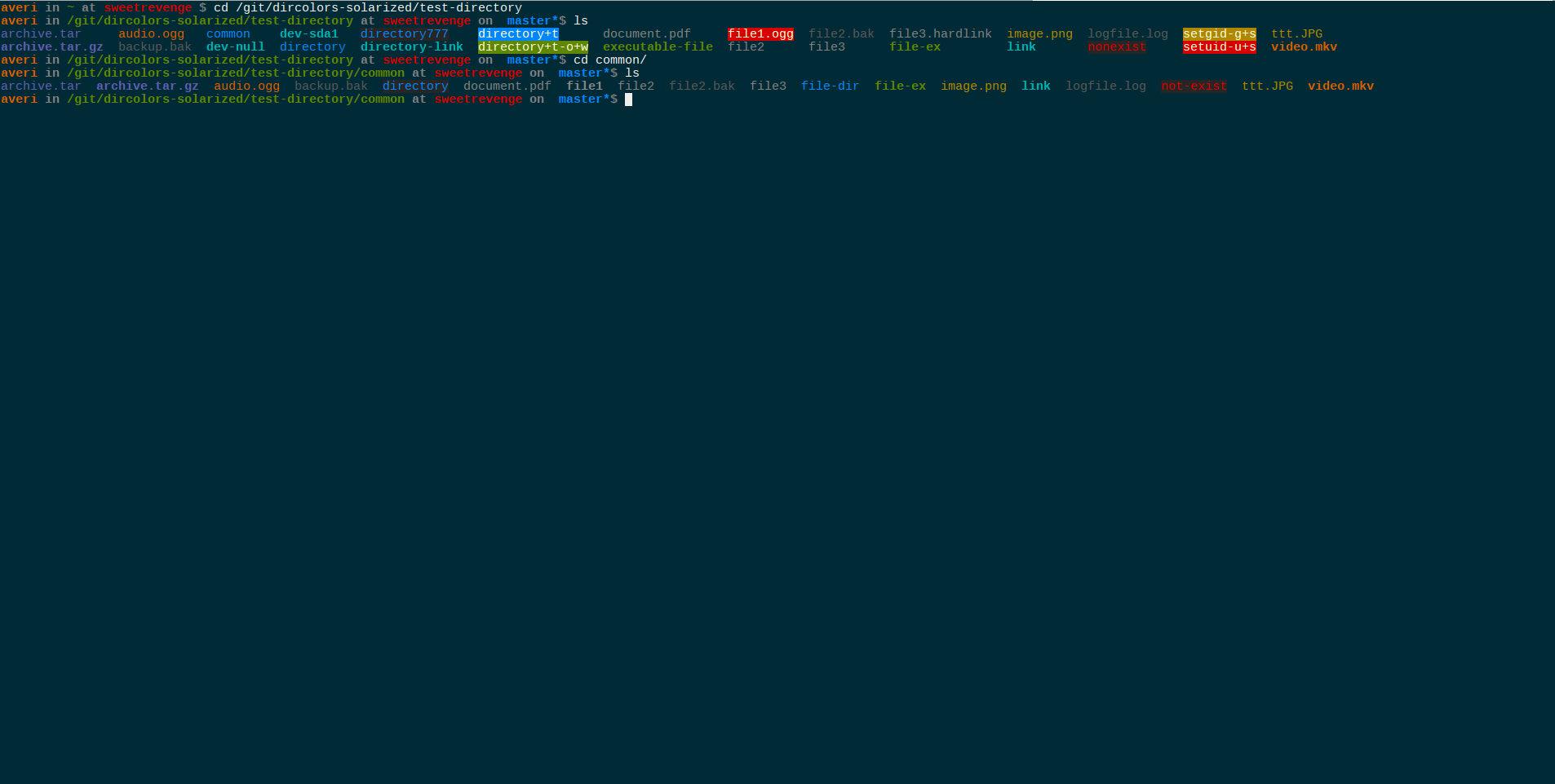
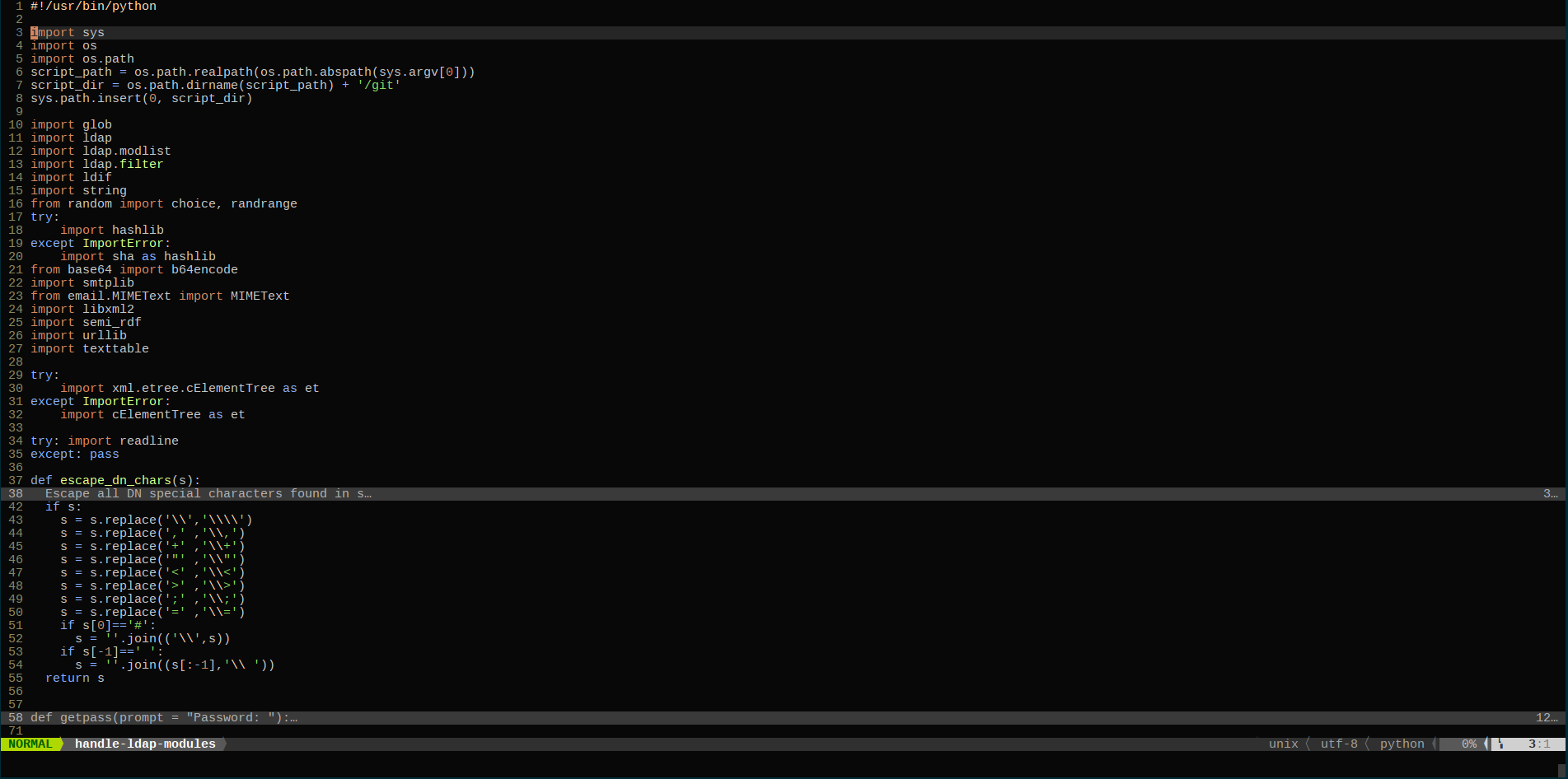
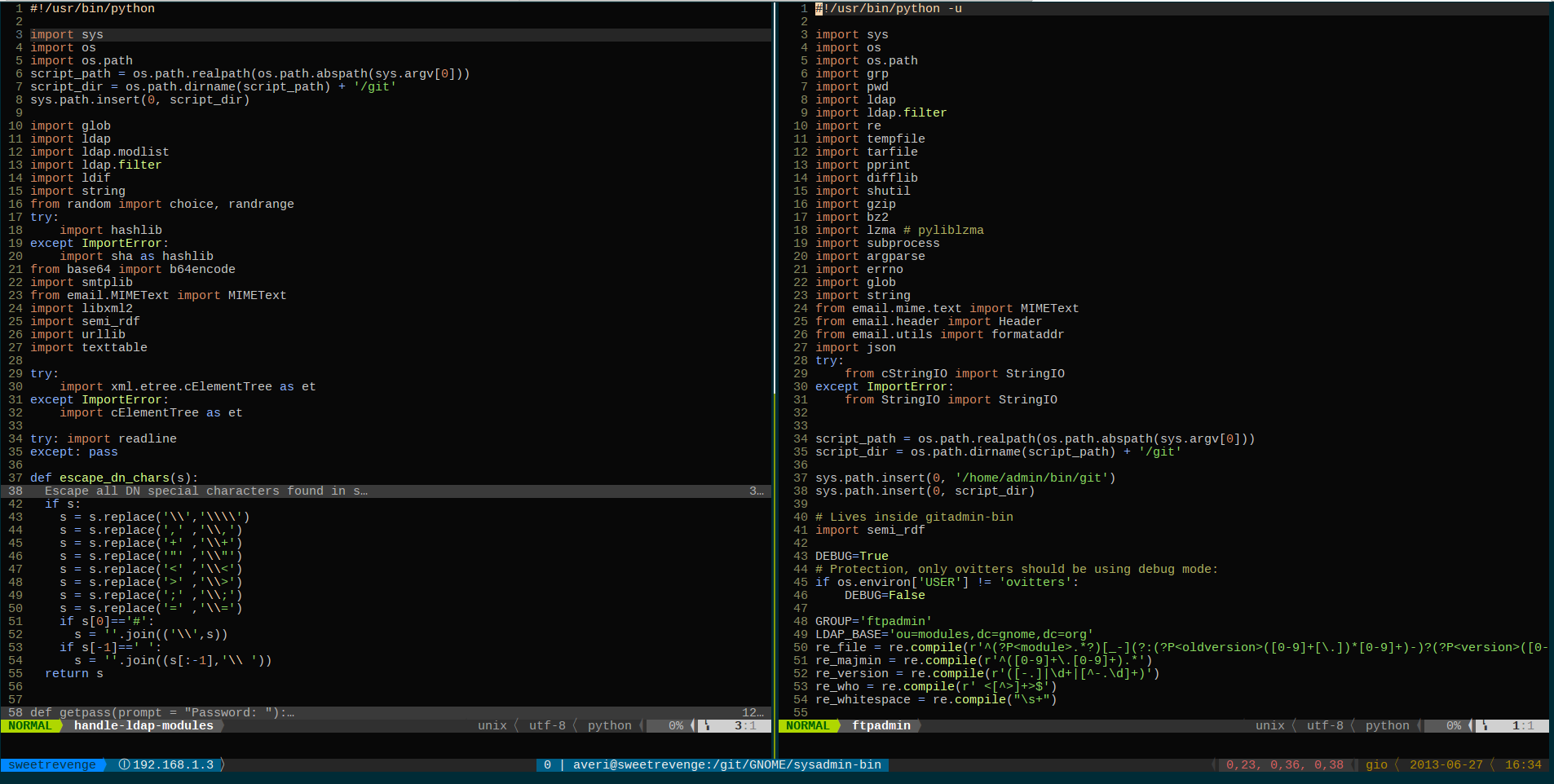
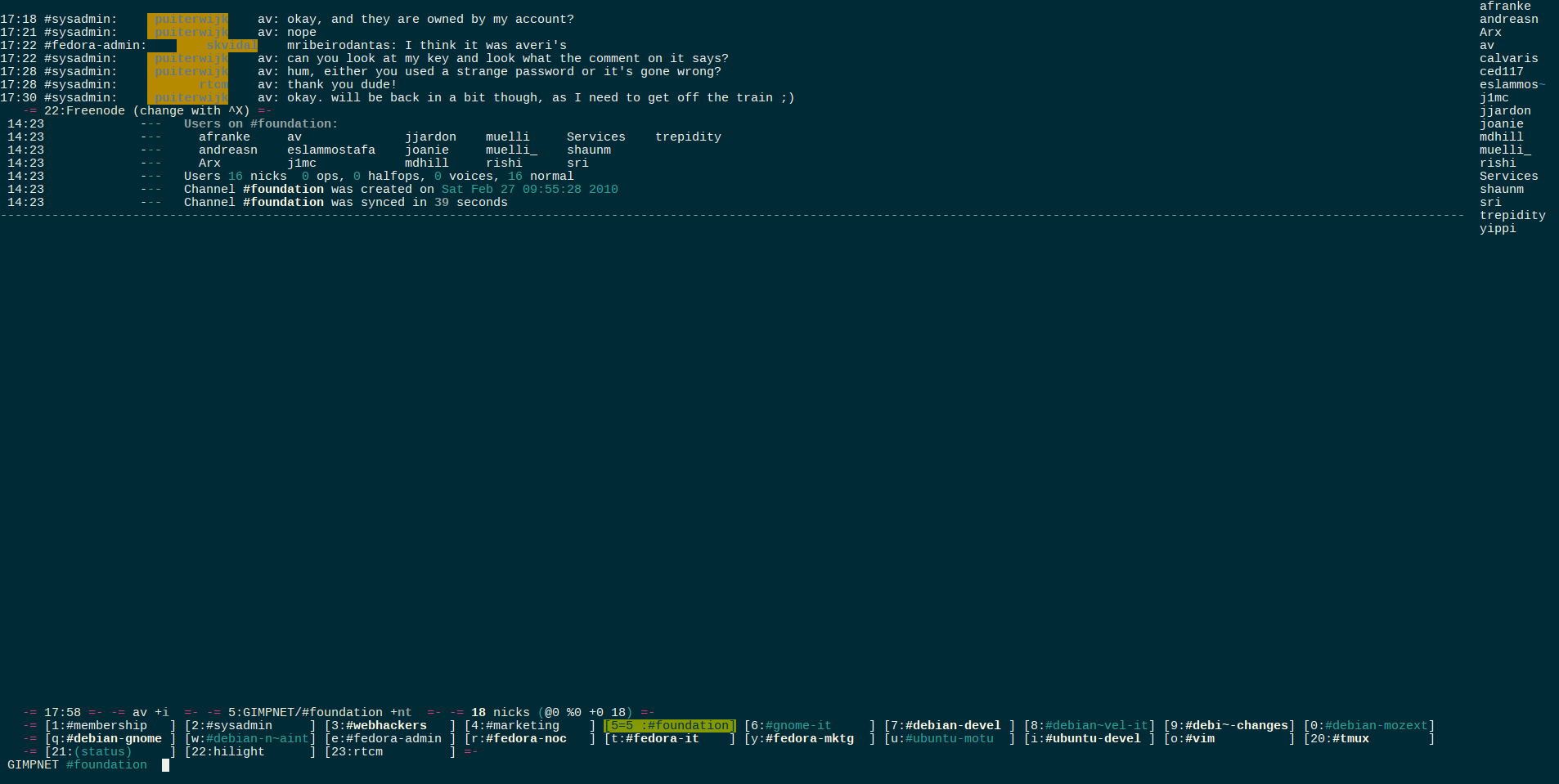
It s been two years since my latest blog post about my Linux desktop and many things have changed since then. I completely moved all my machines to GNOME 3, switched my main editor from nano to vim and my terminal multiplexer from screen to tmux. What didn t change at all except for a tweaks on the theme is my Irssi setup. dircolors_solarized Switching from nano to vim has been a pain at first, nano is really a straightforward editor, it does what you actually need from a CLI editor but while it works just fine when modifying configuration or text files, it s a bit limiting when it comes to programming. Vim on the other hand is highly customizable in every single part also thanks to its huge amount of plugins. Honestly I admit I spent several hours watching videos, reading documentation, trying out key bindings and I m not completely used to vim to be as much productive I would like to be with it. What I found to be the common error of vim s newcomers is their willingness to look around the web for a complete vimrc configuration file, full of key bindings, custom settings and personalizations. That s definitely something you should avoid when learning to use vim, the perfect vimrc doesn t objectively exist, each of us should spend some time investigating what is the best configuration for your needs and build a vimrc accordingly time by time. vimIt will probably take months to have a complex vimrc file matching your needs completely, until then you won t be able to define your vimrc to be ultimate . And that s actually why wgetting someone else s vimrc and copying it to your home folder won t make you an expert of vim, it ll probably make your life harder when trying a specific action with the stock settings will result in something you wouldn t have expected thanks to a particular key binding on the vimrc you downloaded. tmux The other tool that definitely improved my productivity is Tmux given the huge amount of open terminals I had every day during my sysadmin s duties at GNOME. Each day usually started with one or two open terminals mainly meant for random maintenance issues, after a few hours the amount of open terminals jumped to around 30. irssi Switching between tabs became a pain and the usual amount of time spent finding out which terminal had the the specific remote connection I needed was surprisingly sticking around 10 seconds. I looked around for a possible solution and found Tmux, it has been a joy finding out how easy it was to set it up and get used to it. I m now able to divide my 27 inches monitor into several panels and switch between them with a little keybinding, in addition you can set up as many windows (and consequently as many panels) as you wish, that way I can divide my programming windows from the ones specifically meant as remote consoles. From there I can detach / attach my previous Tmux session with one command and keep working on the same files and connections I had open the last time I used Tmux. In addition to the above tools I ve kept being an huge fan of Irssi and some of its plugins that have improved my overall productivity when daily chatting with Fedora, Debian and GNOME contributors. What actually changed on it since two years ago is the theme which is currently a mix between the Solarized and the XChat themes. Please don t hesitate to ask me any question if you are curious about learning something more about my current working setup! :-)

Tollef Fog Heen: Getting rid of NSCA using Python and Chef

NSCA is a tool used to submit passive check results to nagios. Unfortunately, an incompatibility was recently introduced between wheezy clients and old servers. Since I don't want to upgrade my server, this caused some problems and I decided to just get rid of NSCA completely. The server side of NSCA is pretty trivial, it basically just adds a timestamp and a command name to the data sent by the client, then changes tabs into semicolons and stuffs all of that down Nagios' command pipe. The script I came up with was:
#! /usr/bin/python
# -* coding: utf-8 -*-
import time
import sys
# format is:
# [TIMESTAMP] COMMAND_NAME;argument1;argument2; ;argumentN
#
# For passive checks, we want PROCESS_SERVICE_CHECK_RESULT with the
# format:
#
# PROCESS_SERVICE_CHECK_RESULT;<host_name>;<service_description>;<return_code>;<plugin_output>
#
# return code is 0=OK, 1=WARNING, 2=CRITICAL, 3=UNKNOWN
#
# Read lines from stdin with the format:
# $HOSTNAME\t$SERVICE_NAME\t$RETURN_CODE\t$TEXT_OUTPUT
if len(sys.argv) != 2:
    print "Usage:  0  HOSTNAME".format(sys.argv[0])
    sys.exit(1)
HOSTNAME = sys.argv[1]
timestamp = int(time.time())
nagios_cmd = file("/var/lib/nagios3/rw/nagios.cmd", "w")
for line in sys.stdin:
    (_, service, return_code, text) = line.split("\t", 3)
    nagios_cmd.write(u"[ timestamp ] PROCESS_SERVICE_CHECK_RESULT; hostname ; service ; return_code ; text \n".format
                     (timestamp = timestamp,
                      hostname = HOSTNAME,
                      service = service,
                      return_code = return_code,
                      text = text))
The reason for the hostname in the line (even though it's overridden) is to be compatible with send_nsca's input format. Machines submit check results over SSH using its excellent ForceCommand capabilities, the Chef template for the authorized_keys file looks like:
<% for host in @nodes %>
command="/usr/local/lib/nagios/nagios-passive-check-result <%= host[:hostname] %>",no-port-forwarding,no-X11-forwarding,no-agent-forwarding,no-pty ssh-rsa <%= host[:keys][:ssh][:host_rsa_public] %> <%= host[:hostname] %>
<% end %>
The actual chef recipe looks like:
nodes = []
search(:node, "*:*") do  n 
  # Ignore not-yet-configured nodes                                                                       
  next unless n[:hostname]
  next unless n[:nagios]
  next if n[:nagios].has_key?(:ignore)
  nodes << n
end
nodes.sort!    a,b  a[:hostname] <=> b[:hostname]  
print nodes
template "/etc/ssh/userkeys/nagios" do
  source "authorized_keys.erb"
  mode 0400
  variables( 
              :nodes => nodes
             )
end
cookbook_file "/usr/local/lib/nagios/nagios-passive-check-result" do
  mode 0555
end
user "nagios" do
  action :manage
  shell "/bin/sh"
end
To submit a check, hosts do:
printf "$HOSTNAME\t$SERVICE_NAME\t$RET\t$TEXT\n"   ssh -i /etc/ssh/ssh_host_rsa_key -o BatchMode=yes -o StrictHostKeyChecking=no -T nagios@$NAGIOS_SERVER

Russ Allbery: Review: The Odd Clauses

Review: The Odd Clauses, by Jay Wexler
Publisher: Beacon
Copyright: 2011
ISBN: 0-8070-0089-2
Format: Trade paperback
Pages: 193
The subtitle of this book summarizes it nicely: Understanding the Constitution through Ten of Its Most Curious Provisions. (The constitution in question is the United States Constitution.) It's a sort of popularization of US constitutional law, but rather than look at the most well-known and controversial parts, it takes a look at some of the odd side points, obscure clauses, or clauses that one rarely thinks about because they rarely appear in the news. This is partly a tour of curiosity aimed at those who like legal trivia, but it also provides, indirectly, a look at how constitutional law is made and debated, and at some of the burning concerns at the time of the writing that have since faded away. Sometimes why the concern has faded is as interesting as the original problem. This is the sort of book whose table of contents provides a lot of insight into what you're getting. It has ten chapters, each devoted to a particular clause or amendment: incompatibility, weights and measures, recess appointments (one of the rare ones that has made the news), original jurisdiction, natural-born citizen (odd, but sadly now not at all obscure), letters of marque and reprisal, titles of nobility, bills of attainder, and the 3rd and 21st amendments. (For those who haven't memorized all the amendments to the US Constitution, the 3rd is the prohibition on quartering soldiers in private homes and the 21st is Prohibition, which here is examined not for its core intent but for the implications for federalism.) As you can see, this is quite a selection, and while the clauses are often obscure, the issues raised by them are still generally quite active. There are some that were intensely controversial at the time of the original debate that are little more than amusing trivia at this point (the prohibition on officers of the United States taking titles of nobility), or have become so much a part of the structure of the government that people rarely given them a second thought (such as the incompatibility clause, which prohibits members of Congress from holding positions in the executive branch). But most of these clauses establish ground rules for the US government that are still quite current today, even if the legal terminology used at the time is no longer familiar. A good example is the clause prohibiting bills of attainder, something that the writers of the US Constitution saw no need to define. A bill of attainder is an act of a legislature declaring a person guilty of a crime and assigning some punishment without trial. Framed that way, it seems like an obvious extension of the separation of powers system that the US government is constructed around, but unlikely to provoke much modern controversy. However, as Wexler explains quite lucidly, there's a reason why this clause is right next to the prohibition on ex post facto laws. While no one would stand for the US Congress declaring guilt on a matter of criminal law, it has written some startlingly specific laws that seem aimed solely at specific individuals or organizations, which is exactly the sort of behavior that this prohibition, interpreted broadly, was intended to prevent. Similarly, one might think that Congress's power to issue letters of marque and reprisal is little more than ground for an interesting history lesson. But that clause is deeply entangled with the checkered history of US declarations of war and controversies over Congressional oversight, and Wexler uses it as a jumping-off point to take a look at the implications for the modern habit of undeclared wars fought by military contractors. This is a short book, so these treatments are necessarily brief. Some of them are also fairly minor; for example, the discussion of the weights and measures clause is mostly an extended rant on the US refusal to adopt the metric system. That's a sentiment with which I entirely agree, but I'm not sure it has much to do with constitutional law. But Wexler is an entertaining and concise writer; even when the discussion is relatively shallow, I enjoyed reading his analysis. (I will warn, though, that he takes a few potshots from a liberal perspective, so one's enjoyment of his humor may to some extent depend on your personal political allegiances.) I wouldn't rush out to find this book, but I found it mildly diverting and occasionally quite informative. The chapter on original jurisdiction, for instance, explained how the Supreme Court handles certain classes of cases that must be filed directly with it, despite not being a trial court. This was a question that I didn't even know I had, and a side system of judicial procedure that turned out to be surprisingly interesting. I suspect The Odd Clauses will be the most interesting to people who have only a news media understanding of the US Constitution. I went through a personal libertarian period, during which I read the constitution in detail and sought out some discussions of its specifics, so quite a bit of this book was familiar ground to me. Others without that study background may find more novelty. But even with that background, I was entertained, and don't regret buying it. One note, though: I bought this book on the recommendation of Kevin Underhill, author Lowering the Bar, which is a masterpiece of dry humor. If you're looking for legal humor, parts of The Odd Clauses are mildly funny, but Lowering the Bar is the sort of site that will have you staying up late reading just one more page of archives and reading bits aloud to anyone nearby. Rating: 7 out of 10

Matthew Garrett: Automating HP server BIOS setup

One of the goals of our work at Nebula is making it as easy as possible for someone to set up a private cloud. In an ideal world that would involve being able to just plug in the controller hardware, wire up a rack of servers and turn everything on, but right now there are cases where the default firmware configuration on the servers doesn't match our desired configuration. Plugging a console into individual servers just to set some BIOS options is (based on personal experience) about as much fun as writing a doctoral thesis on the experience of watching paint dry, so it seemed worth trying to find a way to avoid people having to deal with that. Thankfully, it turns out that the industry has come to a similar set of conclusions. Recent Dell hardware lets you use WS-MAN, which makes it easy to do things like enable security features as long as you have an authenticated connection to the iDRAC management system. This actually works out wonderfully - the first time a Dell node sends a PXE request to the Cloud Controller, it can push back some configuration changes, reboot the system and then boot it in a known good configuration. Thanks, Dell![1].

HP's slightly trickier. As far as I've been able to work out, the remotely-available programmatic interfaces only provide configuration interfaces to the iLO device itself, along with a range of chassis-level monitoring. Instead, HP provide a couple of utilities that allow the OS to change values. The first of these is called conrep. Conrep is able to modify BIOS settings, but needs an XML file which tells it which configuration values are at which addresses. That's a bit of a pain. Thankfully it's being replaced with a new tool called hprcu which is able to directly query the firmware in order to figure out which configuration options are available and which values have to be stored where in order to set them. You run hprcu once and it spits out a file containing your existing settings. You modify that, feed it back into hprcu, reboot and you're set.

Sounds pretty ideal. What's the problem? The first is that hprcu is currently only shipped as a 32-bit binary, and right now we don't deploy any 32-bit support code on our nodes. It'd be irritating to have to do so just to configure the firmware. The second is that it works by doing raw port IO, and that's not going to be possible from userspace once we've moved to a UEFI Secure Boot setup.

So, obviously, I've been working on reimplementing it. The first step was to figure out what it was actually doing. The first step was to strace it to see if it was using the kernel IPMI interface. strace showed no accesses to /dev/ipmi*. My next thought was that it could be using some sort of shared memory segment with the iLO hardware, so I used MMIOTrace to dump the memory accesses it made. Turned out there weren't many, and certainly not enough to do anything interesting. Then I went back to the strace logs and saw that it was calling iopl() a bunch, and then I got sad.

iopl() allows a userspace application to change its io privilege levels. The Linux manpage for the iopl() call is amazingly helpful, informing us with a straight face that "This call is necessary to allow 8514-compatible X servers to run under Linux." What it actually does is grant userspace access to the full range of io ports.

So, what's an io port? The x86 architecture (and some others) provide two ways to communicate with hardware. The one that's mostly used these days is to map the hardware into the same address space as memory (memory-mapped io), but x86 has an entirely separate address range that can be used. This is significantly more limited, as only 65,536 addresses are available for the entire system. Further, you can only read or write a maximum of 4 bytes in a single transaction. However, while slower and less generally useful than memory-mapped io, port io has the advantage that it's much simpler to implement. As a result, a lot of the original PC hardware was intended to be accessed via port io, and a bunch of that's still present. Want to reprogram your real-time clock? Port io. Want to read from the legacy keyboard controller? Port io. For low-bandwidth transactions, it's a completely reasonable way to implement hardware.

Applications[2] perform port io by executing in and out instructions. Since these instructions allow you to do things like, say, hit the keyboard controller directly[3], userspace is generally forbidden from calling them. Sufficiently privileged applications can call iopl() to raise their privileges and gain access to the full set of io ports. But, since in and out are CPU-level instructions, the actual port io accesses won't show up in strace. So I had to take another approach.

The correct way of doing this would be to LD_PRELOAD something that intercepted iopl(), didn't call it, let the application perform an in or out instruction, caught the fault, looked at the stack frame, called iopl(), performed the access, dumped debug details, dropped iopl() again and restored state. Because that seemed like a bunch of work, I took advantage of the fact that hprcu had separate in and out functions and used gdb. I told gdb to break on every call to in or out, dump the register state and then continue. Then I hacked up a script to parse the register dumps and tell me where the reads and writes were going. Astonishingly, it worked. And then I read the results and got really sad.

PCI setup is hard, if you're a BIOS. You've got PCI devices with large memory windows and you've got to arrange them all somehow and look you've only got 640K of RAM you can access while you're doing this and come on, seriously? So PC-type systems define a port IO interface to performing PCI configuration. Each PCI device has an address made up of a bus, a device and a function. You take a 32-bit integer, set the top bit to indicate that you want PCI access, put the bus in bits 16-23, the device in bits 11-15, the function in bits 8-10 and the configuration register on that device you want to access in bits 0-7. Then you write that to io port 0xcf8. Reads or writes to io port 0xcfc then read or write from that configuration register on that device. This lets the BIOS tell each PCI device where it's going to live in mmio address space without having to actually perform any mmio. Good work, BIOS developers.

This works fine in the BIOS, because nothing else is running while the BIOS is. It even works fine in the kernel, which uses this approach on older hardware that doesn't provide a memory-mapped mechanism to access PCI configuration registers. But it works really badly if you're doing it in userspace, because it shares a problem with all other indexed accesses. You write an address to 0xcf8. You write a value to 0xcfc. What happens if the kernel writes to 0xcf8 before you write to 0xcfc? Your access goes to some other register on some other device and suddenly you've just mapped a PCI device over the top of RAM and well I sure hope you saved all your work.

So, I wasn't thrilled to discover that hprcu was communicating with the iLO by using 0xcf8/0xcfc port io accesses. Not only was it going to stop working once we started deploying UEFI Secure Boot, it had the potential to cause really annoyingly hard to debug problems. Working out how to reimplement it became something of a priority.

By looking at the XML files it generated, and by following the port IO accesses it was performing, I could figure out pretty much how it worked. Some configuration values are stored in the real-time clock CMOS. These were just done in the standard way - write the address to port 0x70, read or write the value to port 0x71[4]. Other configuration values were stored in NVRAM, with accesses going via PCI. This was a little trickier to figure out, because sometimes different NVRAM addresses went to the same PCI address. I finally figured it out - there's a 48 byte window into NVRAM via the PCI configuration registers, and another register which chooses which set of NVRAM is visible. So, take the NVRAM address, divide by 48, write that value to register 0xa6, take the modulus, add it to 0x80 and write the desired value to that address.

So now I knew enough to be able to take an existing XML file and deploy it. Definitely progress, and I could even add support to the kernel. But I still wanted to know how hprcu generated that XML file in the first place. Running strings over the binary showed a bunch of debug output that it never actually printed, but immediately after the help text it also printed SsLlFf:HhAaTtOoDd. I've lost enough years of my life to this kind of thing to be able to identity that as a getopt format string, and there was that tantalising D option at the end that went entirely unmentioned in the help text. Re-running hprcu with the -D argument gave me huge piles of debug output, including references to a DMI entry and an $RBS table.

DMI is a standard for exposing system information, and one aspect of it is providing data from the firmware to the operating system. The OS can look for a defined signature in a fixed area of memory and then pull out a bunch of data about the hardware, including things like the vendor name, model, serial number, BIOS version and more. Some of these information tables are standardised and some are vendor-specific. hprcu was looking for a vendor-specific table and then scanning for it looking for a known signature. That table turned out to to contain a set of signatures and addresses. The address corresponding to the signature hprcu was contained a bunch of data starting with "$RBS". It also contained a huge quantity of ASCII that looked awfully like the strings in the XML file that hprcu had written. Success!

So, the rest of today was spent on working out the format of this table. This was only marginally less tedious than setting up BIOS settings on 20 servers by hand, but I've made enough progress to be able to figure out how to write a kernel-level driver for this. That's about half-done now - the parsing code is all implemented, I just need to add the sysfs glue and I am nowhere near drunk enough for that right now[5], so for now you're just getting a format description.

To start with, look for a DMI table with a type of 0xe5. This contains several entries of 4 bytes of signature, 8 bytes of address and 4 bytes of length. Find the entry with a signature of "$CRQ" and map the corresponding address. The first four bytes of the mapped region should be "$RBS". The first record is 21 bytes into the file. Each record starts with a single byte representing the type and two bytes representing the record length. Records of type 1 contain an ascii string that starts 8 bytes into the record, and have a further type number 6 bytes into the record that tells you what type of string it is. 0x05 indicates that it's a "Feature string", which defines the overall classification of the following features. 0x06 is an "Option string", which provides a human readable explanation of what this configuration value corresponds to. 0x60 is an "Optional warning string", which tells the user which further configuration may be required before the configuration change takes effect.

All other types appear to be configuration options. Bytes 3 to 6 provide the little-endian name of the configuration option. Bytes 7 and 8 provide a unique numberical identifier for the configuration option. Byte 13 indicates the type. 0x03 is stored in CMOS. 0x04 is stored in NVRAM. 0x05 appears to be some different kind of CMOS store. I haven't figured out the others. There then follows a set of choices. These vary in length depending on the type - 0x03 are 14 bytes long, 0x04 are 6 bytes long, 0x05 are 5 bytes long. Type 0x03 choices have the choice id at byte 0, the CMOS offset at byte 2, the mask at byte 3 and the value at byte 4. Type 0x04 choices have the choice id at byte 0, the nvram offset at bytes 1 and 2, the mask at byte 3 and the value at byte 4. Type 0x05 choices have the choice id at byte 0, the cmos offset at byte 1, the mask at byte 2 and the value at byte 3. There are optional flags following each choice - if the final byte of the choice isn't 0, there then follow 6 bytes of flags. The first four bytes provide the name of a configuration option (little-endian, again), the fifth byte refers to a choice on that option and the sixth byte indicates what kind of flag. 0x1 appears to indicate that the option is mutually exclusive with that other option. Examples include the embedded serial port and virtual serial port options, where it's impossible to map both to the same address at once. A choice can have multiple flags.

After a configuration option, there'll be a set of option string records. In turn, these correspond to the previous choices - if a configuration option had three choices, there'll be three option string records. I haven't figured out whether there's a stronger way of binding the option string records to the configuration choice yet. The other thing I haven't entirely figured out are the details of configuring the platform to perform a cold reboot on the next power cycle, but the io traces for that don't look too bad.

The aim is to provide a kernel driver that exposes all these configuration options via sysfs, including indicating the current value, the available values and letting the user set a new value. In an ideal world we'd have a wonderfully generic interface to this kind of functionality, but I'm (sadly) not sure that that's possible.

And that's how I spent the past two days.

[1] (Thell)
[2] Or, indeed, kernels
[3] And, hence, read your keystrokes
[4] Which has exactly the same problems as the PCI access, in that if you happen to ask the clock what the time is while hprcu is accessing CMOS, at least one of you is going to get very confused
[5] Obviously, I would never write kernel code while drunk. You're certainly not running any of it in your enterprise kernel.

comment count unavailable comments

26 June 2013

Daniel Pocock: The irrational fear of the Internet, foreign hackers and blue ties

In recent times, many people around the world have come to appreciate the fears of Australians. Fear of the Internet drove our communications minister to pursue a policy of Internet censorship that has been compared to countries like North Korea. Senator Stephen Conroy's policies achieved the global ridicule that they deserve when he was awarded the title of 2009 Internet Villain of the year. Today, a change of leadership has censored him out of a job and his scare campaign will hopefully disappear with him. Fear of people who work surfaced more recently. Our Prime Minister spent much of this year lashing out at highly skilled workers, especially IT workers she disrespectfully accused of "stealing jobs". Promoting a fear of men in blue ties took her into uncharted territory. In London, the omniprescent security theatre constantly reminds people to fear suspicious packages. But is Australia really to be concerned about blue ties? Blue ties get their revenge As always in politics, it is a story of hyopcrisy. Gillard herself was born in the UK and has no right to be criticising other hard working, highly skilled professionals because they have a foreign background. As for that pesky bunch of bloggers running wild on the Internet her communications minister aspired to suppress: when the Prime Minister did a widely derided photo shoot for a women's magazine, the bloggers lit up the web like a Christmas tree. Within 24 hours, a petition was circulating within her party to sack her Remarkably, while accusing foreigners of "stealing" jobs, it has been a subject of some debate that she only obtained her own job by taking it from another member of her own party in the middle of the night. Today, that same man came to work in a blue tie and took the job back. Hopefully Gillard's fears will leave with her.

Jon Dowland: Office suite UI and creativity

[pic]
For some reason I've always hated the layout of Office Suite tools such as LibreOffice, OpenOffice and Microsoft Office (I seem to find the Ribbon interface nicer than what has gone before, although I can't put my finger on why.) I always find the sheer quantity of UI in these programs have a real negative impact on creativity. I still haven't found anything as inspirational as a blank sheet of paper (or perhaps more accurately, less demotivating than a blank sheet of paper.)
[pic]
I've tried disabling and removing bits in the past, but I've never ended up with something I was happy with. Recently I tried attaching one of the two standard toolbars vertically, instead of horizontally. Surprisingly to me, the result feels a lot nicer. There's still some way to go, though. focuswriter is pretty good but I like to have some graphical features. By analogy when I write on paper it's not always straight lines of words, but sometimes bubbles, arrows, lines, strikethroughs, etc. At least I can get bullet points by remembering the write X compose key sequence (alt gr, dot, equals)

Steve Kemp: So mid-summer is over.

So my partner and I spent last week in Helsinki, visiting for Midsummer. The place was lovely, albeit "too damn hot"tm. (Despite my regularly shaved head I'm a pale-skinned redhead covered in freckles. In sustained sun I can be burned in the space of 10-20 minutes. Ouch.) I ate cake, went to a sauna, and all the usual things. I also had personal interviews with all the mosquitos. The only downside to the holiday was the timing: I'm a sysadmin and sometimes that involves out of hours work, so you can shuffle virtual machines around, upgrade processors, and do all the kind of "disruptive" work outside core business hours. Yesterday I was awake for 22 hours and I was working for 14 of them. Today I'm doing nothing that involves a computer other than a token check-in or three to make sure everything is fine. 99% of the time I don't mind working late, starting early, or scheduling an event outside working hours (e.g. last night I worked from 10PM-3AM ). But with the holiday I've definitely been feeling burned. My sleeping is screwed up, and I'm just getting grumpy and stupid. Still there were some highlights and I took some nice photos, met some good people, and learned some more Finnish. I actually tried to find some Finnish instructor(s) here in Edinburgh, upon my return, and was amused to discover that there is an Edinburgh-based Finnish Society. Amused? They cancelled their midsummer event due to poor weather. For the rest of the week I'm going to be very careful to count working hours and do nothing excessive. I've also got to get back into my gym-routine. Still there is good news on the horizon. I get a new computer next Monday. The new machine will run Wheezy, and Awesome. With 8GB RAM I'll stop hitting OOM conditions once I process many photographs, and I'm going to be very dedicated in using revision control for everything. (I've noticed I've gotten lazy and have started storing bookmarks locally again, instead of under revision control which is a bad sign.) Rambling. I woke up early (10:30AM) because "Microsoft Technical Support" called me and told me my computer had a virus ..

Next.

Previous.