Search Results: "ina"

13 December 2011

Raphaël Hertzog: People behind Debian: Ben Hutchings, member of the kernel team

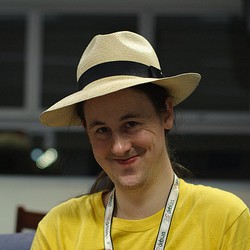
Ben Hutchings, photo by Andrew Mc Millan, license CC-BY-2.0

Ben Hutchings is a rather unassuming guy but hiding behind his hat, there s a real kernel hacker who backports new drivers for the kernel in Debian stable so that our flagship release supports very recent hardware. Read on to learn more about Ben and the kernel team s projects for Debian Wheezy! Raphael: Who are you? Ben: I m a professional programmer, living in Cambridge, England with my long-suffering wife Nattie. In Debian, I mostly work on the Linux kernel and related packages. Raphael: How did you start contributing to Debian? Ben: I started using Debian in 1998 and at some point I subscribed to Debian Weekly News. So in 2003 I heard about the planned Debian 10th birthday party in Cambridge, and thought I would like to go to that. Somehow I persuaded Nattie that we should go, even though it was on the day of our wedding anniversary! We both enjoyed it; we made new friends and met some old ones (small world). From then on we have
both been socially involved in Debian UK. In 2004 there was a bug-squashing party in Cambridge, and we attended that as well. That s where I really started contributing fixing bugs and learning about Debian packaging. Then in 2005 I made my first package (sgt-puzzles), attended DebConf, and was persuaded to enter the New Maintainer process. NM involved a lot of waiting, but by the time I was given questions and tasks to do I had learned enough to get through quite quickly. In April 2006 I was approved as a Debian Developer. Meanwhile, I looked at the videos from DebConf 5 and thought that it would be useful to distribute them on a DVD. That led me to start writing video software and to get involved in the video team for the next year s DebConf. Raphael: You have been one the main driver behind the removal of non-free firmwares from the kernel. Explain us what you did and what s the status nowadays? Ben: That s giving me a bit more credit than I deserve. For a long time the easy way for drivers to load firmware programs was to include them as a blob in their static data, but more recently the kernel has included a simple method for drivers to request a named blob at run-time. These requests are normally handled by udev by reading from files on disk, although there is a build-time option to include blobs in the kernel. Several upstream and distribution developers worked to convert the older drivers to use this method. I converted the last few of these drivers that Debian included in its binary packages. In the upstream Linux source, those blobs have not actually been removed; they have been moved to a firmware subdirectory. The long-term plan is to remove this while still allowing the inclusion of blobs at build-time from the separate linux-firmware repository. For now, the Debian source package excludes this subdirectory from the upstream tarball, so it is all free software. There are still a few drivers that have not been converted, and in Debian we just exclude the firmware from them (so they cannot be built). And from time to time a driver will be added to the staging section of Linux that includes firmware in the old way. But it s understood in the kernel community that it s one of the bugs that will have to be fixed before the driver can move out of staging . Raphael: Do you believe that Debian has done enough to make it easy for users to install the non-free firmwares that they need? Ben: The installer, the Linux binary packages and initramfs-tools will warn about specific files that may be needed but are missing. Users who have enabled the non-free section should then be able to find the necessary package with apt-cache search, because each of the
binaries built from the firmware-nonfree source package includes driver and file names within its description. For the installer, there is a single tarball that provides everything. We could make this easier, but I think we have gone about as far as we can while following the Debian Social Contract and Debian policy. Raphael: At some point in the past, the Debian kernel team was not working very well. Did the situation improve? Ben: Back in 2008 when I started working on the Linux kernel package to sort out the firmware issues, I think there were some problems of communication and coordination, and quite possibly some members were burned-out. Since then, many of the most active kernel team members have been able to meet face-to-face to discuss future plans at LPC 2009 in Portland and the 2010 mini-DebConf in Paris. We generally seem to have productive discussions on the debian-kernel mailing list and elsewhere, and I think the team is working quite well. Several new contributors have joined after me. I would say our biggest problem today is that we just don t have enough time to do all we want to. Certainly, almost all my Debian time is now taken up with integrating upstream kernel releases and handling some fraction of the incoming bug reports. Occasionally I can take the time to work on actual features or the other packages I m neglecting!
Our biggest problem today is that we just don t have enough time to do all we want to.
Raphael: It is widely known that Linux is maintained in a git repository. But the Debian kernel team is using Subversion. I believe a switch is planned. Why was not git used from the start? Ben: The linux-2.6 source package dates from the time when Linus made his first release using git. I wasn t part of the team back then so I don t know for sure why it was imported to Subversion. However, at that time hardly anyone knew how to use git, no-one had experience hosting public git repositories, and Alioth certainly didn t offer that option. Today there are no real blockers: everyone on the kernel team is familiar with using git; Alioth is ready to host it; we don t have per-architecture patches that would require large numbers of branches. But it still takes time to plan such a conversion for what is a relatively complex source package (actually a small set of related source packages). Raphael: What are your plans for Debian Wheezy? Ben: Something I ve already done, in conjunction with the installer team, is to start generating udebs from the linux-2.6 source package. The kernel and modules have to be repacked into lots of little udebs to avoid using too much memory during installation. The configuration for this used to be in a bunch of separate source packages; these could get out of step with the kernel build configuration and this would only be noticed some time later. Now we can update them both at the same time, they are effectively cross-checked on every upload, and the installer can always be built from the latest kernel version in testing or unstable. I think that we should be encouraging PC users to install the 64-bit build (amd64), but many users will still use 32-bit (i386) for backward compatibility or out of habit. On i386, we ve slightly reduced the variety of kernel flavours by getting rid of 686 and making 686-pae the default (previously this was called 686-bigmem ). This means that the NX security feature will be used on all systems that support it. It should also mean that the first i386 CD can have suitable kernel packages for all systems. I have been trying to work on providing a full choice of Linux Security Modules (LSMs). Despite their name, they cannot be built as kernel modules, so every enabled LSM is a waste of memory on the systems that don t use it. This is a significant concern for smaller Debian systems. My intent is to allow all unused LSMs to be freed at boot time so that we can happily enable all of them. I recently proposed to drop support for older x86 systems, starting with 486-class processors in wheezy. In general, this would allow the use of more compiler optimisations throughout userland and the kernel. However it seems that there isn t that much to be gained unless we also drop 586-class processors, and there are still quite a few of those in use. So I think this will have to wait. Uwe Kleine-K nig has been working to include real-time support (also known as PREEMPT_RT). This can provide low and very predictable I/O latency, which is useful for live audio synthesis, for example. It still requires a number of patches and a build configuration change, resulting in a separate binary package. We re currently only building that for 64-bit PCs. (You may notice this is missing for Linux 3.1, because the real-time developers skipped this release.) Raphael: What s the biggest problem of Debian? Ben: I think we try too hard to accommodate every possible option, without regard for the cost to developers and users in general. As an example, we now have sysvinit, file-rc, upstart and systemd all in testing. Daemon maintainers can t rely on any advanced features of upstart or systemd because we refuse to choose between them. And the decision to support the FreeBSD kernel means that we cannot choose upstart or systemd as the only option. So all daemon maintainers will have to maintain those baroque init scripts for the indefinite future. We really should be able to decide as a distribution that when one option is technically good and popular then it can be made the only option. But no-one really has the authority to do that, so we muddle along with the pretence that all the options are equally valid and functional, while none of them is supported as well as they should be.
We try too hard to accommodate every possible option, without regard for the cost to developers and users in general.
We also try to build every package on every architecture, in general. I m quite sure there are many (package, architecture) combinations that have no users, ever. But if at some point that combination FTBFS, developers will waste time investigating and fixing that time that could have been spent working on bugs and features that users actually care about. Yes, sure, portability is good but you can t prove portability just by making a package compile on every architecture. This also applies to the selection of drivers for the kernel, by the way. Raphael: Is there someone in Debian that you admire for their contributions? Well, there are many people, but I will pick out just a few: Steve McIntyre, for his work as DPL to improve communication with the various Debian derivatives and to bring fresh blood into various core teams. Also for being a generous host for countless Debian social and bug-squashing events. Stefano Zacchiroli, for improving further on communications with both downstream and upstream projects, and for regularly exercising his power to lead discussions to the benefit of the project. Julien Cristau, for maintaining good humour while not only fighting against the tide of graphics driver regressions in X and the Linux kernel but also working on release management. Jonathan Nieder, for taking on the unglamorous and frustrating task of kernel bug triage as a non-maintainer and developing it to a fine art.
Thank you to Ben for the time spent answering my questions. I hope you enjoyed reading his answers as I did.

Subscribe to my newsletter to get my monthly summary of the Debian/Ubuntu news and to not miss further interviews. You can also follow along on Identi.ca, Google+, Twitter and Facebook .

4 comments Liked this article? Click here. My blog is Flattr-enabled.

12 December 2011

Joerg Jaspert: KVM-Shell

I recently got myself a new host somewhere in that big thing internet. Pretty big one too and I m moving stuff from other machines over there, to get rid of the other ones. To have things nicely seperated I am using KVM, especially as I also have many different people owning a VM on that machine. In the past I was using Xen, not KVM, and there was the nice Xen-Shell available for it, so that those other people can manage their own VM, but not need direct access to the main box. Or any kind of root beside the limited ability properly put within the xen-shell. There doesn t seem to be anything like this for KVM. Nothing, nada. What? Oh well, with lots of use of search engines I finally found kvm-shell, a Shell Script from Michael Kress. It looked like it was about to do what I want - except that it didn t work. So I set out last weekend and made it work. So here, for those who are looking for a similar tool, grab your copy from here. The way to use is easy: Any bugs you find (I m sure there are) are yours to keep - or you can send me a mail and a patch. Same for new features, I m interested in getting more stuff in. [Update]: Actually one could name this virsh-shell too. Or libvirt-shell It should work with all systems supported by libvirt, it is just calling virsh $whatever for most of the stuff it does.

NeuroDebian: Chroot workaround for fslview (HOWTO)

Chroot workaround for fslview (HOWTO)
Preamble Sometimes research software lags behind developments in libraries it relies upon, because necessary changes to the code might require considerable effort, and thus time. That leads to difficulties building those tools using up-to-date library versions due API incompatibility. That is what happened with fslview from the FSL suite. Today, at the end of 2011, it still relies on Qt3 and VTK GUI support for it.

Note Last version of Qt3, 3.3.8, was released in February 2007, with official support by Trolltech terminated later that year.

Qt4 was first released in 2005, and current stable series 4.7 released appeared in September 2010.

Because of its age and discontinued upstream support, Qt3 was orphaned in Debian, and tools relying on it were encouraged to migrate to use Qt4. As a result, although Qt3 itself is still present in Debian (and thus Ubuntu), VTK GUI support for Qt3 (package libvtk5.4-qt3) which fslview uses, was removed from Debian due to Qt3 deprecation. It should be made clear that it was not removed to annoy people, but rather because it became unfeasible to maintain its robust building and functioning. So nowadays fslview is present only in those previous releases of Debian and Ubuntu which carry the libvtk5.4-qt3 library. Those are Debian squeeze (stable), Ubuntu nutty and maverick. If you upgraded your system from one of those releases, chances are that you still have fslview (and required libraries) installed although not they are not available from the APT repository anymore. Therefore fresh systems installations will not have them at all.
Workaround While everyone is waiting for a new release of fslview compatible with Qt4 there are possible workarounds to keep research going on bleeding edge Debian-based operating systems. The first, obvious choice for a FOSS enthusiast, is to build fslview from source by first building VTK Qt3 bindings, possibly after building Qt3 itself. While it might be educationally valuable and exciting, we are afraid in the end it might be more frustrating than useful. Therefore we would like to suggest another, much more straightforward and hopefully painless approach lightweight virtualization, or chroot jailing, which exists in Unix-land since 1970s. With this exercise in 4 simple steps we will install a complete (minimalistic) installation of Debian stable into a separate directory without harming the original system installation. We will provide a convenience wrapper to run fslview as if it was installed on the main system. So your system will stay intact while you would enhance it with additional software in a stable Debian environment. Moreover if security or critical fixes to any components of that installation become available, this chroot environment, being a complete Debian installation, could be as easily upgraded as your main system, thus guaranteeing robust performance. Although we demonstrate this setup with fslview in mind, such approach is generally useful for various use cases. For example, we have used it in the opposite situation on stable Debian systems we needed to run some software available only from Debian unstable or testing, and backporting of all required dependencies was either cumbersome or just impossible without sacrificing stability of the system.
Prerequisites For this exercise you would need
  • 3 20 minutes depending on the bandwidth to the Debian mirror and efficiency in cut/paste operations
  • root access to the system while performing this setup, although end-users of fslview would not need root access after everything is set up
  • 2 additional tools debootstrap to install Debian in a directory and a convenience utility schroot to enable such an environment
Procedure
  • Install the tools:

    sudo apt-get install debootstrap schroot
  • Choose a location with enough space (600 MB should be enough) and install a complete Debian squeeze installation with fslview:

    sudo debootstrap --include=fslview squeeze /srv/chroots/squeeze http://ftp.us.debian.org/debian

    Note

    You might like to adjust the URL to a Debian mirror closer to you

  • Create schroot configuration file /etc/schroot/chroot.d/squeeze with the following content:

    [squeeze]
    description=Debian squeeze (6.x stable)
    type=directory
    directory=/srv/chroots/squeeze
    users=YOURLOGIN
    aliases=debian,default
    Replace YOURLOGIN with a comma separated list of users who should be allowed to access this chroot environment (see man schroot.conf for more options, e.g. how to specify whole groups with groups=..., etc.)
  • At this point you should already be able to invoke any command within the chroot environment, so just create a little shell script /usr/local/bin/fslview, make it executable and be all set:

    echo -e '#!/bin/sh\nschroot -p -c squeeze /usr/bin/fslview "$@"' > /usr/local/bin/fslview
    chmod a+x /usr/local/bin/fslview

    Note

    You might need to become root for the above.

Optional steps Although at this point you can run fslview from the chroot-ed environment, we would suggest a few additional steps. For some of them (marked with chroot-root) you would need to become root in a chroot environment via following steps:
  • enter chroot using schroot -c squeeze -p
  • become root (via su command, root password should be the same as on the main system)
So here are recommended optional additions:
  • chroot-root: Enable NeuroDebian repository. Choose squeeze release and mirror of preference (remove sudo from provided cmdline).

  • chroot-root: Enable security and functionality updates:

    sed -e 's,squeeze,squeeze-updates,g' /etc/apt/sources.list > /etc/apt/sources.list.d/updates.list
    echo 'deb http://security.debian.org/ stable/updates main' > /etc/apt/sources.list.d/security.list
    apt-get update
    apt-get upgrade
  • Make fsl atlases accessible within the chroot environment. There are two ways and you must choose only one of them, otherwise you might damage your main system installation.

    • chroot-root: Install atlases packages in the chroot-ed environment:

      apt-get install fsl-atlases
      Although this is the best/correct way it would require additional 200MB of space, possibly duplicating what you already have installed in the main system. Also it requires enabling of NeuroDebian repository in chroot environment.
    • Alternatively you can bind-mount those directories with atlases installed on the main system within chroot. For that edit (as root on the main system) /etc/schroot/default/fstab and add following entries:

      /usr/share/fsl/data/atlases /usr/share/fsl/data/atlases none rw,bind 0 0
      /usr/share/data             /usr/share/data             none rw,bind 0 0
      You need to be aware of the potential consequences of this second approach: Any package that installs files under /usr/share/data will modify files in the same directory outside the chroot as well. If you don t want to risk that don t use this method and simply install the necessary data packages inside the chroot environment too, as describe before.

      Note

      Similarly you can bind-mount any other directory you would like to make visible in chroot. Just be careful to not overlap with system directories in chroot which already carry something.

Also you might like to read man schroot on how to enable persistent sessions so that chroot initiation could be done ones during boot instead of per each fslview invocation If you have any comments (typos, improvements, etc) feel welcome to leave a comment below, or just email us@NeuroDebian .

Cyril Brulebois: Fixing synaptics on powerpc

(It s a new day, it s a new bug ) A regression appeared in the synaptics input driver, between the 1.4.1 and the 1.5.0 release, as reported in Debian #649002 by many users. Basically, no more touchpad on PowerPC (hi, iBook G4 users!). :-( What follows is how I tracked it down. The upstream bug report is fdo#43728. Anyone could have done so, there s no black magic involved. A little hint maybe: git bisect is really easy on X drivers, since one can build and test without the Debian packaging bits. 1st step: Getting started You need sources and build dependencies, nothing fancy. Since packages might be named a bit differently, there s a reference to the relevant upstream repositories in debian/watch for X packages.
# You need git here:
debcheckout xserver-xorg-input-synaptics synaptics.git
cd synaptics.git
# Let s get the upstream tags and branches:
cat debian/watch
git remote add upstream git://anongit.freedesktop.org/xorg/driver/xf86-input-synaptics
git fetch --all
# Let s install build dependencies:
sudo apt-get build-dep xserver-xorg-input-synaptics
2nd step: Reproducing It was said 1.5.0 was the first known buggy version, so let s make sure:
# Get the appropriate tag:
git checkout xf86-input-synaptics-1.5.0
# Prepare the build system:
autoreconf -vfi
# X finds its modules under /usr, not /usr/local:
./configure --prefix=/usr
# Build and install:
make && sudo make install
Now time to restart the display manager, and confirm that the pointer is not moving bug reproduced. Now let s check the 1.4.1 release isn t affected:
# Clean everything:
git clean -xdf
git checkout xf86-input-synaptics-1.4.1
autoreconf -vfi
./configure --prefix=/usr
make && sudo make install
And after a display manager restart, the pointer is moving again, good! For reference, the log has very different lines about appletouch, so it can be used to programmatically learn about the status (good or bad). 3rd step: Narrowing it down So, we have a known good version and a known bad version. Time for a binary search to find the guilty commit which introduced that regression!
git bisect start
git bisect good xf86-input-synaptics-1.4.1
git bisect bad  xf86-input-synaptics-1.5.0
You don t even need to know that 1.4.x and 1.5.x live in different branches, git figures that out for you:
Bisecting: a merge base must be tested
[de0dfb76444ad4160468d00515876c91a9fa20bf] synaptics 1.4.0
It s just a matter of running autoreconf && ./configure && make && sudo make install && sudo /etc/init.d/xdm restart every step of the way, so it s pretty easy. No wonder, 1.4.0 was working OK, so it can be recorded as such through git bisect good, and the binary search goes between that commit and 1.5.0. After a few iterations of git bisect good and git bisect bad, we get to the commit reported on the upstream bug. As an extra bonus, mentioning the upstream bug number/URL in the Debian bug means it can be marked as forwarded there and we ll receive automatic notifications when its status changes, thanks to bts-link. Now, if you want to provide a patch for this bug, you may want to try and revert this commit. 4th step: Providing a patch Let s go back to the affected release and try to revert the guilty commit:
git checkout xf86-input-synaptics-1.5.0
git revert 13543b156d78bc4d01a19844a5ee8f283269621b
Unfortunately, some later commits modified the affected areas so we re running into conflicts:
error: could not revert 13543b1... eventcomm: replace synaptics-custom TEST_BIT with server's BitIsOn.
hint: after resolving the conflicts, mark the corrected paths
hint: with 'git add <paths>' or 'git rm <paths>'
hint: and commit the result with 'git commit'
Let s try to understand what the offending commit did: it replaced a set of macros with a single one, taken from the server. Both the old TEST_BIT() and the new BitIsOn() take 2 arguments, but the order is reversed. Reverting it should only be a matter of introducing the TEST_BIT() macro again (along with the two other ones it needs), and using it. The problem is replacing all BitIsOn(foo,bar) with TEST_BIT(bar,foo): foo and bar might not be trivial, they could be complex C expressions, and a replacement in your favourite editor might not get all occurrences right. Thankfully, there s a nice tool to handle such things, called coccinelle. I won t go into details, just show how it can help here. Basically you just need to craft a tiny patch, called a semantic patch, which describes what I wrote in the previous paragraph. You only need to declare two expressions, say a and b, and declare that all BitIsOn(a,b) must be replaced with TEST_BIT(b,a). Here s the syntax:
@@
expression a,b;
@@
-BitIsOn(a,b)
+TEST_BIT(b,a)
Save it under testbit.cocci and apply it through spatch (from the coccinelle package), asking it to perform in-place replacement (we re in a git checkout copy, remember):
# Apply:
spatch -sp_file testbit.cocci -in_place .
# Profit:
git diff
Then you can run git commit -s, write a nice commit message, send it upstream, and enjoy the rest of the night. Coming soon to a mirror near you: fixing commit. As mentioned on the upstream bug report, I got the Debian reference wrong in the commit message, I really meant #649002.

11 December 2011

Stefano Zacchiroli: bits from the DPL for November 2011

Mako's IronBlogger is a great idea. I often find myself postponing blog posts for a very long time, simply out of laziness. IronBlogger provides a nice community incentive to counter (my) laziness and blogging more often. As a related challenge, we have to face the fact that different subsets of our communities use different media to stay informed: mailing lists, blog (aggregators), social media, IRC, etc. Disparities in how they stay informed are a pity and can be countered using multiple medias at a time. Although I haven't blogged very often as of lately, I managed to keep the Debian (Developer) community informed of what happens in "DPL land" on a monthly basis, by the means of bits from the DPL mails sent to d-d-a. While the target of bits mails perfectly fits d-d-a, there is no reason to exclude a broader public from them. After all, who knows, maybe we'll find the next DPL victim^W candidate among Planet readers! Bonus point: blogging this also helped me realize that my mails are not as markdown-clean as I thought they were. I still have no IronBlogger squad, though. (And sharing beers with folks in the Boston area is not terribly handy for me ). Anyone interested in setting up a BloggeurDeFer in the Paris area? (SCNR)
Dear Project Members,
another month has passed, it's time to bother you again about what has happened in DPL land in November (this time, with even less delay than the last one, ah!). Call for Help: press/publicity team I'd like to highlight the call for help by the press / publicity teams. They are "hiring" and have sent out a call for new members a couple of weeks ago. The work they do is amazing and is very important for Debian, as important as maintaining packages or fixing RC bugs during a freeze. It is only by letting the world know what Debian is and what we do, that we can keep the Project thriving. And letting the world know is exactly what the publicity and press teams do. If you're into writing, blogging, or simply have a crush for social media, please read the call and "apply"! Interviews November has apparently been the "let's interview the DPL" month. I've spent quite some time giving interviews to interested journalists about various topics. For both my embarrassment and transparency on what I've said on behalf of Debian, here are the relevant links: Assets Legal advice (work in progress) Relationships with others Miscellanea Thanks for reading thus far,
and happy hacking.
PS as usual, the boring day-to-day activity log is available at master:/srv/leader/news/bits-from-the-DPL.*

Amaya Rodrigo: Biggest of them all


Biggest of them all
Originally uploaded by Amayita.
And what the heck bumped into that? :)

Via Flickr:
Tomares, Seville

10 December 2011

Patrick Schoenfeld: Migrating from blogspot to Movable Type

A while ago I decided to migrate my existing blogspot blog to an own domain and webspace again. My reasoning was mostly, that blogspot lacked some features, which I'd like to have in my blog.
Additionally, my requirements have changed a bit since I originally moved to blogspot and, last but not least, Blogspot was a compromise anyway.

So I started re-evaluating a possible software platform for my blog. In my numerous previous attempts to start blogging (there were several blogs of me in the internet since at least 2006), before I moved to Blogspot, I used Wordpress. But there were quiet some reasons against it, one of the biggest concerns being its security history. Also, while I worked a lot with PHP in the past years, I have developed a serious antipathy against software written in PHP, which I couldn't just ignore.

In the end, the decision fell on Movable Type, because its written in Perl, which is the language I prefer for most of my projects, because its features were matching my wishes (mostly) and because I heard some good opinions about it. Also it is used by my employer for our company blog.

So the next question was: How to migrate?

I decided to use Movable Type 5, although, at present, it seems not to be the communities choice. At least the list of plugins supporting MT5 is really short. Foremost there was no plugin to import blogger posts, which, after all, was the most important thing about the migration.
Luckily there is such a plugin for Movable Type and so I basically did the following:

  1. Install Movable Type 4
  2. Install the Blogger Import Plugin
  3. Import posts (it supports either the export file of blogger or directly importing posts via the Google API)
  4. Upgrade to Movable Type 5
  5. Check the result
Check the results, or: The missing parts

Obviously such an import is not perfect. Some posts contain images or in-site links. The importer is not able to detect that and honestly it would have a hard time to track that anyway.
So as soon as content is migrated, its time to look for the missing parts.

The process to find missing parts is basically very easy and common among the various missing parts:
Just search for your blogspot URL via the Search & Replace option in the Movable Type administration.

Now how to fix that? For links its quiet easy (although I forgot about them in the first run), as long as the permalinks have kept the same scheme.
In my case that is the case, since I decided to use the Preferred Archive option "Entry" in the blog settings for the new blog and the default (if there is an option, because I don't know)
in Blogspot. The importer does import the Basename of the document, so fixing links is just a matter of replacing the domain part of the URL.

For images its some more work. One has to get the images somehow and upload them in Movable Type. Eventually it then boils down to search and replace, but I decided to do that manually, since I only have a very low number of images in my posts so far.

After that I did everything else, which is not specific to the migration, like picking a template, modifying it to my wishes, considering the additions of plugin etc.
And here we are. There were some issues during the migration, which I haven't handled here. I will blog about them another time.

9 December 2011

Christian Perrier: 10 years being Debian Developer - part 5: being a newbie DD...and working on l10n

I left you 2.5 months ago with the last question asked by my applicaiton manager, Martin Michlmayr : "Please tell me about about yourself and what you intend to do for Debian". Interesting question to revisit now, indeed. Here is what I answered: About myself first. I'm a 40 year old project manager and system administrator working in French National Aerospace Research Center. My best definition of my skills in computing is "Know more or less about a Lot of Things and be a Specialist of Nothing"...:-). I'm definitely not a programmer, nor a real system administrator, nor a RDBMS administrator, nor a personal workstation designer, though I do all of these daily. I think I'm perfect for finding the good person for having a defined job done. Besides this, I'm a genealogist for several years now. This is what finally decided me to apply for becoming a package maintainer : there are some quite good free genealogy software for Unix, though for various reasons they are not used very widely, even Unix geeks (my main software for genealogy still runs on Another Operatin System and is evertythig but free).I think that I can bring something here to the Free Software World, by helping some of these good programs in getting into the best Linux distribution I know.... For me, this is a mean for giving back to the free software movement what I gives to me since I discovered Linux 6-7 years ago. My very first intention as soon as I get my way into the Debian Developers Heaven is adopting the Geneweb package currently maintained by Brent Flugham. I'm in close contact with the author (who happens to be french, which helps) as well as a daily user of it. The current package which is in the distribution is already my work for a great part. I gave it to Brent, the current maintainer and we both agreed that it would be better for me to apply to becoming anofficial maintainer. I also contributed to the package for lifelines, another genealogy software. The last version of the package is also 80% my work, acknowledged by Javier, the official maintainer. Concerning that package, I do not have "plans" for adopting it (we didn't discussed of this with Javier, and I'm not sure I could bring him that much things). I came to Linux thanks to a great friend of mine, Ren Cougnenc. Ren opened my eyes to the free software world when I still thought that it was only a variant of free beers. I got really involved into Linux when I forced me to remove any other Operating System from my computer at work and tried to do my daily job with Linux. I have now succeeded at ONERA in getting free software to be accepted as a credible alternative for important projects. At this time, especially for server and network-related projects. I absolutely cannot tell why and how I came to be a Debian user. I simply don't remember. But I know why I am still a Debian user : this is a distribution which is controlled by only one organisation--->its users. And I want to be part of it. Finally, I did not mention above the somewhat "political" nature of my personal involvment into free software. Except for the physical appearence, I think I mimic RMS on several points (though he probably speaks better french than I try to speak english....which does not help for expressing complex ideas like the ones above!). As anyone can see, I was already very verbose when writing, sorry for this. Funnily Martin summed this up in one paragraph when he posted his AM report about my application. From what I see, also, my English didn't improve that much since then. It seems this is a desperatecause, I'm afraid. Anyway, all this was apparently OK for Martin and, on July 21st 2001, he wrote and posted his AM report and, on July 30th 2001, I got a mail by James Troup: An account has been created for you on developer-accessible machines with username 'bubulle'. bubulle@debian.org was born. Now I can more easily destro^W contribute to my favourite Linux distro. Indeed, I don't remember that much about the 2001-2003 years. I was probably not that active in Debian. Mostly, I was maintaining geneweb, for which I polished the package to have it reach a quite decent state, with elaborated debconf configuration. Indeed, at that time, I was still also deeply involved in genealogy research and still contributing to several mutual help groups for this. This is about the time where I did setup my web site (including pages to keep the link with our US family, which we visited in 2002). I think that the major turn in my Debian activities happened around september 2002 when Denis Barbier contacted me to add support in geneweb for a new feature he introduced in Debian : po-debconf. At that time, I knew nearly nothing about localization and internationalization. Denis was definitely one of the "leaders" in this effort in Debian. During these years, he did a tremendous job setting up tools and infrastructure to make the translation work easier. One of his achievements was "po-debconf", this set of tools and scripts that allows translation debconf "templates", the questions asked to users when configuring packages. All this lead me to discover an entire new world : the world of translating software. As often when I discover something I like, I jumped into it very deeply. Indeed, in early January 2003, I did my very first contributions to debian-l10n-french and began working on systematic translation of debconf templates. Guess what was the goal : 100%, of course! Have ALL packages that have debconf templates...translated to French. We reached that goal.....on June 2nd 2008 in unstable (indeed "virtually" : all packages were either 100% translated...or had a bug report with a complete translation) and on December 21st 2010 for testing. Squeeze was indeed the first Debian release with full 100% for French. Something to learn with localization work: it's never finished and you have to be patient. So, back in 2003, we were starting this effort. Indeed, debian-l10n-french was, at that time, an incredibly busy list and the translation rate was very high: I still remember spending my summer holidays translating 2-3 packages debconf templates every day for two weeks. Meanwhile, my packaging activities were low: only geneweb and lifelines, that was all. Something suddenly changed this and it has been the other "big turn" in my Debian life. After summer 2003, I suddenly started coming on some strange packages that were needing translation: they were popping up daily in lists with funny names like "languagechooser", "countrychooser", "choose-mirror", etc. I knew nothing about them and started "translating" their strings too, and sending bug reports after a decent review on debian-l10n-french. Then, Denis Barbier mailed me and explained me that these things were belonging to a new shiny project named Debian Installer and meant to replace the good old boot-floppies. Denis explained me that it would maybe be more efficient to work directly in the "D-I" team and "commit" my work instead of sending bug reports. Commit? What's that? You mean this wizard tool that only Real Power Developers use, named "CVS"? But this is an incredibly complicated tool, Denis. Do you really want me, the nerd DD, to play with it? Oh, and in this D-I development, I see people who are close to be semi-gods. Names I read in mailing lists and always impress me with their Knowledge and Cleverness: Martin Michlmayr (my AM, doh), Tollef Fog Heen, Petter Reinholdtsen and so many others and, doh, this impressive person named "Joey Hess" who seems to be so clever and knowledgeable, and able to write things I have no clue about. Joey Hess, really? But this guy has been in Debian forever. Me, really? Work with the Elite of Debian? Doh, doh, doh. Anyway, in about two months time, I switched from the clueless guy status to the status of "the guy who nags people about l10n in D-I", along with another fellow named Denny "seppy" Stampfer". And then we started helping Joey to release well localized D-I alphas and betas at the end of 2003 (the release rate at the time was incredible: Sarge installer beta1 in November 2003, beta2 in January 2004). I really remember spending my 2003 Christmas holidays hunting for....100% completion of languages we were supporting, and helping new translators to work on D-I translation. Yes, 8 years ago, I was already doing all this..:-)...painting the world in red. All this leads up to the year 2004. Certainly the most important year in my Debian life because it has been....the year of my first DebConf. But you'll learn about this....in another post (hopefully not in 2.5 months).

Russell Coker: Cocolo Chocolate

Cocolo Overview I recently wrote about buying a fridge for storing chocolate [1]. Jason Lewis (the co-founder of Organic Trader [2]) read that post and sent me some free samples of Cocolo chocolate [3] (Cocolo is an Organic Trader product that is made in Switzerland). It s interesting to note that Cocolo seem very focussed on a net presence [3], their URL is printed on the back of the packet in an equal size font to the main label on the front (although the front label is in upper case). The main web page has a prominent link to their Twitter page which appears to be updated a couple of times a month. PIcture of Cocolo chocolate packaging Cocolo makes only organic fair-trade chocolate. Every pack lists the percentage of ingredients that are Fairtrade (presumably milk and some other ingredients are sourced locally in Switzerland and Fairtrade doesn t apply to them). Their chocolate packages have the URL www.fairtrade.com.au printed on them and their web site links to an international Fairtrade organisation. The packages also list the organic and Fairtrade certification details and state that they are GMO free. The final geek data on the package is advise to store the chocolate at a temperature between 16C and 18C (I have now set my fridge thermostat to 17C). The above picture shows the front of a pack of Dark Orange chocolate and the back of a pack of Milk chocolate. Reviews One thing that is different about Cocolo is that they use only unrefined evaporated organic cane sugar juice to sweeten their chocolate. This gives it a hint of molasses in the flavor. Children who like white sugar with brown coloring might not appreciate this, but I think that the use of natural cane sugar juice will be appreciated by most people who appreciate products with complex and subtle flavors. The Milk chocolate contains a minimum of 32% cocoa solids, this compares to the EU standard of a minimum of 25% for milk chocolate and the UK standard of a minimum of 20% for Family Milk Chocolate . The EU standard for dark chocolate specifies a minimum of 35% cocoa solids, so it seems that Cocolo milk chocolate is almost as strong as dark chocolate. If you are used to eating dark and bittersweet chocolate then the Cocolo milk chocolate is obviously not that strong, but it is also significantly more concentrated than most milk chocolate that is on the market. The high chocolate content combined with the evaporated cane sugar extract gives a much stronger flavor than any of the milk chocolates that I have eaten in recent times. The Dark Mint Crisp chocolate has a minimum of 61% cocoa mass. The mint crisp is in very small pieces that give a good texture to the chocolate with a faint crunch when you bite it. It has a good balance of mint and chocolate flavors. The Dark Orange chocolate contains 58% cocoa solids and has a subtle orange flavor. The white chocolate tastes quite different from most white chocolate. While most white chocolate is marketed to children the Cocolo white chocolate will probably appeal more to adults than children. This is one of the few white chocolates that I ve wanted to eat since the age of about 14. They also have many other flavors, most common types of chocolate (such as with almonds or hazelnuts) are available. I highly recommend Cocolo products!

Dirk Eddelbuettel: RInside 0.2.5

RInside 0.2.5 arrived on CRAN earlier today. RInside is a set of convenience classes which facilitate embedding of R inside of C++ applications and programs, using the classes and functions provided by the Rcpp R and C++ integration package. The big news for this release is that Windows applications once again run! James Bates gets full credit for noticing why Windows binaries died on startup, and provided a short patch which we (after some further simplicifcation) added. So for the first time since the 0.2.0 release, Windows users can just change into the examples/standard directory and issue a simple make -f Makefile.win, and the twelve example binaries will actually work. Yay, and kudos to James. The other main addition is a new examples directory examples/wt containing the web-application of the density estimation demo I had blogged about last week. By combining the Wt toolkit with RInside, we get C++ "web" applications containing R which is pretty nifty. The example otherwise follows the earlier Qt-based example of a standard desktop application with RInside. One minor snafu I just noticed is that I was overzealous with the .Rbuildignore file. By excluding the wt and qtbinaries, I also excluded their source files with the same name (up to the .cpp or .h ending). If you desire to run the examples, just grab these examples files from the SVN repo at R-Forge. All changes since the last release are summarized below:
0.2.5   2011-12-07
   o    Applied (somewhat simplified) patch by James Bates which restores
        RInside to working on Windows -- with a big Thank You! to James for
        fixing a long-standing bug we inadvertendly introduced right after
        0.2.0 almost two years ago
   o    New example embedding R inside a Wt (aka Webtoolkit, pronounced 
        'witty') application, mirroring the previous Qt application
   o    Qt example qtdensity now uses the new svg() device in base R; removed
        test for cairoDevice package as well as fallback png code
   o    Very minor fix to qmake.pro file for Qt app correcting link order
CRANberries also provides a short report with changes from the previous release. More information is on the RInside page. Questions, comments etc should go to the rcpp-devel mailing list off the Rcpp R-Forge page.

8 December 2011

Tanguy Ortolo: Return codes

According to Eric S. Raymond, one rule for Unix programming is the Rule of Silence: When a program has nothing surprising to say, it should say nothing. Since return codes are a form of information, I would like to add: when a program has carried out its task with no surprise, it should exit(0).Take xscreensaver-command -lock, for instance. That command is meant to make a running XScreenSaver to lock the screen. I have never seen it fail in doing so, however I sometimes get a non-zero code:
% xscreensaver -lock
xscreensaver-command: could not frobnicate window 4212
zsh: exit 1   xscreensaver-command -lock
Well, xscreensaver-command, I have the deep regret to announce you that despite of your surprising return code, you successfully succeeded to lock my screen. But that return code is wrong and annoying. Wrong, because as a user, I do not care if xscreensaver-command -lock failed to frobnicate some window he would have loved to as long as it does its job and locks my screen. To the user's point of view, locking the screen is binary: either it is done and it is a success or it is not done and that is a failure. And it is annoying, because it makes the return code meaningless and prevents you from using it to do things like:
% # Lock screen and suspend to RAM (only if locking was successful)
% xscreensaver -lock && sudo pm-suspend
With xscreensaver-command sometimes returning a non-zero code with no apparent reason, you end with a locked screen and your computer still running, and have to unlock it and try again. This looks like this meaningless dialogue: So please, when you write a utility, design your return code for the user, not for you. If your utility has done the job, it should exit(0). What happened inside does may interest you as the developer but it does not matter to the user as long as the job is done, so it should not be reported to him, especially not with a misleading failure code.

Michal &#268;iha&#345;: GePeS 0.2.0

Today, I've released GePeS 0.2.0. The only major difference is that it should reduce power consumption of your phone while it is running. Reducing CPU usage when application is not active was definitely on my roadmap, though email from "Publisher Support Specialist for Nokia" about this actually pushed me to investigate the issue. It turned out to be quite easy to disable sensors while application is not active and it did the trick. While doing this I also moved to using AlignedTimer to synchronize wakeups with other possible wakeups in the device. As usual, the application sources can be downloaded on GePeS page, binary will be soon available in Nokia store.

Filed under: English Meego 0 comments Flattr this!

Thomas Koch: On distributing binaries

Many software developers don't care about security. A typical Java developer downloads the Eclipse binary from eclipse.org, a website that doesn't even support https. He then continues to install binary eclipse plugins from several different web sites. Once development starts, maven continues to pull in hundreds of plugins and dependencies without checking their origin.
How do you still want to trust this machine with your private passwords or gpg key? I don't. Therefor I do java development at least in a chroot'ed environment. To make this point a bit less theoretic I've collected examples of compromised downloads or servers in recent months.
And another funny example, why you should not run sudo make install on any downloaded source code: The bumblebee rm -rf /usr disaster. Not so funny: 154 people killed in malware caused airplane crash. or Malware compromises USAF Predator drones
What's the morale? If you're a developer, then please get a gpg key, get it signed by many other developers and sign your release artifacts! And no, just publishing a SHA-1 or (god beware) MD5 hash of the artifact does not provide any security. It may just fool people to believe they'd be secure. (Google Code team, please fix this! Apache people, signing artifacts with gpg keys that don't have any signatures is at best useless!)
This blog post has been triggered by a post relating to the issue of binary incompatibilities between Scala versions. If I understand Josh Suereth correctly, he recommends to not worry about binary incompatibilities but to distribute libraries as source code and recompile them when necessary. AMEN! Please, make this a habbit in Scala land! If you then distribute source code in Git repositories you can make use of gpg signed tags.
And while you're at it, why not help your favorite linux distribution to package Scala stuff?

Craig Sanders: How to set the application icon for chromium

This has been a minor annoyance for the last few months, and I've finally figured out how to fix it: Sometime within the last few months, an upgrade prevented Chromium from finding its application icon with the result that when minimised (or displayed in the panel window list or Alt-Tab) it used the default application icon. It looks to me as if the problem is that Chromium is now looking for chromium-browser.svg but chromium.svg is what's on my debian system. To restore, all you need to do is:
$ mkdir -p ~/.local/share/icons/hicolor/scalable/apps
$ cd ~/.local/share/icons/hicolor/scalable/apps
$ ln -s /usr/share/icons/hicolor/scalable/apps/chromium.svg chromium-browser.svg
great, done. Now my chromium windows don't look the same as my mrxvt windows in Alt-Tab, they're quite clearly Chromium windows. The icon now looks like this: rather than an icon i'd insert here if i knew what its filename is it looks like a white window with a blue title bar and a thinner blue bar at the bottom (about half the height/thickness of the "title bar") I've spent half an hour searching for it and have given up anyone know what it is? alternatively, use cp rather than ln just in case some future upgrade removes or renames the chromium.svg file How to set the application icon for chromium is a post from: Errata

Nikita Youshchenko: 632305222316434

Long time has passed since last entry in this blog. Moderation panel is full of spam comments. It s still unclear if I will ever will continue it. However, given what is happening in my country these days, I *must* write at least one entry, just to put a number there. 632305222316434 Everyone who disagrees with criminal behaviour of Russian president, government and all those rascals, must do that.

7 December 2011

Benjamin Mako Hill: Wide Scream

<object data="https://upload.wikimedia.org/wikipedia/commons/d/de/Aspect-ratio-4x3.svg" type="image/svg+xml"> https://upload.wikimedia.org/wikipedia/commons/d/de/Aspect-ratio-4x3.svg</object> <object data="https://upload.wikimedia.org/wikipedia/commons/f/f8/Aspect-ratio-16x9.svg" type="image/svg+xml"> https://upload.wikimedia.org/wikipedia/commons/f/f8/Aspect-ratio-16x9.svg</object> It seems that nearly all computer monitors have now switched from a 4:3 aspect ratio popular several years ago to a "wide screen" 16:10 and now mostly to an even wider 16:9. But screen sizes are usually measured by their diagonal length and those sizes have not changed. For example, before I had my Thinkpad X201, I had a X60 and a X35. They are similar laptops in the same product line with 12.1" screens. But 12.1" describes the size along the diagonal and the aspect ratio switched from 4:3 to 16:10 between the X60 and the X201. As the screen stretched out but maintained the same diagonal length, the area shrunk: from 453 square centimeters to 425. But screens are not only getting smaller, they are also getting less useful. The switch to wider aspect ratios is done so that people can watch wide screen movies while using a larger proportion of their screens. Of course, the vast majority of people's time on their laptops is not spent watching wide screen movies but in programs like browsers, word processors, and editors. Because most of our writing systems lay out documents from top to bottom, the tools we most frequently use to display (and then scroll through) the things we read primarily use vertical screen space -- the dimension that is shrinking. If you have a desktop monitor, you might rotate the whole thing 90 degrees and "solve" the problem. If you're on a laptop though (as I usually am) this is clearly not an option. I am not the first person to be annoyed by this trend. In fact, many recent desktop UI changes are designed to work around this issue. In the free software world, both Unity and GNOME 3 have made efforts to hide, merge, or otherwise get ride of title bars, menu bars, and panels that take up dwindling vertical space. I use Awesome which I've mostly set up to do two side-by-side terminals with very little in the way of menu bars. /copyrighteous/images/awesome_screenshot_2011-small.png Applications are the worst offenders and the solutions for those things that won't run in a terminal (or people that don't want to live there) are still lacking. I have been using Firefox's Tree Style Tab extension to move tabs to the side and hand-customized toolbars that squeeze everything I need (i.e., back, forward, stop, refresh, and URL bar) onto a single menu bar. /copyrighteous/images/iceweasel_menu_eg_screenshot_2011-small.png But the situation still drives me crazy. I'd love to hear what others are doing.

Kees Cook: juju bug fixing

My earlier post on juju described a number of weird glitches I ran into. I got invited by hazmat on IRC (freenode #juju) to try to reproduce the problems so we could isolate the trouble. Fix #1: use the version from the PPA. The juju setup documentation doesn t mention this, but it seems that adding juju-origin: ppa to your ~/.juju/environment.yaml is a good idea. I suggest it be made the default, and to link to the full list of legal syntax for the environment.yaml file. I was not able to reproduce the missing-machines-at-startup problem after doing this, but perhaps it s a hard race to lose. Fix #2: don t use terminate-machine . :P There seems to be a problem around doing the following series of commands: juju remove-unit FOO/N; juju terminate-machine X; juju add-unit FOO . This makes the provisioner go crazy, and leaves all further attempts to add units stick in pending forever. Big thank you to hazmat and SpamapS for helping debug this.

2011, Kees Cook. This work is licensed under a Creative Commons Attribution-ShareAlike 3.0 License.
Creative Commons License

6 December 2011

Joachim Breitner: Guest lecture on Haskell performance

Today, I had some business in Bonn, so Janis Voigtl nder invited me to hold a guest lecture in his advanced functional programming course, maybe telling the students more about real world use of Haskell, given that he teaches mostly the theoretical foundations. I chose to discuss an experience I made while implementing SAT-Britney, namely that for the sake of good runtime and memory performance, it may be neither ideal to evaluate a list fully lazily, nor fully strict, but to have something in between. For the talk, I demonstrated this by a small example, showed how to use the GHCi debugger to get some insight in the evaluation order of things, how to benchmark the program and read the ghc statistics and a profiling chart, and finally how to get the most out of GHC s List Fusion. I wanted to also touch on QuickCheck, but skipped it to finish in time. The full text of my talk (including graphs) is available, but in German; if you want an English version convince your prof to invite me for a guest lecture as well. Afterwards I sat down with one of the students of the course, Helmut Grohne, who happened to take part in the Debian bug squashing party last weekend and had filed a release critical bug against the Haskell grammar generator frown (no better link available, homepage seems to be down) to debug the problem. It quickly became clear that the bug was introduced by me (can you spot it?) when trying to make it compile with a modern GHC slightly embarrassing for me.

Flattr this post

Don Armstrong: X200 Bios Update on Debian

Updating the bios on my X200 Tablet was surprisingly simple in Debian. Often, updating bios requires some sort of Windows or Dos boot disk and all kinds of machinations to make that happen. Lenovo provides an iso image to update the bios which alleviates some of these problems, but as the X series don't have built-in CDROM drives (and I don't have an ultrabay), All you have to do is download the iso, install syslinux aptitude install syslinux, and configure grub to start memdisk and boot off of the iso. You can do this by copying the iso to your boot partition (cp 7wuj43uc.iso /boot/;), copying memdisk to the boot partition (cp /usr/lib/syslinux/memdisk /boot/;) and adding an entry to your grub.cfg like the following (putting it in /etc/grub.d/40_custom is probably the most reasonable):
menuentry "Thinkpad x200 BIOS Upgrade to 3.19"  
       insmod part_msdos
       insmod ext2
       set root='(hd0,msdos1)'
       linux16 /memdisk iso
       initrd16 /7wuj43uc.iso
 
Note that your configuration will be slightly different depending on whether you have a separate /boot partition (I do) or not. Then you just need to boot the laptop, select the bios upgrade option in grub, and tell the program that you really do want to upgrade the bios and that you really do have a full battery and the laptop plugged into an AC adapter. The major idea for this method came from ThinkWiki's entry.

Next.

Previous.