Search Results: "ina"

19 December 2011

Jonathan Wiltshire: Reinstalling at arm s length

Recently I had need to re-purpose a server and for convenience, I decided to do a complete wipe and reinstall since it had previously been used for all sorts of package testing, experiments, dak debugging, the list goes on. I took a careful backup and then cooked up some USB installation media, but it took so long to boot (USB1.1, yay) I ran out of time before the building was locked. Since this box has two hard disks, and not being one to back down from a challenge, I eventually reinstalled it over the weekend with nothing no install media, no reinstall robot or intelligent hands just a reliable internet connection and a healthy dose of courage. Here s how. Target: reinstalled machine with the same network settings, ssh host keys, and other minor configuration ported. The disk layout is to be RAID-1 containing LVM, with separate /var volume and separate /boot partition, also RAID-1.
  1. One disk in the box contained old data, so I cleared that out and wiped it (including the MBR for good measure) and partitioned it.
  2. I set up a degraded RAID-1 array for a small /boot partition, a large RAID-1 array for the LVM and a swap partition.
  3. I mounted the new partitions in the correct layout in /mnt and used debootstrap(8) to get a very basic root set up. I also bind-mounted /sys, /proc, /dev and /dev/pts for now, they can be done properly when the root is a bit more mature.
  4. Next, I copied into the new root /etc/apt/sources.list and chroot(8)ed into it. Now I could apt-get update and tasksel install standard to get an almost fully-functional base system. At this point it is also sensible to install locales, tzdata and console-data and dpkg-reconfigure them, followed by mdadm and lvm2 if required and openssh-server so you can get back in after rebooting. Some or all of these may already be installed by tasksel.
  5. Time to install a kernel before leaving the chroot: apt-get install linux-image-2.6, followed by grub-pc which should detect both installations and set up menu entries for them.
  6. Back in the old system, I copied in the network, hosts, resolv and hostname configuration files, and set up /etc/fstab to my liking.
  7. Install grub to both hard disks if it isn t already so (dpkg-reconfigure grub-pc) and again check that it detects both installations and creates the right menu entries. At this stage, booting from either hard disk will allow the loading of either the new or old installations, which is exactly what we want. It s now time to umount the new installation.
  8. Now I followed the excellent guide for remote kernel upgrades at http://ariekanarie.nl, except in this case we are using the same method to try booting the new system and fall back to the old one if it s a disaster.
  9. Reboot and hope!
At this point I rebooted to find myself back in the old kernel, which was disappointing this means the new kernel has panicked and rebooted, and grub has fallen back to the old system (exactly as planned). It turned out there was nothing in /dev at boot time, and udev doesn t start early enough to populate it before panic. That s easily solved by mounting the installation again and using MAKEDEV as a seed.
  1. With a bit of luck, you re now in the new installation and can dpkg-reconfigure grub-pc again to install grub to both hard disks again. This isn t strictly necessary, but it records this choice in debconf so future upgrades will automatically upgrade the bootloader everywhere it s needed.
  2. Now I could do some tidying up, mount the old installation and copy over all the data I wanted, and after careful checking wipe the first disk clean ready to be added into the RAID arrays.
  3. Finally, add the old disk to the RAID arrays so they are fully redundant.
Sources:
http://www.michael-hammer.at/server_config/debootstrap/
http://d-i.alioth.debian.org/tmp/en.i386/apds03.html
http://www.debian.org/releases/stable/amd64/apds03.html.en
https://wiki.archlinux.org/index.php/Convert_a_single_drive_system_to_RAID
http://ariekanarie.nl/archives/211/remote-kernel-upgrade-with-debianubuntu-and-grub2
Comments
Reinstalling at arm s length is a post from: jwiltshire.org.uk Flattr

Robert Millan: ZFS v28

ZFS v28 (finally, with deduplication) is available in latest D-I daily builds when selecting kernel of FreeBSD 9 as boot option. Testers wanted!!

Jon Dowland: wadc

I'm happy to announce the release of wadc version 1.2.
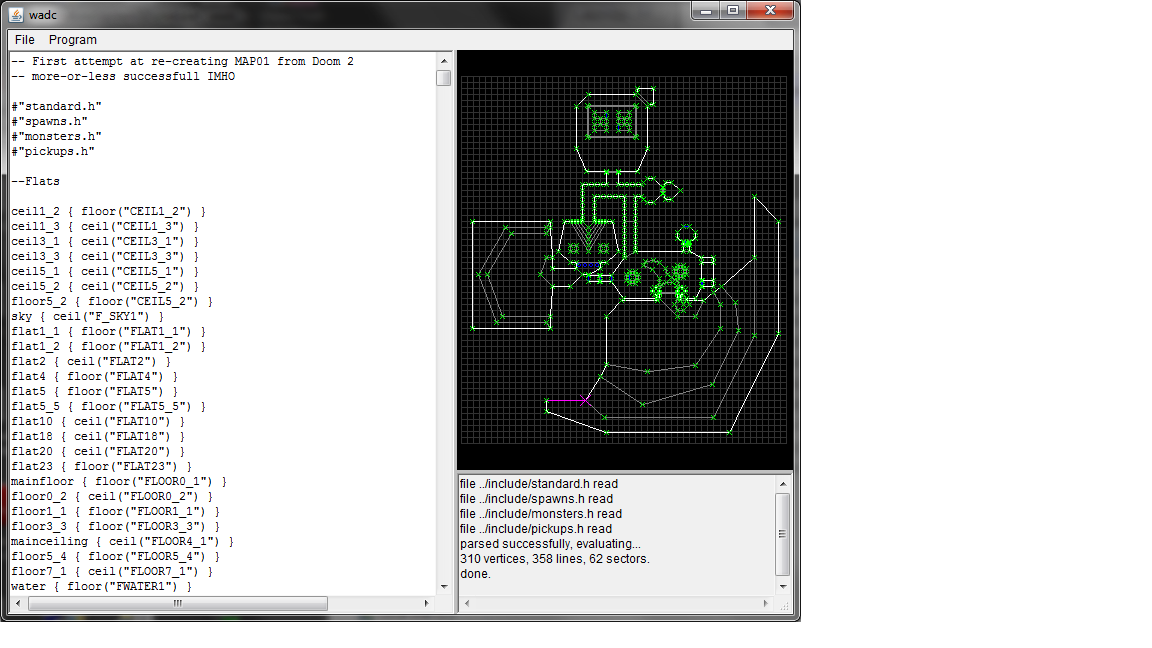
A WadC session A WadC session
WadC is a functional programming language for the composition of Doom-format maps. Originally created by Wouter "Aardappel" van Oortmerssen, I was granted permission to take over the project over a year ago, but didn't get around to releasing anything until now. This version adds a few functions that permit you to draw two-sided lines which are textured and impassible: important for a lot of detailing techniques. You can also create friendly monsters for Boom-compatible ports. There's a new example demonstrating these features; plus a recreation of Doom 2's "entryway", courtesy of GreyGhost. See WadC for a summary, or go straight to the binaries or source on github. Discussions: reddit, doomworld.

18 December 2011

Lars Wirzenius: Obnam 0.24 released (backup software)

I've released version 0.24 of Obnam, my backup application. USER VISIBLE CHANGES BUG FIXES:

Nikita Youshchenko: Life after n900

Since post about lost n900 was on the top of this blog for almost a year, I should probably write a few words about what was next. Since I do need mobile phone every day, I had to get some replacement quickly. Given Maemo was dead and Meego device not available, I decided to go Android. Since after n900 hardware keyboard became a must for me, I decided to try HTC Desire Z. That device made me angry every day, both because of hardware (what a silly idea to place volume buttons such that they are below hardware keyboard when it s opened? they got pressed almost every time when I used keyboard!) and Android itself. I think quite a few things are broken in Android, but most annoying is broken multitasking. I can t live with dialog elements content get lost when I switch to other app and back. Please don t tell me that it s app fault: maybe technically it is, however too many apps have it so I have to generalize. I will likely write more about this later. At the same time, exciting things have been happening in Maemo community. It was the time when Community SSU raised, also several mapping applications went out of dark, and more. I was still subscribed to Maemo resources so I read about all that and got more and more frustrated with my new Android device. And on one sunday evening, after reading more exciting news from Maemo side, I decided that enough is enough. And ordered a new n900. Few days later, I ve sold HTC for about 80% of it s original price. That was an emotional solution, and of course it could not play well in the long term. Despite of individual exciting news, Maemo community was becoming weaker. Device itself had major usability issues (e.g. it could occasionally unlock while being in my pocket, and call a random number from address book and I have quite a few addresses abroad so such calls not only bother people, but also are expensive). There was not many applications, and those available had problems. There was a visible difference between my friends who could just take a phone and quickly do something, and myself who had to struggle with incomplete and buggy software. Also skype quality was very bad. Also when I was planning a 2-week trip to location without mobile network, I tried to preload map of planned route, but it preloaded only part and I was unable to make it preload the rest. Also many similar issues. So it became clear that if I want usability, I have to go to a standard platform. And as such, Android still is the only option. I searched for a device that runs more or less modern Android version, has hardware keyboard, and is not HTC Desire Z. There was not much to choose from. I ordered SonyEricsson sk17i. I m already using it for about 4 months. For common use cases, such as locating a business nearby, or routing to a given address, or quickly browsing a web page, it works. However, all Android flaws including broken multitasking and no-undo-in-text-fields are here, causing everyday frustration. My conclusion is that no smartphone-like devices without major usability issues are available today. What is available probably could be used to somehow satisfy immediate communication needs, but nothing above that. Bells and whistles are there, but I m not interested in those. I want a linux-based pocket-sized mobile computer that will handle both my communication needs and other interests. That could be hacked when I want to, but just works at the rest of time. Something like my Debian desktop. Openmoko was a big hope but it failed. Maemo was a big hope but incompetence of Nokia killed it. Meego was dead before it was born. There is still some life around several mobile linux projects (GTA04, Maemo, Meego, some others), but hopes for it to grow into something that could be used without huge hacking are little. :(

Andreas Metzler: GnuTLS 3.0.x in unstable

GnuTLS 3.0.x is finally available in unstable (and squeeze). Please consider upgrading. (Development package: libgnutls28-dev)

17 December 2011

Matthew Palmer: Rethtool: How I Learned to Stop Worrying and Love the ioctl

Damn those unshaven yaks I m trying to write a Nagios plugin for work that will comprehensively monitor network interfaces and make sure they re up, passing traffic, all those sorts of things. Of course, I m doing it all in Ruby, because that s how I roll. So, I need to Know Things about the interface. Everyone does that with ethtool. Right? Sure, if your eyeballs are parsing it. But have you ever tried to machine parse it? To put it as eloquently as possible:
# ethtool eth0
Settings for eth0:
 Supported ports: [ TP MII ]
 Supported link modes:   10baseT/Half 10baseT/Full 
                         100baseT/Half 100baseT/Full 
                         1000baseT/Half 1000baseT/Full 
 Supports auto-negotiation: Yes
 Advertised link modes:  10baseT/Half 10baseT/Full 
                         100baseT/Half 100baseT/Full 
                         1000baseT/Half 1000baseT/Full 
 Advertised pause frame use: No
 Advertised auto-negotiation: Yes
 Link partner advertised link modes:  10baseT/Half 10baseT/Full 
                                      100baseT/Half 100baseT/Full 
                                      1000baseT/Half 1000baseT/Full 
 Link partner advertised pause frame use: No
 Link partner advertised auto-negotiation: Yes
 Speed: 1000Mb/s
 Duplex: Full
 Port: MII
 PHYAD: 0
 Transceiver: internal
 Auto-negotiation: on
 Supports Wake-on: pumbg
 Wake-on: g
 Current message level: 0x00000033 (51)
 Link detected: yes
Parse that, bitch!
Or perhaps not. At any rate, I decided that it would be most advantageous if I went straight to the source and twiddle the ioctl until it did my bidding. And thus, about 5 hours later, was Rethtool born. Once I worked out a less-than-entirely-crackful way of dealing with C structs in Ruby (after a bit of digging around, I went with the appallingly-undocumented-but-sufficiently-featureful CStruct), and after I finally worked out I was passing the wrong damned struct to ioctl(SIOCETHTOOL) (speaking of appallingly-undocumented: fuck you, ioctl, and all your twisty-passages children), it was smooth sailing. So, if you re one of the eight or so people on earth who will ever need to get at the grubby internals of your network interfaces using Ruby (and can t do it via some sysfs magic), Rethtool is for you.

16 December 2011

Julien Danjou: My OpenStack work

Like I already wrote here last week, I've been heavily working on OpenStack for the last weeks. My first assignment was to package OpenStack for Debian. The packages already present in unstable were mainly done by Thomas Goirand, who based its work on the one done in Ubuntu. Therefore, the packages where not in a very good shape for Debian. Today Ghe Rivero and I (members of the OpenStack Debian packaging team) managed to push the OpenStack Essex 2 milestone into unstable with great success. You can now test and deploy OpenStack Essex 2 very easily! Packaging OpenStack made me write several patches, mainly related to packaging, patches which were all accepted and merged by upstream. This is nice because most of the OpenStack Debian packages lost their debian/patches directories now! Finally, I've finished to implement one blueprint I really missed: the ability to boot from an ISO image using libvirt. The code still needs a review, but it should be included in the Essex 3 milestone if everything's right.

Jamie McClelland: Privilege Separation

What are the biggest security threats to my laptop? Almost all the software I install is vetted and signed by a member of the Debian team. I run reliable virus software on our mail server. My disk is encrypted and xscreensaver locks my screen after a few minutes of inactivity. What else? The two biggest threats I've recently considered are: web browsing and non-free software or software that doesn't come from Debian (I regularly have to use skype and zimbra, for example). To mitigate these risks, I've configured these programs to run as their own users, thus adding a layer of separation between the programs and my primary user account, which has access to my gpg/ssh keys and email. With a program like zimbra it's fairly easy. I created a zimbra user, added my primary account's public ssh key to /home/zimbra/.ssh/authorized_keys, and add the following stanza to ~/.ssh/config:
Host zimbra 
Hostname localhost 
User zimbra 
ForwardX11 yes
Now I can start zimbra with:
ssh zimbra ./zdesktop-launch
Skype was a little harder, since the skype client has to access the audio system. With pulseaudio, though, it's a snap. I copied /etc/pulse/default.pa to ~/.pulse/ and added the line:
load-module module-native-protocol-tcp auth-ip-acl=127.0.0.1
Then, I added /home/skype/.pulse/client.conf with the contents:
default-server = 127.0.0.1
[Note: Jamie Rollins and dkg have pointed out that this arrangement allows any user on my laptop to send arbitrary data to pulseaudio, running as my primay account. They suggested configuring pulseaudio to listen on a unix-domain socket, and then configuring pulseaudio to only permit access to users in a particular group.] iceweasel is the most complicated. In addition to the pulseaudio trick, I had to make two other allowances. First, there are a lot of processes that launch a web browser in a number of different ways (sometimes asking for a new session, other times adding a tab to an existing one, sometimes passing an URL as an argument, etc). The one that I got the most stuck on was mutt. Sometimes I want to see how an HTML message looks in iceweasel. Via mailcap, mutt creates a temp file with the html content and then launches a web browser to view the file. As can be reasonably expected, this temp file is owned by my primary user, and only read-able by the owner. That means my iceweasel user can't read it. Eventually, I decided the easiest way to deal with these various scenarios was to write a simple bash script to launch my web browser (see below). I registered it via update-alternatives, so most reasonable programs that want to launch a web browser will use it. The second issue is that I use the monkeysphere xul plugin to verify TLS certificates, which requires iceweasel to communicate with my monkeysphere validation agent. My agent runs as my primary user and by default only responds to queries from my primary user. Fortunately, monkeysphere is well-designed and can handle this situation. As you can see from my web launcher script, I pass MONKEYSPHEREVALIDATIONAGENTSOCKET=$MONKEYSPHEREVALIDATIONAGENTSOCKET when calling iceweasel. In addition, I added the following before I exec monkeysphere-validation-agent:
export MSVA_ALLOWED_USERS="iceweasel jamie"
With this simple infrastructure setup, it's possible to easily isolate future programs as well. Lastly... here's the script for launching iceweasel.
#!/bin/bash
stdin=
new_session=no
url=
for arg in "$@"; do
  if <span class="createlink"> &#34;&#36;arg&#34; &#61;&#126; &#94;-- </span>; then 
    if [ "$arg" = "--new-session" ]; then
      new_session=yes
    elif [ "$arg" = "--from-stdin" ]; then
      stdin=yes
    fi
  else
    url="$1"
  fi
done
if [ "$stdin" = "yes" ]; then
  temp=$(mktemp)
  while read line; do
    echo "$line" >> "$temp"
  done
  # it must be readable by the iceweasel user
  chmod 755 "$temp"
  url="file:///$temp"
fi
args=
if [ "$new_session" = "yes" ]; then
  args="--no-remote -ProfileManager"
fi
if [ -n "$url" ]; then
  args="$args '$url'"
fi
ssh iceweasel "MONKEYSPHERE_VALIDATION_AGENT_SOCKET=$MONKEYSPHERE_VALIDATION_AGENT_SOCKET iceweasel $args" &
[ -f "$temp" ] && sleep 5 && rm "$temp"
Comments by email... Hi, http://current.workingdirectory.net/posts/2011/privilege-separation/ has good intentions but afaik it does not improve security much. X applications can sniff your passwords and inject commands to your terminal emulators. I personally use xpra to get a similar solution without the hazards of X. I've been using it for two months now both at work and home. There are still bugs but svn version is getting better all the time. See for example my reply to https://grepular.com/ProtectingaLaptopfromSimpleandSophisticated_Attacks Timo

Kai Wasserb ch: QApt was accepted into Debian's archives

Today QApt was accepted into Debian's archives. It took me some time, in fact a lot more than I hoped it'd take, to get the final pieces into place [UPDATE](the inital work was done by Jos , the co-maintainer of QApt)[/UPDATE], but now you're able to use QApt as a simple-to-use wrapper around the whole APT, DPKG and Xapian stack. The target users are C++ programs using the Qt framework. The use cases range from graphical package manager to allowing easy updates of certain packages from within another program. My interest in QApt comes from me being co-maintainer of Kingston, the update notification Plasmoid for KDE. We have a wishlist bug open against Kingston, requesting the addition of a "do update" button. We could have used the update-manager infrastructure, but both Sune and myself weren't too thrilled with that. Luckily there is an alternative in the form of QApt. I'll hope I find some time during the next weeks to implement the update mechanism for Kingston. The next things to come for QApt will be minor cleanups, already waiting in Git, a new upstream bug fix release (no date is set yet) and a multiarchification (already partly done in a local branch).

Patrick Schoenfeld: Why Gnome3 sucks (for me)

When I started using Linux, I started with a desktop environment (KDE) and then tried a lot of (standalone) window managers, including but not limited to Enlightenment, Blackbox, Fluxbox and Sawfish. But I was never really satisfied as it felt as if something was missing.
It then came, that I became a user of a desktop environment again. Now I have been a GNOME user for at least five years.

Among the users of desktop environments, I'm probably not a typical user. In 2009 my setup drifted from a more or less standard GNOME 2.3 to a combination of GNOME and a tiling window manager, which I called Gnomad, as a logical continuation of something I've done for a long time since using computers: Simplifying tasks, which are not my main business.
I just didn't want to care about the hundred techniques to auto mount an USB stick or similar tasks, which are handed just fine by a common Desktop Environment. And I didn't want to care about arranging windows, because after all the arrangement of my windows was always more or less the same.

But there were rumors that GNOME3 significantly changed the user experience and I wanted to give it a try at some point in the future. This try was forced by latest updates in Debian unstable, so I tested it for some days.

Day 1: Getting to know each other
My first day was GNOME3 was a non-working-day. When I'm at home I'm mostly using my computer for some chatting and surfing in the web, so I don't have great demands on the
Window manager/Desktop Environment.
Accordingly the very first experience with GNOME3 was mostly a good one, except some minor issues.
The first thing to notice in a positive way, is the activities screen. I guess this one is inspired by Mac Expos , but its nevertheless a nice thing, as it provides an overview over opened applications.
Apart from that, its possible to launch applications from there. The classical application menu is gone, but this one is better. One can either choose with the mouse or start typing the applications name and it will incrementally search for it and show it immediately. Hitting Enter is enough to launch the application.
Additionally, on the left, there is a launcher for your favorite applications.

This one lead to the first question mark above my head.

I had opened a terminal via this launcher and now wanted to open another terminal, after I switched to a different workspace.
So I just clicked it again and had to notice that GNOME developers and I have a different perception, of whats intuitive, because that click
led me back to the terminal on the first workspace. It took me some minutes to realize how I'm able to start a second terminal, by just right clicking on the icon and click on Open new window or similar.

Day 2: Doing productive work
The next day was a work day and I was on a customer appointment to do support/maintenance tasks. On this appointments my notebook is not my primary work machine and so I could softly go over to using GNOME3 when doing productive work.
I can say that it worked, although I soon started to miss some keystrokes which I'm used to. Like switching workspaces with Meta4+Number or at least switch workspaces by cycling through them with STRG+Alt+Left and Right Arrow Keys. While the first is a shortcut specific to my GNOmad setup, the latter is something I knew back from the good old Gnome2 days.
It just vanished from the default keybindings and did nothing. Appearently, as I learned afterwards, it has been decided to use the Up/Down arrow keys instead.

While for new users this will not be a problem at all, this is really hard for someone using GNOME for about 5 years as these are keystrokes one is really used to.

Day 3: Going mulithead

The appointment ended on the third day at afternoon, so when I came back into the office, I had the chance to test the whole thing in my usual work environment. At office I have my notebook attached to a docking station which has a monitor attached to it. So usually I work in dual head mode, with my primary work screen being the bigger external screen.

That was the point, where GNOME3 became painful.

At first everything was fine. GNOME3 detected the second monitor and made it available for use with the correct resolution. But things started to become ugly, when I actually wanted to work with it. GNOME3 decided that the internal screen is the primary screen, so the panel (or what has stood around from it) was on that screen. I can live with that, as thats basically the same with GNOME2, but the question was: How to start an application in a way that its started on the big screen?
I knew that I couldn't just use the keystrokes I'm used to, like Meta4+p, which were bound to launching dmenu in my GNOmad setup, as I knew that I was not running GNOmad at present. So I thought hard and remembered that GNOME had a run dialog itself, bound to Alt+F2. Relieved I noticed, that this shortcut had not gone away. I typed 'chromium' and waited. A message appeared telling me that the file was not found. Okay. No, wait. What? I did not uninstall it, so I guess it should be there.
I tried several other applications and all were told not to be available. Most likely this is a bug and bugs happen but this was really serious for me.

Another approach was to use the activity screen. At first I used it manually, by moving the mouse to there, launch chromium (surprise, surprise, it was still there) and moved it to the right screen, because I haven't found a shorter way to do that. There must be a better way to that, I thought and so I googled. Actually there are more then one better way to do it.

  1. There is a hidden hot spot in the corner of the second screen, too. If one finds and moves the mouse over it, the activity screen will open on the primary monitor and on the secondary monitor, but the application list is only one the first. One can now type what he wants to start, hit Enter and Tada its on the screen where my mouse is. Not very intuitive, in my opinion, and I really would prefer if I had the same level of choice on the second screen.
  2. I can hit Meta4 and its opening the activitiy screen. From there everything is the same as described above.

There were many other small quirks that disturbed me, like that the desktop has vanished away (I used it seldom, but it was irritating that it wasn't there anymore), shortcuts I were missing and so on. lot of this is really specific to me being used to my previous setup, but I can't help myself but I really need those little helpers.

So, at some point I decided to go back to GNOmad again, knowing that I will run into the next problem again, because I would have to permanently disable the new gnome3 mode and instead launch GNOME in the fallback mode. Luckily that is as easy as typing the following in a terminal

gsettings set org.gnome.desktop.session session-name 'gnome-fallback'

I quickly got this working again, but had to notice another cruel thing in GNOME3, that even disturbed my GNOmad experience. GNOME3 now binds to Meta4+p to a function, which switches internal/extern monitor setting, and now that is a real PITA.

From this point on another journey began, that eventually ended in switch to a Gnome/Awesome setup but this is a different story for a different time.

15 December 2011

Martin F. Krafft: The rating agencies' circus

This is not about any real or alleged might of (private) rating agencies you know, the ones roughening up the financial markets these days. Given the recent influx of news about downgrades of banks and nations, I simply start to wonder what will happen when the triple-A category empties out (which it will the last few nations will be ejected as a consequence of currency explosions (CHF) and forced bailouts of others (EU). Will the whole circus start anew? And if so, why do we even pay any attention?? Gosh do I wish that people started to form their own opinions again. NP: Fila Brazillia: Power Clown

Wouter Verhelst: On beards and politics.

I'd almost forget... Before: Me with beard, two weeks ago During: After: Me with less beard, exactly one week later They finally made it.

Francois Marier: Installing Etherpad on Debian/Ubuntu

Etherpad is an excellent Open Source web application for collaborative text editing. Like Google Docs, it allows you to share documents with others through a secret URL or to set up private documents for which people need a login.

It's a little tricky to install so here's how I did it.

Build a Debian packageBecause the official repository is not kept up to date, you must build the package yourself:
  1. Grab the master branch from the official git repository:
    git clone git://github.com/ether/pad.git etherpad
  2. Build the package:
    dpkg-buildpackage -us -uc

Now, install some of its dependencies:
apt-get install --no-install-recommends dbconfig-common python-uno mysql-server

before installing the .deb you built:
dpkg -i etherpad_1.1.deb
apt-get install --no-install-recommends -f

Application configurationYou will likely need to change a few minor things in the default configuration at /etc/etherpad/etherpad.local.properties:
useHttpsUrls = true
customBrandingName = ExamplePad
customEmailAddress = etherpad@example.com
topdomains = etherpad.example.com,your.external.ip.address,127.0.0.1,localhost,localhost.localdomain

Nginx configurationIf you use Nginx as your web server of choice, create a vhost file in /etc/nginx/sites-available/etherpad:
server  
listen 443;
server_name etherpad.example.com *.etherpad.example.com;
add_header Strict-Transport-Security max-age=15768000;

ssl on;
ssl_certificate /etc/ssl/certs/etherpad.example.com.crt;
ssl_certificate_key /etc/ssl/certs/etherpad.example.com.pem;

ssl_session_timeout 5m;
ssl_session_cache shared:SSL:1m;

ssl_protocols TLSv1;
ssl_ciphers RC4-SHA:HIGH:!kEDH;
ssl_prefer_server_ciphers on;

access_log /var/log/nginx/etherpad.access.log;
error_log /var/log/nginx/etherpad.error.log;

location /
proxy_pass http://localhost:9000/;
proxy_set_header Host $host;

and then enable it and restart Nginx:
/etc/init.d/nginx restart

Apache configurationIf you prefer to use Apache instead, make sure that the required modules are enabled:
a2enmod proxy
a2enmod proxy_http

and then create a vhost file in /etc/apache2/sites-available/etherpad:
<VirtualHost *:443>
ServerName etherpad.example.com
ServerAlias *.etherpad.example.com

SSLEngine on
SSLCertificateFile /etc/apache2/ssl/etherpad.example.com.crt
SSLCertificateKeyFile /etc/apache2/ssl/etherpad.example.com.pem
SSLCertificateChainFile /etc/apache2/ssl/etherpad.example.com-chain.pem

SSLProtocol TLSv1
SSLHonorCipherOrder On
SSLCipherSuite RC4-SHA:HIGH:!kEDH
Header add Strict-Transport-Security: "max-age=15768000"

<Proxy>
Order deny,allow
Allow from all
</Proxy>

Alias /sitemap.xml /ep/tag/\?format=sitemap
Alias /static /usr/share/etherpad/etherpad/src/static

ProxyPreserveHost On
SetEnv proxy-sendchunked 1
ProxyRequests Off
ProxyPass / http://localhost:9000/
ProxyPassReverse / http://localhost:9000/
</VirtualHost>

before enabling that new vhost and restarting Apache:
a2ensite etherpad
apache2ctl configtest
apache2ctl graceful

DNS setupThe final step is to create these two DNS entries to point to your web server:
  • *.etherpad.example.com
  • etherpad.example.com

Also, as a precaution against an OpenOffice/LibreOffice-related bug, I suggest that you add the following entry to your web server's /etc/hosts file to avoid flooding your DNS resolver with bogus queries:
127.0.0.1 localhost.(none) localhost.(none).fulldomain.example.com
where fulldomain.example.com is the search base defined in /etc/resolv.conf.

Other useful instructionsHere are the most useful pages I used while setting this up:

Dirk Eddelbuettel: R / Finance 2012 Call for Papers

Last night, the text below went out to r-sig-finance along with updates to the R/Finance website and its Call for Papers page; followed by some tweeting and Goggle+'ing (and please do feel free to retweet and share at will...)
Call for Papers: R/Finance 2012: Applied Finance with R
May 11 and 12, 2012
University of Illinois, Chicago, IL, USA
The fourth annual R/Finance conference for applied finance using R will be held on May 11 and 12, 2012 in Chicago, IL, USA on the campus of the University of Illinois at Chicago. The two-day conference will cover topics including portfolio management, time series analysis, advanced risk tools, high-performance computing, market microstructure, and econometrics. All will be discussed within the context of using R as a primary tool for financial risk management, portfolio construction, and trading. Over the past three years, R/Finance has included attendees from around the world and featured keynote presentations from prominent academics and practitioners. We anticipate another exciting line-up for 2012 --- including keynote presentations from Blair Hull, Paul Gilbert, Rob McCulloch, and Simon Urbanek. We invite you to submit complete papers or one-page abstracts (in txt or pdf format) for consideration. Academic and practitioner proposals related to R are encouraged. We welcome submissions for full talks, abbreviated "lightning talks", and for a limited number of (longer) pre-conference seminar sessions. Presenters are strongly encouraged to provide working R code to accompany the presentation/paper. Data sets should also be made public for the purposes of reproducibility (though we realize this may be limited due to contracts with data vendors). Preference may be given to presenters who have released R packages. Travel and accommodation grants may be available for selected presenters at the discretion of the committee. In addition, the conference will award prizes for best papers. To be eligible for a best paper award, a submission must be a full paper. Extended abstracts, even if a full paper by conference time, are not eligible for a best paper award. Please send submissions to: committee at RinFinance.com. The submission deadline is January 31, 2012. Submitters will be notified of acceptance via email by February 28, 2012. Notification of whether a presentation will be a long presentation or a lightning talk will also be made at that time. Additional details will be announced at this website as they become available. Information on previous year's presenters and their presentations are also at the conference website R/Finance 2009, 2010 and 2011. For the program committee:
Gib Bassett, Peter Carl, Dirk Eddelbuettel, Brian Peterson,
Dale Rosenthal, Jeffrey Ryan, Joshua Ulrich
So see you in Chicago in May! Update: Corrected urls to past conference thanks to heads-up by Josh. Thanks!

14 December 2011

Emanuele Rocca: First steps with Sinatra on Heroku

Lately I have been playing a little bit with different Platform as a Service providers. So far, the most developer-friendly one seems to be Heroku. In particular, Heroku provides an incredibly straightforward way to get started. After creating an account on their website, you just have to install the appropriate gem: sudo gem install heroku The command heroku help will then show you all the possible invocations of the command line client, just to give you an idea of what you can do with it (everything). Alright, that s not particularly interesting without an application to play with, is it? So let s create a new Sinatra application. In order to do that, we need a new directory containing a file like the following one:
# webapp.rb
require 'rubygems'
require 'sinatra'
# Add other gems you might need here
get '/' do
  "Your Sinatra app is working!"
end
Also add a Gemfile with all the required dependencies, in our trivial example sinatra is actually the only gem you need:
source :rubygems
gem "sinatra"
Lastly, you need a config.ru file where you can require our newly created Ruby program and specify that it is a Sinatra application. In this example, the Ruby file is called webapp.rb.
require './webapp'
run Sinatra::Application
A very useful program when developing a Sinatra application is shotgun. gem install shotgun and you will be able to run your new shiny app by executing the command shotgun. While developing on your machine, shotgun will take care of reloading the application for every request, so that you don t have to restart the server after every modification to the source code. Run bundle install to easily install all the required dependencies in your development environment, and shotgun to start the app locally. Pointing your browser to http://127.0.0.1:9393/ you can check if everything works as expected. If nothing went wrong, you can create a git repository to track changes to the source code:
git init
git add . 
git commit -m "Initial commit"
Perfect! Now, how do you create and deploy your application on Heroku?
heroku create
git push heroku master
Heroku will automatically find out that you deployed a Sinatra application, it will install all the required dependencies and start serving requests. A few interesting commands you might want to run to see what s going on are heroku info, heroku ps and heroku logs. The client also provides a command, heroku open, that opens your browser at the right production URL. So, you now have a working application under revision control. Dependencies are handled by specifying them into the Gemfile, and the required gems can be installed locally using bundle. Shotgun is our friend when it comes to use the application for development purposes. A git push heroku master is all we need to deploy a new version of the code. Of course there is way much more about Sinatra and Heroku than what I ve covered in this mini-intro. Please refer to the Sinatra Book and the Heroku Dev Center for more information!

Patrick Schoenfeld: Struggling with Advanced Format during a LVM to RAID migration

Recently I decided to invest in another harddisk for my atom system. That system, I built up almost two years ago, has become the central system in my home network, serving as a fileserver to host my personal data, some git repositories etc., streaming server and since I switched to a cable internet connection it also serves as a router/firewall.Originally, I bought that disk to backup some data, of the systems in the network, but I realized that all data on this system were hosted on a single 320GB 2,5" disk and it became clear to me, that, in absense of a proper backup strategy, I at least should provide some redundancy. So I decided, once the disk was in place, that the whole system should move to a RAID1 over the two disks. Basically this is not that hard as it may seem at a first glance, but I had some problems due to a new sector size in some recent harddisks, which is called Advanced Format. But lets begin from the start. The basic idea of such a migration is:
  1. Install mdadm with apt-get. Make sure to answer 'all' to the question which devices need to be activated in order to boot the system.

  2. Partition the new disk (almost) identical.Because the new drive is somewhat bigger that wouldn't make sense, but at least the two partitions which should be mirrored on the second disk, need to be identical.Usually this is achieved easily by using
    sfdisk -d /dev/sda sfdisk /dev/second/sdb
    In this case, it wasn't that easy. But I will come to that in a minute.

  3. Change the type of the partitions to 'FD' (Linux RAID autodetect) with fdisk

  4. Erase evidence of an eventual old RAID from the partitions, which is probably pointless on a brand-new disk, but we want to be sure:
    mdadm --zero-superblock /dev/sdb1mdadm --zero-superblock /dev/sdb2
  5. Create two DEGRADED raid1 arrays from the partitions:
    mdadm --create /dev/md0 --level=1 --raid-devices=2 /dev/sdb1 missingmdadm --create /dev/md1 --level=1 --raid-devices=2 /dev/sdb2 missing
  6. Create filesystem on the first raid device, which will become /boot.

  7. Mount that filesystem somewhere temporary and move the contents of /boot to it:
    mount /dev/md0 /mnt/somewhere
  8. Unmount /boot, edit fstab to mount /boot from /dev/md0 and re-mount /boot (from md0)

  9. Create mdadm configuration with mdadm and append it to /etc/mdadm/mdadm.conf:
    mdadm --examine --scan >> /etc/mdadm/mdadm.conf
  10. Update the initramfs and grub (no manual modification needed with grub2 on my system)and install grub into the MBR of the second disk.
    update-initramfs -uupdate-grubgrub-install /dev/sdb
  11. The first point to pray: Reboot the system to verify it can boot from the new /boot.

  12. Create a physical volume on /dev/md1:
    pvcreate /dev/md1
  13. Extend the volume group to contain that device:
    vgextend <volgroup_name> /dev/md1</volgroup_name>
  14. Move the whole volume group physically from the first disk to the degraded RAID:
    vgmove <volgroup_name> /dev/md1</volgroup_name>
    (Wait for it to complete... takes some time ;)

  15. Reduce first disk from the VG:
    vgreduce <volgroup_name> /dev/sda2</volgroup_name>
  16. Prepare it for addition to the RAID (see step 3 and 4) and add it:
    mdadm --add /dev/md0 /dev/sda1mdadm --add /dev/md1 /dev/sda2
  17. Hooray! Watch into /proc/mdstat. You should see that the RAID is recovering.

  18. When recovery is finished pray another time and hope that system is still booting with it running from the RAID entirely. If it does: Finished :-)
Now to the problem with the advanced format:There is some action taking place with the hardware vendors to move to a new sector size. Physically my new device has a size of 4096 bytes per sector. Somewhat different to the 512 bytes disks used to have the last decade. Logically it still has 512 bytes per sector. As far as I understand this is achieved by placing 8 logical sectors into one physical sector, so when partitioning a new disk the alignment of the disk has to be so that partitions start in a sector which is a multiple of 8. That, obviously, wasn't the case with the old partitioning on my first disk. So I had to manually create partitions by specifying start points manually and making sure they are dividable by 8.Otherwise fdisk would complain about the layout on the disk.This does not work with cfdisk, because it does not accept manual alignment parameters and unfortunately the partitions it creates do have a wrong alignment. So good old fdisk and some calculations how many sectors are needed and where to start, to the rescue. So the layout is now:

Device Boot Start End Blocks Id System
/dev/sdb1 2048 291154 144553+ fd Linux raid autodetect
/dev/sdb2 291160 625139334 312424087+ fd Linux raid autodetect

Michal &#268;iha&#345;: GePeS internationalisation

After some fight with qmake and lrelease/lupdate, I've finally managed to allow translations in GePeS. I see no clear reason why QML translating is that poorly supported within Qt tools, however with some hacks it seems to be doable. As usual with my software, besides using sources (Qt's translation files in this case), you can use translation server to do online translation. As there are only few words to translate, I hope some languages will be translated soon. Of course to give you good example, I've completed Czech translation immediately :-).

Filed under: English Meego 0 comments Flattr this!

Dirk Eddelbuettel: R / Finance 2012 Call for Papers

Last night, the text below went out to r-sig-finance along with updates to the R/Finance website and its Call for Papers page; followed by some tweeting and Goggle+'ing (and please do feel free to retweet and share at will...)
Call for Papers: R/Finance 2012: Applied Finance with R
May 11 and 12, 2012
University of Illinois, Chicago, IL, USA
The fourth annual R/Finance conference for applied finance using R will be held on May 11 and 12, 2012 in Chicago, IL, USA on the campus of the University of Illinois at Chicago. The two-day conference will cover topics including portfolio management, time series analysis, advanced risk tools, high-performance computing, market microstructure, and econometrics. All will be discussed within the context of using R as a primary tool for financial risk management, portfolio construction, and trading. Over the past three years, R/Finance has included attendees from around the world and featured keynote presentations from prominent academics and practitioners. We anticipate another exciting line-up for 2012 --- including keynote presentations from Blair Hull, Paul Gilbert, Rob McCulloch, and Simon Urbanek. We invite you to submit complete papers or one-page abstracts (in txt or pdf format) for consideration. Academic and practitioner proposals related to R are encouraged. We welcome submissions for full talks, abbreviated "lightning talks", and for a limited number of (longer) pre-conference seminar sessions. Presenters are strongly encouraged to provide working R code to accompany the presentation/paper. Data sets should also be made public for the purposes of reproducibility (though we realize this may be limited due to contracts with data vendors). Preference may be given to presenters who have released R packages. Travel and accommodation grants may be available for selected presenters at the discretion of the committee. In addition, the conference will award prizes for best papers. To be eligible for a best paper award, a submission must be a full paper. Extended abstracts, even if a full paper by conference time, are not eligible for a best paper award. Please send submissions to: committee at RinFinance.com. The submission deadline is January 31, 2012. Submitters will be notified of acceptance via email by February 28, 2012. Notification of whether a presentation will be a long presentation or a lightning talk will also be made at that time. Additional details will be announced at this website as they become available. Information on previous year's presenters and their presentations are also at the conference website R/Finance 2009, 2010 and 2011. For the program committee:
Gib Bassett, Peter Carl, Dirk Eddelbuettel, Brian Peterson,
Dale Rosenthal, Jeffrey Ryan, Joshua Ulrich
So see you in Chicago in May!

13 December 2011

Vincent Bernat: Tuning Linux IPv4 route cache

The route cache is a Linux kernel component enabling route lookups to be faster by caching the results in some table and checking it before issuing a regular lookup in the route tables. When using Linux as a router, the inefficiency of the route cache can hinder the performances of your box. The documentation on this component is scarce and it is difficult to find up-to-date bits on how the route cache works and how to tune it. The book Understanding Linux Network Internals from O Reilly is an exception and contains valuable information on how the route cache works. Even if the book is targeted at 2.6.12, the part on the route cache is still quite accurate. Unfortunately, it fails to provide appropriate tips on how to monitor and tune the route cache. I hope to provide here a concise view of the route cache, as it is implemented in Linux 3.1. It is protocol-dependent1 and I will cover only the IPv4 version here.

Overview of the route cache subsystem To handle an incoming or outgoing IP datagram, the kernel needs to issue a lookup in the route tables. While it seems to be quite trivial, several questions need to be answered:
  • Does the source address and the destination address appear to be valid?
  • Is the source address a martian address2?
  • Is the destination address mine or should I forward the packet?
  • Which route table should I use?
  • Does the destination address match this route? And this one?
  • Can I currently contact the gateway that I should use?
Those checks can be a bit time consuming, even for small route tables. To avoid them for each packets, Linux maintains a route cache which is queried before doing a regular lookup and updated after each one. You can dump it with ip -s route show cache:
$ ip -s route show cache
198.51.100.7 from 203.0.113.2 via 192.0.2.1 dev eth1
  cache used 7 age 2sec ipid 0x1fce rtt 131ms rttvar 45ms cwnd 10
198.51.100.17 from 203.0.113.15 via 192.0.2.1 dev eth1
  cache used 3 age 0sec ipid 0xc3bd
local 192.0.2.18 from 203.0.113.15 dev lo src 192.0.2.18
  cache <local> used 154 age 1sec iif eth0
Here are two examples:
  • If Linux receives a packet from 198.51.100.17 to 203.0.113.15, it will find this flow in the route cache. Therefore, it already knows that it should forward the packet to 192.0.2.1. No checks needed.
  • If it receives a packet from 198.51.100.16 to 203.0.113.15, there is no appropriate entry in the route cache and therefore, the system will have to look at the route tables. It is likely to use the exact same entry than if the source was 198.51.100.17 but maybe there is some policy routing requesting the use of a special route table or 198.51.100.16 is a local address and the packet will therefore be classified as martian.
The schema below shows how this cache is implemented3. It uses a separate hash table (BSD systems keep the cache in the routing table). Each bucket is a chained list of route cache entries. Schema of the route cache hash table Once an entry has been added to the route cache, there are several ways to remove it. Most entries are removed by the garbage collector which will scan the route cache and remove invalid and older entries. It will be triggered when the route cache is full or at regular interval, once a certain threshold has been met.

Available knobs There are several values you can tune. Most of them are available in sysctl.
  • rhash_entries is the size of the hash table4. If you don t specify it on the kernel command line, it is computed dynamically based on the memory available on your system. You can view its value by looking at something like IP route cache hash table entries: 262144 (order: 9, 2097152 bytes) in the kernel logs.
  • net.ipv4.route.max_size is the maximum number of entries in the route cache. Except under exceptional circumstances, this value is never exceeded.
  • net.ipv4.route.gc_elasticity is the target average length of a chain in the route cache. The garbage collector will work harder if this value is exceeded. This means that if you multiply this value by the value of rhash_entries, you will get the target average number of entries in the route cache.
  • net.ipv4.route.gc_min_interval_ms is the minimum delay between two runs of the garbage collector, except when the cache is full. The default value should be fine.
  • net.ipv4.route.gc_thresh is a threshold triggering the garbage collector every net.ipv4.route.gc_min_interval_ms milliseconds.
  • net.ipv4.route.gc_timeout is the base value to determine if an entry is old enough to be removed or not. Whatever its value, the garbage collector will attempt to remove the same number of entries. However, this value could potentially influence its efficiency. See below for more details on this.
You may find documentation about those obsolete sysctl values:
  • net.ipv4.route.secret_interval has been removed in Linux 2.6.35; it was used to trigger an asynchronous flush at fixed interval to avoid to fill the cache.
  • net.ipv4.route.gc_interval has been removed in Linux 2.6.38. It is still present until Linux 3.2 but has no effect. It was used to trigger an asynchronous cleanup of the route cache (but in a different way of what the garbage collector does). The garbage collector is now considered efficient enough for the job.

Statistics & monitoring Linux maintains some statistics about the use of the route cache. You can find them in /proc/net/stat/rt_cache. The command lnstat can print them nicely for you:
$ lnstat -s1 -i1 -c-1 -f rt_cache
rt_cache rt_cache rt_cache rt_cache rt_cache rt_cache rt_cache rt_cache rt_cache rt_cache rt_cache rt_cache rt_cache rt_cache rt_cache rt_cache rt_cache 
 entries   in_hit in_slow_ in_slow_ in_no_ro   in_brd in_marti in_marti  out_hit out_slow out_slow gc_total gc_ignor gc_goal_ gc_dst_o in_hlist out_hlis 
                       tot       mc      ute            an_dst   an_src              _tot      _mc                ed     miss  verflow  _search t_search 
 3096848    42309      686        0        0        0        0        0        3        0        0      674      672        0        0    27644        8 
 3096984    41405      636        0        0        0        0        0        3        0        0      623      621        0        0    28189        8 
 3097160    42483      700        0        0        0        0        0        5        0        0      694      692        0        0    29506       12 
Except for the first column, lnstat outputs values in units per second. Let s review some of those values:
  • rt_cache_entries is the number of entries in the route cache. You should compare it with net.ipv4.route.max_size and ensure that the cache is never full to avoid triggering the garbage collector too often.
  • rt_cache_in_hit and rt_cache_out_hit are the number of regular lookups avoided because the result was found in the cache for incoming and outgoing packets, respectively. When the system is a router, most lookups only happen on the incoming side. You should compare this value with rt_cache_in_slow_tot and rt_cache_in_out_slow_tot which are the number of lookups in the route tables. On this system, the efficiency of the route cache is more than 98% which is quite good.
  • rt_cache_gc_total is how often the garbage collector was requested to be triggered while rt_cache_gc_ignored corresponds to how often it was finally not run because it has already been triggered shortly beforehand (less than net.ipv4.route.gc_min_interval_ms milliseconds). The difference between those two values should be very small to ensure that the garbage collector does not run more a handful of times per second.
  • rt_cache_gc_goal_miss is how often the garbage collector was not able to fulfill its goal. This value should rarely be different of 0.
  • rt_cache_gc_dst_overflow is how often the route cache is bigger than the allowed maximum size. This should never happen except when you try to shrink the cache.
  • rt_cache_in_hlist_search and rt_cache_out_hlist_search is how often a lookup in the cache had to look at the next entry in the chain for the computed bucket: each time Linux has to follow the next pointer in a cache entry, it increments one of those counters. It is a clue on the average length of chains in the route cache hash table. Compare those values with the number of cache lookups (hit and miss).
As an illustration, here is a plot of the various statistics exposed above for a router whose route cache receives about 1000 routes par second: Plot of various statistics for the route cache rhash_entries is 1,048,576, as is net.ipv4.route.gc_thresh. Therefore, the garbage collector was requested to be run when the number of entries goes above this level. Because the cache is not full, it is only really run twice per seconds (the value of net.ipv4.gc_interval_ms is 500). net.ipv4.gc_elasticity is set to 3. This explains why the garbage collector is aggressive when the number of entries reached 3,145,728. As you can see, the efficiency is near 100% all the time. The percentage of collisions is rt_cache_in_hlist_search ratio to the sum of rt_cache_in_hit and rt_cache_in_slow_tot.

Tuning Do you need to modify any of those values? You have two questions to ask yourself:
  1. How much efficiency do you want to get from the route cache?
  2. How much memory do you want to dedicate to the route cache?
As a rule of thumb, two millions entries eat about 500 MB of memory on a 64bit system. You should be able to compute the average memory usage and the maximum memory usage from the values of net.ipv4.route.max_size, rhash_entries and net.ipv4.route.gc_elasticity. For example, if the route cache hash table has 262,144 buckets, the maximum allowed number of entries in the cache is 4,194,304 and net.ipv4.route.gc_elasticity is set to 8, the memory usage will be 500 MB on average and 1 GB max. If this is too much, you will need to lower some values. Look at the previous section to compute the current efficiency of your route cache. It should be above 90%. If you are dissatisfied with that, you could increase the cache size. If you want to double the number of entries, double net.ipv4.route.max_size, net.ipv4.route.gc_thresh and rhash_entries but keep net.ipv4.route.gc_elasticity to 8. For the garbage collector to be efficient, the route cache should not be filled too fast. The garbage collector should be able to cope with this situation but this may impact performance because it needs to walk several times the route cache to find entries to expire. Watching gc_goal_miss may give you a hint about this: if this value starts to be different of 0, lower net.ipv4.gc_timeout.

In-depth look into the garbage collector Those different pieces of advice may have puzzled you. We need to understand how the garbage collector works to better cope with them. The garbage collector is triggered when a new entry needs to be added to the cache and the number of entries is superior to net.ipv4.route.gc_thresh. It is implemented in rt_garbage_collect() function. It will do nothing if it has been called less than net.ipv4.route.gc_interval_ms milliseconds and the cache is not full (more than net.ipv4.route.max_size entries).

Setting a goal The garbage collector will first assess the situation. It will look how the number of entries currently in the cache compares to the product of rhash_entries and net.ipv4.gc_elasticity:
  1. Above this limit, it will try to remove at least rhash_entries entries.
  2. Otherwise, it will try to remove no more than half the difference.
If you look at the previous plot, you can easily see the difference when the garbage collector is not aggressive (above 1,048,576 entries but below 3,145,728) and when it is (above 3,145,728 entries). If we assume the garbage collector is able to meet its goal, we can easily simulate its algorithm: Plot showing influence of various kernel parameters The first plot shows what would happen if about 2000 routes are added per second with rhash_entries equal to 262,144 and net.ipv4.route.gc_elasticity set to 8. When net.ipv4.route.gc_threshold is met, the garbage collector has almost no effect. However, when the number of entries reaches 2,097,152, the garbage collector sets its goal to 262,144. From this point, the number of entries oscillates around 2 millions entries. On the second plot, rhash_entries is now equal to 1,048,576 but net.ipv4.route.gc_elasticity has been set to 2. Therefore, the aggressive part of the garbage collectors kicks at the same threshold than for the previous plot. However, its goal is now four times larger and the oscillations have a larger amplitude. The fact that the aggressive part of the garbage collector kicks less often is nullified by the fact that it needs to remove more entries each time. Because of the slight impact on cache efficiency, it seems better to keep net.ipv4.route.gc_elasticity around 8, or 4 if we want to keep shorter chains (but there seems to be no improvement to do so). The other plots show what happens when there is a sudden surge in the number of routes added or when there is a pause.

Meeting the goal Now that we understand how rhash_entries, net.ipv4.route.gc_elasticity and net.ipv4.route.gc_threshold interact, let s look at net.ipv4.route.gc_timeout. Once the garbage collector has set its goal and if it is positive, it needs to choose which entries to remove from the cache. It walks the hash table from the position of its last run and remove entries until its goal is met. If the entry is not current anymore (for example, the network interface associated to it has changed its IP configuration), it is removed. Otherwise, the system looks at the age of the entry and its position in the chain. If the entry is the first in the chain, it is kept only if its age is below net.ipv4.route.gc_timeout. If it is second, it is kept only if its age is below half of net.ipv4.route.gc_timeout. If it is third, the threshold is a quarter of net.ipv4.route.gc_timeout, and so on. The garbage collector will favor short chains. If after a full run of the hash table, the garbage collector was not able to meet its goal, it will start again but will behave more aggressively, as if net.ipv4.route.gc_timeout is set to half of its value. It will do as many passes as necessary until its goal is met or until there is no way to remove any entry (or until it has spent too much time). Once the garbage collector has switched to this more aggressive behavior, it will keep being aggressive for a few cycles (a bit less for each cycle). With a very large value of net.ipv4.route.gc_timeout, the garbage collector will have a hard time to find entries to expire. It will need to do several passes until it is able to expire some entries. On the other hand, if you choose a very small value, the garbage collector may remove entries that were just added, even if there are older entries further in the hash table. For a more in-depth coverage of how the route cache works, look at chapter 33 of Understanding Linux Network Internals. Just be aware that multipath route caching has been removed (and was never really used) and asynchronous cleanup (rt_periodic_timer) does not exist anymore.

Conclusion When tuning the route cache, rhash_entries, net.ipv4.route.gc_elasticity, net.ipv4.route.max_size and net.ipv4.route.gc_threshold are related and should not be modified independently. net.ipv4.route.gc_thresh should be below the product of net.ipv4.route.gc_elasticity and rhash_entries while net.ipv4.route.max_size should be above this value. Linux exposes several interesting metrics related to the route cache. Monitoring them allows one to watch the efficiency of the route cache and may uncover some anomalies (garbage collector running too often, difficulty to remove routes from the cache, ). The route cache subsystem still evolves and some old behaviors have been dismissed. The best documentation is, unfortunately, still the code and other documentations tend to become obsolete. The IPv6 route cache is quite different of the one presented here. Don t blindly apply the same tuning for IPv6.

  1. Linux provides a protocol-independent destination cache subsystem (DST). This component is not a generic cache layer and only enables loose coupling with external subsystems.
  2. Martian addresses are addresses that cannot be used as a source address, either because they are reserved for special-use (like a multicast address) or because of the use of reverse path filtering which checks if a packet received on one interface would be answered on the same interface, as defined in RFC 3704. This feature is enabled by setting rp_filter in Linux.
  3. For more details, you may want to look at include/net/dst.h, include/net/route.h and net/ipv4/route.c.
  4. In fact, the size of the hash table is always a power of two. If specified, rhash_entries is rounded to the next power of two and, internally, is stored as rt_hash_mask + 1.

Next.

Previous.