Simon McVittie: GNOME Developer Experience hackfest: xdg-app + Debian
 Over the last few days I've been at the GNOME Developer Experience hackfest
in Brussels, looking into
xdg-app
and how best to use it in Debian and Debian derivatives.
xdg-app is basically a way to run "non-core" software on Linux distributions,
analogous to apps on Android and iOS. It doesn't replace distributions
like Debian or packaging systems, but it adds a layer above them. It's
mostly aimed towards third-party apps obtained from somewhere that isn't
your distribution vendor, aiming to address a few long-standing problems in
that space:
- There's no single ABI that can be called "a standard Linux system" in the same way there would be for Windows or OS X or Android or whatever, apart from LSB which is rather limited. Testing that a third-party app "works on Linux", or even "works on stable Linux releases from 2015", involves a combinatorial explosion of different distributions, desktop environments and local configurations. Steam uses the Steam Runtime, a chroot environment closely resembling Ubuntu 12.04 LTS; other vendors tend to test on a vaguely recent Ubuntu LTS and leave it at that.
- There's no widely-supported mechanism for installing third-party
applications as an ordinary user. gog.com
used to distribute Ubuntu- and Debian-compatible
.debfiles, but installing a.debinvolves running arbitrary vendor-supplied scripts as root, which should worry anyone who wants any sort of privilege-separation. (They have now switched to executable self-extracting installers, which involve running arbitrary vendor-supplied scripts as an ordinary user... better, but not perfect.) - Relatedly, the third-party application itself runs with the user's full privileges: a malicious or security-buggy third-party application can do more or less anything, unless you either switch to a different uid to run third-party apps, or use a carefully-written, app-specific AppArmor profile or equivalent.
- https://anonscm.debian.org/cgit/users/smcv/libgsystem.git
- https://anonscm.debian.org/cgit/users/smcv/ostree.git
- https://anonscm.debian.org/cgit/users/smcv/xdg-app.git
deb https://people.debian.org/~smcv/xdg-app xdg-app main
- enable unprivileged user namespaces via sysctl:
sudo sysctl kernel.unprivileged_userns_clone=1 - make xdg-app root-privileged (it will keep
CAP_SYS_ADMINand drop the rest):sudo dpkg-statoverride --update --add root root 04755 /usr/bin/xdg-app-helper - make xdg-app slightly less privileged:
sudo setcap cap_sys_admin+ep /usr/bin/xdg-app-helper
$ wget http://sdk.gnome.org/keys/gnome-sdk.gpg
$ xdg-app remote-add --user --gpg-import=gnome-sdk.gpg gnome \
    http://sdk.gnome.org/repo/
$ xdg-app remote-ls --user gnome
...
org.freedesktop.Platform
...
org.freedesktop.Platform.Locale.cy
...
org.freedesktop.Sdk
...
org.gnome.Platform
...
$ xdg-app install --user gnome org.gnome.Platform 3.18
$ wget http://209.132.179.2/keys/nightly.gpg
$ xdg-app remote-add --user --gpg-import=nightly.gpg nightly \
    http://209.132.179.2/repo/
$ xdg-app install --user nightly org.mypaint.MypaintDevel
$ xdg-app list
org.mypaint.MypaintDevel
$ xdg-app run org.mypaint.MypaintDevel
[you see a GUI window]
ostree tool, from the package of the same name, can be
used to inspect them.
$ sudo apt install ostree
$ ostree refs --repo ~/.local/share/xdg-app/repo
gnome:runtime/org.gnome.Platform/x86_64/3.18
nightly:app/org.mypaint.MypaintDevel/x86_64/master
ostree can list the directory tree that it represents:
$ ostree ls --repo ~/.local/share/xdg-app/repo \
    runtime/org.gnome.Platform/x86_64/3.18
d00755 0 0      0 /
-00644 0 0    493 /metadata
d00755 0 0      0 /files
$ ostree ls --repo ~/.local/share/xdg-app/repo \
    runtime/org.gnome.Platform/x86_64/3.18 /files
d00755 0 0      0 /files
l00777 0 0      0 /files/local -> ../var/usrlocal
l00777 0 0      0 /files/sbin -> bin
d00755 0 0      0 /files/bin
d00755 0 0      0 /files/cache
d00755 0 0      0 /files/etc
d00755 0 0      0 /files/games
d00755 0 0      0 /files/include
d00755 0 0      0 /files/lib
d00755 0 0      0 /files/lib64
d00755 0 0      0 /files/libexec
d00755 0 0      0 /files/share
d00755 0 0      0 /files/src
/files in a runtime is basically a copy of /usr.
This is not coincidental: the runtime's /files gets mounted at /usr
inside the xdg-app container. There is also some metadata, which is in
the ini-like syntax seen in .desktop files:
$ ostree cat --repo ~/.local/share/xdg-app/repo \
    runtime/org.gnome.Platform/x86_64/3.18 /metadata
[Runtime]
name=org.gnome.Platform/x86_64/3.16
runtime=org.gnome.Platform/x86_64/3.16
sdk=org.gnome.Sdk/x86_64/3.16
[Extension org.freedesktop.Platform.GL]
version=1.2
directory=lib/GL
[Extension org.freedesktop.Platform.Timezones]
version=1.2
directory=share/zoneinfo
[Extension org.gnome.Platform.Locale]
directory=share/runtime/locale
subdirectories=true
[Environment]
GI_TYPELIB_PATH=/app/lib/girepository-1.0
GST_PLUGIN_PATH=/app/lib/gstreamer-1.0
LD_LIBRARY_PATH=/app/lib:/usr/lib/GL
$ ostree ls --repo ~/.local/share/xdg-app/repo \
    app/org.mypaint.MypaintDevel/x86_64/master
d00755 0 0      0 /
-00644 0 0    258 /metadata
d00755 0 0      0 /export
d00755 0 0      0 /files
/files maps to what will become /app for the application, which
was compiled with --prefix=/app:
$ ostree ls --repo ~/.local/share/xdg-app/repo \
    app/org.mypaint.MypaintDevel/x86_64/master /files
d00755 0 0      0 /files
-00644 0 0   4599 /files/manifest.json
d00755 0 0      0 /files/bin
d00755 0 0      0 /files/lib
d00755 0 0      0 /files/share
/export directory, which is made visible to the host system
so that the contained app can appear as a "first-class citizen" in menus:
$ ostree ls --repo ~/.local/share/xdg-app/repo \
    app/org.mypaint.MypaintDevel/x86_64/master /export
d00755 0 0      0 /export
d00755 0 0      0 /export/share
user@debian:~$ ostree ls --repo ~/.local/share/xdg-app/repo \
    app/org.mypaint.MypaintDevel/x86_64/master /export/share
d00755 0 0      0 /export/share
d00755 0 0      0 /export/share/app-info
d00755 0 0      0 /export/share/applications
d00755 0 0      0 /export/share/icons
user@debian:~$ ostree ls --repo ~/.local/share/xdg-app/repo \
    app/org.mypaint.MypaintDevel/x86_64/master /export/share/applications
d00755 0 0      0 /export/share/applications
-00644 0 0    715 /export/share/applications/org.mypaint.MypaintDevel.desktop
$ ostree cat --repo ~/.local/share/xdg-app/repo \
    app/org.mypaint.MypaintDevel/x86_64/master \
    /export/share/applications/org.mypaint.MypaintDevel.desktop
[Desktop Entry]
Version=1.0
Name=(Nightly) MyPaint
TryExec=mypaint
Exec=mypaint %f
Comment=Painting program for digital artists
...
Comment[zh_HK]=
GenericName=Raster Graphics Editor
GenericName[fr]= diteur d'Image Matricielle
MimeType=image/openraster;image/png;image/jpeg;
Type=Application
Icon=org.mypaint.MypaintDevel
StartupNotify=true
Categories=Graphics;GTK;2DGraphics;RasterGraphics;
Terminal=false
$ ostree cat --repo ~/.local/share/xdg-app/repo \
    app/org.mypaint.MypaintDevel/x86_64/master /metadata
[Application]
name=org.mypaint.MypaintDevel
runtime=org.gnome.Platform/x86_64/3.18
sdk=org.gnome.Sdk/x86_64/3.18
command=mypaint
[Context]
shared=ipc;
sockets=x11;pulseaudio;
filesystems=host;
[Extension org.mypaint.MypaintDevel.Debug]
directory=lib/debug
$ sudo install -d -o$(id -nu) /srv/xdg-apps
$ ostree init --repo /srv/xdg-apps
/usr
because that's what xdg-app expects, hence usrmerge:
$ sudo mount -t tmpfs -o mode=0755 tmpfs /mnt
$ sudo debootstrap --arch=amd64 --include=libx11-6,usrmerge \
    --variant=minbase stretch /mnt http://192.168.122.1:3142/debian
$ sudo mkdir /mnt/runtime
$ sudo mv /mnt/usr /mnt/runtime/files
$ sudo sh -c 'cat > /mnt/runtime/metadata'
[Runtime]
name=org.debian.Debootstrap/x86_64/8.20160130
runtime=org.debian.Debootstrap/x86_64/8.20160130
$ ostree commit --repo /srv/xdg-apps \
    --branch runtime/org.debian.Debootstrap/x86_64/8.20160130 \
    /mnt/runtime
$ fakeroot ostree commit --repo /srv/xdg-apps \
    --branch runtime/org.debian.Debootstrap/x86_64/8.20160130
$ fakeroot xdg-app build-update-repo /srv/xdg-apps
$ xdg-app remote-add --user --no-gpg-verify local file:///srv/xdg-apps
$ xdg-app remote-ls --user local
org.debian.Debootstrap
./configure --prefix=/app && make && make install. I'm not going to do that,
because simplicity is nice, and I'm reasonably sure xvt doesn't actually
hard-code /usr into the binary:
$ install -d xvt-app/files/bin
$ sudo apt-get --download-only install xvt
$ dpkg-deb --fsys-tarfile /var/cache/apt/archives/xvt_2.1-20.1_amd64.deb \
      tar -xvf - ./usr/bin/xvt
./usr/
./usr/bin/
./usr/bin/xvt
...
$ mv usr xvt-app/files
$ cat > xvt-app/metadata
[Application]
name=org.debian.packages.xvt
runtime=org.debian.Debootstrap/x86_64/8.20160130
command=xvt
[Context]
sockets=x11;
$ fakeroot ostree commit --repo /srv/xdg-apps \
    --branch app/org.debian.packages.xvt/x86_64/2.1-20.1 xvt-app
$ fakeroot xdg-app build-update-repo /srv/xdg-apps
Updating appstream branch
No appstream data for runtime/org.debian.Debootstrap/x86_64/8.20160130
No appstream data for app/org.debian.packages.xvt/x86_64/2.1-20.1
Updating summary
$ xdg-app remote-ls --user local
org.debian.Debootstrap
org.debian.packages.xvt
$ xdg-app install --user local org.debian.Debootstrap 8.20160130
$ xdg-app install --user local org.debian.packages.xvt 2.1-20.1
$ xdg-app run --branch=2.1-20.1 org.debian.packages.xvt
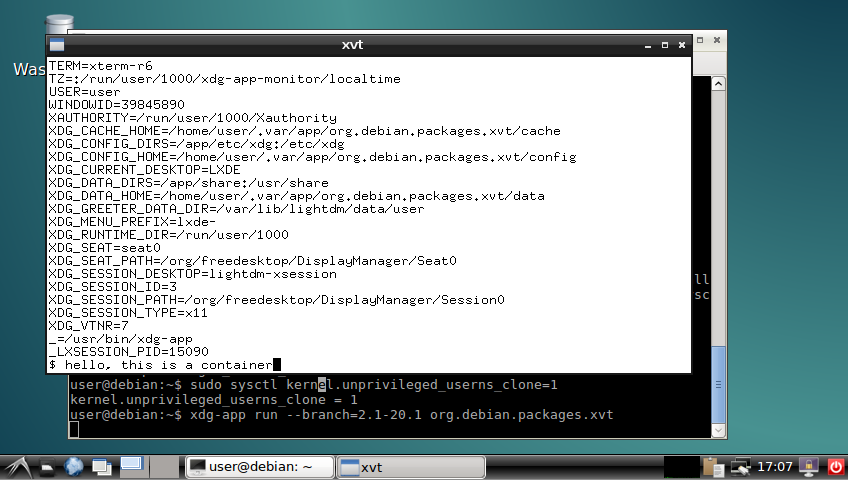 and you can play around with the shell in the
xvt and see what you
can and can't do in the container.
I'm sure there were better ways to do most of this, but I think there's value
in having such a simplistic demo to go alongside the various GNOMEish apps.
Acknowledgements:
- Betacowork Coworking Brussels and ICAB Business & Technology Incubator hosted the hackfest, with Collabora providing snacks, and the GNOME Foundation supporting the hackfest in general;
- Collabora also sponsored my travel, accommodation and time;
- my colleague Philip Withnall organised the hackfest.
 Using Tor helps take back control of what data one decides to share online. It
also helps in avoiding surveillance from the local network (think of someone
listening to the public Wi-Fi) or the Internet access provider. But it is easy
to make mistakes:
 You then need to select the type of bridges. Tor standard protocol is easy
to identify as such. The Tor project has developed
 After solving a CAPTCHA, you'll get a list of addresses and fingerprints for a couple of bridges like the following one:
 To tell Tor to use these bridges, edit
 In there, tick My Internet Service Provider (ISP) blocks connections to the
Tor network and paste the list of bridges below Enter custom bridges:
 Before we restrict outgoing connections to only use the Tor network, lets
configure APT to use Tor as well so we can continue installing and upgrading
packages in the future:


 It was more that one and a half years ago when I
 update 1: Some packages like dpkg-dev are not installable, I m working on them.
 I have just released version 1.19.1 of Obnam, the backup program. See
the website at

 Since ages I wanted have replaced this freaking backup solution of our Network Equipment based on some hacky shell scripts and
 FOSDEM is almost here! And in an hour or so, I'm leaving for the airport.
My talk tomorrow is about Nageru, my live video mixer. HDMI/SDI signals in,
stream that doesn't look like crap out. Or, citing the
 Over the past two months or so I have become
 Reproducible builds ecosystem at FOSDEM
Last years FOSDEM featured
 But there are many more interesting talks (hundreds they say) and so I'd appreciate if you could share your pointers and explainations, whether here on planet, or on IRC or IRL!
 As you can now see


 And then on Wednesday, which is now also yesterday, the nice green page became less green due two new issues:


 Siri and I are on a journey through India and Nepal,
with the aim of learning about needs of Debian derivatives,
to improve Debian and encourage closer integration.
