Search Results: "will"

19 April 2012

Raphaël Hertzog: People behind Debian: Samuel Thibault, working on accessibility and the Hurd

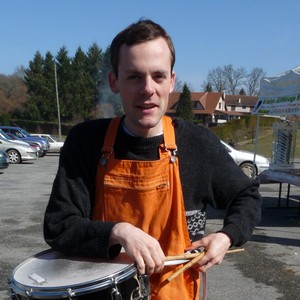
Samuel Thibault is a French guy like me, but it took years until we met. He tends to keep a low profile, even though he s doing lots of good work that deserves to be mentioned. He focuses on improving Debian s accessibility and contributes to the Hurd. Who said he s a dreamer? :-) Checkout his interview to have some news of Wheezy s status on those topics. Raphael: Who are you? Samuel: I am 30 years old, and live in Bordeaux, France. During the workday, I teach Computer Science (Architecture, Networking, Operating Systems, and Parallel Programming, roughly) at the University of Bordeaux, and conduct researches in heterogeneous parallel computing. During the evening, I play the drums and the trombone in various orchestra (harmonic/symphonic/banda/brass). During the night, I hack on whatever fun things I can find, mainly accessibility and the Hurd at the moment, but also miscellaneous bits such as the Linux console support. I am also involved in the development of Aquilenet, an associative ISP around Bordeaux, and getting involved in the development of the network infrastructure in Bordeaux. I am not practicing Judo any more, but I roller-skate to work, and I like hiking in the mountains. I also read quite a few mangas. Saturday mornings do not exist in my schedule (Sunday mornings do, it s Brass Band rehearsal :) ). Raphael: How did you start contributing to Debian? Samuel: Bit by bit. I have been hacking around GNU/Linux since around 1998. I installed my first Debian system around 2000, as a replacement for my old Mandrake installation (which after all my tinkering was actually no longer looking like a Mandrake system any more!). That was Potato at the time, which somebody offered me through a set of CDs (downloading packages over the Internet was unthinkable at the time with the old modems). I have been happily reading and hacking around documentation, source code, etc. provided on them. Contribution things really started to take off when I went to the ENS Lyon high school in 2001: broadband Internet access in one s own student room! Since sending a mail was then really free, I started submitting bugs against various packages I was using. Right after that I started submitting patches along them, and then patches to other bugs. I did that for a long time actually. I had very little knowledge of all packaging details at the time, I was just a happy hacker submitting reports and patches against the upstream source code. At ENS Lyon, I met a blind colleague with very similar hacking tastes (of course we got friends) and he proposed me, for our student project, to work on a brlnet project (now called brlapi), a client/server protocol that lets applications render text on braille devices themselves. Along the way, I got to learn in details how a blind person can use a Unix system and the principles that should be followed when developing Accessibility. That is how I got involved in it. We presented our project at JDLL, and the Hurd booth happened to be next to our table, so I discussed with the Hurd people there about how the Hurd console could be used through braille. That is how I got into the Hurd too. From then on, I progressively contributed more and more to the upstream parts of both accessibility software and the Hurd. And then to the packaging part of them. Through patches in bug reports first, as usual, as well as through discussions on the mailing lists. But quickly enough people gave me commit access so I could just throw the code in. I was also given control over the Hurd buildds to keep them running. It was all good at that stage: I could contribute in all the parts I was caring about. People however started telling me that I should just apply for being a Debian Developer; both from accessibility and Hurd sides. I had also seen a bunch of my friends going through the process. I was however a bit scared (or probably it was just an excuse) by having to manage a gpg key, it seemed like a quite dangerous tool to me (even if I already had commit access to glibc at the time anyway ). I eventually applied for DM in 2008 so as to at least be able to upload some packages to help the little manpower of the Accessibility and Hurd teams. Henceforth I had already a gpg key, thus no excuse any more. And having it in the DM keyring was not enough for e.g. signing the hurd-i386 buildd packages. So I ended up going through NM in 2009, which went very fast, since I had already been contributing to Debian and learning all the needed stuff for almost 10 years! I now have around 50 packages in my QA page, and being a DD is actually useful for my work, to easily push our software to the masses :) So to sum it up, the Debian project is very easy to contribute to and open to new people. It was used during discussions at the GNU Hackers Meeting 2011 as an example of a very open community with public mailing lists and discussions. The mere fact that anybody can take the initiative of manipulating the BTS (if not scared by the commands) without having to ask anybody is an excellent thing to welcome contributions; it is notable tha the GNU project migrated to the Debbugs BTS. More generally, I don t really see the DD status as a must, especially now that we have the DM status (which is still a very good way to drag people into becoming DDs). For instance, I gave a talk at FOSDEM 2008 about the state of accessibility in Debian. People did not care whom I was, they cared that there was important stuff going on and somebody talking about it. More generally, decisions that are made through a vote are actually very rare. Most of the time, things just happen on the mailing lists or IRC channels where anybody can join the discussion. So I would recommend beginners to first use the software, then start reporting bugs, then start digging in the software to try fix the bugs by oneself, eventually propose patches, get them reviewed. At some point the submitted patches will be correct already most of the time. That s when the maintainers will start getting bored of just applying the patches, and simply provide with commit access, and voil , one has become a main contributor. Raphael: You re one of the main contributors to the Debian GNU/Hurd port. What motivates you in this project? Samuel: As I mentioned above, I first got real contact with the Hurd from the accessibility point of view. That initially brought me into the Hurd console, which uses a flexible design and nice interfaces to interact with it. The Hurd driver for console accessibility is actually very straightforward, way simpler than the Windows or Linux drivers. That is what caught me initially. I have continued working on it for several reasons. First, the design is really interesting for users. There are many things that are natural in the Hurd while Linux is still struggling to achieve them, such as UID isolation, recently mentioned in LWN. What I really like in the Hurd is that it excels at providing users with the same features as the administrator s. For instance, I find it annoying that I still can not mount an ISO image that I build on e.g. ries.debian.org. Linux now has FUSE which is supposed to permit that, but I have never seen it enabled on an ssh-accessible machine, only on desktop machines, and usually just because the administrator happens to be the user of the machine (who could as well just have used sudo ) For me, it is actually Freedom #0 of Free Software: let the user run programs for any purpose, that is, combining things together all the possible ways, and not being prevented from doing some things just because the design does not permit to achieve them securely. I had the chance to give a Hurd talk to explain that at GHM 2011, whose main topic was extensibility , I called it GNU/Hurd AKA Extensibility from the Ground, because the design of the Hurd is basically meant for extensibility, and does not care whether it is done by root or a mere user. All the tools that root uses to build a GNU/Hurd system can be used by the user to build its own GNU/Hurd environment. That is guaranteed by the design itself: the libc asks for things not to the kernel, but to servers (called translators), which can be provided by root, or by the user. It is interesting to see that it is actually also tried with varying success in GNU/Linux, through gvfs or Plash. An example of things I love being able to do is: $ zgrep foo ~/ftp://cdn.debian.net/debian/dists/sid/main/Contents-*.gz On my Hurd box, the ~/ftp: directory is indeed actually served by an ftpfs translator, run under my user uid, which is thus completely harmless to the system. Secondly and not the least, the Hurd provides me with interesting yet not too hard challenges. LWN confirmed several times that the Linux kernel has become very difficult to significantly contribute to, so it is no real hacking fun any more. I have notably implemented TLS support in the Hurd and the Xen and 64bit support in the GNU Mach kernel used by the Hurd. All three were very interesting to do, but were already done for Linux (at least for all the architectures which I actually know a bit and own). It happens that both TLS and Xen hacking experience became actually useful later on: I implemented TLS in the threading library of our research team, and the Xen port was a quite interesting line on my CV for getting a postdoc position at XenSource :) Lastly, I would say that I am used to lost causes :) My work on accessibility is sometimes a real struggle, so the Hurd is almost a kind of relief. It is famous for his vapourware reputation anyway, and so it is fun to just try to contribute to it nevertheless. An interesting thing is that the opinion of people on the Hurd is often quite extreme, and only rarely neutral. Some will say it is pure vapourware, while others will say that it is the hope of humanity (yes we do see those coming to #hurd, and they are not always just trolls!). When I published a 0.401 version on 2011 April 1st, the comments of people were very diverse, and some even went as far as saying that it was horrible of us to make a joke about the promised software :) Raphael: The FTPmasters want to demote the Hurd port to the debian-ports.org archive if it doesn t manage a stable release with wheezy. We re now at 2 months of the freeze. How far are you from being releasable ? Samuel: Of course, I can not speak for the Debian Release team. The current progress is however encouraging. During Debconf11, Michael Banck and I discussed with a few Debian Release team members about the kind of goals that should be achieved, and we are near completion of that part. The Debian GNU/Hurd port can almost completely be installed from the official mirrors, using the standard Debian Installer. Some patches need some polishing, but others are just waiting for being uploaded Debian GNU/Hurd can start a graphical desktop and run office tools such as gnumeric, as well as the iceweasel graphical web browser, KDE applications thanks to Pino Toscano s care, and GNOME application thanks to Emilio Pozuelo Monfort s care. Of course, general textmode hacking with gcc/make/gdb/etc. just works smoothly. Thanks to recent work on ghc and ada by Svante Signell, the archive coverage has passed 76%. There was a concern about network board driver support: until recently, the GNU Mach kernel was indeed still using a glue layer to embed the Linux 2.2 or even 2.0 drivers (!). Finding a network board supported by such drivers had of course become a real challenge. Thanks to the GSoC work of Zheng Da, the DDE layer can now be used to embed Linux 2.6.32 drivers in userland translators, which was recently ACCEPTed into the archive, and thus brings way larger support for network boards. It also pushes yet more toward the Hurd design: network drivers as userland process rather than kernel modules. That said, the freeze itself is not the final deadline. Actually, freeze periods are rests for porters, because maintainers stop bringing newer upstream versions which of course break on peculiar architectures. That will probably be helpful to continue improving the archive coverage. Raphael: The kfreebsd port brought into light all the packages which were not portable between different kernels. Did that help the Hurd port or are the problems too different to expect any mutual benefit? Samuel: The two ports have clearly helped each other in many aspects. The hurd-i386 port is the only non-Linux one that has been kept working (at least basically) for the past decade. That helped to make sure that all tools (dpkg, apt, toolchain, etc.) were able to cope with non-Linux ports, and keep that odd-but-why-not goal around, and evidently-enough achievable. In return, the kFreeBSD port managed to show that it was actually releasable, at least as a technological preview, thus making an example. In the daily work, we have sometimes worked hand in hand. The recent porting efforts of the Debian Installer happened roughly at the same time. When fixing some piece of code for one, the switch-case would be left for the other. When some code could be reused by the other, a mail would be sent to advise doing so, etc. In the packaging effort, it also made a lot of difference that a non-Linux port is exposed as released architecture: people attempted by themselves to fix code that is Linuxish for no real reason. The presence of the kFreeBSD is however also sometimes a difficulty for the Hurd: in the discussions, it sometimes tends to become a target to be reached, even if the systems are not really comparable. I do not need to detail the long history of the FreeBSD kernel and the amount of people hacking on it, some of them full-time, while the Hurd has only a small handful of free-time hackers. The FreeBSD kernel stability has already seen long-term polishing, and a fair amount of the Debian software was actually already ported to the FreeBSD kernel, thanks to the big existing pure-FreeBSD hackerbase. These do not hold for the GNU/Hurd port, so the expectations should go along. Raphael: You re also very much involved in the Debian Accessibility team. What are the responsibilities of this team and what are you doing there? Samuel: As you would expect it, the Debian Accessibility team works on packaging accessibility-related packages, and helping users with them; I thus do both. But the goal is way beyond just that. Actual accessibility requires integration. Ideally enough, a blind user should be able to just come to a Debian desktop system, plug his braille device, or press a shortcut to enable speech synthesis, and just use the damn computer, without having to ask the administrator to install some oddly-named package and whatnot. Just like any sighted user would do. He should be able to diagnose why his system does not boot, and at worse be able to reinstall his computer all by himself (typically at 2am ). And that is hard to achieve, because it means discussing about integration by default of accessibility features. For instance, the Debian CD images now beep during at the boot menu. That is a precious feature that has been discussed between debian-boot and debian-accessibility for a few weeks before agreeing on how to do it without too much disturbance. Similarly, my proposition of installing the desktop accessibility engines has been discussed for some time before being commited. What was however surprisingly great is that when somebody brought the topic back for discussion, non-debian-accessibility people answered themselves. This is reassuring, because it means things can be done durably in Debian. On the installation side, our current status is that the stable Debian installer has a high contrast color theme, and several years ago, I have pushed toward making standard CD images automatically detect braille devices, which permits standalone installation. I have added to the Wheezy installer some software speech synthesis (which again brought discussion about size increase vs versatility etc.) for blind people who do not have a braille device. I find it interesting to work on such topic in Debian rather than another distribution, because Debian is an upstream for a lot of distributions. Hopefully they just inherit our accessibility work. It at least worked for the text installer of Ubuntu. Of course, the Accessibility team is looking for help, to maintain our current packages, but also introduce new packages from the TODO list or create some backports. One does not need to be an expert in accessibility: tools can usually be tested, at least basically, by anybody, without particular hardware (I do not own any, I contributed virtual ones to qemu). For new developments and ideas, it is strongly recommended to come and discuss on debian-accessibility, because it is easy to get on a wrong track that does not bring actual accessibility. We still have several goals to achieve: the closest one is to just fix the transition to gnome3, which has been quite bad for accessibility so far :/ On the longer run, we should ideally reach the scenario I have detailed above: desktop accessibility available and ready to be enabled easily by default. Raphael: What s the biggest problem of Debian? Samuel: Debian is famous for its heated debian-devel discussions. And some people eventually say this no fun any more . That is exemplified in a less extreme way in the debian-boot/accessibility discussions that I have mentioned above. Sometimes, one needs to have a real stubborn thick head to continue the discussion until finding a compromise that will be accepted for commit. That is a problem because people do not necessarily have so much patience, and will thus prefer to contribute to a project with easier acceptance. But it is also a quality: as I explained above, once it is there, it is apparently for good. The Ubuntu support of accessibility in its installer has been very diverse, in part due to quite changing codebase. The Debian Installer codebase is more in a convergence process. Its base will have almost not changed between squeeze and wheezy. That allowed the Debian Accessibility team to continue improving its accessibility support, and not have to re-do it. A wiki page explains how to test its accessibility features, and some non-debian-accessibility people do go through it. A problem I am much more frightened by is the manpower in some core teams. The Debian Installer, grub, glibc, Xorg, gcc, mozilla derivatives, When reading the changelogs of these, we essentially keep seeing the same very few names over and over. And when one core developer leaves, it is very often still the same names which appear again to do the work. It is hard to believe that there are a thousand DDs working on Debian. I fear that Debian does not manage to get people to work on core things. I often hear people saying that they do not even dare thinking about putting their hands inside Xorg, for instance. Xorg is complex, but it seems to me that it tends to be overrated, and a lot of people could actually help there, as well as all the teams mentioned above. And if nobody does it, who will? Raphael: Do you have wishes for Debian Wheezy? Samuel: That is an easy one :) Of course I wish that we manage to release the hurd-i386 port. I also wish that accessibility of gnome3 gets fixed enough to become usable again. The current state is worrying: so much has changed that the transition will be difficult for users already, the current bugs will clearly not help. I also hope to find the time to fix the qt-at-spi bridge, which should (at last!) bring complete KDE accessibility. Raphael: Is there someone in Debian that you admire for their contributions? Samuel: Given the concerns I expressed above, I admire all the people who do spend time on core packages, even when that is really not fun everyday. Just to alphabetically name a few people I have seen so often here and there in the areas I have touched in the last few years: Aur lien Jarno, Bastian Blank, Christian Perrier, Colin Watson, Cyril Brulebois, Frans Pop, J rg Jaspert, Joey Hess, Josselin Mouette, Julien Cristau, Matthias Klose, Mike Hommey, Otavio Salvador, Petr Salinger, Robert Millan, Steve Langasek. Man, so many things that each of them works on! Of course this list is biased towards the parts that I touched, but people working in others core areas also deserve the same admiration.
Thank you to Samuel for the time spent answering my questions. I hope you enjoyed reading his answers as I did. Note that older interviews are indexed on wiki.debian.org/PeopleBehindDebian.

Subscribe to my newsletter to get my monthly summary of the Debian/Ubuntu news and to not miss further interviews. You can also follow along on Identi.ca, Google+, Twitter and Facebook.

3 comments Liked this article? Click here. My blog is Flattr-enabled.

Michal Čihař: Weblate appliance

Thanks to great SUSE Studio I've made available appliance with ready to run Weblate. It's based on openSUSE 12.1, with few packages coming from Python devel repository (where I had to push some package updates) and Weblate package, which is currently available in my home. After booting the appliance, you will get Weblate running as web service (it takes some time on first boot as database setup is done in that time). In case you will use it for more than playing, please remember to change default passwords as described in our documentation. Anyway let's stop talking, you can get the appliance at SUSE Studio Gallery.

Filed under: English Suse Weblate 2 comments Flattr this!

18 April 2012

Wouter Verhelst: Screen scraping sucks

At a customer, I've migrated a number of manually-maintained servers to having them be maintained through puppet not so long ago. Since then, some more machines have been added, and getting them up and running properly was a breeze: do a base install, install puppet, sign the certificate, restart puppet, and then wait and twiddle thumbs while puppet did its magic. Easy as pie. Now, a few months later, we needed to install a number of windows machines for a lab (not my choice), and the person involved asked me to figure out some diskspace so we could start creating images for those. Not a chance. Instead, I suggested looking for a configuration management system, similar to puppet. Since we're using Samba 3 to run the Windows network here, dropping everything in Active Directory was not an option. But a short while later, he came back with the note that puppet, in its 2.7 version, actually does support Windows as a platform for the managed machines. Interesting. The unfortunate bit was that puppet supports creating files and installing software when it is distributed as an MSI file, but not when it's distributed as a .exe file. This is not unexpected; MSI files can be installed noninteractively; but when something is distributed as a .exe file, it means it needs to be installed interactively; and puppet does not have the ability to interact with GUI software. The workaround: use something that does have that ability (in my case, autoit), and use an exec block in puppet to make it call those scripts. In effect, that's a bit like screenscraping. Add a creates stanza to the block, so that the installer isn't started again if the software at hand has already been installed. This 'autoit' thing also comes with a recording utility, allowing one to create an initial script by just doing the installation, and having the tool just record stuff. With that, the machines are installed 99% automated. I say 99%, because there are still some issues: I'll have to think about this some more, I guess. First, it's clear that while puppet does have some Windows functionality, it's not entirely ready yet. And somehow, using autoit to add to Puppet functionality feels like an ugly hack. We'll see what the future brings.

Michal Čihař: Weblate 0.9

Pretty much on schedule, Weblate 0.9 has been released today. Besides dozen of bug fixes, the project has been changed to recommended file layout for Django 1.4. In case you are upgrading you will need to adjust few bits, please check documentation. Full list of changes for 0.9: You can find more information about Weblate on it's website, the code is hosted on Github. If you are curious how it looks, you can try it out on demo server. You can login there with demo account using demo password or register your own user. Weblate is also being used https://l10n.cihar.com/ as official translating service for phpMyAdmin, Gammu, Weblate itself and others.

Filed under: English Weblate 0 comments Flattr this!

Richard Hartmann: Potpourri I

Google rant Seems venting can be a worthwhile once in a while; the content of this post made its way into Google. No promises of any kind were made, but it's good to know that this is getting some exposure within Google :) That was quick. moreutils et al Steve Kemp is right; moreutils is very useful in some situations. And yes, it's a pity that we all have our own scripts without a central repository to host them all. The problem is one of diminishing returns and information overload; if any given collection becomes too large, it becomes tedious to look through it. You may have the Most Awesome Ever solution to any given problem, but unless whoever needs it can find it quickly, it's useless to them. Thorsten Glaser suggested this collection, but it suffers from the same basic problem: Not enough content? You won't find what you need. Too much content? You won't find what you need. Finding the right balance is highly non-trivial. Linux storage Russell Coker shared yet another chapter of his continuing quest for modern, reliable, software-based storage on Linux. The short version is "ZFS is not that good on Linux while btrfs is not ready for prime time, yet." That's, unfortunately, not much of a surprise. fsck.btrfs is still too new and the lack of RAID 5/6 is an absolute show-stopper as far as I am concerned. COW solves the writing speed issues so, hopefully, that old argument can finally be laid to rest. And on top of the "wastng" of more disks for RAID 10, the minimum number of failed disks that can lead to data loss on RAID 10 is two whereas it's three for RAID 6. No-brainer, imo. Anyone who does not agree with Dell's pricing structure should seriously consider looking at SuperMicro, by the way. Cheap(ish), reliable, high disk densities. Password hashes Saku Ytti talks about password hashing and the relative merits of different algorithms. While I agree that bcrypt incorporates a good approach inasmuch it's designed to be slow to compute and can be made slower as needed, I think he focuses on one aspect while disregarding all others. Still, the premise that deterring brute force attacks on known hashes is the only concern is wrong. Avoiding collisions, reasonable certainty that there are no computational shortcuts, irreversibility, pseudo-random output, full use of the output's possible values, and thorough analysis by experts in the field are important concerns, as well. Brute forcing known hashes is hardly the only attack. When brute forcing a service, i.e. against an unknown hash, no matter if the system is remote or local, the computational cost of hashing is mostly irrelevant. Rainbow tables help mitigate computational cost when trying to extract clear text in case the hash is known. And if there are a lot of collisions or an easy way to find them, knowing the clear text password is not needed. Simply use whatever generates the correct output and you're done. Again, I am not saying that bcrypt is a bad idea; it's just that there are more concerns than computational cost alone. Travel If you know your way around Novosibirsk, please contact me. We have almost no idea what to do while there other than visiting the railroad museum; part of the reason why we are stopping there is to have a break after ~50 hours on the train and because Novosibirsk is just an awesome name. Our focus while there will be on seeing interesting industrial or research sites. Given that there are large industrial complexes and formerly secret cold war secret research cities situated around Novosibirsk it would be a pity not to see any of them. We may end up hiring a taxi via the hotel and having that drive us around a bit. Somewhat boring and potentially costly, but a feasible backup. Blogging frequency I have to admit being am a bit worried about spamming the various aggregators which are fed from this blog. Writing this catchall post is an attempt to mitigate this. While I am getting a surprising amount of positive feedback, I would be interested to hear anything negative, if applicable, as well. You know how to reach me.

Richard Hartmann: Woegle is me

Google seems to become more and more annoying. Package download http://dl.google.com/linux/chrome/deb/ is slow. Not just slow, but slow. Any random apt-get update will take ages; just sitting there waiting for Google's servers to send any data. Downloading actual packages is slow, as well. Ironically, Google's PageRank will punish sites for loading slowly; it's a pity they don't use their considerable server & bandwidth capacities to fix slowness they are causing, themselves. Chrome Copy and paste is a central part of what I use a mouse for. X has had two copy buffers for as long as I can remember, one for mouse selection, pasting with middle mouse button and one for CTRL-c/CTRL-v. Chrome merges the two. That's bad enough in and as of itself, but every time Chrome gets focus, it will clobber anything you may have in your copy buffers at that time with anything that's selected. No matter if you selected it via mouse, via keyboard, a context switch autoselected something. Selection goes into buffer. Every time. Every. Single. Time. To add insult to injury, this is dependent on which tab is active. And if you happen to search on the site (CTRL-f), it will always use what's in the search bar to clobber buffers, no matter if anything on the actual website has been selected. I can't find the bug report about this at the moment, but Google's stance is that this is a feature and introducing an option for traditional copy & paste handling is not desirable. Google+ I get that they feel a need to combat Facebook, but still, pushing Google+ on you is just annoying. At least the Android application has had a permission change on ICS so it can not auto-update. It's the little things ;) WWW Unified branding, the need to support touch-based devices in their UI, etc. Still, GMail's new interface sucks and the old one will be going away for good. And while making some UI elements larger or displaying them unconditionally makes sense for hand-held portrait displays, this is highly annoying on wide-screen landscape displays. 1366x768 may have overtaken 1024x768, but 768 is a constant here and still not a lot. As an aside, hopefully the Apple Effect and the iPad 3 will break the age-long stalemate with regards to screen resolution. More is better, here. Android Bloatware Using stock Android means you won't get Facebook and other useless apps pre-installed. Yet, uninstalling stock applications, like Google+, is impossible. Rights management It's nice that I get to see what kind of access an application would like to have. It's not nice that I can not choose what access I am willing to grant any given application. I can make a binary decision, install or not install, but I can't refuse random access rights to applications. There are custom versions of Android out there which allow you to do this and many applications seem to cope with being unable to do some things. This should be a standard feature. Access management The concept of "access to USB storage" meaning "whatver your SD card or, in the Galaxy Nexus' case, just a specific directory" is also broken. There is a middle ground between "this application needs access to a large chunk of storage" and "this application needs complete access to said large chunk". Just assign the application a specific directory to write into and read from and done's done. Multi-user I can not hand anyone my phone to play a game or surf the Internet without giving them the ability to look through all my email, contacts, calendar, you name it. While I only give my phone to people I trust completely, this still sucks. How hard can it be to create a minimal guest mode which allows people to access a few pre-selected applications with a custom setting of if they are allowed to use cellular data and/or WiFi? Data access Authorized Access Ah, the big one.... Keep in mind that I am using Google's latest and greatest, the Samsung Galaxy Nexus GSM. It's as cutting-edge as you can get. Yes, having one continuous storage device is nice. But MTP support on Linux is abysmal and you are forced to access your data by means of MTP or PTP. gphoto2, gwenview, and gthumb are all unable to import any photos via PTP; no program I tried can transfer anything via MTP. gphoto2 will transfer the background images which APOD (highly recommended, by the way; there's also a donation application for this) stores on my phone. That's it. So, unless I send email to myself, use WiFi-based hacks, or root my phone, I can not access my data. On the strongest mobile platform in the world. Using the most powerful and versatile OS with up-to-date packages. In 2012. Yay. Unauthorized Access Not being able to access my data is a Bad Thing. Even worse is when others can access my data. Contrary to older Android versions, someone decided that it would be a good idea to allow MTP or PTP, only. As in "you can not disable MTP and PTP. One of them has the be activated." This is awesome when you want to charge your phone at an airport or at an acquaintance's possibly malware-ridden Windows machine. Everyone and their bot-herder can potentially access my data while I can not. Usability And while MTP/PTP is an either/or decision, they are using check-boxes, not radio buttons. There's a decade or more of UI experience about check-box versus radio button, so why not use it? I know of at least one owner of a Galaxy Nexus who was not even aware that he couldn't turn off MTP (the default) as the UI pretends otherwise. Opaqueness And good luck trying to contact anybody about this. Having filed a few bugs against Google stuff in the past, I simply gave up on it. Back when Gmail's mailing list filtering and labelling system was somewhat broken, I spent months hunting down people who knew people who knew someone who was able to actually do something about it.

17 April 2012

Russell Coker: The Most Important things for running a Reliable Internet Service

One of my clients is currently investigating new hosting arrangements. It s a bit of a complex process because there are lots of architectural issues relating to things such as the storage and backup of some terabytes of data and some serious computation on the data. Among other options we are considering cheap servers in the EX range from Hetzner [1] which provide 3TB of RAID-1 storage per server along with reasonable CPU power and RAM and Amazon EC2 [2]. Hetzner and Amazon aren t the only companies providing services that can be used to solve my client s problems, but they both provide good value for what they provide and we have prior experience with them. To add an extra complication my client did some web research on hosting companies and found that Hetzner wasn t even in the list of reliable hosting companies (whichever list that was). This is in some ways not particularly surprising, Hetzner offers servers without a full management interface (you can t see a serial console or a KVM, you merely get access to reset it) and the best value servers (the only servers to consider for many terabytes of data) have SATA disks which presumably have a lower MTBF than SAS disks. But I don t think that this is a real problem. Even when hardware that s designed for the desktop is run in a server room the reliability tends to be reasonable. My experience is that a desktop PC with two hard drives in a RAID-1 array will give a level of reliability in practice that compares very well to an expensive server with ECC RAM, redundant fans, redundant PSUs, etc. My experience is that the most critical factor for server reliability is management. A server that is designed to be reliable can give very poor uptime if poorly maintained or if there is no rapid way of discovering and fixing problems. But a system that is designed to be cheap can give quite good uptime if well maintained, if problems can be repidly discovered and fixed. A Brief Overview of Managing Servers There are text books about how to manage servers, so obviously I can t cover the topic in detail in a blog post. But here are some quick points. Note that I m not claiming that this list includes everything, please add comments about anything particularly noteworthy that you think I ve missed.
  1. For a server to be well managed it needs to be kept up to date. It s probably a good idea for management to have this on the list of things to do. A plan to check for necessary updates and apply them at fixed times (at least once a week) would be a good thing. My experience is that usually managers don t have anything to do with this and sysadmins either apply patches or not at their own whim.
  2. It is really ideal for people to know how all the software works. For every piece of software that s running it should either have come from a source that provides some degree of support (EG a Linux distribution) or be maintained by someone who knows it well. When you install custom software from people who become unavailable then it puts the reliability of the entire system at risk if anything breaks then you won t be able to get it fixed quickly.
  3. It should be possible to rapidly discover problems, having a client phone you to tell you that your web site is offline is a bad thing. Ideally you will have software like Nagios monitoring the network and reporting problems via a SMS gateway service such as ClickaTell.com. I am not sure that Nagios is the best network monitoring system or that ClickaTell is the best SMS gateway, but they have both worked well in my experience. If you think that there are better options for either of those then please write a comment.
  4. It should be possible to rapidly fix problems. That means that a sysadmin must be available 24*7 to respond to SMS and you must have a backup sysadmin for when the main person takes a holiday, or ideally two backup sysadmins so that if one is on holiday and another has an emergency then problems can still be fixed. Another thing to consider is that an increasing number of hotels, resorts, and cruise ships are providing net access. So you could decrease your need for backup sysadmins if you give a holiday bonus to a sysadmin who uses a hotel, resort, or cruise ship that has good net access. ;)
  5. If it seems likely that there may be some staff changes then it s a really good idea to hire a potential replacement on a casual basis so that they can learn how things work. There have been a few occasions when I started a sysadmin contract after the old sysadmin ceased being on speaking terms with the company owner. This made it difficult for me to learn what s going on.
  6. If your network is in any way complex (IE it s something that needs some skill to manage) then it will probably be impossible to hire someone who has experience in all the areas of technology at a salary you are prepared to pay. So you should assume that whoever you hire will do some learning on the job. This isn t necessarily a problem but is something that needs to be considered. If you use some unusual hardware or software and want it to run reliably then you should have a spare system for testing so that the types of mistake which are typically made in the learning process are not made on your production network.
Conclusion If you have a business which depends on running servers on the Internet and you don t do all the things in the above list then the reliability of a service like Hetzner probably isn t going to be an issue at all. Related posts:
  1. Servers vs Phones Hetzner have recently updated their offerings to include servers with...
  2. Why Internet Access in Australia Sucks In a comment on my post about (relatively) Cheap Net...
  3. The National Cost of Slow Internet Access Australia has slow Internet access when compared to other first-world...

Debian Med: New Debian Med metapackages uploaded (Posted by Andreas Tille)

I just uploaded new metapackages featuring dependencies of several new packages prepared thanks to the great work of the Debian Med team. Here are the newcomers (and packages we lost):

med-bio:
+ ballview
+ bowtie2
+ cd-hit
+ clustalo
+ ffindex
+ gassst
+ grinder
+ hhsuite
+ profphd-utils
+ proftmb
+ profphd
+ profphd-utils
+ pynast
+ qiime
+ r-bioc-cummerbund
+ reprof
- seq-gen (turned out to be non-free)

med-bio-dev:
+ libchado-perl
+ libffindex0-dev
+ libtfbs-perl
+ libpal-java
+ librg-reprof-bundle-perl
+ librostlab-blast0-dev
+ librostlab-blast-doc
+ librostlab3-dev
+ librostlab-doc
+ libzerg0-dev
+ libzerg-perl

med-data:
- freediams (restructuring upstream, will be back with next release hopefully)

med-imaging:
+ imagevis3d
+ itksnap
+ odin
+ volview

med-imaging-dev:
+ python-pyxnat

med-practice:
+ clinica
- freediams (restructuring upstream, will be back with next release hopefully)

Seems the regular sprints of the Debian Med team have enhanced the team (regarding the number of people and the effectivity of the cooperation). Thanks to all people who joined our effort to make Debian the best free operating system for medical care and biological research.

Russell Coker: ZFS vs BTRFS on Cheap Dell Servers

I previously wrote about my first experiences with BTRFS [1]. Since then I ve been using BTRFS on more systems and have had good results. The main problem I want to address is with the reliability of RAID [2]. Requirements for a File Server Now one of my clients has a need for a new fileserver. They need to reliably store terabytes of data (currently 6TB and growing) which is mostly comprised of data files in the 10MB 15MB size range. The data files will almost never be re-written and I anticiapte that the main bottleneck will be the latency of NFS and other network file sharing protocols. I would hope that saturating a GigE network when sending 10MB data files from SATA disks via NFS, AFS, or SMB wouldn t be a technical challenge. It seems that BTRFS is the way of the future. But it s still rather new and the lack of RAID-5 and RAID-6 is a serious issue when you need to store 10TB with today s technology (that would be 8*3TB disks for RAID-10 vs 5*3TB disks for RAID-5). Also the case of two disks entirely failing in a short period of time requires RAID-6 (or RAID-Z2 as the ZFS variant of RAID-6 is known). With BTRFS at it s current stage of development it seems that to recover from two disks failing you need to have BTRFS on another RAID-6 (maybe Linux software RAID-6). But for filesystems based on concepts similar to ZFS and BTRFS you want to have the filesystem run the RAID so that if a block has a filesystem hash mismatch then the correct copy can be reconstructed from parity. ZFS seems to be a lot more complex than BTRFS. While having more features is a good thing (BTRFS seems to be missing some sysadmin friendly features at this stage) complexity means that I need to learn more and test more before going live. But it seems that the built in RAID-5 and RAID-6 is the killer issue. Servers start becoming a lot more expensive if you want more than 8 disks and even going past 6 disks is a significant price point. As 3TB disks are available an 8 disk RAID-6 gives something like 18TB usable space vs 12TB on a RAID-10 and a 6 disk RAID-6 gives about 12TB vs 9TB on a RAID-10. With RAID-10 (IE BTRFS) my client couldn t use a 6 disk server such as the Dell PowerEdge T410 for $1500 as 9TB of usable storage isn t adequate and the Dell PowerEdge T610 which can support 8 disks and costs $2100 would be barely adequate for the near future with only 12TB of usable storage. Dell does sell significantly larger servers such that any of my clients needs could be covered by RAID-10, but in addition to costing more there are issues of power use and noise. When comparing a T610 and a T410 with a full set of disks the price difference is $1000 (assuming $200 per disk) which is probably worth paying to delay any future need for upgrades. Buying Disks The problem with the PowerEdge T610 server is that it uses hot-swap disks and the biggest disks available are 2TB for $586.30! 2TB*8 in RAID-6 gives 12TB of usable space for $4690.40! This compares poorly to the PowerEdge T410 which supports non-hot-swap disks so I can buy 6*3TB disks for something less than $200 each and get 12TB of usable space for $1200. If I could get hot-swap trays for Dell disks at a reasonable price then the T610 would be worth considering. But as 12TB of storage should do for at least the next 18 months it seems that the T410 is clearly the better option. Does anyone know how to get cheap disk trays for Dell servers? Implementation In mailing list discussions some people suggest using Solaris or FreeBSD for a ZFS server. ZFS was designed for and implemented on Solaris, and FreeBSD was the first port. However Solaris and FreeBSD aren t commonly used systems so it s harder to find skilled people to work with them and there is less of a guarantee that the desired software will work. Among other things it s really convenient to be able to run software for embedded Linux i386 systems on the server. The first port of ZFS to Linux was based on FUSE [3]. This allows a clean separation of ZFS code from the Linux kernel code to avoid license issues but does have some performance problems. I don t think that I will have any performance issues on this server as the data files are reasonably large, are received via an ADSL link, and which require quite a bit of CPU time to process them when they are accessed. But ZFS-FUSE doesn t seem to be particularly popular. The ZFS On Linux project provides source for a ZFS kernel module which you can compile and load [4]. As the module isn t distributed with or statically linked to the kernel the license conflict of the CDDL ZFS code and the GPL Linux kernel code is apparently solved. I ve read some positive reports from people who use this so it will be my preferred option. Related posts:
  1. ECC RAM in a Cheap Machine In a comment on my previous post about ECC RAM...
  2. Starting with BTRFS Based on my investigation of RAID reliability [1] I have...
  3. Dell PowerEdge T105 Today I received a Dell PowerEDGE T105 for use by...

15 April 2012

Sam Hartman: Moonshot and RDSI

Moonshot continues to be busy. Lately we ve been focusing on finishing our core technical specs, better understanding how Moonshot will be deployed and working on our trust infrastructure. At the same time, we re beginning to watch organizations evaluate whether Moonshot addresses a need they have. I m excited by this process because I like to see technology I work on adopted and because the feedback we get is very valuable. This week though, I personally get to participate in such an exercise. Tomorrow I ll be speaking at the Australian Research Data Storage Initiative s workshop on Moonshot. I ll be giving background on the project, talking about community success, and talking about how Moonshot can help Australia. I m looking forward to that. I m also very excited about a brainstorming exercise I ll be participating in today. Several key participants in the RDSI project and I will get together to carefully evaluate their needs and see what it would take for a Moonshot solution. I hope Moonshot does end up being a good fit. Regardless, I enjoy this sort of problem solving session and am happy to have the opportunity to sit down with knowledgeable people and see how we can solve real problems!

Richard Hartmann: Choo choo two

Now that our departure is looming ahead of us, it's time to give a short update. (Turns out it's not so short, after all...) Preparation Visa Mongolian and Russian visas are done; we will apply for the Chinese ones next Monday. Travel All train tickets, hotels, hostels, and tents have been booked and both a horse-back tour through Mongolia and scuba diving in Lake Baikal have been pre-arranged. The Russian railway seems to do maintenance and development on the live website all the time which meant we were forced to book through a local travel agent. We paid a hefty extra charge for that privilege but still, that was less than half of what we would have paid if we had booked through a German agent. With the help of #china-lug on irc.freenode.net, we found accommodation in a traditional Siheyuan in an old Hutong. Hopefully, this will be a interesting as it sounds. Locals By the power of attending conferences and this blog, I now have local contacts in Moscow, Beijing, and Shanghai. Everyone who contacted me was extremely nice and helpful. I have been getting hints and tips galore; I doubt our preparations would be as neat as they are without this invaluable help. Thanks; you know who you are :) Packing list Apparently there's an interest in what we will be bringing; also, this will be a nice reminder for the future. Information and note-keeping Luggage Clothing Personal and computer security Fastening, storage, and tools Health Photography Minimal scuba gear Food Convenience Leisure That's it. Re-reading this list, I wonder how we managed to fit all of this into an 80-liter travel bag and a 15-liter backpack, but we did and with room to spare.

Richard Hartmann: All aboard the Choo Choo train!

All aboard the Choo Choo train! As some of you know, we are planning our trip on the Trans-Siberian (well, Trans-Mongolian to be exact) railway, at the moment. Given the wall of text my post about Svalbard turned out to be, I am trying to split early and often. The plan Our three-week itinerary is pretty much fixed, by now: Visa issues Not wanting to just book any random package with any random travel agent, we are picking and mixing our own, as usual. Given visa requirements, language barriers and things that are plain weird, it's been an interesting ride before we even pack our bags a month or two from now. Being European, visas are something that do not concern us a lot, normally. I am starting to realize how incredibly lucky we are... barring India, we never needed to do much to be allowed to enter any foreign country. Not so on this trip... While Mongolia has rather lax, or let's just say reasonable, terms, China and Russia are different. To get a visa for Russia, you need: For China, you need to provide a night-to-night itinerary of hotel stays. This may be a remnant of Mao's philosophy of restricting free movement of the population within China, I don't know. On the plus side, they don't require an invitation, health insurance or means of industrial espionage. With processing times ranging from one to four weeks per visa, you will wait one to two months until your passports are back with you and properly visa'ed by everyone. Tickets, please Purchasing tickets in advance, but not through a travel agent, is turning out to be rather complicated. As you can not book train tickets with RZD, the Russian rail company, more than 45 days in advance, you end up with nice circular dependencies. We could pay a premium for faster processing of our visas and buy via travel agencies which sell train tickets from their special contingents, but that's kinda boring, innit? Also, rzd.ru offers Russian order forms, only. With the help of Google translate, ##russian on irc.freenode.net, and a lot of guess-work, we were able to hammer out the connections from Moscow to Novosibirsk and from there on to Irkutsk. Yet, it's quite a different experience not to not be able to fall back to English. No matter where we went in the past, English was the lingua franca, at least to some extent. That's not the case in any of our three intended destinations so those phrase books will get used a lot, I suspect... We are still not sure if the 4-people cabins in second class have a door, let alone one that can be locked, but we decided that this is not too much of an issue. Generally speaking, people are nice and there are train attendants so crime should not be an issue. And even if things do disappear, as long as we stay healthy and I still have one of my several copies of all photos I will take, I will be reasonably happy. As to getting from Irkutsk to Ulan Bator... even a Russian travel agent we contacted claimed you can only purchase tickets on site, not online. From Ulan Bator to Beijing, it's a different booking system. And from Beijing to Shanghai, it's yet another one. This is the most fragmented booking process we ever went through. Other than a few moments of stress and frustration, the hunting for information, cross-referencing and having the occasional eureka moment is tons of fun, though; no complaints here. When in Rome... According to Lonely Planet, the Trans-Siberian is more or less one large picnic where everyone shares whatever they have with them with everyone else. I poked a few Russians about what typically German food they like and they came up with Frankfurters, mustard, and beer. Guess that's what we will be stuffing our backpack with once everything else is packed. And snuff; apparently it's common courtesy to offer your snuff to other men you meet in Mongolia and then snuff from their bottle. When in Rome... German snuff tends to be mixed with menthol, I suspect that will raise some eyebrows ;) No idea if there is any non-obvious social grease to bring to China; still working on that. Initially, we wanted to tour Mongolia's main attractions, but we would either have to sit in a car for days on end or go by plane. Driving for days in between a solid week(!) spent on trains is not very appealing and neither is breaking our personal ground travel record by cheating flying. Thus, we decided to take the eco-tourism route: After a two-hour orientation course in Mongolian behaviour and manners, we will travel a few hundred kilometers by public bus, be picked up by a local, driven out into the outback and ride from ger to ger by camel and horse before returning to Ulan Bator by bus. The stays at the gers are immersive, if short; we will live with the families, help them do their daily chores, and visit local places of interest in between. Oddly enough, I am looking to forward to the bus ride even more than to the gers. At the gers, at least one person is able to speak basic English. Not so with the local bus. People on the various trains will be used to strangers, as are the families at the gers. People on the bus are, most likely, not. Communicating with hand, foot, phrasebook, and a smile will, hopefully, be a lasting experience. If time permits, we will try to visit kiva.org borrowers while in Ulan Bator; this is something we never had a chance to do before and it's been on the bucket list for some time, now. As an aside, the local agent in Mongolia asked us if our sleeping bags are rated down to -26 degrees Celsius. I do hope he was joking... On the privileges of living in a first-world country... Travelling by horse means travelling light. Not a problem for us as we pack light by default and still manage to bring everything from Swiss Tool to water bottles, zip ties, medkit, and everything in between. Still, there's one major thing I have been taking for granted all my life: electricity. Being without any source of power for four to five days is... challenging. Even more so as every single gadget I rely on uses a different type of battery. Flashlight: CR123A and AA; GPS: Ni-MH AA rechargeables and Lithium AAA primaries respectively; Laptop, cameras, cell phone, ebook reader, Nintendo DS and MP3 player: proprietary. I am starting to truly understand why NATO has a hard rule of allowing AA-powered devices, only; planning spares is a pain. Obviously, I am focusing on flashlights, GPS, and, above all, cameras. Battery grips with AA adapters to the rescue! Another even more unsettling realization came when I asked if it would be possible to have boodog (vegetarians/vegans: don't click). Mongolians do not usually prepare boodog in spring as the animals which survived the harsh winter need to fatten and breed before being killed for food. All my life, I have never even once considered the remote possibility of not being able to slaughter domesticated animals due to outside constraints. Mongolian nomads need their animals. This is not about wanting to do things one way or another; this is about survival. Quite fascinating, and humbling, to think about. I am incredibly privileged and, as you are reading this, so are you. An exercise for the reader If you have any information regarding: please let me know. As usual, but just a little bit more than usual, comments are appreciated.

Rémi Vanicat: Logwatch and ikiwiki

As said in a recent comment, I use logwatch to look at the logs on my server. Every night logwatch send me a mail with a report of what has happen. One thing lacking was logs analysis for ikiwiki: ikiwiki don't produce log per-se. Access are logged and reported because they are done by the http server, but modification are only seen in the git repository, and comment waiting moderation are only in the ikiwiki directory. So I needed a way for logwatch to report specific ikiwiki activity.

Vasudev Kamath: Update: Falcon Debian package Status

Recently I wrote about packaging Falcon programming language for Debian. So here is the status of package. Package builds multiple binaries and we have successfully separated modules from core Falcon language component

  1. falconpl (Falcon language itself )
  2. falconpl-dbg (Debug symbols)
  3. libfalconpl-engine1 (Falcon engine library)
  4. libfalconpl-engine1-dbg (Debug symbols for Falcon enging)
Core modules like feathers and modules writtein Falcon itself are part of libfalconpl-engine1. Rest of modules are separated into following packages
  1. falconpl-mongodb: Mongodb connector module
  2. falconpl-dbi : Database Abstraction layer
  3. falconpl-dbi-sqlite3: SQLite3 connector based on DBI module
  4. falconpl-dbi-postgresql: PostgreSQL connector based on DBI module
  5. falconpl-dbi-mysql: MySQL connector based on DBI module
  6. falconpl-dbi-firebird: Firebird DB server connector
  7. falconpl-curl: Curl bindings for Falcon
  8. falconpl-dbus: DBus bindings for Falcon
  9. falconpl-dmtx: Data Matrix reader/writer for Falcon
  10. falconpl-hpdf: Haru based PDF module for Falcon
  11. falconpl-gd2: Graphic manipulation module for Falcon
There are 4 modules which I'm not sure how to build (dependency) or if at all possible to build for Linux they are dynlib, wopi, sdl, conio. I need to consult upstream on these modules status and ability to build. Modules not built We didn't build dbi-oracle and dbi-odbc modules as these are proprietary software dependant. Additionally in a conversation with upstream on IRC it was told dynlib module can't be built for 64bit and X86 version of Linux because lack of assembler, but I've not fully confirmed this. Legal Issues To enable the curl bindings I added curl dependency which in turn has dependency on libssl1.0 library which is part of openssl source package which is causing lintian thrown GPL violation error. Kartik will be looking into this. Patches submitted I've submitted total of 6 patches of which 5 patches are already applied to upstream git repo and 6th one is waiting to be applied. In other words upstream is really helpful to us. Well thats all for this week more updates next week (or may be even before that ;-) )

14 April 2012

NeuroDebian: NeuroDebian nd* tools

NeuroDebian nd* tools One of the goals of NeuroDebian is to provide recent versions of scientific software on stable Debian (and Ubuntu) deployments. That is why we build (whenever possible) every new package not only for the Debian unstable (the entry point of packages into Debian) but also for Debian testing and stable, and Ubuntu releases. To automate such procedure we prepared few rudimentary wrappers around cowbuilder allowing to build packages in isolated environment. Also we provide a backport-dsc script to ease backporting with optional application of per-release patchsets. In this blog post we would like to introduce you to these tools. They will be of use for anyone working on a package intended to be uploaded to NeuroDebian repository or anyone interested to verify if package could be easily backported. With a single command you will be able to build a given Debian source package across distributions. As a result you will verify that there are no outstanding backport-ability issues or compatibility problems with core components (e.g. supported versions of Python) if your source package excercises test suites at build time.
Procedure
  • [1-20 min] If you are not running Debian-based distribution, Install NeuroDebian VM; otherwise just add apt sources for NeuroDebian repository.

  • [<1 min] Install the neurodebian-dev package providing nd* tools:

    sudo apt-get install neurodebian-dev
  • [1-5 min] Adjust default configuration (sudo vim /etc/neurodebian/cmdsettings.sh) used by nd commands to

    • point cowbuilderroot variable to some directory under brain account, e.g. ~brain/debs (should be created by you)
    • remove undesired releases (e.g. deprecated karmic) from allnddist and alldist
    • adjust mirror entries to use the Debian mirror and Ubuntu mirror of your choice or may be even point to your approx apt-caching server
  • [10-60 min] Create the COWs for all releases you left in the configuration file:

    sudo nd_adddistall
Building At this point you should be all set to build packages for all distributions with a single command. E.g.:
sudo nd_build4all blah_1-1.dsc
should take the .dsc file you provide, and build it for main Debian sid and all ND-supported releases of Debian and Ubuntu. nd_build4allnd would build only for the later omitting the vanilla Debian sid. The highlevel summary either builds succeed or failed get reported in summary.log in the same directory, pointing to .build log files for the corresponding architecture/release.
Troubleshooting Failing Build Provide --hookdir cmdline pbuilder argument to point to a hook which would get kicked in by pbuilder upon failure, e.g.:
sudo apt-get install git
git clone https://github.com/neurodebian/neurodebian
sudo nd_build4debianmain *.dsc -- --hookdir $PWD/neurodebian/tools/hooks
If you have any comments (typos, improvements, etc) feel welcome to leave a comment below, or contact us .

Axel Beckert: Automatically hardlinking duplicate files under /usr/share/doc with APT

On my everyday netbook (a very reliable first generation ASUS EeePC 701 4G) the disk (4 GB as the product name suggests :-) is nearly always close to full. TL;DWTR? Jump directly to the HowTo. :-) So I came up with a few techniques to save some more disk space. Installing localepurge was one of the earliest. Another one was to implement aptitude filters to do interactively what deborphan does non-interactively. Yet another one is to use du and friends a lot ncdu is definitely my favourite du-like tool in the meanwhile. Using du and friends I often noticed how much disk space /usr/share/doc takes up. But since I value the contents of /usr/share/doc a lot, I condemn how Nokia solved that on the N900: They let APT delete all files and directories under /usr/share/doc (including the copyright files!) via some package named docpurge. I also dislike Ubuntu s solution to truncate the shipped changelog files (you can still get the remainder of the files on the web somewhere) as they re an important source of information for me. So when aptitude showed me that some package suddenly wanted to use up quite some more disk space, I noticed that the new package version included the upstream changelog twice. So I started searching for duplicate files under /usr/share/doc. There are quite some tools to find duplicate files in Debian. hardlink seemed most appropriate for this case. First I just looked for duplicate files per package, which even on that less than four gigabytes installation on my EeePC found nine packages which shipped at least one file twice. As recommended I rather opted for an according Lintian check (see bugs. Niels Thykier kindly implemented such a check in Lintian and its findings are as reported as tags duplicate-changelog-files (Severity: normal, from Lintian 2.5.2 on) and duplicate-files (Severity: minor, experimental, from Lintian 2.5.0 on). Nevertheless, some source packages generate several binary packages and all of them (of course) ship the same, in some cases quite large (Debian) changelog file. So I found myself running hardlink /usr/share/doc now and then to gain some more free disk space. But as I run Sid and package upgrades happen more than daily, I came to the conclusion that I should run this command more or less after each aptitude run, i.e. automatically. Having taken localepurge s APT hook as example, I added the following content as /etc/apt/apt.conf.d/98-hardlink-doc to my system:
// Hardlink identical docs, changelogs, copyrights, examples, etc
DPkg
 
Post-Invoke  "if [ -x /usr/bin/hardlink ]; then /usr/bin/hardlink -t /usr/share/doc; else exit 0; fi"; ;
 ;
So now installing a package which contains duplicate files looks like this:
~ # aptitude install perl-tk
The following NEW packages will be installed:
  perl-tk 
0 packages upgraded, 1 newly installed, 0 to remove and 0 not upgraded.
Need to get 2,522 kB of archives. After unpacking 6,783 kB will be used.
Get: 1 http://ftp.ch.debian.org/debian/ sid/main perl-tk i386 1:804.029-1.2 [2,522 kB]
Fetched 2,522 kB in 1s (1,287 kB/s)  
Selecting previously unselected package perl-tk.
(Reading database ... 121849 files and directories currently installed.)
Unpacking perl-tk (from .../perl-tk_1%3a804.029-1.2_i386.deb) ...
Processing triggers for man-db ...
Setting up perl-tk (1:804.029-1.2) ...
Mode:     real
Files:    15423
Linked:   3 files
Compared: 14724 files
Saved:    7.29 KiB
Duration: 4.03 seconds
localepurge: Disk space freed in /usr/share/locale: 0 KiB
localepurge: Disk space freed in /usr/share/man: 0 KiB
localepurge: Disk space freed in /usr/share/gnome/help: 0 KiB
localepurge: Disk space freed in /usr/share/omf: 0 KiB
Total disk space freed by localepurge: 0 KiB
Sure, that wasn t the most space saving example, but on some installations I saved around 100 MB of disk space that way and I still haven t found a case where this caused unwanted damage. (Use of this advice on your own risk, though. Pointers to potential problems welcome. :-)

Dominique Dumont: My setup for vdr automatic wake up and shutdown

Hello Like all kids, my kids really enjoy watching cartoons. Unfortunately, most of them are broadcast during the morning, sometimes very early in the morning. Since I don t want my kids to wake up (or wake me up ) too early in the morning to watch cartoon, I record the most interesting programs with vdr (I also edit out commercials before my kids watch them) To limit my carbon (or equivalent radio-active waste) footprint, I do not want to leave the computer on 24/24, so the machine has to power up by itself before a recording time. So I ve setup vdr to automatically setup the wake up time of the computer and shutdown the machine once the recording is finished. Note that this machine is also my main home machine, so it must not shutdown while I m working on it (typing this blog, for instance). This should have been easy and fairly documented. Well, it was not that easy. A lot of doc mentions nvram-wakeup which is more or less obsolete. Other docs were in German. So, here s a summary of the setup so other can benefit from my experience. First, this was done on a Debian/sid machine, this post should be usable on other distros, provided some adaptations. These adaptations are left as an exercise to the reader (which is marketing lingo for I don t have a clue ) First add this line in /etc/default/vdr:
 ENABLE_SHUTDOWN=1
When vdr has nothing to do, it will run some shutdown scripts, including /usr/share/vdr/shutdown-hooks/S90.custom, which is a link to /etc/vdr/shutdown-hooks/S90.custom. The output of this script will be eval ed by vdr, so vdr knows what to do next (e.g. abort shutdown, display a message to user, retry later ). Here are the possible output of a vdr shutdown script (list taken from vdr-wiki): This script will mess with /sys/class/rtc/rtc0/wakealarm so it must be run as root. But vdr will launch this script and does not run as root. Instead of setting a suid bit, let s setup sudo to enable this script to gain root privilege from vdr. Add this line in /etc/sudoers (with visudo):
vdr ALL= NOPASSWD: /etc/vdr/shutdown-hooks/S90.custom *
And here s a commented Perl script that handle the shutdown test:
#!/usr/bin/perl
use IO::File ;
use 5.10.0 ;
use English;
use Path::Class; 
use Sys::Syslog qw(:standard :macros);  # standard functions & macros
openlog('vdr-shutdown', "", "user");
Here s the call to sudo to gain root privilege (if not already run as root):
if ($EUID)  
    system('sudo','/etc/vdr/shutdown-hooks/S90.custom', @ARGV) ;
    syslog(info => "vdr-shutdown: sudo myself returned $@") ;
 
Get the next timer info from the command arguments provided by vdr:
my ($next_timer,$interval) = @ARGV ;
Setup the next alarm in the mother board:
if ( $next_timer)  
  my $dev_fh = IO::File->new("> /sys/class/rtc/rtc0/wakealarm");
  die "cannot open $dev_fh: $!" unless $dev_fh ;
  my $newtime = $next_timer - 300  ;  # Start 5 minutes earlier
  $dev_fh->print( "$newtime\n" ) ;
  $dev_fh->close ;
  syslog(info => "vdr-shutdown: set wakeup to $newtime") ;
 
Now, let s check if someone is logged on the system. Weirdly enough, forking a command from this Perl script does not work when it s run by vdr. Calling the who command always return empty. The trick to find if anyone is logged is to check the content of /dev/pts directory. No files in there means that nobody is logged:
my @pts  = dir('/dev/pts')->children;
syslog(info => "vdr-shutdown:  found pts @pts") ;
if (@pts > 1)  
    syslog(info => "vdr-shutdown: retry later: someone is logged") ;
    say 'ABORT_MESSAGE="someone is logged, shutting down deferred"';
    say 'TRY_AGAIN=30'
 
else  
    syslog(info => "vdr-shutdown: nobody is logged, halting") ;
 
Now some cleanup then exit:
closelog() ;
exit 0;
This script has been working for one month, and not a single programs was missed. My kids are happy. I m not so happy because I now have a lot of commercials to edit out ;-) All the best
Tagged: debian, Perl, vdr

Wouter Verhelst: LOAD: tutorial on Debian Packaging

Two weeks ago, I was at LOAD, where I did a tutorial on Debian Packaging. Unfortunately, I wasn't doing very well physically, and as a result my preparation wasn't what I had hoped for. It ended up being not so much a tutorial as a walking the audience through packaging a piece of software in casu NBD with debhelper in dh mode. Not very difficult, but since there's nothing for people to fall back on afterwards, it may help if they have a writedown of what I said during the session; and I promised to put it on my blog. So, here goes. However, note that the canonical written tutorial on Debian Packaging is here. With apologies to readers of Planet Debian, most of whom for which all this is probably old hat. Unlike RPM packaging, in Debian, the data that tells the debian packaging system how to package a piece of software is functionally split among a number of files. All these files go in a toplevel directory in the source package, (unsurprisingly) called 'debian'. There are four files that are required for every Debian package: the control, changelog, copyright, and rules files. Without these files, dpkg-dev will fail to produce a package any package. The first, the control file, contains metadata on packages: the name of the package, its description, the dependencies, etc. Basically, almost all the information you see when you run 'apt-cache show <package>' (with one exception) is in the control file. If you have a source package that builds multiple binary packages, then you should have multiple 'Package' stanzas in the control file. In my opinion, creating a control file is easiest done by copying a control file from another (similar?) package, and modifying it to suit the software you're dealing with. The one exception, the one bit of metadata that is not found in the control file is the version number: this data is contained in the changelog file. This file looks like a free-form file for the most part, but it really is a machine-parsable format; as such, it's best to edit it with specialized tools, such as the debian-changelog-mode in the emacs editor, or the debchange script, also available as dch, from the devscripts package. In the changelog, you should document any changes you make to the package, making sure the version number (top line), distribution (unstable, experimental, stable, ...; top line), urgency (top line; used mainly when testing needs to be updated urgently for things like security updates), author (bottom line) and date and time (also bottom line) are correct. The copyright file, unsurprisingly, should contain the copyrights statements of the original software, and the license (or a reference to a copy of the same license text under /usr/share/common-licenses). This file is still free-format in most packages today, although a machine-readable format for this file has recently been defined. Of the four required files, this is probably the most boring one, but hey, we can't like everything we do. The last file, the rules file, is where all the action happens. This file is defined as a Makefile, of which the targets are called for various parts of the build system. The rules file has a number of required targets (such as build, clean, and others), but if you're using debhelper in dh mode, you don't need to worry about those; instead, you can use the following simple rules file:
#!/usr/bin/make -f
%:
	dh $@
With the first line, the shebang, we make clear that this is a makefile, and that it should be called by make. The next is a generic target (the % is a wildcard for make), with just one command: 'call dh with the name of the target being called'. Since dh implements all required rules targets, that immediately gets you a working package. Go ahead, try! Run 'dpkg-buildpackage -rfakeroot', and see what happens. Did that work? Maybe, maybe not. First, you'll have seen loads of warnings about something involving a "compatibility level". This is from debhelper; this compatibility level, or 'API level' if you wish, allows debhelper to move forward and make incompatible changes without breaking all the existing packages out there; whenever the compat level is bumped, some new functionality will only be made available if you also raise the compat level in your source package (and then you'll know you may have some changes to do in your package). Since the original debhelper, over a decade ago, did not have a compat level, the absense of a compat level signals compat level 1, which is far outdated now, and about to be unsupported. Hence the warning. The fix is simple: create a file debian/compat containing a single number: the compatibility level you're working with. It's best to use the most recent level which debhelper supports when you create your package, which as of this writing is level 9. Ignoring the compatibility level, if you're building a software package which uses a well-established build system, and you only build one binary package out of that, chances are pretty high that everything worked as expected. If not, you'll have more work. Building multiple packages requires that you tell debhelper somehow which file goes in which package. You can do this with a file debian/package.install, where package is the name of the binary package you're building. The install file is read by dh_install, one of many tools in the debhelper suite. You see, in the old days (before debhelper 7), debhelper was just a suite of tools, which required that you wrote a debian/rules file containing all the individual tools to be called in the correct order. This mode is still supported; in fact, even if you do use dh, you do, since all that tool really does is call the right tools in the right order; the real work is done by the invidual tools. They all have their own man page; to understand how dh_install chooses which file to put in which package, go read man dh_install. Go ahead, do it now; I'll wait. Back? Good. You've now learned that dh_install can install files either from the source directory (useful for packages containing only scripts or so), or from a directory debian/tmp. If you use an autotools-based software package, this is what dh will do for you. When you called dpkg-builpackage above, you may also have noticed that the output contained many lines starting with dh_, one of which said dh_install. As you may have guessed, dh echoes every debhelper command just before it will execute them. This allows you to look at the output, and see what's happening. For more detail, set the environment variable DH_VERBOSE to a non-zero value. I'm sure you'll have seen one or two debhelper tools that could make your package better. Go ahead, go and read their man pages to see what they do, and how they do it. Most of these will require you to create a file debian/package.toolname to specify details. In some cases, you may need to specify command-line arguments to the tool to get it to do what you want. In yet other cases, the tool won't support what you need it to do, and you'll have to do something manual. What to do now? The dh command line doesn't support adding extra commands easily. Does this mean you'd have to revert to old-style long, non-dh debian/rules files? Luckily, no. You can create an override target. If dh detects that you have such a target for a particular tool, it will call that target instead of the tool. This target's rules can then call the tool in question (or not), and add any command line arguments, or extra commands, as needed. An override target is a normal Makefile target with a name of the form override_dh_something, where dh_something is the name of the tool you wish to override. At this point, I'd reached almost the end of my two allotted hours, and a member of the audience asked how to make dpkg deal with configuration files. The answer is, you don't need to do anything! Not if you use debhelper, anyway; all you need to do is install the file in /etc. Since debian policy specifies that all files in /etc need to be configuration files and that no conffiles may be placed anywhere but in /etc, debhelper will automatically mark any file installed in /etc as a conffile, which will cause dpkg to ask the user what to do with changes to such files. Note that in Debian parlance, a conffile is not the same thing as a configuration file: a conffile is a configuration file that is part of the binary package (i.e., if you call 'dpkg --contents' on the .deb file, you'll see it in the output), whereas a configuration file is a file (any file, including files generated during or after installation of the .deb file on a system). Occasionally, this is also why some differences to configuration files are managed through debconf, while others aren't: the ones managed through debconf are non-conffile configuration files managed through ucf, whereas the others are conffiles. So in the simplest of cases, if you want to install a configuration file and you want to make sure it's protected against accidental overwrites by package upgrades, all you need to do is make sure it's installed to /etc; debhelper will do the rest. And that concludes this introduction. Please note it's only an introduction, not a full-blown tutorial; while this will allow you to get started, you may have to learn a bit more if you wish to eventually upload a package to Debian.

13 April 2012

Martin F. Krafft: Mouse on Mars

The atmosphere in Munich s Backstage Werk just before the opening act to the Mouse on Mars was very chilled. People sat on the stairs or scattered themselves over the dance floor while low-fi ambient tunes came from the speakers. It wasn t loud, you had to try hard to hear the people mumble. I have no idea who the opening act was, and their first tune was very nice and groovy. Then ensued a noise explosion, one could only pity the electronic equipment that was being asked to perform in ways that may be described as everything else than you expect , and of course, the base beat shook the building; I am quite sure they didn t use treble at all, but I may also simply have been unable to hear it. Plus, it seemed to us that the musicians catered for what may be a widespread decrease of attention span: it was noticable how they jumped from one thing to the next, not leaving them (or their listeners) any time to get in the groove. My brother and I went outside for a bit and talked about today s music and its simplicity. We postulated the repetitiveness as the basis of a mass movement, considered scene clubs that played heavy techno to an audience that is so entirely different to who historically frequented such musical performances, and in general tried to avoid assuming a position between simplifying society and accepting that individual freedom is as eclectic as can be. When MoM opened, they continued pretty much in line with their openers and half way through the first tune, I started to wonder how long I would last, or when it would be reasonable to step outside again. I had been a little afraid this would happen, having bought and listened to their latest album Parastrophics in preparation of the concert and not being able to get into it. However, what then followed blew us away. Still heavy, still all over the place, but now they were developing sound scenes, ripping them apart, having fun playing with and teasing the audience, while putting on a groove that inevitably made your muscles twitch with the beat. David Bowie called MoM the next big thing and I have to give it to them: MoM have always had a certain aura of that s what your music is like? we can improve on that! to them, and yesterday, they continued along those lines with astounding consistency, and it felt fresh. It also felt real. They weren t just pushing buttons and computers making music, they were making music and the computers were their instruments. Between the two founding members of MoM sat Dodo Nkishi, drummer and microphone artist, and if you don t believe, fast, big breakbeat can be performed live, well, you re wrong. Most everyone in the room was dancing. And while I was more swaying in awe, watching and wondering how the heck they are doing what they are doing, I couldn t contain the bouncing any longer. They came back for an encore and there was no more stopping the crowd, Thomas or me. Three tracks later, they waved goodbye and left, but a bunch of us simply continued to dance. Thomas questioned who would last longer and I started yelling loudly for another encore. The lights turned on, I considered it a slap in the face, but I did not stop yelling. Others tuned in. And then the lights went off and the band came back. Following their 2.5 hour show, gosh was I exhausted. It was a magnificent show. If you aren t afraid of big beat electronica and you take pleasure in nonstandard art, I heartily recommend you ensure that MoM aren t soon playing near you without you there. PS: MoM will play at the (D sseldorf Open-Source Festival)[http://www.open-source-festival.de/en/] on 30 June 2012! PPS: Now I listen to Parastrophics and I am really enjoying it. NP: Mouse on Mars: Parastrophics

12 April 2012

Andrew Cater: Raspberry Pi credit card computer - first two thousand shipping

RS and Farnell have started contacting the first wave of customers: some of the first Raspberry Pi boards will be shipping tomorrow and over the weekend.

Similarly, the two distribution companies are ramping up for constant rolling production and mass volume shipping.

Raspberry Pi post

[Courtesy www.raspberrypi.org - Raspberry Pi is a trademark of the Raspberry Pi foundation which is a registered charity in the UK]

Next.

Previous.