Search Results: "tim"

12 August 2013

Joey Hess: please build a haskell to perl compiler

The Fay compiler is a simple way to build fairly comprehensible javascript code from Haskell source. It occurs to me that it should be rather easy to modify Fay to emit perl code rather than javascript. This would allow contributing things like plugins to various perl programs, without writing perl. Of course, the same idea could probably be used to compile Haskell to other languages like python, but perl seems particularly well suited as a second Fay target, since javascript and it have quite similar syntax and similar support for features like closures which Fay relies on. I do not have time to work on this idea myself. It would be a good project for a beginning Haskell programmer. You probably don't even need to fully understand monads to do it! Essentially, look at Fay output examples, translate them from javascript to perl, and then much of the code changes in Fay would probably be in simple string generation code.
I will forward any bitcoins sent to the address 149eBtWS6i8cwQdPQJJ8hAGpDuEqNidyTj to whoever makes this. If it doesn't happen in 1 year, any donations will be forwarded to the EFF instead.

Aigars Mahinovs: Soon to be on my way to Debconf too

Going to Debconf13
I also soon will be on my way to Debconf13 and those who asked for more photos from the place on Planet Debian will soon start getting their fill ;) Privacy note: as always, I will be trying to balance the need for people to get lots of pictures as fast as possible with privacy of people, who do not want to be in published photos. The way this has been done before and will be done this time (at least from my side) is that: Update: http://www.aigarius.com/blog/2013/08/12/not-going-after-all/

11 August 2013

Lisandro Damián Nicanor Pérez Meyer: Qt in Debian: using Qt4 and/or Qt5 in your packages

Hi everyone! We now have both Qt4 and Qt5 in the archive. Those using Qt4 should not need to make any changes in their packages, although you can be extra-safe with a few steps. Don't rush, just read below.
Some backgroundSune took the time some months ago to consult upstream for a sane way to allow both SDKs to coexist without us distros having to reinvent the wheel choosing which tools have to be in use in each case.

After a long discussion, upstream decided to write qtchooser (already in the archive) to be able to select between Qt4, Qt5 and even special user's cases like cross-platform builds.

So instead of going trough Debian's alternatives as we did with Qt3/Qt4, we will make use of this new tool.
My package uses Qt, how should I proceed?There are many ways of choosing either of the versions of Qt:

- Using any qtchooser method (preferred):

* Exporting QT_SELECT with 4, qt4, 5 or qt5 as a value in debian/rules.
* Call the tool using the '-qtx' parameter, where x can be replaced with any of the options above.

- Build-depending on qt4-default or qt5-default. You can't B-D on both of them, as they can't coexist.

It is good to notice that:

- any qtchooser method will take precedence over build depending on qtX-default.
- If you export XDG_CONFIG_DIRS it will ignore the default paths to qtchooser's configs we setted up in the packages.

We have also provided qt4-[arch-triplet] and qt5-[arch-triplet] options for special cases.

Once again, if you are already using Qt4, there is no need to rush. See below.

Can is use both Qt4 and Qt5 in my package?You can't mix Qt4 and Qt5 in the same binary, but you may provide libraries compiled against one or the other. For example, your source package foo could provide both libqt4foo1 and libqt5foo1. You need to mangle your debian/rules and/or build system accordingly to achieve this. At the time of this writing I don't know of any examples yet.

So are you going to break the archive with a big transition?No, we have done our best to avoid having to make any changes to existing Qt4 packages. Qt tools should default to Qt4 except if overriden by any method described above.

My package uses Qt4, can I leave it as it is?While there is no need to apply the changes in this case, explicitly setting the Qt version will surely not hurt at all. But don't rush ;-)

Gregor Herrmann: DebCamp 2013

[no pictures here, just a short report]. Today DebConf, this year's edition of the annual Debian developer conference, started with two inspiring talks about Debian proper, one by Lucas Nussbaum, the other by Joey Hess. This also means that yesterday DebCamp ended, the period preceeding DebConf and dedicated to working on Debian together with others. Here's a short report from my point of view: I arrived here on Tuesday, the first day of DebCamp. I immediately fell in love with the venue, & despite the early stage of setup, everything I needed was working fine for me from the very start. Like in previous years, I used the time to do work in the Debian Perl Group, especially taking advantage of the presence of other team members. That's the great thing about DebCamp & DebConf: collaborating in real-life & real-time, from quickly asking a question over sitting together to think about solutions for a problem to "just" chatting & thereby developping ideas for the future. In the previous days I I really enjoy my time here, & I'm especially happy to meet some people for the first time in meat space. This is only possible due to the generous support of the DebConf sponsors & the immense efforts of the DebConf team. Thank you!

10 August 2013

Rudy Godoy: Bulding non-service cartridges for RedHat Openshift

Cloud is passing the hype curve and we are seeing more stable developments and offerings on the market. Lately I ve been playing with RedHat s Openshift. Openshift is a PaaS (Platform as a Service) offering that intends to be an alternative for vendors such as Heroku. The focus for such offerings is to give developers enough flexibility and tools that handle the application deployment and maintenance process in a way that is integrated with their existing development workflow and tools. I ve been using Heroku for a while to deploy small to medium size projects. I liked the tools and developer-centered experience they offer. Openshift is quite new on the market and it comes in two flavors: Openshift Online, which is a PaaS service, and Openshift Enterprise, which allows organization to setup a PaaS within their own infrastructure. Both of them powered by the Openshift origin software. I ll not compare Heroku vs. Openshift feature by feature but from my experience I can tell that Openshift is far from mature and will need to give developers more features to increase adoption. When developing applications for Openshift developers are given a set of application stack components, similar to Heroku s buildpacks. They call them cartridges. You can think of them as operating system packages, since the idea is the same: have a particular application stack component ready to be used by application developers. Most of the cartridges offered by the service are base components such as application server, programming language interpreters (Ruby, Python, etc), web development frameworks and data storage, such as relational and non-relational databases. Cartridges are installed inside a gear, which is a sort of application container (I believe it uses LXC internally). Unsurprisingly this Openshift component doesn t leverage on existing packaging for RHEL 64bit, the OS that powers the service. I d expect such things from the RedHat ecosystem. I had to develop a cartridge to have a particular BI engine to be used as embed component by application developers. After reading docs and reference I realized this can be piece of cake, since I have packaging experience. Wrong. Well, quite so. The tricky part for Openshift Online is that it does not offer enough information on the cartridge install process so you can see what s going wrong. To be able to see more details on the process you ll need to setup an Openshift origin server and use it as a testing facility. Turns out that having a Origin server to operate correctly is also a challenging task and consumed a lot of my time. Over the recent weeks I ve learned from origin developers that such features are on the road map for the upcoming releases. That s good news. One of the challenges I had, and still have to figure out, is that unlike the normal cartridges mine didn t required to launch any service. Since it is a BI engine I just needed to configure and deploy to an application server such as JBoss. Cartridge format requires to have a sort of service init.d script under bin along with setup, install and configuration scripts that are ran on install. Although every day I become more familiar with origin and Openshift internals I still have work to do. Nice thing is that I was already familiar with LXC and Ruby-based applications so I could figure where things are placed and where to look for errors on origin quite easily. The cartridges are on my github account if you care to take a look and offer advice.

Kurt Roeckx: Anti-piracy and privacy

In the Dutch language area (Netherlands and Flanders) most e-book publishers changed from using DRM to using a watermark since February. It's now something like 62% with watermark, 24% with DRM and 14% without either. I was hoping that more with move to the watermark, but it doesn't seem to change much. The watermark in the e-books are used to find the original buyer in case of piracy. The information in the e-book does not itself identify the buyer, it just some random ID. That ID can then be used to trace back to buyer. We work with a 3rd party to deliver the e-books to our consumers. They get a random string from us that we can use to trace back the order, and from there we can trace back who bought it. The 3rd party than generates their own random string and puts that in the e-book. They only only keep those 2 random strings, and so have no way to trace this back to the buyer, we are the only one that known who bought it. And I think this is how it should work. I think this is also what the privacy laws require us to do. But now we got a new contract that states that we must directly give information about the buyer if some anti-piracy agency (BREIN) finds an e-book file online. We must keep the information about the buyer for minimum of 2 years and maximum of 5 years. And if we don't sign the contract we won't be allowed to sell e-books with watermark anymore. So this means that they want to bypass the normal judicial system, and probably contact those buyers they accuse of piracy directly. I questioned that this was legal. They say that it is legal according to the Dutch privacy law, but I have a hard time interpreting any of the options in article 8 as that we can give that information without the explicit consent of the person. I guess you can interpret option f in several ways, and that their lawyers do it differently than me. This will probably remain unclear until some court decides on it.

Wouter Verhelst: Debconf13

So debcamp has been going on for just over five days now, and it's been a success and a failure at the same time. A success, because the organization is wonderful, the food is good, the location is excellent, and the fun is everywhere. A failure, because with all these nice things going on, I've done only 300 lines of code (or so) of the nbd-server rewrite that I'd planned to do. Ah well. I suppose I'll have to either cram, or find another time to do so, then.

Rémi Vanicat: I'm going to Debconf13 Vaumarcus

Going to Debconf13 I'm going to debconf13. After been in debian for quite a long time, I finally will see in person some of those mail address I see for so long.

9 August 2013

Daniel Leidert: Local link networking on Debian/Linux between server and workstation

My network is based on wireless LAN, which is running at 54MBit/s. Transfering files between two systems therefor is not very fast. I could use wired connections, but cables would need to be pretty long to connect to the router. However the file server and the workstation are located near to each other and both have a free Gigabit LAN link. So why not connect these systems directly?Both systems run network-manager, whereas the server runs without a graphical/desktop environment. The file /etc/network/interfaces contains this entry related to the LAN devices on both systems:

allow-hotplug eth0
auto eth0
To create the connection it is necessary to have the package avahi-autoipd installed. In a graphical environment is is then as easy as open the network(-manager) preferences dialog, create a new wired connection, change to the IPv4 Settings tab in its Options dialog and choose the Link local only method. Done.On the server I have no desktop environment. Therefor I wrote the necessary file /etc/NetworkManager/system-connections/LocalLink myself. The UUID value can be obtained via uuid -n 1:

[802-3-ethernet]
duplex=full
mac-address=<MAC-address>

[connection]
id=LocalLink
uuid=<value of: uuid -n 1>
type=802-3-ethernet
timestamp=0
autoconnect=true

[ipv6]
method=auto

[ipv4]
method=link-local
I restarted the manager via service network-manager restart on the server and the link came up too. The direct link was ready.A note: I was able to create the connection by using a patch cable because my cards are able to handle the situation. On older systems it might be necessary to use a cross-over-cable.I would really like to use bonding on the wired ethernet and the wireless devices. But the wireless connections are done via router whereas the ethernet connections are created via local link. I think, this is impossible. Any ideas/hints?

Gunnar Wolf: Not in Switzerland But still, cheering for Debian's 20th anniversary!

So... Well, contrary to the popular sentiment in Planet Debian, this year I'm very sorry to inform that... -( This is the first DebConf I miss in ten years, so... Yes, it's a big bummer for me. I'm not attending because this year, DebC(amp onf) coincide with the two first weeks of classes at my university And as a new teacher, I cannot afford to miss it! Anyway, but that should not stand in the way to attend a nice Debian 20th anniversary party! Parties will be held around the world. (Didn't find your city? Plan something and add it *now!*). In Mexico City, the nice guys at the very interesting Rancho Electr nico hackerspace took the lead, and organized the following activities: Debian Day 2013 Mexico City program Don't you yet know the hackerspace? You should go there! It's in a very centric location, just two blocks West from Metro San Antonio Abad (Juan Lucas Lassaga 114, col. Obrera). And the only two times I have been there, it has been good fun. Surely this Saturday we can have a nice party as well! The planned activities are from 13:30 to 20:30. See you there!

Hideki Yamane: bring two small server to DebConf13

Now I'm on the way to DebConf13. And this time, our DebConf sponsor "Plat'Home" asked me to bring their Compact ARM Server named "OpenBlocks".

So, if you're interested in it, please let me know. You can play with it with root access, and I would answer to your question about it (as I can as possible).

Michal &#268;iha&#345;: Roadmap for Weblate 1.7

Weblate 1.6 is already two weeks out without any regressions, so now it's time to think about features for 1.7. I definitely want to improve support for monolingual translation formats as they currently suffer by various metadata issues (eg. checks not working correctly). This requires quite big change in underlying database, but I think it's quite manageable. When talking about checks, I want to make them configurable per project as global configuration is quite limiting for shared sites like hosted Weblate. I will definitely need to touch registration and authentication, either by supporting latest django-registration API or to move some other solution with support for federated login. Which of these approaches will be used depends on my time, what is always the most limiting factor. This might sound as too few features, but I'd like to make releases more often, so that should fit into this plan. However if you want to push for some feature, you still have two days to fund something on Catincan!

Filed under: English Weblate 0 comments Flattr this!

Daniel Pocock: GSoC students progress

I've been lucky enough to be involved in a team mentoring two students contributing to Debian under the Google Summer of Code program this year. Both students have demonstrated a lot of enthusiasm and talent and have just passed their mid-term evaluations. Students often provide a fresh insight to projects. Their potential is not to be underestimated: one diligent student, Thomas Herndon from UMass Amherst recently came to fame exposing fundamental spreadsheet errors in calculations used to back the IMF case for austerity. Herndon was lucky to receive a copy of the spreadsheet (the source was not published openly as in free software): that is one problem that GSoC students don't have to wrestle with. Both of our GSoC students have exposed previously unknown issues in the code they are working on: Fabian discovered API differences in GnuTLS caused problems for dynalogin, while Catalin helped discover that some headers from reSIProcate are susceptible to ABI-breaking behavior dependending on the combination of CPPFLAGS. DebConf this month Both students are going to discuss some of their work on 17 August at DebConf - they are particularly keen to meet with other members of the Debian community throughout the week and find out how their work can best be leveraged by the community and Debian's wider userbase (and derivatives). Fabian Gr nbichler : one time passwords Fabian's project has been working on oath-toolkit and dynalogin. These are excellent projects, helping us realise new opportunities to use tokens for various types of authentication exchanges, such as login. Part of his project involves implementing the recently formalized IETF RFC 6287 for OCRA in a practical way that developers can use. Catalin Usurelu : real-time communications Catalin's project involves working with a variety of open source communications applications to make them work well together on a Debian system. One piece of work he is just completing provides a turn-key SIP conferencing solution that could replace Mumble (which attracted quite some controversy in the previous Debian release cycle) Community development These are all community projects and any feedback from users and other developers is always very welcome. For example, if you have time to test or provide suggestions, please feel free to jump in on the mailing lists we use for these projects.

8 August 2013

Francois Marier: Server Migration Plan

I recently had to migrate the main Libravatar server to a new virtual machine. In order to minimize risk and downtime, I decided to write a migration plan ahead of time. I am sharing this plan here in case it gives any ideas to others who have to go through a similar process.

Prepare DNS
  • Change the TTL on the DNS entry for libravatar.org to 3600 seconds.
  • Remove the mirrors I don't control from the DNS load balancer (cdn and seccdn).
  • Remove the main server from cdn and seccdn in DNS.

Preparing the new server
  • Setup the new server.
  • Copy the database from the old site and restore it.
  • Copy /var/lib/libravatar from the old site.
  • Hack my local /etc/hosts file to point to the new server's IP address:
    xxx.xxx.xxx.xxx www.libravatar.org stats.libravatar.org cdn.libravatar.org
    
  • Test all functionality on the new site.

Preparing the old server
  • Prepare a static "under migration" Apache config in /etc/apache2/sites-enables.static/:
    <VirtualHost *:80>
        RewriteEngine On
        RewriteRule ^ https://www.libravatar.org [redirect=301,last]
    </VirtualHost>
    <VirtualHost *:443>
        SSLEngine on
        SSLProtocol TLSv1
        SSLHonorCipherOrder On
        SSLCipherSuite RC4-SHA:HIGH:!kEDH
        SSLCertificateFile /etc/libravatar/www.crt
        SSLCertificateKeyFile /etc/libravatar/www.pem
        SSLCertificateChainFile /etc/libravatar/www-chain.pem
        RewriteEngine On
        RewriteRule ^ /var/www/migration.html [last]
        <Directory /var/www>
            Allow from all
            Options -Indexes
        </Directory>
    </VirtualHost>
    
  • Put this static file in /var/www/migration.html:
    <html>
    <body>
    <p>We are migrating to a new server. See you soon!</p>
    <p>- <a href="http://identi.ca/libravatar">@libravatar</a></p>
    </body>
    </html>
    
  • Enable the rewrite module:
    a2enmod rewrite
    
  • Prepare an Apache config proxying to the new server in /etc/apache2/sites-enabled.proxy/:
    <VirtualHost *:80>
        RewriteEngine On
        RewriteRule ^ https://www.libravatar.org [redirect=301,last]
    </VirtualHost>
    <VirtualHost *:443>
        SSLEngine on
        SSLProtocol TLSv1
        SSLHonorCipherOrder On
        SSLCipherSuite RC4-SHA:HIGH:!kEDH
        SSLCertificateFile /etc/libravatar/www.crt
        SSLCertificateKeyFile /etc/libravatar/www.pem
        SSLCertificateChainFile /etc/libravatar/www-chain.pem
        SSLProxyEngine on
        ProxyPass / https://www.libravatar.org/
        ProxyPassReverse / https://www.libravatar.org/
    </VirtualHost>
    
  • Enable the proxy-related modules for Apache:
    a2enmod proxy
    a2enmod proxy_connect
    a2enmod proxy_http
    

Migrating servers
  • Tweet and dent about the upcoming migration.
  • Enable the static file config on the old server (disabling the Django app).
  • Copy the database from the old server and restore it on the new server.
  • Copy /var/lib/libravatar from the old server to the new one.

Disable mirror sync
  • Log into each mirror and comment out the sync cron jobs in /etc/cron.d/libravatar-slave.
  • Make sure mirrors are no longer able to connect to the old server by deleting /var/lib/libravatar/master/.ssh/authorized_keys on the old server.

Testing the main site
  • Hack my local /etc/hosts file to point to the new server's IP address:
    xxx.xxx.xxx.xxx www.libravatar.org stats.libravatar.org cdn.libravatar.org
    
  • Test all functionality on the new site.
  • If testing is successful, update DNS to point to the new server with a short TTL (in case we need to revert).
  • Enable the proxy config on the old server.
  • Hack my local /etc/hosts file to point to the old server's IP address.
  • Test basic functionality going through the proxy.
  • Remove local /etc/hosts/ hacks.

Re-enable mirror sync
  • Build a new libravatar-slave package with an updated known_hosts file for the new server.
  • Log into each server I control and update that package.
  • Test the connection to the master (hacking /etc/hosts on the mirror if needed):
    sudo -u libravatar-slave ssh libravatar-master@0.cdn.libravatar.org
    
  • Uncomment the sync cron jobs in /etc/cron.d/libravatar-slave.
  • An hour later, make sure that new images are copied over and that the TLS certs are still working.
  • Remove /etc/hosts hacks from all mirrors.

Post migration steps
  • Tweet and dent about the fact that the migration was successful.
  • Send a test email to the support address included in the tweet/dent.
  • Take a backup of config files and data on the old server in case I forgot to copy something to the new one.
  • Get in touch with mirror owners to tell them to update libravatar-slave package and test ssh configuration.
  • Add third-party controlled mirrors back to the DNS load-balancer once they are up to date.
  • A few days later, change the TTL for the main site back to 43200 seconds.
  • A week later, kill the proxy on the old server by shutting it down.

Enrico Zini: Getting new Front Desk members (part of things to do at Debconf)

Getting new Front Desk members (part of things to do at Debconf) We need more Front Desk members. Jonathan Wiltshire has kindly put together a job description for the current status quo. Currently we'd like a person to have been an Application Manager before joining Front Desk, but FD tasks are now more diverse than they used to be, and I'd like to spend some time thinking about it, for example here. Job Description for Front Desk Assistant Front Desk assistants are often the first point of contact for new applicants to Debian's New Member process, and are responsible for guiding them through all stages. Front Desk collates applications, assigns them to an Application Manager, checks over the completed application and hands it off to the Account Managers. Front Desk also handles membership of the collab-maint Alioth project. It is not currently involved with applications for Debian Maintainer status. You will 'meet' a wide variety of applicants, some of whom are excited to be starting their journey to Debian membership, whilst others are already established and taking the next step to full developer status. This is a mostly procedural role, but some diplomatic skills are required, particularly when applications are held up for reasons beyond your control. You must have excellent written communication, an eye for detail, and a thorough understanding of what it is to be Debian Members. Expect to spend 2-3 hours per week on this role, divided by as many days as you can manage (to ensure mail is dealt with as soon as possible). The most time-consuming part is processing the completed application. Responsibilities:
  1. To be the first point of contact at Front Desk
  2. To perform initial triage of applications
  3. To match each application with an appropriate Application Manager
  4. To ensure applicants are processed in a timely manner, which may require intervening with an application when it is not progressing satisfactorily
  5. To check completed applications for any missing detail and pass them on to the Account Managers
  6. To handle collab-maint membership business
  7. To answer any queries from applicants, Application Managers, and other stakeholders
  8. To monitor output from the NM routine jobs and fix or escalate any problems
Front Desk staff are not expected to make a judgement call on applicants, though some discretion can be used when appropriate.

7 August 2013

Keith Packard: embedded cpus

Choosing Embedded Processors for AltOS When Bdale and I started building rocketry hardware together, we had already picked out a target processor, the TI cc1111. We picked that chip almost entirely based on the digital transceiver that is built in to the chip, and not because we had any particular love for the 8051 microcontroller. At that time, I d seen people struggle with PIC processors, battle AVR to a draw and spend a lot of time trying to get various ARM processors running. So, the 8051 didn t seem all that far from normal, and the cc1111 implementation of it is pretty reasonable, including credible USB support and a built-in DMA engine. Since those early days, we ve gone on to build boards with a slightly wider range of processors: Bdale thinks we should reduce the number of components we use to focus our efforts better. He s probably right, but I have to admit that I ve had way too much fun getting each of these chips running. I thought I d spend a bit of time describing our general process for selecting a new CPU. CC1111 involved a lot of software hacking The 8051 processor in the CC1111 is very well documented, including the two-wire debugging interface. What was missing was a canned solution for programming and debugging the chip from Debian. However, with sufficient motivation and accurate docs, I was able to create a programmer from a USB device with a couple of GPIOs and a lot of ugly software on Linux. That sufficed to get the USB stack limping along, at which point I wrote a much faster programmer that ran on the cc1111 itself and could program another cc1111. With that, I created an assembly-level debugger that could be hooked to the existing SDCC source level debugger and had a full source-level debugging environment for the 8051. This turned out to be way better than what I could get on the Atmel processors, where I ve got a program loader and a whole lot of printf debugging. STM has been great The STM32L-Discovery board has a standard STM debugging setup for the Cortex SWD interface right on the same board as a target CPU. That made for completely self-contained development, with no jumper wires (a first for me, for sure). There s free software, stlink which can talk over the debugger USB connection to drive the SWD interface. This is sufficient to flash and debug applications using GDB. Of course, GCC supports ARM quite well; the only hard part was figuring out what to do for a C library. I settled on pdclib, which is at least easy to understand, if not highly optimized for ARM. We ve built a ton of boards with the STM32L151 and STM32L152; at this point I m pretty darn comfortable with the architecture and our tool chain. Adventures with NXP The NXP LPC11U14 is a very different beast. I m using this because: The LPCXpresso board looks much like the STM32L-Discovery, with a debugger interface wired to the CPU directly on the board. However, I haven t found free software tools to drive this programmer; all I ve found are binary-only tools from NXP. No thanks. Fortunately, the LPC11U14 uses exactly the same SWD interface as the STM32L, so I was able to sever the link between the programmer and the target on the LPCXpresso board and hook the target to an ST-Link device (either the one on the STM32L-Discovery board, or the new stand-along programming dongle I bought). With that, I wrote an openocd script to talk to the LPC11U14 and was in business. What I found in the NXP processor was a bit disturbing though there s a mask ROM that contains a boot loader, which always runs when the chip starts, and a bunch of utility code, including the only documented interface to programming the flash memory. I cannot fathom why anyone thought this was a good idea I don t want a BIOS in my embedded CPU, thankyouverymuch; I d really like my code to be the first instructions executed by the CPU. And, any embedded developer is more than capable of programming flash using a register specification, and calling some random embedded code in ROM from the middle of my operating system is more than a bit scary. NXP could do two simple things to make me like their parts a whole lot more: Right now, I m hoping the STM32L100C6 parts become available in small quantities so I can try them out; they promise to be as cheap as the LPC11U14, but are better supported by free software and offer more complete hardware documentation. Yeah, they re a bit larger; that will probably be annoying.

Enrico Zini: Debconf TODO-list

Debconf TODO-list Friday evening (2013-08-09) I'll arrive at Debcamp. Here is my TODO list for Debcamp and Debconf:

Keith Packard: Cursor tracking

Tracking Cursor Position I spent yesterday morning in the Accessibility BOF here at Guadec and was reminded that one persistent problem with tools like screen magnifiers and screen readers is that they need to know the current cursor position all the time, independent of which window the cursor is in and independent of grabs. The current method that these applications are using to track the cursor is to poll the X server using XQueryPointer. This is obviously terrible for at least a couple of reasons: These two problems also conflict with one another. Reducing input latency comes at the cost of further reducing the opportunities for power saving, and vice versa. XInput2 to the rescue (?) XInput2 has the ability to deliver raw device events right to applications, bypassing the whole event selection mechanism within the X server. This was designed to let games and other applications see relative mouse motion events and drawing applications see the whole tablet surface. These raw events are really raw though; they do not include the cursor position, and so cannot be directly used for tracking. However, we do know that the cursor only moves in response to input device events, so we can easily use the arrival of a raw event to trigger a query for the mouse position. A better plan? Perhaps what we should do is to actually create a new event type to report the cursor position and the containing window so that applications can simply track that. Yeah, it s a bit of a special case, but it s a common requirement for accessibility tools.
 
    CursorEvent
        EVENTHEADER
        detail:                    CARD32
        sourceid:                  DEVICEID
        flags:                     DEVICEEVENTFLAGS
    root:                      WINDOW
    window:                    WINDOW
    root-x, root-y:            INT16
    window-x, window-y:        INT16
 
A CursorEvent is sent whenever a sprite moves on the screen. sourceid is the master pointer which is moving. root is the root window containing the cursor, window is the window that the pointer is in. root-x and root-y indicate the position within the root window, window-x and window-y indicate the position within window . Demo Application Here s a short application, hacked from Peter Hutterer s part1.c
/* cc -o track_cursor track_cursor.c  pkg-config --cflags --libs xi x11  */
#include <stdio.h>
#include <string.h>
#include <X11/Xlib.h>
#include <X11/extensions/XInput2.h>
/* Return 1 if XI2 is available, 0 otherwise */
static int has_xi2(Display *dpy)
 
    int major, minor;
    int rc;
    /* We support XI 2.2 */
    major = 2;
    minor = 2;
    rc = XIQueryVersion(dpy, &major, &minor);
    if (rc == BadRequest)  
    printf("No XI2 support. Server supports version %d.%d only.\n", major, minor);
    return 0;
      else if (rc != Success)  
    fprintf(stderr, "Internal Error! This is a bug in Xlib.\n");
     
    printf("XI2 supported. Server provides version %d.%d.\n", major, minor);
    return 1;
 
static void select_events(Display *dpy, Window win)
 
    XIEventMask evmasks[1];
    unsigned char mask1[(XI_LASTEVENT + 7)/8];
    memset(mask1, 0, sizeof(mask1));
    /* select for button and key events from all master devices */
    XISetMask(mask1, XI_RawMotion);
    evmasks[0].deviceid = XIAllMasterDevices;
    evmasks[0].mask_len = sizeof(mask1);
    evmasks[0].mask = mask1;
    XISelectEvents(dpy, win, evmasks, 1);
    XFlush(dpy);
 
int main (int argc, char **argv)
 
    Display *dpy;
    int xi_opcode, event, error;
    XEvent ev;
    dpy = XOpenDisplay(NULL);
    if (!dpy)  
    fprintf(stderr, "Failed to open display.\n");
    return -1;
     
    if (!XQueryExtension(dpy, "XInputExtension", &xi_opcode, &event, &error))  
       printf("X Input extension not available.\n");
          return -1;
     
    if (!has_xi2(dpy))
    return -1;
    /* select for XI2 events */
    select_events(dpy, DefaultRootWindow(dpy));
    while(1)  
    XGenericEventCookie *cookie = &ev.xcookie;
    XIRawEvent      *re;
    Window          root_ret, child_ret;
    int         root_x, root_y;
    int         win_x, win_y;
    unsigned int        mask;
    XNextEvent(dpy, &ev);
    if (cookie->type != GenericEvent  
        cookie->extension != xi_opcode  
        !XGetEventData(dpy, cookie))
        continue;
    switch (cookie->evtype)  
    case XI_RawMotion:
        re = (XIRawEvent *) cookie->data;
        XQueryPointer(dpy, DefaultRootWindow(dpy),
                  &root_ret, &child_ret, &root_x, &root_y, &win_x, &win_y, &mask);
        printf ("raw %g,%g root %d,%d\n",
            re->raw_values[0], re->raw_values[1],
            root_x, root_y);
        break;
     
    XFreeEventData(dpy, cookie);
     
    return 0;
 
Hacks in xeyes Of course, one common mouse tracking application is xeyes, so I ve hacked up that code (on top of my present changes) here:
git clone git://people.freedesktop.org/~keithp/xeyes.git

6 August 2013

Ian Wienand: Running cloud images locally

Fedora and Ubuntu both provide compact cloud images that are useful for spinning up small VM's quickly (much quicker than installing from a huge ISO or even net-install). Both these pages have single-click buttons to simply launch the VM's at Amazon, which is very cool. However, you may have reason to use them "offline" with a local KVM (outside of EC2 or OpenStack) for testing, or on a plane, etc. I didn't find a lot of information on this (although it is all available once you know what you're looking for). So here's my quick guide for the complete newbie. Firstly, download your image of choice and put it in /var/lib/libvirt/images. Open up virt-manager and you can create your new VM via "import existing image". You can try booting it, but the problem you'll hit is the images have no default password or way to log-in because, very sensibly, you're expected to inject that. Booting you'll see cloud-init attempting to contact 169.254.169.254 to collect the meta-data to initalize the VM; eventually it will time out and you're left at a login prompt you can't log in at. cloud-init does many things and is very flexible with lots of different plugins to initialise images in various ways. The particular one we're interested in is the No cloud plugin. This will look for data from a locally attached CD drive, which works very easily for this scenario. Now that you know that's what you're looking for, the instructions are fairly clear; I'll repeat them just for clarity. Firstly you want to create a minimal meta-data file that has a host-name and an instance-id:
$ cat meta-data
instance-id: iid-local01;
local-hostname: myhost;
Modifying the instance-id will signal to cloud-init that it should run again because something changed. This is also where you can put static IP address data; see the documentation. Secondly, create a user-data file that has the commands to enable password login; set a password, and inject your ssh public key so you can easily log-in:
$ cat user-data
#cloud-config
password: mypassword
ssh_pwauth: True
chpasswd:   expire: False  
ssh_authorized_keys:
  - ssh-rsa ... foo@foo.com (insert ~/.ssh/id_rsa.pub here)
Note for new players: that #cloud-config isn't an optional comment, it's a directive. If you leave it out, you'll probably see a little something about Unhandled non-multipart userdata starting... and your changes won't apply. Insert those two into files into an iso:
$ genisoimage -output init.iso -volid cidata -joliet -rock user-data meta-data
Then copy init.iso into /var/lib/libvirtd/images as well, and connect that as a virtual-cd drive to your virtual-machine created from the image. When you boot you should see some output as it injects your key. It should get an address via DHCP and then you should be able to log-in with fedora or ubuntu users. Then you can start getting more complicated with things like static addresses, package installations, running commands, etc by reading the documentation.

Daniel Pocock: DebConf next week, free real-time communications session

DebConf13 is just about to get under way. While last year's event involved an exciting visit to Nicaragua, this year it is right here in Switzerland making it very convenient for many of those in the very populous community of free software enthusiasts across western Europe.
A long queue has already formed on the freeway going north from Italy into Switzerland's Gotthard Tunnel: did somebody put Debian's 20th birthday party on a social networking site? The big invitation On the final day of DebConf, Saturday 17 August, there is an afternoon track dedicated to the topic of free real-time communications. While DebConf is traditionally aimed at the Debian Developer community, real-time communications, by definition, requires cross-platform collaboration in order to succeed and it is a particularly hot topic thanks to recent revelations about communications privacy. Therefore, there is a wider invitation for visitors to attend this session, please just remember to register your details here, it is free (and private). To get a feel for the topic, please see the video of the Free, Open and Secure Communications panel from FOSDEM 2013 Seeing Switzerland
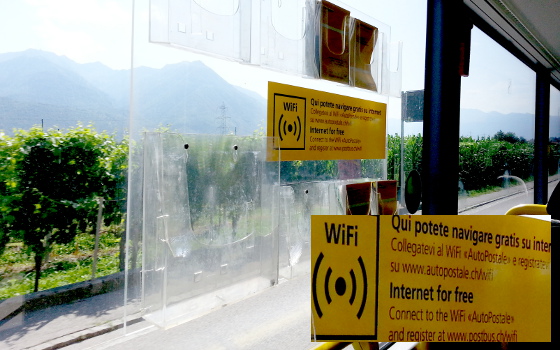
Who said Switzerland is expensive? Swiss Postbus is offering free wifi now Please see some of my previous blogs about Swiss travel for videos and pictures if you are looking for ideas for your time in .ch

Next.

Previous.