Search Results: "mak"

18 September 2011

Keith Packard: MacBook-Air

Installing Linux on Sandybridge MacBook Air Matthew Garrett got a report from someone who bought a brand new Sandybridge MacBook Air and was trying to install Fedora on it. The screen went black as soon as the i915 driver tried to set the initial mode. I bought one to try and help out. Just getting Linux installed turned out to be a minor adventure and I thought I d write a few notes for the next person who comes along and tries to do this. The obvious method I downloaded a collection of Debian ISO images, live images, netboot images from testing and CD-1 of squeeze. I downloaded a Fedora 16 alpha XFCE live image. I burned all of these to actual CDs, and then stuck them in a CD drive and held the c key while booting the machine. Nothing worked. The CD would spin up, the screen would switch from white to a black text mode with a blinking cursor at the upper left and then then CD would stop. rEFIt attempts rEFIt provides a boot selection menu and various configuration bits to provide for a multi-boot environment. This is necessary to leave the OS-X install on the disk and also install Linux. It also lets you boot from removable media, or at least that was the story. rEFIt would list removable USB flash storage devices, but it would not list CD drives, even after the CD drive spun up and did stuff for a while. This makes me wonder if the c key technique wasn t actually trying to boot from the CD. However, rEFIt wouldn t boot from a grub2-enabled USB key. ISO on USB flash key What rEFIt will boot is a Fedora or Debian ISO image copied directly to the USB flash device. The Ubuntu 11.04 live image and it did not work. Fedora F16 Alpha The live image came up and started X in frame buffer mode. However, when I went to install the image to the hard disk, it got stuck trying to discover devices. I waited about 20 minutes and it never finished, although it did chew up a lot of CPU time. Debian Squeeze I copied CD-1 of the 32-bit Squeeze distribution to my flash key. That booted up to text mode and went through the install. Nothing really unusual until it came to installing grub. I let it install grub to /dev/sda4, the new partition I had created for Linux. I figured installing grub to /dev/sda would be a bad idea (I think it would have actually worked just fine in retrospect). A slight out-of-sync diversion here I couldn t get the 32-bit kernel to talk to any keyboard or USB networking device, so I eventually installed a 64-bit kernel and that works just fine. You can run a 32-bit user space with a 64-bit kernel without any trouble. Making EFI boot Naturally, I couldn t get the machine to boot to Linux after this. rEFIt, the multi-boot tool for Mac OS X appears only interested in booting EFI images, or at least was not interested in booting my BIOS-based Grub2 installation on /dev/sda4. I used the rescue mode on the USB flash drive to get back to my installed Linux image and installed grub-efi-amd64. The OS X EFI version does not support 32-bit EFI code, which seems entirely reasonable to me. What took a while was figuring out that all of the grub files need to be readable through EFI, and that the Mac EFI code can only read FAT (and HFS?) partitions. So, the trick appears to be to stick the grub files on the Mac OS X efi partition (/dev/sda1). I created a directory over there, /EFI/grub and then mounted that as /efi and made a symlink from /boot/grub to /efi/EFI/grub. Now, grub-install sticks the files in the right place, and update-grub will even place grub.cfg in the directory where it needs to go. At this point, rEFIt will happily find the core.efi and grub.efi files and show them in the list of possible operating systems to boot. I don t know why there are both core.efi and grub.efi files; I ve only ever picked grub.efi and that has worked nicely. Broadcom WiFi I haven t gotten that working yet; the b43 supported chip list says it works in kernel 3.1. I m busy building a 3.1-rc4 kernel as I type this, so perhaps that will just work when I boot that. i915 KMS The whole reason for doing the install is to fix problems with the eDP EDID discovery which is currently preventing the machine from running X. I ll be working on that next; a quick kludge to just read the current mode from the device should get something on the screen (we already do that for LVDS panels). Beyond that, I ll be trying to figure out whether I can make EDID actually work, or whether it s just not available in this machine. Somehow the kernel frame buffer ended up as 1280x800, which was quite annoying. As a temporary kludge, I ran fbset -yres 768 to at least avoid having text disappear off the bottom of the screen. Once the panel size is discovered correctly, that should be fixed. Status This is sure not like installing Linux on a regular PC. However, I m reasonably hopeful that the devices in the machine will be working pretty well under Debian within the next few days.

17 September 2011

Joey Hess: destructive impulse

I used to know guys who would take old computer hardware out in the desert and shoot it up. I never went, and I've never gratuitously destroyed a computer in 2 decades of working with the things. Until yesterday when I picked one up by the monitor and introduced it to the floor. My regret isn't that I violently destroyed a computer, but that it was my Mom's computer, and I did it right in front of her, and without even a story-worthy reason, just out of garden variety frustration. And perhaps there's some regret that I was actually unsucessful in destroying anything other than the monitor and some speakers. The computer was salvaged, and my mom has a new monitor and a working system again. Sorry Mom & Maggie. To make up for it, I'll humiliate myself with this recording of "broke mom's computer blues", which will only be available for a very limited time: click to listen (warning: contains harmonica). Anyway, don't worry; any remaining frustration will be taken out the usual way: Splitting firewood.

Petter Reinholdtsen: Ripping problematic DVDs using dvdbackup and genisoimage

For convenience, I want to store copies of all my DVDs on my file server. It allow me to save shelf space flat while still having my movie collection easily available. It also make it possible to let the kids see their favourite DVDs without wearing the physical copies down. I prefer to store the DVDs as ISOs to keep the DVD menu and subtitle options intact. It also ensure that the entire film is one file on the disk. As this is for personal use, the ripping is perfectly legal here in Norway. Normally I rip the DVDs using dd like this:
#!/bin/sh
# apt-get install lsdvd
title=$(lsdvd 2>/dev/null awk '/Disc Title: /  print $3 ')
dd if=/dev/dvd of=/storage/dvds/$title.iso bs=1M
But some DVDs give a input/output error when I read it, and I have been looking for a better alternative. I have no idea why this I/O error occur, but suspect my DVD drive, the Linux kernel driver or something fishy with the DVDs in question. Or perhaps all three. Anyway, I believe I found a solution today using dvdbackup and genisoimage. This script gave me a working ISO for a problematic movie by first extracting the DVD file system and then re-packing it back as an ISO.
#!/bin/sh
# apt-get install lsdvd dvdbackup genisoimage
set -e
tmpdir=/storage/dvds/
title=$(lsdvd 2>/dev/null awk '/Disc Title: /  print $3 ')
dvdbackup -i /dev/dvd -M -o $tmpdir -n$title
genisoimage -dvd-video -o $tmpdir/$title.iso $tmpdir/$title
rm -rf $tmpdir/$title
Anyone know of a better way available in Debian/Squeeze? Update 2011-09-18: I got a tip from Konstantin Khomoutov about the readom program from the wodim package. It is specially written to read optical media, and is called like this: readom dev=/dev/dvd f=image.iso. It got 6 GB along with the problematic Cars DVD before it failed, and failed right away with a Timmy Time DVD. Next, I got a tip from Bastian Blank about his program python-dvdvideo, which seem to be just what I am looking for. Tested it with my problematic Timmy Time DVD, and it succeeded creating a ISO image. The git source built and installed just fine in Squeeze, so I guess this will be my tool of choice in the future.

Patrick Schoenfeld: Struggling with Advanced Format during a LVM to RAID migration

Recently I decided to invest in another harddisk for my atom system. That system, I built up almost two years ago, has become the central system in my home network, serving as a fileserver to host my personal data, some git repositories etc., streaming server and since I switched to a cable internet connection it also serves as a router/firewall.
Originally, I bought that disk to backup some data, of the systems in the network, but I realized that all data on this system were hosted on a single 320GB 2,5" disk and it became clear to me, that, in absense of a proper backup strategy, I at least should provide some redundancy.


So I decided, once the disk was in place, that the whole system should move to a RAID1 over the two disks. Basically this is not that hard as it may seem at a first glance, but I had some problems due to a new sector size in some recent harddisks, which is called Advanced Format.


But lets begin from the start. The basic idea of such a migration is:
  1. Install mdadm with apt-get. Make sure to answer 'all' to the question which devices need to be activated in order to boot the system.
  2. Partition the new disk (almost) identical.
    Because the new drive is somewhat bigger that wouldn't make sense, but at least the two partitions which should be mirrored on the second disk, need to be identical.
    Usually this is achieved easily by using
    sfdisk -d /dev/sda sfdisk /dev/second/sdb

    In this case, it wasn't that easy. But I will come to that in a minute.
  3. Change the type of the partitions to 'FD' (Linux RAID autodetect) with fdisk
  4. Erase evidence of an eventual old RAID from the partitions, which is probably pointless on a brand-new disk, but we want to be sure:
    mdadm --zero-superblock /dev/sdb1
    mdadm --zero-superblock /dev/sdb2
  5. Create two DEGRADED raid1 arrays from the partitions:
    mdadm --create /dev/md0 --level=1 --raid-devices=2 /dev/sdb1 missing
    mdadm --create /dev/md1 --level=1 --raid-devices=2 /dev/sdb2 missing
  6. Create filesystem on the first raid device, which will become /boot.
  7. Mount that filesystem somewhere temporary and move the contents of /boot to it:
    mount /dev/md0 /mnt/somewhere
  8. Unmount /boot, edit fstab to mount /boot from /dev/md0 and re-mount /boot (from md0)
  9. Create mdadm configuration with mdadm and append it to /etc/mdadm/mdadm.conf:
    mdadm --examine --scan >> /etc/mdadm/mdadm.conf
  10. Update the initramfs and grub (no manual modification needed with grub2 on my system)
    and install grub into the MBR of the second disk.

    update-initramfs -u
    update-grub
    grub-install /dev/sdb
  11. The first point to pray: Reboot the system to verify it can boot from the new /boot.
  12. Create a physical volume on /dev/md1:
    pvcreate /dev/md1
  13. Extend the volume group to contain that device:
    vgextend <volgroup_name> /dev/md1
  14. Move the whole volume group physically from the first disk to the degraded RAID:
    vgmove <volgroup_name> /dev/md1

    (Wait for it to complete... takes some time ;)
  15. Reduce first disk from the VG:
    vgreduce <volgroup_name> /dev/sda2
  16. Prepare it for addition to the RAID (see step 3 and 4) and add it:
    mdadm --add /dev/md0 /dev/sda1
    mdadm --add /dev/md1 /dev/sda2
  17. Hooray! Watch into /proc/mdstat. You should see that the RAID is recovering.
  18. When recovery is finished pray another time and hope that system is still booting with it running from the RAID entirely. If it does: Finished :-)

Now to the problem with the advanced format:
There is some action taking place with the hardware vendors to move to a new sector size. Physically my new device has a size of 4096 bytes per sector. Somewhat different to the 512 bytes disks used to have the last decade.


Logically it still has 512 bytes per sector. As far as I understand this is achieved by placing 8 logical sectors into one physical sector, so when partitioning a new disk the alignment of the disk has to be so that partitions start in a sector which is a multiple of 8.

That, obviously, wasn't the case with the old partitioning on my first disk. So I had to manually create partitions by specifying start points manually and making sure they are dividable by 8.

Otherwise fdisk would complain about the layout on the disk.
This does not work with cfdisk, because it does not accept manual alignment parameters and unfortunately the partitions it creates do have a wrong alignment. So good old fdisk and some calculations how many sectors are needed and where to start, to the rescue.

So the layout is now:
Device Boot Start End Blocks Id System
/dev/sdb1 2048 291154 144553+ fd Linux raid autodetect
/dev/sdb2 291160 625139334 312424087+ fd Linux raid autodetect


Christian Perrier: RWC: Giant Ireland

Just completed watching Ireland-Australia. What could I say except "I knew they could make it"? This so Irish team won the fight against Australia and, of course, I'm happy. Let's dream for IRL-FRA in final...:) Oh, that Rugby World Cup in case you hadn't noticed and such a game is exactly why I like rugby.

Benjamin Mako Hill: Software Freedom Day Boston 2011

This year, Software Freedom Day in Boston is being organized by Asheesh and Deb and OpenHatch which means a focus on increasing involvement in free software communities. If you are all interested in getting involved in the free software community in any way and at any level -- or interested in hearing about how that might happen someday -- this is a great event to attend. For my part, I'll be giving a short talk on getting involved in Debian. The event will be held on Saturday, September 17 at Cambridge College -- between Harvard and Central squares -- with an after party at Tommy Doyle's in Harvard.

16 September 2011

Rapha&#235;l Hertzog: How to triage bugs in the Debian bug tracking system

Triaging bugs is one of the easiest way to start contributing to Debian. I ll teach you the basics in this article. 1. Prerequisites All interactions with the Debian Bug Tracking System (BTS) happen through email so you need to have an email account with an address that you re willing to make public. All the mail that you send to the BTS will be archived and publicly available through its web-interface. This also means that you should have some spam filters in place because it will inevitably be harvested by spammers. :-( To ensure that this email address is consistently used by the various tools that we re going to use, it s a good idea to put this email address in the DEBEMAIL environment variable. You can also specify your full name in DEBFULLNAME (in case you don t want to use the name associated with your Unix account). You usually do this by modifying ~/.bashrc (if you use bash as login shell):
export DEBEMAIL="hertzog@debian.org"
export DEBFULLNAME="Rapha l Hertzog"
You should also install the devscripts package, it provides the bts command that we re going to use. 2. Find a package or a team with too many bugs You can literally pick any popular software that s in Debian, they almost always get more bug reports than the maintainers can handle. Instead of picking a package, you can also select a packaging team and concentrate your efforts on the set of packages managed by the team. In any case, it s important to receive the bug traffic for the packages that you re going to work on. If you went for a specific package, you should subscribe to the package via the Package Tracking System (there s a subscribe box on the bottom left corner once you selected the source package of interest). If you decided to help a team, there s usually a dedicated mailing list receiving all bug traffic. You can browse a list of packages with the most bugs if you have troubles finding a package to work on. A stack of bug reports to triage 3. Triage bugs! Bug triaging is all about making sure that bugs are correctly classified so that when a developer looks at the bug list, he can quickly find bugs with all the information required to be able to fix them! 3.1 Adding information to bug Adding supplementary information is easily done just by sending a mail to XXXX@bugs.debian.org (replace XXXX with the bug number). But often you want to reply to a message in the bug history, in that case bts --mbox show XXXX is for you. It will grab the corresponding mailbox and open a mailer (mutt by default) on it. Now you can directly reply in your favorite mailer. 3.2 Classifying bugs The Debian BTS uses tags (click the link and read the doc!) to classify bugs. bts tag XXXX + foo will add the foo tag (replace the + with a to remove a tag). If you want to explain why you re adding a tag, you should instead reply in the bug log as explained above, put control@bugs.debian.org in Bcc (Blind Carbon Copy) and start the body of your message with your tag command:
tag XXXX + foo
thanks
But what tag should you add? When a bug is submitted, you should try to reproduce the bug. If you can reproduce it, then tag the bug confirmed (example in #641710). If you can t, you should request more information (ex: a sample document triggering the bug, a configuration file, the output of some relevant command, etc.) until you can reproduce it or conclude that it was a user mistake. When you request supplementary information due to this, you should tag the bug unreproducible moreinfo (example in #526774). moreinfo should be later dropped when the requested information are provided, and unreproducible should be dropped if those information were enough to actually help reproduce the bug (example in #526774). During that initial evaluation, it s also worth differentiating packaging bugs (which are specific to Debian) from upstream bugs (which are relevant also for non-Debian users). The latter should be tagged upstream (and forwarded upstream if the bug is reproducible or contains enough information for the upstream developers, example in #635112). If you saw a (viable) patch in the bug log, the bug should be tagged patch . This is usually done by the patch submitter but sometimes it s forgotten (example in #632460). Take care though to not reinstate the patch tag if it was initially set but then dropped by the package maintainer after a review of the patch. If the title of the bug report is not descriptive enough, you can change it with a retitle XXXX new-title command (example in #170850). You can also change the severity of the bug report depending on the impact of the problem (with a command severity XXXX new-severity , what a surprise!). Request for new features are wishlist , most documentation problems are minor . On the other side of the scale, you can use important for bugs that are very annoying but that should not block a release. serious , grave and critical are used for release critical bugs, check the official definitions of the severities (examples in 502738 or #506498). 3.3 Closing non-bugs and bugs that are already fixed If your analysis of the bug report is that it s not really a bug but a user mistake, then you should close it by sending a mail to XXXX-done@bugs.debian.org with some explanations of the user s mistake so that he can get past his problem (example in #592853). If the problem was a real bug, but one that is apparently already fixed, you should try to quickly find the version that fixed the bug. If you can t find it in the changelog (there s a link to it in the PTS, or you can use /usr/share/doc/package/changelog.Debian.gz), you ll make the safe assumption that the upstream version you re currently using is the first one where this is fixed. Then you send a mail to XXXX-done@bugs.debian.org but you start your mail with Version: version-that-fixed-the-bug and continue with a small explanation of why you believe the bug to be fixed by this version (example in #122948). 3.4 Reassigning misfiled bug reports Bug reports are not always filed against the proper package. Users file bugs against applications where they experience the bugs, but the real bug might be in an underlying library or application. When that happens, you should use the reassign XXXX correct-package version command to get it filed against the correct package. The version parameter is optional but should be provided if possible, it should be the oldest version that we know to have the problem (example in #626232). 3.5 Forwarding bugs Forwarding bugs means opening bug reports in the upstream bug tracker for issues that have been reported in Debian but that applies to the upstream (unmodified) source code. Be sure to include all the relevant information and a link to the corresponding Debian bug. Depending on the upstream bug tracker, you might have to open an account to be able to file new bug reports. On the Debian side, you must record that a bug has been forwarded with bts forwarded XXXX upstream-bug-url . upstream-bug-url is the URL corresponding to the upstream bug report you created (ex: http://projects.ciarang.com/p/feed2omb/issues/21/ recorded in #609345 ). If the upstream authors fix the bug you reported, you can tag the Debian bug with fixed-upstream so that it s easier to find bugs to close when the next upstream release comes out (example in #637275). 3.6 Updating version information The Debian BTS uses version tracking to know which package versions are affected by a given bug. It s particularly important to have correct version information for release critical bugs since it might affect the migration of packages to testing. You can learn more on this topic here: http://wiki.debian.org/HowtoUseBTS. 4. More advice Colin Watson wrote a constructive rant explaining some mistakes that bug triagers are often doing. While it refers mainly to Ubuntu s launchpad, the advice apply equally as well to Debian. Check it out to become a better bug triager! Note that you can refer to this article with this shorter URL: http://raphaelhertzog.com/go/bugtriaging/

Do you want to read more tutorials like this one? Click here to subscribe to my free newsletter, you can opt to receive future articles by email.

One comment Liked this article? Click here. My blog is Flattr-enabled.

Lior Kaplan: Happy 10th b-day bug #98160

Happy 10th birthday Mozilla bug #98160, I hope you won t make it to your 11th, but who knows I hope the same for your younger brothers bug #166240 which is only 9 years old. Many thanks for all the people who tried to help RTL users switch their textarea directionality and alignment easier. Another bug in the it sometime sucks to be an RTL user department is bug #119857, soon to be age 10. I m lucky to have BiDi Mail UI as a good workaround, otherwise I couldn t read emails in Hebrew with the proper alignment/directionality. In another department, I must say I love daylight saving time, as I have more hours of sun, but this comes on the expense of my schedule as due to bug #504299 all my events aren t on the right local time, but an hour earlier. Although the post is written cynically, I would like to call the Mozilla community to help with fixing these issues. I also want to thank the people who are already helping with these issues or helped in the past.
Filed under: Free software applications, i18n & l10n, Mozilla

John Goerzen: Mexico Part 5: Food, Restaurants, and Dueling Karaoke Guys

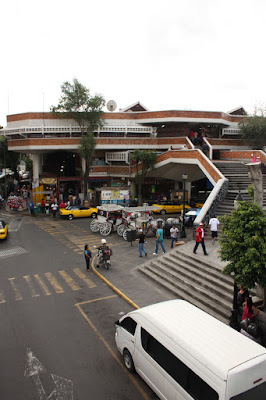
The fifth in a series; see also parts 1, 2, 3, and 4. One piece of advice we got in Mexico went like this: the nicer a place looks, the worse the food and prices will be. Roadside taco stands will be great, and nice-looking restaurants not so much. That seemed to be accurate. We only tried one real nice-looking restaurant and it was very good (though pricy), but it may have been sort of an exception. But perhaps the most interesting bit about eating in Mexico wasn t the food. It s the adventure. We ate one day at Guadalajara s San Juan de Dios market. In that huge labyrinth somewhere was a set of restaurants. They d tend to have a small cooking area, usually just open, and a few tables. We chose one. And at this point, I have to take brief detour and explain something. There are a lot of people in Mexico that do things for tips, and quite often without being asked. Some other examples might be washing a car s windshield at a stoplight. So anyhow, we had ordered our food, and before long, a guy wanders down the aisle and plonks down a boombox. And turns it on. And then he pulled out a microphone, which we quite soon realized was connected to the boombox. (I guess making it more of a karaoke box.) Anyhow, he started singing a song decently and seemed to be enjoying it. About 45 seconds into it, a competing boombox man plonked down a competing boombox 25 feet away, turned it on, and yes, you guessed it pulled out a microphone and started singing a different song. Worse than the first person but louder. Eventually the boombox people left and our lunchtime conversation could resume. But pretty soon a drum guy showed up. He had a bunch of drums on a strap so he could just walk around and play them. He apparently decided that an excellent place to play them would be directly behind my head. I did not entirely agree with his decision, but hey, it beat the competing karaoke guys. Eventually the drum guy left, and somehow between the time I looked down to get out money to pay our bill and the time I had it counted out, a clown had shown up and made several balloon animals for our boys. I tipped him, we paid, and then headed on. You might think from this story that this would be an annoying series of events. And honestly, if it had happened in a big mall in the USA, it would probably have been both annoying and creepy. But really I enjoyed it. The fact that dueling karaoke happened, despite sounding really awful, was pretty funny and really seeing this whole parade of people was interesting too. It made American restaurants seem a little boring. You always know what s going to happen here (and if something surprising does happen, the place probably gets a bad review on Yelp.) Interesting things sometimes happen at mealtimes in Mexico and I like it that way. I had a torta ahogada (drowned sandwich) at that restaurant. And at this point, another brief aside. I m the kind of person that can go to an average American restaurant, see items on the menu helpfully indicated as spicy, order one, and genuinely wonder if other people would find them spicy, because I either don t notice spiciness at all, or maybe notice a tiny bit if I concentrate really hard. Others, meanwhile, might take a bite and lunge for the water. Having said that, I know people that lived in Thailand for awhile and I have nowhere near their tolerance for spiciness. So, having been in Mexico a whole 24 hours or so, I decided not to follow Jonathan s wise lead in ordering a torta with the spicy sauce on the side. I figured I hadn t had anything spicy yet, so maybe this was would be nice and mild for me. Via Jonathan s translation, I ordered it with the spicy sauce. I believe the phrase I heard him use was con chile . The waitress looked at me, gave me an amused the American is ordering it con chile? Hahaha . sort of smile, and went off. Pretty soon our food arrived. (The food always seems to arrive pretty soon in Mexico, by the way.) Oliver was having a bit of a culture shock that day, and mostly refusing to eat (once hunger got the best of him later, he really enjoyed Mexican food.) But the rest of us dug in, including me. I enjoyed my torta. It was spicy, but not too bad. I took some big bites (it was, after all, a thick sandwich) and was really enjoying it. For about a minute. Slowest-acting spiciness I ve had in awhile. Then it hit me. Spiciness, and lots of it. I took a big gulp of my horchata (a creamy sweet rice drink that I found at many restaurants). That helped. A little. I really liked the torta and ate it, but it wouldn t surprise me if the waitress noticed how extremely quickly a drank my horchata Another interesting experience was in Guanajuato. It was raining as we walked towards the Guanajuato market. Their market was large and similar in concept to the Guadalajara one, though a lot smaller. The restaurants were all in a row, in a side of the building that was open to the outside. Most were on the ground level but it looked like a restaurant or two were upstairs. As we approached, all of a sudden people were yelling at us. First it was a guy on the second story, then pretty soon people at the restaurants on the first floor did so as well. They were yelling rapidly in Spanish, waving their menus around in the air. I m imagining they were naming foods they sold or reasons to eat there, but I don t know enough Spanish to know. As we walked down the long row of restaurants, the ones we left behind would quiet down in disgust and other hopeful restaurant owners would take up the yelling and waving cause. I imagine if we did some time-lapse videography and walked up and down that row, we could produce an effect not unlike the sound of a dot-matrix printer going back and forth on the page. Anyhow, we selected one of the quieter restaurants pretty much random. The others then quieted down until another person chanced to walk past at which point it would get loud again. The lunch there was good but I think I mainly will remember it for the selection process! On our way into Guanajuato, we stopped at a wonderful roadside taco place. In typical fashion, they had a large vertical pork thing (I don t know the proper word for it) from which they would carve off meat on the spot anytime someone ordered something with pastor. We found a table. And we ordered a few tacos and such. They were usually a few pesos each (working out to less than a dollar), small round things on a soft tortilla, with meat, cilantro, and onion on top. And typically delicious. They had very little in common with an American taco . We d often order a few, and if we wanted more, just order more. They were made quickly enough for that. Tacos were very similar from one restaurant to the next. My favorite flavors were pastor (pork), chorizo (sausage), and bistec (beef steak). A restaurant in Guadalajara sadly I ve forgotten its name, since we kept calling it the potato place had what I might call a Mexican version of the loaded baked potato, with a meat, queso (cheese), a delicious sauce with a flavor unlike anything I d had before, and some garnish. But really my favorite thing from that restaurant was their amazing juices. I am not much of a juice drinker normally, but in Mexico I went for them whenever they were offered. What passes as fruit juice in the USA has about as much resemblance to a real Mexican fruit juice as Taco Bell has to a real Mexican taco stand. (Very little, in case that wasn t crystal clear.) That particular restaurant offered three types of juices, which were, if I m remembering right, aguas, frescas, and jugos. I has a jugo verde (green juice) on the first visit there. It was good, but the one I can still remember was called, I think, the fresa fresca (fresh strawberry juice). And it was incredible. I m not sure how to describe it, other than real. One observation before I end. It seemed a common thread at some Mexican roadside taco stands to not have soap in their restrooms. Instead there would be a plastic cup holding I kid you not powder-form Tide laundry detergent. It was amusing anyhow. My hands left those places extremely soft and smelling like laundry. One of the last restaurants we visited on our trip was in Ajijic, near the Chapala lake. It was actually right on the lake and served seafood. This was the only restaurant with prices as high as I d be used to in the United States. I ordered a stew served in a stone bowl. It came out sizzling, and since the very thick stone bowl retains heat well, it kept sizzling the entire time I was eating. It was excellent as usual. Coming up in part 6: some thoughts on returning to the United States, our decision to visit, communication, and tips for anyone else considering a first visit to Mexico.

15 September 2011

Dirk Eddelbuettel: littler 0.1.4

Matthias Klose, the tireless force behind the Debian / Ubuntu gcc, python, and what have you packages, sent me a minimal patch to let littler build when the ld linker uses the --as-needed option (as Ubuntu builds now do): all it took was a little reordering of arguments. With that, I did a little cleanup as it has been a while since version 0.1.3. The brief (upstream) ChangeLog is as follows:
2011-09-15  Dirk Eddelbuettel  <edd>
        * configure.in: Mark as release 0.1.4
        * Makefile.am: Applied patch by Mathias Klose to prevent FTBFS with
          'ld --as-needed', cf LP bug 770980.
        * littler.c: A few small tweaks suggested by 'gcc -Wall'
        * examples/install2.r: Added a second R package installer example
        * examples/update.r: Switch to '/usr/bin/r -t' as shebang line
        * examples/fsizes.r: Dito
        * littler.c: Update copyrights to 2011
        * README: Idem
littler provides r (pronounced littler), a shebang / scripting / quick eval / pipelining front-end to the the R language and data analysis environment. As usual, our code is available via our svn archive or from tarballs off my littler page and the local directory here. A fresh package is in Debian's incoming queue and will hit mirrors shortly.

Michal &#268;iha&#345;: Limiting involvement in Gammu

As people on Gammu mailing lists probably already noticed, I don't have enough time for Gammu in past months. Simply mi priorities have shifted and can not spend so much time there anymore. I've decided to make clear cut what I'm going to do and what not. First of all I'm not going to put any extra effort on support for platforms I don't use. Today's release of Wammu no longer includes Windows binaries (they were broken anyway). Gammu releases will include them as long as they do not need extra effort. The very same applies to Ubuntu packages. Sorry, but backporting packages which are using up to date tools from Debian sid is more effort than I can put into it. Of course volunteers are welcome for both areas. For phones support, I will limit my attention to things I'm interested in or use daily (what means AT phones, Meego and possibly Symbian). Others (especially S40 Nokia phones) can not expect much support from me. And of course I still plan to maintain the projects themselves, Debian packages and packages in openSUSE Build Service.

Filed under: English Gammu 0 comments Flattr this!

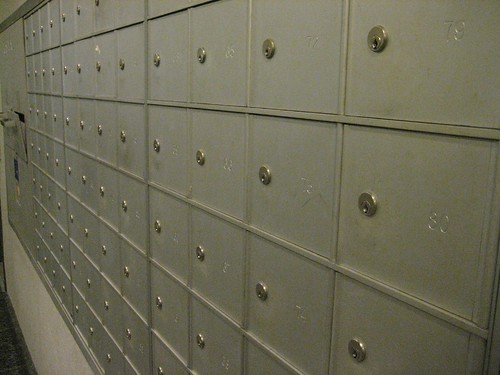
Benjamin Mako Hill: Anxiety

MailBoxes by nffcnnr, on Flickr
Creative Commons Attribution 2.0 Generic License by nffcnnr
I am haunted by the nagging fear that I have mailboxes, tucked into a dark corner of an office somewhere, and perhaps even full of checks and important documents, that I don't know exist.

14 September 2011

Mike Hommey: Building a custom kernel for the Nexus S

There are several reasons why someone would want to build a custom kernel for their Android phone. In my case, this is because I wanted performance counters (those used by the perf tool that comes with the kernel source). In Julian Seward s case, he wanted swap support to overcome the limited memory amount on these devices in order to run valgrind. In both cases, the usual suspects (AOSP, CyanogenMod) don t provide the wanted features in prebuilt ROMs. There are also several reasons why someone would NOT want to build a complete ROM for their Android phone. In my case, the Nexus S is what I use to work on Firefox Mobile, but it is also my actual mobile phone. It s a quite painful and long process to create a custom ROM, and another long (but arguably less painful thanks to ROM manager) process to backup the phone data, install the ROM, restore the phone data. And if you happen to like or use the proprietary Google Apps that don t come with the AOSP sources, you need to add more steps. There are however tricks that allow to build a custom kernel for the Nexus S and use it with the system already on the phone. Please note that the following procedure has only been tested on two Nexus S with a 2.6.35.7-something kernel (one with a stock ROM, but unlocked, and another one with an AOSP build). Also please note that there are various ways to achieve many of the steps in this procedure, but I ll only mention one (or two in a few cases). Finally, please note some steps rely on your device being rooted. There may be ways to do without, but I m pretty sure it requires an unlocked device at the very least. This post doesn t cover neither rooting nor unlocking. Preparing a build environment To build an Android kernel, you need a cross-compiling toolchain. Theoretically, any will do, provided it targets ARM. I just used the one coming in the Android NDK:
$ wget http://dl.google.com/android/ndk/android-ndk-r6b-linux-x86.tar.bz2
$ tar -jxf android-ndk-r6b-linux-x86.tar.bz2
$ export ARCH=arm
$ export CROSS_COMPILE=$(pwd)/android-ndk-r6b/toolchains/arm-linux-androideabi-4.4.3/prebuilt/linux-x86/bin/arm-linux-androideabi-
For the latter, you need to use a directory path containing prefixed versions (such as arm-eabi-gcc or arm-linux-androideabi-gcc), and include the prefix, but not gcc . You will also need the adb tool coming from the Android SDK. You can install it this way:
$ wget http://dl.google.com/android/android-sdk_r12-linux_x86.tgz
$ tar -zxf android-sdk_r12-linux_x86.tgz
$ android-sdk-linux_x86/tools/android update sdk -u -t platform-tool
$ export PATH=$PATH:$(pwd)/android-sdk-linux_x86/platform-tools
Building the kernel For the Nexus S, one needs to use the Samsung Android kernel tree, which happens to be unavailable at the moment of writing due to the kernel.org outage. Fortunately, there is a clone used for the B2G project, which also happens to contain the necessary cherry-picked patch to add support for the PMU registers on the Nexus S CPU that are needed for the performance counters.
$ git clone -b devrom-2.6.35 https://github.com/cgjones/samsung-android-kernel
$ cd samsung-android-kernel
You can then either start from the default kernel configuration:
$ make herring_defconfig
or use the one from the B2G project, which enables interesting features such as oprofile:
$ wget -O .config https://raw.github.com/cgjones/B2G/master/config/kernel-nexuss4g
From then, you can use the make menuconfig or similar commands to further configure your kernel. One of the problems you d first encounter when booting such a custom kernel image is that the bcm4329 driver module that is shipped in the system partition (and not in the boot image) won t match the kernel, and won t be loaded. The unfortunate consequence is the lack of WiFi support. One way to overcome this problem is to overwrite the kernel module in the system partition, but I didn t want to have to deal with switching modules when switching kernels. There is however a trick allowing the existing module to be loaded by the kernel: compile a kernel with the same version string as the one already on the phone. Please note this only really works if the kernel is really about the same. If there are differences in the binary interface between the kernel and the modules, it will fail in possibly dangerous ways. To use that trick, you first need to know what kernel version is running on your device. Settings > About phone > Kernel version will give you that information on the device itself. You can also retrieve that information with the following command:
$ adb shell cat /proc/version
With my stock ROM, this looks like the following:
Linux version 2.6.35.7-ge382d80 (android-build@apa28.mtv.corp.google.com) (gcc version 4.4.3 (GCC) ) #1 PREEMPT Thu Mar 31 21:11:55 PDT 2011
In the About phone information, it looks like:
2.6.35.7-ge382d80
android-build@apa28
The important part above is -ge382d80, and that is what we will be using in our kernel build. Make sure the part preceding -ge382d80 does match the output of the following command:
$ make kernelversion
The trick is to write that -ge382d80 in a .scmversion file in the kernel source tree (obviously, you need to replace -ge382d80 with whatever your device has):
$ echo -ge382d80 > .scmversion
The kernel can now be built:
$ make -j$(($(grep -c processor /proc/cpuinfo) * 3 / 2))
The -j part is the general rule I use when choosing the number of parallel processes make can use at the same time. You can pick whatever suits you better. Before going further, we need to get back to the main directory:
$ cd ..
Getting the current boot image The Android boot image living in the device doesn t contain only a kernel. It also contains a ramdisk containing a few scripts and binaries, that starts the system initialization. As we will be using the ramdisk coming with the existing kernel, we need to get that ramdisk from the device flash memory:
$ adb shell cat /proc/mtd awk -F'[:"]' '$3 == "boot" print $1 '
The above command will print the mtd device name corresponding to the boot partition. On the Nexus S, this should be mtd2.
$ adb shell
$ su
# dd if=/dev/mtd/mtd2 of=/sdcard/boot.img bs=4096
2048+0 records in
2048+0 records out
8388608 bytes transferred in x.xxx secs (xxxxxxxx bytes/sec)
# exit
$ exit
In the above command sequence, replace mtd2 with whatever the previous command did output for you. Now, you can retrieve the boot image:
$ adb pull /sdcard/boot.img
Creating the new boot image We first want to extract the ramdisk from that boot image. There are various tools to do so, but for convenience, I took unbootimg, on github, and modified it slightly to seemlessly support the page size on the Nexus S. For convenience as well, we ll use mkbootimg even if fastboot is able to create boot images. Building unbootimg, as well as the other tools rely on the Android build system, but since I didn t want to go through setting it up, I figured a minimalistic way to build the tools:
$ git clone https://github.com/glandium/unbootimg.git
$ git clone git://git.linaro.org/android/platform/system/core.git
The latter is a clone of git://android.git.kernel.org/platform/system/core.git, which is down at the moment.
$ gcc -o unbootimg/unbootimg unbootimg/unbootimg.c core/libmincrypt/sha.c -Icore/include -Icore/mkbootimg
$ gcc -o mkbootimg core/mkbootimg/mkbootimg.c core/libmincrypt/sha.c -Icore/include
$ gcc -o fastboot core/fastboot/ protocol,engine,bootimg,fastboot,usb_linux,util_linux .c core/libzipfile/ centraldir,zipfile .c -Icore/mkbootimg -Icore/include -lz
Once the tools are built, we can extract the various data from the boot image:
$ unbootimg/unbootimg boot.img
section sizes incorrect
kernel 1000 2b1b84
ramdisk 2b3000 22d55
second 2d6000 0
total 2d6000 800000
...but we can still continue
Don t worry about the error messages about incorrect section sizes if it tells you we can still continue . The unbootimg program creates three files: All that is left to do is to generate the new boot image:
$ eval ./mkbootimg $(sed s,boot.img-kernel,samsung-android-kernel/arch/arm/boot/zImage, boot.img-mk)
Booting the image There are two ways you can use the resulting boot image: one-time boot or flash. If you want to go for the latter, it is best to actually do both, starting with the one-time boot, to be sure you won t be leaving your phone useless (though recovery is there to the rescue, but is not covered here). First, you need to get your device in the fastboot mode, a.k.a. boot-loader:
$ adb reboot bootloader
Alternatively, you can power it off, and power it back on while pressing the volume up button. Once you see the boot-loader screen, you can test the boot image with a one-time boot:
$ ./fastboot boot boot.img
downloading 'boot.img'...
OKAY [ 0.xxxs]
booting...
OKAY [ 0.xxxs]
finished. total time: 0.xxxs
As a side note, if fastboot sits waiting for device , it either means your device is not in fastboot mode (or is not connected), or that you have permissions issues on the corresponding USB device in /dev. Your device should now be starting up, and eventually be usable under your brand new kernel (and WiFi should be working, too). Congratulations. If you want to use that kernel permanently, you can now flash it after going back in the bootloader:
$ adb reboot bootloader
$ ./fastboot flash boot boot.img
sending 'boot' (2904 KB)...
OKAY [ 0.xxxs]
writing 'boot'...
OKAY [ 0.xxxs]
finished. total time: 0.xxxs
$ ./fastboot reboot
Voil .

John Goerzen: Mexico Part 4: Street Scenes and Architecture

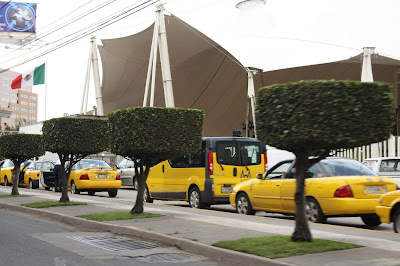
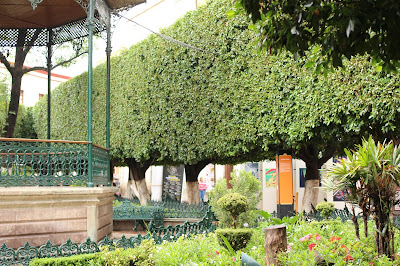
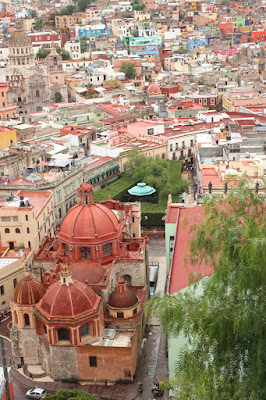
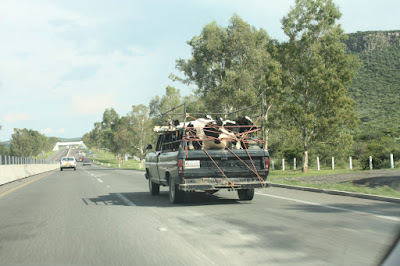
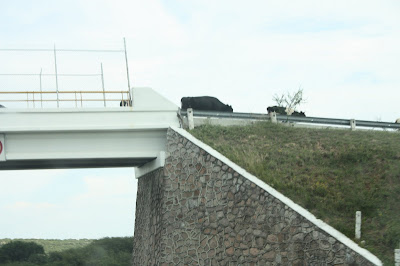
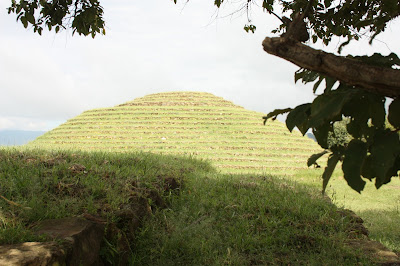
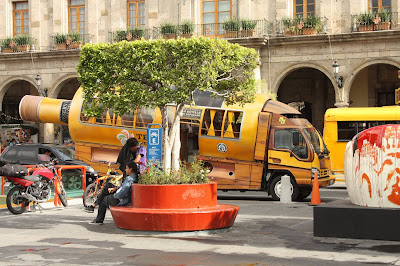
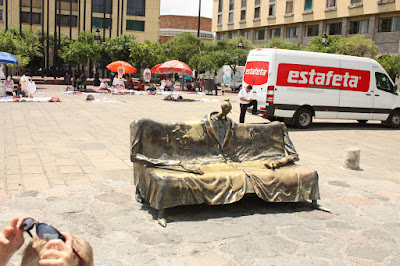
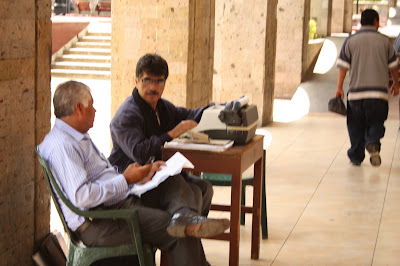
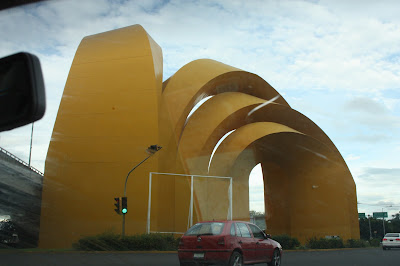
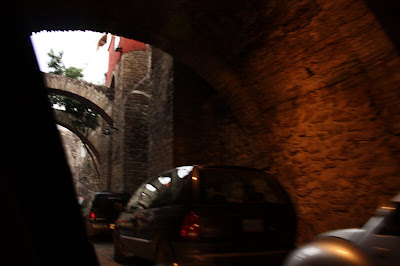
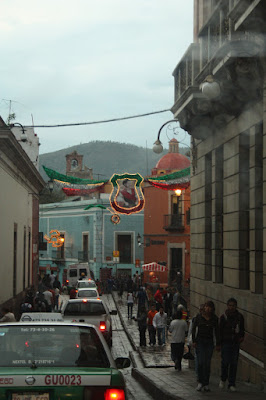
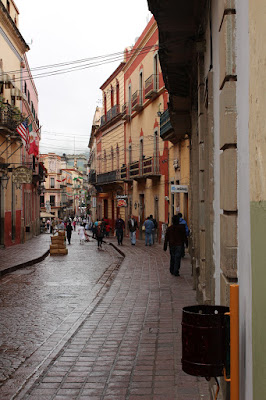
The fourth in a series; see also parts 1, 2, and 3. This post is going to be more a photolog than a narrative, and I apologize in advance for it being a bit disjointed. I ve already touched on these themes a bit in the other post, but now it s time to focus on them. Immediately after leaving the airport, it s quite clear that things are a little different. Trees are square. People ride around in the backs of pickups sometimes on top of piles of debris. Left turns are made in front of other lanes of traffic going the same way. But those are just the things obvious from the road. It s a lot of fun to enjoy the differences. First, the ubiquitous square trees. They look pretty, and are found all over. I also found carefully-manicured trees in cone shapes, more cylindrical shapes, etc. It seems that tree care is taken seriously in Mexico. It was also not uncommon to see the bottom few feet of a tree painted white. A park in Guanajuato had a whole bunch of trees carefully trimmed. And from up on the mountain, it still looked impressive (the green area behind the dome). Driving in Mexico was interesting for a lot of reasons. The highways there aren t quite as limited access as the freeways in the USA. It was quite common to see bicyclists, walkers, a mule, or some cattle ambling along the side of the road. Roadside taco stands don t require taking an exit. You just pull off the road because it s right there. Some sights were a bit surprising. Cattle in a pickup, with rope, for instance. Or cattle crossing the highway on the overpass. Street vendors were everywhere. Stop at a red light and someone might spring from the side of the road and suddenly start washing your windshield (expecting a tip); try to sell you flowers, juice, or bug zappers; or even throw business card-sized advertisements for adult websites into any open windows they can find. One night we saw an incredible fire juggler. I would have tipped him well but he was too far away to do so before the light turned green. Mexico s history stretches back into prehistoric times, and we saw the Teuchitlan ruins at Guachimontones one day. It was truly a remarkable feeling to be able to walk down the middle of the ancient ball court, or to climb up one pyramid and see the other from it. It s not exactly architecture, but Jacob and Oliver sure enjoyed visiting the hot springs at Bosque de la Primavera. Jacob still remembers that where the steam is, the water is 200 degrees, and we CAN T TOUCH IT THERE! Back in Guadalajara, here s a photo from the inside of the grand old cathedral. Compared to the cathedrals we saw in Europe, this was of a similar general size and design, and perhaps only slightly newer. But one big difference: worshipers outnumbered tourists at every Mexican cathedral I saw, whether in the center of Guadalajara or at a rainy intersection in Guanajuato or a plaza in Tlaquepaque. It made them feel more alive, and perhaps more sacred as well. One surprise was seeing people sitting on the steps of the cathedral in downtown Guadalajara selling trinkets such as beads. I think the only other place I had seen something like that was in New Orleans. All of Guadalajara s Centro was beautiful. Much of it survives from colonial days; I think a person could spend days exploring its museums and buildings. Way too many of my 900 photos were taken in Centro to post on the blog, but just for flavor, here s one of the less than historic scenes. Yes, that is a bus shaped like a tequila bottle. Fountains were beautiful and common across Mexico. A few of them were easily reachable by boys, and ours sure loved those. There was a lot of public art, including this interesting chair/skeleton/I m not sure what it is: And, just for good measure while walking around Centro, they tossed in an apparent Redundant Array of Inexpensive Typewriters. I don t know what they were doing, but there were about a dozen guys sitting out in the sun typing on their manual typewriters on their identical tables. And who can leave Guadalajara without seeing one of North America s most impressive traffic circles. I ve got to hand it to the Mexicans for making something that is normally really boring into an interesting work of art. Over in Guanajuato, a lot of driving takes place in the city s vast underground tunnel system. Here s a scene emerging from one of them. Guanajuato was already getting decorated for Mexican independence day festivities (Sept. 15-16) while we were there. Here s a typical Guanajuato street scene. Many of the streets were closed to traffic and perhaps not wide enough to handle vehicles anyway. Those streets had a wonderful peaceful and slow feel to them. I feel that I ve barely done the trip justice with this post. The feelings of walking down a beautiful Guanajuato street, or stepping into a Spanish cathedral, or even seeing a bunch of guys with typewriters, just can t be replicated. It s brimming with history and character, and shouldn t be missed.

13 September 2011

Christian Perrier: 10 years being Debian Developer - part 4: NM process

So, this story begins in January 2001, when I applied in the Debian New Maintainer Process. I wanted to maintain Geneweb, which I was using to publish my genealogy research results. And I wanted to keep it up-to-date while upstream was doing a quite fast development. Moreover, I quickly noticed that Geneweb had big trouble in respecting the way data is organized on a Debian system, and respect the FHS. How to have weveral users able to publish their data on the same server without compromizing the overall system security, etc. Upstream development didn't really care about that. Daniel de Rauglaudre is an excellent genealogist and developer but he was not interested in making Geneweb clean "the Debian way". For instance, at that time, it wasn't easy to setup a server, where genealogy databases could be published without having to manually launch a daemon in user mode at each reboot. Arranging this was indeed my first contribution. I contributed a few patches to make it easier to turn Geneweb into something FHS-compliant...and I developed init scripts and an organization allowing one to have shared databases after system reboots. That was rapidly a great introduction to Debian maintainer scripts and even security-related challenges. And all this....because I needed it. Basically, in 2001, the geneweb package adopted the organization it still has in Debian and Ubuntu, 10 years later: While doing so, I was going through the New Maintainer Process. The Debian developer who had signed my key was Sam Tardieu, of of those longstanding "Freenix" dudes I was sometimes hanging around. I don't remember who did write my advocacy. Michael Mattice was my first Application Manager. Interestingly, here are the three first questions he asked my as part of the Policy and Procedures check : Mike actually asked the questions on February 17th and I probably answered immediately. Unfortunately it seems that I lost my answers. Maybe they are in some archive somewhere. Would be interesting to see how I ended giving an answer about the TeX exception.:-) Immediately, Mike moved to the Tasks and Skills step and checked my geneweb and lifelines packages (I already prepared a package for that other genealogy software). From my records, he found a few lintian warnings, which I probably made my best to fix, then later on, on March 12th, he answered me that thigns were OK and he was marking the T&S step as passed...handing things over to the NM database, asking me what username I wanted on debian.org (obviously, you know what I answered to this!). Then nothing happened..:-) I was not that impatient, but finally, around June 27th, I politely mailed NM Frontdesk (I guess) to get news...and I got a very quick answer by Martin Michlmayr. Martin was indeed worried about the situation (he told me I was on his radar....fun as, many years later, as many DDs, Martin probably went on mine because of pending localization work..:-)) Finally, Martin decided he was not entirely happy with the (maybe too short) processing for P&P and proposed me (very politely, you know how Martin is!) to do it again. So, some more questions...:-) Here, I have the answers. Really fun ro read. Hang on, pure bubulle style, very verbose! What a bunch of questions..:-). Reading my answers ten years after, I see that some answers are somehow naive but, after all, they're not so bad. I really remember spending hours in writing them (my English was somehow more shaky at that time) The last question was: "Please tell me about about yourself and what you intend to do for Debian". Here, Martin opened a big can of worms..:-) So, you'll learn about this in the next episode..:-)

Sylvain Beucler: More Science and Lighting

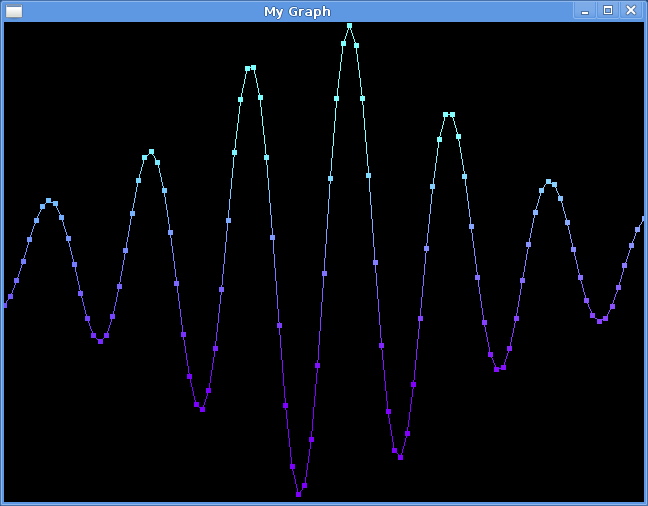
plot Guus wrote another scientific OpenGL tutorial, storing ordinates as a one-dimensional texture for increased performances.
http://en.wikibooks.org/wiki/OpenGL_Programming/Scientific_OpenGL_Tutorial_02
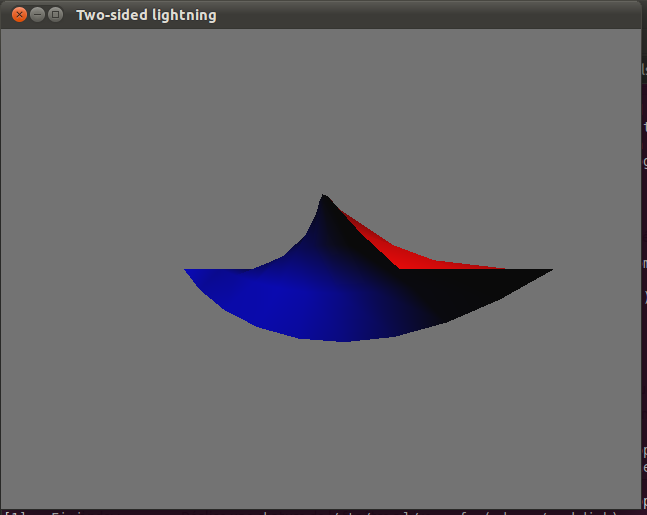
two-sided I also went ahead and added a tutorial on two-sided lighting:
http://en.wikibooks.org/wiki/GLSL_Programming/GLUT/Two-Sided_Surfaces
Remember: this is free documentation that you can share and/or improve upon - make sure you do so :)

12 September 2011

Antonio Terceiro: Laptop fun, or "WTF, HP?"

A couple of weeks ago my old laptop decided to rest forever, and I was forced to impose some economic pressure onto the consumption of the planet resources by acquiring a new one. Fortunately this happened while I am still here in Canada, where it is reasonably cheaper to get a decent laptop than it is in Brazil. Although I did not have the budget I wanted for buying a really kick ass laptop, I was able to buy a decent one, an HP Pavilion G6 1B74CA. I went on 4 different shops with a USB stick loaded with Debian Live to check whether all the hardware would work ok. I always asked one of the salesman before rebooting the laptops, but it was funny to see the reactions of the different employees who came by to check what I was doing: some of them barely noticed that GNOME was not Windows XYZ, and and some asked whether I was hacking the laptops. Unfortunately, I wasn t able to find a single laptop in which the wireless worked out of the box with the Squeeze kernel, which sucks. I searched over the internet a lot, and it seems that even the vendors recommended by the FSF do not provide laptops with wireless cards that work without non-free blobs. Other issue I had was with the Intel graphics. After the kernel enables the modesetting, the backlight goes to the minimum and it looks like you have no video. There are a couple of workarounds in the internet, and the one in which you add acpi_osi=Linux acpi_backlight=vendor to the kernel parameters makes the laptop turn on by itself in the morning. This is probably caused by broken ACPI handling in the BIOS, who almost always is written by people on crack. The other issues I had were related to the keyboard. First, the BIOS came by default with Access keys mode enabled, which means that by default pressing F2-F12 actually activated the multimedia keys instead of the real function keys. It was disapointing to hit F12 and have my wireless turned off. After disabling this in the BIOS setup, it was OK. Well, not quite: for some reason, Fn+F4 did not generate the expected keycodes. After some research on the internet, I found a interesting Ubuntu bug . It seems that the latest and greatest version of Windows starts its video setup application via the Meta+P shortcut ( Meta is the actual name of what Windows people call the Windows key ). Guess what the morons writing the HP BIOS did yes, they made the keys Fn+F4 (where F4 has video setup as its multimedia key ) generate the keycodes for Meta+P! It would be a lot easier for everyone in the world if the people at Microsoft just make their stuff listen to both Meta+P and the video setup keycode, which is generated by every laptop out there, to activate the Windows screen setup thing. This way the very smart dudes writing BIOS at HP wouldn t need to make Fn+F4 generate the keycodes for Meta+P and break every single desktop that is not procuced at Redmond.

John Goerzen: Mexico Part 3: Shopping

The third in my serious about my family s recent visit to Mexico see also part 1 and part 2. Shopping in Mexico was probably the thing I was least prepared for. I probably had the biggest wins of the trip shopping, and also the biggest fails (though they weren t all that significant). It seems to me that shopping is all about serendipity. You almost have to be good at impulse buying. I normally try hard to resist impulse purchases, preferring to research and compare carefully before making a decision. That attitude didn t serve me well in Mexico, and when I was able to overcome it, I got some great purchases. Around here, some of the best places to shop are the ones that have been in business for decades. Anderson Office Supply in Newton, KS, for instance, has been around for over 100 years, and has in stock, even everything from a ribbon for my slightly obscure 1940s typewriter to local history books. Moler s Camera in Wichita often meets or beats the online stores prices, and has better service. But in Mexico the best places seemed to be packed into a large crowded shopping area, or a dusty stand along a road, or a guy selling stuff on a plaza somewhere. Here is Guadalajara s market (San Juan de Dios): It s an incredible open-air market. We spent quite some time there, even ate lunch, and yet I m sure we saw only a small fraction of what they had. It was a cramped place, with small booths and tiny aisles, but all sorts of interesting things. Although I did appreciate walking quickly past the raw pork and fish corner. Terah bought some genuine extract of vanilla there, at a good price. Some of the street vendors were selling what I think were butterfly toys they had some sort of launcher that would launch them in the air, and they d flutter and float down to the ground. We saw them mainly in Guadalajara Centro on our first day, and I (unwisely, it turns out) thought, Hmm, a plastic toy our boys would love it, but I don t want to buy it on our first day. Besides, I m sure we ll see them all over or online. Wrong on both counts. So there s one of my fails. My greatest win came on the road back from Guachimontones (an ancient pyramid site). Every so often along that country road, there would be a vendor with a table selling something or other. I saw some paintings out my window, thought neat , but and here you can see how terrible an impulse buyer I am didn t actually put together that we should turn around and look at them until 10 minutes later after a bathroom stop for Jacob. We went back, and I picked out a beautiful painting on canvas of those pyramids at sunset. And the charge: 200 pesos (about $17 USD). Incredible and incredibly cheap, and there is a great place on my wall for it. The vendor was also the artist. I am kicking myself for only buying one. (No photo yet as it was too big to practically transport by plane.) Another memorable purchase was this one: This was another roadside find. We were driving through Ajijic, and I noted a rug vendor along the side of the road. I had walked past a rug vendor in the Guadalajara market, so I was keeping my eye out. I made a note to stop there on our way back out of Ajijic. So we did. This is a rug made in the Zapotec tradition, all hand-made, with natural dyes and wool. It was 550 pesos (about $46 USD), which I considered to also be a pretty good deal for what it was. I have no idea how many hours went into creating it, but I m sure it was many. My luck in shops wasn t so good. We visited Tlaquepaque, which had lots of shops selling beautiful things. But the prices there were higher than I d pay for similar things back home. Tonala s shops were too inconveniently located to be practical with what were then tired boys, so we didn t go in there. I m not used to shopping without planning, and perhaps am not very good at it. On the other hand, I really enjoyed making those two purchases, and only regret not buying another 200-peso painting! Maybe next time I m in Mexico, I ll even buy something on the first day there. Terah will be so proud..

Jaldhar Vyas: 9/11: Never Forget

As many people reading this may know, my wife Jyoti was in the World Trade Center on 9/11. When the first plane hit, she joined some colleagues at her employers offices on the 78th floor of the South Tower to see what was going on. A few minutes later she went downstairs to her desk on the 77th floor to call me and tell me about it. That's when the second plane hit. Everyone on the 78th floor was instantly killed as she would have been if she had decided to stay. She and some friends, covered in debris and soaked in jet fuel, blinded by thick black smoke made their way down 77 flights of stairs (the elevators were out of action) and even though she was seven months pregnant with our daughter at the time she went all the way down without stopping to rest. An NYPD officer Ramon Suarez helped her out and to an ambulance. He went back to rescue others and died half an hour later when the North Tower collapsed. I was at home. After getting ready and saying my morning prayers, I was leisurly preparing breakfast before starting the day. I started getting phone calls asking "Is Jyoti ok?" Of course she was. Why wouldn't she be? I somehow don't remember who said it first but I was told to turn on the TV because a plane had hit the World Trade Center. I spent the rest of the morning glued to the screen in horror as information on what exactly had happened. Absolutely the lowest moment of my life was when I saw, in real time, the twin towers fall. It was several more hours before I actually got to talk to Jyoti on the phone, confirmation that she was still alive. I didn't get to actually see her and hold her until the next day owing to the curfew around Manhattan. So that's what happened that day. We have repeatedly been told "Never forget" but truth be told some of the details are already fading from my memory. For my wife too, while she occasionally had panic attacks at first, every day life is foremost now and it is only on days like this that her ordeal comes to mind. Our daughter Shailaja is now 10 years old and an honor roll student who just started 4th grade. She knows the story but is not affected by it. These are good things in my opinion. What the jihadists want most of all is apocalypse. They wanted the world to change course but ten years later America remains as generous, bull-headed, lively, spiritual, garish and crude as ever. That's the sweetest revenge lovers of life can have. Don't give up your rights and your daily routines to fear but make the bastards give up theirs. Or as the cliche goes, the terrorists will win.

11 September 2011

Gregor Herrmann: RC bugs 2011/36

after some months of looking only at "my" packages, I'm back in the #RCBW flow. here's my overview of RC bug activities & NMUs in the last week: two short observations:

Next.

Previous.