Search Results: "ag"

1 February 2016

Ritesh Raj Sarraf: State of Email Clients on Linux Based Platforms

I've been trying to catch up on my reading list (Thanks to rss2email, now I can hold the list longer, than just marking all as read). And one item from last year's end worth spending time was Thunderbird. Thunderbird has been the email client of choice for many users. The main reason for it being popular has been, in my opinion, it being cross platform. Because that allows users an easy migration path across platforms. It also bring persistence, in terms of features and workflows, to the end users. Perhaps that must have been an important reason for many distributions (Ubuntu) and service providers to promote it as the default email client. A Windows/Mac user migrating to Ubuntu will have a lot better experience if they see familiar tools, and their data and workflows being intact. Mozilla must have executed its plan pretty well, to have been able to get it rolling so far. Because other attempts elsewhere (KDE4 Windows) weren't so easy. Part of the reason maybe that any time a new disruptive update is rolled on (KDE4, GNOME3), a lot many frustrated users are born. It is not that people don't want change. Its just that no one likes to see things break. But unfortunately, in Free Software / Open Source world, that is taken lightly. That's one reason why it takes Mozilla so so so long to implement Maildir in TB, when others (Evolution) have had it for so long. So, recently, Mozilla announced its plans to drop Thunderbird development. It is not something new. Anyone using TB knows how long it has been in Maintenance/ESR mode. What was interesting on LWN was the comments. People talked a lot about DE Native Email clients - Kmail, Sylpheed. TUI Clients and these days Browser based clients. Surprisingly, not much was talked about Evolution. My recent move to GNOME has made me look into letting go of old tools/workflows, and try to embrace newer ones. Of them has been GNOME itself. Changing workflows for email was difficult and frustrating. But knowing that TB doesn't have a bright future, it was important to look for alternatives. Just having waited for Maildir and GTK3 port of TB for so long, was enough. On GNOME, Evolution, may give an initial impression of being in Maintenance mode. Especially given that most GNOME apps are now moving to the new UI, which is more touch friendly. And also, because there were other efforts to have another email client on GNOME, I think it is Yorba. But even in its current form, Evolution is a pretty impressive email client Personal Information Management tool. It already is ported to GTK3. Which implies it is capable of responding to Touch events. It sure could have a revised Touch UI, like what is happening with other GNOME Apps. But I'm happy that it has been defered for now. Revising Evolution won't be an easy task, and knowing that GNOME too is understaffed, breaking a perfectly working tool won't be a good idea. My intent with this blog post is to give credit to my favorite GNOME application, i.e. Evolution. So next time you are looking for an email client alternative, give Evolution a try. Today, it already does:
  • Touch UI
  • Maildir
  • Microsoft Exchange
  • GTK3
  • Addressbook, Notes, Tasks, Calendar - Most Standards Based and Google Services compatible
  • RSS Feed Manager
  • And many more that I may not have been using
The only missing piece is being cross-platform. But given the trend, and available resources, I think that path is not worthy of trying. Keep It Simple. Support one platform and support it well.

Categories:

Keywords:

Like:

Mike Gabriel: My FLOSS activities in January 2016

In January 2016 I was finally able to work on various FLOSS topics again (after two months of heavily focussed local customer work): Upload of MATE 1.12 to Debian testing/unstable At the beginning of the new year, I finalized the bundle upload of MATE 1.12 to Debian unstable [1]. All uploaded packages are available in Debian testing (stretch) and Ubuntu xenial by now. MATE 1.12 will also be the version shipped in Ubuntu MATE 16.04 LTS. Additionally, I finally uploaded caja-dropbox to Debian unstable (non-free), thanks to Vangelis Mouhtsis and Martin Wimpress for doing first steps preparations. The package has already left Debian's NEW queue, but unfortunately has been removed from Debian testing (stretch) again due to build failures in one of its dependencies. Debian LTS work In January 2016 I did my first round of Debian LTS front desk work [2]. Before actually starting with my front desk duty, I worked myself through the documentation and found it difficult to understand the output of the lts-cve-triage.py script. So, I proposed various improvments to the output of that script (all committed by now). During the second week of January then, I triaged the following packages regarding known/open CVE issues: read more

Michal Čihař: Canon MF8540Cdn on Debian Linux

I've recently bought this beast and of course want to run it on Linux. Vendor does provide Linux drivers which even come with source, so that looked quite okay in the beginning. However it turned out not to be that easy. First attempt was to install the 64-bit drivers and all I got from the printer is almost blank page with:
**** Unable to open the initial device, quitting.
Okay, that's not much helpful. Meanwhile I did install i386 system where it worked just fine. I started to smell some problems and looked at the source. It turned out to be almost complete, there was just single i386 binary, which is obviously needed by the driver. Once realizing this, it was quite easy to make it work on 64 bit system as well:
dpkg --add-architecture i386
apt install libxml2:i386 libstdc++6:i386
Not that I'd be happy to run binary blob on my system, but at least printing now works. Scanning from the device is easy - all you need to configure access to email and Samba and it works pretty without problems.

Filed under: Debian English 0 comments

Michal Čihař: Canon MF8640Cdn on Debian Linux

I've recently bought this beast and of course want to run it on Linux. Vendor does provide Linux drivers which even come with source, so that looked quite okay in the beginning. However it turned out not to be that easy. First attempt was to install the 64-bit drivers and all I got from the printer is almost blank page with:
**** Unable to open the initial device, quitting.
Okay, that's not much helpful. Meanwhile I did install i386 system where it worked just fine. I started to smell some problems and looked at the source. It turned out to be almost complete, there was just single i386 binary, which is obviously needed by the driver. Once realizing this, it was quite easy to make it work on 64 bit system as well:
dpkg --add-architecture i386
apt install libxml2:i386 libstdc++6:i386
Not that I'd be happy to run binary blob on my system, but at least printing now works. Scanning from the device is easy - all you need to configure access to email and Samba and it works pretty without problems.

Filed under: Debian English 0 comments

Stefano Zacchiroli: guest lecture Overthrowing the Tyranny of Software by John Sullivan

As part of my master class on Free and Open Source (FOSS) Software at University Paris Diderot, I invite guest lecturers to present to my students the point of views of various actors of the FOSS ecosystem --- companies, non-profits, activists, lawyers, etc. Tomorrow, Tuesday 2 February 2016, the students will have the pleasure to have as guest lecturer John Sullivan, Executive Director of the Free Software Foundation, talking about Overthrowing the tyranny of software: Why (and how) free societies respect computer user freedom. The lecture is open to everyone interested, but registration is recommended. Logistic and registration information, as well as the lecture abstract in both English and French is reported below.
John Sullivan's Lecture at University Paris Diderot - Overthrowing the tyranny of software: Why (and how) free societies respect computer user freedom John Sullivan, Executive Director of the Free Software Foundation will give a lecture titled "Overthrowing the tyranny of software: Why (and how) free societies respect computer user freedom" at University Paris Diderot next Tuesday, 2 February 2016, at 12:30 in the Amphi 3B, Halle aux Farines building, Paris 75013. Map at: http://www.openstreetmap.org/way/62378611#map=19/48.82928/2.38183 The lecture will be in English and open to everyone, but registration is recommended at https://framadate.org/iPqfjNTz2535F8u4 or via email writing to zack@pps.univ-paris-diderot.fr. Abstract: Anyone who has used a computer for long has at least sometimes felt like a helpless subject under the tyrant of software, screaming (uselessly) in frustration at the screen to try and get the desired results. But with driverless cars, appliances which eavesdrop on conversations in our homes, mobile devices that transmit our location when we are out and about, and computers with unexpected hidden "features", our inability to control the software supposedly in our possession has become a much more serious problem than the superficial blue-screen-of-death irritations of the past. Software which is free "as in freedom" allows anyone who has it to inspect the code and even modify it -- or ask someone trained in the dark arts of computer programming to do it for them -- so that undesirable behaviors can be removed or defused. This characteristic, applied to all software, should be a major part of foundation of free societies moving forward. To get there, we'll need individual developers, nonprofit organizations, governments, and companies all working together -- with the first two groups leading the way.
Cours Magistral de John Sullivan l'Universit Paris Diderot - Surmonter la tyrannie du logiciel: pourquoi (et comment) les soci t s libres respectent les libert s des utilisateurs John Sullivan, Directeur Ex cutif de la Free Software Foundation donnera un cours magistral ayant pour titre "Surmonter la tyrannie du logiciel: pourquoi (et comment) les soci t s libres respectent les libert s des utilisateurs" l'Universit Paris Diderot Mardi prochain, 2 f vrier 2016, 12h30 dans l'Amphi 3B de la Halle aux Farines, Paris 75013. Plan: http://www.openstreetmap.org/way/62378611#map=19/48.82928/2.38183 Le cours (en langue Anglaise) sera ouvert toutes et tous, mais l'inscription est recommand via le formulaire https://framadate.org/iPqfjNTz2535F8u4 ou par mail l'adresse zack@pps.univ-paris-diderot.fr. R sum : Chacun de nous, au moins une fois dans sa vie, a pest contre son ordinateur dans l'espoir (vain) d'obtenir un r sultat attendu, se sentant d poss de par un tyran logiciel. Mais au jour d'aujourd'hui - avec des voitures autonomes, des dispositifs "intelligents" que nous coutent chez nous, des portables qui transmettent notre position quand nous nous baladons, et des ordinateurs pleins des fonctionnalit s cach es - notre incapacit de contr ler nos biens devient une question beaucoup plus s rieuse par rapport a l'irritation qu'auparavant nous causait l' cran bleu de la mort. Le logiciel libre permet chaque utilisateur d' tudier son fonctionnement et de le modifier --- ou de demander des experts dans la magie noire de la programmation de le faire a sa place --- supprimant, ou du moins r duisant, les comportements ind sir s du logiciel. Cette caract ristique du logiciel libre devrait tre appliqu e chaque type de logiciel et devrait constituer un pilier des soci t s se pr tendant libres. Pour achever cet id al, d veloppeurs, organisations but non lucratif, gouvernements et entreprises doivent travailler ensemble. Et les d veloppeurs et les ONG doivent se positionner au premier rang dans ce combat.

Russ Allbery: Review: Oathblood

Review: Oathblood, by Mercedes Lackey
Series: Vows and Honor #3
Publisher: DAW
Copyright: April 1998
ISBN: 0-88677-773-9
Format: Mass market
Pages: 394
I have this story collection listed as the third book in the Vows and Honor series, but as mentioned in the review of The Oathbound, it's more complicated than that. This book has the first Tarma and Kethry story, which is not found in The Oathbound, and two of the better stories from that volume. This is probably the place to start for the series; you're not missing that much from the rest of that book. However, the last three stories ("Wings of Fire," "Spring Plowing at Forst Reach," and "Oathblood") have significant spoilers for Oathbreakers. Therefore, if you care about both avoiding spoilers and reading this series, my recommended reading order is to ignore The Oathbound entirely, read Oathblood up to but not including "Wings of Fire," read Oathbreakers, and then come back here for the last two stories. "Sword-sworn": This is the very first Tarma and Kethry story and hence where this series actually begins. As Lackey notes in her introduction, it's a pretty stock "rape and revenge" story, which is not something I particularly enjoy. Marion Zimmer Bradley liked it well enough to accept it anyway, and I can sort of see why: the dynamic between the two characters sparkles in a few places, and the Shin'a'in world-building isn't bad. The plot, though, is very predictable and not very notable. There isn't much here that you'd be surprised by if you'd read references to these events in later stories. And there's no explanation of a few things one might be curious about, such as where Need came from. (6) "Turnabout": This is one of the two stories also found in The Oathbound. Merchants are plagued by bandits who manage to see through ruses and always catch their guards by surprise (with a particularly nasty bit of rape and murder in one case Tarma and Kethry stories have quite a lot of that). That's enough to get the duo to take the job of luring out the bandits and dealing with them, using a nice bit of magical disguise. This story is also a song on one of the Vows and Honor albums from Firebird (which I also have). It was one of my favorites of Lackey's songs, so I want to like the story (and used to like it a great deal). Unfortunately, the very nasty bit of revenge that the supposed heroes take at the end of the story completely destroyed my enjoyment of it on re-reading. It's essentially a glorification of prison rape, which is a trope that I no longer have any patience for. (4) "The Making of a Legend": In order to explain the differences between the song based on "Turnabout" and the actual story, Lackey invented a bard, Leslac, who loves writing songs about Tarma and Kethry and regularly gets the details wrong, mostly by advertising them as moral crusaders for women instead of mercenaries who want to get paid, much to their deep annoyance. This is his debut in an actual story, featuring an incident that's delightfully contrary to Leslac's expectations. It's a slight story, but I thought it was fun. (6) "Keys": Another story from The Oathbound, this is a locked-room mystery with a bit of magical sleuthing. Kethry attempts to prove that a woman did not murder her husband while Tarma serves as her champion in a (rather broken) version of trial by combat. I think the version here is better than the edited version in The Oathbound, and it's a fairly enjoyable bit of sleuthing. (7) "A Woman's Weapon": I would call this the typical Tarma and Kethry story (except that, for a change, it's missing the rape): they stumble across some sort of serious injustice and put things to right with some hard thinking and a bit of poetic justice. In this case, it's a tannery that's poisoning the land, and a master tanner who can't put a stop to his rival. Competent although not particularly memorable. (6) "The Talisman": A rather depressing little story about a mage who wants shortcuts and a magic talisman that isn't what it appears to be. Not one of my favorites, in part because it has some common Tarma and Kethry problems: unnecessary death, a feeling that the world is very dangerous and that mistakes are fatal, and narrative presentation of the people who die from their stupidity as deserving it. I couldn't shake the feeling that there was probably some better way of resolving this if people had just communicated a bit better. (5) "A Tale of Heroes": Back to the rape, unfortunately, plus a bit of very convenient match-making that I found extremely dubious. For all that Lackey's introduction paints this as a story of empowering people to follow their own paths, the chambermaid of this story didn't seem to have many more choices in her life after meeting Tarma and Kethry than before, even if her physical situation was better. I did like the touch of Tarma and Kethry not being the heroes and victors in the significant magical problem they stumble across, though, and it's a warm-hearted story if you ignore the effects of trauma as much as the story ignores them. (6) "Friendly Fire": An amusing short story about the power of bad luck and Murphy's Law. It hit one of my pet peeves at one point, where Lackey tries to distort the words of someone with a cold and just makes the dialogue irritating to read, but otherwise a lot of fun. (7) "Wings of Fire": I love the Hawkbrothers, so it's always fun when they show up. The villain of this piece is way over the top and leaves much to be desired, but the guest-starring Hawkbrother mostly makes up for it. Once again, Tarma and Kethry get out of a tight spot by thinking harder instead of by having more power, although the villain makes that rather easy via overconfidence. Once again, though, the poetic justice that Lackey's protagonists enjoy leaves a bad taste in my mouth, although it's not quite as bad here as some other stories. (6) "Spring Planting at Forst Reach": On one level, this is a rather prosaic story about training horses (based on Lackey's experience and reading, so a bit better than typical fantasy horse stories). But it's set at Forst Reach, Vanyel's home, some years after Vanyel. I like those people and their gruff approach to life, and it meshes well with Tarma and Kethry's approach. If you enjoy the two showing off their skills and wowing people with new ideas, you'll have fun with this. (7) "Oathblood": As you might guess from the matching title, this novella is the heart of the book and about a quarter of its length. We get to see Kethry's kids, see more of their life in their second (post-Oathbreakers) career, and then get a rather good adventure story of resourceful and thoughtful youngsters, with a nice touch of immature but deeply-meant loyalty. I didn't enjoy it as much as I would have without one of the tactics the kids use to get out of trouble, but my dislike for reading about other people's bowel troubles is partly a personal quirk. This is a pretty typical Lackey story of resourcefulness and courage; if you like this series in general, you'll probably enjoy this one. (7) Rating: 7 out of 10

Russ Allbery: podlators 4.06

More build system changes, this time to (hopefully) finish merging with core so that we don't have to maintain separate build systems and machinery between core and this package. This time, there aren't even any real test suite changes. I was thinking about continuing converting the test suite to the new snippet-based format, but ran out of steam today. You can get the latest version from the podlators distribution page.

Stein Magnus Jodal: January contributions

The following is a short summary of my open source work in January, just like I did back in November and December.

Debian

Mopidy
  • PR #1381: Made lookup() ignore tracks without URI.
  • Updated docs for Raspberry Pi installation to match Raspbian jessie.
  • Rewrote docs for running Mopidy as a service, more focused on systemd than Debian specifics to also cater for Arch users.
  • PR #1397: Added missing MPD volume command.
  • Merged a bunch of contributed fixes and released Mopidy 1.1.2.
  • Updated all extensions hosted under the Mopidy GitHub organization with either the name of the primary maintainer or a call for a new maintainer. The extensions in need of a new maintainer are: If you re a user of any of these and want to contribute, please step up. Instructions can be found in the README of any of these projects.
  • The feature/gst1 branch is complete as far as I know. There are no known regressions from Mopidy 1.1.2. PR #1419 is hopefully the last iteration of the pull request and GStreamer 1.x support will land in Mopidy 1.2.
  • Wrapping up the 1.2 release is now the focus. We might want to include this in Debian/Ubuntu before the Ubuntu 16.04 import freeze February 18, depending on feedback over the next week or two.

Comics
  • Added one new crawler.
  • Released comics 2.4.2.
  • Merged one new crawler and a crawler update.

31 January 2016

Sean Whitton: Clean forks for GitHub pull requests

As I understand it, having a GitHub profile as a portfolio has become an essential element in applying for entry-level computer programming jobs insightfully, a friend of mine draws a comparison with the rise of unpaid internships in other fields. Something about GitHub that gets in the way of maintaining a presentable portfolio is that forks of other people s repositories made just to submit a pull request can crowd out repositories showcasing one s work. Sometimes pull requests can take months to be responded to by upstream maintainers, leaving unimpressive repositories sitting around on one s profile for all that time. The following Python script, clean-github-pr.py, forks a repository and then sets various attributes of it to make it as obvious as GitHub allows that it s just a temporary fork made in order to submit a pull request. Invoke it like this:
$ clean-github-pr.py upstream-owner/repo-to-fork
You will need the PyGitHub python library, which on a Debian Stretch system can be installed with apt-get install python-github.
#!/usr/bin/python
# clean-github-pr --- Create tidy repositories for pull requests
#
# Copyright (C) 2016  Sean Whitton
#
# clean-github-pr is free software: you can redistribute it and/or modify
# it under the terms of the GNU General Public License as published by
# the Free Software Foundation, either version 3 of the License, or
# (at your option) any later version.
#
# clean-github-pr is distributed in the hope that it will be useful,
# but WITHOUT ANY WARRANTY; without even the implied warranty of
# MERCHANTABILITY or FITNESS FOR A PARTICULAR PURPOSE.  See the
# GNU General Public License for more details.
#
# You should have received a copy of the GNU General Public License
# along with clean-github-pr.  If not, see <http://www.gnu.org/licenses/>.
import github
import sys
import time
import tempfile
import shutil
import subprocess
import os
CREDS_FILE = os.getenv("HOME") + "/.cache/clean-github-pr-creds"
def main():
    # check arguments
    if len(sys.argv) != 2:
        print sys.argv[0] + ": usage: " + sys.argv[0] + " USER/REPO"
        sys.exit(1)
    # check creds file
    try:
        f = open(CREDS_FILE, 'r')
    except IOError:
        print sys.argv[0] + ": please put your github username and password, separated by a colon, in the file ~/.cache/clean-github-pr-creds"
        sys.exit(1)
    # just to be sure
    os.chmod(CREDS_FILE, 0600)
    # make the fork
    creds = f.readline()
    username = creds.split(":")[0]
    pword = creds.split(":")[1].strip()
    g = github.Github(username, pword)
    u = g.get_user()
    source = sys.argv[1]
    fork = sys.argv[1].split("/")[1]
    print "forking repo " + source
    u.create_fork(g.get_repo(source))
    while True:
        try:
            r = u.get_repo(fork)
        except github.UnknownObjectException:
            print "still waiting"
            time.sleep(5)
        else:
            break
    # set up & push github branch
    user_work_dir = os.getcwd()
    work_area = tempfile.mkdtemp()
    os.chdir(work_area)
    subprocess.call(["git", "clone", "https://github.com/" + username + "/" + fork])
    os.chdir(work_area + "/" + fork)
    subprocess.call(["git", "checkout", "--orphan", "github"])
    subprocess.call(["git", "rm", "-rf", "."])
    with open("README.md", 'w') as f:
        f.write("This repository is just a fork made in order to submit a pull request; please ignore.")
    subprocess.call(["git", "add", "README.md"])
    subprocess.call(["git", "commit", "-m", "fork for a pull request; please ignore"])
    subprocess.call(["git", "push", "origin", "github"])
    os.chdir(user_work_dir)
    shutil.rmtree(work_area)
    # set clean repository settings
    r.edit(fork,
           has_wiki=False,
           description="Fork for a pull request; please ignore",
           homepage="",
           has_issues=False,
           has_downloads=False,
           default_branch="github")
if __name__ == "__main__":
    main()
If you have any suggestions for clean-github-pr.py, please send me a patch or a pull request against the version in my dotfiles repository.

Steinar H. Gunderson: Back from FOSDEM

Back safely from FOSDEM; just wanted to write down a few things while it's still fresh. FOSDEM continues to be huge. There are just so many people, and it overflows everywhere into ULB even the hallways during the talks are packed! I don't have a good solution for this, but I wish I did. Perhaps some rooms could be used as overflow rooms , ie., do a video link/stream to them, so that more people can get to watch the talks in the most popular rooms. The talks were of variable quality. I were to some that were great and some that were less than great, and it's really hard to know beforehand from the title/abstract alone; FOSDEM is really a place that goes for breadth. But the main attraction keeps being bumping into people in the hallways; I met a lot of people I knew (and some that I didn't know), which was the main thing for me. My own talk about Nageru, my live video mixer, went reasonably well; the room wasn't packed (about 75% full) and the live demo had to be run with only one camera (partly because the SDI camera I was supposed to borrow couldn't get to the conference due to unfortunate circumstances, and partly because I had left a command in the demo script to run with only one anyway), but I got a lot of good questions from the audience. The room was rather crummy, though; with no audio amplification, it was really hard to hear in the back (at least on the talks I visited myself in the same room), and half of the projector screen was essentially unreadable due to others' heads being in the way. The slides (with speaker notes) are out on the home page, and there will be a recording as soon as FOSDEM publishes it. All in all, I'm happy I went; presenting for an unknown audience is always a thrill, especially with the schedule being so tight. Keeps you on your toes. Lastly, I want to put out a shoutout to the FOSDEM networking team (supported by Cisco, as I understand it). The wireless was near-spotless; I had an issue reaching the Internet the first five minutes I was at the conference, and then there was ~30 seconds where my laptop chose (or was directed towards) a far-away AP; apart from that, it was super-responsive everywhere, including locations that were far from any auditorium. Doing this with 7000 heavy users is impressive. And NAT64 as primary ESSID is bold =) PS: Uber, can you please increase the surge pricing during FOSDEM next year? It's insane to have zero cars available for half an hour, and then only 1.6x surge at most.

Thorsten Alteholz: My Debian Activities in January 2016

FTP assistant This month I marked 281 package for accept and rejected 58, so almost back to normal processing. I also sent 19 emails to maintainers asking questions. As mentioned in October the accept-number has reached another milestone. I accepted package 6666 on 20151221, it was python-skbio_0.4.1-1. The winner of a fast processed package with the best guess of this date is: *tata* Javi. Ok, he was the only participant :-) . So, who can guess the date of 7777? Squeeze LTS This was my nineteenth month that I did some work for the Squeeze LTS initiative, started by Raphael Hertzog at Freexian. This month several people had to reduce their contribution, so all in all I got a workload of 30h. Altogether I uploaded those DLAs: For the first time this month, I was also involved in three embargoed uploads. Ben and I were informed about some security issues before they got published and I prepared the DLAs. Although the real upload for all suites were still done by the security team, it was really exciting. I also spent some time on #796095 and prepared another patch for review. Further I am almost done with the next upload of PHP 5.3. Just before starting dupload, another issue appeared. As I think that this will be the last upload of PHP for Squeeze LTS, I also want to take care of this latecomer. The upload of krb5 is waiting in the pipeline, I am just waiting for a confirmation that everything is fine. This month I also had another term of doing frontdesk work and looked for CVEs that are important for Squeeze LTS or could be ignored. As Wheezy LTS is just before the start, I already prepared the new build environment. So either now or later in April, I am ready Other stuff Due to the high LTS workload, there was no time for other stuff :-( .

Daniel Silverstone: The Beer'o'Meter project

As some of you may know, I have been working on a small hardware project called the Beer'o'Meter whose purpose is to allow us to extend Ye Olde Vic's beer board to indicate the approximate fullness of each cask. For some time now, we've been operating an electronic beer board at the Vic which you may see tweeted out from time to time. The pumpotron has become very popular with the visitors to the pub, especially that it can be viewed online in a basic textual form. Of course, as many of you who visit pubs know only too well. That a beer is "on" is no indication of whether or not you need to get there sharpish to have a pint, or if you can take your time and have a curry first. As a result, some of us have noticed a particular beer on, come to the pub after dinner, and then been very sad that if only we'd come 30 minutes previously, we'd have had a chance at the very beer we were excited about. Combine this kind of sadness with a two week break at Christmas, and I started to develop a Beer'o'Meter to extend the pumpotron with an indication of how much of a given beer had already been served. Recently my boards came back from Elecrow along with various bits and bobs, and I have spent some time today building one up for test purposes. As always, it's important to start with some prep work to collect all the necessary components. I like to use cake cases as you may have noticed on the posting yesterday about the oscilloscope I built. Component prep for the Beer'o'Meter Naturally, after prep comes the various stages of assembly. You start with the lowest-height components, so here's the board after I fitted the ceramic capacitors: Step 1, ceramic capacitors And here's after I fitted the lying-down electrolytic decoupling capacitor for the 3.3 volt line: Step 2, capacitors which lie down Next I should have fitted the six transitors from the middle cake case, but I discovered that I'd used the wrong pinout for them. Even after weeks of verification by myself and others, I'd made a mistake. My good friend Vincent Sanders recently posted about how creativity is allowing yourself to make mistakes and here I had made a doozy I hadn't spotted until I tried to assemble the board. Fortunately TO-92 transistors have nice long legs and I have a pair of tweezers and some electrical tape. As such I soon had six transistors doing the river dance: Transistors doing the river-dance With that done, I noticed that the transistors now stood taller than the pins (previously I had been intending to fit the transistors before the pins) so I had to shuffle things around and fit all my 0.1" pins and sockets next: Step 3, pins and sockets Then I could fit my dancing transistors: Step 4, transistors We're almost finished now, just one more capacitor to provide some input decoupling on the 9v power supply: Finished -- decoupling fitted Of course, it wouldn't be complete without the ESP8266Huzzah I acquired from AdaFruit though I have to say that I'm unlikely to use these again, but rather I might design in the surface-mount version of the module instead. Fitted with the module And since this is the very first Beer'o'Meter to be made, I had to go and put a 1 on the serial-number space on the back of the board. I then tried to sign my name in the box, made a hash of it, so scribbled in the gap :-) The back of the finished module Finally I got to fit all six of my flow meters ready for some testing. I may post again about testing the unit, but for now, here's a big spider of a flow meter for beer: The Beer'o'Meter spider This has been quite a learning experience for me, and I hope in the future to be able to share more of my hardware projects, perhaps from an earlier stage. I have plans for a DAC board, and perhaps some other things.

Martin-&#201;ric Racine: Stupid Design: Facebook's Selling Something feature

Over these past few months, I've been going through my personal belongings to reduce them to the bare essentials more-or-less following the rule "If I cannot remember that I had it, I probably don't need it" with an explicit goal to make it easier for me to relocate in the near future.Part of that iterative process has involved selling surplus items via Facebook groups. While I initially rejoiced at the invention of the new Selling Something feature, the more I use it, the more I end up cursing at the lack of thought that went into designing that feature:For instance, in the feature's most recent implementation, it has become possible to post the same ad in several groups. Great idea, right? Actually, no. What this option does is post individual copies of that exact same ad in each group. Managed to sell a particular item? You'll have to sort through each and every duplicate post in each group to mark the item as sold. Need to edit the ad to lower the price or add requested information about the item? Same thing: go through each individual copy of the ad in each group. Seriously, Facebook? Who the fuck designed that senseless implementation?!Here's a better implementation: centrally manage all items via the user's account preferences, and let the user tick checkboxes besides each item to decide which groups will see that particular item. Ditto whenever editing the ad's content or marking an item as sold; do everything via the user's account preferences. Rather than making the content group-centric, make it user-centric.You're welcome.

Lars Wirzenius: Update on 'Backups as a service in Debian': no news is bad news

At Debconf15 I gave a talk on topic of having backups be a default service on Debian machines. In that talk, I proposed that we create infrastructure to be included in a default Debian install to manage backups. I still think this is a good idea, but over the past several months, I've had nearly no time at all to actually do this. I'm afraid I have to say now that I won't be able to work on this in time for the stretch release. I would be very happy for others to do that, however. The Debian wiki page https://wiki.debian.org/Backup acts as a central point of information for this. If you're interested in working on this, you can just do it.

Chris Lamb: Free software activities in January 2016

Here is my monthly update covering a large part of what I have been doing in the free software world (previously):
Debian
  • Had a talk proposal accepted (Reproducible Builds - fulfilling the original promise of free software) at FOSSASIA 16.
My work in the Reproducible Builds project was also covered in more depth in Lunar's weekly reports (#35, #36, #37, #38, #39)
LTS

This month I have been paid to work 18 hours on Debian Long Term Support (LTS). In that time I did the following:
  • Sevend days of "frontdesk" duties, triaging CVEs, etc.
  • Issued DLA 386-1 for cacti to patch an SQL injection vulnerability.
  • Issued DLA 388-1 for dwarfutils fixing a NULL deference issue.
  • Issued DLA 391-1 for prosody correcting the use of a weak pseudo-random number generator.
  • Issued DLA 404-1 for nginx to prevent against an invalid pointer deference.

Uploads
  • redis (2:3.0.7-1) New upstream stable release, also ensure that test processes are cleaned up and replacing an existing reproducibility patch with a SOURCE_DATE_EPOCH solution.
  • python-django (1.9.1-1) New upstream release.
  • disque (1.0~rc1-4) Make the build reproducible via SOURCE_DATE_EPOCH, ensure that test processes are cleaned up and that the nocheck flag is correctly honoured.
  • gunicorn (19.4.5-1) New upstream release.
  • redis (2:3.2~rc3-1) New upstream RC release (to experimental).


RC bugs


I also filed 100 FTBFS bugs against apache-log4j2, awscli, binutils, brian, ccbuild, coala, commons-beanutils, commons-vfs, composer, cyrus-sasl2, debiandoc-sgml-doc-pt-br, dfvfs, dillo, django-compat, dulwich, git-annex, grpc, hdf-eos5, hovercraft, ideviceinstaller, ircp-tray, isomd5sum, javamail, jhdf, jsonpickle, kivy, klog, libcloud, libcommons-jexl2-java, libdata-objectdriver-perl, libdbd-sqlite3-perl, libpam-krb5, libproc-waitstat-perl, libslf4j-java, libvmime, linuxdcpp, lsh-utils, mailutils, mdp, menulibre, mercurial, mimeo, molds, mugshot, nose, obex-data-server, obexfs, obexftp, orafce, p4vasp, pa-test, pgespresso, pgpool2, pgsql-asn1oid, php-doctrine-cache-bundle, php-net-ldap2, plv8, pngtools, postgresql-mysql-fdw, pyfftw, pylint-common, pylint-django, pylint-django, python-ase, python-axiom, python-biopython, python-dcos, python-falcon, python-instagram, python-markdown, python-pysam, python-requests-toolbelt, python-ruffus, pytsk, pyviennacl, ros-class-loader, ros-ros-comm, ros-roscpp-core, roxterm, ruby-celluloid-extras, ruby-celluloid-fsm, ruby-celluloid-supervision, ruby-eye, ruby-net-scp, ruby-net-ssh, ruby-sidekiq, ruby-sidekiq-cron, ruby-sinatra-contrib, seaview, smc, spatial4j-0.4, swift-plugin-s3, tilecache, typecatcher, ucommon, undertaker, urdfdom, ussp-push, xserver-xorg-video-intel & yt.

FTP Team

As a Debian FTP assistant I ACCEPTed 201 packages: abi-tracker, android-platform-build, android-platform-frameworks-native, android-platform-libcore, android-platform-system-core, animate.css, apitrace, argon2, autosize.js, bagel, betamax, bittorrent, bls-standalone, btfs, caja-dropbox, cegui-mk2, complexity, corebird, courier-authlib, cpopen, ctop, dh-haskell, django-python3-ldap, e2fsprogs1.41, emacs-async, epl, fast5, fastkml, flask-restful, flask-silk, gcc-6, gitlab, golang-github-kolo-xmlrpc, golang-github-kr-fs, golang-github-pkg-sftp, golang-github-prometheus-common, google-auth-library-php, h5py, haskell-aeson-compat, haskell-userid, heroes, hugo, ioprocess, iptables, ivy-debian-helper, ivyplusplus, jquery-timer.js, klaus, kpatch, lazarus, libatteanx-store-sparql-perl, libbrowserlauncher-java, libcgi-test-perl, libdata-sah-normalize-perl, libfsntfs, libjs-fuzzaldrin-plus, libjung-free-java, libmongoc, libmygpo-qt, libnet-nessus-rest-perl, liborcus, libperinci-sub-util-propertymodule-perl, libpodofo, librep, libsodium, libx11-xcb-perl, linux, linux-grsec-base, list.js, lombok, lua-mediator, luajit, maven-script-interpreter, midicsv, mimeo, miniasm, mlpack, mom, mosquitto-auth-plugin, moxie.js, msgpuck, nanopolish, neovim, netcdf, network-manager-applet, network-manager-ssh, node-esprima-fb, node-mocks-http, node-schlock, nomacs, ns3, openalpr, openimageio, openmpi, openms, orafce, pbsim, pd-iemutils, pd-nusmuk, pd-puremapping, pd-purest-json, pg-partman, pg-rage-terminator, pgfincore, pgmemcache, pgsql-asn1oid, php-defaults, php-jwt, php-mf2, php-redis, pkg-info-el, plr, pnmixer, postgresql-multicorn, postgresql-mysql-fdw, powa-archivist, previsat, pylint-flask, pyotherside, python-caldav, python-cookies, python-dcos, python-flaky, python-flickrapi, python-frozendict, python-genty, python-git, python-greenlet, python-instagram, python-ironic-inspector-client, python-manilaclient, python-neutronclient, python-openstackclient, python-openstackdocstheme, python-prometheus-client, python-pymzml, python-pysolr, python-reno, python-requests-toolbelt, python-scales, python-socketio-client, qdox2, qgis, r-cran-biasedurn, rebar.js, repmgr, rfcdiff, rhythmbox-plugin-alternative-toolbar, ripe-atlas-cousteau, ripe-atlas-sagan, ripe-atlas-tools, ros-image-common, ruby-acts-as-list, ruby-allocations, ruby-appraiser, ruby-appraiser-reek, ruby-appraiser-rubocop, ruby-babosa, ruby-combustion, ruby-did-you-mean, ruby-fixwhich, ruby-fog-xenserver, ruby-hamster, ruby-jeweler, ruby-mime-types-data, ruby-monkey-lib, ruby-net-telnet, ruby-omniauth-azure-oauth2, ruby-omniauth-cas3, ruby-puppet-forge, ruby-racc, ruby-reek, ruby-rubinius-debugger, ruby-rubysl, ruby-rubysl-test-unit, ruby-sidekiq-cron, ruby-threach, ruby-wavefile, ruby-websocket-driver, ruby-xmlhash, rustc, s-nail, scrm, select2.js, senlin, skytools3, slurm-llnl, sphinx-argparse, sptk, sunpy, swauth, swift, tdiary, three.js, tiny-initramfs, tlsh, ublock-origin, vagrant-cachier, xapian-core, xmltooling, & yp-tools. I additionally REJECTed 29 packages.

Jamie McClelland: Networking in 2016

So many options, so little time. Many years ago I handled all my network connections via /etc/network/interfaces. Then, I was in desperate need of a Internet connection and all I had was a borrowed USB cell phone modem. My friends running NetworkManager just plugged the stick in and were online. I was left with the task of figuring out how to manually configure this piece of hardware without being online. I ended up borrowing my friend's computer. Then, when I got home, I installed NetworkManager. Once I had NetworkManager installed, I decided it was easier to find, connect to and manage passwords of wireless networks using a graphical tool rather than digging through the copious output of commands run from my terminal and trying to keep track of the passwords. So long wireless. Then I had to help a colleague get on our Virtual Private Network. Wow. There's a NetworkManager GUI for that too. If I'm going to support my colleauge with this tool... I guess I should use it as well. I also managed to write a dispatcher script in /etc/NetworkManager/dispatcher.d that calls su -c "/usr/bin/smbnetfs /media/smbnetfs" -l jamie when it receives and action of "vpn-up" and umount /media/smbnetfs 2>/dev/null on "vpn-down." Now I can mount the samba share by simply connecting to the VPN via NetworkManager. My cable connections are almost always configured using DHCP. Almost everything else is in NetworkManager, why not move enp1s0f2 as well? What's left? My final piece is my bridge. I still run and manage my own KVM guests and I have a bridge to handle that traffic. I first decided to move this functionality to systemd.network because systemd can not only handle the bridge, but can also handle IP Forwarding, DHCP service, and best of all, IP Masquerading. Well, almost... not IP Masquerading after all, at least not yet. Without IP masquerading, I figured I'd go with NetworkManager. Having all networking in the same place gives me an illusion of control at best and at worst makes it easier to debug. So, I setup a crufty script in /etc/NetworkManager/dispatcher.d that configures masquerading via iptables everytime either my wireless or wired network goes up or down, which I'm not crazy about. Maybe when #787480 is fixed I'll got back to systemd. I also edited /etc/sysctl.conf to enable #net.ipv4.ip_forward=1. Then I changed it back and added my own file in /etc/sysctl.d to do the same thing. Then I deleted that file and added sysctl net.ipv4.ip_forward=1 and sysctl net.ipv4.ip_forward=0 to my crufty dispatcher script. I decided to do without DHCP - I can manually configure the few KVM instances that I run. Now /etc/network/interfaces is so lonely.

30 January 2016

Simon McVittie: GNOME Developer Experience hackfest: xdg-app + Debian

Over the last few days I've been at the GNOME Developer Experience hackfest in Brussels, looking into xdg-app and how best to use it in Debian and Debian derivatives. xdg-app is basically a way to run "non-core" software on Linux distributions, analogous to apps on Android and iOS. It doesn't replace distributions like Debian or packaging systems, but it adds a layer above them. It's mostly aimed towards third-party apps obtained from somewhere that isn't your distribution vendor, aiming to address a few long-standing problems in that space: To address the first point, each application uses a specified "runtime", which is available as /usr inside its sandbox. This can be used to run application bundles with multiple, potentially incompatible sets of dependencies within the same desktop environment. A runtime can be updated within its branch - for instance, if an application uses the "GNOME 3.18" runtime (consisting of a basic Linux system, the GNOME 3.18 libraries, other related libraries like Mesa, and their recursive dependencies like libjpeg), it can expect to see minor-version updates from GNOME 3.18.x (including any security updates that might be necessary for the bundled libraries), but not a jump to GNOME 3.20. To address the second issue, the plan is for application bundles to be available as a single file, containing metadata (such as the runtime to use), the app itself, and any dependencies that are not available in the runtime (which the app vendor is responsible for updating if necessary). However, the primary way to distribute and upgrade runtimes and applications is to package them as OSTree repositories, which provide a git-like content-addressed filesystem, with efficient updates using binary deltas. The resulting files are hard-linked into place. To address the last point, application bundles run partially isolated from the wider system, using containerization techniques such as namespaces to prevent direct access to system resources. Resources from outside the sandbox can be accessed via "portal" services, which are responsible for access control; for example, the Documents portal (the only one, so far) displays an "Open" dialog outside the sandbox, then allows the application to access only the selected file. xdg-app for Debian One thing I've been doing at this hackfest is improving the existing Debian/Ubuntu packaging for xdg-app (and its dependencies ostree and libgsystem), aiming to get it into a state where I can upload it to Debian experimental. Because xdg-app aims to be a general freedesktop project, I'm currently intending to make it part of the "Utopia" packaging team alongside projects like D-Bus and polkit, but I'm open to suggestions if people want to co-maintain it elsewhere. In the process of updating xdg-app, I sent various patches to Alex, mostly fixing build and test issues, which are in the new 0.4.8 release. I'd appreciate co-maintainers and further testing for this stuff, particularly ostree: ostree is primarily a whole-OS deployment technology, which isn't a use-case that I've tested, and in particular ostree-grub2 probably doesn't work yet. Source code: Binaries (no trust path, so only use these if you have a test VM): The "Hello, World" of xdg-apps Another thing I set out to do here was to make a runtime and an app out of Debian packages. Most of the test applications in and around GNOME use the "freedesktop" or "GNOME" runtimes, which consist of a Yocto base system and lots of RPMs, are rebuilt from first principles on-demand, and are extensive and capable enough that they make it somewhat non-obvious what's in an app or a runtime. So, here's a step-by-step route through xdg-app, first using typical GNOME instructions, but then using the simplest GUI app I could find - xvt, a small xterm clone. I'm using a Debian testing (stretch) x86_64 virtual machine for all this. xdg-app currently requires systemd-logind to put users and apps in cgroups, either with systemd as pid 1 (systemd-sysv) or systemd-shim and cgmanager; I used the default systemd-sysv. In principle it could work with plain cgmanager, but nobody has contributed that support yet. Demonstrating an existing xdg-app Debian's kernel is currently patched to be able to allow unprivileged users to create user namespaces, but make it runtime-configurable, because there have been various security issues in that feature, making it a security risk for a typical machine (and particularly a server). Hopefully unprivileged user namespaces will soon be secure enough that we can enable them by default, but for now, we have to do one of three things to let xdg-app use them: First, we'll need a runtime. The standard xdg-app tutorial would tell you to download the "GNOME Platform" version 3.18. To do that, you'd add a remote, which is a bit like a git remote, and a bit like an apt repository:
$ wget http://sdk.gnome.org/keys/gnome-sdk.gpg
$ xdg-app remote-add --user --gpg-import=gnome-sdk.gpg gnome \
    http://sdk.gnome.org/repo/
(I'm ignoring considerations like trust paths and security here, for brevity; in real life, you'd want to obtain the signing key via https and/or have a trust path to it, just like you would for a secure-apt signing key.) You can list what's available in a remote:
$ xdg-app remote-ls --user gnome
...
org.freedesktop.Platform
...
org.freedesktop.Platform.Locale.cy
...
org.freedesktop.Sdk
...
org.gnome.Platform
...
The Platform runtimes are what we want here: they are collections of runtime libraries with which you can run an application. The Sdk runtimes add development tools, header files, etc. to be able to compile apps that will be compatible with the Platform. For now, all we want is the GNOME 3.18 platform:
$ xdg-app install --user gnome org.gnome.Platform 3.18
Next, we can install an app that uses it, from Alex Larsson's nightly builds of a subset of GNOME. The server they're on doesn't have a great deal of bandwidth, so be nice :-)
$ wget http://209.132.179.2/keys/nightly.gpg
$ xdg-app remote-add --user --gpg-import=nightly.gpg nightly \
    http://209.132.179.2/repo/
$ xdg-app install --user nightly org.mypaint.MypaintDevel
We now have one app, and the runtime it needs:
$ xdg-app list
org.mypaint.MypaintDevel
$ xdg-app run org.mypaint.MypaintDevel
[you see a GUI window]
Digression: what's in a runtime? Behind the scenes, xdg-app runtimes and apps are both OSTree trees. This means the ostree tool, from the package of the same name, can be used to inspect them.
$ sudo apt install ostree
$ ostree refs --repo ~/.local/share/xdg-app/repo
gnome:runtime/org.gnome.Platform/x86_64/3.18
nightly:app/org.mypaint.MypaintDevel/x86_64/master
A "ref" has roughly the same meaning as in git: something like a branch or a tag. ostree can list the directory tree that it represents:
$ ostree ls --repo ~/.local/share/xdg-app/repo \
    runtime/org.gnome.Platform/x86_64/3.18
d00755 0 0      0 /
-00644 0 0    493 /metadata
d00755 0 0      0 /files
$ ostree ls --repo ~/.local/share/xdg-app/repo \
    runtime/org.gnome.Platform/x86_64/3.18 /files
d00755 0 0      0 /files
l00777 0 0      0 /files/local -> ../var/usrlocal
l00777 0 0      0 /files/sbin -> bin
d00755 0 0      0 /files/bin
d00755 0 0      0 /files/cache
d00755 0 0      0 /files/etc
d00755 0 0      0 /files/games
d00755 0 0      0 /files/include
d00755 0 0      0 /files/lib
d00755 0 0      0 /files/lib64
d00755 0 0      0 /files/libexec
d00755 0 0      0 /files/share
d00755 0 0      0 /files/src
You can see that /files in a runtime is basically a copy of /usr. This is not coincidental: the runtime's /files gets mounted at /usr inside the xdg-app container. There is also some metadata, which is in the ini-like syntax seen in .desktop files:
$ ostree cat --repo ~/.local/share/xdg-app/repo \
    runtime/org.gnome.Platform/x86_64/3.18 /metadata
[Runtime]
name=org.gnome.Platform/x86_64/3.16
runtime=org.gnome.Platform/x86_64/3.16
sdk=org.gnome.Sdk/x86_64/3.16
[Extension org.freedesktop.Platform.GL]
version=1.2
directory=lib/GL
[Extension org.freedesktop.Platform.Timezones]
version=1.2
directory=share/zoneinfo
[Extension org.gnome.Platform.Locale]
directory=share/runtime/locale
subdirectories=true
[Environment]
GI_TYPELIB_PATH=/app/lib/girepository-1.0
GST_PLUGIN_PATH=/app/lib/gstreamer-1.0
LD_LIBRARY_PATH=/app/lib:/usr/lib/GL
Looking at an app, the situation is fairly similar:
$ ostree ls --repo ~/.local/share/xdg-app/repo \
    app/org.mypaint.MypaintDevel/x86_64/master
d00755 0 0      0 /
-00644 0 0    258 /metadata
d00755 0 0      0 /export
d00755 0 0      0 /files
This time, /files maps to what will become /app for the application, which was compiled with --prefix=/app:
$ ostree ls --repo ~/.local/share/xdg-app/repo \
    app/org.mypaint.MypaintDevel/x86_64/master /files
d00755 0 0      0 /files
-00644 0 0   4599 /files/manifest.json
d00755 0 0      0 /files/bin
d00755 0 0      0 /files/lib
d00755 0 0      0 /files/share
There is also a /export directory, which is made visible to the host system so that the contained app can appear as a "first-class citizen" in menus:
$ ostree ls --repo ~/.local/share/xdg-app/repo \
    app/org.mypaint.MypaintDevel/x86_64/master /export
d00755 0 0      0 /export
d00755 0 0      0 /export/share
user@debian:~$ ostree ls --repo ~/.local/share/xdg-app/repo \
    app/org.mypaint.MypaintDevel/x86_64/master /export/share
d00755 0 0      0 /export/share
d00755 0 0      0 /export/share/app-info
d00755 0 0      0 /export/share/applications
d00755 0 0      0 /export/share/icons
user@debian:~$ ostree ls --repo ~/.local/share/xdg-app/repo \
    app/org.mypaint.MypaintDevel/x86_64/master /export/share/applications
d00755 0 0      0 /export/share/applications
-00644 0 0    715 /export/share/applications/org.mypaint.MypaintDevel.desktop
$ ostree cat --repo ~/.local/share/xdg-app/repo \
    app/org.mypaint.MypaintDevel/x86_64/master \
    /export/share/applications/org.mypaint.MypaintDevel.desktop
[Desktop Entry]
Version=1.0
Name=(Nightly) MyPaint
TryExec=mypaint
Exec=mypaint %f
Comment=Painting program for digital artists
...
Comment[zh_HK]= 
GenericName=Raster Graphics Editor
GenericName[fr]= diteur d'Image Matricielle
MimeType=image/openraster;image/png;image/jpeg;
Type=Application
Icon=org.mypaint.MypaintDevel
StartupNotify=true
Categories=Graphics;GTK;2DGraphics;RasterGraphics;
Terminal=false
Again, there's some metadata:
$ ostree cat --repo ~/.local/share/xdg-app/repo \
    app/org.mypaint.MypaintDevel/x86_64/master /metadata
[Application]
name=org.mypaint.MypaintDevel
runtime=org.gnome.Platform/x86_64/3.18
sdk=org.gnome.Sdk/x86_64/3.18
command=mypaint
[Context]
shared=ipc;
sockets=x11;pulseaudio;
filesystems=host;
[Extension org.mypaint.MypaintDevel.Debug]
directory=lib/debug
Building a runtime, probably the wrong way The way in which the reference/demo runtimes and containers are generated is... involved. As far as I can tell, there's a base OS built using Yocto, and the actual GNOME bits come from RPMs. However, we don't need to go that far to get a working runtime. In preparing this runtime I'm probably completely ignoring some best-practices and tools - but it works, so it's good enough. First we'll need a repository:
$ sudo install -d -o$(id -nu) /srv/xdg-apps
$ ostree init --repo /srv/xdg-apps
I'm just keeping this local for this demonstration, but you could rsync it to a web server's exported directory or something - a lot like a git repository, it's just a collection of files. We want everything in /usr because that's what xdg-app expects, hence usrmerge:
$ sudo mount -t tmpfs -o mode=0755 tmpfs /mnt
$ sudo debootstrap --arch=amd64 --include=libx11-6,usrmerge \
    --variant=minbase stretch /mnt http://192.168.122.1:3142/debian
$ sudo mkdir /mnt/runtime
$ sudo mv /mnt/usr /mnt/runtime/files
This obviously has a lot of stuff in it that we don't need - most obviously init, apt and dpkg - but it's Good Enough . We will also need some metadata. This is sufficient:
$ sudo sh -c 'cat > /mnt/runtime/metadata'
[Runtime]
name=org.debian.Debootstrap/x86_64/8.20160130
runtime=org.debian.Debootstrap/x86_64/8.20160130
That's a runtime. We can commit it to ostree, and generate xdg-app metadata:
$ ostree commit --repo /srv/xdg-apps \
    --branch runtime/org.debian.Debootstrap/x86_64/8.20160130 \
    /mnt/runtime
$ fakeroot ostree commit --repo /srv/xdg-apps \
    --branch runtime/org.debian.Debootstrap/x86_64/8.20160130
$ fakeroot xdg-app build-update-repo /srv/xdg-apps
(I'm not sure why ostree and xdg-app report "Operation not permitted" when we aren't root or fakeroot - feedback welcome.) build-update-repo would presumably also be the right place to GPG-sign your repository, if you were doing that. We can add that as another xdg-app remote:
$ xdg-app remote-add --user --no-gpg-verify local file:///srv/xdg-apps
$ xdg-app remote-ls --user local
org.debian.Debootstrap
Building an app, probably the wrong way The right way to build an app is to build a "SDK" runtime - similar to that platform runtime, but with development files and tools - and recompile the app and any missing libraries with ./configure --prefix=/app && make && make install. I'm not going to do that, because simplicity is nice, and I'm reasonably sure xvt doesn't actually hard-code /usr into the binary:
$ install -d xvt-app/files/bin
$ sudo apt-get --download-only install xvt
$ dpkg-deb --fsys-tarfile /var/cache/apt/archives/xvt_2.1-20.1_amd64.deb \
      tar -xvf - ./usr/bin/xvt
./usr/
./usr/bin/
./usr/bin/xvt
...
$ mv usr xvt-app/files
Again, we'll need metadata, and it's much simpler than the more production-quality GNOME nightly builds:
$ cat > xvt-app/metadata
[Application]
name=org.debian.packages.xvt
runtime=org.debian.Debootstrap/x86_64/8.20160130
command=xvt
[Context]
sockets=x11;
$ fakeroot ostree commit --repo /srv/xdg-apps \
    --branch app/org.debian.packages.xvt/x86_64/2.1-20.1 xvt-app
$ fakeroot xdg-app build-update-repo /srv/xdg-apps
Updating appstream branch
No appstream data for runtime/org.debian.Debootstrap/x86_64/8.20160130
No appstream data for app/org.debian.packages.xvt/x86_64/2.1-20.1
Updating summary
$ xdg-app remote-ls --user local
org.debian.Debootstrap
org.debian.packages.xvt
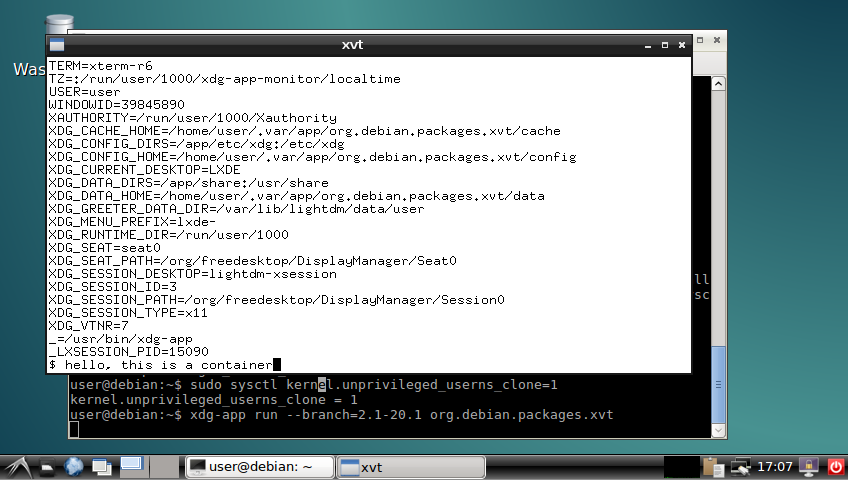
The obligatory screenshot OK, good, now we can install it:
$ xdg-app install --user local org.debian.Debootstrap 8.20160130
$ xdg-app install --user local org.debian.packages.xvt 2.1-20.1
$ xdg-app run --branch=2.1-20.1 org.debian.packages.xvt
xvt in a container and you can play around with the shell in the xvt and see what you can and can't do in the container. I'm sure there were better ways to do most of this, but I think there's value in having such a simplistic demo to go alongside the various GNOMEish apps.
Acknowledgements: Thanks to all those!

Lunar: Only allow outgoing connections through Tor

Using Tor helps take back control of what data one decides to share online. It also helps in avoiding surveillance from the local network (think of someone listening to the public Wi-Fi) or the Internet access provider. But it is easy to make mistakes: Tor Browser, the easiest and most common way to use Tor, is just a web browser. Extra special care is required to make other applications use Tor, and it is easy to forget to change settings, let alone actual attackers. That's why using Tails is often recommended as everything is preconfigured and it requires traffic to go through Tor by various means. Qubes or Whonix also have interesting properties, but require reinstalling systems and changing habits. Meanwhile, securing the network on an already installed system can help you feel better. A potential solution to prevent connections from leaking out without going through Tor is simply to prevent all connections from leaving the computer, except the ones going to the Tor network. This can quite easily be implemented by setting up an outgoing firewall. Using the default settings, a Tor client can potentially connect to any of the 2,000 Guard relays. While there are ways to get such a list and turn it into firewall rules, we are going to use an easier solution. Because the list of Tor relays is public, censors have often used it to prevent people from connecting to the Tor network. The Tor project came up with bridges as a work-around. Bridges are entry nodes in the Tor network. For public bridges, users can only get a few bridge addresses at a time, preventing an adversary from easily blocking them at all once. When configured to use a set of bridges, Tor will only connect to their addresses. This will make our firewall much shorter. The instructions that follow should work on Debian Jessie and later versions. Adapting them to other systems should not be too hard either. We assume that Tor Browser is already installed. As we will want other applications to use Tor than just the browser, we also want to install a system-wide instance:
# apt install tor
Next, visit bridges.torproject.org to request a set of bridges: BridgeDB landing page You then need to select the type of bridges. Tor standard protocol is easy to identify as such. The Tor project has developed pluggable transports to easily disguise the traffic, but using them is outside the scope for this documentation. So lets stay with the default type of bridges: BridgeDB bridge type selection After solving a CAPTCHA, you'll get a list of addresses and fingerprints for a couple of bridges like the following one: Example bridge list from BridgeDB (blurred to protect the actual bridges To tell Tor to use these bridges, edit /etc/tor/torrc, and at the end, add something like:
UseBridges 1
Bridge 109.XXX.XXX.XXX:4XXX 2244XXXXXXXXXXXXXXXXXXXXXXXXXXXXXXXXXXXX
Bridge 37.XXX.XXX.XXX:1XXXX 9CF0XXXXXXXXXXXXXXXXXXXXXXXXXXXXXXXXXXXX
Bridge 171.XXX.XXX.XXX:4XXX 7705XXXXXXXXXXXXXXXXXXXXXXXXXXXXXXXXXXXX
Replace the actual addresses and fingerprints by those you got earlier. Now reload the daemon and make sure that it still connects to the network:
# service tor reload
# tail -f /var/log/tor/log
Tor Browser also needs to be told to use these bridges. Open the onion menu close to the location bar, and select Tor Network Settings . Tor Browser  onion menu In there, tick My Internet Service Provider (ISP) blocks connections to the Tor network and paste the list of bridges below Enter custom bridges: Tor Browser Network Settings Before we restrict outgoing connections to only use the Tor network, lets configure APT to use Tor as well so we can continue installing and upgrading packages in the future:
# apt install apt-transport-tor
The following command will reconfigure APT to use Tor to access the currently configured package repositories. It basically takes care of replacing every http:// by tor+http://:
# sed -e 's/^[^#]*\(deb\(-src\)\?\W\+\)http/\1tor+http/' -i /etc/apt/sources.list /etc/apt/sources.list.d/*.list
Lets see if it still works:
# apt update
One last thing: sometimes, we still need to bypass our restrictions and access the network directly. Some websites sadly deny access to Tor users, or we might need to login through a captive portal before being able to use a random network. To make it practical, we are going to create a new user account. This will enable us to use the desktop user switching capabilities to start a new browser or sudo for command line applications. In this example, the user is going to be named passthrough:
# adduser passthrough
Make sure to set a proper password! Now lets configure the firewall. Here we are going to use ferm which makes it fairly easy to do low-level firewall rule in a readable manner:
# apt install ferm
We want the firewall to be started at boot time. Now edit its configuration in /etc/ferm/ferm.conf. At the end, add:
# Let's block everything for both IPv4 and IPv6, except to localhost,
# already established connections and the special 'passthrough' user.
domain (ip ip6) chain OUTPUT  
    policy DROP;
    outerface lo ACCEPT;
    proto icmp ACCEPT;
    mod state state (ESTABLISHED RELATED) ACCEPT;
    mod owner uid-owner "passthrough" ACCEPT;
 
# Now for IPv4, we want to restrict output to configured Tor bridges
domain ip chain OUTPUT  
    # Don't break network autoconfiguration
    mod owner uid-owner 0 proto udp dport bootps ACCEPT;
    # Allow bridges defined in torrc by getting them directly
    # from the configuration file.
    @include "sed -n -e 's/^Bridge \([^ ]* \)\?\([0-9.]*\):\([0-9]*\).*/daddr \2 proto tcp dport \3 ACCEPT;/p' /etc/tor/torrc  ";
 
# Let's REJECT everything else so we get notice instead of timeouts
domain (ip ip6) chain OUTPUT REJECT;
Reload the firewall through:
# service ferm reload
Lets do some tests:
# ping check.torproject.org
  ping: unknown host check.torproject.org
# tor-resolve check.torproject.org
  38.229.72.22
# ping 38.229.72.22
  From 192.168.7.234 icmp_seq=1 Destination Port Unreachable
# curl https://check.torproject.org/
  curl: (6) Could not resolve host: check.torproject.org
# curl -I https://38.229.72.22/
  curl: (7) Failed to connect to 38.229.72.22 port 443: Connection refused
# curl --socks5 127.0.0.1:9050 https://check.torproject.org/
  curl: (6) Could not resolve host: check.torproject.org
# curl --silent --socks5-hostname 127.0.0.1:9050 https://check.torproject.org/   grep Congratulations
  Congratulations. This browser is configured to use Tor.
# sudo -u passthrough ping -c 1 check.torproject.org
  64 bytes from sergii.torproject.org (38.229.72.22): icmp_seq=1 ttl=54 time=148 ms
# sudo -u passthrough curl --silent https://check.torproject.org/   grep Sorry
  Sorry. You are not using Tor.
One last thing to complete the setup: for command line applications like SSH, torsocks does wonders. Just prefix your usual commands by torsocks and they should work:
# apt install torsocks
# torsocks curl --silent https://check.torproject.org/   grep Congratulations
  Congratulations. This browser is configured to use Tor.
All set! In case you ever need to turn it all off, just ask ferm to reconfigure the firewall:
# service ferm stop
But don't forget to turn it back on later!
# service ferm start
Ideally, we would have a way to automatically configure a different set of bridges for each network we connect to make it more difficult to trace the computer from network to network. But there's quite some more work to be done on various levels before that can be done in an integrated manner (torshiftchange and tordyguards are promising options). Meanwhile, be aware that you might want to keep a fresh set of bridges handy to configure them after leaving for a trip. Another downside of the setup currently is that it doesn't allow for network time synchronization. That might make the system fingerprintable by using its clock drift. To use obfs4 bridges which helps defeating censored networks, you will need two extra steps. First, install the required software:
# apt install obfs4proxy
Then add the following extra line to /etc/tor/torrc:
ClientTransportPlugin obfs2,obfs3,obfs4,scramblesuit exec /usr/bin/obfs4proxy
You can then request obfs4 bridges from BridgeDB. These changes are only required for the system-wide Tor daemon, as Tor Browser comes with obs4proxy preconfigured. Kudos to Micah for proofreading this article.

Neil McGovern: On ZFS in Debian

shutterstock_366995438I m currently over at FOSDEM, and have been asked by a couple of people about the state of ZFS and Debian. So, I thought I d give a quick post to explain what Debian s current plan is (which has come together with a lot of discussion with the FTP Masters and others around what we should do). TLDR: It s going in contrib, as a source only dkms module. Longer version: Debian has always prided itself in providing the unequivocally correct solution to our users and downstream distributions. This also includes licenses we make sure that Debian will contain 100% free software. This means that if you install Debian, you are guaranteed freedoms offered under the DFSG and our social contract. Now, this is where ZFS on Linux gets tricky. ZFS is licensed under the CDDL, and the Linux kernel under the GPLv2-only. The project views that both of these are free software licenses, but they re incompatible with each other. This incompatibility means that there is risk to producing a combined work with Linux and a CDDL module. (Note: there is arguments about if a kernel module, once loaded, is a combined work with the kernel. I m not touching that with a barge pole, as I Am Not A Lawyer.) Now, does this mean that Debian would get sued by distributing ZFS natively compiled into the kernel? Well, maybe, but I think it s a bit unlikely. This doesn t mean it s the right choice for Debian to take as a project though! It brings us back to our promise to our users, and our commercial and non-commercial downstream distributions. If a commercial downstream distribution took the next release of stable, and used our binaries, they may well get sued if they have enough money to make it worthwhile. Additionally, Debian has always taken its commitment to upstream licenses very seriously. If there s a doubt, it doesn t go in official Debian. It should be noted that ZFS is something that is important to a lot of Debian users, who all want to be able to use ZFS in a manner that makes it easier for them to install. Thus, the position that we ve arrived at is that we can ship ZFS as a source only, DKMS module. This means it will be built on the target machines, and we re not distributing binaries. There s also a warning in the README.Debian file explaining that care should be taken if you do things with the resultant binary as we can t promise it complies with the licenses. Finally, I should point out that this isn t my decision in the end. The contents of the archive is a decision for the FTP-Masters, as it s delegated. However, what I have been able to do is coordinate many conflicting views, and I hope that ZFS will be accepted into the archive soon!

B lint R czey: Progress report on hardened1-linux-amd64, a potential Debian port with PIE, ASAN, UBSAN and more

It was more that one and a half years ago when I proposed creating a new security &QA focused port for Debian and now I m happy to share the first bits of it. Last year I started the bootstrapping during the holidays and I now have the prototype in the form of cross built packages which can be installed next to amd64 packages using multiarch. The aim of creating the port is still the same, letting people mix fast (amd64) and reasonably hardened (hardened1-linux-amd64) packages on the same system. You can already try the cross-built packages in an amd64 unstable chroot, but be warned that the packages are not stable yet. In the following session I tested curl which seems to be working OK, and groff, which seems to be too buggy even for debugging:
debootstrap --arch=amd64 unstable test-hardened1
# mount /proc for ASAN
mount --bind /proc test-hardened1/proc
chroot test-hardened1/
apt-get install debian-keyring
# this is my key, I'll create one dedicated release key later
gpg --keyring /usr/share/keyrings/debian-keyring.gpg -a --export 0x21E764DF   apt-key add -
echo "deb http://hardened1-debian.s3.amazonaws.com/debian-cross-built hardened1-unstable main" >> \
/etc/apt/sources.list
apt-get update
# update apt and dpkg to versions handling the new port
apt-get upgrade
apt-get update
dpkg --add-architecture hardened1-linux-amd64
apt-get update
apt-get install curl:hardened1-linux-amd64
curl -s https://www.debian.org   tail -n2
</body>
</html>
apt-get install -t hardened1-unstable groff:hardened1-linux-amd64
groff
ASAN:SIGSEGV
=================================================================
==20642==ERROR: AddressSanitizer: SEGV on unknown address 0x000000000000 (pc 0x7f79cd84698a bp 0x619000006980 sp 0x7ffe89b3a930 T0)
ASAN:SIGSEGV
==20642==AddressSanitizer: while reporting a bug found another one. Ignoring.
The next steps are finalizing the changes to apt, dpkg, GCC, glibc and other packages, rebuilding all packages in hardened1-linux-amd64 sbuild chroots and building the rest of the archive.
Some of the patches are not submitted yet but they are available in a temporary fork of rebootstrap
I hope I ll be back soon with the recompiled and finalized packages, but until then feel free to try the cross-compiled ones! Patches fixing crashes are always welcome! :-) update 1: Some packages like dpkg-dev are not installable, I m working on them.
update 2: There is one similar project I know of which aims creating an address sanitized Gentoo variant and Hanno B ck will give a presentation about that at FOSDEM.

Next.

Previous.