Search Results: "tar"

10 July 2012

Gerfried Fuchs: Mermaids Reloaded

It's almost seven years now since I wrote/published Mermaids. It was an important step in my life, confessing publicly what I've found out about myself, how I feel and identify myself. It definitely has been a certain turning point in my life. A year later, there was the Debconf6 in Mexico, which was just as important. I was wearing a skirt for the first time, and that for the whole duration of the two weeks. It was an enormous feeling of freedom, and I knew I was feeling at home. That was also the time I shaved off my beard. And since? Well, I sort of limited myself to these two weeks every year. Debconf is my haven, Debconf is my home. Here I allow myself to be myself. Debian is my family. And like in every family, there are people who won't understand, but that doesn't matter. I feel comfortable to express myself in this crowd in the way I feel. Being abroad seems to help with the confidence, and it seems like it also shines through. I haven't had lots of strange looks. To the contrary, when I went with a skirt to a homosexual acceptance event at home in Vienna, there was a group of gays who were pointing and laughing. Quite an interesting experience, one would assume that people who are wanting more acceptance would be more acceptable and tolerant themselves... But, I don't think I will ever take the step toward actually turning my body into a female one. It was an important step for me to find out about my inner self, and it actually managed to make me accept my male body; even though I can totally relate to people not being able to understand this both people not in the situation and people being in the situation and needing the physical adjustment to be able to be happy again. But this is what and how I am: Contents may vary from packaging. This though has an inherited problem: as I am not (usually) heading for a female appearance (besides my skirt during Debconf), people keep addressing me with a male pronoun, even, or rather especially when using my nick Rhonda. This is something that I consider a fair bit disturbing, especially when it comes from people that I consider to address with the term friends. One would assume that people who you share a fair bit of private life with would be the ones who can understand and relate better than others. But that's where we are, and I also can understand the troubles: I'm not giving them much visual help for fixing their thoughts. I found the confidence in my body, and like most of you know, I have a son I dearly love (and miss like hell these two weeks), so I know how to use the tools it comes with, frankly spoken. But I won't go the road to adjust my body to be a female one instead, just to convince people that I really am the female person that I identify as. It might be hard for you to understand that, it might be hard for you to accept it it is also hard for me, to fight for the acceptance that I thought are an inherent part of the term friendship. I have deepest respect for the people who feel the requirement and have the strength to adjust their body to their mind. It though just isn't the road for me. I already have enough uncertainties in my life to cope with, and I don't need another one to deal with, related to that I might not be able to accept my body after the transition than I am able to accept it now. It's just not important enough for me to find my place. My place is here, my home is Debconf.

/personal permanent link Comments: 4 Flattr this

Keith Packard: hotplug-displaylink

Getting Hotplugging working with a DisplayLink USB to DVI adapter I merged Dave Airlie s randr provider patches to the server and pushed them out in preparation for freezing the X server for the version 1.13 release. Before freezing, I figured I should at least test hotplugging my DisplayLink adapter. Well, that took all day Sources For the impatient, here s where all of the bits are. These work on my machine. Upstream bits:
  1. randrproto. git://anongit.freedesktop.org/git/xorg/proto/randrproto master
Bits from Dave Airlie s trees:
  1. libdrm. git://people.freedesktop.org/~airlied/drm.git prime
  2. libXrandr. git://people.freedesktop.org/~airlied/libXrandr.git prime
  3. xrandr. git://people.freedesktop.org/~airlied/xrandr.git prime
  4. xf86-video-intel. git://people.freedesktop.org/~airlied/xf86-video-intel prime
Bits from my trees:
  1. xf86-video-modesetting. git://people.freedesktop.org/~keithp/xf86-video-modesetting prime
  2. kernel. git://people.freedesktop.org/~keithp/linux prime
  3. X server. git://people.freedesktop.org/~keithp/xserver master
Kernel adventures The 3.5-rc6 bits have all of the necessary driver changes to support DisplayLink hot-plug. At least, they do if you re not running 32-bit user space atop a 64-bit kernel. If you are, then most of the DRM drivers don t work at all they re missing the .compat_ioctl entry in the file_operations structure, which makes all ioctl calls return -ENOTTY. In particular, the udl driver is missing this entry, so when you plug in the device, the server tries to talk to it and nothing works. X server adventures Once I got the kernel working, I discovered some nice crashing behaviour in the X server. If I started the server with the DisplayLink device plugged in, as soon as I tried to enable the output, the server would segfault. Turns out this cases requires special code in the server to ensure that the DisplayLink screen privates are adjust correctly while the intel driver loads. Modesetting driver fixup The modesetting driver was missing a rename that happened to a structure member in the last couple of days. I d bet Dave has the same patch sitting on a disk somewhere. xrandr changes The command line additions to xrandr are sufficient to get this stuff working, but I think it could use some improvements to make the interface a bit friendlier. In particular, requiring you to use XIDs to identify providers is a bit harsh. Schedules I ll be pushing the X server changes out this evening; review would be appreciated, but I don t think any of the patches I made there are scary. I sent the kernel patches necessary to lkml, but with Dave in transit, I m not sure who is minding the store. As for the rest of the bits, they re sitting in Dave s repositories, presumably they ll get pushed upstream soon. But, does it actually work? Almost. Everything says it s working, but I m not getting any signal to my DVI monitor. My DisplayLink device is ancient, and the kernel complains about it, saying
[drm:udl_parse_vendor_descriptor] *ERROR* Unrecognized vendor firmware descriptor".
So close, and yet

9 July 2012

Arnaud Quette: Hello Planet Debian

Hey fellows Debian lovers, and old friends reading this, after more than a decade serving Debian, our greatest and beloved OS, I've finally decided to start blogging. Please, bear with me, I'm still very new at blogging. Thus, constructive comments and mails are welcome ;-) So here we actually go with the usual 'quick introduction post': I'm Arnaud Quette, 36 years old, and Debian developer since 2001. I'm leading the upstream project called 'NUT' (Network UPS Tools project) since 2005, and I'm a Free Software hacker since 1997 (incomplete list of contribs and linkedIn profile). I'm working at Eaton, a Debian partner participating in the power protection of our Debian infrastructure (FTP masters and Alioth). If you're a Debian admin, and feel Eaton can help, drop me a mail. My main Opensource contribution, for some years, is to lead 'NUT', and the related power management developments and distribution. As such, I also ensure that all this work lands finely in Debian, and is useful and reliable to users. In the past, I've also been working on some Media Center packages (Coherence UPnP, moovida, LIRC, ...), Synaptics touchpads app and some more. Here is the current list of maintained and co-maintained packages, though not up to date. It's not always that easy to balance between upstream lead and the numerous developments on one hand, and Debian packaging and support on the other hand... Not counting real life and the many others responsibilities I have. Just forgive me for the time it has taken (and is still taking, sometimes) to update my various packages. Just remember that I'm always doing my best :-) So dear Planet Debian readers, I'll be bothering you with some news on power management and GreenIT in Debian. There will be both upstream and Debian developments and releases info, so that you all can react. There may probably be some diversion, on other Debian related topics, one way or another... All this will depend on your feedback, and the balance with my available time and pleasure to share with you these few tech bits. cheers,
Arnaud

Julien Danjou: Logitech K750 keyboard and Unifying Receiver Linux support

A year ago, I bought a Logitech Wireless Solar Keyboard K750. I'm particularly picky on keyboards, but this one is good. It has an incredible useful feature: while being wireless, it has no need for disposable or rechargeable batteries, it uses solar power! Logitech Wireless Solar Keyboard K750 My problem is that there's obviously no way to know the battery status from Linux, the provided application only working on Windows. And one dark night, while fragging on QuakeLive, my keyboard stopped working: it had no battery left. This activity being quite energy consuming, it emptied the whole battery. Someone should write code to get the battery status and light meter from Linux: challenge accepted! How the keyboard works Logitech Unifying Receiver This keyboard, like many of the new wireless devices from Logitech, uses the Unifying interface. It's an USB receiver that can be attached up to 6 differents devices (mouse, keyboards ). On old Linux kernel, the Unifying receiver is recognized as only one keyboard and/or one mouse device. Recently, a driver called hid-logitech-dj has been added to the Linux kernel. With this driver, each device attached to the receiver is recognized as one different device. What the Logitech application does Logitech Solar App The Logitech application under Windows works that way: you launch it, and it displays the battery charge level. On the keyboard, there's a special "light" button (up right). When pressed, a LED will light up on the keyboard: green if the keyboard is receiving enough light and is charging, red if the keyboard does not receive enough light and is therefore discharging. Pushing this same button while the application is running will makes the light meter activated: the application will tell you how much lux your keyboard is receiving. Let's reverse engineer this As far as I know, there's nothing in the USB HID protocol that handles this kind of functionality (battery status, light meter ) in a standard way. So the first task to accomplish is, unfortunately, to reverse engineer the program. I discovered a bit too late that Drew Fisher did a good presentation on USB reverse engineering at 28c3. You might want to take a look at it if you want to reverse engineer on USB. I did not need it, but I learned a few things. Anyway, my plan was the following: run the Logitech application inside a virtual machine running Windows, give it direct access to the USB keyboard, and sniff what happens on the USB wire. To achieve that, you need a virtual machine emulator that can do USB pass-through. Both KVM and VirtualBox can do that, but VirtualBox works much better with USB and allow hot(un)plugging of devices, so I used it. To sniff what happens on the USB, you need to load the usbmon Linux kernel module. Simply doing modprobe usbmon will work. You can then use Wireshark which know how to use usbmon devices and understand the USB protocol. USB stuff you need to know You don't need to know much about USB to understand what I'll write about below, but for the sake of comprehensibility I'll write a couple of things here before jumping in. To communicate with an USB device, we communicate with one of its endpoints. Endpoints are regrouped into an interface. Interfaces are regrouped into a configuration. A device might contains one or several configurations. There's also several types of packets in the USB wire protocol, and at least two of them interest us there, they are: All of this and more is well (and better) explained in the chapter 13 of Linux Device Drivers, Third Edition. Sniffed data Once everything was set-up, I ran my beloved Wireshark. There's a an URB of type interrupt sent each time you press any key with some data in it. Therefore I advise you to plug another keyboard (or use the laptop keyboard if you're doing this on a laptop), otherwise you'll get crazy trying to sniff the keyboard you're typing on. At this point, just launching the application does a bunch of USB traffic. Pressing the "light" button on the keyboard makes even more USB packets coming in and out. Here's the interesting packets that I noticed once I excluded the noise: With all this, the next step was clear: understand the packets and reproduce that exchange under Linux. What the packets mean The "go for the light meter" packet The packet sent from the computer to the keyboard is the following. <figure>
Frame 17: 71 bytes on wire (568 bits), 71 bytes captured (568 bits)
    Frame Length: 71 bytes (568 bits)
    Capture Length: 71 bytes (568 bits)
USB URB
    URB id: 0xffff880161997240
    URB type: URB_SUBMIT ('S')
    URB transfer type: URB_CONTROL (0x02)
    Endpoint: 0x00, Direction: OUT
        0... .... = Direction: OUT (0)
        .000 0000 = Endpoint value: 0
    Device: 6
    URB bus id: 1
    Device setup request: relevant (0)
    Data: present (0)
    URB sec: 1340124450
    URB usec: 495643
    URB status: Operation now in progress (-EINPROGRESS) (-115)
    URB length [bytes]: 7
    Data length [bytes]: 7
    [Response in: 18]
    [bInterfaceClass: HID (0x03)]
    URB setup
        bmRequestType: 0x21
            0... .... = Direction: Host-to-device
            .01. .... = Type: Class (0x01)
            ...0 0001 = Recipient: Interface (0x01)
    bRequest: SET_REPORT (0x09)
    wValue: 0x0210
        ReportID: 16
        ReportType: Output (2)
    wIndex: 2
    wLength: 7
0000  40 72 99 61 01 88 ff ff 53 02 00 06 01 00 00 00   @r.a....S.......
0010  22 ad e0 4f 00 00 00 00 1b 90 07 00 8d ff ff ff   "..O............
0020  07 00 00 00 07 00 00 00 21 09 10 02 02 00 07 00   ........!.......
0030  00 00 00 00 00 00 00 00 00 00 00 00 00 00 00 00   ................
0040  10 01 09 03 78 01 00                              ....x..
</figure> What's here interesting is the last part representing the data. wLength says that the length of the data is 7 bytes, so let's take a look at those 7 bytes: 10 01 09 03 78 01 00. Well, actually, you can't decode them like that, unless you're a freak or a Logitech engineer. And I have actually no idea what they mean. But sending this to the keyboard will trigger an interesting thing: the keyboard will start sending URB interrupt with some data without you pressing any more key. The "light meter and battery values" packet This is most interesting packet. This is the one sent by the keyboard to the host and that contains the data we want to retrieve. <figure>
Frame 1467: 84 bytes on wire (672 bits), 84 bytes captured (672 bits)
    Frame Length: 84 bytes (672 bits)
    Capture Length: 84 bytes (672 bits)
USB URB
    URB id: 0xffff88010c43c380
    URB type: URB_COMPLETE ('C')
    URB transfer type: URB_INTERRUPT (0x01)
    Endpoint: 0x83, Direction: IN
        1... .... = Direction: IN (1)
        .000 0011 = Endpoint value: 3
    Device: 2
    URB bus id: 6
    Device setup request: not relevant ('-')
    Data: present (0)
    URB sec: 1334953309
    URB usec: 728740
    URB status: Success (0)
    URB length [bytes]: 20
    Data length [bytes]: 20
    [Request in: 1466]
    [Time from request: 0.992374000 seconds]
    [bInterfaceClass: Unknown (0xffff)]
Leftover Capture Data: 1102091039000c061d474f4f4400000000000000
0000  80 c3 43 0c 01 88 ff ff 43 01 83 02 06 00 2d 00   ..C.....C.....-.
0010  5d c5 91 4f 00 00 00 00 a4 1e 0b 00 00 00 00 00   ]..O............
0020  14 00 00 00 14 00 00 00 00 00 00 00 00 00 00 00   ................
0030  02 00 00 00 00 00 00 00 00 02 00 00 00 00 00 00   ................
0040  11 02 09 10 39 00 0c 06 1d 47 4f 4f 44 00 00 00   ....9....GOOD...
0050  00 00 00 00                                       ....
</figure> This packets come in regularly (1 per second) on the wire for some time once you sent the "go for the light meter" packet. At one point they are emitted less often and do not contain the value for the light meter anymore, suggesting that the control packet sent earlier triggers the activation of the light meter for a defined period. Now you probably wonder where the data are in this. They're in the 20 bytes leftover in the capture data part, indicated by Wireshark, at the end of the packet: 11 02 09 10 39 00 0c 06 1d 47 4f 4f 44 00 00 00 00 00 00 00. Fortunately, it was easy to decode. Knowing we're looking for 2 values (battery charge and light meter), we just need to observe and compare the packet emitted on the wire with the values displayed by the Logitech Solar App. To achieve this, I looked both at the Logitech Solar App and Wireshark while bringing more and more light near the keyboard, increasing the lux value received by the meter on the Solar App, and saw that the fields represented in blue (see below) where changing in Wireshark. Since 2 bytes were changing, I guessed that it was coded on 16 bits, and therefore it was easy to correlate the value with the Solar App. <figure>
[ ....9....GOOD....... ]
11 02 09 10 39 00 0c 06 1d 47 4f 4f 44 00 00 00 00 00 00 00
4 bytes - 1 byte for battery charge - 2 bytes for light meter - 2 bytes - 4 bytes for GOOD - 7 bytes
</figure> In this example, the battery has a charge of 0x39 = 57 % and the light meter receives 0x0c = 12 lux of light. It's basically dark, and that makes sense: it was night and the light was off in my office, the only light being the one coming from my screen. I've no idea what the GOOD part of the packet is about, but it's present in every packet and it's actually very handy to recognize such a packet. Therefore I'm considering this as some sort of useful mark for now. For the other bytes, they were always the same (0x11 0x2 0x9 0x10 at the beginning, 7 times 0x00 at the end). The 2 bytes between the light meter and GOOD probably mean something, but I've no idea what for now. Building our solar app Now we've enough information to build our own very basic solar application. We know how to triggers the light meter, and we know how to decode the packets. We're going to write a small application using libusb. Here's a quick example. It's not perfect and does not check for error codes, be careful. <figure>
/* Written by Julien Danjou <julien> in 2012 */
#include <linux/hid.h>
#include <libusb.h>
#include <stdio.h>
#include <stdlib.h>
#include <string.h>
int main(void)
 
    libusb_context *ctx;
    libusb_init(&ctx);
    libusb_set_debug(ctx, 3);
    /* Look at the keyboard based on vendor and device id */
    libusb_device_handle *device_handle = libusb_open_device_with_vid_pid(ctx, 0x046d, 0xc52b);
    fprintf(stderr, "Found keyboard 0x%p\n", device_handle);
    libusb_device *device = libusb_get_device(device_handle);
    struct libusb_device_descriptor desc;
    libusb_get_device_descriptor(device, &desc);
    for(uint8_t config_index = 0; config_index < desc.bNumConfigurations; config_index++)
     
        struct libusb_config_descriptor *config;
        libusb_get_config_descriptor(device, config_index, &config);
        /* We know we want interface 2 */
        int iface_index = 2;
        const struct libusb_interface *iface = &config->interface[iface_index];
        for (int altsetting_index = 0; altsetting_index < iface->num_altsetting; altsetting_index++)
         
            const struct libusb_interface_descriptor *iface_desc = &iface->altsetting[al>tsetting_index];
            if (iface_desc->bInterfaceClass == LIBUSB_CLASS_HID)
             
                libusb_detach_kernel_driver(device_handle, iface_index);
                libusb_claim_interface(device_handle, iface_index);
                unsigned char ret[65535];
                unsigned char payload[] = "\x10\x02\x09\x03\x78\x01\x00";
                if(libusb_control_transfer(device_handle,
                                           LIBUSB_REQUEST_TYPE_CLASS   LIBUSB_RECIPIENT_INTERFACE,
                                           HID_REQ_SET_REPORT,
                                           0x0210, iface_index, payload, sizeof(payload) - 1, 10000))
                 
                    int actual_length = 0;
                    while(actual_length != 20   strncmp((const char *) &ret[9], "GOOD", 4))
                        libusb_interrupt_transfer(device_handle,
                                                  iface_desc->endpoint[0].bEndpointAddress,
                                                  ret, sizeof(ret), &actual_length, 100000);
                    uint16_t lux = ret[5] << 8   ret[6];
                    fprintf(stderr, "Charge: %d %%\nLight: %d lux\n", ret[4], lux);
                 
                libusb_release_interface(device_handle, iface_index);
                libusb_attach_kernel_driver(device_handle, iface_index);


    libusb_close(device_handle);
    libusb_exit(ctx);
 
</figure> What the program is doing is the following: This gives the following:
Found keyboard 0x0x24ec8e0
Charge: 64 %
Light: 21 lux
Challenge accomplished! To be continued Unfortunately, this approach has at least one major drawback. We have to disconnect the Logitech Unifying Receiver from the kernel. That means that while we're waiting for the packet, we're dropping packets corresponding to other events from every connected device (key presses, pointer motions ). In order to solve that, I sent a request for help on the linux-input mailing list. That way, I learned that Logitech is actually using the HID++ protocol to communicate with the devices using the Unifying Receiver. Lars-Dominik Braun managed to get the HID++ specifications from Logitech and published them with their authorization. This opens a whole new world. With that document, I may be able to understand the part I reverse engineered and convert this to a more useful and generic library using the hidraw interface (so we don't have to disconnect the devices from the kernel driver).

Russell Coker: Breaking SATA Connectors

I ve just broken my second SATA connector. This isn t a lot considering the number of hard drives I ve worked with, but it s still really annoying as I generally don t break things. The problem is that unplugging a SATA cable requires pushing a little clip, this isn t overly difficult but it unfortunately doesn t fit well with habits formed from previous hardware. The power cables used for hard drives based on the ST-506 interface which was copied for the IDE interface was large and had a fairly tight fit. Removing such a cable requires a significant amount of force which is about the same as the amount of force required to break a SATA connector. When I first started using PCs a reasonably configured AT system cost over $5,000 (maybe something like $10,000 in today s money). With that sort of price hardly anyone had a set of test PCs. When hardware prices dropped such that hard drives of reasonable size became reasonably affordable on the second-hand market I bought more disks and used some for extra storage and some for testing software. As there was nothing like VMWare for testing OS images the way to test a new OS was to plug in a different hard drive and boot it. So I got a lot of practice at removing IDE power cables with as much force as was necessary. Now I own a pile of test PCs, SATA disks less than 100G are free, I use Xen for a lot of my testing, and generally I have much less need to swap hard drives around. In most situations in which I would swap hard drives in the 90 s I will now swap PCs and I have piles of PCs ready for this purpose. So I haven t had enough practice with SATA disks to develop habits for safely removing them. So far this lack of habit development has resulted in damaging two disks due to changing drives while not concentrating enough. Fortunately duct-tape works well for holding a SATA connector in place when the plastic that attaches to the clip is broken. Related posts:
  1. Strange SATA Disk Performance Below is a GNUPlot graph of ZCAV output from a...
  2. Vibration and Strange SATA Performance Almost two years ago I blogged about a strange performance...
  3. Dell PowerEdge T105 Today I received a Dell PowerEDGE T105 for use by...

Joey Hess: debian-cd work at DebCamp

I've been working the past two days on debian-cd, which was the main thing (besides git-annex assistant) I planned to work on at DebCamp. Yesterday, Steve McIntyre and I cleaned up some cruft in debian-cd's package lists. This freed somewhere in the area of 30 mb. I also took a grep through d-i and made sure the CDs include packages that d-i can optionally install in some situations. Today, I investigated how Recommends are ordered on the CD, and concluded it's as close to optimal as can be easily achieved. So was not able to save space there, but I did find a way to reorganize the desktop task that avoids needing to include a lot of printing stuff and some other stuff on the first CD. While that helped some, it still didn't get either Gnome or Kde to entirely fit, so getting there will probably involve rebuilding 100 or so packages with xz, if someone decides to do that. So it's stil TBD whether Gnome or Kde will fit on a single CD in Debian wheezy. At this point I think most of us are getting tired of fighting this increasingly losing battle every release, and so other options like only having a desktop DVD are looking more appealing, as they solve the problem long-term. This would also free up the first CD for other interesting use cases, perhaps xfce, or perhaps a CD targeted at server users, and/or containing high-popularity non-desktop packages.

John Goerzen: Decisions on Listening to Music

A couple of days ago, I commented about my thoughts on finding a better way to listen to music, and asked for suggestions. I ve checked out the avenues suggested, and here are my thoughts so far. Streaming service: Spotify Of the streaming service offerings, Spotify seems the most compelling. It has both Linux and Android clients. The Linux client is unofficial and a bit buggy, but serviceable. The service is fairly nice, and the serendipity of listening to radio of tracks like any track or artist I may pick is an incredible feature. It will mean a different mindset; rather than carefully choosing what I buy, I have a vast catalog at my fingertips. I d have to give up some control, but might be better off for it. Spotify can play local files, but sadly lacks support for FLAC that most of my collection is in. A little work with the shell, and I had a quick multi-core FLAC to MP3 conversion done. It can also identify local files and match them up with its catalog, but it does a somewhat poor job of it, despite the fact that my files are tagged by Musicbrainz. There are also a fair number of albums in my collection (from Magnatune and from local artists) that aren t in Spotify s catalog and probably never will be. I may wind up using git-annex or something like it to sync them between PCs. Surprisingly, it doesn t have any kind of web-based player available. It has a lot of features, but many of them are under-documented. Subsonic / Supersonic The idea of being able to stream music anywhere certainly has appeal, and the idea of streaming that music from my own machine my own collection is quite the appealing one. Subsonic seems to be the standard that people recommend for this. It has a web-based player that works well, as well as mobile clients for various platforms. The Android mobile client is particularly well-regarded and is probably the best one here, aside from Spotify. The playlists work well, as expected, and generally it has the appearance of a well-rounded system. There is a lot of flexibility in bitrates; maximum bitrates can be set per-user and per-client. It, of course, transcodes on the fly. My chief gripe about Subsonic is that it has no true album/artist/genre browser. Its main browser is mostly a filesystem browser. I have used clients that show album/artist/genre panes or sortable lists, based on tags, for so long that my filesystem organization is rather different centered around bitrate of rip, origin, etc. It is not very easy to navigate my collection in that way. The search feature can search artist and album, and this can partially make up for it. But there is simply no way to see a list of all artists in the collection. The server is written in Java, and takes up 362MB at startup. That s, I guess, decent for a Java server, but doesn t make me pleased as I d be running it on lower-end hardware. Supersonic is a git-maintained actively synced subsonic fork which removes the license cost (the source is GPL3 anyhow so that wasn t a big deal). Ampache Often mentioned in the same breath as Subsonic, this is yet another frequent suggestion for streaming your own collection. Its primary player is web-based, like Subsonic. It has full artist/genre browsers, and adds tag cloud and various other options as well by default, it loaded the tag cloud with my genre tags, which was a nice touch. The search feature is a little less robust, as it simply searches anywhere and returns a list of all matching tracks, rather than listing matching albums and artists before going into the list of all tracks. But that is somewhat of a minor nit. Ampache s web-based player, liks Subsonic s, uses Flash, but the implementation is really quite awkward. You can t simply click a play button and have playback start. Rather, you must add things to the playlist (queue), a frame on the web interface. Then, you must click play in THAT frame, which launches a new window for the player and transfers its contents to it. You thus have two separate running playlists. And if you think you can just add to the playlist of the player window, think again; you can only replace it. It is simply not possible to add a track to the end of that list without losing your existing place. This makes the usefulness of the web-based player rather, well, low. Playlist functionality in Ampache is rather odd. You can have playlists, but if you want to add a track to a saved playlist, first you have to clear you current playlist, then add the track to it, then save it to the existing playlist. Frontends for Ampache exist in banshee and in amarok. Banshee s is broken, and simply silently fails to do anything. Unless you look in the console, in which case you ll see a .NET backtrace. Banshee has had these mysterious errors for me for years. The Amarok plugin is so basic that you can browse by artist but not by album, and is almost unusable. There is also a rhythmbox plugin in Debian, but it is apparently for an old version of Rhythmbox and no longer works. The best frontend is a dedicated Ampache frontend called Viridian. It has a nice interface, provides features such as taskbar integration, and generally works pretty well. The only thing it s bad at is playlists, and here it s even worse than the web interface. It doesn t support modifying the server-side playlists at all. And accessing one is an annoying load playlist operation, that replaces your current play queue (also called the playlist ) with its contents by default. Several Android clients exist for Ampache, though it seems only one has seen any updates since 2010. mpd This is an interesting program, as it is designed more to provide multiple points of control for a single player than it is to stream a single collection to multiple devices. Nevertheless, I tested its HTTP and icecast stream modules. (It can also stream with PulseAudio, but PulseAudio causes devious breakage on my workstation, so I refuse to bother.) This could be made to work reasonably well on my LAN using the gmpc client. There are several Android clients as well, though none of them integrate as well as Subsonic or Spotify. Most seem focused on controlling a remote player. The ones that do stream do so with some hiccups, and don t integrate controls with the lock screen. gmpc is a reasonable control program and, combined with mplayer, makes a decent player. It can browse the database every way I d want to. It doesn t let me right-click on tracks to add them to playlists, but I can use copy/paste to do so, or add them to the play queue and from there to a playlist. It s annoying, but not completely unworkable. But here s the real concern. mpd has no provision whatsoever for any sort of encryption such as SSL. If I want to be listening to my music collection from on the road, I don t really wish to open up a streaming music service for the entire Internet. Nor do I really want to mess with SSH tunnels and the like, which are cumbersome on Android (and can be in general). This is pretty much a fatal flaw to me. Google Music An interesting service, but ultimately one I don t see the point for in my situation where I already have my music on a PC that is always on. It would probably accommodate my entire collection free, but how many weeks would it take me to get it there? And how would it stay in sync? It simply doesn t offer me any compelling advantage over streaming direct from my PC, so I don t see much need to bother with it. Others I briefly considered Streeme (poor mobile support), Audiogalaxy (no Linux support), Jinzora (appears dead), and Sockso (no mobile support). I also briefly considered other streaming services such as Pandora, Slacker, rdio, etc., but based on reviews didn t think that they were worth bothering with. Conclusions I m left mainly considering Spotify and Subsonic. For right now, I m going to try Spotify and see where that leads me, but may wind up getting back to Subsonic if I can t find tracks I want with Spotify.

8 July 2012

Petter Reinholdtsen: Debian Edu interview: George Bredberg

The Debian Edu / Skolelinux project have users all over the globe, but until recently we have not known about any users in Norway's neighbour country Sweden. This changed when George Bredberg showed up in March this year on the mailing list, asking interesting questions about how to adjust and scale the just released Debian Edu Wheezy setup to his liking. He granted me an interview, and I am happy to share his answers with you here. Who are you, and how do you spend your days? I'm a 44 year old country guy that have been working 12 years at the same school as 50% IT-manager and 50% Teacher. My educational background is fil.kand in history and religious beliefs, an exam as a "folkhighschool" teacher, that is, for teaching grownups. In Norwegian I believe it's called "Vuxenupplaring". I also have a master in "Technology and social change". So I'm not really a tech guy, I just like to study how humans and technology interact and that is my perspective when working with IT. How did you get in contact with the Skolelinux/Debian Edu project? I have followed the Skolelinux project for quite some time by now. Earlier I tested out the K12-LTSP project, which we used for some time, but I really like the idea of having a distribution aimed to be a complete solution for schools with necessary tools integrated. When K12-LTSP abandoned that idea some years ago, I started to look more seriously into Skolelinux instead. What do you see as the advantages of Skolelinux/Debian Edu? The big point of Skolelinux to me is that it is a complete distribution, ready to install. It has LDAP-support, MS Windows integration tools and so forth already configured, saving an administrator a lot of time and headache. We were using another Linux based thin-client system called Thinlinc, that has served us very well. But that Skolelinux is based on VNC and LTSP, to me, is better when it comes to the kind of multimedia used in schools. That is showing videos from Youtube or educational TV. It is also easier to mix thin clients with workstations, since the user settings will be the same. In our VNC-based solution you had to "beat around the bush" by setting up a second, hidden, home-directory for user settings for the workstations, because they will be different from the ones used on the thin clients. Skolelinux support for diskless workstations are very convenient since a school today often need to use a class room projector showing videos in full screen. That is easily done with a small integrated media computer running as a diskless workstation. You have only two installs to update and configure. One for the thin clients and one for the workstations. Also saving a lot of time. Our old system was also based on Redhat and CentOS. They are both very nice distributions, but they are sometimes painfully slow when it comes to updating multimedia support and multimedia programs (even such as Gimp), leaving us with a bit "oldish" applications. Debian is quicker to update. What do you see as the disadvantages of Skolelinux/Debian Edu? Debian is a bit too quick when it comes to updating. As an example we use old HP terminals as thinclients, and two times already this year (2012) the updates you get from the repositories has stopped sound from working with them. It's a kernel/ALSA issue. So you have to be more careful properly testing the updates before you run them in a production environment. This has never happened with CentOS. I also would like to be able to set my own domain-settings at install time. In Skolelinux they are kind of hard coded into the distribution, when it comes to LDAP and at least samba integration. That is more a cosmetic/translation issue, and not a real problem. Running MS Windows applications within the Skolelinux environment needs to be better supported. That is, running them seamlessly via RDP, and support for single-sign on. That will make the transition to free software easier, because you can keep the applications you really need. No support will make it impossible if you work in a school where some applications can't be open source. As for us we really need to run Adobe InDesign in our journalist classes. We run a journalist education, and is one of the very few non university ones that is ok:d by Svenska journalistf rbundet (Swedish journalist association). Our education gives the pupils the right of membership there, once they are done. This is important if you want to get a job. Adobe InDesign is the program most commonly used in newspapers and magazines. We used Quark Express before, but they seem to loose there market to Adobe. The only "equivalent" to InDesign in the opensource world is Scribus, and its not advanced enough. At least not according to the teacher. I think it would be possible to use it, because they are not supposed to learn a program, they are supposed to learn how to edit and compile a newspaper. But politically at our school we are not there yet. And Scribus lacks a lot of things you find i InDesign. We used even a windows program for sound editing when it comes to the radio-journalist part. The year to come we are going to try Audacity. That software has the same kind of limitations compared to Adobe Audition, but that teacher is a bit more open minded. We have tried Ardour also, but that instead is more like a music studio program, not intended for the kind of editing taking place in a radio studio. Its way to complex and the GUI is to scattered when you only want to cut, make pass-overs, add extra channels and normalise. Those things you can do in Audacity, but its not as easy as in Audition. You have to do more things manually with envelopes, and that is a bit old fashion and timewasting. Its also harder to cut and move sound from one channel to another, which is a thing that you do frequently because you often find yourself needing to rearrange parts of the sound file. So, I am not sure we will succeed in replacing even Audition, but we will try. The problem is the students have certain expectations when they start an education towards a profession. So the programs has to look and feel professional. Good thing with radio, there are many programs out there, that radio studios use, so its not as standardised as Newspaper editing. That means, it does not really matter what program they learn, because once they start working they still have to learn the program the studio uses, so instead focus has to be to learn the editing part without to much focus on a specific software. Which free software do you use daily? Myself I'm running Linux Mint, or Ubuntu these days. I use almost only open source software, and preferably Linux based. When it comes to most used applications its OpenOffice, and Firefox (of course ;) ) Which strategy do you believe is the right one to use to get schools to use free software? To get schools to use free software there has to be good open source software that are windows based, to ease the transition. But it's also very important that the multimedia support is working flawlessly. The problems with Youtube, Twitter, Facebook and whatever will create problems when it comes to both teachers and students. Economy are also important for schools, so using thin clients, as long as they have good multimedia support, is a very good idea. It's also important that the open source software works even for the administration. It's hard to convince the teachers to stick with open source, if the principal has to run Windows. It also creates a problem if some classes has to use Windows for there tasks, since that will create a difference in "status" between classes, so a good support for running windows applications via the thin client (Linux) desktop is essential. At least at our school, where we have mixed level of educations, from high-school to journalist-school. Update 2012-07-09 08:30: Paul Wise tipped me on IRC about three useful sources related to Free Software for radio stations: the LWN article Radio station management with Airtime, Airtime which claim to be a Free open source radio automation software and Rivendell which claim to be complete radio broadcast automation solution. All of them seem useful to the aspiring radio producer.

Dirk Eddelbuettel: New package RcppCNPy with release 0.1.0 (and 0.0.1 earlier last week)

A few days ago I had blogged about getting NumPy data in R by using a simple converter script. That works fine, but it is a little annoying to have to write an entire file only to read from it again. So I kept looking around for a better solution---and soon found the cnpy library by Carl Rogers which provides simple C++ functions to read and write NumPy files. Bringing such a C++ library to R is done very easily via Rcpp modules. The resulting package contains a single R file with a single line: loadModule("cnpy", TRUE). And it relies on the following module declarations in the a C++ file:
RCPP_MODULE(cnpy) 
    using namespace Rcpp;
    function("npyLoad",                         // name of the identifier at the R level
             &npyLoad,                          // function pointer to helper function defined above
             List::create( Named("filename"),   // function arguments including default value
                           Named("type") = "numeric"),
             "read an npy file into a numeric or integer vector or matrix");
    function("npySave",                         // name of the identifier at the R level
             &npySave,                          // function pointer to helper function defined above
             List::create( Named("filename"),   // function arguments including default value
                           Named("object"), 
                           Named("mode") = "w"),
             "save an R object (vector or matrix of type integer or numeric) to an npy file");
 
which give us at the R prompt
R> library(RcppCNPy)
Loading required package: Rcpp
R> npyLoad
internal C++ function <0x243af70>
    docstring : read an npy file into a numeric or integer vector or matrix
    signature : Rcpp::RObject npyLoad(std::string, std::string)
R> npySave
internal C++ function <0x23033e0>
    docstring : save an R object (vector or matrix of type integer or numeric) to an npy file
    signature : void npySave(std::string, Rcpp::RObject, std::string)
R> 
these two functions (and their docstrings) defined above. That's all! Well there are about one hundred more lines dealing with whether we have integer or numeric data, and whether we use a vector or a matrix. But all in all pretty simple... So version 0.1.0 of this new package RcppCNPy completes the initial release 0.0.1 from earlier in the week by adding The NEWS entry for this release (as well as the initial one) follow:
News for Package RcppCNPy Changes in version 0.1.0 (2012-07-07)
  • Added automatic use of transpose to automagically account for Fortran-vs-C major storage defaults between Python and R.
  • Support for integer types in dependent on the int64_t type which is available only when the -std=c++0x switch is used at build-time (and CRAN still discourages use of it)
  • Added support for reading gzip'ed files ending in ".npy.gz"
  • Added regression tests in directory tests/
  • Added a vignette describing the package
  • Added a timing benchmark in demo/timings.R
Changes in version 0.0.1 (2012-07-04)
  • Initial version, as a straightforward Rcpp modules wrap around the cpny library by Carl Rogers (on github under a MIT license).
  • At present, npy files can be read and written for vectors and matrices of either numeric or integer type. Note however that matrices are currently transposed because of the default Fortran ordering done by numpy.
I will follow up with a little usage example later. CRANberries also provides a diffstat report for 0.1.0 relative to 0.0.1. As always, feedback is welcome and the rcpp-devel mailing list off the R-Forge page for Rcpp is the best place to start a discussion.

7 July 2012

Tiago Bortoletto Vaz: VoIP in Neo Freerunner with Qtmoko and Linphone

I keep using a Neo Freerunner with Qtmoko in a Debian Squeeze (+ some Wheezy) chroot as my daily phone. It also works well for SMS, GPS, MUA, IM, IRC and some Web browsing with Aurora (using both Wifi and GPRS). Last weekend I managed to play a little with VoIP possibilities in Qtmoko and ended with a functional SIP client in my hands. I want to share some points which may be useful for other brave freerunners: UPDATE: I didn't make clear that I get a very nice audio quality using internal mic/speaker with the above voip-handset state file. The issue is only when using the headset, which demands understanding and setting up a proper state file. Enjoy some shots:

Christian Perrier: DebConf running: take 5 (South-West suburbs of Managua)

The challenge is now more and more to find good places to run without too much cars and noises....and not too far away. Today, I think I made it well..:-) After a look on the map, and some wild guess from what I now know of the way the city is organized, I decided to go south-west of Managa, from the hotel Seminole. This is again a hilly run because, anyway, wherever you go south in Managua, you're going up. Ralf, who arrived just yesterday, joined me and, I guess, enjoyed the run. After going through an obviously quite rich neighbourhood with nice villas, gardeners, huge US truck-style cars, we went close to the Mormonschurch...and a mosque, then headed westward close to "Colegio Americano", with fences, walls, guards in the corner, etc. Seems that any tiny bit of USA in the world needs an army to protect it. Crossing la Pista Suburbana, we then went on a very quiet roads towards the hill, in a very green and peaceful area. House there were really not as fancy as in other places, even seeming quite "poor" in some way. However, we never felt any problem and people we meet on the way are always friendly and smiling : "Hola", "Buenos Dias", etc. At the end of the road, after about half an hour, we decided to head back. However, as going back the same way is boring, I suggested we head up west as my phone's map (it is very helpful to have a smartphone with GPS and Google Maps for wandering through unknwon places) was mentioning another road going north-west a little bit westward. So we entered a small trail between house farms...with dogs! These were a bit "scary" as they were barking at us and of course running entirely freely. On the other hand, none was really aggressive and we had no problem. I however saw a few people really staring at us as I guess there are not so many runners in this place..:-). But still, we never felt unsafe: just in a quite uncommon place. After abotu 500m we found the "road" that was on my map: indeed a path going down slowly along the hill. And there was the marvel. An incredible panoramic view going going the volcanoes that are East and North of Leon : San Cristobal, Telica Rota, Pilas elHoj and last but definitely not least: EL MOMOTOMBO. A nearly perfect pyramid-style volcano that lies about 50km north-west of Managua, on the eastern shore of Managua Lake. The view there is...just fantastic with also a 180 panorama to West and North-West of the lake and the volcanoes area. After this, all we had to do was heading back to the hotel and share this with you...:-) As usual, the full GPS trace is here.

Petter Reinholdtsen: Free Timetabling Software - nice free software

Included in Debian Edu / Skolelinux is a large collection of end user and school specific software. It is one of the packages not installed by default but provided in the Debian archive for schools to install if they want to, is a system to automatically plan the school time table using information about available teachers, classes and rooms, combined with the list of required courses and how many hours each topic should receive. The software is named FET, and it provide a graphical user interface to input the required information, save the result in a fairly simple XML format, and generate time tables for both teachers and students. It is available both for Linux, MacOSX and Windows. This is the feature list, liftet from the project web site: I have not used it myself, as I am not involved in time table planning at a school, but it seem to work fine when I test it. If you need to set up your schools time table, and is tired of doing it manually, check it out. A quick summary on how to use it can be found in a blog post from MarvelSoft. If you find FET useful, please provide a recipe for the Debian Edu project in the Debian Edu HowTo section.

Keith Packard: FEC

Forward Error Correction with the TI CC1120 Sub-GHz transceiver We re building a new, fancier flight computer and decided to give the new, fancier TI CC1120 chip a try. It has significantly more transmit power (+16dBm) and receive sensitivity (-109dBm) than the transciever built in to the TI CC1111 RF SoC that we ve built our other boards with. Given that we d already decided to use a fancier STM32L processor, using the nicest stand-alone radio chip we could find seemed to make good sense. One of the nice features found in the CC1111 is support for FEC using a 1/2 rate constraint length 4 convolutional code. Both the encoder and the soft-decision Viterbi decoder are built right into the chip; all we had to do was flip a couple of bits and we got error correction, interleaving, data whitening and CRC checking all for free. We assumed that, as the CC1120 was advertised as a better replacement for our CC1111 radio, that it would also include all of these fine features. After we got the chip all soldered down to our first prototype boards, we read through the reference manual looking for the right register values to flip for forward error correction. We found support for CRC computation and data whitening, but no mention of interleaving or forward error correction at all. Thanks, TI. Of course, without the FEC pieces, the other packet handling hardware is worthless you can t exactly do a CRC on the encoded data and expect it to be useful on the other end of the link, and data whitening happens after the CRC. Basic CC1120 driver I assumed I d eventually figure out something to do about the FEC pieces and started writing a basic CC1120 driver AltOS, the operating system used in all of our projects. I started with the transmit side, as that seemed easier as I could use the existing packet hardware by uploading the desired bit sequence using whatever fancy encoding desired and the hardware would happily transmit it. I first tested that using low data-rate bits (2kbps), transmitting an alternating sequence of zeros and ones to generate a 1kHz tone on a regular 70cm receiver. That seemed to work just fine, demonstrating that I had some grasp of the basic operation of the chip. Convolutional Encoding in Software Not to be daunted by a small challenge in software, I set out to replicate the encoding scheme used in the CC1111 chips for use in our CC1120-based design. We obviously want our CC1120 boards to interoperate with the CC1111 boards. Fortunately, TI fully documents the CRC, data whitening, convolutional encoding and interleaving done in the hardware. I created my own implementation of the encoder (licensed, as usual, under the GPLv2) which you can see in the file ao_fec_tx.c It s not quite as flexible as the hardware, it always whitens the data and always appends the CRC bytes to the end of the packet, along with the necessary trellis termination bytes. The core of that code is surprisingly simple:
static const uint8_t ao_fec_encode_table[16] =  
/* next 0  1      state */
    0, 3,   /* 000 */
    1, 2,   /* 001 */
    3, 0,   /* 010 */
    2, 1,   /* 011 */
    3, 0,   /* 100 */
    2, 1,   /* 101 */
    0, 3,   /* 110 */
    1, 2    /* 111 */
 ;
uint8_t
ao_fec_encode(const uint8_t *in, uint8_t len, uint8_t *out)
 
    uint8_t     extra[AO_FEC_PREPARE_EXTRA];
    uint8_t     extra_len;
    uint32_t    encode, interleave;
    uint8_t     pair, byte, bit;
    uint16_t    fec = 0;
    const uint8_t   *whiten = ao_fec_whiten_table;
    extra_len = ao_fec_prepare(in, len, extra);
    for (pair = 0; pair < len + extra_len; pair += 2)  
        encode = 0;
        for (byte = 0; byte < 2; byte++)  
            if (pair + byte == len)
                in = extra;
            fec  = *in++ ^ *whiten++;
            for (bit = 0; bit < 8; bit++)  
                encode = encode << 2   ao_fec_encode_table[fec >> 7];
                fec = (fec << 1) & 0x7ff;
             
         
        interleave = 0;
        for (bit = 0; bit < 4 * 4; bit++)  
            uint8_t byte_shift = (bit & 0x3) << 3;
            uint8_t bit_shift = (bit & 0xc) >> 1;
            interleave = (interleave << 2)   ((encode >> (byte_shift + bit_shift)) & 0x3);
         
        *out++ = interleave >> 24;
        *out++ = interleave >> 16;
        *out++ = interleave >> 8;
        *out++ = interleave >> 0;
     
    return (len + extra_len) * 2;
 
ao_fec_encode_table takes care of the convolutional piece, ao_fec_whiten_table (not shown) contains the data whitening codes while the little loop at the bottom does the interleaving. I didn t spend a lot of time optimizing this as it seemed to run plenty fast on the 32MHz processor. With the bits all nicely encoded, I passed them to my simple CC1120 driver and let it send them along to our CC1111 receiver. Much to my delight, with only a few bugs fixed, it worked just fine! I d managed to get one direction working, validating the hardware and making it clear that we d at least be able to use the board in flight for telemetry. Getting Soft-decision data out of the CC1120 In packet mode, the CC1120 receiver converts the incoming GFSK stream directly into bits, making its best guess as to whether the detected value was a one or zero. Of course, like any FM modulation, the receiver will be producing intermediate values, especially when the signal is weak or masked by interference. A Viterbi decoder can make good use of this information;these noisy intermediate values are less influential in the final resulting path cost which allows the strong 0/1 values to pull the solution to the right one. Soft decision decoding yields a theoretical 2dB gain over hard decision decoders, and given our desire for maximum packet reception over long distances, it seemed important to make this work. The CC1120 has a way to recover the soft decision values, but only one 8-bit value at a time. It does, however, helpfully provide a GPIO wire which can be programmed to interrupt the CPU when the soft decision data has arrived. So, I hooked up a GPIO line on the processor to the GPIO line on the CC1120 and let it interrupt once per bit time, or 38400 times per second, to read this valuable soft decision data out of the radio part. According to TI support, this is the only way to make this work, and that they generally recommend that developers use the packet mode stuff and throw away this valueable source of data. I was happily surprised to learn that the STM32L can in fact survive this interrupt rate, and by setting interrupt priorities appropriately, I manage to reliably capture an entire packets worth of data without dropping a single bit. I set up a simple packet dumping function to run on the prototype board and captured raw encoded bytes from our CC1111-based flight computer so that I d have some real data to work from. Soft-decision Viterbi Decoding The sample encoding implementation from TI made that piece fairly straightforward. Lacking a similar sample for the decoding piece meant that I d be starting from scratch. And, implementing something that seemed like magic to me when I started. I started by reading a few articles on Viterbi decoding: I found Chip Fleming s tutorial very useful as it included a bunch of worked examples using a convolutional encoders with constraint length (k) of 3 instead of 4; this makes all of the trellis diagrams half the size. I also sent my friend, Phil Karn, a query about this process, and he responded with a bunch of helpful suggestions, while also recommending that I just steal his DSP and FEC library implementation. Of course, I don t like using code that I can t understand, and his code only implements much longer codes than I needed, so I d have to understand it anyways to make it work for me. Phil s code is a marvel, but it s not exactly comprehensible to someone who doesn t even know what a Viterbi decoder is supposed to do. So, with Chip s tutorial on my screen, I wrote a primitive Viterbi decoder. This did only the Viterbi step, and split that into two phases. The first computed the cost for each state in the system for every received pair of symbols received. It also tracked the chain of states through the entire decode process:
    for (state = 0; state < 8; state++)  
        struct ao_soft_sym zero = ao_soft_sym(ao_fec_encode_table[state * 2 + 0]);
        struct ao_soft_sym one = ao_soft_sym(ao_fec_encode_table[state * 2 + 1]);
        uint8_t zero_state = ao_next_state(state, 0);
        uint8_t one_state = ao_next_state(state, 1);
        int zero_cost = ao_cost(s, zero);
        int one_cost = ao_cost(s, one);
        zero_cost += cost[b][state];
        one_cost += cost[b][state];
        if (zero_cost < cost[b+1][zero_state])  
            prev[b+1][zero_state] = state;
            cost[b+1][zero_state] = zero_cost;
         
        if (one_cost < cost[b+1][one_state])  
            prev[b+1][one_state] = state;
            cost[b+1][one_state] = one_cost;
         
     
At the end of the packet, it found the least costly path and walked that from back to front, generating output bits (yes, one bit per element of the bits array):
for (state = 1; state < 8; state++)  
    if (cost[b][state] < c)  
        c = cost[b][state];
        min_state = state;
     
 
for (b = len/2; b > 0; b--)  
    bits[b-1] = min_state & 1;
    min_state = prev[b][min_state];
 
Completely separate from this code were the interleaving and data whitening stages. Keeping those separate allowed them to be tested independently, which made debugging them far easier. None of this code ever ran on the STM32L processor, it was instead run in a test framework on my laptop. I first got this working with data generated by the software convolutional encoder, then I managed to get it to decode the raw packets that I had recorded directly from the receiver it self. This marked a significant milestone in my mind I d managed to replace, in software, the CC1111 FEC encoder and decoder. However, the decoder performance was not fast enough to manage back-to-back packets yet. Having something in hand that worked meant that further development would be directly comparable to something that did work, making optimization much easier. Yet another lesson in making it work, and then making it work fast. Optimizing the Viterbi Decoder The first step was to reduce memory usage within the decoder. While it s best to defer computing the path until the very last bit has been received, it s also true that the chances of a bit affecting old data reduces as the distance between the new and old data increases. With the rule of thumb being a distance of k 6 or k 7, I saved 32 output bits for each state and wrote the oldest of 8 each time the buffer filled up, making a distance of 24 bits between the newest saved data and the current decoding position. That meant a fixed amount of storage was needed for an arbitrarily long packet. I tested a variety of different history sizes from 8 to 56 bits (cooresponding to 16, 32 and 64 bits of saved data for each state). With 100000 random packets generated that had gaussian noise added to each bit, here are the error rates for the different history lengths:
History LengthTotal PacketsCorrectIncorrect
8 bits10000090520 (90.52%)9480 (9.48%)
24 bits10000093614 (93.61%)6386 (6.39%)
56 bits10000093620 (93.62%)6380 (6.38%)
The performance of the 8-bit history and 16-bit history versions turned out to be essentially identical (given the 32-bit nature of the STM32L, that shouldn t be too surprising). The performance of the 56-bit version, which manipulated uint64_t data types was sigificantly slower, and given the very modest benefit, deemed not worth it. If we move to a larger constraint length (k > 4), or started using a punctured convolutional encoding, we would want to re-measure this. The next step was to combine the de-interleaving, decoding, de-whitening and CRC computation into a single loop. This would eliminate a pile of data copying and extra memory usage. Nothing fancy here, but it made enough of a difference that I could decode most of the incoming packets now, dropping only about 25% of them. To get to being able to decode every packet, I needed to start decoding the packet while it was being received. Because of interleaving, I had to have 32 bits of data to be able to decode anything, so it was a simple matter of having my per-soft-value interrupt handler start the decoder going after each interleave block of data was received. With this in place, I was able to decode a 76-byte payload (160 transmitted bits) in 14.7 ms, or just about 50% of the time it took to transmit the packet. Unrolling one of the inner decoding loops eliminated a bunch of computation and sped this up even more, decoding packets in 9.5ms. Success at last, a solid 100% of packets received were being decoded, as long as the CPU was otherwise idle. Finally, I went and re-read Phil Karn s code and pondered over how it works. It was opaque until I wrote a message back to Phil asking how it worked and pointing out sections that were confusing. Fortunately, simply phrasing my confusion in words made me understand how the code works. Here s my original code for computing the per-state cost metric:
/* Metric for a zero bit */
uint32_t    bitcost = ((uint32_t) (s0 ^ ao_fec_decode_table[(state<<1)]) +
               (uint32_t) (s1 ^ ao_fec_decode_table[(state<<1)+1]));
 
    /* Total path metric and state for a zero bit */
    uint32_t    cost0 = cost[p][state] + bitcost;
    uint8_t     state0 = ao_next_state(state, 0);
    /* Compare the total path metric against all existing
     * metrics heading into the same new state, choosing
     * the least expensive and killing the others.  Record
     * the new lowest cost and output bit.
     */
    if (cost0 < cost[n][state0])  
        cost[n][state0] = cost0;
        bits[n][state0] = (bits[p][state] << 1)   (state & 1);


    /* Total path metric and state for a one bit.  Because
     * encoding a one is always exactly the opposite of
     * encoding a zero from any state, this cost is
     * 255*2 - bitcost
     */
    uint32_t    cost1 = cost[p][state] + 510 - bitcost;
    uint8_t     state1 = ao_next_state(state, 1);
    if (cost1 < cost[n][state1])  
        cost[n][state1] = cost1;
        bits[n][state1] = (bits[p][state] << 1)   (state & 1);
     
 
Before this loop is run, I have to initialize cost[n] to a large value so that the comparisons will be true for the first case to reach each state. Phil s code, in contrast, doesn t have to initialize cost[n] as we know which two states can reach any possible new state. His code looks like this:
/* Metric for a zero bit */
bitcost = ((uint32_t) (s0 ^ ao_fec_decode_table[(state<<1)]) +
       (uint32_t) (s1 ^ ao_fec_decode_table[(state<<1) 1]));
/* Only state and state+4 reach state<<1 with a zero bit */
/* Cost from state to state<<1 for a zero bit*/
m0 = cost[p][state] + bitcost;
/* Cost from state+4 to state<<1 for a zero bit */
m1 = cost[p][state+4] + (510 - bitcost);
/* Which source state is cheaper? */
bit = m0 > m1;
/* Record the cheaper cost and the add to the path of bits */
cost[n][state<<1] = bit ? m1 : m0;
bits[n][state<<1] = (bits[p][state + (bit<<2)] << 1)   (state&1);
/* State and state+4 reach (state<<1)+1 with a one bit */
/* Cost from state to (state<<1)+1 for a one bit */
m0 -= (bitcost+bitcost-510);
/* Cost from state+4 to (state<<1)+1 for a one bit */
m1 += (bitcost+bitcost-510);
/* Which source state is cheaper? */
bit = m0 > m1;
/* Record cheaper cost and add to the path of bits */
cost[n][(state<<1)+1] = bit ? m1 : m0;
bits[n][(state<<1)+1] = (bits[p][state + (bit<<2)] << 1)   (state&1);
This code does two states at a time, and so while it s slightly longer than the above, it only needs to run half as many times. The resulting code now decodes packets in 5.7ms. The final version of the code can be see in ao_fec_rx.c The whole AltOS operating system, with many drivers and support for CC1111, AVR and STM32L processirs is available, under the GPLv2 from git://git.gag.com/scm/git/fw/altos

Robert Collins: Reprap driver pinouts

This is largely a memo-to-my-future self, but it may save some time for someone else facing what I was last weekend. I ve been putting together a Reprap recently, seeded by the purchase of a partially assembled one from someone local who was leaving town and didn t want to take it with them. One of the issues it had was that 2 of the stepstick driver boards it uses were burnt out, and in NZ there are no local suppliers that I could find. There is however a supplier of Easydriver driver boards, which are apparently compatible. (The Reprap electronics is a sanguinololu, which has a fitted strip that exactly matches stepstick (or pololu) driver boards. The Easydrivers are not physically compatible, but they should be pin compatible.. no? I mapped across all the pins carefully, and the only issues were: there are three GND s on the Easydriver vs 2 on the stepstick, and the PFD pin isn t exposed on the stepstick board so it can t be mapped across. I ended up with this mapping (I m not sure where pin 1 is *meant* to be on the stepstick, so I m starting with VMOT, the anti-clockwise corner pin on the same side as the 2B/2A/1A/1B pins, when looking down on an installed board pin 1, and going clockwise from there). Stepstick Easydriver VMOT M+
GND GND
2B B2
2A A2
1A A1
1B B1
VDD +5V
GND GND
Dir Dir
Step Step
Slp Slp
Rst Rst
Ms3 Nothing
Ms2 Ms2
Ms1 Ms1
En Enable But, when I tried to use this, the motor just jammed up solid. A bit of debugging and trial and error later and I figured it out. The right mapping for the motor pins: 2B B2
2A B1
1A A1
1B A2 Thats right, the two boards have chosen opposed elements for labelling of motors coils pins on the step stick 1/2 refers to the coil and A/B the two ends that need to have voltage put across them, on the easydriver A/B refer to the coil and 1/2 the two ends Super confusing, especially as I haven t been doing much electronics for oh, a decade or so. I m reminded very strongly of Rusty s scale of interface usability here.

6 July 2012

John Goerzen: How to listen to music?

This seems like a simple question: how do you listen to music? But in a way, I think I ve fallen behind the times. I ve enjoyed listening to digital music for years, since well before MP3 even existed (MIDI files could be comfortably downloaded over dialup; some of you may even remember MOD files). Anyhow, a few years ago, I digitized my entire CD collection, ripping it to FLAC and encoding to high-bitrate MP3 for storage on my 160GB iPod. Since, I ve purchased some music from DRM-free MP3 retailers, and even FLAC files from Magnatune, but at this point I basically say that I have enough music. I have only rarely bought anything new in the last couple of years. I have used Musicbrainz Picard to enforce consistent tagging across almost my entire collection. I am usually in front of a Linux machine. I run mt-daapd on my fileserver, so I can stream music from it to any other machine in the house. However, this has a lot of drawbacks. It is generally impossible to create or modify persistent playlists with this protocol. I can t modify metadata. I can t assign ratings. Though perhaps I don t need to. There are a lot of online services I could think of: Pandora, Spotify, Rdio, Slacker. Plus, of course, the upload your music to the cloud services such as Google and Amazon. Have people tried these? I m hesitant to use a service where I pay a monthly fee, unless I wind up owning the music in a DRM-free fashion. And I m a little nervous about the privacy implications of uploading a vast amount of music to the cloud. There are some items in my collection that I am certain are not available on any of those others, but for the most part I m willing to take what is out there if it meets my tastes. My tastes, by the way, typically run to classical and opera but also can go towards middle eastern or certain new age music (though I m very picky about that, since I don t care for most new age stuff I hear.) But these are huge categories; sometimes I d like to hear some load and noisy classical (say, Beethoven s Ninth conclusion, some Wagner, Verdi arias, etc.) And other times, something more contemplative (a Mozert concerto) or even quiet (a nice sonata) meet my mood. I have playlists for these on my iPod Classic a bit of a problem, since I don t use that device much anymore except in the car, and it takes a LOT of time to categorize things into these playlists. (An opera or a symphony could have parts in various styles and various levels of energy, for instance.) I keep a small manually-managed subset on my Android phone, which works fine. A recommendation engine for things like this could be useful, if it works well. My requirements, basically: I want something that will play the same music on my Linux machines. I want to be able to have playlists kept in sync across my machines. And I don t want a monthly fee. Ideally, the software will work on Android as well, and provide similar features there. Anything that requires Windows is a non-starter. I ve considered NFS mounts, but that s a bit annoying when the laptop disconnects from the network or when it s not at home. What are your thoughts? Ideas?

Paul Tagliamonte: Thinkpad t520i Palmrest

Hello, Internets! After a bit of a disappointment with Lenovo, they ve come through with flying colors, My 520i s palmrest fractured in a couple of really gnarly ways. The machine was still usable, but the fractures were really bad, looked really gnarly and creaked a bit when I put any pressure around it. After having fancyhands call them a few times, each time returning a different part number, I complained on twitter only tagging @lenovo as an afterthought which (to my surprise) got a fast response and helpful email service. Here I am, 3 days later with a replaced palmrest. Nice ending, but I hope it won t happen again :)

5 July 2012

Christian Perrier: DebConf running: take 3

The Grand Plan today was reaching the end of the road I already explored on Tuesday. Named "Camino Las Viudas", it's climbing in the southern hills up to a place named "Intermzeeo del Bosque", apparently a very fancy (and expensive) restaurant. The road climbs in the apparently "rich" neighbourhood of Managua, with very fancy villas as guarded by private security, as well as private condominiums, guarded as well. What's funny to see is that, at the bottom of the road, when it crosses a large avenue (Pista Suburbana Espana), you can find several auto-rickshaws, just like those you find everywhere in India. Those autos apparently drive people who happen to work in these villas (like maids, gardeners, security guards, etc.) up to the place they work. We even met two cows wandering on the road and I hesitated waiting for a rickshaw to show up and take a pic of the road (with holes), the auto and the cows, then pretending that I'm no longer in Nicaragua but back in Karnataka. I did the run along with No l K the, who I was very happy to find again, restoring our now famous Debconf Runners Duet. We even found the German Embassy! Though climb, even if we took care to start at 6 a.m. to avoid the heat (and also the traffic and noise). No l unfortunately had to give up at 1km from the top of the road, when a 15% climb suddenly "killed" his legs. I need to train him more for ups and downs..:-) I could continue the road and finally reached the restaurant....which was guarded by private security (as apparently everything in this country) who unfortunately didn't let me in despite my desperate attempts to convince him, in broken Spanish, that I just wanted to take a few pictures and not place a bomb or rob someone... So, I gota little bit disappointed and the only option was then....to run down for another 8.5 kilometers, accelerating all the way, to finish nearly at 14 km/h on Managua's sidewalks...Fun. Great run (nearly 400m positive slope in less than 17km). Next challenge : find another such nice run in the neighbourhood! Maybe Volcan Masaya tomorrow. GPS trace is here.

Michal &#268;iha&#345;: Roadmap for Weblate 1.2

As Weblate 1.1 is out, it's time to schedule next release. This release will bring some small improvements to the workflow, especially it will allow to tune it to different use cases than I originally had in mind. I've already started tagging bugs and feature requests to be fixed in 1.2 in [issue tracker][4]. Basically no big features on the list, just smaller things like notifications and locking. And of course dozen of bugfixes as the bugs will appear :-). As you can see there as well, 1.2 should be ready about month from now. This will be possible only thanks to Hackweek VIII (the wiki is still showing last one), which will happen from July 23rd to July 27th. The rest is time for testing the features and polishing the features. Anyway I might have time for some other features as well, so 1.2 might bring more things than I currently plan. But that depends on how fast I will be in implementing planned stuff.

Filed under: English Suse Weblate 0 comments Flattr this!

4 July 2012

Johannes Schauer: enumerating elementary circuits of a directed_graph

For my GSoC project this year I need to be able to enumerate all elementary circuits of a directed graph. My code is written in Ocaml but neither the ocamlgraph library nor graph libraries for other languages seem to implement a well tested algorithm for this task. In lack of such a well tested solution to the problem, I decided to implement a couple of different algorithms. Since it is unlikely that different algorithms yield the same wrong result, I can be certain enough that each individual algorithm is working correctly in case they all agree on a single solution. As a result I wrote a testsuite, containing an unholy mixture of Python, Ocaml, D and Java code which implements algorithms by D. B. Johnson, R. Tarjan, K. A. Hawick and H. A. James.
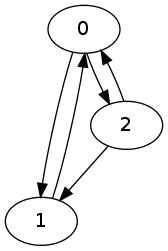
Algorithm by R. Tarjan The earliest algorithm that I included was published by R. Tarjan in 1973.
Enumeration of the elementary circuits of a directed graph
R. Tarjan, SIAM Journal on Computing, 2 (1973), pp. 211-216
http://dx.doi.org/10.1137/0202017
I implemented the pseudocode given in the paper using Python. The git repository can be found here: https://github.com/josch/cycles_tarjan

Algorithm by D. B. Johnson The algorithm by D. B. Johnson from 1975 improves on Tarjan's algorithm by its complexity.
Finding all the elementary circuits of a directed graph.
D. B. Johnson, SIAM Journal on Computing 4, no. 1, 77-84, 1975.
http://dx.doi.org/10.1137/0204007
In the worst case, Tarjan's algorithm has a time complexity of O(n e(c+1)) whereas Johnson's algorithm supposedly manages to stay in O((n+e)(c+1)) where n is the number of vertices, e is the number of edges and c is the number of cycles in the graph. I found two implementations of Johnson's algorithm. One was done by Frank Meyer and can be downloaded as a zip archive. The other was done by Pietro Abate and the code can be found in a blog entry which also points to a git repository. The implementation by Frank Meyer seemed to work flawlessly. I only had to add code so that a graph could be given via commandline. The git repository of my additions can be found here: https://github.com/josch/cycles_johnson_meyer Pietro Abate implemented an iterative and a functional version of Johnson's algorithm. It turned out that both yielded incorrect results as some cycles were missing from the output. A fixed version can be found in this git repository: https://github.com/josch/cycles_johnson_abate

Algorithm by K. A. Hawick and H. A. James The algorithm by K. A. Hawick and H. A. James from 2008 improves further on Johnson's algorithm and does away with its limitations.
Enumerating Circuits and Loops in Graphs with Self-Arcs and Multiple-Arcs.
Hawick and H.A. James, In Proceedings of FCS. 2008, 14-20
www.massey.ac.nz/~kahawick/cstn/013/cstn-013.pdf
In contrast to Johnson's algorithm, the algorithm by K. A. Hawick and H. A. James is able to handle graphs containing edges that start and end at the same vertex as well as multiple edges connecting the same two vertices. I do not need this functionality but add the code as additional verification. The paper posts extensive code snippets written in the D programming language. A full, working version with all pieces connected together can be found here: https://github.com/josch/cycles_hawick_james The algorithm was verified using example output given in the paper. The project README states how to reproduce it.

Input format All four codebases have been modified to produce executables that take the same commandline arguments which describes the graphs to investigate. The first argument is the number of vertices of the graph. Subsequent arguments are ordered pairs of comma separated vertices that make up the directed edges of the graph. Lets look at the following graph as an example: cycle example The DOT source for this graph is:
digraph G  
  0;
  1;
  2;
  0 -> 1;
  0 -> 2;
  1 -> 0;
  2 -> 0;
  2 -> 1;
   
To generate the list of elementary circuits using Tarjan's algorithm for the graph above, use:
$ python cycles.py 3 0,1 0,2 1,0 2,0 2,1
0 1
0 2
0 2 1
The commandline arguments are the exact same for the other three methods and yield the same result in the same order. If the DOT graph is in a format as simple as above, the following sed construct can be used to generate the commandline argument that represents the graph:
$ echo  sed -n -e '/^\s*[0-9]\+;$/p' graph.dot   wc -l   sed -n -e 's/^\s*\([0-9]\) -> \([0-9]\);$/\1,\2/p' graph.dot 

Testsuite As all four codebases take the same input format and have the same output format, it is now trivial to write a testsuite that compares the individual output of each algorithm for the same input and checks for differences. The code of the testsuite is available via this git repository: https://github.com/josch/cycle_test The other four repositories exist as submodules of the testsuite repository.
$ git clone git://github.com/josch/cycle_test.git
$ cd cycle_test
$ git submodule update --init
A testrun is done via calling:
$ ./test.sh 11
The argument to the shell script is an integer denoting the maximum number N of vertices for which graphs will be generated. The script will compile the Ocaml, Java and D sourcecode of the submodules as well as an ocaml script called rand_graph.ml which generates random graphs from v = 1..N vertices where N is given as a commandline argument. For each number of vertices n, e = 1..M number of edges are chosen where M is maximum number of edges given the number of vertices. For every combination of number of vertices v and number of edges e, a graph is randomly generated using Pack.Digraph.Rand.graph from the ocamlgraph library. Each of those generated graphs is checked for cycles and written to a file graph-v-e.dot if the graph contains a cycle. test.sh then loops over all generated dot files. It uses the above sed expression to convert each dot file to a commandline argument for each of the algorithms. The outputs of each algorithm are then compared with each other and only if they do not differ, does the loop continue. Otherwise the script returns with an exit code. The tested algorithms are the Python implementation of Tarjan's algorithm, the iterative and functional Ocaml implementation as well as the Java implementation of Johnson's algorithm and the D implementation of the algorithm by Hawick and James.

Future developments Running the testsuite with a maximum of 12 vertices takes about 33 minutes on a 2.53GHz Core2Duo and produces graphs with as much as 1.1 million cycles. It seems that all five implementations agree on the output for all 504 generated graphs that were used as input. If there should be another implementation of an algorithm that enumerates all elementary circuits of a directed graph, I would like to add it. There are some more papers that I would like to read but I lack access to epubs.siam.org and ieeexplore.ieee.org and would have to buy them. Benchmarks seem a bit pointless as not only the algorithms are very different from each other (and there are many ways to tweak each of them) but also the programming languages differ. Though for the curious kind, it follows the time each algorithm takes to enumerate all cycles for all generated graphs up to 11 vertices.
algorithmtime (s)
Johnson, Abate, Ocaml, iterative137
Johnson, Abate, Ocaml, functional139
Tarjan, Python153
Hawick, D175
Johnson, Meyer, Java357
The iterative Ocaml code performs as well as the functional one. In practice, the iterative code should probably be preferred as the functional code is not tail recursive. On the other hand it is also unlikely that cycles ever grow big enough to make a difference in the used stack space. The Python implementation executes surprisingly fast, given that Tarjan's algorithm is supposedly inferior to Johnson's and given that Python is interpreted but the Python implementation is also the most simple one with the least amount of required datastructures. The D code potentially suffers from the bigger datastructures and other bookkeeping that is required to support multi and self arcs. The java code implements a whole graph library which might explain some of its slowness.

Michael Banck: 4 Jul 2012

Update on computational chemistry packages in Debian

For many years, me and the Debichem team maintained two computational chemistry packages, first MPQC and later PSI3. In recent years however, two respected quantum chemistry codes have been open sourced and are now available in Debian: ACESIII and NWChem. Make no mistake, those are not recently started codes or some Ph.D.'s pet-project but state-of-the-art projects targeted at massively parallel supercomputers and developed at the University of Florida's Quantum Chemistry Project (QTP) in the case of ACESIII and at Pacific Northwest National Laboratory (PNNL) for NWChem.

While ACESIII has a somewhat narrow focus on Coupled-Cluster (unfortunately, the current version does not yet implement analytic gradients for the "golden standard" CCSD(T) method) and Multi-Body Perturbation Theory methods, NWChem is a very versatile package supporting a variety of molecular quantum chemistry methods (including Density Functional Theory (DFT)), as well as periodic plane-wave electronic structure and (ab-initio and classical) molecular dynamics. At this point, NWChem probably covers 90% of all use cases for routine computational chemistry compared to the popular non-free codes Gaussian and GAMESS, while likely exhibiting superior parallel scaling at least compared to Gaussian.

Over the last year, I have packaged and integrated NWChem and ACESIII for Debian, and they are now both in testing. Furthermore, I have recently overhauled the packaging of MPQC and enabled parallel execution via MPI. Further, both MPQC and PSI will see updated versions (MPQC3 and PSI4) in the near future with significant increased functionality, including some unique (at least among open source codes) features like Symmetry-Adapted Perturbation Theory (SAPT) for PSI4 and general explicitly correlated corrections ([2]f12) for MPQC3. Unfortunately, they both did not get released in time for the wheezy freeze.

On the periodic/plane-wave front, I have also packaged and uploaded Quantum ESPRESSO (formerly PwSCF), a set of plane-wave programs, and I have been working with lafur Jens Sigur sson to get the latest Abinit release packaged. The nanoscale-physics team is also targeting further periodic ab-initio packages like BigDFT and Octopus, but those as well did not land in time for the freeze.

Finally, I also packaged and uploaded CP2K, a well-engineered and versatile periodic plane-wave/pseudo-potential code which focuses on state-of-the-art ab-initio Molecular Dynamics (AIMD) using Density Functional Theory. Some of the authors have recently published a paper reporting linear scaling benchmark calculations on a system with a million atoms using almost 50,000 CPU cores.

All of the above mentioned packages are included either in the molecular ab-initio or the periodic ab-initio Debichem tasks.

Next.

Previous.
