Est aberta a inscri o de participantes e a
chamada de atividades
para a
MiniDebConf Belo Horizonte 2024 e para o
FLISOL - Festival Latino-americano de Instala o de Software Livre.
Veja abaixo algumas informa es importantes:
Data e local da MiniDebConf e do FLISOL
A MiniDebConf acontecer de 27 a 30 de abril no
Campus Pampulha da UFMG - Universidade Federal de Minas Gerais.
No dia 27 (s bado) tamb m realizaremos uma edi o do
FLISOL - Festival Latino-americano de Instala o de Software Livre,
evento que acontece no mesmo dia em v rias cidades da Am rica Latina.
Enquanto a MiniDebConf ter atividades focados no Debian, o FLISOL ter
atividades gerais sobre Software Livre e temas relacionados como linguagem de
programa o, CMS, administra o de redes e sistemas, filosofia, liberdade,
licen as, etc.
Inscri o gratuita e oferta de bolsas
Voc j pode realizar a sua inscri o gratuita para a MiniDebConf Belo Horizonte
2024.
A MiniDebConf um evento aberto a todas as pessoas, independente do seu n vel
de conhecimento sobre Debian. O mais importante ser reunir a comunidade para
celebrar um dos maiores projeto de Software Livre no mundo, por isso queremos
receber desde usu rios(as) inexperientes que est o iniciando o seu contato com o
Debian at Desenvolvedores(as) oficiais do projeto. Ou seja, est o todos(as)
convidados(as)!
Este ano estamos ofertando
bolsas de hospedagem e passagens
para viabilizar a vinda de pessoas de outras cidades que
contribuem para o Projeto Debian.
Contribuidores(as) n o oficiais, DMs e DDs podem solicitar as bolsas usando o
formul rio de inscri o.
Tamb m estamos ofertando bolsas de alimenta o para todos(as) os(as)
participantes, mesmo n o contribuidores(as), e pessoas que moram na regi o de
BH.
Os recursos financeiros s o bastante limitados, mas tentaremos atender o m ximo
de pedidos.
Se voc pretende pedir alguma dessas bolsas, acesse
este link e veja mais informa es
antes de realizar a sua inscri o:
A inscri o (sem bolsas) poder ser feita at a data do evento, mas temos uma
data limite para o
pedido de bolsas de hospedagem e passagens, por isso fique atento(a) ao
prazo final: at 18 de fevereiro.
Como estamos usando mesmo formul rio para os dois eventos, a inscri o ser
v lida tanto para a MiniDebConf quanto para o FLISOL.
Para se inscrever, acesse o site, v em
Criar conta. Criei a sua conta
(preferencialmente usando o Salsa) e acesse o
seu perfil. L voc ver o bot o de
Se inscrever.
https://bh.mini.debconf.org
Chamada de atividades
Tamb m est aberta a
chamada de atividades
tanto para MiniDebConf quanto para o FLISOL.
Para mais informa es, acesse
este link.
Fique atento ao prazo final para enviar sua proposta de atividade: at 18 de
fevereiro.
Contato
Qualquer d vida, mande um email para contato@debianbrasil.org.br
Organiza o
Version 0.0.16 of RcppSpdlog is now
on CRAN and will be uploaded to
Debian. RcppSpdlog
bundles spdlog, a
wonderful header-only C++ logging library with all the bells and
whistles you would want that was written by Gabi Melman, and also includes fmt by Victor Zverovich. You can learn
more at the nice package
documention site.
This releases updates the code to the version 1.13 of spdlog which was release
this morning.
The NEWS entry for this release follows.
An new version 0.2.6 of the random-number generator tester RDieHarder
(based on the DieHarder
suite developed / maintained by Robert Brown with contributions by David
Bauer and myself along with other contributors) is now on CRAN (and to the day year after
the previous release).
This release contains changes to printf format strings
to avoid new warnings on Windows. No functional changes have been
made.
Thanks to CRANberries, you
can also look at the most recent diff
to the previous release.
If you like this or other open-source work I do, you can now sponsor me at
GitHub.
Release 0.6.34 of the digest package
arrived at CRAN today and has
also been uploaded to Debian
already.
digest
creates hash digests of arbitrary R objects. It can use a number
different hashing algorithms (md5, sha-1,
sha-256, sha-512, crc32,
xxhash32, xxhash64, murmur32,
spookyhash, blake3, and crc32c),
and ebales easy comparison of (potentially large and nested) R language
objects as it relies on the native serialization in R. It is a mature
and widely-used package (with 63.8 million downloads just on the partial
cloud mirrors of CRAN which keep logs) as many tasks may involve
caching of objects for which it provides convenient
general-purpose hash key generation to quickly identify the various
objects.
(Oh and we also just passed the 20th anniversary of the initial CRAN
upload. Time flies, as they say.)
This release contains small (build-focussed) enhancements contributed
by Michael Chirico, and another set of fixed for printf
format warnings this time on Windows.
My CRANberries
provides a summary of changes to the previous
version. For questions or comments use the issue tracker
off the GitHub
repo.
If you like this or other open-source work I do, you can now sponsor me at
GitHub.
Welcome to the December 2023 report from the Reproducible Builds project! In these reports we outline the most important things that we have been up to over the past month. As a rather rapid recap, whilst anyone may inspect the source code of free software for malicious flaws, almost all software is distributed to end users as pre-compiled binaries (more).
Reproducibility to affect package migration policy in Debian
In a post summarising the activities of the Debian Release Team at a recent in-person Debian event in Cambridge, UK, Paul Gevers announced a change to the way packages are migrated into the staging area for the next stable Debian release based on its reproducibility status:
The folks from the Reproducibility Project have come a long way since they started working on it 10 years ago, and we believe it s time for the next step in Debian. Several weeks ago, we enabled a migration policy in our migration software that checks for regression in reproducibility. At this moment, that is presented as just for info, but we intend to change that to delays in the not so distant future. We eventually want all packages to be reproducible. To stimulate maintainers to make their packages reproducible now, we ll soon start to apply a bounty [speedup] for reproducible builds, like we ve done with passing autopkgtests for years. We ll reduce the bounty for successful autopkgtests at that moment in time.
Speranza: Usable, privacy-friendly software signing
Kelsey Merrill, Karen Sollins, Santiago Torres-Arias and Zachary Newman have developed a new system called Speranza, which is aimed at reassuring software consumers that the product they are getting has not been tampered with and is coming directly from a source they trust. A write-up on TechXplore.com goes into some more details:
What we have done, explains Sollins, is to develop, prove correct, and demonstrate the viability of an approach that allows the [software] maintainers to remain anonymous. Preserving anonymity is obviously important, given that almost everyone software developers included value their confidentiality. This new approach, Sollins adds, simultaneously allows [software] users to have confidence that the maintainers are, in fact, legitimate maintainers and, furthermore, that the code being downloaded is, in fact, the correct code of that maintainer. []
Nondeterministic Git bundles
Paul Baecher published an interesting blog post on Reproducible git bundles. For those who are not familiar with them, Git bundles are used for the offline transfer of Git objects without an active server sitting on the other side of a network connection. Anyway, Paul wrote about writing a backup system for his entire system, but:
I noticed that a small but fixed subset of [Git] repositories are getting backed up despite having no changes made. That is odd because I would think that repeated bundling of the same repository state should create the exact same bundle. However [it] turns out that for some, repositories bundling is nondeterministic.
Paul goes on to to describe his solution, which involves forcing git to be single threaded makes the output deterministic . The article was also discussed on Hacker News.
Rework the generate-id() function to return deterministic values. We use
a simple incrementing counter and store ids in the 'psvi' member of
nodes which was freed up by previous commits. The presence of an id is
indicated by a new "source node" flag.
This fixes long-standing problems with reproducible builds, see
https://bugzilla.gnome.org/show_bug.cgi?id=751621
This also hardens security, as the old implementation leaked the
difference between a heap and a global pointer, see
https://bugs.chromium.org/p/chromium/issues/detail?id=1356211
The old implementation could also generate the same id for dynamically
created nodes which happened to reuse the same memory. Ids for namespace
nodes were completely broken. They now use the id of the parent element
together with the hex-encoded namespace prefix.
Community updates
There were made a number of improvements to our website, including Chris Lamb fixing the generate-draft script to not blow up if the input files have been corrupted today or even in the past [], Holger Levsen updated the Hamburg 2023 summit to add a link to farewell post [] & to add a picture of a Post-It note. [], and Pol Dellaiera updated the paragraph about tar and the --clamp-mtime flag [].
On our mailing list this month, Bernhard M. Wiedemann posted an interesting summary on some of the reasons why packages are still not reproducible in 2023.
diffoscope is our in-depth and content-aware diff utility that can locate and diagnose reproducibility issues. This month, Chris Lamb made a number of changes, including processing objdump symbol comment filter inputs as Python byte (and not str) instances [] and Vagrant Cascadian extended diffoscope support for GNU Guix [] and updated the version in that distribution to version 253 [].
Challenges of Producing Software Bill Of Materials for Java
Musard Balliu, Benoit Baudry, Sofia Bobadilla, Mathias Ekstedt, Martin Monperrus, Javier Ron, Aman Sharma, Gabriel Skoglund, C sar Soto-Valero and Martin Wittlinger (!) of the KTH Royal Institute of Technology in Sweden, have published an article in which they:
deep-dive into 6 tools and the accuracy of the SBOMs they produce for complex open-source Java projects. Our novel insights reveal some hard challenges regarding the accurate production and usage of software bills of materials.
Debian Non-Maintainer campaign
As mentioned in previousreports, the Reproducible Builds team within Debian has been organising a series of online and offline sprints in order to clear the huge backlog of reproducible builds patches submitted by performing so-called NMUs (Non-Maintainer Uploads).
During December, Vagrant Cascadian performed a number of such uploads, including:
In addition, Holger Levsen performed three no-source-change NMUs in order to address the last packages without .buildinfo files in Debian trixie, specifically lorene (0.0.0~cvs20161116+dfsg-1.1), maria (1.3.5-4.2) and ruby-rinku (1.7.3-2.1).
Reproducibility testing framework
The Reproducible Builds project operates a comprehensive testing framework (available at tests.reproducible-builds.org) in order to check packages and other artifacts for reproducibility. In December, a number of changes were made by Holger Levsen:
Detect failures due to rename of the vmlinuz file. []
Improve the grammar of an error message. []
Document that freebsd-jenkins.debian.net has been updated to FreeBSD 14.0. []
In addition, node maintenance was performed by Holger Levsen [] and Vagrant Cascadian [].
Upstream patches
The Reproducible Builds project detects, dissects and attempts to fix as many currently-unreproducible packages as possible. We endeavour to send all of our patches upstream where appropriate. This month, we wrote a large number of such patches, including:
If you are interested in contributing to the Reproducible Builds project, please visit our Contribute page on our website. However, you can get in touch with us via:
This post is in part a response to an aspect of Nate s post Does Wayland really break everything? , but also my reflection on discussing Wayland protocol additions, a unique pleasure that I have been involved with for the past months1.
Some facts
Before I start I want to make a few things clear: The Linux desktop will be moving to Wayland2 this is a fact at this point (and has been for a while), sticking to X11 makes no sense for future projects. From reading Wayland protocols and working with it at a much lower level than I ever wanted to, it is also very clear to me that Wayland is an exceptionally well-designed core protocol, and so are the additional extension protocols (xdg-shell & Co.). The modularity of Wayland is great, it gives it incredible flexibility and will for sure turn out to be good for the long-term viability of this project (and also provides a path to correct protocol issues in future, if one is found). In other words: Wayland is an amazing foundation to build on, and a lot of its design decisions make a lot of sense!
The shift towards people seeing Linux more as an application developer platform, and taking PipeWire and XDG Portals into account when designing for Wayland is also an amazing development and I love to see this this holistic approach is something I always wanted!
Furthermore, I think Wayland removes a lot of functionality that shouldn t exist in a modern compositor and that s a good thing too! Some of X11 s features and design decisions had clear drawbacks that we shouldn t replicate. I highly recommend to read Nate s blog post, it s very good and goes into more detail. And due to all of this, I firmly believe that any advancement in the Wayland space must come from within the project.
But!
But! Of course there was a but coming I think while developing Wayland-as-an-ecosystem we are now entrenched into narrow concepts of how a desktop should work. While discussing Wayland protocol additions, a lot of concepts clash, people from different desktops with different design philosophies debate the merits of those over and over again never reaching any conclusion (just as you will never get an answer out of humans whether sushi or pizza is the clearly superior food, or whether CSD or SSD is better). Some people want to use Wayland as a vehicle to force applications to submit to their desktop s design philosophies, others prefer the smallest and leanest protocol possible, other developers want the most elegant behavior possible. To be clear, I think those are all very valid approaches.
But this also creates problems: By switching to Wayland compositors, we are already forcing a lot of porting work onto toolkit developers and application developers. This is annoying, but just work that has to be done. It becomes frustrating though if Wayland provides toolkits with absolutely no way to reach their goal in any reasonable way. For Nate s Photoshop analogy: Of course Linux does not break Photoshop, it is Adobe s responsibility to port it. But what if Linux was missing a crucial syscall that Photoshop needed for proper functionality and Adobe couldn t port it without that? In that case it becomes much less clear on who is to blame for Photoshop not being available.
A lot of Wayland protocol work is focused on the environment and design, while applications and work to port them often is considered less. I think this happens because the overlap between application developers and developers of the desktop environments is not necessarily large, and the overlap with people willing to engage with Wayland upstream is even smaller. The combination of Windows developers porting apps to Linux and having involvement with toolkits or Wayland is pretty much nonexistent. So they have less of a voice.
A quick detour through the neuroscience research lab
I have been involved with Freedesktop, GNOME and KDE for an incredibly long time now (more than a decade), but my actual job (besides consulting for Purism) is that of a PhD candidate in a neuroscience research lab (working on the morphology of biological neurons and its relation to behavior). I am mostly involved with three research groups in our institute, which is about 35 people. Most of us do all our data analysis on powerful servers which we connect to using RDP (with KDE Plasma as desktop). Since I joined, I have been pushing the envelope a bit to extend Linux usage to data acquisition and regular clients, and to have our data acquisition hardware interface well with it. Linux brings some unique advantages for use in research, besides the obvious one of having every step of your data management platform introspectable with no black boxes left, a goal I value very highly in research (but this would be its own blogpost).
In terms of operating system usage though, most systems are still Windows-based. Windows is what companies develop for, and what people use by default and are familiar with. The choice of operating system is very strongly driven by application availability, and WSL being really good makes this somewhat worse, as it removes the need for people to switch to a real Linux system entirely if there is the occasional software requiring it. Yet, we have a lot more Linux users than before, and use it in many places where it makes sense. I also developed a novel data acquisition software that even runs on Linux-only and uses the abilities of the platform to its fullest extent. All of this resulted in me asking existing software and hardware vendors for Linux support a lot more often. Vendor-customer relationship in science is usually pretty good, and vendors do usually want to help out. Same for open source projects, especially if you offer to do Linux porting work for them But overall, the ease of use and availability of required applications and their usability rules supreme. Most people are not technically knowledgeable and just want to get their research done in the best way possible, getting the best results with the least amount of friction.
KDE/Linux usage at a control station for a particle accelerator at Adlershof Technology Park, Germany, for reference (by 25years of KDE)3
Back to the point
The point of that story is this: GNOME, KDE, RHEL, Debian or Ubuntu: They all do not matter if the necessary applications are not available for them. And as soon as they are, the easiest-to-use solution wins. There are many facets of easiest : In many cases this is RHEL due to Red Hat support contracts being available, in many other cases it is Ubuntu due to its mindshare and ease of use. KDE Plasma is also frequently seen, as it is perceived a bit easier to onboard Windows users with it (among other benefits). Ultimately, it comes down to applications and 3rd-party support though.
Here s a dirty secret: In many cases, porting an application to Linux is not that difficult. The thing that companies (and FLOSS projects too!) struggle with and will calculate the merits of carefully in advance is whether it is worth the support cost as well as continuous QA/testing. Their staff will have to do all of that work, and they could spend that time on other tasks after all.
So if they learn that porting to Linux not only means added testing and support, but also means to choose between the legacy X11 display server that allows for 1:1 porting from Windows or the new Wayland compositors that do not support the same features they need, they will quickly consider it not worth the effort at all. I have seen this happen.
Of course many apps use a cross-platform toolkit like Qt, which greatly simplifies porting. But this just moves the issue one layer down, as now the toolkit needs to abstract Windows, macOS and Wayland. And Wayland does not contain features to do certain things or does them very differently from e.g. Windows, so toolkits have no way to actually implement the existing functionality in a way that works on all platforms. So in Qt s documentation you will often find texts like works everywhere except for on Wayland compositors or mobile 4.
Many missing bits or altered behavior are just papercuts, but those add up. And if users will have a worse experience, this will translate to more support work, or people not wanting to use the software on the respective platform.
What s missing?
Window positioning
SDI applications with multiple windows are very popular in the scientific world. For data acquisition (for example with microscopes) we often have one monitor with control elements and one larger one with the recorded image. There is also other configurations where multiple signal modalities are acquired, and the experimenter aligns windows exactly in the way they want and expects the layout to be stored and to be loaded upon reopening the application. Even in the image from Adlershof Technology Park above you can see this style of UI design, at mega-scale. Being able to pop-out elements as windows from a single-window application to move them around freely is another frequently used paradigm, and immensely useful with these complex apps.
It is important to note that this is not a legacy design, but in many cases an intentional choice these kinds of apps work incredibly well on larger screens or many screens and are very flexible (you can have any window configuration you want, and switch between them using the (usually) great window management abilities of your desktop).
Of course, these apps will work terribly on tablets and small form factors, but that is not the purpose they were designed for and nobody would use them that way.
I assumed for sure these features would be implemented at some point, but when it became clear that that would not happen, I created the ext-placement protocol which had some good discussion but was ultimately rejected from the xdg namespace. I then tried another solution based on feedback, which turned out not to work for most apps, and now proposed xdg-placement (v2) in an attempt to maybe still get some protocol done that we can agree on, exploring more options before pushing the existing protocol for inclusion into the ext Wayland protocol namespace. Meanwhile though, we can not port any application that needs this feature, while at the same time we are switching desktops and distributions to Wayland by default.
Window position restoration
Similarly, a protocol to save & restore window positions was already proposed in 2018, 6 years ago now, but it has still not been agreed upon, and may not even help multiwindow apps in its current form. The absence of this protocol means that applications can not restore their former window positions, and the user has to move them to their previous place again and again.
Meanwhile, toolkits can not adopt these protocols and applications can not use them and can not be ported to Wayland without introducing papercuts.
Window icons
Similarly, individual windows can not set their own icons, and not-installed applications can not have an icon at all because there is no desktop-entry file to load the icon from and no icon in the theme for them. You would think this is a niche issue, but for applications that create many windows, providing icons for them so the user can find them is fairly important. Of course it s not the end of the world if every window has the same icon, but it s one of those papercuts that make the software slightly less user-friendly. Even applications with fewer windows like LibrePCB are affected, so much so that they rather run their app through Xwayland for now.
I decided to address this after I was working on data analysis of image data in a Python virtualenv, where my code and the Python libraries used created lots of windows all with the default yellow W icon, making it impossible to distinguish them at a glance. This is xdg-toplevel-icon now, but of course it is an uphill battle where the very premise of needing this is questioned. So applications can not use it yet.
Limited window abilities requiring specialized protocols
Firefox has a picture-in-picture feature, allowing it to pop out media from a mediaplayer as separate floating window so the user can watch the media while doing other things. On X11 this is easily realized, but on Wayland the restrictions posed on windows necessitate a different solution. The xdg-pip protocol was proposed for this specialized usecase, but it is also not merged yet. So this feature does not work as well on Wayland.
Automated GUI testing / accessibility / automation
Automation of GUI tasks is a powerful feature, so is the ability to auto-test GUIs. This is being worked on, with libei and wlheadless-run (and stuff like ydotool exists too), but we re not fully there yet.
Wayland is frustrating for (some) application authors
As you see, there is valid applications and valid usecases that can not be ported yet to Wayland with the same feature range they enjoyed on X11, Windows or macOS. So, from an application author s perspective, Wayland does break things quite significantly, because things that worked before can no longer work and Wayland (the whole stack) does not provide any avenue to achieve the same result.
Wayland does break screen sharing, global hotkeys, gaming latency (via no tearing ) etc, however for all of these there are solutions available that application authors can port to. And most developers will gladly do that work, especially since the newer APIs are usually a lot better and more robust. But if you give application authors no path forward except use Xwayland and be on emulation as second-class citizen forever , it just results in very frustrated application developers.
For some application developers, switching to a Wayland compositor is like buying a canvas from the Linux shop that forces your brush to only draw triangles. But maybe for your avant-garde art, you need to draw a circle. You can approximate one with triangles, but it will never be as good as the artwork of your friends who got their canvases from the Windows or macOS art supply shop and have more freedom to create their art.
Triangles are proven to be the best shape! If you are drawing circles you are creating bad art!
Wayland, via its protocol limitations, forces a certain way to build application UX often for the better, but also sometimes to the detriment of users and applications. The protocols are often fairly opinionated, a result of the lessons learned from X11. In any case though, it is the odd one out Windows and macOS do not pose the same limitations (for better or worse!), and the effort to port to Wayland is orders of magnitude bigger, or sometimes in case of the multiwindow UI paradigm impossible to achieve to the same level of polish. Desktop environments of course have a design philosophy that they want to push, and want applications to integrate as much as possible (same as macOS and Windows!). However, there are many applications out there, and pushing a design via protocol limitations will likely just result in fewer apps.
The porting dilemma
I spent probably way too much time looking into how to get applications cross-platform and running on Linux, often talking to vendors (FLOSS and proprietary) as well. Wayland limitations aren t the biggest issue by far, but they do start to come come up now, especially in the scientific space with Ubuntu having switched to Wayland by default. For application authors there is often no way to address these issues. Many scientists do not even understand why their Python script that creates some GUIs suddenly behaves weirdly because Qt is now using the Wayland backend on Ubuntu instead of X11. They do not know the difference and also do not want to deal with these details even though they may be programmers as well, the real goal is not to fiddle with the display server, but to get to a scientific result somehow.
Another issue is portability layers like Wine which need to run Windows applications as-is on Wayland. Apparently Wine s Wayland driver has some heuristics to make window positioning work (and I am amazed by the work done on this!), but that can only go so far.
A way out?
So, how would we actually solve this? Fundamentally, this excessively long blog post boils down to just one essential question:
Do we want to force applications to submit to a UX paradigm unconditionally, potentially loosing out on application ports or keeping apps on X11 eternally, or do we want to throw them some rope to get as many applications ported over to Wayland, even through we might sacrifice some protocol purity?
I think we really have to answer that to make the discussions on wayland-protocols a lot less grueling. This question can be answered at the wayland-protocols level, but even more so it must be answered by the individual desktops and compositors.
If the answer for your environment turns out to be Yes, we want the Wayland protocol to be more opinionated and will not make any compromises for application portability , then your desktop/compositor should just immediately NACK protocols that add something like this and you simply shouldn t engage in the discussion, as you reject the very premise of the new protocol: That it has any merit to exist and is needed in the first place. In this case contributors to Wayland and application authors also know where you stand, and a lot of debate is skipped. Of course, if application authors want to support your environment, you are basically asking them now to rewrite their UI, which they may or may not do. But at least they know what to expect and how to target your environment.
If the answer turns out to be We do want some portability , the next question obviously becomes where the line should be drawn and which changes are acceptable and which aren t. We can t blindly copy all X11 behavior, some porting work to Wayland is simply inevitable. Some written rules for that might be nice, but probably more importantly, if you agree fundamentally that there is an issue to be fixed, please engage in the discussions for the respective MRs! We for sure do not want to repeat X11 mistakes, and I am certain that we can implement protocols which provide the required functionality in a way that is a nice compromise in allowing applications a path forward into the Wayland future, while also being as good as possible and improving upon X11. For example, the toplevel-icon proposal is already a lot better than anything X11 ever had. Relaxing ACK requirements for the ext namespace is also a good proposed administrative change, as it allows some compositors to add features they want to support to the shared repository easier, while also not mandating them for others. In my opinion, it would allow for a lot less friction between the two different ideas of how Wayland protocol development should work. Some compositors could move forward and support more protocol extensions, while more restrictive compositors could support less things. Applications can detect supported protocols at launch and change their behavior accordingly (ideally even abstracted by toolkits).
You may now say that a lot of apps are ported, so surely this issue can not be that bad. And yes, what Wayland provides today may be enough for 80-90% of all apps. But what I hope the detour into the research lab has done is convince you that this smaller percentage of apps matters. A lot. And that it may be worthwhile to support them.
To end on a positive note: When it came to porting concrete apps over to Wayland, the only real showstoppers so far5 were the missing window-positioning and window-position-restore features. I encountered them when porting my own software, and I got the issue as feedback from colleagues and fellow engineers. In second place was UI testing and automation support, the window-icon issue was mentioned twice, but being a cosmetic issue it likely simply hurts people less and they can ignore it easier.
What this means is that the majority of apps are already fine, and many others are very, very close! A Wayland future for everyone is within our grasp!
I will also bring my two protocol MRs to their conclusion for sure, because as application developers we need clarity on what the platform (either all desktops or even just a few) supports and will or will not support in future. And the only way to get something good done is by contribution and friendly discussion.
Footnotes
Apologies for the clickbait-y title it comes with the subject
When I talk about Wayland I mean the combined set of display server protocols and accepted protocol extensions, unless otherwise clarified.
I would have picked a picture from our lab, but that would have needed permission first
Qt has awesome platform issues pages, like for macOS and Linux/X11 which help with porting efforts, but Qt doesn t even list Linux/Wayland as supported platform. There is some information though, like window geometry peculiarities, which aren t particularly helpful when porting (but still essential to know).
Besides issues with Nvidia hardware CUDA for simulations and machine-learning is pretty much everywhere, so Nvidia cards are common, which causes trouble on Wayland still. It is improving though.
Boost is a very large and
comprehensive set of (peer-reviewed) libraries for the C++ programming
language, containing well over one hundred individual libraries. The BH package provides a
sizeable subset of header-only libraries for (easier, no linking
required) use by R. It is fairly
widely used: the (partial) CRAN mirror logs (aggregated from the cloud
mirrors) show over 35.7 million package downloads.
Version 1.84.0 of Boost was released in December following the
regular Boost release schedule of April, August and December releases.
As the commits and changelog show, we packaged it almost immediately and
started testing following our annual update cycle which strives to
balance being close enough to upstream and not stressing CRAN and the
user base too much. The reverse depends check revealed five packages
requiring changes or adjustments which is a pretty good outcome given
the over three hundred direct reverse dependencies. So we opened issue #100 to
coordinate the issue over the winter break during which CRAN also closes
(just as we did in previous years). Our sincere thanks to the two
packages that already updated before, and to the one that updated today
within hours (!!) of the BH uploaded it needed.
There are very few actual changes. We honoured one request (in issue #97) to
add Boost
QVM bringing quarternion support to R. No other new changes needed to
be made. A number of changes I have to make each time in BH, and it is worth
mentioning them. Because CRAN cares about backwards compatibility and
the ability to be used on minimal or older systems, we still
adjust the filenames of a few files to fit a jurassic constraints of
just over a 100 characters per filepath present in some long-outdated
versions of tar. Not a big deal. We also, and that is more
controversial, silence a number of #pragma diagnostic
messages for g++ and clang++ because CRAN
insists on it. I have no choice in that matter. One warning we
suppressed last year, but no longer do, concerns the C++14 standard that
some Boost libraries now default to.
Packages setting C++11 explicitly will likely get a note from CRAN
changing this; in most cases that should be trivial to remove as we only
had to opt into (then) newer standards under old compilers. These days
newer defaults help; R itself now defaults to C++17.
Via my CRANberries, there
is a diffstat report relative to the previous
release. Comments and suggestions about BH are welcome via the issue
tracker at the GitHub
repo.
If you like this or other open-source work I do, you can now sponsor me at
GitHub.
Having had success running Trisquel on the ppc64 Talos II, I felt ready to get an arm64 machine running Trisquel. I have a Ampere Altra Developer Platform from ADLINK, which is a fairly powerful desktop machine. While there were some issues during installation, I m happy to say the machine is stable and everything appears to work fine.
ISO images for non-amd64 platforms are unfortunately still hidden from the main Trisquel download area, so you will have to use the following procedure to download and extract a netinst ISO image (using debian-installer) and write it to a USB memory device. Another unfortunate problem is that there are no OpenPGP signatures or hash checksums, but below I publish one checksum.
Insert the USB stick in a USB slot in the machine, and power up. Press ESCAPE at the BIOS prompt and select the USB device as the boot device. The first problem that hit me was that translations didn t work, I selected Swedish but the strings were garbled. Rebooting and selecting the default English worked fine. For installation, you need Internet connectivity and I use the RJ45 port closest to VGA/serial which is available as enP5p1s0 in the installer. I wouldn t connect the BMC RJ45 port to anything unless you understand the security implications.
During installation you have to create a EFI partition for booting, and I ended up with one 1GB EFI partition, one 512GB ext4 partition for / with discard/noatime options, and a 32GB swap partition. The installer did not know about any Trisquel mirrors, but only had the default archive.trisquel.org, so if you need to use a mirror, take a note of the necessary details. The installation asks me about which kernel to install, and I went with the default linux-generic which results in a 5.15 linux-libre kernel. At the end of installation, unfortunately grub failed with a mysterious error message: Unable to install GRUB in dummy. Executing 'grub-install dummy' failed. On another console there is a better error message: failed to register the EFI boot entry. There are some references to file descriptor issues. Perhaps I partitioned the disk in a bad way, or this is a real bug in the installer for this platform. I continued installation, and it appears the installer was able to write GRUB to the device, but not add the right boot menu. So I was able to finish the installation properly, and then reboot and manually type the following GRUB commands: linux (hd0,gpt2)/boot/vmlinuz initrd (hd0,gpt2)/boot/initrd.img boot. Use the GRUB ls command to find the right device. See images below for more information.
Booting and installing GRUB again manually works fine:
root@ampel:~# update-grub
Sourcing file  /etc/default/grub'
Sourcing file  /etc/default/grub.d/background.cfg'
Sourcing file  /etc/default/grub.d/init-select.cfg'
Generating grub configuration file ...
Found linux image: /boot/vmlinuz-5.15.0-91-generic
Found initrd image: /boot/initrd.img-5.15.0-91-generic
Found linux image: /boot/vmlinuz-5.15.0-58-generic
Found initrd image: /boot/initrd.img-5.15.0-58-generic
Warning: os-prober will not be executed to detect other bootable partitions.
Systems on them will not be added to the GRUB boot configuration.
Check GRUB_DISABLE_OS_PROBER documentation entry.
Adding boot menu entry for UEFI Firmware Settings ...
done
root@ampel:~#
During installation I tend to avoid selecting any tasksel components, in part because it didn t use a local mirror to gain network speed, and in part because I don t want to generate OpenSSH keys in a possibly outdated environment that is harder to audit and reproducible rebuild than the finally installed system. When I selected the OpenSSH and GNOME tasksel, I get an error, but fortunately using apt get directly is simple.
Graphics in GNOME was slow using the built-in ASPEED AST2500 VGA controller with linux-libre 5.15. There are kernels labeled 64k but I haven t tested them, and I m not sure they would bring any significant advantage. I simply upgraded to a more recent linux-libre 6.2 kernel via the linux-image-generic-hwe-11.0 virtual package. After a reboot, graphics in GNOME is usable.
There seems to be some issue with power-saving inside GNOME, since the machine becomes unresponsive after 20 minutes, and I m unable to make it resume via keyboard or power button. Disabling the inactivity power setting in GNOME works fine to resolve this.
I will now put this machine to some more heavy use and see how it handles it. I hope to find more suitable arm64-based servers to complement my ppc64el-based servers in the future, as this ADLINK Ampere Altra Developer Platform with liquid-cooling is more of a toy than a serious server for use in a datacentre.
Happy Trisquel-on-arm64 Hacking!
The Rcpp Core Team is once again thrilled to announce a new release
1.0.12 of the Rcpp package. It
arrived on CRAN early today,
and has since been uploaded to Debian as well. Windows and macOS
builds should appear at CRAN in the next few days, as will builds in
different Linux distribution and of course at r2u should catch up
tomorrow. The release was uploaded yesterday, and run its reverse
dependencies overnight. Rcpp always
gets flagged nomatter what because the grandfathered
.Call(symbol) but we had not single change to worse
among over 2700 reverse dependencies!
This release continues with the six-months January-July cycle started
with release
1.0.5 in July 2020. As a reminder, we do of course make interim
snapshot dev or rc releases available via the Rcpp drat repo and strongly
encourage their use and testing I run my systems with these versions
which tend to work just as well, and are also fully tested against all
reverse-dependencies.
Rcpp has long established itself
as the most popular way of enhancing R with C or C++ code. Right now,
2791 packages on CRAN depend on
Rcpp for making analytical code go
faster and further, along with 254 in BioConductor. On CRAN, 13.8% of
all packages depend (directly) on Rcpp, and 59.9% of all compiled packages
do. From the cloud mirror of CRAN (which is but a subset of all CRAN
downloads), Rcpp has been downloaded
78.1 million times. The two published papers (also included in the
package as preprint vignettes) have, respectively, 1766 (JSS, 2011) and 292 (TAS, 2018)
citations, while the the book (Springer useR!,
2013) has another 617.
This release is incremental as usual, generally preserving existing
capabilities faithfully while smoothing our corners and / or extending
slightly, sometimes in response to changing and tightened demands from
CRAN or R standards.
The full list below details all changes, their respective PRs and, if
applicable, issue tickets. Big thanks from all of us to all
contributors!
Changes in
Rcpp release version 1.0.12 (2024-01-08)
Changes in Rcpp API:
Missing header includes as spotted by some recent tools were
added in two places (Michael Chirico in #1272 closing #1271).
Casts to avoid integer overflow in matrix row/col selections have
neem added (Aaron Lun #1281).
Three print format correction uncovered by R-devel were applied
with thanks to Tomas Kalibera (Dirk in #1285).
Correct a print format correction in the RcppExports glue code
(Dirk in #1288
fixing #1287).
The upcoming OBJSXP addition to R 4.4.0 is supported
in the type2name mapper (Dirk and I aki in #1293).
Changes in Rcpp Attributes:
Generated interface code from base R that fails under LTO is now
corrected (I aki in #1274 fixing a
StackOverflow issue).
Changes in Rcpp Documentation:
The caption for third figure in the introductory vignette has
been corrected (Dirk in #1277 fixing #1276).
A small formatting issue was correct in an Rd file as noticed by
R-devel (Dirk in #1282).
The Rcpp FAQ vignette has been updated (Dirk in #1284).
The Rcpp.bib file has been refreshed to current
package versions.
Changes in Rcpp Deployment:
The RcppExports file for an included test package has been updated
(Dirk in #1289).
So this blog is now celebrating its 21st birthday (or 20 if you count
from zero, or 18 if you want to be pedantic), and I figured I would do
this yearly thing of reviewing how that went.
Number of posts
2022 was the official 20th
anniversary in any case, and
that was one of my best years on record, with 46 posts, surpassed only
by the noisy 2005 (62) and matching 2006 (46). 2023, in comparison,
was underwhelming: a feeble 11 posts! What happened!
Well, I was busy with other things, mostly away from keyboard, that I
will not bore you with here...
The other thing that happened is that the one-liner I used to collect
stats was broken (it counted folders and other unrelated files) and
wildly overestimated 2022! Turns out I didn't write that much then:
But even that is inaccurate because, in ikiwiki, I can tag any page as
being featured on the blog. So we actually need to process the HTML
itself because we don't have much better on hand without going through
ikiwiki's internals:
Anyway. 2023 is certainly not a glorious year in that regard, in any case.
Visitors
In terms of visits, however, we had quite a few hits. According to
Goatcounter, I had 122 300 visits in 2023! 2022, in comparison,
had 89 363, so that's quite a rise.
What you read
I seem to have hit the Hacker News front page at least twice. I say
"seem" because it's actually pretty hard to tell what the HN
frontpage actually is on any given day. I had 22k visits on
2023-03-13, in any case, and you can't see me on the front that
day. We do see a post of mine on 2023-09-02, all the way down
there, which seem to have generated another 10k visits.
In any case, here were the most popular stories for you fine visitors:
Framework 12th gen laptop
review: 24k visits, which is
surprising for a 13k words article "without images", as some
critics have complained. 15k referred by Hacker News. Good
reference and time-consuming benchmarks, slowly bit-rotting.
That is, by far, my most popular article ever. A popular article in
2021 or 2022 was around 6k to 9k, so that's a big one. I suspect it
will keep getting traffic for a long while.
Calibre replacement considerations:
15k visits, most of which without a referrer. Was actually an old
article, but I suspect HN brought it back to light. I keep updating
that wiki page regularly when I find new things, but I'm still
using Calibre to import ebooks.
Hacking my Kobo Clara HD: is not
new but always gathering more and more hits, it had 1800 hits in
the first year, 4600 hits last year and now brought 6400 visitors
to the blog! Not directly related, but this iFixit
battery replacement guide I wrote also seem to be quite popular
Where you've been
People send less and less private information when they browse the
web. The number of visitors without referrers was 41% in 2021, it rose
to 44% in 2023. Most of the remaining traffic comes from Google, but
Hacker News is now a significant chunk, almost as big as Google.
In 2021, Google represented 23% of my traffic, in 2022, it was down to
15% so 18% is actually a rise from last year, even if it seems much
smaller than what I usually think of.
Ratio
Referrer
Visits
18%
Google
22 098
13%
Hacker News
16 003
2%
duckduckgo.com
2 640
1%
community.frame.work
1 090
1%
missing.csail.mit.edu
918
Note that Facebook and Twitter do not appear at all in my referrers.
Where you are
Unsurprisingly, most visits still come from the US:
Ratio
Country
Visits
26%
United States
32 010
14%
France
17 046
10%
Germany
11 650
6%
Canada
7 425
5%
United Kingdom
6 473
3%
Netherlands
3 436
Those ratios are nearly identical to last year, but quite different
from 2021, where Germany and France were more or less reversed.
Back in 2021, I mentioned there was a long tail of countries with at
least one visit, with 160 countries listed. I expanded that and
there's now 182 countries in that list, almost all of the 193 member
states in the UN.
What you were
Chrome's dominance continues to expand, even on readers of this blog,
gaining two percentage points from Firefox compared to 2021.
Ratio
Browser
Visits
49%
Firefox
60 126
36%
Chrome
44 052
14%
Safari
17 463
1%
Others
N/A
It seems like, unfortunately, my Lynx and Haiku users have not visited
in the past year. It seems like trying to read those metrics is like
figuring out tea leaves...
In terms of operating systems:
Ratio
OS
Visits
28%
Linux
34 010
23%
macOS
28 728
21%
Windows
26 303
17%
Android
20 614
10%
iOS
11 741
Again, Linux and Mac are over-represented, and Android and iOS are
under-represented.
What is next
I hope to write more next year. I've been thinking about a few posts I
could write for work, about how things work behind the scenes at Tor,
that could be informative for many people. We run a rather old setup,
but things hold up pretty well for what we throw at it, and it's worth
sharing that with the world...
So anyway, thanks for coming, faithful reader, and see you in the
coming 2024 year...
The Faithless is the second book in a political fantasy series that
seems likely to be a trilogy. It is a direct sequel to
The Unbroken, which you should read
first. As usual, Orbit made it unnecessarily hard to get re-immersed in
the world by refusing to provide memory aids for readers who read books as
they come out instead of only when the series is complete, but this is not
the fault of Clark or the book and you've heard me rant about this before.
The Unbroken was set in Qaz l (not-Algeria). The Faithless,
as readers of the first book might guess from the title, is set in
Balladaire (not-France). This is the palace intrigue book. Princess Luca
is fighting for her throne against her uncle, the regent. Touraine is
trying to represent her people. Whether and to what extent those
interests are aligned is much of the meat of this book.
Normally I enjoy palace intrigue novels for the competence porn: watching
someone navigate a complex political situation with skill and cunning, or
upend the entire system by building unlikely coalitions or using
unexpected routes to power. If you are similar, be warned that this is
not what you're going to get. Touraine is a fish out of water with no
idea how to navigate the Balladairan court, and does not magically become
an expert in the course of this novel. Luca has the knowledge, but she's
unsure, conflicted, and largely out-maneuvered. That means you will have
to brace for some painful scenes of some of the worst people apparently
getting what they want.
Despite that, I could not put this down. It was infuriating, frustrating,
and a much slower burn than I prefer, but the layers of complex
motivations that Clark builds up provided a different sort of payoff.
Two books in, the shape of this series is becoming clearer. This series
is about empire and colonialism, but with considerably more complexity
than fantasy normally brings to that topic. Power does not loosen its
grasp easily, and it has numerous tools for subtle punishment after
apparent upstart victories. Righteous causes rarely call banners to your
side; instead, they create opportunities for other people to maneuver to
their own advantage. Touraine has some amount of power now, but it's far
from obvious how to use it. Her life's training tells her that exercising
power will only cause trouble, and her enemies are more than happy to
reinforce that message at every opportunity.
Most notable to me is Clark's bitingly honest portrayal of the supposed
allies within the colonial power. It is clear that Luca is attempting to
take the most ethical actions as she defines them, but it's remarkable how
those efforts inevitably imply that Touraine should help Luca now in
exchange for Luca's tenuous and less-defined possible future aid. This is
not even a lie; it may be an accurate summary of Balladairan politics.
And yet, somehow what Balladaire needs always matters more than the needs
of their abused colony.
Underscoring this, Clark introduces another faction in the form of a
populist movement against the Balladairan monarchy. The details of that
setup in another fantasy novel would make them allies of the Qaz l. Here,
as is so often the case in real life, a substantial portion of the
populists are even more xenophobic and racist than the nobility. There
are no easy alliances.
The trump card that Qaz l holds is magic. They have it, and (for reasons
explored in The Unbroken) Balladaire needs it, although that is a
position held by Luca's faction and not by her uncle. But even Luca wants
to reduce that magic to a manageable technology, like any other element of
the Balladairan state. She wants to understand it, harness it, and bring
it under local control. Touraine, trained by Balladaire and facing
Balladairan political problems, has the same tendency. The magic, at
least in this book, refuses not in the flashy, rebellious way that it
would in most fantasy, but in a frustrating and incomprehensible lack of
predictable or convenient rules. I think this will feel like a plot
device to some readers, and that is to some extent true, but I think I see
glimmers of Clark setting up a conflict of world views that will play out
in the third book.
I think some people are going to bounce off this book. It's frustrating,
enraging, at times melodramatic, and does not offer the cathartic payoff
typically offered in fantasy novels of this type. Usually these are
things I would be complaining about as well. And yet, I found it
satisfyingly challenging, engrossing, and memorable. I spent a lot of the
book yelling "just kill him already" at the characters, but I think one of
Clark's points is that overcoming colonial relationships requires a lot
more than just killing one evil man. The characters profoundly fail to
execute some clever and victorious strategy. Instead, as in the first
book, they muddle through, making the best choice that they can see in
each moment, making lots of mistakes, and paying heavy prices. It's
realistic in a way that has nothing to do with blood or violence or
grittiness. (Although I did appreciate having the thin thread of Pruett's
story and its highly satisfying conclusion.)
This is also a slow-burn romance, and there too I think opinions will
differ. Touraine and Luca keep circling back to the same arguments and
the same frustrations, and there were times that this felt repetitive. It
also adds a lot of personal drama to the politics in a way that
occasionally made me dubious. But here too, I think Clark is partly using
the romance to illustrate the deeper political points.
Luca is often insufferable, cruel and ambitious in ways she doesn't
realize, and only vaguely able to understand the Qaz l perspective; in
short, she's the pragmatic centrist reformer. I am dubious that her
ethics would lead her to anything other than endless compromise without
Touraine to push her. To Luca's credit, she also realizes that and wants
to be a better person, but struggles to have the courage to act on it.
Touraine both does and does not want to manipulate her; she wants Luca's
help (and more), but it's not clear Luca will give it under acceptable
terms, or even understand how much she's demanding. It's that
foundational conflict that turns the romance into a slow burn by pushing
them apart. Apparently I have more patience for this type of on-again,
off-again relationship than one based on artificial miscommunication.
The more I noticed the political subtext, the more engaging I found the
romance on the surface.
I picked this up because I'd read several books about black characters
written by white authors, and while there was nothing that wrong with
those books, the politics felt a little too reductionist and simplified.
I wanted a book that was going to force me out of comfortable political
assumptions. The Faithless did exactly what I was looking for, and
I am definitely here for the rest of the series. In that sense,
recommended, although do not go into this book hoping for adroit court
maneuvering and competence porn.
Followed by The Sovereign, which does not yet have a release date.
Content warnings: Child death, attempted cultural genocide.
Rating: 7 out of 10
I needed to migrate an existing system to an Hetzner cloud VPS. While it is
possible to attach KVM consoles and custom ISO images to dedicated servers, i
didn t find any way to do so with regular cloud instances.
For system migrations i usually use REAR,
which has never failed me. (and also has saved my ass during recovery multiple
times). It s an awesome utility!
It s possible to do this using the Hetzner recovery console too, but using REAR
is very convenient here, because it handles things like re-creating the
partition layout and network settings automatically!
The steps are:
Create bootable REAR rescue image on the source system.
Register a target system in Hetzner Cloud with at least the same disk size as the source system.
Boot the REAR image s initrd and kernel from the running VPS system using kexec
Make the REAR recovery console accessible via SSH (or use Hetzners console).
Let REAR do its magic and re-partition the system.
Restore the system data to the freshly partitioned disks
Let REAR handle the bootloader and network re-configuration.
Example
To create a rescue image on the source system:
apt install rear
echo OUTPUT=ISO > /etc/rear/local.conf
rear mkrescue -v[..]
Wrote ISO image: /var/lib/rear/output/rear-debian12.iso (185M)
My source system had a 128 GB disk, so i registered an instance on Hetzner
cloud with greater disk size to make things easier:
Now copy the ISO image to the newly created instance and extract
its data:
Note down the current gateway configuration, this is required later
on to make the REAR recovery console reachable via SSH:
root@testme:~# ip route
default via 172.31.1.1 dev eth0
172.31.1.1 dev eth0 scope link
Reboot the running VPS instance into the REAR recovery image using somewhat
the same kernel cmdline:
root@testme:~# cat /proc/cmdline
BOOT_IMAGE=/boot/vmlinuz-6.1.0-13-amd64 root=UUID=5174a81e-5897-47ca-8fe4-9cd19dc678c4 ro consoleblank=0 systemd.show_status=true console=tty1 console=ttyS0
kexec --initrd /tmp/initrd.cgz --command-line="consoleblank=0 systemd.show_status=true console=tty1 console=ttyS0" /tmp/kernel
Connection to 49.13.193.226 closed by remote host.
Connection to 49.13.193.226 closed
Now watch the system on the Console booting into the REAR system:
Login the recovery console (root without password) and fix its default route to
make it reachable:
ip addr
[..]
2: enp1s0
..
$ ip route add 172.31.1.1 dev enp1s0
$ ip route add default via 172.31.1.1
ping 49.13.193.226
64 bytes from 49.13.193.226: icmp_seq=83 ttl=52 time=27.7 ms
The network configuration might differ, the source system in this example used
DHCP, as the target does. If REAR detects changed static network configuration
it guides you through the setup pretty nicely.
Login via SSH (REAR will store your ssh public keys in the image) and start the
recovery process, follow the steps as suggested by REAR:
ssh -l root 49.13.193.226
Welcome to Relax-and-Recover. Run "rear recover" to restore your system !
RESCUE debian12:~ # rear recover
Relax-and-Recover 2.7 / Git
Running rear recover (PID 673 date 2024-01-04 19:20:22)
Using log file: /var/log/rear/rear-debian12.log
Running workflow recover within the ReaR rescue/recovery system
Will do driver migration (recreating initramfs/initrd)
Comparing disks
Device vda does not exist (manual configuration needed)
Switching to manual disk layout configuration (GiB sizes rounded down to integer)
/dev/vda had size 137438953472 (128 GiB) but it does no longer exist
/dev/sda was not used on the original system and has now 163842097152 (152 GiB)
Original disk /dev/vda does not exist (with same size)in the target system
Using /dev/sda (the only available of the disks)for recreating /dev/vda
Current disk mapping table (source=> target):
/dev/vda => /dev/sda
Confirm or edit the disk mapping
1) Confirm disk mapping and continue'rear recover'[..]
User confirmed recreated disk layout
[..]
This step re-recreates your original disk layout and mounts it to /mnt/local/
(this example uses a pretty lame layout, but usually REAR will handle things
like lvm/btrfs just nicely):
mount
/dev/sda3 on /mnt/local type ext4 (rw,relatime,errors=remount-ro)
/dev/sda1 on /mnt/local/boot type ext4 (rw,relatime)
Now clone your source systems data to /mnt/local/ with whatever utility you
like to use and exit the recovery step. After confirming everything went well,
REAR will setup the bootloader (and all other config details like fstab entries
and adjusted network configuration) for you as required:
rear> exit
Did you restore the backup to /mnt/local ? Are you ready to continue recovery ? yes
User confirmed restored files
Updated initramfs with new drivers for this system.
Skip installing GRUB Legacy boot loader because GRUB 2 is installed (grub-probe or grub2-probe exist).
Installing GRUB2 boot loader...
Determining where to install GRUB2 (no GRUB2_INSTALL_DEVICES specified)
Found possible boot disk /dev/sda - installing GRUB2 there
Finished 'recover'. The target system is mounted at '/mnt/local'.
Exiting rear recover (PID 7103) and its descendant processes ...
Running exit tasks
Now reboot the recovery console and watch it boot into your target
systems configuration:
Being able to use this procedure for complete disaster recovery within Hetzner
cloud VPS (using off-site backups) gives me a better feeling, too.
I ve been getting annoyed with Raspberry Pi OS (Raspbian) for years now. It s a fork of Debian, but manages to omit some of the most useful things. So I ve decided to migrate all of my Pis to run pure Debian. These are my reasons:
Raspberry Pi OS has, for years now, specified that there is no upgrade path. That is, to get to a newer major release, it s a reinstall. While I have sometimes worked around this, for a device that is frequently installed in hard-to-reach locations, this is even more important than usual. It s common for me to upgrade machines for a decade or more across Debian releases and there s no reason that it should be so much more difficult with Raspbian.
As I noted in Consider Security First, the security situation for Raspberry Pi OS isn t as good as it is with Debian.
Raspbian lags behind Debian often times by 6 months or more for major releases, and days or weeks for bug fixes and security patches.
Raspbian uses a custom kernel without initramfs support
It turns out it is actually possible to do an in-place migration from Raspberry Pi OS bullseye to Debian bookworm. Here I will describe how. Even if you don t have a Raspberry Pi, this might still be instructive on how Raspbian and Debian packages work.
WARNINGS
Before continuing, back up your system. This process isn t for the neophyte and it is entirely possible to mess up your boot device to the point that you have to do a fresh install to get your Pi to boot. This isn t a supported process at all.
Architecture Confusion
Debian has three ARM-based architectures:
armel, for the lowest-end 32-bit ARM devices without hardware floating point support
armhf, for the higher-end 32-bit ARM devices with hardware float (hence hf )
arm64, for 64-bit ARM devices (which all have hardware float)
Although the Raspberry Pi 0 and 1 do support hardware float, they lack support for other CPU features that Debian s armhf architecture assumes. Therefore, the Raspberry Pi 0 and 1 could only run Debian s armel architecture.
Raspberry Pi 3 and above are capable of running 64-bit, and can run both armhf and arm64.
Prior to the release of the Raspberry Pi 5 / Raspbian bookworm, Raspbian only shipped the armhf architecture. Well, it was an architecture they called armhf, but it was different from Debian s armhf in that everything was recompiled to work with the more limited set of features on the earlier Raspberry Pi boards. It was really somewhere between Debian s armel and armhf archs. You could run Debian armel on those, but it would run more slowly, due to doing floating point calculations without hardware support. Debian s raspi FAQ goes into this a bit.
What I am going to describe here is going from Raspbian armhf to Debian armhf with a 64-bit kernel. Therefore, it will only work with Raspberry Pi 3 and above. It may theoretically be possible to take a Raspberry Pi 2 to Debian armhf with a 32-bit kernel, but I haven t tried this and it may be more difficult. I have seen conflicting information on whether armhf really works on a Pi 2. (If you do try it on a Pi 2, ignore everything about arm64 and 64-bit kernels below, and just go with the linux-image-armmp-lpae kernel per the ARMMP page)
There is another wrinkle: Debian doesn t support running 32-bit ARM kernels on 64-bit ARM CPUs, though it does support running a 32-bit userland on them. So we will wind up with a system with kernel packages from arm64 and everything else from armhf. This is a perfectly valid configuration as the arm64 like x86_64 is multiarch (that is, the CPU can natively execute both the 32-bit and 64-bit instructions).
(It is theoretically possible to crossgrade a system from 32-bit to 64-bit userland, but that felt like a rather heavy lift for dubious benefit on a Pi; nevertheless, if you want to make this process even more complicated, refer to the CrossGrading page.)
Prerequisites and Limitations
In addition to the need for a Raspberry Pi 3 or above in order for this to work, there are a few other things to mention.
If you are using the GPIO features of the Pi, I don t know if those work with Debian.
I think Raspberry Pi OS modified the desktop environment more than other components. All of my Pis are headless, so I don t know if this process will work if you use a desktop environment.
I am assuming you are booting from a MicroSD card as is typical in the Raspberry Pi world. The Pi s firmware looks for a FAT partition (MBR type 0x0c) and looks within it for boot information. Depending on how long ago you first installed an OS on your Pi, your /boot may be too small for Debian. Use df -h /boot to see how big it is. I recommend 200MB at minimum. If your /boot is smaller than that, stop now (or use some other system to shrink your root filesystem and rearrange your partitions; I ve done this, but it s outside the scope of this article.)
You need to have stable power. Once you begin this process, your pi will mostly be left in a non-bootable state until you finish. (You did make a backup, right?)
Basic idea
The basic idea here is that since bookworm has almost entirely newer packages then bullseye, we can just switch over to it and let the Debian packages replace the Raspbian ones as they are upgraded. Well, it s not quite that easy, but that s the main idea.
Preparation
First, make a backup. Even an image of your MicroSD card might be nice. OK, I think I ve said that enough now.
It would be a good idea to have a HDMI cable (with the appropriate size of connector for your particular Pi board) and a HDMI display handy so you can troubleshoot any bootup issues with a console.
Preparation: access
The Raspberry Pi OS by default sets up a user named pi that can use sudo to gain root without a password. I think this is an insecure practice, but assuming you haven t changed it, you will need to ensure it still works once you move to Debian. Raspberry Pi OS had a patch in their sudo package to enable it, and that will be removed when Debian s sudo package is installed. So, put this in /etc/sudoers.d/010_picompat:
pi ALL=(ALL) NOPASSWD: ALL
Also, there may be no password set for the root account. It would be a good idea to set one; it makes it easier to log in at the console. Use the passwd command as root to do so.
Preparation: bluetooth
Debian doesn t correctly identify the Bluetooth hardware address. You can save it off to a file by running hcitool dev > /root/bluetooth-from-raspbian.txt. I don t use Bluetooth, but this should let you develop a script to bring it up properly.
Package first steps
From here on, we are making modifications to the system that can leave it in a non-bootable state.
Examine /etc/apt/sources.list and all the files in /etc/apt/sources.list.d. Most likely you will want to delete or comment out all lines in all files there. Replace them with something like:
deb http://deb.debian.org/debian/ bookworm main non-free-firmware contrib non-free
deb http://security.debian.org/debian-security bookworm-security main non-free-firmware contrib non-free
deb https://deb.debian.org/debian bookworm-backports main non-free-firmware contrib non-free
(you might leave off contrib and non-free depending on your needs)
Now, we re going to tell it that we ll support arm64 packages:
dpkg --add-architecture arm64
And finally, download the bookworm package lists:
apt-get update
If there are any errors from that command, fix them and don t proceed until you have a clean run of apt-get update.
Moving /boot to /boot/firmware
The boot FAT partition I mentioned above is mounted at /boot by Raspberry Pi OS, but Debian s scripts assume it will be at /boot/firmware. We need to fix this. First:
umount /boot
mkdir /boot/firmware
Now, edit fstab and change the reference to /boot to be to /boot/firmware. Now:
mount -v /boot/firmware
cd /boot/firmware
mv -vi * ..
This mounts the filesystem at the new location, and moves all its contents back to where apt believes it should be. Debian s packages will populate /boot/firmware later.
Installing the first packages
Now we start by installing the first of the needed packages. Eventually we will wind up with roughly the same set Debian uses.
If you get errors relating to firmware-brcm80211 from any commands, run that install firmware-brcm80211 command and then proceed. There are a few packages that Raspbian marked as newer than the version in bookworm (whether or not they really are), and that s one of them.
Configuring the bootloader
We need to configure a few things in /etc/default/raspi-firmware before proceeding. Edit that file.
First, uncomment (or add) a line like this:
KERNEL_ARCH="arm64"
Next, in /boot/cmdline.txt you can find your old Raspbian boot command line. It will say something like:
root=PARTUUID=...
Save off the bit starting with PARTUUID. Back in /etc/default/raspi-firmware, set a line like this:
ROOTPART=PARTUUID=abcdef00
(substituting your real value for abcdef00).
This is necessary because the microSD card device name often changes from /dev/mmcblk0 to /dev/mmcblk1 when switching to Debian s kernel. raspi-firmware will encode the current device name in /boot/firmware/cmdline.txt by default, which will be wrong once you boot into Debian s kernel. The PARTUUID approach lets it work regardless of the device name.
Resolving firmware package version issues
If it gives an error about the installed version of a package, you may need to force it to the bookworm version. For me, this often happened with firmware-atheros, firmware-libertas, and firmware-realtek.
Here s how to resolve it, with firmware-realtek as an example:
apt list '?narrow(?installed, ?not(?origin(Debian)))'
Deal with them; mostly you will need to force the installation of a bookworm version using the procedure in the section Resolving firmware package version issues above (even if it s not for a firmware package). For non-firmware packages, you might possibly want to add --mark-auto to your apt-get install command line to allow the package to be autoremoved later if the things depending on it go away.
If you aren t going to use Bluetooth, I recommend apt-get --purge remove bluez as well. Sometimes it can hang at boot if you don t fix it up as described above.
Set up networking
We ll be switching to the Debian method of networking, so we ll create some files in /etc/network/interfaces.d. First, eth0 should look like this:
allow-hotplug eth0
iface eth0 inet dhcp
iface eth0 inet6 auto
Raspbian is inconsistent about using eth0/wlan0 or renamed interface. Run ifconfig or ip addr. If you see a long-named interface such as enx<something> or wlp<something>, copy the eth0 file to the one named after the enx interface, or the wlan0 file to the one named after the wlp interface, and edit the internal references to eth0/wlan0 in this new file to name the long interface name.
If using wifi, verify that your SSIDs and passwords are in /etc/wpa_supplicant/wpa_supplicant.conf. It should have lines like:
network=
   ssid="NetworkName"
   psk="passwordHere"
(This is where Raspberry Pi OS put them).
Deal with DHCP
Raspberry Pi OS used dhcpcd, whereas bookworm normally uses isc-dhcp-client. Verify the system is in the correct state:
Set up LEDs
To set up the LEDs to trigger on MicroSD activity as they did with Raspbian, follow the Debian instructions. Run apt-get install sysfsutils. Then put this in a file at /etc/sysfs.d/local-raspi-leds.conf:
Prepare for boot
To make sure all the /boot/firmware files are updated, run update-initramfs -u. Verify that root in /boot/firmware/cmdline.txt references the PARTUUID as appropriate. Verify that /boot/firmware/config.txt contains the lines arm_64bit=1 and upstream_kernel=1. If not, go back to the section on modifying /etc/default/raspi-firmware and fix it up.
The moment arrives
Cross your fingers and try rebooting into your Debian system:
reboot
For some reason, I found that the first boot into Debian seems to hang for 30-60 seconds during bootstrap. I m not sure why; don t panic if that happens. It may be necessary to power cycle the Pi for this boot.
Troubleshooting
If things don t work out, hook up the Pi to a HDMI display and see what s up. If I anticipated a particular problem, I would have documented it here (a lot of the things I documented here are because I ran into them!) So I can t give specific advice other than to watch boot messages on the console. If you don t even get kernel messages going, then there is some problem with your partition table or /boot/firmware FAT partition. Otherwise, you ve at least got the kernel going and can troubleshoot like usual from there.
I write this in the context of my decision to ditch Raspberry Pi OS and move everything I possibly can, including my Raspberry Pi devices, to Debian. I will write about that later.
But for now, I wanted to comment on something I think is often overlooked and misunderstood by people considering distributions or operating systems: the huge importance of getting security updates in an automated and easy way.
Background
Let s assume that these statements are true, which I think are well-supported by available evidence:
Every computer system (OS plus applications) that can do useful modern work has security vulnerabilities, some of which are unknown at any given point in time;
During the lifetime of that computer system, some of these vulnerabilities will be discovered. For a (hopefully large) subset of those vulnerabilities, timely patches will become available.
Now then, it follows that applying those timely patches is a critical part of having a system that it as secure as possible. Of course, you have to do other things as well good passwords, secure practices, etc but, fundamentally, if your system lacks patches for known vulnerabilities, you ve already lost at the security ballgame.
How to stay patched
There is something of a continuum of how you might patch your system. It runs roughly like this, from best to worst:
All components are kept up-to-date automatically, with no intervention from the user/operator
The operator is automatically alerted to necessary patches, and they can be easily installed with minimal intervention
The operator is automatically alerted to necessary patches, but they require significant effort to apply
The operator has no way to detect vulnerabilities or necessary patches
It should be obvious that the first situation is ideal. Every other situation relies on the timeliness of human action to keep up-to-date with security patches. This is a fallible situation; humans are busy, take trips, dismiss alerts, miss alerts, etc. That said, it is rare to find any system living truly all the way in that scenario, as you ll see.
What is your system ?
A critical point here is: what is your system ? It includes:
Your kernel
Your base operating system
Your applications
All the libraries needed to run all of the above
Some OSs, such as Debian, make little or no distinction between the base OS and the applications. Others, such as many BSDs, have a distinction there. And in some cases, people will compile or install applications outside of any OS mechanism. (It must be stressed that by doing so, you are taking the responsibility of patching them on your own shoulders.)
How do common systems stack up?
Debian, with its support for unattended-upgrades, needrestart, debian-security-support, and such, is largely category 1. It can automatically apply security patches, in most cases can restart the necessary services for the patch to take effect, and will alert you when some processes or the system must be manually restarted for a patch to take effect (for instance, a kernel update). Those cases requiring manual intervention are category 2. The debian-security-support package will even warn you of gaps in the system. You can also use debsecan to scan for known vulnerabilities on a given installation.
FreeBSD has no way to automatically install security patches for things in the packages collection. As with many rolling-release systems, you can t automate the installation of these security patches with FreeBSD because it is not safe to blindly update packages. It s not safe to blindly update packages because they may bring along more than just security patches: they may represent major upgrades that introduce incompatibilities, etc. Unlike Debian s practice of backporting fixes and thus producing narrowly-tailored patches, forcing upgrades to newer versions precludes a minimal intervention install. Therefore, rolling release systems are category 3.
Things such as Snap, Flatpak, AppImage, Docker containers, Electron apps, and third-party binaries often contain embedded libraries and such for which you have no easy visibility into their status. For instance, if there was a bug in libpng, would you know how many of your containers had a vulnerability? These systems are category 4 you don t even know if you re vulnerable. It s for this reason that my Debian-based Docker containers apply security patches before starting processes, and also run unattended-upgrades and friends.
The pernicious library problem
As mentioned in my last category above, hidden vulnerabilities can be a big problem. I ve been writing about this for years. Back in 2017, I wrote an article focused on Docker containers, but which applies to the other systems like Snap and so forth. I cited a study back then that Over 80% of the :latest versions of official images contained at least one high severity vulnerability. The situation is no better now. In December 2023, it was reported that, two years after the critical Log4Shell vulnerability, 25% of apps were still vulnerable to it. Also, only 21% of developers ever update third-party libraries after introducing them into their projects.
Clearly, you can t rely on these images with embedded libraries to be secure. And since they are black box, they are difficult to audit.
Debian s policy of always splitting libraries out from packages is hugely beneficial; it allows finegrained analysis of not just vulnerabilities, but also the dependency graph. If there s a vulnerability in libpng, you have one place to patch it and you also know exactly what components of your system use it.
If you use snaps, or AppImages, you can t know if they contain a deeply embedded vulnerability, nor could you patch it yourself if you even knew. You are at the mercy of upstream detecting and remedying the problem a dicey situation at best.
Who makes the patches?
Fundamentally, humans produce security patches. Often, but not always, patches originate with the authors of a program and then are integrated into distribution packages. It should be noted that every security team has finite resources; there will always be some CVEs that aren t patched in a given system for various reasons; perhaps they are not exploitable, or are too low-impact, or have better mitigations than patches.
Debian has an excellent security team; they manage the process of integrating patches into Debian, produce Debian Security Advisories, maintain the Debian Security Tracker (which maintains cross-references with the CVE database), etc.
Some distributions don t have this infrastructure. For instance, I was unable to find this kind of tracker for Devuan or Raspberry Pi OS. In contrast, Ubuntu and Arch Linux both seem to have active security teams with trackers and advisories.
Implications for Raspberry Pi OS and others
As I mentioned above, I m transitioning my Pi devices off Raspberry Pi OS (Raspbian). Security is one reason. Although Raspbian is a fork of Debian, and you can install packages like unattended-upgrades on it, they don t work right because they use the Debian infrastructure, and Raspbian hasn t modified them to use their own infrastructure. I don t see any Raspberry Pi OS security advisories, trackers, etc. In short, they lack the infrastructure to support those Debian tools anyhow.
Not only that, but Raspbian lags behind Debian in both new releases and new security patches, sometimes by days or weeks.
Live Migrating from Raspberry Pi OS bullseye to Debian bookworm contains instructions for migrating Raspberry Pis to Debian.
In 2023, I finished and reviewed 53 books, continuing a trend of
year-over-year increases and of reading the most books since 2012 (the
last year I averaged five books a month). Reviewing continued to be
uneven, with a significant slump in the summer and smaller slumps in
February and November, and a big clump of reviews finished in October in
addition to my normal year-end reading and reviewing vacation.
The unevenness this year was mostly due to finishing books and not writing
reviews immediately. Reviews are much harder to write when the finished
books are piling up, so one goal for 2024 is to not let that happen again.
I enter the new year with one book finished and not yet reviewed, after
reading a book about every day and a half during my December vacation.
I read two all-time favorite books this year. The first was Emily Tesh's
debut novel Some
Desperate Glory, which is one of the best space opera novels I have ever
read. I cannot improve on Shelley Parker-Chan's blurb for this book:
"Fierce and heartbreakingly humane, this book is for everyone who loved
Ender's Game, but Ender's Game didn't love them back." This
is not hard science fiction but it is fantastic character fiction. It was
exactly what I needed in the middle of a year in which I was fighting a
"burn everything down" mood.
The second was Night
Watch by Terry Pratchett, the 29th Discworld and 6th Watch novel.
Throughout my Discworld read-through, Pratchett felt like he was on the
cusp of a truly stand-out novel, one where all the pieces fit and the book
becomes something more than the sum of its parts. This was that book.
It's a book about ethics and revolutions and governance, but also about
how your perception of yourself changes as you get older. It does all of
the normal Pratchett things, just... better. While I would love to point
new Discworld readers at it, I think you do have to read at least the
Watch novels that came before it for it to carry its proper emotional
heft.
This was overall a solid year for fiction reading. I read another 15
novels I rated 8 out of 10, and 12 that I rated 7 out of 10. The largest
contributor to that was my Discworld read-through, which was reliably
entertaining throughout the year. The run of Discworld books between
The Fifth Elephant
(read late last year) and Wintersmith (my last of this year) was the best run of Discworld
novels so far. One additional book I'll call out as particularly worth
reading is Thud!,
the Watch novel after Night Watch and another excellent entry.
I read two stand-out non-fiction books this year. The first was Oliver
Darkshire's delightful memoir about life as a rare book seller,
Once Upon a Tome.
One of the things I will miss about Twitter is the regularity with which I
stumbled across fascinating people and then got to read their books. I'm
off Twitter permanently now because the platform is designed to make me
incoherently angry and I need less of that in my life, but it was very
good at finding delightfully quirky books like this one.
My other favorite non-fiction book of the year was Michael Lewis's
Going Infinite, a
profile of Sam Bankman-Fried. I'm still bemused at the negative reviews
that this got from people who were upset that Lewis didn't turn the story
into a black-and-white morality play. Bankman-Fried's actions were
clearly criminal; that's not in dispute. Human motivations can be complex
in ways that are irrelevant to the law, and I thought this attempt to
understand that complexity by a top-notch storyteller was worthy of
attention.
Also worth a mention is Tony Judt's
Postwar, the first
book I reviewed in 2023. A sprawling history of post-World-War-II Europe
will never have the sheer readability of shorter, punchier books, but this
was the most informative book that I read in 2023.
2024 should see the conclusion of my Discworld read-through, after which I
may return to re-reading Mercedes Lackey or David Eddings, both of which I
paused to make time for Terry Pratchett. I also have another re-read
similar to my Chronicles of
Narnia reviews that I've been thinking about for a while. Perhaps I will
start that next year; perhaps it will wait for 2025.
Apart from that, my intention as always is to read steadily, write reviews
as close to when I finished the book as possible, and make reading time
for my huge existing backlog despite the constant allure of new releases.
Here's to a new year full of more new-to-me books and occasional old
favorites.
The full analysis includes some
additional personal reading statistics, probably only of interest to me.
Today, the animation figure Mickey Mouse finally was released from
the corporate copyright prison, as the 1928 movie
Steamboat
Willie entered the public domain in USA. This movie was the first
public appearance of Mickey Mouse. Sadly the figure is still on
probation, thanks to trademark laws and a the Disney corporations
powerful pack of lawyers, as described in the 2017 article
in "How
Mickey Mouse Evades the Public Domain" from Priceonomics. On the
positive side, the primary driver for repeated extentions of the
duration of copyright has been Disney thanks to Mickey Mouse and the
2028 movie, and as it now in the public domain I hope it will cause
less urge to extend the already unreasonable long copyright
duration.
The first book I published, the 2004 book "Free Culture" by Lawrence Lessig,
published 2015 in
English,
French and Norwegian Bokm l, touch on the story of Disney pushed
for extending the copyright duration in USA. It is a great book
explaining problems with the current copyright regime and why we need
Creative Commons movement, and I strongly recommend everyone to read
it.
This movie (with
IMDB ID tt0019422)
is now available from the Internet Archive. Two copies have been
uploaded so far, one uploaded
2015-11-04
(torrent)
and the other
2023-01-01
(torrent) - see
VLC
bittorrent plugin for streaming the video using the torrent link.
I am very happy to see
the
number of public domain movies increasing. I look forward to
when those are the majority. Perhaps it will reduce the urge of the
copyright industry to control its customers.
A more
comprehensive
list of works entering the public domain in 2024 is available from
the Public Domain Review.
As usual, if you use Bitcoin and want to show your support of my
activities, please send Bitcoin donations to my address
15oWEoG9dUPovwmUL9KWAnYRtNJEkP1u1b.
It can be incredibly easy for a frontend developer to accidentally
write a client-side cross-site-scripting (DOM-XSS) security issue, and
yet these are hard for security teams to detect. Vulnerability
scanners are slow, and suffer from false positives. Can smarter
collaboration between development, operations and security teams
provide a way to eliminate these problems altogether?
Google claims that Trusted
Types has all but eliminated
DOM-XSS exploits on those of their sites which have implemented
it. Let s find out how this can work!
DOM-XSS vulnerabilities are easy to write, but hard for security teams to catch
It is very easy to accidentally introduce a client-side XSS problem.
As an example of what not to do, suppose you are setting an element s
text to the current URL, on the client side:
// Don't do this
para.innerHTML = location.href;
Unfortunately, an attacker can now manipulate the URL (and e.g. send
this link in a phishing email), and any HTML tags they add will be
interpreted by the user s browser. This could potentially be used by
the attacker to send private data to a different server.
Detecting DOM-XSS using vulnerability scanning tools is challenging -
typically this requires crawling each page of the website and
attempting to detect problems such as the one above, but there is a
significant risk of false positives, especially as the complexity of
the logic increases.
There are already ways to avoid these exploits developers
should validate untrusted input before making use of it. There are
libraries such as DOMPurify
which can help with sanitization.1
However, if you are part of a security team with responsibility for
preventing these issues, it can be complex to understand whether you
are at risk. Different developer teams may be using different
techniques and tools. It may be impossible for you to work closely
with every developer so how can you know that the frontend
team have used these libraries correctly?
Trusted Types closes the DevSecOps feedback loop for DOM-XSS, by allowing Ops and Security to verify good Developer practices
Trusted Types enforces sanitization in the browser2, by requiring
the web developer to assign a particular kind of JavaScript object
rather than a native string to .innerHTML and other dangerous
properties. Provided these special types are created in an
appropriate way, then they can be trusted not to expose XSS
problems.
This approach will work with whichever tools the frontend developers have
chosen to use, and detection of issues can be rolled out by
infrastructure engineers without requiring frontend code changes.
Content Security Policy allows enforcement of security policies in the browser itself
Because enforcing this safer approach in the browser for all websites
would break backwards-compatibility, each website must opt-in through
Content Security Policy headers.
Content Security Policy (CSP) is a mechanism that allows web pages
to restrict what actions a browser should execute on their page, and a
way for the site to receive reports if the policy is violated.
Figure 1: Content-Security-Policy browser communication
This is revolutionary, because it allows servers to receive feedback
in real time on errors that may be appearing in the browser s console.
Trusted Types can be rolled out incrementally, with continuous feedback
Web.dev s article on Trusted Types
explains how to safely roll out the feature using the features of CSP itself:
Deploy a CSP collector if you haven t already
Switch on CSP reports without enforcement (via Content-Security-Policy-Report-Only headers)
Iteratively review and fix the violations
Switch to enforcing mode when there are a low enough rate of reports
Static analysis in a continuous integration pipeline is also sensible
you want to prevent regressions shipping in new releases
before they trigger a flood of CSP reports. This will also give you a
chance of finding any low-traffic vulnerable pages.
Smart security teams will use techniques like Trusted Types to eliminate entire classes of bugs at a time
Rather than playing whack-a-mole with unreliable vulnerability
scanning or bug bounties, techniques such as Trusted Types are truly
in the spirit of Secure by Design build high quality in from
the start of the engineering process, and do this in a way which
closes the DevSecOps feedback loop between your Developer, Operations
and Security teams.
Sanitization libraries are especially needed when the examples
become more complex, e.g. if the application must manipulate the
input. DOMPurify version 1.0.9 also added Trusted Types support, so
can still be used to help developers adopt this feature.
Trusted Types has existed in Chrome and Edge since 2020, and
should soon be coming to
Firefox
as well. However, it s not necessary to wait for Firefox or Safari to
add support, because the large market share of Chrome and Edge will
let you identify and fix your site s DOM-XSS issues, even if you do
not set enforcing mode, and users of all browsers will benefit. Even
so, it is great that Mozilla is now on board.
Looking at the options for blocking ads, people usually first look at browser extensions. Google's plan is to disable adblock extensions in 2024. The alternative is usually an app (on phones) or a "VPN" that does filtering for you. All these methods are quite heavyweight, and require installing software on your phone or PC. What is less known, is that you can you DNS-over-TLS or DNS-over-HTTPS for ad blocking.
What is DNS-over-TLS and DNS-over-HTTPS
Since Android 9, Google has provided a setting calledPrivate DNS. Traditional DNS is unencrypted UDP so anyone can monitor your requests and/or return false records. With private DNS, DNS-over-TLS or DNS-over-HTTPS is used to guarantee the DNS request is sent to the server you configured. Which Google hopes is of course Google's own public servers. If you do so, your ISP and hotspot providers no longer can monitor, monetize and enshittify your DNS requests - only Google can do so.
Subverting private DNS for ad blocking
This is where AdGuard DNS comes useful. By setting the AdGuard DNS server as your "private DNS" server following the instructions,you can start blocking right away. Note, on PC you can also configure the Adguard DNS server on the Browser settings (Firefox -> Enable secure DNS and Chrome -> Use Secure DNS) instead of configuring a system-wide DNS server. Blocking via DNS, of course, limits effectiveness to ads distributed from 3rd party servers.
Other uses for AdGuard DNS
If you register for Adguard DNS, you get your "own", customizable DNS server address to point to. You can, for example, create your own /etc/hosts style records that are now available to all you devices you have connected to the Adguard DNS server - whether your a are home or not. Of course, you choose to use the personal DNS server, your DNS query privacy is in the hands of AdGuard.
Going further
What else is ruining the web than Ads? Well commercial social media. An article ("Ei n in! Algoritmi hky") from the latest Finnish Magazine SKROLLI (mainos: jos luet suomeksi, Tilaa skrolli!) hit a chord for me. The algorithms of social media sites are designed not to serve you, but to addict you. For example, If you stop to watch a hateful meme image, the algorithm will record "The user spent time watching this, show more of the same!". It doesn't help block or mute - yeah that spefic hate engager will be blocked, but all the dozens similar hate pages will still be shown to you. Worse, the social media sites are being overrun by AI-generated crap. Unfortunately the addictive nature of the algorithms works. You reload in vain, hoping this time the algorithmic god will show something your friends share. How do you cure addiction? By blocking yourself out:
Epilogue
I didn't block myself out of Fediverse - yet. It's not engineered to be addictive, which is also probably why it isn't as popular as the commercial alternatives...
Read all parts of the series
Part 1
// Part 2
// Part 3
// Part 4
I ve been wanting to write this post for over a year, but lacked energy
and time. Before 2023 is coming to an end, I want to close this series
and share some more insights with you and hopefully provide you with a
smile here and there.
For this round of interviews, four more kids around the ages of 8 to 13
were interviewed, 3 of them have a US background these 3
interviews were done by a friend who recorded these interviews for me,
thank you!
As opposed to the previous interviews, these four kids have parents who
have a more technical professional background. And this seems to make a
difference: even though none of these kids actually knew much better how
the internet really works than the other kids that I interviewed,
specifically in terms of physical infrastructures, they were much more
confident in using the internet, they were able to more correctly name
things they see on the internet, and they had partly radical ideas about
what they would like to learn or what they would want to change about
the internet!
Looking at these results, I think it s safe to say that social
reproduction is at work and that we need to improve education for kids
who do not profit from this type of social and cultural wealth at home.
But let s dive into the details.
The boy and the aliens
(I ll be mostly transribing the interview, which was short, and which I
find difficult to sum up because some of the questions are written
in a way to encourage the kids to tell a story, and this particular kid
had a thing going on with aliens.)
He s a 13 year old boy living in the US. He has his own computer, which
technically belongs to his school but can be used by him freely and he
can also take it home.
He s the first kid saying he s reading the news on the internet; he does
not actually use social media, besides sometimes watching TikTok.
When asked: Imagine that aliens land and come to you and say: We ve
heard about this internet thing you all talk about, what is it? What do
you tell them? he replied:
Well, I mean they re aliens, so I don t know if I wanna tell them
much.
(Parents laughing in the background.)
Let s assume they re friendly aliens.
Well, I would say you can look anything up and play different games.
And there are alien games. But mostly the enemies are aliens which you
might be a little offended by. And you can get work done, if you
needed to spy on humans. There s cameras, you can film yourself, yeah.
And you can text people and call people who are far away
And what would be in a drawing that would explain the internet?
And here s what he explains about his drawing:
First, I would draw what I see when you open a new tab, Google.
On the right side of the drawing we see something like Twitch.
I don t wanna offend the aliens, but you can film yourself playing a
game, so here is the alien and he s playing a game.
And then you can ask questions like: How did aliens come to the Earth? And
the answer will be here (below). And there ll be different websites
that you can click on.
And you can also look up Who won the alien contest? And that would
be Usmushgagu, and that guy won the alien contest.
Do you think the information about alien intergalactic football is
already on the internet?
Yeah! That s how fast the internet is.
On the bottom of the drawing we see an iPhone and an instant messaging software.
There s also a device called an iPhone and with it you can text your
friends. So here s the alien asking: How was ur day? and the friend
might answer IDK [I don t know].
Imagine that a wise and friendly dragon could teach you one thing about
the internet that you ve always wanted to know. What would you ask the
dragon to teach you about?
Is there a way you don t have to pay for any channels or subscriptions
and you can get through any firewall?
Imagine you could make the internet better for everyone. What would you do first?
Well you wouldn t have to pay for it [paywalls].
Can you describe what happens between your device and a website when you
visit a website?
Well, it takes 0.025 seconds. [ ] It s connecting.
Wow, that s indeed fast! We were not able to obtain more details about
what is that fast thing that s happening exactly
The software engineer s kid
This kid identifies as neither boy nor girl, is 10 years old and lives
in Germany. Their father works as a software engineer, or in the words
of the child:
My dad knows everything.
The kid has a laptop and a mobile phone, both with parental
control they don t think that the controlling is fair.
This kid uses the internet foremostly for listening to music and
watching prank channels on Youtube but also to work with Purple Mash (a
teaching platform for the computing curriculum used at their school),
finding 3d printing models (that they ask their father to print with
them because they did not manage to use the printer by themselves yet).
Interestingly, and very differently from the non-tech-parent kids, this
kid insists on using Firefox and Signal - the latter is not only used by
their dad to tell them to come downstairs for dinner, but also to call
their grandmother. This kid also shops online, with the help of the
father who does the actual shopping for them using money that the kid
earned by reading books.
If you would need to explain to an alien who has landed on Earth what
the internet is, what would you tell them?
The internet is something where you search, for example, you can look
for music. You can also watch videos from around the world, and you
can program stuff.
Like most of the kids interviewed, this kid uses the internet mostly for
media consumption, but with the difference that they also engage with
technology by way of programming using Purple Mash.
In their drawing we see a Youtube prank channel on a screen, an external
trackpad on the right (likely it s not a touch screen), and headphones.
Notice how there is no keyboard, or maybe it s folded away.
If you could ask a nice and friendly dragon anything you d like to
learn about the internet, what would it be?
How do I shutdown my dad s computer forever?
And what is it that he would do to improve the internet for
everyone?
Contrary to the kid living in the US, they think that
It takes too much time to load stuff!
I wonder if this kid experiences the internet as being slow because they use
the mobile network or because their connection somehow gets throttled as a
way to control media consumption, or if the German internet
infrastructure is just so much worse in certain regions
If you could improve the internet for everyone, what would you do
first?
I d make a new Firefox app that loads the internet much faster.
The software engineer s daughter
This girl is only 8 years old, she hates unicorns, and her dad is also a
software engineer. She uses a smartphone, controlled by her parents. My
impression of the interview is that at this age, kids slightly mix up
the internet with the devices that they use to access the internet.
In her drawing, we see again Google - it s clearly everywhere - and also
the interfaces for calling and texting someone.
To explain what the internet is, besides the fact that one
can use it for calling and listening to music, she says:
[The internet] is something that you can [use to] see someone who is
far away, so that you don t need to take time to get to them.
Now, that s a great explanation, the internet providing the possibility
for communication over a distance :)
If she could ask a friendly dragon something she always wanted to know,
she d ask how to make her phone come alive:
that it can talk to you, that it can see you, that it can smile and
has eyes. It s like a new family member, you can talk to it.
Sounds a bit like Siri, Alexa, or Furby, doesn t it?
If you could improve the internet for everyone, what would you do
first?
She d have the phone be able to decide over her free time, her phone
time. That would make the world better, not for the kids, but certainly
for the parents.
The antifascist kid
This German boy s dad has a background in electrotechnical engineering.
He s 10 years old and he told me he s using the internet a lot for
searching things for example about his passion: the firefighters. For
him, the internet is:
An invisible world. A virtual world. But there s also the darknet.
He told me he always watches that German show on public TV for kids that
explains stuff: Checker Tobi. (In 2014, Checker Tobi actually produced an episode about the
internet, which I d criticize for having only male characters,
except for one female character: a secretary Google, a nice and
friendly woman guiding the way through the huge library that s the
internet )
This kid was the only one interviewed who managed to actually explain
something about the internet, or rather about the hypertextual structure
of the web. When I asked him to draw the internet, he made a drawing of
a pin board. He explained:
Many items are attached to the pin board, and on the top left corner
there s a computer, for example with Youtube and one can navigate like
that between all the items, and start again from the beginning when
done.
When I asked if he knew what actually happens between the device and a
website he visits, he put forth the hypothesis of the existence of some
kind of
Waves, internet waves - all this stuff somehow needs to be transmitted.
What he d like to learn:
How to get into the darknet? How do you become a Whitehat? I ve heard
these words on the internet, the internet makes me clever.
And what would he change on the internet if he could?
I want that right wing extreme stuff is not accessible anymore, or
at least, that it rains turds ( Kackw rste ) whenever people watch
such stuff. Or that people are always told: This video is scum.
I suspect that his father has been talking with him about these things,
and maybe these are also subjects he heard about when listening to punk
music (he told me he does), or browsing Youtube.
Future projects
To me this has been pretty insightful. I might share some more internet
drawings by adults in the future, which I think are also really
interesting, as they show very different things depending on the age of
the person.
I ve been using the information gathered to work on a children s
book which I hope to be able to share with you next year.
Nettle & Bone is a standalone fantasy novel with fairy tale vibes.
T. Kingfisher is a pen name for Ursula Vernon.
As the book opens, Marra is giving herself a blood infection by wiring
together dog bones out of a charnel pit. This is the second of three
impossible tasks that she was given by the dust-wife. Completing all
three will give her the tools to kill a prince.
I am a little cautious of which T. Kingfisher books I read since she
sometimes writes fantasy and sometimes writes horror and I don't get along
with horror. This one seemed a bit horrific in the marketing, so I held
off on reading it despite the Hugo nomination. It turns out to be just on
the safe side of my horror tolerance, with only a couple of parts that I
read a bit quickly.
One of those is the opening, which I am happy to report does not set the
tone for the rest of the book. Marra starts the story in a wasteland full
of disease, madmen, and cannibals (who, in typical Ursula Vernon fashion,
turn out to be nicer than the judgmental assholes outside of the blistered
land). She doesn't stay there long. By chapter two, the story moves on
to flashbacks explaining how Marra ended up there, alternating with
further (and less horrific) steps in her quest to kill the prince of the
Northern Kingdom.
Marra is a princess of a small, relatively poor coastal kingdom with a
good harbor and acquisitive neighbors. Her mother, the queen, has
protected the kingdom through arranged marriage of her daughters to the
prince of the Northern Kingdom, who rules it in all but name given the
mental deterioration of his father the king. Marra's eldest sister Damia
was first, but she died suddenly and mysteriously in a fall. (If you're
thinking about the way women are injured by "accident," you have the right
idea.) Kania, the middle sister, is next to marry; she lives, but not
without cost. Meanwhile, Marra is sent off to a convent to ensure that
there are no complicating potential heirs, and to keep her on hand as a
spare.
I won't spoil the entire backstory, but you do learn it all. Marra is a
typical Kingfisher protagonist: a woman who is way out of her depth who
persists with stubbornness, curiosity, and innate decency because what
else is there to do? She accumulates the typical group of misfits and
oddballs common in Kingfisher's quest fantasies, characters that in the
Chosen One male fantasy would be supporting characters at best. The
bone-wife is a delight; her chicken is even better. There are fairy
godmothers and a goblin market and a tooth extraction that was one of the
creepiest things I've read without actually being horror. It is, in
short, a Kingfisher fantasy novel, with a touch more horror than average
but not enough to push it out of the fantasy genre.
I think my favorite part of this book was not the main quest. It was the
flashback scenes set in the convent, where Marra has the space (and the
mentorship) to develop her sense of self.
"We're a mystery religion," said the abbess, when she'd had a bit more
wine than usual, "for people who have too much work to do to bother
with mysteries. So we simply get along as best we can. Occasionally
someone has a vision, but [the goddess] doesn't seem to want anything
much, and so we try to return the favor."
If you have read any other Kingfisher novels, much of this will be
familiar: the speculative asides, the dogged determination, the slightly
askew nature of the world, the vibes-based world-building that feels more
like a fairy tale than a carefully constructed magic system, and the sense
that the main characters (and nearly all of the supporting characters) are
average people trying to play the hands they were dealt as ethically as
they can. You will know that the tentative and woman-initiated romance is
coming as soon as the party meets the paladin type who is almost always
the romantic interest in one of these books. The emotional tone of the
book is a bit predictable for regular readers, but Ursula Vernon's brain
is such a delightful place to spend some time that I don't mind.
Marra had not managed to be pale and willowy and consumptive at any
point in eighteen years of life and did not think she could achieve it
before she died.
Nettle & Bone won the Hugo for Best Novel in 2023. I'm not sure
why this specific T. Kingfisher novel won and not any of the half-dozen
earlier novels she's written in a similar style, but sure, I have no
objections. I'm glad one of them won; they're all worth reading and
hopefully that will help more people discover this delightful style of
fantasy that doesn't feel like what anyone else is doing. Recommended,
although be prepared for a few more horror touches than normal and a
rather grim first chapter.
Content warnings: domestic abuse. The dog... lives? Is equally as alive
at the end of the book as it was at the end of the first chapter? The dog
does not die; I'll just leave it at that. (Neither does the chicken.)
Rating: 8 out of 10

 Est aberta a inscri o de participantes e a
chamada de atividades
para a
MiniDebConf Belo Horizonte 2024 e para o
FLISOL - Festival Latino-americano de Instala o de Software Livre.
Veja abaixo algumas informa es importantes:
Data e local da MiniDebConf e do FLISOL
A MiniDebConf acontecer de 27 a 30 de abril no
Campus Pampulha da UFMG - Universidade Federal de Minas Gerais.
No dia 27 (s bado) tamb m realizaremos uma edi o do
FLISOL - Festival Latino-americano de Instala o de Software Livre,
evento que acontece no mesmo dia em v rias cidades da Am rica Latina.
Enquanto a MiniDebConf ter atividades focados no Debian, o FLISOL ter
atividades gerais sobre Software Livre e temas relacionados como linguagem de
programa o, CMS, administra o de redes e sistemas, filosofia, liberdade,
licen as, etc.
Inscri o gratuita e oferta de bolsas
Voc j pode realizar a sua inscri o gratuita para a MiniDebConf Belo Horizonte
2024.
A MiniDebConf um evento aberto a todas as pessoas, independente do seu n vel
de conhecimento sobre Debian. O mais importante ser reunir a comunidade para
celebrar um dos maiores projeto de Software Livre no mundo, por isso queremos
receber desde usu rios(as) inexperientes que est o iniciando o seu contato com o
Debian at Desenvolvedores(as) oficiais do projeto. Ou seja, est o todos(as)
convidados(as)!
Este ano estamos ofertando
bolsas de hospedagem e passagens
para viabilizar a vinda de pessoas de outras cidades que
contribuem para o Projeto Debian.
Contribuidores(as) n o oficiais, DMs e DDs podem solicitar as bolsas usando o
formul rio de inscri o.
Tamb m estamos ofertando bolsas de alimenta o para todos(as) os(as)
participantes, mesmo n o contribuidores(as), e pessoas que moram na regi o de
BH.
Os recursos financeiros s o bastante limitados, mas tentaremos atender o m ximo
de pedidos.
Se voc pretende pedir alguma dessas bolsas, acesse
este link e veja mais informa es
antes de realizar a sua inscri o:
A inscri o (sem bolsas) poder ser feita at a data do evento, mas temos uma
data limite para o
pedido de bolsas de hospedagem e passagens, por isso fique atento(a) ao
prazo final: at 18 de fevereiro.
Como estamos usando mesmo formul rio para os dois eventos, a inscri o ser
v lida tanto para a MiniDebConf quanto para o FLISOL.
Para se inscrever, acesse o site, v em
Criar conta. Criei a sua conta
(preferencialmente usando o Salsa) e acesse o
seu perfil. L voc ver o bot o de
Se inscrever.
https://bh.mini.debconf.org
Chamada de atividades
Tamb m est aberta a
chamada de atividades
tanto para MiniDebConf quanto para o FLISOL.
Para mais informa es, acesse
este link.
Fique atento ao prazo final para enviar sua proposta de atividade: at 18 de
fevereiro.
Contato
Qualquer d vida, mande um email para contato@debianbrasil.org.br
Organiza o
Est aberta a inscri o de participantes e a
chamada de atividades
para a
MiniDebConf Belo Horizonte 2024 e para o
FLISOL - Festival Latino-americano de Instala o de Software Livre.
Veja abaixo algumas informa es importantes:
Data e local da MiniDebConf e do FLISOL
A MiniDebConf acontecer de 27 a 30 de abril no
Campus Pampulha da UFMG - Universidade Federal de Minas Gerais.
No dia 27 (s bado) tamb m realizaremos uma edi o do
FLISOL - Festival Latino-americano de Instala o de Software Livre,
evento que acontece no mesmo dia em v rias cidades da Am rica Latina.
Enquanto a MiniDebConf ter atividades focados no Debian, o FLISOL ter
atividades gerais sobre Software Livre e temas relacionados como linguagem de
programa o, CMS, administra o de redes e sistemas, filosofia, liberdade,
licen as, etc.
Inscri o gratuita e oferta de bolsas
Voc j pode realizar a sua inscri o gratuita para a MiniDebConf Belo Horizonte
2024.
A MiniDebConf um evento aberto a todas as pessoas, independente do seu n vel
de conhecimento sobre Debian. O mais importante ser reunir a comunidade para
celebrar um dos maiores projeto de Software Livre no mundo, por isso queremos
receber desde usu rios(as) inexperientes que est o iniciando o seu contato com o
Debian at Desenvolvedores(as) oficiais do projeto. Ou seja, est o todos(as)
convidados(as)!
Este ano estamos ofertando
bolsas de hospedagem e passagens
para viabilizar a vinda de pessoas de outras cidades que
contribuem para o Projeto Debian.
Contribuidores(as) n o oficiais, DMs e DDs podem solicitar as bolsas usando o
formul rio de inscri o.
Tamb m estamos ofertando bolsas de alimenta o para todos(as) os(as)
participantes, mesmo n o contribuidores(as), e pessoas que moram na regi o de
BH.
Os recursos financeiros s o bastante limitados, mas tentaremos atender o m ximo
de pedidos.
Se voc pretende pedir alguma dessas bolsas, acesse
este link e veja mais informa es
antes de realizar a sua inscri o:
A inscri o (sem bolsas) poder ser feita at a data do evento, mas temos uma
data limite para o
pedido de bolsas de hospedagem e passagens, por isso fique atento(a) ao
prazo final: at 18 de fevereiro.
Como estamos usando mesmo formul rio para os dois eventos, a inscri o ser
v lida tanto para a MiniDebConf quanto para o FLISOL.
Para se inscrever, acesse o site, v em
Criar conta. Criei a sua conta
(preferencialmente usando o Salsa) e acesse o
seu perfil. L voc ver o bot o de
Se inscrever.
https://bh.mini.debconf.org
Chamada de atividades
Tamb m est aberta a
chamada de atividades
tanto para MiniDebConf quanto para o FLISOL.
Para mais informa es, acesse
este link.
Fique atento ao prazo final para enviar sua proposta de atividade: at 18 de
fevereiro.
Contato
Qualquer d vida, mande um email para contato@debianbrasil.org.br
Organiza o




 Version 0.0.16 of

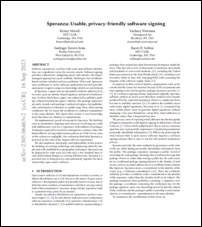
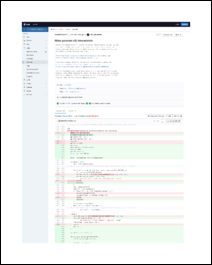



 I think while developing Wayland-as-an-ecosystem we are now entrenched into narrow concepts of how a desktop should work. While discussing Wayland protocol additions, a lot of concepts clash, people from different desktops with different design philosophies debate the merits of those over and over again never reaching any conclusion (just as you will never get an answer out of humans whether sushi or pizza is the clearly superior food, or whether CSD or SSD is better). Some people want to use Wayland as a vehicle to force applications to submit to their desktop s design philosophies, others prefer the smallest and leanest protocol possible, other developers want the most elegant behavior possible. To be clear, I think those are all very valid approaches.
But this also creates problems: By switching to Wayland compositors, we are already forcing a lot of porting work onto toolkit developers and application developers. This is annoying, but just work that has to be done. It becomes frustrating though if Wayland provides toolkits with absolutely no way to reach their goal in any reasonable way. For Nate s Photoshop analogy: Of course Linux does not break Photoshop, it is Adobe s responsibility to port it. But what if Linux was missing a crucial syscall that Photoshop needed for proper functionality and Adobe couldn t port it without that? In that case it becomes much less clear on who is to blame for Photoshop not being available.
A lot of Wayland protocol work is focused on the environment and design, while applications and work to port them often is considered less. I think this happens because the overlap between application developers and developers of the desktop environments is not necessarily large, and the overlap with people willing to engage with Wayland upstream is even smaller. The combination of Windows developers porting apps to Linux and having involvement with toolkits or Wayland is pretty much nonexistent. So they have less of a voice.
I think while developing Wayland-as-an-ecosystem we are now entrenched into narrow concepts of how a desktop should work. While discussing Wayland protocol additions, a lot of concepts clash, people from different desktops with different design philosophies debate the merits of those over and over again never reaching any conclusion (just as you will never get an answer out of humans whether sushi or pizza is the clearly superior food, or whether CSD or SSD is better). Some people want to use Wayland as a vehicle to force applications to submit to their desktop s design philosophies, others prefer the smallest and leanest protocol possible, other developers want the most elegant behavior possible. To be clear, I think those are all very valid approaches.
But this also creates problems: By switching to Wayland compositors, we are already forcing a lot of porting work onto toolkit developers and application developers. This is annoying, but just work that has to be done. It becomes frustrating though if Wayland provides toolkits with absolutely no way to reach their goal in any reasonable way. For Nate s Photoshop analogy: Of course Linux does not break Photoshop, it is Adobe s responsibility to port it. But what if Linux was missing a crucial syscall that Photoshop needed for proper functionality and Adobe couldn t port it without that? In that case it becomes much less clear on who is to blame for Photoshop not being available.
A lot of Wayland protocol work is focused on the environment and design, while applications and work to port them often is considered less. I think this happens because the overlap between application developers and developers of the desktop environments is not necessarily large, and the overlap with people willing to engage with Wayland upstream is even smaller. The combination of Windows developers porting apps to Linux and having involvement with toolkits or Wayland is pretty much nonexistent. So they have less of a voice.
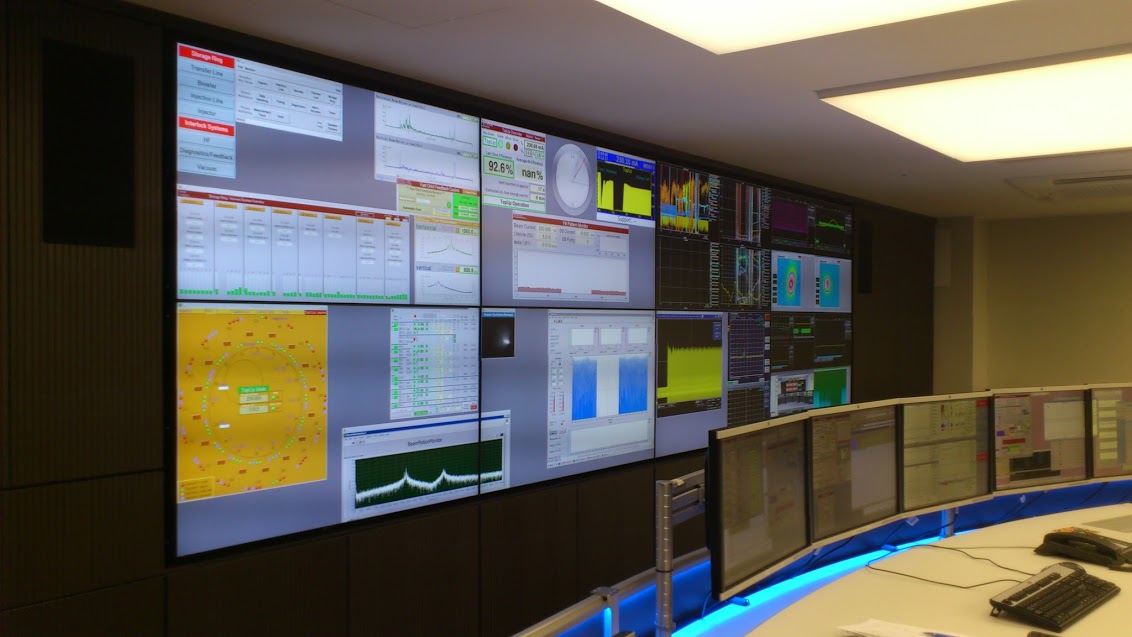
 I will also bring my two protocol MRs to their conclusion for sure, because as application developers we need clarity on what the platform (either all desktops or even just a few) supports and will or will not support in future. And the only way to get something good done is by contribution and friendly discussion.


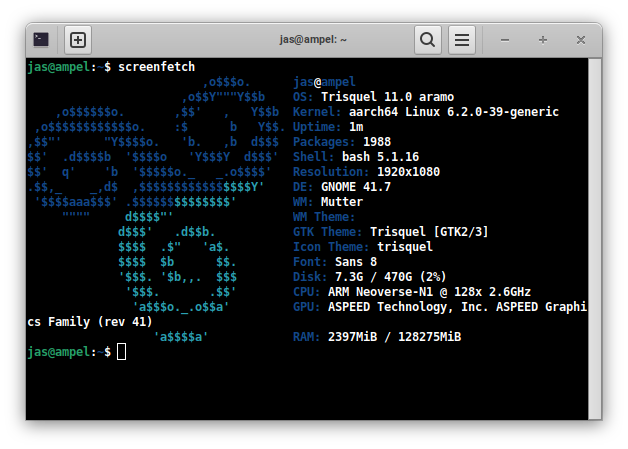
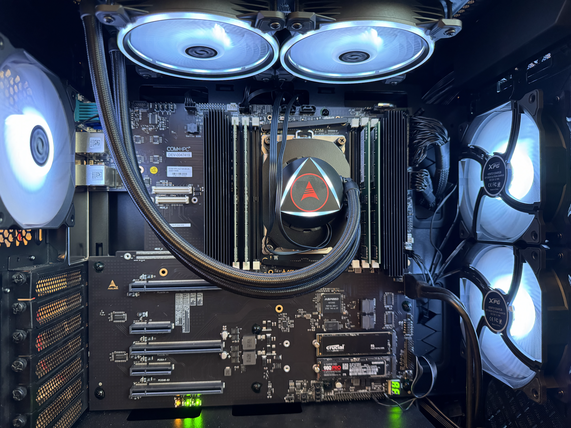
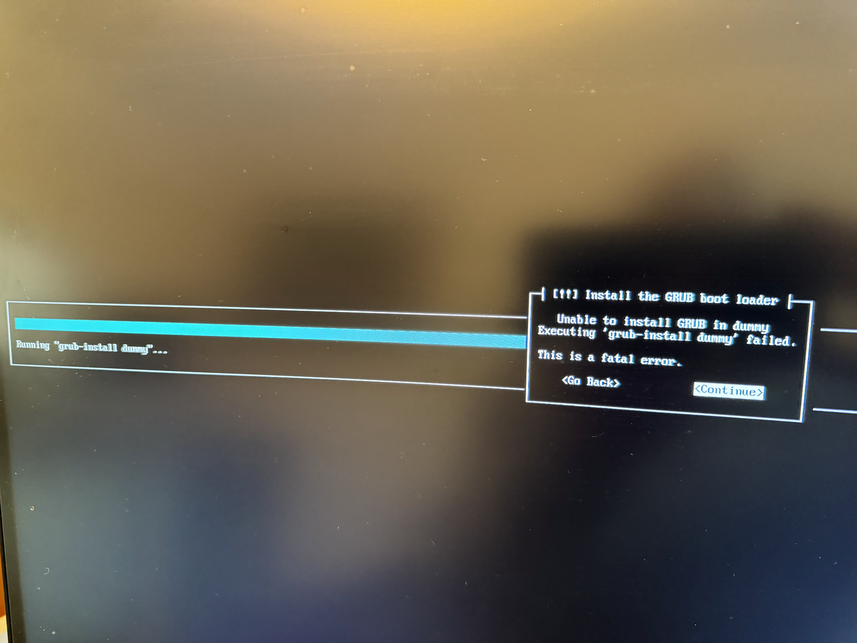
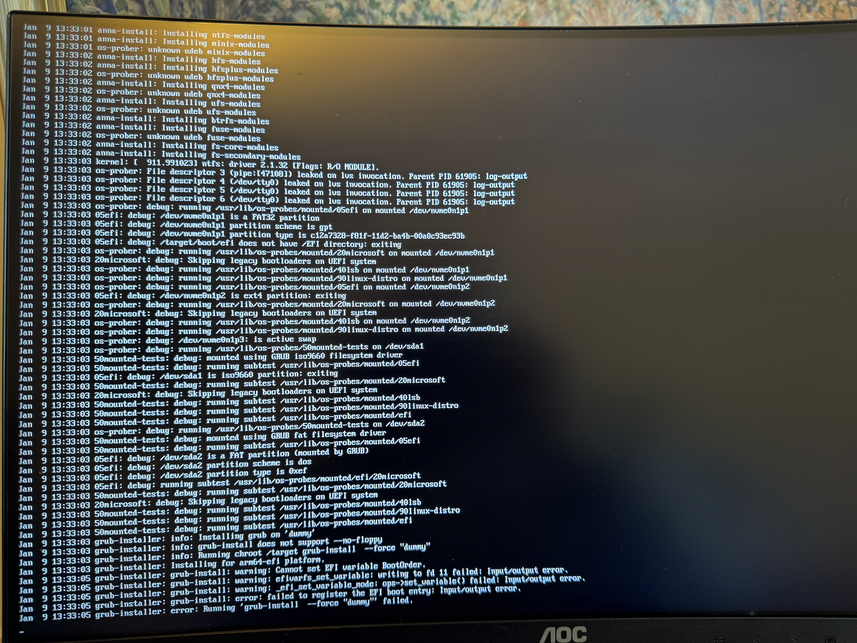
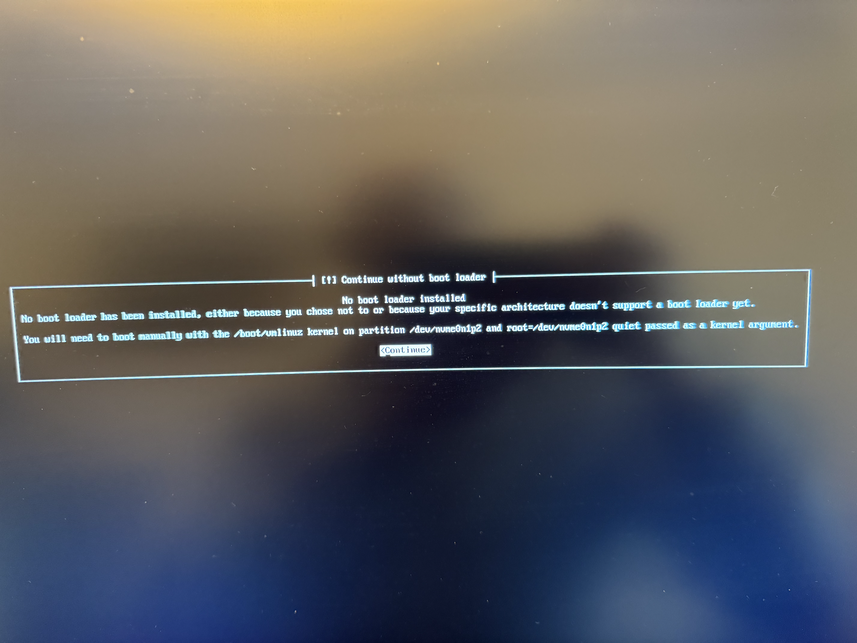
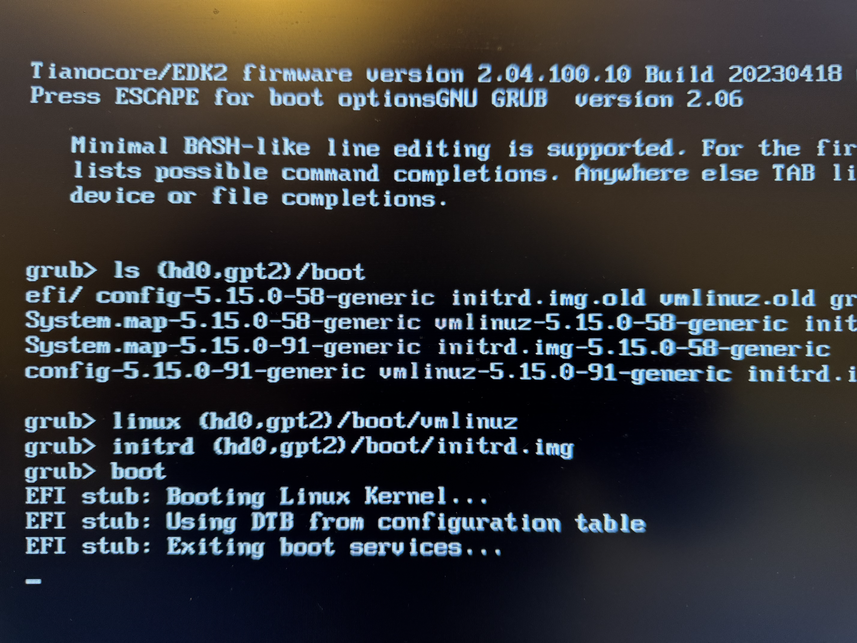
 The Rcpp Core Team is once again thrilled to announce a new release
1.0.12 of the
The Rcpp Core Team is once again thrilled to announce a new release
1.0.12 of the  Now copy the ISO image to the newly created instance and extract
its data:
Now copy the ISO image to the newly created instance and extract
its data:
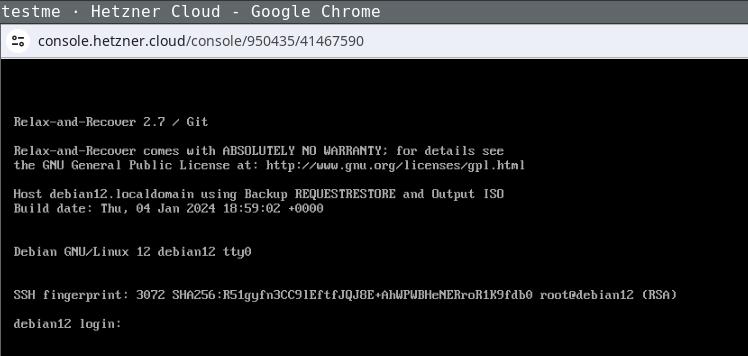 Login the recovery console (root without password) and fix its default route to
make it reachable:
Login the recovery console (root without password) and fix its default route to
make it reachable:
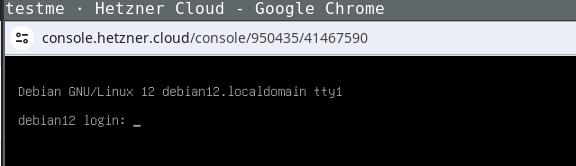 Being able to use this procedure for complete disaster recovery within Hetzner
cloud VPS (using off-site backups) gives me a better feeling, too.
Being able to use this procedure for complete disaster recovery within Hetzner
cloud VPS (using off-site backups) gives me a better feeling, too.
 Today, the animation figure Mickey Mouse finally was released from
the corporate copyright prison, as the 1928 movie
Today, the animation figure Mickey Mouse finally was released from
the corporate copyright prison, as the 1928 movie
 Figure 1: Content-Security-Policy browser communication
This is revolutionary, because it allows servers to receive feedback
in real time on errors that may be appearing in the browser s console.
Figure 1: Content-Security-Policy browser communication
This is revolutionary, because it allows servers to receive feedback
in real time on errors that may be appearing in the browser s console.


 Read all parts of the series
 And here s what he explains about his drawing:
 In their drawing we see a Youtube prank channel on a screen, an external
trackpad on the right (likely it s not a touch screen), and headphones.
Notice how there is no keyboard, or maybe it s folded away.
If you could ask a nice and friendly dragon anything you d like to
learn about the internet, what would it be?
In their drawing we see a Youtube prank channel on a screen, an external
trackpad on the right (likely it s not a touch screen), and headphones.
Notice how there is no keyboard, or maybe it s folded away.
If you could ask a nice and friendly dragon anything you d like to
learn about the internet, what would it be?
 In her drawing, we see again Google - it s clearly everywhere - and also
the interfaces for calling and texting someone.
To explain what the internet is, besides the fact that one
can use it for calling and listening to music, she says:
In her drawing, we see again Google - it s clearly everywhere - and also
the interfaces for calling and texting someone.
To explain what the internet is, besides the fact that one
can use it for calling and listening to music, she says:
 When I asked if he knew what actually happens between the device and a
website he visits, he put forth the hypothesis of the existence of some
kind of
When I asked if he knew what actually happens between the device and a
website he visits, he put forth the hypothesis of the existence of some
kind of