Search Results: "hug"

8 November 2014

Russ Allbery: Another book haul

Someday there will be reviews. Also, software releases. But these posts are much easier to write in the evening when my brain is fried. Also, the anticipation of reading good books is delightful. The motivating reason for this order was that Powell's was giving away $10 gift cards with an order, so I bought books to buy more books later. Iain M. Banks Feersum Endjinn (sff)
Jacqueline Carey Autumn Bones (sff)
Robert Caro The Path to Power (non-fiction)
Keith Houston Shady Characters (non-fiction)
Jan Morris Hav (mainstream)
Arika Okrent In the Land of Invented Languages (non-fiction) I've been in a non-fiction mood lately, so lots of random non-fiction here. The Caro is the first volume of his huge biography of LBJ, which is apparently one of the best biographies ever written. The other non-fiction is less serious: one about intentionally-created languages, and the other about the history of punctuation characters. Hav is a travel book about a city that doesn't actually exist, so it fits somewhat with the non-fiction theme.

7 November 2014

Andrew Cater

Here at the Debian mini-conf in Cambridge at ARM.

16 developers sat in near-total silence, the only noise keyboards and a server sitting next to me.

Some of them I've seen only on video presentations: one I first knew 20 years ago, one wrote all the HOWTO's I knew a couple of years before that - and was the second Linux user ever.

The release team is in another room behind me: Jessie froze the night before last - whatever else will be said/done, we're on the path to release.

It feels very strange and comforting to see Debian in the round: to be able to talk to someone you might argue with in email and see a real person.

And HUGE thanks to all at ARM for time, effort, chasing around and to Sledge and Jo Jo most of all for being stuck on a front desk waiting for people :)


6 November 2014

Matthias Klumpp: The state of AppStream/GNOME-Software in Debian Jessie

or Why do I not see any update notifications on my brand-new Debian Jessie installation?? This is a short explanation of the status quo, and also explains the no update notifications issue in a slightly more detailed way, since I am already getting bug reports for that. As you might know, GNOME provides GNOME-Software for installation of applications via PackageKit. In order to work properly, GNOME-Software needs AppStream metadata, which is not yet available in Debian. There was a GSoC student working on the necessary code for that, but the code is not yet ready and doesn t produce good results yet. Therefore, I postponed AppStream integration to Jessie+1, with an option to include some metadata for GNOME and KDE to use via a normal .deb package. Then, GNOME was updated to 3.14. GNOME 3.14 moved lots of stuff into GNOME-Software, including the support for update-notifications (which have been in g-s-d before). GNOME-Software is also the only thing which can edit the application groups in GNOME-Shell, at least currently. So obviously, there was no a much stronger motivation to support GNOME-Software in Jessie. The appstream-glib library, which GNOME-Software uses exclusively to read AppStream metadata, didn t support the DEP-11 metadata format which Debian uses in place of the original AppSTream XML for a while, but does so in it s current development branch. So that component had to be packaged first. Later, GNOME-Software was uploaded to the archive as well, but still lacked the required metadata. That data was provided by me as a .deb package later, locally generated using the current code by my SoC student (the data isn t great, but better than nothing). So far with the good news. But there are multiple issues at time. First of all, the appstream-data package didn t pass NEW so far, due to it s complex copyright situation (nothing we can t resolve, since app-install-data, which appstream-data would replace, is in Debian as well). Also, GNOME-Software is exclusively using offline-updates (more information also on [1] and [2]) at time. This isn t always working at the moment, since I haven t had the time to test it properly and I didn t expect it to be used in Debian Jessie as well[3]. Furthermore, the offline-updates feature requires systemd (which isn t an issue in itself, I am quite fine with that, but people not using it will get unexpected results, unless someone does the work to implement offline-updates with sysvinit). Since we are in freeze at time, and obviously this stuff is not ready yet, GNOME is currently without update notifications and without a way to change the shell application groups. So, how can we fix this? One way would of course be to patch notification support back into g-s-d, if the new layout there allows doing that. But that would not give us the other features GNOME-Software provides, like application-group-editing. Implementing that differently and patching it to make it work would be more or at least the same amount of work like making GNOME-Software run properly. I therefore prefer getting GNOME-Software to run, at least with basic functionality. That would likely mean hiding things like the offline-update functionality, and using online-updates with GNOME-PackageKit instead. Obviously, this approach has it s own issues, like doing most of the work post-freeze, which kind of defeats the purpose of the freeze and would need some close coordination with the release-team. So, this is the status quo at time. It is kind of unfortunate that GNOME moved crucial functionality into a new component which requires additional integration work by the distributors so quickly, but that s something which isn t worth to talk about. We need a way forward to bring update-notifications back, and there is currently work going on to do that. For all Debian users: Please be patient while we resolve the situation, and sorry for the inconvenience. For all developers: If you would like to help, please contact me or Laurent Bigonville, there are some tasks which could use some help.
As a small remark: If you are using KDE, you are lucky Apper provides the notification support like it always did, and thanks to improvements in aptcc and PackageKit, it even is a bit faster now. For the Xfce and <other_desktop> people, you need to check if your desktop provides integration with PackageKit for update-checking. At least Xfce doesn t, but after GNOME-PackageKit removed support for it (which was moved to gnome-settings-daemon and now to GNOME-Software) nobody stepped up to implement it yet (so if you want to do it it s not super-complicated, but knowledge of C and GTK+ is needed). - [3]: It looks like dpkg tries to ask a debconf question for some reason, or an external tool like apt-listchanges is interfering with the process, which must run completely unsupervised. There is some debugging needed to resolve these Debian-specific issues.

5 November 2014

Carl Chenet: Send the same short message on Twitter, Pump.io, Diaspora* and a lot more

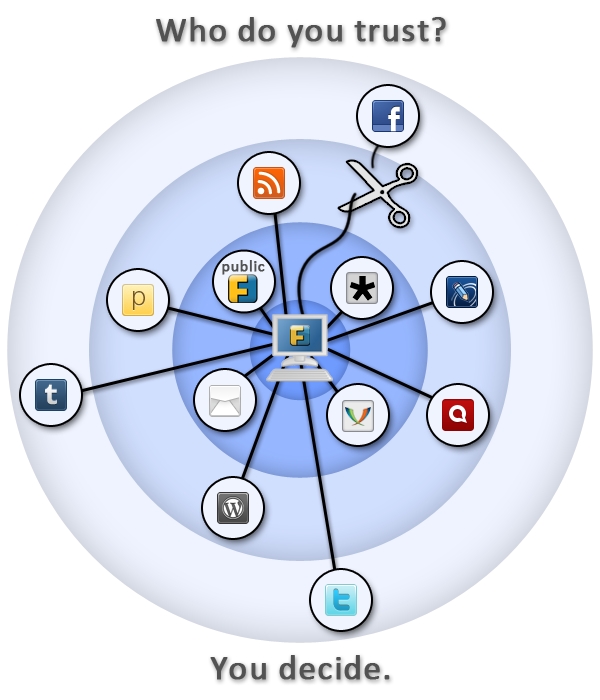
Follow me on Identi.ca or Twitter or Diaspora*diaspora-banner This is a feedback about installing a self hosted instance of Friendica on a Debian server (Jessie). If you re not interested in why I use Friendica, just go to Prerequisite for Friendica section below. Frustration about social networks Being a huge user of short messages, I was quite frustated to spend so much time on my Twitter account. To be quite honest, there is no much I like about this social network, except the huge population of people being potentially interested in what I write. twitter-logo I also have been using Identi.ca (now powered by Pump.io) for a while. But I tried for a while to manage both networks Pump.io and Twitter by hand and it was quite painful. And something was telling me another social network was going to appear from nowhere one of these days and I ll be just horrible to try to keep it up this way. identica-logo So I was looking for a scalable solution not asking too much personal investment. Subscribing to Diaspora* some days ago on the Framasphere pod, tintouli told me to try Friendica. Hmmm, what s Friendica ? f-intro Friendica is a content manager you can plug on almost anything: social networks (Facebook, Twitter, Pump.io, Diaspora*, ), but also WordPress, XMPP, emails I m in fact just discovering the power of this tool but to plug it on my different social network accounts was quite a good use case for me. And I guess if you re still reading, for you too. I tried to use some shared public servers but I was not quite happy with the result, one connector was still missing or public servers were really unstable. So I m at last self hosting my Friendica. Here is how. Prerequisite for Friendica You need to install the following packages: # apt-get install apache2 libapache2-mod-php5 php5 php5-curl php5-gd php5-mysql mysql-server git Having a already self-modified /etc/php5/apache2/php.ini, I encountered a small issue with libCurl and had to manually add the following line in the php.ini: extension=curl.so Setting up MySQL Connect to MySQL and create an empty database with a dedicated user: # mysql -u root -pV3rYS3cr3t -e create database friendica; GRANT ALL PRIVILEGES ON friendica.* TO friendica@localhost IDENTIFIED BY R3AlLyH4rdT0Gu3ss mysql Setting up Apache My server hosts several services, so I use a subdomain friendica.mydomain.com. If you use a subdomain, of course check you do have declared this subdomain in your DNS zone. apache-logo I use SSL encryption with a wildcard certificate for all my subdomains. My Friendica data are stored in /var/www/friendica. Here is my virtual host configuration for Friendica stored in the file /etc/apache2/sites-available/friendicassl.conf : <VirtualHost *:443>


ServerName friendica.mydomain.com
DocumentRoot /var/www/friendica/
DirectoryIndex index.php index.html
ErrorLog /var/log/apache2/friendica-error-ssl.log
TransferLog /var/log/apache2/friendica-access-ssl.log SSLEngine on
SSLCertificateFile /etc/ssl/certs/mydomain/mydomain.com.crt
SSLCertificateKeyFile /etc/ssl/private/mydomain.com.key
SSLVerifyClient None <Directory /var/www/friendica/>
AllowOverride All
Options FollowSymLinks
Order allow,deny
Allow from all
</Directory>
</VirtualHost> After writing the configuration file, just launch the following commands and it should be good for the Apache configuration: # a2ensite friendicassl && /etc/init.d/apache2 reload friendica-trust Setting up Friendica Get the master zip file of Friendica, copy it on your server and decompress it. Something like : # cd /var/www/ && wget https://github.com/friendica/friendica/archive/master.zip && unzip master.zip && mv friendica-master friendica You need to give www-data (Apache user) the rights to write in /var/www/friendica/view/smarty3/ : # chown -R www-data:www-data /var/www/friendica/view/smarty3 && chmod -R ug+w var/www/friendica/view/smarty3 Ok, I guess we re all set, lets launch the installation process! Using your web browser, connect to friendica.mydomain.com. First step you ll see the installation window which checks the prerequisite before installing. Complete if something is missing.
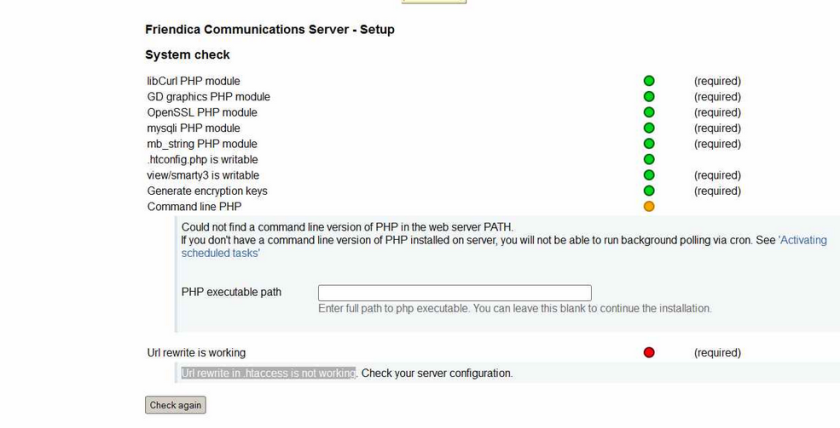
friendica-installation

First window of the Friendica installation process

Second step asks the host/user/password of the database, complete and the installation process starts. Hopefully all goes just fine. Next you ll have to create a /var/www/friendica/.htconfig.php with the content that the last page of the installation process provides. Just copy/paste, check the rights of this file and now you can connect again to see the register page of friendica at the url https://friendlica.mydomain.com/register . Pretty cool! Register a user That s a fairly easy step. You just need to check before that your server is able to send emails, because the password is going to be sent to you by email. If it is ok, you should now identify on the welcome page of friendica and access your account. That s a huge step to broadcast your short messages everywhere, but we have some last steps before being able to send your short messages on all the social networks we need. A small break, create an app for twitter on apps.twitter.com To send your short messages to Twitter, you need to create an app on apps.twitter.com. Just check you re logged in Twitter and connect to apps.twitter.com. Create an app called with a unique name (apparently), then go to the Keys and Access tokens page, note the consumer key and the consumer secret. You ll later need the name of the app, the consumer key and the consumer secret. friendica-decentralized-network Install and configure the addons Friendica uses an addon system in order to plug on the different third-parties it needs. We are going to configure Twitter, Pump.io and the Diaspora* plug. Let s go back to our server and launches some commands: # cd /tmp && git clone https://github.com/friendica/friendica-addons.git && cd friendica-addons # tar xvf twitter.tgz -C /var/www/friendica/addon # tar xvf pumpio.tgz -C /var/www/friendica/addon # cp -a diaspora /var/www/friendica/addon You need to modify your /var/www/friendica/.htconfig.php file and add the following content at the end: // names of your addons, separated by a comma $a->config['system']['addon'] = pumpio, twitter, diaspora ; // your Twitter consumer key
$a->config['twitter']['consumerkey'] = P4Jl2Pe4j7Lj91eIn0AR8vIl2 ; // your Twitter consumer secret
$a->config['twitter']['consumersecret'] = 1DnVkllPik9Ua8jW4fncxwtXZJbs9iFfI5epFzmeI8VxM9pqP1 ; // you Twitter app name $a->config['twitter']['application_name'] = whatever-twitter ; banner_friendica Connect again to Friendica. Go to settings => social networks, you will see the options for Twitter, Pump.io and Diaspora*. Complete the requested information for each of them. Important options you should not forget to check are: Pump.io Twitter Diaspora* Done? Now it s time to send your first broadcasted short message. Yay! Send a short message to your different social networks Connect to Friendica, click on the network page, write your short message in the Share box. Click on the lock lock, you ll see the following setup: friendica-post-default It means your short messages will be broadcasted to the three networks. Or more, it s up to you! That s my setup, feel free to modify. Now close the lock window and send your message. For me it takes some time to appear on Twitter and Diaspora* and it immediatly appears on Identi.ca. Last words friendica-stand Friendica offers to take back the control of your data, by broadcasting content on different media from a single source. While self hosting, you keep your data whatever happends and are not subject to companies losing your data like recently Twitpic. Moreover the philosophy behind Friendica pushed me to dig and test the solution What about you? How do you proceed to broadcast your short messages? Does Friendica offer a good solution in your opinion? Are you interested in the philosophy behind this project? Feel free to share your thoughs in the comments. LAST MINUTE: hey, this article is on Hacker News, don t hesitate to vote for it if you liked it!

30 October 2014

Matthew Garrett: Hacker News metrics (first rough approach)

I'm not a huge fan of Hacker News[1]. My impression continues to be that it ends up promoting stories that align with the Silicon Valley narrative of meritocracy, technology will fix everything, regulation is the cancer killing agile startups, and discouraging stories that suggest that the world of technology is, broadly speaking, awful and we should all be ashamed of ourselves.

But as a good data-driven person[2], wouldn't it be nice to have numbers rather than just handwaving? In the absence of a good public dataset, I scraped Hacker Slide to get just over two months of data in the form of hourly snapshots of stories, their age, their score and their position. I then applied a trivial test:
  1. If the story is younger than any other story
  2. and the story has a higher score than that other story
  3. and the story has a worse ranking than that other story
  4. and at least one of these two stories is on the front page
then the story is considered to have been penalised.

(note: "penalised" can have several meanings. It may be due to explicit flagging, or it may be due to an automated system deciding that the story is controversial or appears to be supported by a voting ring. There may be other reasons. I haven't attempted to separate them, because for my purposes it doesn't matter. The algorithm is discussed here.)

Now, ideally I'd classify my dataset based on manual analysis and classification of stories, but I'm lazy (see [2]) and so just tried some keyword analysis:
KeywordPenalisedUnpenalised
Women134
Harass20
Female51
Intel23
x8634
ARM34
Airplane12
Startup4626

A few things to note:
  1. Lots of stories are penalised. Of the front page stories in my dataset, I count 3240 stories that have some kind of penalty applied, against 2848 that don't. The default seems to be that some kind of detection will kick in.
  2. Stories containing keywords that suggest they refer to issues around social justice appear more likely to be penalised than stories that refer to technical matters
  3. There are other topics that are also disproportionately likely to be penalised. That's interesting, but not really relevant - I'm not necessarily arguing that social issues are penalised out of an active desire to make them go away, merely that the existing ranking system tends to result in it happening anyway.

This clearly isn't an especially rigorous analysis, and in future I hope to do a better job. But for now the evidence appears consistent with my innate prejudice - the Hacker News ranking algorithm tends to penalise stories that address social issues. An interesting next step would be to attempt to infer whether the reasons for the penalties are similar between different categories of penalised stories[3], but I'm not sure how practical that is with the publicly available data.

(Raw data is here, penalised stories are here, unpenalised stories are here)


[1] Moving to San Francisco has resulted in it making more sense, but really that just makes me even more depressed.
[2] Ha ha like fuck my PhD's in biology
[3] Perhaps stories about startups tend to get penalised because of voter ring detection from people trying to promote their startup, while stories about social issues tend to get penalised because of controversy detection?

comment count unavailable comments

28 October 2014

Keith Packard: Goodbye-Barnes-and-Noble

Goodbye Barnes & Noble I've read books on electronic devices for many years now; the convenience of having a huge library with me while traveling makes up for the lower quality of the presentation. I've read books on a selection of Palm devices, an old OpenInkpot compatible ereader, my phone and, most recently, on my Kobo Aura. To get reading material, I've used a variety of sources, including the venerable Project Gutenberg, the Internet Archive, directly from authors like Cory Doctorow and even our local Multnomah County Public Library. I like to have books in epub format; it's a published standard, based on HTML and CSS. My recent devices have all happily supported that, and it allows for editing when I feel the need to correct typos or formatting problems. Purchasing Books When I wanted to actually purchase a book, I bought from Barnes & Noble; they have a good selection, and reasonable automatic recommendations. According to their web site, since I started shopping there, I've purchased 51 books. I can't tell how much I've spent, but probably in excess of $500. Not knowing which device I'd be reading on at any one time, and liking to have the assurance of ongoing access to my library, I would always download the epub files to my laptop and then transfer them to whichever device I wanted to read on. This ensured that my books would be available even when I didn't have a network connection (as happened yesterday during a wind storm which cut the power to the DSLAM which connects me to the internet). I'd created a simple shell script which captured the file after it was downloaded on my laptop and prepared it for my reader. A bit of browser configuration and it really was as simple as clicking the 'download' button to get a book onto both my laptop and my reading device. Barnes & Noble Disables Downloading I was traveling in Bordeaux a couple of weeks ago and wanted to get the latest volume in a series I was reading. My library didn't have it available, and so I decided that it was worth a few dollars to purchase it for the flight home. After clicking through the Barnes & Noble store, I was ready to download the book so that I could transfer it to my reader. Going to 'My Library', I found my new purchases but the usual 'Download' button was missing. I was a bit surprised as I'd purchased and downloaded the previous volume just before leaving without any troubles. At first, I assumed there was some kind of region restriction on the distribution of this book. I'm familiar with that from DVD region locking of movies, and supposed that the same could be done with books for some reason. However, after setting up a VPN back to home and browsing through that (to ensure that my browser would appear with an Oregon address), the download button was still not present. The unhelpful Barnes & Noble representative that I accessed through the 'help' button disclosed that the 'download' "feature" had been disabled for "security" reasons. Not really having any alternative, I requested a refund for the new book. Barnes & Noble Loses a Customer With no way to actually use ebooks purchased through the Barnes & Noble store, I won't be spending any more money with them. I'm not sure how that helps their "security" issues, although if they lose enough customers and they close their doors, I guess that would make them about as secure as imaginable. Kobo Makes a Sale Having purchased a Kobo Aura, it had built-in access to their book store, which made it easy to download the book that I wanted. Then, I simply connected my reader to my laptop and copied the file over for safe keeping. Buying Books under Linux After I got home, I had to figure out how to get Adobe Digital Editions installed on my laptop. Fortunately, I discovered that version 2.0.1 runs fine under wine. Now, purchasing books can be done with my laptop (a vastly superior browsing experience). The .acsm file can be dragged straight from the iceweasel download menu to Adobe Digital Editions, which happily downloads the actual .epub file and makes it available for transferring to my reader. Of course, now that I've got Adobe Digital Editions working, I can also get digitally restricted books from all over the net, greatly expanding my options for purchasing (or borrowing) books. It's a bit less convenient, and requires that I run an icky Windows binary under wine, but at least I have choices, which is some consolation.

27 October 2014

Petter Reinholdtsen: First Jessie based Debian Edu released (alpha0)

I am happy to report that I on behalf of the Debian Edu team just sent out this announcement:
The Debian Edu Team is pleased to announce the release of Debian Edu
Jessie 8.0+edu0~alpha0
Debian Edu is a complete operating system for schools. Through its
various installation profiles you can install servers, workstations
and laptops which will work together on the school network. With
Debian Edu, the teachers themselves or their technical support can
roll out a complete multi-user multi-machine study environment within
hours or a few days. Debian Edu comes with hundreds of applications
pre-installed, but you can always add more packages from Debian.
For those who want to give Debian Edu Jessie a try, download and
installation instructions are available, including detailed
instructions in the manual[1] explaining the first steps, such as
setting up a network or adding users. Please note that the password
for the user your prompted for during installation must have a length
of at least 5 characters!
 [1] <URL: https://wiki.debian.org/DebianEdu/Documentation/Jessie >
Would you like to give your school's computer a longer life? Are you
tired of sneaker administration, running from computer to computer
reinstalling the operating system? Would you like to administrate all
the computers in your school using only a couple of hours every week?
Check out Debian Edu Jessie!
Skolelinux is used by at least two hundred schools all over the world,
mostly in Germany and Norway.
About Debian Edu and Skolelinux
===============================
Debian Edu, also known as Skolelinux[2], is a Linux distribution based
on Debian providing an out-of-the box environment of a completely
configured school network. Immediately after installation a school
server running all services needed for a school network is set up just
waiting for users and machines being added via GOsa , a comfortable
Web-UI. A netbooting environment is prepared using PXE, so after
initial installation of the main server from CD or USB stick all other
machines can be installed via the network.  The provided school server
provides LDAP database and Kerberos authentication service,
centralized home directories, DHCP server, web proxy and many other
services.  The desktop contains more than 60 educational software
packages[3] and more are available from the Debian archive, and
schools can choose between KDE, Gnome, LXDE, Xfce and MATE desktop
environment.
 [2] <URL: http://www.skolelinux.org/ >
 [3] <URL: http://people.skolelinux.org/pere/blog/Educational_applications_included_in_Debian_Edu___Skolelinux__the_screenshot_collection____.html >
Full release notes and manual
=============================
Below the download URLs there is a list of some of the new features
and bugfixes of Debian Edu 8.0+edu0~alpha0 Codename Jessie. The full
list is part of the manual. (See the feature list in the manual[4] for
the English version.) For some languages manual translations are
available, see the manual translation overview[5].
 [4] <URL: https://wiki.debian.org/DebianEdu/Documentation/Jessie/Features >
 [5] <URL: http://maintainer.skolelinux.org/debian-edu-doc/ >
Where to get it
---------------
To download the multiarch netinstall CD release (624 MiB) you can use
 * ftp://ftp.skolelinux.org/skolelinux-cd/debian-edu-8.0+edu0~alpha0-CD.iso
 * http://ftp.skolelinux.org/skolelinux-cd/debian-edu-8.0+edu0~alpha0-CD.iso
 * rsync -avzP ftp.skolelinux.org::skolelinux-cd/debian-edu-8.0+edu0~alpha0-CD.iso .
The SHA1SUM of this image is: 361188818e036ce67280a572f757de82ebfeb095
New features for Debian Edu 8.0+edu0~alpha0 Codename Jessie released 2014-10-27
===============================================================================
Installation changes
--------------------
 * PXE installation now installs firmware automatically for the hardware present.
Software updates
----------------
Everything which is new in Debian Jessie 8.0, eg:
 * Linux kernel 3.16.x
 * Desktop environments KDE "Plasma" 4.11.12, GNOME 3.14, Xfce 4.10,
   LXDE 0.5.6 and MATE 1.8 (KDE "Plasma" is installed by default; to
   choose one of the others see manual.)
 * the browsers Iceweasel 31 ESR and Chromium 38 
 * !LibreOffice 4.3.3
 * GOsa 2.7.4
 * LTSP 5.5.4
 * CUPS print system 1.7.5
 * new boot framework: systemd
 * Educational toolbox GCompris 14.07 
 * Music creator Rosegarden 14.02
 * Image editor Gimp 2.8.14
 * Virtual stargazer Stellarium 0.13.0
 * golearn 0.9
 * tuxpaint 0.9.22
 * New version of debian-installer from Debian Jessie.
 * Debian Jessie includes about 42000 packages available for
   installation.
 * More information about Debian Jessie 8.0 is provided in the release
   notes[6] and the installation manual[7].
 [6] <URL: http://www.debian.org/releases/jessie/releasenotes >
 [7] <URL: http://www.debian.org/releases/jessie/installmanual >
Fixed bugs
----------
 * Inserting incorrect DNS information in Gosa will no longer break
   DNS completely, but instead stop DNS updates until the incorrect
   information is corrected (Debian bug #710362)
 * and many others.
Documentation and translation updates
------------------------------------- 
 * The Debian Edu Jessie Manual is fully translated to German, French,
   Italian, Danish and Dutch. Partly translated versions exist for
   Norwegian Bokmal and Spanish.
Other changes
-------------
 * Due to new Squid settings, powering off or rebooting the main
   server takes more time.
 * To manage printers localhost:631 has to be used, currently www:631
   doesn't work.
Regressions / known problems
----------------------------
 * Installing LTSP chroot fails with a bug related to eatmydata about
   exim4-config failing to run its postinst (see Debian bug #765694
   and Debian bug #762103).
 * Munin collection is not properly configured on clients (Debian bug
   #764594).  The fix is available in a newer version of munin-node.
 * PXE setup for Main Server and Thin Client Server setup does not
   work when installing on a machine without direct Internet access.
   Will be fixed when Debian bug #766960 is fixed in Jessie.
See the status page[8] for the complete list.
 [8] <URL: https://wiki.debian.org/DebianEdu/Status/Jessie >
How to report bugs
------------------
<URL: http://wiki.debian.org/DebianEdu/HowTo/ReportBugs >
About Debian
============
The Debian Project was founded in 1993 by Ian Murdock to be a truly
free community project. Since then the project has grown to be one of
the largest and most influential open source projects. Thousands of
volunteers from all over the world work together to create and
maintain Debian software. Available in 70 languages, and supporting a
huge range of computer types, Debian calls itself the universal
operating system.
Contact Information
For further information, please visit the Debian web pages[9] or send
mail to press@debian.org.
 [9] <URL: http://www.debian.org/ >

26 October 2014

Russ Allbery: California general election

Probably only of interest to California residents. Time again for the general election voting. This is probably too late to be helpful for a lot of people voting permanent absentee, but may as well write this down anyway. (Hm, I apparently didn't do this in 2012.) Propositions: Proposition 1: YES. Now is one of the best times in history to borrow money for infrastructure improvements, and our water infrastructure in the state can certainly use it. Proposition 2: YES. I have somewhat mixed feelings about this, since I hate passing complex legislation like this via proposition, but this already went through the legislature. It would be dumb for the federal government, which can more easily borrow money, but given how the finances of state governments work in the US, this sort of rainy day fund is probably prudent. This one seems reasonably well-designed, and the opposition is panic about a secondary effect on how school reserves are managed that can be changed with later legislative action and which is rather unconvincing. Proposition 45: YES. I can't get very enthused about yet more bandaids on top of our completely broken health care system, but forcing insurance companies to justify rate increases results in some public pressure against profit-taking by insurance companies. Single payer is what we actually need, but this might be mildly helpful. Plus, the argument against is more incoherent nonsense. So, I'm voting yes, but I don't think it's important and I won't mind if it loses. Proposition 46: NO. There are a lot of things that we should do about preventable medical errors, starting with funding our health care system properly, testing drugs properly, and investing in proper inspections and medical licensing investigations. Drug testing doctors is not among those things. This is a well-meaning but horrible idea pushed by a victim's advocacy group that won't do anything to improve our health care system. The fear-mongering of the opponents about malpractice lawsuits is a bit much, but there are essentially no positive benefits here. Proposition 47: YES. Requires that misdemeanor crimes actually be misdemeanors, rather than giving prosecutors discretion to charge them as felonies if the person charged happens to be black-- er, I mean, if the prosecutor doesn't like them for some reason. Obviously a good idea on all fronts: stop over-charging crimes, stop giving prosecutors discretion to choose the impact of laws on particular people (since they rarely use it appropriately), and further try to decriminalize our completely worthless "war on drugs." Proposition 48: YES. I'm opposed to the Indian gaming system in general, but this proposition appears to be a rather cynical attempt to block new casino development by tribes that already have casinos. My general feeling is that if we're going to have casinos, they should generally be legal; the bizarre system where each casino is subject to public approval seems designed to create political cronyism. State offices: I'm not going to comment on the partisan offices, since no one interesting survived the primaries. Across the board, it's basically the Democratic incumbants against various Republicans. The state Republican party in California is dominated by science denialists, Randian objectivists, and people who think the solution to all problems is ensuring rich people don't pay taxes, so it takes rather a lot to get me to vote for any of them. At the moment, the Democrats are doing a reasonably good job running the state, so while I'd vote for challengers from the left against several of them, given the boring candidate slate, I'm just voting Democrat down the line. California has a system that requires voter approval for various state judicial offices. In general, I don't agree with voter approval for judges, since voters are rarely in a position to make reasonable choices about justices. Since there's a Democratic administration in power at the moment, these are probably the best judges that we're going to get (the few I've heard of are good choices), and I don't think the yes/no approval voting is useful anyway. So I'm voting to approve across the board. Superintendent of Public Instruction: Tom Torlakson. I'm not a huge fan of Torlakson, but Tuck is a Harvard MBA who ran charter schools and then a school privatization initiative. Everyone always claims that they want to reduce bureaucracy and empower teachers, but Tuck has a past track record of trying to do so by taking public education private, something that I am passionately opposed to. So Torlakson it is. Local measures: Measure B: YES. Increases the local hotel tax and uses it for local infrastructure. I'm generally in favor of raising taxes, and the amount certainly won't be significant in the ridiculous Palo Alto hotel market. The arguments against feature one of my favorite stupid right-wing talking points: the tax is unfair because it isn't earmarked to benefit the people paying it. Measure C: YES. Reasonable, small reform of the local utility tax, opposed by the Libertarian Party and "taxpayer associations" using an "all taxation is theft" argument. What's not to like? Measure D: NO. Reduces the size of the city council for no clear reason. The stated reasons are saving money (not credible given how little money is involved) and making city meetings not take as long. I'm going to need something better than that to vote for this. Local offices: Judge of the Superior Court, Office #24: Matthew S. Harris. I'm making one exception for my normal rule against voting for former prosecutors for judges because the incumbant, Diane Ritchie, is apparently a train wreck. All it takes is a quick Google search to reveal multiple news stories about strange behavior, clear conflicts of interest, and other serious problems, including a rebuke by the local bar association. Even if not all of that information is true, judges should be above reproach, or at least farther above reproach than this. Palo Alto City Council: I have an agenda here: I think housing density is about the best thing that the local community could support. Housing density enables better mass transit options, makes housing more affordable and brings more housing under possible rent control, and simply makes more sense given the cost of housing in the area. A lot of the city council members run on low-density or anti-growth platforms; I vote against those and for people who support development. And, of course, I'll filter out candidates who believe stupid things, like claiming a minimum wage is un-American (Seelam-Sea Reddy). The best seem to be Greg Scharff, A.C. Johnston, Nancy Shepherd, Cory Wolbach, and Wayne Douglass. Palo Alto Unified School District: The Democratic party has endorsed four out of the five candidates, so it probably doesn't matter too much. Gina Dalma and Ken Dauber sound like the best of the candidates to me, so I will probably vote for them. Santa Clara Valley Water District #7: I voted for Brian Schmidt last time, and I don't see a reason to change my mind. His opponent is a Silicon Valley millionaire who is spending a surprisingly large amount of money on this race and is involved with a business that sells software to water boards, which raises some eyebrows.

17 October 2014

Martin Pitt: Ramblings from LinuxCon/Plumbers 2014

I m on my way home from D sseldorf where I attended the LinuxCon Europe and Linux Plumber conferences. I was quite surprised how huge LinuxCon was, there were about 1.500 people there! Certainly much more than last year in New Orleans. Containers (in both LXC and docker flavors) are the Big Thing everybody talks about and works with these days; there was hardly a presentation where these weren t mentioned at all, and (what felt like) half of the presentations were either how to improve these, or how to use these technologies to solve problems. For example, some people/companies really take LXC to the max and try to do everything in them including tasks which in the past you had only considered full VMs for, like untrusted third-party tenants. For example there was an interesting talk how to secure networking for containers, and pretty much everyone uses docker or LXC now to deploy workloads, run CI tests. There are projects like fleet which manage systemd jobs across an entire cluster of containers (distributed task scheduler) or like project-builder.org which auto-build packages from each commit of projects. Another common topic is the trend towards building/shipping complete (r/o) system images, atomic updates and all that goodness. The central thing here was certainly Stateless systems, factory reset, and golden images which analyzed the common requirements and proposed how to implement this with various package systems and scenarios. In my opinion this is certainly the way to go, as our current solution on Ubuntu Touch (i. e. Ubuntu s system-image) is far too limited and static yet, it doesn t extend to desktops/servers/cloud workloads at all. It s also a lot of work to implement this properly, so it s certainly understandable that we took that shortcut for prototyping and the relatively limited Touch phone environment. On Plumbers my main occupations were mostly the highly interesting LXC track to see what s coming in the container world, and the systemd hackfest. On the latter I was again mostly listening (after all, I m still learning most of the internals there..) and was able to work on some cleanups and improvements like getting rid of some of Debian s patches and properly run the test suite. It was also great to sync up again with David Zeuthen about the future of udisks and some particular proposed new features. Looks like I m the de-facto maintainer now, so I ll need to spend some time soon to review/include/clean up some much requested little features and some fixes. All in all a great week to meet some fellows of the FOSS world a gain, getting to know a lot of new interesting people and projects, and re-learning to drink beer in the evening (I hardly drink any at home :-P). If you are interested you can also see my raw notes, but beware that there are mostly just scribbling. Now, off to next week s Canonical meeting in Washington, DC!

13 October 2014

Steve McIntyre: Successful Summer of Code in Linaro

It's past time I wrote about how Linaro's students fared in this year's Google Summer of Code. You might remember me posting earlier in the year when we welcomed our students. We started with 3 student projects at the beginning of the summer. One of the students unfortunately didn't work out, but the other two were hugely successful. Gaurav Minocha was a graduate student at the University of British Columbia, Vancouver, Canada. He worked on Linux Flattened Device Tree Self-checking, mentored by Grant Likely from Linaro's Office of the CTO. Gaurav achieved all of his project's goals, and he was invited to Linaro's recent Linaro Connect USAConnect conference in California to meet people and and talk about his project. He and Grant presented a session on their work; it was filmed, and video is online. Grant said he was very happy with Gaurav's "strong, solid performance" during the project. Varad Gautam was a student at Birla Institute of Technology and Science, Pilani, India. He succeeded in porting UEFI to the BeagleBone Black. Leif Lindholm from the Linaro Enterprise Group was his mentor for the summer. At the end of the summer, Varad delivered a UEFI port ready for booting Linux and his code was included in Linaro's September UEFI release. Leif said that he was "very pleased with Varad's self sufficiency and ability to pick up an entirely new software project very quickly". We were hoping to invite Gaurad to Connect in California also, but travel document delays got in the way. With luck we'll see him at the next Connect in Hong Kong in February 2015. Well done, guys! It was great to work with these young developers for the summer, and we wish them lots more success in their future endeavours. Google have also just confirmed that they will be running the Summer of Code program again in 2015. I'm hoping that Linaro will be accepted again next year as a mentoring organisation. I'll post more about that early next year.

12 October 2014

Giuseppe Iuculano: apt-get purge chromium

As you may know, I was the Debian chromium maintainer for many years. Some week ago, I decided to stop working in the chromium package because it is not possible anymore to contribute and work in the team. In fact, Michael Gilbert started to work in a manner that prevent people to help maintain the package. In the last period the git repository rarely was updated, and my requests were systematically ignored. Having an updated git repository is mandatory in a big package like Chromium, and if you don t push your changes, other people will lost their time Now, after deciding to stop maintaining Chromium, I also decided to purge it and switch to the Google Chrome binary. Why? Chromium is a pain. Huge commits not documented in changelog that caused stupid bugs because no one can double check them. In this moment we have an unusable [1] [2] [3] version of Chromium in testing because maintainer demoted grave bugs with the recommendation to rm -rf ./config/chromium and nobody can understand the sense of latest commits. flattr this!

10 October 2014

Matthias Klumpp: Listaller + Glick: Some new ideas

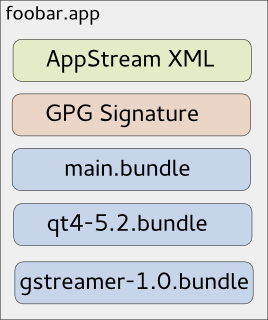
As you might know, due to invasive changes in PackageKit, I am currently rewriting the 3rd-party application installer Listaller. Since I am not the only one looking at the 3rd-party app-installation issue (there is a larger effort going on at GNOME, based on Lennarts ideas), it makes sense to redesign some concepts of Listaller. Currently, dependencies and applications are installed into directories in /opt, and Listaller contains some logic to make applications find dependencies, and to talk to the package manager to install missing things. This has some drawbacks, like the need to install an application before using it, the need for applications to be relocatable, and application-installations being non-atomic. Glick2 There is/was another 3rd-party app installer approach on the GNOME side, by Alexander Larsson, called Glick2. Glick uses application bundles (do you remember Klik from back in the days?) mounted via FUSE. This allows some neat features, like atomic installations and software upgrades, no need for relocatable apps and no need to install the application. However, it also has disadvantages. Quoting the introduction document for Glick2: Bundling isn t perfect, there are some well known disadvantages. Increased disk footprint is one, although current storage space size makes this not such a big issues. Another problem is with security (or bugfix) updates in bundled libraries. With bundled libraries its much harder to upgrade a single library, as you need to find and upgrade each app that uses it. Better tooling and upgrader support can lessen the impact of this, but not completely eliminate it. This is what Listaller does better, since it was designed to do a large effort to avoid duplication of code. Also, currently Glick doesn t have support for updates and software-repositories, which Listaller had. Combining Listaller and Glick ideas So, why not combine the ideas of Listaller and Glick? In order to have Glick share resources, the system needs to know which shared resources are available. This is not possible if there is one huge Glick bundle containing all of the application s dependencies. So I modularized Glick bundles to contain just one software component, which is e.g. GTK+ or Qt, GStreamer or could even be a larger framework (e.g. GNOME 3.14 Platform ). These components are identified using AppStream XML metadata, which allows them to be installed from the distributor s software repositories as well, if that is wanted. If you now want to deploy your application, you first create a Glick bundle for it. Then, in a second step, you bundle your application bundle with it s dependencies in one larger tarball, which can also be GPG signed and can contain additional metadata. The resulting metabundle will look like this: glick-libundle This doesn t look like we share resources yet, right? The dependencies are still bundled with the application requiring them. The trick lies in the installation step: While the application above can be executed right away without installing it, there will also be an option to install it. For the user, this will mean that the application shows up in GNOME-Shell s overview or KDEs Plasma launcher, gets properly registered with mimetypes and is if installed for all users available system-wide. Technically, this will mean that the application s main bundle is extracted and moved to a special location on the file system, so are the dependency-bundles. If bundles already exist, they will not be installed again, and the new application will simply use the existing software. Since the bundles contain information about their dependencies, the system is able to determine which software is needed and which can simply be deleted from the installation directories. If the application is started now, the bundles are combined and mounted, so the application can see the libraries it depends on. Additionally, this concept allows secure updates of applications and shared resources. The bundle metadata contains an URL which points to a bundle repository. If new versions are released, the system s auto-updater can automatically pick these up and install them this means e.g. the Qt bundle will receive security updates, even if the developer who shipped it with his/her app didn t think of updating it. Conclusion So far, no productive code exists for this I just have a proof-of-concept here. But I pretty much like the idea, and I am thinking about going further in that direction, since it allows deploying applications on the Linux desktop as well as deploying software on servers in a way which plays nice with the native package manager, and which does not duplicate much code (less risk of having not-updated libraries with security flaws around). However, there might be issues I haven t thought about yet. Also, it makes sense to look at GNOME to see how the whole 3rd-party app deployment issue develops. In case I go further with Listaller-NEXT, it is highly likely that it will make use of the ideas sketched above (comments and feedback are more than welcome!).

8 October 2014

Michal &#268;iha&#345;: Wammu 0.37

It has been more than three years since last release of Wammu and I've decided it's time to push changes made in the Git repos to the users. So here comes Wammu 0.37. The list of changes is not really huge, but in total that means 1470 commits in git (most of that are translations): I will not make any promises for future releases (if there will be any) as the tool is not really in active development.

Filed under: English Gammu Wammu 0 comments Flattr this!

7 October 2014

Andrea Veri: The GNOME Infrastructure is now powered by FreeIPA!

As preannounced here the GNOME Infrastructure switched to a new Account Management System which is reachable at https://account.gnome.org. All the details will follow. Introduction It s been a while since someone actually touched the underlaying authentication infrastructure that powers the GNOME machines. The very first setup was originally configured by Jonathan Blandford (jrb) who configured an OpenLDAP istance with several customized schemas. (pServer fields in the old CVS days, pubAuthorizedKeys and GNOME modules related fields in recent times) While OpenLDAP-server was living on the GNOME machine called clipboard (aka ldap.gnome.org) the clients were configured to synchronize users, groups, passwords through the nslcd daemon. After several years Jeff Schroeder joined the Sysadmin Team and during one cold evening (date is Tue, February 1st 2011) spent some time configuring SSSD to replace the nslcd daemon which was missing one of the most important SSSD features: caching. What surely convinced Jeff to adopt SSSD (a very new but promising sofware at that time as the first release happened right before 2010 s Christmas) and as the commit log also states ( New sssd module for ldap information caching ) was SSSD s caching feature. It was enough for a certain user to log in once and the /var/lib/sss/db directory was populated with its login information preventing the LDAP daemon in charge of picking up login details (from the LDAP server) to query the LDAP server itself every single time a request was made against it. This feature has definitely helped in many occasions especially when the LDAP server was down for a particular reason and sysadmins needed to access a specific machine or service: without SSSD this wasn t ever going to work and sysadmins were probably going to be locked out from the machines they were used to manage. (except if you still had /etc/passwd , /etc/group and /etc/shadow entries as fallback) Things were working just fine except for a few downsides that appeared later on:
  1. the web interface (view) on our LDAP user database was managed by Mango, an outdated tool which many wanted to rewrite in Django that slowly became a huge dinosaur nobody ever wanted to look into again
  2. the Foundation membership information were managed through a MySQL database, so two databases, two sets of users unrelated to each other
  3. users were not able to modify their own account information on their own but even a single e-mail change required them to mail the GNOME Accounts Team which was then going to authenticate their request and finally update the account.
Today s infrastructure changes are here to finally say the issues outlined at (1, 2, 3) are now fixed. What has changed? The GNOME Infrastructure is now powered by Red Hat s FreeIPA which bundles several FOSS softwares into one big bundle all surrounded by an easy and intuitive web UI that will help users update their account information on their own without the need of the Accounts Team or any other administrative entity. Users will also find two custom fields on their Overview page, these being Foundation Member since and Last Renewed on date . As you may have understood already we finally managed to migrate the Foundation membership database into LDAP itself to store the information we want once and for all. As a side note it might be possible that some users that were Foundation members in the past won t find any detail stored on the Foundation fields outlined above. That is actually expected as we were able to migrate all the current and old Foundation members that had an LDAP account registered at the time of the migration. If that s your case and you still would like the information to be stored on the new setup please get in contact with the Membership Committee at stating so. Where can I get my first login credentials? Let s make a little distinction between users that previously had access to Mango (usually maintainers) and users that didn t. If you were used to access Mango before you should be able to login on the new Account Management System by entering your GNOME username and the password you were used to use for loggin in into Mango. (after loggin in the very first time you will be prompted to update your password, please choose a strong password as this account will be unique across all the GNOME Infrastructure) If you never had access to Mango, you lost your password or the first time you read the word Mango on this post you thought why is he talking about a fruit now? you should be able to reset it by using the following command:
ssh -l yourgnomeuserid account.gnome.org
The command will start an SSH connection between you and account.gnome.org, once authenticated (with the SSH key you previously had registered on our Infrastructure) you will trigger a command that will directly send your brand new password on the e-mail registered for your account. From my tests seems GMail sees the e-mail as a phishing attempt probably because the body contains the word password twice. That said if the e-mail won t appear on your INBOX, please double-check your Spam folder. Now that Mango is gone how can I request a new account? With Mango we used to have a form that automatically e-mailed the maintainer of the selected GNOME module which was then going to approve / reject the request. From there and in the case of a positive vote from the maintainer the Accounts Team was going to create the account itself. With the recent introduction of a commit robot directly on l10n.gnome.org the number of account requests reduced its numbers. In addition to that users will now be able to perform pretty much all the needed maintenance on their accounts themselves. That said and while we will probably work on building a form in the future we feel that requesting accounts can definitely be achieved directly by mailing the Accounts Team itself which will mail the maintainer of the respective module and create the account. As just said the number of account creations has become very low and the queue is currently clear. The documentation has been updated to reflect these changes at: https://wiki.gnome.org/AccountsTeam
https://wiki.gnome.org/AccountsTeam/NewAccounts The migration of all the user data and ACLs has been massive and I ve been spending a lot of time reviewing the existing HBAC rules trying to spot possible errors or misconfigurations. If you happen to not being able to access a certain service as you were used to in the past, please get in contact with the Sysadmin Team. All the possible ways to contact us are available at https://wiki.gnome.org/Sysadmin/Contact. What is missing still? Now that the Foundation membership information has been moved to LDAP I ll be looking at porting some of the existing membership scripts to it. What I managed to port already are welcome e-mails for new or existing members. (renewals) Next step will be generating a membership page from LDAP (to populate http://www.gnome.org/foundation/membership) and all the your-membership-is-going-to-lapse e-mails that were being sent till today. Other news /home/users mount on master.gnome.org You will notice that loggin in into master.gnome.org will result in your home directory being empty, don t worry, you did not lose any of your files but master.gnome.org is now currently hosting your home directories itself. As you may have been aware of adding files to the public_html directory on master resulted in them appearing on your people.gnome.org/~userid space. That was unfortunately expected as both master and webapps2 (the machine serving people.gnome.org s webspaces) were mounting the same GlusterFS share. We wanted to prevent that behaviour to happen as we wanted to know who has access to what resource and where. From today master s home directories will be there just as a temporary spot for your tarballs, just scp and use ftpadmin against them, that should be all you need from master. If you are interested in receiving or keeping using your people.gnome.org s webspace please mail stating so. Other news a shiny and new error 500 page has been deployed Thanks to Magdalen Berns (magpie) a new error 500 web page has been deployed on all the Apache istances we host. The page contains an iframe of status.gnome.org and will appear every single time the web server behind the service you are trying to reach will be unreachable for maintenance or other purposes. While I hope you won t see the page that often you can still enjoy it at https://static.gnome.org/error-500/500.html. Make sure to whitelist status.gnome.org on your browser as it currently loads it without https. (as the service is currently hosted on OpenShift which provides us with a *.rhcloud.com wildcard certificate, which differs from the CN the browser would expect it to be)

Andrea Veri: The GNOME Infrastructure is now powered by FreeIPA!

As preannounced here the GNOME Infrastructure switched to a new Account Management System which is reachable at https://account.gnome.org. All the details will follow. Introduction It s been a while since someone actually touched the underlying authentication infrastructure that powers the GNOME machines. The very first setup was originally configured by Jonathan Blandford (jrb) who configured an OpenLDAP istance with several customized schemas. (pServer fields in the old CVS days, pubAuthorizedKeys and GNOME modules related fields in recent times) While OpenLDAP-server was living on the GNOME machine called clipboard (aka ldap.gnome.org) the clients were configured to synchronize users, groups, passwords through the nslcd daemon. After several years Jeff Schroeder joined the Sysadmin Team and during one cold evening (date is Tue, February 1st 2011) spent some time configuring SSSD to replace the nslcd daemon which was missing one of the most important SSSD features: caching. What surely convinced Jeff to adopt SSSD (a very new but promising sofware at that time as the first release happened right before 2010 s Christmas) and as the commit log also states ( New sssd module for ldap information caching ) was SSSD s caching feature. It was enough for a certain user to log in once and the /var/lib/sss/db directory was populated with its login information preventing the LDAP daemon in charge of picking up login details (from the LDAP server) to query the LDAP server itself every single time a request was made against it. This feature has definitely helped in many occasions especially when the LDAP server was down for a particular reason and sysadmins needed to access a specific machine or service: without SSSD this wasn t ever going to work and sysadmins were probably going to be locked out from the machines they were used to manage. (except if you still had /etc/passwd , /etc/group and /etc/shadow entries as fallback) Things were working just fine except for a few downsides that appeared later on:
  1. the web interface (view) on our LDAP user database was managed by Mango, an outdated tool which many wanted to rewrite in Django that slowly became a huge dinosaur nobody ever wanted to look into again
  2. the Foundation membership information were managed through a MySQL database, so two databases, two sets of users unrelated to each other
  3. users were not able to modify their own account information on their own but even a single e-mail change required them to mail the GNOME Accounts Team which was then going to authenticate their request and finally update the account.
Today s infrastructure changes are here to finally say the issues outlined at (1, 2, 3) are now fixed. What has changed? The GNOME Infrastructure is now powered by Red Hat s FreeIPA which bundles several FOSS softwares into one big bundle all surrounded by an easy and intuitive web UI that will help users update their account information on their own without the need of the Accounts Team or any other administrative entity. Users will also find two custom fields on their Overview page, these being Foundation Member since and Last Renewed on date . As you may have understood already we finally managed to migrate the Foundation membership database into LDAP itself to store the information we want once and for all. As a side note it might be possible that some users that were Foundation members in the past won t find any detail stored on the Foundation fields outlined above. That is actually expected as we were able to migrate all the current and old Foundation members that had an LDAP account registered at the time of the migration. If that s your case and you still would like the information to be stored on the new setup please get in contact with the Membership Committee at stating so. Where can I get my first login credentials? Let s make a little distinction between users that previously had access to Mango (usually maintainers) and users that didn t. If you were used to access Mango before you should be able to login on the new Account Management System by entering your GNOME username and the password you were used to use for loggin in into Mango. (after loggin in the very first time you will be prompted to update your password, please choose a strong password as this account will be unique across all the GNOME Infrastructure) If you never had access to Mango, you lost your password or the first time you read the word Mango on this post you thought why is he talking about a fruit now? you should be able to reset it by using the following command:
ssh -l yourgnomeuserid account.gnome.org
The command will start an SSH connection between you and account.gnome.org, once authenticated (with the SSH key you previously had registered on our Infrastructure) you will trigger a command that will directly send your brand new password on the e-mail registered for your account. From my tests seems GMail sees the e-mail as a phishing attempt probably because the body contains the word password twice. That said if the e-mail won t appear on your INBOX, please double-check your Spam folder. Now that Mango is gone how can I request a new account? With Mango we used to have a form that automatically e-mailed the maintainer of the selected GNOME module which was then going to approve / reject the request. From there and in the case of a positive vote from the maintainer the Accounts Team was going to create the account itself. With the recent introduction of a commit robot directly on l10n.gnome.org the number of account requests reduced its numbers. In addition to that users will now be able to perform pretty much all the needed maintenance on their accounts themselves. That said and while we will probably work on building a form in the future we feel that requesting accounts can definitely be achieved directly by mailing the Accounts Team itself which will mail the maintainer of the respective module and create the account. As just said the number of account creations has become very low and the queue is currently clear. The documentation has been updated to reflect these changes at: https://wiki.gnome.org/AccountsTeam
https://wiki.gnome.org/AccountsTeam/NewAccounts I was used to have access to a specific service but I don t anymore, what should I do? The migration of all the user data and ACLs has been massive and I ve been spending a lot of time reviewing the existing HBAC rules trying to spot possible errors or misconfigurations. If you happen to not being able to access a certain service as you were used to in the past, please get in contact with the Sysadmin Team. All the possible ways to contact us are available at https://wiki.gnome.org/Sysadmin/Contact. What is missing still? Now that the Foundation membership information has been moved to LDAP I ll be looking at porting some of the existing membership scripts to it. What I managed to port already are welcome e-mails for new or existing members. (renewals) Next step will be generating a membership page from LDAP (to populate http://www.gnome.org/foundation/membership) and all the your-membership-is-going-to-lapse e-mails that were being sent till today. Other news /home/users mount on master.gnome.org You will notice that loggin in into master.gnome.org will result in your home directory being empty, don t worry, you did not lose any of your files but master.gnome.org is now currently hosting your home directories itself. As you may have been aware of adding files to the public_html directory on master resulted in them appearing on your people.gnome.org/~userid space. That was unfortunately expected as both master and webapps2 (the machine serving people.gnome.org s webspaces) were mounting the same GlusterFS share. We wanted to prevent that behaviour to happen as we wanted to know who has access to what resource and where. From today master s home directories will be there just as a temporary spot for your tarballs, just scp and use ftpadmin against them, that should be all you need from master. If you are interested in receiving or keeping using your people.gnome.org s webspace please mail <accounts AT gnome DOT org> stating so. Other news a shiny and new error 500 page has been deployed Thanks to Magdalen Berns (magpie) a new error 500 web page has been deployed on all the Apache istances we host. The page contains an iframe of status.gnome.org and will appear every single time the web server behind the service you are trying to reach will be unreachable for maintenance or other purposes. While I hope you won t see the page that often you can still enjoy it at https://static.gnome.org/error-500/500.html. Make sure to whitelist status.gnome.org on your browser as it currently loads it without https. (as the service is currently hosted on OpenShift which provides us with a *.rhcloud.com wildcard certificate, which differs from the CN the browser would expect it to be) Updates UPDATE on status.gnome.org s SSL certificate: the certificate has been provisioned and it should result in the 500 s page to be displayed correctly with no warnings from your browser. UPDATE from Adam Young on Kerberos ports being closed on many DC s firewalls:
The next version of upstream MIT Kerberos will have support for fetching a ticket via ports 443 and marshalling the request over HTTPS. We ll need to run a proxy on the server side, but we should be able to make it work: Read up here
http://adam.younglogic.com/2014/06/kerberos-firewalls

2 October 2014

Andrew Pollock: [opinion] On Islamaphobia

It's taken me a while to get sufficiently riled up about Australia's current Islamaphobia outbreak, but it's been brewing in me for a couple of weeks. For the record, I'm an Atheist, but I'll defend your right to practise your religion, just don't go pushing it on me, thank you very much. I'm also not a huge fan of Islam, because it does seem to lend itself to more violent extremism than other religions, and ISIS/ISIL/IS (whatever you want to call them) aren't doing Islam any favours at the moment. I'm against extremism of any stripes though. The Westboro Baptists are Christian extremists. They just don't go around killing people. I'm also not a big fan of the burqa, but again, I'll defend a Muslim woman's right to choose to wear one. They key point here is choice. I got my carpets cleaned yesterday by an ethnic couple. I like accents, and I was trying to pick theirs. I thought they may have been Turkish. It turned out they were Kurdish. Whenever I hear "Kurd" I habitually stick "Bosnian" in front of it after the Bosnian War that happened in my childhood. Turns out I wasn't listening properly, and that was actually "Serb". Now I feel dumb, but I digress. I got chatting with the lady while her husband did the work. I got a refresher on where most Kurds are/were (Northern Iraq) and we talked about Sunni versus Shia Islam, and how they differed. I learned a bit yesterday, and I'll have to have a proper read of the Wikipedia article I just linked to, because I suspect I'll learn a lot more. We briefly talked about burqas, and she said that because they were Sunni, they were given the choice, and they chose not to wear it. That's the sort of Islam that I support. I suspect a lot of the women running around in burqas don't get a lot of say in it, but I don't think banning it outright is the right solution to that. Those women need to feel empowered enough to be able to cast off their burqas if that's what they want to do. I completely agree that a woman in a burqa entering a secure place (for example Parliament House) needs to be identifiable (assuming that identification is verified for all entrants to Parliament House). If it's not, and they're worried about security, that's what the metal detectors are for. I've been to Dubai. I've seen how they handle women in burqas at passport control. This is an easily solvable problem. You don't have to treat burqa-clad women as second class citizens and stick them in a glass box. Or exclude them entirely.
1 October 2014

Vincent Sanders: It is a bad plan that admits of no modification

I find it somewhat interesting that thousands of years later that our society still uses Publilius Syrus sententiae though I imagine the tendency to leave well enough alone means such phrases stay in usage.

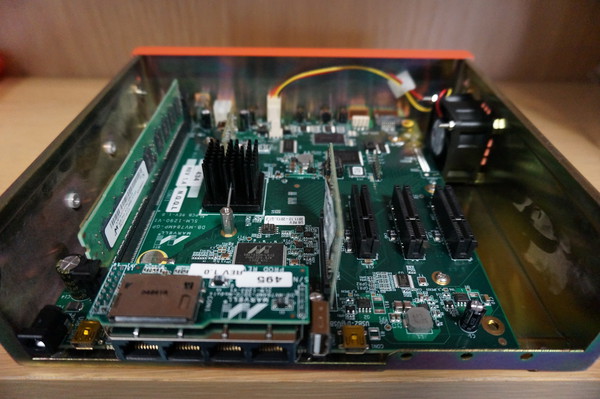
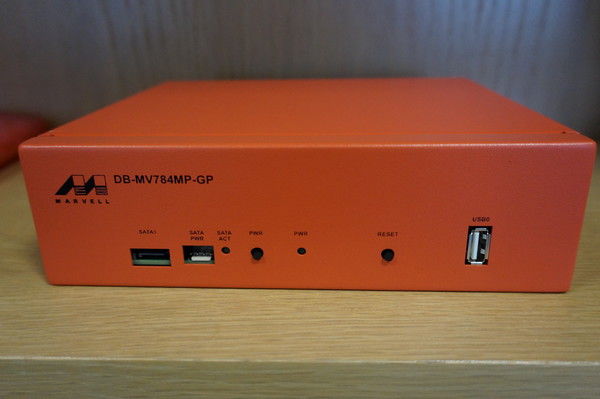
Marvell ARM system - Photo from Steve McIntyre
One weekend Steve McIntyre asked me if I could find a source of some of some 40mm fans for some systems with some pretty strict requirements. They needed to be long life and shift a lot of air to combat a persistent overheating issue.

I sat with him and went through the Farnell utterly hateful parametric web interface and eventually came up with a couple of options which were very expensive. Only then did I stop and ask what the actual problem was.

Marvell ARM system Original internal cooling arrangement - Photo from Steve McIntyre
Steve showed me one of the Debian ARM buildd boxes which are Marvell development machines. These systems are powerful quad core machines housed in compact steel enclosures.

There is a single 40mm fan trying to provide cooling for the entire enclosure. When the units are placed horizontally and used intermittently this proves adequate. Unfortunately when the system are arranged vertically in a rack and run at full load continuously they often overheat and have to be restarted. In addition the small high speed fans need replacing frequently as their bearings wore out quickly.

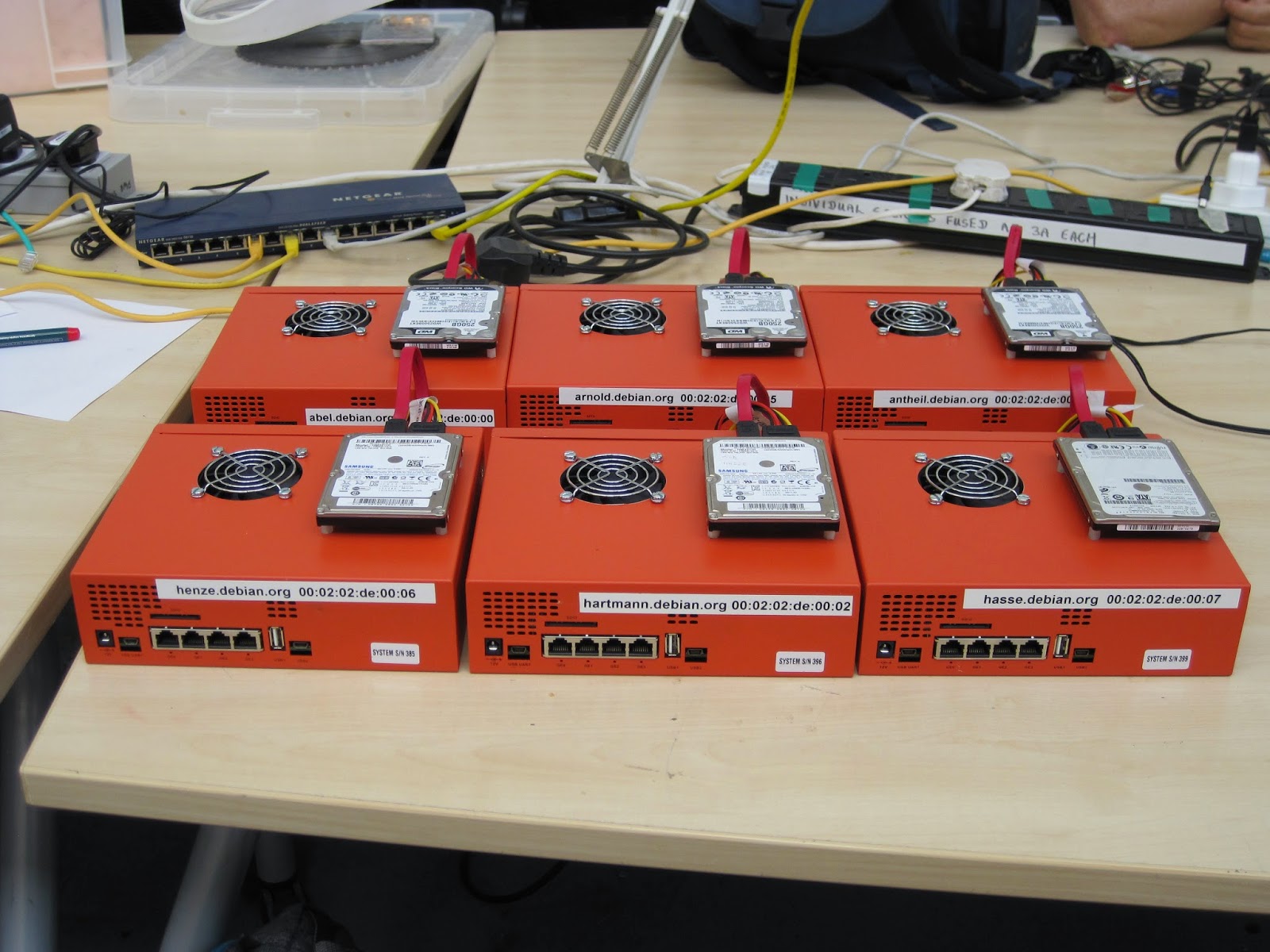
Debian ARM buildd systems - Photo from Steve McIntyreThis was obviously causing some issues for the ARM Debian ports which Steve wanted to rectify. After talking the problem through for a while we came to the conclusion we could use much larger 60mm fans to blow air directly through the top of the case onto the cpu heatsink.

Larger fans can be run much more slowly to move a similar volume of air to the smaller 40mm fans which gives a much longer service life.

Hole punch and Drilling template
Steve proceeded to order enough parts to allow us to modify all the Debian systems, this worked out cheaper than a single "special" 40mm high volume fan.

I acquired a rather large steel hole punch, I chose this tool because it produces a much superior finish to a hole cutter and this project demanded a high level of finish (not to mention I loved having a valid excuse to own and use a huge allen key!)

If we had simply been modifying a single case I would have measured and marked up by hand. With the prospect of altering at least eight I laser cut a template from plywood which Andy Simpkins took great glee in excessively annotating.

We also used the opportunity to add bolt holes to securely attach the 2.5 inch SATA drives instead of using sticky pads.

Steve and I modified a single system to begin with both to check our alignment and the efficacy of the change. We were pleasantly surprised to discover that hoiby could now repeatedly do kernel compiles with all four cores flat out which was not possible before. The measured CPU temperature, which had previously been around 90 C, did not rise above 40 C

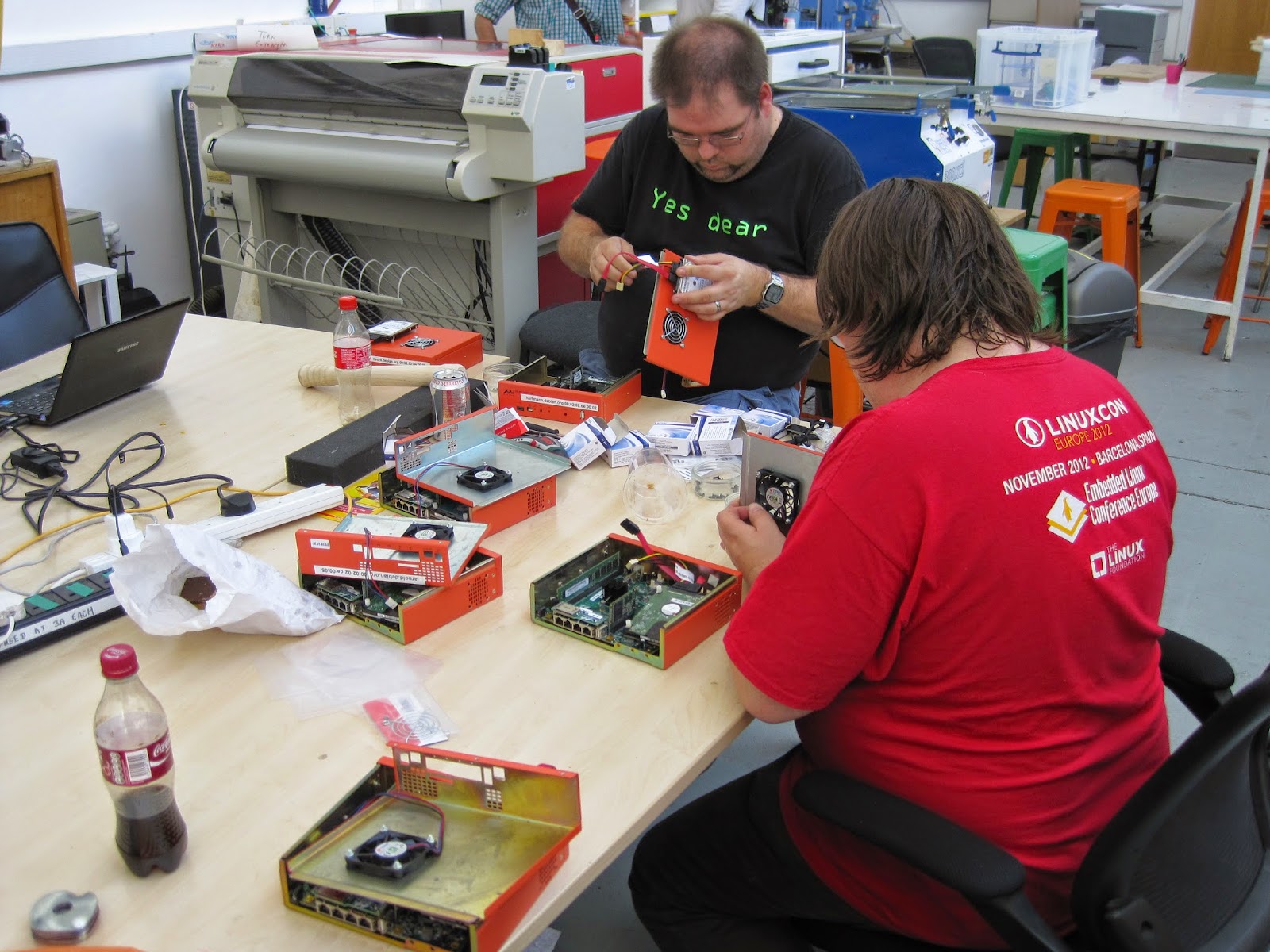
Steve and Andy on the assembly line
Steve, Andy and I then arranged a day where we took all the remaining units out of the rack at ARM, modified and returned them. We used the facilities at the Cambridge Makespace where I am a member to do the modifications.

I broke two 3mm drill bits and dulled a 4mm bit drilling all the holes, Roger Smith was good enough to loan us the use of his "Christmas tree bit" to ream the fan hole out to 16mm so we could thread the hole punch and cut the 60mm fan aperture out.

six modified systems ready to be re-racked.
We managed to get quite an assembly line going and, in my opinion, the results look pretty professional.

It has been several months since we did this work and these systems continue to run without issue. To complete the story we can see some graphs courtesy of the DSA munin instance.

CPU load on arnold.debian.org
You can clearly see the huge drop in temperature at the end of Week 25 despite the continuously high CPU load. Also there is only a single gap in the data after the changes (these indicate crashes where data was not recorded) where before there were frequent and extensive times where the systems were simply unusable.

CPU Temperature of arnold.debian.org
One reason I continue to enjoy Debian so much is the wide variety of ways in which I can contribute not only by maintaining my packages. Sometimes this kind of work does not receive the credit it deserves and hopefully highlights a small part of the frantic paddling that goes on under the serene surface of the Debian project to keep things "just working".

28 September 2014

Jonathan Dowland: What have I been up to?

It's been a little while since I've written about what I've been up to. The truth is I've been busy with moving house - and I'll write a bit more about that at another time. But asides from that there have been some bits and bobs. I use a little tool called archivemail to tidy up old listmail (my policy is to retain 30 days of listmail for most lists). If I unsubscribe to a list, then eventually I end up with an empty mail folder corresponding to that list. I decided it would be nice to extend archivemail to delete mailboxes if, after the archiving has taken place, the mailbox is empty. Doing this properly means adding delete routines to Python's "mailbox" library, which is part of the Python standard library. I've therefore started work on a patch for Python. Since this is an enhancement, Python would only accept a patch for Python 3. Therefore, eventually, I would also have to port archivemail from Python 2 to 3. "archivemail" is basically abandonware at the moment, and the principal Debian maintainer is MIA. There was a release critical bug filed against it, so I joined the Debian Python team to co-maintain archivemail in Debian. I've worked around the RC bug but a proper fix is still to come. In other Debian news, I've been mostly quiet. A small patch for squishyball to get it to build on Hurd, and a temporary fix patch for lhasa to get it to build on the build daemons for all architectures (problems with the test suite). All three of lhasa, squishyball and archivemail need a little bit of love to get them into shape before the jessie freeze. I've had plans to write up some of the more interesting technical things I've been up to at work, but with the huge successes of the School we've been so busy I haven't had time. Hopefully you can soon look forward to some of our further adventures with puppet, including evaluating Shibboleth modules, some stuff about handling user directories, bind mounts and LVM volumes and actually publishing some of our more useful internal modules; I hope we will also (soon) have some useful data to go with our experiments with Linux LXC containers versus KVM-powered virtual machines in some of our use-cases. I've also got a few bits and pieces on Systemd to write up.

Benjamin Mako Hill: Community Data Science Workshops Post-Mortem

Earlier this year, I helped plan and run the Community Data Science Workshops: a series of three (and a half) day-long workshops designed to help people learn basic programming and tools for data science tools in order to ask and answer questions about online communities like Wikipedia and Twitter. You can read our initial announcement for more about the vision. The workshops were organized by myself, Jonathan Morgan from the Wikimedia Foundation, long-time Software Carpentry teacher Tommy Guy, and a group of 15 volunteer mentors who taught project-based afternoon sessions and worked one-on-one with more than 50 participants. With overwhelming interest, we were ultimately constrained by the number of mentors who volunteered. Unfortunately, this meant that we had to turn away most of the people who applied. Although it was not emphasized in recruiting or used as a selection criteria, a majority of the participants were women. The workshops were all free of charge and sponsored by the UW Department of Communication, who provided space, and the eScience Institute, who provided food. cdsw_combo_images-1The curriculum for all four session session is online: The workshops were designed for people with no previous programming experience. Although most our participants were from the University of Washington, we had non-UW participants from as far away as Vancouver, BC. Feedback we collected suggests that the sessions were a huge success, that participants learned enormously, and that the workshops filled a real need in the Seattle community. Between workshops, participants organized meet-ups to practice their programming skills. Most excitingly, just as we based our curriculum for the first session on the Boston Python Workshop s, others have been building off our curriculum. Elana Hashman, who was a mentor at the CDSW, is coordinating a set of Python Workshops for Beginners with a group at the University of Waterloo and with sponsorship from the Python Software Foundation using curriculum based on ours. I also know of two university classes that are tentatively being planned around the curriculum. Because a growing number of groups have been contacting us about running their own events based on the CDSW and because we are currently making plans to run another round of workshops in Seattle late this fall I coordinated with a number of other mentors to go over participant feedback and to put together a long write-up of our reflections in the form of a post-mortem. Although our emphasis is on things we might do differently, we provide a broad range of information that might be useful to people running a CDSW (e.g., our budget). Please let me know if you are planning to run an event so we can coordinate going forward.
25 September 2014

Russ Allbery: Review: Turn the Ship Around!

Review: Turn the Ship Around!, by L. David Marquet
Publisher: Portfolio
Copyright: 2012
ISBN: 1-101-62369-1
Format: Kindle
Pages: 272
Turn the Ship Around! (yes, complete with the irritating exclamation point in the title) is marketed to the business and management non-fiction market, which is clogged with books claiming to provide simple techniques to be a great manager or fix an organization. If you're like me, this is a huge turn-off. The presentation of the books is usually just shy of the click-bait pablum of self-help books. Many of the books are written by famous managers best known for doing horrible things to their staff (*cough* Jack Welch). It's hard to get away from the feeling that this entire class of books is an ocean of bromides covering a small core of outright evil. This book is not like that, and Marquet is not one of those managers. It can seem that way at times: it is presented in the format that caters to short attention span, with summaries of primary points at the end of every short chapter and occasionally annoying questions sprinkled throughout. I'm capable of generalizing information to my own life without being prompted by study questions, thanks. But that's just form. The core of this book is a surprisingly compelling story of Marquet's attempt to introduce a novel management approach into one of the most conservative and top-down of organizations: a US Navy nuclear submarine. I read this book as an individual employee, and someone who has no desire to ever be a manager. But I recently changed jobs and significantly disrupted my life because of a sequence of really horrible management decisions, so I have strong opinions about, at least, the type of management that's bad for employees. A colleague at my former employer recommended this book to me while talking about the management errors that were going on around us. It did such a good job of reinforcing my personal biases that I feel like I should mention that as a disclaimer. When one agrees with a book this thoroughly, one may not have sufficient distance from it to see the places where its arguments are flawed. At the start of the book, Marquet is assigned to take over as captain of a nuclear submarine that's struggling. It had a below-par performance rating, poor morale, and the worst re-enlistment rate in the fleet, and was not advancing officers and crew to higher ranks at anywhere near the level of other submarines. Marquet brought to this assignment some long-standing discomfort with the normal top-down decision-making processes in the Navy, and decided to try something entirely different: a program of radical empowerment, bottom-up decision-making, and pushing responsibility as far down the chain of command as possible. The result (as you might expect given that you can read a book about it) was one of the best-performing submarines in the fleet, with retention and promotion rates well above average. There's a lot in here about delegated decision-making and individual empowerment, but Turn the Ship Around! isn't only about that. Those are old (if often ignored) rules of thumb about how to manage properly. I think the most valuable part of this book is where Marquet talks frankly about his own thought patterns, his own mistakes, and the places where he had to change his behavior and attitude in order to make his strategy successful. It's one thing to say that individuals should be empowered; it's quite another to stop empowering them (which is still a top-down strategy) and start allowing them to be responsible. To extend trust and relinquish control, even though you're the one who will ultimately be held responsible for the performance of the people reporting to you. One of the problems with books like this is that they focus on how easy the techniques presented in the book are. Marquet does a more honest job in showing how difficult they are. His approach was not complex, but it was emotionally quite difficult, even though he was already biased in favor of it. The control, hierarchy, and authority parts of the book are the most memorable, but Marquet also talks about, and shows through specific examples from his command, some accompanying principles that are equally important. If everyone in an organization can make decisions, everyone has to understand the basis for making those decisions and understand the shared goals, which requires considerable communication and open discussion (particularly compared to a Navy ideal of an expert and taciturn captain). It requires giving people the space to be wrong, and requires empowering people to correct each other without blame. (There's a nice bit in here about the power of deliberate action, and while Marquet's presentation is more directly applicable to the sorts of physical actions taken in a submarine, I was immediately reminded of code review.) Marquet also has some interesting things to say about the power of, for lack of a better term, esprit de corps, how to create it, and the surprising power of acting like you have it until you actually develop it. As mentioned, this book is very closely in alignment with my own biases, so I'm not exactly an impartial reviewer. But I found it fascinating the degree to which the management situation I left was the exact opposite of the techniques presented in this book in nearly every respect. I found it quite inspiring during my transition period, and there are bits of it that I want to read again to keep some of the techniques and approaches fresh in my mind. There is a fair bit of self-help-style packaging and layout here, some of which I found irritating. If, like me, you don't like that style of book, you'll have to wade through a bit of it. I would have much preferred a more traditional narrative story from which I could draw my own conclusions. But it's more of a narrative than most books of this sort, and Marquet is humble enough to show his own thought processes, tensions, and mistakes, which adds a great deal to the presentation. I'm not sure how directly helpful this would be for a manager, since I've never been in that role, but it gave me a lot to think about when analyzing successful and unsuccessful work environments. Rating: 8 out of 10

Next.

Previous.