Search Results: "tca"

16 July 2020

Russell Coker: Windows 10 on Debian under KVM

Here are some things that you need to do to get Windows 10 running on a Debian host under KVM. UEFI Booting UEFI is big and complex, but most of what it does isn t needed at all. If all you want to do is boot from an image of a disk with a GPT partition table then you just install the package ovmf and add something like the following to your KVM start script:
UEFI"-drive if=pflash,format=raw,readonly,file=/usr/share/OVMF/OVMF_CODE.fd -drive if=pflash,format=raw,readonly,file=/usr/share/OVMF/OVMF_VARS.fd"
Note that some of the documentation on this doesn t have the OVMF_VARS.fd file set to readonly. Allowing writes to that file means that the VM boot process (and maybe later) can change EFI variables that affect later boots and other VMs if they all share the same file. For a basic boot you don t need to change variables so you want it read-only. Also having it read-only is necessary if you want to run KVM as non-root. As an experiment I tried booting without the OVMF_VARS.fd file, it didn t boot and then even after configuring it to use the OVMF_VARS.fd file again Windows gave a boot error about the boot configuration data file that required booting from recovery media. Apparently configuration mistakes with EFI can mess up the Windows installation, so be careful and backup the Windows installation regularly! Linux can boot from EFI but you generally don t want to unless the boot device is larger than 2TB. It s relatively easy to convert a Linux installation on a GPT disk to a virtual image on a DOS partition table disk or on block devices without partition tables and that gives a faster boot. If the same person runs the host hardware and the VMs then the best choice for Linux is to have no partition tables just one filesystem per block device (which makes resizing much easier) and have the kernel passed as a parameter to kvm. So booting a VM from EFI is probably only useful for booting Windows VMs and for Linux boot loader development and testing. As an aside, the Debian Wiki page about Secure Boot on a VM [4] was useful for this. It s unfortunate that it and so much of the documentation about UEFI is about secure boot which isn t so useful if you just want to boot a system without regard to the secure boot features. Emulated IDE Disks Debian kernels (and probably kernels from many other distributions) are compiled with the paravirtualised storage device drivers. Windows by default doesn t support such devices so you need to emulate an IDE/SATA disk so you can boot Windows and install the paravirtualised storage driver. The following configuration snippet has a commented line for paravirtualised IO (which is fast) and an uncommented line for a virtual IDE/SATA disk that will allow an unmodified Windows 10 installation to boot.
#DRIVE="-drive format=raw,file=/home/kvm/windows10,if=virtio"
DRIVE="-drive id=disk,format=raw,file=/home/kvm/windows10,if=none -device ahci,id=ahci -device ide-drive,drive=disk,bus=ahci.0"
Spice Video Spice is an alternative to VNC, Here is the main web site for Spice [1]. Spice has many features that could be really useful for some people, like audio, sharing USB devices from the client, and streaming video support. I don t have a need for those features right now but it s handy to have options. My main reason for choosing Spice over VNC is that the mouse cursor in the ssvnc doesn t follow the actual mouse and can be difficult or impossible to click on items near edges of the screen. The following configuration will make the QEMU code listen with SSL on port 1234 on all IPv4 addresses. Note that this exposes the Spice password to anyone who can run ps on the KVM server, I ve filed Debian bug #965061 requesting the option of a password file to address this. Also note that the qxl virtual video hardware is VGA compatible and can be expected to work with OS images that haven t been modified for virtualisation, but that they work better with special video drivers.
KEYDIR=/etc/letsencrypt/live/kvm.example.com-0001
-spice password=xxxxxxxx,x509-cacert-file=$KEYDIR/chain.pem,x509-key-file=$KEYDIR/privkey.pem,x509-cert-file=$KEYDIR/cert.pem,tls-port=1234,tls-channel=main -vga qxl
To connect to the Spice server I installed the spice-client-gtk package in Debian and ran the following command:
spicy -h kvm.example.com -s 1234 -w xxxxxxxx
Note that this exposes the Spice password to anyone who can run ps on the system used as a client for Spice, I ve filed Debian bug #965060 requesting the option of a password file to address this. This configuration with an unmodified Windows 10 image only supported 800*600 resolution VGA display. Networking To setup bridged networking as non-root you need to do something like the following as root:
chgrp kvm /usr/lib/qemu/qemu-bridge-helper
setcap cap_net_admin+ep /usr/lib/qemu/qemu-bridge-helper
mkdir -p /etc/qemu
echo "allow all" > /etc/qemu/bridge.conf
chgrp kvm /etc/qemu/bridge.conf
chmod 640 /etc/qemu/bridge.conf
Windows 10 supports the emulated Intel E1000 network card. Configuration like the following configures networking on a bridge named br0 with an emulated E1000 card. MAC addresses that have a 1 in the second least significant bit of the first octet are locally administered (like IPv4 addresses starting with 10. ), see the Wikipedia page about MAC Address for details. The following is an example of network configuration where $ID is an ID number for the virtual machine. So far I haven t come close to 256 VMs on one network so I ve only needed one octet.
NET="-device e1000,netdev=net0,mac=02:00:00:00:01:$ID -netdev tap,id=net0,helper=/usr/lib/qemu/qemu-bridge-helper,br=br0"
Final KVM Settings
KEYDIR=/etc/letsencrypt/live/kvm.example.com-0001
SPICE="-spice password=xxxxxxxx,x509-cacert-file=$KEYDIR/chain.pem,x509-key-file=$KEYDIR/privkey.pem,x509-cert-file=$KEYDIR/cert.pem,tls-port=1234,tls-channel=main -vga qxl"
UEFI="-drive if=pflash,format=raw,readonly,file=/usr/share/OVMF/OVMF_CODE.fd -drive if=pflash,format=raw,readonly,file=/usr/share/OVMF/OVMF_VARS.fd"
DRIVE="-drive format=raw,file=/home/kvm/windows10,if=virtio"
NET="-device e1000,netdev=net0,mac=02:00:00:00:01:$ID -netdev tap,id=net0,helper=/usr/lib/qemu/qemu-bridge-helper,br=br0"
kvm -m 4000 -smp 2 $SPICE $UEFI $DRIVE $NET
Windows Settings The Spice Download page has a link for spice-guest-tools that has the QNX video driver among other things [2]. This seems to be needed for resolutions greater than 800*600. The Virt-Manager Download page has a link for virt-viewer which is the Spice client for Windows systems [3], they have MSI files for both i386 and AMD64 Windows. It s probably a good idea to set display and system to sleep after never (I haven t tested what happens if you don t do that, but there s no benefit in sleeping). Before uploading an image I disabled the pagefile and set the partition to the minimum size so I had less data to upload. Problems Here are some things I haven t solved yet. The aSpice Android client for the Spice protocol fails to connect with the QEMU code at the server giving the following message on stderr: error:14094418:SSL routines:ssl3_read_bytes:tlsv1 alert unknown ca:../ssl/record/rec_layer_s3.c:1544:SSL alert number 48 . Spice is supposed to support dynamic changes to screen resolution on the VM to match the window size at the client, this doesn t work for me, not even with the Red Hat QNX drivers installed. The Windows Spice client doesn t seem to support TLS, I guess running some sort of proxy for TLS would work but I haven t tried that yet.

14 July 2020

Russell Coker: Debian PPC64EL Emulation

In my post on Debian S390X Emulation [1] I mentioned having problems booting a Debian PPC64EL kernel under QEMU. Giovanni commented that they had PPC64EL working and gave a link to their site with Debian QEMU images for various architectures [2]. I tried their image which worked then tried mine again which also worked it seemed that a recent update in Debian/Unstable fixed the bug that made QEMU not work with the PPC64EL kernel. Here are the instructions on how to do it. First you need to create a filesystem in an an image file with commands like the following:
truncate -s 4g /vmstore/ppc
mkfs.ext4 /vmstore/ppc
mount -o loop /vmstore/ppc /mnt/tmp
Then visit the Debian Netinst page [3] to download the PPC64EL net install ISO. Then loopback mount it somewhere convenient like /mnt/tmp2. The package qemu-system-ppc has the program for emulating a PPC64LE system, the qemu-user-static package has the program for emulating PPC64LE for a single program (IE a statically linked program or a chroot environment), you need this to run debootstrap. The following commands should be most of what you need.
apt install qemu-system-ppc qemu-user-static
update-binfmts --display
# qemu ppc64 needs exec stack to solve "Could not allocate dynamic translator buffer"
# so enable that on SE Linux systems
setsebool -P allow_execstack 1
debootstrap --foreign --arch=ppc64el --no-check-gpg buster /mnt/tmp file:///mnt/tmp2
chroot /mnt/tmp /debootstrap/debootstrap --second-stage
cat << END > /mnt/tmp/etc/apt/sources.list
deb http://mirror.internode.on.net/pub/debian/ buster main
deb http://security.debian.org/ buster/updates main
END
echo "APT::Install-Recommends False;" > /mnt/tmp/etc/apt/apt.conf
echo ppc64 > /mnt/tmp/etc/hostname
# /usr/bin/awk: error while loading shared libraries: cannot restore segment prot after reloc: Permission denied
# only needed for chroot
setsebool allow_execmod 1
chroot /mnt/tmp apt update
# why aren't they in the default install?
chroot /mnt/tmp apt install perl dialog
chroot /mnt/tmp apt dist-upgrade
chroot /mnt/tmp apt install bash-completion locales man-db openssh-server build-essential systemd-sysv ifupdown vim ca-certificates gnupg
# install kernel last because systemd install rebuilds initrd
chroot /mnt/tmp apt install linux-image-ppc64el
chroot /mnt/tmp dpkg-reconfigure locales
chroot /mnt/tmp passwd
cat << END > /mnt/tmp/etc/fstab
/dev/vda / ext4 noatime 0 0
#/dev/vdb none swap defaults 0 0
END
mkdir /mnt/tmp/root/.ssh
chmod 700 /mnt/tmp/root/.ssh
cp ~/.ssh/id_rsa.pub /mnt/tmp/root/.ssh/authorized_keys
chmod 600 /mnt/tmp/root/.ssh/authorized_keys
rm /mnt/tmp/vmlinux* /mnt/tmp/initrd*
mkdir /boot/ppc64
cp /mnt/tmp/boot/[vi]* /boot/ppc64
# clean up
umount /mnt/tmp
umount /mnt/tmp2
# setcap binary for starting bridged networking
setcap cap_net_admin+ep /usr/lib/qemu/qemu-bridge-helper
# afterwards set the access on /etc/qemu/bridge.conf so it can only
# be read by the user/group permitted to start qemu/kvm
echo "allow all" > /etc/qemu/bridge.conf
Here is an example script for starting kvm. It can be run by any user that can read /etc/qemu/bridge.conf.
#!/bin/bash
set -e
KERN="kernel /boot/ppc64/vmlinux-4.19.0-9-powerpc64le -initrd /boot/ppc64/initrd.img-4.19.0-9-powerpc64le"
# single network device, can have multiple
NET="-device e1000,netdev=net0,mac=02:02:00:00:01:04 -netdev tap,id=net0,helper=/usr/lib/qemu/qemu-bridge-helper"
# random number generator for fast start of sshd etc
RNG="-object rng-random,filename=/dev/urandom,id=rng0 -device virtio-rng-pci,rng=rng0"
# I have lockdown because it does no harm now and is good for future kernels
# I enable SE Linux everywhere
KERNCMD="net.ifnames=0 noresume security=selinux root=/dev/vda ro lockdown=confidentiality"
kvm -drive format=raw,file=/vmstore/ppc64,if=virtio $RNG -nographic -m 1024 -smp 2 $KERN -curses -append "$KERNCMD" $NET

9 July 2020

Enrico Zini: Laptop migration

This laptop used to be extra-flat My laptop battery started to explode in slow motion. HP requires 10 business days to repair my laptop under warranty, and I cannot afford that length of downtime. Alternatively, HP quoted me 375 + VAT for on-site repairs, which I tought was very funny. For 376.55 + VAT, which is pretty much exactly the same amount, I bought instead a refurbished ThinkPad X240 with a dual-core I5, 8G of RAM, 250G SSD, and a 1920x1080 IPS display, to use as a spare while my laptop is being repaired. I'd like to thank HP for giving me the opportunity to own a ThinkPad. Since I'm migrating all my system to the spare and then (hopefully) back, I'm documenting what I need to be fully productive on new hardware. Install Debian A basic Debian netinst with no tasks selected is good enough to get going. Note that if wifi worked in Debian Installer, it doesn't mean that it will work in the minimal system it installed. See here for instructions on quickly bringing up wifi on a newly installed minimal system. Copy /home A simple tar of /home is all I needed to copy my data over. A neat way to do it was connecting the two laptops with an ethernet cable, and using netcat:
# On the source
tar -C / -zcf - home   nc -l -p 12345 -N
# On the target
nc 10.0.0.1 12345   tar -C / -zxf -
Since the data travel unencrypted in this way, don't do it over wifi. Install packages I maintain a few simple local metapackages that depend on the packages I usually used. I could just install those and let apt bring in their dependencies. For the build dependencies of the programs I develop, I use mk-build-deps from the devscripts package to create metapackages that make sure they are installed. Here's an extract from debian/control of the metapackage:
Source: enrico
Section: admin
Priority: optional
Maintainer: Enrico Zini <enrico@debian.org>
Build-Depends: debhelper (>= 11)
Standards-Version: 3.7.2.1
Package: enrico
Section: admin
Architecture: all
Depends:
  mc, mmv, moreutils, powertop, syncmaildir, notmuch,
  ncdu, vcsh, ddate, jq, git-annex, eatmydata,
  vdirsyncer, khal, etckeeper, moc, pwgen
Description: Enrico's working environment
Package: enrico-devel
Section: devel
Architecture: all
Depends:
  git, python3-git, git-svn, gitk, ansible, fabric,
  valgrind, kcachegrind, zeal, meld, d-feet, flake8, mypy, ipython3,
  strace, ltrace
Description: Enrico's development environment
Package: enrico-gui
Section: x11
Architecture: all
Depends:
  xclip, gnome-terminal, qalculate-gtk, liferea, gajim,
  mumble, sm, syncthing, virt-manager
Recommends: k3b
Description: Enrico's GUI environment
Package: enrico-sanity
Section: admin
Architecture: all
Conflicts: libapache2-mod-php, libapache2-mod-php5, php5, php5-cgi, php5-fpm, libapache2-mod-php7.0, php7.0, libphp7.0-embed, libphp-embed, libphp5-embed
Description: Enrico's sanity
 Metapackage with a list of packages that I do not want anywhere near my
 system.
System-wide customizations I tend to avoid changing system-wide configuration as much as possible, so copying over /home and installing packages takes care of 99% of my needs. There are a few system-wide tweaks I cannot do without: For postfix, I have a little ansible playbook that takes care of it. Network Manager system connections need to be copied manually: a plain copy and a systemctl restart network-manager are enough. Note that Network Manager will ignore the files unless their owner and permissions are what it expects. Fine tuning Comparing the output of dpkg --get-selections between the old and the new system might highlight packages manually installed in a hurry and not added to the metapackages. Finally, what remains is fixing the sad state of mimetype associations, which seem to associate opening file depending on whatever application was installed last, phases of the moon, and what option is the most annoying. Currently on my system, PDFs are opened in inkscape by xdg-open and in calibre by run-mailcap. Let's see how long it takes to figure this one out.

5 July 2020

Russell Coker: Debian S390X Emulation

I decided to setup some virtual machines for different architectures. One that I decided to try was S390X the latest 64bit version of the IBM mainframe. Here s how to do it, I tested on a host running Debian/Unstable but Buster should work in the same way. First you need to create a filesystem in an an image file with commands like the following:
truncate -s 4g /vmstore/s390x
mkfs.ext4 /vmstore/s390x
mount -o loop /vmstore/s390x /mnt/tmp
Then visit the Debian Netinst page [1] to download the S390X net install ISO. Then loopback mount it somewhere convenient like /mnt/tmp2. The package qemu-system-misc has the program for emulating a S390X system (among many others), the qemu-user-static package has the program for emulating S390X for a single program (IE a statically linked program or a chroot environment), you need this to run debootstrap. The following commands should be most of what you need.
# Install the basic packages you need
apt install qemu-system-misc qemu-user-static debootstrap
# List the support for different binary formats
update-binfmts --display
# qemu s390x needs exec stack to solve "Could not allocate dynamic translator buffer"
# so you probably need this on SE Linux systems
setsebool allow_execstack 1
# commands to do the main install
debootstrap --foreign --arch=s390x --no-check-gpg buster /mnt/tmp file:///mnt/tmp2
chroot /mnt/tmp /debootstrap/debootstrap --second-stage
# set the apt sources
cat << END > /mnt/tmp/etc/apt/sources.list
deb http://YOURLOCALMIRROR/pub/debian/ buster main
deb http://security.debian.org/ buster/updates main
END
# for minimal install do not want recommended packages
echo "APT::Install-Recommends False;" > /mnt/tmp/etc/apt/apt.conf
# update to latest packages
chroot /mnt/tmp apt update
chroot /mnt/tmp apt dist-upgrade
# install kernel, ssh, and build-essential
chroot /mnt/tmp apt install bash-completion locales linux-image-s390x man-db openssh-server build-essential
chroot /mnt/tmp dpkg-reconfigure locales
echo s390x > /mnt/tmp/etc/hostname
chroot /mnt/tmp passwd
# copy kernel and initrd
mkdir -p /boot/s390x
cp /mnt/tmp/boot/vmlinuz* /mnt/tmp/boot/initrd* /boot/s390x
# setup /etc/fstab
cat << END > /mnt/tmp/etc/fstab
/dev/vda / ext4 noatime 0 0
#/dev/vdb none swap defaults 0 0
END
# clean up
umount /mnt/tmp
umount /mnt/tmp2
# setcap binary for starting bridged networking
setcap cap_net_admin+ep /usr/lib/qemu/qemu-bridge-helper
# afterwards set the access on /etc/qemu/bridge.conf so it can only
# be read by the user/group permitted to start qemu/kvm
echo "allow all" > /etc/qemu/bridge.conf
Some of the above can be considered more as pseudo-code in shell script rather than an exact way of doing things. While you can copy and past all the above into a command line and have a reasonable chance of having it work I think it would be better to look at each command and decide whether it s right for you and whether you need to alter it slightly for your system. To run qemu as non-root you need to have a helper program with extra capabilities to setup bridged networking. I ve included that in the explanation because I think it s important to have all security options enabled. The -object rng-random,filename=/dev/urandom,id=rng0 -device virtio-rng-ccw,rng=rng0 part is to give entropy to the VM from the host, otherwise it will take ages to start sshd. Note that this is slightly but significantly different from the command used for other architectures (the ccw is the difference). I m not sure if noresume on the kernel command line is required, but it doesn t do any harm. The net.ifnames=0 stops systemd from renaming Ethernet devices. For the virtual networking the ccw again is a difference from other architectures. Here is a basic command to run a QEMU virtual S390X system. If all goes well it should give you a login: prompt on a curses based text display, you can then login as root and should be able to run dhclient eth0 and other similar commands to setup networking and allow ssh logins.
qemu-system-s390x -drive format=raw,file=/vmstore/s390x,if=virtio -object rng-random,filename=/dev/urandom,id=rng0 -device virtio-rng-ccw,rng=rng0 -nographic -m 1500 -smp 2 -kernel /boot/s390x/vmlinuz-4.19.0-9-s390x -initrd /boot/s390x/initrd.img-4.19.0-9-s390x -curses -append "net.ifnames=0 noresume root=/dev/vda ro" -device virtio-net-ccw,netdev=net0,mac=02:02:00:00:01:02 -netdev tap,id=net0,helper=/usr/lib/qemu/qemu-bridge-helper
Here is a slightly more complete QEMU command. It has 2 block devices, for root and swap. It has SE Linux enabled for the VM (SE Linux works nicely on S390X). I added the lockdown=confidentiality kernel security option even though it s not supported in 4.19 kernels, it doesn t do any harm and when I upgrade systems to newer kernels I won t have to remember to add it.
qemu-system-s390x -drive format=raw,file=/vmstore/s390x,if=virtio -drive format=raw,file=/vmswap/s390x,if=virtio -object rng-random,filename=/dev/urandom,id=rng0 -device virtio-rng-ccw,rng=rng0 -nographic -m 1500 -smp 2 -kernel /boot/s390x/vmlinuz-4.19.0-9-s390x -initrd /boot/s390x/initrd.img-4.19.0-9-s390x -curses -append "net.ifnames=0 noresume security=selinux root=/dev/vda ro lockdown=confidentiality" -device virtio-net-ccw,netdev=net0,mac=02:02:00:00:01:02 -netdev tap,id=net0,helper=/usr/lib/qemu/qemu-bridge-helper
Try It Out I ve got a S390X system online for a while, ssh root@s390x.coker.com.au with password SELINUX to try it out. PPC64 I ve tried running a PPC64 virtual machine, I did the same things to set it up and then tried launching it with the following result:
qemu-system-ppc64 -drive format=raw,file=/vmstore/ppc64,if=virtio -nographic -m 1024 -kernel /boot/ppc64/vmlinux-4.19.0-9-powerpc64le -initrd /boot/ppc64/initrd.img-4.19.0-9-powerpc64le -curses -append "root=/dev/vda ro"
Above is the minimal qemu command that I m using. Below is the result, it stops after the 4. from 4.19.0-9 . Note that I had originally tried with a more complete and usable set of options, but I trimmed it to the minimal needed to demonstrate the problem.
  Copyright (c) 2004, 2017 IBM Corporation All rights reserved.
  This program and the accompanying materials are made available
  under the terms of the BSD License available at
  http://www.opensource.org/licenses/bsd-license.php
Booting from memory...
Linux ppc64le
#1 SMP Debian 4.
The kernel is from the package linux-image-4.19.0-9-powerpc64le which is a dependency of the package linux-image-ppc64el in Debian/Buster. The program qemu-system-ppc64 is from version 5.0-5 of the qemu-system-ppc package. Any suggestions on what I should try next would be appreciated.

16 April 2020

Rigved Rakshit: Intermediate Statistics

These are some of my notes on intermediate statistics from the Udemy Data Science Bootcamp. The Python code associated with this section is available here.

29 March 2020

Paulo Henrique de Lima Santana: My free software activities in February 2020

My free software activities in february 2020 March is ending but I finally wrote my monthly report about activities in Debian and Free Software in general for February. As I already wrote here, I attended to FOSDEM 2020 on February 1st and 2nd in Brussels. It was a amazing experience. After my return to Curitiba, I felt my energies renewed to start new challenges.

MiniDebConf Macei 2020 I continued helping to organize MiniDebConf and I got positive answers from 4Linux and Globo.com and they are sponsorsing the event.

FLISOL 2020 I started to talk with Maristela from IEP - Instituto de Engenharia do Paran and after some messages and I joined a meeting with her and other members of C mara T cnica de Eletr nica, Computa o e Ci ncias de Dados. I explained about FLISOL in Curitiba to them and they agreed to host the event at IEP. I asked to use three spaces: Auditorium for FLISOL talks, Sal o Nobre for meetups from WordPress and PostgreSQL Communities, and the hall for Install Fest. Besides FLISOL, they would like to host other events and meetups from Communities in Curitiba as Python, PHP, and so on. At least one per month. I helped to schedule a PHP Paran Community meetup on March.

New job Since 17th I started to work at Rentcars as Infrastructure Analyst. I m very happy to work there because we use a lot of FLOSS and with nice people. Ubuntu LTS is the approved OS for desktops but I could install Debian on my laptop :-)

Misc I signed pgp keys from friends I met in Brussels and I had my pgp key signed by them. Finally my MR to the DebConf20 website fixing some texts was accepted. I have watched v deos from FOSDEM
  1. Until now, I saw these great talks:
  • Growing Sustainable Contributions Through Ambassador Networks
  • Building Ethical Software Under Capitalism
  • Cognitive biases, blindspots and inclusion
  • Building a thriving community in company-led open source projects
  • Building Community for your Company s OSS Projects
  • The Ethics of Open Source
  • Be The Leader You Need in Open Source
  • The next generation of contributors is not on IRC
  • Open Source Won, but Software Freedom Hasn t Yet
  • Open Source Under Attack
  • Lessons Learned from Cultivating Open Source Projects and Communities
That s all folks!

11 March 2020

Axel Beckert: Backup over Tor with BackupPC

I have a Raspberry Pi at my parents home. They have internet access via some ISP using Carrier Grade NAT (CGN). Hence their home router is not reachable via IPv4 from the outside, they do have IPv6 and the devices can also be made accessible via IPv6 via the local router. Did that, was able to access my Raspberry Pi over IPv6 and SSH from the outside. So doing backup of that Raspberry Pi with BackupPC from the outside was a walk in the park. Unfortunately the IPv6 prefix seems to change occasionally and the router only allows to configure explicit IPv6 addresses in firewall rules so after a prefix change the configured rules no more match the devices IPv6 addresses. Meh. So there were multiple possibilities to work around these restrictions and access a devices behind the router: Enabling a Tor Hidden Service for port 22 is a no-brainer and was done most quickly (actually it already was in place as I already suspected that an IPv6 prefix change might happen) and I so far was too lazy to replace it with something more proper. But my backup was relying on direct SSH access via IPv6. So I needed to get that working over Tor, too. Here s what was needed for the host named sherpa (named after the Fiberfab Sherpa) to be backed up via Tor: That s it basically. Of course you also need to have the SSH public host key in the .ssh/known_hosts file also for the .onion hostname. And the Tor Hidden Service needs to be configured on the target device. But that s left as exercise for the reader. There s a lot of documentation about that on the internet, including slides and video recordings of talks and live demos I gave about this topic in German. Ah, and in case you might think that s unfair and misuse of the resources of the Tor Project: No, I explicitly asked and they said more or less any additional traffic helps to make it more difficult to analyse Tor traffic or to track Tor users and is hence welcome. Addendum: The last direct full backup of that Raspberry Pi (5.5 GB) took around 32 minutes. The first full backup over Tor (8.7 GB) took 341 minutes. Seems much slower, but there might be other factors as well: Most backups which ran last night were running at only 0.85 MB/s to 1 MB/s, probably because too many backups were running in parallel after a recent backup server downtime with file system check the backup server was probably the bottleneck. The backup of the Raspberry Pi over Tor ran at 0.42 MB/s, so about half the speed of the other backups. (Will probably add some more notes if I have more statistics over time.)

17 October 2017

Antoine Beaupr : A comparison of cryptographic keycards

An earlier article showed that private key storage is an important problem to solve in any cryptographic system and established keycards as a good way to store private key material offline. But which keycard should we use? This article examines the form factor, openness, and performance of four keycards to try to help readers choose the one that will fit their needs. I have personally been using a YubiKey NEO, since a 2015 announcement on GitHub promoting two-factor authentication. I was also able to hook up my SSH authentication key into the YubiKey's 2048 bit RSA slot. It seemed natural to move the other subkeys onto the keycard, provided that performance was sufficient. The mail client that I use, (Notmuch), blocks when decrypting messages, which could be a serious problems on large email threads from encrypted mailing lists. So I built a test harness and got access to some more keycards: I bought a FST-01 from its creator, Yutaka Niibe, at the last DebConf and Nitrokey donated a Nitrokey Pro. I also bought a YubiKey 4 when I got the NEO. There are of course other keycards out there, but those are the ones I could get my hands on. You'll notice none of those keycards have a physical keypad to enter passwords, so they are all vulnerable to keyloggers that could extract the key's PIN. Keep in mind, however, that even with the PIN, an attacker could only ask the keycard to decrypt or sign material but not extract the key that is protected by the card's firmware.

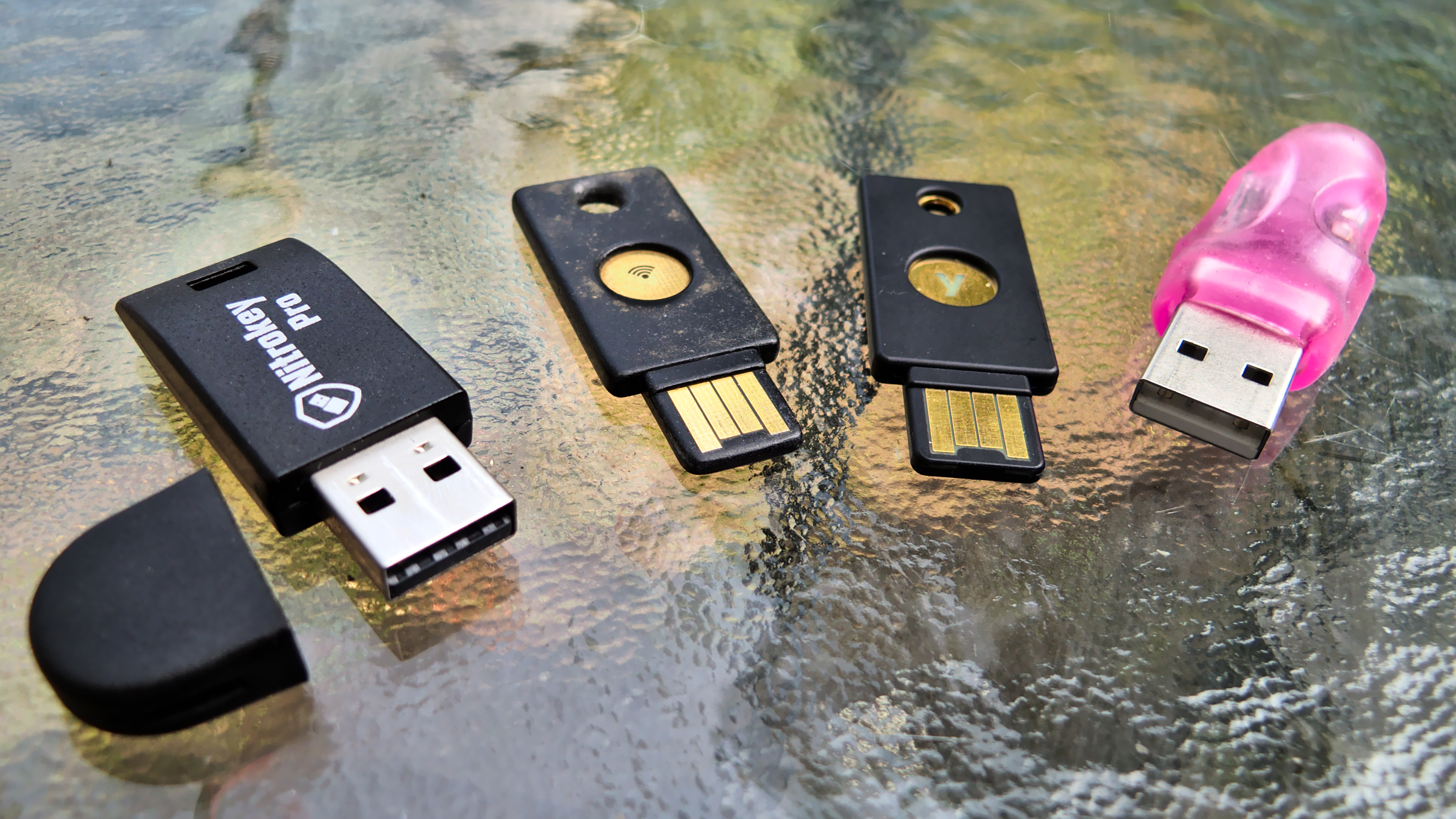
Form factor The Nitrokey Pro, YubiKey NEO (worn out), YubiKey 4, and FST-01 The four keycards have similar form factors: they all connect to a standard USB port, although both YubiKey keycards have a capacitive button by which the user triggers two-factor authentication and the YubiKey 4 can also require a button press to confirm private key use. The YubiKeys feel sturdier than the other two. The NEO has withstood two years of punishment in my pockets along with the rest of my "real" keyring and there is only minimal wear on the keycard in the picture. It's also thinner so it fits well on the keyring. The FST-01 stands out from the other two with its minimal design. Out of the box, the FST-01 comes without a case, so the circuitry is exposed. This is deliberate: one of its goals is to be as transparent as possible, both in terms of software and hardware design and you definitely get that feeling at the physical level. Unfortunately, that does mean it feels more brittle than other models: I wouldn't carry it in my pocket all the time, although there is a case that may protect the key a little better, but it does not provide an easy way to hook it into a keyring. In the group picture above, the FST-01 is the pink plastic thing, which is a rubbery casing I received along with the device when I got it. Notice how the USB connectors of the YubiKeys differ from the other two: while the FST-01 and the Nitrokey have standard USB connectors, the YubiKey has only a "half-connector", which is what makes it thinner than the other two. The "Nano" form factor takes this even further and almost disappears in the USB port. Unfortunately, this arrangement means the YubiKey NEO often comes loose and falls out of the USB port, especially when connected to a laptop. On my workstation, however, it usually stays put even with my whole keyring hanging off of it. I suspect this adds more strain to the host's USB port but that's a tradeoff I've lived with without any noticeable wear so far. Finally, the NEO has this peculiar feature of supporting NFC for certain operations, as LWN previously covered, but I haven't used that feature yet. The Nitrokey Pro looks like a normal USB key, in contrast with the other two devices. It does feel a little brittle when compared with the YubiKey, although only time will tell how much of a beating it can take. It has a small ring in the case so it is possible to carry it directly on your keyring, but I would be worried the cap would come off eventually. Nitrokey devices are also two times thicker than the Yubico models which makes them less convenient to carry around on keyrings.

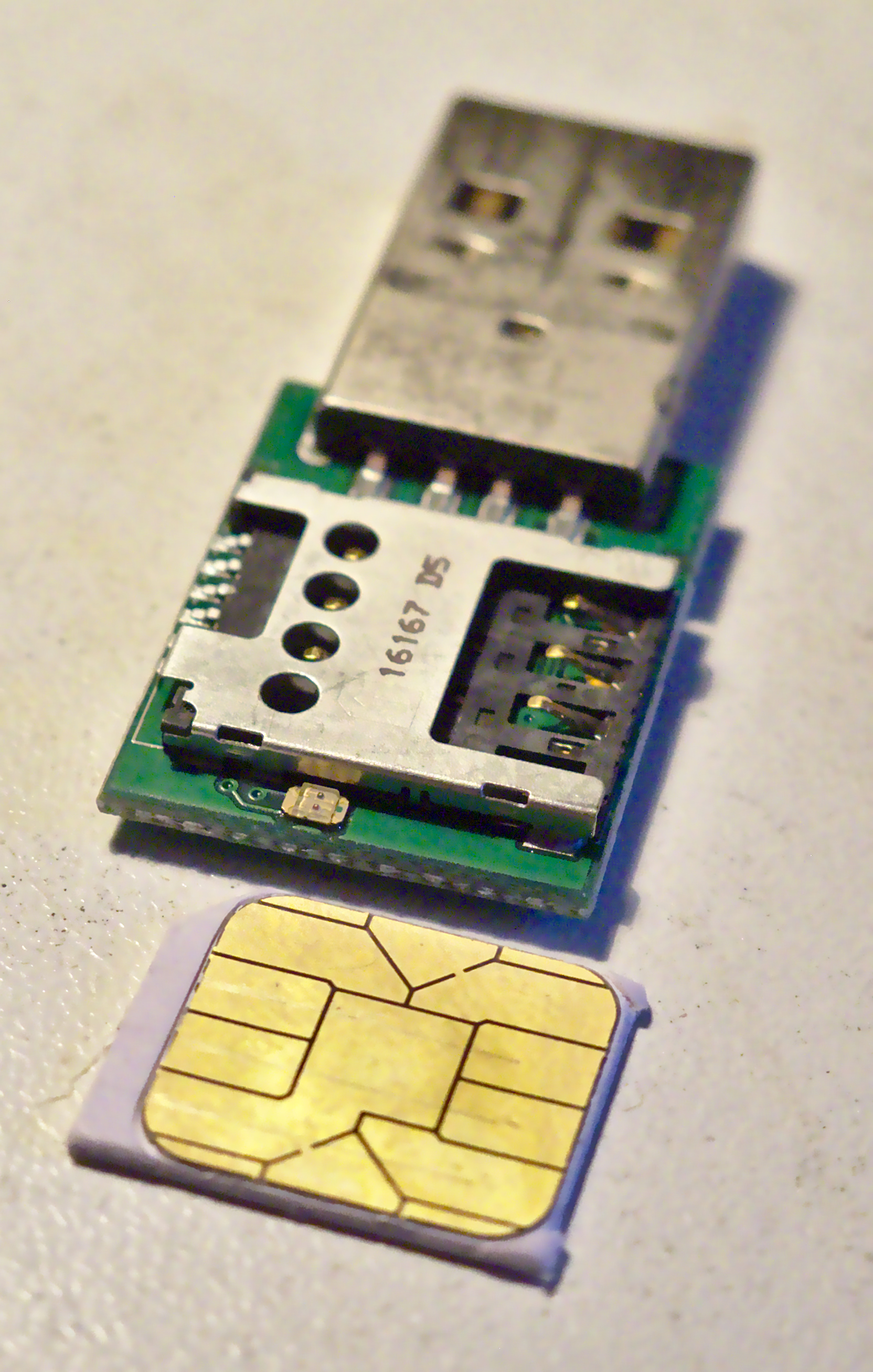
Open and closed designs The FST-01 is as open as hardware comes, down to the PCB design available as KiCad files in this Git repository. The software running on the card is the Gnuk firmware that implements the OpenPGP card protocol, but you can also get it with firmware implementing a true random number generator (TRNG) called NeuG (pronounced "noisy"); the device is programmable through a standard Serial Wire Debug (SWD) port. The Nitrokey Start model also runs the Gnuk firmware. However, the Nitrokey website announces only ECC and RSA 2048-bit support for the Start, while the FST-01 also supports RSA-4096. Nitrokey's founder Jan Suhr, in a private email, explained that this is because "Gnuk doesn't support RSA-3072 or larger at a reasonable speed". Its devices (the Pro, Start, and HSM models) use a similar chip to the FST-01: the STM32F103 microcontroller. Nitrokey Pro with STM32F103TBU6 MCU Nitrokey also publishes its hardware designs, on GitHub, which shows the Pro is basically a fork of the FST-01, according to the ChangeLog. I opened the case to confirm it was using the STM MCU, something I should warn you against; I broke one of the pins holding it together when opening it so now it's even more fragile. But at least, I was able to confirm it was built using the STM32F103TBU6 MCU, like the FST-01. Nitrokey back side But this is where the comparison ends: on the back side, we find a SIM card reader that holds the OpenPGP card that, in turn, holds the private key material and does the cryptographic operations. So, in effect, the Nitrokey Pro is really a evolution of the original OpenPGP card readers. Nitrokey confirmed the OpenPGP card featured in the Pro is the same as the one shipped by the Free Software Foundation Europe (FSFE): the BasicCard built by ZeitControl. Those cards, however, are covered by NDAs and the firmware is only partially open source. This makes the Nitrokey Pro less open than the FST-01, but that's an inevitable tradeoff when choosing a design based on the OpenPGP cards, which Suhr described to me as "pretty proprietary". There are other keycards out there, however, for example the SLJ52GDL150-150k smartcard suggested by Debian developer Yves-Alexis Perez, which he prefers as it is certified by French and German authorities. In that blog post, he also said he was experimenting with the GPL-licensed OpenPGP applet implemented by the French ANSSI. But the YubiKey devices are even further away in the closed-design direction. Both the hardware designs and firmware are proprietary. The YubiKey NEO, for example, cannot be upgraded at all, even though it is based on an open firmware. According to Yubico's FAQ, this is due to "best security practices": "There is a 'no upgrade' policy for our devices since nothing, including malware, can write to the firmware." I find this decision questionable in a context where security updates are often more important than trying to design a bulletproof design, which may simply be impossible. And the YubiKey NEO did suffer from critical security issue that allowed attackers to bypass the PIN protection on the card, which raises the question of the actual protection of the private key material on those cards. According to Niibe, "some OpenPGP cards store the private key unencrypted. It is a common attitude for many smartcard implementations", which was confirmed by Suhr: "the private key is protected by hardware mechanisms which prevent its extraction and misuse". He is referring to the use of tamper resistance. After that security issue, there was no other option for YubiKey NEO users than to get a new keycard (for free, thankfully) from Yubico, which also meant discarding the private key material on the key. For OpenPGP keys, this may mean having to bootstrap the web of trust from scratch if the keycard was responsible for the main certification key. But at least the NEO is running free software based on the OpenPGP card applet and the source is still available on GitHub. The YubiKey 4, on the other hand, is now closed source, which was controversial when the new model was announced last year. It led the main Linux Foundation system administrator, Konstantin Ryabitsev, to withdraw his endorsement of Yubico products. In response, Yubico argued that this approach was essential to the security of its devices, which are now based on "a secure chip, which has built-in countermeasures to mitigate a long list of attacks". In particular, it claims that:
A commercial-grade AVR or ARM controller is unfit to be used in a security product. In most cases, these controllers are easy to attack, from breaking in via a debug/JTAG/TAP port to probing memory contents. Various forms of fault injection and side-channel analysis are possible, sometimes allowing for a complete key recovery in a shockingly short period of time.
While I understand those concerns, they eventually come down to the trust you have in an organization. Not only do we have to trust Yubico, but also hardware manufacturers and designs they have chosen. Every step in the hidden supply chain is then trusted to make correct technical decisions and not introduce any backdoors. History, unfortunately, is not on Yubico's side: Snowden revealed the example of RSA security accepting what renowned cryptographer Bruce Schneier described as a "bribe" from the NSA to weaken its ECC implementation, by using the presumably backdoored Dual_EC_DRBG algorithm. What makes Yubico or its suppliers so different from RSA Security? Remember that RSA Security used to be an adamant opponent to the degradation of encryption standards, campaigning against the Clipper chip in the first crypto wars. Even if we trust the Yubico supply chain, how can we trust a closed design using what basically amounts to security through obscurity? Publicly auditable designs are an important tradition in cryptography, and that principle shouldn't stop when software is frozen into silicon. In fact, a critical vulnerability called ROCA disclosed recently affects closed "smartcards" like the YubiKey 4 and allows full private key recovery from the public key if the key was generated on a vulnerable keycard. When speaking with Ars Technica, the researchers outlined the importance of open designs and questioned the reliability of certification:
Our work highlights the dangers of keeping the design secret and the implementation closed-source, even if both are thoroughly analyzed and certified by experts. The lack of public information causes a delay in the discovery of flaws (and hinders the process of checking for them), thereby increasing the number of already deployed and affected devices at the time of detection.
This issue with open hardware designs seems to be recurring topic of conversation on the Gnuk mailing list. For example, there was a discussion in September 2017 regarding possible hardware vulnerabilities in the STM MCU that would allow extraction of encrypted key material from the key. Niibe referred to a talk presented at the WOOT 17 workshop, where Johannes Obermaier and Stefan Tatschner, from the Fraunhofer Institute, demonstrated attacks against the STMF0 family MCUs. It is still unclear if those attacks also apply to the older STMF1 design used in the FST-01, however. Furthermore, extracted private key material is still protected by user passphrase, but the Gnuk uses a weak key derivation function, so brute-forcing attacks may be possible. Fortunately, there is work in progress to make GnuPG hash the passphrase before sending it to the keycard, which should make such attacks harder if not completely pointless. When asked about the Yubico claims in a private email, Niibe did recognize that "it is true that there are more weak points in general purpose implementations than special implementations". During the last DebConf in Montreal, Niibe explained:
If you don't trust me, you should not buy from me. Source code availability is only a single factor: someone can maliciously replace the firmware to enable advanced attacks.
Niibe recommends to "build the firmware yourself", also saying the design of the FST-01 uses normal hardware that "everyone can replicate". Those advantages are hard to deny for a cryptographic system: using more generic components makes it harder for hostile parties to mount targeted attacks. A counter-argument here is that it can be difficult for a regular user to audit such designs, let alone physically build the device from scratch but, in a mailing list discussion, Debian developer Ian Jackson explained that:
You don't need to be able to validate it personally. The thing spooks most hate is discovery. Backdooring supposedly-free hardware is harder (more costly) because it comes with greater risk of discovery. To put it concretely: if they backdoor all of them, someone (not necessarily you) might notice. (Backdooring only yours involves messing with the shipping arrangements and so on, and supposes that you specifically are of interest.)
Since that, as far as we know, the STM microcontrollers are not backdoored, I would tend to favor those devices instead of proprietary ones, as such a backdoor would be more easily detectable than in a closed design. Even though physical attacks may be possible against those microcontrollers, in the end, if an attacker has physical access to a keycard, I consider the key compromised, even if it has the best chip on the market. In our email exchange, Niibe argued that "when a token is lost, it is better to revoke keys, even if the token is considered secure enough". So like any other device, physical compromise of tokens may mean compromise of the key and should trigger key-revocation procedures.

Algorithms and performance To establish reliable performance results, I wrote a benchmark program naively called crypto-bench that could produce comparable results between the different keys. The program takes each algorithm/keycard combination and runs 1000 decryptions of a 16-byte file (one AES-128 block) using GnuPG, after priming it to get the password cached. I assume the overhead of GnuPG calls to be negligible, as it should be the same across all tokens, so comparisons are possible. AES encryption is constant across all tests as it is always performed on the host and fast enough to be irrelevant in the tests. I used the following:
  • Intel(R) Core(TM) i3-6100U CPU @ 2.30GHz running Debian 9 ("stretch"/stable amd64), using GnuPG 2.1.18-6 (from the stable Debian package)
  • Nitrokey Pro 0.8 (latest firmware)
  • FST-01, running Gnuk version 1.2.5 (latest firmware)
  • YubiKey NEO OpenPGP applet 1.0.10 (not upgradable)
  • YubiKey 4 4.2.6 (not upgradable)
I ran crypto-bench for each keycard, which resulted in the following:
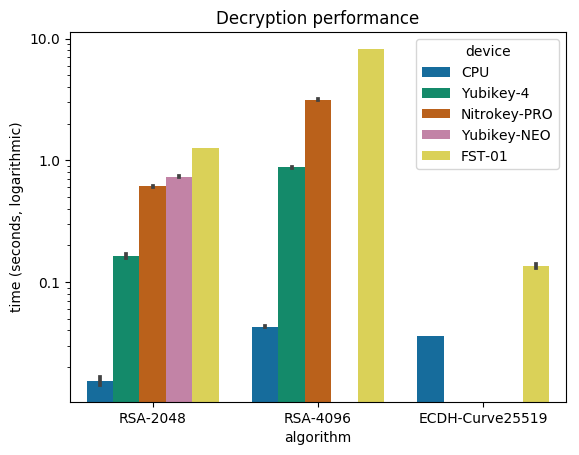
Algorithm Device Mean time (s)
ECDH-Curve25519 CPU 0.036
FST-01 0.135
RSA-2048 CPU 0.016
YubiKey-4 0.162
Nitrokey-Pro 0.610
YubiKey-NEO 0.736
FST-01 1.265
RSA-4096 CPU 0.043
YubiKey-4 0.875
Nitrokey-Pro 3.150
FST-01 8.218
Decryption graph There we see the performance of the four keycards I tested, compared with the same operations done without a keycard: the "CPU" device. That provides the baseline time of GnuPG decrypting the file. The first obvious observation is that using a keycard is slower: in the best scenario (FST-01 + ECC) we see a four-fold slowdown, but in the worst case (also FST-01, but RSA-4096), we see a catastrophic 200-fold slowdown. When I presented the results on the Gnuk mailing list, GnuPG developer Werner Koch confirmed those "numbers are as expected":
With a crypto chip RSA is much faster. By design the Gnuk can't be as fast - it is just a simple MCU. However, using Curve25519 Gnuk is really fast.
And yes, the FST-01 is really fast at doing ECC, but it's also the only keycard that handles ECC in my tests; the Nitrokey Start and Nitrokey HSM should support it as well, but I haven't been able to test those devices. Also note that the YubiKey NEO doesn't support RSA-4096 at all, so we can only compare RSA-2048 across keycards. We should note, however, that ECC is slower than RSA on the CPU, which suggests the Gnuk ECC implementation used by the FST-01 is exceptionally fast. In discussions about improving the performance of the FST-01, Niibe estimated the user tolerance threshold to be "2 seconds decryption time". In a new design using the STM32L432 microcontroller, Aurelien Jarno was able to bring the numbers for RSA-2048 decryption from 1.27s down to 0.65s, and for RSA-4096, from 8.22s down to 3.87s seconds. RSA-4096 is still beyond the two-second threshold, but at least it brings the FST-01 close to the YubiKey NEO and Nitrokey Pro performance levels. We should also underline the superior performance of the YubiKey 4: whatever that thing is doing, it's doing it faster than anyone else. It does RSA-4096 faster than the FST-01 does RSA-2048, and almost as fast as the Nitrokey Pro does RSA-2048. We should also note that the Nitrokey Pro also fails to cross the two-second threshold for RSA-4096 decryption. For me, the FST-01's stellar performance with ECC outshines the other devices. Maybe it says more about the efficiency of the algorithm than the FST-01 or Gnuk's design, but it's definitely an interesting avenue for people who want to deploy those modern algorithms. So, in terms of performance, it is clear that both the YubiKey 4 and the FST-01 take the prize in their own areas (RSA and ECC, respectively).

Conclusion In the above presentation, I have evaluated four cryptographic keycards for use with various OpenPGP operations. What the results show is that the only efficient way of storing a 4096-bit encryption key on a keycard would be to use the YubiKey 4. Unfortunately, I do not feel we should put our trust in such closed designs so I would argue you should either stick with 2048-bit encryption subkeys or keep the keys on disk. Considering that losing such a key would be catastrophic, this might be a good approach anyway. You should also consider switching to ECC encryption: even though it may not be supported everywhere, GnuPG supports having multiple encryption subkeys on a keyring: if one algorithm is unsupported (e.g. GnuPG 1.4 doesn't support ECC), it will fall back to a supported algorithm (e.g. RSA). Do not forget your previously encrypted material doesn't magically re-encrypt itself using your new encryption subkey, however. For authentication and signing keys, speed is not such an issue, so I would warmly recommend either the Nitrokey Pro or Start, or the FST-01, depending on whether you want to start experimenting with ECC algorithms. Availability also seems to be an issue for the FST-01. While you can generally get the device when you meet Niibe in person for a few bucks (I bought mine for around \$30 Canadian), the Seeed online shop says the device is out of stock at the time of this writing, even though Jonathan McDowell said that may be inaccurate in a debian-project discussion. Nevertheless, this issue may make the Nitrokey devices more attractive. When deciding on using the Pro or Start, Suhr offered the following advice:
In practice smart card security has been proven to work well (at least if you use a decent smart card). Therefore the Nitrokey Pro should be used for high security cases. If you don't trust the smart card or if Nitrokey Start is just sufficient for you, you can choose that one. This is why we offer both models.
So far, I have created a signing subkey and moved that and my authentication key to the YubiKey NEO, because it's a device I physically trust to keep itself together in my pockets and I was already using it. It has served me well so far, especially with its extra features like U2F and HOTP support, which I use frequently. Those features are also available on the Nitrokey Pro, so that may be an alternative if I lose the YubiKey. I will probably move my main certification key to the FST-01 and a LUKS-encrypted USB disk, to keep that certification key offline but backed up on two different devices. As for the encryption key, I'll wait for keycard performance to improve, or simply switch my whole keyring to ECC and use the FST-01 or Nitrokey Start for that purpose.
[The author would like to thank Nitrokey for providing hardware for testing.] This article first appeared in the Linux Weekly News.

16 October 2017

Yves-Alexis Perez: OpenPGP smartcard transition (part 1.5)

Following the news about the ROCA vulnerability (weak key generation in Infineon-based smartcards, more info here and here) I can confirm that the Almex smartcard I mentionned on my last post (which are Infineon based) are indeed vulnerable. I've contacted Almex to have more details, but if you were interested in buying that smartcard, you might want to refrain for now. It does *not* affect keys generated off-card and later injected (the process I use myself).

10 October 2017

Yves-Alexis Perez: OpenPGP smartcard transition (part 1)

A long time ago, I switched my GnuPG setup to a smartcard based one. I kept using the same master key, but: I've been working with that setup for a few years now and it is working perfectly fine. The signature counter on the OpenPGP basic card is a bit north of 5000 which is large but not that huge, all considered (and not counting authentication and decryption key usage).

One very nice feature of using a smartcard is that my laptop (or other machines I work on) never manipulates the private key directly but only sends request to the card, which is a really huge improvement, in my opinion. But it's also not the perfect solution for me: the OpenPGP card uses a proprietary platform from ZeitControl, named BasicCard. We have very few information on the smartcard, besides the fact that Werner Koch trust ZeistControl to not mess up. One caveat for me is that the card does not use a certified secure microcontroler like you would find in smartcard chips found in debit card or electronic IDs. That means it's not really been audited by a competent hardware lab, and thus can't be considered secure against physical attacks. The cardOS software and the application implementing the OpenPGP specification are not public either and have not been audited either, to the best of my knowledge.

At one point I was interested in the Yubikey Neo, especially since the architecture Yubico used was common: a (supposedly) certified platform (secure microcontroler, card OS) and a GlobalPlatform / JavaCard virtual machine. The applet used in the Yubikey Neo is open-source, too, so you could take a look at it and identify any issue.

Unfortunately, Yubico transitioned to a less common and more proprietary infrastructure for Yubikey 4: it's not longer Javacard based, and they don't provide the applet source anymore. This was not really seen as a good move by a lot of people, including Konstantin Ryabitsev (kernel.org administrator). Also, it wasn't possible even for the Yubico Neo to actually build the applet yourself and inject it on the card: when the Yubikey leaves the facility, the applet is already installed and the smartcard is locked (for obvious security reason). I've tried asking about getting naked/empty Yubikey with developers keys to load the applet myself, but it' was apparently not possible or would have required signing an NDA with NXP (the chip maker), which is not really possible as an individual (not that I really want to anyway).

In the meantime, a coworker actually wrote an OpenPGP javacard applet, with the intention to support latest version of the OpenPGP specification, and especially elliptic curve cryptography. The applet is called SmartPGP and has been released on ANSSI github repository. I investigated a bit, and found a smartcard with correct specification: certified (in France or Germany), and supporting Javacard 3.0.4 (required for ECC). The card can do RSA2048 (unfortunately not RSA4096) and EC with NIST (secp256r1, secp384r1, secp521r1) and Brainpool (P256, P384, P512) curves.

I've ordered some cards, and when they arrived started playing. I've built the SmartPGP applet and pushed it to a smartcard, then generated some keys and tried with GnuPG. I'm right now in the process of migrating to a new smartcard based on that setup, which seems to work just fine after few days.

Part two of this serie will describe how to build the applet and inject it in the smartcard. The process is already documented here and there, but there are few things not to forget, like how to lock the card after provisionning, so I guess having the complete process somewhere might be useful in case some people want to reproduce it.

5 October 2017

Wouter Verhelst: Patching Firefox

At work, I help maintain a smartcard middleware that is provided to Belgian citizens who want to use their electronic ID card to, e.g., log on to government websites. This middleware is a piece of software that hooks into various browsers and adds a way to access the smartcard in question, through whatever APIs the operating system and the browser in question provide for that purpose. The details of how that is done differ between each browser (and in the case of Google Chrome, for the same browser between different operating systems); but for Firefox (and Google Chrome on free operating systems), this is done by way of a PKCS#11 module. For Firefox 57, mozilla decided to overhaul much of their browser. The changes are large and massive, and in some ways revolutionary. It's no surprise, therefore, that some of the changes break compatibility with older things. One of the areas in which breaking changes were made is in the area of extensions to the browser. Previously, Firefox had various APIs available for extensions; right now, all APIs apart from the WebExtensions API are considered "legacy" and support for them will be removed from Firefox 57 going forward. Since installing a PKCS#11 module manually is a bit complicated, and since the legacy APIs provided a way to do so automatically provided the user would first install an add-on (or provided the installer of the PKCS#11 module sideloads it), most parties who provide a PKCS#11 module for use with Firefox will provide an add-on to automatically install it. Since the alternative involves entering the right values in a dialog box that's hidden away somewhere deep in the preferences screen, the add-on option is much more user friendly. I'm sure you can imagine my dismay when I found out that there was no WebExtensions API to provide the same functionality. So, after asking around a bit, I filed bug 1357391 to get a discussion started. While it took some convincing initially to get people to understand the reasons for wanting such an API, eventually the bug was assigned the "P5" priority -- essentially, a "we understand the need and won't block it, but we don't have the time to implement it. Patches welcome, though" statement. Since having an add-on was something that work really wanted, and since I had the time, I got the go-ahead from management to look into implementing the required code myself. I made it obvious rather quickly that my background in Firefox was fairly limited, though, and so was assigned a mentor to help me through the process. Having been a Debian Developer for the past fifteen years, I do understand how to develop free software. Yet, the experience was different enough that still learned some new things about free software development, which was somewhat unexpected. Unfortunately, the process took much longer than I had hoped, which meant that the patch was not ready by the time Firefox 57 was branched off mozilla's "central" repository. The result of that is that while my patch has been merged into what will eventually become Firefox 58, it looks strongly as though it won't make it into Firefox 57. That's going to cause some severe headaches, which I'm not looking forward to; and while I can certainly understand the reasons for not wanting to grant the exception for the merge into 57, I can't help but feeling like this is a missed opportunity. Anyway, writing code for the massive Open Source project that mozilla is has been a load of fun, and in the process I've learned a lot -- not only about Open Source development in general, but also about this weird little thing that Javascript is. That might actually be useful for this other project that I've got running here. In closing, I'd like to thank Tomislav 'zombie' Jovanovic for mentoring me during the whole process, without whom it would have been doubtful if I would even have been ready by now. Apologies for any procedural mistakes I've made, and good luck in your future endeavours! :-)

3 October 2017

Christoph Egger: Another Xor (CSAW 2017)

A short while ago, FAUST participated in this year's CSAW qualification and -- as usual -- I was working on the Crypto challenges again. The first puzzle I worked on was called "Another Xor" -- and, while there are quite some write ups already our solution was somewhat different (maybe even the intended solution given how nice things worked out) and certainly interesting. The challenge provides a cipher-text. It's essentially a stream cipher with key repeated to generate the key stream. The plain-text was plain + key + checksum.
p = this is a plaintextThis is the keyfa5d46a2a2dcdeb83e0241ee2c0437f7
k = This is the keyThis is the keyThis is the keyThis is the keyThis i
Key length Our first step was figuring out the key length. Let's assume for now the key was This is the key. Notice that the key is also part of the plain-text and we know something about its location -- it ends at 32 characters from the back. If we only take a look at the encrypted key it should have the following structure:
p' = This is the key
k' = he keyThis is t
The thing to notice here is that every character in the Key appears both in the plain-text and key stream sequence. And the cipher-text is the XOR ( ) of both. Therefore XOR over the cipher-text sequence encrypting the key should equal 0 ( (p') (k') = 0). So remove the last 32 characters and find all suffixes that result in a XOR of 0. Fortunately there is exactly one such suffix (there could be multiple) and therefore we know the key size: 67. To put it in code, this basically is the function we implemented for this:
def calculate(ciphertextcandidate):
    accumulator = 0
    for char in ciphertextcandidate:
        accumulator = accumulator ^ char
Which, for the matching plain-text and key-stream fragments is equal (due to the XOR encryption) to
def calculate(plainfragment, keyfragment):
    accumulator = 0
    for i in range(len(plainfragment):
        accumulator = accumulator ^ (plainfragment[i] ^ keyfragment[i])
Now XOR lets us nicely reorder this to
def calculate(plainfragment, keyfragment):
    accumulator = 0
    for i in range(len(plainfragment):
        accumulator = accumulator ^ (plainfragment[i] ^
                                     keyfragment[(i + 6) % len(plainfragment)])
And, as plainfragment[i] and keyfragment[(i + 6) % len(plainfragment)] are equal for the plain-text range encoding the key this becomes
def calculate(plainfragment, keyfragment):
    accumulator = 0
    for i in range(len(plainfragment):
        accumulator = accumulator ^ 0
Or simply 0 if the guess of the cipher-text range is correct. Key recovery Now the nice thing to notice is that the length of the key (67) is a prime (and 38, the plain-text length, is a generator). As a result, we only need to guess one byte of the key: Assume you know one byte of the key (and the position). Now you can use that one byte of the key to decrypt the next byte of the key (using the area where the key is part of the plain-text). Due to the primeness of the key length this allows recovery of the full key. Finally you can either print all 256 options and look for the one that looks reasonable or you can verify the md5sum which will give you the one valid solution, flag sti11_us3_da_x0r_for_my_s3cratz . Code

cipher = b"'L\x10\x12\x1a\x01\x00I[P-U\x1cU\x7f\x0b\x083X]\x1b'\x03\x0bR(\x04\r7SI\n\x1c\x02T\x15\x05\x15%EQ\x18\x00\x19\x11SJ\x00RV\n\x14YO\x0b\x1eI\n\x01\x0cE\x14A\x1e\x07\x00\x14aZ\x18\x1b\x02R\x1bX\x03\x05\x17\x00\x02\x07K\n\x1aLAM\x1f\x1d\x17\x1d\x00\x15\x1b\x1d\x0fH\x0eI\x1e\x02I\x01\x0c\x15\x00P\x11\\PXPCB\x03B\x13TBL\x11PC\x0b^\tM\x14IW\x08\rDD%FC"
def keycover(guess):
    key = dict()
    pos = 38
    key[38] = guess
    for i in range(67):
        newpos = (pos % 67) + 38
        key[newpos] = xor(cipher[pos:], key[pos])
        pos = newpos
    try:
        return b''.join([ key[i] for i in range(38, 105, 1) ])
    except:
        return b'test'
for guess in range(256):
    keycand = keycover(bytes([guess]))
    plaincand = xor(cipher, repeat(keycand, len(cipher)))
    if md5(plaincand[:-32]).hexdigest().encode() == plaincand[-32:]:
        print(keycand, plaincand)

2 October 2017

Antoine Beaupr : Strategies for offline PGP key storage

While the adoption of OpenPGP by the general population is marginal at best, it is a critical component for the security community and particularly for Linux distributions. For example, every package uploaded into Debian is verified by the central repository using the maintainer's OpenPGP keys and the repository itself is, in turn, signed using a separate key. If upstream packages also use such signatures, this creates a complete trust path from the original upstream developer to users. Beyond that, pull requests for the Linux kernel are verified using signatures as well. Therefore, the stakes are high: a compromise of the release key, or even of a single maintainer's key, could enable devastating attacks against many machines. That has led the Debian community to develop a good grasp of best practices for cryptographic signatures (which are typically handled using GNU Privacy Guard, also known as GnuPG or GPG). For example, weak (less than 2048 bits) and vulnerable PGPv3 keys were removed from the keyring in 2015, and there is a strong culture of cross-signing keys between Debian members at in-person meetings. Yet even Debian developers (DDs) do not seem to have established practices on how to actually store critical private key material, as we can see in this discussion on the debian-project mailing list. That email boiled down to a simple request: can I have a "key dongles for dummies" tutorial? Key dongles, or keycards as we'll call them here, are small devices that allow users to store keys on an offline device and provide one possible solution for protecting private key material. In this article, I hope to use my experience in this domain to clarify the issue of how to store those precious private keys that, if compromised, could enable arbitrary code execution on millions of machines all over the world.

Why store keys offline? Before we go into details about storing keys offline, it may be useful to do a small reminder of how the OpenPGP standard works. OpenPGP keys are made of a main public/private key pair, the certification key, used to sign user identifiers and subkeys. My public key, shown below, has the usual main certification/signature key (marked SC) but also an encryption subkey (marked E), a separate signature key (S), and two authentication keys (marked A) which I use as RSA keys to log into servers using SSH, thanks to the Monkeysphere project.
    pub   rsa4096/792152527B75921E 2009-05-29 [SC] [expires: 2018-04-19]
      8DC901CE64146C048AD50FBB792152527B75921E
    uid                 [ultimate] Antoine Beaupr  <anarcat@anarc.at>
    uid                 [ultimate] Antoine Beaupr  <anarcat@koumbit.org>
    uid                 [ultimate] Antoine Beaupr  <anarcat@orangeseeds.org>
    uid                 [ultimate] Antoine Beaupr  <anarcat@debian.org>
    sub   rsa2048/B7F648FED2DF2587 2012-07-18 [A]
    sub   rsa2048/604E4B3EEE02855A 2012-07-20 [A]
    sub   rsa4096/A51D5B109C5A5581 2009-05-29 [E]
    sub   rsa2048/3EA1DDDDB261D97B 2017-08-23 [S]
All the subkeys (sub) and identities (uid) are bound by the main certification key using cryptographic self-signatures. So while an attacker stealing a private subkey can spoof signatures in my name or authenticate to other servers, that key can always be revoked by the main certification key. But if the certification key gets stolen, all bets are off: the attacker can create or revoke identities or subkeys as they wish. In a catastrophic scenario, an attacker could even steal the key and remove your copies, taking complete control of the key, without any possibility of recovery. Incidentally, this is why it is so important to generate a revocation certificate and store it offline. So by moving the certification key offline, we reduce the attack surface on the OpenPGP trust chain: day-to-day keys (e.g. email encryption or signature) can stay online but if they get stolen, the certification key can revoke those keys without having to revoke the main certification key as well. Note that a stolen encryption key is a different problem: even if we revoke the encryption subkey, this will only affect future encrypted messages. Previous messages will be readable by the attacker with the stolen subkey even if that subkey gets revoked, so the benefits of revoking encryption certificates are more limited.

Common strategies for offline key storage Considering the security tradeoffs, some propose storing those critical keys offline to reduce those threats. But where exactly? In an attempt to answer that question, Jonathan McDowell, a member of the Debian keyring maintenance team, said that there are three options: use an external LUKS-encrypted volume, an air-gapped system, or a keycard. Full-disk encryption like LUKS adds an extra layer of security by hiding the content of the key from an attacker. Even though private keyrings are usually protected by a passphrase, they are easily identifiable as a keyring. But when a volume is fully encrypted, it's not immediately obvious to an attacker there is private key material on the device. According to Sean Whitton, another advantage of LUKS over plain GnuPG keyring encryption is that you can pass the --iter-time argument when creating a LUKS partition to increase key-derivation delay, which makes brute-forcing much harder. Indeed, GnuPG 2.x doesn't have a run-time option to configure the key-derivation algorithm, although a patch was introduced recently to make the delay configurable at compile time in gpg-agent, which is now responsible for all secret key operations. The downside of external volumes is complexity: GnuPG makes it difficult to extract secrets out of its keyring, which makes the first setup tricky and error-prone. This is easier in the 2.x series thanks to the new storage system and the associated keygrip files, but it still requires arcane knowledge of GPG internals. It is also inconvenient to use secret keys stored outside your main keyring when you actually do need to use them, as GPG doesn't know where to find those keys anymore. Another option is to set up a separate air-gapped system to perform certification operations. An example is the PGP clean room project, which is a live system based on Debian and designed by DD Daniel Pocock to operate an OpenPGP and X.509 certificate authority using commodity hardware. The basic principle is to store the secrets on a different machine that is never connected to the network and, therefore, not exposed to attacks, at least in theory. I have personally discarded that approach because I feel air-gapped systems provide a false sense of security: data eventually does need to come in and out of the system, somehow, even if only to propagate signatures out of the system, which exposes the system to attacks. System updates are similarly problematic: to keep the system secure, timely security updates need to be deployed to the air-gapped system. A common use pattern is to share data through USB keys, which introduce a vulnerability where attacks like BadUSB can infect the air-gapped system. From there, there is a multitude of exotic ways of exfiltrating the data using LEDs, infrared cameras, or the good old TEMPEST attack. I therefore concluded the complexity tradeoffs of an air-gapped system are not worth it. Furthermore, the workflow for air-gapped systems is complex: even though PGP clean room went a long way, it's still lacking even simple scripts that allow signing or transferring keys, which is a problem shared by the external LUKS storage approach.

Keycard advantages The approach I have chosen is to use a cryptographic keycard: an external device, usually connected through the USB port, that stores the private key material and performs critical cryptographic operations on the behalf of the host. For example, the FST-01 keycard can perform RSA and ECC public-key decryption without ever exposing the private key material to the host. In effect, a keycard is a miniature computer that performs restricted computations for another host. Keycards usually support multiple "slots" to store subkeys. The OpenPGP standard specifies there are three subkeys available by default: for signature, authentication, and encryption. Finally, keycards can have an actual physical keypad to enter passwords so a potential keylogger cannot capture them, although the keycards I have access to do not feature such a keypad. We could easily draw a parallel between keycards and an air-gapped system; in effect, a keycard is a miniaturized air-gapped computer and suffers from similar problems. An attacker can intercept data on the host system and attack the device in the same way, if not more easily, because a keycard is actually "online" (i.e. clearly not air-gapped) when connected. The advantage over a fully-fledged air-gapped computer, however, is that the keycard implements only a restricted set of operations. So it is easier to create an open hardware and software design that is audited and verified, which is much harder to accomplish for a general-purpose computer. Like air-gapped systems, keycards address the scenario where an attacker wants to get the private key material. While an attacker could fool the keycard into signing or decrypting some data, this is possible only while the key is physically connected, and the keycard software will prompt the user for a password before doing the operation, though the keycard can cache the password for some time. In effect, it thwarts offline attacks: to brute-force the key's password, the attacker needs to be on the target system and try to guess the keycard's password, which will lock itself after a limited number of tries. It also provides for a clean and standard interface to store keys offline: a single GnuPG command moves private key material to a keycard (the keytocard command in the --edit-key interface), whereas moving private key material to a LUKS-encrypted device or air-gapped computer is more complex. Keycards are also useful if you operate on multiple computers. A common problem when using GnuPG on multiple machines is how to safely copy and synchronize private key material among different devices, which introduces new security problems. Indeed, a "good rule of thumb in a forensics lab", according to Robert J. Hansen on the GnuPG mailing list, is to "store the minimum personal data possible on your systems". Keycards provide the best of both worlds here: you can use your private key on multiple computers without actually storing it in multiple places. In fact, Mike Gerwitz went as far as saying:
For users that need their GPG key on multiple boxes, I consider a smartcard to be essential. Otherwise, the user is just furthering her risk of compromise.

Keycard tradeoffs As Gerwitz hinted, there are multiple downsides to using a keycard, however. Another DD, Wouter Verhelst clearly expressed the tradeoffs:
Smartcards are useful. They ensure that the private half of your key is never on any hard disk or other general storage device, and therefore that it cannot possibly be stolen (because there's only one possible copy of it). Smartcards are a pain in the ass. They ensure that the private half of your key is never on any hard disk or other general storage device but instead sits in your wallet, so whenever you need to access it, you need to grab your wallet to be able to do so, which takes more effort than just firing up GnuPG. If your laptop doesn't have a builtin cardreader, you also need to fish the reader from your backpack or wherever, etc.
"Smartcards" here refer to older OpenPGP cards that relied on the IEC 7816 smartcard connectors and therefore needed a specially-built smartcard reader. Newer keycards simply use a standard USB connector. In any case, it's true that having an external device introduces new issues: attackers can steal your keycard, you can simply lose it, or wash it with your dirty laundry. A laptop or a computer can also be lost, of course, but it is much easier to lose a small USB keycard than a full laptop and I have yet to hear of someone shoving a full laptop into a washing machine. When you lose your keycard, unless a separate revocation certificate is available somewhere, you lose complete control of the key, which is catastrophic. But, even if you revoke the lost key, you need to create a new one, which involves rebuilding the web of trust for the key a rather expensive operation as it usually requires meeting other OpenPGP users in person to exchange fingerprints. You should therefore think about how to back up the certification key, which is a problem that already exists for online keys; of course, everyone has a revocation certificates and backups of their OpenPGP keys... right? In the keycard scenario, backups may be multiple keycards distributed geographically. Note that, contrary to an air-gapped system, a key generated on a keycard cannot be backed up, by design. For subkeys, this is not a problem as they do not need to be backed up (except encryption keys). But, for a certification key, this means users need to generate the key on the host and transfer it to the keycard, which means the host is expected to have enough entropy to generate cryptographic-strength random numbers, for example. Also consider the possibility of combining different approaches: you could, for example, use a keycard for day-to-day operation, but keep a backup of the certification key on a LUKS-encrypted offline volume. Keycards introduce a new element into the trust chain: you need to trust the keycard manufacturer to not have any hostile code in the key's firmware or hardware. In addition, you need to trust that the implementation is correct. Keycards are harder to update: the firmware may be deliberately inaccessible to the host for security reasons or may require special software to manipulate. Keycards may be slower than the CPU in performing certain operations because they are small embedded microcontrollers with limited computing power. Finally, keycards may encourage users to trust multiple machines with their secrets, which works against the "minimum personal data" principle. A completely different approach called the trusted physical console (TPC) does the opposite: instead of trying to get private key material onto all of those machines, just have them on a single machine that is used for everything. Unlike a keycard, the TPC is an actual computer, say a laptop, which has the advantage of needing no special procedure to manage keys. The downside is, of course, that you actually need to carry that laptop everywhere you go, which may be problematic, especially in some corporate environments that restrict bringing your own devices.

Quick keycard "howto" Getting keys onto a keycard is easy enough:
  1. Start with a temporary key to test the procedure:
        export GNUPGHOME=$(mktemp -d)
        gpg --generate-key
    
  2. Edit the key using its user ID (UID):
        gpg --edit-key UID
    
  3. Use the key command to select the first subkey, then copy it to the keycard (you can also use the addcardkey command to just generate a new subkey directly on the keycard):
        gpg> key 1
        gpg> keytocard
    
  4. If you want to move the subkey, use the save command, which will remove the local copy of the private key, so the keycard will be the only copy of the secret key. Otherwise use the quit command to save the key on the keycard, but keep the secret key in your normal keyring; answer "n" to "save changes?" and "y" to "quit without saving?" . This way the keycard is a backup of your secret key.
  5. Once you are satisfied with the results, repeat steps 1 through 4 with your normal keyring (unset $GNUPGHOME)
When a key is moved to a keycard, --list-secret-keys will show it as sec> (or ssb> for subkeys) instead of the usual sec keyword. If the key is completely missing (for example, if you moved it to a LUKS container), the # sign is used instead. If you need to use a key from a keycard backup, you simply do gpg --card-edit with the key plugged in, then type the fetch command at the prompt to fetch the public key that corresponds to the private key on the keycard (which stays on the keycard). This is the same procedure as the one to use the secret key on another computer.

Conclusion There are already informal OpenPGP best-practices guides out there and some recommend storing keys offline, but they rarely explain what exactly that means. Storing your primary secret key offline is important in dealing with possible compromises and we examined the main ways of doing so: either with an air-gapped system, LUKS-encrypted keyring, or by using keycards. Each approach has its own tradeoffs, but I recommend getting familiar with keycards if you use multiple computers and want a standardized interface with minimal configuration trouble. And of course, those approaches can be combined. This tutorial, for example, uses a keycard on an air-gapped computer, which neatly resolves the question of how to transmit signatures between the air-gapped system and the world. It is definitely not for the faint of heart, however. Once one has decided to use a keycard, the next order of business is to choose a specific device. That choice will be addressed in a followup article, where I will look at performance, physical design, and other considerations.
This article first appeared in the Linux Weekly News.

30 September 2017

Chris Lamb: Free software activities in September 2017

Here is my monthly update covering what I have been doing in the free software world in September 2017 (previous month):
Reproducible builds

Whilst anyone can inspect the source code of free software for malicious flaws, most software is distributed pre-compiled to end users. The motivation behind the Reproducible Builds effort is to allow verification that no flaws have been introduced either maliciously or accidentally during this compilation process by promising identical results are always generated from a given source, thus allowing multiple third-parties to come to a consensus on whether a build was compromised. I have generously been awarded a grant from the Core Infrastructure Initiative to fund my work in this area. This month I:
  • Published a short blog post about how to determine which packages on your system are reproducible. [...]
  • Submitted a pull request for Numpy to make the generated config.py files reproducible. [...]
  • Provided a patch to GTK upstream to ensure the immodules.cache files are reproducible. [...]
  • Within Debian:
    • Updated isdebianreproducibleyet.com, moving it to HTTPS, adding cachebusting as well as keeping the number up-to-date.
    • Submitted the following patches to fix reproducibility-related toolchain issues:
      • gdk-pixbuf: Make the output of gdk-pixbuf-query-loaders reproducible. (#875704)
      • texlive-bin: Make PDF IDs reproducible. (#874102)
    • Submitted a patch to fix a reproducibility issue in doit.
  • Categorised a large number of packages and issues in the Reproducible Builds "notes" repository.
  • Chaired our monthly IRC meeting. [...]
  • Worked on publishing our weekly reports. (#123, #124, #125, #126 & #127)


I also made the following changes to our tooling:
reproducible-check

reproducible-check is our script to determine which packages actually installed on your system are reproducible or not.

  • Handle multi-architecture systems correctly. (#875887)
  • Use the "restricted" data file to mask transient issues. (#875861)
  • Expire the cache file after one day and base the local cache filename on the remote name. [...] [...]
I also blogged about this utility. [...]
diffoscope

diffoscope is our in-depth and content-aware diff utility that can locate and diagnose reproducibility issues.

  • Filed an issue attempting to identify the causes behind an increased number of timeouts visible in our CI infrastructure, including running a number of benchmarks of recent versions. (#875324)
  • New features:
    • Add "binwalking" support to analyse concatenated CPIO archives such as initramfs images. (#820631).
    • Print a message if we are reading data from standard input. [...]
  • Bug fixes:
    • Loosen matching of file(1)'s output to ensure we correctly also match TTF files under file version 5.32. [...]
    • Correct references to path_apparent_size in comparators.utils.file and self.buf in diffoscope.diff. [...] [...]
  • Testing:
    • Make failing some critical flake8 tests result in a failed build. [...]
    • Check we identify all CPIO fixtures. [...]
  • Misc:
    • No need for try-assert-except block in setup.py. [...]
    • Compare types with identity not equality. [...] [...]
    • Use logging.py's lazy argument interpolation. [...]
    • Remove unused imports. [...]
    • Numerous PEP8, flake8, whitespace, other cosmetic tidy-ups.

strip-nondeterminism

strip-nondeterminism is our tool to remove specific non-deterministic results from a completed build.

  • Log which handler processed a file. (#876140). [...]

disorderfs

disorderfs is our FUSE-based filesystem that deliberately introduces non-determinism into directory system calls in order to flush out reproducibility issues.


Debian My activities as the current Debian Project Leader are covered in my monthly "Bits from the DPL" email to the debian-devel-announce mailing list.
Lintian I made a large number of changes to Lintian, the static analysis tool for Debian packages. It reports on various errors, omissions and general quality-assurance issues to maintainers: I also blogged specifically about the Lintian 2.5.54 release.

Patches contributed
  • debconf: Please add a context manager to debconf.py. (#877096)
  • nm.debian.org: Add pronouns to ALL_STATUS_DESC. (#875128)
  • user-setup: Please drop set_special_users hack added for "the convenience of heavy testers". (#875909)
  • postgresql-common: Please update README.Debian for PostgreSQL 10. (#876438)
  • django-sitetree: Should not mask test failures. (#877321)
  • charmtimetracker:
    • Missing binary dependency on libqt5sql5-sqlite. (#873918)
    • Please drop "Cross-Platform" from package description. (#873917)
I also submitted 5 patches for packages with incorrect calls to find(1) in debian/rules against hamster-applet, libkml, pyferret, python-gssapi & roundcube.

Debian LTS

This month I have been paid to work 15 hours on Debian Long Term Support (LTS). In that time I did the following:
  • "Frontdesk" duties, triaging CVEs, etc.
  • Documented an example usage of autopkgtests to test security changes.
  • Issued DLA 1084-1 and DLA 1085-1 for libidn and libidn2-0 to fix an integer overflow vulnerabilities in Punycode handling.
  • Issued DLA 1091-1 for unrar-free to prevent a directory traversal vulnerability from a specially-crafted .rar archive. This update introduces an regression test.
  • Issued DLA 1092-1 for libarchive to prevent malicious .xar archives causing a denial of service via a heap-based buffer over-read.
  • Issued DLA 1096-1 for wordpress-shibboleth, correcting an cross-site scripting vulnerability in the Shibboleth identity provider module.

Uploads
  • python-django:
    • 1.11.5-1 New upstream security release. (#874415)
    • 1.11.5-2 Apply upstream patch to fix QuerySet.defer() with "super" and "subclass" fields. (#876816)
    • 2.0~alpha1-2 New upstream alpha release of Django 2.0, dropping support for Python 2.x.
  • redis:
    • 4.0.2-1 New upstream release.
    • 4.0.2-2 Update 0004-redis-check-rdb autopkgtest test to ensure that the redis.rdb file exists before testing against it.
    • 4.0.2-2~bpo9+1 Upload to stretch-backports.
  • aptfs (0.11.0-1) New upstream release, moving away from using /var/lib/apt/lists internals. Thanks to Julian Andres Klode for a helpful bug report. (#874765)
  • lintian (2.5.53, 2.5.54) New upstream releases. (Documented in more detail above.)
  • bfs (1.1.2-1) New upstream release.
  • docbook-to-man (1:2.0.0-39) Tighten autopkgtests and enable testing via travis.debian.net.
  • python-daiquiri (1.3.0-1) New upstream release.

I also made the following non-maintainer uploads (NMUs):

Debian bugs filed
  • clipit: Please choose a sensible startup default in "live" mode. (#875903)
  • git-buildpackage: Please add a --reset option to gbp pull. (#875852)
  • bluez: Please default Device "friendly name" to hostname without domain. (#874094)
  • bugs.debian.org: Please explicitly link to packages,tracker .debian.org. (#876746)
  • Requests for packaging:
    • selfspy log everything you do on the computer. (#873955)
    • shoogle use the Google API from the shell. (#873916)

FTP Team

As a Debian FTP assistant I ACCEPTed 86 packages: bgw-replstatus, build-essential, caja-admin, caja-rename, calamares, cdiff, cockpit, colorized-logs, comptext, comptty, copyq, django-allauth, django-paintstore, django-q, django-test-without-migrations, docker-runc, emacs-db, emacs-uuid, esxml, fast5, flake8-docstrings, gcc-6-doc, gcc-7-doc, gcc-8, golang-github-go-logfmt-logfmt, golang-github-google-go-cmp, golang-github-nightlyone-lockfile, golang-github-oklog-ulid, golang-pault-go-macchanger, h2o, inhomog, ip4r, ldc, libayatana-appindicator, libbson-perl, libencoding-fixlatin-perl, libfile-monitor-lite-perl, libhtml-restrict-perl, libmojo-rabbitmq-client-perl, libmoosex-types-laxnum-perl, libparse-mime-perl, libplack-test-agent-perl, libpod-projectdocs-perl, libregexp-pattern-license-perl, libstring-trim-perl, libtext-simpletable-autowidth-perl, libvirt, linux, mac-fdisk, myspell-sq, node-coveralls, node-module-deps, nov-el, owncloud-client, pantomime-clojure, pg-dirtyread, pgfincore, pgpool2, pgsql-asn1oid, phpliteadmin, powerlevel9k, pyjokes, python-evdev, python-oslo.db, python-pygal, python-wsaccel, python3.7, r-cran-bindrcpp, r-cran-dotcall64, r-cran-glue, r-cran-gtable, r-cran-pkgconfig, r-cran-rlang, r-cran-spatstat.utils, resolvconf-admin, retro-gtk, ring-ssl-clojure, robot-detection, rpy2-2.8, ruby-hocon, sass-stylesheets-compass, selinux-dbus, selinux-python, statsmodels, webkit2-sharp & weston. I additionally filed 4 RC bugs against packages that had incomplete debian/copyright files against: comptext, comptext, ldc & python-oslo.concurrency.

26 September 2017

Reproducible builds folks: Reproducible Builds: Weekly report #126

Here's what happened in the Reproducible Builds effort between Sunday September 17th and Saturday September 23rd 2017: Media coverage Reproducible work in other packages Packages reviewed and fixed, and bugs filed Reviews of unreproducible packages 1 package reviews was added, 49 have been updated and 54 have been removed in this week, adding to our knowledge about identified issues. One issue type was updated: Weekly QA work During our reproducibility testing, FTBFS bugs have been detected and reported by: diffoscope development Version 87 was uploaded to unstable by Mattia Rizzolo. It included contributions from: strip-nondeterminism development reprotest development Version 0.7 was uploaded to unstable by Ximin Luo: tests.reproducible-builds.org Vagrant Cascadian and Holger Levsen: Holger Levsen: Misc. This week's edition was written by Bernhard M. Wiedemann, Chris Lamb, Vagrant Cascadian & reviewed by a bunch of Reproducible Builds folks on IRC & the mailing lists.

2 September 2017

Antoine Beaupr : My free software activities, August 2017

Debian Long Term Support (LTS) This is my monthly Debian LTS report. This month I worked on a few major packages that took a long time instead of multiple smaller issues. Affected packages were Mercurial, libdbd-mysql-perl and Ruby.

Mercurial updates Mercurial was vulnerable to two CVEs: CVE-2017-1000116 (command injection on clients through malicious ssh URLs) and CVE-2017-1000115 (path traversal via symlink). The former is an issue that actually affects many other similar software like Git (CVE-2017-1000117), Subversion (CVE-2017-9800) and even CVS (CVE-2017-12836). The latter symlink issue is a distinct issue that came up during an internal audit. The fix, shipped as DLA-1072-1, involved a rather difficult backport, especially because the Mercurial test suite takes a long time to complete. This reminded me of the virtues of DEB_BUILD_OPTIONS=parallel=4, which sped up the builds considerably. I also discovered that the Wheezy build chain doesn't support sbuild's --source-only-changes flag which I had hardcoded in my sbuild.conf file. This seems to be simply because sbuild passes --build=source to dpkg-buildpackage, an option that is supported only in jessie or later.

libdbd-mysql-perl I have worked on fixing two issues with the libdbd-mysql-perl package, CVE-2017-10788 and CVE-2017-10789, which resulted in the DLA-1079-1 upload. Behind this mysteriously named package sits a critical piece of infrastructure, namely the mysql commandline client which is probably used and abused by hundreds if not thousands of home-made scripts, but also all of Perl's MySQL support, which is probably used by even a larger base of software. Through the Debian bug reports (Debian bug #866818 and Debian bug #866821), I have learned that the patches existed in the upstream tracker but were either ignored or even reverted in the latest 4.043 upstream release. It turns out that there are talks of forking that library because of maintainership issue. It blows my mind that such an important part of MySQL is basically unmaintained. I ended up backporting the upstream patches, which was also somewhat difficult because of the long-standing issues with SSL support in MySQL. The backport there was particularly hard to test, as you need to run that test suite by hand, twice: once with a server configured with a (valid!) SSL certificate and one without (!). I'm wondering how much time it is really worth spending on trying to fix SSL in MySQL, however. It has been badly broken forever, and while the patch is an improvement, I would actually still never trust SSL transports in MySQL over an untrusted network. The few people that I know use such transports wrap their connections around a simpler stunnel instead. The other issue was easier to fix so I submitted a pull request upstream to make sure that work isn't lost, although it is not clear what the future of that patch (or project!) will be at this point.

Rubygems I also worked on the rubygems issues, which, thanks to the "vendoring" practice of the Ruby community, also affects the ruby1.9 package. 4 distinct CVEs were triaged here (CVE-2017-0899, CVE-2017-0900, CVE-2017-0901 and CVE-2017-0902) and I determined the latter issue didn't affect wheezy as rubygems doesn't do its own DNS resolution there (later versions lookup SRV records). This is another package where the test suite takes a long time to run. Worse, the packages in Wheezy actually fails to build from source: the test suites just fail in various steps, particularly because of dh key too small errors for Rubygems, but also other errors for Ruby. I also had trouble backporting one test which I had to simply skip for Rubygems. I uploaded and announced test packages and hopefully I'll be able to complete this work soon, although I would certainly appreciate any help on this...

Triage I took a look at the sox, libvorbis and exiv2 issues. None had fixes available. sox and exiv2 were basically a list of fuzzing issues, which are often minor or at least of unknown severity. Those would have required a significant amount of work and I figured I would prioritize other work first. I also triaged CVE-2017-7506, which doesn't seem to affect the spice package in wheezy, after doing a fairly thorough audit of the code. The vulnerability is specifically bound to the reds_on_main_agent_monitors_config function, which is simply not present in our older version. A hostile message would fall through the code and not provoke memory allocation or out of bounds access, so I simply marked the wheezy version as not-affected, something which usually happens during the original triage but can also happen during the actual patching work, as in this case.

Other free software work This describes the volunteer work I do on various free software projects. This month, again, my internal reports show that I spent about the same time on volunteer and paid time, but this is probably a wrong estimate because I spent a lot of time at Debconf which I didn't clock in...

Debconf So I participated in the 17th Debian Conference in Montreal. It was great to see (and make!) so many friends from all over the world in person again, and I was happy to work on specific issues together with other Debian developers. I am especially thankful to David Bremner for fixing the syncing of the flagged tag when added to new messages (patch series). This allows me to easily sync the one tag (inbox) that is not statically assigned during notmuch new, by using flagged as a synchronization tool. This allows me to use notmuch more easily across multiple machines without having to sync all tags with dump/restore or using muchsync which wasn't working for me (although a new release came out which may fix my issues). The magic incantation looks something like this:
notmuch tag -inbox tag:inbox and not tag:flagged
notmuch tag +inbox not tag:inbox and tag:flagged
However, most of my time in the first week (Debcamp) was spent trying to complete the networking setup: configure switches, setup wiring and so on. I also configured an apt-cacher-ng proxy to serve packages to attendees during the conference. I configured it with Avahi to configure clients automatically, which led me to discover (and fix) issue Debian bug #870321) although there are more issues with the autodiscovery mechanism... I spent extra time to document the (somewhat simple) configuration of such a server in the Debian wiki because it was not the first time I had research that procedure... I somehow thought this was a great time to upgrade my laptop to stretch. Normally, I keep that device running stable because I don't use it often and I don't want to have major traumatizing upgrades every time I leave with it on a trip. But this time was special: there were literally hundreds of Debian developers to help me out if there was trouble. And there was, of course, trouble as it turns out! I had problems with the fonts on my display, because, well, I had suspended (twice) my laptop during the install. The fix was simply to flush the fontconfig cache, and I tried to document this in the fonts wiki page and my upgrades page. I also gave a short training called Debian packaging 101 which was pretty successful. Like the short presentation I made at the last Montreal BSP, the workshop was based on my quick debian development guide. I'm thinking of expanding this to a larger audience with a "102" course that would discuss more complex packaging problems. But my secret plan (well, secret until now I guess) is to make packaging procedures more uniform in Debian by training new Debian packagers using that same training for the next 2 decades. But I will probably start by just trying to do this again at the next Debconf, if I can attend.

Debian uploads I also sponsored two packages during Debconf: one was a "scratch an itch" upload (elpa-ivy) which I requested (Debian bug #863216) as part of a larger effort to ship the Emacs elisp packages as Debian packages. The other was an upload of diceware to build the documentation in a separate package and fix other issues I have found in the package during a review. I also uploaded a bunch of other fixes to the Debian archive:

Signing keys rotation I also started the process of moving my main OpenPGP certification key by adding a signing subkey. The subkey is stored in a cryptographic token so I can sign things on more than one machine without storing that critical key on all those devices physically. Unfortunately, this meant that I need to do some shenanigans when I want to sign content in my Debian work, because the new subkey takes time to propagate to the Debian archive. For example, I have to specify the primary key with a "bang" when signing packages (debsign -k '792152527B75921E!' ...) or use inline signatures in email sent for security announcement (since that trick doesn't work in Mutt or Notmuch). I tried to figure out how to better coordinate this next time by reading up documentation on keyring.debian.org, but there is no fixed date for key changes on the rsync interface. There are "monthly changes" so one's best bet is to look for the last change in their git repository.

GitLab.com and LFS migration I finally turned off my src.anarc.at git repository service by moving the remaining repos to GitLab. Unfortunately, GitLab removed support for git-annex recently, so I had to migrate my repositories to Git-LFS, which was an interesting experience. LFS is pretty easy to use, definitely simpler than git-annex. It also seems to be a good match for the use-case at hand, which is to store large files (videos, namely) as part of slides for presentations. It turns out that their migration guide could have been made much simpler. I tried to submit those changes to the documentation but couldn't fork the GitLab EE project to make a patch, so I just documented the issue in the original MR for now. While I was there I filed a feature request to add a new reference shortcut (GL-NNN) after noticing a similar token used on GitHub. This would be a useful addition because I often have numbering conflicts between Debian BTS bug numbers and GitLab issues in packages I maintain there. In particular, I have problems using GitLab issue numbers in Monkeysign, because commit logs end up in Debian changelogs and will be detected by the Debian infrastructure even though those are GitLab bug numbers. Using such a shortcut would avoid detection and such a conflict.

Numpy-stats I wrote a small tool to extract numeric statistics from a given file. I often do ad-hoc benchmarks where I store a bunch of numbers in a file and then try to make averages and so on. As an exercise in learning NumPy, I figured I would write such a simple tool, called numpy-stats, which probably sounds naive to seasoned Python scientists. My incentive was that I was trying to figure out what was the distribution of password length in a given password generator scheme. So I wrote this simple script:
for i in seq 10000 ; do
    shuf -n4 /usr/share/dict/words   tr -d '\n'
done > length
And then feed that data in the tool:
$ numpy-stats lengths 
 
  "max": 60, 
  "mean": 33.883293722913464, 
  "median": 34.0, 
  "min": 14, 
  "size": 143060, 
  "std": 5.101490225062775
 
I am surprised that there isn't such a tool already: hopefully I am wrong and will just be pointed towards the better alternative in the comments here!

Safe Eyes I added screensaver support to the new SafeEyes project, which I am considering as a replacement to the workrave project I have been using for years. I really like how the interruptions basically block the whole screen: way more effective than only blocking the keyboard, because all potential distractions go away. One feature that is missing is keystrokes and mouse movement counting and of course an official Debian package, although the latter would be easy to fix because upstream already has an unofficial build. I am thinking of writing my own little tool to count keystrokes, since the overlap between SafeEyes and such a counter isn't absolutely necessary. This is something that workrave does, but there are "idle time" extensions in Xorg that do not need to count keystrokes. There are already certain tools to count input events, but none seem to do what I want (most of them are basically keyloggers). It would be an interesting test to see if it's possible to write something that would work both for Xorg and Wayland at the same time. Unfortunately, preliminary research show that:
  1. in Xorg, the only way to implement this is to sniff all events, ie. to implement a keylogger
  2. in Wayland, this is completely unsupported. it seems some compositors could implement such a counter, but then it means that this is compositor specific, or, in other words, unportable
So there is little hope here, which brings to my mind "painmeter" as an appropriate name for this future programming nightmare.

Ansible I sent my first contribution to the ansible project with a small documentation fix. I had an eye opener recently when I discovered a GitLab ansible prototype that would manipulate GitLab settings. When I first discovered Ansible, I was frustrated by the YAML/Jinja DSL: it felt silly to write all this code in YAML when you are a Python developer. It was great to see reasonably well-written Python code that would do things and delegate the metadata storage (and only that!) to YAML, as opposed to using YAML as a DSL. So I figured I would look at the Ansible documentation on how this works, but unfortunately, the Ansible documentation is severly lacking in this area. There are broken links (I only fixed one page) and missing pieces. For example, the developing plugins page doesn't explain how to program a plugin at all. I was told on IRC that: "documentation around developing plugins is sparse in general. the code is the best documentation that exists (right now)". I didn't get a reply when asking which code in particular could provide good examples either. In comparison, Puppet has excellent documentation on how to create custom types, functions and facts. That is definitely a turn-off for a new contributor, but at least my pull request was merged in and I can only hope that seasoned Ansible contributors expand on this critical piece of documentation eventually.

Misc As you can see, I'm all over the place, as usual. GitHub tells me I "Opened 13 other pull requests in 11 repositories" (emphasis mine), which I guess means on top of the "9 commits in 5 repositories" mentioned earlier. My profile probably tells a more detailed story that what would be useful to mention here. I should also mention how difficult it is to write those reports: I basically do a combination of looking into my GitHub and GitLab profiles, the last 30 days of emails (!) and filesystem changes (!!). En vrac, a list of changes which may be of interest:
  • font-large (and its alias, font-small): shortcut to send the right escape sequence to rxvt so it changes its font
  • fix-acer: short script to hardcode the modeline (you remember those?!) for my screen which has a broken EDID pin (so autodetection fails, yay Xorg log files...)
  • ikiwiki-pandoc-quickie: fake ikiwiki renderer that (ab)uses pandoc to generate a HTML file with the right stylesheet to preview Markdown as it may look in this blog (the basic template is missing still)
  • git-annex-transfer: a command I've often been missing in git-annex, which is a way to transfer files between remotes without having to copy them locally (upstream feature request)
  • I linked the graphics of the Debian archive software architecture in the Debian wiki in the hope more people notice it.
  • I did some tweaks on my Taffybar to introduce a battery meter and hoping to have temperature sensors, which mostly failed. there's a pending pull request that may bring some sense into this, hopefully.
  • I made two small patches in Monkeysign to fix gpg.conf handling and multiple email output, a dumb bug I cannot believe anyone noticed or reported just yet. Thanks Valerie for the bug report! The upload of this in Debian is pending a review from the release team.

17 August 2017

Sean Whitton: I went all the way to Montr al for DebConf17, and all I got was a new MUA

This year s group photo (by Aigars Mahinovs). I really like the tagline
On Sunday night I got back from Montr al, where I attended both DebCamp17 and DebConf17. It was a wonderful two weeks. All I really did was work on Debian for roughly eight hours per day, interspersed with getting to know both people I ve been working with since I first began contributing to Debian in late 2015, and people I didn t yet know. But this was all I really needed to be doing. There was no need to engage in distracting myself. I enjoyed the first week more. There were sufficiently few people present that you could know at least all of their faces, and interesting-sounding talks didn t interrupt making progress on one s own work or unblocking other people s work. In the second week it was great to meet people who were only present for the second week, but it felt more like regular Debian, in that I was often waiting on other people or they were waiting on me. While I spent one morning actually writing fresh code, and I did a fair amount of pure packaging work, the majority of my time was poured into (i) Debian Policy; (ii) discussions within the Emacs team; and (iii) discussions about dgit. This was as I expected. During DebConf, it s not that useful to seclude oneself and sufficiently reacquaint oneself with a codebase that one can start producing patches, because that can be done anywhere in the world, without everyone else around. It s far more useful to bring different people together to get projects unblocked. I did some of that for my own work, and also tried to help other people s, including those who weren t able to attend the conference. In my ordinary life, taking a step back from the methods by which I protect my PGP keys and other personal data, I can appear to myself as a paranoid extremist, or some kind of data hoarder. It was comforting to find at DebConf plenty of people who go way further than me: multiple user accounts on their laptop, with separate X servers, for tasks of different security levels; PGP keys on smartcards; refusal to sign my PGP key based on government-issued ID alone; use of Qubes OS. One thing that did surprise me was to find myself in a minority for using the GNOME desktop; I had previously assumed that most people deep in Debian development didn t bother with tiling window managers. Turns out they are enthusiastic to talk about the trade-offs between window managers while riding the subway train back to our accommodation at midnight who knew such people existed? I was pleased to find them. One evening, I received a tag-teamed live tutorial in using i3 s core keybindings, and the next morning GNOME seemed deeply inelegant. The insinuation began, but I was immediately embroiled in inner struggle over the fact that i3 is a very popular tiling window manager, so it wouldn t be very cool if I were to start using it. This difficulty was compounded when I learned that the Haskell team lead still uses xmonad. The struggle continues. I hope that I ve been influenced by the highly non-judgemental and tolerant attitudes of the attendees of the conference. While most people at the conference were pretty ordinary aside from wanting to talk about the details of Debian packaging and processes! there were several people who rather visibly rejected social norms about how to present themselves. Around these people there was nothing of the usual tension. Further, in contrast with my environment as a graduate student, everyone was extremely relaxed about how everyone was spending their time. People drinking beer in the evenings were sitting at tables where other people were continuing to silently work on Debian. It is nice to have my experience in Montr al as a reference to check my own judgemental tendencies. I came away with a lot more than a new MUA: a certainty that I want to try to get to next year s conference; friends; a real life community behind what was hitherto mostly a hobby; a long list of tasks and the belief that I can accomplish them; a list of PGP fingerprints to sign; a new perspective on the arguments that occur on Debian mailing lists; an awareness of the risk of unconsciously manipulating other community members into getting work done. With regard to the MUA, I should say that I did not waste a lot of DebConf time messing with its configuration. I had actually worked out a notmuch configuration some months ago, but couldn t use it because I couldn t figure out how to incorporate my old mail archives into its index. Fortunately notmuch s maintainer is also on the Emacs team he was able to confirm that the crazy solution I d come up with was not likely to break notmuch s operating assumptions, and so I was able to spend about half an hour copying and pasting the configuration and scripts I d previously developed into my homedir, and then start using notmuch for the remainder of the conference. The main reason for wanting to use notmuch was to handle Debian mailing list volume more effectively than I m able to with mutt, so I was very happy to have the opportunity to pester David with newbie questions. Many, many thanks to all the volunteers whose efforts made DebCamp17 and DebConf17 possible.

13 August 2017

Enrico Zini: Consensually doing things together?

On 2017-08-06 I have a talk at DebConf17 in Montreal titled "Consensually doing things together?" (video). Here are the talk notes. Abstract At DebConf Heidelberg I talked about how Free Software has a lot to do about consensually doing things together. Is that always true, at least in Debian? I d like to explore what motivates one to start a project and what motivates one to keep maintaining it. What are the energy levels required to manage bits of Debian as the project keeps growing. How easy it is to say no. Whether we have roles in Debian that require irreplaceable heroes to keep them going. What could be done to make life easier for heroes, easy enough that mere mortals can help, or take their place. Unhappy is the community that needs heroes, and unhappy is the community that needs martyrs. I d like to try and make sure that now, or in the very near future, Debian is not such an unhappy community. Consensually doing things together I gave a talk in Heidelberg. Valhalla made stickers Debian France distributed many of them. There's one on my laptop. Which reminds me of what we ought to be doing. Of what we have a chance to do, if we play our cards right. I'm going to talk about relationships. Consensual relationships. Relationships in short. Nonconsensual relationships are usually called abuse. I like to see Debian as a relationship between multiple people. And I'd like it to be a consensual one. I'd like it not to be abuse. Consent From wikpedia:
In Canada "consent means the voluntary agreement of the complainant to engage in sexual activity" without abuse or exploitation of "trust, power or authority", coercion or threats.[7] Consent can also be revoked at any moment.[8] There are 3 pillars often included in the description of sexual consent, or "the way we let others know what we're up for, be it a good-night kiss or the moments leading up to sex." They are:
  • Knowing exactly what and how much I'm agreeing to
  • Expressing my intent to participate
  • Deciding freely and voluntarily to participate[20]
Saying "I've decided I won't do laundry anymore" when the other partner is tired, or busy doing things. Is different than saying "I've decided I won't do laundry anymore" when the other partner has a chance to say "why? tell me more" and take part in negotiation. Resources: Relationships Debian is the Universal Operating System. Debian is made and maintained by people. The long term health of debian is a consequence of the long term health of the relationship between Debian contributors. Debian doesn't need to be technically perfect, it needs to be socially healthy. Technical problems can be fixed by a healty community. graph showing relationship between avoidance, accomodation, compromise, competition, collaboration The Thomas-Kilmann Conflict Mode Instrument: source png. Motivations Quick poll: What are your motivations to be in a relationship? Which of those motivations are healthy/unhealthy? "Galadriel" (noun, by Francesca Ciceri): a task you have to do otherwise Sauron takes over Middle Earth See: http://blog.zouish.org/nonupdd/#/22/1 What motivates me to start a project or pick one up? What motivates me to keep maintaning a project? What motivates you? What's an example of a sustainable motivation? Is it really all consensual in Debian? Energy Energy that thing which is measured in spoons. The metaphore comes from people suffering with chronic health issues:
"Spoons" are a visual representation used as a unit of measure used to quantify how much energy a person has throughout a given day. Each activity requires a given number of spoons, which will only be replaced as the person "recharges" through rest. A person who runs out of spoons has no choice but to rest until their spoons are replenished.
For example, in Debian, I could spend: What is one person capable of doing? Have reasonable expectations, on others: Have reasonable expectations, on yourself: Debian is a shared responsibility When spoons are limited, what takes more energy tends not to get done As the project grows, project-wide tasks become harder Are they still humanly achievable? I don't want Debian to have positions that require hero-types to fill them Dictatorship of who has more spoons: Perfectionism You are in a relationship that is just perfect. All your friends look up to you. You give people relationship advice. You are safe in knowing that You Are Doing It Right. Then one day you have an argument in public. You don't just have to deal with the argument, but also with your reputation and self-perception shattering. One things I hate about Debian: consistent technical excellence. I don't want to be required to always be right. One of my favourite moments in the history of Debian is the openssl bug Debian doesn't need to be technically perfect, it needs to be socially healthy, technical problems can be fixed. I want to remove perfectionism from Debian: if we discover we've been wrong all the time in something important, it's not the end of Debian, it's the beginning of an improved Debian. Too good to be true There comes a point in most people's dating experience where one learns that when some things feel too good to be true, they might indeed be. There are people who cannot say no: There are people who cannot take a no: Note the diversity statement: it's not a problem to have one of those (and many other) tendencies, as long as one manages to keep interacting constructively with the rest of the community Also, it is important to be aware of these patterns, to be able to compensate for one's own tendencies. What happens when an avoidant person meets a narcissistic person, and they are both unaware of the risks? Resources: Note: there are problems with the way these resources are framed: Red flag / green flag http://pervocracy.blogspot.ca/2012/07/green-flags.html Ask for examples of red/green flags in Debian. Green flags: Red flags: Apologies / Dealing with issues I don't see the usefulness of apologies that are about accepting blame, or making a person stop complaining. I see apologies as opportunities to understand the problem I caused, help fix it, and possibly find ways of avoiding causing that problem again in the future. A Better Way to Say Sorry lists a 4 step process, which is basically what we do when in bug reports already: 1, Try to understand and reproduce the exact problem the person had. 2. Try to find the cause of the issue. 3. Try to find a solution for the issue. 4. Verify with the reporter that the solution does indeed fix the issue. This is just to say
My software ate
the files
that where in
your home directory and which
you were probably
needing
for work Forgive me
it was so quick to write
without tests
and it worked so well for me
(inspired by a 1934 poem by William Carlos Williams) Don't be afraid to fail Don't be afraid to fail or drop the ball. I think that anything that has a label attached of "if you don't do it, nobody will", shouldn't fall on anybody's shoulders and should be shared no matter what. Shared or dropped. Share the responsibility for a healthy relationship Don't expect that the more experienced mates will take care of everything. In a project with active people counted by the thousand, it's unlikely that harassment isn't happening. Is anyone writing anti-harassment? Do we have stats? Is having an email address and a CoC giving us a false sense of security?
When you get involved in a new community, such as Debian, find out early where, if that happens, you can find support, understanding, and help to make it stop. If you cannot find any, or if the only thing you can find is people who say "it never happens here", consider whether you really want to be in that community.
(from http://www.enricozini.org/blog/2016/debian/you-ll-thank-me-later/)
There are some nice people in the world. I mean nice people, the sort I couldn t describe myself as. People who are friends with everyone, who are somehow never involved in any argument, who seem content to spend their time drawing pictures of bumblebees on flowers that make everyone happy. Those people are great to have around. You want to hold onto them as much as you can. But people only have so much tolerance for jerkiness, and really nice people often have less tolerance than the rest of us. The trouble with not ejecting a jerk whether their shenanigans are deliberate or incidental is that you allow the average jerkiness of the community to rise slightly. The higher it goes, the more likely it is that those really nice people will come around less often, or stop coming around at all. That, in turn, makes the average jerkiness rise even more, which teaches the original jerk that their behavior is acceptable and makes your community more appealing to other jerks. Meanwhile, more people at the nice end of the scale are drifting away.
(from https://eev.ee/blog/2016/07/22/on-a-technicality/) Give people freedom If someone tries something in Debian, try to acknowledge and accept their work. You can give feedback on what they are doing, and try not to stand in their way, unless what they are doing is actually hurting you. In that case, try to collaborate, so that you all can get what you need. It's ok if you don't like everything that they are doing. I personally don't care if people tell me I'm good when I do something, I perceive it a bit like "good boy" or "good dog". I rather prefer if people show an interest, say "that looks useful" or "how does it work?" or "what do you need to deploy this?" Acknowledge that I've done something. I don't care if it's especially liked, give me the freedom to keep doing it. Don't give me rewards, give me space and dignity. Rather than feeding my ego, feed by freedom, and feed my possibility to create.

1 August 2017

Russ Allbery: Review: The Fifth Season

Review: The Fifth Season, by N.K. Jemisin
Series: The Broken Earth #1
Publisher: Orbit
Copyright: 2015
ISBN: 0-316-22930-X
Format: Kindle
Pages: 497
The world of The Fifth Season is one of near-constant seismic activity. Volcanoes, massive earthquakes, and all the catastrophes that follow them are a constant threat. Civilization barely survives the turmoil, and only because of two things: strict cultural rules about how to handle a "fifth season" of heavy seismic activity and its aftermath (called stonelore), and the orogenes. Orogenes are humans (well, there is some debate about that) who have an organ that others don't, a biological ability to manipulate the seismic activity and the earth itself. They can protect others by damping down activity, smoothing faults, and redirecting seismic shock waves, but they can also destroy: pull earth out of shape, set off quakes, and create paths for magma to surface. And, to gather the power to manipulate the earth, they draw energy from everything around them, including from other people, often fatally. Orogenes are feared and hated by the typical person. The Stillness, the ironically-named continent on which this book is set, is very old and has had numerous civilizations destroyed by some seismic catastrophe. The landscape is scattered with useless or dangerous remnants of previous forgotten civilizations; the history, likewise, with only the stonelore and some muddled mythology available to most people. The current rulers have kept their empire for a surprising length of time, however, due mostly to the stable ground beneath their centrally-located capital. That stability comes from Fulcrum-trained orogenes, who are taken from their family as children and trained harshly to serve their society by suppressing or fixing dangerous seismic events. Fulcrum orogenes don't have an awful life (well, most of them; for some, it is pure torture), but they're effectively slaves, kept under the watchful eye of Guardians who have mysterious powers of their own. Against this background, The Fifth Season tells three interwoven stories. Essun lives in a small village (comm) at the start of the book, leading a quiet life, until one of her children is beaten to death by her husband following a seismic event that he thinks the child stopped. He's taken their other child and left. Essun, severely traumatized, heads after him to attempt a rescue, or at least revenge. Damaya is a child from another comm who is sold to the Guardians by her parents when she demonstrates orogenic ability, and who goes through Fulcrum training. And Syenite is a Fulcrum orogene, assigned to a field mission with a difficult but very senior orogene named Alabaster. All of these stories eventually interweave, and eventually reveal where they fit in the somewhat unobvious chronology of the story, but it takes some time to get there. It also takes some time for the primary characters to have much in the way of agency. Essun starts with the most, once she recovers her senses enough to start her hunt for revenge. Syenite is ambitious but junior, and Damaya is a child, trying to navigate an unknown world of student politics and strict rules. And all three of the main characters are orogenes, rogga when one is being insulting, and this world does not like orogenes. At all. The Fifth Season starts with an unusual narrative style: a conversational narrator who begins with some of the world background and some mysterious scenes that didn't make sense until much later in the book (late enough that I didn't remember them or make sense of them until I re-read them for this review). The book then focuses on Essun, whose scenes are written in second person present. Normally I think second person feels weirdly intrusive and off-putting, but once I got used to it here, I think it works as well as I've seen it work anywhere. I also see why Jemisin did it: Essun starts the story so traumatized that she's partly disassociating. First person wouldn't have worked, and the second-person voice gives that trauma some immediacy and emotional heft that would have been hard to achieve in third person. The story starts slowly, and builds slowly, as the world is introduced and Jemisin lays down the texture and history of the world. The world-building is ambitious in tracing down the ramifications of the seismic chaos and the implications of orogene ability (although it's best to think of it as pure magic, despite the minor science fiction trappings). But through that world-building, what this story is building is a deep, powerful, frustrated rage. The Fifth Season is an angry book. It's a book about outcasts, about slaves. About people who, even if they're succeeding within the parameters they're given, are channeled and stymied and controlled. It's a story about smiling, kind paternalism hiding lies, control, and abuse, about how hard it is to find enough space from the smothering destructiveness of a totalitarian culture to let yourself relax. It's a story about the horrible things people are willing to do to those they don't consider fully human, and all the ways in which safety, expediency, tradition, culture, and established social roles conspire to keep people within the box where they belong. And it's a story about how being constantly on edge, constantly dreading the next abuse, breaking under it, and being left wanting to burn the whole world to the ground. I struggled at the start of this book, but it grew on me, and by about halfway through it had me hooked completely. At first, Syenite's part of the story (the most traditionally told) was my favorite, but the coming-of-age stories of her and Damaya were overtaken by Essun's far more complex, cautious, and battle-weary tale. And I loved Jemisin's world-building. There's a lot of depth here, a lot of things going on that are unexplained but clearly important, and a restraint and maturity in how the world is revealed that makes it feel older and more layered than Jemisin's The Hundred Thousand Kingdoms. The major drawback of this book is that it is very much the first book of a series, and it doesn't so much have an ending as a hard stop. It's not quite a cliff-hanger, but it's nearly as unsatisfying as one. Most of the major questions of the book who the stone eaters are and what they want, and the fate of Essun's husband and child, just to name two are still unresolved at the end of the story. There is a bit of emotional closure, but not a true moment of catharsis for all of the rage. Hopefully that will be coming in a future book. This is a very unusual story, mixing fantasy and a sort of magic (orogeny) with some science fiction elements and a deep history. It's gritty, textured, emotional, and furious, and very much worth reading. I'm looking forward to the next book in the series. Followed by The Obelisk Gate. Rating: 8 out of 10

Next.

Previous.