Search Results: "rul"

8 February 2026

Colin Watson: Free software activity in January 2026

About 80% of my Debian contributions this month were sponsored by Freexian, as well as one direct donation via GitHub Sponsors (thanks!). If you appreciate this sort of work and are at a company that uses Debian, have a look to see whether you can pay for any of Freexian s services; as well as the direct benefits, that revenue stream helps to keep Debian development sustainable for me and several other lovely people. You can also support my work directly via Liberapay or GitHub Sponsors. Python packaging New upstream versions: Fixes for Python 3.14: Fixes for pytest 9: Porting away from the deprecated pkg_resources: Other build/test failures: I investigated several more build failures and suggested removing the packages in question: Other bugs: Other bits and pieces Alejandro Colomar reported that man(1) ignored the MANWIDTH environment variable in some circumstances. I investigated this and fixed it upstream. I contributed an ubuntu-dev-tools patch to stop recommending sudo. I added forky support to the images used in Salsa CI pipelines. I began working on getting a release candidate of groff 1.24.0 into experimental, though haven t finished that yet. I worked on some lower-priority security updates for OpenSSH. Code reviews

Louis-Philippe V ronneau: Montreal Subway Foot Traffic Data, 2025 edition

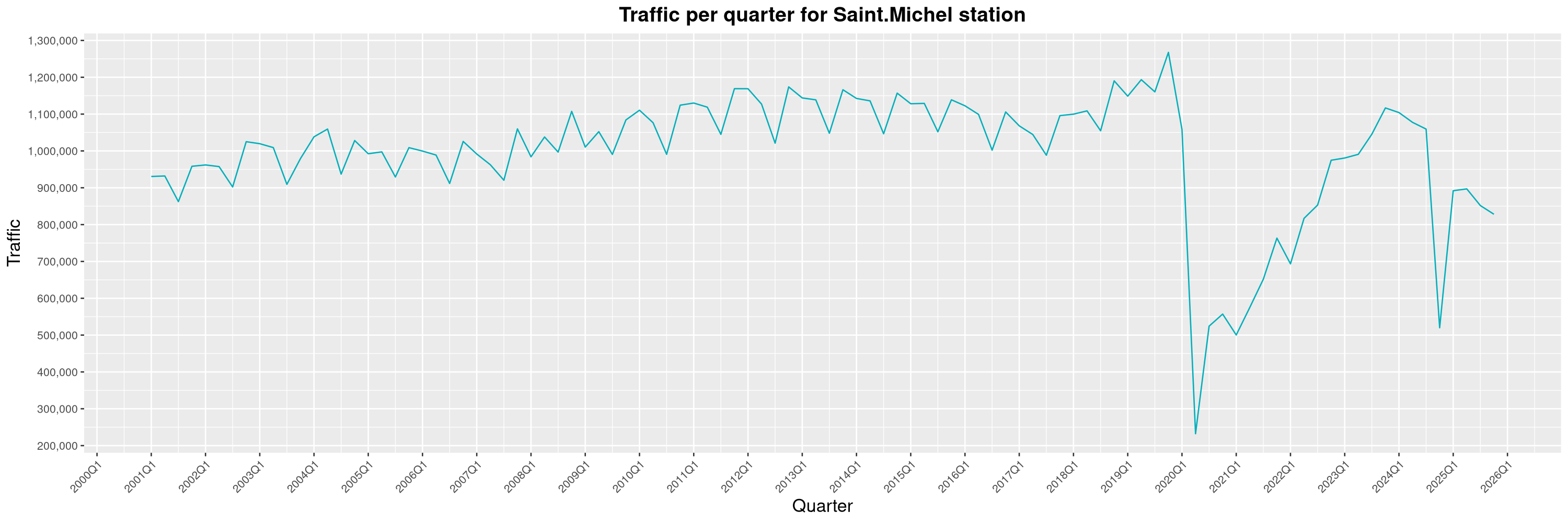
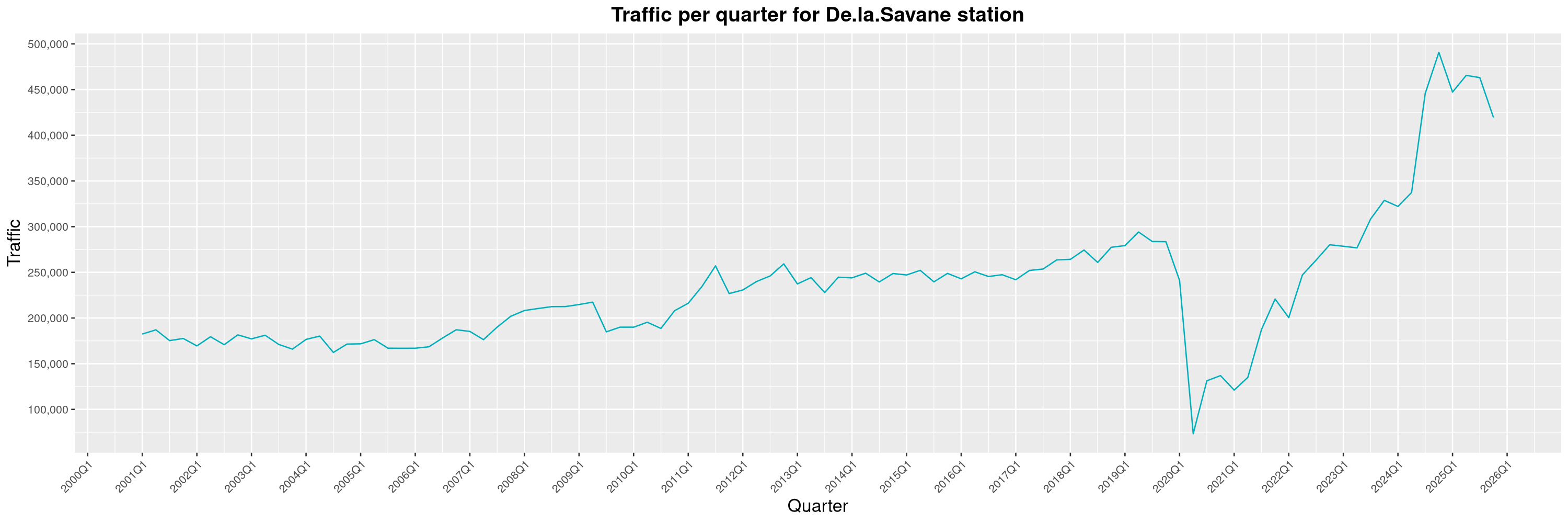
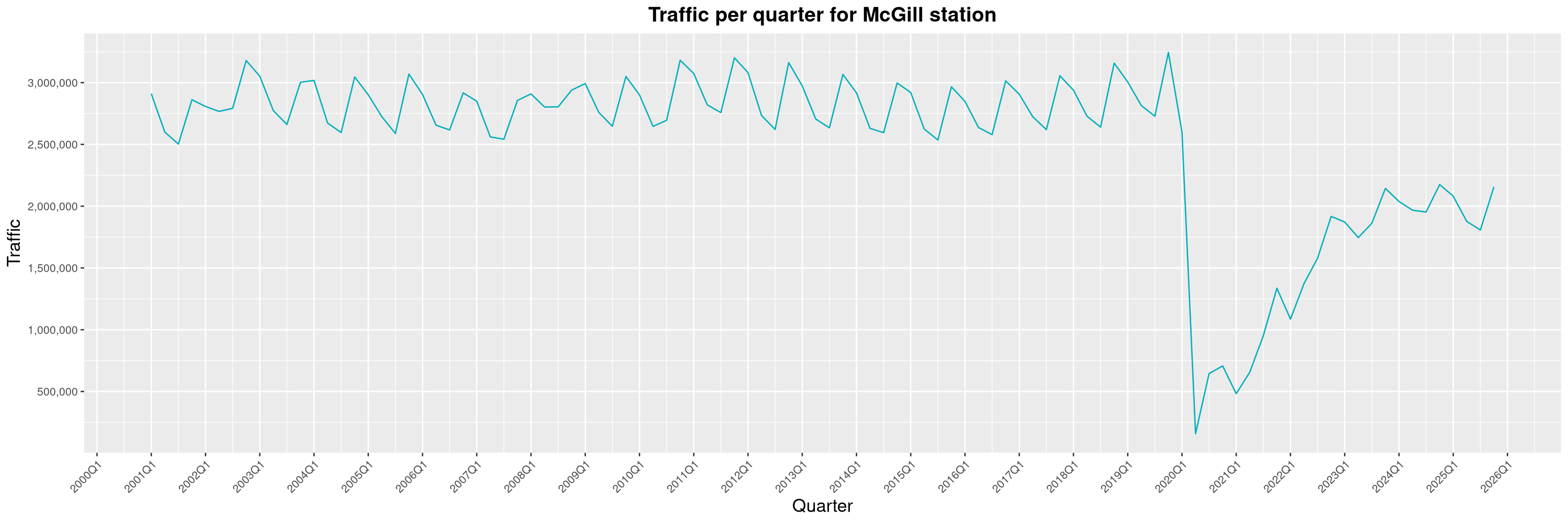
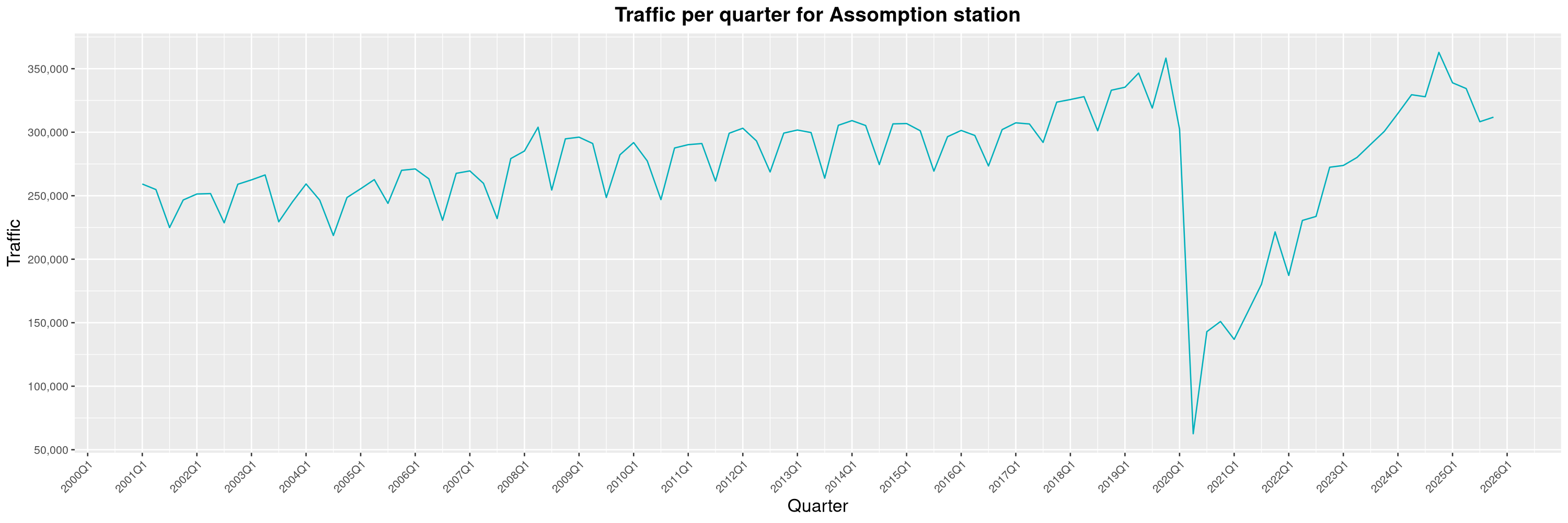
Another year of data from Soci t de Transport de Montr al, Montreal's transit agency! A few highlights this year:
  1. Although the Saint-Michel station closed for emergency repairs in November 2024, traffic never bounced back to its pre-closure levels and is still stuck somewhere around 2022 Q2 levels. I wonder if this could be caused by the roadwork on Jean-Talon for the new Blue Line stations making it harder for folks in Montreal-Nord to reach the station by bus.
  2. The effects of the opening of the Royalmount shopping center has had a durable impact on the traffic at the De la Savane station. I reported on this last year, but it seems this wasn't just a fad.
  3. With the completion of the Deux-Montagnes branch of the R seau express m tropolitain (REM, a light-rail, above the surface transit network still in construction), the transfer stations to the Montreal subway have seen major traffic increases. The douard-Montpetit station has nearly reached its previous all-time record of 2015 and the McGill station has recovered from the general slump all the other stations have had in 2025.
  4. The Assomption station, which used to have one of the lowest number of riders of the subway network, has had a tremendous growth in the past few years. This is mostly explained by the many high-rise projects that were built around the station since the end of the COVID-19 pandemic.
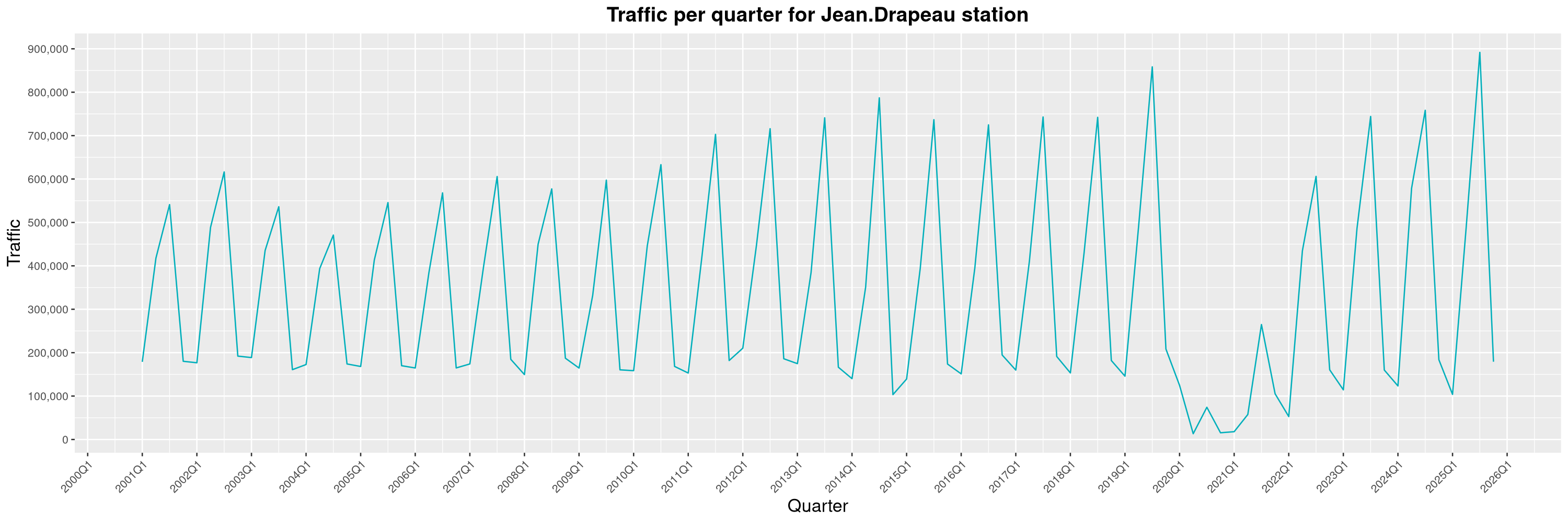
  5. Although still affected by a very high seasonality, the Jean-Drapeau station broke its previous record of 2019, a testament of the continued attraction power of the various summer festivals taking place on the Sainte-H l ne et Notre-Dame islands.
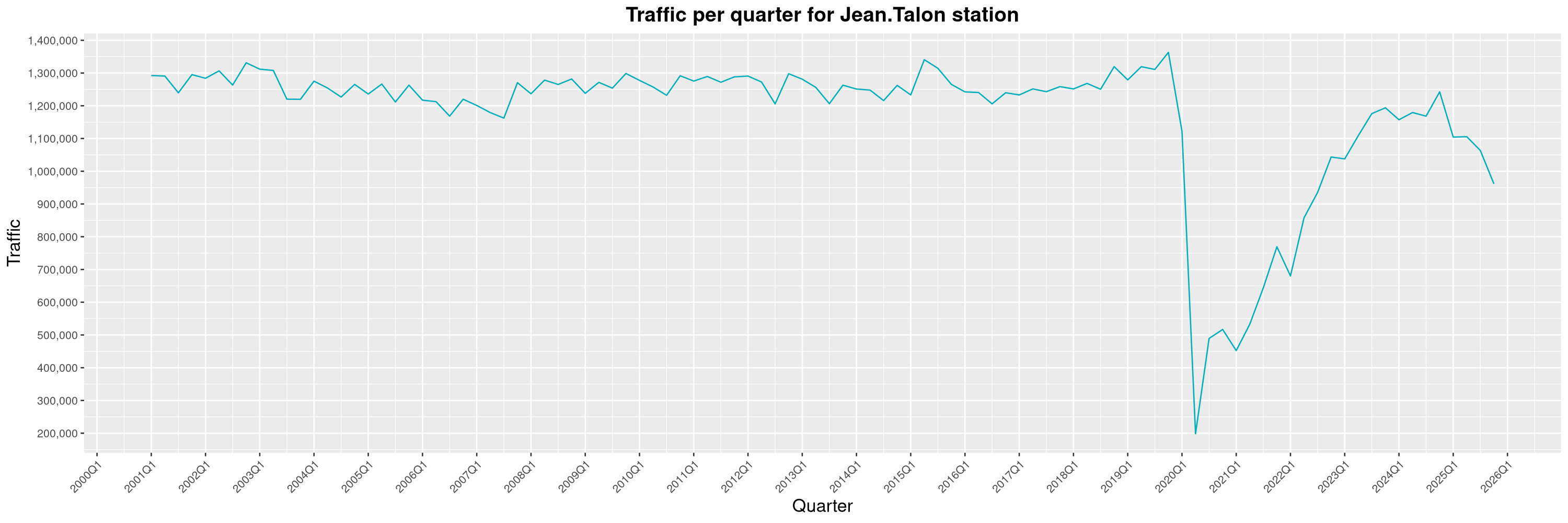
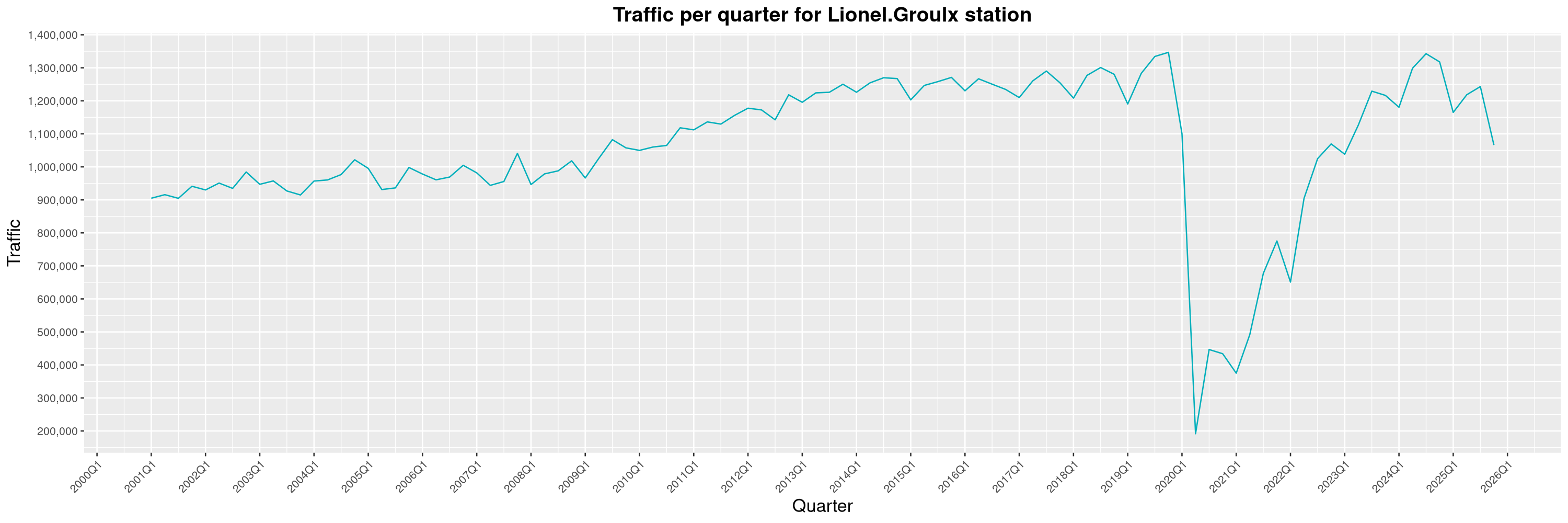
More generally, it seems the Montreal subway has had a pretty bad year. Traffic had been slowly climbing back since the COVID-19 pandemic, but this is the first year since 2020 such a sharp decline can be witnessed. Even major stations like Jean-Talon or Lionel-Groulx are on a downward trend and it is pretty worrisome. As for causes, a few things come to mind. First of all, as the number of Montrealers commuting to work by bike continues to rise1, a modal shift from public transit to active mobility is to be expected. As local experts put it, this is not uncommon and has been seen in other cities before. Another important factor that certainly turned people away from the subway this year has been the impacts of the continued housing crisis in Montreal. As more and more people get kicked out of their apartments, many have been seeking refuge in the subway stations to find shelter. Sadly, this also brought a unprecedented wave of incivilities. As riders' sense of security sharply decreased, the STM eventually resorted to banning unhoused people from sheltering in the subway. This decision did bring back some peace to the network, but one can posit damage had already been done and many casual riders are still avoiding the subway for this reason. Finally, the weekslong STM worker's strike in Q4 had an important impact on general traffic, as it severely reduced the opening hours of the subway. As for the previous item, once people find alternative ways to get around, it's always harder to bring them back. Hopefully, my 2026 report will be a more cheerful one... By clicking on a subway station, you'll be redirected to a graph of the station's foot traffic. Licences

  1. Mostly thanks to major improvements to the cycling network and the BIXI bikesharing program.

6 February 2026

Reproducible Builds: Reproducible Builds in January 2026

Welcome to the first monthly report in 2026 from the Reproducible Builds project! These reports outline what we ve been up to over the past month, highlighting items of news from elsewhere in the increasingly-important area of software supply-chain security. As ever, if you are interested in contributing to the Reproducible Builds project, please see the Contribute page on our website.

  1. Flathub now testing for reproducibility
  2. Reproducibility identifying projects that will fail to build in 2038
  3. Distribution work
  4. Tool development
  5. Two new academic papers
  6. Upstream patches

Flathub now testing for reproducibility Flathub, the primary repository/app store for Flatpak-based applications, has begun checking for build reproducibility. According to a recent blog post:
We have started testing binary reproducibility of x86_64 builds targeting the stable repository. This is possible thanks to flathub-repro-checker, a tool doing the necessary legwork to recreate the build environment and compare the result of the rebuild with what is published on Flathub. While these tests have been running for a while now, we have recently restarted them from scratch after enabling S3 storage for diffoscope artifacts.
The test results and status is available on their reproducible builds page.

Reproducibility identifying software projects that will fail to build in 2038 Longtime Reproducible Builds developer Bernhard M. Wiedemann posted on Reddit on Y2K38 commemoration day T-12 that is to say, twelve years to the day before the UNIX Epoch will no longer fit into a signed 32-bit integer variable on 19th January 2038. Bernhard s comment succinctly outlines the problem as well as notes some of the potential remedies, as well as links to a discussion with the GCC developers regarding adding warnings for int time_t conversions . At the time of publication, Bernhard s topic had generated 50 comments in response.

Distribution work Conda is language-agnostic package manager which was originally developed to help Python data scientists and is now a popular package manager for Python and R. conda-forge, a community-led infrastructure for Conda recently revamped their dashboards to rebuild packages straight to track reproducibility. There have been changes over the past two years to make the conda-forge build tooling fully reproducible by embedding the lockfile of the entire build environment inside the packages.
In Debian this month:
In NixOS this month, it was announced that the GNU Guix Full Source Bootstrap was ported to NixOS as part of Wire Jansen bachelor s thesis (PDF). At the time of publication, this change has landed in NiX stdev distribution.
Lastly, Bernhard M. Wiedemann posted another openSUSE monthly update for his work there.

Tool development diffoscope is our in-depth and content-aware diff utility that can locate and diagnose reproducibility issues. This month, Chris Lamb made the following changes, including preparing and uploading versions, 310 and 311 to Debian.
  • Fix test compatibility with u-boot-tools version 2026-01. [ ]
  • Drop the implied Rules-Requires-Root: no entry in debian/control. [ ]
  • Bump Standards-Version to 4.7.3. [ ]
  • Reference the Debian ocaml package instead of ocaml-nox. (#1125094)
  • Apply a patch by Jelle van der Waa to adjust a test fixture match new lines. [ ]
  • Also the drop implied Priority: optional from debian/control. [ ]

In addition, Holger Levsen uploaded two versions of disorderfs, first updating the package from FUSE 2 to FUSE 3 as described in last months report, as well as updating the packaging to the latest Debian standards. A second upload (0.6.2-1) was subsequently made, with Holger adding instructions on how to add the upstream release to our release archive and incorporating changes by Roland Clobus to set _FILE_OFFSET_BITS on 32-bit platforms, fixing a build failure on 32-bit systems. Vagrant Cascadian updated diffoscope in GNU Guix to version 311-2-ge4ec97f7 and disorderfs to 0.6.2.

Two new academic papers Julien Malka, Stefano Zacchiroli and Th o Zimmermann of T l com Paris in-house research laboratory, the Information Processing and Communications Laboratory (LTCI) published a paper this month titled Docker Does Not Guarantee Reproducibility:
[ ] While Docker is frequently cited in the literature as a tool that enables reproducibility in theory, the extent of its guarantees and limitations in practice remains under-explored. In this work, we address this gap through two complementary approaches. First, we conduct a systematic literature review to examine how Docker is framed in scientific discourse on reproducibility and to identify documented best practices for writing Dockerfiles enabling reproducible image building. Then, we perform a large-scale empirical study of 5,298 Docker builds collected from GitHub workflows. By rebuilding these images and comparing the results with their historical counterparts, we assess the real reproducibility of Docker images and evaluate the effectiveness of the best practices identified in the literature.
A PDF of their paper is available online.
Quentin Guilloteau, Antoine Waehren and Florina M. Ciorba of the University of Basel in Sweden also published a Docker-related paper, theirs called Longitudinal Study of the Software Environments Produced by Dockerfiles from Research Artifacts:
The reproducibility crisis has affected all scientific disciplines, including computer science (CS). To address this issue, the CS community has established artifact evaluation processes at conferences and in journals to evaluate the reproducibility of the results shared in publications. Authors are therefore required to share their artifacts with reviewers, including code, data, and the software environment necessary to reproduce the results. One method for sharing the software environment proposed by conferences and journals is to utilize container technologies such as Docker and Apptainer. However, these tools rely on non-reproducible tools, resulting in non-reproducible containers. In this paper, we present a tool and methodology to evaluate variations over time in software environments of container images derived from research artifacts. We also present initial results on a small set of Dockerfiles from the Euro-Par 2024 conference.
A PDF of their paper is available online.

Miscellaneous news On our mailing list this month: Lastly, kpcyrd added a Rust section to the Stable order for outputs page on our website. [ ]

Upstream patches The Reproducible Builds project detects, dissects and attempts to fix as many currently-unreproducible packages as possible. We endeavour to send all of our patches upstream where appropriate. This month, we wrote a large number of such patches, including:

Finally, if you are interested in contributing to the Reproducible Builds project, please visit our Contribute page on our website. However, you can get in touch with us via:

2 February 2026

Isoken Ibizugbe: How Open Source Contributions Define Your Career Path

Hi there, I m more than halfway through (8 weeks) my Outreachy internship with Debian, working on the openQA project to test Live Images.

My journey into tech began as a software engineering trainee, during which I built a foundation in Bash scripting, C programming, and Python. Later, I worked for a startup as a Product Manager. As is common in startups, I wore many hats, but I found myself drawn most to the Quality Assurance team. Testing user flows and edge-case scenarios sparked my curiosity, and that curiosity is exactly what led me to the Debian Live Image testing project.

From Manual to Automated

In my previous roles, I was accustomed to manual testing, simulating user actions one by one. While effective, I quickly realized it could be a bottleneck in fast-paced environments. This internship has been a masterclass in removing that bottleneck. I ve learned that automating repetitive actions makes life (and engineering) much easier. Life s too short for manual testing  .

One of my proudest technical wins so far has been creating Synergy across desktop environments. I proposed a solution to group common applications so we could use a single Perl script to handle tests for multiple desktop environments. With my mentor s guidance, we implemented this using symbolic links, which significantly reduced code redundancy.

Expanding My Technical Toolkit

Over the last 8 weeks, my technical toolkit has expanded significantly:

  • Perl & openQA: I ve learnt writing with Perl for automation within the openQA framework and I ve successfully automated apps_startstop tests for Cinnamon and LXQt
  • Technical Documentation: I authored a contributor guide. This required paying close attention to detail, ensuring that new contributors can have faster reviews and merged contributions
  • Ansible: I am learning that testing doesn t happen in a vacuum. To ensure new tests are truly automated, they must be integrated into the system s configuration.

Working on this project has shaped my perspective on where I fit in the tech ecosystem. In Open Source, my resume isn t just a PDF, it s a public trail of merged code, technical proposals, and collaborative discussions.

As my mentor recently pointed out, this is my proof-of-work. It s a transparent record of what I am capable of and where my interests lie.

Finally, I ve grown as a team player. Working with a global team across different time zones has taught me the importance of asynchronous communication and respecting everyone s time. Whether I am proposing a new logic or documenting a process, I am learning that open communication is just as vital as clean code.

1 February 2026

Benjamin Mako Hill: What do people do when they edit Wikipedia through Tor?

Note: I have not published blog posts about my academic papers over the past few years. To ensure that my blog contains a more comprehensive record of my published papers and to surface these for folks who missed them, I will be periodically (re)publishing blog posts about some older published projects. This post is closely based on a previously published post by Kaylea Champion on the Community Data Science Blog.

Many individuals use Tor to reduce their visibility to widespread internet surveillance.
One popular approach to protecting our privacy online is to use the Tor network. Tor protects users from being identified by their IP address, which can be tied to a physical location. However, if you d like to contribute to Wikipedia using Tor, you ll run into a problem. Although most IP addresses can edit without an account, Tor users are blocked from editing.
Tor users attempting to contribute to Wikipedia are shown a screen that informs them that they are not allowed to edit Wikipedia.
Other research by my team has shown that Wikipedia s attempt to block Tor is imperfect and that some people have been able to edit despite the ban. As part of this work, we built a dataset of more than 11,000 contributions to Wikipedia via Tor and used quantitative analysis to show that contributions from Tor were of about the same quality as contributions from other new editors and other contributors without accounts. Of course, given the unusual circumstances Tor-based contributors face, we wondered whether a deeper look at the content of their edits might reveal more about their motives and the kinds of contributions they seek to make. Kaylea Champion (then a student, now faculty at UW Bothell) led a qualitative investigation to explore these questions. Given the challenges of studying anonymity seekers, we designed a novel forensic qualitative approach inspired by techniques common in computer security and criminal investigation. We applied this new technique to a sample of 500 editing sessions and categorized each session based on what the editor seemed to be intending to do. Most of the contributions we found fell into one of the two following categories: Although these were most of what we observed, we also found evidence of several types of contributor intent:
An exploratory mapping of our themes in terms of the value a type of contribution represents to the Wikipedia community and the importance of anonymity in facilitating it. Anonymity-protecting tools play a critical role in facilitating contributions on the right side of the figure, while edits on the left are more likely to occur even when anonymity is impossible. Contributions toward the top reflect valuable forms of participation in Wikipedia, while edits at the bottom reflect damage.
In all, these themes led us to reflect on how the risks individuals face when contributing to online communities sometimes diverge from the risks the communities face in accepting their work. Expressing minoritized perspectives, maintaining community standards even when you may be targeted by the rulebreaker, highlighting injustice, or acting as a whistleblower can be very risky for an individual, and may not be possible without privacy protections. Of course, in platforms seeking to support the public good, such knowledge and accountability may be crucial.

This work was published as a paper at CSCW: Kaylea Champion, Nora McDonald, Stephanie Bankes, Joseph Zhang, Rachel Greenstadt, Andrea Forte, and Benjamin Mako Hill. 2019. A Forensic Qualitative Analysis of Contributions to Wikipedia from Anonymity Seeking Users. Proceedings of the ACM on Human-Computer Interaction. 3, CSCW, Article 53 (November 2019), 26 pages. https://doi.org/10.1145/3359155

This project was conducted by Kaylea Champion, Nora McDonald, Stephanie Bankes, Joseph Zhang, Rachel Greenstadt, Andrea Forte, and Benjamin Mako Hill. This work was supported by the National Science Foundation (awards CNS-1703736 and CNS-1703049) and included the work of two undergraduates supported through an NSF REU supplement.

28 January 2026

C.J. Collier: Dataproc GPUs, Secure Boot, & Proxies

Part
1: Building a Secure Network Foundation for Dataproc with GPUs &
SWP Welcome to the first post in our series on running GPU-accelerated
Dataproc workloads in secure, enterprise-grade environments. Many
organizations need to operate within VPCs that have no direct internet
egress, instead routing all traffic through a Secure Web Proxy (SWP).
Additionally, security mandates often require the use of Shielded VMs
with Secure Boot enabled. This series will show you how to meet these
requirements for your Dataproc GPU clusters. In this post, we ll focus on laying the network foundation using
tools from the LLC-Technologies-Collier/cloud-dataproc
repository (branch proxy-sync-2026-01).

The Challenge: Network
Isolation & Control Before we can even think about custom images or GPU drivers, we need
a network environment that:
  1. Prevents direct internet access from Dataproc cluster nodes.
  2. Forces all egress traffic through a manageable and auditable
    SWP.
  3. Provides the necessary connectivity for Dataproc to function and for
    us to build images later.
  4. Supports Secure Boot for all VMs.

The Toolkit:
LLC-Technologies-Collier/cloud-dataproc To make setting up and tearing down these complex network
environments repeatable and consistent, we ve developed a set of bash
scripts within the gcloud directory of the
cloud-dataproc repository. These scripts handle the
creation of VPCs, subnets, firewall rules, service accounts, and the
Secure Web Proxy itself. Key Script:
gcloud/bin/create-dpgce-private This script is the cornerstone for creating the private, proxied
environment. It automates:
  • VPC and Subnet creation (for the cluster, SWP, and management).
  • Setup of Certificate Authority Service and Certificate Manager for
    SWP TLS interception.
  • Deployment of the SWP Gateway instance.
  • Configuration of a Gateway Security Policy to control egress.
  • Creation of necessary firewall rules.
  • Result: Cluster nodes in this VPC have NO default
    internet route and MUST use the SWP.
Configuration via env.json We use a single env.json file to drive the
configuration. This file will also be used by the
custom-images scripts in Part 3. This env.json
should reside in your custom-images repository clone, and
you ll symlink it into the cloud-dataproc/gcloud
directory. Running the Setup:
# Assuming you have cloud-dataproc and custom-images cloned side-by-side
# And your env.json is in the custom-images root
cd cloud-dataproc/gcloud
# Symlink to the env.json in custom-images
ln -sf ../../custom-images/env.json env.json
# Run the creation script, but don't create a cluster yet
bash bin/create-dpgce-private --no-create-cluster
cd ../../custom-images

Node
Configuration: The Metadata Startup Script for Runtime For the Dataproc cluster nodes to function correctly in this proxied
environment, they need to be configured to use the SWP on boot. We
achieve this using a GCE metadata startup script. The script startup_script/gce-proxy-setup.sh (from the
custom-images repository) is designed to be run on each
cluster node at boot. It reads metadata like http-proxy and
http-proxy-pem-uri (which our cluster creation scripts in
Part 4 will pass) to configure the OS environment, package managers, and
other tools to use the SWP. Upload this script to your GCS bucket:
# Run from the custom-images repository root
gsutil cp startup_script/gce-proxy-setup.sh gs://$(jq -r .BUCKET env.json)/custom-image-deps/
This script is essential for the runtime behavior of the
cluster nodes.

Conclusion of Part 1 With the cloud-dataproc scripts, we ve laid the
groundwork by provisioning a secure VPC with controlled egress through
an SWP. We ve also prepared the essential node-level proxy configuration
script (gce-proxy-setup.sh) in GCS, ready to be used by our
clusters. Stay tuned for Part 2, where we ll dive into the
install_gpu_driver.sh initialization action from the
LLC-Technologies-Collier/initialization-actions repository
(branch gpu-202601) and how it s been adapted to install
all GPU-related software through the proxy during the image build
process.

27 January 2026

Elana Hashman: A beginner's guide to improving your digital security

In 2017, I led a series of workshops aimed at teaching beginners a better understanding of encryption, how the internet works, and their digital security. Nearly a decade later, there is still a great need to share reliable resources and guides on improving these skills. I have worked professionally in computer security one way or another for well over a decade, at many major technology companies and in many open source software projects. There are many inaccurate and unreliable resources out there on this subject, put together by well-meaning people without a background in security, which can lead to sharing misinformation, exaggeration and fearmongering. I hope that I can offer you a trusted, curated list of high impact things that you can do right now, using whichever vetted guide you prefer. In addition, I also include how long it should take, why you should do each task, and any limitations. This guide is aimed at improving your personal security, and does not apply to your work-owned devices. Always assume your company can monitor all of your messages and activities on work devices. What can I do to improve my security right away? I put together this list in order of effort, easiest tasks first. You should be able to complete many of the low effort tasks in a single hour. The medium to high effort tasks are very much worth doing, but may take you a few days or even weeks to complete them. Low effort (<15 minutes) Upgrade your software to the latest versions Why? I don't know anyone who hasn't complained about software updates breaking features, introducing bugs, and causing headaches. If it ain't broke, why upgrade, right? Well, alongside all of those annoying bugs and breaking changes, software updates also include security fixes, which will protect your device from being exploited by bad actors. Security issues can be found in software at any time, even software that's been available for many years and thought to be secure. You want to install these as soon as they are available. Recommendation: Turn on automatic upgrades and always keep your devices as up-to-date as possible. If you have some software you know will not work if you upgrade it, at least be sure to upgrade your laptop and phone operating system (iOS, Android, Windows, etc.) and web browser (Chrome, Safari, Firefox, etc.). Do not use devices that do not receive security support (e.g. old Android or iPhones). Guides: Limitations: This will prevent someone from exploiting known security issues on your devices, but it won't help if your device was already compromised. If this is a concern, doing a factory reset, upgrade, and turning on automatic upgrades may help. This also won't protect against all types of attacks, but it is a necessary foundation. Use Signal Why? Signal is a trusted, vetted, secure messaging application that allows you to send end-to-end encrypted messages and make video/phone calls. This means that only you and your intended recipient can decrypt the messages and someone cannot intercept and read your messages, in contrast to texting (SMS) and other insecure forms of messaging. Other applications advertise themselves as end-to-end encrypted, but Signal provides the strongest protections. Recommendation: I recommend installing the Signal app and using it! My mom loves that she can video call me on Wi-Fi on my Android phone. It also supports group chats. I use it as a secure alternative to texting (SMS) and other chat platforms. I also like Signal's "disappearing messages" feature which I enable by default because it automatically deletes messages after a certain period of time. This avoids your messages taking up too much storage. Guides: Limitations: Signal is only able to protect your messages in transit. If someone has access to your phone or the phone of the person you sent messages to, they will still be able to read them. As a rule of thumb, if you don't want someone to read something, don't write it down! Meet in person or make an encrypted phone call where you will not be overheard. If you are talking to someone you don't know, assume your messages are as public as posting on social media. Set passwords and turn on device encryption Why? Passwords ensure that someone else can't unlock your device without your consent or knowledge. They also are required to turn on device encryption, which protects your information on your device from being accessed when it is locked. Biometric (fingerprint or face ID) locking provides some privacy, but your fingerprint or face ID can be used against your wishes, whereas if you are the only person who knows your password, only you can use it. Recommendation: Always set passwords and have device encryption enabled in order to protect your personal privacy. It may be convenient to allow kids or family members access to an unlocked device, but anyone else can access it, too! Use strong passwords that cannot be guessed avoid using names, birthdays, phone numbers, addresses, or other public information. Using a password manager will make creating and managing passwords even easier. Disable biometric unlock, or at least know how to disable it. Most devices will enable disk encryption by default, but you should double-check. Guides: Limitations: If your device is unlocked, the password and encryption will provide no protections; the device must be locked for this to protect your privacy. It is possible, though unlikely, for someone to gain remote access to your device (for example through malware or stalkerware), which would bypass these protections. Some forensic tools are also sophisticated enough to work with physical access to a device that is turned on and locked, but not a device that is turned off/freshly powered on and encrypted. If you lose your password or disk encryption key, you may lose access to your device. For this reason, Windows and Apple laptops can make a cloud backup of your disk encryption key. However, a cloud backup can potentially be disclosed to law enforcement. Install an ad blocker Why? Online ad networks are often exploited to spread malware to unsuspecting visitors. If you've ever visited a regular website and suddenly seen an urgent, flashing pop-up claiming your device was hacked, it is often due to a bad ad. Blocking ads provides an additional layer of protection against these kinds of attacks. Recommendation: I recommend everyone uses an ad blocker at all times. Not only are ads annoying and disruptive, but they can even result in your devices being compromised! Guides: Limitations: Sometimes the use of ad blockers can break functionality on websites, which can be annoying, but you can temporarily disable them to fix the problem. These may not be able to block all ads or all tracking, but they make browsing the web much more pleasant and lower risk! Some people might also be concerned that blocking ads might impact the revenue of their favourite websites or creators. In this case, I recommend either donating directly or sharing the site with a wider audience, but keep using the ad blocker for your safety. Enable HTTPS-Only Mode Why? The "S" in "HTTPS" stands for "secure". This feature, which can be enabled on your web browser, ensures that every time you visit a website, your connection is always end-to-end encrypted (just like when you use Signal!) This ensures that someone can't intercept what you search for, what pages on websites you visit, and any information you or the website share such as your banking details. Recommendation: I recommend enabling this for everyone, though with improvements in web browser security and adoption of HTTPS over the years, your devices will often do this by default! There is a small risk you will encounter some websites that do not support HTTPS, usually older sites. Guides: Limitations: HTTPS protects the information on your connection to a website. It does not hide or protect the fact that you visited that website, only the information you accessed. If the website is malicious, HTTPS does not provide any protection. In certain settings, like when you use a work-managed computer that was set up for you, it can still be possible for your IT Department to see what you are browsing, even over an HTTPS connection, because they have administrator access to your computer and the network. Medium to high effort (1+ hours) These tasks require more effort but are worth the investment. Set up a password manager Why? It is not possible for a person to remember a unique password for every single website and app that they use. I have, as of writing, 556 passwords stored in my password manager. Password managers do three important things very well:
  1. They generate secure passwords with ease. You don't need to worry about getting your digits and special characters just right; the app will do it for you, and generate long, secure passwords.
  2. They remember all your passwords for you, and you just need to remember one password to access all of them. The most common reason people's accounts get hacked online is because they used the same password across multiple websites, and one of the websites had all their passwords leaked. When you use a unique password on every website, it doesn't matter if your password gets leaked!
  3. They autofill passwords based on the website you're visiting. This is important because it helps prevent you from getting phished. If you're tricked into visiting an evil lookalike site, your password manager will refuse to fill the password.
Recommendation: These benefits are extremely important, and setting up a password manager is often one of the most impactful things you can do for your digital security. However, they take time to get used to, and migrating all of your passwords into the app (and immediately changing them!) can take a few minutes at a time... over weeks. I recommend you prioritize the most important sites, such as your email accounts, banking/financial sites, and cellphone provider. This process will feel like a lot of work, but you will get to enjoy the benefits of never having to remember new passwords and the autofill functionality for websites. My recommended password manager is 1Password, but it stores passwords in the cloud and costs money. There are some good free options as well if cost is a concern. You can also use web browser- or OS-based password managers, but I do not prefer these. Guides: Limitations: Many people are concerned about the risk of using a password manager causing all of their passwords to be compromised. For this reason, it's very important to use a vetted, reputable password manager that has passed audits, such as 1Password or Bitwarden. It is also extremely important to choose a strong password to unlock your password manager. 1Password makes this easier by generating a secret to strengthen your unlock password, but I recommend using a long, memorable password in any case. Another risk is that if you forget your password manager's password, you will lose access to all your passwords. This is why I recommend 1Password, which has you set up an Emergency Kit to recover access to your account. Set up two-factor authentication (2FA) for your accounts Why? If your password is compromised in a website leak or due to a phishing attack, two-factor authentication will require a second piece of information to log in and potentially thwart the intruder. This provides you with an extra layer of security on your accounts. Recommendation: You don't necessarily need to enable 2FA on every account, but prioritize enabling it on your most important accounts (email, banking, cellphone, etc.) There are typically a few different kinds: email-based (which is why your email account's security is so important), text message or SMS-based (which is why your cell phone account's security is so important), app-based, and hardware token-based. Email and text message 2FA are fine for most accounts. You may want to enable app- or hardware token-based 2FA for your most sensitive accounts. Guides: Limitations: The major limitation is that if you lose access to 2FA, you can be locked out of an account. This can happen if you're travelling abroad and can't access your usual cellphone number, if you break your phone and you don't have a backup of your authenticator app, or if you lose your hardware-based token. For this reason, many websites will provide you with "backup tokens" you can print them out and store them in a secure location or use your password manager. I also recommend if you use an app, you choose one that will allow you to make secure backups, such as Ente. You are also limited by the types of 2FA a website supports; many don't support app- or hardware token-based 2FA. Remove your information from data brokers Why? This is a problem that mostly affects people in the US. It surprises many people that information from their credit reports and other public records is scraped and available (for free or at a low cost) online through "data broker" websites. I have shocked friends who didn't believe this was an issue by searching for their full names and within 5 minutes being able to show them their birthday, home address, and phone number. This is a serious privacy problem! Recommendation: Opt out of any and all data broker websites to remove this information from the internet. This is especially important if you are at risk of being stalked or harassed. Guides: Limitations: It can take time for your information to be removed once you opt out, and unfortunately search engines may have cached your information for a while longer. This is also not a one-and-done process. New data brokers are constantly popping up and some may not properly honour your opt out, so you will need to check on a regular basis (perhaps once or twice a year) to make sure your data has been properly scrubbed. This also cannot prevent someone from directly searching public records to find your information, but that requires much more effort. "Recommended security measures" I think beginners should avoid We've covered a lot of tasks you should do, but I also think it's important to cover what not to do. I see many of these tools recommended to security beginners, and I think that's a mistake. For each tool, I will explain my reasoning around why I don't think you should use it, and the scenarios in which it might make sense to use. "Secure email" What is it? Many email providers, such as Proton Mail, advertise themselves as providing secure email. They are often recommended as a "more secure" alternative to typical email providers such as GMail. What's the problem? Email is fundamentally insecure by design. The email specification (RFC-3207) states that any publicly available email server MUST NOT require the use of end-to-end encryption in transit. Email providers can of course provide additional security by encrypting their copies of your email, and providing you access to your email by HTTPS, but the messages themselves can always be sent without encryption. Some platforms such as Proton Mail advertise end-to-end encrypted emails so long as you email another Proton user. This is not truly email, but their own internal encrypted messaging platform that follows the email format. What should I do instead? Use Signal to send encrypted messages. NEVER assume the contents of an email are secure. Who should use it? I don't believe there are any major advantages to using a service such as this one. Even if you pay for a more "secure" email provider, the majority of your emails will still be delivered to people who don't. Additionally, while I don't use or necessarily recommend their service, Google offers an Advanced Protection Program for people who may be targeted by state-level actors. PGP/GPG Encryption What is it? PGP ("Pretty Good Privacy") and GPG ("GNU Privacy Guard") are encryption and cryptographic signing software. They are often recommended to encrypt messages or email. What's the problem? GPG is decades old and its usability has always been terrible. It is extremely easy to accidentally send a message that you thought was encrypted without encryption! The problems with PGP/GPG have been extensively documented. What should I do instead? Use Signal to send encrypted messages. Again, NEVER use email for sensitive information. Who should use it? Software developers who contribute to projects where there is a requirement to use GPG should continue to use it until an adequate alternative is available. Everyone else should live their lives in PGP-free bliss. Installing a "secure" operating system (OS) on your phone What is it? There are a number of self-installed operating systems for Android phones, such as GrapheneOS, that advertise as being "more secure" than using the version of the Android operating system provided by your phone manufacturer. They often remove core Google APIs and services to allow you to "de-Google" your phone. What's the problem? These projects are relatively niche, and don't have nearly enough resourcing to be able to respond to the high levels of security pressure Android experiences (such as against the forensic tools I mentioned earlier). You may suddenly lose security support with no notice, as with CalyxOS. You need a high level of technical know-how and a lot of spare time to maintain your device with a custom operating system, which is not a reasonable expectation for the average person. By stripping all Google APIs such as Google Play Services, some useful apps can no longer function. And some law enforcement organizations have gone as far as accusing people who install GrapheneOS on Pixel phones to be engaging in criminal activity. What should I do instead? For the best security on an Android device, use a phone manufactured by Google or Samsung (smaller manufacturers are more unreliable), or consider buying an iPhone. Make sure your device is receiving security updates and up-to-date. Who should use it? These projects are great for tech enthusiasts who are interested in contributing to and developing them further. They can be used to give new life to old phones that are not receiving security or software updates. They are also great for people with an interest in free and open source software and digital autonomy. But these tools are not a good choice for a general audience, nor do they provide more practical security than using an up-to-date Google or Samsung Android phone. Virtual Private Network (VPN) Services What is it? A virtual private network or VPN service can provide you with a secure tunnel from your device to the location that the VPN operates. This means that if I am using my phone in Seattle connected to a VPN in Amsterdam, if I access a website, it appears to the website that my phone is located in Amsterdam. What's the problem? VPN services are frequently advertised as providing security or protection from nefarious bad actors, or helping protect your privacy. These benefits are often far overstated, and there are predatory VPN providers that can actually be harmful. It costs money and resources to provide a VPN, so free VPN services are especially suspect. When you use a VPN, the VPN provider knows the websites you are visiting in order to provide you with the service. Free VPN providers may sell this data in order to cover the cost of providing the service, leaving you with less security and privacy. The average person does not have the knowledge to be able to determine if a VPN service is trustworthy or not. VPNs also don't provide any additional encryption benefits if you are already using HTTPS. They may provide a small amount of privacy benefit if you are connected to an untrusted network with an attacker. What should I do instead? Always use HTTPS to access websites. Don't connect to untrusted internet providers for example, use cellphone network data instead of a sketchy Wi-Fi access point. Your local neighbourhood coffee shop is probably fine. Who should use it? There are three main use cases for VPNs. The first is to bypass geographic restrictions. A VPN will cause all of your web traffic to appear to be coming from another location. If you live in an area that has local internet censorship policies, you can use a VPN to access the internet from a location that lacks such policies. The second is if you know your internet service provider is actively hostile or malicious. A trusted VPN will protect the visibility of all your traffic, including which websites you visit, from your internet service provider, and the only thing they will be able to see is that you are accessing a VPN. The third use case is to access a network that isn't connected to the public internet, such as a corporate intranet. I strongly discourage the use of VPNs for "general-purpose security." Tor What is it? Tor, "The Onion Router", is a free and open source software project that provides anonymous networking. Unlike with a VPN, where the VPN provider knows who you are and what websites you are requesting, Tor's architecture makes it extremely difficult to determine who sent a request. What's the problem? Tor is difficult to set up properly; similar to PGP-encrypted email, it is possible to accidentally not be connected to Tor and not know the difference. This usability has improved over the years, but Tor is still not a good tool for beginners to use. Due to the way Tor works, it is also extremely slow. If you have used cable or fiber internet, get ready to go back to dialup speeds. Tor also doesn't provide perfect privacy and without a strong understanding of its limitations, it can be possible to deanonymize someone despite using it. Additionally, many websites are able to detect connections from the Tor network and block them. What should I do instead? If you want to use Tor to bypass censorship, it is often better to use a trusted VPN provider, particularly if you need high bandwidth (e.g. for streaming). If you want to use Tor to access a website anonymously, Tor itself might not be enough to protect you. For example, if you need to provide an email address or personal information, you can decline to provide accurate information and use a masked email address. A friend of mine once used the alias "Nunya Biznes" Who should use it? Tor should only be used by people who are experienced users of security tools and understand its strengths and limitations. Tor also is best used on a purpose-built system, such as Tor Browser or Freedom of the Press Foundation's SecureDrop. I want to learn more! I hope you've found this guide to be a useful starting point. I always welcome folks reaching out to me with questions, though I might take a little bit of time to respond. You can always email me. If there's enough interest, I might cover the following topics in a future post: Stay safe out there!

23 January 2026

Reproducible Builds (diffoscope): diffoscope 311 released

The diffoscope maintainers are pleased to announce the release of diffoscope version 311. This version includes the following changes:
[ Chris Lamb ]
* Fix test compatibility with u-boot-tools 2026-01. Thanks, Jelle!
* Bump Standards-Version to 4.7.3.
* Drop implied "Priority: optional" from debian/control.
* Also drop implied "Rules-Requires-Root: no" entry in debian/control.
* Update copyright years.
You find out more by visiting the project homepage.

12 January 2026

Gunnar Wolf: Python Workout 2nd edition

This post is an unpublished review for Python Workout 2nd edition
Note: While I often post the reviews I write for Computing Reviews, this is a shorter review requested to me by Manning. They kindly invited me several months ago to be a reviewer for Python Workout, 2nd edition; after giving them my opinions, I am happy to widely recommend this book to interested readers. Python is relatively an easy programming language to learn, allowing you to start coding pretty quickly. However, there s a significant gap between being able to throw code in Python and truly mastering the language. To write efficient, maintainable code that s easy for others to understand, practice is essential. And that s often where many of us get stuck. This book begins by stating that it is not designed to teach you Python ( ) but rather to improve your understanding of Python and how to use it to solve problems. The author s structure and writing style are very didactic. Each chapter addresses a different aspect of the language: from the simplest (numbers, strings, lists) to the most challenging for beginners (iterators and generators), Lerner presents several problems for us to solve as examples, emphasizing the less obvious details of each aspect. I was invited as a reviewer in the preprint version of the book. I am now very pleased to recommend it to all interested readers. The author presents a pleasant and easy-to-read text, with a wealth of content that I am sure will improve the Python skills of all its readers.

11 January 2026

Otto Kek l inen: Stop using MySQL in 2026, it is not true open source

Featured image of post Stop using MySQL in 2026, it is not true open sourceIf you care about supporting open source software, and still use MySQL in 2026, you should switch to MariaDB like so many others have already done. The number of git commits on github.com/mysql/mysql-server has been significantly declining in 2025. The screenshot below shows the state of git commits as of writing this in January 2026, and the picture should be alarming to anyone who cares about software being open source. MySQL GitHub commit activity decreasing drastically

This is not surprising Oracle should not be trusted as the steward for open source projects When Oracle acquired Sun Microsystems and MySQL along with it back in 2009, the European Commission almost blocked the deal due to concerns that Oracle s goal was just to stifle competition. The deal went through as Oracle made a commitment to keep MySQL going and not kill it, but (to nobody s surprise) Oracle has not been a good steward of MySQL as an open source project and the community around it has been withering away for years now. All development is done behind closed doors. The publicly visible bug tracker is not the real one Oracle staff actually uses for MySQL development, and the few people who try to contribute to MySQL just see their Pull Requests and patch submissions marked as received with mostly no feedback and then those changes may or may not be in the next MySQL release, often rewritten, and with only Oracle staff in the git author/committer fields. The real author only gets a small mention in a blog post. When I was the engineering manager for the core team working on RDS MySQL and RDS MariaDB at Amazon Web Services, I oversaw my engineers contributions to both MySQL and MariaDB (the latter being a fork of MySQL by the original MySQL author, Michael Widenius). All the software developers in my org disliked submitting code to MySQL due to how bad the reception by Oracle was to their contributions. MariaDB is the stark opposite with all development taking place in real-time on github.com/mariadb/server, anyone being able to submit a Pull Request and get a review, all bugs being openly discussed at jira.mariadb.org and so forth, just like one would expect from a true open source project. MySQL is open source only by license (GPL v2), but not as a project.

MySQL s technical decline in recent years Despite not being a good open source steward, Oracle should be given credit that it did keep the MySQL organization alive and allowed it to exist fairly independently and continue developing and releasing new MySQL versions well over a decade after the acquisition. I have no insight into how many customers they had, but I assume the MySQL business was fairly profitable and financially useful to Oracle, at least as long as it didn t gain too many features to threaten Oracle s own main database business. I don t know why, perhaps because too many talented people had left the organization, but it seems that from a technical point of view MySQL clearly started to deteriorate from 2022 onward. When MySQL 8.0.29 was released with the default ALTER TABLE method switched to run in-place, it had a lot of corner cases that didn t work, causing the database to crash and data to corrupt for many users. The issue wasn t fully fixed until a year later in MySQL 8.0.32. To many users annoyance Oracle announced the 8.0 series as evergreen and introduced features and changes in the minor releases, instead of just doing bugfixes and security fixes like users historically had learnt to expect from these x.y.Z maintenance releases. There was no new major MySQL version for six years. After MySQL 8.0 in 2018 it wasn t until 2023 when MySQL 8.1 was released, and it was just a short-term preview release. The first actual new major release MySQL 8.4 LTS was released in 2024. Even though it was a new major release, many users got disappointed as it had barely any new features. Many also reported degraded performance with newer MySQL versions, for example the benchmark by famous MySQL performance expert Mark Callaghan below shows that on write-heavy workloads MySQL 9.5 throughput is typically 15% less than in 8.0. Benchmark showing new MySQL versions being slower than the old Due to newer MySQL versions deprecating many features, a lot of users also complained about significant struggles regarding both MySQL 5.7->8.0 and 8.0->8.4 upgrades. With few new features and heavy focus on code base cleanup and feature deprecation, it became obvious to many that Oracle had decided to just keep MySQL barely alive, and put all new relevant features (e.g. vector search) into Heatwave, Oracle s closed-source and cloud-only service for MySQL customers. As it was evident that Oracle isn t investing in MySQL, Percona s Peter Zaitsev wrote Is Oracle Finally Killing MySQL in June 2024. At this time MySQL s popularity as ranked by DB-Engines had also started to tank hard, a trend that likely accelerates in 2026. MySQL dropping significantly in DB-Engines ranking In September 2025 news reported that Oracle was reducing its workforce and that the MySQL staff was getting heavily reduced. Obviously this does not bode well for MySQL s future, and Peter Zaitsev posted already in November stats showing that the latest MySQL maintenance release contained fewer bug fixes than before.

Open source is more than ideology: it has very real effects on software security and sovereignty Some say they don t care if MySQL is truly open source or not, or that they don t care if it has a future in coming years, as long as it still works now. I am afraid people thinking so are taking a huge risk. The database is often the most critical part of a software application stack, and any flaw or problem in operations, let alone a security issue, will have immediate consequences, and not caring will eventually get people fired or sued. In open source problems are discussed openly, and the bigger the problem, the more people and companies will contribute to fixing it. Open source as a development methodology is similar to the scientific method with free flow of ideas that are constantly contested and only the ones with the most compelling evidence win. Not being open means more obscurity, more risk and more just trust us bro attitude. This open vs. closed is very visible for example in how Oracle handles security issues. We can see that in 2025 alone MySQL published 123 CVEs about security issues, while MariaDB had 8. There were 117 CVEs that only affected MySQL and not MariaDB in 2025. I haven t read them all, but typically the CVEs hardly contain any real details. As an example, the most recent one CVE-2025-53067 states Easily exploitable vulnerability allows high privileged attacker with network access via multiple protocols to compromise MySQL Server. There is no information a security researcher or auditor could use to verify if any original issue actually existed, or if it was fixed, or if the fix was sufficient and fully mitigating the issue or not. MySQL users just have to take the word of Oracle that it is all good now. Handling security issues like this is in stark contrast to other open source projects, where all security issues and their code fixes are open for full scrutiny after the initial embargo is over and CVE made public. There is also various forms of enshittification going on one would not see in a true open source project, and everything about MySQL as a software, documentation and website is pushing users to stop using the open source version and move to the closed MySQL versions, and in particular to Heatwave, which is not only closed-source but also results in Oracle fully controlling customer s databases contents. Of course, some could say this is how Oracle makes money and is able to provide a better product. But stories on Reddit and elsewhere suggest that what is going on is more like Oracle milking hard the last remaining MySQL customers who are forced to pay more and more for getting less and less.

There are options and migrating is easy, just do it A large part of MySQL users switched to MariaDB already in the mid-2010s, in particular everyone who had cared deeply about their database software staying truly open source. That included large installations such as Wikipedia, and Linux distributions such as Fedora and Debian. Because it s open source and there is no centralized machine collecting statistics, nobody knows what the exact market shares look like. There are however some application specific stats, such as that 57% of WordPress sites around the world run MariaDB, while the share for MySQL is 42%. For anyone running a classic LAMP stack application such as WordPress, Drupal, Mediawiki, Nextcloud, or Magento, switching the old MySQL database to MariaDB is be straightforward. As MariaDB is a fork of MySQL and mostly backwards compatible with it, swapping out MySQL for MariaDB can be done without changing any of the existing connectors or database clients, as they will continue to work with MariaDB as if it was MySQL. For those running custom applications and who have the freedom to make changes to how and what database is used, there are tens of mature and well-functioning open source databases to choose from, with PostgreSQL being the most popular general database. If your application was built from the start for MySQL, switching to PostgreSQL may however require a lot of work, and the MySQL/MariaDB architecture and storage engine InnoDB may still offer an edge in e.g. online services where high performance, scalability and solid replication features are of highest priority. For a quick and easy migration MariaDB is probably the best option. Switching from MySQL to the Percona Server is also very easy, as it closely tracks all changes in MySQL and deviates from it only by a small number of improvements done by Percona. However, also precisely because of it being basically just a customized version of the MySQL Server, it s not a viable long-term solution for those trying to fully ditch the dependency on Oracle. There are also several open source databases that have no common ancestry with MySQL, but strive to be MySQL-compatible. Thus most apps built for MySQL can simply switch to using them without needing SQL statements to be rewritten. One such database is TiDB, which has been designed from scratch specifically for highly scalable and large systems, and is so good that even Amazon s latest database solution DSQL was built borrowing many ideas from TiDB. However, TiDB only really shines with larger distributed setups, so for the vast majority of regular small- and mid-scale applications currently using MySQL, the most practical solution is probably to just switch to MariaDB, which on most Linux distributions can simply be installed by running apt/dnf/brew install mariadb-server. Whatever you end up choosing, as long as it is not Oracle, you will be better off.

8 January 2026

Dirk Eddelbuettel: RcppCCTZ 0.2.14 on CRAN: New Upstream, Small Edits

A new release 0.2.14 of RcppCCTZ is now on CRAN, in Debian and built for r2u. RcppCCTZ uses Rcpp to bring CCTZ to R. CCTZ is a C++ library for translating between absolute and civil times using the rules of a time zone. In fact, it is two libraries. One for dealing with civil time: human-readable dates and times, and one for converting between between absolute and civil times via time zones. And while CCTZ is made by Google(rs), it is not an official Google product. The RcppCCTZ page has a few usage examples and details. This package was the first CRAN package to use CCTZ; by now several others packages (four the last time we counted) include its sources too. Not ideal, but beyond our control. This version updates to a new upstream release, and brings some small local edits. CRAN and R-devel were stumbled over us still mentioning C++11 in SystemRequirements (yes, this package is old enough for that to have mattered once). As that is a false positive the package compiles well under any recent standard we removed the mention. The key changes since the last CRAN release are summarised below.

Changes in version 0.2.14 (2026-01-08)
  • Synchronized with upstream CCTZ (Dirk in #46).
  • Explicitly enumerate files to be compiled in src/Makevars* (Dirk in #47)

Courtesy of my CRANberries, there is a diffstat report relative to to the previous version. More details are at the RcppCCTZ page; code, issue tickets etc at the GitHub repository.

This post by Dirk Eddelbuettel originated on his Thinking inside the box blog. If you like this or other open-source work I do, you can sponsor me at GitHub.

3 January 2026

Benjamin Mako Hill: Effects of Algorithmic Flagging on Fairness: Quasi-experimental Evidence from Wikipedia

Note: I have not published blog posts about my academic papers over the past few years. To ensure that my blog contains a more comprehensive record of my published papers and to surface these for folks who missed them, I will be periodically (re)publishing blog posts about some older published projects. This particular post is closely based on a previously published post by Nate TeBlunthuis from the Community Data Science Blog. Many online platforms are adopting AI and machine learning as a tool to maintain order and high-quality information in the face of massive influxes of user-generated content. Of course, AI algorithms can be inaccurate, biased, or unfair. How do signals from AI predictions shape the fairness of online content moderation? How can we measure an algorithmic flagging system s effects? In our paper published at CSCW, Nate TeBlunthuis, together with myself and Aaron Halfaker, analyzed the RCFilters system: an add-on to Wikipedia that highlights and filters edits that a machine learning algorithm called ORES identifies as likely to be damaging to Wikipedia. This system has been deployed on large Wikipedia language editions and is similar to other algorithmic flagging systems that are becoming increasingly widespread. Our work measures the causal effect of being flagged in the RCFilters user interface.

Screenshot of Wikipedia edit metadata on Special:RecentChanges with RCFilters enabled. Highlighted edits with a colored circle to the left side of other metadata are flagged by ORES. Different circle and highlight colors (white, yellow, orange, and red in the figure) correspond to different levels of confidence that the edit is damaging. RCFilters does not specifically flag edits by new accounts or unregistered editors, but does support filtering changes by editor types.
Our work takes advantage of the fact that RCFilters, like many algorithmic flagging systems, create discontinuities in the relationship between the probability that a moderator should take action and whether a moderator actually does. This happens because the output of machine learning systems like ORES is typically a continuous score (in RCFilters, an estimated probability that a Wikipedia edit is damaging), while the flags (in RCFilters, the yellow, orange, or red highlights) are either on or off and are triggered when the score crosses some arbitrary threshold. As a result, edits slightly above the threshold are both more visible to moderators and appear more likely to be damaging than edits slightly below. Even though edits on either side of the threshold have virtually the same likelihood of truly being damaging, the flagged edits are substantially more likely to be reverted. This fact lets us use a method called regression discontinuity to make causal estimates of the effect of being flagged in RCFilters.
Charts showing the probability that an edit will be reverted as a function of ORES scores in the neighborhood of the discontinuous threshold that triggers the RCfilters flag. The jump in the increase in reversion chances is larger for registered editors compared to unregistered editors at both thresholds.
To understand how this system may affect the fairness of Wikipedia moderation, we estimate the effects of flagging on edits on different groups of editors. Comparing the magnitude of these estimates lets us measure how flagging is associated with several different definitions of fairness. Surprisingly, we found evidence that these flags improved fairness for categories of editors that have been widely perceived as troublesome particularly unregistered (anonymous) editors. This occurred because flagging has a much stronger effect on edits by the registered than on edits by the unregistered. We believe that our results are driven by the fact that algorithmic flags are especially helpful for finding damage that can t be easily detected otherwise. Wikipedia moderators can see the editor s registration status in the recent changes, watchlists, and edit history. Because unregistered editors are often troublesome, Wikipedia moderators attention is often focused on their contributions, with or without algorithmic flags. Algorithmic flags make damage by registered editors (in addition to unregistered editors) much more detectable to moderators and so help moderators focus on damage overall, not just damage by suspicious editors. As a result, the algorithmic flagging system decreases the bias that moderators have against unregistered editors. This finding is particularly surprising because the ORES algorithm we analyzed was itself demonstrably biased against unregistered editors (i.e., the algorithm tended to greatly overestimate the probability that edits by these editors were damaging). Despite the fact that the algorithms were biased, their introduction could still lead to less biased outcomes overall. Our work shows that although it is important to design predictive algorithms to avoid such biases, it is equally important to study fairness at the level of the broader sociotechnical system. Since we first published a preprint of our paper, a follow-up piece by Leijie Wang and Haiyi Zhu replicated much of our work and showed that differences between different Wikipedia communities may be another important factor driving the effect of the system. Overall, this work suggests that social signals and social context can interact with algorithmic signals, and together these can influence behavior in important and unexpected ways.

The full citation for the paper is: TeBlunthuis, Nathan, Benjamin Mako Hill, and Aaron Halfaker. 2021. Effects of Algorithmic Flagging on Fairness: Quasi-Experimental Evidence from Wikipedia. Proceedings of the ACM on Human-Computer Interaction 5 (CSCW): 56:1-56:27. https://doi.org/10.1145/3449130.

We have also released replication materials for the paper, including all the data and code used to conduct the analysis and compile the paper itself.

Russ Allbery: Review: Challenges of the Deeps

Review: Challenges of the Deeps, by Ryk E. Spoor
Series: Arenaverse #3
Publisher: Baen
Copyright: March 2017
ISBN: 1-62579-564-5
Format: Kindle
Pages: 438
Challenges of the Deeps is the third book in the throwback space opera Arenaverse series. It is a direct sequel to Spheres of Influence, but Spoor provides a substantial recap of the previous volumes for those who did not read the series in close succession (thank you!). Ariane has stabilized humanity's position in the Arena with yet another improbable victory. (If this is a spoiler for previous volumes, so was telling you the genre of the book.) Now is a good opportunity to fulfill the promise humanity made to their ally Orphan: accompaniment on a journey into the uncharted deeps of the Arena for reasons that Orphan refuses to explain in advance. Her experienced crew provide multiple options to serve as acting Leader of Humanity until she gets back. What can go wrong? The conceit of this series is that as soon as a species achieves warp drive technology, their ships are instead transported into the vast extradimensional structure of the Arena where a godlike entity controls the laws of nature and enforces a formal conflict resolution process that looks alternatingly like a sporting event, a dueling code, and technology-capped total war. Each inhabitable system in the real universe seems to correspond to an Arena sphere, but the space between them is breathable atmosphere filled with often-massive storms. In other words, this is an airship adventure as written by E.E. "Doc" Smith. Sort of. There is an adventure, and there are a lot of airships (although they fight mostly like spaceships), but much of the action involves tense mental and physical sparring with a previously unknown Arena power with unclear motives. My general experience with this series is that I find the Arena concept fascinating and want to read more about it, Spoor finds his much-less-original Hyperion Project in the backstory of the characters more fascinating and wants to write about that, and we reach a sort of indirect, grumbling (on my part) truce where I eagerly wait for more revelations about the Arena and roll my eyes at the Hyperion stuff. Talking about Hyperion in detail is probably a spoiler for at least the first book, but I will say that it's an excuse to embed versions of literary characters into the story and works about as well as most such excuses (not very). The characters in question are an E.E. "Doc" Smith mash-up, a Monkey King mash-up, and a number of other characters that are obviously references to something but for whom I lack enough hints to place (which is frustrating). Thankfully we get far less human politics and a decent amount of Arena world-building in this installment. Hyperion plays a role, but mostly as foreshadowing for the next volume and the cause of a surprising interaction with Arena rules. One of the interesting wrinkles of this series is that humanity have an odd edge against the other civilizations in part because we're borderline insane sociopaths from the perspective of the established powers. That's an old science fiction trope, but I prefer it to the Campbell-style belief in inherent human superiority. Old science fiction tropes are what you need to be in the mood for to enjoy this series. This is an unapologetic and intentional throwback to early pulp: individuals who can be trusted with the entire future of humanity because they're just that moral, super-science, psychic warfare, and even coruscating beams that would make E.E. "Doc" Smith proud. It's an occasionally glorious but mostly silly pile of technobabble, but Spoor takes advantage of the weird, constructed nature of the Arena to provide more complex rules than competitive superlatives. The trick is that while this is certainly science fiction pulp, it's also a sort of isekai novel. There's a lot of anime and manga influence just beneath the surface. I'm not sure why it never occurred to me before reading this series that melodramatic anime and old SF pulps have substantial aesthetic overlap, but of course they do. I loved the Star Blazers translated anime that I watched as a kid precisely because it had the sort of dramatic set pieces that make the Lensman novels so much fun. There is a bit too much Wu Kong in this book for me (although the character is growing on me a little), and some of the maneuvering around the mysterious new Arena actor drags on longer than was ideal, but the climax is great stuff if you're in the mood for dramatic pulp adventure. The politics do not bear close examination and the writing is serviceable at best, but something about this series is just fun. I liked this book much better than Spheres of Influence, although I wish Spoor would stop being so coy about the nature of the Arena and give us more substantial revelations. I'm also now tempted to re-read Lensman, which is probably a horrible idea. (Spoor leaves the sexism out of his modern pulp.) If you got through Spheres of Influence with your curiosity about the Arena intact, consider this one when you're in the mood for modern pulp, although don't expect any huge revelations. It's not the best-written book, but it sits squarely in the center of a genre and mood that's otherwise a bit hard to find. Followed by the Kickstarter-funded Shadows of Hyperion, which sadly looks like it's going to concentrate on the Hyperion Project again. I will probably pick that up... eventually. Rating: 6 out of 10

2 January 2026

Birger Schacht: Status update, December 2025

December 2025 started off with a nice event, namely a small gathering of Vienna based DDs. Some of us were at DebConf25 in Brest and we thought it might be nice to have a get-together of DDs in Vienna. A couple of months after DebConf25 I picked up the idea, let someone else ping the DDs, booked a table at a local cafe and in the end we were a group of 6 DDs. It was nice to put faces to names, names to nicknames and to hear what people are up to. We are definitely planning to repeat that! December also ended with a meeting of nerds: the 39th Chaos Communication Congress in Hamburg. As usual, I did not really have that much time to watch many talks. I tend to bookmark a lot of them in the scheduling app in advance, but once I m at the congress the social aspect is much more important and I try to only attend workshop or talks that are not recorded. Watching the recordings afterward is possible anyway (and I actually try to do that!). There was also a Debian Developers meetup at day 3, combined with the usual time confusion regarding UTC and CET. We talked about having a Debian table at 40c3, so maybe the timezone won t be that much of a problem in the next time. Two talks I recommend are CSS Clicker Training: Making games in a styling language and To sign or not to sign: Practical vulnerabilities in GPG & friends. Regarding package uploads this month did not happen that much, I only uploaded the new version (0.9.3) of labwc. I created two new releases for carl. First a 0.5 release that adds Today and SpecifiedDate as properties. I forwarded an issue about dates not being parsed correctly to the icalendar issue tracker and this was fixed a couple of days later (thanks!). I then created a 0.5.1 release containing that fix. I also started planning to move the carl repository back to codeberg, because Github feels more and more like an AI Slop platform. The work on debiverse also continued. I removed the tailwind CSS framework, and it was actually not that hard to reproduce all the needed CSS classes with custom CSS. I think that CSS frameworks make sense to a point, but once you start implementing stuff that the framework does not provide, it is easier if everything comes out of one set of rules. There was also the article Vanilla CSS is all you need which goes into the same direction and which gave me some ideas how to organize the CSS directives. I also refactored the filter generation for the listing filters and the HTML filter form is now generated from the FastAPI Query Parameter Model. Screenshot of the filter form For navigation I implemented a sidebar, that is hidden on small screens but can be toggled using a burger menu. Screenshot of the navigation bar I also stumbled upon An uncomfortable but necessary discussion about the Debian bug tracker, which raises some valid points. I think debiverse could be a solution to the first point of What could be a way forward? , namely: Create a new web service that parses the existing bug data and displays it in a rich format . But if there is ever another way than email to interact with bugs.debian.org, than this approach should not rely on passing on the commands via mail. If I click a button in a web interface to raise the severity, the severity should be raised right away - not 10 minutes later when the email is received. I think the individual parts (web, database, mail interface) should be decoupled and talk to each other via APIs.

1 January 2026

Dima Kogan: Using libpython3 without linking it in; and old Python, g++ compatibility patches

I just released mrcal 2.5; much more about that in a future post. Here, I'd like to talk about some implementation details.

libpython3 and linking
mrcal is a C library and a Python library. Much of mrcal itself interfaces the C and Python libraries. And it is common for external libraries to want to pass Python mrcal.cameramodel objects to their C code. The obvious way to do this is in a converter function in an O& argument to PyArg_ParseTupleAndKeywords(). I wrote this mrcal_cameramodel_converter() function, which opened a whole can of worms when thinking about the compiling and linking and distribution of this thing. mrcal_cameramodel_converter() is meant to be called by code that implements Python-wrapping of C code. This function will be called by the PyArg_ParseTupleAndKeywords() Python library function, and it uses the Python C API itself. Since it uses the Python C API, it would normally link against libpython. However:
  • The natural place to distribute this is in libmrcal.so, but this library doesn't touch Python, and I'd rather not pull in all of libpython for this utility function, even in the 99% case when that function won't even be called
  • In some cases linking to libpython actually breaks things, so I never do that anymore anyway. This is fine: since this code will only ever be called by libpython itself, we're guaranteed that libpython will already be loaded, and we don't need to ask for it.
OK, let's not link to libpython then. But if we do that, we're going to have unresolved references to our libpython calls, and the loader will complain when loading libmrcal.so, even if we're not actually calling those functions. This has an obvious solution: the references to the libpython calls should be marked weak. That won't generate unresolved-reference errors, and everything will be great. OK, how do we mark things weak? There're two usual methods:
  1. We mark the declaration (or definition?) or the relevant functions with __attribute__((weak))
  2. We weaken the symbols after the compile with objcopy --weaken.
Method 1 is more work: I don't want to keep track of what Python API calls I'm actually making. This is non-trivial, because some of the Py_...() invocations in my code are actually macros that call functions internally that I must weaken. Furthermore, all the functions are declared in Python.h that I don't control. I can re-declare stuff with __attribute__((weak)), but then I have to match the prototypes. And I have to hope that re-declaring these will make __attribute__((weak)) actually work. So clearly I want method 2. I implemented it:
python-cameramodel-converter.o: %.o:%.c
        $(c_build_rule); mv $@ _$@
        $(OBJCOPY) --wildcard --weaken-symbol='Py*' --weaken-symbol='_Py*' _$@ $@
Works great on my machine! But doesn't work on other people's machines. Because only the most recent objcopy tool actually works to weaken references. Apparently the older tools only weaken definitions, which isn't useful to me, and the tool only started handling references very recently. Well that sucks. I guess I will need to mark the symbols with __attribute__((weak)) after all. I use the nm tool to find the symbols that should be weakened, and I apply the attribute with this macro:
#define WEAKEN(f) extern __typeof__(f) f __attribute__((weak));
The prototypes are handled by __typeof__. So are we done? With gcc, we are done. With clang we are not done. Apparently this macro does not weaken symbols generated by inline function calls if using clang I have no idea if this is a bug. The Python internal machinery has some of these, so this doesn't weaken all the symbols. I give up on the people that both have a too-old objcopy and are using clang, and declare victory. So the logic ends up being:
  1. Compile
  2. objcopy --weaken
  3. nm to find the non-weak Python references
  4. If there aren't any, our objcopy call worked and we're done!
  5. Otherwise, compile again, but explicitly asking to weaken those symbols
  6. nm again to see if the compiler didn't do it
  7. If any non-weak references still remain, complain and give up.
Whew. This logic appears here and here. There were even more things to deal with here: calling nm and objcopy needed special attention and build-system support in case we were cross-building. I took care of it in mrbuild. This worked for a while. Until the converter code started to fail. Because .

Supporting old Python
. I was using PyTuple_GET_ITEM(). This is a macro to access PyTupleObject data. So the layout of PyTupleObject ended up encoded in libmrcal.so. But apparently this wasn't stable, and changed between Python3.13 and Python3.14. As described above, I'm not linking to libpython, so there's no NEEDED tag to make sure we pull in the right version. The solution was to call the PyTuple_GetItem() function instead. This is unsatisfying, and means that in theory other stuff here might stop working in some Python 3.future, but I'm ready to move on for now. There were other annoying gymnastics that had to be performed to make this work with old-but-not-super old tooling. The Python people deprecated PyModule_AddObject(), and added PyModule_Add() as a replacement. I want to support Pythons before and after this happened, so I needed some if statements. Today the old function still works, but eventually it will stop, and I will have needed to do this typing sooner or later.

Supporting old C++ compilers
mrcal is a C project, but it is common for people to want to #include the headers from C++. I widely use C99 designated initializers (27-years old in C!), which causes issues with not-very-old C++ compilers. I worked around this initialization in one spot, and disabled it a feature for a too-old compiler in another spot. Fortunately, semi-recent tooling supports my usages, so this is becoming a non-issue as time goes on.

31 December 2025

Bits from Debian: DebConf26 dates announced

Alt Debconf26 by Romina Molina As announced in Brest, France, in July, the Debian Conference is heading to Santa Fe, Argentina. The DebConf26 team and the local organizers team in Argentina are excited to announce Debconf26 dates, the 27th edition of the Debian Developers and Contributors Conference: DebCamp, the annual hacking session, will run from Monday July 13th to Sunday to July 19th 2026, followed by DebConf from Monday July 20th to Saturday July 25th 2026. For all those who wish to meet us in Santa Fe, the next step will be the opening of registration on January 26, 2026. The call for proposals period for anyone wishing to submit a conference or event proposal will be launched on the same day. DebConf26 is looking for sponsors; if you are interested or think you know of others who would be willing to help, please have a look at our sponsorship page and get in touch with sponsors@debconf.org. About Debian The Debian Project was founded in 1993 by Ian Murdock to be a truly free community project. Since then the project has grown to be one of the largest and most influential Open Source projects. Thousands of volunteers from all over the world work together to create and maintain Debian software. Available in 70 languages, and supporting a huge range of computer types, Debian calls itself the universal operating system. About DebConf DebConf is the Debian Project's developer conference. In addition to a full schedule of technical, social and policy talks, DebConf provides an opportunity for developers, contributors and other interested people to meet in person and work together more closely. It has taken place annually since 2000 in locations as varied as Scotland, Bosnia and Herzegovina, India, Korea. More information about DebConf is available from https://debconf.org/. For further information, please visit the DebConf26 web page at https://debconf26.debconf.org/ or send mail to press@debian.org. Debconf26 is made possible by Proxmox and others.

Petter Reinholdtsen: Some of my 2025 free software activities

I guess it is about time I posted a new summary of the free software and open culture activites and projects I have been involved in the last year. The days have been so packed the last year that I have failed with my intention to post at least one blog post per month, so this summary became rather long. I am sorry about this. This year was the year I got tired of the lack of new releases of the multimedia related libraries published via Xiph, and I decided to wrap up the current state and make the releases myself. In a burst of activity early this year, I collected and tested patches, coordinated with other developers and finally made new tarballs and release announcement for theora, and new tarball releases for liboggz, kate and fishsound. This upstreamed several patches accumulated in Debian and other Linux distributions for the last 15 years or so. To change the world and the future, it is important to start with the kids, and one such avenue of change have been created by the current president of FSF Europe, Matthias Kirschner. He wrote a book for children, Ada & Zangemann, and I have been involved in its translation framework for the entire year. The source code has been transformed to Docbook and I have been conducting and coordinating translations into Norwegian Bokm l and Nynorsk, as well as preparing paper editions of the book and an animation movie with Norwegian voices. The Bokm l edition is very close to ready, and will be available early in 2026, and the movie release will follow shortly after this. I intend announce this on my blog and elsewhere when this happen. Please get in touch if you want to help spread the word about this book in Norwegian. I hope we can get the author to Norway when making the Norwegian releases. This year I continued a push for the system I made a few years ago to improve hardware dongle handling on Linux. The Isenkram system use hardware mapping information provided by relevant packages using the AppStream system to propose which Linux distribution packages to install on a given machine to support dongles like cameras, finger print readers, smart card readers, LEGO controllers, ECC memory and other hardware. I have followed up on the list of packages providing such mapping, either to get it into Debian or to upstream the necessary metadata. I am not sure if we are at a point where package maintainers on their own add such information to their packages, but there are Debian lintian reports suggesting it and I have send patches to all packages I am aware of that should include such mappings. Most of the patches are included in Debian now, only 27 was left the last time I checked. As part of my involvement with Debian, I continued my push to get all orphaned packages without a version control repository migrated to git. I am not sure how many packages I went through, but it was in the range of 200-300 packages. In addition to this I updated, sponsored, pushed maintainers for updates upstreamed patches for and fixed RC issues with battery-stats, bs1770gain, isenkram, libonvif, mfiutil, opensnitch, simplescreenrecorder, vlc-plugin-bittorrent and wakeonlan. I've also followed up LEGO related packages, dahdi support for Asterisk, llama.cpp and whisper.cpp in particular for the AMD GPU I was donated by AMD, as well as tried yet again to convince the upstream developers of the photogrammetric workstion e-foto to get their program into a state that could be included in Debian. As I do not buy into the story that it is great to expose oneself to the whims of and priorities of commercial entities to have access to cultural expressions like films and music, I still maintain a huge collection of movies. For this to work well, I have ended up as part of the people maintaining lsdvd upstream and wrapped up a new release fixing several crash bugs caused by DVDs with intentionally broken metadata, and introduced code to list a DVD ID in the lsdvd output. Related to this, I have also worked some add-ons for my main video and music player, and took over upstream maintenance of the Invidious add-on, which sadly stopped working for non-authenticated users when web scrapers made it impossible for Invidious installations to provide a open API, as well as contributed to the NRK and projector control add-ons. As part of my involvement in the Norwegian archiving community and standardisation work, we organised a Noark 5 workshop this spring discussing how to decide what to keep and what to delete in digital archives. We finally managed to apply for Noark 5 certification for the free software archive API Nikita, as well as worked to test and improve the performance of Nikita together with people on my day job at the university. Manufacturing using Free Software is still a focus for me, and I have continued my involved with the LinuxCNC community, organising a developer gathering this summer with the help and sponsoring from the initial start in 2023 from NUUG Foundation and sponsoring from Debian and Redpill-Linpro. We plan to repeat the event also in 2026, but this time NUUG Foundation have told us they do not want a role, so we have found another friendly organisation to handle the money. A popular machine controller with LinuxCNC is the MESA set of electronics, which is centred around a FPGA which now can be programmed using only Free Software. We discussed during this summers gathering how hard it would be to compile the current FPGA source using a Free Software tool chain, and I started looking into this, locating tools to transform the VHDL source into something the Yosys tool chain can handle. Still lot to do there, and I hope to get further next year. An important part of Free Software manufacturing is the ability to design parts and create programs that can be passed to machines making parts, also known as CAD/CAM. The most prominent project for this is FreeCAD, and I have been both pushing to get opencamlib integrated with it in Debian as well as fixing bugs in the handling of Fanuc controlled machines, do make it easier to generate instructions for machines I have access to. I expect to also continue this also next year. This year the UN conference Internet Governance Forum (IGF) was held in Norway, and I tried my best to get a stand for the Norwegian Unix Users Group (NUUG) there. Sadly the effort failed, due to lack of interest with the NUUG Board, but I was happy to see several members at least attend some of the activities related to IGF. Sadly to participate at IGF one need to hand over quite private information, so I decided not to participate in any of the closed forum events myself. Related to NUUG I have been a member of the election board proposing board member candidates to the general assembly, and been part of the program committee of the "Big Tech m vekk" (Big Tech must go away) festival organised by Attac in concert with NUUG and EFN. I've also assisted the Norwegian open TV channel Frikanalen with access to their machines located in a machine room at the university. Related to the University, I have become involved in a small team of students working to build and program robots for the Robocup@Home competition. For 2026 we also plan to use the new features of FreeCAD to make parts for the open hardware robot arm OpenArm. This is also the group that will handle the money for the LinuxCNC gathering in 2026. Also related to the university I was looking into the Linux security auditing system Falco earlier this year, making improvements to the detection rules. This activity is on hold at the moment, and do not expect to continue with this in 2026. I will most likely have to cut down a bit on my free software and open culture activities going forward, as NUUG Foundation, who have funded one day a week for such activities for several years no, sadly have decided they do not want to continue doing this. I am very grateful for their contributions over the years, both with freeing up time for me and supporting several events and projects where I have been involved or taken the initiative on. Now they are reorganizing with more focus on paperwork and applications. As usual, if you use Bitcoin and want to show your support of my activities, please send Bitcoin donations to my address 15oWEoG9dUPovwmUL9KWAnYRtNJEkP1u1b.

28 December 2025

Balasankar 'Balu' C: Granting Namespace-Specific Access in GKE Clusters

Heyo, In production Kubernetes environments, access control becomes critical when multiple services share the same cluster. I recently faced this exact scenario: a GKE cluster hosting multiple services across different namespaces, where a new team needed access to maintain and debug their service-but only their service. The requirement was straightforward yet specific: grant external users the ability to exec into pods, view logs, and forward ports, but restrict this access to a single namespace within a single GKE cluster. No access to other clusters in the Google Cloud project, and no access to other namespaces.

The Solution Achieving this granular access control requires combining Google Cloud IAM with Kubernetes RBAC (Role-Based Access Control). Here s how to implement it:

Step 1: Tag Your GKE Cluster First, apply a unique tag to your GKE cluster. This tag will serve as the identifier for IAM policies.

Step 2: Grant IAM Access via Tags Add an IAM policy binding that grants users access to resources with your specific tag. The Kubernetes Engine Viewer role (roles/container.viewer) provides sufficient base permissions without granting excessive access.

Step 3: Create a Kubernetes ClusterRole Define a ClusterRole that specifies the exact permissions needed:
apiVersion: rbac.authorization.k8s.io/v1
kind: ClusterRole
metadata:
  name: custom-access-role
rules:
  - apiGroups: [""]
    resources: ["pods", "pods/exec", "pods/attach", "pods/portforward", "pods/log"]
    verbs: ["get", "list", "watch", "create"]
Note: While you could use a namespace-scoped Role, a ClusterRole offers better reusability if you need similar permissions for other namespaces later.

Step 4: Bind the Role to Users Create a RoleBinding to connect the role to specific users and namespaces:
apiVersion: rbac.authorization.k8s.io/v1
kind: RoleBinding
metadata:
  name: custom-rolebinding
  namespace: my-namespace
subjects:
  - kind: User
    name: myuser@gmail.com
    apiGroup: rbac.authorization.k8s.io
roleRef:
  kind: ClusterRole
  name: custom-access-role
  apiGroup: rbac.authorization.k8s.io
Apply both configurations using kubectl apply -f <filename>.

How It Works This approach creates a two-layer security model:
  • GCP IAM controls which clusters users can access using resource tags
  • Kubernetes RBAC controls what users can do within the cluster and limits their scope to specific namespaces
The result is a secure, maintainable solution that grants teams the access they need without compromising the security of other services in your cluster.

22 December 2025

Jonathan McDowell: NanoKVM: I like it

I bought a NanoKVM. I d heard some of the stories about how terrible it was beforehand, and some I didn t learn about until afterwards, but at 52, including VAT + P&P, that seemed like an excellent bargain for something I was planning to use in my home network environment. Let s cover the bad press first. apalrd did a video, entitled NanoKVM: The S stands for Security (Armen Barsegyan has a write up recommending a PiKVM instead that lists the objections raised in the video). Matej Kova i wrote an article about the hidden microphone on a Chinese NanoKVM. Various other places have picked up both of these and still seem to be running with them, 10 months later. Next, let me explain where I m coming from here. I have over 2 decades of experience with terrible out-of-band access devices. I still wince when I think of the Sun Opteron servers that shipped with an iLOM that needed a 32-bit Windows browser in order to access it (IIRC some 32 bit binary JNI blob). It was a 64 bit x86 server from a company who, at the time, still had a major non-Windows OS. Sheesh. I do not assume these devices are fit for exposure to the public internet, even if they come from reputable vendors. Add into that the fact the NanoKVM is very much based on a development board (the LicheeRV Nano), and I felt I knew what I was getting into here. And, as a TL;DR, I am perfectly happy with my purchase. Sipeed have actually dealt with a bunch of apalrd s concerns (GitHub ticket), which I consider to be an impressive level of support for this price point. Equally the microphone is explained by the fact this is a 52 device based on a development board. You re giving it USB + HDMI access to a host on your network, if you re worried about the microphone then you re concentrating on the wrong bit here. I started out by hooking the NanoKVM up to my Raspberry Pi classic, which I use as a serial console / network boot tool for working on random bits of hardware. That meant the NanoKVM had no access to the outside world (the Pi is not configured to route, or NAT, for the test network interface), and I could observe what went on. As it happens you can do an SSH port forward of port 80 with this sort of setup and it all works fine - no need for the NanoKVM to have any external access, and it copes happily with being accessed as http://localhost:8000/ (though you do need to choose MJPEG as the video mode, more forwarding or enabling HTTPS is needed for an H.264 WebRTC session). IPv6 is enabled in the kernel. My test setup doesn t have a router advertisements configured, but I could connect to the web application over the v6 link-local address that came up automatically. My device reports:
Image version:              v1.4.1
Application version:        2.2.9
That s recent, but the GitHub releases page has 2.3.0 listed as more recent. Out of the box it s listening on TCP port 80. SSH is not running, but there s a toggle to turn it on and the web interface offers a web based shell (with no extra authentication over the normal login). On first use I was asked to set a username + password. Default access, as you d expect from port 80, is HTTP, but there s a toggle to enable HTTPS. It generates a self signed certificate - for me it had the CN localhost but that might have been due to my use of port forwarding. Enabling HTTPS does not disable HTTP, but HTTP just redirects to the HTTPS URL. As others have discussed it does a bunch of DNS lookups, primarily for NTP servers but also for cdn.sipeed.com. The DNS servers are hard coded:
~ # cat /etc/resolv.conf
nameserver 192.168.0.1
nameserver 8.8.4.4
nameserver 8.8.8.8
nameserver 114.114.114.114
nameserver 119.29.29.29
nameserver 223.5.5.5
This is actually restored on boot from /boot/resolv.conf, so if you want changes to persist you can just edit that file. NTP is configured with a standard set of pool.ntp.org services in /etc/ntp.conf (this does not get restored on reboot, so can just be edited in place). I had dnsmasq on the Pi setup to hand out DNS + NTP servers, but both were ignored (though actually udhcpc does write the DNS details to /etc/resolv.conf.dhcp). My assumption is the lookup to cdn.sipeed.com is for firmware updates (as I bought the NanoKVM cube it came fully installed, so no need for a .so download to make things work); when working DNS was provided I witness attempts to connect to HTTPS. I ve not bothered digging further into this. I did go grab the latest.zip being served from the URL, which turned out to be v2.2.9, matching what I have installed, not the latest on GitHub. I note there s an iptables setup (with nftables underneath) that s not fully realised - it seems to be trying to allow inbound HTTP + WebRTC, as well as outbound SSH, but everything is default accept so none of it gets hit. Setting up a default deny outbound and tweaking a little should provide a bit more reassurance it s not going to try and connect out somewhere it shouldn t. It looks like updates focus solely on the KVM application, so I wanted to take a look at the underlying OS. This is buildroot based:
~ # cat /etc/os-release
NAME=Buildroot
VERSION=-g98d17d2c0-dirty
ID=buildroot
VERSION_ID=2023.11.2
PRETTY_NAME="Buildroot 2023.11.2"
The kernel reports itself as 5.10.4-tag-. Somewhat ancient, but actually an LTS kernel. Except we re now up to 5.10.247, so it obviously hasn t been updated in some time. TBH, this is what I expect (and fear) from embedded devices. They end up with some ancient base OS revision and a kernel with a bunch of hacks that mean it s not easily updated. I get that the margins on this stuff are tiny, but I do wish folk would spend more time upstreaming. Or at least updating to the latest LTS point release for their kernel. The SSH client/daemon is full-fat OpenSSH:
~ # sshd -V
OpenSSH_9.6p1, OpenSSL 3.1.4 24 Oct 2023
There are a number of CVEs fixed in later OpenSSL 3.1 versions, though at present nothing that looks too concerning from the server side. Yes, the image has tcpdump + aircrack installed. I m a little surprised at aircrack (the device has no WiFi and even though I know there s a variant that does, it s not a standard debug tool the way tcpdump is), but there s a copy of GNU Chess in there too, so it s obvious this is just a kitchen-sink image. FWIW it looks like the buildroot config is here. Sadly the UART that I believe the bootloader/kernel are talking to is not exposed externally - the UART pin headers are for UART1 + 2, and I d have to open up the device to get to UART0. I ve not yet done this (but doing so would also allow access to the SD card, which would make trying to compile + test my own kernel easier). In terms of actual functionality it did what I d expect. 1080p HDMI capture was fine. I d have gone for a lower resolution, but I think that would have required tweaking on the client side. It looks like the 2.3.0 release allows EDID tweaking, so I might have to investigate that. The keyboard defaults to a US layout, which caused some problems with the symbol until I reconfigured the target machine not to expect a GB layout. There s also the potential to share out images via USB. I copied a Debian trixie netinst image to /data on the NanoKVM and was able to select it in the web interface and have it appear on the target machine easily. There s also the option to fetch direct from a URL in the web interface, but I was still testing without routable network access, so didn t try that. There s plenty of room for images:
~ # df -h
Filesystem                Size      Used Available Use% Mounted on
/dev/mmcblk0p2            7.6G    823.3M      6.4G  11% /
devtmpfs                 77.7M         0     77.7M   0% /dev
tmpfs                    79.0M         0     79.0M   0% /dev/shm
tmpfs                    79.0M     30.2M     48.8M  38% /tmp
tmpfs                    79.0M    124.0K     78.9M   0% /run
/dev/mmcblk0p1           16.0M     11.5M      4.5M  72% /boot
/dev/mmcblk0p3           22.2G    160.0K     22.2G   0% /data
The NanoKVM also appears as an RNDIS USB network device, with udhcpd running on the interface. IP forwarding is not enabled, and there s no masquerading rules setup, so this doesn t give the target host access to the management LAN by default. I guess it could be useful for copying things over to the target host, as a more flexible approach than a virtual disk image. One thing to note is this makes for a bunch of devices over the composite USB interface. There are 3 HID devices (keyboard, absolute mouse, relative mouse), the RNDIS interface, and the USB mass storage. I had a few occasions where the keyboard input got stuck after I d been playing about with big data copies over the network and using the USB mass storage emulation. There is a HID-only mode (no network/mass storage) to try and help with this, and a restart of the NanoKVM generally brought things back, but something to watch out for. Again I see that the 2.3.0 application update mentions resetting the USB hardware on a HID reset, which might well help. As I stated at the start, I m happy with this purchase. Would I leave it exposed to the internet without suitable firewalling? No, but then I wouldn t do so for any KVM. I wanted a lightweight KVM suitable for use in my home network, something unlikely to see heavy use but that would save me hooking up an actual monitor + keyboard when things were misbehaving. So far everything I ve seen says I ve got my money s worth from it.

Fran ois Marier: LXC setup on Debian forky

Similar to what I wrote for Ubuntu 18.04, here is how to setup an LXC container on Debian forky.

Installing the required packages Start by installing the necessary packages on the host:
apt install lxc libvirt-clients debootstrap

Network setup Ensure the veth kernel module is loaded by adding the following to /etc/modules-load.d/lxc-local.conf:
veth
and then loading it manually for now:
modprobe veth
Enable IPv4 forwarding by putting this in /etc/sysctl.d/lxc-local.conf:
net.ipv4.ip_forward=1
and applying it:
sysctl -p /etc/sysctl.d/lxc-local.conf
Restart the LXC network bridge:
systemctl restart lxc-net.service
Ensure that container traffic is not blocked by the host firewall, for example by adding the following to /etc/network/iptables.up.rules:
-A FORWARD -d 10.0.3.0/24 -m conntrack --ctstate RELATED,ESTABLISHED -j ACCEPT
-A FORWARD -s 10.0.3.0/24 -j ACCEPT
-A INPUT -d 224.0.0.251 -s 10.0.3.1 -j ACCEPT
-A INPUT -d 239.255.255.250 -s 10.0.3.1 -j ACCEPT
-A INPUT -d 10.0.3.255 -s 10.0.3.1 -j ACCEPT
-A INPUT -d 10.0.3.1 -s 10.0.3.0/24 -j ACCEPT
and applying the rules:
iptables-apply

Creating a container To see all available images, run:
lxc-create -n foo --template=download -- --list
and then create a Debian forky container using:
lxc-create -n forky -t download -- -d debian -r forky -a amd64
Start and stop the container like this:
lxc-start -n forky
lxc-stop -n forky

Connecting to the container Attach to the running container's console:
lxc-attach -n forky
Inside the container, you can change the root password by typing:
passwd
and install some essential packages:
apt install openssh-server vim
To find the container's IP address (for example, so that you can ssh to it from the host):
lxc-ls --fancy

Next.

Previous.