For over ten years, the only way I have had of knowing what our solar
panels are doing has been an impulse monitor on the generation meter,
counting the flashes of its LED. It has always been a bit flaky due
to battery changes or loose connections, and there has never been a
way to see solar generation alongside the energy used by the rest of
the house. This week I have fixed that, by building a small ESPHome
sensor which talks directly to the inverter. I am still reeling
slightly: with AI assistance, it took under a week from idea to
working implementation, and it is a project I would certainly never
have attempted otherwise. The result is
zeversolar-esphome.
The inverter is a Zeversolar Zeverlution 3680, which has an RS485 port
but no Wi-Fi or Ethernet module. It doesn t speak Modbus; it uses
Eversolar s own master/slave protocol, which nobody has officially
documented but which several people have reverse-engineered over the
years (credit to
eversolar-monitor,
Heliograph and
others).
Manufacturer support for Eversolar/Zeversolar inverters apparently
ended in December 2019 when the company went out of business.
The rating plate on my inverter.
A while ago I had looked into what ports were available on this
inverter with a view to connecting some sort of monitoring, but I had
abandoned it as too hard . While working on some Home Assistant
configuration, Claude suggested the idea again, but similarly wrote it
off initially. I encouraged it to explore a bit further, and supplied
the model number of the inverter, at which point the picture got a lot
more promising. After a bit of back-and-forth about hardware, we
settled on an M5Stack Atom Lite on an Atomic RS485
Base. The
main attraction was that it already comes in a case, so I didn t need
to design (or, more likely, bodge) an enclosure.
While I waited for the parts to arrive, Claude wrote the firmware: an
ESPHome external
component built
around a small, dependency-free C++ driver, with host-side unit tests
against byte captures that other people had published from other
models. I found it slightly surreal to have a tested protocol driver
before owning any hardware to run it on.
Cables
The parts came before the tools I needed to get into the inverter
safely (a DC clamp meter and a T25 screwdriver bit), so in the
meantime I made up an RS485 cable - this uses an RJ45 connection at
one end, and some custom wiring at the other. My first attempt was
with some CAT 6, but (as Claude had pointed out and I had ignored) its
solid-core conductors are much harder to twist together. So I gave up
and sacrificed an old CAT 5e patch lead instead, which went much
better.
The custom end of the cable, before being taped up.
The risky bit
On a Zeverlution, the RJ45 sockets are inside the wiring compartment,
which means taking the cover off to install the monitor. The manual
addresses this part to qualified electricians. So the step I was most
nervous about was not the software at all, but safely isolating the
inverter.
Inside the inverter, with the cover off.
I did this with appropriate caution, following the instructions from
the manual carefully, and also waiting until after dark just in case.
Now that I understand how the DC clips from the panels work, I can see
how to do this safely during daytime too but hopefully this won t
be necessary.
Plugged in, and threaded through the cable gland.
Warning: if you re not confident, I would always advise to get an
electrician to do this bit. Do what I say, not what I do.
Debugging over Wi-Fi
Once the device was installed, the nice thing about ESPHome is that I
never need to go back in the loft again to update it it reflashes
over Wi-Fi. I ve taken full advantage of this for debugging, and for
reading the wire protocol directly from the logs.
The finished device. Green means generating.
Separately, I ve used Claude to integrate the new sensors into Home
Assistant. Solar generation finally sits in the Energy dashboard
next to the rest of the house s usage, which was the whole point.
Reflections
This was a fun, quick project, and it solved a problem that has eluded
me for a decade. I want to be honest about how much of that is down
to the AI: I would not have attempted any of this on my own. I could
not have told you the protocol existed, never mind implemented it. My
contribution was everything involving a screwdriver, and ordering some
hardware.
As a casual user of Gmail, I find its ability to recognize when I ve received
tickets, invoices, and flight confirmations, and to display this
information in a structured way, very useful. Flights appear directly in Google
Calendar, parcel delivery statuses are tracked, and reservations are easy to
find at a glance.
However, my main email address is not Gmail, and I don t want to migrate
to Gmail for a number of reasons (privacy, data sovereignty, vendor lock-in).
At the same time, I missed having that automatic extraction: having flight and
train bookings appear in my calendar without manual copy-pasting, keeping track
of incoming parcels, and having invoices neatly organized.
JSON-LD and schema.org
There is an established standard format for structured data called
JSON-LD, which is used by Google and other search
engines to extract structured data from web pages. JSON-LD represents linked
data using JSON, and it can be embedded directly in HTML documents.
Email messages can also contain structured data in the form of JSON-LD,
which can link the information in the email to external data sources. There are
standardized schemas for structured data in email messages, such as the
schema.org vocabulary, which defines types and
properties for describing entities including flight reservations, train trips,
hotel bookings, parcel deliveries, and invoices.
For example, an email containing a flight reservation might embed the following
JSON-LD snippet:
1 2 3 4 5 6 7 8 91011121314151617181920212223
"@context":"https://schema.org","@type":"FlightReservation","reservationNumber":"ABC123","underName":"@type":"Person","name":"John Doe" ,"reservationFor":"@type":"Flight","flightNumber":"AA123","departureAirport":"@type":"Airport","name":"John F. Kennedy International Airport" ,"arrivalAirport":"@type":"Airport","name":"Los Angeles International Airport" ,"departureTime":"2026-11-01T10:00:00-05:00","arrivalTime":"2026-11-01T13:00:00-08:00"
When this is present, reading email data is clean and straightforward. The
reality, however, is that only a fraction of vendors actually include
schema.org markup in their emails. Most airlines, train operators, couriers, and
web shops still send regular HTML or plain-text messages with arbitrary layouts
that change over time.
Mailsift
To bridge this gap on my own infrastructure, I built mailsift. Written in Rust, it is a daemon and CLI
tool that monitors incoming email, extracts structured information, and routes
it to standard files and services.
Rather than locking data into an internal database, mailsift embraces the Unix
philosophy: it delegates extraction to small, isolated programs and files the
resulting structured artifacts into standard formats and protocols:
Calendar events & reservations: Turned into iCalendar (.ics) events and
pushed directly to a CalDAV server (such as Xandikos)
or stored in a local directory.
Bills & invoices: Extracted as structured JSON records, organized by year,
and optionally synced to a personal finance manager like Firefly III.
Parcels: Extracted as delivery records keyed by tracking number, merged
across status update emails, and optionally registered with tracking APIs like 17track or Karrio.
Tickets & boarding passes: Saved as PDFs, Apple Wallet passes (.pkpass),
or images, accompanied by JSON metadata sidecars linking them to the booking.
Receipts & orders: Filed as JSON records, synced over WebDAV, or forwarded
via email.
How extractors work
Mailsift decouples the pipeline that handles emails from the logic that parses
individual vendors. It discovers extractors from a directory of manifests.
The contract between mailsift and an extractor is deliberately simple:
Input: The raw RFC822 message is fed to the extractor on stdin.
Execution: The extractor runs in a fresh, temporary working directory,
with a strict timeout (typically 10 seconds).
Output: The extractor writes zero or more named artifact files into its
working directory and exits 0.
Extractors can be written in any programming language. In practice, most are
small Python scripts that parse HTML with regexes or BeautifulSoup, using a
small helper library (mailsift_extractor) that handles Unicode normalization
and HTML body stripping.
Filtering and DKIM verification
Spawning a subprocess for every single email in an active inbox would be
wasteful. Each extractor therefore has a YAML manifest declaring prefiltering criteria:
Before running an extractor, mailsift evaluates the message headers and MIME
structure - possibly converting it to an IMAP filter. If the sender domain or
subject doesn t match, or the required MIME parts are missing, the extractor is
skipped immediately.
Crucially, the manifest can also require a valid DKIM signature via
require_dkim. Mailsift inspects the Authentication-Results: header
produced by the receiving mail server. This guarantees that an extractor only
processes messages that genuinely originated from the vendor s domain,
preventing forged emails from injecting fake calendar events or bills.
Generic vs. vendor extractors
Extractors fall into two categories:
Generic extractors: schema-ld inspects the HTML for any
<script type="application/ld+json"> blocks conforming to schema.org
reservations. Another extractor, ics-passthrough, extracts standard
iCalendar attachments.
Vendor-specific extractors: For vendors that don t include structured
markup, dedicated extractors parse the message text. For instance, the
easyjet extractor looks for booking references and flight tables,
producing a standard FlightReservation artifact:
The collection of extractors is maintained in a separate repository,
mailsift-extractors, and
currently includes nearly 60 extractors covering airlines (British Airways, KLM,
EasyJet, Transavia, Eurostar), transport (NS, SNCF Connect, FlixBus), package
carriers (Royal Mail, DPD, DHL, UPS, Evri, PostNL), online orders, and utility bills.
Handling forwarded mail
In real life, travel bookings or receipts are often forwarded by family,
friends, or colleagues. By default, forwarded mail would fail sender checks, and
DKIM signatures on inline forwards are broken by mail clients.
Mailsift handles this via a trusted_forwarders configuration. When an email
arrives from a trusted forwarder, mailsift unwraps the forwarded message:
Attachment forwards: If the original email was attached as
message/rfc822, mailsift extracts the original message and re-evaluates
the vendor s DKIM signature on the inner message.
Inline forwards: Mailsift reconstructs a synthetic RFC822 message from the
client s forwarded quotation header block and quotes, deriving a deterministic
Message-ID.
This means hotel confirmations or flight tickets forwarded by a partner still
end up in the family calendar automatically.
Running mailsift
Mailsift fits into existing email setups in several ways:
Dovecot Sieve
For local delivery, Sieve provides an elegant integration using the
sieve_extprograms plugin. Because Sieve runs during local delivery after
Dovecot has validated DKIM and added Authentication-Results:,
require_dkim checks work as expected:
12
require["vnd.dovecot.pipe"];pipe:copy"mailsift";
The :copy flag ensures the email continues to the user s inbox while a copy
is piped through mailsift.
IMAP watching
If you don t run your own mail server, or want to process mail on an existing
remote mailbox, imap-scan connects over IMAP:
With --watch, mailsift uses IMAPIDLE (RFC 2177) to wait for new messages
and process them as they arrive. It supports standard passwords, Kerberos (SASLGSSAPI), and OAuth2 (XOAUTH2) for providers like Gmail and Microsoft 365 via
an interactive mailsift imap-auth flow.
Other modes
Postfix Milter: mailsift milter runs as an MTA filter, processing
messages in real-time as they pass through Postfix.
Maildir scan: mailsift maildir-scan walks an on-disk Maildir folder,
useful for backfilling historical mail.
Replay: mailsift replay message.eml runs extractors on a single
saved message file, which is invaluable when writing or testing an extractor.
Web UI and RESTAPI
In addition to routing data to CalDAV and disk, mailsift includes an optional
read-only web dashboard (mailsift web):
$ mailsiftweb--listen127.0.0.1:8088
The dashboard provides an overview of upcoming trips, arriving packages,
unpaid bills, and recent orders. It rescans the artifact directories on request,
so it stays in sync with incoming mail without needing a separate database.
JSON endpoints (such as /api/parcels.json or /api/bills.json) are also
available for custom status scripts or home automation dashboards.
Status and getting involved
Mailsift has been running reliably on my mail server for over a year, and having
flights, hotel bookings, and train journeys seamlessly sync into my calendar
without relying on proprietary cloud services has been very satisfying.
The project is free software under the GPL-3.0:
Adding support for new vendors only requires writing a small YAML manifest and a
Python script with a couple of regexes. If you have vendors you d like to
extract data from, contributions of new extractors are very welcome!
A brand new release 0.1.16 of the RcppSimdJson
package is now on CRAN, has
been built for r2u,
and is updated on r-universe.
RcppSimdJson
wraps the fantastic and genuinely impressive simdjson library by Daniel Lemire and collaborators. Via
very clever algorithmic engineering to obtain largely branch-free code,
coupled with modern C++ and newer compiler instructions, it results in
parsing gigabytes of JSON parsed per second which is quite
mindboggling. The best-case performance is faster than CPU speed as
use of parallel SIMD instructions and careful branch avoidance can lead
to less than one cpu cycle per byte parsed; see the video of the talk by Daniel Lemire
at QCon.
This version updates to the recent 5.0.2 upstream release with
improved performance. Given the strong focus on performance, this
release also alters some of the R and C++ interfaces to be more direct.
Rcpp generally aims for a balance between readable / maintainable code
and good performance; this moves the dial closer to strong performance
gains. As Daniel noted in a table in
the (main) PR for this release, this now consistently beats yyjsonr, and
improves considerably over the previous release of this package. I had
made some smaller interim upgrades earlier (without a CRAN releases),
and made a number of minor standard packaging updates.
The short NEWS entry for this release follows.
Changes in version 0.1.16
(2026-10-09)
simdjson was upgraded to versions 4.6.1
and 4.6.3 (Dirk in #100
and #102
fixing #99
and #101)
simdjson was upgraded to version 5.0.2
(Daniel in #104)
A number of small tweaks to the Rcpp
interface were made too (Daniel in #104)
Diagnostics for gcc and clang are not
suppressed per CRAN Policy (Dirk in #106
closing #105)
The continuous integration matrix was extended to
g++ version 15 and 16 (Dirk in #108
closing #107)
A few minor packaging nags were address (Dirk in #109)
setuptools 84 is now in Debian and no longer contains pkg_resources. Removing uses of that module has been an ongoing project for a while now, but I did another batch of fixes this month:
A new python-coverage version triggered several build regressions due to a known problem in pytest-cov. I worked around these by setting COVERAGE_CORE=ctrace:
Greg KH gave a great lecture for Kernel Recipies 2026 about the use of LLMs to find and fix bugs in kernel code [1]. I recommend that everyone watch this and I also think it s important to note that hardly any of the lecture is really specific to kernel coding, it s just that the Linux kernel is one of the highest profile large free software projects so it gets more attention than most projects in both good and bad ways.
One side note that Greg made at 20:30 is about the natural tendency to anthromorphise the entity sending bug reports, I think this deserves much wider appreciation. For the case of patches to source code the human sending the patch will have dedicated some time and effort to writing it, if it s their first patch then they will have probably checked it a lot and maybe sought advice from people they regard as skilled. If they have a history of sending patches for the project they will probably do fewer checks but the quality of their work would be higher. In every case there s some minimum level of quality that you can expect from a human who has gone to the effort of finding a bug and writing code to try and fix it.
This doesn t mean that all code written by humans is good, I have written code that s objectively bad on many occasions and I have also written code that s good for my scenario but bad for others. For example the first patch I sent to the Linux kernel made all possible configuration settings of an ISA NE2000 network card be detected by the kernel (a clear benefit when using hardware I had available) but was rejected by Linus because it would break some ISA SCSI cards. So while being unsuitable for inclusion in the main kernel source tree the patch wasn t bad for everyone and the change was clear and easy to check. I had of course checked the code many times before submitting it because I didn t want to waste Linus time on rubbish code.
When you receive something produced by a human you will consider that the work was done by someone who spent some effort on it and did it for a reason. It may be misguided or even hostile in some rare cases but it is definitely worth some consideration. If you think of the output of LLMs in the same way you will give them much more consideration than they deserve. I think that the output of a LLM should not be given any more consideration than the first hit from a web search engine, it might be good but it might also be ridiculously wrong. I think in many ways LLM output should be treated with less trust than the first result from a web search because LLMs are designed to be convincing as an answer to your question unlike the cases where a web page has the wrong answer and it s more obviously wrong.
This is going to become more of an issue as LLMs give responses that are more human-like. Early LLMs would refuse to advise on crimes. Currently ChatGPT will deflect for example when asking about advice for writing a crime novel it recommends to have the action of finding an employee to bribe happen outside the plot and concentrate on interactions within the group. One recent model I tried gave a human style conversation about how it felt uncomfortable about discussing such things in a similar manner to a law abiding person being coerced into helping with a criminal plan.
I expect that the attempts to appear human will increase and that this will become more of a problem. Possibly to the extent that we need to use something like the GPG web of trust to determine who is human.
Currently a scam group is sending out email to the administrators of web sites that link to a variety of dead domains. They claim to be the legitimate operators of the dead domains in question and request that the links change to mirrors of the web sites under en-html.org. Their end goal appears to game search engines by getting links from a lot of old web pages and later use that high ranking for selling SEO optimisation.
If you have made the mistake of linking to something under en-html.org then I recommend that you change the link to the original content on archive.org.
If you receive email from the en-html.org domain then ignore it, or configure your mail server to reject it.
I am seriously considering configuring the DNS servers I run to return no valid data for any requests under that domain.
Also I will reject all future requests to update links in old blog posts. The very small number of people who want to see what I linked to in old posts can use archive.org.
Related posts:
Advertising a Scam Below is a strange Google advert that appeared on my...
A few days ago, a colleague reached out to me, asking if I could help draft a
resolution on digital autonomy and free software for the upcoming renewal of
our collective bargaining agreement. Although she's very politicised and
generally a great individual, she is not a techie and we never really talked
about these issues before.
This took me by surprise. I should have been rejoicing; no, I should have been
the one who brought up this topic in our union. Wasn't I the technical expert
on these issues? But alas, my first reaction when she came to me was to snicker
and tell myself: "That's cute, but nothing's ever gonna change, Big Tech is too
strong and our governments don't give a damn."
How sad and cynical is that? That's not the person I want to be.
Something in the Quebecois political landscape has shifted in the last few
years with regards to tech. More and more "regular" people seem to be talking
about the importance of digital autonomy, how government services shouldn't
rely on Big Tech and how we should be using FOSS on hardware we actually
control.
A few years ago, I would have been at the vanguard of this change. I would have
been part of the creation of Donn es souveraines Qu bec. Heck, they are
organising a whole conference next week and I'm not even going. How did
this happen to me?
I first fell for Free Software for its political ideals: Knowledge Should Be
Free, Cooperation Is More Efficient Than Competition, Centralisation Should Be
Avoided When Possible, etc. I still believe in all of this, but somehow, after
years of fighting for change in the tech world, I have retreated into technical
work. I maintain Debian packages as a hobby and to scratch my own itch. I run
services for myself and a few friends. I organise Debian User Group meetings.
To be clear, I haven't generally given up. I'm very politically active in my
union and at work, I'm a good member of my housing cooperative and I'm still
fighting against the industrialisation of natural spaces in my
neighborhood. But when it comes time to defend freedom in the tech
world, lately, I've just been shrugging and accepting I should use Microsoft
Teams like every one else does. I want this to change and to do so, I need to
free some time.
Lintian
Two years ago, I added myself to Lintian's Uploaders list. Up until
then1, I enjoyed fixing little issues here and there and liked creating
new tags to help out the Python Team, where most of my Debian time was spent.
Lintian was badly in need of a new maintainer and as I felt it was an important
project, I decided to step in. 37 releases and about 160 closed bugs
later2, I'm done.
To be honest, I haven't had much fun maintaining Lintian lately. Bugs keep
piling on the BTS, so much so I have mostly been ignoring them for the past few
months. In fact, most of the actual work triaging, writing code and fixing bug
has been done by Nilesh Patra for a while now.
All this to say, if you care about Lintian, you should consider adding yourself
to the Uploaders list, as I'm out and Nilesh can't do all the work by himself.
He's a great person to work with and since I don't want to suddenly leave him
all alone, I'll be sticking around for a few more weeks in the hope someone
else will volunteer to help out. A smooth transition with a new co-maintainer
would really be nice!
If you're interested, don't hesitate to reach out to me on IRC or by email.
My first technical commit to Lintian was nearly 7 years
ago! Crazy how time flies.
The diffoscope maintainers are pleased to announce the release of diffoscope
version 333. This version includes the following changes:
[ Johannes Schauer Marin Rodrigues ]
* Add support for showing differences in POSIX.1-2001 PAX headers within .tar
  files.
[ Chris Lamb ]
* Re-order various parts of the tar comparator to make it easier to
  progressively delve into its functionality.
* Reflect that the use of the "case-match" language feature requires at least
  Python 3.10+. This can be worked around if it causes problems - let us know.
* Update various copyright years.
This is a copy of an email I sent at work. I'm not sure I
should be making noise about this here, feedback welcome.
This is your bi-yearly reminder that time is changing soon! October 25th
in Europe, November 1st in North America. Less people in Canada are
changing this year, with BC, Alberta, Manitoba and Northwest
Territories getting rid of DST.
What's happening?
Some places in the world implement what is called Daylight saving time
or DST:
https://en.wikipedia.org/wiki/Daylight_saving_time
Normally, you shouldn't have to do anything: computers automatically
change time following local rules, assuming they are correctly
configured, provided recent updates have been applied in the case of a
recent change in said rules (because yes, this happens, and happened
this year, and yes, you need to upgrade your software!).
Of course, appliances like your microwave oven will likely not change
time and will need to adjusted unless they are so-called "smart", in
which case they are part of the skynet botnet and should be destroyed.
If your clock is flashing "0:00" or "12:00", you have no action to take
to adapt to this change, lucky you.
If you haven't changed time in six months, congratulations, your clock
will be accurate again!
In any case, you should still consider DST because it might affect some
of your meeting schedules, particularly if you set up a new meeting
schedule in the last 6 months and forgot to consider this change.
If your location does not have DST
Properly scheduled meetings affecting multiple time zones are set in UTC
time, which does not change. So if your location does not observer
time changes, your (local!) meeting time will not change.
But be aware that some other folks attending your meeting might have
the DST bug and their meeting times will change.
Be kind to those poor souls which might be missing meetings by a full
hour because time flies backwards for them.
If you do observe DST
If you are affected by daylight savings, your local meeting times
will change for UTC meetings. Normally, your meeting times are
scheduled to take this into account and the new hours should be
reasonable.
But now is a good time to verify that. Take a look at your schedule for
the next couple of weeks and reschedule meetings before the daylight
saving come up to avoid too much disruption. You have only a couple of
weeks to do so right now.
When do times change, how, and and where?
As regular readers will remember, the rule of thumb is:
Spring forward, fall backwards.
That is, during the season of Spring, the clocks move forward, and
during the Fall (like right now), they move backwards. That is in the
northern hemisphere, but then the southern hemisphere is often saner and
doesn't switch anyways.
So time will move backwards which means an extra hour of sleep. Unless
you have children or bad sleep, in which case your body doesn't care
about what the clock says and will wake up one hour earlier than what it
should.
And of course, this doesn't happen everywhere at once, so let's see when
it happens where.
Europe
The dance starts in Europe.
The change happens on the last Sunday in October at 01:00 UTC (not local
time!), that is October 25th. If you are in the central European
timezone, also known as Amsterdam, Berlin, or Paris time depending on
your national affiliation, that essentially means that at 2:59 local the
clocks will fall back to 2:00 instead of going to 3:00.
Concretely, set your watch back one hour before going to bed, go to bed
at the normal time, and enjoy an extra hour of sleep or leisure.
If you have kids, you might want to start getting them to bed slightly
earlier every day for a week before the change so they take time getting
used to the change. If you have trouble sleeping in the morning, find
your inner child and do that to yourself as well.
USA / Canada
Then it's the US[1] and Canada[2] joining the dance, on the First Sunday in
November at 02:00 local (not UTC!), that is, I believe, November 1st
2026.
This means that, at 1:59, the clocks will flip to 1:00, instead of 2:00.
Concretely, do like the Europeans and tweak your clock before going to
bed.
That is a little less than four weeks from now.
[1] except Arizona (except the Navajo nation), US territories, and
Hawaii
[2] except Yukon, Saskatchewan, (newly) British Columbia, (newly)
Alberta, (newly) Northwest Territories, (newly) Manitoba, one island in
Nunavut (Southampton Island), one town in Ontario (Atikokan) and small
parts of Quebec (Le Golfe-du-Saint-Laurent)
Other places with DST
This time again, I must apologize to the people of Cuba, Lebanon,
Israel, Palestine, Egypt, Chile, Australia, and New Zealand, as you fine
folks all have your own DST rules that are omitted here for brevity. I
rely on this page from Wikipedia to be updated by time nerds accurately
for this message, and it should provide you with a rough idea of what's
coming:
https://en.wikipedia.org/wiki/Daylight_saving_time_by_country
In general, changes also happen in October, but either on different
times or different days, except in the south hemisphere, where they
might happen in September (oops, sorry NZ folks, I'm late!).
Places without DST
Everyone else, enjoy, you're on the right side of history, and we thank
you for the good example you give us.
Changes since last time
There's been lots of changes since last time:
British Columbia moved to permanent -07 on 2026-03-09, that is it
will not change to normal time in November
Alberta moved to permanent -06 on 2026-06-18, similar to BC above.
Canada s Northwest Territories moved to permanent -06 on 2026-08-21,
matching Alberta.
Manitoba moves to permanent -05 on 2026-10-31.
Morocco moves to permanent +00 on 2026-09-20.
Moldova has used EU transition times since 2022, but the tz database
only noticed in 2026
This is my interpretation of the changes announced on the tzdata mailing
list here:
https://lists.iana.org/hyperkitty/list/tz-announce@iana.org/latest
If the eastward trend continues, Canada should adopt country-wide "no
daylight savings" rules by 2027, although there's actually no sign of
the other provinces (Ontario, Qu bec and so on) currently running bills
to change those rules just yet. Poor Canadians like me confused about
time in their countries can refer to this section of Wikipedia for
details:
https://en.wikipedia.org/wiki/Daylight_saving_time_in_Canada#By_province_and_territory
... and particularly the image featured there:
https://commons.wikimedia.org/wiki/File:Canada_time_zone_map-en.svg
It also seems like the US government might finally adopt a permanent
daylight saving change bill in 2026, as the "Sunshine protection act"
pass the house in July:
https://en.wikipedia.org/wiki/Sunshine_Protection_Act
True to form, this was associated with absolutely ridiculous pressure
from Donald Trump against republicans (his own party!) objecting to the
change:
On July 14, 2026, the House passed a Sunshine Protection Act bill
backed by President Trump. Nevertheless, the bill was opposed in the
Senate by Republicans, including Senator Cotton. In response, on
October 3, 2026, Trump shared a post on Truth Social urging Cotton to
approve the bill, where he revealed Cotton's personal cellphone number
and called on people to call him.
https://www.theguardian.com/us-news/2026/oct/03/trump-tom-cotton-daylight-saving-time
Given that the last time the US did a major change to the daylight
savings policy (in 2005), Canada followed suit to stay in sync, it's
quite possible Trump's mad dash might actually finish getting rid of DST
in North America:
https://en.wikipedia.org/wiki/Energy_Policy_Act_of_2005#Change_to_daylight_saving_time
A new and exciting version of our still-new package myman reached CRAN this morning, and has been
built for r2u and on
r-universe. The
matching Python package
has also been updated. The package offers nineteen hundred eighty four
My man posts by Kevin Kruse
made on bsky during the summer of 2026.
Each wave picked at one particular public persona. This package wrapse
these up in the style of packages like fortunes or gaussfacts.
A sample usage illustration shows how to extract by pattern, and
shows posts from the two most recent waves:
>library(myman)>myman("maitre")My man looks like he's inquiring with the maitre'd about the house curly fries.-- about Howard Lutnick on 2026-08-28My man looks like a maitre'd who deeply doubts you have a reservation. -- about Scott Bessent on 2026-08-31My man looks like he's asked the maitre'd to remove a party of four he finds visuallyunpleasant. -- about Scott Bessent on 2026-08-31My man looks like the maitre'd at a very exclusive restaurant called The Berghof.-- about JD Vance on 2026-09-13My man looks like he's asking the maitre'd where they source their corn dogs.-- about Palmer Luckey on 2026-10-02My man looks like Data had to borrow a sports jacket from the maitre'd. -- about Elon Musk on 2026-10-05>
One can also subset by target , or sample randomly (which is the
default).
As noted during the initial
announcement last week, wave eight did not make it into the initial
CRAN release as it happened
while the package was under review. Waves nine and ten occured more or
less while I was out of town last weekend so this release now brings
three new waves to the CRAN package! We also added two new helper
functions to extract the underlying data frame object, and tabulate the
targetted men.
To align the version number with the count of post waves , we
switched to version 0.10.0 for this release and the corresponding Python package release so
that both implementations now have the same version number.
The NEWS entry for this release follows.
Changes in version 0.10.0
(2026-10-08)
New waves nine (100 posts) and ten (190 posts) made last week;
total is now 1984 posts
New helper functions posts() and men()
retrieving data.frame of posts and tabulation of targets
Internal post gathering and aggregation functions have been
updated and generalized
Versioning scheme now goes with post waves (also for Python
sibbling)
Japanese input method editors (IMEs) such as Mozc are essential for typing
Japanese (yes, skk, anthy and more, but it's out-of-scope in this article). Testing them is a surprisingly fiddly job: an IME behaves differently
depending on the desktop environment (GNOME, KDE, Xfce, Budgie), the input
framework (ibus, fcitx5, uim), and the Wayland or X11 session. Setting up a
fresh VM for every combination from scratch is slow and repetitive, and
breaking your host's environment while experimenting is no fun.
virt-japanese-desktop is a small set of toy scripts that solves exactly this
problem. It builds ready-to-use virtual machines - each with a desktop
environment and a Japanese IME already installed and configured - so you can
start typing Japanese within a minute of booting, and throw the whole thing
away without any impact on your host.
What it gives you
A single make command produces a qcow2 image that combines one of four
desktops with one of three IMEs:
ibus-mozc
fcitx5-mozc
uim-mozc
GNOME
KDE
Xfce
Budgie
The one gap - uim on Budgie - is a real technical limitation, not an
oversight: Budgie runs the labwc compositor, which implements
zwp_input_method_v2, while uim-wayland only speaks the older
zwp_input_method_v1 (KWin/Weston). On Budgie you use ibus-mozc or fcitx5-mozc
instead.
All images come with the Japanese locale, fonts, and the Asia/Tokyo time
zone pre-configured, plus the SSH key of your choice. Input switching is wired
up out of the box: Ctrl + Space or Shift + Space for your IMEs to enable it.
The layered-image trick
The core idea is that the images are stacked qcow2 overlay layers, one on
top of another:
debian-sid-nocloud-amd64-daily.qcow2     ... base image you download
  unstable-japanese-template.qcow2      ... locale, fonts, user, SSH
     unstable-<DE>-template.qcow2       ... a desktop environment
        unstable-<DE>-<IME>.qcow2       ... desktop + IME, configured
           unstable-<DE>-<IME>.workspace.qcow2 ... the image you test in
This makes both building and resetting fast. The first build downloads and
customizes the base image and takes a while, but every later step only adds a
thin overlay. When a test breaks the VM, you do not rebuild anything - you
simply delete the top workspace layer and recreate it. That is all it takes
to return to a pristine state:
rm /tmp/unstable-gnome-ibus-mozc.workspace.qcow2
make gnome-ibus-mozc
The images reference their backing files by relative path, so you can move
an entire stack anywhere you like as long as the images stay together.
A platform for experimenting with bleeding-edge IMEs
The base system is Debian unstable (sid), and the experimental
repository is already added. That makes the project a convenient platform for
testing not just the IME packages in sid but also the ones still being
developed in experimental - exactly what the project was built for.
The keyboard layout of the VM follows the layout of your host (read from
/etc/default/keyboard, with a fallback chain to localectl and finally
us).
Quick start
# 1. Install the tools (Debian/Ubuntu example)
sudo apt install qemu-utils libguestfs-tools virt-install curl
# 2. Save your SSH public key
curl --location https://github.com/USERNAME.keys --output pubkey.pub
# 3. Download the base Debian sid image
make download
# 4. Build a desktop + IME (first build takes a while)
make gnome-ibus-mozc
# 5. Start it as a VM (needs the libvirt daemon, qemu:///system)
./scripts/make-virsh-image.sh virt-gnome-ibus-mozc /tmp/unstable-gnome-ibus-mozc.workspace.qcow2
Log in as debian (password debian) and press Ctrl + Space (Shift + Space) to start
typing Japanese. The VM is registered in libvirt, so you can manage it with
virsh or virt-manager - handy for opening the SPICE console or restarting
the machine after a test.
Status
The project is still in the proof-of-concept phase, and it is developed
mainly to test Mozc and other IMEs across desktops and input frameworks.
If you regularly test Japanese IMEs - give it a try.
Each release of Debian has a shiny new theme which is visible on the installer,
the boot screen, the login screen and, most prominently, on the desktop
wallpaper. It's a very important part of a Debian release as it is usually the
first thing new users see when installing or booting the system for the first
time. Not only that, but also the first thing appearing when debianites share
their screen or connect to an external device when giving talks around the
world.
As the most enthusiastic users will know, the forky - yes, that is the name of
the next stable version, Debian 14 - release cycle is rapidly approaching its
latter stages. This means we need to select the artwork shipping with forky
soon, really soon!
And as with everything else in Debian, collecting artwork is a collaborative
effort which Debian shares with its community. So, if you would like (or know
someone who would like) to create a desktop look and feel that will be seen by
trillions of people around the world - and in space! - be sure to send in your
artwork ASAP!
The deadline for submissions is: 2026-11-26.
For the most up to date details please refer to the Debian
wiki.
At the same time, we would like to thank Elise Couper for creating the
Ceratopsian theme for
our last trixie release.
And for the interested or the curious ones, the artwork is usually picked
based on which theme looks the most:
''Debian'': admittedly not the most defined concept, since everyone has their
own take on what Debian means to them. Though, usually they all agree when
something looks like Debian.
''Plausible to integrate without patching core software'': as much as we love
some of the insanely looking themes, some would require heavy GTK+ theming
and patching GDM/GNOME.
''Clean and well designed'': without becoming something that gets annoying to
look at a year, or ten, down the road. Examples of good themes include
Emerald, Homeworld, Joy, Lines, softWaves and futurePrototype
The Problem
I want to use a FOSS phone running Debian as my daily driver and not use a non-free OS on my phone. GrapheneOS [1] is a FOSS rebuild of Android, it s a great project and I commend them for what they are doing. But I want a system where I have access to all the bits and where I can ssh in to it and manage it in the same way as all other Linux systems. Android is free software but it s a closed design and the phones are expected to be appliances not full peers on the network. The Android native terminal emulator (AKA Linux development environment) is a nice feature, a VM with a default of 1GB of RAM but it s still separate from the main OS.
KDE Connect [2] is a system for KDE talking to phones, it is a great project and allows convenient interaction between a Linux PC and a phone. But in addition to that I d like the option to ssh to my phone to send an SMS or have one sent from a cron job. I blogged about using the basic functions of Kdeconnect from the command-line [3].
I have had ongoing issues with the battery not lasting long enough on the PinePhonePro (PPP) and the Librem 5 (L5) which makes them unusable for my purposes. For a phone running Droidian I can have an open ssh session (with keep-alive packets) running overnight on Wifi without any problems while for the PPP or L5 an hour of reading an ebook (the least demanding use of a phone) will use most of the battery.
I sent my FuriPhone back for warranty repair and it s been almost a month with no follow up, so I need to have another option.
The Aim
The aim of this post is to develop a rough design for a battery case for either a L5 or a PPP, I have both phones and they are both capable of doing what I want apart from battery life. Also designing a case that basically works for both phones and has two variations of the CAD file for 3D printing is good to allow collaboration with people who use either phone. Protecting the phone from damage when dropped is also a core feature.
I investigated commercial options. There are some reports of cases for other phones working, someone reported a PPP working well with a battery case for a Samsung S20 Ultra. The OtterBox uniVERSE Case for Samsung Galaxy XCover Pro is reported to fit the PPP so probably battery cases for the XCover Pro will also work. There are also universal power cases which have spring clips to fit a wide range of phone sizes, but they are much larger than other options and probably increase the risk of damage if the phone is dropped.
At this stage I m planning out the rough specs of a case that can be 3D printed to protect a phone while being easy to change the cells. The process of changing cells should be quick, easy, and not risk breaking anything. The hardware required should be affordable ($100AU plus some 3D printing seems reasonable) and should not require significant skills to assemble. After recent experiments with Thinkpad repair I ve determined that I am not good at electronics by today s standards so I plan to avoid anything difficult in that regard.
Battery Options
There are phone cases with batteries built in for the more common phones. A quick search on AliExpress turned up options for recent Pixel phones. They aren t as common as they used to be as Android phones and iPhones generally have good battery life nowadays. Of course there aren t such options for less common phones like the L5 and PPP.
It is cheap and easy to buy a portable battery for charging phones, but that s a separate bulky device and unless the connector is inside a protective case it leaves the phone vulnerable to catastrophic damage if dropped.
So can a suitable battery case be designed and 3D printed?
Cheap Batteries
According to Wikipedia the 18650 LiIon cell is the most commonly used LiIon battery, that is 18mm in diameter and 65mm in length. For a phone case thinner batteries would be more convenient but economies of scale make the 18650 cheap to buy new and commonly available on the second hand market. The current prices on AliExpress (in Australian dollars) are about $8 per cell when buying 10 at a time. Most of the cells on AliExpress don t have wires attached so they can be swapped in a carrier the way AA batteries are used, but the cells are symmetrical (no bump for positive) so the user has to take care of polarity. Chargers are around $22 for a 4 cell charger or $52 for a 12 cell charger.
I ve seen prices as low as $1 per cell on the second hand market, I haven t investigated the amount of usable capacity in such cells. Probably the prices for chargers I ve found aren t the best available but they are good enough to start the design. 10 cells and a 4 cell charger is about $100. That s about 130Wh while a 74Wh USB-C battery pack costs about $50. So the price per Wh is OK.
I have read about an attempt to do this for the L5 with two of the batteries designed for the L5 in a case attached to it, so you have 3*L5 batteries. It s an interesting approach but those batteries have poor value for money when compared to 18650 ($29US for 4500mAh compared to $8 for 3500mAh) and they also don t ship them outside the US at this time. The 18650 batteries are available everywhere cheaply and have multiple uses.
How They Fit
According to my measurements the PPP is 76mm wide and the L5 is 73mm wide. That s wide enough for 3*18mm or 4*18mm cells side by side arranged parallel to the long side of the phone or one 65mm long cell going across the phone with the necessary spring and wires.
The L5 is about 151mm long and the PPP is about 5mm longer. So that means that for just the cells we could have 2 cells in a row in parallel to the long side of the phone giving a 2*3 or 2*4 array or we could have a row of 8 cells parallel to the short side of the phone.
A quick search for controllers for a battery of LiIon cells that outputs USB-PD turned up one of the smaller ones as 40*28mm, here is the AliExpress page [4]. So that means we could have a maximum of about 4 cells and the controller while leaving space for the camera. Looking at other similar items it seems that most of them take a large portion of the 73mm width available and take a bit less than 30mm height. The price range for DC-DC voltage converters ranges from about $3 to $20, the one I linked to is currently $8.
The mass of 18650 cells is around 45g so 4 of them would be about 180g before counting the weight of the case and electronics. A L5 weighs 262g and a PPP weighs 220g so 180g of battery will make a significant difference, not an impossible difference but holding a PPP while reading an ebook is already annoying. Maybe the case could be designed to be easier to hold, a loop of wool attached to the top could be used to suspend the phone from one finger while the rest of the hand just keeps it steady.
In a default configuration the L5 has a 4500mAh 3.8V battery and the PPP has a 3000mAh 3.8V battery. The 18650 cells have up to 4000mAh with 3500mAh being common. So 4 such cells could multiply the battery life of a PPP by a factor of 5 or a L5 by 4. That would not be enough to last for a whole day without charging so they need to be easy to swap.
A 3 cell battery seems like a good option, 135g of batteries so the project overall wouldn t even double the weight of the phone with battery case. As it doesn t seem possible to put in enough cells to last a day of reasonable use (running a web browser, checking email, reading wikipedia, and having some IM systems checking for notifications) there doesn t seem to be a benefit in trying to stuff the maximum number of cells in. Going to 4 or 5 cells doesn t provide much benefit over 3 while increasing the weight and making the design more difficult. The modules for DC Voltage conversion often have configuration for the number of cells to be used so it wouldn t be difficult to print a new case and reconfigure the Voltage converter.
Design
A case needs to provide protection as well as hold the batteries. The lack of cases for the L5 and PPP is a problem even without the extra weight of a battery pack increasing the kinetic energy of falling phone. Ideally a drop from 1M on to concrete would not cause any damage to the phone, destruction of the case is OK as it would be 3D printed and can be rebuilt easily.
I think that a case where the phone slides in from the top would be best. To change cells one would slide the phone out and the cells would be immediately accessible with no divider between the phone and the cells. Sliding the phone in would hold the cells against the back of the case and as there is a gap of about 3mm on each side of the PPP between the display area and the edge of the phone there s plenty of space for the case to wrap around it at the sides and bottom. At the top there would have to be some sort of plastic clip. The PPP only has buttons on the top right so the case can be snug on all sides apart from the top right. The L5 has switches at the top left and buttons at the top right so whatever clips on to the top would really need some strength to cover the fall flat on face case.
The USB C plug would need to be held in place well enough to allow the phone to easily slide on to it but also be weak enough that it would move if a drop forced the phone out of the case.
Thingiverse has a design for a L5 case [5] (with several derivatives) and a design for a PPP case [6]. Those cases could be used as starting points and then changed to store batteries and the voltage change circuit board. I have just learned that it s possible to use rubberised material in a 3D printer which is apparently what those designs are for. If a case was printed with rubberised material the top could just stick in place after being pushed in.
Potential for Excessive Excitement
Having an exploding device in your pocket would be the exciting in a bad way. My initial idea was to have multiple 18650 cells in series. The problem is that if the cells have different capacity levels then one can run out before the rest and get to a deep discharge state which at a minimum causes damage to the cell.
One way of minimising risk is to have only a single cell in use at one time, here is a converter for a single cell to 5V [7]. It is possible to run multiple cells in parallel by simply wiring them together, but it s recommended to make sure that the voltage difference between cells is less than 0.2V to avoid high current when connecting.
The arrangement of cells is often referred to as nS or nP to refer to n cells in series or parallel. Aliexpress has a range of 1S to 6S devices. Some of the 2S devices have a connector for the mid point which permits separate voltage monitoring for both cells but there doesn t seem to be anything equivalent for 3S or more. They also don t appear to have anything to specifically manage 2P or 3P arrangements at the moment (they had a 3P board on sale when I looked into this last year).
Conclusion
This is a bigger project than I expected when I first started investigating it. I ve played with FreeCAD which seems OK but will take a lot of learning and practice. Then I need to do more investigation into the DC-DC converters to find one that works well and is unlikely to start a fire.
I will look into other phone options as well and keep chasing Furilabs people about my phone replacement.
I ve tested the DBUS interfaces for Kdeconnect (the system for connecting a KDE desktop to a phone or another computer). Unlike most DBUS interfaces it has a significant tree of interfaces so the busctl command to get the tree is important. Here s the useful things I discovered:
# list basic interfaces for kdeconnect
qdbus6 org.kde.kdeconnect.daemon /modules/kdeconnect
# get tree of interfaces for kdeconnect
busctl --user tree org.kde.kdeconnect.daemon
# get list of devices
qdbus6 --literal org.kde.kdeconnect.daemon /modules/kdeconnect org.kde.kdeconnect.daemon.deviceNames
# list interfaces for a device (DEVID is a hex string from the above command)
qdbus6 org.kde.kdeconnect.daemon /modules/kdeconnect/devices/$DEVID
# get battery charge
qdbus6 org.kde.kdeconnect.daemon /modules/kdeconnect/devices/$DEVID/battery org.kde.kdeconnect.device.battery.charge
Sending an SMS apparently requires using the QVariantList type which is more pain than I wanted so I tried the kdeconnect-cli command. Here s a quick summary of how to use it:
# list devices
kdeconnect-cli -l
# send a SMS
kdeconnect-cli -d $DEVID --send-sms "the message" --destination $NUMBER
# find device (ring)
kdeconnect-cli --ring -d $DEVID
# send a notification message
kdeconnect-cli --ping-msg "this is the message" -d $DEVID
# unlock and lock screen (only works on Debian devices for me not Android devices)
kdeconnect-cli --unlock -d $DEVID
kdeconnect-cli --lock -d $DEVID
There doesn t seem to be support for making phone calls via kdeconnect which is a significant omission. It s a very common situation to want to call a number that s listed on a web site or in some other data source that s easier to access on a PC than on a phone. The clipboard could be used but that s needless pain.
Related posts:
Nheko DBUS Nheko is my current favourite client for the Matrix IM...
Moving Between Devices I previously wrote about the possibility of transferring work between...
dbus error Strange dbus error from the KDE power monitoring tool...
With 26.10 in Feature Freeze, wore my Release team hat to:
Review and approve a bunch of Feature Freeze Exceptions, including the Go 1.27 transition, Qt 6.11.2, rust-coreutils 0.12.0, devscripts 2.6.12, kdump-tools moving to dracut, and a few GCE packages.
Point linux-entra-sso to the SRU team, as it didn t need an FFe at all, and milestone a couple of bugs for 26.10.
Continued to push for infrastructure improvements:
Made ubuntu-cdimage more resilient to Launchpad hiccups (MP).
Taught generate-freeze-block in ubuntu-archive-tools a couple of new options (--skip-update and --series) and better error handling (MP).
Bumped the arm64 generic non-cloud image to 4.5G in livecd-rootfs and uploaded it as 26.10.16; also sponsored the follow-up 26.10.17 for Chlo .
Reviewed quite a lot of MPs - britney hints, meta-release, ubuntu-release-tools, ubuntu-archive-tools, ubuntu-cdimage, livecd-rootfs, ubuntu-seeds, and so on.
Did Archive Admin, DMB, and Release team duties as usual.
Debian (E)LTS
This month I have worked 33.5 hours
on Debian Long Term Support (LTS)
and on its sister Extended LTS
project and did the following things:
(A quick note that I did quite a lot of the work during my work as Frontdesk that went on till 4th Oct, so 33.50 hours include the work I did till 4th October 2026.)
Released Security Updates
node-lodash: Prototype pollution in _.unset and _.omit (plus a bypass of the initial fix for it), and code injection via the imports option of _.template.
This is the bookworm follow-up to DLA 4663-1 that I carried over from July. The update had been sitting prepared and tested on debusine, so once the upstream discussion wrapped up, it went straight out. It also carries an extra patch to the lodash-cli dependency map - without it, the regenerated lodash.template module throws assignWith is not defined at runtime, which node-gulp-util s autopkgtest caught.
libpng1.6: Use-after-free of zlib input in png_read_end() after incomplete zTXt, iTXt, or iCCP decompression, which could result in denial of service.
I picked this one up whilst on front desk; the upstream fix that went into trixie via DSA 6537-1 applied to 1.6.39 as-is.
Work in Progress
libpng1.6: The same CVE-2026-46675.
[ELTS]: Claimed in ela-needed; the same upstream fix applies to all three ELTS suites, so this should go out shortly.
Other Activities
[E/LTS] Did my front-desk week from 28-09 to 04-10.
Over the week I did roughly:
Triage of 524 unique CVEs across 192 source packages and all four suites. And 1 automated ELTS end-of-life sweep.
Additional data is now part of the front-desk job too, so 75 commits record it for 179 CVEs across 71 packages.
Newly queued 22 source packages - 13 in dla-needed (apache2, chromium, firefox-esr, libnet-idn-encode-perl, libpng1.6, node-shell-quote, nvidia-graphics-drivers, openssl, pcre2, php-mongodb, php8.2, social-auth-core, and wpa) and 16 in ela-needed (apache2, firefox-esr, gegl, lemonldap-ng, libnet-idn-encode-perl, libpng1.6, libwebsockets, nsd, nvidia-graphics-drivers, pcre2, php7.0, php7.3, php7.4, rar, unrar-nonfree, and wpa), 7 of them in both. Also widened 3 ELTS entries to bullseye - antiword, ocaml, and openvswitch.
Most of the interesting work was again in the <not-affected> verdicts: 217 of 263 (83%, across 57 packages) rest on showing that the vulnerable code or feature isn t in the source we ship. Another 17 cover incomplete upstream fixes that we either never shipped or shipped with the follow-up already in (expat, libxml2, node-tar, and pyjwt). 15 come from bundled components we don t ship - node-ajv again, which uses uri-js and not fast-uri, and nvidia-open, which doesn t ship the NGX updater. And 13 are vendor- or platform-specific - openssh s CVE-2026-55654 lives only in a Red Hat GSSAPI patch, and the netdata and PHP ones only affect Windows.
Did 4 rounds of newly supported bullseye packages (33 packages overall), plus libmail-mboxparser-perl for buster - 34 in all. The existing CVE data mostly held up; the real finds were discovery gaps. One interesting gotcha: sid renamed stunnel4 to stunnel, and two new CVEs were associated only with the new name, so they never showed up for trixie, bookworm, or any ELTS suite. I also sorted the 180 Triage needed entries (57 packages) from elts-eol by where each was already handled, and triaged for ELTS the 100 that trixie or bookworm had already decided; the rest come next. And I imported 79 package-level lines for the older source names ELTS still ships (tomcat8, php7.0/7.3/7.4, netty-3.9, openssl1.0, python2.7/3.5/3.7, and pypy).
Caught some inconsistencies in released advisories: DLA 4801-1 (swift) was missing a CVE, ELA 1831-1 (redis) listed the wrong one, and DLA 4808-1 (network-manager-l2tp) listed CVE-2026-75883 - an ID that was renamed and then reassigned to an unrelated ppp issue. I fixed all three in the tracker s advisory lists.
Made the Security team and the uploaders aware of regressions from our own updates:
libde265: the CVE-2026-49337 fix in DLA 4789-1/ELA 1828-1 (and DSA 6413-1) misses upstream s follow-up commit.
libxml2 CVE-2026-76781 and policykit-1 CVE-2026-85498 were introduced by our own back-ports; the policykit-1 one is harmless.
expat: the CVE-2025-59375 backport in DLA 4807-1 is compiled out, because XML_GE is never defined.
xen: DLA 4818-1 s XSA-491 fix makes XSA-510 reachable.
gegl: the CVE-2026-2049/2050 back-port in ELA 1650-1 rejects valid RLE .hdr files.
log4cxx: DLA 4322-1 broke UTF-8 in JSONLayout output. That one is functional, not security.
Helped correct a set of triages and let the Debian Security team know:
ruby-json CVE-2026-71847: the vulnerable code was never in a released Debian version.
openssh CVE-2026-55654: only affects a Red Hat-specific GSSAPI patch.
three libxml2 issues that don t affect trixie either.
the stunnel4 rename above.
trixie <no-dsa> lines on jsch, node-qs, and ruby-loofah, where trixie s version doesn t have the vulnerable feature at all.
Independently found a security issue in rclone and reported it privately upstream through a GitHub security advisory. Upstream already had a report for the same issue, so they folded mine into the existing advisory and credited me as a co-reporter.
Also found some bugs in the additional-data tooling, e.g. cve-ad --package P --severity tbd wipes the CVE-level severity, and the schema doesn t validate package-level entries at all.
[E/LTS] Monitored discussions on mailing lists, IRC, and all the documentation updates.
netip.Addr features an Unmap()
method returning the unwrapped IPv4 contained in an IPv4-mapped IPv6
address: from ::ffff:203.0.113.10 or ::ffff:cb00:710a, it returns
203.0.113.10.1 There is no Map() or To6() method for the reverse
direction. Such a method is trivial to implement, but Go maintainers have
rejected it on the grounds that users should write
netip.AddrFrom16(ip.As16()) and let the compiler optimize it.2 Today,
this pattern is eight times slower than a native method. How can we teach the
compiler to optimize this sequence?
The alternatives
Let s explore three ways to implement the map semantics for netip.Addr. My
favorite is to add it to the Go standard library. Go maintainers prefer a small
external helper chaining netip.AddrFrom16() and netip.Addr.As16(), hoping
the compiler eventually optimizes it. The unsafe package
opens a third path, with the same performance as the first solution.
Modifying the Go standard library
Internally, netip.Addr stores any IP address as a
128-bit value with an extra field z to encode the family and the zone:
typeAddrstructaddruint128zunique.Handle[addrDetail]typeaddrDetailstructisV6bool// IPv4 is false, IPv6 is true.zoneV6string// != "" only if IsV6 is true.var(z0unique.Handle[addrDetail]z4=unique.Make(addrDetail )z6noz=unique.Make(addrDetailisV6:true ))
AddrFrom4() encodes an IPv4 address as an
IPv4-mapped IPv6 address and sets z to the unique value z4:
// AddrFrom4 returns the address of the IPv4 address given by the bytes in addr.funcAddrFrom4(addr[4]byte)AddrreturnAddraddr:uint1280,0xffff00000000uint64(addr[0])<<24uint64(addr[1])<<16uint64(addr[2])<<8uint64(addr[3]) ,z:z4,
Unmap() turns an IPv4-mapped IPv6 address into an
IPv4 address by setting the z field to z4:
Implementing the reverse direction inside the Go standard library is trivial: we
set the z field to z6noz if the address is IPv4.
// To6 maps an IPv4 address to an IPv4-mapped IPv6 address. It returns an// IPv6 address unmodified.func(ipAddr)To6()Addrifip.Is4()ip.z=z6nozreturnip
As a helper
We can t access the z field from outside the net/netip package. Instead, we
build a small helper around the netip.AddrFrom16(ip.As16()) pattern:
// AddrTo6 maps an IPv4 address to an IPv4-mapped IPv6 address. It returns an// IPv6 address unmodified.funcAddrTo6(ipnetip.Addr)netip.Addrifip.Is4()ip=netip.AddrFrom16(ip.As16())returnip
As an unsafe function
Another solution uses the unsafe package to alter the Addr struct through
a proxy with the same memory layout:3
// addrProxy has the same memory layout as netip.Addr.typeaddrProxystructaddr[2]uint64// netip.uint128zunsafe.Pointer// unique.Handle[netip.addrDetail]var(anyIPv6=netip.IPv6Unspecified()netipZ6noz=(*addrProxy)(unsafe.Pointer(&anyIPv6)).z)// AddrTo6 maps an IPv4 address to an IPv4-mapped IPv6 address. It returns an// IPv6 address unmodified.funcAddrTo6(ipnetip.Addr)netip.Addrif!ip.Is4()returnip(*addrProxy)(unsafe.Pointer(&ip)).z=netipZ6nozreturnip
Benchmarks
On my computer, with Go 1.27.1, the standard library solution costs 0.88 ns per
operation, while the solution favored by Go maintainers costs 7.14 ns. The
unsafe solution matches the performance of the first one.
Assembly code
Let s check the assembly code the compiler generates for each solution.4
The one built into the standard library looks like this:5
// AX = input.addr.hi, BX = input.addr.lo, CX = input.zCMPQnet/netip z4(SB),CX; check "z" if this is an IPv4 addressJNEend; if not, stop hereMOVQnet/netip z6noz(SB),CX; CX = netip.z6nozend:RET// return value = Addr hi: AX, lo: BX, z: CX
Go s assembly language is not a direct representation of the underlying
machine language: it operates on a semi-abstract instruction set derived from
Plan 9 s assembler. It has four pseudo-registers: FP (frame pointer
for function arguments), PC (program counter), SB (static base pointer for
global symbols), and SP (stack pointer). It also has architecture-specific
registers like AX, CX, DX, BX, SI, DI, and R8 to R15.
Instructions storing data use their last argument as the destination.
Instructions can carry an explicit size suffix: MOVB moves a byte, MOVW 16
bits, MOVL 32 bits, and MOVQ 64 bits. In the example above, the first
instruction compares the 64-bit value z4 with the CX register.
The unsafe solution looks almost the same:
// AX = input.addr.hi, BX = input.addr.lo, CX = input.zCMPQnet/netip z4(SB),CX; check "z" if this is an IPv4 addressJNEend; if not, stop hereMOVQnetipZ6noz(SB),CX; CX = netip.z6nozend:RET// return value = Addr hi: AX, lo: BX, z: CX
The helper solution has far more instructions. To understand why, let s look at
the code for As16() and
AddrFrom16(). They are short enough for the compiler
to inline them.
We can already guess the pattern to optimize: the code packs the IP address into
an array, copies it, then unpacks it. If we inline the Go code by hand, we get:
Unfortunately, as of Go 1.26.8, the compiler is not smart enough to do the same:
// AX = input.addr.hi, BX = input.addr.lo, CX = input.z; Push the stack (32 bytes):; 0(SP) addr netip.uint128; 16(SP) a16 [16]bytePUSHQBPMOVQSP,BPSUBQ$32,SPCMPQnet/netip z4(SB),CX; check "z" if this is an IPv4 addressJNEend; if not, stop here; Pack: byteorder.BEPutUint64(a16[:8], input.addr.hi); byteorder.BEPutUint64(a16[8:], input.addr.lo)MOVBEQAX,net/netip a16+16(SP)MOVBEQBX,net/netip a16+24(SP); addr = a16, 16 bytes at once through the vector register X0MOVUPSnet/netip a16+16(SP),X0MOVUPSX0,net/netip addr(SP); CX = netip.z6nozMOVQnet/netip z6noz(SB),CX; Unpack: output.addr.hi = byteorder.BEUint64(addr[:8]); output.addr.lo = byteorder.BEUint64(addr[8:])MOVBEQnet/netip addr(SP),AXMOVBEQnet/netip addr+8(SP),BXend:ADDQ$32,SPPOPQBPRET// return value = Addr hi: AX, lo: BX, z: CX
The compiler does a decent job on the byte shuffling: the eight byte stores of
BEPutUint64() become a single MOVBEQ, which stores a register byte-swapped.
The eight byte loads of BEUint64() become a single MOVBEQ the other way
round.6 Three groups of instructions remain: a pack, a copy, and an
unpack.
Hacking the Go compiler
The Go compiler has several phases:
The compiler converts the syntax tree and its types into its own intermediate
representation (IR). This process, called noding, goes through
a serialization format named unified IR.
This phase runs two steps: order of evaluation decomposes complex
statements into simpler ones, and desugaring transforms higher-level Go
constructs, like switch or channels, into more primitive instructions or
calls to the runtime.
The compiler rewrites the SSA form into machine-specific variants,
allocates registers, and applies more optimization passes. At the end, the
assembler turns the generated instructions into machine code.
The hammer
My first idea is to replace occurrences of netip.AddrFrom16(ip.As16()) with
netip.Addr addr: ip.addr, z: netip.z6noz as early as possible, during the
noding process. Before that, the type checking phase prevents
us from accessing unexported struct fields.
Go 1.27 introduced a convenient debug option to dump the IR of a function at
interesting points during compilation:
$ GOTOOLCHAIN=go1.27.1GOAMD64=v3gobuild-a-gcflags="-d=astdump=AddrTo6Safe".
Writing text ast output for AddrTo6Safe to AddrTo6Safe.astWriting html ast output for AddrTo6Safe to AddrTo6Safe.htmlWriting html syntax output for AddrTo6Safe to AddrTo6Safe.syntax.html
In the HTML file, the first column shows the IR as it comes out of noding:
In the body of the if statement, we spot the calls to the method
netip.Addr.As16() and to the function netip.AddrFrom16(). Our goal is to
patch them with a struct literal:
In noder s reader.go, the expr() method builds the IR tree for
an expression. At the end of the exprCall case, we add a call to a
rewriteAddrFrom16As16() function. It takes the current node and returns the
struct literal on success, or nil if the rewrite is not possible. First, we
check that we have the expected pattern: a call to the netip.AddrFrom16()
function with a call to the netip.Addr.As16() method as its only argument:
Have a look at the complete patch.7 We can test it
with the following commands:
$ cdsrc
$ ./make.bash
Building Go cmd/dist using /usr/lib/go-1.27. (go1.27.1 linux/amd64)Building Go toolchain1 and bootstrap cmd/go (go_bootstrap) using /usr/lib/go-1.27.Building Go toolchain2 using go_bootstrap and Go toolchain1.Building Go toolchain3 and commands using go_bootstrap and Go toolchain2.Checking command staleness for linux/amd64.---Installed Go for linux/amd64 in /home/bernat/code/free/goInstalled commands in /home/bernat/code/free/go/bin*** You need to add /home/bernat/code/free/go/bin to your PATH.$ exportPATH=$PWD/../bin:$PATH$ goversion
go version go1.28-devel_9834516e20 Sat Sep 12 08:23:11 2026 -0700 linux/amd64$ gotestnet/netip/...
ok net/netip 0.224s$ cd../../go-netip-addrto6
$ gotest.
ok github.com/vincentbernat/go-netip-addrto6 0.062s
The generated code for the helper is now the shortest possible version!
// AX = input.addr.hi, BX = input.addr.lo, CX = input.zCMPQnet/netip z4(SB),CX; check "z" if this is an IPv4 addressJNEend; if not, stop hereMOVQnet/netip z6noz(SB),CX; CX = netip.z6nozend:RET// return value = Addr hi: AX, lo: BX, z: CX
Go maintainers are unlikely to accept this change. It relies on the internal
structure of net/netip.Addr. It s an ugly hack in the noder, whose job is to
faithfully translate the type-checked AST into the IR. And it s harder to
maintain than adding a To6() method.
The screwdriver
The right place for such an optimization is the generic SSA phase. One of
the last machine-independent passes is memcombine. With the appropriate debug
flag, the compiler dumps the SSA form after this pass:8
The result of the memcombine pass follows the same structure as the assembly
code for AddrTo6Safe()we looked at earlier: two stores,
one move, and two loads we would like to optimize away.
Each line features a value identifier (v442), an operation with its type
(Bswap64 <uint64>), and its arguments (v490).9 Values are the basic
building blocks of SSA and are defined exactly once. Square brackets enclose
integer parameters ([8]) and curly braces contain auxiliary arguments
( netip.addr ). Operations writing to memory produce a new memory state. Every
memory operation takes the current state as its last argument, which keeps them
in order.
To simplify this code, we could apply three rewriting rules:
The first one adds a shortcut when loading through a move: (Load (OffPtr
[o] p) (Move p src mem)) => (Load (OffPtr [o] src) mem). This matches v174
with its arguments v415 and v286 and creates a new value v600:
The second one simplifies a load following a store: (Load p (Store p x
_)) => x. The load is forwarded: the stored value replaces it and no memory
access remains. It matches v174. It notices that v600 and v173 are the
same address and replaces v174 with a copy of v442:
To optimize it away, we also apply three rewriting rules:
The first one also adds a shortcut when loading through a move, but
without an offset: (Load p (Move p src mem)) => (Load src mem). This rewrites v416
to use arguments from v286:
The second rule forwards a value stored one step earlier, skipping over a
store to another address: (Load p (Store q _ (Store p x _))) => x. This
matches v416: x is v542, p is v22 (&a16), q is v173
(&a16[8]), and p and q do not overlap for uint64.
In practice
Most of these rules already exist in generic.rules. They use
conditions to validate their context: ssa.IsSamePtr() for the same address,
ssa.Disjoint() for addresses that do not overlap. The rule forwarding a stored
value to a load already exists with three variants looking through several other
stores. Here are the two we need:
There is no generic rule to cancel two byte swaps, but the AMD64 lowering
pass includes this rule:
(BSWAP(Q L)(BSWAP(Q L)p))=>p
After switching to Go s development branch and adding the missing
rule, the generated assembly code is worse than with Go 1.26.8,
even though our additional rule slightly improves the situation at the end:
// AX = input.addr.hi, BX = input.addr.lo, CX = input.z; Push the stack (16 bytes):; 0(SP) a16 [16]bytePUSHQBPMOVQSP,BPSUBQ$16,SPCMPQnet/netip z4(SB),CX; check "z" if this is an IPv4 addressJNEend; if not, stop here; The four forwarded bytes: the low half of input.addr.lo is taken apart and; put back together in registersMOVQBX,DX; DX = input.addr.loSHRQ$24,BX; BX = input.addr.lo >> 24MOVQDX,SI; SI = input.addr.loSHRQ$16,DX; DX = input.addr.lo >> 16MOVQSI,DI; DI = input.addr.lo, kept for the packSHRQ$8,SI; SI = input.addr.lo >> 8MOVBLZXDIB,R8; R8 = byte(input.addr.lo)MOVBLZXSIB,SI; SI = byte(input.addr.lo >> 8)SHLQ$8,SIORQR8,SI; SI = two low bytes of input.addr.loMOVBLZXDL,DX; DX = byte(input.addr.lo >> 16)SHLQ$16,DXORQSI,DXMOVBLZXBL,BX; BX = byte(input.addr.lo >> 24)SHLQ$24,BXORQDX,BX; BX = input.addr.lo & 0xffffffff; Pack: byteorder.BEPutUint64(a16[:8], input.addr.hi); byteorder.BEPutUint64(a16[8:], input.addr.lo)MOVBEQAX,net/netip a16(SP)MOVBEQDI,net/netip a16+8(SP); The four other bytes of input.addr.lo, read one by one from a16MOVBLZXnet/netip a16+11(SP),DX; a16[11]SHLQ$32,DXORQDX,BXMOVBLZXnet/netip a16+10(SP),DX; a16[10]SHLQ$40,DXORQDX,BXMOVBLZXnet/netip a16+9(SP),DX; a16[9]SHLQ$48,DXORQDX,BXMOVBLZXnet/netip a16+8(SP),DX; a16[8]SHLQ$56,DX; output.z = netip.z6nozMOVQnet/netip z6noz(SB),CX; output.addr.hi = byteorder.BEUint64(a16[:8])MOVBEQnet/netip a16(SP),AX; output.addr.lo assembled from the previous stepsORQDX,BXend:LEAVEQRET// return value = Addr hi: AX, lo: BX, z: CX
The rule loading through a move, added in Go 1.27, introduced this regression.
Out of order
Let s not give up now! In reality, the rewriting rules run before memcombine,
notably in the late opt pass. At this point, the inlined versions of
BEPutUint64() and BEUint64() still expand to sixteen byte stores and sixteen
byte loads, matching their source code:
funcBEUint64(b[]byte)uint64_=b[7]// bounds check hint to compiler; see golang.org/issue/14808returnuint64(b[7])uint64(b[6])<<8uint64(b[5])<<16uint64(b[4])<<24uint64(b[3])<<32uint64(b[2])<<40uint64(b[1])<<48uint64(b[0])<<56
Let s follow two bytes of output.addr.lo: addr[15] and addr[11]. Here is
a simplified SSA form before late opt:
The first rule loads through the move: (Load (OffPtr [o] p) (Move p src mem))
=> (Load (OffPtr [o] src) mem). It matches both loads, which now read a16
with the memory state before the copy:
The second rule shortcuts a load following a store: (Load p (Store p x _)) =>
x. It matches v435, as v282 stores a16[15]. It does not match v481:
v235 stores a16[11] four stores earlier in the chain, while the variants of
this rule look through three stores at most.
The same happens to the other bytes: the rule forwards the four bytes stored
last, a16[12] to a16[15]. The twelve other loads now read a16 instead of
addr.
BEUint64() becomes a chain of Or64, each one adding a byte shifted into
place. memcombine is a pass written in Go, not a set of rewrite
rules. It starts from the last Or64 of the chain and collects up to eight
terms. If each term is a byte load, extended to 64 bits and shifted, and if the
eight loads read consecutive addresses from the same pointer with the same
memory state, it replaces the whole chain with a single 64-bit load and a byte
swap. Otherwise, it tries again with four, then two terms, and from each
intermediate Or64. Here is the loop checking each term in a simplified version
of combineLoads():
From v520, four of the eight terms are forwarded bytes, not loads from memory,
and memcombine can t combine them. It doesn t merge the four remaining loads
either, as they sit on top of the forwarded bytes.
Back in order
In summary, the rewriting rules run too early to be effective. A quick
workaround exists: run an earlier round of memcombine before late opt. After
this change, the generated code for the helper is back to the
shortest possible version:
// AX = input.addr.hi, BX = input.addr.lo, CX = input.zCMPQnet/netip z4(SB),CX; check "z" if this is an IPv4 addressJNEend; if not, stop hereMOVQnet/netip z6noz(SB),CX; CX = netip.z6nozend:RET// return value = Addr hi: AX, lo: BX, z: CX
Next steps
I think Go maintainers would reject this change because of the additional
memcombine pass. Instead, I plan to publish this blog post and bring up the
subject again as a follow-up to issue #54365. Either the sheer complexity and
the Go 1.27 regression convince the maintainers that adding a To6() method is
simpler and more efficient, or they advise me on how to move forward. Either
way, digging into this subject taught me a lot about the Go compiler!
IPv4-mapped IPv6 addresses let you handle only IPv6 addresses in your code
and keep conversions at a few well-defined boundaries. I use them in
Akvorado.
This is not strictly equivalent. The zero value becomes :: while it would
make more sense to leave it untouched.
To avoid catastrophic bugs when netip.Addr s layout changes, you must add
tests to detect it. This is more dangerous if you put this code in a
package. Either ask users to run the tests themselves, or detect the change
at run time and panic. Hiding this optimization behind a build tag would
make users aware of this potential trap.
I produced the assembly code with GOTOOLCHAIN=go1.26.8 GOAMD64=v3 ./go-asm
'\.asm' from the companion repository, then edited it a bit to keep this
article from turning into an endless rabbit hole. Due to an unfortunate
sequence of events, we switch between versions: Go 1.27 introduced a
regression that blurs the point of this article.
The function is short enough for the compiler to inline it, so the assembly
code may vary depending on the surrounding code.
MOVBEQ requires GOAMD64=v3, matching the x86-64-v3
microarchitecture from 2013. Otherwise, the compiler translates
BEPutUint64() to BSWAPQ+MOVQ and BEUint64() to MOVQ+BSWAPQ.
When the call is used as a statement, a struct literal alone is invalid. The
patch then turns it into _ = netip.Addr .
The compiler can also write an HTML file with the result of each pass:
$ GOSSAFUNC=AddrTo6Safe\> GOTOOLCHAIN=go1.26.8\> GOAMD64=v3gobuild-a.
dumped SSA for AddrTo6Safe,1 to ./ssa.html
Source line numbers in parentheses follow value identifiers, but I removed
them from the examples. The SSA form also features branches, but we don t
need them to understand our optimizations.
netip.Addr features an Unmap()
method returning the unwrapped IPv4 contained in an IPv4-mapped IPv6
address: from ::ffff:203.0.113.10 or ::ffff:cb00:710a, it returns
203.0.113.10.1 There is no Map() or To6() method for the reverse
direction. Such a method is trivial to implement, but Go maintainers have
rejected it on the grounds that users should write
netip.AddrFrom16(ip.As16()) and let the compiler optimize it.2 Today,
this pattern is eight times slower than a native method. How can we teach the
compiler to optimize this sequence?
The alternatives
Let's explore three ways to implement the map semantics for netip.Addr. My
favorite is to add it to the Go standard library. Go maintainers prefer a small
external helper chaining netip.AddrFrom16() and netip.Addr.As16(), hoping
the compiler eventually optimizes it. The unsafe package
opens a third path, with the same performance as the first solution.
Modifying the Go standard library
Internally, netip.Addr stores any IP address as a
128-bit value with an extra field z to encode the family and the zone:
typeAddrstructaddruint128zunique.Handle[addrDetail]typeaddrDetailstructisV6bool// IPv4 is false, IPv6 is true.zoneV6string// != "" only if IsV6 is true.var(z0unique.Handle[addrDetail]z4=unique.Make(addrDetail )z6noz=unique.Make(addrDetailisV6:true ))
AddrFrom4() encodes an IPv4 address as an
IPv4-mapped IPv6 address and sets z to the unique value z4:
// AddrFrom4 returns the address of the IPv4 address given by the bytes in addr.funcAddrFrom4(addr[4]byte)AddrreturnAddraddr:uint1280,0xffff00000000uint64(addr[0])<<24uint64(addr[1])<<16uint64(addr[2])<<8uint64(addr[3]) ,z:z4,
Unmap() turns an IPv4-mapped IPv6 address into an
IPv4 address by setting the z field to z4:
Implementing the reverse direction inside the Go standard library is trivial: we
set the z field to z6noz if the address is IPv4.
// To6 maps an IPv4 address to an IPv4-mapped IPv6 address. It returns an// IPv6 address unmodified.func(ipAddr)To6()Addrifip.Is4()ip.z=z6nozreturnip
Update (2026-10)
Instead of patching Go, we can use the -overlay flag of go
build to hijack any package, including the standard library. In our case,
it can add To6() to net/netip. Yet it is
cumbersome:3 the flag expects a JSON file mapping absolute
paths in GOROOT to replacement files, and you need to add it to every go
command.
As a helper
We can't access the z field from outside the net/netip package. Instead, we
build a small helper around the netip.AddrFrom16(ip.As16()) pattern:
// AddrTo6 maps an IPv4 address to an IPv4-mapped IPv6 address. It returns an// IPv6 address unmodified.funcAddrTo6(ipnetip.Addr)netip.Addrifip.Is4()ip=netip.AddrFrom16(ip.As16())returnip
As an unsafe function
Another solution uses the unsafe package to alter the Addr struct through
a proxy with the same memory layout:4
// addrProxy has the same memory layout as netip.Addr.typeaddrProxystructaddr[2]uint64// netip.uint128zunsafe.Pointer// unique.Handle[netip.addrDetail]var(anyIPv6=netip.IPv6Unspecified()netipZ6noz=(*addrProxy)(unsafe.Pointer(&anyIPv6)).z)// AddrTo6 maps an IPv4 address to an IPv4-mapped IPv6 address. It returns an// IPv6 address unmodified.funcAddrTo6(ipnetip.Addr)netip.Addrif!ip.Is4()returnip(*addrProxy)(unsafe.Pointer(&ip)).z=netipZ6nozreturnip
Benchmarks
On my computer, with Go 1.27.1, the standard library solution costs 0.88 ns per
operation, while the solution favored by Go maintainers costs 7.14 ns. The
unsafe solution matches the performance of the first one.
Assembly code
Let's check the assembly code the compiler generates for each solution.5
The one built into the standard library looks like this:6
// AX = input.addr.hi, BX = input.addr.lo, CX = input.zCMPQnet/netip z4(SB),CX; check "z" if this is an IPv4 addressJNEend; if not, stop hereMOVQnet/netip z6noz(SB),CX; CX = netip.z6nozend:RET// return value = Addr hi: AX, lo: BX, z: CX
Go's assembly language is not a direct representation of the underlying
machine language: it operates on a semi-abstract instruction set derived from
Plan 9's assembler. It has four pseudo-registers: FP (frame pointer
for function arguments), PC (program counter), SB (static base pointer for
global symbols), and SP (stack pointer). It also has architecture-specific
registers like AX, CX, DX, BX, SI, DI, and R8 to R15.
Instructions storing data use their last argument as the destination.
Instructions can carry an explicit size suffix: MOVB moves a byte, MOVW 16
bits, MOVL 32 bits, and MOVQ 64 bits. In the example above, the first
instruction compares the 64-bit value z4 with the CX register.
The unsafe solution looks almost the same:
// AX = input.addr.hi, BX = input.addr.lo, CX = input.zCMPQnet/netip z4(SB),CX; check "z" if this is an IPv4 addressJNEend; if not, stop hereMOVQnetipZ6noz(SB),CX; CX = netip.z6nozend:RET// return value = Addr hi: AX, lo: BX, z: CX
The helper solution has far more instructions. To understand why, let's look at
the code for As16() and
AddrFrom16(). They are short enough for the compiler
to inline them.
We can already guess the pattern to optimize: the code packs the IP address into
an array, copies it, then unpacks it. If we inline the Go code by hand, we get:
Unfortunately, as of Go 1.26.8, the compiler is not smart enough to do the same:
// AX = input.addr.hi, BX = input.addr.lo, CX = input.z; Push the stack (32 bytes):; 0(SP) addr netip.uint128; 16(SP) a16 [16]bytePUSHQBPMOVQSP,BPSUBQ$32,SPCMPQnet/netip z4(SB),CX; check "z" if this is an IPv4 addressJNEend; if not, stop here; Pack: byteorder.BEPutUint64(a16[:8], input.addr.hi); byteorder.BEPutUint64(a16[8:], input.addr.lo)MOVBEQAX,net/netip a16+16(SP)MOVBEQBX,net/netip a16+24(SP); addr = a16, 16 bytes at once through the vector register X0MOVUPSnet/netip a16+16(SP),X0MOVUPSX0,net/netip addr(SP); CX = netip.z6nozMOVQnet/netip z6noz(SB),CX; Unpack: output.addr.hi = byteorder.BEUint64(addr[:8]); output.addr.lo = byteorder.BEUint64(addr[8:])MOVBEQnet/netip addr(SP),AXMOVBEQnet/netip addr+8(SP),BXend:ADDQ$32,SPPOPQBPRET// return value = Addr hi: AX, lo: BX, z: CX
The compiler does a decent job on the byte shuffling: the eight byte stores of
BEPutUint64() become a single MOVBEQ, which stores a register byte-swapped.
The eight byte loads of BEUint64() become a single MOVBEQ the other way
round.7 Three groups of instructions remain: a pack, a copy, and an
unpack.
Hacking the Go compiler
The Go compiler has several phases:
The compiler converts the syntax tree and its types into its own intermediate
representation (IR). This process, called "noding," goes through
a serialization format named unified IR.
This phase runs two steps: order of evaluation decomposes complex
statements into simpler ones, and desugaring transforms higher-level Go
constructs, like switch or channels, into more primitive instructions or
calls to the runtime.
The compiler rewrites the SSA form into machine-specific variants,
allocates registers, and applies more optimization passes. At the end, the
assembler turns the generated instructions into machine code.
The hammer
My first idea is to replace occurrences of netip.AddrFrom16(ip.As16()) with
netip.Addr addr: ip.addr, z: netip.z6noz as early as possible, during the
"noding" process. Before that, the type checking phase prevents
us from accessing unexported struct fields.
Go 1.27 introduced a convenient debug option to dump the IR of a function at
interesting points during compilation:
$ GOTOOLCHAIN=go1.27.1GOAMD64=v3gobuild-a-gcflags="-d=astdump=AddrTo6Safe".
Writing text ast output for AddrTo6Safe to AddrTo6Safe.astWriting html ast output for AddrTo6Safe to AddrTo6Safe.htmlWriting html syntax output for AddrTo6Safe to AddrTo6Safe.syntax.html
In the HTML file, the first column shows the IR as it comes out of noding:
In the body of the if statement, we spot the calls to the method
netip.Addr.As16() and to the function netip.AddrFrom16(). Our goal is to
patch them with a struct literal:
In noder's reader.go, the expr() method builds the IR tree for
an expression. At the end of the exprCall case, we add a call to a
rewriteAddrFrom16As16() function. It takes the current node and returns the
struct literal on success, or nil if the rewrite is not possible. First, we
check that we have the expected pattern: a call to the netip.AddrFrom16()
function with a call to the netip.Addr.As16() method as its only argument:
Have a look at the complete patch.8 We can test it
with the following commands:
$ cdsrc
$ ./make.bash
Building Go cmd/dist using /usr/lib/go-1.27. (go1.27.1 linux/amd64)Building Go toolchain1 and bootstrap cmd/go (go_bootstrap) using /usr/lib/go-1.27.Building Go toolchain2 using go_bootstrap and Go toolchain1.Building Go toolchain3 and commands using go_bootstrap and Go toolchain2.Checking command staleness for linux/amd64.---Installed Go for linux/amd64 in /home/bernat/code/free/goInstalled commands in /home/bernat/code/free/go/bin*** You need to add /home/bernat/code/free/go/bin to your PATH.$ exportPATH=$PWD/../bin:$PATH$ goversion
go version go1.28-devel_9834516e20 Sat Sep 12 08:23:11 2026 -0700 linux/amd64$ gotestnet/netip/...
ok net/netip 0.224s$ cd../../go-netip-addrto6
$ gotest.
ok github.com/vincentbernat/go-netip-addrto6 0.062s
The generated code for the helper is now the shortest possible version!
// AX = input.addr.hi, BX = input.addr.lo, CX = input.zCMPQnet/netip z4(SB),CX; check "z" if this is an IPv4 addressJNEend; if not, stop hereMOVQnet/netip z6noz(SB),CX; CX = netip.z6nozend:RET// return value = Addr hi: AX, lo: BX, z: CX
Go maintainers are unlikely to accept this change. It relies on the internal
structure of net/netip.Addr. It's an ugly hack in the noder, whose job is to
faithfully translate the type-checked AST into the IR. And it's harder to
maintain than adding a To6() method.
The screwdriver
The right place for such an optimization is the generic SSA phase. One of
the last machine-independent passes is memcombine. With the appropriate debug
flag, the compiler dumps the SSA form after this pass:9
The result of the memcombine pass follows the same structure as the assembly
code for AddrTo6Safe()we looked at earlier: two stores,
one move, and two loads we would like to optimize away.
Each line features a value identifier (v442), an operation with its type
(Bswap64 <uint64>), and its arguments (v490).10 Values are the basic
building blocks of SSA and are defined exactly once. Square brackets enclose
integer parameters ([8]) and curly braces contain auxiliary arguments
( netip.addr ). Operations writing to memory produce a new memory state. Every
memory operation takes the current state as its last argument, which keeps them
in order.
To simplify this code, we could apply three rewriting rules:
The first one adds a shortcut when loading through a move: (Load (OffPtr
[o] p) (Move p src mem)) => (Load (OffPtr [o] src) mem). This matches v174
with its arguments v415 and v286 and creates a new value v600:
The second one simplifies a load following a store: (Load p (Store p x
_)) => x. The load is forwarded: the stored value replaces it and no memory
access remains. It matches v174. It notices that v600 and v173 are the
same address and replaces v174 with a copy of v442:
To optimize it away, we also apply three rewriting rules:
The first one also adds a shortcut when loading through a move, but
without an offset: (Load p (Move p src mem)) => (Load src mem). This rewrites v416
to use arguments from v286:
The second rule forwards a value stored one step earlier, skipping over a
store to another address: (Load p (Store q _ (Store p x _))) => x. This
matches v416: x is v542, p is v22 (&a16), q is v173
(&a16[8]), and p and q do not overlap for uint64.
In practice
Most of these rules already exist in generic.rules. They use
conditions to validate their context: ssa.IsSamePtr() for the same address,
ssa.Disjoint() for addresses that do not overlap. The rule forwarding a stored
value to a load already exists with three variants looking through several other
stores. Here are the two we need:
There is no generic rule to cancel two byte swaps, but the AMD64 lowering
pass includes this rule:
(BSWAP(Q L)(BSWAP(Q L)p))=>p
After switching to Go's development branch and adding the missing
rule, the generated assembly code is worse than with Go 1.26.8,
even though our additional rule slightly improves the situation at the end:
// AX = input.addr.hi, BX = input.addr.lo, CX = input.z; Push the stack (16 bytes):; 0(SP) a16 [16]bytePUSHQBPMOVQSP,BPSUBQ$16,SPCMPQnet/netip z4(SB),CX; check "z" if this is an IPv4 addressJNEend; if not, stop here; The four forwarded bytes: the low half of input.addr.lo is taken apart and; put back together in registersMOVQBX,DX; DX = input.addr.loSHRQ$24,BX; BX = input.addr.lo >> 24MOVQDX,SI; SI = input.addr.loSHRQ$16,DX; DX = input.addr.lo >> 16MOVQSI,DI; DI = input.addr.lo, kept for the packSHRQ$8,SI; SI = input.addr.lo >> 8MOVBLZXDIB,R8; R8 = byte(input.addr.lo)MOVBLZXSIB,SI; SI = byte(input.addr.lo >> 8)SHLQ$8,SIORQR8,SI; SI = two low bytes of input.addr.loMOVBLZXDL,DX; DX = byte(input.addr.lo >> 16)SHLQ$16,DXORQSI,DXMOVBLZXBL,BX; BX = byte(input.addr.lo >> 24)SHLQ$24,BXORQDX,BX; BX = input.addr.lo & 0xffffffff; Pack: byteorder.BEPutUint64(a16[:8], input.addr.hi); byteorder.BEPutUint64(a16[8:], input.addr.lo)MOVBEQAX,net/netip a16(SP)MOVBEQDI,net/netip a16+8(SP); The four other bytes of input.addr.lo, read one by one from a16MOVBLZXnet/netip a16+11(SP),DX; a16[11]SHLQ$32,DXORQDX,BXMOVBLZXnet/netip a16+10(SP),DX; a16[10]SHLQ$40,DXORQDX,BXMOVBLZXnet/netip a16+9(SP),DX; a16[9]SHLQ$48,DXORQDX,BXMOVBLZXnet/netip a16+8(SP),DX; a16[8]SHLQ$56,DX; output.z = netip.z6nozMOVQnet/netip z6noz(SB),CX; output.addr.hi = byteorder.BEUint64(a16[:8])MOVBEQnet/netip a16(SP),AX; output.addr.lo assembled from the previous stepsORQDX,BXend:LEAVEQRET// return value = Addr hi: AX, lo: BX, z: CX
The rule loading through a move, added in Go 1.27, introduced this regression.
Out of order
Let's not give up now! In reality, the rewriting rules run before memcombine,
notably in the late opt pass. At this point, the inlined versions of
BEPutUint64() and BEUint64() still expand to sixteen byte stores and sixteen
byte loads, matching their source code:
funcBEUint64(b[]byte)uint64_=b[7]// bounds check hint to compiler; see golang.org/issue/14808returnuint64(b[7])uint64(b[6])<<8uint64(b[5])<<16uint64(b[4])<<24uint64(b[3])<<32uint64(b[2])<<40uint64(b[1])<<48uint64(b[0])<<56
Let's follow two bytes of output.addr.lo: addr[15] and addr[11]. Here is
a simplified SSA form before late opt:
The first rule loads through the move: (Load (OffPtr [o] p) (Move p src mem))
=> (Load (OffPtr [o] src) mem). It matches both loads, which now read a16
with the memory state before the copy:
The second rule shortcuts a load following a store: (Load p (Store p x _)) =>
x. It matches v435, as v282 stores a16[15]. It does not match v481:
v235 stores a16[11] four stores earlier in the chain, while the variants of
this rule look through three stores at most.
The same happens to the other bytes: the rule forwards the four bytes stored
last, a16[12] to a16[15]. The twelve other loads now read a16 instead of
addr.
BEUint64() becomes a chain of Or64, each one adding a byte shifted into
place. memcombine is a pass written in Go, not a set of rewrite
rules. It starts from the last Or64 of the chain and collects up to eight
terms. If each term is a byte load, extended to 64 bits and shifted, and if the
eight loads read consecutive addresses from the same pointer with the same
memory state, it replaces the whole chain with a single 64-bit load and a byte
swap. Otherwise, it tries again with four, then two terms, and from each
intermediate Or64. Here is the loop checking each term in a simplified version
of combineLoads():
From v520, four of the eight terms are forwarded bytes, not loads from memory,
and memcombine can't combine them. It doesn't merge the four remaining loads
either, as they sit on top of the forwarded bytes.
Back in order
In summary, the rewriting rules run too early to be effective. A quick
workaround exists: run an earlier round of memcombine before late opt. After
this change, the generated code for the helper is back to the
shortest possible version:
// AX = input.addr.hi, BX = input.addr.lo, CX = input.zCMPQnet/netip z4(SB),CX; check "z" if this is an IPv4 addressJNEend; if not, stop hereMOVQnet/netip z6noz(SB),CX; CX = netip.z6nozend:RET// return value = Addr hi: AX, lo: BX, z: CX
Next steps
I think Go maintainers would reject this change because of the additional
memcombine pass. Instead, I plan to publish this blog post and bring up the
subject again as a follow-up to issue #54365. Either the sheer complexity and
the Go 1.27 regression convince the maintainers that adding a To6() method is
simpler and more efficient, or they advise me on how to move forward. Either
way, digging into this subject taught me a lot about the Go compiler!
Update (2026-10)
I opened issue #81994 to propose Addr.To6(). Give it a if you want
it in Go!
IPv4-mapped IPv6 addresses let you handle only IPv6 addresses in your code
and keep conversions at a few well-defined boundaries. I use them in
Akvorado.
This is not strictly equivalent. The zero value becomes :: while it would
make more sense to leave it untouched.
I suppose Go maintainers keep it inconvenient on purpose: they don't want
random packages to patch the standard library or other packages.
To avoid catastrophic bugs when netip.Addr's layout changes, you must add
tests to detect it. This is more dangerous if you put this code in a
package. Either ask users to run the tests themselves, or detect the change
at run time and panic. Hiding this optimization behind a build tag would
make users aware of this potential trap.
I produced the assembly code with GOTOOLCHAIN=go1.26.8 GOAMD64=v3 ./go-asm
'\.asm' from the companion repository, then edited it a bit to keep this
article from turning into an endless rabbit hole. Due to an unfortunate
sequence of events, we switch between versions: Go 1.27 introduced a
regression that blurs the point of this article.
The function is short enough for the compiler to inline it, so the assembly
code may vary depending on the surrounding code.
MOVBEQ requires GOAMD64=v3, matching the x86-64-v3
microarchitecture from 2013. Otherwise, the compiler translates
BEPutUint64() to BSWAPQ+MOVQ and BEUint64() to MOVQ+BSWAPQ.
When the call is used as a statement, a struct literal alone is invalid. The
patch then turns it into _ = netip.Addr .
The compiler can also write an HTML file with the result of each pass:
$ GOSSAFUNC=AddrTo6Safe\> GOTOOLCHAIN=go1.26.8\> GOAMD64=v3gobuild-a.
dumped SSA for AddrTo6Safe,1 to ./ssa.html
Source line numbers in parentheses follow value identifiers, but I removed
them from the examples. The SSA form also features branches, but we don't
need them to understand our optimizations.
A friend wants to proofread your work-in-progress blog post, but its preview
only runs on localhost:8080. Several tools can help. Some run as a
commercial service, like ngrok or Cloudflare Quick Tunnels. Some are
self-hostable but require a specific client, like frp or localtunnel.
Some only require a plain SSH client but rely on a specific SSH server, like
sish. Let's implement a self-hosted solution with only OpenSSH and
nginx!
$ ssh-R0:localhost:8080http-over-ssh
Allocated port 41535 for remote forward to localhost:8080https://6J3jK1WmB15c6WmjW_X-Wg--1789928654@p41535.ssh.luffy.cx/
Basic setup
First, we forward connections from a port on a remote server to your local
service:
$ ssh-N-R0:localhost:8080web02.luffy.cx
Allocated port 41535 for remote forward to localhost:8080
When you specify 0 as the remote port, the server allocates a free port.
Then, we configure nginx to proxy requests from https://p41535.ssh.luffy.cx to
http://127.0.0.1:41535:
Access control
The port is the only "secret"1 keeping the content confidential. Other
forwarding solutions add a random string to the domain name to prevent an
intruder from enumerating the possible values.
Thanks to ngx_http_secure_link_module, we can secure
this setup a bit. This module computes a hash2 over a set of values,
including a secret, and compares it with the hash from the request. The hash is
base64-encoded, so we cannot put it in the domain name, which is
case-insensitive. Instead, we put it in the URL as a username, along with its
expiration timestamp:3
https://6J3jK1WmB15c6WmjW_X-Wg--1789928654@p41535.ssh.luffy.cx/en/blog

                hash             expires    port               path
The client sends the username to the server with HTTP basic
authentication. This works with most HTTP clients, including curl.
Nginx exposes the username in the $remote_user variable. The module expects
the hash and the expiration timestamp separated by a comma. We use a map
directive to extract the two parts from $remote_user and join them with a
comma.4 We also give the module the string to hash. It contains the
expiration timestamp, the port, and a secret:
The module returns the status of the check in the $secure_link variable:
empty if the hashes do not match,
"0" if they match but the link has expired, or
"1" otherwise.
If the hash is incorrect or missing, we return a 401 error with a
WWW-Authenticate header to ask for credentials. If the link has expired, we
return a 410 error. We remove the Authorization header before forwarding the
request and add a few directives to proxy WebSocket connections.
Here is the complete configuration:5
Well, I suppose you are now saying: "Vincent, this is not very convenient! I'll stick
with ngrok if you don't mind." Okay, I hear you. Let's write a helper script.
Helper script
The main difficulty is finding the ephemeral port that OpenSSH allocates, as it
does not appear in any environment variable.6 To work around this obstacle,
we look for the ancestor sshd-session processes:7
With this solution, I only rely on OpenSSH and nginx, two pieces of software
already running on this server. One short command gives me a self-hosted tunnel
and a URL to share. To try it, grab the complete helper script, which
includes a few minor improvements. If you run NixOS, as any person of taste
would, have a look at my http-over-ssh.nix instead.
Update (2026-10)
This post was widely discussed on Hacker News.
Update (2026-10)
I have since switched to Caddy, which does not include a module to check the
validity of a URL. Instead, Caddy queries a local HTTP service written in
Go through the forward_auth directive. As a bonus, this lets me put
the token in the domain name.
Since the kernel allocates it from the local port range, its entropy is low.
Moreover, on Linux, we lose one more bit because the kernel favors odd
ports when it picks a random free port.
The module relies on MD5. Its security is weak but good enough for this
use.
We need an expiration date because a later session could reuse the port,
and we have no way to detect this case.
The username could use a comma directly instead of a double dash. But some
applications do not recognize the URL correctly, making it harder to share.
This configuration exposes any TCP port listening on 127.0.0.1 or
0.0.0.0 to anyone with the secret, bypassing most firewall rules. You
could strengthen it by limiting the server_name regex to the ephemeral
port range.
One SSH session can contain several tunnels, and the client can add or
remove them at any time. This is unlike tun device forwarding (ssh -w),
which gets its own SSH_TUNNEL environment variable.
Since OpenSSH 9.8, sshd-session is the name of the helper handling the
session. With older versions, look for sshd instead.
We need sudo because the sshd-session process dropped its privileges.
The kernel then marks it as not dumpable, and its /proc/PID/fd directory
belongs to root. Without access to this directory, ss cannot
find which process owns a socket.
A week ago, release
0.0.5 of the RcppFastAD package
went to CRAN, and we
noted that it provided a stop-gap measure against a gnarly segfault
with g++-16 under heavier optimization / inlining. We are
happy to now announce that a new and fixed version 0.0.6 of RcppFastAD is now
on CRAN, and has been built for
r2u as well as at r-universe.
RcppFastAD
wraps the FastAD
header-only C++ library by James which provides a C++
implementation of both forward and reverse mode of automatic
differentiation. It offers an easy-to-use header library that is both
lightweight and performant. With a little of bit of Rcpp glue, it is also easy to use from R
in simple C++ applications.
This release takes advantage of some large-language model inference
access I now get via Debian. The Deepseek v4 flash-0731 model, driven in
a container via the pi.dev harness, took just about no time finding a
small workaround for the issue described
last week where we could see segfaults under heavier optimization
and inlining. The fix was to prohibit inlining the local
bind() reimplementation. We have also sent this upstream as
a patch. It is nice to have an option of querying something a little
more powerful than the local models I experimented with before. We
suppress more compiler warnings in local builds via another option, and
did some standard maintenance.
The NEWS file for this release follows.
Changes in version 0.0.6
(2026-10-01)
The expression-template view rebinding is protected against
g++ -O3 (which led to wrong Eigen::Map
dimensions, an Eigen::Map resize assertion, and a
segfault.
The bind() helpers are marked non-inline and are
also protected from operating on a nullptr.
Both items co-written with DeepSeek V4 Flash, and have been sent
upstream in a PR.
Suppress another compiler warning when local build
detected.
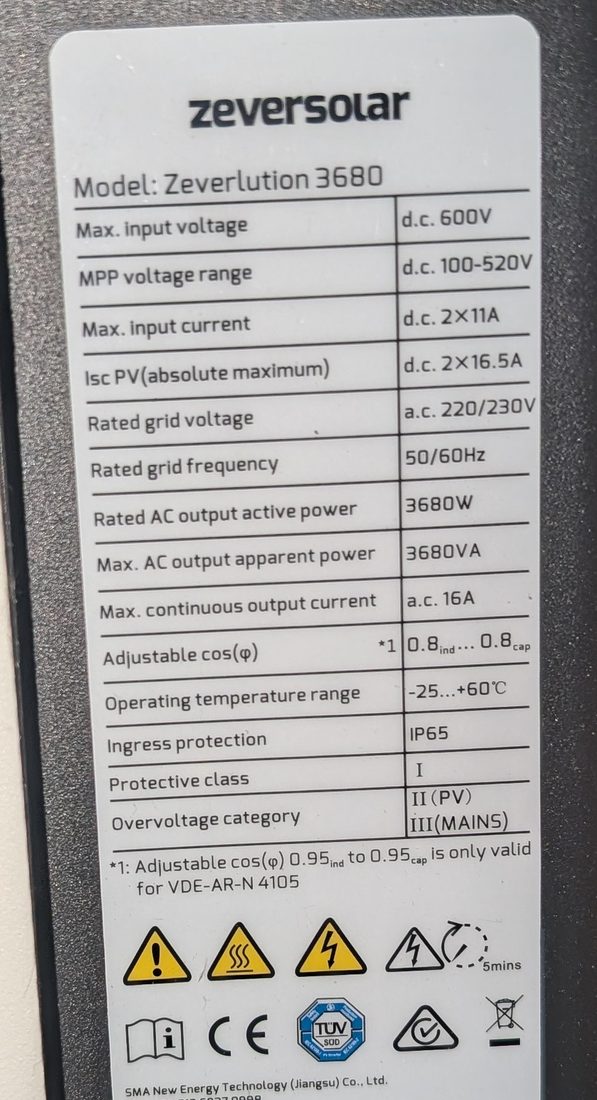 The rating plate on my inverter.
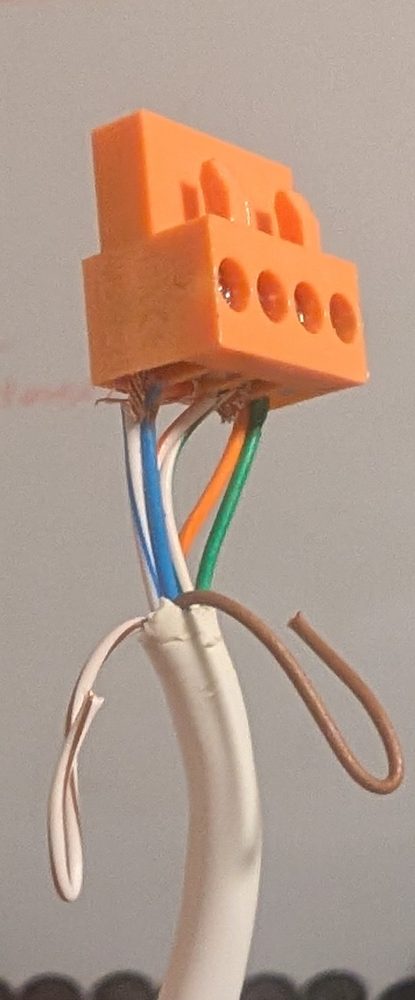 The custom end of the cable, before being taped up.
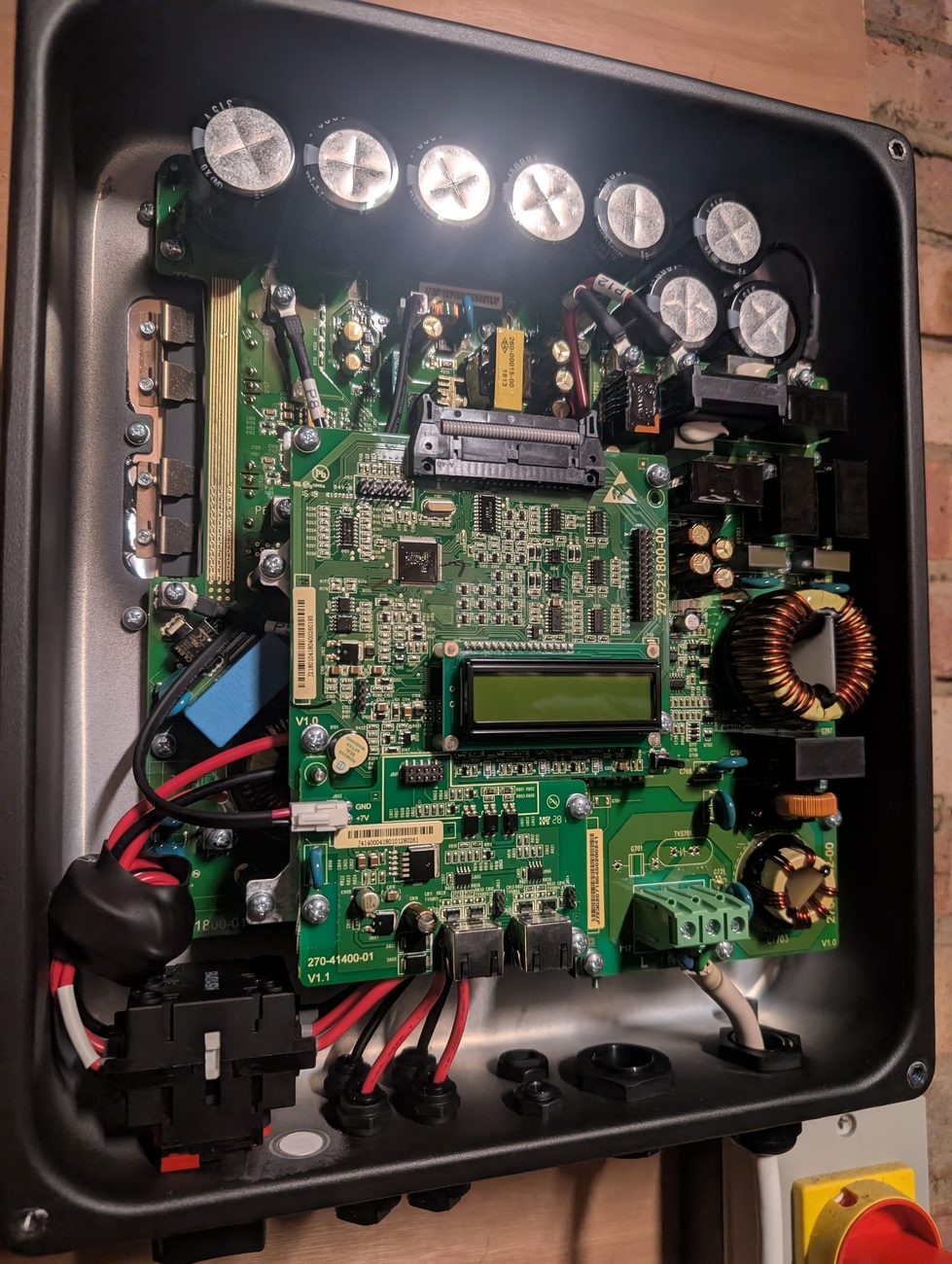 Inside the inverter, with the cover off.
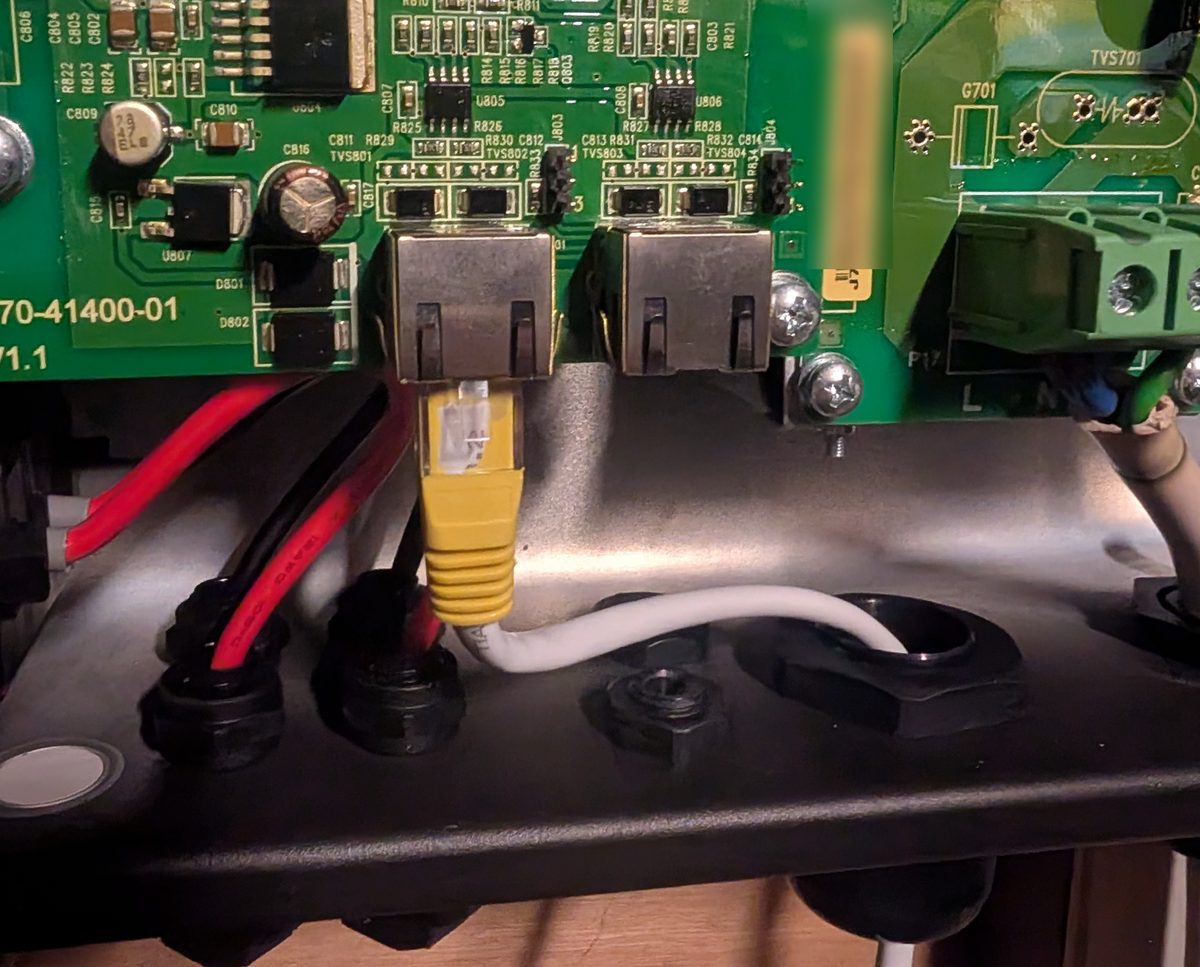 Plugged in, and threaded through the cable gland.
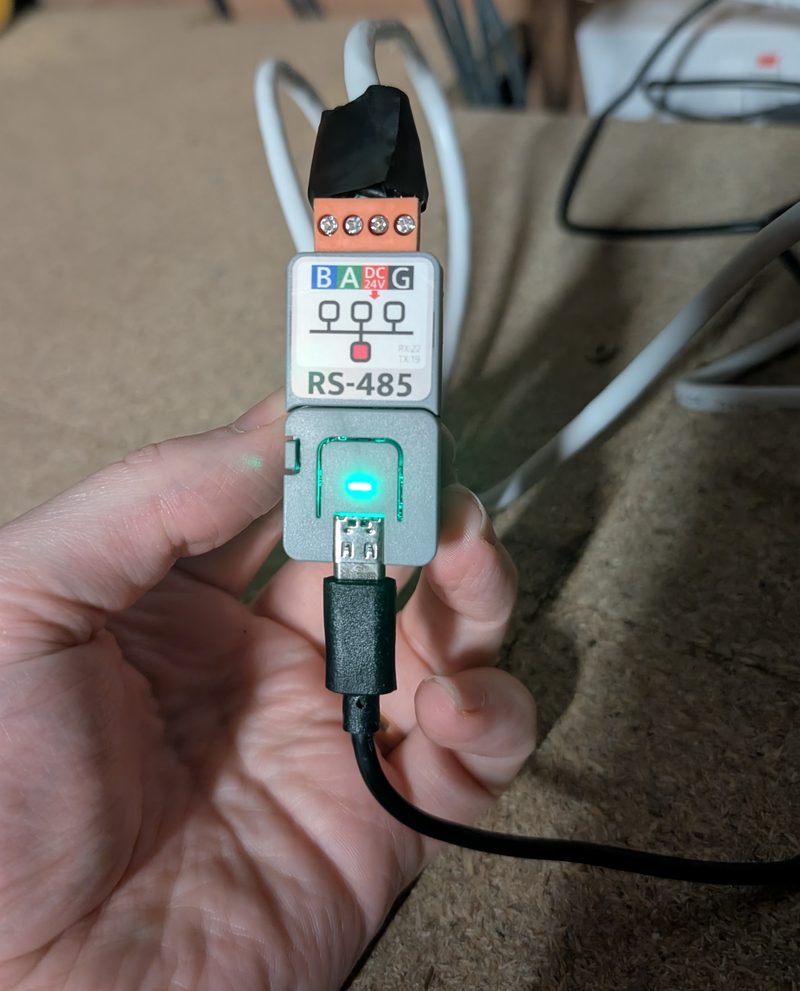 The finished device. Green means generating.
 A brand new release 0.1.16 of the
 My Debian contributions this month were all
 A few days ago, a colleague reached out to me, asking if I could help draft a
resolution on digital autonomy and free software for the upcoming renewal of
our collective bargaining agreement. Although she's very politicised and
generally a great individual, she is not a techie and we never really talked
about these issues before.
This took me by surprise. I should have been rejoicing; no, I should have been
the one who brought up this topic in our union. Wasn't I the technical expert
on these issues? But alas, my first reaction when she came to me was to snicker
and tell myself: "That's cute, but nothing's ever gonna change, Big Tech is too
strong and our governments don't give a damn."
How sad and cynical is that? That's not the person I want to be.
Something in the Quebecois political landscape has shifted in the last few
years with regards to tech. More and more "regular" people seem to be talking
about the importance of digital autonomy, how government services shouldn't
rely on Big Tech and how we should be using FOSS on hardware we actually
control.
A few years ago, I would have been at the vanguard of this change. I would have
been part of the creation of
 Japanese input method editors (IMEs) such as Mozc are essential for typing
Japanese (yes, skk, anthy and more, but it's out-of-scope in this article). Testing them is a surprisingly fiddly job: an IME behaves differently
depending on the desktop environment (GNOME, KDE, Xfce, Budgie), the input
framework (ibus, fcitx5, uim), and the Wayland or X11 session. Setting up a
fresh VM for every combination from scratch is slow and repetitive, and
breaking your host's environment while experimenting is no fun.
 Each release of Debian has a shiny new theme which is visible on the installer,
the boot screen, the login screen and, most prominently, on the desktop
wallpaper. It's a very important part of a Debian release as it is usually the
first thing new users see when installing or booting the system for the first
time. Not only that, but also the first thing appearing when debianites share
their screen or connect to an external device when giving talks around the
world.
As the most enthusiastic users will know, the forky - yes, that is the name of
the next stable version, Debian 14 - release cycle is rapidly approaching its
latter stages. This means we need to select the artwork shipping with forky
soon, really soon!
And as with everything else in Debian, collecting artwork is a collaborative
effort which Debian shares with its community. So, if you would like (or know
someone who would like) to create a desktop look and feel that will be seen by
trillions of people around the world - and in space! - be sure to send in your
artwork ASAP!
The deadline for submissions is: 2026-11-26.
For the most up to date details please refer to the