Bartosz Feński: I m even cooler
 Evgeni Golov you re not the coolest fanboy.
I ve got this
 And it s made by my girlfriend as a christmas gift. Also hand-made.
Judge this
 Evgeni Golov you re not the coolest fanboy.
I ve got this
And it s made by my girlfriend as a christmas gift. Also hand-made.
Judge this
 Today I wanted to clone my
dotfiles repository (no, not available online, too much private stuff in there) to a remote machine and noticed that it has grown way too big (20MiB working directory and about 200MiB in .git), so I decided to clean it up.
git gc did clean up a couple of megabytes, but .git was still about 190MiB, so I wasn t satisfied. Short thinking revealed the lost megabytes are somewhere in the history when I accidentally added some files and removed them afterwards (iceweasel, icedove, it s you I m blaming ;)). But how the heck do I find and remove them?
git filter-branch -f --index-filter 'git rm --cached --ignore-unmatch FILE' -- --all will remove FILE from all commits, says git-filter-branch(1), but how to find those files? They are not in my working directory anymore and I do not want to checkout every revision and look for big files in there. Let s ask git itself :)for commit in git log --all --pretty=format:%H ; do git ls-tree -r -l $commit; done awk ' print $4 " " $5 ' sort -nu will show all files (actually all versions of all files) ever known to git, with the biggest ones at the end. Just identify the really big (unused) ones and remove them as above, thats what you think, right? Right, but .git won t be any smaller. Huh? Read git-filter-branch(1) again, just create a clone and it will be smaller, so mission accomplished! Now I had just 6MiB to push (compressed). For reference, the old tree would have used something about 150MiB to push.
It s been a long time since my last post about my desktop in a shell , but today I stumbled over something absolutely awesome I want to share with you.
A bit of background: I am using mutt with a single imap server (where everything is forwarded to), because I disliked the idea of having multiple mutt instances running and did not want to play the <change-folder>imaps://other.server.tld/<enter> game too much.<change-folder> game and was like wow because the account showed up in my sidebar and I could just jump between the folders of both accounts.
So I thought how to automate this, so I could actually use mutt with multiple accounts (without offline-imap and friends, which is what you find on the web).
It s damn easy:
# muttrc
set imap_user=account1
set imap_pass=password
set folder="imaps://imap.one.example.com/INBOX"
set spoolfile="imaps://imap.one.example.com/INBOX"
...
push <change-folder>imaps://account2@imap.two.example.com/<enter>
Well, what does this do? It advises mutt to use
imap.one.example.com, but then just jumps to imap.two.example.com at the end of the config, resulting in both accounts being loaded into the sidebar and usable. That s it, one line and it is awesome!
Please note, the password to both accounts is the same, you will have to fiddle around and put it in the URL somehow if it differs.
you have to put options scsi_mod scan=sync somewhere in /etc/modprobe.d/ and regenerate the initrd.mdadm -A /dev/md0 worked just fine to confuse me. Let data be textarea->value and browser be (firefox or chrome).I want the user to be able to sign the data he entered in the textarea as I do not trust the website to store the data without modification.So far I found a couple of GnuPG/PGP based solutions: So I got my hands on that new machine, somewhere, somehow, and I had to make myself comfortable on it. The biggest difference in that machine and the ones I used before is the RAID controller, an Adaptec 5405, instead of the 3ware ones I used to have before. That means getting used to new tools, messages and all these things which I ll try to document here.Step 1: does vendor deliver?Well, yes, mostly. There is (mainline) kernel support for the controller, Squeeze s kernel will boot up just fine and I just throw my junk into /dev/sda and it will handle the whole raidy thingy itself. But what is when I want to check the health of the disks, to add a spare or modify the caching? Ask the mighty vendor and it will answer Yes, you can! .So I downloaded that asm_debian_x86_x64_v6_50_18570.tgz, unpacked and faced two debs, one i368 and one amd64. Yes, you could have saved half of the bandwidth if someone would have asked for the arch before, but who cares for some additional 60MiB today? So let s see what it does. Oh no, wait, there is a 1. Make sure to be in root level access. 2. Install the ASM storman .deb package. For example, if the package is storman_6.50-18570_i386.deb, then install it using the following command dpkg -i storman_6.50-18570_i386.deb 3. Adaptec Storage Manager will get installed at /usr/StorMan 4. Add the line /usr/StorMan to /etc/ld.so.conf. Then run "ldconfig". This is needed for the arcconf utility to find the path of the libstdc++.so.5 libraryWell, 1 is obvious, so is 2.
cp -a /usr/StorMan/arcconf /usr/local/sbin/
apt-get remove --purge storman
Step 2: does community deliver?You can, by the way, get (better) packages at http://hwraid.le-vert.net/wiki/DebianPackages from Adam C cile (Le_Vert). I didn t test those much, but I currently use the arcconf package from there, which seems to be exactly what I need: proper dependencies and just the arcconf binary, no Java sh*t.Step 3: monitor the controllerAs this post is about monitoring, not ranting, let s continue. As mentioned before, I only have arcconf installed, which is just a cli to do stuff with the controller. If I understood the docs right, the actual StorMan is able to send notification mails when a disk dies or the controller gets eaten by aliens, but as I don t have StorMan, I have to do things myself.Adam has a aacraid-status package in his repository, which includes some minimalistic shell-daemon to monitor the output of arcconf. It didn t perfectly fit my needs (and had some hickups with my disks which refuse to report a vendor, whyever), so I decided to write something myself (slightly based on what Adam has done in aacraid-status, though).The result is on GitHub: https://github.com/evgeni/aacraidAs you can see the code contains (at the time of writing) exactly ZERO comments and there is no README either, but it s actually quite usable already.
/dev/twa0 -d 3ware,0 -a -s L/../../2/01 -m root
/dev/twa0 -d 3ware,1 -a -s L/../../2/03
This is possible with Adaptect controllers too (not through /dev/twaX obviously). You have to have the
sg module loaded, which will result in /dev/sg[012] on my machine, with sg0 being the controller itself and sg1/sg2 the both disks attached to it. Having sg loaded, one can now use smartd with:/dev/sg1 -d sat -a -s L/../../7/01 -m root /dev/sg2 -d sat -a -s L/../../7/02 -m root(
-d sat is the important option here!)Thanks to Thomas Krenn Wiki: Smartmontools mit Adaptec RAID Controller for the basic info and ostlogd.spenneberg.net: Adaptec-Raid-Controller S.M.A.R.T.-Healthstatus monitoren for the pointer to the sg module!Step 5: relaxYupp, 4 steps are enough, go relax until the next disk dies (you will be doing something REALLY important that moment according to Murphy). Yupp, it s this time of the month again! Rhonda has already spammed about it, but I think repeating won t hurt: the next (4th) meeting of the Debian/Ubuntu Games Team will be held in #debian-games on June 26th at 10:00 UTC.  Yes, you will see me in Banja Luka. This will be my first DebConf, but I have a strong feeling it won t be the last one. I hope to see some productive sessions in pkg-games and pkg-ayatana, nice people and a lot of fun in a nice country.I will travel with ICE 729 from Duesseldorf to Munich and EN 499 from Munich to Zagreb on the 22.07.2011 and return with EN 498 and ICE 728 on 31.07.2011.
 To make things louder, I will go to Wacken from 02.08.2011 until 07.08.2011, wonder to see some Debian people there :) As it hasn t been announced on planet yet, I d like to invite you to the thrird Debian/Ubuntu Games Team Meeting on May 29th (yes, tomorrow!) at 11:00 UTC in #debian-games. I ve been a little sick the last days and decided to be productive instead of just drinking tea all the time.The result are some (10) squashed bugs from pkg-games, and one long standing nmu.adonthell#624998 LP#765984 i can haz understanding?I m trying to rebuild a package with gcc-4.6 instead of (default) gcc-4.5. Sounds easy, huh?Not today, not with qmake :(Setting
CC=gcc-4.6 CXX=g++-4.6 on the command-line does not help. Neither does exporting these in debian/rules. Let s fire up Google, I think I remember qmake tends to prepend EVERYTHING with QMAKE_ Right, official documentation says it s QMAKE_CC and QMAKE_CXX. Setting those on the command-line does not help. debian/rules? Nope!Okay, let s do it the qmake-way, set it in the main .pro file which basically just calls a bunch of other .pro files (one for each component of the project). Guess what? It does not help. You have to set these in each and every .pro file! Rly? Is this what I have a build-system for?</rant>Now, seriously, what s the proper way to override stuff like this in qmake? Any pointers appreciated. As Evgeni Golov already blogged, there is going to be the next round of a IRC meeting of the Debian/Ubuntu Games Team on the upcoming Saturday. This time it will be held at April 30th at 12:00 UTC in #debian-games on irc.oftc.net, so if you are interested in bringing the Games Team up to pace again, want to join and wonder how you could help, please attend. The agenda contains a fair amount of leftovers from the first meeting, please see Meeting Page about it.
The readers of debian-devel-games@l.d.o and games@l.fd.o do already know, but the fact pkg-games has it s next (second) meeting on April 30th at 12:00 UTC in #debian-games needs the attention of the whole planet (pun intended)!
 Around the first bunch of postings in my Useful
but Unknown Unix Tools, Tobias Klauser of inotail and Symlink fame came up with the idea of
making a Planet (i.e. a blog aggregator) of all the comandline blogs
and blog categories out there.
A first Planet Venus running prototype based on the template and style
sheets of Planet
Symlink was quickly up and running.
I just couldn t decide if I should use an amber or phosphor green
style for this new planet. Marius Rieder finally had the right idea to solve
this dilemma: Offer both, an amber and a phosphor green
style. Christian Herzog
pointed me to the right piece of code at A List Apart. So here is it, available in you
favourite screen colors:
Planet Commandline For a beginning, the following feeds are included:
*g* (Yeah, I didn t include
that one yet. But as soon someone shows me the vi-equivalent of that
blog, I ll include both. Anyone thinks, spf13 s vim
category is up to that?)
Oh, and sure, any shell-specific (zsh, tcsh, bash, mksh, busybox)
tips & tricks blogs don t count as program-specific blogs like some
$EDITOR, $BROWSER, or $VCS specific blogs do. :-)
Of course I m happy about further suggestions for feeds to
include in Planet Commandline. Just remember that the feed should
provide (at least nearly) exclusively command line tips, tricks or
howtos. Suggestions for links to other commandline related planets are
welcome, too.
Another week, another post from my desktop in a shell series. This time: newsbeuter, my RSS/Atom/whatever feed-reader of choice.Newsbeuter is a config-and-forget kind of tool. You only have to touch it when you change from a static ~/.newsbeuter/urls to Google Reader or something (like I did some time ago). In the following I will explain both ways (as both are short and it would not fill a whole post then *g*).newsbeuter with a static urls fileFirst you create a ~/.newsbeuter/urls with all your feed URLs (one per line). Then you already can start newsbeuter and it will just work . But you also can customize it (see newsbeuter s online doc) by writing a ~/.newsbeuter/config. Mine was rather short:auto-reload yes refresh-on-startup yes goto-next-feed noWhich means newsbeuter will refresh the feeds every 60 minutes (tuneable via
reload-time) and on startup and won t jump to the next feed when pressing n in a feed which has no unread items.Yes, sorry, this is all. Newsbeuter just works ;)newsbeuter with Google ReaderWant to use newsbeuter with your Google Reader account? Addurls-source "googlereader" googlereader-login "you@gmail.com" googlereader-password "password"to your
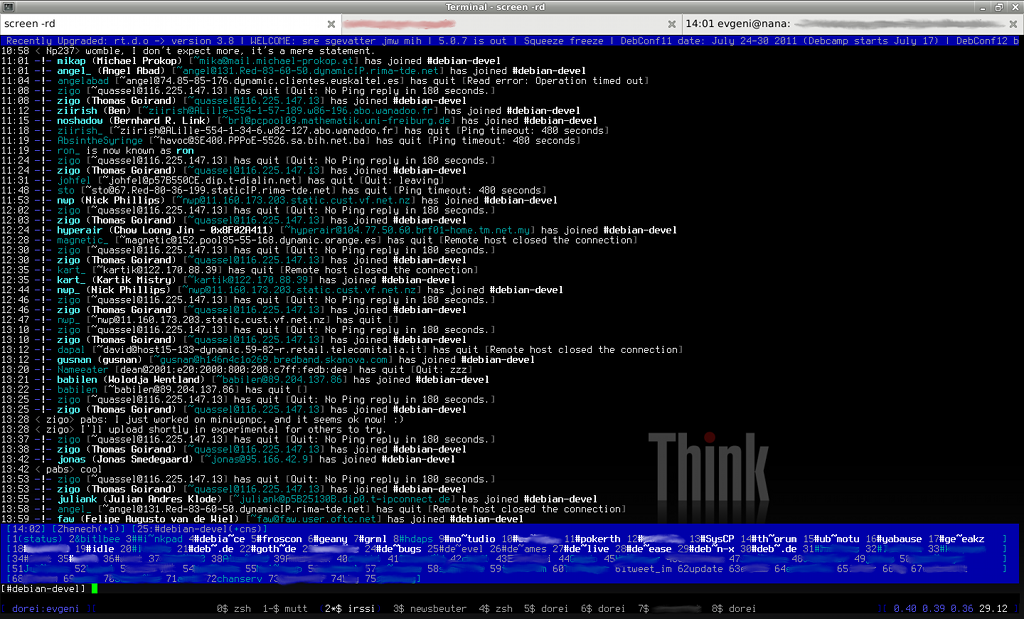
~/.newsbeuter/config and it works :)googlereader-show-special-feeds no as they do not care about Google s suggestions etc. Continuing my series about my desktop in a shell, in this chapter I will present you my irssi setup.Irssi is the most customized part of my setup, using many scripts from the irssi-scripts Debian package and some from the internet , handling 6 irc networks with a total of 34 channels plus
/set completion_char ,I also like *long highlighted text*, so:/set emphasis_multiword onHide mIRC and ANSI colors when turned on. This can be used to eliminate angry fruit salad syndrome in some channels. (Quote from irssi.org/documentation/settings, do I have to say more?):/set hide_colors onWhen talking in more than one channel, it sometimes comes handy to repeat something from the past said in THAT channel, not searching though all:/set window_history onTell irssi to shutup when away, noone will hear/see the beep anyways:/set beep_when_away offI want my screen to inform me about new messages, so I need this:/set bell_beeps onBeep for query text, notices, dcc, dcc text and hilight:/set beep_msg_level MSGS NOTICES DCC DCCMSGS HILIGHMy used irssi scriptsactive_notice.pl (from irssi-scripts)Show notices in the active window or the corresponding query instead of the status-window./set chansort_autosort on<Update>kaimi asked me yesterday, whether chansort could ignore the network and just sort ALL channels in alphabetical order. Well, it could not, until yesterday ;) Fetch either the patch against chansort.pl or my chansort-ng.pl and set chansort_ignore_network to ON. You can also set chansort_ignore_windowtype to mix channels and queries if you like to.</Update>hack-whois-in-current-window.pl (from dgl.cx)Display /whois in the current window or the corresponding query instead of the status-window./keepnick [-net chatnet] [nick]nickserv.pl (from irssi-scripts)Automatically authorize me on networks with NickServ./nickserv addnet freenode NickServ@services. /nickserv addnick freenode Zhenech mypassscreen_away.pl (from irssi-scripts)Set away when screen is detached.
screen_away_message :)seen.pl (from irssi-scripts)Add a /seen nick command to lookup when and where nick was online the last time.jabber.die-welt.net, my Jabber/XMPP server. There I have a pyICQt instance running, to connect to ICQ via Jabber (yes, BitlBee would support that directly, but that would fail on me when I would like to connect from a different Jabber-client). Twitter and identi.ca are handled via Jabber too: identi.ca does support this by themself, for Twitter I use the tweet.im service.apt-get install bitlbee, connect irssi to localhost:6667, you will be force-joined to &bitlbee, where you do:register somepassword account add Jabber you@jabberserber.example.com jabberpassword account on 0and done, you@jabberserver.example.com is online :)The all awaited screenshot (from my last irssi-post):
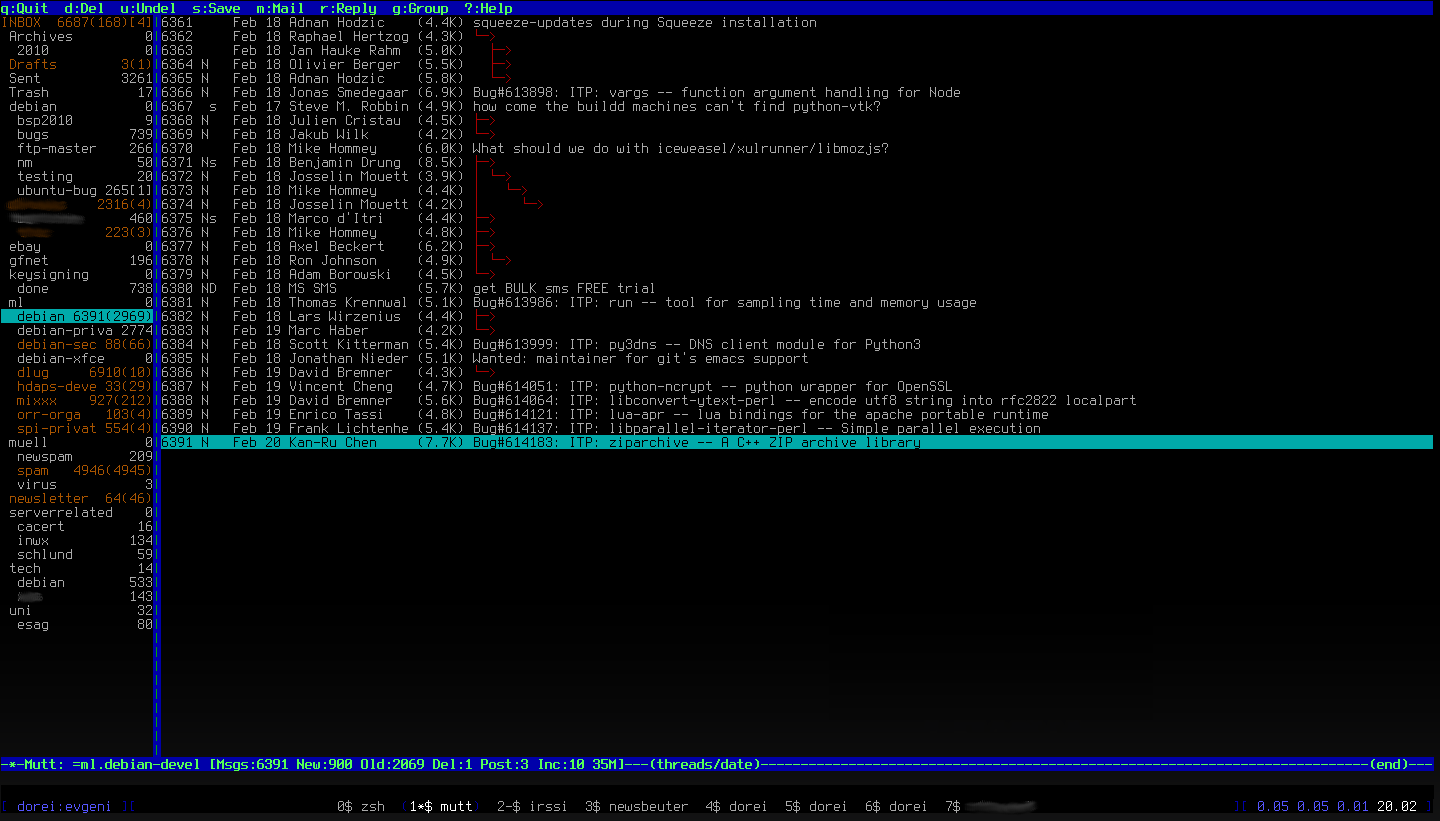
~/.irssi/config: http://files.die-welt.net/irssi-config.txt, read it carefully while waiting for the next post about newsbeuter :) Continuing my series about a desktop in a shell, today I will present you my mutt setup. I use mutt because it has no bugs and is a really good MUA for people loving consoles ;)First of all you have to know, that all my mail is forwarded to my server and sorted into Maildirs via maildrop, so I do not care about sorting on my desktop , which just fetches the mail via IMAP from the server ;)I m running mutt-patched from Debian Squeeze, so not all options may be available for you if you do not have the same patchset as I do.First, tell mutt to fetch mail from imap.die-welt.net via IMAP:set imap_user=username set imap_pass=password set folder="imaps://imap.die-welt.net/INBOX" set spoolfile="imaps://imap.die-welt.net/INBOX"Now, enable IMAP-IDLE, list subscribed folders, reconnect to the server if needed and mark mail as read when you open it:
set imap_idle
set imap_check_subscribed
unset imap_passive
unset imap_peek
Let mutt save sent mail to the Sent directory on the IMAP server, and postponed mail to Drafts:
set record=+Sent
set postponed=+Drafts
Read mail should stay where it is:
set mbox="!"We use IMAP-IDLE, thus check for new mail manually only every 90 seconds:
set mail_check=90Instead timeout after 15 seconds if no user input is given:
set timeout=15Set default mail from address to my default mail address:
set from=evgeni@golov.deAnd send mail via mstmp (see below for mstmp configuration):
set sendmail="/usr/bin/msmtp"Tell mutt which addresses I recieve mail to (danger, ugly regex!):
alternates (evgeni@(debian.org golov.(de eu)) sargentd@(die-welt sargentd).net evgeni.golov@uni-duesseldorf.de)As mutt knows where I receive mail, let it set From accordingly:
set reverse_nameLet mutt cache some stuff and find its certificates:
set header_cache="~/.mutt/cache/headers"
set message_cachedir="~/.mutt/cache/bodies"
set certificate_file=~/.mutt/certificates
set ssl_ca_certificates_file=/etc/ssl/certs/ca-certificates.crt
Show only interesting headers in an useful order:
ignore headers *
unignore headers from to subject date cc
hdr_order from to cc subject date
Fix stupid MUAs behaviour (e.g. filenames like
=?iso-8859-1?Q?file=5F=E4=5F991116=2Ezip?=):set rfc2047_parametersBeep on new mail, will generate a ! in the window name in screen:
set beep_newmutt-patched has the great sidebar patch, assign ctrl-n, ctrl-p to select next, prev folder, ctrl-o to open selected folder:
bind index \Cp sidebar-prev
bind index \Cn sidebar-next
bind index \Co sidebar-open
And toggle sidebar visibility with ctrl-b:
macro index \Cb '<enter-command>toggle sidebar_visible<enter><refresh>'
macro pager \Cb '<enter-command>toggle sidebar_visible<enter><redraw-screen>'
Since 1.5.20-2, mutt patched contains my sidebar-dotted and sidebar-sorted patches.
debian-devel instead of INBOX.ml.debian-devel) and sort the folders (the are returned in random order when using imap_check_subscribed):set sidebar_shortpath set sidebar_sortNow let s set some colors (that match the rest of my desktop ):
color sidebar_new yellow default
color normal white default
color hdrdefault brightcyan default
color signature green default
color attachment brightyellow default
color quoted green default
color quoted1 white default
color tilde blue default
And add some useful macros for marking new and old messages as read:
macro index .n "<tag-pattern>~N<enter><tag-prefix><clear-flag>N<clear-flag>*" "Catchup all new messages"
macro index .o "<tag-pattern>~O<enter><tag-prefix><clear-flag>O<clear-flag>*" "Catchup all old messages"
When forwarding mail, I like it to be forwarded as an attachment (YMMV):
set mime_forward=yesI m using goobook in mutt to fetch my addressbook from Google. As there is no Debian package for goobook (yet), you have to install it yourself (via
easy_install):apt-get install python-argparse python-gdata python-simplejson python-keyring python-nose easy_install goobookConfiguration is easy via
~/.goobookrc:[DEFAULT] # If not given here, email and password is taken from .netrc using # machine google.com email: me@gmail.com password: passwordAnd then add the following to your
.muttrc:set query_command="goobook query '%s'" bind editor complete-query macro index,pager a "<pipe-message>goobook add<return>" "add the sender address to Google contacts"That s all for mutt, but We are running mutt in a screen, so let s add the following to
.screenrc to fix transparency and cut&paste (see http://wiki.mutt.org/?MuttFaq/Appearance):defbce on term screen-bceAnd as mutt uses mstmp (yes, I know, mutt can handle SMTP itself ), this is my
.msmtprc:defaults domain dorei.kerker.die-welt.net tls on account die-welt.net host smtp.die-welt.net from sargentd@die-welt.net auth on user username password password tls_starttls on tls_certcheck off # Set a default account account default : die-welt.netC est tout! That is my personal mutt configuration, you can download it as one file here: my .muttrc. And as everyone loves screenshots, here is one:
 Oh, the next chapter will be about
irssi, but not before next Sunday (March 6th) as I ll be offline for a week, skiing in Austria :) People are using computers, everywhere, really! ;)dorei, running Debian GNU/Linux screen -rd, -r for reattach a running screen session, -d for detach it if it is already attached somewhere else. Or I can start a new session by just typing screen. Inside the screen I have multiple windows (one can create new ones with ^A c) with all the needed software running. I can switch windows by pressing ^A N, N being the number of the window, ^A n for the next window, ^A p for the previous one or ^A ^a for the last one. Or I can get a window-list with ^A w. If needed, I can rename windows with ^A A, followed by the new name. That should be enough for almost everyone. Let s just add a window-list to the bottom (as you might have seen on GNOME, Xfce, KDE and even Windows ;) by adding the following to the ~/.screenrc:caption always " " # clear line before hardstatus hardstatus alwayslastline "% = kb [ % B %H:$USER % b ][ %=% w %?%-Lw%?% b (% W %n*%f %t%?(%u)%?% b )% w %?%+Lw%?%?%= % b ][% B %l % B % W %d.%0m % b ]"You get the current host- and username, the machine load and the date for free ;)Even if it is possible, I do not have any autostart like stuff in my
.screenrc as the machine is running stable and I start the screen and the apps inside maybe once a year after a reboot.screenrcMy .screenrc looks like this:# detach on hangup autodetach on # don't display the copyright page startup_message off # set scrollback to 2000 lines, default 100 defscrollback 2000 # set silencewait to 15 seconds, default 30 silencewait 15 # new shells should be started as login-shells shell -$SHELL # make a fancy statusline caption always " " # clear line before hardstatus hardstatus alwayslastline "% = kb [ % B %H:$USER % b ][ %=% w %?%-Lw%?% b (% W %n*%f %t%?(%u)%?% b )% w %?%+Lw%?%?%= % b ][% B %l % B % W %d.%0m % b ]" # make higlighting bold, black on blue background sorendition +b bk # some fixes, no I do not know where they come from :) termcap xterm hs@:cs=\E[%i%d;%dr:im=\E[4h:ei=\E[4l terminfo xterm hs@:cs=\E[%i%p1%d;%p2%dr:im=\E[4h:ei=\E[4l termcapinfo xterm Z0=\E[?3h:Z1=\E[?3l:is=\E[r\E[m\E[2J\E[H\E[?7h\E[?1;4;6l termcapinfo xterm* OL=100 termcapinfo xterm 'VR=\E[?5h:VN=\E[?5l' termcapinfo xterm 'k1=\E[11~:k2=\E[12~:k3=\E[13~:k4=\E[14~' termcapinfo xterm 'kh=\EOH:kI=\E[2~:kD=\E[3~:kH=\EOF:kP=\E[5~:kN=\E[6~' termcapinfo xterm 'hs:ts=\E]2;:fs=\007:ds=\E]2;screen\007' termcapinfo xterm 'vi=\E[?25l:ve=\E[34h\E[?25h:vs=\E[34l' termcapinfo xterm 'XC=K%,%\E(B,[\304,\\\\\326,]\334, \344, \366, \374,~\337' termcapinfo xterm* be termcapinfo xterm xterms xs ti@:te=\E[2J termcapinfo wy75-42 xo:hs@ termcapinfo wy* CS=\E[?1h:CE=\E[?1l:vi=\E[?25l:ve=\E[?25h:VR=\E[?5h:VN=\E[?5l:cb=\E[1K:CD=\E[1J termcapinfo hp700 'Z0=\E[?3h:Z1=\E[?3l:hs:ts=\E[62"p\E[0$~\E[2$~\E[1$ :fs=\E[0 \E[61"p:ds=\E[62"p\E[1$~\E[61"p:ic@' termcap vt100* ms:AL=\E[%dL:DL=\E[%dM:UP=\E[%dA:DO=\E[%dB:LE=\E[%dD:RI=\E[%dC terminfo vt100* ms:AL=\E[%p1%dL:DL=\E[%p1%dM:UP=\E[%p1%dA:DO=\E[%p1%dB:LE=\E[%p1%dD:RI=\E[%p1%dC termcapinfo linux C8 # some bindings bind k bind ^k bind . bind ^\ bind \\ bind ^h bind h bind 'w' windowlist -b bind 'W' windows bind 'K' kill bind 'I' login on bind 'O' login off bind ' ' history bind = resize = bind + resize +3 bind - resize -3 # Mutt demands this # http://wiki.mutt.org/?MuttFaq/Appearance defbce on term screen-bceThat s all for my screen setup. The obvious, boring screenshot follows:
 See you next time, when I will present my mutt setup here. Some (long) time ago, I wrote an article how to setup a Mustek PowerMust 1000 USB on Debian Sarge. Since then Etch, Lenny and now Squeeze were released and the machine the UPS was attached to was replaced.Yesterday I have upgraded this machine from Lenny to Squeeze and of course nut has kicked me in the nuts, telling me it can t connect to the UPS.When I replaced the old machine, I had to connect the UPS via USB instead of serial, as the new machine has only one serial port and that one is needed for the serial console to my Sun Netra T1. On Lenny, I was using the
megatec_usb driver which seems borked on Squeeze and is superseeded by the blazer_usb one. So here is my nut setup on Squeeze:nut.conf:MODE=standalone UPSD_OPTIONS="" UPSMON_OPTIONS=""ups.conf:
[powermust]
    driver = blazer_usb
    port = schrank
    vendorid = 0665
    productid = 5161
    desc = "Mustek PowerMust 1000"
Yes, port has to be set, but can be any random string.upsd.conf:ACL all 0.0.0.0/0 ACL localhost 127.0.0.1/32 ACCEPT localhost REJECT allupsmon.conf:
RUN_AS_USER nut
MONITOR powermust@localhost 1 nut nut master
MINSUPPLIES 1
SHUTDOWNCMD "/sbin/shutdown -h +0"
POLLFREQ 5
POLLFREQALERT 5
HOSTSYNC 15
DEADTIME 15
POWERDOWNFLAG /etc/killpower
RBWARNTIME 43200
NOCOMMWARNTIME 300
FINALDELAY 5
upssched.conf:
CMDSCRIPT /upssched-cmdI hope this helps someone ;)
Did not exist.Will never exist.There was quite a lot of buzz about privacy with that new IPv6 thingy. Some say it is bad, as you will have a static address. Some say the privacy extensions will fix everything. I say: lemme rant ;)First of all, that was the internet, when I started using it back in 1999: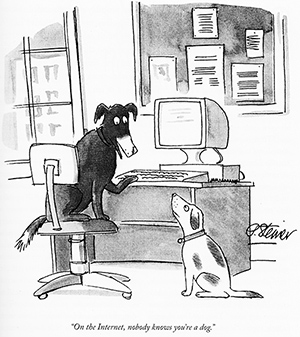
[ New Yorker Magazine, March 1993] On the Internet nobody knows that you are a dog And that s the internet today:

[ robcottingham.ca] How the hell does Facebook know I m a dog?
Well, I d say that s not correct. Even in 1999 facebook could know you are a dog (if you ignore the fact, that there was no facebook in 1999), it s just noone really cared about it. But let s start from the beginning :)An IP-address is a 32-bit integer
An IP-address is technically a 32-bit integer, formatted into 4 8-bit parts (you can read more about IPv4 at Wikipedia), which makes a total of 4,294,967,296 possible IP-addresses. Your ISP has a range in this address-space it can give to its customers (you). My ISP (Unitymedia) owns about 300,000 IP-addresses (based on the RIPE database), which is about 0.007% of the whole address-space. If you look at the RIPE page, you see two common netname prefixes (DE-KNRW and DE-IESY-HFC) which match two regions of Germany where my ISP has its customers (Unitymedia is a merge of ish and iesy). What does that mean? It means one can map a Unitymedia customer into one of these regions, even if he would change his IP-address (Unitymedia uses DHCP with high lease-times, so this does not happen actually). It does not map the customer to a dog yet, but I bet real GeoIP databases can map them correctly to a city (I didn t try much, but this site suggests it works: http://www.ip-adress.com/?lc=en at least they map me correctly to Duesseldorf).Dynamic IP-addresses do not improve privacy
Given the above facts, even if Unitymedia would give me a new IP-address every X hours (many DSL-providers have X=24), it is still possible to map me into a set of about 150,000 users (here user means customer, there still may be multiple computers connected via the same line). I would even go further and say the set is much smaller, as I think I am not able to get every free IP-address from DE-KNRW-*, as these should be bound to cities/regions (GeoIP databases exist, you rememember?) and I do not move with my line.Routers and reverse DNS kill privacy
Currently, my IP-address is 62.143.232.104, which has a reverse DNS entry ip-62-143-232-104.unitymediagroup.de and does not say anything about me or my location, besides of the obvious Unitymedia customer . But look at the traceroute:
4  7111A-MX960-01-ae5.frankfurt.unity-media.net (80.81.192.181)
5  13NOC-MX960-01-ae8.kerpen.unity-media.net (80.69.107.26)
6  1411G-MX960-01-ae9.neuss.unity-media.net (80.69.107.2)
7  1411J-MX960-01-ae1.bilk.unity-media.net (80.69.107.70)
8  PH-1411J-uBR10k-06-Te-1-2-0.bilk.unity-media.net (80.69.102.106)
Frankfurt is about 250km from here, Kerpen about 60, Neuss about 10 and Bilk is a part of the city I live in, about 4km away from my home. I guess you get the idea :)Browsers kill privacy tooDo I have to say more than a link to https://panopticlick.eff.org/? My Chromium scores one in 1,400,000. How much IP-addresses did I have to hide in again?We are at the dog level now, dogs use BoneOS with FireBark, not Linux with Chromium :)IPv6 kills cute kittensOh, and privacy, because with IPv6, there are 2^128 IPv6-addresses out there, of which your provider will maybe own a /32 (2^96 addresses) and give you a /48 (2^80 addresses) or (more likely) /64 (2^64 addresses). Then you enable the great IPv6 privacy extensions (RFC4941) and happily hide in your own assigned subnet, still being a customer of your ISP, still living in the same city and using your old browser It s just about mapping subnets instead of individual IP-addresses then. And we can t get lower as the dog levelPeople can annoy meI did not write all this to teach you, you can do yourself with Wikipedia and RFCs. There is a person out there, who thinks using a random name, mail address and twitter account could fool me into thinking that s a new, yet unknown, person to me. Well, I am not stupid, sorry. When you comment on my blog, your IP-address is logged, when I approve the comment, I often look at the reverse DNS and the whois entry of that IP-address (sorry, I AM paranoid). I even might check my webserver logs (or Piwik) where did you come from (Google etc), writing accidentally in your comment does not help :) Also, if you are trying to fool me, don t use your own computer, running Windows 7 and Firefox which I installed. Oh, and probably do not use your home line which I used to login into my admin-area using my unique Chromium ;)Sorry Hanna Lena, the chicken has just eaten her own eggs And yes, one can track down a single person on this big thing called internet, IPv6 will not change this (in any direction).
Next.