Search Results: "ardo"

26 December 2020

Paul Tagliamonte: Reverse Engineering my Christmas Tree

Over the course of the last year and a half, I ve been doing some self-directed learning on how radios work. I ve gone from a very basic understanding of wireless communications (there s usually some sort of antenna, I guess?) all the way through the process of learning about and implementing a set of libraries to modulate and demodulate data using my now formidable stash of SDRs. I ve been implementing all of the RF processing code from first principals and purely based on other primitives I ve written myself to prove to myself that I understand each concept before moving on. I figured that there was a fun capstone to be done here - the blind reverse engineering and implementation of the protocol my cheep Amazon power switch uses to turn on and off my Christmas Tree. All the work described in this post was done over the course of a few hours thanks to help during the demodulation from Tom Bereknyei and hlieberman.

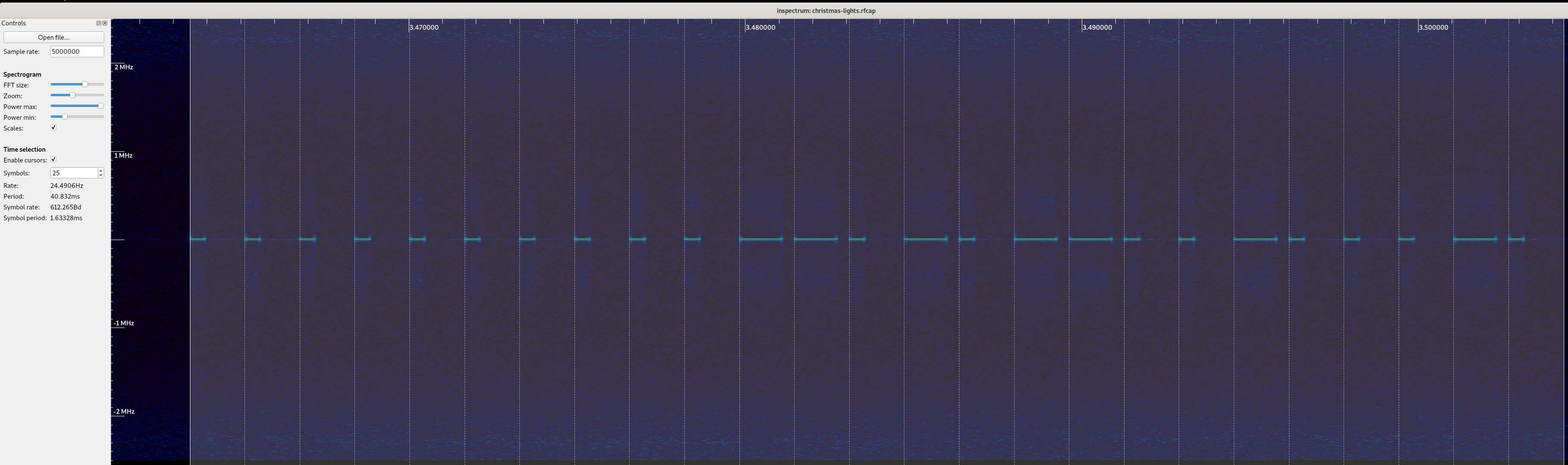
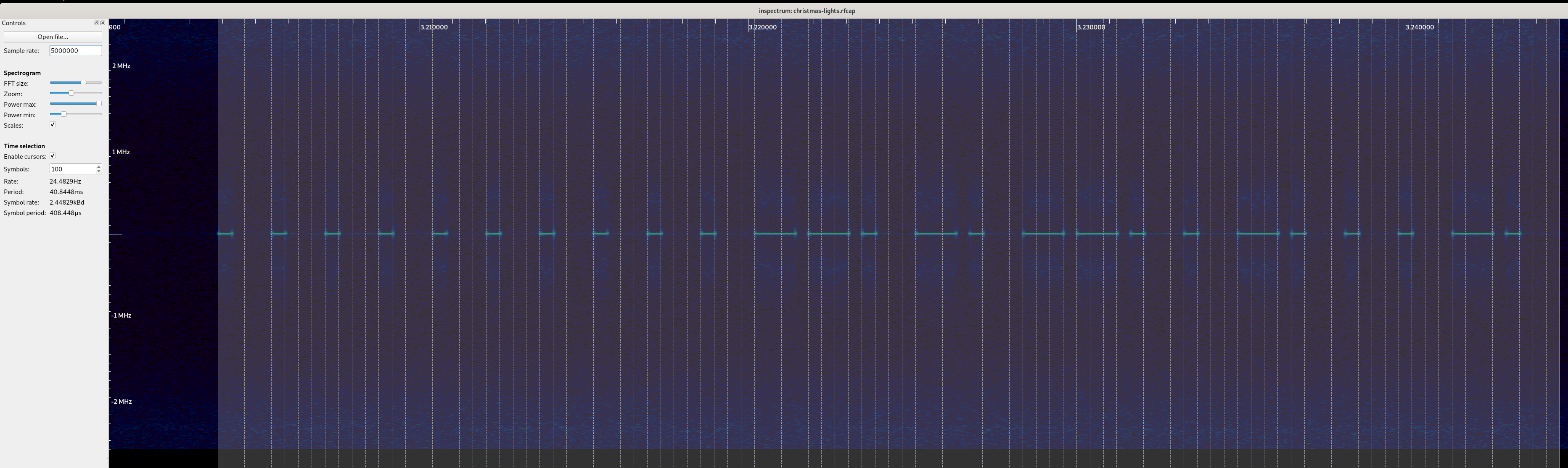
Going in blind When I first got my switch, I checked it for any FCC markings in order to look up the FCC filings to determine the operational frequency of the device, and maybe some other information such as declared modulation or maybe even part numbers and/or diagrams. However, beyond a few regulatory stickers, there were no FCC ids or other distinguishing IDs on the device. Worse yet, it appeared to be a whitelabeled version of another product, so searching Google for the product name was very unhelpful. Since operation of this device is unlicensed, I figured I d start looking in the ISM band. The most common band used that I ve seen is the band starting at 433.05MHz up to 434.79MHz. I fired up my trusty waterfall tuned to a center frequency of 433.92MHz (since it s right in the middle of the band, and it let me see far enough up and down the band to spot the remote) and pressed a few buttons. Imagine my surprise when I realize the operational frequency of this device is 433.920MHz, exactly dead center. Weird, but lucky! After taking a capture, I started to look at understanding what the modulation type of the signal was, and how I may go about demodulating it. Using inspectrum, I was able to clearly see the signal in the capture, and it immediately stuck out to my eye to be encoded using OOK / ASK. Next, I started to measure the smallest pulse, and see if I could infer the symbols per second, and try to decode it by hand. These types of signals are generally pretty easy to decode by eye. This wound up giving me symbol rate of 2.2 Ksym/s, which is a lot faster than I expected. While I was working by hand, Tom demodulated a few messages in Python, and noticed that if you grouped the bits into groups of 4, you either had a 1000 or a 1110 which caused me to realize this was encoded using something I saw documented elsewhere, where the 0 is a short pulse, and a 1 is a long pulse, not unlike morse code, but where each symbol takes up a fixed length of time (monospace morse code?). Working on that assumption, I changed my inspectrum symbol width, and demodulated a few more by hand. This wound up demodulating nicely (and the preamble / clock sync could be represented as repeating 0s, which is handy!) and gave us a symbol rate of 612(ish) symbols per second a lot closer to what I was expecting. If we take the code for on in the inspectrum capture above and demodulate it by hand, we get 0000000000110101100100010 (treat a short pulse as a 0, and a long pulse as a 1). If you re interested in following along at home, click on the inspectrum image, and write down the bits you see, and compare it to what I have! Right, so it looks like from what we can tell so far that the packet looks something like this:




preamble / sync
stuff
Next, I took a capture of all the button presses and demodulated them by hand, and put them into a table to try and understand the format of the messages:
Button Demod'd Bits
On 0000000000110101100100010
Off 00000000001101011001010000
Dim Up 0000000000110101100110100
Dim Down 0000000000110101100100100
Timer 1h 0000000000110101100110010
Timer 2h 0000000000110101100100110
Timer 4h 0000000000110101100100000
Dim 100% 0000000000110101000101010
Dim 75% 00000000001101010001001100
Dim 50% 00000000001101010001001000
Dim 25% 0000000000110101000100000
Great! So, this is enough to attempt to control the tree with, I think so I wrote a simple modulator. My approach was to use the fact that I can break down a single symbol into 4 sub-symbol components which is to say, go back to representing a 1 as 1110, and a 0 as 1000. This let me allocate IQ space for the symbol, break the bit into 4 symbols, and if that symbol is 1, write out values from a carrier wave (cos in the real values, and sin in the imaginary values) to the buffer. Now that I can go from bits to IQ data, I can transmit that IQ data using my PlutoSDR or HackRF and try and control my tree. I gave it a try, and the tree blinked off! Success! But wait that s not enough for me I know I can t just demodulate bits and try and replay the bits forever there s stuff like addresses and keys and stuff, and I want to get a second one of these working. Let s take a look at the bits to see if we spot anything fun & interesting. At first glance, a few things jumped out at me as being weird? First is that the preamble is 10 bits long (fine, let s move along - maybe it just needs 8 in a row and there s two to ensure clocks sync?). Next is that the messages are not all the same length. I double (and triple!) checked the messages, and it s true, the messages are not all the same length. Adding an extra bit at the end didn t break anything, but I wonder if that s just due to the implementation rather than the protocol. But, good news, it looks like we have a stable prefix to the messages from the remote must be my device s address! The stable 6 bits that jump out right away are 110101. Something seems weird, though, 6 bits is a bit awkward, even for a bit limited embedded device. Why 6? But hey, wait, we had 10 bits in the preamble, what if we have an 8 bit address meaning my device is 00110101, and the preamble is 8 0 symbols! Those are numbers that someone working on an 8 bit aligned platform would pick! To test this, I added a 0 to the preamble to see if the message starts at the first 1, or if it requires all the bits to be fully decoded, and lo and behold, the tree did not turn on or off. This would seem to me to confirm that the 0s are part of the address, and I can assume we have two 8 bit aligned bytes in the prefix of the message.
preamble / sync
address
stuff
Now, when we go through the 9-10 bits of stuff , we see all sorts of weird bits floating all over the place. The first 4 bits look like it s either 1001 or 0001, but other than that, there s a lot of chaos. This is where things get really squishy. I needed more information to try and figure this out, but no matter how many times I sent a command it was always the same bits (so, no counters), and things feel very opaque still. The only way I was going to make any progress is to get another switch and see how the messages from the remote change. Off to Amazon I went, and ordered another switch from the same page, and eagerly waited its arrival.

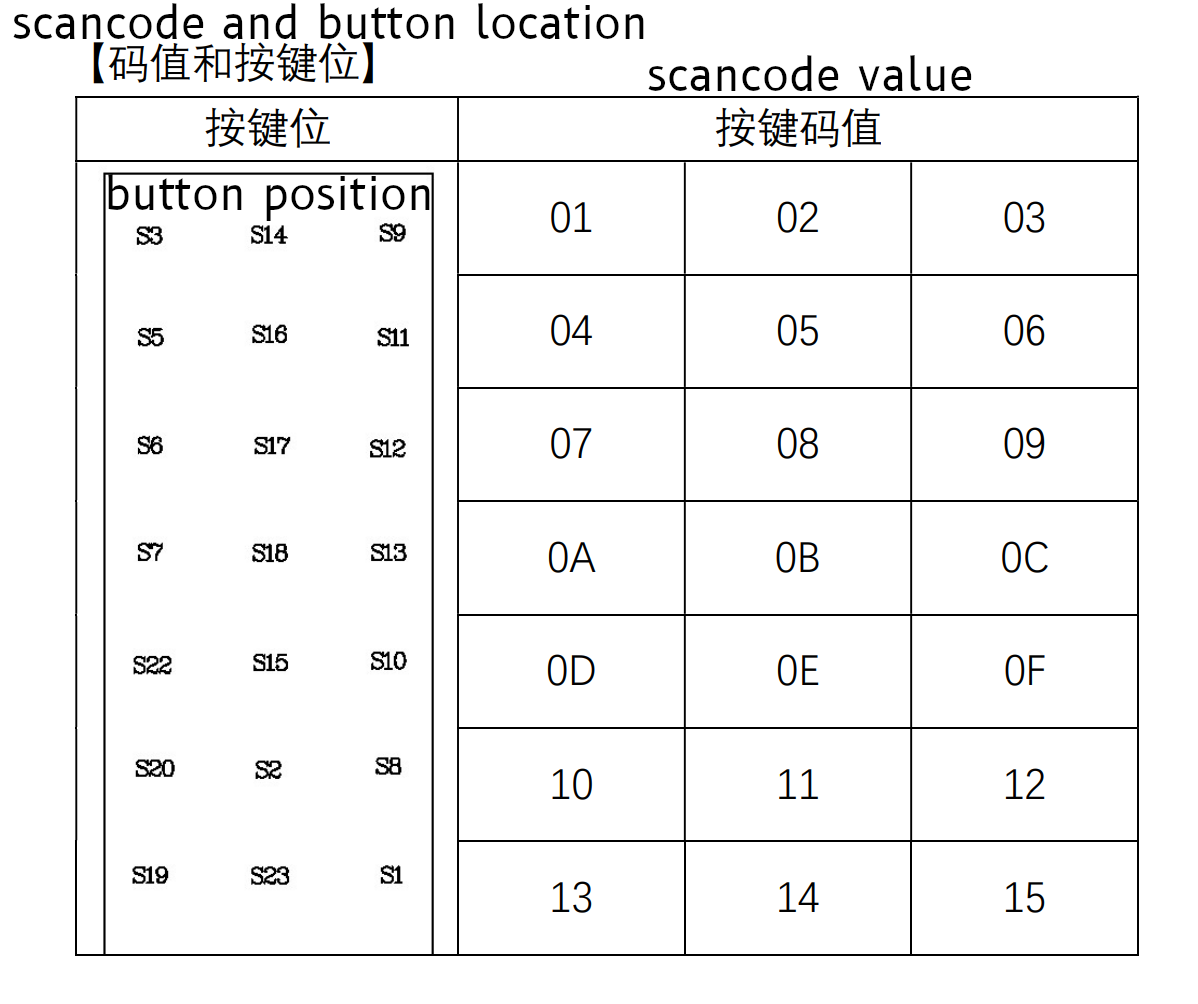
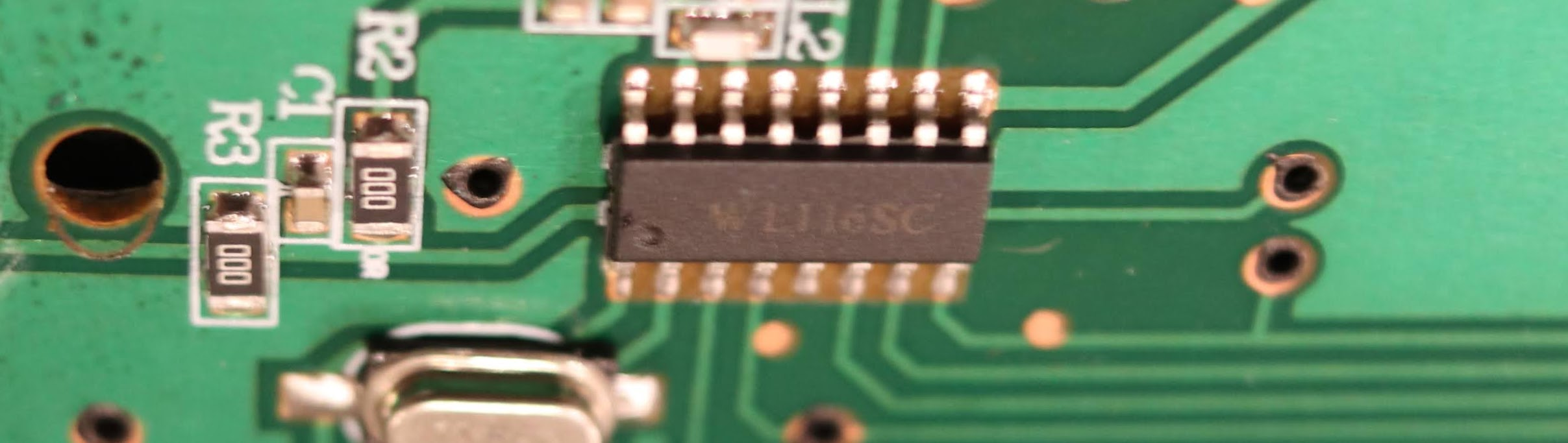
Switch #2 The second switch showed up, and I hurriedly unboxed the kit, put batteries into the remote, and fired up my SDR to take a capture. After I captured the first button ( Off ), my heart sunk as I saw my lights connected to Switch #1 flicker off. Apparently the new switch and the old switch have the same exact address. To be sure, I demodulated the messages as before, and came out with the exact same bit pattern. This is a setback and letdown I was hoping to independently control my switches, but it also means I got no additional information about the address or button format. The upside to all of this, though, is that because the switches are controlled by either remote, I only needed one remote, so why not pull it apart and see if I can figure out what components it s using to transmit, and find any datasheets I can. The PCB was super simple, and I wound up finding a WL116SC IC on the PCB. After some googling, I found a single lone datasheet, entirely in Chinese. Thankfully, Google Translate seems to have worked well enough on technical words, and I was able to put together at least a little bit of understanding based on the documentation that was made available. I took a few screenshots below - I put the google translated text above the hanzi. From that sheet, we can see we got the basics of the 1 and 0 symbol encoding right (I was halfway expecting the bits to be flipped), and a huge find by way of a description of the bits in the message! It s a bummer that we missed the clock sync / preamble pulse before the data message, but that s OK somehow. It also turns out that 8 or 10 bit series of of 0"s wasn t clock sync at all - it was part of the address! Since it also turns out that all devices made by this manufacturer have the hardcoded address of []byte 0x00, 0x35 , that means that the vast majority of bits sent are always going to be the same for any button press on any remote made by this vendor. Seems like a waste of bits to me, but hey, what do I know. Additionally, this also tells us the trailing zeros are not part of the data encoding scheme, which is progress!
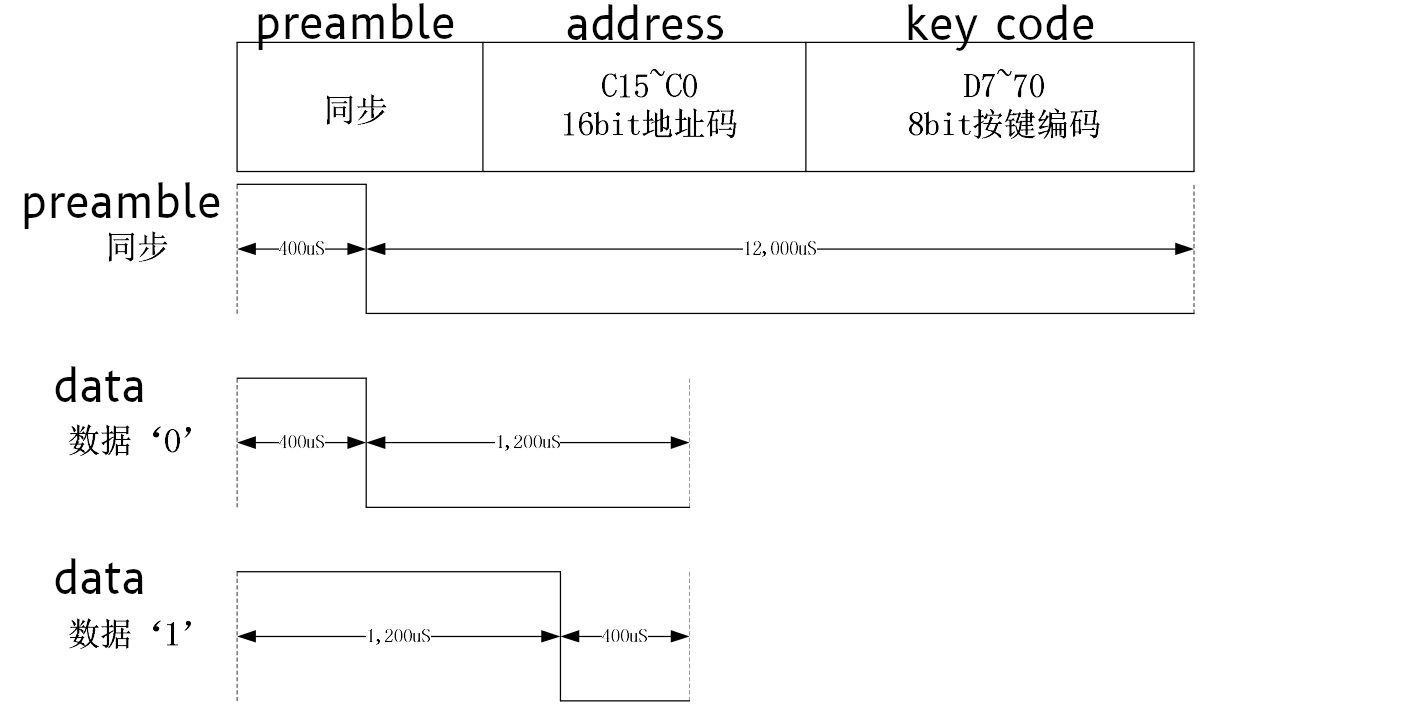
address
keycode
Now, working on the assumptions validated by the datasheet, here s the updated list of scancodes we ve found:
Button Scancode Bits Integer
On 10010001 145 / 0x91
Off 10010100 148 / 0x94
Dim Up 10011010 154 / 0x9A
Dim Down 10010010 146 / 0x92
Timer 1h 10011001 154 / 0x99
Timer 2h 10010011 147 / 0x93
Timer 4h 10010000 144 / 0x90
Dim 100% 00010101 21 / 0x15
Dim 75% 00010011 19 / 0x13
Dim 50% 00010010 18 / 0x12
Dim 25% 00010000 16 / 0x10
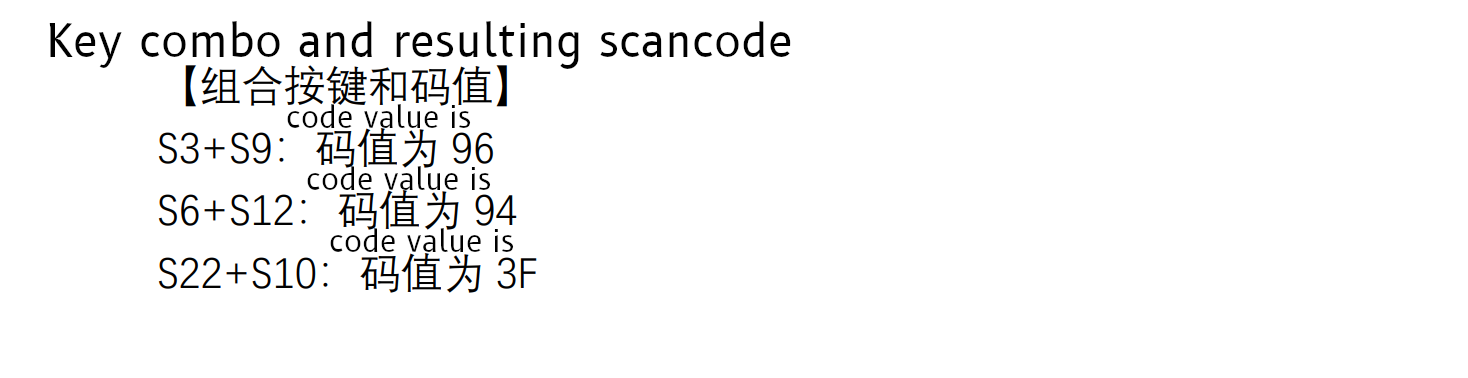
Interestingly, I think the Dim keys may have a confirmation that we have a good demod the codes on the bottom are missing the most significant bit, and when I look back at the scancode table in the datasheet, they make an interesting pattern the bottom two rows, right and left side values match up! If you take a look, Dim 100% is S1 , Dim 75% is S19 , Dim 50% is S8 , and Dim 25% is S20 . Cool! Since none of the other codes line up, I am willing to bet the most significant bit is a Combo indicator, and not part of the button (leaving 7 bits for the keycode). And even more interestingly, one of our scancodes ( Off , which is 0x94) shows up just below this table, in the examples. Over all, I think this tells us we have the right bits to look at for determining the scan code! Great news there!
Back to the modulation! So, armed with this knowledge, I was able to refactor my code to match the timings and understanding outlined by the datasheet and ensure things still work. The switch itself has a high degree of tolerance, so being wildly off frequency or a wildly wrong symbol rate may actually still work. It s hard to know if this is more or less correct, but matching documentation seems like a more stable foundation if nothing else. This code has been really reliable, and tends to work just as well as the remote from what I ve been able to determine. I ve been using incredibly low power to avoid any interference, and it s been very robust - a testament to the engineering that went into the outlet hardware, even though it cost less than of a lot of other switches! I have a lot of respect for the folks who built this device - it s incredibly simple, reliable and my guess is this thing will keep working even in some fairly harsh RF environments. The only downside is the fact the manufacturer used the same address for all their devices, rather than programming a unique address for each outlet and remote when the underlying WL116SC chip supports it. I m sure this was done to avoid complexity in assembly (e.g. pairing the remote and outlet, and having to keep those two items together during assembly), but it s still a bummer. I took apart the switch to see if I could dump an EEPROM and change the address in ROM, but the entire thing was potted in waterproof epoxy, which is a very nice feature if this was ever used outdoors. Not good news for tinkering, though!

Unsolved Mysteries At this point, even though I understand the protocol enough to control the device, it still feels like I hit a dead end in my understanding. I m not able to figure out how exactly the scancodes are implemented, and break them down into more specific parts. They are stable and based on the physical wiring of the remote, so I think I m going to leave it a magic number. I have what I was looking for, and these magic constants appear to be the right one to use, even if I did understand how to create the codes itself. This does leave us with a few bits we never resolved, which I ll memorialize below just to be sure I don t forget about them. Question #1: According to the datasheet there should be a preamble. Why do I not see one leading the first message? My hunch is that the trailing 0 at the end of the payload is actually just the preamble for the next message (always rendering the first message invalid?). This would let us claim there s an engineering reason why we are ignoring the weird bit, and also explain away something from the documentation. It s just weird that it wouldn t be present on the first message. This theory is mostly confirmed by measuring the timing and comparing it to the datasheet, but it s not exactly in line with the datasheet timings either (specifically, it s off by 200 s, which is kinda a lot for a system using 400 s timings). I think I could go either way on the last 0 being the preamble for the next message. It could be that the first message is technically invalid, or it could also be that this was not implemented or actively disabled by the vendor for this specific application / device. It s really hard to know without getting the source code for the WL116SC chip in this specific remote or the source in the outlet itself. Question #2: Why are some keycodes 8 bits and others 9 bits? I still have no idea why there sometimes 8 bits (for instance, On ) and other times there are 9 bits (for instance, Off ) in the 8 bit keycode field. I spent some time playing with the trailing zeros, when I try and send an Off with the most significant 8 bits (without the least significant / last 9th bit, which is a 0 ), it does not turn the tree off. If I send an On with 9 bits (an additional 0 after the least significant bit), it does work, but both On and Off work when I send 10, 11 or 12 bits padded with trailing zeros. I suspect my outlet will ignore data after the switch is done reading bits regardless of trailing zeros. The docs tell me there should only be 8 bits, but it won t work unless I send 9 bits for some commands. There s something fishy going on here, and the datasheet isn t exactly right either way. Question #3: How in the heck do those scancodes work? This one drove me nuts. I ve spent countless hours on trying to figure this out, including emailing the company that makes the WL116SC (they re really nice!), and even though they were super kind and generous with documentation and example source, I m still having a hard time lining up their documentation and examples with what I see from my remote. I think the manufacturer of my remote and switch has modified the protocol enough to where there s actually something different going on here. Bummer. I wound up in my place of last resort asking friends over Signal to try and see if they could find a pattern, as well as making multiple pleas to the twittersphere, to no avail (but thank you to Ben Hilburn, devnulling, Andreas Bombe and Larme for your repiles, help and advice!) I still don t understand how they assemble the scan code for instance, if you merely add, you won t know if a key press of 0x05 is 0x03 + 0x02 or if it s 0x01 + 0x04. On the other hand, treating it as two 4-bit integers won t work for 0x10 to 0x15 (since they need 5 bits to represent). It s also likely the most significant bit is a combo indicator, which only leaves 7 bits for the actual keypress data. Stuffing 10 bits of data into 7 bits is likely resulting in some really intricate bit work. On a last ditch whim, I tried to XOR the math into working, but some initial brute forcing to make the math work given the provided examples did not result in anything. It could be a bitpacked field that I don t understand, but I don t think I can make progress on that without inside knowledge and much more work. Here s the table containing the numbers I was working off of:
Keys Key Codes Scancode
S3 + S9 0x01 + 0x03 0x96
S6 + S12 0x07 + 0x09 0x94
S22 + S10 0x0D + 0x0F 0x3F
If anyone has thoughts on how these codes work, I d love to hear about it! Send me an email or a tweet or something - I m a bit stumped. There s some trick here that is being used to encode the combo key in a way that is decodeable. If it s actually not decodeable (which is a real possibility!), this may act as a unique button combo hash which allows the receiver to not actually determine which keys are pressed, but have a unique button that gets sent when a combo is used. I m not sure I know enough to have a theory as to which it may be.

16 November 2020

Bits from Debian: New Debian Developers and Maintainers (September and October 2020)

The following contributors got their Debian Developer accounts in the last two months: The following contributors were added as Debian Maintainers in the last two months: Congratulations!

19 September 2020

Bits from Debian: New Debian Maintainers (July and August 2020)

The following contributors were added as Debian Maintainers in the last two months: Congratulations!

12 September 2020

Markus Koschany: My Free Software Activities in August 2020

Welcome to gambaru.de. Here is my monthly report (+ the first week in September) that covers what I have been doing for Debian. If you re interested in Java, Games and LTS topics, this might be interesting for you. Debian Games

teeworlds
Debian Java Misc Debian LTS This was my 54. month as a paid contributor and I have been paid to work 20 hours on Debian LTS, a project started by Rapha l Hertzog. In that time I did the following: ELTS Extended Long Term Support (ELTS) is a project led by Freexian to further extend the lifetime of Debian releases. It is not an official Debian project but all Debian users benefit from it without cost. The current ELTS release is Debian 8 Jessie . This was my 27. month and I have been paid to work 14,25 hours on ELTS. Thanks for reading and see you next time.

4 September 2020

Dirk Eddelbuettel: nanotime 0.3.2: Tweaks

Another (minor) nanotime release, now at version 0.3.2. This release brings an endianness correction which was kindly contributed in a PR, switches to using the API header exported by RcppCCTZ, and tweaks test coverage a little with respect to r-devel. nanotime relies on the RcppCCTZ package for (efficient) high(er) resolution time parsing and formatting up to nanosecond resolution, and the bit64 package for the actual integer64 arithmetic. Initially implemented using the S3 system, it has benefitted greatly from work by co-author Leonardo who not only rejigged nanotime internals in S4 but also added new S4 types for periods, intervals and durations. The NEWS snippet adds full details.

Changes in version 0.3.2 (2020-09-03)
  • Correct for big endian (Elliott Sales de Andrade in #81).
  • Use the RcppCCTZ_API.h header (Dirk in #82).
  • Conditionally reduce test coverage (Dirk in #83).

Thanks to CRANberries there is also a diff to the previous version. More details and examples are at the nanotime page; code, issue tickets etc at the GitHub repository. If you like this or other open-source work I do, you can now sponsor me at GitHub. For the first year, GitHub will match your contributions.

This post by Dirk Eddelbuettel originated on his Thinking inside the box blog. Please report excessive re-aggregation in third-party for-profit settings.

31 August 2020

Chris Lamb: Free software activities in August 2020

Here is another monthly update covering what I have been doing in the free software world during August 2020 (previous month): I uploaded Lintian versions 2.86.0, 2.87.0, 2.88.0, 2.89.0, 2.90.0, 2.91.0 and 2.92.0, as well as made the following changes:

Reproducible Builds One of the original promises of open source software is that distributed peer review and transparency of process results in enhanced end-user security. However, whilst anyone may inspect the source code of free and open source software for malicious flaws, almost all software today is distributed as pre-compiled binaries. This allows nefarious third-parties to compromise systems by injecting malicious code into ostensibly secure software during the various compilation and distribution processes. The motivation behind the Reproducible Builds effort is to ensure no flaws have been introduced during this compilation process by promising identical results are always generated from a given source, thus allowing multiple third-parties to come to a consensus on whether a build was compromised. The project is proud to be a member project of the Software Freedom Conservancy. Conservancy acts as a corporate umbrella allowing projects to operate as non-profit initiatives without managing their own corporate structure. If you like the work of the Conservancy or the Reproducible Builds project, please consider becoming an official supporter. This month, I:

diffoscope I made the following changes to diffoscope, including preparing and uploading versions 155, 156, 157 and 158 to Debian:

Debian Debian LTS This month I have worked 18 hours on Debian Long Term Support (LTS) and 12 hours on its sister Extended LTS project. You can find out more about the project via the following video:


Uploads to Debian

10 August 2020

Dirk Eddelbuettel: nanotime 0.3.1: Misc Build Fixes for Yuge New Features!

The nanotime 0.3.0 release four days ago was so exciting that we decided to do it again! Kidding aside, and fairly extensive tests notwithstanding we were bitten by a few build errors: who knew clang on macOS needed extra curlies to be happy, another manifestation of Solaris having no idea what a timezone setting America/New_York is, plus some extra pickyness from the SAN tests and whatnot. So Leonardo and I gave it some extra care over the weekend, uploaded it late yesterday and here we are with 0.3.1. Thanks again to CRAN for prompt processing even though they are clearly deluged shortly before their (brief) summer break. nanotime relies on the RcppCCTZ package for (efficient) high(er) resolution time parsing and formatting up to nanosecond resolution, and the bit64 package for the actual integer64 arithmetic. Initially implemented using the S3 system, it has benefitted greatly from work by Leonardo Silvestri who rejigged internals in S4 and now added new types for periods, intervals and durations. The NEWS snippet adds full details.

Changes in version 0.3.1 (2020-08-09)
  • Several small cleanups to ensure a more robust compilation (Leonardo and Dirk in #75 fixing #74).
  • Show Solaris some extra love by skipping tests and examples with a timezone (Dirk in #76).

Thanks to CRANberries there is also a diff to the previous version. More details and examples are at the nanotime page; code, issue tickets etc at the GitHub repository. If you like this or other open-source work I do, you can now sponsor me at GitHub. For the first year, GitHub will match your contributions.

This post by Dirk Eddelbuettel originated on his Thinking inside the box blog. Please report excessive re-aggregation in third-party for-profit settings.

6 August 2020

Dirk Eddelbuettel: nanotime 0.3.0: Yuge New Features!

A fresh major release of the nanotime package for working with nanosecond timestamps is hitting CRAN mirrors right now. nanotime relies on the RcppCCTZ package for (efficient) high(er) resolution time parsing and formatting up to nanosecond resolution, and the bit64 package for the actual integer64 arithmetic. Initially implemented using the S3 system, it has benefitted greatly from work by Leonardo Silvestri who rejigged internals in S4 and now added new types for periods, intervals and durations. This is what is commonly called a big fucking deal!! So a really REALLY big thank you to my coauthor Leonardo for all these contributions. With all these Yuge changes patiently chisseled in by Leonardo, it took some time since the last release and a few more things piled up. Matt Dowle corrected something we borked for integration with the lovely and irreplacable data.table. We also switched to the awesome yet minimal tinytest package by Mark van der Loo, and last but not least we added the beginnings of a proper vignette currently at nine pages but far from complete. The NEWS snippet adds full details.

Changes in version 0.3.0 (2020-08-06)
  • Use tzstr= instead of tz= in call to RcppCCTZ::parseDouble()) (Matt Dowle in #49).
  • Add new comparison operators for nanotime and charcters (Dirk in #54 fixing #52).
  • Switch from RUnit to tinytest (Dirk in #55)
  • Substantial functionality extension in with new types nanoduration, nanoival and nanoperiod (Leonardo in #58, #60, #62, #63, #65, #67, #70 fixing #47, #51, #57, #61, #64 with assistance from Dirk).
  • A new (yet still draft-ish) vignette was added describing the four core types (Leonardo and Dirk in #71).
  • A required compilation flag for Windows was added (Leonardo in #72).
  • RcppCCTZ function are called in new 'non-throwing' variants to not trigger exeception errors (Leonardo in #73).

We also have a diff to the previous version thanks to CRANberries. More details and examples are at the nanotime page; code, issue tickets etc at the GitHub repository. If you like this or other open-source work I do, you can now sponsor me at GitHub. For the first year, GitHub will match your contributions.

This post by Dirk Eddelbuettel originated on his Thinking inside the box blog. Please report excessive re-aggregation in third-party for-profit settings.

5 August 2020

Dirk Eddelbuettel: RcppCCTZ 0.2.8: Minor API Extension

A new minor release 0.2.8 of RcppCCTZ is now on CRAN. RcppCCTZ uses Rcpp to bring CCTZ to R. CCTZ is a C++ library for translating between absolute and civil times using the rules of a time zone. In fact, it is two libraries. One for dealing with civil time: human-readable dates and times, and one for converting between between absolute and civil times via time zones. And while CCTZ is made by Google(rs), it is not an official Google product. The RcppCCTZ page has a few usage examples and details. This package was the first CRAN package to use CCTZ; by now at least three others do using copies in their packages which remains less than ideal. This version adds three no throw variants of three existing functions, contributed again by Leonardo. This will be used in an upcoming nanotime release which we are finalising now.

Changes in version 0.2.8 (2020-08-04)
  • Added three new nothrow variants (for win32) needed by the expanded nanotime package (Leonardo in #37)

We also have a diff to the previous version thanks to CRANberries. More details are at the RcppCCTZ page; code, issue tickets etc at the GitHub repository. If you like this or other open-source work I do, you can now sponsor me at GitHub. For the first year, GitHub will match your contributions.

This post by Dirk Eddelbuettel originated on his Thinking inside the box blog. Please report excessive re-aggregation in third-party for-profit settings.

30 June 2020

Russ Allbery: Review: The Fifth Risk

Review: The Fifth Risk, by Michael Lewis
Publisher: W.W. Norton
Copyright: 2018
Printing: 2019
ISBN: 0-393-35745-7
Format: Kindle
Pages: 254
The Fifth Risk starts with the presidential transition. Max Stier, the first person profiled by Lewis in this book, is the founder of the Partnership for Public Service. That foundation helped push through laws to provide more resources and structure for the transition of the United States executive branch from one president to the next. The goal was to fight wasted effort, unnecessary churn, and pointless disruption in the face of each administration's skepticism about everyone who worked for the previous administration.
"It's Groundhog Day," said Max. "The new people come in and think that the previous administration and the civil service are lazy or stupid. Then they actually get to know the place they are managing. And when they leave, they say, 'This was a really hard job, and those are the best people I've ever worked with.' This happens over and over and over."
By 2016, Stier saw vast improvements, despite his frustration with other actions of the Obama administration. He believed their transition briefings were one of the best courses ever produced on how the federal government works. Then that transition process ran into Donald Trump. Or, to be more accurate, that transition did not run into Donald Trump, because neither he nor anyone who worked for him were there. We'll never know how good the transition information was because no one ever listened to or read it. Meetings were never scheduled. No one showed up. This book is not truly about the presidential transition, though, despite its presence as a continuing theme. The Fifth Risk is, at its heart, an examination of government work, the people who do it, why it matters, and why you should care about it. It's a study of the surprising and misunderstood responsibilities of the departments of the United States federal government. And it's a series of profiles of the people who choose this work as a career, not in the upper offices of political appointees, but deep in the civil service, attempting to keep that system running. I will warn now that I am far too happy that this book exists to be entirely objective about it. The United States desperately needs basic education about the government at all levels, but particularly the federal civil service. The public impression of government employees is skewed heavily towards the small number of public-facing positions and towards paperwork frustrations, over which the agency usually has no control because they have been sabotaged by Congress (mostly by Republicans, although the Democrats get involved occasionally). Mental images of who works for the government are weirdly selective. The Coast Guard could say "I'm from the government and I'm here to help" every day, to the immense gratitude of the people they rescue, but Reagan was still able to use that as a cheap applause line in his attack on government programs. Other countries have more functional and realistic social attitudes towards their government workers. The United States is trapped in a politically-fueled cycle of contempt and ignorance. It has to stop. And one way to help stop it is someone with Michael Lewis's story-telling skills writing a different narrative. The Fifth Risk is divided into a prologue about presidential transitions, three main parts, and an afterword (added in current editions) about a remarkable government worker whom you likely otherwise would never hear about. Each of the main parts talks about a different federal department: the Department of Energy, the Department of Agriculture, and the Department of Commerce. In keeping with the theme of the book, the people Lewis profiles do not do what you might expect from the names of those departments. Lewis's title comes from his discussion with John MacWilliams, a former Goldman Sachs banker who quit the industry in search of more personally meaningful work and became the chief risk officer for the Department of Energy. Lewis asks him for the top five risks he sees, and if you know that the DOE is responsible for safeguarding nuclear weapons, you will be able to guess several of them: nuclear weapons accidents, North Korea, and Iran. If you work in computer security, you may share his worry about the safety of the electrical grid. But his fifth risk was project management. Can the government follow through on long-term hazardous waste safety and cleanup projects, despite constant political turnover? Can it attract new scientists to the work of nuclear non-proliferation before everyone with the needed skills retires? Can it continue to lay the groundwork with basic science for innovation that we'll need in twenty or fifty years? This is what the Department of Energy is trying to do. Lewis's profiles of other departments are similarly illuminating. The Department of Agriculture is responsible for food stamps, the most effective anti-poverty program in the United States with the possible exception of Social Security. The section on the Department of Commerce is about weather forecasting, specifically about NOAA (the National Oceanic and Atmospheric Administration). If you didn't know that all of the raw data and many of the forecasts you get from weather apps and web sites are the work of government employees, and that AccuWeather has lobbied Congress persistently for years to prohibit the NOAA from making their weather forecasts public so that AccuWeather can charge you more for data your taxes already paid for, you should read this book. The story of American contempt for government work is partly about ignorance, but it's also partly about corporations who claim all of the credit while selling taxpayer-funded resources back to you at absurd markups. The afterword I'll leave for you to read for yourself, but it's the story of Art Allen, a government employee you likely have never heard of but whose work for the Coast Guard has saved more lives than we are able to measure. I found it deeply moving. If you, like I, are a regular reader of long-form journalism and watch for new Michael Lewis essays in particular, you've probably already read long sections of this book. By the time I sat down with it, I think I'd read about a third in other forms on-line. But the profiles that I had already read were so good that I was happy to read them again, and the additional stories and elaboration around previously published material was more than worth the cost and time investment in the full book.
It was never obvious to me that anyone would want to read what had interested me about the United States government. Doug Stumpf, my magazine editor for the past decade, persuaded me that, at this strange moment in American history, others might share my enthusiasm.
I'll join Michael Lewis in thanking Doug Stumpf. The Fifth Risk is not a proposal for how to fix government, or politics, or polarization. It's not even truly a book about the Trump presidency or about the transition. Lewis's goal is more basic: The United States government is full of hard-working people who are doing good and important work. They have effectively no public relations department. Achievements that would result in internal and external press releases in corporations, not to mention bonuses and promotions, go unnoticed and uncelebrated. If you are a United States citizen, this is your government and it does important work that you should care about. It deserves the respect of understanding and thoughtful engagement, both from the citizenry and from the politicians we elect. Rating: 10 out of 10

19 April 2020

Enrico Zini: Little wonders

Gibbsdavidl/CatterPlots
devel
Did you ever wish you could make scatter plots with cat shaped points? Now you can! - Gibbsdavidl/CatterPlots
What is the best tool to use for drawing vector pictures? For me and probably for many others, the answer is pretty obvious: Illustrator, or, maybe, Inkscape.
A coloring book to help folks understand how SELinux works. - mairin/selinux-coloring-book
The EURion constellation (also known as Omron rings[1] or doughnuts[2]) is a pattern of symbols incorporated into a number of banknote designs worldwide since about 1996. It is added to help imaging software detect the presence of a banknote in a digital image. Such software can then block the user from reproducing banknotes to prevent counterfeiting using colour photocopiers. According to research from 2004, the EURion constellation is used for colour photocopiers but probably not used in computer software.[3] It has been reported that Adobe Photoshop will not allow editing of an image of a banknote, but in some versions this is believed to be due to a different, unknown digital watermark rather than the EURion constellation.[4][3]
This huge collection of non-scary optical illusions and fascinating visual phenomena emphasizes interactive exploration, beauty, and scientific explanation.
Generated photos are created from scratch by AI systems. All images can be used for any purpose without worrying about copyrights, distribution rights, infringement claims, or royalties.
Dokumentarfilm ber die Rangierer im Bahnhof Dresden-Friedrichstadt in der DDR aus dem Jahr 1984.
Il termine sardo femina accabadora, femina agabbad ra o, pi comunemente, agabbadora o accabadora (s'agabbad ra, lett. "colei che finisce", deriva dal sardo s'acabbu, "la fine" o dallo spagnolo acabar, "terminare") denota la figura storicamente incerta di una donna che si incaricava di portare la morte a persone di qualunque et , nel caso in cui queste fossero in condizioni di malattia tali da portare i familiari o la stessa vittima a richiederla. In realt non ci sono prove di tale pratica, che avrebbe riguardato alcune regioni sarde come Marghine, Planargia e Gallura[1]. La pratica non doveva essere retribuita dai parenti del malato poich il pagare per dare la morte era contrario ai dettami religiosi e della superstizione.
Alright the people have spoken and they want more cat genetics. So, I present to you all "Cat Coat Genetics 101: A Tweetorial", feat. pics of many real life cats (for science, of course...this baby is Caterpillar).

18 March 2020

Dirk Eddelbuettel: RcppCCTZ 0.2.7

A new release 0.2.7 of RcppCCTZ is now at CRAN. RcppCCTZ uses Rcpp to bring CCTZ to R. CCTZ is a C++ library for translating between absolute and civil times using the rules of a time zone. In fact, it is two libraries. One for dealing with civil time: human-readable dates and times, and one for converting between between absolute and civil times via time zones. And while CCTZ is made by Google(rs), it is not an official Google product. The RcppCCTZ page has a few usage examples and details. This package was the first CRAN package to use CCTZ; by now at least three others do using copies in their packages which remains less than ideal. This version adds internal extensions, contributed by Leonardo, which support upcoming changes to the nanotime package we are working on.

Changes in version 0.2.7 (2020-03-18)
  • Added functions _RcppCCTZ_convertToCivilSecond that converts a time point to the number of seconds since epoch, and _RcppCCTZ_convertToTimePoint that converts a number of seconds since epoch into a time point; these functions are only callable from C level (Leonardo in #34 and #35).
  • Added function _RcppCCTZ_getOffset that returns the offset at a speficied time-point for a specified timezone; this function is only callable from C level (Leonardo in #32).

We also have a diff to the previous version thanks to CRANberries. More details are at the RcppCCTZ page; code, issue tickets etc at the GitHub repository. If you like this or other open-source work I do, you can now sponsor me at GitHub. For the first year, GitHub will match your contributions.

This post by Dirk Eddelbuettel originated on his Thinking inside the box blog. Please report excessive re-aggregation in third-party for-profit settings.

15 March 2020

Antoine Beaupr : Remote presence tools for social distancing

As a technologist, I've been wondering how I can help people with the rapidly spreading coronavirus pandemic. With the world entering the "exponential stage" (e.g. Canada, the USA and basically all of Europe), everyone should take precautions and limit practice Social Distancing (and not dumbfuckery). But this doesn't mean we should dig ourselves in a hole in our basement: we can still talk to each other on the internet, and there are great, and free, tools available to do this. As part of my work as a sysadmin, I've had to answer questions about this a few times and I figured it was useful to share this more publicly.

Just say hi using whatever First off, feel free to use the normal tools you normally use: Signal, Facetime, Skype, Zoom, and Discord can be fine to connect with your folks, and since it doesn't take much to make someone's day please do use those tools to call your close ones and say "hi". People, especially your older folks, will feel alone and maybe scared in those crazy times. Every little bit you can do will help, even if it's just a normal phone call, an impromptu balcony fanfare, a remote workout class, or just a sing-along from your balcony, anything goes. But if those tools don't work well for some reason, or you want to try something new, or someone doesn't have an iPad, or it's too dang cold to go on your balcony, you should know there are other alternatives that you can use.

Jitsi We've been suggesting our folks use a tool called "Jitsi". Jitsi is a free software platform to host audio/video conferences. It has a web app which means anyone with a web browser can join a session. It can also do "screen sharing" if you need to work together on a project. There are many "instances", but here's a subset I know about: You can connect to those with your web browser directly. If your web browser doesn't work, try switching to another (e.g. if Firefox doesn't work, try Chrome and vice-versa). There are also apps for desktop and mobile apps (F-Droid, Google Play, Apple Store) that will work better than just using your browser. Jitsi should scale for small meetings up to a dozen people.

Mumble ... but beyond that, you might have trouble doing a full video-conference with a lot of people anyways. If you need to have a large conference with a lot of people, or if you have bandwidth and reliability problems with Jitsi, you can also try Mumble. Mumble is an audio-only conferencing service, similar to Discord or Teamspeak, but made with free software. It requires users to install an app but there are clients for every platform out there (F-Droid, Google Play, Apple Store). Mumble is harder to setup, but is much more efficient in terms of bandwidth and latency. In other words, it will just scale and sound better. Mumble ships with a list of known servers, but you can also connect to those trusted ones:
  • mumble.mayfirst.org - Mayfirst (see also their instructions on how to use it, hosted in New York city
  • mumble.riseup.net - Riseup, an autonomous collective, hosted in Seattle (ask me if you need their password) not a public service
  • talk.systemli.org - systemli, a left-wing network and technics-collective, hosted in Berlin

Live streaming If for some reason those tools still don't scale, you might have a bigger problem on your hands. If your audience is over 100 people, you will not be able to all join in the same conference together. And besides, maybe you just want to broadcast some news and do not need audio or video feedback from the audience. In this case, you need "live streaming". Here, proprietary services are Twitch, Livestream.com and Youtube. But the community also provides alternatives to those. This is more complicated to setup, but just to get you started, I'll link to: For either of those tools, you need an app on your desktop. The Mayfirst instructions use OBS Studio for this, but it might be possible to hotwire VLC to stream video from your computer as well.

Text chat When all else fails, text should go through. Slack, Twitter and Facebook are the best known alternatives here, obviously. I would warn against spending too much time on those, as they can foment harmful rumors and can spread bullshit like a virus on any given day. The situation does not make that any better. But it can be a good way to keep in touch with your loved ones. But if you want to have a large meetings with a crazy number of people, text can actually accomplish wonders. Internet Relay Chat also known as "IRC" (and which oldies might have experienced for a bit as mIRC) is, incredibly, still alive at the venerable age of 30 years old. It is mainly used by free software projects, but can be used by anyone. Here are some networks you can try: Those are all web interface to the IRC networks, but there are also a plenitude of IRC apps you can install on your desktop if you want the full experience.

Whiteboards and screensharing I decided to add this section later on because it's a frequently mentioned "oh but you forgot..." comment I get from this post.
  • Big Blue Button - seems to check all the boxes: free software, VoIP integration, whiteboarding and screen sharing, works from a web browser
  • CodiMD: collaborative text editor with UML and diagrams support
  • Excalidraw: (collaborative) whiteboard tool that lets you easily sketch diagrams that have a hand-drawn feel
I'll also mention that collaborative editors, in general, like Etherpad are just great for taking minutes because you don't have that single person with the load of writing down what people are saying and is too busy to talk. Google Docs and Nextcloud have similar functionality, of course. Update, public Big Blue Button instances: BBB requires one user to register to start the conference, but once that's done, anyone with the secret URL can join.

Common recommendations Regardless of the tools you pick, audio and video streaming is a technical challenge. A lot of things happen under the hood when you pick up your phone and dial a number, and sometimes using a desktop, it can be difficult to get everything "just right". Some advice:
  1. get a good microphone and headset: good audio really makes a difference in how pleasing the experience will be, both for you and your peers. good hardware will reduce echo, feedback and other audio problems. (see also my audio docs)
  2. check your audio/video setup before joining the meeting, ideally with another participant on the same platform you will use
  3. find a quiet place to meet: even a good microphone will pick up noises from the environment, if you reduce this up front, everything will sound better. if you do live streaming and want high quality recording, considering setting up a smaller room to do recording. (tip: i heard of at least one journalist hiding in a closer full of clothes to make recordings, as it dampens the sound!)
  4. mute your microphone when you are not speaking (spacebar in Jitsi, follow the "audio wizard" in Mumble)
If you have questions or need help, feel free to ask! Comment on this blog or just drop me an email (see contact), I'd be happy to answer your questions.

Other ideas Inevitably, when I write a post like this, someone writes something like "I can't believe you did not mention APL!" Here's a list of tools I have not mentioned here, deliberately or because I forgot:
  • Nextcloud Talk - needs access to a special server, but can be used for small meetings (less than 5, or so i heard)
  • Jabber/XMPP - yes, I know, XMPP can do everything and it's magic. but I've given up a while back, and I don't think setting up audio conferences with multiple enough is easy enough to make the cut here
  • Signal - signal is great. i use it every day. it's the primary way I do long distance, international voice calls for free, and the only way I do video-conferencing with family and friends at all. but it's one to one only, and the group (text) chat kind of sucks
Also, all the tools I recommend above are made of free software, which means they can be self-hosted. If things go bad and all those services stop existing, it should be possible for you to run your own instance. Let me know if I forgot anything, but in a friendly way. And stay safe out there. Update: a similar article from the good folks at systemli also recommends Mastodon, Ticker, Wikis and Etherpad. Update 2: same, at SFC, which also mentions Firefox Send and Etherpad (and now I wish I did).

19 November 2017

Louis-Philippe V ronneau: DebConf Videoteam sprint report - day 0

First day of the videoteam autumn sprint! Well, I say first day, but in reality it's more day 0. Even though most of us have arrived in Cambridge already, we are still missing a few people. Last year we decided to sprint in Paris because most of our video gear is stocked there. This year, we instead chose to sprint a few days before the Cambridge Mini-Debconf to help record the conference afterwards. Since some of us arrived very late and the ones who did arrive early are still mostly jet lagged (that includes me), I'll use this post to introduce the space we'll be working from this week and our general plan for the sprint. House Party After some deliberations, we decided to rent a house for a week in Cambridge: finding a work space to accommodate us and all our gear proved difficult and we decided mixing accommodation and work would be a good idea. I've only been here for a few hours, but I have to say I'm pretty impressed by the airbnb we got. Last time I checked (it seems every time I do, some new room magically appears), I counted 5 bedrooms, 6 beds, 5 toilets and 3 shower rooms. Heck, there's even a solarium and a training room with weights and a punching bag on the first floor. Having a whole house to ourselves also means we have access to a functional kitchen. I'd really like to cook at least a few meals during the week. There's also a cat! Picture of a black cat I took from Wikipedia. It was too dark outside to use mine It's not the house's cat per say, but it's been hanging out around the house for most of the day and makes cute faces trying to convince us to let it come inside. Nice try cat. Nice try. Here are some glamour professional photos of what the place looks like on a perfect summer day, just for the kick of it: The view from the garden The Kitchen One of the multiple bedrooms Of course, reality has trouble matching all the post-processing filters. Plan for the week Now on a more serious note; apart from enjoying the beautiful city of Cambridge, here's what the team plans to do this week: tumbleweed Stefano wants to continue refactoring our ansible setup. A lot of things have been added in the last year, but some of it are hacks we should remove and implement correctly. highvoltage Jonathan won't be able to come to Cambridge, but plans to work remotely, mainly on our desktop/xfce session implementation. Another pile of hacks waiting to be cleaned! ivodd Ivo has been working a lot of the pre-ansible part of our installation and plans to continue working on that. At the moment, creating an installation USB key is pretty complicated and he wants to make that simpler. olasd Nicolas completely reimplemented our streaming setup for DC17 and wants to continue working on that. More specifically, he wants to write scripts to automatically setup and teardown - via API calls - the distributed streaming network we now use. Finding a way to push TLS certificates to those mirrors, adding a live stream viewer on video.debconf.org and adding a viewer to our archive are also things he wants to look at. pollo For my part, I plan to catch up with all the commits in our ansible repository I missed since last year's sprint and work on documentation. It would be very nice if we could have a static website describing our work so that others (at mini-debconfs for examples) could replicate it easily. If I have time, I'll also try to document all the ansible roles we have written. Stay tuned for more daily reports!

10 November 2017

Thadeu Lima de Souza Cascardo: Software Freedom Strategy with Community Projects

It's been some time since I last wrote. Life and work have been busy. At the same time, the world has been busy, and as I would love to write a larger post, I will try to be short here. I would love to touch on the Librem 5 and postmarketOS. In fact, I had, in a podcast in Portuguese, Papo Livre. Maybe, I'll touch a little on the latter. Some of the inspiration for this post include: All of those led me to understand how software freedom is under attack, in particular how copyleft in under attack. And, as I talked during FISL, though many might say that "Open Source has won", end users software freedom has not. Lots of companies have co-opted "free software" but give no software freedom to their users. They seem friends with free software, and they are. Because they want software to be free. But freedom should not be a value for software itself, it needs to be a value for people, not only companies or people who are labeled software developers, but all people. That's why I want to stop talking about free software, and talk more about software freedom. Because I believe the latter is more clear about what we are talking about. I don't mind that we use whatever label, as long as we stablish its meaning during conversations, and set the tone to distinguish them. The thing is: free software does not software freedom make. Not by itself. As Bradley Kuhn puts it: it's not magic pixie dust. Those who have known me for years might remember me as a person who studied free software licenses and how I valued copyleft, the GPL specifically, and how I concerned myself with topics like license compatibility and other licensing matters. Others might remember me as a person who valued a lot about upstreaming code. Not carrying changes to software openly developed that you had not made an effort to put upstream. I can't say I was wrong on both accounts. I still believe in those things. I still believe in the importance of copyleft and the GPL. I still value sharing your code in the commons by going upstream. But I was certaily wrong in valuing them too much. Or not giving as much or even more value to distribution efforts of getting software freedom to the users. And it took me a while in seeing how many people also saw the GPL as a tool to get code upstream. You see that a lot in Linus' discourse about the GPL. And that is on the minds of a lot of people, who I have seen argue that copyleft is not necessary for companies to contribute code back. But that's the problem. The point is not about getting code upstream. But about assuring people have the freedom to run a modified version of the software they received on their computers. It turns out that many examples of companies who had contributed code upstream, have not delivered that freedom to their end-users, who had received a modified version of that same software, which is not free. Bradley Kuhn also alerts us that many companies have been replacing copyleft software with non-copyleft software. And I completely agree with him that we should be writing more copyleft software that we hold copyright for, so we can enforce it. But looking at what has been happening recently in the Linux community about enforcement, even thought I still believe in enforcement as an strategy, I think we need much more than that. And one of those strategies is delivering more free software that users may be able to install on their own computers. It's building those replacements for software that people have been using for any reason. Be it the OS they get when they buy a device, or the application they use for communication. It's not like the community is not doing it, it's just that we need to acknowledge that this is a necessary strategy to guarantee software freedom. That distribution of software that users may easily install on their computers is as much or even more valuable than developing software closer to the hacker/developer community. That doing downstream changes to free software in the effort of getting them to users is worth it. That maintaining that software stable and secure for users is a very important task. I may be biased when talking about that, as I have been shifting from doing upstream work to downstream work and both on the recent years. But maybe that's what I needed to realize that upstreaming does not necessarily guarantees that users will get software freedom. I believe we need to talk more about that. I have seen many people dear to me disregard that difference between the freedom of the user and the freedom of software. There is much more to talk about that, go into detail about some of those points, and I think we need to debate more. I am subscribed to the libreplanet-discuss mailing list. Come join us in discussing about software freedom there, if you want to comment on anything I brought up here. As I promised I would, I would like to mention about postmarketOS, which is an option users have now to get some software freedom on some mobile devices. It's an effort I wanted to build myself, and I applaud the community that has developed around it and has been moving forward so quickly. And it's a good example of a balance between upstream and dowstream code that gets to deliver a better level of software freedom to users than the vendor ever would. I wanted to write about much of the topics I brought up today, but postponed that for some time. I was motivated by recent events in the community, and I am really disappointed at some the free software players and some of the events that happened in the last few years. That got me into thinking in how we need to manifest ourselves about those issues, so people know how we feel. So here it is: I am disappointed at how the Linux Foundation handled the situation about Software Freedom Conversancy taking a case against VMWare; I am disappointed about how Software Freedom Law Center handled a trademark issue against the Software Freedom Conservancy; and I really appreciate all the work the Software Freedom Conservancy has been doing. I have supported them for the last two years, and I urge you to become a supporter too.

4 November 2017

Louis-Philippe V ronneau: Migrating my website to Pelican

After too much time lying to myself, telling myself things like "I'll just add this neat feature I want on my blog next week", I've finally made the big jump, ditched django and migrated my website to Pelican. I'm going to the Cambridge Mini-Debconf at the end of the month for the Debconf Videoteam Autumn sprint and I've taken the task of making daily sprint reports for the team. That in return means I have to publish my blog on Planet Debian. My old website not having feeds made this a little hard and this perfect storm gave me the energy to make the migration happen. Anyway, django was fun. Building a (crappy) custom blogging engine with it taught me some rough basics, but honestly I don't know why I ever thought it was a good idea. Don't get me wrong: django is great and should definitely be used for large and complicated websites. My blog just ain't one. Migrating to Pelican was pretty easy since it also uses Jinja2 templates and generates content from Mardown. The hardest part was actually bending it to replicate the weird and specific behavior I wanted it to have. So yeah, woooo, I migrated to Pelican. Who cares, right? Well, if you are amongst the very, very few people who read the blog posts I mainly write for myself, you'll be please to know that: Here's a bonus picture of a Pelican from Wikimedia, just for the sake of it: A pelican

1 November 2017

Petter Reinholdtsen: Some notes on fault tolerant storage systems

If you care about how fault tolerant your storage is, you might find these articles and papers interesting. They have formed how I think of when designing a storage system. Several of these research papers are based on data collected from hundred thousands or millions of disk, and their findings are eye opening. The short story is simply do not implicitly trust RAID or redundant storage systems. Details matter. And unfortunately there are few options on Linux addressing all the identified issues. Both ZFS and Btrfs are doing a fairly good job, but have legal and practical issues on their own. I wonder how cluster file systems like Ceph do in this regard. After all, there is an old saying, you know you have a distributed system when the crash of a compyter you have never heard of stops you from getting any work done. The same holds true if fault tolerance do not work. Just remember, in the end, it do not matter how redundant, or how fault tolerant your storage is, if you do not continuously monitor its status to detect and replace failed disks.

17 October 2017

Russ Allbery: Bundle haul

Confession time: I started making these posts (eons ago) because a close friend did as well, and I enjoyed reading them. But the main reason why I continue is because the primary way I have to keep track of the books I've bought and avoid duplicates is, well, grep on these posts. I should come up with a non-bullshit way of doing this, but time to do more elegant things is in short supply, and, well, it's my blog. So I'm boring all of you who read this in various places with my internal bookkeeping. I do try to at least add a bit of commentary. This one will be more tedious than most since it includes five separate Humble Bundles, which increases the volume a lot. (I just realized I'd forgotten to record those purchases from the past several months.) First, the individual books I bought directly: Ilona Andrews Sweep in Peace (sff)
Ilona Andrews One Fell Sweep (sff)
Steven Brust Vallista (sff)
Nicky Drayden The Prey of Gods (sff)
Meg Elison The Book of the Unnamed Midwife (sff)
Pat Green Night Moves (nonfiction)
Ann Leckie Provenance (sff)
Seanan McGuire Once Broken Faith (sff)
Seanan McGuire The Brightest Fell (sff)
K. Arsenault Rivera The Tiger's Daughter (sff)
Matthew Walker Why We Sleep (nonfiction)
Some new books by favorite authors, a few new releases I heard good things about, and two (Night Moves and Why We Sleep) from references in on-line articles that impressed me. The books from security bundles (this is mostly work reading, assuming I'll get to any of it), including a blockchain bundle: Wil Allsop Unauthorised Access (nonfiction)
Ross Anderson Security Engineering (nonfiction)
Chris Anley, et al. The Shellcoder's Handbook (nonfiction)
Conrad Barsky & Chris Wilmer Bitcoin for the Befuddled (nonfiction)
Imran Bashir Mastering Blockchain (nonfiction)
Richard Bejtlich The Practice of Network Security (nonfiction)
Kariappa Bheemaiah The Blockchain Alternative (nonfiction)
Violet Blue Smart Girl's Guide to Privacy (nonfiction)
Richard Caetano Learning Bitcoin (nonfiction)
Nick Cano Game Hacking (nonfiction)
Bruce Dang, et al. Practical Reverse Engineering (nonfiction)
Chris Dannen Introducing Ethereum and Solidity (nonfiction)
Daniel Drescher Blockchain Basics (nonfiction)
Chris Eagle The IDA Pro Book, 2nd Edition (nonfiction)
Nikolay Elenkov Android Security Internals (nonfiction)
Jon Erickson Hacking, 2nd Edition (nonfiction)
Pedro Franco Understanding Bitcoin (nonfiction)
Christopher Hadnagy Social Engineering (nonfiction)
Peter N.M. Hansteen The Book of PF (nonfiction)
Brian Kelly The Bitcoin Big Bang (nonfiction)
David Kennedy, et al. Metasploit (nonfiction)
Manul Laphroaig (ed.) PoC GTFO (nonfiction)
Michael Hale Ligh, et al. The Art of Memory Forensics (nonfiction)
Michael Hale Ligh, et al. Malware Analyst's Cookbook (nonfiction)
Michael W. Lucas Absolute OpenBSD, 2nd Edition (nonfiction)
Bruce Nikkel Practical Forensic Imaging (nonfiction)
Sean-Philip Oriyano CEHv9 (nonfiction)
Kevin D. Mitnick The Art of Deception (nonfiction)
Narayan Prusty Building Blockchain Projects (nonfiction)
Prypto Bitcoin for Dummies (nonfiction)
Chris Sanders Practical Packet Analysis, 3rd Edition (nonfiction)
Bruce Schneier Applied Cryptography (nonfiction)
Adam Shostack Threat Modeling (nonfiction)
Craig Smith The Car Hacker's Handbook (nonfiction)
Dafydd Stuttard & Marcus Pinto The Web Application Hacker's Handbook (nonfiction)
Albert Szmigielski Bitcoin Essentials (nonfiction)
David Thiel iOS Application Security (nonfiction)
Georgia Weidman Penetration Testing (nonfiction)
Finally, the two SF bundles: Buzz Aldrin & John Barnes Encounter with Tiber (sff)
Poul Anderson Orion Shall Rise (sff)
Greg Bear The Forge of God (sff)
Octavia E. Butler Dawn (sff)
William C. Dietz Steelheart (sff)
J.L. Doty A Choice of Treasons (sff)
Harlan Ellison The City on the Edge of Forever (sff)
Toh Enjoe Self-Reference ENGINE (sff)
David Feintuch Midshipman's Hope (sff)
Alan Dean Foster Icerigger (sff)
Alan Dean Foster Mission to Moulokin (sff)
Alan Dean Foster The Deluge Drivers (sff)
Taiyo Fujii Orbital Cloud (sff)
Hideo Furukawa Belka, Why Don't You Bark? (sff)
Haikasoru (ed.) Saiensu Fikushon 2016 (sff anthology)
Joe Haldeman All My Sins Remembered (sff)
Jyouji Hayashi The Ouroboros Wave (sff)
Sergei Lukyanenko The Genome (sff)
Chohei Kambayashi Good Luck, Yukikaze (sff)
Chohei Kambayashi Yukikaze (sff)
Sakyo Komatsu Virus (sff)
Miyuki Miyabe The Book of Heroes (sff)
Kazuki Sakuraba Red Girls (sff)
Robert Silverberg Across a Billion Years (sff)
Allen Steele Orbital Decay (sff)
Bruce Sterling Schismatrix Plus (sff)
Michael Swanwick Vacuum Flowers (sff)
Yoshiki Tanaka Legend of the Galactic Heroes, Volume 1: Dawn (sff)
Yoshiki Tanaka Legend of the Galactic Heroes, Volume 2: Ambition (sff)
Yoshiki Tanaka Legend of the Galactic Heroes, Volume 3: Endurance (sff)
Tow Ubukata Mardock Scramble (sff)
Sayuri Ueda The Cage of Zeus (sff)
Sean Williams & Shane Dix Echoes of Earth (sff)
Hiroshi Yamamoto MM9 (sff)
Timothy Zahn Blackcollar (sff)
Phew. Okay, all caught up, and hopefully won't have to dump something like this again in the near future. Also, more books than I have any actual time to read, but what else is new.

10 October 2017

Yves-Alexis Perez: OpenPGP smartcard transition (part 1)

A long time ago, I switched my GnuPG setup to a smartcard based one. I kept using the same master key, but: I've been working with that setup for a few years now and it is working perfectly fine. The signature counter on the OpenPGP basic card is a bit north of 5000 which is large but not that huge, all considered (and not counting authentication and decryption key usage).

One very nice feature of using a smartcard is that my laptop (or other machines I work on) never manipulates the private key directly but only sends request to the card, which is a really huge improvement, in my opinion. But it's also not the perfect solution for me: the OpenPGP card uses a proprietary platform from ZeitControl, named BasicCard. We have very few information on the smartcard, besides the fact that Werner Koch trust ZeistControl to not mess up. One caveat for me is that the card does not use a certified secure microcontroler like you would find in smartcard chips found in debit card or electronic IDs. That means it's not really been audited by a competent hardware lab, and thus can't be considered secure against physical attacks. The cardOS software and the application implementing the OpenPGP specification are not public either and have not been audited either, to the best of my knowledge.

At one point I was interested in the Yubikey Neo, especially since the architecture Yubico used was common: a (supposedly) certified platform (secure microcontroler, card OS) and a GlobalPlatform / JavaCard virtual machine. The applet used in the Yubikey Neo is open-source, too, so you could take a look at it and identify any issue.

Unfortunately, Yubico transitioned to a less common and more proprietary infrastructure for Yubikey 4: it's not longer Javacard based, and they don't provide the applet source anymore. This was not really seen as a good move by a lot of people, including Konstantin Ryabitsev (kernel.org administrator). Also, it wasn't possible even for the Yubico Neo to actually build the applet yourself and inject it on the card: when the Yubikey leaves the facility, the applet is already installed and the smartcard is locked (for obvious security reason). I've tried asking about getting naked/empty Yubikey with developers keys to load the applet myself, but it' was apparently not possible or would have required signing an NDA with NXP (the chip maker), which is not really possible as an individual (not that I really want to anyway).

In the meantime, a coworker actually wrote an OpenPGP javacard applet, with the intention to support latest version of the OpenPGP specification, and especially elliptic curve cryptography. The applet is called SmartPGP and has been released on ANSSI github repository. I investigated a bit, and found a smartcard with correct specification: certified (in France or Germany), and supporting Javacard 3.0.4 (required for ECC). The card can do RSA2048 (unfortunately not RSA4096) and EC with NIST (secp256r1, secp384r1, secp521r1) and Brainpool (P256, P384, P512) curves.

I've ordered some cards, and when they arrived started playing. I've built the SmartPGP applet and pushed it to a smartcard, then generated some keys and tried with GnuPG. I'm right now in the process of migrating to a new smartcard based on that setup, which seems to work just fine after few days.

Part two of this serie will describe how to build the applet and inject it in the smartcard. The process is already documented here and there, but there are few things not to forget, like how to lock the card after provisionning, so I guess having the complete process somewhere might be useful in case some people want to reproduce it.

8 October 2017

Ricardo Mones: Cannot enable. Maybe the USB cable is bad?

One of the reasons which made me switch my old 17" BenQ monitor for a Dell U2413 three years ago was it had an integrated SD card reader. I find very convenient to take camera's card out, plug the card into the monitor and click on KDE device monitor's option Open with digiKam to download the photos or videos.

But last week, when trying to reconnect the USB cable to the new board just didn't work and the kernel log messages were not very hopeful:

[190231.770349] usb 2-2.3.3: new SuperSpeed USB device number 15 using xhci_hcd
[190231.890439] usb 2-2.3.3: New USB device found, idVendor=0bda, idProduct=0307
[190231.890444] usb 2-2.3.3: New USB device strings: Mfr=1, Product=2, SerialNumber=3
[190231.890446] usb 2-2.3.3: Product: USB3.0 Card Reader
[190231.890449] usb 2-2.3.3: Manufacturer: Realtek
[190231.890451] usb 2-2.3.3: SerialNumber: F141000037E1
[190231.896592] usb-storage 2-2.3.3:1.0: USB Mass Storage device detected
[190231.896764] scsi host8: usb-storage 2-2.3.3:1.0
[190232.931861] scsi 8:0:0:0: Direct-Access     Generic- SD/MMC/MS/MSPRO  1.00 PQ: 0 ANSI: 6
[190232.933902] sd 8:0:0:0: Attached scsi generic sg5 type 0
[190232.937989] sd 8:0:0:0: [sde] Attached SCSI removable disk
[190243.069680] hub 2-2.3:1.0: hub_ext_port_status failed (err = -71)
[190243.070037] usb 2-2.3-port3: cannot reset (err = -71)
[190243.070410] usb 2-2.3-port3: cannot reset (err = -71)
[190243.070660] usb 2-2.3-port3: cannot reset (err = -71)
[190243.071035] usb 2-2.3-port3: cannot reset (err = -71)
[190243.071409] usb 2-2.3-port3: cannot reset (err = -71)
[190243.071413] usb 2-2.3-port3: Cannot enable. Maybe the USB cable is bad?
...

I was sure USB 3.0 ports were working, because I've already used them with a USB 3.0 drive, so first thought was the monitor USB hub had failed. It seemed unlikely that a cable which has not been moved in 3 years was suddenly failing, is that even possible?

But a few moments later the same cable plugged into a USB 2.0 worked flawlessly and all photos could be downloaded, just noticeably slower.

A bit confused, and thinking that, since everything else was working maybe the cable had to be replaced, it happened I upgraded the system in the meantime. And luck came into rescue, because now it works again in 4.9.30-2+deb9u5 kernel. Looking at the package changelog it seems the fix was this usb:xhci:Fix regression when ATI chipsets detected . So, not a bad cable but a little kernel bug ;-)

Thanks to all involved, specially Ben for the package update!

Next.

Previous.