Search Results: "anarcat"

18 March 2020

Antoine Beaupr : How can I trust this git repository?

Join me in the rabbit hole of git repository verification, and how we could improve it.

Problem statement As part of my work on automating install procedures at Tor, I ended up doing things like:
git clone REPO
./REPO/bootstrap.sh
... something eerily similar to the infamous curl pipe bash method which I often decry. As a short-term workaround, I relied on the SHA-1 checksum of the repository to make sure I have the right code, by running this both on a "trusted" (ie. "local") repository and the remote, then visually comparing the output:
$ git show-ref master
9f9a9d70dd1f1e84dec69a12ebc536c1f05aed1c refs/heads/master
One problem with this approach is that SHA-1 is now considered as flawed as MD5 so it can't be used as an authentication mechanism anymore. It's also fundamentally difficult to compare hashes for humans. The other flaw with comparing local and remote checksums is that we assume we trust the local repository. But how can I trust that repository? I can either:
  1. audit all the code present and all the changes done to it after
  2. or trust someone else to do so
The first option here is not practical in most cases. In this specific use case, I have audited the source code -- I'm the author, even -- what I need is to transfer that code over to another server. (Note that I am replacing those procedures with Fabric, which makes this use case moot for now as the trust path narrows to "trust the SSH server" which I already had anyways. But it's still important for my fellow Tor developers who worry about trusting the git server, especially now that we're moving to GitLab.) But anyways, in most cases, I do need to trust some other fellow developer I collaborate with. To do this, I would need to trust the entire chain between me and them:
  1. the git client
  2. the operating system
  3. the hardware
  4. the network (HTTPS and the CA cartel, specifically)
  5. then the hosting provider (and that hardware/software stack)
  6. and then backwards all the way back to that other person's computer
I want to shorten that chain as much as possible, make it "peer to peer", so to speak. Concretely, it would eliminate the hosting provider and the network, as attackers.

OpenPGP verification My first reaction is (perhaps perversely) to "use OpenPGP" for this. I figured that if I sign every commit, then I can just check the latest commit and see if the signature is good. The first problem here is that this is surprisingly hard. Let's pick some arbitrary commit I did recently:
commit b3c538898b0ed4e31da27fc9ca22cb55e1de0000
Author: Antoine Beaupr  <anarcat@debian.org>
Date:   Mon Mar 16 14:37:28 2020 -0400
    fix test autoloading
    pytest only looks for file names matching  test  by default. We inline
    tests inside the source code directly, so hijack that.
diff --git a/fabric_tpa/pytest.ini b/fabric_tpa/pytest.ini
new file mode 100644
index 0000000..71004ea
--- /dev/null
+++ b/fabric_tpa/pytest.ini
@@ -0,0 +1,3 @@
+[pytest]
+# we inline tests directly in the source code
+python_files = *.py
That's the output of git log -p in my local repository. I signed that commit, yet git log is not telling me anything special. To check the signature, I need something special: --show-signature, which looks like this:
commit b3c538898b0ed4e31da27fc9ca22cb55e1de0000
gpg: Signature faite le lun 16 mar 2020 14:37:53 EDT
gpg:                avec la clef RSA 7B164204D096723B019635AB3EA1DDDDB261D97B
gpg: Bonne signature de  Antoine Beaupr  <anarcat@orangeseeds.org>  [ultime]
gpg:                 alias  Antoine Beaupr  <anarcat@torproject.org>  [ultime]
gpg:                 alias  Antoine Beaupr  <anarcat@anarc.at>  [ultime]
gpg:                 alias  Antoine Beaupr  <anarcat@koumbit.org>  [ultime]
gpg:                 alias  Antoine Beaupr  <anarcat@debian.org>  [ultime]
Author: Antoine Beaupr  <anarcat@debian.org>
Date:   Mon Mar 16 14:37:28 2020 -0400
    fix test autoloading
    pytest only looks for file names matching  test  by default. We inline
    tests inside the source code directly, so hijack that.
Can you tell if this is a valid signature? If you speak a little french, maybe you can! But even if you would, you are unlikely to see that output on your own computer. What you would see instead is:
commit b3c538898b0ed4e31da27fc9ca22cb55e1de0000
gpg: Signature made Mon Mar 16 14:37:53 2020 EDT
gpg:                using RSA key 7B164204D096723B019635AB3EA1DDDDB261D97B
gpg: Can't check signature: No public key
Author: Antoine Beaupr  <anarcat@debian.org>
Date:   Mon Mar 16 14:37:28 2020 -0400
    fix test autoloading
    pytest only looks for file names matching  test  by default. We inline
    tests inside the source code directly, so hijack that.
Important part: Can't check signature: No public key. No public key. Because of course you would see that. Why would you have my key lying around, unless you're me. Or, to put it another way, why would that server I'm installing from scratch have a copy of my OpenPGP certificate? Because I'm a Debian developer, my key is actually part of the 800 keys in the debian-keyring package, signed by the APT repositories. So I have a trust path. But that won't work for someone who is not a Debian developer. It will also stop working when my key expires in that repository, as it already has on Debian buster (current stable). So I can't assume I have a trust path there either. One could work with a trusted keyring like we do in the Tor and Debian project, and only work inside that project, that said. But I still feel uncomfortable with those commands. Both git log and git show will happily succeed (return code 0 in the shell) even though the signature verification failed on the commits. Same with git pull and git merge, which will happily push your branch ahead even if the remote has unsigned or badly signed commits. To actually verify commits (or tags), you need the git verify-commit (or git verify-tag) command, which seems to do the right thing:
$ LANG=C.UTF-8 git verify-commit b3c538898b0ed4e31da27fc9ca22cb55e1de0000
gpg: Signature made Mon Mar 16 14:37:53 2020 EDT
gpg:                using RSA key 7B164204D096723B019635AB3EA1DDDDB261D97B
gpg: Can't check signature: No public key
[1]$
At least it fails with some error code (1, above). But it's not flexible: I can't use it to verify that a "trusted" developer (say one that is in a trusted keyring) signed a given commit. Also, it is not clear what a failure means. Is a signature by an expired certificate okay? What if the key is signed by some random key in my personal keyring? Why should that be trusted?

Worrying about git and GnuPG In general, I'm worried about git's implementation of OpenPGP signatures. There has been numerous cases of interoperability problems with GnuPG specifically that led to security, like EFAIL or SigSpoof. It would be surprising if such a vulnerability did not exist in git. Even if git did everything "just right" (which I have myself found impossible to do when writing code that talks with GnuPG), what does it actually verify? The commit's SHA-1 checksum? The tree's checksum? The entire archive as a zip file? I would bet it signs the commit's SHA-1 sum, but I just don't know, on the top of my head, and neither do git-commit or git-verify-commit say exactly what is happening. I had an interesting conversation with a fellow Debian developer (dkg) about this and we had to admit those limitations:
<anarcat> i'd like to integrate pgp signing into tor's coding practices more, but so far, my approach has been "sign commits" and the verify step was "TBD" <dkg> that's the main reason i've been reluctant to sign git commits. i haven't heard anyone offer a better subsequent step. if torproject could outline something useful, then i'd be less averse to the practice. i'm also pretty sad that git remains stuck on sha1, esp. given the recent demonstrations. all the fancy strong signatures you can make in git won't matter if the underlying git repo gets changed out from under the signature due to sha1's weakness
In other words, even if git implements the arcane GnuPG dialect just so, and would allow us to setup the trust chain just right, and would give us meaningful and workable error messages, it still would fail because it's still stuck in SHA-1. There is work underway to fix that, but in February 2020, Jonathan Corbet described that work as being in a "relatively unstable state", which is hardly something I would like to trust to verify code. Also, when you clone a fresh new repository, you might get an entirely different repository, with a different root and set of commits. The concept of "validity" of a commit, in itself, is hard to establish in this case, because an hostile server could put you backwards in time, on a different branch, or even on an entirely different repository. Git will warn you about a different repository root with warning: no common commits but that's easy to miss. And complete branch switches, rebases and resets from upstream are hardly more noticeable: only a tiny plus sign (+) instead of a star (*) will tell you that a reset happened, along with a warning (forced update) on the same line. Miss those and your git history can be compromised.

Possible ways forward I don't consider the current implementation of OpenPGP signatures in git to be sufficient. Maybe, eventually, it will mature away from SHA-1 and the interface will be more reasonable, but I don't see that happening in the short term. So what do we do?

git evtag The git-evtag extension is a replacement for git tag -s. It's not designed to sign commits (it only verifies tags) but at least it uses a stronger algorithm (SHA-512) to checksum the tree, and will include everything in that tree, including blobs. If that sounds expensive to you, don't worry too much: it takes about 5 seconds to tag the Linux kernel, according to the author. Unfortunately, that checksum is then signed with GnuPG, in a manner similar to git itself, in that it exposes GnuPG output (which can be confusing) and is likely similarly vulnerable to mis-implementation of the GnuPG dialect as git itself. It also does not allow you to specify a keyring to verify against, so you need to trust GnuPG to make sense of the garbage that lives in your personal keyring (and, trust me, it doesn't). And besides, git-evtag is fundamentally the same as signed git tags: checksum everything and sign with GnuPG. The difference is it uses SHA-512 instead of SHA-1, but that's something git will eventually fix itself anyways.

kernel patch attestations The kernel also faces this problem. Linus Torvalds signs the releases with GnuPG, but patches fly all over mailing list without any form of verification apart from clear-text email. So Konstantin Ryabitsev has proposed a new protocol to sign git patches which uses SHA256 to checksum the patch metadata, commit message and the patch itself, and then sign that with GnuPG. It's unclear to me what this solves, if anything, at all. As dkg argues, it would seem better to add OpenPGP support to git-send-email and teach git tools to recognize that (e.g. git-am) at least if you're going to keep using OpenPGP anyways. And furthermore, it doesn't resolve the problems associated with verifying a full archive either, as it only attests "patches".

jcat Unhappy with the current state of affairs, the author of fwupd (Richard Hughes) wrote his own protocol as well, called jcat, which provides signed "catalog files" similar to the ones provided in Microsoft windows. It consists of a "gzip-compressed JSON catalog files, which can be used to store GPG, PKCS-7 and SHA-256 checksums for each file". So yes, it is yet again another wrapper to GnuPG, probably with all the flaws detailed above, on top of being a niche implementation, disconnected from git.

The Update Framework One more thing dkg correctly identified is:
<dkg> anarcat: even if you could do exactly what you describe, there are still some interesting wrinkles that i think would be problems for you. the big one: "git repo's latest commits" is a loophole big enough to drive a truck through. if your adversary controls that repo, then they get to decide which commits to include in the repo. (since every git repo is a view into the same git repo, just some have more commits than others)
In other words, unless you have a repository that has frequent commits (either because of activity or by a bot generating fake commits), you have to rely on the central server to decide what "the latest version" is. This is the kind of problems that binary package distribution systems like APT and TUF solve correctly. Unfortunately, those don't apply to source code distribution, at least not in git form: TUF only deals with "repositories" and binary packages, and APT only deals with binary packages and source tarballs. That said, there's actually no reason why git could not support the TUF specification. Maybe TUF could be the solution to ensure end-to-end cryptographic integrity of the source code itself. OpenPGP-signed tarballs are nice, and signed git tags can be useful, but from my experience, a lot of OpenPGP (or, more accurately, GnuPG) derived tools are brittle and do not offer clear guarantees, and definitely not to the level that TUF tries to address. This would require changes on the git servers and clients, but I think it would be worth it.

Other Projects

OpenBSD There are other tools trying to do parts of what GnuPG is doing, for example minisign and OpenBSD's signify. But they do not integrate with git at all right now. Although I did find a hack] to use signify with git, it's kind of gross...

Golang Unsurprisingly, this is a problem everyone is trying to solve. Golang is planning on hosting a notary which would leverage a "certificate-transparency-style tamper-proof log" which would be ran by Google (see the spec for details). But that doesn't resolve the "evil server" attack, if we treat Google as an adversary (and we should).

Python Python had OpenPGP going for a while on PyPI, but it's unclear if it ever did anything at all. Now the plan seems to be to use TUF but my hunch is that the complexity of the specification is keeping that from moving ahead.

Docker Docker and the container ecosystem has, in theory, moved to TUF in the form of Notary, "a project that allows anyone to have trust over arbitrary collections of data". In practice however, in my somewhat limited experience, setting up TUF and image verification in Docker is far from trivial.

Android and iOS Even in what is possibly one of the strongest models (at least in terms of user friendliness), mobile phones are surprisingly unclear about those kind of questions. I had to ask if Android had end-to-end authentication and I am still not clear on the answer. I have no idea of what iOS does.

Conclusion One of the core problems with everything here is the common usability aspect of cryptography, and specifically the usability of verification procedures. We have become pretty good at encryption. The harder part (and a requirement for proper encryption) is verification. It seems that problem still remains unsolved, in terms of usability. Even Signal, widely considered to be a success in terms of adoption and usability, doesn't properly solve that problem, as users regularly ignore "The security number has changed" warnings... So, even though they deserve a lot of credit in other areas, it seems unlikely that hardcore C hackers (e.g. git and kernel developers) will be able to resolve that problem without at least a little bit of help. And TUF seems like the state of the art specification around here, it would seem wise to start adopting it in the git community as well. Update: git 2.26 introduced a new gpg.minTrustLevel to "tell various signature verification codepaths the required minimum trust level", presumably to control how Git will treat keys in your keyrings, assuming the "trust database" is valid and up to date. For an interesting narrative of how "normal" (without PGP) git verification can fail, see also A Git Horror Story: Repository Integrity With Signed Commits.

11 March 2020

Antoine Beaupr : Font changes

I have worked a bit on the fonts I use recently. From the main font I use every day in my text editor and terminals to this very website, I did a major and (hopefully) thoughtful overhaul of my typography, in the hope of making things easier to use and, to be honest, just prettier.

Editor and Terminal: Fira mono This all started when I found out about the Jetbrains Mono font. I found the idea of ligatures fascinating: the result is truly beautiful. So I do what I often do (sometimes to the despair of some fellow Debian members) and filed a RFP to document my research. As it turns out, Jetbrains Mono is not free enough to be packaged in Debian, because it requires proprietary tools to build. I nevertheless figured I could try another font so I looked at other monospace alternatives. I found the following packages in debian: Those are also "programmer fonts" that caught my interest but somehow didn't land in Debian yet: Because Fira code had ligatures, i ended up giving it a shot. I really like the originality of the font. See, for example, how the @ sign looks when compared to my previous font, Liberation Mono:
A dark terminal window showing the prompt '[SIGPIPE]anarcat@angela:~(master)$' in the Liberation Mono font Liberation Mono
A dark terminal window showing the prompt '[SIGPIPE]anarcat@angela:~(master)$' in the Fira mono font Fira Mono
Interestingly, a colleague (thanks ahf!) pointed me to the Practical Typography post "Ligatures in programming fonts: hell no", which makes the very convincing argument that ligatures are downright dangerous to programming environment. In my experiences with the fonts, it was also not always giving the result I would expect. I also remembered that the Emacs Haskell mode would have this tendency of inserting crazy syntactic sugar like this in source code without being asked, which I found extremely frustrating. Besides, Emacs doesn't support ligatures, unless you count such horrendous hacks which hack at the display time. That's because Emacs' display layer is not based on a modern rendering library like Pango but some scary legacy code that very few people understand. On top of the complexity of the codebase, there is also resistance in including a modern font. So I ended up using Fira mono everywhere I use fixed-width fonts, even though it's not packaged in Debian. That involves the following configuration in my .Xresources (no, I haven't switched to Wayland):
! font settings
Emacs*font: Fira mono
rofi*font: Fira mono 12
! Symbola is to get emojis to display correctly, apt install fonts-symbola
!URxvt*font: xft:Monospace,xft:Symbola
URxvt*font: xft:Fira mono,xft:Symbola
I also dropped this script in ~/.local/share/fonts/download.sh, for lack of a better way, to download all the fonts I'm interested in:
#!/bin/sh
set -e
set -u
wget --no-clobber --continue https://practicaltypography.com/fonts/charter.zip
unzip -u charter.zip
wget --no-clobber --continue https://github.com/adobe-fonts/source-serif-pro/releases/download/3.001R/source-serif-pro-3.001R.zip
unzip -u source-serif-pro-3.001R.zip
wget --no-clobber --continue https://github.com/adobe-fonts/source-sans-pro/releases/download/3.006R/source-sans-pro-3.006R.zip
unzip -u source-sans-pro-3.006R.zip
wget --no-clobber --continue https://github.com/adobe-fonts/source-code-pro/releases/download/2.030R-ro%2F1.050R-it/source-code-pro-2.030R-ro-1.050R-it.zip
unzip -u source-code-pro-2.030R-ro-1.050R-it.zip
wget --no-clobber --continue -O Fira-4.202.zip https://github.com/mozilla/Fira/archive/4.202.zip   true
unzip -u Fira-4.202.zip
Update: I forgot to mention one motivation behind this was to work around a change in the freetype interpreter, discussed in bug 866685 and my upgrades documentation.

Website: Charter That "hell no" article got me interested in the Practical Typography web book, which I read over the weekend. It was an eye opener and I realized I had already some of those concepts implanted; in fact it's probably after reading the Typography in ten minutes guide that I ended up trying Fira sans a few years ago. I have removed that font since then, however, after realising it was taking up an order of magnitude more bandwidth space than the actual page content. I really loved the book, so much that I actually bought it. I liked the concept of it, the look, and the fact that it's a living document. There's a lot of typography work I would need to do on this site to catchup with the recommendations from Matthew Butterick. Switching fonts is only one part of this, but it's something I was excited to work on. So I sat down and reviewed the free fonts Butterick recommends and tried out a few. I ended up settling on Charter, a relatively old (in terms of computing) font designed by Matthew Carter (of Verdana fame) in 1987. Charter really looks great and is surprisingly small. While a single version of Fira varies between 96KiB (Fira Sans Condensed) and 308KiB (Fira Sans Medium Italic), Charter is only 28KiB! While it's still about as large as most of my articles, I found it was a better compromise and decided to make the jump. This site is now in Serif, which is a huge change for me. The change was done with the following CSS:
h1, h2, h3, h4, h5, body  
    /* 
     * Charter: Butterick's favorite, freely available, found on https://practicaltypography.com/free-fonts.html
     * Palatino: Mac OS
     * Palatino Linotype: Windows
     * Noto serif: Android, packaged in Debian
     * Liberation serif: Linux fallback
     * Serif: fallback
     */
    font-family: Charter, Palatino, "Palatino Linotype", "Noto serif", "Liberation serif", serif;
    /* Charter is available from https://practicaltypography.com/charter.html under the liberal Bitstream license */
 
I have also decided to outline headings by making them slanted, using the beautiful italic version of Charter:
h1, h2, h3, h4, h5  
    font-style: italic;
 
I also made the point size larger, if the display is large enough:
/* enlarge body point size for charter for larger displays */
@media (min-device-width: 750px)  
    body  
        font-size: 20px;
        line-height: 1.3; /* default in FF is ~1.48 */
     
 
Modern display (including fonts) have a much higher resolution and the point size on my website was really getting too small to be readable. This, in turn, required a change to the max-width:
#content  
    /* about 2.5 alphabets with charter */
    max-width: 35em;
 
I have kept the footers and "UI" elements in sans-serif though, and kept those aligned on operating system defaults or "system fonts":
/* some hacking at typefaces to get some fresh zest in here
 * fallbacks from:
 * https://en.wikipedia.org/wiki/List_of_typefaces_included_with_Microsoft_Windows
 * https://en.wikipedia.org/wiki/List_of_typefaces_included_with_macOS
 */
.navbar, .footer  
    /*
     * Avenir: Mac, quite different but should still be pretty
     * Gill sans: Mac, Windows, somewhat similar to Avenir (indulge me)
     * Noto sans: Android, packaged in Debian
     * Open sans: Texlive extras AKA Linux, packaged in Debian
     * Fira sans: Mozilla's Firefox OS
     * Liberation sans: Linux fallback
     * Helvetica: general fallback
     * Sans-serif: fallback
     */
    font-family: Avenir, "Gill sans", "Noto sans", "Open sans", "Fira sans", "Liberation sans", Helvetica, sans-serif;
    /* Fira is available from https://github.com/mozilla/Fira/ under the SIL Open Font License */
    /* alternatively, just use system fonts for "controls" instead:
    font-family: -apple-system, BlinkMacSystemFont, "Segoe UI", "Roboto", "Oxygen", "Ubuntu", "Cantarell", "Fira Sans", "Droid Sans", "Helvetica Neue", sans-serif;
    gitlab uses: -apple-system, BlinkMacSystemFont, "Segoe UI", Roboto, "Noto Sans", Ubuntu, Cantarell, "Helvetica Neue", sans-serif, "Apple Color Emoji", "Segoe UI Emoji", "Segoe UI Symbol", "Noto Color Emoji"
    */
 
I've only done some preliminary testing of how this will look like. Although I tested on a few devices (my phone, e-book tablet, an iPad, and of course my laptop), I fully expect things to break on your device. Do let me know if things look better or worse. For future comparison, my site is well indexed in the Internet Wayback Machine and can be used to look at the site before the change. For example, compare the previous article here with its earlier style. The changes to the theme are of course available in my custom ikiwiki bootstrap theme (see in particular commits 0bca0fb7 and d1901fb8), as usual. Enjoy, and let me know what you think! PS: I considered just setting the Charter font in CSS and not adding it as a @font-face. I'm still considering that option and might do so if the performance cost is too big. The Fira mono font is actually set like this for the preformatted sections of the site, but because it's more common (and it's too big) I haven't added it as a font-face. You might want to download the font locally to benefit from the full experience as well. PPS: As it turns out, an earlier version of this post featured exactly that: a non-webfont version of Charter, which works fine if you have a good Charter font available. But it looks absolutely terrible if, like many Linux users, you have the nasty bitmap font shipped with xfonts-100dpi and xfonts-75dpi. So I fixed the webfont and it's unlikely this site will be able to load reasonably well in Linux until those packages are removed or bitmap font rendering is disabled.

2 November 2017

Antoine Beaupr : October 2017 report: LTS, feed2exec beta, pandoc filters, git mediawiki

Debian Long Term Support (LTS) This is my monthly Debian LTS report. This time I worked on the famous KRACK attack, git-annex, golang and the continuous stream of GraphicsMagick security issues.

WPA & KRACK update I spent most of my time this month on the Linux WPA code, to backport it to the old (~2012) wpa_supplicant release. I first published a patchset based on the patches shipped after the embargo for the oldstable/jessie release. After feedback from the list, I also built packages for i386 and ARM. I have also reviewed the WPA protocol to make sure I understood the implications of the changes required to backport the patches. For example, I removed the patches touching the WNM sleep mode code as that was introduced only in the 2.0 release. Chunks of code regarding state tracking were also not backported as they are part of the state tracking code introduced later, in 3ff3323. Finally, I still have concerns about the nonce setup in patch #5. In the last chunk, you'll notice peer->tk is reset, to_set to negotiate a new TK. The other approach I considered was to backport 1380fcbd9f ("TDLS: Do not modify RNonce for an TPK M1 frame with same INonce") but I figured I would play it safe and not introduce further variations. I should note that I share Matthew Green's observations regarding the opacity of the protocol. Normally, network protocols are freely available and security researchers like me can easily review them. In this case, I would have needed to read the opaque 802.11i-2004 pdf which is behind a TOS wall at the IEEE. I ended up reading up on the IEEE_802.11i-2004 Wikipedia article which gives a simpler view of the protocol. But it's a real problem to see such critical protocols developed behind closed doors like this. At Guido's suggestion, I sent the final patch upstream explaining the concerns I had with the patch. I have not, at the time of writing, received any response from upstream about this, unfortunately. I uploaded the fixed packages as DLA 1150-1 on October 31st.

Git-annex The next big chunk on my list was completing the work on git-annex (CVE-2017-12976) that I started in August. It turns out doing the backport was simpler than I expected, even with my rusty experience with Haskell. Type-checking really helps in doing the right thing, especially considering how Joey Hess implemented the fix: by introducing a new type. So I backported the patch from upstream and notified the security team that the jessie and stretch updates would be similarly easy. I shipped the backport to LTS as DLA-1144-1. I also shared the updated packages for jessie (which required a similar backport) and stretch (which didn't) and those Sebastien Delafond published those as DSA 4010-1.

Graphicsmagick Up next was yet another security vulnerability in the Graphicsmagick stack. This involved the usual deep dive into intricate and sometimes just unreasonable C code to try and fit a round tree in a square sinkhole. I'm always unsure about those patches, but the test suite passes, smoke tests show the vulnerability as fixed, and that's pretty much as good as it gets. The announcement (DLA 1154-1) turned out to be a little special because I had previously noticed that the penultimate announcement (DLA 1130-1) was never sent out. So I made a merged announcement to cover both instead of re-sending the original 3 weeks late, which may have been confusing for our users.

Triage & misc We always do a bit of triage even when not on frontdesk duty, so I: I also did smaller bits of work on: The latter reminded me of the concerns I have about the long-term maintainability of the golang ecosystem: because everything is statically linked, an update to a core library (say the SMTP library as in CVE-2017-15042, thankfully not affecting LTS) requires a full rebuild of all packages including the library in all distributions. So what would be a simple update in a shared library system could mean an explosion of work on statically linked infrastructures. This is a lot of work which can definitely be error-prone: as I've seen in other updates, some packages (for example the Ruby interpreter) just bit-rot on their own and eventually fail to build from source. We would also have to investigate all packages to see which one include the library, something which we are not well equipped for at this point. Wheezy was the first release shipping golang packages but at least it's shipping only one... Stretch has shipped with two golang versions (1.7 and 1.8) which will make maintenance ever harder in the long term.
We build our computers the way we build our cities--over time, without a plan, on top of ruins. - Ellen Ullman

Other free software work This month again, I was busy doing some serious yak shaving operations all over the internet, on top of publishing two of my largest LWN articles to date (2017-10-16-strategies-offline-pgp-key-storage and 2017-10-26-comparison-cryptographic-keycards).

feed2exec beta Since I announced this new project last month I have released it as a beta and it entered Debian. I have also wrote useful plugins like the wayback plugin that saves pages on the Wayback machine for eternal archival. The archive plugin can also similarly save pages to the local filesystem. I also added bash completion, expanded unit tests and documentation, fixed default file paths and a bunch of bugs, and refactored the code. Finally, I also started using two external Python libraries instead of rolling my own code: the pyxdg and requests-file libraries, the latter which I packaged in Debian (and fixed a bug in their test suite). The program is working pretty well for me. The only thing I feel is really missing now is a retry/fail mechanism. Right now, it's a little brittle: any network hiccup will yield an error email, which are readable to me but could be confusing to a new user. Strangely enough, I am particularly having trouble with (local!) DNS resolution that I need to look into, but that is probably unrelated with the software itself. Thankfully, the user can disable those with --loglevel=ERROR to silence WARNINGs. Furthermore, some plugins still have some rough edges. For example, The Transmission integration would probably work better as a distinct plugin instead of a simple exec call, because when it adds new torrents, the output is totally cryptic. That plugin could also leverage more feed parameters to save different files in different locations depending on the feed titles, something would be hard to do safely with the exec plugin now. I am keeping a steady flow of releases. I wish there was a way to see how effective I am at reaching out with this project, but unfortunately GitLab doesn't provide usage statistics... And I have received only a few comments on IRC about the project, so maybe I need to reach out more like it says in the fine manual. Always feels strange to have to promote your project like it's some new bubbly soap... Next steps for the project is a final review of the API and release production-ready 1.0.0. I am also thinking of making a small screencast to show the basic capabilities of the software, maybe with asciinema's upcoming audio support?

Pandoc filters As I mentioned earlier, I dove again in Haskell programming when working on the git-annex security update. But I also have a small Haskell program of my own - a Pandoc filter that I use to convert the HTML articles I publish on LWN.net into a Ikiwiki-compatible markdown version. It turns out the script was still missing a bunch of stuff: image sizes, proper table formatting, etc. I also worked hard on automating more bits of the publishing workflow by extracting the time from the article which allowed me to simply extract the full article into an almost final copy just by specifying the article ID. The only thing left is to add tags, and the article is complete. In the process, I learned about new weird Haskell constructs. Take this code, for example:
-- remove needless blockquote wrapper around some tables
--
-- haskell newbie tips:
--
-- @ is the "at-pattern", allows us to define both a name for the
-- construct and inspect the contents as once
--
--   is the "empty record pattern": it basically means "match the
-- arguments but ignore the args"
cleanBlock (BlockQuote t@[Table  ]) = t
Here the idea is to remove <blockquote> elements needlessly wrapping a <table>. I can't specify the Table type on its own, because then I couldn't address the table as a whole, only its parts. I could reconstruct the whole table bits by bits, but it wasn't as clean. The other pattern was how to, at last, address multiple string elements, which was difficult because Pandoc treats spaces specially:
cleanBlock (Plain (Strong (Str "Notifications":Space:Str "for":Space:Str "all":Space:Str "responses":_):_)) = []
The last bit that drove me crazy was the date parsing:
-- the "GAByline" div has a date, use it to generate the ikiwiki dates
--
-- this is distinct from cleanBlock because we do not want to have to
-- deal with time there: it is only here we need it, and we need to
-- pass it in here because we do not want to mess with IO (time is I/O
-- in haskell) all across the function hierarchy
cleanDates :: ZonedTime -> Block -> [Block]
-- this mouthful is just the way the data comes in from
-- LWN/Pandoc. there could be a cleaner way to represent this,
-- possibly with a record, but this is complicated and obscure enough.
cleanDates time (Div (_, [cls], _)
                 [Para [Str month, Space, Str day, Space, Str year], Para _])
    cls == "GAByline" = ikiwikiRawInline (ikiwikiMetaField "date"
                                           (iso8601Format (parseTimeOrError True defaultTimeLocale "%Y-%B-%e,"
                                                           (year ++ "-" ++ month ++ "-" ++ day) :: ZonedTime)))
                        ++ ikiwikiRawInline (ikiwikiMetaField "updated"
                                             (iso8601Format time))
                        ++ [Para []]
-- other elements just pass through
cleanDates time x = [x]
Now that seems just dirty, but it was even worse before. One thing I find difficult in adapting to coding in Haskell is that you need to take the habit of writing smaller functions. The language is really not well adapted to long discourse: it's more about getting small things connected together. Other languages (e.g. Python) discourage this because there's some overhead in calling functions (10 nanoseconds in my tests, but still), whereas functions are a fundamental and important construction in Haskell that are much more heavily optimized. So I constantly need to remind myself to split things up early, otherwise I can't do anything in Haskell. Other languages are more lenient, which does mean my code can be more dirty, but I feel get things done faster then. The oddity of Haskell makes frustrating to work with. It's like doing construction work but you're not allowed to get the floor dirty. When I build stuff, I don't mind things being dirty: I can cleanup afterwards. This is especially critical when you don't actually know how to make things clean in the first place, as Haskell will simply not let you do that at all. And obviously, I fought with Monads, or, more specifically, "I/O" or IO in this case. Turns out that getting the current time is IO in Haskell: indeed, it's not a "pure" function that will always return the same thing. But this means that I would have had to change the signature of all the functions that touched time to include IO. I eventually moved the time initialization up into main so that I had only one IO function and moved that timestamp downwards as simple argument. That way I could keep the rest of the code clean, which seems to be an acceptable pattern. I would of course be happy to get feedback from my Haskell readers (if any) to see how to improve that code. I am always eager to learn.

Git remote MediaWiki Few people know that there is a MediaWiki remote for Git which allow you to mirror a MediaWiki site as a Git repository. As a disaster recovery mechanism, I have been keeping such a historical backup of the Amateur radio wiki for a while now. This originally started as a homegrown Python script to also convert the contents in Markdown. My theory then was to see if we could switch from Mediawiki to Ikiwiki, but it took so long to implement that I never completed the work. When someone had the weird idea of renaming a page to some impossible long name on the wiki, my script broke. I tried to look at fixing it and then remember I also had a mirror running using the Git remote. It turns out it also broke on the same issue and that got me looking in the remote again. I got lost in a zillion issues, including fixing that specific issue, but I especially looked at the possibility of fetching all namespaces because I realized that the remote fetches only a part of the wiki by default. And that drove me to submit namespace support as a patch to the git mailing list. Finally, the discussion came back to how to actually maintain that contrib: in git core or outside? Finally, it looks like I'll be doing some maintenance that project outside of git, as I was granted access to the GitHub organisation...

Galore Yak Shaving Then there's the usual hodgepodge of fixes and random things I did over the month.
There is no [web extension] only XUL! - Inside joke

17 October 2017

Antoine Beaupr : A comparison of cryptographic keycards

An earlier article showed that private key storage is an important problem to solve in any cryptographic system and established keycards as a good way to store private key material offline. But which keycard should we use? This article examines the form factor, openness, and performance of four keycards to try to help readers choose the one that will fit their needs. I have personally been using a YubiKey NEO, since a 2015 announcement on GitHub promoting two-factor authentication. I was also able to hook up my SSH authentication key into the YubiKey's 2048 bit RSA slot. It seemed natural to move the other subkeys onto the keycard, provided that performance was sufficient. The mail client that I use, (Notmuch), blocks when decrypting messages, which could be a serious problems on large email threads from encrypted mailing lists. So I built a test harness and got access to some more keycards: I bought a FST-01 from its creator, Yutaka Niibe, at the last DebConf and Nitrokey donated a Nitrokey Pro. I also bought a YubiKey 4 when I got the NEO. There are of course other keycards out there, but those are the ones I could get my hands on. You'll notice none of those keycards have a physical keypad to enter passwords, so they are all vulnerable to keyloggers that could extract the key's PIN. Keep in mind, however, that even with the PIN, an attacker could only ask the keycard to decrypt or sign material but not extract the key that is protected by the card's firmware.

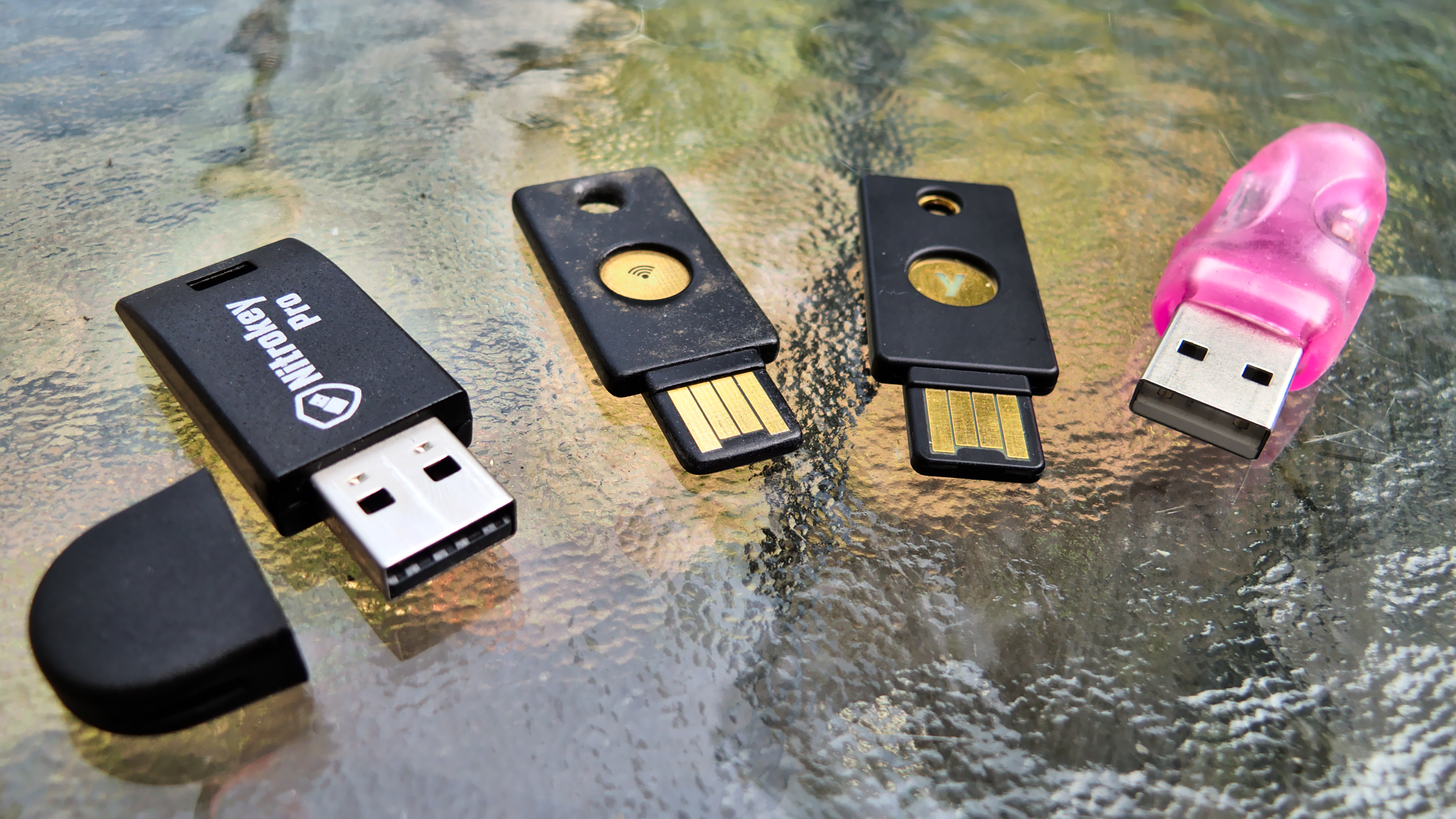
Form factor The Nitrokey Pro, YubiKey NEO (worn out), YubiKey 4, and FST-01 The four keycards have similar form factors: they all connect to a standard USB port, although both YubiKey keycards have a capacitive button by which the user triggers two-factor authentication and the YubiKey 4 can also require a button press to confirm private key use. The YubiKeys feel sturdier than the other two. The NEO has withstood two years of punishment in my pockets along with the rest of my "real" keyring and there is only minimal wear on the keycard in the picture. It's also thinner so it fits well on the keyring. The FST-01 stands out from the other two with its minimal design. Out of the box, the FST-01 comes without a case, so the circuitry is exposed. This is deliberate: one of its goals is to be as transparent as possible, both in terms of software and hardware design and you definitely get that feeling at the physical level. Unfortunately, that does mean it feels more brittle than other models: I wouldn't carry it in my pocket all the time, although there is a case that may protect the key a little better, but it does not provide an easy way to hook it into a keyring. In the group picture above, the FST-01 is the pink plastic thing, which is a rubbery casing I received along with the device when I got it. Notice how the USB connectors of the YubiKeys differ from the other two: while the FST-01 and the Nitrokey have standard USB connectors, the YubiKey has only a "half-connector", which is what makes it thinner than the other two. The "Nano" form factor takes this even further and almost disappears in the USB port. Unfortunately, this arrangement means the YubiKey NEO often comes loose and falls out of the USB port, especially when connected to a laptop. On my workstation, however, it usually stays put even with my whole keyring hanging off of it. I suspect this adds more strain to the host's USB port but that's a tradeoff I've lived with without any noticeable wear so far. Finally, the NEO has this peculiar feature of supporting NFC for certain operations, as LWN previously covered, but I haven't used that feature yet. The Nitrokey Pro looks like a normal USB key, in contrast with the other two devices. It does feel a little brittle when compared with the YubiKey, although only time will tell how much of a beating it can take. It has a small ring in the case so it is possible to carry it directly on your keyring, but I would be worried the cap would come off eventually. Nitrokey devices are also two times thicker than the Yubico models which makes them less convenient to carry around on keyrings.

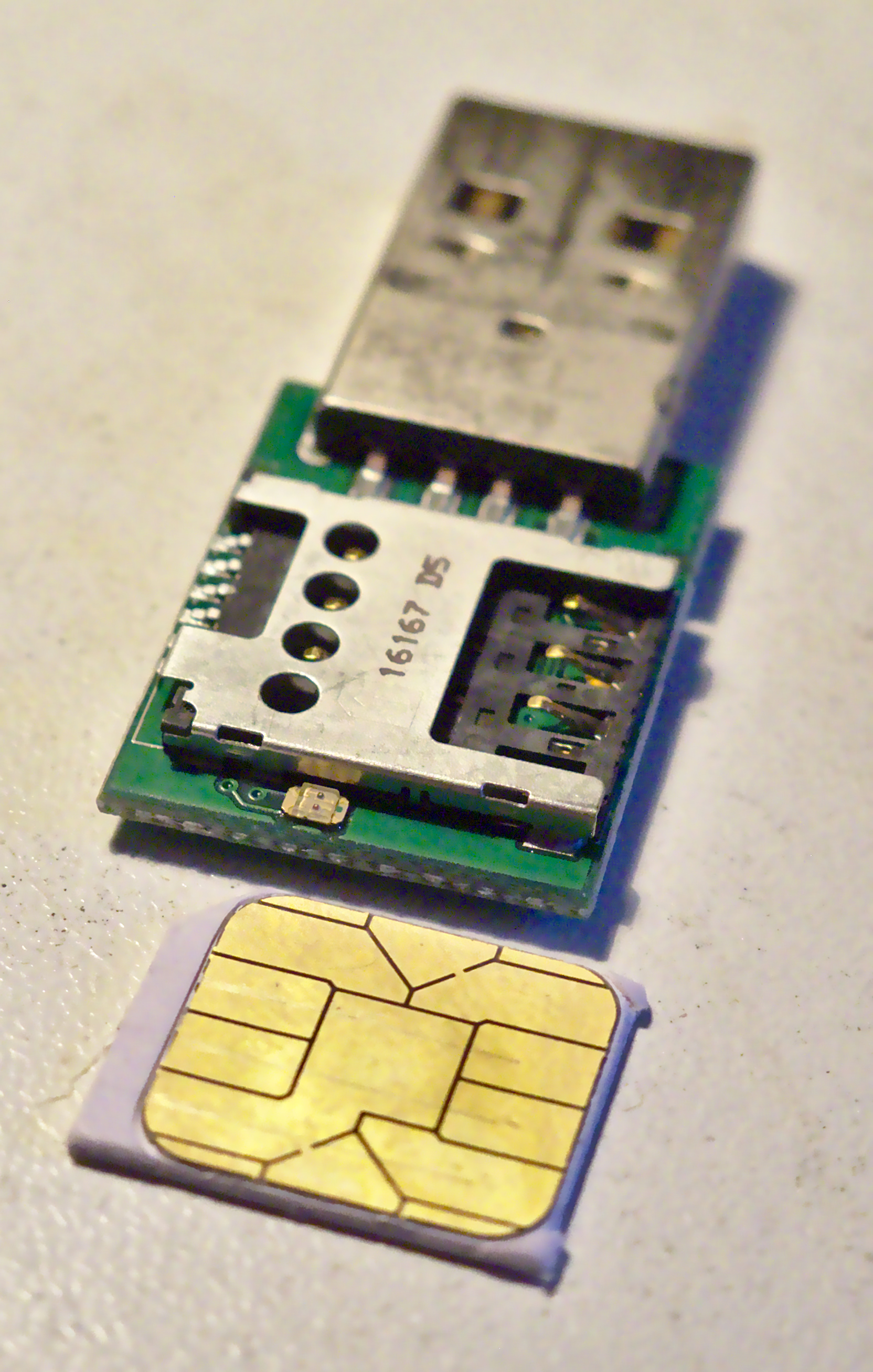
Open and closed designs The FST-01 is as open as hardware comes, down to the PCB design available as KiCad files in this Git repository. The software running on the card is the Gnuk firmware that implements the OpenPGP card protocol, but you can also get it with firmware implementing a true random number generator (TRNG) called NeuG (pronounced "noisy"); the device is programmable through a standard Serial Wire Debug (SWD) port. The Nitrokey Start model also runs the Gnuk firmware. However, the Nitrokey website announces only ECC and RSA 2048-bit support for the Start, while the FST-01 also supports RSA-4096. Nitrokey's founder Jan Suhr, in a private email, explained that this is because "Gnuk doesn't support RSA-3072 or larger at a reasonable speed". Its devices (the Pro, Start, and HSM models) use a similar chip to the FST-01: the STM32F103 microcontroller. Nitrokey Pro with STM32F103TBU6 MCU Nitrokey also publishes its hardware designs, on GitHub, which shows the Pro is basically a fork of the FST-01, according to the ChangeLog. I opened the case to confirm it was using the STM MCU, something I should warn you against; I broke one of the pins holding it together when opening it so now it's even more fragile. But at least, I was able to confirm it was built using the STM32F103TBU6 MCU, like the FST-01. Nitrokey back side But this is where the comparison ends: on the back side, we find a SIM card reader that holds the OpenPGP card that, in turn, holds the private key material and does the cryptographic operations. So, in effect, the Nitrokey Pro is really a evolution of the original OpenPGP card readers. Nitrokey confirmed the OpenPGP card featured in the Pro is the same as the one shipped by the Free Software Foundation Europe (FSFE): the BasicCard built by ZeitControl. Those cards, however, are covered by NDAs and the firmware is only partially open source. This makes the Nitrokey Pro less open than the FST-01, but that's an inevitable tradeoff when choosing a design based on the OpenPGP cards, which Suhr described to me as "pretty proprietary". There are other keycards out there, however, for example the SLJ52GDL150-150k smartcard suggested by Debian developer Yves-Alexis Perez, which he prefers as it is certified by French and German authorities. In that blog post, he also said he was experimenting with the GPL-licensed OpenPGP applet implemented by the French ANSSI. But the YubiKey devices are even further away in the closed-design direction. Both the hardware designs and firmware are proprietary. The YubiKey NEO, for example, cannot be upgraded at all, even though it is based on an open firmware. According to Yubico's FAQ, this is due to "best security practices": "There is a 'no upgrade' policy for our devices since nothing, including malware, can write to the firmware." I find this decision questionable in a context where security updates are often more important than trying to design a bulletproof design, which may simply be impossible. And the YubiKey NEO did suffer from critical security issue that allowed attackers to bypass the PIN protection on the card, which raises the question of the actual protection of the private key material on those cards. According to Niibe, "some OpenPGP cards store the private key unencrypted. It is a common attitude for many smartcard implementations", which was confirmed by Suhr: "the private key is protected by hardware mechanisms which prevent its extraction and misuse". He is referring to the use of tamper resistance. After that security issue, there was no other option for YubiKey NEO users than to get a new keycard (for free, thankfully) from Yubico, which also meant discarding the private key material on the key. For OpenPGP keys, this may mean having to bootstrap the web of trust from scratch if the keycard was responsible for the main certification key. But at least the NEO is running free software based on the OpenPGP card applet and the source is still available on GitHub. The YubiKey 4, on the other hand, is now closed source, which was controversial when the new model was announced last year. It led the main Linux Foundation system administrator, Konstantin Ryabitsev, to withdraw his endorsement of Yubico products. In response, Yubico argued that this approach was essential to the security of its devices, which are now based on "a secure chip, which has built-in countermeasures to mitigate a long list of attacks". In particular, it claims that:
A commercial-grade AVR or ARM controller is unfit to be used in a security product. In most cases, these controllers are easy to attack, from breaking in via a debug/JTAG/TAP port to probing memory contents. Various forms of fault injection and side-channel analysis are possible, sometimes allowing for a complete key recovery in a shockingly short period of time.
While I understand those concerns, they eventually come down to the trust you have in an organization. Not only do we have to trust Yubico, but also hardware manufacturers and designs they have chosen. Every step in the hidden supply chain is then trusted to make correct technical decisions and not introduce any backdoors. History, unfortunately, is not on Yubico's side: Snowden revealed the example of RSA security accepting what renowned cryptographer Bruce Schneier described as a "bribe" from the NSA to weaken its ECC implementation, by using the presumably backdoored Dual_EC_DRBG algorithm. What makes Yubico or its suppliers so different from RSA Security? Remember that RSA Security used to be an adamant opponent to the degradation of encryption standards, campaigning against the Clipper chip in the first crypto wars. Even if we trust the Yubico supply chain, how can we trust a closed design using what basically amounts to security through obscurity? Publicly auditable designs are an important tradition in cryptography, and that principle shouldn't stop when software is frozen into silicon. In fact, a critical vulnerability called ROCA disclosed recently affects closed "smartcards" like the YubiKey 4 and allows full private key recovery from the public key if the key was generated on a vulnerable keycard. When speaking with Ars Technica, the researchers outlined the importance of open designs and questioned the reliability of certification:
Our work highlights the dangers of keeping the design secret and the implementation closed-source, even if both are thoroughly analyzed and certified by experts. The lack of public information causes a delay in the discovery of flaws (and hinders the process of checking for them), thereby increasing the number of already deployed and affected devices at the time of detection.
This issue with open hardware designs seems to be recurring topic of conversation on the Gnuk mailing list. For example, there was a discussion in September 2017 regarding possible hardware vulnerabilities in the STM MCU that would allow extraction of encrypted key material from the key. Niibe referred to a talk presented at the WOOT 17 workshop, where Johannes Obermaier and Stefan Tatschner, from the Fraunhofer Institute, demonstrated attacks against the STMF0 family MCUs. It is still unclear if those attacks also apply to the older STMF1 design used in the FST-01, however. Furthermore, extracted private key material is still protected by user passphrase, but the Gnuk uses a weak key derivation function, so brute-forcing attacks may be possible. Fortunately, there is work in progress to make GnuPG hash the passphrase before sending it to the keycard, which should make such attacks harder if not completely pointless. When asked about the Yubico claims in a private email, Niibe did recognize that "it is true that there are more weak points in general purpose implementations than special implementations". During the last DebConf in Montreal, Niibe explained:
If you don't trust me, you should not buy from me. Source code availability is only a single factor: someone can maliciously replace the firmware to enable advanced attacks.
Niibe recommends to "build the firmware yourself", also saying the design of the FST-01 uses normal hardware that "everyone can replicate". Those advantages are hard to deny for a cryptographic system: using more generic components makes it harder for hostile parties to mount targeted attacks. A counter-argument here is that it can be difficult for a regular user to audit such designs, let alone physically build the device from scratch but, in a mailing list discussion, Debian developer Ian Jackson explained that:
You don't need to be able to validate it personally. The thing spooks most hate is discovery. Backdooring supposedly-free hardware is harder (more costly) because it comes with greater risk of discovery. To put it concretely: if they backdoor all of them, someone (not necessarily you) might notice. (Backdooring only yours involves messing with the shipping arrangements and so on, and supposes that you specifically are of interest.)
Since that, as far as we know, the STM microcontrollers are not backdoored, I would tend to favor those devices instead of proprietary ones, as such a backdoor would be more easily detectable than in a closed design. Even though physical attacks may be possible against those microcontrollers, in the end, if an attacker has physical access to a keycard, I consider the key compromised, even if it has the best chip on the market. In our email exchange, Niibe argued that "when a token is lost, it is better to revoke keys, even if the token is considered secure enough". So like any other device, physical compromise of tokens may mean compromise of the key and should trigger key-revocation procedures.

Algorithms and performance To establish reliable performance results, I wrote a benchmark program naively called crypto-bench that could produce comparable results between the different keys. The program takes each algorithm/keycard combination and runs 1000 decryptions of a 16-byte file (one AES-128 block) using GnuPG, after priming it to get the password cached. I assume the overhead of GnuPG calls to be negligible, as it should be the same across all tokens, so comparisons are possible. AES encryption is constant across all tests as it is always performed on the host and fast enough to be irrelevant in the tests. I used the following:
  • Intel(R) Core(TM) i3-6100U CPU @ 2.30GHz running Debian 9 ("stretch"/stable amd64), using GnuPG 2.1.18-6 (from the stable Debian package)
  • Nitrokey Pro 0.8 (latest firmware)
  • FST-01, running Gnuk version 1.2.5 (latest firmware)
  • YubiKey NEO OpenPGP applet 1.0.10 (not upgradable)
  • YubiKey 4 4.2.6 (not upgradable)
I ran crypto-bench for each keycard, which resulted in the following:
Algorithm Device Mean time (s)
ECDH-Curve25519 CPU 0.036
FST-01 0.135
RSA-2048 CPU 0.016
YubiKey-4 0.162
Nitrokey-Pro 0.610
YubiKey-NEO 0.736
FST-01 1.265
RSA-4096 CPU 0.043
YubiKey-4 0.875
Nitrokey-Pro 3.150
FST-01 8.218
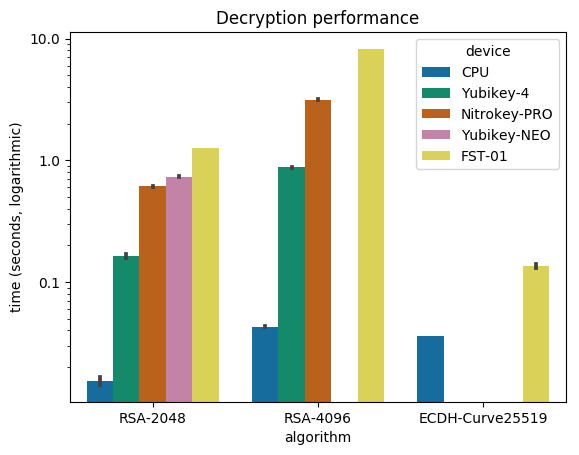
Decryption graph There we see the performance of the four keycards I tested, compared with the same operations done without a keycard: the "CPU" device. That provides the baseline time of GnuPG decrypting the file. The first obvious observation is that using a keycard is slower: in the best scenario (FST-01 + ECC) we see a four-fold slowdown, but in the worst case (also FST-01, but RSA-4096), we see a catastrophic 200-fold slowdown. When I presented the results on the Gnuk mailing list, GnuPG developer Werner Koch confirmed those "numbers are as expected":
With a crypto chip RSA is much faster. By design the Gnuk can't be as fast - it is just a simple MCU. However, using Curve25519 Gnuk is really fast.
And yes, the FST-01 is really fast at doing ECC, but it's also the only keycard that handles ECC in my tests; the Nitrokey Start and Nitrokey HSM should support it as well, but I haven't been able to test those devices. Also note that the YubiKey NEO doesn't support RSA-4096 at all, so we can only compare RSA-2048 across keycards. We should note, however, that ECC is slower than RSA on the CPU, which suggests the Gnuk ECC implementation used by the FST-01 is exceptionally fast. In discussions about improving the performance of the FST-01, Niibe estimated the user tolerance threshold to be "2 seconds decryption time". In a new design using the STM32L432 microcontroller, Aurelien Jarno was able to bring the numbers for RSA-2048 decryption from 1.27s down to 0.65s, and for RSA-4096, from 8.22s down to 3.87s seconds. RSA-4096 is still beyond the two-second threshold, but at least it brings the FST-01 close to the YubiKey NEO and Nitrokey Pro performance levels. We should also underline the superior performance of the YubiKey 4: whatever that thing is doing, it's doing it faster than anyone else. It does RSA-4096 faster than the FST-01 does RSA-2048, and almost as fast as the Nitrokey Pro does RSA-2048. We should also note that the Nitrokey Pro also fails to cross the two-second threshold for RSA-4096 decryption. For me, the FST-01's stellar performance with ECC outshines the other devices. Maybe it says more about the efficiency of the algorithm than the FST-01 or Gnuk's design, but it's definitely an interesting avenue for people who want to deploy those modern algorithms. So, in terms of performance, it is clear that both the YubiKey 4 and the FST-01 take the prize in their own areas (RSA and ECC, respectively).

Conclusion In the above presentation, I have evaluated four cryptographic keycards for use with various OpenPGP operations. What the results show is that the only efficient way of storing a 4096-bit encryption key on a keycard would be to use the YubiKey 4. Unfortunately, I do not feel we should put our trust in such closed designs so I would argue you should either stick with 2048-bit encryption subkeys or keep the keys on disk. Considering that losing such a key would be catastrophic, this might be a good approach anyway. You should also consider switching to ECC encryption: even though it may not be supported everywhere, GnuPG supports having multiple encryption subkeys on a keyring: if one algorithm is unsupported (e.g. GnuPG 1.4 doesn't support ECC), it will fall back to a supported algorithm (e.g. RSA). Do not forget your previously encrypted material doesn't magically re-encrypt itself using your new encryption subkey, however. For authentication and signing keys, speed is not such an issue, so I would warmly recommend either the Nitrokey Pro or Start, or the FST-01, depending on whether you want to start experimenting with ECC algorithms. Availability also seems to be an issue for the FST-01. While you can generally get the device when you meet Niibe in person for a few bucks (I bought mine for around \$30 Canadian), the Seeed online shop says the device is out of stock at the time of this writing, even though Jonathan McDowell said that may be inaccurate in a debian-project discussion. Nevertheless, this issue may make the Nitrokey devices more attractive. When deciding on using the Pro or Start, Suhr offered the following advice:
In practice smart card security has been proven to work well (at least if you use a decent smart card). Therefore the Nitrokey Pro should be used for high security cases. If you don't trust the smart card or if Nitrokey Start is just sufficient for you, you can choose that one. This is why we offer both models.
So far, I have created a signing subkey and moved that and my authentication key to the YubiKey NEO, because it's a device I physically trust to keep itself together in my pockets and I was already using it. It has served me well so far, especially with its extra features like U2F and HOTP support, which I use frequently. Those features are also available on the Nitrokey Pro, so that may be an alternative if I lose the YubiKey. I will probably move my main certification key to the FST-01 and a LUKS-encrypted USB disk, to keep that certification key offline but backed up on two different devices. As for the encryption key, I'll wait for keycard performance to improve, or simply switch my whole keyring to ECC and use the FST-01 or Nitrokey Start for that purpose.
[The author would like to thank Nitrokey for providing hardware for testing.] This article first appeared in the Linux Weekly News.

2 October 2017

Antoine Beaupr : My free software activities, September 2017

Debian Long Term Support (LTS) This is my monthly Debian LTS report. I mostly worked on the git, git-annex and ruby packages this month but didn't have time to completely use my allocated hours because I started too late in the month.

Ruby I was hoping someone would pick up the Ruby work I submitted in August, but it seems no one wanted to touch that mess, understandably. Since then, new issues came up, and not only did I have to work on the rubygems and ruby1.9 package, but now the ruby1.8 package also had to get security updates. Yes: it's bad enough that the rubygems code is duplicated in one other package, but wheezy had the misfortune of having two Ruby versions supported. The Ruby 1.9 also failed to build from source because of test suite issues, which I haven't found a clean and easy fix for, so I ended up making test suite failures non-fatal in 1.9, which they were already in 1.8. I did keep a close eye on changes in the test suite output to make sure tests introduced in the security fixes would pass and that I wouldn't introduce new regressions as well. So I published the following advisories:
  • ruby 1.8: DLA-1113-1, fixing CVE-2017-0898 and CVE-2017-10784. 1.8 doesn't seem affected by CVE-2017-14033 as the provided test does not fail (but it does fail in 1.9.1). test suite was, before patch:
    2199 tests, 1672513 assertions, 18 failures, 51 errors
    
    and after patch:
    2200 tests, 1672514 assertions, 18 failures, 51 errors
    
  • rubygems: uploaded the package prepared in August as is in DLA-1112-1, fixing CVE-2017-0899, CVE-2017-0900, CVE-2017-0901. here the test suite passed normally.
  • ruby 1.9: here I used the used 2.2.8 release tarball to generate a patch that would cover all issues and published DLA-1114-1 that fixes the CVEs of the two packages above. the test suite was, before patches:
    10179 tests, 2232711 assertions, 26 failures, 23 errors, 51 skips
    
    and after patches:
    1.9 after patches (B): 10184 tests, 2232771 assertions, 26 failures, 23 errors, 53 skips
    

Git I also quickly issued an advisory (DLA-1120-1) for CVE-2017-14867, an odd issue affecting git in wheezy. The backport was tricky because it wouldn't apply cleanly and the git package had a custom patching system which made it tricky to work on.

Git-annex I did a quick stint on git-annex as well: I was able to reproduce the issue and confirm an approach to fixing the issue in wheezy, although I didn't have time to complete the work before the end of the month.

Other free software work

New project: feed2exec I should probably make a separate blog post about this, but ironically, I don't want to spend too much time writing those reports, so this will be quick. I wrote a new program, called feed2exec. It's basically a combination of feed2imap, rss2email and feed2tweet: it allows you to fetch RSS feeds and send them in a mailbox, but what's special about it, compared to the other programs above, is that it is more generic: you can basically make it do whatever you want on new feed items. I have, for example, replaced my feed2tweet instance with it, using this simple configuration:
[anarcat]
url = https://anarc.at/blog/index.rss
output = feed2exec.plugins.exec
args = tweet "%(title)0.70s %(link)0.70s"
The sample configuration file also has examples to talk with Mastodon, Pump.io and, why not, a torrent server to download torrent files available over RSS feeds. A trivial configuration can also make it work as a crude podcast client. My main motivation to work on this was that it was difficult to extend feed2imap to do what I needed (which was to talk to transmission to download torrent files) and rss2email didn't support my workflow (which is delivering to feed-specific mail folders). Because both projects also seemed abandoned, it seemed like a good idea at the time to start a new one, although the rss2email community has now restarted the project and may produce interesting results. As an experiment, I tracked my time working on this project. It turns out it took about 45 hours to write that software. Considering feed2exec is about 1400 SLOC, that's 30 lines of code per hour. I don't know if that's slow or fast, but it's an interesting metric for future projects. It sure seems slow to me, but we need to keep in mind those 30 lines of code don't include documentation and repeated head banging on the keyboard. For example, I found two issues with the upstream feedparser package which I use to parse feeds which also seems unmaintained, unfortunately. Feed2exec is beta software at this point, but it's working well enough for me and the design is much simpler than the other programs of the kind. The main issue people can expect from it at this point is formatting issues or parse errors on exotic feeds, and noisy error messages on network errors, all of which should be fairly easy to fix in the test suite. I hope it will be useful for the community and, as usual, I welcome contributions, help and suggestions on how to improve the software.

More Python templates As part of the work on feed2exec, I did cleanup a few things in the ecdysis project, mostly to hook tests up in the CI, improve on the advancedConfig logger and cleanup more stuff. While I was there, it turns out that I built a pretty decent basic CI configuration for Python on GitLab. Whereas the previous templates only had a non-working Django example, you should now be able to chose a Python template when you configure CI on GitLab 10 and above, which should hook you up with normal Python setup procedures like setup.py install and setup.py test.

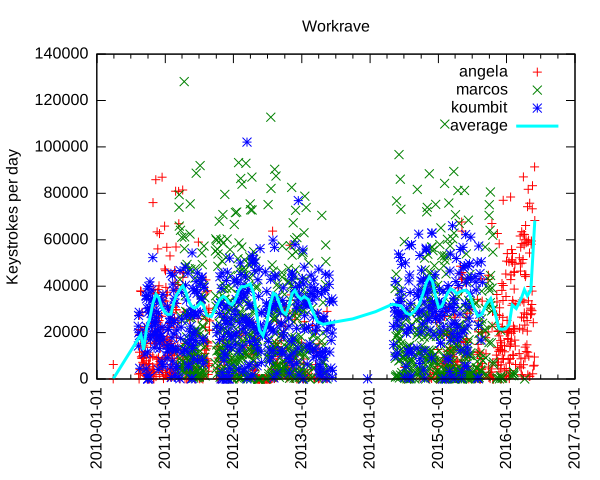
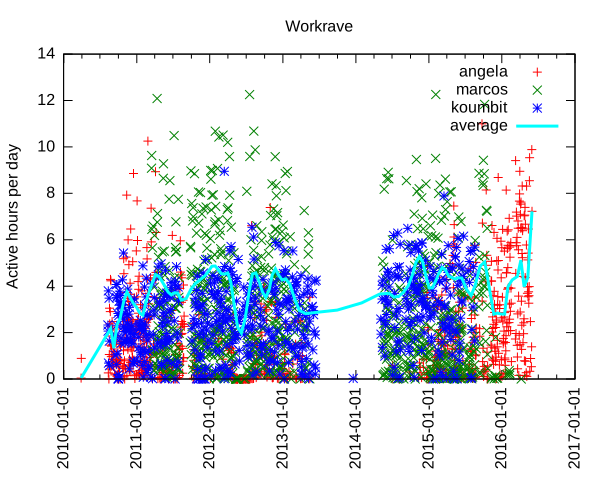
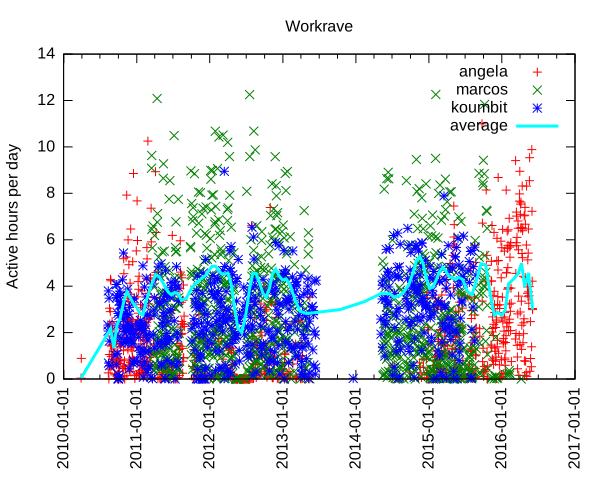
Selfspy I mentioned working on a monitoring tool in my last post, because it was a feature from Workrave missing in SafeEyes. It turns out there is already such a tool called selfspy. I did an extensive review of the software to make sure it wouldn't leak out confidential information out before using it, and it looks, well... kind of okay. It crashed on me at least once so far, which is too bad because then it loses track of the precious activity. I have used it at least once to figure out what the heck I worked on during the day, so it's pretty useful. I particularly used it to backtrack my work on feed2exec as I didn't originally track my time on the project. Unfortunately, selfspy seems unmaintained. I have proposed a maintenance team and hopefully the project maintainer will respond and at least share access so we don't end up in a situation like linkchecker. I also sent a bunch of pull requests to fix some issues like being secure by default and fixing the build. Apart from the crash, the main issue I have found with the software is that it doesn't detect idle time which means certain apps are disproportionatly represented in statistics. There are also some weaknesses in the crypto that should be adressed for people that encrypt their database. Next step is to package selfspy in Debian which should hopefully be simple enough...

Restic documentation security As part of a documentation patch on the Restic backup software, I have improved on my previous Perl script to snoop on process commandline arguments. A common flaw in shell scripts and cron jobs is to pass secret material in the environment (usually safe) but often through commandline arguments (definitely not safe). The challenge, in this peculiar case, was the env binary, but the last time I encountered such an issue was with the Drush commandline tool, which was passing database credentials in clear to the mysql binary. Using my Perl sniffer, I could get to 60 checks per second (or 60Hz). After reimplementing it in Python, this number went up to 160Hz, which still wasn't enough to catch the elusive env command, which is much faster at hiding arguments than MySQL, in large part because it simply does an execve() once the environment is setup. Eventually, I just went crazy and rewrote the whole thing in C which was able to get 700-900Hz and did catch the env command about 10-20% of the time. I could probably have rewritten this by simply walking /proc myself (since this is what all those libraries do in the end) to get better result, but then my point was made. I was able to prove to the restic author the security issues that warranted the warning. It's too bad I need to repeat this again and again, but then my tools are getting better at proving that issue... I suspect it's not the last time I have to deal with this issue and I am happy to think that I can come up with an even more efficient proof of concept tool the next time around.

Ansible 101 After working on documentation last month, I ended up writing my first Ansible playbook this month, converting my tasksel list to a working Ansible configuration. This was a useful exercise: it allow me to find a bunch of packages which have been removed from Debian and provides much better usability than tasksel. For example, it provides a --diff argument that shows which packages are missing from a given setup. I am still unsure about Ansible. Manifests do seem really verbose and I still can't get used to the YAML DSL. I could probably have done the same thing with Puppet and just run puppet apply on the resulting config. But I must admit my bias towards Python is showing here: I can't help but think Puppet is going to be way less accessible with its rewrite in Clojure and C (!)... But then again, I really like Puppet's approach of having generic types like package or service rather than Ansible's clunky apt/yum/dnf/package/win_package types...

Pat and Ham radio After responding (too late) to a request for volunteers to help in Puerto Rico, I realized that my amateur radio skills were somewhat lacking in the "packet" (data transmission in ham jargon) domain, as I wasn't used to operate a Winlink node. Such a node can receive and transmit actual emails over the airwaves, for free, without direct access to the internet, which is very useful in disaster relief efforts. Through summary research, I stumbled upon the new and very promising Pat project which provides one of the first user-friendly Linux-compatible Winlink programs. I provided improvements on the documentation and some questions regarding compatibility issues which are still pending. But my pet issue is the establishment of pat as a normal internet citizen by using standard protocols for receiving and sending email. Not sure how that can be implemented, but we'll see. I am also hoping to upload an official Debian package and hopefully write more about this soon. Stay tuned!

Random stuff I ended up fixing my Kodi issue by starting it as a standalone systemd service, instead of gdm3, which is now completely disabled on the media box. I simply used the following /etc/systemd/service/kodi.service file:
[Unit]
Description=Kodi Media Center
After=systemd-user-sessions.service network.target sound.target
[Service]
User=xbmc
Group=video
Type=simple
TTYPath=/dev/tty7
StandardInput=tty
ExecStart=/usr/bin/xinit /usr/bin/dbus-launch --exit-with-session /usr/bin/kodi-standalone -- :1 -nolisten tcp vt7
Restart=on-abort
RestartSec=5
[Install]
WantedBy=multi-user.target
The downside of this is that it needs Xorg to run as root, whereas modern Xorg can now run rootless. Not sure how to fix this or where... But if I put needs_root_rights=no in Xwrapper.config, I get the following error in .local/share/xorg/Xorg.1.log:
[  2502.533] (EE) modeset(0): drmSetMaster failed: Permission denied
After fooling around with iPython, I ended up trying the xonsh shell, which is supposed to provide a bash-compatible Python shell environment. Unfortunately, I found it pretty unusable as a shell: it works fine to do Python stuff, but then all my environment and legacy bash configuration files were basically ignored so I couldn't get working quickly. This is too bad because the project looked very promising... Finally, one of my TLS hosts using a Let's Encrypt certificate wasn't renewing properly, and I figured out why. It turns out the ProxyPass command was passing everything to the backend, including the /.well-known requests, which obviously broke ACME verification. The solution was simple enough, disable the proxy for that directory:
ProxyPass /.well-known/ !

Antoine Beaupr : My free software activities, September 2017

Debian Long Term Support (LTS) This is my monthly Debian LTS report. I mostly worked on the git, git-annex and ruby packages this month but didn't have time to completely use my allocated hours because I started too late in the month.

Ruby I was hoping someone would pick up the Ruby work I submitted in August, but it seems no one wanted to touch that mess, understandably. Since then, new issues came up, and not only did I have to work on the rubygems and ruby1.9 package, but now the ruby1.8 package also had to get security updates. Yes: it's bad enough that the rubygems code is duplicated in one other package, but wheezy had the misfortune of having two Ruby versions supported. The Ruby 1.9 also failed to build from source because of test suite issues, which I haven't found a clean and easy fix for, so I ended up making test suite failures non-fatal in 1.9, which they were already in 1.8. I did keep a close eye on changes in the test suite output to make sure tests introduced in the security fixes would pass and that I wouldn't introduce new regressions as well. So I published the following advisories:
  • ruby 1.8: DLA-1113-1, fixing CVE-2017-0898 and CVE-2017-10784. 1.8 doesn't seem affected by CVE-2017-14033 as the provided test does not fail (but it does fail in 1.9.1). test suite was, before patch:
    2199 tests, 1672513 assertions, 18 failures, 51 errors
    
    and after patch:
    2200 tests, 1672514 assertions, 18 failures, 51 errors
    
  • rubygems: uploaded the package prepared in August as is in DLA-1112-1, fixing CVE-2017-0899, CVE-2017-0900, CVE-2017-0901. here the test suite passed normally.
  • ruby 1.9: here I used the used 2.2.8 release tarball to generate a patch that would cover all issues and published DLA-1114-1 that fixes the CVEs of the two packages above. the test suite was, before patches:
    10179 tests, 2232711 assertions, 26 failures, 23 errors, 51 skips
    
    and after patches:
    1.9 after patches (B): 10184 tests, 2232771 assertions, 26 failures, 23 errors, 53 skips
    

Git I also quickly issued an advisory (DLA-1120-1) for CVE-2017-14867, an odd issue affecting git in wheezy. The backport was tricky because it wouldn't apply cleanly and the git package had a custom patching system which made it tricky to work on.

Git-annex I did a quick stint on git-annex as well: I was able to reproduce the issue and confirm an approach to fixing the issue in wheezy, although I didn't have time to complete the work before the end of the month.

Other free software work

New project: feed2exec I should probably make a separate blog post about this, but ironically, I don't want to spend too much time writing those reports, so this will be quick. I wrote a new program, called feed2exec. It's basically a combination of feed2imap, rss2email and feed2tweet: it allows you to fetch RSS feeds and send them in a mailbox, but what's special about it, compared to the other programs above, is that it is more generic: you can basically make it do whatever you want on new feed items. I have, for example, replaced my feed2tweet instance with it, using this simple configuration:
[anarcat]
url = https://anarc.at/blog/index.rss
output = feed2exec.plugins.exec
args = tweet "%(title)0.70s %(link)0.70s"
The sample configuration file also has examples to talk with Mastodon, Pump.io and, why not, a torrent server to download torrent files available over RSS feeds. A trivial configuration can also make it work as a crude podcast client. My main motivation to work on this was that it was difficult to extend feed2imap to do what I needed (which was to talk to transmission to download torrent files) and rss2email didn't support my workflow (which is delivering to feed-specific mail folders). Because both projects also seemed abandoned, it seemed like a good idea at the time to start a new one, although the rss2email community has now restarted the project and may produce interesting results. As an experiment, I tracked my time working on this project. It turns out it took about 45 hours to write that software. Considering feed2exec is about 1400 SLOC, that's 30 lines of code per hour. I don't know if that's slow or fast, but it's an interesting metric for future projects. It sure seems slow to me, but we need to keep in mind those 30 lines of code don't include documentation and repeated head banging on the keyboard. For example, I found two issues with the upstream feedparser package which I use to parse feeds which also seems unmaintained, unfortunately. Feed2exec is beta software at this point, but it's working well enough for me and the design is much simpler than the other programs of the kind. The main issue people can expect from it at this point is formatting issues or parse errors on exotic feeds, and noisy error messages on network errors, all of which should be fairly easy to fix in the test suite. I hope it will be useful for the community and, as usual, I welcome contributions, help and suggestions on how to improve the software.

More Python templates As part of the work on feed2exec, I did cleanup a few things in the ecdysis project, mostly to hook tests up in the CI, improve on the advancedConfig logger and cleanup more stuff. While I was there, it turns out that I built a pretty decent basic CI configuration for Python on GitLab. Whereas the previous templates only had a non-working Django example, you should now be able to chose a Python template when you configure CI on GitLab 10 and above, which should hook you up with normal Python setup procedures like setup.py install and setup.py test.

Selfspy I mentioned working on a monitoring tool in my last post, because it was a feature from Workrave missing in SafeEyes. It turns out there is already such a tool called selfspy. I did an extensive review of the software to make sure it wouldn't leak out confidential information out before using it, and it looks, well... kind of okay. It crashed on me at least once so far, which is too bad because then it loses track of the precious activity. I have used it at least once to figure out what the heck I worked on during the day, so it's pretty useful. I particularly used it to backtrack my work on feed2exec as I didn't originally track my time on the project. Unfortunately, selfspy seems unmaintained. I have proposed a maintenance team and hopefully the project maintainer will respond and at least share access so we don't end up in a situation like linkchecker. I also sent a bunch of pull requests to fix some issues like being secure by default and fixing the build. Apart from the crash, the main issue I have found with the software is that it doesn't detect idle time which means certain apps are disproportionatly represented in statistics. There are also some weaknesses in the crypto that should be adressed for people that encrypt their database. Next step is to package selfspy in Debian which should hopefully be simple enough...

Restic documentation security As part of a documentation patch on the Restic backup software, I have improved on my previous Perl script to snoop on process commandline arguments. A common flaw in shell scripts and cron jobs is to pass secret material in the environment (usually safe) but often through commandline arguments (definitely not safe). The challenge, in this peculiar case, was the env binary, but the last time I encountered such an issue was with the Drush commandline tool, which was passing database credentials in clear to the mysql binary. Using my Perl sniffer, I could get to 60 checks per second (or 60Hz). After reimplementing it in Python, this number went up to 160Hz, which still wasn't enough to catch the elusive env command, which is much faster at hiding arguments than MySQL, in large part because it simply does an execve() once the environment is setup. Eventually, I just went crazy and rewrote the whole thing in C which was able to get 700-900Hz and did catch the env command about 10-20% of the time. I could probably have rewritten this by simply walking /proc myself (since this is what all those libraries do in the end) to get better result, but then my point was made. I was able to prove to the restic author the security issues that warranted the warning. It's too bad I need to repeat this again and again, but then my tools are getting better at proving that issue... I suspect it's not the last time I have to deal with this issue and I am happy to think that I can come up with an even more efficient proof of concept tool the next time around.

Ansible 101 After working on documentation last month, I ended up writing my first Ansible playbook this month, converting my tasksel list to a working Ansible configuration. This was a useful exercise: it allow me to find a bunch of packages which have been removed from Debian and provides much better usability than tasksel. For example, it provides a --diff argument that shows which packages are missing from a given setup. I am still unsure about Ansible. Manifests do seem really verbose and I still can't get used to the YAML DSL. I could probably have done the same thing with Puppet and just run puppet apply on the resulting config. But I must admit my bias towards Python is showing here: I can't help but think Puppet is going to be way less accessible with its rewrite in Clojure and C (!)... But then again, I really like Puppet's approach of having generic types like package or service rather than Ansible's clunky apt/yum/dnf/package/win_package types...

Pat and Ham radio After responding (too late) to a request for volunteers to help in Puerto Rico, I realized that my amateur radio skills were somewhat lacking in the "packet" (data transmission in ham jargon) domain, as I wasn't used to operate a Winlink node. Such a node can receive and transmit actual emails over the airwaves, for free, without direct access to the internet, which is very useful in disaster relief efforts. Through summary research, I stumbled upon the new and very promising Pat project which provides one of the first user-friendly Linux-compatible Winlink programs. I provided improvements on the documentation and some questions regarding compatibility issues which are still pending. But my pet issue is the establishment of pat as a normal internet citizen by using standard protocols for receiving and sending email. Not sure how that can be implemented, but we'll see. I am also hoping to upload an official Debian package and hopefully write more about this soon. Stay tuned!

Random stuff I ended up fixing my Kodi issue by starting it as a standalone systemd service, instead of gdm3, which is now completely disabled on the media box. I simply used the following /etc/systemd/service/kodi.service file:
[Unit]
Description=Kodi Media Center
After=systemd-user-sessions.service network.target sound.target
[Service]
User=xbmc
Group=video
Type=simple
TTYPath=/dev/tty7
StandardInput=tty
ExecStart=/usr/bin/xinit /usr/bin/dbus-launch --exit-with-session /usr/bin/kodi-standalone -- :1 -nolisten tcp vt7
Restart=on-abort
RestartSec=5
[Install]
WantedBy=multi-user.target
The downside of this is that it needs Xorg to run as root, whereas modern Xorg can now run rootless. Not sure how to fix this or where... But if I put needs_root_rights=no in Xwrapper.config, I get the following error in .local/share/xorg/Xorg.1.log:
[  2502.533] (EE) modeset(0): drmSetMaster failed: Permission denied
After fooling around with iPython, I ended up trying the xonsh shell, which is supposed to provide a bash-compatible Python shell environment. Unfortunately, I found it pretty unusable as a shell: it works fine to do Python stuff, but then all my environment and legacy bash configuration files were basically ignored so I couldn't get working quickly. This is too bad because the project looked very promising... Finally, one of my TLS hosts using a Let's Encrypt certificate wasn't renewing properly, and I figured out why. It turns out the ProxyPass command was passing everything to the backend, including the /.well-known requests, which obviously broke ACME verification. The solution was simple enough, disable the proxy for that directory:
ProxyPass /.well-known/ !

Antoine Beaupr : Strategies for offline PGP key storage

While the adoption of OpenPGP by the general population is marginal at best, it is a critical component for the security community and particularly for Linux distributions. For example, every package uploaded into Debian is verified by the central repository using the maintainer's OpenPGP keys and the repository itself is, in turn, signed using a separate key. If upstream packages also use such signatures, this creates a complete trust path from the original upstream developer to users. Beyond that, pull requests for the Linux kernel are verified using signatures as well. Therefore, the stakes are high: a compromise of the release key, or even of a single maintainer's key, could enable devastating attacks against many machines. That has led the Debian community to develop a good grasp of best practices for cryptographic signatures (which are typically handled using GNU Privacy Guard, also known as GnuPG or GPG). For example, weak (less than 2048 bits) and vulnerable PGPv3 keys were removed from the keyring in 2015, and there is a strong culture of cross-signing keys between Debian members at in-person meetings. Yet even Debian developers (DDs) do not seem to have established practices on how to actually store critical private key material, as we can see in this discussion on the debian-project mailing list. That email boiled down to a simple request: can I have a "key dongles for dummies" tutorial? Key dongles, or keycards as we'll call them here, are small devices that allow users to store keys on an offline device and provide one possible solution for protecting private key material. In this article, I hope to use my experience in this domain to clarify the issue of how to store those precious private keys that, if compromised, could enable arbitrary code execution on millions of machines all over the world.

Why store keys offline? Before we go into details about storing keys offline, it may be useful to do a small reminder of how the OpenPGP standard works. OpenPGP keys are made of a main public/private key pair, the certification key, used to sign user identifiers and subkeys. My public key, shown below, has the usual main certification/signature key (marked SC) but also an encryption subkey (marked E), a separate signature key (S), and two authentication keys (marked A) which I use as RSA keys to log into servers using SSH, thanks to the Monkeysphere project.
    pub   rsa4096/792152527B75921E 2009-05-29 [SC] [expires: 2018-04-19]
      8DC901CE64146C048AD50FBB792152527B75921E
    uid                 [ultimate] Antoine Beaupr  <anarcat@anarc.at>
    uid                 [ultimate] Antoine Beaupr  <anarcat@koumbit.org>
    uid                 [ultimate] Antoine Beaupr  <anarcat@orangeseeds.org>
    uid                 [ultimate] Antoine Beaupr  <anarcat@debian.org>
    sub   rsa2048/B7F648FED2DF2587 2012-07-18 [A]
    sub   rsa2048/604E4B3EEE02855A 2012-07-20 [A]
    sub   rsa4096/A51D5B109C5A5581 2009-05-29 [E]
    sub   rsa2048/3EA1DDDDB261D97B 2017-08-23 [S]
All the subkeys (sub) and identities (uid) are bound by the main certification key using cryptographic self-signatures. So while an attacker stealing a private subkey can spoof signatures in my name or authenticate to other servers, that key can always be revoked by the main certification key. But if the certification key gets stolen, all bets are off: the attacker can create or revoke identities or subkeys as they wish. In a catastrophic scenario, an attacker could even steal the key and remove your copies, taking complete control of the key, without any possibility of recovery. Incidentally, this is why it is so important to generate a revocation certificate and store it offline. So by moving the certification key offline, we reduce the attack surface on the OpenPGP trust chain: day-to-day keys (e.g. email encryption or signature) can stay online but if they get stolen, the certification key can revoke those keys without having to revoke the main certification key as well. Note that a stolen encryption key is a different problem: even if we revoke the encryption subkey, this will only affect future encrypted messages. Previous messages will be readable by the attacker with the stolen subkey even if that subkey gets revoked, so the benefits of revoking encryption certificates are more limited.

Common strategies for offline key storage Considering the security tradeoffs, some propose storing those critical keys offline to reduce those threats. But where exactly? In an attempt to answer that question, Jonathan McDowell, a member of the Debian keyring maintenance team, said that there are three options: use an external LUKS-encrypted volume, an air-gapped system, or a keycard. Full-disk encryption like LUKS adds an extra layer of security by hiding the content of the key from an attacker. Even though private keyrings are usually protected by a passphrase, they are easily identifiable as a keyring. But when a volume is fully encrypted, it's not immediately obvious to an attacker there is private key material on the device. According to Sean Whitton, another advantage of LUKS over plain GnuPG keyring encryption is that you can pass the --iter-time argument when creating a LUKS partition to increase key-derivation delay, which makes brute-forcing much harder. Indeed, GnuPG 2.x doesn't have a run-time option to configure the key-derivation algorithm, although a patch was introduced recently to make the delay configurable at compile time in gpg-agent, which is now responsible for all secret key operations. The downside of external volumes is complexity: GnuPG makes it difficult to extract secrets out of its keyring, which makes the first setup tricky and error-prone. This is easier in the 2.x series thanks to the new storage system and the associated keygrip files, but it still requires arcane knowledge of GPG internals. It is also inconvenient to use secret keys stored outside your main keyring when you actually do need to use them, as GPG doesn't know where to find those keys anymore. Another option is to set up a separate air-gapped system to perform certification operations. An example is the PGP clean room project, which is a live system based on Debian and designed by DD Daniel Pocock to operate an OpenPGP and X.509 certificate authority using commodity hardware. The basic principle is to store the secrets on a different machine that is never connected to the network and, therefore, not exposed to attacks, at least in theory. I have personally discarded that approach because I feel air-gapped systems provide a false sense of security: data eventually does need to come in and out of the system, somehow, even if only to propagate signatures out of the system, which exposes the system to attacks. System updates are similarly problematic: to keep the system secure, timely security updates need to be deployed to the air-gapped system. A common use pattern is to share data through USB keys, which introduce a vulnerability where attacks like BadUSB can infect the air-gapped system. From there, there is a multitude of exotic ways of exfiltrating the data using LEDs, infrared cameras, or the good old TEMPEST attack. I therefore concluded the complexity tradeoffs of an air-gapped system are not worth it. Furthermore, the workflow for air-gapped systems is complex: even though PGP clean room went a long way, it's still lacking even simple scripts that allow signing or transferring keys, which is a problem shared by the external LUKS storage approach.

Keycard advantages The approach I have chosen is to use a cryptographic keycard: an external device, usually connected through the USB port, that stores the private key material and performs critical cryptographic operations on the behalf of the host. For example, the FST-01 keycard can perform RSA and ECC public-key decryption without ever exposing the private key material to the host. In effect, a keycard is a miniature computer that performs restricted computations for another host. Keycards usually support multiple "slots" to store subkeys. The OpenPGP standard specifies there are three subkeys available by default: for signature, authentication, and encryption. Finally, keycards can have an actual physical keypad to enter passwords so a potential keylogger cannot capture them, although the keycards I have access to do not feature such a keypad. We could easily draw a parallel between keycards and an air-gapped system; in effect, a keycard is a miniaturized air-gapped computer and suffers from similar problems. An attacker can intercept data on the host system and attack the device in the same way, if not more easily, because a keycard is actually "online" (i.e. clearly not air-gapped) when connected. The advantage over a fully-fledged air-gapped computer, however, is that the keycard implements only a restricted set of operations. So it is easier to create an open hardware and software design that is audited and verified, which is much harder to accomplish for a general-purpose computer. Like air-gapped systems, keycards address the scenario where an attacker wants to get the private key material. While an attacker could fool the keycard into signing or decrypting some data, this is possible only while the key is physically connected, and the keycard software will prompt the user for a password before doing the operation, though the keycard can cache the password for some time. In effect, it thwarts offline attacks: to brute-force the key's password, the attacker needs to be on the target system and try to guess the keycard's password, which will lock itself after a limited number of tries. It also provides for a clean and standard interface to store keys offline: a single GnuPG command moves private key material to a keycard (the keytocard command in the --edit-key interface), whereas moving private key material to a LUKS-encrypted device or air-gapped computer is more complex. Keycards are also useful if you operate on multiple computers. A common problem when using GnuPG on multiple machines is how to safely copy and synchronize private key material among different devices, which introduces new security problems. Indeed, a "good rule of thumb in a forensics lab", according to Robert J. Hansen on the GnuPG mailing list, is to "store the minimum personal data possible on your systems". Keycards provide the best of both worlds here: you can use your private key on multiple computers without actually storing it in multiple places. In fact, Mike Gerwitz went as far as saying:
For users that need their GPG key on multiple boxes, I consider a smartcard to be essential. Otherwise, the user is just furthering her risk of compromise.

Keycard tradeoffs As Gerwitz hinted, there are multiple downsides to using a keycard, however. Another DD, Wouter Verhelst clearly expressed the tradeoffs:
Smartcards are useful. They ensure that the private half of your key is never on any hard disk or other general storage device, and therefore that it cannot possibly be stolen (because there's only one possible copy of it). Smartcards are a pain in the ass. They ensure that the private half of your key is never on any hard disk or other general storage device but instead sits in your wallet, so whenever you need to access it, you need to grab your wallet to be able to do so, which takes more effort than just firing up GnuPG. If your laptop doesn't have a builtin cardreader, you also need to fish the reader from your backpack or wherever, etc.
"Smartcards" here refer to older OpenPGP cards that relied on the IEC 7816 smartcard connectors and therefore needed a specially-built smartcard reader. Newer keycards simply use a standard USB connector. In any case, it's true that having an external device introduces new issues: attackers can steal your keycard, you can simply lose it, or wash it with your dirty laundry. A laptop or a computer can also be lost, of course, but it is much easier to lose a small USB keycard than a full laptop and I have yet to hear of someone shoving a full laptop into a washing machine. When you lose your keycard, unless a separate revocation certificate is available somewhere, you lose complete control of the key, which is catastrophic. But, even if you revoke the lost key, you need to create a new one, which involves rebuilding the web of trust for the key a rather expensive operation as it usually requires meeting other OpenPGP users in person to exchange fingerprints. You should therefore think about how to back up the certification key, which is a problem that already exists for online keys; of course, everyone has a revocation certificates and backups of their OpenPGP keys... right? In the keycard scenario, backups may be multiple keycards distributed geographically. Note that, contrary to an air-gapped system, a key generated on a keycard cannot be backed up, by design. For subkeys, this is not a problem as they do not need to be backed up (except encryption keys). But, for a certification key, this means users need to generate the key on the host and transfer it to the keycard, which means the host is expected to have enough entropy to generate cryptographic-strength random numbers, for example. Also consider the possibility of combining different approaches: you could, for example, use a keycard for day-to-day operation, but keep a backup of the certification key on a LUKS-encrypted offline volume. Keycards introduce a new element into the trust chain: you need to trust the keycard manufacturer to not have any hostile code in the key's firmware or hardware. In addition, you need to trust that the implementation is correct. Keycards are harder to update: the firmware may be deliberately inaccessible to the host for security reasons or may require special software to manipulate. Keycards may be slower than the CPU in performing certain operations because they are small embedded microcontrollers with limited computing power. Finally, keycards may encourage users to trust multiple machines with their secrets, which works against the "minimum personal data" principle. A completely different approach called the trusted physical console (TPC) does the opposite: instead of trying to get private key material onto all of those machines, just have them on a single machine that is used for everything. Unlike a keycard, the TPC is an actual computer, say a laptop, which has the advantage of needing no special procedure to manage keys. The downside is, of course, that you actually need to carry that laptop everywhere you go, which may be problematic, especially in some corporate environments that restrict bringing your own devices.

Quick keycard "howto" Getting keys onto a keycard is easy enough:
  1. Start with a temporary key to test the procedure:
        export GNUPGHOME=$(mktemp -d)
        gpg --generate-key
    
  2. Edit the key using its user ID (UID):
        gpg --edit-key UID
    
  3. Use the key command to select the first subkey, then copy it to the keycard (you can also use the addcardkey command to just generate a new subkey directly on the keycard):
        gpg> key 1
        gpg> keytocard
    
  4. If you want to move the subkey, use the save command, which will remove the local copy of the private key, so the keycard will be the only copy of the secret key. Otherwise use the quit command to save the key on the keycard, but keep the secret key in your normal keyring; answer "n" to "save changes?" and "y" to "quit without saving?" . This way the keycard is a backup of your secret key.
  5. Once you are satisfied with the results, repeat steps 1 through 4 with your normal keyring (unset $GNUPGHOME)
When a key is moved to a keycard, --list-secret-keys will show it as sec> (or ssb> for subkeys) instead of the usual sec keyword. If the key is completely missing (for example, if you moved it to a LUKS container), the # sign is used instead. If you need to use a key from a keycard backup, you simply do gpg --card-edit with the key plugged in, then type the fetch command at the prompt to fetch the public key that corresponds to the private key on the keycard (which stays on the keycard). This is the same procedure as the one to use the secret key on another computer.

Conclusion There are already informal OpenPGP best-practices guides out there and some recommend storing keys offline, but they rarely explain what exactly that means. Storing your primary secret key offline is important in dealing with possible compromises and we examined the main ways of doing so: either with an air-gapped system, LUKS-encrypted keyring, or by using keycards. Each approach has its own tradeoffs, but I recommend getting familiar with keycards if you use multiple computers and want a standardized interface with minimal configuration trouble. And of course, those approaches can be combined. This tutorial, for example, uses a keycard on an air-gapped computer, which neatly resolves the question of how to transmit signatures between the air-gapped system and the world. It is definitely not for the faint of heart, however. Once one has decided to use a keycard, the next order of business is to choose a specific device. That choice will be addressed in a followup article, where I will look at performance, physical design, and other considerations.
This article first appeared in the Linux Weekly News.

Antoine Beaupr : Strategies for offline PGP key storage

While the adoption of OpenPGP by the general population is marginal at best, it is a critical component for the security community and particularly for Linux distributions. For example, every package uploaded into Debian is verified by the central repository using the maintainer's OpenPGP keys and the repository itself is, in turn, signed using a separate key. If upstream packages also use such signatures, this creates a complete trust path from the original upstream developer to users. Beyond that, pull requests for the Linux kernel are verified using signatures as well. Therefore, the stakes are high: a compromise of the release key, or even of a single maintainer's key, could enable devastating attacks against many machines. That has led the Debian community to develop a good grasp of best practices for cryptographic signatures (which are typically handled using GNU Privacy Guard, also known as GnuPG or GPG). For example, weak (less than 2048 bits) and vulnerable PGPv3 keys were removed from the keyring in 2015, and there is a strong culture of cross-signing keys between Debian members at in-person meetings. Yet even Debian developers (DDs) do not seem to have established practices on how to actually store critical private key material, as we can see in this discussion on the debian-project mailing list. That email boiled down to a simple request: can I have a "key dongles for dummies" tutorial? Key dongles, or keycards as we'll call them here, are small devices that allow users to store keys on an offline device and provide one possible solution for protecting private key material. In this article, I hope to use my experience in this domain to clarify the issue of how to store those precious private keys that, if compromised, could enable arbitrary code execution on millions of machines all over the world.

Why store keys offline? Before we go into details about storing keys offline, it may be useful to do a small reminder of how the OpenPGP standard works. OpenPGP keys are made of a main public/private key pair, the certification key, used to sign user identifiers and subkeys. My public key, shown below, has the usual main certification/signature key (marked SC) but also an encryption subkey (marked E), a separate signature key (S), and two authentication keys (marked A) which I use as RSA keys to log into servers using SSH, thanks to the Monkeysphere project.
    pub   rsa4096/792152527B75921E 2009-05-29 [SC] [expires: 2018-04-19]
      8DC901CE64146C048AD50FBB792152527B75921E
    uid                 [ultimate] Antoine Beaupr  <anarcat@anarc.at>
    uid                 [ultimate] Antoine Beaupr  <anarcat@koumbit.org>
    uid                 [ultimate] Antoine Beaupr  <anarcat@orangeseeds.org>
    uid                 [ultimate] Antoine Beaupr  <anarcat@debian.org>
    sub   rsa2048/B7F648FED2DF2587 2012-07-18 [A]
    sub   rsa2048/604E4B3EEE02855A 2012-07-20 [A]
    sub   rsa4096/A51D5B109C5A5581 2009-05-29 [E]
    sub   rsa2048/3EA1DDDDB261D97B 2017-08-23 [S]
All the subkeys (sub) and identities (uid) are bound by the main certification key using cryptographic self-signatures. So while an attacker stealing a private subkey can spoof signatures in my name or authenticate to other servers, that key can always be revoked by the main certification key. But if the certification key gets stolen, all bets are off: the attacker can create or revoke identities or subkeys as they wish. In a catastrophic scenario, an attacker could even steal the key and remove your copies, taking complete control of the key, without any possibility of recovery. Incidentally, this is why it is so important to generate a revocation certificate and store it offline. So by moving the certification key offline, we reduce the attack surface on the OpenPGP trust chain: day-to-day keys (e.g. email encryption or signature) can stay online but if they get stolen, the certification key can revoke those keys without having to revoke the main certification key as well. Note that a stolen encryption key is a different problem: even if we revoke the encryption subkey, this will only affect future encrypted messages. Previous messages will be readable by the attacker with the stolen subkey even if that subkey gets revoked, so the benefits of revoking encryption certificates are more limited.

Common strategies for offline key storage Considering the security tradeoffs, some propose storing those critical keys offline to reduce those threats. But where exactly? In an attempt to answer that question, Jonathan McDowell, a member of the Debian keyring maintenance team, said that there are three options: use an external LUKS-encrypted volume, an air-gapped system, or a keycard. Full-disk encryption like LUKS adds an extra layer of security by hiding the content of the key from an attacker. Even though private keyrings are usually protected by a passphrase, they are easily identifiable as a keyring. But when a volume is fully encrypted, it's not immediately obvious to an attacker there is private key material on the device. According to Sean Whitton, another advantage of LUKS over plain GnuPG keyring encryption is that you can pass the --iter-time argument when creating a LUKS partition to increase key-derivation delay, which makes brute-forcing much harder. Indeed, GnuPG 2.x doesn't have a run-time option to configure the key-derivation algorithm, although a patch was introduced recently to make the delay configurable at compile time in gpg-agent, which is now responsible for all secret key operations. The downside of external volumes is complexity: GnuPG makes it difficult to extract secrets out of its keyring, which makes the first setup tricky and error-prone. This is easier in the 2.x series thanks to the new storage system and the associated keygrip files, but it still requires arcane knowledge of GPG internals. It is also inconvenient to use secret keys stored outside your main keyring when you actually do need to use them, as GPG doesn't know where to find those keys anymore. Another option is to set up a separate air-gapped system to perform certification operations. An example is the PGP clean room project, which is a live system based on Debian and designed by DD Daniel Pocock to operate an OpenPGP and X.509 certificate authority using commodity hardware. The basic principle is to store the secrets on a different machine that is never connected to the network and, therefore, not exposed to attacks, at least in theory. I have personally discarded that approach because I feel air-gapped systems provide a false sense of security: data eventually does need to come in and out of the system, somehow, even if only to propagate signatures out of the system, which exposes the system to attacks. System updates are similarly problematic: to keep the system secure, timely security updates need to be deployed to the air-gapped system. A common use pattern is to share data through USB keys, which introduce a vulnerability where attacks like BadUSB can infect the air-gapped system. From there, there is a multitude of exotic ways of exfiltrating the data using LEDs, infrared cameras, or the good old TEMPEST attack. I therefore concluded the complexity tradeoffs of an air-gapped system are not worth it. Furthermore, the workflow for air-gapped systems is complex: even though PGP clean room went a long way, it's still lacking even simple scripts that allow signing or transferring keys, which is a problem shared by the external LUKS storage approach.

Keycard advantages The approach I have chosen is to use a cryptographic keycard: an external device, usually connected through the USB port, that stores the private key material and performs critical cryptographic operations on the behalf of the host. For example, the FST-01 keycard can perform RSA and ECC public-key decryption without ever exposing the private key material to the host. In effect, a keycard is a miniature computer that performs restricted computations for another host. Keycards usually support multiple "slots" to store subkeys. The OpenPGP standard specifies there are three subkeys available by default: for signature, authentication, and encryption. Finally, keycards can have an actual physical keypad to enter passwords so a potential keylogger cannot capture them, although the keycards I have access to do not feature such a keypad. We could easily draw a parallel between keycards and an air-gapped system; in effect, a keycard is a miniaturized air-gapped computer and suffers from similar problems. An attacker can intercept data on the host system and attack the device in the same way, if not more easily, because a keycard is actually "online" (i.e. clearly not air-gapped) when connected. The advantage over a fully-fledged air-gapped computer, however, is that the keycard implements only a restricted set of operations. So it is easier to create an open hardware and software design that is audited and verified, which is much harder to accomplish for a general-purpose computer. Like air-gapped systems, keycards address the scenario where an attacker wants to get the private key material. While an attacker could fool the keycard into signing or decrypting some data, this is possible only while the key is physically connected, and the keycard software will prompt the user for a password before doing the operation, though the keycard can cache the password for some time. In effect, it thwarts offline attacks: to brute-force the key's password, the attacker needs to be on the target system and try to guess the keycard's password, which will lock itself after a limited number of tries. It also provides for a clean and standard interface to store keys offline: a single GnuPG command moves private key material to a keycard (the keytocard command in the --edit-key interface), whereas moving private key material to a LUKS-encrypted device or air-gapped computer is more complex. Keycards are also useful if you operate on multiple computers. A common problem when using GnuPG on multiple machines is how to safely copy and synchronize private key material among different devices, which introduces new security problems. Indeed, a "good rule of thumb in a forensics lab", according to Robert J. Hansen on the GnuPG mailing list, is to "store the minimum personal data possible on your systems". Keycards provide the best of both worlds here: you can use your private key on multiple computers without actually storing it in multiple places. In fact, Mike Gerwitz went as far as saying:
For users that need their GPG key on multiple boxes, I consider a smartcard to be essential. Otherwise, the user is just furthering her risk of compromise.

Keycard tradeoffs As Gerwitz hinted, there are multiple downsides to using a keycard, however. Another DD, Wouter Verhelst clearly expressed the tradeoffs:
Smartcards are useful. They ensure that the private half of your key is never on any hard disk or other general storage device, and therefore that it cannot possibly be stolen (because there's only one possible copy of it). Smartcards are a pain in the ass. They ensure that the private half of your key is never on any hard disk or other general storage device but instead sits in your wallet, so whenever you need to access it, you need to grab your wallet to be able to do so, which takes more effort than just firing up GnuPG. If your laptop doesn't have a builtin cardreader, you also need to fish the reader from your backpack or wherever, etc.
"Smartcards" here refer to older OpenPGP cards that relied on the IEC 7816 smartcard connectors and therefore needed a specially-built smartcard reader. Newer keycards simply use a standard USB connector. In any case, it's true that having an external device introduces new issues: attackers can steal your keycard, you can simply lose it, or wash it with your dirty laundry. A laptop or a computer can also be lost, of course, but it is much easier to lose a small USB keycard than a full laptop and I have yet to hear of someone shoving a full laptop into a washing machine. When you lose your keycard, unless a separate revocation certificate is available somewhere, you lose complete control of the key, which is catastrophic. But, even if you revoke the lost key, you need to create a new one, which involves rebuilding the web of trust for the key a rather expensive operation as it usually requires meeting other OpenPGP users in person to exchange fingerprints. You should therefore think about how to back up the certification key, which is a problem that already exists for online keys; of course, everyone has a revocation certificates and backups of their OpenPGP keys... right? In the keycard scenario, backups may be multiple keycards distributed geographically. Note that, contrary to an air-gapped system, a key generated on a keycard cannot be backed up, by design. For subkeys, this is not a problem as they do not need to be backed up (except encryption keys). But, for a certification key, this means users need to generate the key on the host and transfer it to the keycard, which means the host is expected to have enough entropy to generate cryptographic-strength random numbers, for example. Also consider the possibility of combining different approaches: you could, for example, use a keycard for day-to-day operation, but keep a backup of the certification key on a LUKS-encrypted offline volume. Keycards introduce a new element into the trust chain: you need to trust the keycard manufacturer to not have any hostile code in the key's firmware or hardware. In addition, you need to trust that the implementation is correct. Keycards are harder to update: the firmware may be deliberately inaccessible to the host for security reasons or may require special software to manipulate. Keycards may be slower than the CPU in performing certain operations because they are small embedded microcontrollers with limited computing power. Finally, keycards may encourage users to trust multiple machines with their secrets, which works against the "minimum personal data" principle. A completely different approach called the trusted physical console (TPC) does the opposite: instead of trying to get private key material onto all of those machines, just have them on a single machine that is used for everything. Unlike a keycard, the TPC is an actual computer, say a laptop, which has the advantage of needing no special procedure to manage keys. The downside is, of course, that you actually need to carry that laptop everywhere you go, which may be problematic, especially in some corporate environments that restrict bringing your own devices.

Quick keycard "howto" Getting keys onto a keycard is easy enough:
  1. Start with a temporary key to test the procedure:
        export GNUPGHOME=$(mktemp -d)
        gpg --generate-key
    
  2. Edit the key using its user ID (UID):
        gpg --edit-key UID
    
  3. Use the key command to select the first subkey, then copy it to the keycard (you can also use the addcardkey command to just generate a new subkey directly on the keycard):
        gpg> key 1
        gpg> keytocard
    
  4. If you want to move the subkey, use the save command, which will remove the local copy of the private key, so the keycard will be the only copy of the secret key. Otherwise use the quit command to save the key on the keycard, but keep the secret key in your normal keyring; answer "n" to "save changes?" and "y" to "quit without saving?" . This way the keycard is a backup of your secret key.
  5. Once you are satisfied with the results, repeat steps 1 through 4 with your normal keyring (unset $GNUPGHOME)
When a key is moved to a keycard, --list-secret-keys will show it as sec> (or ssb> for subkeys) instead of the usual sec keyword. If the key is completely missing (for example, if you moved it to a LUKS container), the # sign is used instead. If you need to use a key from a keycard backup, you simply do gpg --card-edit with the key plugged in, then type the fetch command at the prompt to fetch the public key that corresponds to the private key on the keycard (which stays on the keycard). This is the same procedure as the one to use the secret key on another computer.

Conclusion There are already informal OpenPGP best-practices guides out there and some recommend storing keys offline, but they rarely explain what exactly that means. Storing your primary secret key offline is important in dealing with possible compromises and we examined the main ways of doing so: either with an air-gapped system, LUKS-encrypted keyring, or by using keycards. Each approach has its own tradeoffs, but I recommend getting familiar with keycards if you use multiple computers and want a standardized interface with minimal configuration trouble. And of course, those approaches can be combined. This tutorial, for example, uses a keycard on an air-gapped computer, which neatly resolves the question of how to transmit signatures between the air-gapped system and the world. It is definitely not for the faint of heart, however. Once one has decided to use a keycard, the next order of business is to choose a specific device. That choice will be addressed in a followup article, where I will look at performance, physical design, and other considerations.
This article first appeared in the Linux Weekly News.

2 September 2017

Antoine Beaupr : My free software activities, August 2017

Debian Long Term Support (LTS) This is my monthly Debian LTS report. This month I worked on a few major packages that took a long time instead of multiple smaller issues. Affected packages were Mercurial, libdbd-mysql-perl and Ruby.

Mercurial updates Mercurial was vulnerable to two CVEs: CVE-2017-1000116 (command injection on clients through malicious ssh URLs) and CVE-2017-1000115 (path traversal via symlink). The former is an issue that actually affects many other similar software like Git (CVE-2017-1000117), Subversion (CVE-2017-9800) and even CVS (CVE-2017-12836). The latter symlink issue is a distinct issue that came up during an internal audit. The fix, shipped as DLA-1072-1, involved a rather difficult backport, especially because the Mercurial test suite takes a long time to complete. This reminded me of the virtues of DEB_BUILD_OPTIONS=parallel=4, which sped up the builds considerably. I also discovered that the Wheezy build chain doesn't support sbuild's --source-only-changes flag which I had hardcoded in my sbuild.conf file. This seems to be simply because sbuild passes --build=source to dpkg-buildpackage, an option that is supported only in jessie or later.

libdbd-mysql-perl I have worked on fixing two issues with the libdbd-mysql-perl package, CVE-2017-10788 and CVE-2017-10789, which resulted in the DLA-1079-1 upload. Behind this mysteriously named package sits a critical piece of infrastructure, namely the mysql commandline client which is probably used and abused by hundreds if not thousands of home-made scripts, but also all of Perl's MySQL support, which is probably used by even a larger base of software. Through the Debian bug reports (Debian bug #866818 and Debian bug #866821), I have learned that the patches existed in the upstream tracker but were either ignored or even reverted in the latest 4.043 upstream release. It turns out that there are talks of forking that library because of maintainership issue. It blows my mind that such an important part of MySQL is basically unmaintained. I ended up backporting the upstream patches, which was also somewhat difficult because of the long-standing issues with SSL support in MySQL. The backport there was particularly hard to test, as you need to run that test suite by hand, twice: once with a server configured with a (valid!) SSL certificate and one without (!). I'm wondering how much time it is really worth spending on trying to fix SSL in MySQL, however. It has been badly broken forever, and while the patch is an improvement, I would actually still never trust SSL transports in MySQL over an untrusted network. The few people that I know use such transports wrap their connections around a simpler stunnel instead. The other issue was easier to fix so I submitted a pull request upstream to make sure that work isn't lost, although it is not clear what the future of that patch (or project!) will be at this point.

Rubygems I also worked on the rubygems issues, which, thanks to the "vendoring" practice of the Ruby community, also affects the ruby1.9 package. 4 distinct CVEs were triaged here (CVE-2017-0899, CVE-2017-0900, CVE-2017-0901 and CVE-2017-0902) and I determined the latter issue didn't affect wheezy as rubygems doesn't do its own DNS resolution there (later versions lookup SRV records). This is another package where the test suite takes a long time to run. Worse, the packages in Wheezy actually fails to build from source: the test suites just fail in various steps, particularly because of dh key too small errors for Rubygems, but also other errors for Ruby. I also had trouble backporting one test which I had to simply skip for Rubygems. I uploaded and announced test packages and hopefully I'll be able to complete this work soon, although I would certainly appreciate any help on this...

Triage I took a look at the sox, libvorbis and exiv2 issues. None had fixes available. sox and exiv2 were basically a list of fuzzing issues, which are often minor or at least of unknown severity. Those would have required a significant amount of work and I figured I would prioritize other work first. I also triaged CVE-2017-7506, which doesn't seem to affect the spice package in wheezy, after doing a fairly thorough audit of the code. The vulnerability is specifically bound to the reds_on_main_agent_monitors_config function, which is simply not present in our older version. A hostile message would fall through the code and not provoke memory allocation or out of bounds access, so I simply marked the wheezy version as not-affected, something which usually happens during the original triage but can also happen during the actual patching work, as in this case.

Other free software work This describes the volunteer work I do on various free software projects. This month, again, my internal reports show that I spent about the same time on volunteer and paid time, but this is probably a wrong estimate because I spent a lot of time at Debconf which I didn't clock in...

Debconf So I participated in the 17th Debian Conference in Montreal. It was great to see (and make!) so many friends from all over the world in person again, and I was happy to work on specific issues together with other Debian developers. I am especially thankful to David Bremner for fixing the syncing of the flagged tag when added to new messages (patch series). This allows me to easily sync the one tag (inbox) that is not statically assigned during notmuch new, by using flagged as a synchronization tool. This allows me to use notmuch more easily across multiple machines without having to sync all tags with dump/restore or using muchsync which wasn't working for me (although a new release came out which may fix my issues). The magic incantation looks something like this:
notmuch tag -inbox tag:inbox and not tag:flagged
notmuch tag +inbox not tag:inbox and tag:flagged
However, most of my time in the first week (Debcamp) was spent trying to complete the networking setup: configure switches, setup wiring and so on. I also configured an apt-cacher-ng proxy to serve packages to attendees during the conference. I configured it with Avahi to configure clients automatically, which led me to discover (and fix) issue Debian bug #870321) although there are more issues with the autodiscovery mechanism... I spent extra time to document the (somewhat simple) configuration of such a server in the Debian wiki because it was not the first time I had research that procedure... I somehow thought this was a great time to upgrade my laptop to stretch. Normally, I keep that device running stable because I don't use it often and I don't want to have major traumatizing upgrades every time I leave with it on a trip. But this time was special: there were literally hundreds of Debian developers to help me out if there was trouble. And there was, of course, trouble as it turns out! I had problems with the fonts on my display, because, well, I had suspended (twice) my laptop during the install. The fix was simply to flush the fontconfig cache, and I tried to document this in the fonts wiki page and my upgrades page. I also gave a short training called Debian packaging 101 which was pretty successful. Like the short presentation I made at the last Montreal BSP, the workshop was based on my quick debian development guide. I'm thinking of expanding this to a larger audience with a "102" course that would discuss more complex packaging problems. But my secret plan (well, secret until now I guess) is to make packaging procedures more uniform in Debian by training new Debian packagers using that same training for the next 2 decades. But I will probably start by just trying to do this again at the next Debconf, if I can attend.

Debian uploads I also sponsored two packages during Debconf: one was a "scratch an itch" upload (elpa-ivy) which I requested (Debian bug #863216) as part of a larger effort to ship the Emacs elisp packages as Debian packages. The other was an upload of diceware to build the documentation in a separate package and fix other issues I have found in the package during a review. I also uploaded a bunch of other fixes to the Debian archive:

Signing keys rotation I also started the process of moving my main OpenPGP certification key by adding a signing subkey. The subkey is stored in a cryptographic token so I can sign things on more than one machine without storing that critical key on all those devices physically. Unfortunately, this meant that I need to do some shenanigans when I want to sign content in my Debian work, because the new subkey takes time to propagate to the Debian archive. For example, I have to specify the primary key with a "bang" when signing packages (debsign -k '792152527B75921E!' ...) or use inline signatures in email sent for security announcement (since that trick doesn't work in Mutt or Notmuch). I tried to figure out how to better coordinate this next time by reading up documentation on keyring.debian.org, but there is no fixed date for key changes on the rsync interface. There are "monthly changes" so one's best bet is to look for the last change in their git repository.

GitLab.com and LFS migration I finally turned off my src.anarc.at git repository service by moving the remaining repos to GitLab. Unfortunately, GitLab removed support for git-annex recently, so I had to migrate my repositories to Git-LFS, which was an interesting experience. LFS is pretty easy to use, definitely simpler than git-annex. It also seems to be a good match for the use-case at hand, which is to store large files (videos, namely) as part of slides for presentations. It turns out that their migration guide could have been made much simpler. I tried to submit those changes to the documentation but couldn't fork the GitLab EE project to make a patch, so I just documented the issue in the original MR for now. While I was there I filed a feature request to add a new reference shortcut (GL-NNN) after noticing a similar token used on GitHub. This would be a useful addition because I often have numbering conflicts between Debian BTS bug numbers and GitLab issues in packages I maintain there. In particular, I have problems using GitLab issue numbers in Monkeysign, because commit logs end up in Debian changelogs and will be detected by the Debian infrastructure even though those are GitLab bug numbers. Using such a shortcut would avoid detection and such a conflict.

Numpy-stats I wrote a small tool to extract numeric statistics from a given file. I often do ad-hoc benchmarks where I store a bunch of numbers in a file and then try to make averages and so on. As an exercise in learning NumPy, I figured I would write such a simple tool, called numpy-stats, which probably sounds naive to seasoned Python scientists. My incentive was that I was trying to figure out what was the distribution of password length in a given password generator scheme. So I wrote this simple script:
for i in seq 10000 ; do
    shuf -n4 /usr/share/dict/words   tr -d '\n'
done > length
And then feed that data in the tool:
$ numpy-stats lengths 
 
  "max": 60, 
  "mean": 33.883293722913464, 
  "median": 34.0, 
  "min": 14, 
  "size": 143060, 
  "std": 5.101490225062775
 
I am surprised that there isn't such a tool already: hopefully I am wrong and will just be pointed towards the better alternative in the comments here!

Safe Eyes I added screensaver support to the new SafeEyes project, which I am considering as a replacement to the workrave project I have been using for years. I really like how the interruptions basically block the whole screen: way more effective than only blocking the keyboard, because all potential distractions go away. One feature that is missing is keystrokes and mouse movement counting and of course an official Debian package, although the latter would be easy to fix because upstream already has an unofficial build. I am thinking of writing my own little tool to count keystrokes, since the overlap between SafeEyes and such a counter isn't absolutely necessary. This is something that workrave does, but there are "idle time" extensions in Xorg that do not need to count keystrokes. There are already certain tools to count input events, but none seem to do what I want (most of them are basically keyloggers). It would be an interesting test to see if it's possible to write something that would work both for Xorg and Wayland at the same time. Unfortunately, preliminary research show that:
  1. in Xorg, the only way to implement this is to sniff all events, ie. to implement a keylogger
  2. in Wayland, this is completely unsupported. it seems some compositors could implement such a counter, but then it means that this is compositor specific, or, in other words, unportable
So there is little hope here, which brings to my mind "painmeter" as an appropriate name for this future programming nightmare.

Ansible I sent my first contribution to the ansible project with a small documentation fix. I had an eye opener recently when I discovered a GitLab ansible prototype that would manipulate GitLab settings. When I first discovered Ansible, I was frustrated by the YAML/Jinja DSL: it felt silly to write all this code in YAML when you are a Python developer. It was great to see reasonably well-written Python code that would do things and delegate the metadata storage (and only that!) to YAML, as opposed to using YAML as a DSL. So I figured I would look at the Ansible documentation on how this works, but unfortunately, the Ansible documentation is severly lacking in this area. There are broken links (I only fixed one page) and missing pieces. For example, the developing plugins page doesn't explain how to program a plugin at all. I was told on IRC that: "documentation around developing plugins is sparse in general. the code is the best documentation that exists (right now)". I didn't get a reply when asking which code in particular could provide good examples either. In comparison, Puppet has excellent documentation on how to create custom types, functions and facts. That is definitely a turn-off for a new contributor, but at least my pull request was merged in and I can only hope that seasoned Ansible contributors expand on this critical piece of documentation eventually.

Misc As you can see, I'm all over the place, as usual. GitHub tells me I "Opened 13 other pull requests in 11 repositories" (emphasis mine), which I guess means on top of the "9 commits in 5 repositories" mentioned earlier. My profile probably tells a more detailed story that what would be useful to mention here. I should also mention how difficult it is to write those reports: I basically do a combination of looking into my GitHub and GitLab profiles, the last 30 days of emails (!) and filesystem changes (!!). En vrac, a list of changes which may be of interest:

  • font-large (and its alias, font-small): shortcut to send the right escape sequence to rxvt so it changes its font
  • fix-acer: short script to hardcode the modeline (you remember those?!) for my screen which has a broken EDID pin (so autodetection fails, yay Xorg log files...)
  • ikiwiki-pandoc-quickie: fake ikiwiki renderer that (ab)uses pandoc to generate a HTML file with the right stylesheet to preview Markdown as it may look in this blog (the basic template is missing still)
  • git-annex-transfer: a command I've often been missing in git-annex, which is a way to transfer files between remotes without having to copy them locally (upstream feature request)
  • I linked the graphics of the Debian archive software architecture in the Debian wiki in the hope more people notice it.
  • I did some tweaks on my Taffybar to introduce a battery meter and hoping to have temperature sensors, which mostly failed. there's a pending pull request that may bring some sense into this, hopefully.
  • I made two small patches in Monkeysign to fix gpg.conf handling and multiple email output, a dumb bug I cannot believe anyone noticed or reported just yet. Thanks Valerie for the bug report! The upload of this in Debian is pending a review from the release team.

29 July 2017

Antoine Beaupr : My free software activities, July 2017

Debian Long Term Support (LTS) This is my monthly working on Debian LTS. This time I worked on various hairy issues surrounding ca-certificates, unattended-upgrades, apache2 regressions, libmtp, tcpdump and ipsec-tools.

ca-certificates updates I've been working on the removal of the Wosign and StartCom certificates (Debian bug #858539) and, in general, the synchronisation of ca-certificates across suites (Debian bug #867461) since at least last march. I have made an attempt at summarizing the issue which led to a productive discussion and it seems that, in the end, the maintainer will take care of synchronizing information across suites. Guido was right in again raising the question of synchronizing NSS across all suites (Debian bug #824872) which itself raised the other question of how to test reverse dependencies. This brings me back to Debian bug #817286 which, basically proposed the idea of having "proposed updates" for security issues. The problem is while we can upload test packages to stable proposed-updates, we can't do the same in LTS because the suite is closed and we operate only on security packages. This issue came up before in other security upload and we need to think better about how to solve this.

unattended-upgrades Speaking of security upgrades brings me to the question of a bug (Debian bug #867169) that was filed against the wheezy version of unattended-upgrades, which showed that the package simply stopped working since the latest stable release, because wheezy became "oldoldstable". I first suggested using the "codename" but that appears to have been introduced only after wheezy. In the end, I proposed a simple update that would fix the configuration files and uploaded this as DLA-1032-1. This is thankfully fixed in later releases and will not require such hackery when jessie becomes LTS as well.

libmtp Next up is the work on the libmtp vulnerabilities (CVE-2017-9831 and CVE-2017-9832). As I described in my announcement, the work to backport the patch was huge, as upstream basically backported a whole library from the gphoto2 package to fix those issues (and probably many more). The lack of a test suite made it difficult to trust my own work, but given that I had no (negative) feedback, I figured it was okay to simply upload the result and that became DLA-1029-1.

tcpdump I then looked at reproducing CVE-2017-11108, a heap overflow triggered tcpdump would parse specifically STP packets. In Debian bug #867718, I described how to reproduce the issue across all suites and opened an issue upstream, given that the upstream maintainers hadn't responded responded in weeks according to notes in the RedHat Bugzilla issue. I eventually worked on a patch which I shared upstream, but that was rejected as they were already working on it in their embargoed repository. I can explain this confusion and duplication of work with:
  1. the original submitter didn't really contact security@tcpdump.org
  2. he did and they didn't reply, being just too busy
  3. they replied and he didn't relay that information back
I think #2 is most likely: the tcpdump.org folks are probably very busy with tons of reports like this. Still, I should probably have contacted security@tcpdump.org directly before starting my work, even though no harm was done because I didn't divulge issues that were already public. Since then, tcpdump has released 4.9.1 which fixes the issue, but then new CVEs came out that will require more work and probably another release. People looking into this issue must be certain to coordinate with the tcpdump security team before fixing the actual issues.

ipsec-tools Another package that didn't quite have a working solution is the ipsec-tools suite, in which the racoon daemon was vulnerable to a remotely-triggered DOS attack (CVE-2016-10396). I reviewed and fixed the upstream patch which introduced a regression. Unfortunately, there is no test suite or proof of concept to control the results. The reality is that ipsec-tools is really old, and should maybe simply be removed from Debian, in favor of strongswan. Upstream hasn't done a release in years and various distributions have patched up forks of those to keep it alive... I was happy, however, to know that a maintainer will take care of updating the various suites, including LTS, with my improved patch. So this fixes the issue for now, but I would strongly encourage users to switch away from ipsec-tools in the future.

apache2 Finally, I was bitten by the old DLA-841-1 upload I did all the way back in February, as it introduced a regression (Debian bug #858373). It turns out it was possible to segfault Apache workers with a trivial HTTP request, in certain (rather exotic, I might add) configurations (ErrorDocument 400 directive pointing to a cgid script in worker mode). Still, it was a serious regression and I found a part of the nasty long patch we worked on back then that was faulty, and introduced a small fix to correct that. The proposed package unfortunately didn't yield any feedback, and I can only assume it will work okay for people. The result is the DLA-841-2 upload which fixes the regression. I unfortunately didn't have time to work on the remaining CVEs affecting apache2 in LTS at the time of writing.

Triage I also did some miscellaneous triage by filing Debian bug #867477 for poppler in an effort to document better the pending issue. Next up was some minor work on eglibc issues. CVE-2017-8804 has a patch, but it's been disputed. since the main victim of this and the core of the vulnerability (rpcbind) has already been fixed, I am not sure this vulnerability is still a thing in LTS at all. I also looked at CVE-2014-9984, but the code is so different in wheezy that I wonder if LTS is affected at all. Unfortunately, the eglibc gymnastics are a little beyond me and I do not feel confident enough to just push those issues aside for now and let them open for others to look at.

Other free software work And of course, there's my usual monthly volunteer work. My ratio is a little better this time, having reached an about even ratio between paid and volunteer work, whereas this was 60% volunteer work in march.

Announcing ecdysis I recently published ecdysis, a set of template and code samples that I frequently reuse across project. This is probably the least pronounceable project name I have ever chosen, but this is somewhat on purpose. The goal of this project is not collaboration or to become a library: it's just a personal project which I share with the world as a curiosity. To quote the README file:
The name comes from what snakes and other animals do to "create a new snake": they shed their skin. This is not so appropriate for snakes, as it's just a way to rejuvenate their skin, but is especially relevant for anthropods since then "ecdysis" may be associated with a metamorphosis:
Ecdysis is the moulting of the cuticle in many invertebrates of the clade Ecdysozoa. Since the cuticle of these animals typically forms a largely inelastic exoskeleton, it is shed during growth and a new, larger covering is formed. The remnants of the old, empty exoskeleton are called exuviae. Wikipedia
So this project is metamorphosed into others when the documentation templates, code examples and so on are reused elsewhere. For that reason, the license is an unusally liberal (for me) MIT/Expat license. The name also has the nice property of being absolutely unpronounceable, which makes it unlikely to be copied but easy to search online.
It was an interesting exercise to go back into older projects and factor out interesting code. The process is not complete yet, as there are older projects I'm still curious in reviewing. A bunch of that code could also be factored into upstream project and maybe even the Python standard library. In short, this is stuff I keep on forgetting how to do: a proper setup.py config, some fancy argparse extensions and so on. Instead of having to remember where I had written that clever piece of code, I now shove it in the crazy chaotic project where I can find it again in the future.

Beets experiments Since I started using Subsonic (or Libresonic) to manage the music on my phone, album covers are suddenly way more interesting. But my collection so far has had limited album covers: my other media player (gmpc) would download those on the fly on its own and store them in its own database - not on the filesystem. I guess this could be considered to be a limitation of Subsonic, but I actually appreciate the separation of duty here. Garbage in, garbage out: the quality of Subsonic's rendering depends largely on how well setup your library and tags are. It turns out there is an amazing tool called beets to do exactly that kind of stuff. I originally discarded that "media library management system for obsessive-compulsive [OC] music geeks", trying to convince myself i was not an "OC music geek". Turns out I am. Oh well. Thanks to beets, I was able to download album covers for a lot of the albums in my collection. The only covers that are missing now are albums that are not correctly tagged and that beets couldn't automatically fix up. I still need to go through those and fix all those tags, but the first run did an impressive job at getting album covers. Then I got the next crazy idea: after a camping trip where we forgot (again) the lyrics to Georges Brassens, I figured I could start putting some lyrics on my ebook reader. "How hard can that be?" of course, being the start of another crazy project. A pull request and 3 days later, I had something that could turn a beets lyrics database into a Sphinx document which, in turn, can be turned into an ePUB. In the process, I probably got blocked from MusixMatch a hundred times, but it's done. Phew! The resulting e-book is about 8000 pages long, but is still surprisingly responsive. In the process, I also happened to do a partial benchmark of Python's bloom filter libraries. The biggest surprise there was the performance of the set builtin: for small items, it is basically as fast as a bloom filter. Of course, when the item size grows larger, its memory usage explodes, but in this case it turned out to be sufficient and bloom filter completely overkill and confusing. Oh, and thanks to those efforts, I got admitted in the beetbox organization on GitHub! I am not sure what I will do with that newfound power: I was just scratching an itch, really. But hopefully I'll be able to help here and there in the future as well.

Debian package maintenance I did some normal upkeep on a bunch of my packages this month, that were long overdue:
  • uploaded slop 6.3.47-1: major new upstream release
  • uploaded an NMU for maim 5.4.64-1.1: maim was broken by the slop release
  • uploaded pv 1.6.6-1: new upstream release
  • uploaded kedpm 1.0+deb8u1 to jessie (oldstable): one last security fix (Debian bug #860817, CVE-2017-8296) for that derelict password manager
  • uploaded charybdis 3.5.5-1: new minor upstream release, with optional support for mbedtls
  • filed Debian bug #866786 against cryptsetup to make the remote initramfs SSH-based unlocking support multiple devices: thanks to the maintainer, this now works flawlessly in buster and may be backported to stretch
  • expanded on Debian bug #805414 against gdm3 and Debian bug #845938 against pulseaudio, because I had trouble connecting my computer to this new Bluetooth speaker. turns out this is a known issue in Pulseaudio: whereas it releases ALSA devices, it doesn't release Bluetooth devices properly. Documented this more clearly in the wiki page
  • filed Debian bug #866790 regarding old stray Apparmor profiles that were lying around my system after an upgrade, which got me interested in Debian bug #830502 in turn
  • filed Debian bug #868728 against cups regarding a weird behavior I had interacting with a network printer. turns out the other workstation was misconfigured... why are printers still so hard?
  • filed Debian bug #870102 to automate sbuild schroots upgrades
  • after playing around with rash tried to complete the packaging (Debian bug #754972) of percol with this pull request upstream. this ended up to be way too much overhead and I reverted to my old normal history habits.

3 July 2017

Antoine Beaupr : My free software activities, June 2017

Debian Long Term Support (LTS) This is my monthly Debian LTS report. This time I worked on Mercurial, sudo and Puppet.

Mercurial remote code execution I issued DLA-1005-1 to resolve problems with the hg server --stdio command that could be abused by "remote authenticated users to launch the Python debugger, and consequently execute arbitrary code, by using --debugger as a repository name" (CVE-2017-9462). Backporting the patch was already a little tricky because, as is often the case in our line of work, the code had changed significantly in newer version. In particular, the commandline dispatcher had been refactored which made the patch non-trivial to port. On the other hand, mercurial has an extensive test suite which allowed me to make those patches in all confidence. I also backported a part of the test suite to detect certain failures better and to fix the output so that it matches the backported code. The test suite is slow, however, which meant slow progress when working on this package. I also noticed a strange issue with the test suite: all hardlink operations would fail. Somehow it seems that my new sbuild setup doesn't support doing hardlinks. I ended up building a tarball schroot to build those types of packages, as it seems the issue is related to the use of overlayfs in sbuild. The odd part is my tests of overlayfs, following those instructions, show that it does support hardlinks, so there maybe something fishy here that I misunderstand. This, however, allowed me to get a little more familiar with sbuild and the schroots. I also took this opportunity to optimize the builds by installing an apt-cacher-ng proxy to speed up builds, which will also be useful for regular system updates.

Puppet remote code execution I have issued DLA-1012-1 to resolve a remote code execution attack against puppetmaster servers, from authenticated clients. To quote the advisory: "Versions of Puppet prior to 4.10.1 will deserialize data off the wire (from the agent to the server, in this case) with a attacker-specified format. This could be used to force YAML deserialization in an unsafe manner, which would lead to remote code execution." The fix was non-trivial. Normally, this would have involved fixing the YAML parsing, but this was considered problematic because the ruby libraries themselves were vulnerable and it wasn't clear we could fix the problem completely by fixing YAML parsing. The update I proposed took the bold step of switching all clients to PSON and simply deny YAML parsing from the server. This means all clients need to be updated before the server can be updated, but thankfully, updated clients will run against an older server as well. Thanks to LeLutin at Koumbit for helping in testing patches to solve this issue.

Sudo privilege escalation I have issued DLA-1011-1 to resolve an incomplete fix for a privilege escalation issue (CVE-2017-1000368 from CVE-2017-1000367). The backport was not quite trivial as the code had changed quite a lot since wheezy as well. Whereas mercurial's code was more complex, it's nice to see that sudo's code was actually simpler and more straightforward in newer versions, which is reassuring. I uploaded the packages for testing and uploaded them a year later. I also took extra time to share the patch in the Debian bugtracker, so that people working on the issue in stable may benefit from the backported patch, if needed. One issue that came up during that work is that sudo doesn't have a test suite at all, so it is quite difficult to test changes and make sure they do not break anything.

Should we upload on fridays? I brought up a discussion on the mailing list regarding uploads on fridays. With the sudo and puppet uploads pending, it felt really ... daring to upload both packages, on a friday. Years of sysadmin work hardwired me to be careful on fridays; as the saying goes: "don't deploy on a friday if you don't want to work on the weekend!" Feedback was great, but I was surprised to find that most people are not worried worried about those issues. I have tried to counter some of the arguments that were brought up: I wonder if there could be a disconnection here between the package maintainer / programmer work and the sysadmin work that is at the receiving end of that work. Having myself to deal with broken updates in the past, I'm surprised this has never come up in the discussions yet, or that the response is so underwhelming. So far, I'll try to balance the need for prompt security updates and the need for stable infrastructure. One does not, after all, go without the other...

Triage I also did small fry triage: Hopefully some of those will come to fruitition shortly.

Other work My other work this month was a little all over the place.

Stressant Uploaded a new release (0.4.1) of stressant to split up the documentation from the main package, as the main package was taking up too much space according to grml developers. The release also introduces limited anonymity option, by blocking serial numbers display in the smartctl output.

Debiman Also did some small followup on the debiman project to fix the FAQ links.

Local server maintenance I upgraded my main server to Debian stretch. This generally went well, althought the upgrade itself took way more time than I would have liked (4 hours!). This is partly because I have a lot of cruft installed on the server, but also because of what I consider to be issues in the automation of major Debian upgrades. For example, I was prompted for changes in configuration files at seemingly random moments during the upgrade, and got different debconf prompts to answer. This should really be batched together, and unfortunately I had forgotten to use the home-made script I established when i was working at Koumbit which shortens the upgrade a bit. I wish we would improve on our major upgrade mechanism. I documented possible solutions for this in the AutomatedUpgrade wiki page, but I'm not sure I see exactly where to go from here. I had a few regressions after the upgrade:
  • the infrared remote control stopped working: still need to investigate
  • my home-grown full-disk encryption remote unlocking script broke, but upstream has a nice workaround, see Debian bug #866786
  • gdm3 breaks bluetooth support (Debian bug #805414 - to be fair, this is not a regression in stretch, it's just that I switched my workstation from lightdm to gdm3 after learning that the latter can do rootless X11!)

Docker and Subsonic I did my first (and late?) foray into Docker and containers. My rationale was that I wanted to try out Subsonic, an impressive audio server which some friends have shown me. Since Subsonic is proprietary, I didn't want it to contaminate the rest of my server and it seemed like a great occasion to try out containers to keep things tidy. Containers may also allow me to transparently switch to the FLOSS fork LibreSonic once the trial period is over. I have learned a lot and may write more about the details of that experience soon, for now you can look at the contributions I made to the unofficial Subsonic docker image, but also the LibreSonic one. Since Subsonic also promotes album covers as first-class citizens, I used beets to download a lot of album covers, which was really nice. I look forward to using beets more, but first I'll need to implement two plugins.

Wallabako I did a small release of wallabako to fix the build with the latest changes in the underlying wallabago library, which led me to ask upstream to make versionned releases. I also looked into creating a separate documentation site but it looks like mkdocs doesn't like me very much: the table of contents is really ugly...

Small fry That's about it! And that was supposed to be a slow month...

17 June 2017

Alexander Wirt: Survey about alioth replacement

To get some idea about the expectations and current usage of alioth I created a survey. Please take part in it if you are an alioth user. If you need some background about the coming alioth replacement I recommend to read the great lwn article written by anarcat.

31 May 2017

Lars Wirzenius: Using a Yubikey 4 for ensafening one's encryption

Introduction I've written before about using a U2F key with PAM. This post continues the theme and explains how to use a smartcard with GnuPG for storing OpenPGP private keys. Specifically, a Yubikey 4 card, because that's what I have, but any good GnuPG compatible card should work. The Yubikey is both a GnuPG compatible smart card, and a U2F card. The Yubikey 4 can handle keys up to 4096 bits. Older Yubikeys can only handle keys up to 2095 bits. The reason to do this is to make it harder for an attacker to steal your encryption keys. I will assume you don't already have an OpenPGP key, or are willing to generate a new one. I will also assume you run Debian stretch; some of the desktop environment setup details may differ between Debian versions or between Linux distributions. You will need: Terminology Some terminology: Outline The process outline is:
  1. Create a new, signing-only master key with GnuPG.
  2. Create three "subkeys", one each for encryption, signing, and authentication. These subkeys are what everyone else uses.
  3. Export copies of the master key pair and the subkey pairs and put them in a safe place.
  4. Put the subkeys on the Yubikey.
  5. GnuPG will automatically use the keys from the card. You have to have the card plugged into a USB port for things to work. If someone steals your laptop, they won't get the private subkeys. Even if they steal your Yubikey, they won't get them (the smartcard is physically designed to prevent that), and can't even use them (because there's PIN codes or passphrases and getting them wrong several times locks up the smartcard).
  6. Use gpg-agent as your SSH agent, and the authentication-only subkey on the Yubikey is used as your ssh key.
Configure GnuPG The process in more detail: Create new keys
$ gpg --full-generate-key
gpg (GnuPG) 2.1.18; Copyright (C) 2017 Free Software Foundation, Inc.
This is free software: you are free to change and redistribute it.
There is NO WARRANTY, to the extent permitted by law.

Please select what kind of key you want:
(1) RSA and RSA (default)
(2) DSA and Elgamal
(3) DSA (sign only)
(4) RSA (sign only)
Your selection? 4
RSA keys may be between 1024 and 4096 bits long.
What keysize do you want? (2048) 4096
Requested keysize is 4096 bits
Please specify how long the key should be valid.
0 = key does not expire
= key expires in n days
w = key expires in n weeks
m = key expires in n months
y = key expires in n years
Key is valid for? (0) 1y
Key expires at Tue 29 May 2018 06:43:54 PM EEST
Is this correct? (y/N) y

GnuPG needs to construct a user ID to identify your key.

Real name: Lars Wirzenius
Email address: liw@liw.fi
Comment: test key
You selected this USER-ID:
"Lars Wirzenius (test key) <liw@liw.fi>>"

Change (N)ame, (C)omment, (E)mail or (O)kay/(Q)uit? o
We need to generate a lot of random bytes. It is a good idea to perform
some other action (type on the keyboard, move the mouse, utilize the
disks) during the prime generation; this gives the random number
generator a better chance to gain enough entropy.
gpg: key 25FB738D6EE435F7 marked as ultimately trusted
gpg: directory '/home/liw/.gnupg/openpgp-revocs.d' created
gpg: revocation certificate stored as '/home/liw/.gnupg/openpgp-revocs.d/A734C10BF2DF39D19DC0F6C025FB738D6EE435F7.rev'
public and secret key created and signed.

Note that this key cannot be used for encryption. You may want to use
the command "--edit-key" to generate a subkey for this purpose.
pub rsa4096 2017-05-29 [SC] [expires: 2018-05-29]
A734C10BF2DF39D19DC0F6C025FB738D6EE435F7
uid Lars Wirzenius (test key) <liw@liw.fi>
  • Note that I set a 1-year expiration for they key. The expiration can be extended at any time (if you have the master secret key), but unless you do, the key won't accidentally live longer than the chosen time.
  • Review the key:
$ gpg --list-secret-keys
/home/liw/.gnupg/pubring.kbx
----------------------------
sec rsa4096 2017-05-29 [SC] [expires: 2018-05-29]
A734C10BF2DF39D19DC0F6C025FB738D6EE435F7
uid [ultimate] Lars Wirzenius (test key) <liw@liw.fi>
  • You now have the signing-only master key. You should now create three subkeys (keyid is the key identifier shown in the key listing, A734C10BF2DF39D19DC0F6C025FB738D6EE435F7 above). Use the --expert option to be able to add an authentication-only subkey.
$ gpg --edit-key --expert A734C10BF2DF39D19DC0F6C025FB738D6EE435F7z
gpg (GnuPG) 2.1.18; Copyright (C) 2017 Free Software Foundation, Inc.
This is free software: you are free to change and redistribute it.
There is NO WARRANTY, to the extent permitted by law.

Secret key is available.

sec rsa4096/25FB738D6EE435F7
created: 2017-05-29 expires: 2018-05-29 usage: SC
trust: ultimate validity: ultimate
[ultimate] (1). Lars Wirzenius (test key) <liw@liw.fi>

gpg> addkey
Please select what kind of key you want:
(3) DSA (sign only)
(4) RSA (sign only)
(5) Elgamal (encrypt only)
(6) RSA (encrypt only)
(7) DSA (set your own capabilities)
(8) RSA (set your own capabilities)
(10) ECC (sign only)
(11) ECC (set your own capabilities)
(12) ECC (encrypt only)
(13) Existing key
Your selection? 4
RSA keys may be between 1024 and 4096 bits long.
What keysize do you want? (2048) 4096
Requested keysize is 4096 bits
Please specify how long the key should be valid.
0 = key does not expire
= key expires in n days
w = key expires in n weeks
m = key expires in n months
y = key expires in n years
Key is valid for? (0) 1y
Key expires at Tue 29 May 2018 06:44:52 PM EEST
Is this correct? (y/N) y
Really create? (y/N) y
We need to generate a lot of random bytes. It is a good idea to perform
some other action (type on the keyboard, move the mouse, utilize the
disks) during the prime generation; this gives the random number
generator a better chance to gain enough entropy.

sec rsa4096/25FB738D6EE435F7
created: 2017-05-29 expires: 2018-05-29 usage: SC
trust: ultimate validity: ultimate
ssb rsa4096/05F88308DFB71774
created: 2017-05-29 expires: 2018-05-29 usage: S
[ultimate] (1). Lars Wirzenius (test key) <liw@liw.fi>

gpg> addkey
Please select what kind of key you want:
(3) DSA (sign only)
(4) RSA (sign only
(5) Elgamal (encrypt only)
(6) RSA (encrypt only)
(7) DSA (set your own capabilities)
(8) RSA (set your own capabilities)
(10) ECC (sign only)
(11) ECC (set your own capabilities)
(12) ECC (encrypt only)
(13) Existing key
Your selection? 6
RSA keys may be between 1024 and 4096 bits long.
What keysize do you want? (2048) 4096
Requested keysize is 4096 bits
Please specify how long the key should be valid
0 = key does not expire
= key expires in n days
w = key expires in n weeks
m = key expires in n months
y = key expires in n years
Key is valid for? (0) 1y
Key expires at Tue 29 May 2018 06:45:22 PM EEST
Is this correct? (y/N) y
Really create? (y/N) y
We need to generate a lot of random bytes. It is a good idea to perform
some other action (type on the keyboard, move the mouse, utilize the
disks) during the prime generation; this gives the random number
generator a better chance to gain enough entropy.

sec rsa4096/25FB738D6EE435F7
created: 2017-05-29 expires: 2018-05-29 usage: SC
trust: ultimate validity: ultimate
ssb rsa4096/05F88308DFB71774
created: 2017-05-29 expires: 2018-05-29 usage: S
ssb rsa4096/2929E8A96CBA57C7
created: 2017-05-29 expires: 2018-05-29 usage: E
[ultimate] (1). Lars Wirzenius (test key) <liw@liw.fi>

gpg> addkey
Please select what kind of key you want:
(3) DSA (sign only)
(4) RSA (sign only)
(5) Elgamal (encrypt only)
(6) RSA (encrypt only)
(7) DSA (set your own capabilities)
(8) RSA (set your own capabilities)
(10) ECC (sign only)
(11) ECC (set your own capabilities)
(12) ECC (encrypt only)
(13) Existing key
Your selection? 8

Possible actions for a RSA key: Sign Encrypt Authenticate
Current allowed actions: Sign Encrypt

(S) Toggle the sign capability
(E) Toggle the encrypt capability
(A) Toggle the authenticate capability
(Q) Finished

Your selection? a

Possible actions for a RSA key: Sign Encrypt Authenticate
Current allowed actions: Sign Encrypt Authenticate

(S) Toggle the sign capability
(E) Toggle the encrypt capability
(A) Toggle the authenticate capability
(Q) Finished

Your selection? s

Possible actions for a RSA key: Sign Encrypt Authenticate
Current allowed actions: Encrypt Authenticate

(S) Toggle the sign capability
(E) Toggle the encrypt capability
(A) Toggle the authenticate capability
(Q) Finished

Your selection? e

Possible actions for a RSA key: Sign Encrypt Authenticate
Current allowed actions: Authenticate

(S) Toggle the sign capability
(E) Toggle the encrypt capability
(A) Toggle the authenticate capability
(Q) Finished

Your selection? q
RSA keys may be btween 1024 and 4096 bits long.
What keysize do you want? (2048) 4096
Requested keysize is 4096 bits
Please specify how long the key should be valid.
0 = key does not expire
= key expires in n days
w = key expires in n weeks
m = key expires in n months
y = key expires in n years
Key is valid for? (0) 1y
Key expires at Tue 29 May 2018 06:45:56 PM EEST
Is this correct? (y/N) y
Really create? (y/N) y
We need to generate a lot of random bytes. It is a good idea to perform
some other action (type on the keyboard, move the mouse, utilize the
disks) during the prime generation; this gives the random number
generator a better chance to gain enough entropy.

sec rsa4096/25FB738D6EE435F7
created: 2017-05-29 expires: 2018-05-29 usage: SC
trust: ultimate validity: ultimate
ssb rsa4096/05F88308DFB71774
created: 2017-05-29 expires: 2018-05-29 usage: S
ssb rsa4096/2929E8A96CBA57C7
created: 2017-05-29 expires: 2018-05-29 usage: E
ssb rsa4096/4477EB0AEF1C440A
created: 2017-05-29 expires: 2018-05-29 usage: A
[ultimate] (1). Lars Wirzenius (test key) <liw@liw.fi>

gpg> save
Export secret keys to files, make a backup
  • You now have a master key and three subkeys. They are hidden in the ~/.gnupg directory. It is time to "export" the secret keys out from there.
$ gpg --export-secret-key --armor keyid > master.key
$ gpg --export-secret-subkeys --armor keyid > subkeys.key
  • You should keep these files safe. You don't want to lose them, and you don't want anyone else to get access to them. I recommend you format two USB memory sticks, format them using full-disk encryption, and copy the exported files to both of them. Then keep them somewhere safe. There's ways of making this part more sophisticated, but that's for another time.
  • The next step involves some hoop-jumping. What we want is to have the master secret key NOT on you machine, so we tell GnuPG to remove it. We exported it above, so we won't lose it. However, deleting the master secret key also removes the secret subkeys. But we can import those without importing the master secret key.
$ gpg --delete-secret-key keyid
$ gpg --import subkeys.key
  • Now verify that you have the secret subkeys, but not the master key. There should be one line starting with sec# (note the hash mark, which indicates the key isn't available), and three lines starting with ssb (no hash mark).
$ gpg -K
/home/liw/.gnupg/pubring.kbx
----------------------------
sec# rsa4096 2017-05-29 [SC] [expires: 2018-05-29]
A734C10BF2DF39D19DC0F6C025FB738D6EE435F7
uid [ultimate] Lars Wirzenius (test key) <liw@liw.fi>
ssb rsa4096 2017-05-29 [S] [expires: 2018-05-29]
ssb rsa4096 2017-05-29 [E] [expires: 2018-05-29]
ssb rsa4096 2017-05-29 [A] [expires: 2018-05-29]
Install subkeys on a Yubikey
  • Now insert the Yubikey in a USB slot. We can start transferring the secret subkeys to the Yubikey. If you want, you can set your name and other information, and change PIN codes. There's several types of PIN codes: normal use, unblocking a locked card, and a third PIN code for admin operations. Changing the PIN codes is a good idea, otherwise everyone will just try the default of 123456 (admin 12345678). However, I'm skipping that in the interest of brevity.
$ gpg -card-edit
...
  • Actually move the subkeys to the card. Note that this does a move, not a copy, and the subkeys will be removed from your ~/.gnupg (check with gpg -K).
$ gpg --edit-key liw
gpg (GnuPG) 2.1.18; Copyright (C) 2017 Free Software Foundation, Inc.
This is free software: you are free to change and redistribute it.
There is NO WARRANTY, to the extent permitted by law.

Secret key is available.

pub rsa4096/25FB738D6EE435F7
created: 2017-05-29 expires: 2018-05-29 usage: SC
trust: ultimate validity: ultimate
ssb rsa4096/05F88308DFB71774
created: 2017-05-29 expires: 2018-05-29 usage: S
ssb rsa4096/2929E8A96CBA57C7
created: 2017-05-29 expires: 2018-05-29 usage: E
ssb rsa4096/4477EB0AEF1C440A
created: 2017-05-29 expires: 2018-05-29 usage: A
[ultimate] (1). Lars Wirzenius (test key) <liw@liw.fi>

gpg> key 1

pub rsa4096/25FB738D6EE435F7
created: 2017-05-29 expires: 2018-05-29 usage: SC
trust: ultimate validity: ultimate
ssb* rsa4096/05F88308DFB71774
created: 2017-05-29 expires: 2018-05-29 usage: S
ssb rsa4096/2929E8A96CBA57C7
created: 2017-05-29 expires: 2018-05-29 usage: E
ssb rsa4096/4477EB0AEF1C440A
created: 2017-05-29 expires: 2018-05-29 usage: A
[ultimate] (1). Lars Wirzenius (test key) <liw@liw.fi>

gpg> keytocard
Please select where to store the key:
(1) Signature key
(3) Authentication key
Your selection? 1

pub rsa4096/25FB738D6EE435F7
created: 2017-05-29 expires: 2018-05-29 usage: SC
trust: ultimate validity: ultimate
ssb* rsa4096/05F88308DFB71774
created: 2017-05-29 expires: 2018-05-29 usage: S
ssb rsa4096/2929E8A96CBA57C7
created: 2017-05-29 expires: 2018-05-29 usage: E
ssb rsa4096/4477EB0AEF1C440A
created: 2017-05-29 expires: 2018-05-29 usage: A
[ultimate] (1). Lars Wirzenius (test key) <liw@liw.fi>

gpg> key 1

pub rsa4096/25FB738D6EE435F7
created: 2017-05-29 expires: 2018-05-29 usage: SC
trust: ultimate validity: ultimate
ssb rsa4096/05F88308DFB71774
created: 2017-05-29 expires: 2018-05-29 usage: S
ssb rsa4096/2929E8A96CBA57C7
created: 2017-05-29 expires: 2018-05-29 usage: E
ssb rsa4096/4477EB0AEF1C440A
created: 2017-05-29 expires: 2018-05-29 usage: A
[ultimate] (1). Lars Wirzenius (test key) <liw@liw.fi>

gpg> key 2

pub rsa4096/25FB738D6EE435F7
created: 2017-05-29 expires: 2018-05-29 usage: SC
trust: ultimate validity: ultimate
ssb rsa4096/05F88308DFB71774
created: 2017-05-29 expires: 2018-05-29 usage: S
ssb* rsa4096/2929E8A96CBA57C7
created: 2017-05-29 expires: 2018-05-29 usage: E
ssb rsa4096/4477EB0AEF1C440A
created: 2017-05-29 expires: 2018-05-29 usage: A
[ultimate] (1). Lars Wirzenius (test key) <liw@liw.fi>

gpg> keytocard
Please select where to store the key:
(2) Encryption key
Your selection? 2

pub rsa4096/25FB738D6EE435F7
created: 2017-05-29 expires: 2018-05-29 usage: SC
trust: ultimate validity: ultimate
ssb rsa4096/05F88308DFB71774
created: 2017-05-29 expires: 2018-05-29 usage: S
ssb* rsa4096/2929E8A96CBA57C7
created: 2017-05-29 expires: 2018-05-29 usage: E
ssb rsa4096/4477EB0AEF1C440A
created: 2017-05-29 expires: 2018-05-29 usage: A
[ultimate] (1). Lars Wirzenius (test key) <liw@liw.fi>

gpg> key 2

pub rsa4096/25FB738D6EE435F7
created: 2017-05-29 expires: 2018-05-29 usage: SC
trust: ultimate validity: ultimate
ssb rsa4096/05F88308DFB71774
created: 2017-05-29 expires: 2018-05-29 usage: S
ssb rsa4096/2929E8A96CBA57C7
created: 2017-05-29 expires: 2018-05-29 usage: E
ssb rsa4096/4477EB0AEF1C440A
created: 2017-05-29 expires: 2018-05-29 usage: A
[ultimate] (1). Lars Wirzenius (test key) <liw@liw.fi>

gpg> key 3

pub rsa4096/25FB738D6EE435F7
created: 2017-05-29 expires: 2018-05-29 usage: SC
trust: ultimate validity: ultimate
ssb rsa4096/05F88308DFB71774
created: 2017-05-29 expires: 2018-05-29 usage: S
ssb rsa4096/2929E8A96CBA57C7
created: 2017-05-29 expires: 2018-05-29 usage: E
ssb* rsa4096/4477EB0AEF1C440A
created: 2017-05-29 expires: 2018-05-29 usage: A
[ultimate] (1). Lars Wirzenius (test key) <liw@liw.fi>

gpg> keytocard
Please select where to store the key:
(3) Authentication key
Your selection? 3

pub rsa4096/25FB738D6EE435F7
created: 2017-05-29 expires: 2018-05-29 usage: SC
trust: ultimate validity: ultimate
ssb rsa4096/05F88308DFB71774
created: 2017-05-29 expires: 2018-05-29 usage: S
ssb rsa4096/2929E8A96CBA57C7
created: 2017-05-29 expires: 2018-05-29 usage: E
ssb* rsa4096/4477EB0AEF1C440A
created: 2017-05-29 expires: 2018-05-29 usage: A
[ultimate] (1). Lars Wirzenius (test key) <liw@liw.fi>

gpg> save
  • If you want to use several Yubikeys, or have a spare one just in case, repeat the previous four steps (starting from importing subkeys back into ~/.gnupg).
  • You're now done, as far GnuPG use is concerned. Any time you need to sign, encrypt, or decrypt something, GnuPG will look for your subkeys on the Yubikey, and will tell you to insert it in a USB port if it can't find the key.
Use subkey on Yubikey as your SSH key
  • To actually use the authentication-only subkey on the Yubikey for ssh, you need to configure your system to use gpg-agent as the SSH agent. Add the following line to .gnupg/gpg-agent.conf:
     enable-ssh-support
    
  • On a Debian stretch system with GNOME, edit /etc/xdg/autostart/gnome-keyring-ssh.desktop to have the following line, to prevent the GNOME ssh agent from starting up:
     Hidden=true
    
  • Edit /etc/X11/Xsession.options and remove or comment out the line that says use-ssh-agent. This stops a system-started ssh-agent from being started when the desktop start.
  • Create the file ~/.config/autostart/gpg-agent.desktop with the following content:
     [Desktop Entry]
     Type=Application
     Name=gpg-agent
     Comment=gpg-agent
     Exec=/usr/bin/gpg-agent --daemon
     OnlyShowIn=GNOME;Unity;MATE;
     X-GNOME-Autostart-Phase=PreDisplayServer
     X-GNOME-AutoRestart=false
     X-GNOME-Autostart-Notify=true
     X-GNOME-Bugzilla-Bugzilla=GNOME
     X-GNOME-Bugzilla-Product=gnome-keyring
     X-GNOME-Bugzilla-Component=general
     X-GNOME-Bugzilla-Version=3.20.0
    
  • To test, log out, and back in again, run the following in a terminal:
$ ssh-add -l
The output should contain a line that looks like this:
    4096 SHA256:PDCzyQPpd9tiWsELM8LwaLBsMDMm42J8/eEfezNgnVc cardno:000604626953 (RSA)
  • You need to export the authentication-only subkey in the SSH key format. You need this for adding to .ssh/authorized_keys, if nothing else.
$ gpg --export-ssh-key keyid > ssh.pub
  • Happy hacking.
See also See also the following links. I've used them to learn enough to write the above. Edited to fix:
  • Output of gpg -K after removing secret master key.

29 April 2017

Antoine Beaupr : My free software activities, April 2017

Debian Long Term Support (LTS) This is my monthly Debian LTS report. My time this month was spent working on various hairy security issues, most notably XBMC (now known as Kodi) and yaml-cpp.

Kodi directory transversal I started by looking in CVE-2017-5982, a "directory traversal" vulnerability in XBMC (now known as Kodi) which is a technical term for "allow attackers to read any world-readable file on your computer from the network". It's a serious vulnerability which has no known fix. When you enable the "remote control" interface in Kodi, it allows anyone with the password (which is disabled by default) to download any files Kodi has read access to on the machine it's running. Considering Kodi is often connected to multiple services, this may mean elevated compromise and more nasty stuff. I furthered the investigation done with my own analysis which showed the problem is difficult to solve: Kodi internally uses the facility to show thumbnails and media to the user, and there are no clear way of restricting which paths Kodi should have access to. Indeed, Kodi is designed to access mounted file systems and paths in arbitrary locations. In Debian bug #855225, I further confirmed confirmed wheezy and jessie-backports as vulnerable and therefore showed with good certainty that stretch and sid are vulnerable as well. I also suggested possible workaround, but at this point, it's in upstream's hands, as the changes will be intrusive. The file transfer mechanism need to be revamped all over Kodi, or authentication (with a proper password policy), need to be enforced.

Squirrelmail Next I looked at that old webmail software, Squirrelmail, which suffers from a remote code execution vulnerability (CVE-2017-7692) when sending mails with sendmail on the commandline. This is arguably an edge case, but considering the patch was simple, I figured I would provide an update to the LTS community. I tried to get a coordinated release for jessie, since the code is the same, but this wasn't completed at the time of writing. A patch is available and will hopefully be picked up by another LTS worker soon.

Fop and Batik Those issues (CVE-2017-5661 and CVE-2017-5662) were more difficult. The patches weren't clearly documented and there were no upstream references other than security advisories for the first release in years (in the case of batik) or months (in the case of fop), which made it hard to track down the issues. Fortunately, I was able to track down the upstream issues (FOP-2668 and BATIK-1139) where I got confirmation on what the proper fixes were. I could then release DLA-927-1 and DLA-926-1 with the backported patches. I do not use fop or batik. In fact, even after reading the homepage of both products, I couldn't quite figure out what use people could possibly have for that thing. Before uploading the packages, I therefore made packages available for testing for fop and batik.

libsndfile Next up was libsndfile which a bunch of overflows when parsing various audio files. I backported a patch for CVE-2017-7585 CVE-2017-7586 and CVE-2017-7741 which all seemed to be fixed by a single patch usptream. CVE-2017-7742 was also fixed, although with a separate patch. In all of those, i could only test CVE-2017-7741 and CVE-2017-7742, as the others were missing test cases. I provided a test package for a few days then I also figured it would be best to incorporate the security fixes done in stable, which brought in fixes for CVE-2015-7805, CVE-2014-9756 and CVE-2014-9496. So in the end, I ported patches from wheezy to jessie and uploaded the jessie version (reverting certain build changes) into wheezy and uploaded DLA-928-1 with the results.

yaml-cpp I then turned to yaml-cpp, a C++ parser for YAML. This one didn't have a known upstream fix, but I figured I would give it a shot anyways. I ended up writing my first C++ code in years which is still pending review and merge upstream. It's not an easy problem to fix: this is basically an excessive recursion problem that can be used to smash the stack. I figured I could introduce a recursion limit, but as the discussion showed, this is a limited approach: stack size varies on different platforms and it's not easy to find the right limit. The real solution is to rewrite the code to avoid recursion but that's a major code refactoring I didn't feel belong in a LTS update. Besides, this could be better handled by upstream, so I will leave things at that for now. It does make you wonder how much code out there is recursing on untrusted data structures...

kedpm Finally, a friend over at Koumbit.org reported Debian bug #860817, as information leak in kedpm, a password manager I previously maintained. I requested and got assigned CVE-2017-8296 and provided a fix for wheezy and jessie. For unstable and the coming stretch release, I have requested kedpm to be completely removed from Debian (Debian bug #860817) which involved a release notes update (Debian bug #861277). It's unfortunate to see software go, but kedpm wasn't maintained. I wasn't the original author: I just gave a few patches and ended up maintaining that software and not using it. It's a bad situation to be in, as you don't really know what's working and not with the tools you are supposed to be responsible for. There are more modern alternatives available now and I encourage everyone to switch.

Triage Looking for more work, I peeked a bit in the secretary tasks to triage some pending issues. I found that trafficserver could be crashed with simple requests (CVE-2017-5659) so I looked into that issue. My analysis showed that the patch is long and complex and could be difficult to backport to the old version available in wheezy. I also couldn't reproduce the issue in wheezy, so it may be a bug introduced only later, although I couldn't confirm that directly. I also triaged wireshark, where I just noted the maintainer expressed concern that we were taking up issues too fast and will probably take care of this one. I also postponed various issues in GnuTLS (marked "no-dsa") as they affect only a (unfortunately) rarely used part of GnuTLS that has been removed in later version: OpenPGP support.

Other free software work

Debiman I finally got around contributing to the debiman project. I worked on ensuring that there is a dman compatibility in debiman, by shipping dman in the debian-goodies package (Debian bug #860920). I also submitted a pull request to fix the fix about page title, document the custom assets repository, fix a stray bracket and link to the link to venerable man7.org project After a discussion on IRC, I also filed a few more issues: I'm happy to be able to contribute to this important service and I hope the new FAQ I created will be online soon!

XMonad and Emacs I started using writeroom-mode again as part of my work on LWN. As it turns out, my setup was not exactly working: I had to port my config to the new version and windows weren't "sticky" as they should be, a known issue with Xmonad. Indeed, Xmonad doesn't obey the "static" or "all desktops" standard directives. Writeroom is a "distraction-free writing" mode for Emacs, so the irony of working on such a deep distraction in establishing a distraction free environment is not lost on me. Needing to scratch that particular itch, and with the help of clever people from the IRC channel, I was able to make Emacs tell Xmonad to show its window (or "frame" as Emacs likes to call it) on all desktops. This involved creating a new function which I think could be useful in the CopyWindow library:
--   Toggle between "copyToAll" or "killAllOtherCopies". Copies to all
-- workspaces, or remove from all other workspaces, depending on
-- previous state (checked with "wsContainingCopies").
copyToAllToggle :: X ()
copyToAllToggle = do
    -- check which workspaces have copies
    copies <- wsContainingCopies
    if null copies
      then windows copyToAll -- no workspaces, make sticky
      else killAllOtherCopies -- already other workspaces, unstick
There are probably better ways of implementing this directly in the CopyWindow code - wsContainingCopies, in particular, is probably overkill. But it's all I can use directly from my xmonad.hs, so that's what I did. The other bit I needed was something to trigger that function from the outside. I rejected the ServerMode hook because it looked a bit too complicated and there is a built-in facility within X that works without this, which, from Emacs' point of view, is the x-send-client-message function. So I made up a new message identifier and wrote a event hook handler to process it:
--   handle X client messages that tell Xmonad to make a window appear
-- on all workspaces
--
-- this should really be using _NET_WM_STATE and
-- _NET_WM_STATE_STICKY. but that's more complicated: then we'd need
-- to inspect a window and figure out the current state and act
-- accordingly. I am not good enough with Xmonad to figure out that
-- part yet.
--
-- Instead, just check for the relevant message and check if the
-- focused window is already on all workspaces and toggle based on
-- that.
--
-- this is designed to interoperate with Emacs's writeroom-mode module
-- and called be called from elisp with:
--
-- (x-send-client-message nil 0 nil "XMONAD_COPY_ALL_SELF" 8 '(0))
myClientMessageEventHook :: Event -> X All
myClientMessageEventHook (ClientMessageEvent  ev_message_type = mt, ev_data = dt ) = do
  dpy <- asks display
  -- the client message we're expecting
  copyAllMsg <- io $ internAtom dpy "XMONAD_COPY_ALL_SELF" False
  -- if the event matches the message we expect, toggle sticky state
  when (mt == copyAllMsg && dt /= []) $ do
    copyToAllToggle
  -- we processed the event completely
  return $ All True
All that was left was to hook that into Emacs, and I was done! Whoohoo! Full screen total domination, distraction free work! :) I would love to hear from others what they think of that approach, if they have improvements or if the above copyToAllToggle function could be merged in. Ideally, Xmonad would just parse the STICKY client messages and do the right thing - maybe even directly in CopyWindow - but I have found this enough Haskell for one day. You can see the diff on my home directory to see exactly the changes involved to make this configuration work.

Emacs packaging Speaking of Emacs, after complaining in the noisy #emacs IRC channel about the poor TLS configuration of marmelade.org -- and filing a bug (Debian bug #861106) regarding the use of SHA-1 in certificate pinning -- I was told we shouldn't expect trust from third-party ELPA repositories. Marmelade seems to be dead, as the maintainer is "behind the great firewall of China" and MELPA still hasn't figured out how to sign packages. In the end, it seems like there are tons of elpa packages in Debian and that if your favorite one is missing, that's a bug that can be filed and fixed. I first discovered that 6 of the packages I used were already packaged: And so I went ahead and filed a ton more bugs for the packages I am using but that aren't in Debian just yet: Of those, I can't recommend multiple-cursors (MC) enough: I used it at least 4 times just writing this text. It's just awesome. The other ones are also all great in their own right of course, but I feel they are more specific to my workflow whereas MC is just amazing.

ikiwiki I did some more work on ikiwiki the software driving this blog. I created a new plugin to, at least, fix anchors in the table of contents to be human readable. This is something I had done on the MoinMoin wiki almost a decade ago -- which I called then NicerHeadingIds and that I have always found frustrating with Ikiwiki. It turns out the problem was both easier and hairier than I thought. Right from the start, something weird was happening: something was already adding nice headings, but they were somewhat broken. It turns out that multimarkdown already inserts those headers, but I wasn't satisfied with the way they were generated. But even worse, I had the headinganchors plugin enabled, but that plugin wasn't taking effect, because of multimarkdown. And even if it would take effect, it doesn't behave well with non-ASCII characters, which gets turned in their numeric presentation. So I also wrote the i18nheadinganchors plugin that creates better headings and patched the toc plugin so that it can reuse existing anchors if they exist, while keeping backwards compatibility. I hope this gets merged in a future ikiwiki release so I do not have to carry this patch locally too long... In other news, I have upgraded the ikiwiki-hosting package to the latest version and sent a patch upstream to provide HSTS support.

Other stuff I have migrated all my public repos hosted on my home server to either Gitlab.com or Github. I also have repositories on 0xacab and it seemed ludicrous to have 4 different, canonical, places where my code was hosted. I have now about 40 different projects on Gitlab and about 60 on Github, although most of the latter are forks of existing projects. I also made a manpage for stressant and moved the documentation to RTFD which makes it neatly accessible. I also made small incremental improvements (like --directory support). I installed Rainloop on this server to give a nice, mobile-friendly webmail. Instructions to replicate this setup are in mail. In the constant git-annex documentation effort, I tried to draft a user guide that could be a basis for restructuring the documentation to be more easily accessible. I also helped a friend put his documentation on the wiki in splitting a repository. Finally, I also looked into Android stuff a little more. I wrote a usability review of the F-Droid privileged extension that will bring good changes, I hope. I also opened the discussion regarding reproducible builds to try and clarify exactly how those worked to help the Wallabag people ship consistently signed alphas. So far, it seems that it will remain a standard practice on F-Droid to ship packages that are not signed by the official upstream signature, unfortunately, unless upstream provides a reproducible build that is publicly available... Switching to such build is also a hairy issue, as, obviously, the signature changes, which raises the alarm we are trying to avoid in the first place.

1 April 2017

Antoine Beaupr : My free software activities, February and March 2017

Looking into self-financing Before I begin, I should mention that I started tracking my time working on free software more systematically. I spend a lot of time on the computer, as regular readers of this blog might remember so I wanted to know exactly how much time was paid vs free work. I was already using org-mode's time clock system to keep track of my work hours, so I just extended this to my regular free software contributions, which also helps in writing those reports. It turns out that over 60% of my computer time is spent working on free software. That's huge! I was expecting something more along the range of 20 to 40% of my time. So I started thinking about ways of financing this work. I created a Patreon page but I'm hesitant into launching such a campaign: the only thing worse than "no patreon page" is "a patreon page with failed goals and no one financing it". So before starting such an effort, I'd like to get a feeling of what other people's experience with it are. I know that joeyh is close to achieving his goals, but I can't compare with the guy that invented git-annex or debhelper, so I'm concerned I wouldn't be able to raise the same level of funding. So any advice you have, feel free to contact me in private or in the comments. If you would be ready to fund my work, I'd love to know about it, obviously, but I guess I wouldn't get real numbers until I actually open up such a page... Now, onto the regular report.

Wallabako I spent a good chunk of time completing most of the things I had in mind for Wallabako, which I mentioned quickly in the previous report. Wallabako is now much easier to installed, with clearer instructions, an easier to use configuration file, more reliable synchronization and read status propagation. As usual the Wallabako README file has all the details. I've also looked at better integration with Koreader, the free software e-reader that forms the basis of the okreader free software distribution which has been able to port Debian to the Kobo e-readers, a project I am really excited about. This project has the potential of supporting Kobo readers beyond the lifetime that upstream grants it and removes a lot of proprietary software and spyware that ships with the Kobo readers. So I have made a few contributions to okreader and also on koreader, the ebook reader okreader is based on.

Stressant I rewrote stressant, my simple burn-in and stress-testing tool. After struggling in turn with Debirf, live-build, vmdebootstrap and even FAI, I just figured maybe it wasn't the best idea to try and reinvent that particular wheel: instead of reinventing how to build yet another Debian system build tool, maybe I should just reuse what's already there. It turns out there's a well known, succesful and fairly complete recovery system called Grml. It is a Debian Derivative, so all I needed to do was to stop procrastinating and actually write the actual stressant tool instead of just creating a distribution with a bunch of random tools shipped in. This allowed me to focus on which tools were the best to stress test different components. This selection ended up being: fio can also be used to overwrite disk drives with the proper options (--overwrite and --size=100%), although grml also ships with nwipe for wiping old spinning disks and hdparm to do a secure erase of SSD disks (whatever that's worth). Stressant still needs to be shipped with grml for this transition to be complete. In the meantime, I was able to configure the excellent public Gitlab CI service to provide ISO images with Stressant built-in as a stopgap measure. I also need to figure out a way to automate starting stressant from a boot menu to automate deployments on a larger scale, although because I have little need for the feature at this moment in time, this will likely wait for a sponsor to show up for this to be implemented. Still, stressant has useful features like the capability of sending logs by email using a fresh new implementation of the Python SMTPHandler (BufferedSMTPHandler) which waits for logging to complete before sending a single email. Another interesting piece of code in there is the NegateAction argparse handler that enables the use of "toggle flags" (e.g. --flag / --no-flag). I'm so happy with the code that I figure I could just share it here directly:
class NegateAction(argparse.Action):
    '''add a toggle flag to argparse

    this is similar to 'store_true' or 'store_false', but allows
    arguments prefixed with --no to disable the default. the default
    is set depending on the first argument - if it starts with the
    negative form (define by default as '--no'), the default is False,
    otherwise True.
    '''
    negative = '--no'
    def __init__(self, option_strings, *args, **kwargs):
        '''set default depending on the first argument'''
        default = not option_strings[0].startswith(self.negative)
        super(NegateAction, self).__init__(option_strings, *args,
                                           default=default, nargs=0, **kwargs)
    def __call__(self, parser, ns, values, option):
        '''set the truth value depending on whether
        it starts with the negative form'''
        setattr(ns, self.dest, not option.startswith(self.negative))
Short and sweet. I wonder why stuff like this is not in the standard library yet - maybe just because no one bothered yet? It'd be great to get feedback of more experienced Pythonistas on this one. I hope that my work on Stressant is complete. I get zero funding for this work, and have little use for it myself: I manage only a few machines and such a tool really shines when you regularly put new hardware online, which is (fortunately?) not my case anymore. I'd be happy, of course, to accompany organisations and people that wish to further develop and use such a tool. A short demo of stressant as well as detailed description of how it works is of course available in its README file.

Standard third party repositories After looking at improvements for the grml repository instructions, I realized there was no real "best practices" document on how to configure an Apt repository. Sure, there are tools like reprepro and others, but those hardly qualify as policy: they are very flexible and there are lots of ways to create insecure repositories or curl sh style instructions, which we of course generally want to avoid. While the larger problem of Unstrusted Debian packages remain generally unsolved (e.g. when you install any .deb file, it can get root on your system), it seemed to me one critical part of this problem was how to add a random third-party repository to your machine while limiting, as much as possible, what possible attackers could do with such a repository. In other words, to solve the more general problem of insecure .deb files, we also need to solve the distribution problem, otherwise fixing the .deb files themselves will be useless. This lead to the creation of standardized repository instructions that define:
  1. how to distribute the repository's public signing key (ie. over HTTPS)
  2. how to name suites and components (e.g. use stable and main unless you have a good reason, and explain yourself)
  3. recommend a healthy does of apt preferences pinning
  4. how to distribute keys (e.g. with a derive-archive-keyring package)
I've seen so many third party repositories get this wrong. For example, a lot of repositories recommend this type of command to intialize the OpenPGP trust path:
curl http://example.com/key.asc   apt-key add -
This has the following problems:
  • the key is transfered in plaintext and can easily be manipulated by an active attacker (e.g. a router on your path to the server or a neighbor in a Wifi cafe)
  • the key is added to the main trust root, which allows the key to authentify as the real Debian archive, therefore giving it all rights over all packages
  • since it's part of the global archive, it's difficult for a package to remove/add the key when a key rollover is necessary (and repositories generally don't provide a deriv-archive-keyring to do that process anyways)
An example of this are the Docker install instructions that, at least, manage to do this over HTTPS. Some other repositories don't even bother teaching people about the proper way of adding those keys. We settled for:
wget -O /usr/share/keyrings/deriv-archive-keyring.gpg https://deriv.example.net/debian/deriv-archive-keyring.gpg
That location was explicitly chosen to be out of the main trust directory, so that it needs to be explicitly added to the sources.list as well:
deb [signed-by=/usr/share/keyrings/deriv-archive-keyring.gpg] https://deriv.example.net/debian/ stable main
Similarly, we highly recommend users setup "apt pinning" to restrict what a given repository can do. Since pinning is so confusing, most people don't actually bother even configuring it and I have yet to see a single repo advise its users to configure those preferences, which are essential to limit what a repository can do. To keep configuration simple, we recommend this:
Package: *
Pin: origin deriv.example.net
Pin-Priority: 100
Obviously, for a single-package repository, the actual package name should be listed, e.g.:
Package: foo
Pin: origin deriv.example.net
Pin-Priority: 100
And the priority should probably be set to 1 unless you want to allow automatic upgrades. It is my hope that this design will get more traction in the years to come and become a de-facto standard that will be a key part in safely adding third party repositories. There is obviously much more work to be done to improve security when installing untrusted .deb files, and I encourage Debian developers to consider contributing to the UntrustedDebs discussions and particularly to the Teams/Dpkg/Spec/DeclarativePackaging work.

Signal R&D I spent a significant amount of time this month struggling with the Signal project on my phone. I'm still ambivalent on Signal: it's a centralized designed, too dependent on phone numbers, but I must admit they get a lot of things right and it's the only free-software platform that allows for easy-to-use, multi-platform videoconferencing that my family can use. I've been following Signal for a while: up until now, I had been using the LibreSignal rebuild of the official client, as it is distributed on a F-Droid repository. Because I try to avoid Google (proprietary) software on my phone, it's basically the only way I could even install Signal. Unfortunately, the repository is out of date and introduces another point of trust in the distribution model: now you not only need to trust the Signal authors to do the right thing, you also need to trust that F-Droid repo not to inject nasty code on your phone. I've therefore started a discussion about how Signal could be distributed outside of the Google Play Store. I'd like to think it's one of the things that led the Signal people to distribute an official copy of Signal outside of the playstore. After much struggling, I was able to upgrade to this official client and will be able to upgrade easily by just downloading the APK. (Do note that I ended up reinstalling and re-registering Signal, which unfortunately changed my secret keys.) I do hope Signal enters F-Droid one day, but it could take a while because it still doesn't work without Google services and barely works with MicroG, the free software alternative to the Google services clients. Moxie also set a list of requirements like crash reporting and statistics that need to be implemented on F-Droid's side before he agrees to the deployment, so this could take a while. I've also participated in the, ahem, discussion on the JWZ blog regarding a supposed vulnerability in Signal where it would leak previously unknown phone numbers to third parties. I reviewed the way the phone number is uploaded and, while it's possible to create a rainbow table of phone numbers (which are hashed with a truncated SHA-1 checksum), I couldn't verify the claims of other participants in the thread. For me, Signal still does the right thing with contacts, although I do question the way "read status" notifications get transmitted, but that belong in another bug report / blog post.

Debian Long Term Support (LTS) It's been more than a year working on Debian LTS, started by Raphael Hertzog at Freexian. I didn't work much in February so I had a lot of hours to catchup with, and was unfortunately unable to do so, partly because I was busy with other projects, and partly because my colleagues are doing a great job at resolving the most important issues. So one my concerns this month was finding work. It seemed that all the hard packages were either taken (e.g. my usual favorites, tiff and imagemagick, we done by others) or just too challenging (e.g. I don't feel quite comfortable tackling the LTS branch of the Linux kernel yet). I spent quite a bit of time trying to figure out what was wrong with pcre3, only to realise the "32" in the report was not about the architecture, but about the character width. Because of thise, I marked 4 CVEs (CVE-2017-7186, CVE-2017-7244, CVE-2017-7245, CVE-2017-7246) as "not-affected", since the 32-bith character support wasn't enabled in wheezy (or jessie, for that matter). I still spent some time trying to reproduce the issues, which require a compiler with an AddressSanitizer, something that was introduced in both Clang and GCC after Wheezy was released, which makes reproducing this fairly complicated... This allowed me to experiment more with Vagrant, however, and I have provided the Debian cloud team with a 32-bit Vagrant box that was merged in shortly after, although it doesn't show up yet in the official list of Debian images. Then I looked at the apparmor situation (CVE-2017-6507), Debian bug #858768). That was one tricky bug as well, since it's not a security issue in apparmor per se, but more an issue with things that assume a certain behavior from apparmor. I have concluded that Wheezy was not affected because there are no assumptions of proper isolation there - which are provided only starting from LXC 1.0 - and Docker is not in Wheezy. I also couldn't reproduce the issue on Jessie, but, as it turns out, the issue was sysvinit-specific, which is why I couldn't reproduce it under the default systemd configuration shipped with Jessie. I also looked at the various binutils security issues: as I reported on the mailing list, I didn't see anything serious enough in there to warrant a a security release and followed the lead of both the stable and Red Hat security teams by marking this "no-dsa". I similiarly reviewed the mp3splt security issues (specifically CVE-2017-5666) and was fairly puzzled by that issue, which seems to be triggered only the same address sanitization extensions than PCRE, although there was some pretty wild interplay with debugging flags in there. All in all, it seems we can't reproduce that issue in wheezy, but I do not feel confident enough in the results to push that issue aside for now. I finally uploaded the pending graphicsmagick issue (DLA-547-2), a regression update to fix a crash that was introduced in the previous release (DLA-547-1, mistakenly named DLA-574-1). Hopefully that release should clear up some of the confusion and fix the regression. I also released DLA-879-1 for the CVE-2017-6369 in firebird2.5 which was an interesting experiment: I couldn't reproduce the issue in a local VM. After following the Ubuntu setup tutorial, as I wasn't too familiar with the Firebird database until now (hint: the default username and password is sysdba/masterkey), I ended up assuming we were vulnerable and just backporting the patch after seeing the jessie folks push out a release just in case. I also looked at updating the ca-certificates package to deal with the pending WoSign/Startcom removal: I made an explicit list of the CAs that need to be removed after reviewing the Mozilla list. I also sent a patch for an unrelated issue where ca-certificates is writing to /usr/local (!!) in Debian bug #843722. I have also done some "meta" work in starting a discussion about fixing the missing DLA links in the tracker, as you will notice all of the above links lead to nowhere. Thanks to pabs, there are now some links but unfortunately there are about 500 DLAs missing from the website. We also discussed ways to Debian bug #859123, something which is currently a manual process. This is now in the hands of the excellent webmaster team. I have also filed a few missing security bugs (Debian bug #859135, Debian bug #859136), partly because I wanted to help the security team. But it turned out that I felt the script needed some improvements, so I submitted a patch to improve the script so it is easier to run.

Other projects As usual, there's the usual mixed bags of chaos: More stuff on Github...

1 February 2017

Antoine Beaupr : Testing new hardware with Stressant

I got a new computer and wondered... How can I test it? One of those innocent questions that brings hours and hours of work and questionning...

A new desktop: Intel NUC devices After reading up on Jeff Atwood's blog and especially his article on the scooter computer, I have discovered a whole range of small computers that could answer my need for a faster machine in my office at a low price tag and without taking up too much of my precious desk space. After what now seems like a too short review I ended up buying a new Intel NUC device from NCIX.com, along with 16GB of RAM and an amazing 500GB M.2 hard drive for around 750$. I am very happy with the machine. It's very quiet and takes up zero space on my desk as I was able to screw it to the back of my screen. You can see my review of the hardware compatibility and installation report in the Debian wiki. I wish I had taken more time to review the possible alternatives - for example I found out about the amazing Airtop PC recently and, although that specific brand is a bit too expensive, the space of small computers is far and wide and deserves a more thorough review than just finding the NUC by accident while shopping for laptops on System76.com...

Reviving the Stressant project But this, and Atwood's Is Your Computer Stable? article, got me thinking about how to test new computers. It's one thing to build a machine and fire it up, but how do you know everything is actually really working? It is common practice to do a basic stress test or burn-in when you get a new machine in the industry - how do you proceed with such tests? Back in the days when I was working at Koumbit, I wrote a tool exactly for that purpose called Stressant. Since I am the main author of the project and I didn't see much activity on it since I left, I felt it would be a good idea to bring it under my personal wing again, and I have therefore moved it to my Gitlab where I hope to bring it back to life. Parts of the project's rationale are explained in an "Intent To Package" the "breakin" tool (Debian bug #707178), which, after closer examination, ended up turning into a complete rewrite. The homepage has a bit more information about how the tool works and its objectives, but generally, the idea is to have a live CD or USB stick that you can just plugin into a machine to run a battery of automated tests (memtest86, bonnie++, stress-ng and disk wiping, for example) or allow for interactive rescue missions on broken machines. At Koumbit, we had Debirf-based live images that we could boot off the network fairly easily that we would use for various purposes, although nothing was automated yet. The tool is based on Debian, but since it starts from boot, it should be runnable on any computer. I was able to bring the project back to life, to a certain extent, by switching to vmdebootstrap instead of debirf for builds, but that removed netboot support. Also, I hope that Gitlab could provide with an autobuilder for the images, but unfortunately there's a bug in Docker that makes it impossible to mount loop images in Docker images (which makes it impossible to build Docker in Docker, apparently).

Should I start yet another project? So there's still a lot of work to do in this project to get it off the ground. I am still a bit hesitant in getting into this, however, for a few reasons:
  1. It's yet another volunteer job - which I am trying to reduce for health and obvious economic reasons. That's a purely personal reason and there isn't much you can do about it.
  2. I am not sure the project is useful. It's one thing to build a tool that can do basic tests on a machine - I can probably just build an live image for myself that will do everything I need - it's another completely different thing to build something that will scale to multiple machines and be useful for more various use cases and users.
(A variation of #1 is how everything and everyone is moving to the cloud. It's become a common argument that you shouldn't run your own metal these days, and we seem to be fighting an uphill economic battle when we run our own datacenters, rack or even physical servers these days. I still think it's essential to have some connexion to metal to be autonomous in our communications, but I'm worried that focusing on such a project is another of my precious dead entreprises... ) Part #2 is obviously where you people come in. Here's a few questions I'd like to have feedback on:
  1. (How) do you perform stress-testing of your machines before putting them in production (or when you find issues you suspect to be hardware-related)?
  2. Would a tool like breakin or stressant be useful in your environment?
  3. Which tools do you use now for such purposes?
  4. Would you contribute to such a project? How?
  5. Do you think there is room for such a project in the existing ecology of projects) or should I contribute to an existing project?
Any feedback here would be, of course, greatly appreciated.

Antoine Beaupr : My free software activities, January 2017

manpages.debian.org launched The debmans package I had so lovingly worked on last month is now officially abandoned. It turns out that another developer, Michael Stapelberg wrote his own implementation from scratch, called debiman. Both software share a similar design: they are both static site generators that parse an existing archive and call another tool to convert manpages into HTML. We even both settled on the same converter (mdoc). But while I wrote debmans in Python, debiman is written in Go. debiman also seems much faster, being written with concurrency in mind from the start. Finally, debiman is more feature complete: it properly deals with conflicting packages, localization and all sorts redirections. Heck, it even has a pretty logo, how can I compete? While debmans was written first and was in the process of being deployed, I had to give it up. It was a frustrating experience because I felt I wasted a lot of time working on software that ended up being discarded, especially because I put so much work on it, creating extensive documentation, an almost complete test suite and even filing a detailed core infrastructure best practices report In the end, I think that was the right choice: debiman seemed clearly superior and the best tool should win. Plus, it meant less work for me: Michael and Javier (the previous manpages.debian.org maintainer) did all the work of putting the site online. I also learned a lot about the CII best practices program, flask, click and, ultimately, the Go programming language itself, which I'll refer to as Golang for brievity. debiman definitely brought Golang into the spotlight for me. I had looked at Go before, but it seemed to be yet another language. But seeing Michael beat me to rebuilding the service really made me look at it again more seriously. While I really appreciate Python and I will probably still use it as my language of choice for GUI work and smaller scripts, but for daemons, network programs and servers, I will seriously consider Golang in the future. The site is now online at https://manpages.debian.org/. I even got credited in the about page which makes up for the disappointment.

Wallabako downloads Wallabag articles on my Kobo e-reader This obviously brings me to the latest project I worked on, Wallabako, my first Golang program ever. Wallabako is basically a client for the Wallabag application, which is a free software "read it later" service, an alternative to the likes of Pocket, Pinboard or Evernote. Back in April, I had looked downloading my "unread articles" into my new ebook reader, going through convoluted ways like implementing OPDS support into Wallabag, which turned out to be too difficult. Instead, I used this as an opportunity to learn Golang. After reading the quite readable golang specification over the weekend, I found the language to be quite elegant and simple, yet very powerful. Golang feels like C, but built with concurrency and memory (and to a certain extent, type) safety in mind, along with a novel approach to OO programming. The fact that everything can be compiled in one neat little static binary was also a key feature in selecting golang for this project, as I do not have much control over the platform my E-Reader is running: it is a Linux machine running under the ARM architecture, but beyond that, there isn't much available. I couldn't afford to ship a Python interpreter in there and while there are solutions there like pyinstaller, I felt that it may be so easy to deploy on ARM. The borg team had trouble building a ARM binary, restoring to tricks like building on a Raspberry PI or inside an emulator. In comparison, the native go compiler supports cross-compilation out of the box through a simple environment variable. So far Wallabako works amazingly well: when I "bag" a new article in Wallabag, either from my phone or my web browser, it will show up on my ebook reader then next time I open the wifi. I still need to "tap" the screen to fake the insertion of the USB cable, but we're working on automating that. I also need to make the installation of the software much easier and improve the documentation, because so far it's unlikely that someone unfamiliar with Kobo hardware hacking will be able to install it.

Other work According to Github, I filed a bunch of bugs all over the place (25 issues in 16 repositories), sent patches everywhere (13 pull requests in 6 repositories), and tried to fix everythin (created 38 commits in 7 repositories). Note that excludes most of my work, which happens on Gitlab. January was still a very busy month, especially considering I had an accident which kept me mostly offline for about a week. Here are some details on specific projects.

Stressant and a new computer I revived the stressant project and got a new computer. This is be covered in a separate article.

Linkchecker forked After much discussions, it was decided to fork the linkchecker project, which now lives in its own organization. I still have to write community guidelines and figure out the best way to maintain a stable branch, but I am hopeful that the community will pick up the project as multiple people volunteer to co-maintain the project. There has already been pull requests and issues reported, so that's a good sign.

Feed2tweet refresh I re-rolled my pull requests to the feed2tweet project: last time they were closed before I had time to rebase them. The author was okay with me re-submitting them, but he hasn't commented, reviewed or merged the patches yet so I am worried they will be dropped again. At that point, I would more likely rewrite this from scratch than try to collaborate with someone that is clearly not interested in doing so...

Debian uploads

Debian Long Term Support (LTS) This is my 10th month working on Debian LTS, started by Raphael Hertzog at Freexian. I took two months off last summer, which means it's actually been a year of work on the LTS project. This month I worked on a few issues, but they were big issues, so they took a lot of time. I have done a lot of work trying to backport the heading sanitization patches for CVE-2016-8743. The full report explain all the gritty details, but I ran out of time and couldn't upload the final version either. The issue mostly affects Apache servers in proxy configurations so it's not so severe as to warrant an immediate upload anyways. A lot of my time was spent battling the tiff package. The report mentions fixes for 15 CVEs and I uploaded the result in the DLA-795-1 advisory. I also worked on a small update to graphics magic for CVE-2016-9830 that is still pending because the issue is minor and we're waiting for more to pile up. See the full report for details. Finally, there was a small discussion surrounding tools to use when building and testing update to LTS packages. The resulting conversation was interesting, but it showed that we have a big documentation problem in the Debian project. There are a lot of tools, and the documentation is old and distributed everywhere. Every time I want to contribute something to the documentation, I never know where to start or go. This is why I wrote a separate debian development guide instead of contributing to existing documentation...

22 January 2017

Shirish Agarwal: Debian contributions and World History

Beware, this would be slightly longish. Debian Contributions In the last couple of weeks, was lucky to put up a patch against debian-policy which had been bothering me for a long-long time. The problem statement is simple, man-pages historically were made by software engineers for software-engineers. The idea, probably then was you give the user some idea of what the software does and the rest the software engineer would garner from reading the source-code. But over period of time, the audience has changed. While there are still software engineers who use GNU/Linux for the technical excellence, the man-pages have not kept up with this new audience who perhaps are either not technically so sound that or they do not want to take the trouble to reading the source-code to understand how things flow. An example or examples in a man-page gives us (the lesser mortals) some insight as how the command works, how the logic flows. A good example of a man-page is the ufw man-page

EXAMPLES
Deny all access to port 53: ufw deny 53 Allow all access to tcp port 80: ufw allow 80/tcp Allow all access from RFC1918 networks to this host: ufw allow from 10.0.0.0/8
ufw allow from 172.16.0.0/12
ufw allow from 192.168.0.0/16 Deny access to udp port 514 from host 1.2.3.4: ufw deny proto udp from 1.2.3.4 to any port 514 Allow access to udp 1.2.3.4 port 5469 from 1.2.3.5 port 5469: ufw allow proto udp from 1.2.3.5 port 5469 to 1.2.3.4 port 5469
Now if we had man-pages like the above which give examples, then the user at least can try to accomplish whatever s/he is trying to do. I truly believe not having examples in a man-page kills 50% of your audience and people who could potentially use your tool. Personal wishlist The only thing (and this might be my failure) is we need a good way to search through a man-page. The only way I know is using / and try to give a pattern. Lots of times it fails because I, the user doesn t know the exact keyword which the documenter was using. What would be nice, great if we do have some sort of parser where I tell it, $this is what I m looking for and the parser tries the pattern + all its synonyms and whatever seems to be most relevant passage from the content, in this case a manpage it tells me. It would make my life a lot easier while at the same time force people to document more and more. I dunno if there has been any research or study of the relationship between good documentation and popularity of a program. I know there are lots of different tiny bits which make or break a program, one of which would definitely be documentation and in that a man-page IF it s a command-line tool. A query on Quora gives some indication https://www.quora.com/How-comprehensible-do-you-find-Unix-Linux-Man-pages although the low response rate tells its own story. there have been projects like man2html and man2pdf and others which try to make the content more accessible to people who are not used to the man-page interface but till you don t have Examples the other things can work only so far. Also if anybody talks about X project which claims to solve this problem they will have to fight manpages who have been around like forever. As can be seen in the patch, did some rookie mistakes as can be seen. I also filed a lintian bug at the same time. Hope the patch does get merged at some point in debian-policy and then a check introduced in lintian in some future release. I do agree with anarcat s assertion that it should be at the level of the manpage missing level. I am no coder but finding 14,000 binary packages without a manpage left me both shocked and surprised. I came to know about manpage-alert from the devscripts package to know which all binary packages that have been installed but not have man-pages. I hope to contribute a manpage or two if I across a package I m somewhat comfortable with. I have made a beginning of sorts by running manpage alert and putting the output in a .txt file which I would grep through manually and see if something interesting jumps at me. The learning garnered from putting the patch to the debian package resulted in another patch but this time for an upstream project altogether. As can be seen all are just baby-steps that even a non-coder can take. Another couple of bugs I filed which were fixed were of a sim called unknown-horizons . A 2D realtime strategy simulation. I had filed three bugs, two of which were fixed in 2 days, the 3rd I hope is also fixed soonish. Lastly, I spent most of the week-end poring over packages who have left files in /etc/bash_completion.d/ . I spent almost 4-5 odd hours as each package in question as well as entries found in /etc/bash-completion.d/$filename I had to find which package it belonged to first

[$] dpkg -S /etc/bash_completion.d/git-prompt
git: /etc/bash_completion.d/git-prompt
I know that dpkg-query also does the same
[$] dpkg-query -S /etc/bash_completion.d/git-prompt
git: /etc/bash_completion.d/git-prompt
But I am used to plain dpkg although do know that dpkg-query can do lot more intimate searching in various ways than dpkg can. Once the package name was established, first simulate the purge [$] sudo aptitude -s purge git

[sudo] password for shirish:
The following packages will be REMOVED:
git p
0 packages upgraded, 0 newly installed, 1 to remove and 14 not upgraded.
Need to get 0 B of archives. After unpacking 29.5 MB will be freed.
The following packages have unmet dependencies:
libgit-wrapper-perl : Depends: git but it is not going to be installed
git-extras : Depends: git (>= 1.7.0) but it is not going to be installed
bup : Depends: git but it is not going to be installed
git-remote-gcrypt : Depends: git but it is not going to be installed
git-svn : Depends: git (> 1:2.11.0) but it is not going to be installed
Depends: git ( 1:2.11.0) but it is not going to be installed
Depends: git (= 1:1.8.1) but it is not going to be installed
git-core : Depends: git (> 1:1.7.0.2) but it is not going to be installed
The following actions will resolve these dependencies:
Remove the following packages:
1) bup [0.29-2 (now, testing, unstable)]
2) fdroidserver [0.7.0-1 (now, testing, unstable)]
3) git-annex [6.20161012-1 (now, testing)]
4) git-core [1:2.11.0-2 (now, testing, unstable)]
5) git-extras [4.2.0-1 (now, testing, unstable)]
6) git-remote-gcrypt [1.0.1-1 (now, testing, unstable)]
7) git-repair [1.20151215-1 (now, unstable)]
8) git-svn [1:2.11.0-2 (now, testing, unstable)]
9) gitk [1:2.11.0-2 (now, testing, unstable)]
10) libgit-wrapper-perl [0.047-1 (now, testing, unstable)]
11) python3-git [2.1.0-1 (now, testing, unstable)]
12) svn2git [2.4.0-1 (now, testing, unstable)] Leave the following dependencies unresolved:
13) devscripts recommends libgit-wrapper-perl
14) dh-make-perl recommends git
15) fdroidserver recommends git
16) git-annex recommends git-remote-gcrypt (>= 0.20130908-6)
17) gplaycli recommends fdroidserver
18) python-rope recommends git-core
Accept this solution? [Y/n/q/?] q
Abandoning all efforts to resolve these dependencies.
Abort.
Then I made a note of all the packages being affected, saw purging all of them wouldn t call others (the Package dependency Hell), made the purge and then reinstalled anew. The reason I did this is that many a times during upgrade, either during update/upgrade sometimes the correct action doesn t happen. To take the git s example itself, there were two files git-extras and git-prompt which were in /etc/bash_completion.d/ both of which were showing their source as git. Purging git and installing git afresh removed git-extras file and git-prompt is the only one remaining. While blogging about the package, did try to grep through changelog.Debian.gz and changelog.gz in git

[shirish@debian] - [/usr/share/doc/git] - [10046]
[$] zless changelog.gz
and similarly

[shirish@debian] - [/usr/share/doc/git] - [10046]
[$] zless changelog.Debian.gz
But failed to find any mention of the now gone git-extras. Doing this with all the packages took considerable time as didn t want to deal with any potential fallout later on. For instance, ufw (uncomplicated firewall) also had an entry in /etc/bash_completion.d/, hence before purging ufw, took backup of all the rules I have made, did a successful simulation

[$] sudo aptitude -s purge ufw gufw


The following packages will be REMOVED:
gufw p ufw p
0 packages upgraded, 0 newly installed, 2 to remove and 14 not upgraded.
Need to get 0 B of archives. After unpacking 4,224 kB will be freed.
Note: Using 'Simulate' mode.
Do you want to continue? [Y/n/?] y
Would download/install/remove packages.
purged the packages, reinstalled it and then re-added all the rules. Doing it all for various sundry packages, had to do it manually as there is no one size fits all solution. A sensitive one was grub which still has an entry in /etc/bash_completion.d/grub. Doing it wrong could have resulted in a non-bootable situation. There are workarounds for that, but it would have taken quite a bit of time, energy, notes and bit of recall factor what I did the last time something like that happened. Doing it manually, being present meant I could do it rightly the first time. So, was it worth it It would be if the package maintainers do the needful and the remaining entries are moved out of /etc/bash_completion.d/ to /usr/share/bash-completions and some to my favourite /usr/share/zsh/vendor-completions/ for instance

[shirish@debian] - [/usr/share/zsh/vendor-completions] - [10064]
[$] ll -h _youtube-dl
-rw-r--r-- 1 root root 3.2K 2016-12-01 08:48 _youtube-dl But trying to get all or even major packages to use zsh-completions would be hard work and would take oodles of time and this concerns upstream stuff, also very much outside what I was sharing. World History Before, during and even after South-African experience, I was left wondering why India and South Africa, two countries who had similar histories at least the last couple of hundred years or more, the final result of Independence was so different for both the countries. It took me quite sometime to articulate that in a form of question , while the answers were interesting, from what little I know of India itself, if I were an Englishman I would never leave Hindustan . What the people answering failed to take into account was that in that era it was Hindustan or un-divided India.
Pre-partition map of India

Pre-partition map of India

This map can be found at https://commons.wikimedia.org/wiki/File:British_Indian_Empire_1909_Imperial_Gazetteer_of_India.jpg and is part of quite a few Indian articles. I would urge people to look at the map in-depth. Except for the Central India Agency and Central India Provinces, most of the other regions were quite comfortable weather-wise. Hence I can t help but feel the assertion that Britishers didn t like India (as to live here) slightly revolting. See the excerpt/take on Dale Kennedy s The Magic Mountains: Hill Stations and the British Raj. Berkeley: University of California Press, 1996. xv + 264 pp. . A look at the list of hill stations of divided India is enough to tell that there were lot of places which either were founded by the Britishers or they chose to live there. And this is not all, there are supposed to lot of beautiful places even in Pakistan, especially in North East Frontier, Swat for instance. While today it s infamous for Taliban and Islamic Terrorism, there was a time it was known for its beauty.
The second most difficult mountain in the world - K2, Pakistan

The second most difficult mountain in the world K2, Pakistan

Trivia After Everest, K2 is the smaller one although whatever I have read of people s accounts, most people who ascended all 14 8,000 metre peaks say K2 is technically more tougher than Everest and after Everest has the highest casualty rate. Also places like the disputed North half of Pakistan Occupied Kashmir, Gilgit Baltistan, Extreme northern Punjab of Pakistan , Northern half of Khyber-Pakhtunkhawa province and Northern Balochistan all of these places would have been more than conducive to the Britishers as it is near to the British climate (snow and pleasant weather all year round). It really is a pity that Pakistan chose to become a terrorist state where it could have become one of the more toured places of Asia. I really feel nauseous and sad at the multiple chances that Pakistan frittered away, it could have been something else.
Filed under: Miscellenous Tagged: #bash-completion, #British Raj, #contributions, #debian, #debian-policy, #Debian-QA, #Hill Stations, #India Independance Movement, #lintian, #obsolete-conffiles, #unknown-horizons, #weather, #World History, adequate, Pakistan, tourism

30 December 2016

Antoine Beaupr : My free software activities, November and December 2016

Debian Long Term Support (LTS) Those were 8th and 9th months working on Debian LTS started by Raphael Hertzog at Freexian. I had trouble resuming work in November as I had taken a long break during the month and started looking at issues only during the last week of November.

Imagemagick, again I have, again, spent a significant amount of time fighting the ImageMagick (IM) codebase. About 15 more vulnerabilities were found since the last upload, which resulted in DLA-756-1. In the advisory, I unfortunately forgot to mention CVE-2016-8677 and CVE-2016-9559, something that was noticed by my colleague Roberto after the upload... More details about the upload are available in the announcement. When you consider that I worked on IM back in october, which lead to an upload near the end of November covering around 80 more vulnerabilities, it doesn't look good for the project at all. Of the 15 vulnerabilities I worked on, only 6 had CVEs assigned and I had to request CVEs for the other 9 vulnerabilities plus 11 more that were still unassigned. This lead to the assignment of 25 distinct CVE identifiers as a lot of issues were found to be distinct enough to warrant their own CVEs. One could also question how many of those issues affect the fork, Graphicsmagick. A lot of the vulnerabilities were found through fuzzing searches that may not have been tested on Graphicsmagick. It seems clear to me that a public corpus of test data should be available to test regressions and cross-project vulnerabilities. It's already hard enough to track issues withing IM itself, I can't imagine what it would be for the fork to keep track of those issues, especially since upstream doesn't systematically request CVEs for issues that they find, a questionable practice considering the number of issues we all need to keep track of.

Nagios I have also worked on the Nagios package and produced DLA 751-1 which fixed two fairly major issues (CVE-2016-9565 and CVE-2016-9566) that could allow remote root access under certain conditions. Fortunately, the restricted permissions setup by default in the Debian package made both exploits limited to information disclosure and privilege escalation if the debug log is enabled. This says a lot about how proper Debian packaging can help in limiting the attack surface of certain vulnerabilities. It was also "interesting" to have to re-learn dpatch to add patches to the package: I regret not converting it to quilt, as the operation is simple and quilt is so much easier to use. People new to Debian packaging may be curious to learn about the staggering number of patching systems historically used in Debian. On that topic, I started a conversation about how much we want to reuse existing frameworks when we work on those odd packages, and the feedback was interesting. Basically, the answer is "it depends"...

NSS I had already worked on the package in November and continued the work in December. Most of the work was done by Raphael, which fixed a lot of issues with the test suite. I tried to wrap this up by fixing CVE-2016-9074, the build on armel and the test suite. Unfortunately, I had to stop again because I ran out of hours and the fips test suite was still failing, but fortunately Raphael was able to complete the work with DLA-759-1. As things stand now, the package is in better shape than in other suites as tests (Debian bug #806639) and autopkgtest (Debian bug #806207) are still not shipped in the sid or stable releases.

Other work For the second time, I forgot to formally assign myself a package before working on it, which meant that I wasted part of my hours working on the monit package. Those hours, of course, were not counted in my regular hours. I still spent some time reviewing mejo's patch to ensure it was done properly and it turned out we both made similar patches working independently, always a good sign. As I reported in my preliminary November report, I have also triaged issues in libxml2, ntp, openssl and tiff. Finally, I should mention my short review of the phpMyAdmin upload, among the many posts i sent to the LTS mailing list.

Other free software work One reason why I had so much trouble getting paid work done in November is that I was busy with unpaid work...

manpages.debian.org A major time hole for me was trying to tackle the manpages.debian.org service, which had been offline since August. After a thorough evaluation of the available codebases, I figured the problem space wasn't so hard and it was worth trying to do an implementation from scratch. The result is a tool called debmans. It took, obviously, way longer than I expected, as I experimented with Python libraries I had been keeping an eye on for a while. For the commanline interface, I used the click library, which is really a breeze to use, but a bit heavy for smaller scripts. For a web search service prototype, I looked at flask, which was also very interesting, as it is light and simple enough to use that I could get started quickly. It also, surprisingly, fares pretty well in the global TechEmpower benchmarking tests. Those interested in those tools may want to look at the source code, in particular the main command (using an interesting pattern itself, __main__.py) and the search prototype. Debmans is the first project for which I have tried the CII Best Practices Badge program, an interesting questionnaire to review best practices in software engineering. It is an excellent checklist I recommend every project manager and programmer to get familiar with. I still need to complete my work on Debmans: as I write this, I couldn't get access to the new server the DSA team setup for this purpose. It was a bit of a frustrating experience to wait for all the bits to get into place while I had a product ready to test. In the end, the existing manpages.d.o maintainer decided to deploy the existing codebase on the new server while the necessary dependencies are installed and accesses are granted. There's obviously still a bunch of work to be done for this to be running in production so I have postponed all this work to January. My hope is that this tool can be reused by other distributions, but after talking with Ubuntu folks, I am not holding my breath: it seems everyone has something that is "good enough" and that they don't want to break it...

Monkeysign I spent a good chunk of time giving a kick in the Monkeysign project, with the 2.2.2 release, which features contributions from two other developers, which may be a record for a single release. I am especially happy to have adopted a new code of conduct - it has been an interesting process to adapt the code of conduct for such a relatively small project. Monkeysign is becoming a bit of a template on how to do things properly for my Python projects: documentation on readthedocs.org including a code of conduct, support and contribution information, and so on. Even though the code now looks a bit old to me and I am embarrassed to read certain parts, I still think it is a solid project that is useful for a lot of people. I would love to have more time to spend on it.

LWN publishing As you may have noticed if you follow this blog, I have started publishing articles for the LWN magazine, filed here under the lwn tag. It is a way for me to actually get paid for some of my blogging work that used to be done for free. Reports like this one, for example, take up a significant amount of my time and are done without being paid. Converting parts of this work into paid work is part of my recent effort to reduce the amount of time I spend on the computer. An funny note: I always found the layout of the site to be a bit odd, until I looked at my articles posted there in a different web browser, which didn't have my normal ad blocker configuration. It turns out LWN uses ads, and Google ones too, which surprised me. I definitely didn't want to publish my work under banner ads, and will never do so on this blog. But it seems fair that, since I get paid for this work, there is some sort of revenue stream associated with it. If you prefer to see my work without ads, you can wait for it to be published here or become a subscriber which allows you to get rid of the ads on the site. My experience with LWN is great: they're great folks, and very supportive. It's my first experience with a real editor and it really pushed me in improving my writing to make better articles that I normally would here. Thanks to the LWN folks for their support! Expect more of those quality articles in 2017.

Debian packaging I have added a few packages to the Debian archive:
  • magic-wormhole: easy file-transfer tool, co-maintained with Jamie Rollins
  • slop: screenshot tool
  • xininfo: utility used by teiler
  • teiler (currently in NEW): GUI for screenshot and screencast tools
I have also updated sopel and atheme-services.

Other work Against my better judgment, I worked again on the borg project. This time I tried to improve the documentation, after a friend asked me for help on "how to make a quick backup". I realized I didn't have any good primer to send regular, non-sysadmin users to and figured that, instead of writing a new one, I could improve the upstream documentation instead. I generated a surprising 18 commits of documentation during that time, mainly to fix display issues and streamline the documentation. My final attempt at refactoring the docs eventually failed, unfortunately, again reminding me of the difficulty I have in collaborating on that project. I am not sure I succeeded in making the project more attractive to non-technical users, but maybe that's okay too: borg is a fairly advanced project and not currently aimed at such a public. This is yet another project I am thinking of creating: a metabackup program like backupninja that would implement the vision created by liw in his A vision for backups in Debian post, which was discarded by the Borg project. Github also tells me that I have opened 19 issues in 14 different repositories in November. I would like to particularly bring your attention to the linkchecker project which seems to be dead upstream and for which I am looking for collaborators in order to create a healthy fork. Finally, I started on reviving the stressant project and changing all my passwords, stay tuned for more!

1 June 2016

Antoine Beaupr : (Still) working too much on the computer

I have been using Workrave to try to force me to step away from the computer regularly to work around Repetitive Strain Injury (RSI) issues that have plagued my life on the computer intermittently in the last decade. Workrave itself is only marginally efficient at getting me away from the machine: as any warning systems, it suffers from alarm fatigue as you frenetically click the dismiss button every time a Workrave warning pops up. However, it has other uses.

Analyzing data input In the past, I have used Workrave to document how I work too much on the computer, but never went through more serious processing of the vast data store that Workrave accumulates about mouse movements and keystrokes. Interested in knowing how much my leave from Koumbit affected time spent on the computer, I decided to look into this again. It turns out I am working as much, if not more, on the computer since I took that "time off": per machine keystrokes per day and average We can see here that I type a lot on the computer. Normal days range from 10 000 to 60 000 keystrokes, with extremes at around 100 000 keystrokes per day. The average seem to fluctuate around 30 to 40 000 keystrokes per day, but rises sharply around the end of the second quarter of this very year. For those unfamiliar with the underlying technology, one keystroke is roughly one byte I put on the computer. So the average of 40 000 keystrokes is 40 kilobyte (KB) per day on the computer. That means 15 MB over a year or about 150MB (or 100 MiB if you want to be picky about it) over the course of the last decade. That is a lot of typing. I originally thought this could have been only because I type more now, as opposed to use more the mouse previously. Unfortunately, Workrave also tracks general "active time" which we can also examine: per machine keystrokes per day and average Here we see that I work around 4 hours a day continuously on the computer. That is active time: not just login, logout time. In other words, the time where i look away from the computer and think for a while, jot down notes in my paper agenda or otherwise step away from the computer for small breaks is not counted here. Notice how some days go up to 12 hours and how recently the average went up to 7 hours of continuous activity. So we can clearly see that I basically work more on the computer now than I ever did in the last 7 years. This is a problem - one of the reasons of this time off was to step away from the computer, and it seems I have failed.
Update: it turns out the graph was skewed towards the last samples. I went more easy on the keyboard in the last few days and things have significantly improved: per machine keystrokes per day and average, 3 days later
Another interesting thing we can see is when I switched from using my laptop to using the server as my main workstation, around early 2011, which is about the time marcos was built. Now that marcos has been turned into a home cinema downstairs, I went back to using my laptop as my main computing device, in late 2015. We can also clearly see when I stopped using Koumbit machines near the end of 2015 as well.

Further improvements and struggle for meaning The details of how the graph was produced are explained at the end of this article. This is all quite clunky: it doesn't help that the Workrave data structure is not easily parsable and so easily corruptible. It would be best if each data point was on its own separate line, which would be long, granted, but so easier to parse. Furthermore, I do not like the perl/awk/gnuplot data processing pipeline much. It doesn't allow me to do interesting analysis like averages, means and linear regressions easily. It could be interesting to rewrite the tools in Python to allow better graphs and easier data analysis, using the tools I learned in 2015-09-28-fun-with-batteries. Finally, this looks only at keystrokes and non-idle activity. It could be more interesting to look at idle/active times and generally the amount of time spent on the computer each day. And while it is interesting to know that I basically write a small book on the computer every day (according to Wikipedia, 120KB is about the size of a small pocket book), it is mostly meaningless if all that stuff is machine-readable code. Where is, after all, the meaning in all those shell commands and programs we constantly input on our keyboards, in the grand scheme of human existence? Most of those bytes are bound to be destroyed by garbage collection (my shell's history) or catastrophic backup failures.
While the creative works from the 16th century can still be accessed and used by others, the data in some software programs from the 1990s is already inaccessible. - Lawrence Lessig
But is my shell history relevant? Looking back at old posts on this blog, one has to wonder if the battery life of the Thinkpad 380z laptop or how much e-waste I threw away in 2005 will be of any historical value in 20 years, assuming the data survives that long.

How this graph was made I was happy to find that Workrave has some contrib scripts to do such processing. Unfortunately, those scripts are not shipped with the Debian package, so I requested that to be fixed (#825982). There were also some fixes necessary to make the script work at all: first, there was a syntax error in the Perl script. But then since my data is so old, there was bound to be some data corruption in there: incomplete entries or just plain broken data. I had lines that were all NULL characters, typical of power failures or disk corruptions. So I have made a patch to fix that script (#826021). But this wasn't enough: while this processes data on the current machine fine, it doesn't deal with multiple machines very well. In the last 7 years of data I could find, I was using 3 different machines: this server (marcos), my laptop (angela) and Koumbit's office servers (koumbit). I ended up modifying the contrib scripts to be able to collate that data meaningfully. First, I copied over the data from Koumbit in a local fake-koumbit directory. Second, I mounted marcos home directory locally with SSHFS:
sshfs anarc.at:/home/anarcat marcos
I also made this script to sum up datasets:
#!/usr/bin/perl -w
use List::MoreUtils 'pairwise';
$  = 1;
my %data = ();
while (<>)  
    my @fields = split;
    my $date = shift @fields;
    if (defined($data $date ))  
        my @t = pairwise   $a + $b   @ $data $date , @fields;
        $data $date  = \@t;
     
    else  
        $data $date  = \@fields;
     
 
foreach my $d ( sort keys %data )  
    print "$d @ $data $d \n";
 
Then I made a modified version of the Gnuplot script that processes all those files together:
#!/usr/bin/gnuplot
set title "Workrave"
set ylabel "Keystrokes per day"
set timefmt "%Y%m%d%H%M"
#set xrange [450000000:*]
set format x "%Y-%m-%d"
set xtics rotate
set xdata time
set terminal svg
set output "workrave.svg"
plot "workrave-angela.dat" using 1:28 title "angela", \
     "workrave-marcos.dat" using 1:28 title "marcos", \
     "workrave-koumbit.dat" using 1:28 title "koumbit", \
     "workrave-sum.dat" using 1:2 smooth sbezier linewidth 3 title "average"
#plot "workrave-angela.dat" using 1:28 smooth sbezier title "angela", \
#     "workrave-marcos.dat" using 1:28 smooth sbezier title "marcos", \
#     "workrave-koumbit.dat" using 1:28 smooth sbezier title "koumbit"
And finally, I made a small shell script to glue this all together:
#!/bin/sh
perl workrave-dump > workrave-$(hostname).dat
HOME=$HOME/marcos perl workrave-dump > workrave-marcos.dat
HOME=$PWD/fake-koumbit perl workrave-dump > workrave-koumbit.dat
# remove idle days as they skew the average
sed -i '/ 0$/d' workrave-*.dat
# per-day granularity
sed -i 's/^\(........\)....\? /\1 /' workrave-*.dat
# sum up all graphs
cat workrave-*.dat   sort   perl sum.pl > workrave.dat
./gnuplot-workrave-anarcat
I used a different gnuplot script to generate the activity graph:
#!/usr/bin/gnuplot
set title "Workrave"
set ylabel "Active hours per day"
set timefmt "%Y%m%d%H%M"
#set xrange [450000000:*]
set format x "%Y-%m-%d"
set xtics rotate
set xdata time
set terminal svg
set output "workrave.svg"
plot "workrave-angela.dat"  using 1:($23/3600) title "angela", \
     "workrave-marcos.dat"  using 1:($23/3600) title "marcos", \
     "workrave-koumbit.dat" using 1:($23/3600) title "koumbit", \
     "workrave.dat"         using 1:($23/3600) title "average" smooth sbezier linewidth 3
#plot "workrave-angela.dat" using 1:28 smooth sbezier title "angela", \
#     "workrave-marcos.dat" using 1:28 smooth sbezier title "marcos", \
#     "workrave-koumbit.dat" using 1:28 smooth sbezier title "koumbit"

Next.

Previous.