Search Results: "Michael Prokop"

8 July 2010

Michael Prokop: Report from FAI developer workshop 07/2010

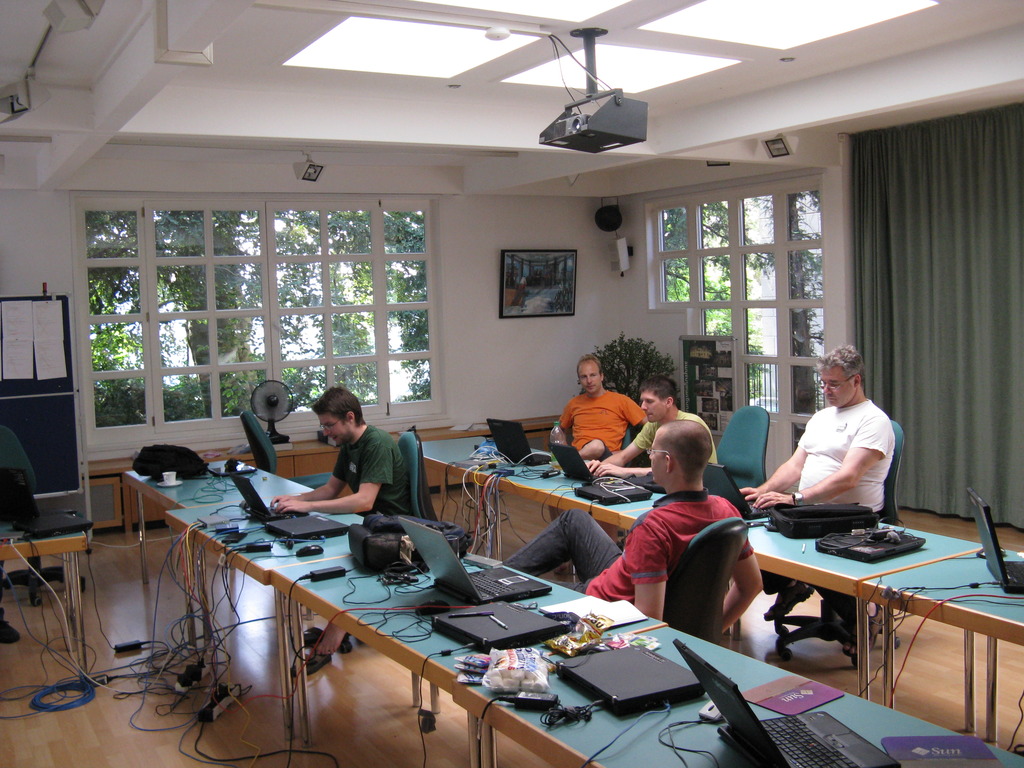
Last weekend (2010-07-02 2010-07-04) nine people met at the FAI developer workshop at Linuxhotel in Essen/Germany. If you can t remember: FAI is a non-interactive system to install, customize and manage Linux systems and software configurations on computers as well as virtual machines and chroot environments, from small networks to large-scale infrastructures and clusters. The participants of the FAI meeting: picture of participants of the FAI developer workshop 2010 second row from left to right: Michael Goetze, Michael Prokop, Andreas Schuldei
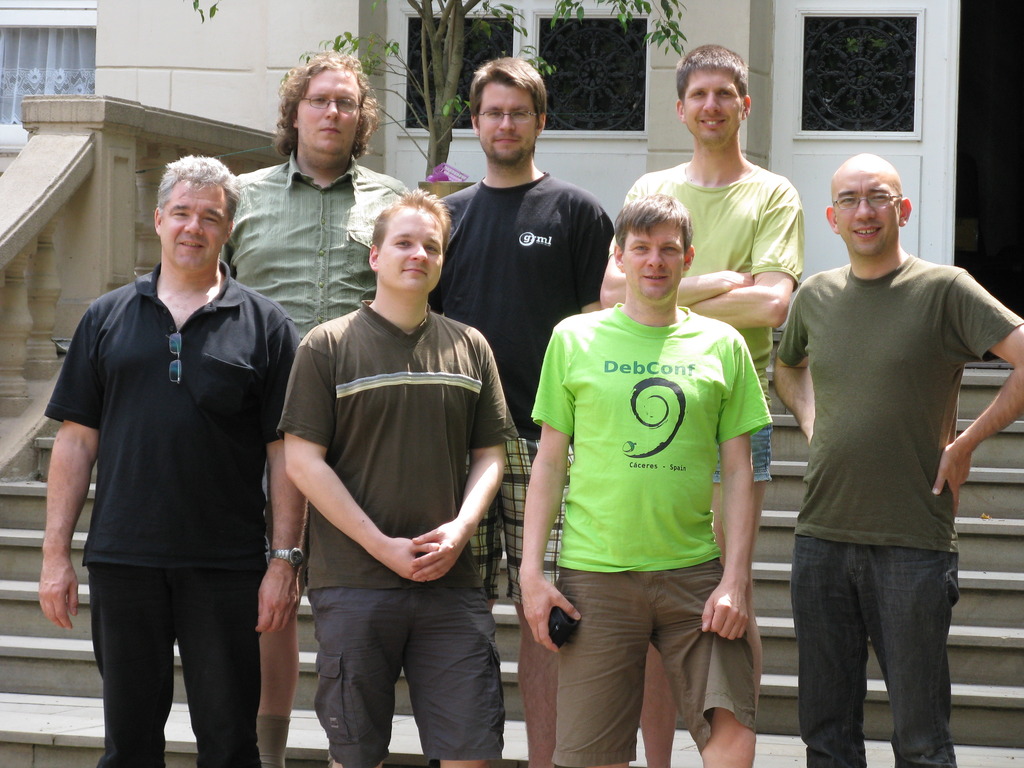
first row from left to right: Sebastian Hetze, Manuel Hachtkemper, Thomas Lange, Mattias Jansson
missing on the picture: Thomas Neumann (left on sunday midday) and Stephan Hermann (only part-time) Friday afternoon started with getting to know each other, continuing with discussions all around FAI. On saturday we started to hack on FAI. * Between the hack sessions and discussions the attending people presented their FAI usage and approaches. Some notes from the presentations:
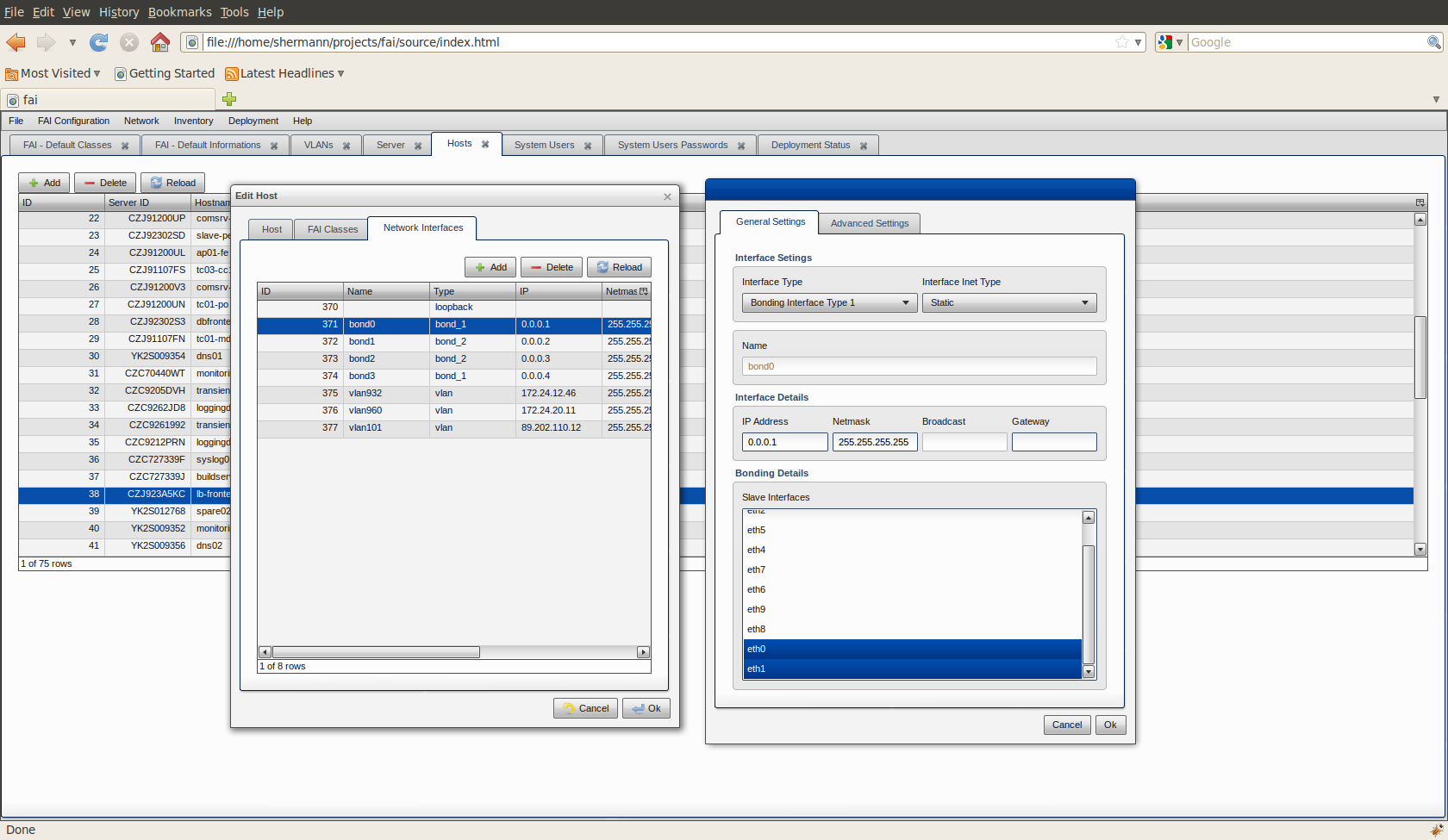
FAI Manager webfrontend / Stephan Hermann Stephan \sh Hermann presented his FAI web frontend which should be released under the GPL license in those days. The frontend uses qooxdoo whereas the backend is based on django, rpc4django and python-tftpy. Screenshot of FAI manager webfrontend A demo video is available at blip.tv. Currently Stephan is searching for a nice name for his FAI management tool please send suggestions either to him or to the linux-fai-devel mailinglist. Grml / Michael Prokop Grml is a Debian based Linux live system specially made for system administrators. Grml uses grml-live for building the ISOs, whereas grml-live itself uses FAI s dirinstall feature to build the live system. This provides the Grml team with a nice way to autobuild 18 ISOs per day, known as daily.grml.org. Mika also presented Grml s netscript bootoption and the ethdevice bootoption of live-initramfs which is useful for booting Grml/FAI via PXE. Host Europe / Michael Goetze Host Europe uses FAI for installing Debian and Ubuntu (32+64 bit) in the support center. They have ~20 FAI classes and use a Debian lenny NFSROOT as base for all deployed systems. Their main problems with FAI aren t related to FAI itself, but instead e.g. broadcom NICs with lack of support for it in Lenny s kernel. They are not using softupdate (yet) and currently use Kickstart for deploying CentOS but are working on deploying CentOS with FAI as well. LIS AG / Sebastian Hetze Linux Information Systems AG (LIS AG) are using FAI 3.2.17 and provide a luma and PyQt based GUI to their customers. They use DHCP, LDAP and DDNS for inventory, configuration and deployment. Mathematical Institute of the University of Bonn / Manuel Hachtkemper The Mathematical Institute of the University of Bonn uses FAI 3.1.8 and 3.3.5 for managing ~150 systems. They are automatically running softupdates every day, reporting how many hosts actually did run the softupdate and how many didn t run. The involved failogwatch tool supports two regex files, one for excluding specific hosts and the other one for grepping for known problems in the logs. Spotify / Andreas Schuldei + Mattias Jansson Spotify is a peer-to-peer music streaming service and the operating people at Spotify use FAI for deploying the systems. Currently they are using FAI 3.3.3 to deploy ~400 bare metal machines and ~150 virtualised machines. They have their class names in DNS using the txt/Text record entry. They are using a self written prepend_class script to manage dependencies between classes. University K ln / Thomas Lange Thomas uses FAI s trunk version (of course :) ), managing ~25 machines with less than 20 FAI classes. He s not using softupdates as Lenny s aptitude ignores the hold status of packages (this bug should be fixed for Squeeze). $COMPANY One of the big telecommunication providers in Germany uses FAI 3.3.3 for installing their bare-metal and virtual servers, providing Debian, Ubuntu and SLES. They are using Debian NFSROOT as a base for all systems as well and their main problems with FAI wasn t FAI itself but how to manage installation of virtual machines.
On Saturday evening we had a nice barbecue which included beer and K lsch *d&r*. ;) On Sunday we continued with discussions and development. Our work-log of the weekend: Important decisions made: We noticed that many FAI users implement their own way how to handle dependency management between classes, we will re-consider how we could provide such a mechanism through FAI s core. We also noted that it s important that any self-written scripts used within FAI are fully idempotent and users should be aware of this. Last but not least many thanks to the sponsors of the FAI developer workshop 07/2010! The workshop wouldn t have been possible without our generous sponsors, namely being:

22 June 2010

Michael Prokop: FAI Developer Workshop 2010

From 2nd to 4th of July 2010 the FAI developer workshop will take place at the Linuxhotel in Essen/Germany. FAI? FAI is the abbreviation for Fully Automatic Installation. It s a non-interactive system to install, customize and manage Linux systems and software configurations on computers as well as virtual machines and chroot environments, from small networks to large-scale infrastructures and clusters. As the name states the workshop is targeted towards FAI developers. We the FAI developers want to get FAI into shape for squeeze, discuss pending issues like Ubuntu packaging, release management and of course meet in real life for networking and socializing. Our rough roadmap for the FAI weekend looks like this: Friday: Saturday: Sunday: Further details are available in the FAI wiki at http://faiwiki.informatik.uni-koeln.de/index.php/DeveloperWorkshopJuly2010. The meeting wouldn t be possible without sponsors so special thanks to: If you are interested in sponsoring the FAI Developer Workshop as well please contact FAI lead developer Thomas Lange.

14 April 2010

Michael Prokop: EtherPad.com gone long live TitanPad.com!

I love EtherPad for online collaboration in real-time. By today (14th of April 2010) new pad creation will be disabled at EtherPad.com. Being aware of that in advance and as the EtherPad software was open sourced recently friends of mine and I were working on providing a dedicated EtherPad setup. TitanPad was born! Quoting our TOS / Privacy Info:
TitanPad was launched to provide an EtherPad setup which is unrelated to any commercial and political entities. Its goal is to offer a stable service through proper operating.
[...]
Now TitanPad is officially up and running and you re free to use it for online collaboration. Feel free to drop your feedback, questions and suggestions to our team via mail to support (at) titanpad.com.

6 April 2010

Michael Prokop: Remote Console feature through Java applet failing?

I m working for a customer who s using IBM blades. Remote access isn t limited to e.g. SoL but also possible through a Remote Console feature using a Java applet. After migrating one of my 32bit systems to a fresh 64bit system I suddenly couldn t use this Remote Console feature any longer. The error message was (leaving it for search engines and help other affected users):
load: class vnc.VncViewer.class not found.
java.lang.ClassNotFoundException: vnc.VncViewer.class
	at sun.plugin2.applet.Applet2ClassLoader.findClass(Applet2ClassLoader.java:152)
	at java.lang.ClassLoader.loadClass(ClassLoader.java:303)
	at java.lang.ClassLoader.loadClass(ClassLoader.java:248)
	at sun.plugin2.applet.Plugin2ClassLoader.loadCode(Plugin2ClassLoader.java:447)
	at sun.plugin2.applet.Plugin2Manager.createApplet(Plugin2Manager.java:2880)
	at sun.plugin2.applet.Plugin2Manager$AppletExecutionRunnable.run(Plugin2Manager.java:1397)
	at java.lang.Thread.run(Thread.java:619)
Caused by: java.net.ConnectException: Network is unreachable
	at java.net.PlainSocketImpl.socketConnect(Native Method)
	at java.net.PlainSocketImpl.doConnect(PlainSocketImpl.java:333)
	at java.net.PlainSocketImpl.connectToAddress(PlainSocketImpl.java:195)
	at java.net.PlainSocketImpl.connect(PlainSocketImpl.java:182)
	at java.net.SocksSocketImpl.connect(SocksSocketImpl.java:366)
	at java.net.Socket.connect(Socket.java:525)
	at sun.net.NetworkClient.doConnect(NetworkClient.java:161)
	at sun.net.www.http.HttpClient.openServer(HttpClient.java:394)
	at sun.net.www.http.HttpClient.openServer(HttpClient.java:529)
	at sun.net.www.http.HttpClient.<init>(HttpClient.java:233)
	at sun.net.www.http.HttpClient.New(HttpClient.java:306)
	at sun.net.www.http.HttpClient.New(HttpClient.java:323)
	at sun.net.www.protocol.http.HttpURLConnection.getNewHttpClient(HttpURLConnection.java:860)
	at sun.net.www.protocol.http.HttpURLConnection.plainConnect(HttpURLConnection.java:801)
	at sun.net.www.protocol.http.HttpURLConnection.connect(HttpURLConnection.java:726)
	at sun.net.www.protocol.http.HttpURLConnection.getInputStream(HttpURLConnection.java:1049)
	at java.net.HttpURLConnection.getResponseCode(HttpURLConnection.java:373)
	at sun.plugin2.applet.Applet2ClassLoader.getBytes(Applet2ClassLoader.java:458)
	at sun.plugin2.applet.Applet2ClassLoader.access$000(Applet2ClassLoader.java:46)
	at sun.plugin2.applet.Applet2ClassLoader$1.run(Applet2ClassLoader.java:126)
	at java.security.AccessController.doPrivileged(Native Method)
	at sun.plugin2.applet.Applet2ClassLoader.findClass(Applet2ClassLoader.java:123)
	... 6 more
Exception: java.lang.ClassNotFoundException: vnc.VncViewer.class
The error message might not be obvious at a glance and that s why I m writing about it actually. It s NOT the:
load: class vnc.VncViewer.class not found.
why it s failing but instead the real reason for the failure is the:
java.net.ConnectException: Network is unreachable
As you can read in Debian s Bug Tracking System in bug #560044:
Netbase has recently introduced the sysctl-setting
net.ipv6.bindv6only=1 in /etc/sysctl.d/bindv6only.conf and this setting will probably be the default in squeeze. This setting breaks networking in java, and any traffic will always
result in a java.net.SocketException: Network is unreachable .
To quote /etc/sysctl.d/bindv6only.conf:
When disabled, IPv6 sockets will also be able to send and receive IPv4 traffic with addresses in the form ::ffff:192.0.2.1 and daemons listening on IPv6 sockets will also accept IPv4 connections. When IPV6_V6ONLY is enabled, daemons interested in both IPv4 and IPv6 connections must open two listening sockets.
To work around this issue you can either execute the Java process through "java -Djava.net.preferIPv4Stack=true" or to change the IPv6 behaviour system wide execute "sysctl -w net.ipv6.bindv6only=0". To make this setting permanent across reboots adjust the setting inside /etc/sysctl.d/bindv6only.conf. After applying this workaround the Remote Console should work again.

3 April 2010

Michael Prokop: I am going to DebConf 10

* Just booked my ticket for DebConf10. See you in New York.

2 November 2009

Michael Prokop: Grml 2009.10 Codename Hello-Wien

Screenshot of Grml 2009.10 Distrowatch, Heise, Pro-Linux, Symlink, Golem & CO already have the news: a new version of the Debian based Live system for system administrators has been released: Grml 2009.10 Codename Hello-Wien . One visible new feature is the new bootsplash which should lead you through the most important boot options. The new release features kernel 2.6.31.5 with various patches and extra modules. We ve an automatic hostname configuration via DHCP & rDNS, improved network boot capabilities, extensive documentation to Grml s Z Shell features and configuration, support for GRUB2 and directory-specific Z Shell configuration. Amongst the new software packages are Google s stressapptest, btrfs-tools and guymager. A full changelog and release notes can be found at http://grml.org/changelogs/README-grml-2009.10/. As always, images for 32 bit and 64 bit x86 architectures are provided in the sizes grml (~700 MiB), medium (~200 MiB) and small (~100 MiB). They can be downloaded via HTTP, FTP, rsync and Bittorrent. Thanks to all the contributors for being part of this rocking release! *

11 September 2009

Michael Prokop: Debian: considerations regarding redesign of live-initramfs

Live-initramfs is a fork of Ubuntu s casper for use within Debian. Nowadays several Debian based live systems are using live-initramfs to build an initramfs suited to boot live systems. Besides debian-live and all its users that s at least Grml (and its derivates) and FAI. I m maintaining live-initramfs for Grml so I know the limitations of live-initramfs. Yes, it has some design flaws but upstream finally decided to take the time to redesign it. That s why I m posting this: I would like to see even more Debian based systems adopting live-initramfs (hello Sidux!). This would improve compatibility with regards to similar bootoptions and features as well as better cooperation among the teams. Of course this will be possible only if live-initramfs is capable of handling all the necessary customization and configuration tasks that different live systems require nowadays. So this are my current considerations regarding the redesign of live-initramfs: If you re interested in adopting live-initramfs in your distribution/system feel free to contact me (mika [at] debian.org). If you do have any further wishes for the redesign please let me know so I can forward them to upstream.

30 May 2009

Michael Prokop: Directory specific shell configuration with Zsh

Now being an official Debian developer I ve the possibility to use $DEBEMAIL=mika@debian.org for my Debian packages. But whereas I want to use that for all my official Debian packages I still want to use $DEBEMAIL=mika@grml.org for my grml related packages. I m a lazy sysadmin and don t want to manually adjust my changelogs depending on the type of package (especially since this might be error-prone) so I needed a generic solution. Grml s Zsh configuration (Debian package grml-etc-core >=0.3.71) provides a solution for Zsh (version 4.3.3 or later): based on directories you can set your own profiles. Demonstration:
% cd /grml/git-grml
chpwd(): Switching to profile: grml
% echo $DEBEMAIL
mika@grml.org
% cd /grml/git-debian
chpwd(): Switching to profile: debian
% echo $DEBEMAIL
mika@debian.org
The configuration is pretty simple:
# define profiles based on directories:
zstyle ':chpwd:profiles:/grml/git-grml( / /*)'       profile grml
zstyle ':chpwd:profiles:/grml/git-debian( / /*)'     profile debian
zstyle ':chpwd:profiles:/home/mika/Customers( / /*)' profile customers
# configuration for profile 'grml':
chpwd_profile_grml()
 
  [[ $ profile  == $ CHPWD_PROFILE  ]] && return 1
  print "chpwd(): Switching to profile: $profile"
  export DEBEMAIL=mika@grml.org
  export GIT_AUTHOR_EMAIL="mika@grml.org"
  export GIT_COMMITTER_EMAIL="mika@grml.org"
 
# configuration for profile 'debian':
chpwd_profile_debian()
 
  [[ $ profile  == $ CHPWD_PROFILE  ]] && return 1
  print "chpwd(): Switching to profile: $profile"
  export DEBEMAIL=mika@debian.org
  export GIT_AUTHOR_EMAIL="mika@debian.org"
  export GIT_COMMITTER_EMAIL="mika@debian.org"
 
# configuration for profile 'customers':
chpwd_profile_customers()
 
  [[ $ profile  == $ CHPWD_PROFILE  ]] && return 1
  print "chpwd(): Switching to profile: $profile"
  export TELEPHONE=[...]
  export MAIL=[...]
 
Kudos to Frank for implementing this lovely feature in grml s zshrc. Look for chpwd_profiles() in grml s zsh config for further documentation on this feature.

28 May 2009

Michael Prokop: Debian.Developer->add_member( mika )

Since 2009-05-28 I m an official Debian Developer. Thanks to all involved people. Special thanks to Gerfried Rhonda Fuchs for being my advocate and a helpful package sponsor, to Alexander formorer Wirt for being a helpful package sponsor, to Christoph Myon Berg and Bernd bzed Zeimetz from the frontdesk and to Marc he Brockschmidt for being a great Application Manager.

25 May 2009

Michael Prokop: Boot an ISO via Grub2

With grub2 you can directly boot an (iso9660) ISO using its loopback option. This is great because it provides another nice rescue scenario - for example when using grml (the Debian based Linux Live-CD for sysadmins). You no longer need to extract kernel and initrd from the ISO to be able to boot it using the isofrom bootoption. All you need to do is put a plain grml ISO to your harddisk. I ve tested it with grml-small 2008.11 and grml-small 2009.05-rc1 using grub2 from Debian/unstable (1.96+20090317-1). In the following example the ISO file grml-small_2008.11.iso is available in directory grml on device /dev/sda1. You can boot it from the interactive grub shell using:
loopback loop (hd0,1)/grml/grml-small_2008.11.iso
linux    (loop)/boot/grmlsmall/linux26 isofrom=/dev/sda1/grml/grml-small_2008.11.iso boot=live quiet vga=791 noeject noprompt
initrd   (loop)/boot/grmlsmall/initrd.gz
boot
So if you are using grub2 already consider adding an entry like the following to your grub config (/boot/grub/grub.cfg):
menuentry "grml-rescue system from harddisk (ISO = grml-small_2008.11.iso)"  
  loopback loop (hd0,1)/grml/grml-small_2008.11.iso
  linux    (loop)/boot/grmlsmall/linux26 isofrom=/dev/sda1/grml/grml-small_2008.11.iso boot=live quiet vga=791 noeject noprompt
  initrd   (loop)/boot/grmlsmall/initrd.gz
 
This entry gives you the option to boot grml from your harddisk even if you don t have the possibility to boot via CD/USB/PXE/ . Tip: starting with grml 2009.05(-rc1) you can also use findiso=/path/to/grml.iso instead of isofrom=/dev/sdX/path/to/grml.iso. findiso is a dynamic version of isofrom as it looks for the specified ISO file on all disks where it usually looks for the .squashfs file (so you don t have to know the device name compared to isofrom= ). The above configuration using findiso is even easier to set up and would look like this:
menuentry "grml-rescue system from harddisk (ISO = grml-small_2008.11.iso)"  
  loopback loop (hd0,1)/grml/grml-small_2008.11.iso
  linux    (loop)/boot/grmlsmall/linux26 findiso=/grml/grml-small_2008.11.iso boot=live quiet vga=791 noeject noprompt
  initrd   (loop)/boot/grmlsmall/initrd.gz
 

15 February 2009

Michael Prokop: Debian GNU/Linux 5.0 codename Lenny - News for sysadmins

Alright, Debian GNU/Linux 5.0 AKA as Lenny has been released. Time for a Debian unstable unfreeze party! 8-) What does the new stable release bring for system administrators? I ll give an overview what news you might expect when upgrading from Debian GNU/Linux 4.0, codename Etch (released on 8th April 2007) to the current version Debian GNU/Linux 5.0, codename Lenny (released on 14th February 2009). I try to avoid duplicated information so make sure to read the release announcement and the official release notes for Lenny beforehand. Noteworthy Changes Virtualisation Virtualisation related new tools: Desktop oriented packages like virtualbox and qemu are available as well of course. Noteworthy Updates This is a (selective) list of some noteworthy updates: New packages Lenny ships over 7000 new packages. Lists of new/removed/replaced packages are available online. I ll name 238 sysadmin related packages that might be worth a look. (Note: I don t list addon stuff like optional server-modules, docs-only and kernel-source related packages. I plan to present some of the following packages in more detail in separate blog entries.) Further Ressources

1 December 2008

Michael Prokop: Schluchtenscheisser!

grml release delayed through a CBS commedy series. News at 11<Rhonda /> There we go: there’s a new grml release (you know, the Debian based Linux Live-CD for sysadmins and texttool users). The release with codename Schluchtenscheisser and version number 2008.11 is available in different variants. The 32bit versions grml, grml-medium and grml-small as well as grml64, grml64-medium and (new!) grml64-small are available through grml.org/download/. For details regarding the changes in the new release check out the release announcements. Happy grml-ing, dear Schluchtenscheissers - and to the rest of the world. 8-)

28 November 2008

Martin F. Krafft: Up the Khyber!

What started with a little host naming theme riddle, and spread as a meme across various planets, has come full circle today, as I installed a new machine, khyber.madduck.net in the racks hosted at the LayerOne colocation site in Z rich. Init Seven, my favourite Swiss ISP, are sponsoring the rack space and connectivity: a routed /28 IPv4 subnet and a /64 IPv6 subnet. The machine is a Transtec Calleo 331 1U server with two quad-core AMD Opteron 2354 processors, 16Gb of RAM, and 4Tb of disk space, configured into a 2Tb RAID1 with LVM on top. It will be used to host a couple of KVM instances for a number of projects I currently operate off my main, personal server, pulse.madduck.net. Unfortunately, Transtec (as well as most other vendors I checked out) uses nVidia s MCP55Pro chipset, which had me sceptical long before I sent the order. nVidia is known to suck at thinking open-source, and the Linux kernel driver for their network chips, forcedeth, had to be reverse-engineered, because nVidia failed to cooperate. Apart from that, nVidia s chips are also often simply crap. Many of their motherboards come with broken APICs and the network chips often wreak havoc on subnets. I find it curious that a search for MCP55 or MCP55Pro on the nVidia website yields no results. Given these expectations, I insisted on a try-and-buy contract, which are not default in Switzerland (as opposed to the EU). My fears proved right, it wasn t long until I encountered the first problems with nVidia s crap: the network chip is unable to deal with segmentation offloading for larger packets, e.g. those with IPv6 payload in a bridging context, and generic segmentation offloading has to be turned off on the interface:
ethtool -K eth0 gso off

This fixes the issue, and so I stuffed it into /etc/network/interfaces and decided to keep the machine, especially after having invested the time into the server to figure out how to work the watchdog and the IPMI card. The folks behind Transtec s support hotline are helpful, but it took me a bit of time to get the information I wanted out of them. At least they deemed it perfectly natural that I wanted to run Debian, and never questioned that. Let s document some of the more internal specs here for posterity: The BIOS gives the impression of two separate watchdogs, one on the IPMI card (a SIMSO+) and one on the mainboard itself (a SuperMicro H8DMU+). Transtec told me that SuperMicro disabled the IPMI watchdog (called BMC watchdog in the BIOS) with firmware 1.29, leaving only the one on the motherboard. It took a bit of time to find out that this was a W83627THF and supported by the w83627hf_wdt driver, which I configured with module options timeout=120 nowayout=1. I left the BIOS setting at disabled since that would otherwise interfere with booting e.g. the awesome grml live system by rebooting the machine after the set amount of time. It also took a bit of time to get SOL working with the IPMI card. In the end, I found it to work best by configuring the console redirection in the BIOS to use COM2 with 38400/n/8, using hardware flow control, redirection-after-POST always, and vt100 emulation ANSI and vt-utf8 emulation were horrific. I instructed the bootloader to pass console=tty0 console=ttyS1,38400n8 to the kernel (order matters), and configured agetty in /etc/inittab like this:
T0:2345:respawn:/sbin/getty -8hL ttyS1 38400n8 vt100

To guard against the worst, I also left a grml CD in the drive, to be able to boot a rescue system via SOL in case everything else was broken. The following kernel boot parameters enable me to use the rescue system via IPMI:
vga=normal noeject noprompt console=tty0 console=ttyS1,38400n8 forensic

Michael Prokop of the grml project tried to create a customised ISO image with these options for me, but I kept getting medium errors trying to read it, independent of the burner, CD-writing-software, operating system used to burn, medium, and drive used to read, so it s possible that the ISO image is faulty. Michael used the following command line to create it (supporting files are here):
grml-live -t ~/templates-madduck -c GRMLBASE,GRML_MEDIUM,AMD64 -o \
  /grml-live/grml64-medium_2008.11-madduck -a amd64 -s sid -v \
  2008.11-madduck -g grml64-medium -r Schluchtenscheisser -V -b

Until we figure out the problem with this, the grml64 0.2 CD in the drive will do. The machine is now operational, but the IPv6 prefix I have still arrives at vera.madduck.net, a Xen-Instance hosted by Init Seven, which I will no longer need, once I find the time to migrate all the services it hosts. NP: This Will Destroy You: Young Mountain

8 September 2008

Michael Prokop: FAI developer meeting in Extremadura/Spain

For the last few days I’ve been in the city Badajoz in region Extremadura of Spain at the FAI developer meeting. Check out the Linex Euronews Video at youtube to get a short impression of Linux in the region. Lessions learnt: <insider>
FAI Comic - Image
</insider>

8 April 2008

Michael Prokop: Re: I am only mad on IRC

Martin, sorry for calling you Madduck on the debian.ch-mailinglist. Luckily I didn’t use that name during our meeting in Zurich last week. *pfuh* ;) To take part in the pdo-game with my own name (being Michael Prokop ;-)): as many of you might know I’m known as Mika in the community. The name was invented for me around 1999 (IIRC) by a greek flat collegue who liked to call me “Mika” - refering to Mika H kkinen (for whatever reason). From that on several people started to call me that way. I’m signing mails “to the community” with that nick since many years as well as using it in usenet and on freenode (IRC); on OFTC (another IRC network) I’ve to use mikap instead because mika was registered by another user already. Outside “the community” I’m usually known as Michael, good friends also use Michi and the family of my girlfriend uses Michl when the sister of my girlfriend (named Michaela and known as Michi as well) is present. Oh, and during grammar school I was AKA Proke.</secret> 8-) So calling me Mika is perfectly fine because it’s a kind of uniqueness for me. There might be just too many Michaels around and at least in Austria my nickname is everything but common. Quoting the marketing department: Great trademark! ;) Oh and my speech parser knows to handle Michael, Michi and Michl as well - though it strongly depends on the situation, place, environment,…. Oh but using Proke is like talking to /dev/null - you’ve never heard of that name, ok?

8 March 2008

Michael Prokop: google hack for your desktop: keyword correct

Do you know the situation where you just aren’t sure whether you are spelling a word the right way? If you know how to type the word pretty well, then a dictionary might work just fine. If you aren’t sure at all you might consider using Google’s ‘Did you mean’-feature. Check out a simple demonstration for the word Wondows, which could mean ‘Windows’. ;-) If you happen to use that google-feature just too many times you might be interested in my small hack:
wget -O google_correct.py http://grml.org/scripts/google_correct.txt
chmod +x google_correct.py
This small python script uses xsel (so it currently works only on systems providing xsel ;-)) to retrieve the currently selected word from your X selection, executes a google search and parses the output for the keyword inside the ‘Did you mean’ section. Finally it sets the corrected keyword as your current X selection. If you provide the keyword directly as an option, then the script just outputs the corrected keyword without touching your X selection so you can integrate it directly inside your $EDITOR as well as an option. This gives you the flexibility to use this feature globally(!) inside your preferred window manager. Select a word, press the keybinding for executing google_correct.py and now you’ve the corrected word available for further actions… Finally don’t forget to put the affected word (after double-checking it using a real dictionary of course) into your $EDITOR’s dictionary to keep such “help m0m, I can’t sp3ll w0rds anymore” situations at a minimum. I’m using a personal dictionary file and ‘iab wondows windows’ inside Vim to fix spelling errors for words I’m unsure how to spell or which I always get worng. A whishlist of further ideas/features for the script can be found in the header of the script itself. Further input welcome.

26 February 2008

Michael Prokop: Linux Live-CD grml 1.1 - Codename Skunk

It’s done, we have new releases of grml, the Debian-based Linux Live-CD for sysadmins and texttool users:
  • grml 1.1 (32bit) - Codename Skunk
  • grml64 0.2 (64bit) - Codename Schwammerlklauber
  • grml-medium 0.1 (32bit) / grml64-medium (64bit) - Codename Pfuh
  • Screenshot von grml 1.1 It’s the first stable release being based on our new build-framework grml-live which itself is based on FAI (Fully Automatic Installation). Thanks to grml-live we can provide you a new grml flavour grml-medium which tries to close the gap between grml-small and grml. As usual you’ll get software and kernel updates, many new packages and features plus additional hardware support. We are using LZMA compression for squashfs and provide several additional kernel modules like atl2, iscsitarget, madwifi and (for the first time) loop-aes. Oh and the grml release is known to work fine on the Asus Eee PC - LAN, WLAN and webcam working out-of-the-box! Find all the glory details about the new releases in above mentioned release notes or just visit grml.org. For german readers there’s an article about the new release at pro-linux.de. BTW: On the next weekend (1st and 2nd of march) we - the grml team) - will present the new release on Chemnitzer Linuxdays at the grml booth. grml-CDs, grml-shirts und (new!) “ready to go grml-usb-pens” will be available as well as the chance to talk to us in reallife. 8-) So, we wish you a fast download and hope you enjoy the new release! :-)

    24 February 2008

    Michael Prokop: Why you shouldn t use copy/paste as root

    Title: How to subtile fsck your Apache setup. Solution (quoting the original command line):
    cd /etc/apache2/mods-enabled
    lrwxrwxrwx 1 root www-data 33 2007-09-28 15:23 auth_basic.load -> ../mods-available/auth_basic.load
    lrwxrwxrwx 1 root www-data 33 2007-09-28 15:23 authn_file.load -> ../mods-available/authn_file.load
    lrwxrwxrwx 1 root www-data 36 2007-09-28 15:23 authz_default.load -> ../mods-available/authz_default.load
    Disclaimer: no, it wasn’t me; it’s the log of a customer. Credits: thanks to monitoring and the use of mercurial in /etc locating and fixing the problem was a matter of seconds.

    22 December 2007

    Michael Prokop: Make console work comfortable

    You like grml’s Zsh, GNU screen and Vim configuration? No problem to get that on non-grml/non-Debian/non-Linux/… systems as well. Just copy/paste the following lines which are stolen from one of my personal cheatsheets for working on foreign systems (being Linux as well as Solaris, BSD, Windows,…):
    # IMPORTANT: please notice that you might override existing
    # configuration files in the current working directory! =>
    wget -O .zshrc        http://hg.grml.org/grml-etc-core/raw-file/tip/etc/skel/.zshrc
    wget -O .zshrc.global http://hg.grml.org/grml-etc-core/raw-file/tip/etc/zsh/zshrc
    wget -O .screenrc     http://hg.grml.org/grml-etc-core/raw-file/tip/etc/grml/screenrc_generic
    wget -O .vimrc        http://hg.grml.org/grml-etc-core/raw-file/tip/etc/skel/.vimrc
    
    If you do not want to copy/paste just use the grml-config.sh script instead. Notice: the ‘tip’ inside the URL always points to the most recent version of the file(s), so it’s easy to stay up2date as well as checking out a very specific version of the configuration files. Just look at http://hg.grml.org/grml-etc-core. Disclaimer: If you notice any problems with the configuration files on your system/platform please let me know, it’s considered as a bug then. Any other feedback is welcome as well of course. :)

    13 December 2007

    Michael Prokop: Checklist for 1:1 clone of a Debian system

    When cloning a Linux/Debian system 1:1 you should have a checklist of what’s important to change on the cloned system. For cloning I use the grml Linux Live-CD of course (the following tips are part of grml-tips as well). To create a 1:1 clone I boot grml on the systems (usually using the ssh=password bootoption to be able to access the system remotely as well) and use something like:
    Listener:
    # nc -vlp 30000 > /dev/sda1
    Source:
    # dd if=/dev/sda1 bs=$VALUE   nc -vq 0 $IP_OF_LISTENER 30000
    
    When I have to leave the place where the clone process is running and if the CD-ROM doesn’t reinsert CDs on reboot automatically (usually that’s the case for server systems) I can use my remote-reboot procedure via ssh later on like:
    eject &>/dev/null
    umount -l /cdrom
    eject /dev/cdrom
    echo b > /proc/sysrq-trigger
    
    But stop: before executing the last steps to reboot the server you should take care of a few important steps, otherwise rebooting might fail and you won’t be able to login via SSH. ;-) That’s my personal checklist: Tip: I highly recommend the use of a version controll system for maintaining /etc, for example etckeeper and mercurial should do the job for you.

    Next.

    Previous.