Search Results: "ina"

30 April 2012

Petter Reinholdtsen: Cutting it short - and picking the right tool for the job

I normally cut my hair short, and my tool of choice has been a common hair/beard cutter, bought in a electrical shop here in Norway. But the last ones have not really been up to the task. My last cutter, some model from Braun, could only cut a few of my hairs at the time, and cutting my head took forever. And the one before that did not work very well either. We have looked for something better for a while, but it was not until I ended up visiting a hairdresser that we discovered that there are indeed better tools available. But these are not marketed and sold to "regular consumers". The hair saloons can get them through their suppliers, but their suppliers only sell companies. The models they sell, are very different from the ones available from Elkj p and Lefdal. The main difference is their efficiency. It would cut my hair in 5 minutes, instead of the 30-40 minutes required by my impotent Braun. The hairdresser I visited had a Panasonic ER160, which unfortunately is no longer available from the producer. But I found it had a successor, the Panasonic ER1611. The next step was to find somewhere to buy it. This was not straight forward. The list of suppliers I got from the hairdresser did not want to sell anything to me. But searching for the model on the web we found a supplier in Norway willing to sell it to us for around NOK 4000,-. This was a bit much. We kept searching and finally found a Danish supplier selling it for around NOK 1800,-. We ordered one, and it arrived a few days ago. The instructions said it had to charge for 8 hours when we started to use it, so we left it charging over night. Normally it will only need one hour to charge. The following evening we successfully tested it, and I can warmly recommend it to anyone looking for a real hair cutter. The ones we have used until now have been hair cutter toys.

John Goerzen: Review: Amateur Radio Handhelds (HTs), APRS, and Battery Tuning Tips

There are a lot of opinions about handhelds for amateur radio users (these handhelds are often known as HTs). I ve used three of them, two with APRS capability, and thought it s about time I write about them. First, I ll talk about the units in particular, then I ll get to some broader Yaesu vs. Kenwood generalizations and conclusions. Yaesu VX-7R a rugged first HT without APRS Cost: $350 as of 4/30/2012 This was the first HT I got as a ham, at the suggestion of Mike AE0MW. It truly does make a great first handheld for a ham. Radio-wise, one unique feature is a receive that s wideband enough to cover both broadcast FM and broadcast AM, the various ham bands, and plenty of others besides. The battery life quoted in the manual is 6 hours on 2m and 5.5 hours on 440 (using standard 6s TX / 6s RX / 48s squelched metric), and in my experience it seems it must be even better in some cases. The real piece of news about this unit, though, is just how rugged it is. It says submersible across the front and I absolutely believe it. I have personal experience with its ruggedness. I once was at an event and put the radio on my car roof while helping one of my children into the car. I then started driving home and forgot it there. When we got home, I realized what had happened, and also realized what that mysterious CLUNK along the busy county road was. So I drove 45 minutes back to where I heard the clunk, and found the VX-7R still lying in the roadway, where it had been for 1.5 hours on the 55 MPH road. The thing was really beat up. It had obviously been hit by numerous vehicles. The antenna was ripped off, taking the SMA mount with it. But wouldn t you know it, the darn thing still powered up. I took it to a local amateur radio shop, and about $80 later it was repaired. Incredible. The only real problem was the antenna connector. I took this radio with me on my bicycle many days, mounted on my handlebars. It got bounced around, but still worked great. Some days I listened to FM radio from it while riding my bike, monitoring a local repeater while I rode. Other days, I spent most of my ride (about an hour each way) chatting with people on the repeaters I have a mobile antenna mounted on the bike, fed to the VX-7R, and a headset. It all worked fine never a problem at all. The ruggedness has its downside. All of the connectors on the radio, except for DC in, are screw-down even the speaker/mic connector. This obviously helps keep water out, but means that it can take a lot longer than normal to do a simple thing like plug in a speaker/mic. It doesn t need any tools, but can get a little annoying. The radio physically is small (unless you install the belt clip, which has an odd peg-based mechanism that protrudes unnecessarily far and is surprisingly non-rugged). It can easily fit into a pocket. The other downsides of the VX-7R mostly surround its interface. I m not one of the Yaesu haters that seem to be so common. I find the interface usable if you read the manual; it seems a lot of people that complain about it don t. But it is quirky. The SET mode is one long menu in sort of a ring. You scroll with the knob, and when you get to the end, it repeats to the beginning. There are one or two shortcut keys to a specific setting, but overall either you use the thing so much you know exactly where you re going, or you re twisting the knob for awhile until the option you want rolls around. (I know of nobody that uses it so much they know exactly where they re going.) They do have options grouped into categories, but it doesn t help much because there s no quick way to skip between categories. The dual transceivers work less elegantly than on the TH-D72A or VX-8GR. Instead of being two equal transceivers A and B, they are main and sub . The sub transceiver is not broadband receive like the main receiver is. But there are also other limitations that have no apparent logic. For instance, you can program memory groups into the device putting, say, all the local repeaters into a certain group, or all the public safety frequencies (to use as a scanner). You can go to the special set menu, select group, then activate SCAN, and it will scan only the memories in that group. But you can t select the special group mode on the sub transceiver for no apparent reason. One other complaint is that the AC charger introduces so much noise to a transmission that you cannot really use the VX-7R to transmit while the charger is connected. Yaesu sells a programming cable that plugs into the speaker/mic port on one end, and a DB-9 serial port on the other, and includes programming software. For an incredibly high price. For far less, I found a similar cable on eBay that has a USB port on the other end (with a built-in USB/serial converter), and used VX-7R Commander though now that Chirp is available for Linux, I ll probably switch to it. I would probably continue to recommend this transceiver for a new ham. The ruggedness, plus the broadband RX, are features that should make it appealing. It is an excellent emergency preparedness/response radio due to those properties; having TX and RX on ham bands, plus RX on broadcast and public safety could be quite the asset. However, for someone that has any interest in APRS, one of the other two radios I mention is probably a better choice. At only $10 more, the VX-8GR sacrifices ruggedness and broadband receive for APRS functionality and could make a compelling alternative to the VX-7R at the same price point. The very low-power transmit at 50MHz and 220MHz on the VX-7R strikes me as a gimmick feature at best that has very little actual use. Shipped battery: FNB-80LI, 7.4V, 1400 mAh, lithium-ion Kenwood TH-D72A / D72E The Cadillac HT, with APRS and GPS Cost: $464 as of April 30, 2012 It s hard to use any word but incredible to describe this HT, though it does have its own rough edges. Starting with the basics, it has dual transceivers with full duplex (meaning you can be transmitting on one band while receiving on another). Its stored memory system and memory bank scanning system are both a lot easier and faster to use than Yaesu s, and work the same on both transceivers A and B, though perhaps offer slightly less flexibility than Yaesu s (on the VX-7R, a single memory can be a member of more than one group). The quoted operating time is 6 hours, which is probably accurate with APRS and GPS off, matching (or nearly matching) the VX-7R. The TH-D72A has the usual mic and speaker ports. Unlike Yaesu, Kenwood has used the same jack for years, so it is not necessary to purchase new accessories with each upgrade. The unit also has both serial (Kenwood connector) and standard mini USB ports, and even ships with a USB cable. The USB port is designed to interface to a PC, and the radio presents itself as a serial-over-USB device. Kenwood also includes MCP-4A, the programming software for the unit, free. This is one example of several things that Kenwood includes for free but are costly add-ons with Yaesu. Kenwood s configuration menu system is hierarchical. You can scroll through the four top-level menus (RADIO, GPS, APRS, and SKY), then navigate through sub menus. The result is that it s both faster and easier to find what you want than on the Yaesu menus. Plus, as you navigate, the radio shows you the shortcut key to get to a particular option (each level of menu is numbered starting) so, for instance, Menu-1-1-0 takes me directly to the configuration for RX battery saver interval far faster than I could get there on the VX-7R or VX-8GR. Only the APRS menu gets a bit crowded with this setup. The D72A supports Kenwood s Sky Command II an intriguing way of making it essentially a remote for a Kenwood HF rig such as the TS-2000. It works by engaging a crossband repeater for the audio, and setting up a AX.25 packet link for the control. It works, but as the response time to frequency adjustments is measured in seconds, is klunky for tuning around a HF band. A nifty, though perhaps not supremely useful, feature with some hackable potential that I haven t explored yet. The TH-D72A is one of only two shipping general-purpose amateur radios that have a built-in GPS the other is the Yaesu VX-8GR, which I ll review below. The GPS works well, and can get a fix indoors if desired. It has a system of saving waypoints, which you can then navigate back to later (using distance/bearing indicators). It also has a track log. While the track log can t be viewed on the unit, it can be downloaded with the included MCP-4A software and saved in a variety of formats including Google s KML for later importing into Google Maps or Google Earth. I enjoy this feature on trips to see where I went later on. There is also a GPS-only mode, which disables all of the other radio circuitry on the radio for very low power consumption. The GPS navigation screens all support heading-up or north-up indicators. But where this radio really shines is APRS. The D72 has all the basics you d expect sending and receiving beacons, sending and receiving messages and bulletins, etc. It has built-in support for being a digipeater in many different ways, including new-N UI-Trace. Coupled with an MFJ VHF amplifier, this could make a nice temporary (or even permanent) digi. The message interface permits sending, receiving, and shortcuts for replying to messages. Beacon transmission can be completely manual, at set intervals, or using SmartBeaconing. Outbound beacons also support proportional pathing (meaning adjusting via-path to not have wide coverage with every transmission). Also, if not using SmartBeaconing, a decay algorithm can be used to send beacons less frequently when the station s location isn t changing. An alternative tells the system to transmit a beacon every time PTT is released, subject to rate limiting by interval. So lots of choices there. For incoming beacons, there are various filters by callsign pattern, packet type, etc. that control whether they will be processed at all, and what kind of alert (visual or audible) to present. Beacons are also placed in a received beacon list, sorted with the most recent at the top (duplicates from the same station are always removed, so only the most recent is presented.) A long press of the LIST button shows time received and type of device next to the callsign. Selecting a specific beacon shows status text, comment, device type, bearing/distance (with graphical north-up or heading-up display), telemetry (weather information and the like), and a little bit of info about the via-path. Pretty nice to see weather reports from local weather stations on there. You can sort the list by received time, station call, or distance from your position but it doesn t stay sorted by anything other than received time, and takes several seconds to re-sort. Seems like a bit of an oversight there. The D72A supports QSY information in beacons. This can automatically insert the frequency of the other band on the transceiver into your transmitted beacons for you, or give you a quick way to tune to the frequency mentioned on others beacons. Either way, a nice touch. The D72 also supports query packets, such as packets asking your station to transmit its position right now. The TH-D72A can directly interface with several types of weather stations via serial link to read weather sensor information and transmit it into APRS packets directly, with no need for a PC to be in the picture at all. But if you do hook up a PC to it, there are quite a few more possibilities. You can hook it up to PC APRS software (or a hardware device such as the AVMAP) to see locations of other APRS stations on a map. It can emit APRS packets, plus even GPS sentences, down the USB port to the PC. Moreover, in PACKET mode, it acts as a full TNC, with a fairly robust TNC command set. In short, it can do more than APRS; it can also do regular AX.25 such as DX clusters, BBS, nodes, etc. As far as I know, this is the only HT that can interface with a PC in this manner, and only Kenwood s mobile D710 has the same kind of feature set at that. Kenwood includes a lot of documentation with the TH-D72A. The 51-page printed manual is a summary or introductory guide. The included CD-ROM supplies another 75 pages of detailed reference material, and the 92-page in-depth APRS manual has a level of detail that true geeks like me appreciate. I ve referred to Kenwood s documentation more than once while figuring out things about the VX-8GR (which woefully under-documents things like SmartBeaconing). That said, it appears that at least some of the documentation has been copied from the earlier TH-D7A. Page 4 of the printed book is a good example. It talks about the memory effect of the battery, and warns against unplugging and replugging the charger because the charge cycle will be reset and the battery will be over-charged (I find it hard to believe that a Li-Ion charge controller would be that stupid, and furthermore direct observation suggests that it isn t.) Parts of the in-depth APRS guide appear to have been written for the D710, but that s a really minor nit. Unlike Yaesu, Kenwood issues periodic firmware updates to the D72A, which you can apply over USB. They have fixed bugs and added features to the unit over time. Now onto the things that aren t so good about the D72A. I ll start with the battery system, since we were already discussing it. Despite shipping with a much larger battery than the VX-8GR (1800 mAh vs. 1100 mAh), it only manages roughly equal battery life with APRS and GPS engaged. (It will probably do better as a simple voice unit, however.) This has been confirmed by numerous reports on the Internet. I will discuss this topic more below. There is very little else to fault the D72A on, feature-wise. I have a minor nit in that it is impossible to cause the keylock feature to also lock PTT. It would be nice to be able to see raw APRS packets on beacons and messages. Other than that, I can t think of a feature it really lacks. Compared to the VX-7R and VX-8GR, the TH-D72A is significantly larger physically, in every dimension. It is not uncomfortably large, and still fits in my hand fine. But its size is enough different that it feels like the design is dated and could have been more compact if Kenwood would have bothered. It s a nit, sure, but a nontrivial one. With the single exception of the sturdy metal belt clip, the D72 doesn t feel nearly as rugged as the VX-7R, and not even as rugged as the VX-8GR. The keys have a squishy feel to them, the PTT button works fine but has a cheap plastic design (as opposed to the rubberized versions on Yaesu s HTs). The manual doesn t mention it, but one Kenwood brochure mentions and IP54 weatherproofing. That means it is protected against limited ingress of dust and against water sprayed from all directions limited ingress permitted. Contrast that to the VX-7R, which is rated for 30 minutes of submersion at 3ft and has a magnesium case. It seems to be specced similarly to the VX-8GR, though the VX-8GR certainly feels a lot more solid. I have no proof, as I m not about to sacrifice my HTs for science, but I doubt that the TH-D72A would have survived over an hour on a busy road as well as the VX-7R did, and probably not even as well as the VX-8GR would. The case is plastic a stout plastic, but still plastic. Like the VX-8GR, and unlike the VX-7R, the D72A does not have broadband receive. It can receive some bands adjacent to the ham bands it supports, which includes a lot of bands of interest to people with scanners, but still can t receive broadcast FM signals like the VX-7R. Shipped battery: PB-45L, 1800 mAh, lithium-ion Yaesu VX-8GR: Cheaper APRS & GPS Cost: $360 as of 4/30/2012 One could probably call this Yaesu s closest competitor to the D72A. At about $100 cheaper, it doesn t have a featureset that matches Kenwood s, but it does have a few innovations that the D72A lacks. Starting with the basics, it lacks the VX-7R s broadband receive, with the receive roughly matching the TH-D72A s. The 8GR is a dual-transceiver HT, and it works this effectively (moreso than the VX-7R). Yaesu has a bad habit of changing connectors on radios with regularity, and charging an arm and a leg for accessories to boot. Even within the VX-8 line, the 8GR uses different accessories than the 8DR, and of course has different plugs than the 7R (though it appears that the DC power plug is the same, and with some luck you might be able to use a VX-7R speaker/mic on the 8GR, though not the reverse). The menu system on the 8GR is still similar to the 7R, though Yaesu has done several things to improve it. For one, scrolling through the menu now shows several lines of context on the screen at once, making it faster to scan. Also, there are more ways to jump into the menu at a certain location than before and even a small bit of clumsily-implemented hierarchy (there are several settings on the SmartBeaconing page, for instance). The menu key now toggles between various displays: the default frequency/status display, a GPS display, an APRS staion list, and an APRS message list. Just about everything operationally takes more keypresses than the D72A. On the D72A, it s one or two keys (a physical button or F+button) to do almost everything: toggle GPS state, change TNC/APRS state (turn on or off), etc. All of that is in the scrolling menus on the 8GR. The quickest way there, which is documented in the manual, is to press MENU until a certain screen comes up, then press and hold MENU to bring up the settings (defaulting to a certain APRS-related category), then scroll and change settings. It s a pain to turn APRS on and off, because you have to do this process for both the GPS and the APRS modem. Inexplicably, there is a hotkey to change the APRS beacon method (manual, auto, or SmartBeaconing) but not to turn APRS itself on or off. (The D72A has a hotkey to toggle the beaconing, though not to change its method; though in truth, if you do it frequently, the menu shortcuts will get you there rapidly.) Physically, the VX-8GR is closer to the size of the 7R than the size of the D72A, and notably is significantly smaller than the D72A (at least with the standard battery). As noted in the D72A review, the VX-8GR feels more rugged than the D72A, though whether that is actually true or not is hard to pin down. It is definitely less rugged than the VX-7R. The keys require more pressure than the D72A, and in this they are similar to the 7R, but feel satisfyingly solid. Unlike the other radios here, the 8GR does not have a dedicated volume knob, having only one dial on the top. To adjust volume, you hold the volume button on the left while twisting the knob. In practice, this is probably not usually very annoying, but if the radio is on your belt or otherwise not in your hand, this would be a frustration. (I think it would be particularly annoying if using it with a speaker/mic). Setting 99 will let you change the key so you don t have to hold it in, which could probably go a long way to making the situation more tolerable. One unique feature of the VX-8GR, as far as I know completely unique to it, is a vibrating alert. This would most frequently be used with APRS to provide a nearly-silent alert of incoming messages and the like. The screen of the 8G, while similar in size to both the D72A and the 7R, appears to be higher-resolution (or if not, they make better use of it). More information is packed onto the screen at once, and although the D72A does have a small font, it uses it so rarely that lots of scrolling is needed. The 8GR uses a smaller font than the D72A to show content of messages and the like, which makes a much faster experience since there is a lot less scrolling. Neither radio has a setting to change this behavior, so if your eyesight isn t good, you may prefer the D72A anyhow. The VX-8GR supports a heading-up or a north-up view of the received GPS data, but strangely it does not support this when navigating to a received beacon (north-up is the only option). Unlike the TH-D72A, you can engage keylock on the 8GR while someone s beacon is on the display. Also unlike the TH-D72A, you can lock out the PTT key on the 8GR. However, the keylock feature is just a quick press of the power button, which makes me a bit nervous. And worse, if you tell it to lock the PTT key, then it also won t transmit any automatic APRS beacons! There are a lot of things the D72A supports in the APRS area that the 8GR doesn t. Here s a summary of features missing in the 8GR compared to the D72A: voice alert (can t even do it manually since tone/CTCSS are locked out in APRS mode), quick replying to messages, TNC mode (meaning you can t use it with PC-based APRS programs), full AX.25 packet mode, full PC linking, weather station inputs, built-in digipeater mode, heading-up display, GPS track logs, QSY in beacons, quick tuning to others QSY info, responding to position queries, proportional pathing, automatic decay, beaconing on PTT release, sorting of beacon list, hotkey access to many features, and I m sure the list goes on. On the flipside, the only thing feature-wise that you get on the 8GR s APRS implementation that the D72A lacks is ability to inspect raw APRS packets. The VX-8GR has the lowest-capacity battery of the three radios covered in this post, and this is an oft-cited problem for users of the unit. Yeasu does seem to do a much better job of power management than Kenwood, though, so in full APRS and GPS mode, the battery life is roughly the same, amazingly enough. It is unlikely that the talk time on the 8GR would match either the 7R or the D72A, however. Kenwood and Yaesu both have a battery saver feature which cuts power to the RX circuit except for brief checks for signals. Yaesu completely disables this while the APRS modem is on (and STILL matches Kenwood s battery life, despite the smaller battery!) Kenwood doesn t, though recommends changing the signal-check interval from 0.2s to 0.03s in order to avoid truncating APRS packets. Yaesu offers an 1800 mAh extended-life battery which should significantly exceed Kenwood s battery life. Aftermarket vendors have 2000 mAh batteries as well. Either way, expect APRS to be a drain on batteries. More on that below. Although Yaesu includes 168 pages of documentation with the 8GR, don t expect it to match the quality and detail of Kenwood s 218 pages. There are a lot of gimmicky/useless features on the 8GR (WIRES, for one) that get extensive treatment, and there is a fair bit of repetition. I particularly single out the SmartBeaconing documentation on the 8GR as being, at best, woefully incomplete and probably also inaccurate to boot. Read the D72A manuals to figure out how that feature works on your 8GR. I bought the VX-8GR intending it to be something akin to a more versatile TinyTrak. On that score, it mostly succeeds. It may be my go-to rig for use at bicycle rides, marathons, emergencies, etc., while the D72A will probably be the one that goes with me on trips. Shipped battery: FNB-101LI, 7.4V, 1100 mAh, lithium-ion Not covered: VX-8DR poor value for the dollar Cost: $434 ($550 with GPS and GPS connector) Yaesu s top-of-the-line HT is sometimes considered to be the VX-8DR. It maintains the broadband capability of the 7R, is probably almost as rugged as the 7R, and has APRS built in, like the 8GR. It even has an option to add a Bluetooth board. What is doesn t have built-in is a GPS. You can add one on for $77 for the FGPS-2 plus $39 for the CT-136 connector which connects the GPS to the unit. But then you have a unit a lot less rugged than even the D72A (that s a small connector for the GPS), a lot less small, with the same APRS featureset as the 8GR (meaning a lot less than the D72A), which costs about $100 more than the D72A. Frankly I think this makes for a poor APRS package, and would probably only be reasonable for someone that wants other 8DR features and has a desire for some very occasionaly APRS work. Battery Life and APRS One of my first surprises with APRS HTs was the poor battery life I saw. Doing my research seemed to suggest that, contrary to popular opinion, the transmitted beacons were not the culiprit, but the receive circuits were to blame. Because it is not acceptable to cut off the first 200ms of an AX.25 packet like it is with a repeater, the RX circuit is either engaged much more frequently (Kenwood) or continuously (Yaesu), putting a lot more drain on the battery. (This has also been confirmed by multiple others that have done testing) The GPS receiver also adds drain, and on the D72A, so does the TNC, which is always active when APRS is. If you don t care about received beacons, you can dramatically raise the battery life on the D72A by setting the power saver to 1 second or greater as high as 14 hours by one report. On either unit, raising the squelch should have some effect (though not as much; but in any case, weak packets won t decode anyhow, so there s no sense in letting them in.) On the 8GR, getting the extended life 1800 mAh (or aftermarket version) could produce battery life in nearly that same region, without compromising on the RX side of things. Conclusions If you want a HT capable of APRS, seriously think of the TH-D72A before anything else. It is $100 more expensive than the 8GR, but has more than $100 worth of extra features (and included things, like PC link cable and software, that are extra on the 8GR), so it has a better value. If you re particularly budget-conscious or want the most ruggedness you can find, the 7R and 8GR are solid contenders if you can sacrifice the extra APRS features. Update May 1: Clarified what the lack of TNC mode on the VX-8GR means, and also how the VX-8GR PTT keylock also locks out APRS transmissions.
Russell Coker: The Royal Caribbean Official Android app

I ve just played with the official Android app [1] for the Royal Carribean cruise line [2]. The cruise line is apparently great (I ve never been on one of their ships but the reviews are good) but the Android app isn t. Net Access The most obvious and significant problem with this app is that it s entirely useless without net access. All data of note comes from the Internet which means that the program is useless in any location where Internet access is unavailable (or unreasonably expensive). They wrote an app about cruising that can t be used on a cruise ship! Did they even think about what they were doing? The correct thing to do when writing such an application is to have all basic data about all ships included in the app. This means that when they change the deck plan of a ship they need to release a new version of the app and have people download it. Having done a lot of software development I understand that forcing software updates (even updates to included data files) involves some effort and expense. But when they spend $20,000,000 to update a ship (which is about the minimum that is spent for a major ship in dry-dock according to TV documentaries I ve watched) it seems quite reasonable to budget $10,000 to release new software. Also one benefit of updating the software is that it can promote the changes, after spending tens of millions of dollars improving a ship they probably want to promote that to customers and pushing a new app update with adverts for the improved ship seems like a good way of doing that. There is some data that can t reasonably be included in the app due to size constraints with photos of ships being the most notable example. The solution to this is to provide an option for the user to cache the data that interests them. For example if I was meeting some people to discuss the possibility of a group cruise on a RCL ship then I could download all the pictures of that ship on my home Wifi network and then have them all available with no delay or 3G costs. Also the app seems to hang if net access is temporarily interrupted. As phones are expected to have unreliable net access this is also a significant flaw. Maps The maps of the ships are comprised of a series of pictures which each show one deck. In addition to being downloaded (not cached or included in the app) they aren t scalable (they should be SVG or at least allow zooming the high resolution pictures) and they don t allow a 3D view. The paper maps used to promote cruises (including RCI cruises) and which are given to all passengers on Princess cruises (I m not sure about other lines) show a side cutaway view of the ship which is handy for working out which things are near where you are. It seems that an ideal cruise ship mapping program would have some sort of 3D component, maybe X3D. My experience is that a two night cruise isn t long enough to become familiar with one of the smaller cruise ships. Using a map is essential and a smart phone is a good way of managing such a map as typical 2D paper maps just aren t good enough for such a large and complex structure. Photos One of the significant things that is wrong with the app is a lack of care in displaying the photos of ships. They display three pictures of the Allure of the Seas (one of the two newest, biggest, and most luxurious ships in their fleet), but one of those three photos is actually of the Oasis of the Seas. The fact that the two ships are almost identical is no excuse, there is a principle at stake! Also only having three pictures is pretty poor, there is no way that less than 50 pictures could do justice to such a big ship! A Google search for the words cruise and photos turns up many sites with pictures of cruise ships and it s not particularly difficult to find pictures of any particular ship. Photographs by customers are often of high quality as some of the better DSLR cameras are in the same price range as some of the cheaper tickets for cruise ships. Probably the best thing that RCI could do is to run a contest and allow their customers to enter photos and vote towards the winning entries. That would get them photos that aren t as sterile as the official photos and which include the things that are of most interest to customers. Finally in terms of caching, pictures are the most easily cached source of data and as phones get higher resolution they keep getting bigger. The storage space for a modern phone is equivalent to the entire 3G download quota for about a year on an affordable Australian 3G plan. When dealing with photos downloaded from the net the default should be to cache everything. Navigation Navigating a smart-phone app is a lot more difficult than navigating the same data on a desktop system (which would be in a web browser). Users can compensate for some deficiencies with web site organisation by using a large monitor and having several web browser windows with multiple tabs. But with a phone it should be possible to switch between things quickly. The main menu has a View Our Ships option (which allows viewing deck plans and pictures) and a View Our Staterooms option which offers a list of ships and then describes the state rooms available for each one. This means that you can t see all the information about a ship in one place and even worse you can t easily compare ships. As it seems likely that people will want to use this app for selecting a cruise it should be possible to select a few ships that are of interest and then quickly flip between them. For example the Rhapsody of the Seas and the Voyager of the Seas are cruising in my part of the world so it would be nice if I could tell the app to compare those ships and then allow me to view a page about one ship and then flick to the equivalent page about the other ship. Another notable problem is that the ships are listed in alphabetical order. The sensible thing to do is to list them by class going from biggest to smallest. Lessons to be Learned These problems aren t specific to the RCI app, many other Android apps have the same flaws. For example the Google Play market app doesn t cache the icons of the installed apps so every time I want to see a list of installed apps it goes slow and wastes some of my bandwidth. Doing something wrong in the same way as Google isn t necessarily a great mistake, although using the Google Play market on a cruise ship is probably very uncommon. Probably the biggest problem is a lack of testing. They should have sent the developers on a cruise as a live test. Every cruise ship has a sales desk for booking future cruises so it wouldn t be difficult to have a dozen Android phones at the sales desk to see how real customers who really want to book a cruise find it. I presume that even if net access was available then such a test would fail dismally. If a 3D display of a ship combined with all the data management capabilities of a modern smart phone (which is a lot more powerful than the desktop systems I used prior to 2000) can t at least be a useful supplement to a stack of paper brochures then it s probably a failure. I think that the RCI app is an example of how to make an Android app which doesn t fall into the more common failings (such as being a quick and dirty port from iOS) but yet still isn t useful to customers. I recommend that people who develop apps which have an objective of imparting information to users try it out as an example of what not to do. Try a few basic tasks like comparing the three biggest classes of RCI ships in terms of features, after failing to do that with the app you can then use Wikipedia to get the result. But don t use the Wikipedia client apps, use a tabbed browser such as Opera Mini. Related posts:
  1. An Introduction to Android I gave a brief introductory talk about Android at this...
  2. Choosing an Android Phone My phone contract ends in a few months, so I m...
  3. Galaxy S vs Xperia X10 and Android Network Access Galaxy S Review I ve just been given an indefinite loan...

29 April 2012

Peter Eisentraut: Setting the time zone on remote SSH hosts

The tasks: I have one or more desktop/laptop machines with varying local time zones (because the persons using them are actually in different time zones, or because the one person using them travels). I also have a number of servers configured in some random time zones. (It could be the time zone where they are physically located, or the time zone of the person who installed it, or UTC for neutrality.) Now what I would like to have happen is that if I log in using SSH from a desktop to a server, I see time on that server in my local time zone. For things like ls -l, for example. Obviously, this illusion will never be perfect. Nothing (except something very complicated) will adjust the time stamps in the syslog output, for example. But the ls -l case in particular seems to come up a lot, to check how long ago was this file modified. This should be completely doable in principle, because you can set the TZ environment variable to any time zone you like, and it will be used for things like ls -l. But how do you get the TZ setting from here to there? First, you have to make the remote SSH server accept the TZenvironment variable. At least on Debian, this is not done by default. So make a setting like this in /etc/ssh/sshd_config:
# Allow client to pass locale environment variables
AcceptEnv LANG LC_* TZ
You also need to make the equivalent setting on the client side, either in /etc/ssh/ssh_config or in ~/.ssh/config:
SendEnv LANG LC_* TZ
Which leaves the question, how do you get your local time zone into the TZ variable to pass to the remote server? The actual time zone configuration is the file /etc/localtime, which belongs to glibc. In current Debian, this is (normally) a copy of some file under /usr/share/zoneinfo/. In the distant past, it was a symlink, which would have made things easier, but now it's a copy, so you don't know where it came from. But the name of the time zone is also written to /etc/timezone, so you can use that. The format of the TZ environment variable can be found in the glibc documentation. If you skip past most of the text, you will see the relevant parts:
The third format looks like this: :CHARACTERS Each operating system interprets this format differently; in the GNU C library, CHARACTERS is the name of a file which describes the time zone.
So what you could do is set
TZ=":$(cat /etc/timezone)"
Better yet, for hopping through multiple SSH hosts in particular, make sure to preserve an already set TZ:
TZ=$ TZ:-":$(cat /etc/timezone)" 
And finally, how does one hook this into ssh? The best I could think of is a shell alias:
alias ssh='TZ=$ TZ:-":$(cat /etc/timezone)"  ssh'
Now this set up has a number of flaws, including: But it practice it has turned out to be quite useful. Comments? Improvements? Better ideas? Related thoughts:

27 April 2012

Richard Hartmann: , ,

I have no idea if the literal translation carries over, but to be on the safe side: I like what I've seen up to now. First impressions are always the most honest (and I may have sketchy access to the Internet at best in the coming days) so here goes. I haven't even been here for 24 hours so take everything I say with a sack of salt.

Ana Beatriz Guerrero Lopez: Debian in the Google Summer of Code 2012

This year our efforts have paid off and despite there being more mentoring organizations than there were in 2011 (175 in 2011 and 180 in 2012), this year in Debian we got 81 submissions versus 43 submissions in 2011.
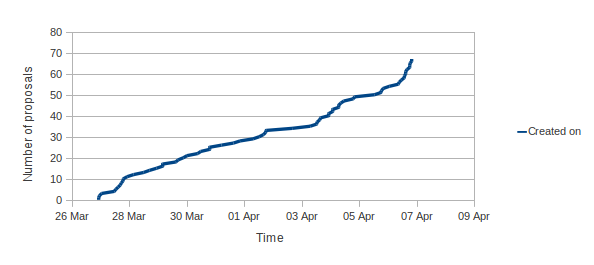
You can see here the graphs of applications against time from this year: 2012 The result is this year we ll have 15 students in Debian versus 9 students last year! Without further ado, here is the list of projects and student who will be working with us this summer: If you want to know more about these projects, follow the links and ask the students (and mentors)!

Riku Voipio

Cross Compiling with MultiArch Congrats to the Ubuntu Folk for the new LTS release. Incidentally this is also the first release where our work on MultiArch bears fruit. We can now cross-compile relatively easily without resorting to hacks like scratchbox, qemu chroot or dpkg-cross/xdeb. Lets show short practical guide on cross-building Qemu for armhf. The instructions refer to precise, but the goodiness is on the way to Debian as well. Biggest missing piece being the cross-compiler packages, which we have an Summer of Code project. The example is operated in a chroot to avoid potentially messing up your working machine. Qemu-linaro is not a shining example, as cross-building it doesn't work out of box. But that is educational, it allows me to show what kind of issues you can bump into, and how to fix them.

$ sudo debootstrap --variant=buildd precise /srv/precise
Edit the /srv/precise/etc/apt.sources.list to the following (replace amd64 with i386 if you made an i386 chroot)

deb [arch=amd64] http://archive.ubuntu.com/ubuntu precise main universe
deb [arch=armhf] http://ports.ubuntu.com/ubuntu-ports precise main universe
deb-src http://archive.ubuntu.com/ubuntu precise main universe
Edit the /srv/precise/etc/dpkg/dpkg.cfg.d/multiarch by adding the following line:

foreign-architecture armhf
Finally disable install of recommends by editing /srv/precise/etc/apt/apt.conf.d/10local:

APT::Install-Recommends "0";
APT::Install-Suggests "0";
Install the armhf crosscompiler the chroot

$ sudo chroot /srv/precise/
# unset LANG LANGUAGE
# mount -t proc proc /proc
# apt-get update
# apt-get install g++-arm-linux-gnueabihf pkg-config-arm-linux-gnueabihf
Get the sources and try to install the cross-buildeps:

# cd /tmp
# apt-get source qemu-linaro
# cd qemu-linaro-*
# apt-get build-dep -aarmhf qemu-linaro
As we see, the build-dep bombs out ugly, with a them of "perl" being unable to be installed. This is because apt-get can't figure out if we should install and armhf or amd64 version of perl. We don't use the required syntax yet in Build-Dep line, "perl:any", as dpkg and apt in previous released don't support it. Thus back porting would no longer be possible. One way to fix it, would be to drop perl build-dep, as perl is already pulled by other build-deps. But lets instead show howto install it the build-deps manually. First we build system build-deps, then target architecture ones:

# apt-get install debhelper texinfo
# apt-get install zlib1g-dev:armhf libasound2-dev:armhf libsdl1.2-dev:armhf libx11-dev:armhf libpulse-dev:armhf libncurses5-dev:armhf libbrlapi-dev:armhf libcurl4-gnutls-dev:armhf libgnutls-dev:armhf libsasl2-dev:armhf uuid-dev:armhf libvdeplug2-dev:armhf libbluetooth-dev:armhf
And try the build[1]:

# dpkg-buildpackage -aarmhf -B
Which sadly errors out. Turns out the cross-build support in debian/rules is broken. Instead of --cc we need to feed an --cross-prefix to the ./configure of qemu. Edit the debian/rules with replacing

- conf_arch += --cc=$(DEB_HOST_GNU_TYPE)-gcc --cpu=$(QEMU_CPU)
+ conf_arch += --cross-prefix=$(DEB_HOST_GNU_TYPE)-
Optional: Since we are cross-compiling from a multicore machine, lets also add parallel building support, by changing the override_dh_auto_build: rule to have --parallel flags in debian/rules as well:

override_dh_auto_build:
# system build
dh_auto_build -B system-build --parallel
ifeq ($(DEB_HOST_ARCH_OS),linux)
# user build
dh_auto_build -B user-build --parallel

# static user build
dh_auto_build -B user-static-build --parallel

Try the build again:

# export DEB_BUILD_OPTIONS=parallel=4 # I have dual-core hyperthreading machine, build with all four threads
# time dpkg-buildpackage -aarmhf -B
...
dpkg-buildpackage: binary only upload (no source included)

real 18m53.425s
user 65m42.570s
sys 2m50.383s
The Native build of qemu-linaro took 4h 11min. [1] You should not build as root - but to keep instructions short, I'm not explaining howto add and use a unprivileged user in a chroot. Do as I *say*, not as I *do*!

26 April 2012

Paul Wise: What happens when a Debian derivative shuts down?

Over the past months we have seen the end of two Debian derivatives. In January the news came that Junta de Extremadura (Spain) were abandoning the development of LinEx and switching to Debian itself. Early in March the Debian derivatives census scripts noted that the Vanillux apt repository was down. Fabrice Quenneville then confirmed that he had to put a hold on the Vanillux project due to the cost of bandwidth and servers. In addition the future of StormOS is in doubt after Illumian was created. StormOS is a port of Debian to the OpenSolaris kernel and Illumian is similar but uses only apt/dpkg and repackages everything else. The LinEx page in the Debian derivatives census did not reveal much information about the project that would have been useful to Debian, in particular it does not list any apt repositories. As a result it is quite hard to say what has potentially been lost. Two mails from people close to or involved in the project indicate that much of the LinEx distribution was already merged into Debian. It is probably safe to say that everything of value has been merged into Debian, including at least one of the developers involved in LinEx. Vanillux was a small distribution with few developers according to the Google caches of their website. If we look at the patches created by the derivatives census scripts, we can see that the 5 source packages that were possibly derived from Debian source packages were simply imported from Christian Marillat's repository of non-free, patented, legally restricted and multimedia-related packages. The patches indicate that 3 source packages were forked from Debian and that 2 source packages were done from scratch. The forked packages seem to be mainly about enabling support for proprietary and patented codecs in several programs. This is a surprisingly small number of altered/differing packages, so what else could Vanillux folks have been working on? It appears that there were 12 new source packages that were not derived from Debian source packages. These appear to be mainly multimedia-related packages, one font imported from an Ubuntu PPA, some syslinux themes and a metapackage. The multimedia packages are all from Christian Marillat's repository. The Debian multimedia team is working hard on bringing multimedia related software to Debian and welcomes help with that. The font (Cantarell) is now in Debian under a different source package name. The metapackage appears to be very similar to from the ubuntu-meta source package from Ubuntu that uses germinate. So at first glance, the contribution of Vanillux to the world of Linux distributions appears to be in the area of artwork and package selection. The artwork produced is basically Vanillux branding and is thus not usable by Debian, although we would like more artists involved in Debian. The meta-package is not easily useful to Debian since we use a different mechanism for our task packages and our task packages have already been updated for the GNOME 3 transition. Still, the amount of difference between to source packages is relatively small. So, what else? Perusing the diff between the list of source packages exposed by the Packages and Sources files, I noted that a number of binary packages in the Packages files reference source packages not listed in the Sources files. When I saw picasa in that list, it occurred to me that Vanillux might have directly imported some binary packages without their corresponding source packages. Perusing their apt metadata confirms that they have imported some binary packages of non-free software directly from vendors. These include Google Desktop, Opera, Picasa and VirtualBox 3.2. The rest of the packages in the diff appear to be caused by some sort of issue with the import process from Debian and other apt repos. Most of the above could be achieved by adding some external commerical repositories to a normal Debian system or by merging some of those repositories (such as the Opera one) into Debian. The interesting thing about the Debian derivatives census is that it allows us to perform analyses like these and figure out what patches and packages we might like to integrate into Debian. In this way we can salvage some of the value of our derivatives if they abandon ship. If you have any ideas or code for improving the census or are running a Debian derivative, please join us at the Debian derivatives frontdesk.

25 April 2012

Vincent Bernat: XBMC Eden on Debian Wheezy

I bought some HTPC a few years ago to run XBMC, a neat media center solution. At the time, to avoid any problems, I installed it on top of a minimal Ubuntu Lucid installation with the official packages from the team XBMC. Recently, XBMC Eden has been released and XBMC has landed into Debian unstable. It was a good occasion to make the switch. Unofficial XBMC logo for Eden TL;DR: Installing XBMC on Debian Wheezy is quite easy: it almost works out of the box. The big difficulty is the configuration of the remote control: either it works as you expect or you will have to scratch your head over the pile of layers needed to work with a remote control. The configuration of my HTPC is as follows:

Installation

Installing Debian Wheezy Installing Debian Wheezy2 is pretty easy. Nowadays, getting a bootable USB key from a netinst image of Debian Installer for Wheezy is simplified:
$ sudo dd if=debian-testing-i386-netinst.iso \
>         of=/dev/disk/by-id/usb...
The installation was smooth with the exception of GRUB which was unable to install itself on the disk. This is a known bug when dealing with LVM and it comes with a simple workaround. I hope it will be corrected in time for Wheezy release. While this has little to do with the installation of XBMC, I wanted to test systemd which may become the default init in Debian (at least in Debian GNU/Linux). From README.Debian:
systemd can be installed alongside sysvinit and will not change the behaviour of the system out of the box. This is intentional. To test systemd, add init=/bin/systemd to the kernel command line and then rebooting, or install the systemd-sysv package.
The final system boots in about 15 seconds.

Configuring X Because video decoding in nouveau driver is still a work in progress, the use of the proprietary NVIDIA drivers is mandatory to be able to watch high resolution videos. Therefore, /etc/apt/sources.list should be completed with contrib and non-free repository. Then, you can install the appropriate packages: xserver-xorg-video-nvidia, nvidia-vdpau-driver and xserver-xorg. Here is my /etc/X11/xorg.conf.d/nvidia.conf:
Section "Device"
    Identifier     "NVidia ION"
    Driver         "nvidia"
    VendorName     "NVIDIA Corporation"
    Option         "HWCursor" "False"
    Option         "NoFlip" "False"
    Option         "FlatPanelProperties" "Scaling = Native"
    Option         "DynamicTwinView" "False"
    Option         "ConnectedMonitor" "DFP-1"
    Option         "CustomEDID" "DFP-1:/etc/X11/edid.bin"
    Option         "NoLogo" "True"
EndSection
Section "Extensions"
    Option "Composite" "false"
EndSection
The CustomEDID option allows the driver to get an appropriate EDID even when the AV receiver is off. You can get yours, free of charge, with get-edid from read-edid package.

Installing XBMC Thanks to the work of Andr s Mej a, XBMC is now available in Debian Wheezy. To install it, just type aptitude install xbmc. I have dropped the following xbmc.service in /etc/systemd/system directory:
[Unit]
Description = XBMC media center
After = syslog.target
[Service]
User = xbmc
Group = xbmc
Type = simple
ExecStart = /usr/bin/xinit /usr/bin/xbmc-standalone -- :0
Restart = on-failure
[Install]
WantedBy = multi-user.target
Enable this service on boot with systemctl enable xbmc.service. You need to allow xbmc user to run X. The simplest way is to run dpkg-reconfigure -plow x11-common and to allow anybody to run X. sudo may be an alternative.

Configuration

Sound While I wanted to use PulseAudio, I want the AV receiver to be able to upmix stereo streams itself. With PulseAudio, it would always receive a 6-channel signal. Therefore, I directly use ALSA. First, unmute the appropriate outputs:
$ amixer scontrols   grep IEC958
Simple mixer control 'IEC958',0
Simple mixer control 'IEC958 Default PCM',0
Simple mixer control 'IEC958',1
$ amixer sset 'IEC958',0 unmute
$ amixer sset 'IEC958 Default PCM',0 unmute
$ amixer sset 'IEC958',1 unmute
$ sudo systemctl stop alsa-utils.service
The order of channels is incorrect. With the following /etc/asound.conf, we declare a new output, hdmi2, with a different mapping:
pcm.hdmi2  
  type asym
  playback.pcm  
    type plug
    slave.pcm "remap-surround51"
   
 
pcm.!remap-surround51  
  type route
  slave.pcm "hdmi"
  ttable  
    0.0= 1
    1.1= 1
    2.4= 1
    3.5= 1
    4.2= 1
    5.3= 1
   
 
In XBMC, this output should be used instead of the default one. hdmi should still be used for passthrough. To check if each speaker is mapped correctly, one can use speaker-test -D hdmi2 -c 6.

LCD display The LCD display integrated into the SoundGraph iMON is supported by the imon kernel module and the lcdproc package. I have only modified a few lines of /etc/LCDd.conf to make it work:
[server]
Driver=imonlcd
ServerScreen=off
[imonlcd]
Protocol=1
OnExit=2
Contrast=400

Remote control This is the most difficult part. I have a Logitech Harmony remote which is a great universal remote. Its support in Linux is acceptable: you can configure through Logitech website and use congruity to push the new configuration.

Remote controls and Linux Before Linux 2.6.36, most remote controls would need LIRC to work:
  • The driver receives the signal from the IR receiver and make it available through /dev/lirc.
  • lircd, with the help of a configuration file describing the protocol used by the remote control, will read the signal and turn it into the appropriate LIRC code.
  • XBMC connects to lircd and receives incoming LIRC codes. It will translate them to an XBMC command. This translation is specified in Lircmap.xml.
  • XBMC maps each command to an action (like Play, Fullscreen, ) using a keymap. This keymap can handle commands received by a remote control, but also by a keyboard, a mouse or a joystick.
Since Linux 2.6.36, remote controls will be mapped as a generic input device (just like a keyboard):
  • The driver receives the signal from the IR receiver.
  • The signal will be handled by a decoder. The configuration of this decoder is done in userland by ir-keytable. The decoder will turn the signal into the appropriate event (usually, some keypress).
  • X will listen to those events and turn them into X key events.
  • XBMC will receive them and use the appropriate keymap to turn them into actions.
And to add more complexity to the mix, in this last case, you can still use LIRC: lircd will listen to events generated by the kernel and turn them into LIRC codes. This can be very confusing. Moreover, the SoundGraph iMON IR receiver accepts two IR protocols: the iMON protocol and the RC-6 one. The Linux driver accepts both of them but uses the first one by default. The RC-6 protocol is the protocol used by many MCE remote controls. I hope you are still with me here.

The easy way To get a reasonable configuration out of the box, here is how to configure each layer:
Logitech Harmony remote
Configure it as a Microsoft branded Media Center PC: Windows Media Center SE.
iMON IR receiver
It must use RC-6 protocol. See below for more details.
LIRC
In /etc/lirc/hardware.conf, put DEVICE=/dev/input/by-id/usb-15c2_0038-event-if00 and DRIVER=devinput. In /etc/lirc/lircd.conf, just put include "/usr/share/lirc/remotes/devinput/lircd.conf.devinput".
XBMC
With the previous bits done, it should just work out of the box.
To switch to RC-6 protocol, install the ir-keytable package and use the following commands:
$ sudo modprobe rc-imon-mce
$ sudo ir-keytable -s rc0 -p rc-6 -c -w /lib/udev/rc_keymaps/imon_mce
Read imon_mce table
Old keytable cleared
Wrote 77 keycode(s) to driver
Protocols changed to RC-6
To make the change permanent, add the rc-imon-mce module to /etc/modules and create /etc/udev/rules.d/90-imon.rules with the following content:
# Override the keytable for iMON
ACTION=="add change", SUBSYSTEM=="rc", DRV_NAME="imon", \
   RUN+="/usr/bin/ir-keytable -s $name -p rc-6 -c -w /lib/udev/rc_keymaps/imon_mce"

The hard way Now, you may want to bind custom actions to some (physical or virtual) buttons. Basically, you are left with two solutions:
  1. Start from the basic configuration with LIRC and add more buttons at each levels (there are five of them!).
  2. Remove LIRC and start with the Logitech Harmony acting as a Microsoft MCE keyboard.
The first option can be quite difficult. You need to find an unused code for the Logitech Harmony. You can try to make it learn a new code if you have some RC-6 remote control. Then, you need to ensure that this code will be present in the keytable used by ir-keytable. If not, you need to add it. That s not easy since you need a to enable some debug stuff in the kernel to find the appropriate scancode. After that, the code needs to be translated in lircd.conf. You will then have to translate it again in Lircmap.xml. At least, you need to add it to a keymap in XBMC. The other way is not ideal but seems less cumbersome. The first step is to configure the Logitech Harmony as a Microsoft MCE keyboard: it has a lot of available keys. Because of the lack of multimedia keys, let s match the keyboard configuration of XBMC:
Button Command Button Command
Channel Down PageDown Stop X
Channel Up PageUp Skip back Comma
Prev Backspace Skip forward .
Up DirectionUp Play P
Down DirectionDown Rewind R
Left DirectionLeft Fast forward F
Right DirectionRight Star Delete
OK Enter Pound W
Menu C Red F1
Exit Esc Green F2
Guide Tab Yellow F3
Info I Blue F4
Unfortunately, the keytables provided with ir-keytable are not complete enough. I have built a more complete table3. With this table and the bindings described above, most functions will work out of the box without LIRC. Additional keys can be configured in a dedicated keymap4. Here is an excerpt of mine:
<keymap>
 <global>
  <keyboard>
    <end>XBMC.ShutDown()</end>
    <f1>XBMC.ActivateWindow(MusicLibrary)</f1>
    <f2>XBMC.ActivateWindow(Videos,TvShowTitles)</f2>
    <f3>XBMC.ActivateWindow(Videos,MovieTitles)</f3>
    <f4>XBMC.ActivateWindow(Weather)</f4>
  </keyboard>
 </global>
 <FullscreenVideo>
  <keyboard>
   <opensquarebracket>SubtitleDelayMinus</opensquarebracket>
   <closesquarebracket>SubtitleDelayPlus</closesquarebracket>
   <f6>xbmc.runscript(script.xbmc.subtitles)</f6>
  </keyboard>
 </FullscreenVideo>
</keymap>

FTP Instead of using SSH, I prefer to drop new files with anonymous FTP. vsftpd fits this purpose. Here is my configuration file:
listen=YES
xferlog_enable=YES
use_localtime=YES
setproctitle_enable=YES
secure_chroot_dir=/var/run/vsftpd/empty
nopriv_user=ftp
ftpd_banner=XBMC
hide_ids=YES
ftp_username=xbmc
anon_umask=022
anon_root=/home/xbmc/media
anonymous_enable=YES
write_enable=YES
anon_upload_enable=YES
anon_world_readable_only=YES
It is currently not compatible with systemd (see bug #670308). I have removed the symlink in /etc/rc2.d and I have used the following unit file:
[Unit]
Description=Vsftpd ftp daemon
After=syslog.target network.target
[Service]
Type=simple
ExecStart=/usr/sbin/vsftpd /etc/vsftpd.conf
ExecReload=/bin/kill -HUP $MAINPID
ExecStartPre=-/bin/mkdir -p /var/run/vsftpd/empty
[Install]
WantedBy=multi-user.target

Miscellaneous
  1. In /etc/default/grub, reduce TIMEOUT to 0 to shorten the boot time.
  2. Enabling dirty regions can help speed up XBMC.
  3. aptitude install upower pm-utils to be able to shutdown/suspend from XBMC. Since XBMC was configured to be started outside any session, you need to explicitely give the appropriate rights by creating the following /var/lib/polkit-1/localauthority/50-local.d/xbmc.pkla:
    [Actions for xbmc user]
    Identity=unix-user:xbmc
    Action=org.freedesktop.upower.*;org.freedesktop.consolekit.system.*
    ResultAny=yes
    ResultInactive=yes
    ResultActive=yes
    

  1. The readibility of the LCD screen is very bad. You should look at the VFD version. The IR receiver reception is poor. The provided remote control is a joke.
  2. Debian Wheezy is not yet released. If you are unfamiliar with Debian, it may be cumbersome to maintain it until the freeze happens in a few months.
  3. Some keys are missing from the provided table. For example, there is no exclamation mark. While there is a scan code for such a key in RC-6 protocol, there is no appropriate key code to translate to: on a QWERTY keyboard, the exclamation mark is on the same key as the number 1. It is possible to map it to some other key code, but the mapping would have been difficult to use.
  4. For example, in ~/.xbmc/userdata/keymaps/harmony.xml.

24 April 2012

Jonathan McDowell: The future is here again

Back in 2004 when Simon and I went full time with Black Cat one of the first things I did was sort out an ADSL offering, including native IPv6. We were one of the first UK ISPs to offer this (possibly the first; I know A&A had been doing tunneled IPv6 for a lot longer, but I'm not sure exactly when they enabled IPv6 on the PPP session. Also Bogons were fairly quick to enable it as well). By the middle of 2004 I was fully IPv6 enabled; my colo box had a native connection, my entire home network (a /64 for the wired, a /64 for the wireless) was configured, BCN had multiple native IPv6 connections to other ISPs (such as peering over LoNAP). By and large it just worked; I remember at one point looking at a traffic graph link from someone in Australia and them indicating surprise that I'd come in over v6. I hadn't noticed anything different than normal, which is exactly how it should be. When we sold BCN in 2007 unfortunately one of the casualties was the v6 support. The ISP that took over the ADSL wasn't setup to be able to continue the v6 support, nor were RapidSwitch, who took over most of the hosting (I note with sadness that RapidSwitch still don't seem to be offering v6, though they keep saying it's a work in progress). So I stopped having any v6 for some time, refusing to slum it with a tunnel. This changed at the start of last year, when I sought out new hosting for the. I ended up selecting Bytemark, partly because I knew of their commitment to v6. I'd chosen Sonic as my US access ISP, again partly because they offered an IPv6 tunnel service (while not as nice as native v6 over the DSL I felt that a tunnel provided by the DSL ISP was acceptable for access). However a combination of not having a machine that was always on at home, and a dynamic IP on my connection, meant that I never got round to configuring anything permanent up. Recently I got around to buying a little low powered box to be always-on and this week I finally looked at configuring it up as the tunnel endpoint, planning to do some sort of screen scraping of the web interface to automatically update the tunnel broker information for the rare occurrences when my IP changes. The first nice surprise was that Sonic are now doing static IPs for free (previously you could only have a block of 8 for $20/month extra). That makes things a lot easier. So tonight I configured up the little server as the tunnel endpoint, installing radvd and some basic v6 firewalling. As expected my laptop sees the RAs, automatically configures everything up and my ssh sessions start to go over IPv6 instead. Looks like my phone also does the same. I'm not entirely sure what the NAT on the ADSL router is doing and if inbound connections will fail if there's nothing outbound holding the translation entry active, but I'm sure I can work around that if it turns out to be a problem. I care more about access than hosting anything on the end of my DSL anyway. This means I'm finally almost back to where I was nearly 8 years ago, just in time for World IPv6 Launch day.

23 April 2012

Benjamin Drung: Unreliable SSDs

Today my system froze and failed to reboot. I plugged in an Ubuntu live USB stick and booted from it. Then I discovered the problem that my Intel SSD 320 broke. The output of hdparm is attached to the end of the blog post. You can see that the device size is reduced to 8 MB from 120 GB and the serial number is called BAD_CTX 00000159. The firmware of the SSD was up-to-date and the last firmware update should have fixed the 8 MB bug. The Intel SSD 320 is my second SSD. My first SSD was a Super Talent Ultradrive GX 64GB, which died after around fifteen month of heavy use. It left a big bunch of my data corruption behind. SSDs seems to be very unreliable. Both SSDs died, but I cant remember that one of my HDDs died. $ sudo hdparm -I /dev/sda /dev/sda: ATA device, with non-removable media
Model Number: INTEL SSDSA2CW120G3
Serial Number: BAD_CTX 00000159
Firmware Revision: 4PC10362
Transport: Serial, ATA8-AST, SATA 1.0a, SATA II Extensions, SATA Rev 2.5, SATA Rev 2.6
Standards:
Used: unknown (minor revision code 0x0029)
Supported: 8 7 6 5
Likely used: 8
Configuration:
Logical max current
cylinders 16383 16
heads 16 16
sectors/track 63 63
--
CHS current addressable sectors: 16128
LBA user addressable sectors: 16384
LBA48 user addressable sectors: 16384
Logical Sector size: 512 bytes
Physical Sector size: 512 bytes
device size with M = 1024*1024: 8 MBytes
device size with M = 1000*1000: 8 MBytes
cache/buffer size = unknown
Nominal Media Rotation Rate: Solid State Device
Capabilities:
LBA, IORDY(can be disabled)
Standby timer values: spec'd by Standard, no device specific minimum
R/W multiple sector transfer: Max = 16 Current = 16
DMA: mdma0 mdma1 mdma2 udma0 udma1 udma2 udma3 udma4 udma5 *udma6
Cycle time: min=120ns recommended=120ns
PIO: pio0 pio1 pio2 pio3 pio4
Cycle time: no flow control=120ns IORDY flow control=120ns
Commands/features:
Enabled Supported:
Security Mode feature set
* Power Management feature set
* Write cache
* Look-ahead
* Host Protected Area feature set
* WRITE_BUFFER command
* READ_BUFFER command
* NOP cmd
* DOWNLOAD_MICROCODE
SET_MAX security extension
* 48-bit Address feature set
* Device Configuration Overlay feature set
* Mandatory FLUSH_CACHE
* FLUSH_CACHE_EXT
* General Purpose Logging feature set
* WRITE_ DMA MULTIPLE _FUA_EXT
* 64-bit World wide name
* IDLE_IMMEDIATE with UNLOAD
* WRITE_UNCORRECTABLE_EXT command
* READ,WRITE _DMA_EXT_GPL commands
* Segmented DOWNLOAD_MICROCODE
* Gen1 signaling speed (1.5Gb/s)
* Gen2 signaling speed (3.0Gb/s)
* Phy event counters
* Software settings preservation
* SMART Command Transport (SCT) feature set
* SCT LBA Segment Access (AC2)
* SCT Error Recovery Control (AC3)
* SCT Features Control (AC4)
* SCT Data Tables (AC5)
* Data Set Management TRIM supported (limit 8 blocks)
* Deterministic read ZEROs after TRIM
Security:
Master password revision code = 65534
supported
not enabled
not locked
frozen
not expired: security count
supported: enhanced erase
2min for SECURITY ERASE UNIT. 2min for ENHANCED SECURITY ERASE UNIT.
Logical Unit WWN Device Identifier: 500151795951d4b9
NAA : 5
IEEE OUI : 001517
Unique ID : 95951d4b9
Checksum: correct

Clint Adams: Work in advertising!

The marketing industry divides itself up into a number of businesses. Some are boutique agencies, but most are owned by one of the world's four major holding companies. These conglomerates pursue an aggressive M&A strategy, snapping up smaller companies all the time. There are other sets of services, as well as variations on the above, particularly in terms of targeting certain age groups or ethnic groups, but also particular industries or sectors (movies, politics). There is direct marketing (spamming) through all the imaginable media. There is also paying people to blog about certain things without disclosing their sponsorship.

Russell Coker: Links April 2012

Karen Tse gave an interesting TED talk about how to stop police torture as an investigative tool [1]. Mostly it s about training and empowering public defenders. Phil Plait gave an interesting TED talk about how to defend the Earth from asteroids [2]. Julian Baggini wrote an interesting article for the Financial Times about the persecution of Atheists in the US [3]. Charlie Todd of Improv Everywhere gave an amusing TED talk about Improv events that he has run [4]. He is most famous for organising people to wear blue shirts and khaki pants in Best Buy, but he s done lots of other funny things. Paul Zak gave an interesting TED talk about trust, morality, and oxytocin [5]. One of the many interesting fact that he shared is that oxytocin levels can significantly increase when using social networking sites. So people who use Facebook etc are likely to be more trustworthy as well as more trusting. The Occupy the Judge Rotenberg Center movement aims to stop the torture of Autistic children in the US [6], Anonymous is involved in that too. Paul Lewis gave an insightful TED talk about the use of crowdsourced data in news reporting [7]. A lot of the analysis of citizen journalism is based on comparing bloggers with full-time paid journalists, but Paul describes how professional full-time journalistic work can be greatly assisted by random people filming and photographing things that seem noteworthy. Make sure your next phone has the best possible camera phone cameras will never be great but the quality of the camera you have with you is what matters. Sam Harris published an interesting interview with Tim Prowse who is a Baptist minister who faked belief for two years after becoming an atheist [8A]. He also references The Clergy Project a support group for atheists who are current or former members of the clergy [8B]. Cracked has an insightful article about 6 things that rich people need to stop saying [9]. How do the 1% not understand these things? Barack Obama and Nichelle Nichols (who played Lt Uhura in the original Star Treck) give the Vulcan Salute in the White-House [10]. Gabriel Arana wrote an insightful article about his experiences with the ex-gay movement [11]. The therapist who hurt him so much is still doing the same to other victims. S#!T Ignorant People Say To Autistics is an interesting youtube video about ignorant and annoying people [12]. Strangely I ve received little of that myself, I wonder whether women on the Autism Spectrum get a lot more of that than men. At GManCaseFile an ex-FBI agent has written an informative post about how the TSA is failing [13]. The Nieder Family has an interesting article about how patents are being used to prevent the creation of assisted communication (AAC) devices for children [14]. Apparently the company that has the patents wants all AAC devices to be really expensive and profitable for them. This is yet another example of patents doing harm not good. Renew Economy has an informative article by Giles Parkinson about the affect that solar power generation will have on power prices [15]. In short as solar systems produce power when it s most needed (during the day and at the hottest time of the day for warm climates) it will dramatically reduce the auction price for wholesale power. That will hurt the business of the power companies and also allow lower prices on the retail market. Related posts:
  1. Links March 2012 Washington s Blog has an informative summary of recent articles about...
  2. Links February 2012 Sociological Images has an interesting article about the attempts to...
  3. Links April 2010 Sam Harris gave an interesting TED talk about whether there...

Julien Danjou: OpenStack Swift eventual consistency analysis & bottlenecks

Swift is the software behind the OpenStack Object Storage service. This service provides a simple storage service for applications using RESTful interfaces, providing maximum data availability and storage capacity. I explain here how some parts of the storage and replication in Swift works, and show some of its current limitations. If you don't know Swift and want to read a more "shallow" overview first, you can read John Dickinson's Swift Tech Overview. How Swift storage works If we refer to the CAP theorem, Swift chose availability and partition tolerance and dropped consistency. That means that you'll always get your data, they will be dispersed on many places, but you could get an old version of them (or no data at all) in some odd cases (like some server overload or failure). This compromise is made to allow maximum availability and scalability of the storage platform. But there are mechanisms built into Swift to minimize the potential data inconsistency window: they are responsible for data replication and consistency. The official Swift documentation explains the internal storage in a certain way, but I'm going to write my own explanation here about this. Consistent hashing Swift uses the principle of consistent hashing. It builds what it calls a ring. A ring represents the space of all possible computed hash values divided in equivalent parts. Each part of this space is called a partition. The following schema (stolen from the Riak project) shows the principle nicely: Consistent hashing ring In a simple world, if you wanted to store some objects and distribute them on 4 nodes, you would split your hash space in 4. You would have 4 partitions, and computing hash(object) modulo 4 would tell you where to store your object: on node 0, 1, 2 or 3. But since you want to be able to extend your storage cluster to more nodes without breaking the whole hash mapping and moving everything around, you need to build a lot more partitions. Let's say we're going to build 210 partitions. Since we have 4 nodes, each node will have 210 4 = 256 partitions. If we ever want to add a 5th node, it's easy: we just have to re-balance the partitions and move 1 4 of the partitions from each node to this 5th node. That means all our nodes will end up with 210 5 204 partitions. We can also define a weight for each node, in order for some nodes to get more partitions than others. With 210 partitions, we can have up to 210 nodes in our cluster. Yeepee. For reference, Gregory Holt, one of the Swift authors, also wrote an explanation post about the ring. Concretely, when building one Swift ring, you'll have to say how much partitions you want, and this is what this value is really about. Data duplication Now, to assure availability and partitioning (as seen in the CAP theorem) we also want to store replicas of our objects. By default, Swift stores 3 copies of every objects, but that's configurable. In that case, we need to store each partition defined above not only on 1 node, but on 2 others. So Swift adds another concept: zones. A zone is an isolated space that does not depends on other zone, so in case of an outage on a zone, the other zones are still available. Concretely, a zone is likely to be a disk, a server, or a whole cabinet, depending on the size of your cluster. It's up to you to chose anyway. Consequently, each partitions has not to be mapped to 1 host only anymore, but to N hosts. Each node will therefore store this number of partitions:
number of partition stored on one node = number of replicas   total number of partitions   number of node
Examples:
We split the ring in 210 = 1024 partitions. We have 3 nodes. We want 3 replicas of data.
Each node will store a copy of the full partition space: 3 210 3 = 210 = 1024 partitions.
We split the ring in 211 = 2048 partitions. We have 5 nodes. We want 3 replicas of data.
Each node will store 211 3 5 1129 partitions.
We split the ring in 211 = 2048 partitions. We have 6 nodes. We want 3 replicas of data.
Each node will store 211 3 6 = 1024 partitions.
Three rings to rule them all In Swift, there is 3 categories of thing to store: account, container and objects. An account is what you'd expect it to be, a user account. An account contains containers (the equivalent of Amazon S3's buckets). Each container can contains user-defined key and values (just like a hash table or a dictionary): values are what Swift call objects. Swift wants you to build 3 different and independent rings to store its 3 kind of things (accounts, containers and objects). Internally, the two first categories are stored as SQLite databases, whereas the last one is stored using regular files. Note that this 3 rings can be stored and managed on 3 completely different set of servers. Swift storage schema Data replication Now that we have our storage theory in place (accounts, containers and objects distributed into partitions, themselves stored into multiple zones), let's go the replication practice. When you put something in one of the 3 rings (being an account, a container or an object) it is uploaded into all the zones responsible for the ring partition the object belongs to. This upload into the different zones is the responsibility of the swift-proxy daemon. Swift proxy schema But if one of the zone is failing, you can't upload all your copies in all zones at the upload time. So you need a mechanism to be sure the failing zone will catch up to a correct state at some point. That's the role of the swift- container,account,object -replicator processes. This processes are running on each node part of a zone and replicates their contents to nodes of the other zones. When they run, they walk through all the contents from all the partitions on the whole file system and for each partition, issue a special REPLICATE HTTP request to all the other zones responsible for that same partition. The other zone responds with information about the local state of the partition. That allows the replicator process to decide if the remote zone has an up-to-date version of the partition. In case of account and containers, it doesn't check at the partition level, but check each account/container contained inside each partition. If something is not up-to-date, it will be pushed using rsync by the replicator process. This is why you'll read that the replication updates are "push based" in Swift documentation.
# Pseudo code describing replication process for accounts
# The principle is exactly the same for containers
for account in accounts:
    # Determine the partition used to store this account
    partition = hash(account) % number_of_partitions
    # The number of zone is the number of replicas configured
    for zone in partition.get_zones_storing_this_partition():
        # Send a HTTP REPLICATE command to the remote swift-account-server process
        version_of_account = zone.send_HTTP_REPLICATE_for(account):
        if version_of_account < account.version()
            account.sync_to(zone)
This replication process is O(number of account number of replicas). The more your number of account will increase and the more you will want replicas for your data, the more the replication time for your accounts will grow. The same rule applies for containers.
# Pseudo code describing replication process for objects
for partition in partitions_storing_objects:
    # The number of zone is the number of replicas configured
    for zone in partition.get_zones_storing_this_partition():
        # Send a HTTP REPLICATE command to the remote swift-object-server process
        verion_of_partition = zone.send_HTTP_REPLICATE_for(partition):
        if version_of_partition < partition.version()
            # Use rsync to synchronize the whole partition
            # and all its objects
            partition.rsync_to(zone)
This replication process is O(number of objects partitions number of replicas). The more your number of objects partitions will increase, and the more you will want replicas for your data, the more the replication time for your objects will grow. I think this is something important to know when deciding how to build your Swift architecture. Choose the right number the number of replicas, partitions and nodes. Replication process bottlenecks Copycat File accesses The problem, as you might have guessed, is that to replicate, it walks through every damn things, things being accounts, containers, or object's partition hash files. This means it need to open and read (part of) a every file your node stores to check that data need or not to be replicated! For accounts & containers replication, this is done every 30 seconds by default, but it will likely take more than 30 seconds as soon as you hit around 12 000 containers on a node (see measurements below). Therefore you'll end up checking consistency of accounts & containers on each all node all the time, using obviously a lot of CPU time. For reference, Alex Yang also did an analysis of that same problem. TCP connections Worst, the HTTP connections used to send the REPLICATE commands are not pooled: a new TCP connection is established each time something has to be checked against the same thing stored on a remote zone. This is why you'll see in the Swift's Deployment Guide this lines listed under "general system tuning":
# disable TIME_WAIT.. wait..
net.ipv4.tcp_tw_recycle=1
net.ipv4.tcp_tw_reuse=1
# double amount of allowed conntrack
net.ipv4.netfilter.ip_conntrack_max = 262144
In my humble opinion, this is more an ugly hack than a tuning. If you don't activate this and if you have a lot of containers on your node, you'll end up soon with thousands of connections in TIME_WAIT state, and you indeed risk to overload the IP conntrack module. Container deletion We also should talk about container deletion. When a user deletes a container from its account, the container is marked as deleted. And that's it. It's not deleted. Therefore the SQLite database file representing the container will continue to be checked for synchronization, over and over. The only way to have a container permanently deleted is to mark an account as deleted. This way the swift-account-reaper will delete all its containers and, finally, the account. Measurement On a pretty big server, I measured the replications to be done at a speed of around 350 account,container,object-partitions /second, which can be a real problem if you chose to build a lots of partition and you have a low number_of_node number_of_replicas ratio. For example, the default parameters runs the container replication every 30 seconds. To check replication status of 12 000 containers stored on one node at the speed of 350 containers/seconds, you'll need around 34 seconds to do so. In the end, you'll never stop checking replication of your containers, and the more you'll have containers, the more your inconsistency window will increase. Conclusion Until some of the code is fixed (the HTTP connection pooling probably being the "easiest" one), I warmly recommend to chose correctly the different Swift parameters for your setup. The replication process optimization consists in having the minimum amount of partitions per node, which can be done by: For very large setups, some code to speed up accounts and containers synchronization, and remove deleted containers will be required, but this does not exist yet, as far as I know.

22 April 2012

Julian Andres Klode: Reference Counting and Tail Calls

One thing I thought about today is reference counting in combination with tail calls. Imagine a function like this:
function f(x)   return g(x+1);  
Now consider that x is a reference counted object and that x + 1 creates a new object. The call to g(x + 1) shall be in tail call position. In most reference counted languages, the reference to an argument is owned by the caller. That is, f() owns the reference to x + 1. In that case, the call to g() would no longer be in a tail call position, as we still have to decrease the reference count after g() exits. An alternative would be that the callee owns the reference. This however, will most likely create far more reference count changes than a caller-owns language (increase reference count in caller, decrease reference count in callee). For example, the following function requires an increment before the call to g().
function f1(x)   return g(x);  
Does anyone have any ideas on how to solve the problem of tail calls while avoiding the callee-owns scenario? Something that does not require a (non-reference-counting) garbage collector would be preferably.
Filed under: General

Russell Coker: Autism as an Excuse

A Polish geek going by the handle of mmemuar has recently written a blog post claiming that people use Autism as an excuse for bad behavior [1]. He gets enough things wrong in one short post to make it worth debunking it. It seems that Google s translation of Polish isn t as good as some other languages, but unless Google mistranslated about a dozen sections such that they had the exact opposite meaning then mmemuar s post has a lot of wrong ideas. Does Anyone use Autism as an Excuse? I ve read a lot of blog posts written by people on the Autism Spectrum, read many forum discussions, and talked to more than a few people in person. So far I haven t yet encountered any evidence of people using an Autism Spectrum Disorder (ASD) diagnosis as an excuse. There are probably about 70,000,000 people who meet the diagnostic criteria (most of whom have not been diagnosed due to not having access to anyone who is qualified to do an assessment). The number of people who have been diagnosed is large enough that I couldn t claim that none of them have ever used it as an excuse. The number of self-diagnosed people is also large enough that there has to be some people who wouldn t get diagnosed if professionally assessed. But I don t see any evidence that using an ASD as an excuse is at all common. I imagine that some people would take someone merely mentioning the fact that they have an ASD diagnosis in a public place (EG a mailing list or a blog post) as some sort of an excuse. One problem with such an interpretation is that for every way in which people on the Autism Spectrum annoy other people it s the ones who aren t diagnosed (or who reject a diagnosis) that will do it the most. Being diagnosed with an ASD is correlated with annoying other people less. Another problem is that keeping quiet about such things when they get raised for discussion so often takes a psychological toll. When someone is diagnosed as an adult a fairly common reaction is to study Psychology and Sociology (usually through web sites such as Sociological Images which I highly recommend [2]) and try to get a better understanding of other people. Any time you assume that everyone else thinks like you then you will get things wrong, when someone gets an ASD diagnosis they will probably take more care to avoid making such mistakes. Is Autism Obvious? Mmemuar says if you were full of autistic, which is very easy to overheat the brain from excess signals at the input, it would be very obvious to all . There are some people who are utterly incapable of acting like an NT. But the majority of people on the Autism Spectrum have some ability to pass as NT, it just takes a lot of effort. So if someone is spending all their effort to walk, talk, and make eye contact in a way that most people expect then they will have little spare effort for other things. This can result in them having little patience for other people. The solution to this is to not require people to look average. Even apart from Autism there are people who fidget, don t make eye contact in the way you expect, and do other things a little differently. Being tolerant of such things won t hurt you and will generally make things easier for everyone. TheAnMish gave a good Youtube presentation about the way that she has to act normal [3]. Note that while her video represents her own personal experiences (which differ slightly from those of other Aspies particularly male Aspies) they are regarded as representative enough for her video to be shown by Tony Attwood (a world renowned expert on Asperger Syndrome) at a conference about women on the Autism Spectrum. As an aside I disagree with her use of the word normal without scare-quotes. Learning about Psychology through Sci-Fi In the end of the blog post and in some of the comments there is discussion about learning to understand people through reading sci-fi books. The first problem with this is that fiction books generally have a range of characters that is determined by the author s understanding of people, if you read multiple books by an author then you will usually notice the same character types. The second problem is that characters in fiction books are simplified to fit into a reasonable sized book, in real life people have lots of really boring reasons for doing what they do, in fiction only stuff that is interesting ends up in print. But the biggest problem is that fiction books just aren t a good way of learning about people. Whatever lessons might be in a fiction book will probably be missed by a reader who is concentrating on the plot. You can learn things about people by reading an analysis of literature by a Psychologist or a Sociologist, but apart from that you probably won t be able to learn things if you don t already know them. As an aside, my experience of reading sci-fi books suggests that some of the popular sci-fi authors have such a poor understanding of people that it impairs their ability to write believable fiction about human characters. If I was going to try and learn about people by reading fiction I d choose something that s been popular for a long time. If a book has been popular for more than 100 years and sold well in different times, cultures, and languages then it probably has something to say about the human condition. Catching up on Youth Mmemuar says absolutely nothing prevents you to the age of twenty he began to catch up on some of youth . Actually one significant thing is that the human brain develops in particular stages, the older you get the more difficult it becomes to learn things. So even if it was just a matter of learning things someone who was behind at age 20 would have some significant difficulty in catching up. But some things just can t be learned, for example someone who has extreme discomfort in making eye contact can t just learn to be happy with it. Also there are some things which people would have learned if it was possible. For example people who have Prosopagnosia (an inability to recognise faces) suffer extreme bullying in school, if they could just learn to recognise people then they surely would do so, so if they complete school without learning then it s probably going to be impossible for them. Prosopagnosia is one of many conditions which can contribute to social difficulties and therefore contribute to an ASD diagnosis. Can Aspies get Married? Some people think that people on the Autism Spectrum can t get married. In fact this belief is so widely held that some people who seem very obviously Autistic are convinced that they are NT simply because they are married! The fact that there are more than few books offering advice to people who have married someone who is on the Autism Spectrum is clear proof that such claims are bogus. The Relevance to Geek Communities People who meet the diagnostic criteria for Asperger Syndrome will almost certainly be Geeks due to the Restricted, repetitive patterns of behavior, interests, or activities section of the diagnostic criteria (the proposed revision for the DSM-V is the best reference I know for this [4]) as the modern use of the term Geek applies to anyone who has an extreme interest in something. The more Geeky a community is the greater the incidence of people who could be diagnosed with an ASD. Spreading ideas such as those of mmemuar will lead to people not being assessed for an ASD. I would have been assessed earlier if it wasn t for hearing an influential member of the Linux community say some things which were similar in concept (although not as deliberate). Having people not be assessed is bad for the individuals in question and bad for the community. Related posts:
  1. Autism Awareness and the Free Software Community It s Autism Awareness Month April is Autism Awareness month, there...
  2. Autism vs Asperger Syndrome Diagnostic Changes for Autism Spectrum Disorders Currently Asperger Syndrome (AS)...
  3. Communication Shutdown and Autism The AEIOU Foundation The AEIOU Foundation [1] is a support...

Stefano Zacchiroli: deferred bits from the DPL for March 2012

Posted a week ago, already deferred back then, this report is even more deferred now! But as there are people interest in knowing what the "DPL job" is about even among non debian-devel-announce subscribers, here is a blog-conveyed reproduction, for the records.
Dear project members,
here is my monthly DPL activity report, this time for last March. It is delayed by a couple of weeks because, myself being both incumbent and candidate DPL, I preferred not to use d-d-a during the voting period unless really needed. Apologies for the delay (or the unneeded paranoia, you name it). As a side effect of the delay, the results of the DPL election are now known. I'd like to thank all the people who took part in the elections: voters, people who asked questions on -vote, the secretary, and obviously Gergely and Wouter, without whom the campaign wouldn't have allowed to discuss relevant aspects of Debian "politics". Thanks for your trust. I'll do my best to match your expectations. ... and just to remind you what you've just asked for, here goes the BigMonthlyBlurb! Highlight: long-term hardware replacement planning The highlight for this month is long term planning of hardware replacement. It's something I've been discussing with DSA for quite a while and on which DSA has worked hard during the recent sprint. As a result, we now have a quite ambitious 5-year hardware replacement plan that will guarantee that all machines in production are under warranty at any given time (with the nice side effect of generally better performances, as they go hand in hand with newer hardware). The current estimated cost per year is 29'000 USD. That does not yet include buildds and porter-boxes, so it is expected to increase a bit to cover all our hardware needs. But we expect it not increase too much, as we tend to get explicit hardware donations to cover arch-specific needs. Given the current state of Debian finances and donation trends, the plan looks sustainable for at least 2-3 years. But this assessment still needs to be refined as soon as, together with the auditors, we'll manage to obtain the history of past Debian transactions, in particular from SPI. We've been waiting for this for about 5 months now, but I'm positive it could become a reality in the next weeks. In the meantime, it is surely safe to start with the plan for the next 1-1.5 years, so I'll give green light to DSA for the first acquisitions as soon as they're ready for it. When implemented, this plan will increase our ability to rely on hardware. But it also means we will need to become a bit more organized about fund-raising. The discussion started with the sprint report has some insights about how to do that. As part of this, we'll also need to share resources (e.g. contact databases, people, etc.) among the yearly DebConf fund-raising initiatives and the initiatives mentioned in the aforementioned discussion. Ongoing discussions Summer of Code Debian has been accepted as an organization for the Google Summer of Code. At the time these bits go out, the student application deadline has also elapsed. In March I've contributed a few project ideas and chased potential mentors for them, when I thought the project could be important for Debian and the prospective student. I'm happy that one (a dak building block needed for the implementation of PPAs and more) has found both mentors and students. We'll see if any of the corresponding student proposal is retained and how it goes. Communication I've given an interview, about Debian and Free Software in general, to La Repubblica, one of the major newspapers in Italy. The interview is available online, but only in Italian. If some kind (and Italian-speaking) soul would like to translate it into English, I'll be happy to publish the translation as well. (update 22/04/2012: Matteo Cortese has contributed an English translation of the interview, which I'll make available shortly) Legal stuff In order to transfer ownership of the Debian trademark in Japan to SPI, I've contacted the current owners (all Japanese Debian Developers or contributors) to do the needed paperwork. I've been blessed by the help of Kenshi Muto that has taken the matter in his hands. He is now navigating through Japanese trademark procedures, a subject neither myself nor SPI lawyers were familiar with. Thanks also to Jonathan McDowell who has done the needed paperwork, SPI-side. Sprints Plenty of sprints and sprint reports in March!: Debian Med, DSA, DAM/FrontDesk. Everything should also be available from the wiki sprint page where you can find info to organize your team sprint. Assets miscellanea Cheers.
PS the boring day-to-day activity log for March is available at master:/srv/leader/news/bits-from-the-DPL.txt.201203

21 April 2012

Andreas Metzler: balance sheet snowboarding season 2011/12

Finally a year with real snow again. Winter started rather late this year, I was still hiking at above 2000m end of November with zero snow there. First day of snowboarding was December 21st. Starting from there we never had too little snow. At home we topped out at 175cm, and had more than 125cm for a long time. Start of February was very cold, I had to skip a good day of good weather as I got a tiny bit of frostburn on my nose. (1200m of descent was a little to much at below -20 C.) A very warm end of March/start of April neverless quickly killed the snow here down at the bottom of the valley. There is still lots of snow in the mountains, although the ski-lifts have closed April 15th. Judging from the number of snowboarding days the season was a bad one. It started late and ended early (31st of March). In spring I simply need good weather to have fun. - Cloudy nights are too warm, the slope does not freeze properly, which is perfect only for breaking one's leg. Nevertheless if I could choose between a repetition of 2010/11 or 2011/2012, I would always go for the latter. :-) On a sidenote, my local hill has switched from www.hoehenmeter.com to www.skiline.cc to provide statistical information. Here is the balance sheet:
2005/06 2006/07 2007/08 2008/09 2009/10 2010/11 2011/12
number of (partial) days25172937303025
Dam ls1010510162310
Diedamskopf154242313414
Warth/Schr cken0304131
total meters of altitude12463474096219936226774202089203918228588
highscore10247m8321m12108m11272m11888m10976m13076m
# of runs309189503551462449516

Vasudev Kamath: Update: Issue in Kannada Dictionary Bot

Just a short update for those who are wondering what is Kannada Dictionary bot, it is a small Jabber chat bot written in Python which pulls out meaning for given English or Kannada word from Kannada Wiktionary. More about the usage of this bot can be found in my previous post Recently I've been getting many queries from users that they are not able to access the bot from their GTalk account. Of course no one contacted me directly they were pinging my friend Omshivaprakash and in turn he was pinging and telling that some one contacted him and told bot is not online. But I have monit service monitoring bot 24x7 additionally I could see it online all the time, even when shiv is telling me its offline!. Finally figured out the reason when I went to Jabber So here is the reason
As you ve probably noticed, the jabber.org service has been experiencing connectivity problems with gmail.com and other Google Talk domains (e.g., you might not be able to see if your contacts there are online). The folks at Google are working on a solution and we will post again once they have fixed the problem.
Now folks please have patience till a solution comes up and once its in place you should be able to use the bot without any issue.

20 April 2012

Sven Mueller: Ex-TSA lead on air traffic security woes

I came across this article today and really found it noteworthy: http://online.wsj.com/article/SB10001424052702303815404577335783535660546.html Original title: Why Airport Security Is Broken And How To Fix It Kip Hawley, TSA head from July 2005 to January 2009, writes about how the current TSA procedures came into being, how he failed at some of his goals (to make the checks less annoying) during his involvement and what could be done to fix procedures. I especially liked these points:
By the time of my arrival, the agency was focused almost entirely on finding prohibited items. Constant positive reinforcement on finding items like lighters had turned our checkpoint operations into an Easter-egg hunt. When we ran a test, putting dummy bomb components near lighters in bags at checkpoints, officers caught the lighters, not the bomb parts.
(also quoted on LWN.net) And this one:
The public wants the airport experience to be predictable, hassle-free and airtight and for it to keep us 100% safe. But 100% safety is unattainable.
I think the most important thing he mentioned is the fifth and last of his action items to improve both experience by passengers and security:
5. Randomize security: Predictability is deadly. Banned-item lists, rigid protocols if terrorists know what to expect at the airport, they have a greater chance of evading our system.
He got it nailed there, in my opinion: If security measures are predictable, the loopholes in it are also predictable, so you basically give attackers a handbook of what to avoid when planning the attack. This, by the way isn t limited to physical security and air travel, but also applies to IT security (though it is much easier to hide your IT security measures and make them somewhat unpredictable that way, then it is to do so with physical security and passenger screening on airports.

Next.

Previous.


