Mirco Bauer: Ethereum GPU Mining on Linux How-To

TL;DR
Install/use Debian 8 or Ubuntu 16.0.4 then execute:
sudo apt-get install software-properties-common
sudo add-apt-repository ppa:ethereum/ethereum
sudo sed 's/jessie/vivid/' -i /etc/apt/sources.list.d/ethereum-ethereum-*.list
sudo apt-get update
sudo apt-get install ethereum ethminer
geth account new
# copy long character sequence within  , that is your <YOUR_WALLET_ADDRESS>
# if you lose the passphrase, you lose your coins!
sudo apt-get install linux-headers-amd64 build-essential
chmod +x NVIDIA-Linux-x86_64-367.35.run
sudo NVIDIA-Linux-x86_64-367.35.run
ethminer -G -F http://yolo.ethclassic.faith:9999/0x<YOUR_WALLET_ADDRESS> --farm-recheck 200
echo done
My Attention Span is > 60 seconds
Ethereum is a crypto currency similar to Bitcoin as it is based on the
blockchain technology. Ethereum is not yet another Bitcoin clone though, since
it has an additional feature called Smart Contracts that makes it unique and
very promising. I am not going into details how Ethereum works, you can get that
into great detail on the Internet. This post is about Ethereum mining. Mining is
how crypto coins are created. You need to spent computing time to get coins out.
At the beginning CPU mining was sufficient, but as the Ethereum network
difficulty has increased you need to use GPUs as they can calculate at a much
higher hashrate than a general purpose CPU can do.
About 2 months ago I bought a new gaming rig, with a Nvidia GTX 1070 so I can
experience virtual-reality gaming with a HTC Vive at a great framerate. As it
turns out modern graphics cards are very good at hashing so I gave it a spin.
Initially I did this mining setup with Windows 10, as that is the operating
system on my gaming rig. If you want to do Ethereum mining using your GPU, then
you really want to use Linux. On Windows the GTX 1070 produced a hashrate of 6
MH/s (megahashes per second) while the same hardware does 25 MH/s on Linux. The
hashrate multiplied by 4 by using Linux instead of Windows. Sounds good? Keep
reading and follow this guide.
 You have to pick a Linux distro to use for mining. As I am a Debian developer,
all my systems run Debian, which is what I am also using for this guide. The
same procedure can be done for Ubuntu as it is similar enough. For other distros
you have to substitute the steps yourself. So I assume you already have Debian 8
or Ubuntu 16.04 installed on your system.
Install Ethereum Software
First we need the geth tool which is the main Ethereum "client". Ethereum is
really a peer-to-peer network, that means each node is a server and client at
the same time. A node that contains the complete blockchain history in a
database is called a full node. For this guide you don't need to run a full
node, as mining pools do this for you. We still need geth to create the private
key of your Ethereum wallet. Somewhere we have to receive the coins we are
mining  Add the Ethereum APT repository using these commands:
sudo apt-get install software-properties-common
sudo add-apt-repository ppa:ethereum/ethereum
sudo apt-get update
On Debian 8 (on Ubuntu you can skip this) you need to replace the repository name with this command:
sudo sed 's/jessie/vivid/' -i /etc/apt/sources.list.d/ethereum-ethereum-*.list
sudo apt-get update
Install ethereum, ethminer and geth:
sudo apt-get install ethereum ethminer geth
Create Ethereum Wallet
A wallet is where coins are "stored". They are not really stored in the
wallet because the wallet is just a private key that nobody has. The balance
of that wallet is visible to everyone using the blockchain database. And
this is what full nodes do, they contain and distribute the database to all
other peers. So this this command to create your first private key for your
wallet:
geth account new
Be aware, that this passphrase protects the private key of your wallet. Anyone
who has access to that file and knows your passphrase will have full control
over your coins. And also do not forget the passphrase, as if you do, you lost
all your coins!
The output of "geth account new" shows a long character/number sequence quoted
in . This is your wallet address and you should write that number down, as if
someone wants to send you money, then it is to that address. We will use that
for the mining pool later.
Install (proprietary) nvidia driver
For OpenCL to work with nvidia graphics cards, like my GTX 1070, you need to
install this proprietary driver from nvidia. If you have an older card maybe the
opensource drivers will work for you. For the nvidia pascal cards numbers 10xx
you will need this driver package.
After you have agreed the terms, download the NVIDIA-Linux-x86_64-367.35.run
file. But before we can use that installer we need to install some dependencies
that installer needs as it will have to compile a Linux kernel module for you.
Install the dependencies using this command:
sudo apt-get install linux-headers-amd64 build-essential
Now we can make the installer executable and run it like this:
chmod +x NVIDIA-Linux-x86_64-367.35.run
sudo NVIDIA-Linux-x86_64-367.35.run
If that step completed without error, then we should be able to run the mining
benchmark!
ethminer -M -G
The -M means "run benchmark" and the -G is for GPU mining. The first time you
run it it will create a DAG file and that will takes a while. For me it took
about 12 minutes on my GTX 1070. After that is should show a inner mean
hashrate. If it says H/s that is hashes per second and KH is kilo (H/1000) and
MH is megahashes per second (KH/1000). I had numbers around 25-30 MH/s, but for
real mining you will see an average that is a balanced number and not a min/max
range.
Pick Ethereum Network
Now it gets serious, you need to decide 2 things. First which Ethereum network
you want to mine for and the second is using which pool.
Ethereum has 2 networks, one is called Ethereum One or Core, while the other is
called Ethereum Classic. Ethereum has made a hardfork to undo the consequences
of a software bug in the DAO. The DAO is a smart contract for a decentralized
organization. Because of that bug, a blackhat could use that bug to obtain money
from that DAO. The Ethereum developers made a poll and decided that the
consequences will be undone. Not everyone agreed and the old network stayed
alive and is now called Ethereum Classic short ETC. The hardfork kept its short
name ETH.
This is important to understand for mining, because the hashing difficulty has
a huge difference between ETH and ETC. As of writing, the hashrate of ETC is at
20% compared to ETH. Thus you need less computing time to get ETC coins and
more time to get ETH coins. Differently said, ETC mining is currently more
profitable.
Pick a Pool
Hmmmm, I want a swimming pool, thanks! Just kidding... You can mine without a
pool, that is called solo mining, but you will get less reward. A mining pool
are multiple computers that work on the same block to find a solution quicker
than others. The pool has an aggregated hashrate that is higher than other solo
miners. Each found block by anyone in this pool will be rewarded to everyone in
the pool. The reward of 5 ether currently per block gets split in the same
ratio of hashrate each member provides (minus the pool fee). So while you get
less for a found block, you still have a steady lower income rate instead of
higher with less chance of finding one (in time). Simply said: you have to find
a new block faster than the others to receive the reward.
If you want to mine Ethereum Classic (ETC) use one of the pools listed
here (at the bottom of the page).
If you want to mine Ethereum One / Core (ETH) use one of the pools listed
here.
Run ethminer
The instruction page of the pool website usually says how to start the miner
program, but here is an example of the pool that I use (because pony!):
ethminer -G -F http://yolo.ethclassic.faith:9999/0x<YOUR_WALLET_ADDRESS> --farm-recheck 200
Profit
If this guide was helpful for you, you can tip me at
ethereum:0x9ec1220d2f2fadd3f0c96e3007daa827bc83fbd6
or simply run the ethminer using my wallet address for a day or two:
ethminer -G -F http://yolo.ethclassic.faith:9999/0x9ec1220d2f2fadd3f0c96e3007daa827bc83fbd6 --farm-recheck 200
Happy mining!
sudo apt-get install software-properties-common
sudo add-apt-repository ppa:ethereum/ethereum
sudo sed 's/jessie/vivid/' -i /etc/apt/sources.list.d/ethereum-ethereum-*.list
sudo apt-get update
sudo apt-get install ethereum ethminer
geth account new
# copy long character sequence within , that is your <YOUR_WALLET_ADDRESS>
# if you lose the passphrase, you lose your coins!
sudo apt-get install linux-headers-amd64 build-essential
chmod +x NVIDIA-Linux-x86_64-367.35.run
sudo NVIDIA-Linux-x86_64-367.35.run
ethminer -G -F http://yolo.ethclassic.faith:9999/0x<YOUR_WALLET_ADDRESS> --farm-recheck 200
echo done
 Add the Ethereum APT repository using these commands:
sudo apt-get install software-properties-common
sudo add-apt-repository ppa:ethereum/ethereum
sudo apt-get update
sudo sed 's/jessie/vivid/' -i /etc/apt/sources.list.d/ethereum-ethereum-*.list
sudo apt-get update
sudo apt-get install ethereum ethminer geth
Create Ethereum Wallet
A wallet is where coins are "stored". They are not really stored in the
wallet because the wallet is just a private key that nobody has. The balance
of that wallet is visible to everyone using the blockchain database. And
this is what full nodes do, they contain and distribute the database to all
other peers. So this this command to create your first private key for your
wallet:
geth account new
Be aware, that this passphrase protects the private key of your wallet. Anyone
who has access to that file and knows your passphrase will have full control
over your coins. And also do not forget the passphrase, as if you do, you lost
all your coins!
The output of "geth account new" shows a long character/number sequence quoted
in . This is your wallet address and you should write that number down, as if
someone wants to send you money, then it is to that address. We will use that
for the mining pool later.
Install (proprietary) nvidia driver
For OpenCL to work with nvidia graphics cards, like my GTX 1070, you need to
install this proprietary driver from nvidia. If you have an older card maybe the
opensource drivers will work for you. For the nvidia pascal cards numbers 10xx
you will need this driver package.
After you have agreed the terms, download the NVIDIA-Linux-x86_64-367.35.run
file. But before we can use that installer we need to install some dependencies
that installer needs as it will have to compile a Linux kernel module for you.
Install the dependencies using this command:
sudo apt-get install linux-headers-amd64 build-essential
Now we can make the installer executable and run it like this:
chmod +x NVIDIA-Linux-x86_64-367.35.run
sudo NVIDIA-Linux-x86_64-367.35.run
If that step completed without error, then we should be able to run the mining
benchmark!
ethminer -M -G
The -M means "run benchmark" and the -G is for GPU mining. The first time you
run it it will create a DAG file and that will takes a while. For me it took
about 12 minutes on my GTX 1070. After that is should show a inner mean
hashrate. If it says H/s that is hashes per second and KH is kilo (H/1000) and
MH is megahashes per second (KH/1000). I had numbers around 25-30 MH/s, but for
real mining you will see an average that is a balanced number and not a min/max
range.
Pick Ethereum Network
Now it gets serious, you need to decide 2 things. First which Ethereum network
you want to mine for and the second is using which pool.
Ethereum has 2 networks, one is called Ethereum One or Core, while the other is
called Ethereum Classic. Ethereum has made a hardfork to undo the consequences
of a software bug in the DAO. The DAO is a smart contract for a decentralized
organization. Because of that bug, a blackhat could use that bug to obtain money
from that DAO. The Ethereum developers made a poll and decided that the
consequences will be undone. Not everyone agreed and the old network stayed
alive and is now called Ethereum Classic short ETC. The hardfork kept its short
name ETH.
This is important to understand for mining, because the hashing difficulty has
a huge difference between ETH and ETC. As of writing, the hashrate of ETC is at
20% compared to ETH. Thus you need less computing time to get ETC coins and
more time to get ETH coins. Differently said, ETC mining is currently more
profitable.
Pick a Pool
Hmmmm, I want a swimming pool, thanks! Just kidding... You can mine without a
pool, that is called solo mining, but you will get less reward. A mining pool
are multiple computers that work on the same block to find a solution quicker
than others. The pool has an aggregated hashrate that is higher than other solo
miners. Each found block by anyone in this pool will be rewarded to everyone in
the pool. The reward of 5 ether currently per block gets split in the same
ratio of hashrate each member provides (minus the pool fee). So while you get
less for a found block, you still have a steady lower income rate instead of
higher with less chance of finding one (in time). Simply said: you have to find
a new block faster than the others to receive the reward.
If you want to mine Ethereum Classic (ETC) use one of the pools listed
here (at the bottom of the page).
If you want to mine Ethereum One / Core (ETH) use one of the pools listed
here.
Run ethminer
The instruction page of the pool website usually says how to start the miner
program, but here is an example of the pool that I use (because pony!):
ethminer -G -F http://yolo.ethclassic.faith:9999/0x<YOUR_WALLET_ADDRESS> --farm-recheck 200
Profit
If this guide was helpful for you, you can tip me at
ethereum:0x9ec1220d2f2fadd3f0c96e3007daa827bc83fbd6
or simply run the ethminer using my wallet address for a day or two:
ethminer -G -F http://yolo.ethclassic.faith:9999/0x9ec1220d2f2fadd3f0c96e3007daa827bc83fbd6 --farm-recheck 200
Happy mining!
geth account new
sudo apt-get install linux-headers-amd64 build-essential
chmod +x NVIDIA-Linux-x86_64-367.35.run
sudo NVIDIA-Linux-x86_64-367.35.run
ethminer -M -G
Pick Ethereum Network
Now it gets serious, you need to decide 2 things. First which Ethereum network
you want to mine for and the second is using which pool.
Ethereum has 2 networks, one is called Ethereum One or Core, while the other is
called Ethereum Classic. Ethereum has made a hardfork to undo the consequences
of a software bug in the DAO. The DAO is a smart contract for a decentralized
organization. Because of that bug, a blackhat could use that bug to obtain money
from that DAO. The Ethereum developers made a poll and decided that the
consequences will be undone. Not everyone agreed and the old network stayed
alive and is now called Ethereum Classic short ETC. The hardfork kept its short
name ETH.
This is important to understand for mining, because the hashing difficulty has
a huge difference between ETH and ETC. As of writing, the hashrate of ETC is at
20% compared to ETH. Thus you need less computing time to get ETC coins and
more time to get ETH coins. Differently said, ETC mining is currently more
profitable.
Pick a Pool
Hmmmm, I want a swimming pool, thanks! Just kidding... You can mine without a
pool, that is called solo mining, but you will get less reward. A mining pool
are multiple computers that work on the same block to find a solution quicker
than others. The pool has an aggregated hashrate that is higher than other solo
miners. Each found block by anyone in this pool will be rewarded to everyone in
the pool. The reward of 5 ether currently per block gets split in the same
ratio of hashrate each member provides (minus the pool fee). So while you get
less for a found block, you still have a steady lower income rate instead of
higher with less chance of finding one (in time). Simply said: you have to find
a new block faster than the others to receive the reward.
If you want to mine Ethereum Classic (ETC) use one of the pools listed
here (at the bottom of the page).
If you want to mine Ethereum One / Core (ETH) use one of the pools listed
here.
Run ethminer
The instruction page of the pool website usually says how to start the miner
program, but here is an example of the pool that I use (because pony!):
ethminer -G -F http://yolo.ethclassic.faith:9999/0x<YOUR_WALLET_ADDRESS> --farm-recheck 200
Profit
If this guide was helpful for you, you can tip me at
ethereum:0x9ec1220d2f2fadd3f0c96e3007daa827bc83fbd6
or simply run the ethminer using my wallet address for a day or two:
ethminer -G -F http://yolo.ethclassic.faith:9999/0x9ec1220d2f2fadd3f0c96e3007daa827bc83fbd6 --farm-recheck 200
Happy mining!
Run ethminer
The instruction page of the pool website usually says how to start the miner
program, but here is an example of the pool that I use (because pony!):
ethminer -G -F http://yolo.ethclassic.faith:9999/0x<YOUR_WALLET_ADDRESS> --farm-recheck 200
Profit
If this guide was helpful for you, you can tip me at
ethereum:0x9ec1220d2f2fadd3f0c96e3007daa827bc83fbd6
or simply run the ethminer using my wallet address for a day or two:
ethminer -G -F http://yolo.ethclassic.faith:9999/0x9ec1220d2f2fadd3f0c96e3007daa827bc83fbd6 --farm-recheck 200
Happy mining!
ethminer -G -F http://yolo.ethclassic.faith:9999/0x<YOUR_WALLET_ADDRESS> --farm-recheck 200
ethminer -G -F http://yolo.ethclassic.faith:9999/0x9ec1220d2f2fadd3f0c96e3007daa827bc83fbd6 --farm-recheck 200
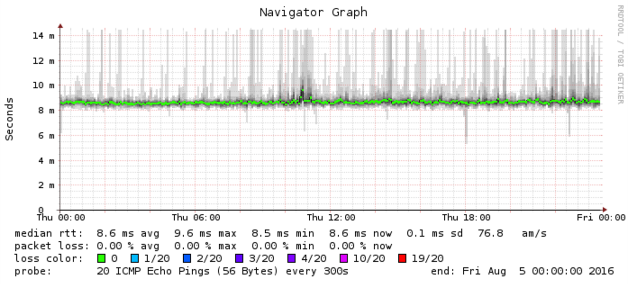
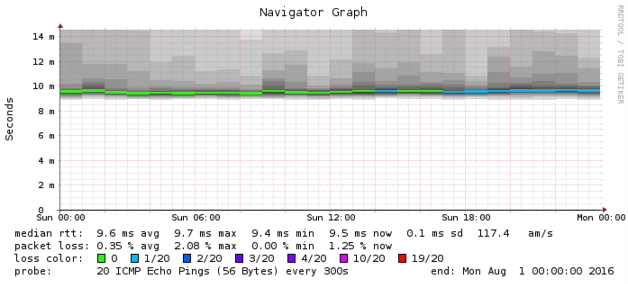 It didn't drop packets at random, though. Some traffic would be
deterministically dropped, such as the parallel A/AAAA DNS lookups generated by
the glibc DNS stub resolver. For instance, in the following
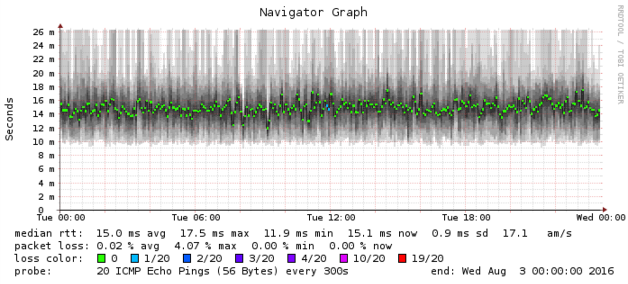 It seemed unlikely that Arris would fix the firmware issues in the SB6190 before
the end of my 30-day return window, so I returned the SB6190 and purchased a
 It's not clear which company is to blame for the problems in the Arris modem.
Looking at the DOCSIS drivers in the SB6190 firmware source reveals copyright
statements from ARRIS Group, Texas Instruments, and Intel. However, I would
recommend avoiding cable modems produced by Arris in particular, and cable
modems based on the Intel Puma SoC in general.

 This package also sees the (third) revision of how config files for pdftex and luatex are structured, since then we have settled down. Hopefully this will close some of the issues that have appeared.
New packages

 A maintenance release of
 Recently somebody reported that my

 Have you ever thought about using a gpg key to encrypt something, but
didn't due to worries that you'd eventually lose the secret key? Or maybe
you did use a gpg key to encrypt something and lost the key. There are
nice tools like
 crowdsupply.com has a


 The
 I'm pleased to announce that, at long last, the
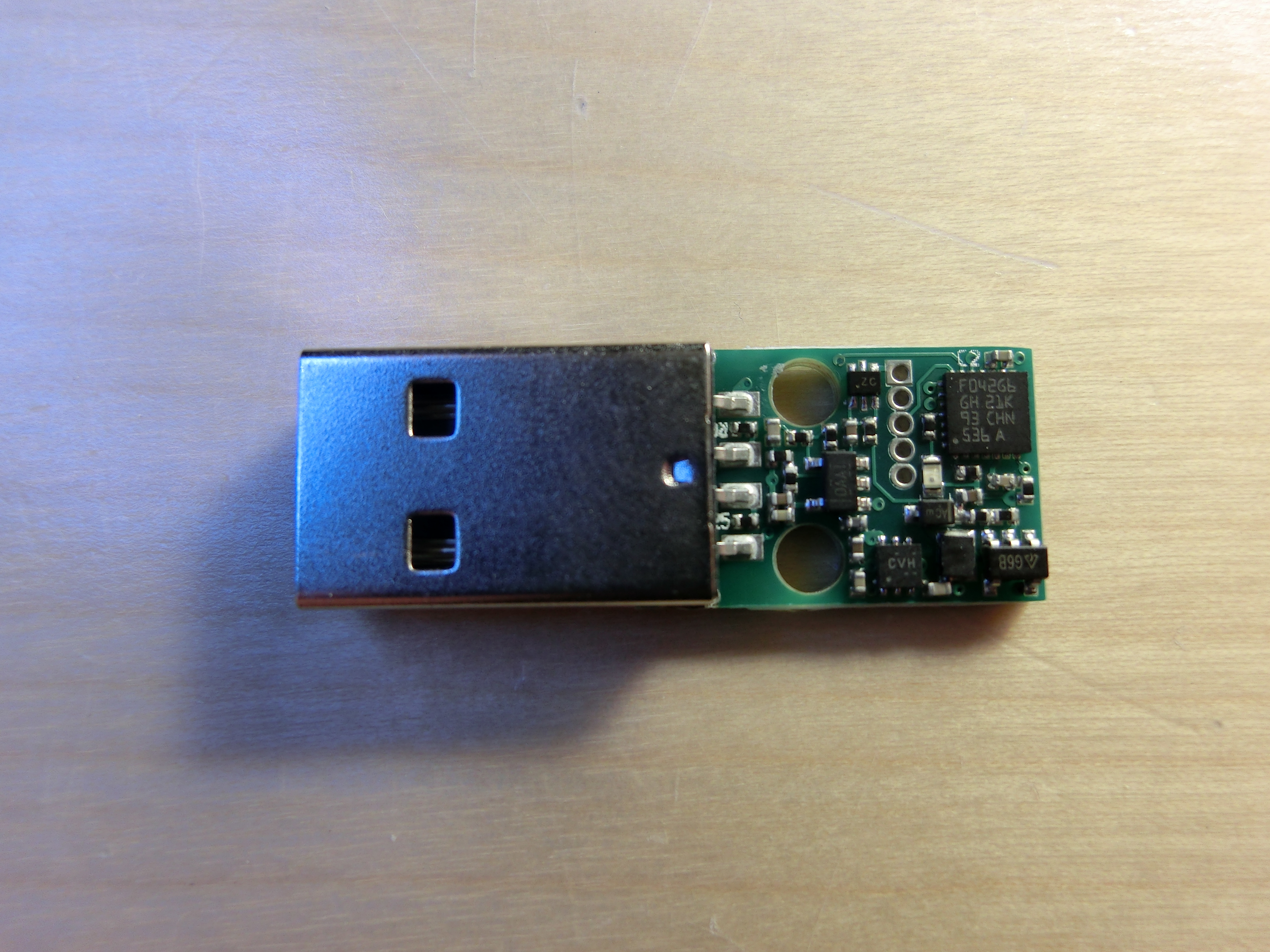
 ChaosKey v1.0 Released USB Attached True Random Number Generator
ChaosKey, our random number generator that attaches via USB, is now
available for sale from the

 Debian LTS
July marked the fifteenth month I contributed to