Search Results: "gt"

18 September 2016

Norbert Preining: Fixing packages for broken Gtk3

As mentioned on sunweaver s blog Debian s GTK-3+ v3.21 breaks Debian MATE 1.14, Gtk3 is breaking apps all around. But not only Mate, probably many other apps are broken, too, in particular Nemo (the file manager of Cinnamon desktop) has redraw issues (bug 836908), and regular crashes (bug 835043). gtk-breakage I have prepared packages for mate-terminal and nemo built from the most recent git sources. The new mate-terminal now does not crash anymore on profile changes (bug 835188), and the nemo redraw issues are gone. Unfortunately, the other crashes of nemo are still there. The apt-gettable repository with sources and amd64 binaries are here:
deb http://www.preining.info/debian/ gtk3fixes main
deb-src http://www.preining.info/debian/ gtk3fixes main
and are signed with my usual GPG key. Last but not least, I quote from sunweaver s blog: Questions
  1. Isn t GTK-3+ a shared library? This one was rhetorical Yes, it is.
  2. One that breaks other application with every point release? Well, unfortunately, as experience over the past years has shown: Yes, this has happened several times, so far and it happened again.
  3. Why is it that GTK-3+ uploads appear in Debian without going through a proper transition? This question is not rhetorical. If someone has an answer, please enlighten me.
(end of quote) <rant>
My personal answer to this is: Gtk is strongly related to Gnome, Gnome is strongly related to SystemD, all this is pushed onto Debian users in the usual way of we don t care for breaking non-XXX apps (for XXX in Gnome, SystemD). It is very sad to see this recklessness taking more and more space all over Debian.
</rant> I finish with another quote from sunweaver s blog:
already scared of the 3.22 GTK+ release, luckily the last development release of the GTK+ 3-series

17 September 2016

Jonas Meurer: apache rewritemap querystring

Apache2: Rewrite REQUEST_URI based on a bulk list of GET parameters in QUERY_STRING Recently I searched for a solution to rewrite a REQUEST_URI based on GET parameters in QUERY_STRING. To make it even more complicated, I had a list of ~2000 parameters that have to be rewritten like the following:
if % QUERY_STRING  starts with one of <parameters>:
    rewrite % REQUEST_URI  from /new/ to /old/
Honestly, it took me several hours to find a solution that was satisfying and scales well. Hopefully, this post will save time for others with the need for a similar solution. Research and first attempt: RewriteCond % QUERY_STRING ... After reading through some documentation, particularly Manipulating the Query String, the following ideas came to my mind at first:
RewriteCond % REQUEST_URI  ^/new/
RewriteCond % QUERY_STRING  ^(param1)(.*)$ [OR]
RewriteCond % QUERY_STRING  ^(param2)(.*)$ [OR]
...
RewriteCond % QUERY_STRING  ^(paramN)(.*)$
RewriteRule /new/ /old/?%1%2 [R,L]
or instead of an own RewriteCond for each parameter:
RewriteCond % QUERY_STRING  ^(param1 param2 ... paramN)(.*)$

There has to be something smarter ... But with ~2000 parameters to look up, neither of the solutions seemed particularly smart. Both scale really bad and probably it's rather heavy stuff for Apache to check ~2000 conditions for every ^/new/ request. Instead I was searching for a solution to lookup a string from a compiled list of strings. RewriteMap seemed like it might be what I was searching for. I read the Apache2 RewriteMap documentation here and here and finally found a solution that worked as expected, with one limitation. But read on ... The solution: RewriteMap and RewriteCond $ mapfile:% QUERY_STRING ... Finally, the solution was to use a RewriteMap with all parameters that shall be rewritten and check given parameters in the requests against this map within a RewriteCond. If the parameter matches, the simple RewriteRule applies. For the inpatient, here's the rewrite magic from my VirtualHost configuration:
RewriteEngine On
RewriteMap RewriteParams "dbm:/tmp/rewrite-params.map"
RewriteCond % REQUEST_URI  ^/new/
RewriteCond $ RewriteParams:% QUERY_STRING NOT_FOUND  !=NOT_FOUND
RewriteRule ^/new/ /old/ [R,L]

A more detailed description of the solution First, I created a RewriteMap at /tmp/rewrite-params.txt with all parameters to be rewritten. A RewriteMap requires two field per line, one with the origin and the other one with the replacement part. Since I use the RewriteMap merely for checking the condition, not for real string replacement, the second field doesn't matter to me. I ended up putting my parameters in both fields, but you could choose every random value for the second field: /tmp/rewrite-params.txt:
param1 param1
param2 param2
...
paramN paramN
Then I created a DBM hash map file from that plain text map file, as DBM maps are indexed, while TXT maps are not. In other words: with big maps, DBM is a huge performance boost:
httxt2dbm -i /tmp/rewrite-params.txt -o /tmp/rewrite-params.map

Now, let's go through the VirtualHost configuration rewrite magic from above line by line. First line should be clear: it enables the Apache Rewrite Engine:
RewriteEngine On
Second line defines the RewriteMap that I created above. It contains the list of parameters to be rewritten:
RewriteMap RewriteParams "dbm:/tmp/rewrite-params.map"
The third line limits the rewrites to REQUEST_URIs that start with /new/. This is particularly required to prevent rewrite loops. Without that condition, queries that have been rewritten to /old/ would go through the rewrite again, resulting in an endless rewrite loop:
RewriteCond % REQUEST_URI  ^/new/
The fourth line is the core condition: it checks whether QUERY_STRING (the GET parameters) is listed in the RewriteMap. A fallback value 'NOT_FOUND' is defined if the lookup didn't match. The condition is only true, if the lookup was successful and the QUERY_STRING was found within the map:
RewriteCond $ RewriteParams:% QUERY_STRING NOT_FOUND  !=NOT_FOUND
The last line is a simple RewriteRule from /new/ to /old/. It is executed only if all previous conditions are met. The flags are R for redirect (issuing a HTTP redirect to browser) and L for last (causing mod_rewrite to stop processing immediately after that rule):
RewriteRule ^/new/ /old/ [R,L]

Known issues A big limitation of this solution (compared to the ones above) is, that it looks up the whole QUERY_STRING in RewriteMap. Therefore, it works only if param is the only GET parameter. In case of additional GET parameters, the second rewrite condition fails and nothing is rewritten even if the first GET parameter is listed in RewriteMap. If anyone comes up with a solution to this limitation, I would be glad to learn about it :)

Jonas Meurer: data recovery

Data recovery with ddrescue, testdisk and sleuthkit From time to time I need to recover data from disks. Reasons can be broken flash/hard disks as well as accidently deleted files. Fortunately, this doesn't happen to often, which on the downside means that I usually don't remember the details about best practice. Now that a good friend asked me to recover very important data from a broken flash disk, I take the opportunity to write down what I did and hopefully don't need to read the same docs again next time :) Disclaimer: I didn't take the time to read through full documentation. This is rather a brief summary of the best practice to my knowledge, not a sophisticated and detailed explanation of data recovery techniques. Create image with ddrescue First and most secure rule for recovery tasks: don't work on the original, use a copied image instead. This way you can do, whatever you want without risking further data loss. The perfect tool for this is GNU ddrescue. Contrary to dd, it doesn't reiterate over a broken sector with I/O errors again and again while copying. Instead, it remembers the broken sector for later and goes on to the next sector first. That way, all sectors that can be read without errors are copied first. This is particularly important as every extra attempt to read a broken sector can further damage the source device, causing even more data loss. In Debian, ddrescue is available in the gddrescue package:
apt-get install gddrescue
Copying the raw disk content to an image with ddrescue is as easy as:
ddrescue /dev/disk disk-backup.img disk.log
Giving a logfile as third argument has the great advantage that you can interupt ddrescue at any time and continue the copy process later, possibly with different options. In case of very large disks where only the first part was in use, it might be useful to start with copying the beginning only:
ddrescue -i0 -s20MiB /dev/disk disk-backup.img disk.log
In case of errors after the first run, you should start ddrescue again with direct read access (-d) and tell it to try again bad sectors three times (-r3):
ddrescue -d -r3 /dev/disk disk-backup.img disk.log
If some sectors are still missing afterwards, it might help to run ddrescue with infinite retries for some time (e.g. one night):
ddrescue -d -r-1  /dev/disk disk-backup.img disk.log

Inspect the image Now that you have an image of the raw disk, you can take a first look at what it contains. If ddrescue was able to recover all sectors, chances are high that no further magic is required and all data is there. If the raw disk (used to) contain a partition table, take a first look with mmls from sleuthkit:
mmls disk-backup.img
In case of a intact partition table, you can try to create device maps with kpartx after setting up a loop device for the image file:
losetup /dev/loop0 disk-backup.img
kpartx -a /dev/loop0
If kpartx finds partitions, they will be made available at /dev/mapper/loop0p1, /dev/mapper/loop0p2 and so on. Search for filesystems on the partitions with fsstat from sleuthkit on the partition device map:
fsstat /dev/mapper/loop0p1
Or directly on the image file with the offset discovered by mmls earlier. This also might work in case of
fsstat -o 8064 disk-backup.img
The offset obviously is not needed if the image contains a partition dump (without partition table):
fsstat disk-backup.img
In case that a filesystem if found, simply try to mount it:
mount -t <fstype> -o ro /dev/mapper/loop0p1 /mnt
or
losetup -o 8064 /dev/loop1 disk-backup.img
mount -t <fstype> -o ro /dev/loop1 /mnt

Recover partition table If the partition table is broken, try to recover it with testdisk. But first, create a second copy of the image, as you will alter it now:
ddrescue disk-backup.img disk-backup2.img
testdisk disk-backup2.img
In testdisk, select a media (e.g. Disk disk-backup2.img) and proceed, then select the partition table type (usually Intel or EFI GPT) and analyze -> quick search. If partitions are found, select one or more and write the partition structure to disk.

Recover files Finally, let's try to recover the actual files from the image. testdisk If the partition table recovery was sucessfull, try to undelete files from within testdisk. Go back to the main menu and select advanced -> undelete. photorec Another option is to use the photorec tool that comes with testdisk. It searches the image for known file structures directly, ignoring possible filesystems:
photorec sdb2.img
You have to select either a particular partition or the whole disk, a file system (ext2/ext3 vs. other) and a destination for recovered files. Last time, photorec was my last resort as the fat32 filesystem was so damaged that testdisk detected only an empty filesystem. sleuthkit sleuthkit also ships with tools to undelete files. I tried fls and icat. fls searches for and lists files and directories in the image, searching for parts of the former filesystem. icat copies the files by their inode numer. Last time I tried, fls and icat didn't recover any new files compared to photorec. Still, for the sake of completeness, I document what I did. First, I invoked fls in order to search for files:
fls -f fat32 -o 8064 -pr disk-backup.img
Then, I tried to backup one particular file from the list:
icat -f fat32 -o 8064 <INODE>
Finally, I used the recoup.pl script from Dave Henk in order to batch-recover all discovered files:
wget http://davehenk.googlepages.com/recoup.pl
chmod +x recoup.pl
vim recoup.pl
[...]
my $fullpath="~/recovery/sleuthkit/";
my $FLS="/usr/bin/fls";
my @FLS_OPT=("-f","fat32","-o","8064","-pr","-m $fullpath","-s 0");
my $FLS_IMG="~/recovery/disk-image.img";
my $ICAT_LOG="~/recovery/icat.log";
my $ICAT="/usr/bin/icat";
my @ICAT_OPT=("-f","fat32","-o","8064");
[...]
Further down, the double quotes around $fullfile needed to be replaced by single quotes (at least in my case, as $fullfile contained a subdir called '$OrphanFiles'):
system("$ICAT @ICAT_OPT $ICAT_IMG $inode > \'$fullfile\' 2>> $ICAT_LOG") if ($inode != 0);
That's it for now. Feel free to comment with suggestions on how to further improve the process of recovering data from broken disks.

Jonas Meurer: hello world

Hello world! Finally, this is my first post to my own blog. For years, I refrained from having an own blog, even though I think about it since 10 years at least. Today I decided to give it a try, let's see where it takes me. I'll write about Free Software topics from time to time, probably with a strong emphasis on Debian GNU/Linux. Welcome to everybody who steps by. Cheers,
mejo

Norbert Preining: Android 7.0 Nougat Root PokemonGo

Since my switch to Android my Nexus 6p is rooted and I have happily fixed the Android (<7) font errors with Japanese fonts in English environment (see this post). The recently released Android 7 Nougat finally fixes this problem, so it was high time to update. In addition, a recent update to Pokemon Go excluded rooted devices, so I was searching for a solution that allows me to: update to Nougat, keep root, and run PokemonGo (as well as some bank security apps etc). android-nougat-root-poke After some playing around here are the steps I took: Installation of necessary components Warning: The following is for Nexus6p device, you need different image files and TWRP recovery for other devices. Flash Nougat firmware images Get it from the Google Android Nexus images web site, unpack the zip and the included zip one gets a lot of img files.
unzip angler-nrd90u-factory-7c9b6a2b.zip
cd angler-nrd90u/
unzip image-angler-nrd90u.zip
As I don t want my user partition to get flashed, I did not use the included flash script, but did it manually:
fastboot flash bootloader bootloader-angler-angler-03.58.img
fastboot reboot-bootloader
sleep 5
fastboot flash radio radio-angler-angler-03.72.img
fastboot reboot-bootloader
sleep 5
fastboot erase system
fastboot flash system system.img
fastboot erase boot
fastboot flash boot boot.img
fastboot erase cache
fastboot flash cache cache.img
fastboot erase vendor
fastboot flash vendor vendor.img
fastboot erase recovery
fastboot flash recovery recovery.img
fastboot reboot
After that boot into the normal system and let it do all the necessary upgrades. Once this is done, let us prepare for systemless root and possible hiding of it. Get the necessary file Get Magisk, SuperSU-magisk, as well as the Magisk-Manager.apk from this forum thread (direct links as of 2016/9: Magisk-v6.zip, SuperSU-v2.76-magisk.zip, Magisk-Manager.apk). Transfer these two files to your device I am using an external USB stick that can be plugged into the device, or copy it via your computer or via a cloud service. Also we need to get a custom recovery image, I am using TWRP. I used the version 3.0.2-0 of TWRP I had already available, but that version didn t manage to decrypt the file system and hangs. One needs to get at least version 3.0.2-2 from the TWRP web site. Install latest TWRP recorvery Reboot into boot-loader, then use fastboot to flash twrp:
fastboot erase recovery
fastboot flash recovery twrp-3.0.2-2-angler.img
fastboot reboot-bootloader
After that select Recovery with the up-down buttons and start twrp. You will be asked you pin if you have one set. Install Magisk-v6.zip Select Install in TWRP, select the Magisk-v6.zip file, and see you device being prepared for systemless root. Install SuperSU, Magisk version Again, boot into TWRP and use the install tool to install SuperSU-v2.76-magisk.zip. After reboot you should have a SuperSU binary running. Install the Magisk Manager From your device browse to the .apk and install it. How to run safety net programs Those programs that check for safety functions (Pokemon Go, Android Pay, several bank apps) need root disabled. Open the Magisk Manager and switch the root switch to the left (off). After this starting the program should bring you past the special check.

16 September 2016

Steinar H. Gunderson: BBR opensourced

This is pretty big stuff for anyone who cares about TCP. Huge congrats to the team at Google.

Dirk Eddelbuettel: anytime 0.0.2: Added functionality

anytime arrived on CRAN via release 0.0.1 a good two days ago. anytime aims to convert anything in integer, numeric, character, factor, ordered, ... format to POSIXct (or Date) objects. This new release 0.0.2 adds two new functions to gather conversion formats -- and set new ones. It also fixed a minor build bug, and robustifies a conversion which was seen to be not quite right under some time zones. The NEWS file summarises the release:
Changes in Rcpp version 0.0.2 (2016-09-15)
  • Refactored to use a simple class wrapped around two vector with (string) formats and locales; this allow for adding formats; also adds accessor for formats (#4, closes #1 and #3).
  • New function addFormats() and getFormats().
  • Relaxed one tests which showed problems on some platforms.
  • Added as.POSIXlt() step to anydate() ensuring all POSIXlt components are set (#6 fixing #5).
Courtesy of CRANberries, there is a comparison to the previous release. More information is on the anytime page. For questions or comments use the issue tracker off the GitHub repo.

This post by Dirk Eddelbuettel originated on his Thinking inside the box blog. Please report excessive re-aggregation in third-party for-profit settings.

15 September 2016

Craig Sanders: Frankenwheezy! Keeping wheezy alive on a container host running libc6 2.24

It s Alive! The day before yesterday (at Infoxchange, a non-profit whose mission is Technology for Social Justice , where I do a few days/week of volunteer systems & dev work), I had to build a docker container based on an ancient wheezy image. It built fine, and I got on with working with it. Yesterday, I tried to get it built on my docker machine here at home so I could keep working on it, but the damn thing just wouldn t build. At first I thought it was something to do with networking, because running curl in the Dockerfile was the point where it was crashing but it turned out that many programs would segfault e.g. it couldn t run bash, but sh (dash) was OK. I also tried running a squeeze image, and that had the same problem. A jessie image worked fine (but the important legacy app we need wheezy for doesn t yet run in jessie). After a fair bit of investigation, it turned out that the only significant difference between my workstation at IX and my docker machine at home was that I d upgraded my home machines to libc6 2.24-2 a few days ago, whereas my IX workstation (also running sid) was still on libc6 2.23. Anyway, the point of all this is that if anyone else needs to run a wheezy on a docker host running libc6 2.24 (which will be quite common soon enough), you have to upgrade libc6 and related packages (and any -dev packages, including libc6-dev, you might need in your container that are dependant on the specific version of libc6). In my case, I was using docker but I expect that other container systems will have the same problem and the same solution: install libc6 from jessie into wheezy. Also, I haven t actually tested installing jessie s libc6 on squeeze if it works, I expect it ll require a lot of extra stuff to be installed too. I built a new frankenwheezy image that had libc6 2.19-18+deb8u4 from jessie. To build it, I had to use a system which hadn t already been upgraded to libc6 2.24. I had already upgraded libc6 on all the machines on my home network. Fortunately, I still had my old VM that I created when I first started experimenting with docker crazily, it was a VM with two ZFS ZVOLs, a small /dev/vda OS/boot disk, and a larger /dev/vdb mounted as /var/lib/docker. The crazy part is that /dev/vdb was formatted as btrfs (mostly because it seemed a much better choice than aufs). Disk performance wasn t great, but it was OK and it worked. Docker has native support for ZFS, so that s what I m using on my real hardware. I started with the base wheezy image we re using and created a Dockerfile etc to update it. First, I added deb lines to the /etc/apt/sources.list for my local jessie and jessie-updates mirror, then I added the following line to /etc/apt/apt.conf:
APT::Default-Release "wheezy";
Without that, any other apt-get installs in the Dockerfile will install from jesssie rather than wheezy, which will almost certainly break the legacy app. I forgot to do it the first time, and had to waste another 10 minutes or so building the app s container again. I then installed the following:
apt-get -t jessie install libc6 locales libc6-dev krb5-multidev comerr-dev zlib1g-dev libssl-dev libpq-dev
To minimise the risk of incompatible updates, it s best to install the bare minimum of jessie packages required to get your app running. The only reason I needed to install all of those -dev packages was because we needed libpq-dev, which pulled in all the rest. If your app doesn t need to talk to postgresql, you can skip them. In fact, I probably should try to build it again without them I added them after the first build failed but before I remembered to set Apt::Default::Release (OTOH, it s working OK now and we re probably better off with libssl-dev from jessie anyway). Once it built successfully, I exported the image to a tar file, copied it back to my real Docker machine (co-incidentally, the same machine with the docker VM installed) and imported it into docker there and tested it to make sure it didn t have the same segfault issues that the original wheezy image did. No problem, it worked perfectly. That worked, so I edited the FROM line in the Dockerfile for our wheezy app to use frankenwheezy and ran make build. It built, passed tests, deployed and is running. Now I can continue working on the feature I m adding to it, but I expect there ll be a few more yaks to shave before I m finished. When I finish what I m currently working on, I ll take a look at what needs to be done to get this app running on jessie. It s on the TODO list at work, but everyone else is too busy a perfect job for an unpaid volunteer. Wheezy s getting too old to keep using, and this frankenwheezy needs to float away on an iceberg. Frankenwheezy! Keeping wheezy alive on a container host running libc6 2.24 is a post from: Errata

14 September 2016

Mike Gabriel: [Arctica Project] Release of nx-libs (version 3.5.99.1)

Introduction NX is a software suite which implements very efficient compression of the X11 protocol. This increases performance when using X applications over a network, especially a slow one. NX (v3) has been originally developed by NoMachine and has been Free Software ever since. Since NoMachine obsoleted NX (v3) some time back in 2013/2014, the maintenance has been continued by a versatile group of developers. The work on NX (v3) is being continued under the project name "nx-libs". Release Announcement On Tuesday, Sep 13th, version 3.5.99.1 of nx-libs has been released [1]. This release brings some code cleanups regarding displayed copyright information and an improvement when it comes to reconnecting to an already running session from an X11 server with a color depths setup that is different from the X11 server setup where the NX/X11 session was originally created on. Furthermore, an issue reported to the X2Go developers has been fixed that caused problems on Windows clients on copy+paste actions between the NX/X11 session and the underlying MS Windows system. For details see X2Go BTS, Bug #952 [3]. Change Log A list of recent changes (since 3.5.99.0) can be obtained from here. Binary Builds You can obtain binary builds of nx-libs for Debian (jessie, stretch, unstable) and Ubuntu (trusty, xenial) via these apt-URLs: Our package server's archive key is: 0x98DE3101 (fingerprint: 7A49 CD37 EBAE 2501 B9B4 F7EA A868 0F55 98DE 3101). Use this command to make APT trust our package server:
 wget -qO - http://packages.arctica-project.org/archive.key   sudo apt-key add -
The nx-libs software project brings to you the binary packages nxproxy (client-side component) and nxagent (nx-X11 server, server-side component). References

13 September 2016

John Goerzen: Two Boys, An Airplane, Plus Hundreds of Old Computers

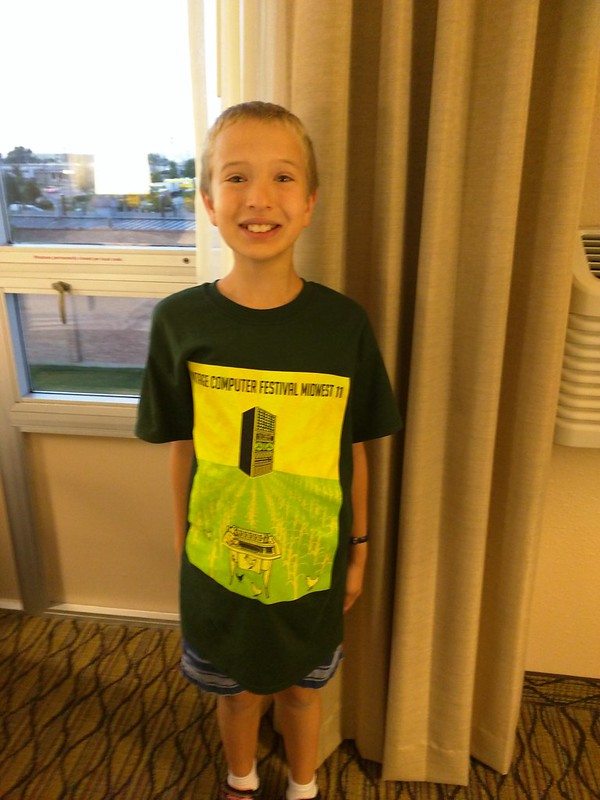
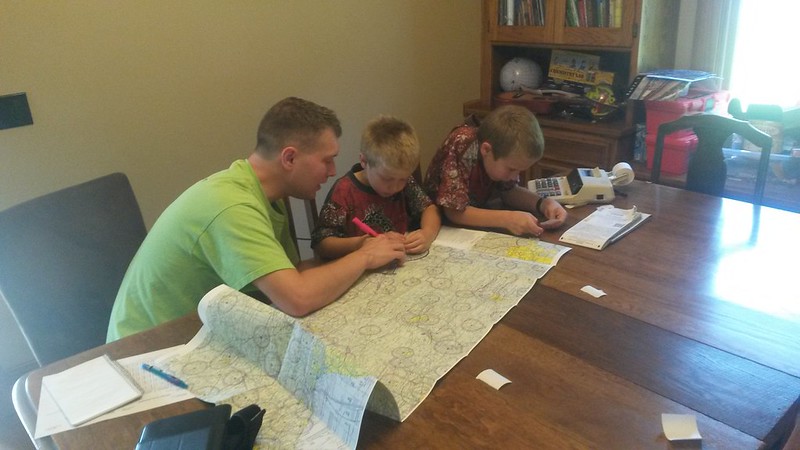
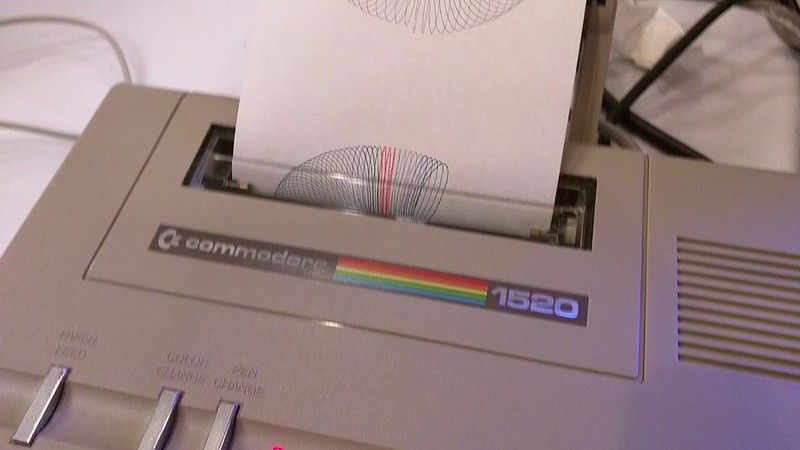
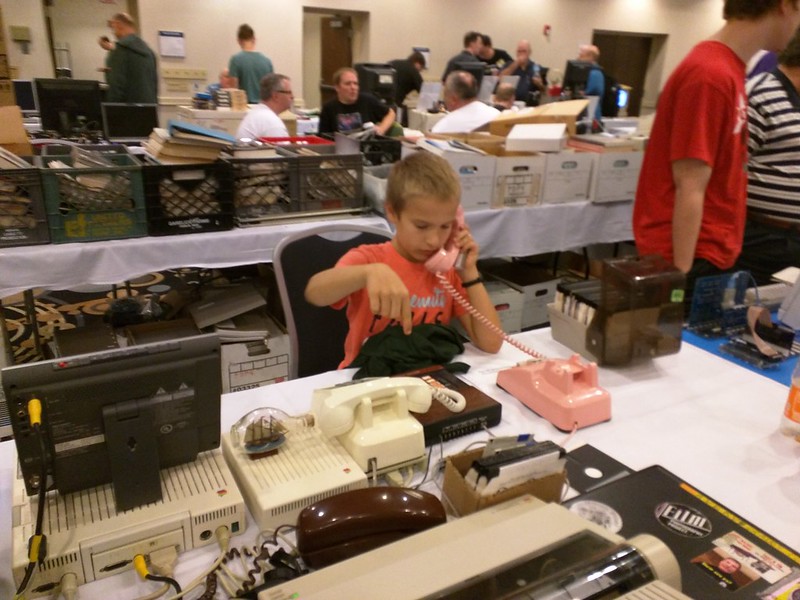
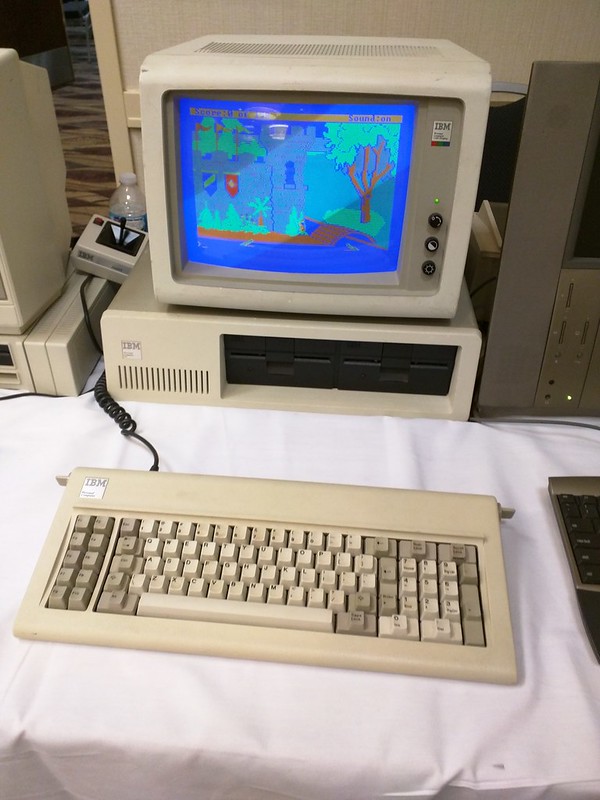
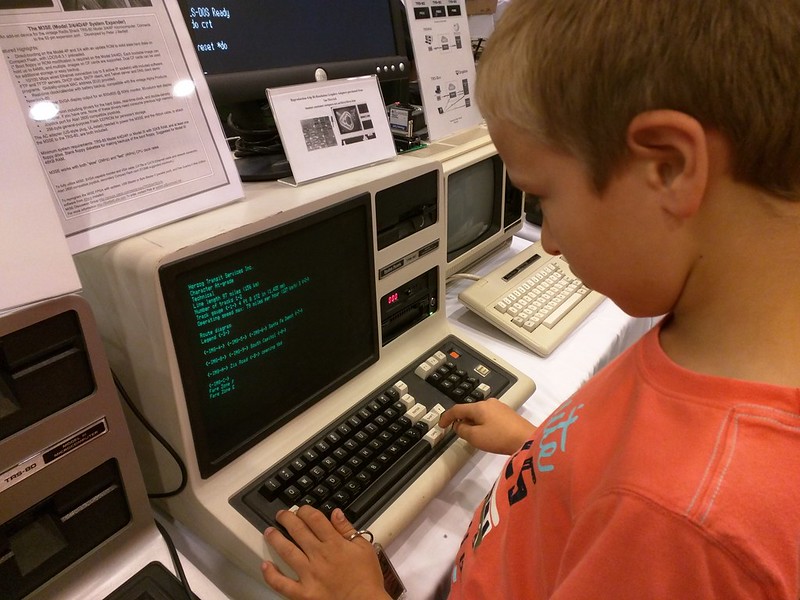
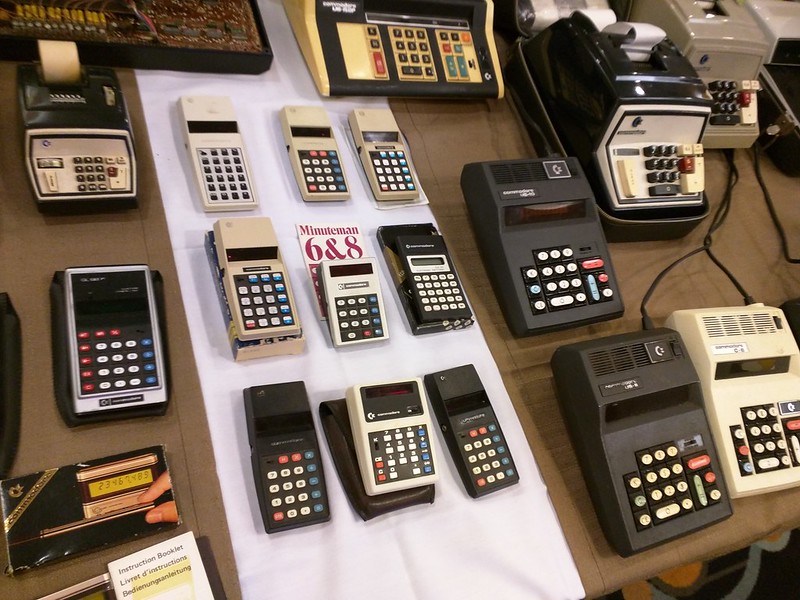
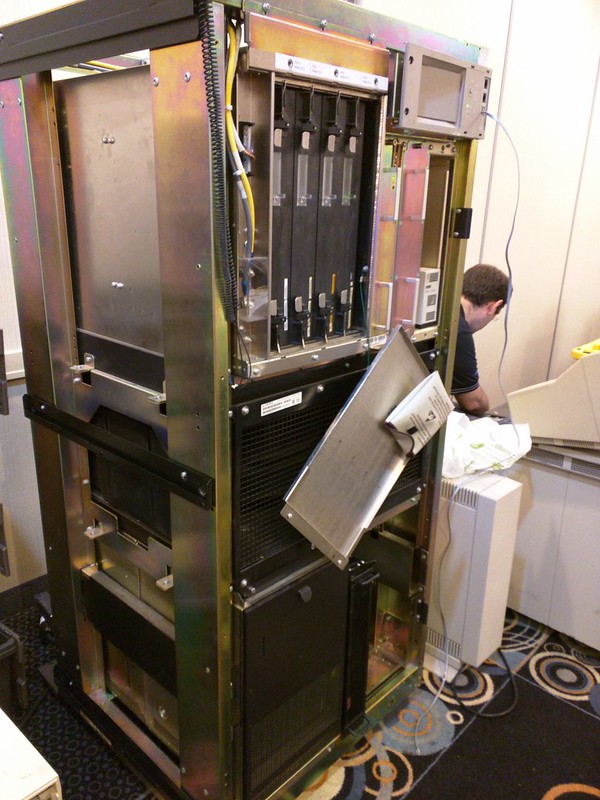
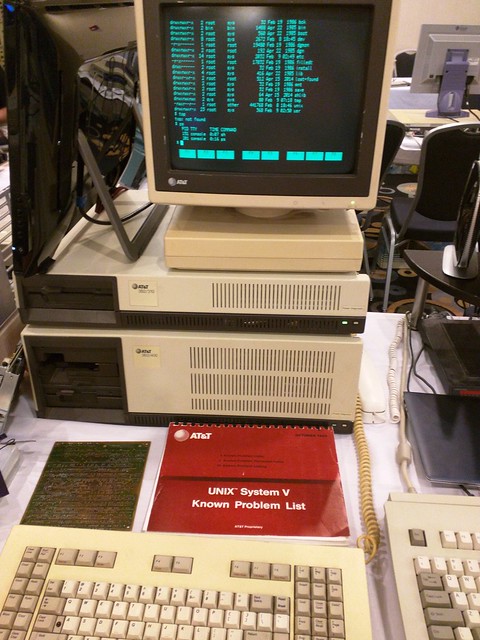
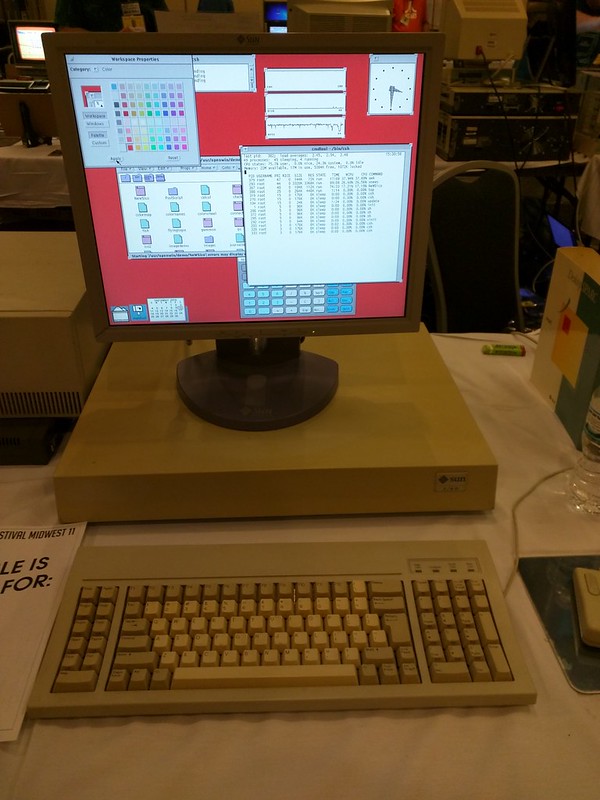
Was there anything you didn t like about our trip? Jacob s answer: That we had to leave so soon! That s always a good sign. When I first heard about the Vintage Computer Festival Midwest, I almost immediately got the notion that I wanted to go. Besides the TRS-80 CoCo II up in my attic, I also have fond memories of an old IBM PC with CGA monitor, a 25MHz 486, an Alpha also in my attic, and a lot of other computers along the way. I didn t really think my boys would be interested. But I mentioned it to them, and they just lit up. They remembered the Youtube videos I d shown them of old line printers and punch card readers, and thought it would be great fun. I thought it could be a great educational experience for them too and it was. It also turned into a trip that combined being a proud dad with so many of my other interests. Quite a fun time. IMG_20160911_061456 (Jacob modeling his new t-shirt) Captain Jacob Chicago being not all that close to Kansas, I planned to fly us there. If you re flying yourself, solid flight planning is always important. I had already planned out my flight using electronic tools, but I always carry paper maps with me in the cockpit for backup. I got them out and the boys and I planned out the flight the old-fashioned way. Here s Oliver using a scale ruler (with markings for miles corresponding to the scale of the map) and Jacob doing calculating for us. We measured the entire route and came to within one mile of the computer s calculation for each segment those boys are precise! 20160904_175519 We figured out how much fuel we d use, where we d make fuel stops, etc. The day of our flight, we made it as far as Davenport, Iowa when a chance of bad weather en route to Chicago convinced me to land there and drive the rest of the way. The boys saw that as part of the exciting adventure! Jacob is always interested in maps, and had kept wanting to use my map whenever we flew. So I dug an old Android tablet out of the attic, put Avare on it (which has aviation maps), and let him use that. He was always checking it while flying, sometimes saying this over his headset: DING. Attention all passengers, this is Captain Jacob speaking. We are now 45 miles from St. Joseph. Our altitude is 6514 feet. Our speed is 115 knots. We will be on the ground shortly. Thank you. DING Here he is at the Davenport airport, still busy looking at his maps: IMG_20160909_183813 Every little airport we stopped at featured adults smiling at the boys. People enjoyed watching a dad and his kids flying somewhere together. Oliver kept busy too. He loves to help me on my pre-flight inspections. He will report every little thing to me a scratch, a fleck of paint missing on a wheel cover, etc. He takes it seriously. Both boys love to help get the plane ready or put it away. The Computers Jacob quickly gravitated towards a few interesting things. He sat for about half an hour watching this old Commodore plotter do its thing (click for video): VID_20160910_142044 His other favorite thing was the phones. Several people had brought complete analog PBXs with them. They used them to demonstrate various old phone-related hardware; one had several BBSs running with actual modems, another had old answering machines and home-security devices. Jacob learned a lot about phones, including how to operate a rotary-dial phone, which he d never used before! IMG_20160910_151431 Oliver was drawn more to the old computers. He was fascinated by the IBM PC XT, which I explained was just about like a model I used to get to use sometimes. They learned about floppy disks and how computers store information. IMG_20160910_195145 He hadn t used joysticks much, and found Pong ( this is a soccer game! ) interesting. Somebody has also replaced the guts of a TRS-80 with a Raspberry Pi running a SNES emulator. This had thoroughly confused me for a little while, and excited Oliver. Jacob enjoyed an old TRS-80, which, through a modern Ethernet interface and a little computation help in AWS, provided an interface to Wikipedia. Jacob figured out the text-mode interface quickly. Here he is reading up on trains. IMG_20160910_140524 I had no idea that Commodore made a lot of adding machines and calculators before they got into the home computer business. There was a vast table with that older Commodore hardware, too much to get on a single photo. But some of the adding machines had their covers off, so the boys got to see all the little gears and wheels and learn how an adding machine can do its printing. IMG_20160910_145911 And then we get to my favorite: the big iron. Here is a VAX a working VAX. When you have a computer that huge, it s easier for the kids to understand just what something is. IMG_20160910_125451 When we encountered the table from the Glenside Color Computer Club, featuring the good old CoCo IIs like what I used as a kid (and have up in my attic), I pointed out to the boys that we have a computer just like this that can do these things and they responded wow! I think they are eager to try out floppy disks and disk BASIC now. Some of my favorites were the old Unix systems, which are a direct ancestor to what I ve been working with for decades now. Here s AT&T System V release 3 running on its original hardware: IMG_20160910_144923 And there were a couple of Sun workstations there, making me nostalgic for my college days. If memory serves, this one is actually running on m68k in the pre-Sparc days: IMG_20160910_153418 Returning home After all the excitement of the weekend, both boys zonked out for awhile on the flight back home. Here s Jacob, sleeping with his maps still up. IMG_20160911_132952 As we were nearly home, we hit a pocket of turbulence, the kind that feels as if the plane is dropping a bit (it s perfectly normal and safe; you ve probably felt that on commercial flights too). I was a bit concerned about Oliver; he is known to get motion sick in cars (and even planes sometimes). But what did I hear from Oliver? Whee! That was fun! It felt like a roller coaster! Do it again, dad!


Dirk Eddelbuettel: anytime 0.0.1: New package for 'anything' to POSIXct (or Date)

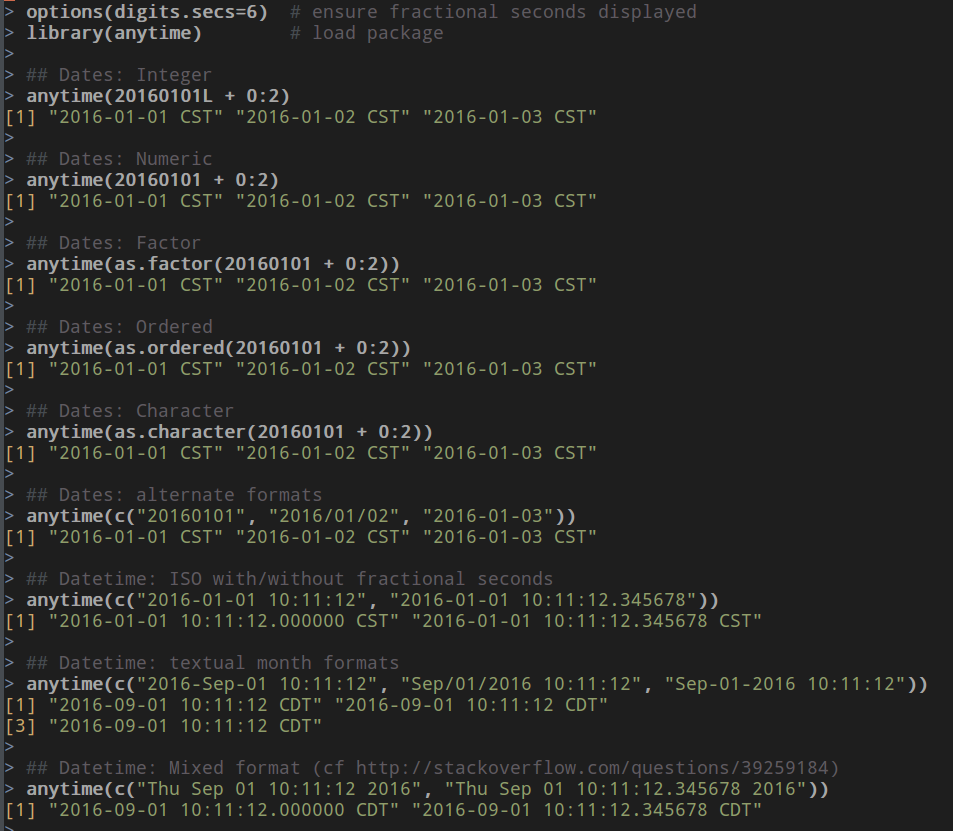
anytime just arrived on CRAN as a very first release 0.0.1. So why (yet another) package dealing with dates and times? R excels at computing with dates, and times. By using typed representation we not only get all that functionality but also of the added safety stemming from proper representation. But there is a small nuisance cost: How often have we each told as.POSIXct() that the origin is epoch '1970-01-01'? Do we have to say it a million more times? Similarly, when parsing dates that are in some recogniseable form of the YYYYMMDD format, do we really have to manually convert from integer or numeric or factor or ordered to character first? Having one of several common separators and/or date / time month forms (YYYY-MM-DD, YYYY/MM/DD, YYYYMMDD, YYYY-mon-DD and so on, with or without times, with or without textual months and so on), do we really need a format string? anytime() aims to help as a small general purpose converter returning a proper POSIXct (or Date) object nomatter the input (provided it was somewhat parseable), relying on Boost date_time for the (efficient, performant) conversion. See some examples on the anytime page or the GitHub README.md, or in the screenshot below. And then just give it try! anytime examples For questions or comments use the issue tracker off the GitHub repo.

This post by Dirk Eddelbuettel originated on his Thinking inside the box blog. Please report excessive re-aggregation in third-party for-profit settings.

Rapha&#235;l Hertzog: Freexian s report about Debian Long Term Support, August 2016

A Debian LTS logoLike each month, here comes a report about the work of paid contributors to Debian LTS. Individual reports In August, 140 work hours have been dispatched among 10 paid contributors. Their reports are available: Evolution of the situation The number of sponsored hours rised to 167 hours per month thanks to UR Communications BV joining as gold sponsor (funding 1 day of work per month)! In practice, we never distributed this amount of work per month because some sponsors did not renew in time and some of them might not even be able to renew at all. The security tracker currently lists 31 packages with a known CVE and the dla-needed.txt file 29. It s a small bump compared to last month but almost all issues are affected to someone. Thanks to our sponsors New sponsors are in bold.

No comment Liked this article? Click here. My blog is Flattr-enabled.

Joey Hess: PoW bucket bloom: throttling anonymous clients with proof of work, token buckets, and bloom filters

An interesting side problem in keysafe's design is that keysafe servers, which run as tor hidden services, allow anonymous data storage and retrieval. While each object is limited to 64 kb, what's to stop someone from making many requests and using it to store some big files? The last thing I want is a git-annex keysafe special remote. ;-) I've done a mash-up of three technologies to solve this, that I think is perhaps somewhat novel. Although it could be entirely old hat, or even entirely broken. (All I know so far is that the code compiles.) It uses proof of work, token buckets, and bloom filters.
Each request can have a proof of work attached to it, which is just a value that, when hashed with a salt, starts with a certain number of 0's. The salt includes the ID of the object being stored or retrieved. The server maintains a list of token buckets. The first can be accessed without any proof of work, and subsequent ones need progressively more proof of work to be accessed. Clients will start by making a request without a PoW, and that will often succeed, but when the first token bucket is being drained too fast by other load, the server will reject the request and demand enough proof of work to allow access to the second token bucket. And so on down the line if necessary. At the worst, a client may have to do 8-16 minutes of work to access a keysafe server that is under heavy load, which would not be ideal, but is acceptible for keysafe since it's not run very often. If the client provides a PoW good enough to allow accessing the last token bucket, the request will be accepted even when that bucket is drained. The client has done plenty of work at this point, so it would be annoying to reject it. To prevent an attacker that is willing to burn CPU from abusing this loophole to flood the server with object stores, the server delays until the last token bucket fills back up.
So far so simple really, but this has a big problem: What prevents a proof of work from being reused? An attacker could generate a single PoW good enough to access all the token buckets, and flood the server with requests using it, and so force everyone else to do excessive amounts of work to use the server. Guarding against that DOS is where the bloom filters come in. The server generates a random request ID, which has to be included in the PoW salt and sent back by the client along with the PoW. The request ID is added to a bloom filter, which the server can use to check if the client is providing a request ID that it knows about. And a second bloom filter is used to check if a request ID has been used by a client before, which prevents the DOS. Of course, when dealing with bloom filters, it's important to consider what happens when there's a rare false positive match. This is not a problem with the first bloom filter, because a false positive only lets some made-up request ID be used. A false positive in the second bloom filter will cause the server to reject the client's proof of work. But the server can just request more work, or send a new request ID, and the client will follow along. The other gotcha with bloom filters is that filling them up too far sets too many bits, and so false positive rates go up. To deal with this, keysafe just keeps count of how many request IDs it has generated, and once it gets to be too many to fit in a bloom filter, it makes a new, empty bloom filter and starts storing request IDs in it. The old bloom filter is still checked too, providing a grace period for old request IDs to be used. Using bloom filters that occupy around 32 mb of RAM, this rotation only has to be done every million requests of so. But, that rotation opens up another DOS! An attacker could cause lots of request IDs to be generated, and so force the server to rotate its bloom filters too quickly, which would prevent any requests from being accepted. To solve this DOS, just use one more token bucket, to limit the rate that request IDs can be generated, so that the time it would take an attacker to force a bloom filter rotation is long enough that any client will have plenty of time to complete its proof of work.
This sounds complicated, and probably it is, but the implementation only took 333 lines of code. About the same number of lines that it took to implement the entire keysafe HTTP client and server using the amazing servant library. There are a number of knobs that may need to be tuned to dial it in, including the size of the token buckets, their refill rate, the size of the bloom filters, and the number of argon2 iterations in the proof of work. Servers may eventually need to adjust those on the fly, so that if someone decides it's worth burning large quantities of CPU to abuse keysafe for general data storage, the server throttles down to a rate that will take a very long time to fill up its disk. This protects against DOS attacks that fill up the keysafe server storage. It does not prevent a determined attacker, who has lots of CPU to burn, from flooding so many requests that legitimate clients are forced to do an expensive proof of work and then time out waiting for the server. But that's an expensive attack to keep running, and the proof of work can be adjusted to make it increasingly expensive.

12 September 2016

Norbert Preining: Farewell academics talk: Colloquium Logicum 2016 G del Logics

Today I had my invited talk at the Colloquium Logicum 2016, where I gave an introduction to and overview of the state of the art of G del Logics. Having contributed considerably to the state we are now, it was a pleasure to have the opportunity to give an invited talk on this topic. cl16-preining It was also somehow a strange talk (slides are available here), as it was my last as academic . After the rejection of extension of contract by the JAIST (foundational research, where are you going? Foreign faculty, where?) I have been unemployed not a funny state in Japan, but also not the first time I have been, my experiences span Austrian and Italian unemployment offices. This unemployment is going to end this weekend, and after 25 years in academics I say good-bye. Considering that I had two invited talks, one teaching assignment for the ESSLLI, submitted three articles (another two forthcoming) this year, JAIST is missing out on quite a share of achievements in their faculty database. Not my problem anymore. It was a good time in academics, and I will surely not stop doing research, but I am looking forward to new challenges and new ways of collaboration and development. I will surely miss academics, but for now I will dedicate my energy to different things in life. Thanks to all the colleagues who did care, and for the rest, I have already forgotten you.

Keith Packard: hopkins

Hopkins Trailer Brake Controller in Subaru Outback My minivan transmission gave up the ghost last year, so I bought a Subaru outback to pull my t@b travel trailer. There isn't a huge amount of space under the dash, so I didn't want to mount a trailer brake controller in the 'usual' spot, right above my right knee. Instead, I bought a Hopkins InSIGHT brake controller, 47297. That comes in three separate pieces which allows for very flexible mounting options. I stuck the 'main' box way up under the dash on the left side of the car. There was a nice flat spot with plenty of space that was facing the right direction: The next trick was to mount the display and control boxes around the storage compartment in the center console: Routing the cables from the controls over to the main unit took a piece of 14ga solid copper wire to use as a fishing line. The display wire was routed above the compartment lid, the control wire was routed below the lid. I'm not entirely happy with the wire routing; I may drill some small holes and then cut the wires to feed them through.

Shirish Agarwal: mtpfs, feh and not being able to share the debconf experience.

I have been sick for about 2 weeks now hence haven t written. I had joint pains and still am weak. There has been lot of reports of malaria, chikungunya and dengue fever around the city. The only thing I came to know is how lucky I am to be able to move around on 2 legs and how powerless and debilitating it feels when you can t move. In the interim I saw Me Before You and after going through my most miniscule experience, I could relate with Will Taylor s character. If I was in his place, I would probably make the same choices. But my issues are and were slightly different. Last month I was supposed to share my debconf experience in the local PLUG meet. For that purpose, I took some pictures from my phone on a pen-drive to share. But when reached the venue, found out that I had forgotten to take the pen-drive. What I had also done is used the mogrify command from the imagemagick stable to lossy compress the images on the pen-drive so it is easier on image viewers. But that was not to be and at the last moment had to use my phone plugged into the USB drive of the lappy and show some pictures. This was not good. I had known that it was mounted somewhere but hadn t looked at where. After coming back home, it took me hardly 10 minutes to find out where it was mounted. It is not mounted under /media/shirish but under /run/user/1000/gvfs . If I do list under it shows mtp:host=%5Busb%3A005%2C007%5D . I didn t need any packages under debian to make it work. Interestingly, the only image viewer which seems to be able to work with all the images is feh which is a command-line image viewer in Debian. [$] aptitude show feh
Package: feh
Version: 2.16.2-1
State: installed
Automatically installed: no
Priority: optional
Section: graphics
Maintainer: Debian PhotoTools Maintainers
Architecture: amd64
Uncompressed Size: 391 k
Depends: libc6 (>= 2.15), libcurl3 (>= 7.16.2), libexif12 (>= 0.6.21-1~), libimlib2 (>= 1.4.5), libpng16-16 (>= 1.6.2-1), libx11-6, libxinerama1
Recommends: libjpeg-progs
Description: imlib2 based image viewer
feh is a fast, lightweight image viewer which uses imlib2. It is commandline-driven and supports multiple images through slideshows, thumbnail
browsing or multiple windows, and montages or index prints (using TrueType fonts to display file info). Advanced features include fast dynamic
zooming, progressive loading, loading via HTTP (with reload support for watching webcams), recursive file opening (slideshow of a directory
hierarchy), and mouse wheel/keyboard control.
Homepage: http://feh.finalrewind.org/
I did try various things to get it to mount under /media/shirish/ but as of date have no luck. Am running Android 6.0 Marshmallow and have enabled USB debugging with help from my friend Akshat . I even changed the /etc/fuse.conf options but even that didn t work. #cat /etc/fuse.conf
[sudo] password for shirish:
# /etc/fuse.conf - Configuration file for Filesystem in Userspace (FUSE)
# Set the maximum number of FUSE mounts allowed to non-root users.
# The default is 1000.
mount_max = 1
# Allow non-root users to specify the allow_other or allow_root mount options.
user_allow_other
One way which I haven t explored is adding/making an entry into /etc/fstab. If anybody knows of a solution which doesn t involve changing content of /etc/fstab. At the same time you are able to get the card and phone directories mounted under /media// , in my case /media/shirish would be interested to know. I would like the /etc/fstab to remain as it is. I am using Samsung J5 (unrooted) Btw I tried all the mtpfs packages in Debian testing but without any meaningful change Look forward to tips.
Filed under: Miscellenous Tagged: #Android, #Debconf16, #debian, #mptfs, feh, FUSE, PLUG

Steve Kemp: If your code accepts URIs as input..

There are many online sites that accept reading input from remote locations. For example a site might try to extract all the text from a webpage, or show you the HTTP-headers a given server sends back in response to a request. If you run such a site you must make sure you validate the schema you're given - also remembering to do that if you're sent any HTTP-redirects.

Really the issue here is a confusion between URL & URI.
The only time I ever communicated with Aaron Swartz was unfortunately after his death, because I didn't make the connection. I randomly stumbled upon the html2text software he put together, which had an online demo containing a form for entering a location. I tried the obvious input:
file:///etc/passwd
The software was vulnerable, read the file, and showed it to me. The site gives errors on all inputs now, so it cannot be used to demonstrate the problem, but on Friday I saw another site on Hacker News with the very same input-issue, and it reminded me that there's a very real class of security problems here. The site in question was http://fuckyeahmarkdown.com/ and allows you to enter a URL to convert to markdown - I found this via the hacker news submission. The following link shows the contents of /etc/hosts, and demonstrates the problem: http://fuckyeahmarkdown.example.com/go/?u=file:///etc/hosts&read=1&preview=1&showframe=0&submit=go The output looked like this:
..
127.0.0.1 localhost
255.255.255.255 broadcasthost
::1 localhost
fe80::1%lo0 localhost
127.0.0.1 stage
127.0.0.1 files
127.0.0.1 brettt..
..
In the actual output of '/etc/passwd' all newlines had been stripped. (Which I now recognize as being an artifact of the markdown processing.) UPDATE: The problem is fixed now.

Ritesh Raj Sarraf: apt-offline 1.7.1 released

I am happy to mention the release of apt-offline, version 1.7.1. This release includes many bug fixes, code cleanups and better integration.
  • Integration with PolicyKit
  • Better integration with apt gpg keyring
  • Resilient to failures when a sub-task errors out
  • New Feature: Changelog
    • This release adds the ability to deal with package changelogs ('set' command option: --generate-changelog) based on what is installed, extract changelog (Currently support with python-apt only) from downloaded packages and display them during installation ('install' command opiton: --skip-changelog, if you want to skip display of changelog)
  • New Option: --apt-backend
    • Users can now opt to choose an apt backend of their choice. Currently support: apt, apt-get (default) and python-apt
Hopefully, there will be one more release, before the release to Stretch. apt-offline can be downloaded from its homepage or from Github page. Update: The PolicyKit integration requires running the apt-offline-gui command with pkexec (screenshot). It also work fine with sudo, su etc.

Categories:

Keywords:

Like:

Reproducible builds folks: Reproducible Builds: week 72 in Stretch cycle

What happened in the Reproducible Builds effort between Sunday September 4 and Saturday September 10 2016: Reproducible work in other projects Python 3.6's dictonary type now retains the insertion order. Thanks to themill for the report. In coreboot, Alexander Couzens committed a change to make their release archives reproducible. Patches submitted Reviews of unreproducible packages We've been adding to our knowledge about identified issues. 3 issue types have been added: 1 issue type has been updated: 16 have been have updated: 13 have been removed, not including removed packages: 100s of packages have been tagged with the more generic captures_build_path, and many with captures_kernel_version, user_hostname_manually_added_requiring_further_investigation, user_hostname_manually_added_requiring_further_investigation, captures_shell_variable_in_autofoo_script, etc. Particular thanks to Emanuel Bronshtein for his work here. Weekly QA work FTBFS bugs have been reported by: diffoscope development strip-nondeterminism development tests.reproducible-builds.org: Misc. This week's edition was written by Chris Lamb and Holger Levsen and reviewed by a bunch of Reproducible Builds folks on IRC.

11 September 2016

Gregor Herrmann: RC bugs 2016/34-36

as before, my work on release-critical bugs was centered around perl issues. here's the list of bugs I worked on:

Next.

Previous.