Search Results: "reg"

17 August 2007

Erich Schubert: Skype problems aren't solved, but just worked around?

Skype seems slowly to recover from yesterdays blackout.However, it doesn't look to me as if they've actually solved the problem. I assume they've just added a workaround (e.g. maybe using DNS to locate good servers?) that help recovering. At least when enough people download the new version.If you look at the graphs at Njanjan.to and 85qm.de, then they still look far from healthy.I'm not talking about the mere numbers - Skype reports about 3 Million users connected, which would mean 1 out of 3 regular users is back. But I'm talking about the shape of the curve. During regular operations, the curve used to be smooth. Which is easy to explain: by some million users going online and offline indepentenly, it all smoothens out. The curve goes up when people start working in a densely populated area and goes down when they go to bed. But if you look at the graphs for the past few hours parts of the Skype P2P network still appear to get disconnected and reconnected. They cerainly didn't flip a switch and people could connect again. The service still appears to be going up and down.To me, that indicates that they actually didn't solve the problem, but just found a way to make the problems not take down the whole network, while parts still drop off now and then.Just my guesses, though. And Skype will not tell the truth either, you bet. (You might want to skim over the presentation "Silver Needle In The Skype" [PDF], about the inner workings of Skype, their obfuscation technologies and how far they go at hiding what their software is actually doing)P.S. I've read in a blog that Skype might right now only allow one connection per IP. That would even more support the rumors that they're actually trying to defend against an attack on their network (and using the IP limit to slow down the attacks?)P.P.S. Another interesting note: the Skype stats on the Skype website report 5.5 Million connected users - my Skype client reports 3.7 Million. Which number is correct?

John Goerzen: Linux Hardware Support Better Than Windows

Something I often hear from people that talk about Linux on the desktop is this: people want to be able to go to the store, buy hardware, and be confident that it will Just Work.

I would like to point out that things are rarely this simple on Windows. And, in fact, things are often simpler on Linux these days.

Here's the example that prompted this post.

I have a computer that's about 4 years old. It's my main desktop machine at home. It was still fast enough for me, but has been developing all sorts of weird behaviors. Certain USB ports stopped working altogether a few months ago. Then it started hanging during POST whenever I'd try to reboot -- but would still boot OK about 80% of the time after a power cycle. Then it started randomly losing contact with my USB mouse until a reboot. And the last straw was when the display started randomly going out. I've told everyone that my machine has cancer and is slowly dying.

The case is a pretty nice full tower -- solid and sturdy. I have an 160GB IDE drive in it. So I figured I will upgrade the motherboard, CPU, RAM, and add a 500GB SATA drive since they're so cheap these days and I'm running out of space. I'd also have to buy a new video card since my old one was AGP and the new motherboard only has PCI Express for video. So about $700 later from Newegg (I got a Core 2 Duo E6750), the parts arrived.

I spent some time installing it all. The motherboard had only one IDE channel, and I didn't have any IDE cable long enough to connect both the IDE hard disk and the optical drive, so I popped in an old Maxtor/Promise PCI Ultra133 controller I had sitting around to use with the DVD burner.

Now, to recap, the hardware that the OS would see as new/different is: CPU, RAM, IDE controller, SATA controller, Promise IDE controller, integrated NIC, sound, video.

Then the magic smoke test.

I turned on the machine. Grub appeared. Linux started booting.

Even though I had switched from the default Debian "supports everything" kernel to a K7 kernel, it still booted.

And every single piece of hardware was supported immediately. There was no "add new hardware" wizard that popped up, no "I've found new hardware" boxes. It just worked, silently, with no need to tell me anything or have me click on anything.

Only one piece required configuration: the NIC, thanks to some udev design flaws (it got renamed from eth0 to eth1 by udev). That took 20 seconds. Debian saw the IDE HDD, the SATA drive, the Promise controller, the DVD burner, the video card, the sound, and it all worked automatically. And Debian is not even a distro that occurs to a lot of people when they think of great hardware support.

Now let's turn to Windows.

The Windows Nightmare

I have a legal copy of Windows XP Home that was preinstalled on the machine when I got it. I resized its partition down to about 20GB so that I could use 140GB for Linux. I use it rarely, primarily for gaming, and I've bought about 3 games in the last 4 years. I usually disconnect the network when I boot to Windows, though I do keep it current with updates.

I did some research on what Windows was going to do when I replace the hardware. The general consensus from people on the 'net is that you can't just replace a motherboard and expect everything to be happy. There were generally three different approaches suggested: 1) don't even try, just reinstall; 2) do a rescue install after you move over; and 3) use sysprep. The rescue install has to be done by booting from an XP install CD, then picking a rescue install option somewhere. It will overwrite your installed Windows with the version from the CD. That means that I'd have to re-apply SP2, though bits of it that didn't get overwritten would still be on the hard disk, and who knows what would happen to the registry.

Option #3 was to download sysprep (must have the Genuine Disadvantage ActiveX to get the free download from MS). Sysprep is designed to be used just prior to taking an image with ghost for replication. It removes the hardware-specific config (but not the drivers), as well as the product key, from the machine, but otherwise leaves it untouched. On the next boot, you get the "Welcome to XP" wizard.

One other strike against #2 is that Compaq "helpfully" didn't ship any install CDs with the machine. Under Windows, they did have a "create rescue CD" tool, which burned 7 CDs for me. But they are full Compaq-specific CDs, not one of them an XP CD, *AND* they check on boot to see if you're using the same Compaq motherboard, and exit if not. Highly useless.

So I went with sysprep. Before my new hardware even arrived, I downloaded the Windows drivers for all of it. I burned them to a CD, and installed as many as I could on the system in advance. About half of them refused to install since the new hardware wasn't there yet. I then took a raw image of the partition with dd, just in case. Finally, right before I swapped the hardware, I ran sysprep and let it shut down the machine.

So after the new hardware was installed came the adventure.

Windows booted to the "welcome to XP" thingy. The video, keyboard, mouse, and IDE HDD worked. That's about it.

I went through the "welcome to XP wizard". But the network didn't work yet, so I couldn't activate it. So I popped my handy driver CD in the drive. But what's this? Windows doesn't recognize the DVD drive because it doesn't have drivers for this Promise controller that came out in, what, 2001? Sigh. Downloaded the drivers with the imac, copy them to a CF card, plug the USB CF reader into Windows.

While I was doing that, about 6 "found new hardware" dialogs got queued up. Not one of them could actually find a driver for my hardware, but that didn't prevent Windows from making me click through them all.

So, install Promise driver from CF card, reboot. Click through new hardware dialogs again. Install network driver, reboot, click through dialogs. Install sound driver. Install Intel "chipset" driver, click through dialogs. Reboot. Install SATA driver. Reboot.

So the hardware appears to all be working by this point, though I have a Creative volume control (from the old hardware) and a Realtek one in the tray. Minor annoyance to deal with later.

Now I have to re-activate XP. I dutifully key in the magic string from the sticker on my case. Surprise surprise, the Internet-based activation fails because my hardware is different. So I have to call the 800 number. I have to read in 7 blocks of 6 digits, one block at a time. Then I answer some questions: have I activated Windows before, have I changed hardware, was the old hardware defective (yes, yes, and yes). Then I get 7 blocks of 6 digits read to me. Finally Windows is activated. PHEW! Why they couldn't ask those questions with the online tool is beyond me.

Anyhow. Linux took me 20 seconds to get working. Windows, about 2 hours, plus another 2 hours for prep and research.

I did zero prep for Linux. I made one config change (GUI users could have just configured their machine to use eth1).

Other cool Linux HW features

Say you buy a new printer and want to get it set up. On Windows, you insert the CD, let it install 200MB of print drivers plus ads plus crap plus add something to your taskbar plus who knows what else. Probably reboot. Then the printer might actually print.

On Debian, you plug in the printer to the USB port. You type printconf. 5 seconds later, your printer works.

I have been unpleasantly surprised lately by just how difficult hardware support in Windows really is, especially since everyone keeps saying how good it is. It's not good. Debian's is better, in my opinion.

Stefano Zacchiroli: debcheckout bits

debcheckout: some new bits Some new bits about debcheckout (talk is cheap, code here): (Perl) Tip of the day: Switch.pm With "use Switch;" you will win a switch statement for your Perl programs, which can be used as follows:
switch ($repo_type)  
  case "cvs"    my $module = pop @cmd; push @cmd, ("-d", $destdir, $module);  
  case /^(bzr darcs git hg svn)$/
                push @cmd, $destdir;  
  else   die "sorry, don't know how to set the destination directory for $repo_type repositories (patches welcome!)\n";  
 

This is far better than a chain of if/elsif statements and has even a sane semantics (e.g. no need of explicit breaks, possibility to have higher-case branches, ...). Unfortunately, it is not possible (using a simple syntax) to match a scalar value against an array case branch. Therefore the only way to factorize branches is (when possible) to rely on regexp alternative branches, as it is done in the code snippet above.

Erich Schubert: Skype taking down your network

Side note: According to the Skype RSS data feed, right now 174086 user are online. That less than 10% of the usual numbers, isn't it? To me, that's more than a few users.Skype is harmful. Here's the explantaion why:Skype uses P2P technology where it is not needed. There are parts of VoIP where it does make sense (when a direct connection is possible, transfer the data directly between clients), but pretty much any VoIP software does that.And there are parts, where it doesn't make sense. This includes not accessing the login servers directly, but trying to use other Skype users as proxies.Now what I've seen happening in some networks is the following: Skype fails to login directly, so it starts connecting random peers it has seen before. It keeps a list of 200 peers for that in the registry. So when it fails to connect, it will try contacting these 200 peers instead. Now if you have multiple users sharing your connection, let's say 10 and a cheap router with limited memory, 2000 connections is a lot to keep track of. It might start losing other connections. Such as your mail an web connections.This is exactly what I've seen today: the internet connection becoming pretty much unuseable (single packets would work fine, but not TCP/IP transfers of more than a few kb). When we found out it might be due to Skype malfunctioning, and gave the order for everyone to shut down Skype (which didn't work anyway, so people quickly complied), Internet became useable again. Let me emphasize that: it wasn't a bandwidth issue, but it was just the sheer number of connections opened by Skype that caused more important connections to be dropped by the routers.So why is Skype not using proper servers, like MSN, AIM and ICQ do? Because they're cheapskates. It's cheaper for them to let others use your bandwidth instead of having to provide enough to handle all the data. The other reason is that it's harder for system administrators to deny access to Skype, if any other Skype user can proxy your access to the actual login server. But if you want/need a central user registry, you can't rely on a true P2P system. It's bound to get disconnected at some point.And yes, this especially means that Skype is not a good idea in a corporate environment with a large number of users. The skype approach works well for a single user at home, but the Skype networking behaviour can take down your routers if you have too many users running Skype at the same time. Other software choices, such as the standardized, vendor independant SIP protocol for VoIP, however would even allow you to setup a proper VoIP telephone system, with conference rooms, complex call routing, dictionaries, callback, routing to ATM or mobiles, complex voice mail systems, you name it. Skype is designed for single home users, not for company use.P.S. Am I the only one who thinks the Skype UI is crap? No groups (at least not in my version, which is the latest there is for Linux), and totally idiotic button placement (like this ugly 'add' button I'm pretty much never ever, and a floding-up button next to it with the options, quit and recent chats (do they have anything in common?) hidden in there. How about using a menu bar like everybody else? How about organizing functionality in a human-comprehendable way?P.P.S. What I guess has happened: somehow, most nodes (especially super nodes) got convined that the actual login servers are bad. As long, as some still had the connection, login still worked. At least sometimes (many probably experienced an unstable Skype connection before they could no longer login). But at a certain point, a large part of the network got separated from the login nodes and started routing requests around chaotically, trying to find the actual login server. The only way they have for fixing it, is slowly convincing and nodes on the perimeter of the P2P network about the proper location for the login servers, and that way spreading the correct information around again. Or shipping a new version which will re-inject this information in clients again. Just my guesses.P.P.P.S. It would be interesting to know what had caused this. If it was some kind of subtle attack on the network. Like someone trying to convince supernodes that the login servers are bad and untrustworthy or something. Maybe just by sending spoofed bad data packets from the login servers IP or so.P^4.S. Interesting graph on the number of Skype users logged in. Still going down.

16 August 2007

MJ Ray: Weston-super-Mare Co-op Welcome Closed

Sorry, but I can't see how to make this post anything but a bit negative: Along with a few million others, I own some food shops. I usually try to shop there. I go away for a few weeks and the picture shows what's happened to my nearest food shop... [picture of closed shop] It's closed! Well, that's one less store for the rebranding project, [Cambridge Co-operator] but it's a bit of a pain in the backside. There's no sign on the closed shop and I saw no sign when I last visited it. There's nothing on the membership web news and there was nothing in the last magazines. I've called the regional office to find out what's happening and left a voicemail. I might email one of our committee too, as I think they decide on closures. I'm a bit unhappy about this. Now we're down to two medium/small food shops that have really bizarre stock policies (for example, they sell filter coffee, but no coffee filters) and are unable to order key ethical products. (2007-08-17: 1 comment)
Andrew Pollock: [tech] Hidden gems in the GNU C Library

I should really read the GNU C Library documentation. Even if only 10% of it sinks in, I'll be that much the wiser for it. Today's (re)discovery: libSegfault.so I actually found this with a co-worker a few months ago, and promptly forgot all about it until he reminded me today whilst I was lamenting about Cfengine segfaulting on me. Here's a lovely self-illustrating example:
apollock@icarus:~$ sudo chmod a+x /lib/libSegFault.so
apollock@icarus:~$ /lib/libSegFault.so
Segmentation fault
apollock@icarus:~$ # Aww
apollock@icarus:~$ LD_PRELOAD=/lib/libSegFault.so /lib/libSegFault.so
*** Segmentation fault
Register dump:
 EAX: 80003f00   EBX: b7ff1ff4   ECX: 00000000   EDX: 00000000
 ESI: bf88b97c   EDI: 800008b0   EBP: 00000000   ESP: bf88b974
 EIP: 00000001   EFLAGS: 00010282
 CS: 0073   DS: 007b   ES: 007b   FS: 0000   GS: 0033   SS: 007b
 Trap: 0000000e   Error: 00000004   OldMask: 00000000
 ESP/signal: bf88b974   CR2: 00000001
Backtrace:
/lib/libSegFault.so[0xb7fd004f]
[0xffffe420]
Memory map:
80000000-80003000 r-xp 00000000 08:02 8589       /lib/libSegFault.so
80003000-80005000 rwxp 00002000 08:02 8589       /lib/libSegFault.so
80005000-80026000 rwxp 80005000 00:00 0          [heap]
b7e61000-b7e6b000 r-xp 00000000 08:02 6254       /lib/libgcc_s.so.1
b7e6b000-b7e6c000 rwxp 00009000 08:02 6254       /lib/libgcc_s.so.1
b7e6c000-b7e6d000 rwxp b7e6c000 00:00 0
b7e6d000-b7faf000 r-xp 00000000 08:02 8572       /lib/libc-2.6.so
b7faf000-b7fb0000 r-xp 00141000 08:02 8572       /lib/libc-2.6.so
b7fb0000-b7fb2000 rwxp 00142000 08:02 8572       /lib/libc-2.6.so
b7fb2000-b7fb5000 rwxp b7fb2000 00:00 0
b7fce000-b7fd1000 r-xp 00000000 08:02 8589       /lib/libSegFault.so
b7fd1000-b7fd3000 rwxp 00002000 08:02 8589       /lib/libSegFault.so
b7fd3000-b7fd5000 rwxp b7fd3000 00:00 0
b7fd5000-b7ff1000 r-xp 00000000 08:02 8569       /lib/ld-2.6.so
b7ff1000-b7ff3000 rwxp 0001b000 08:02 8569       /lib/ld-2.6.so
bf879000-bf88f000 rw-p bf879000 00:00 0          [stack]
ffffe000-fffff000 r-xp 00000000 00:00 0          [vdso]
Segmentation fault
This is somewhat similar to Tridge's segv_handler, which used to be what I reached for in these sort of situations, but that was a bit fiddly to get set up. This is significantly easier, and already installed as standard. Of course, interpreting the output is left as an exercise for the reader. Update Or you can just use catchsegv(1)

15 August 2007

Russell Coker: ARP

In the IP protocol stack the lowest level protocol is ARP (the Address Resolution Protocol). ARP is used to request the Ethernet hardware (MAC) address of the host which owns a particular IP address. # arping 192.168.0.43
ARPING 192.168.0.43
60 bytes from 00:60:b0:3c:62:6b (192.168.0.43): index=0 time=339.031 usec
60 bytes from 00:60:b0:3c:62:6b (192.168.0.43): index=1 time=12.967 msec
60 bytes from 00:60:b0:3c:62:6b (192.168.0.43): index=2 time=168.800 usec
— 192.168.0.43 statistics —
3 packets transmitted, 3 packets received, 0% unanswered One creative use of this is the program arping which will send regular ARP request packets for an IP address and give statistics on the success of getting responses. The above is the result of an arping command which shows that the machine in question can respond in 12.9msec or less. One of the features of arping (when compared to the regular ping which uses an ICMP echo) is that it will operate when the interface has no IP address assigned or when the IP address does not match the netmask for the network in question. This means that if you have a network which lacks DHCP and you want to find a spare IP address in the range that is used then you can use arping without assigning yourself an IP address first. If you wanted to use ping in that situation then you would have to first assign an IP address in which case you may have already broken the network! Another useful utility is arpwatch. This program listens to ARP traffic and will notify the sys-admin when new machines appear. The notification message will include the Ethernet hardware address and the name of the manufacturer of the device (if it’s known). When you use arpwatch you can say “who added the device with the Intel Ethernet card to the network at lunch time?” instead of “who did something recently to the network that made it break?”. The more specific question is more likely to get an accurate answer.

Russell Coker: ARP

In the IP protocol stack the lowest level protocol is ARP (the Address Resolution Protocol). ARP is used to request the Ethernet hardware (MAC) address of the host which owns a particular IP address. # arping 192.168.0.43
ARPING 192.168.0.43
60 bytes from 00:60:b0:3c:62:6b (192.168.0.43): index=0 time=339.031 usec
60 bytes from 00:60:b0:3c:62:6b (192.168.0.43): index=1 time=12.967 msec
60 bytes from 00:60:b0:3c:62:6b (192.168.0.43): index=2 time=168.800 usec
— 192.168.0.43 statistics —
3 packets transmitted, 3 packets received, 0% unanswered One creative use of this is the program arping which will send regular ARP request packets for an IP address and give statistics on the success of getting responses. The above is the result of an arping command which shows that the machine in question can respond in 12.9msec or less. One of the features of arping (when compared to the regular ping which uses an ICMP echo) is that it will operate when the interface has no IP address assigned or when the IP address does not match the netmask for the network in question. This means that if you have a network which lacks DHCP and you want to find a spare IP address in the range that is used then you can use arping without assigning yourself an IP address first. If you wanted to use ping in that situation then you would have to first assign an IP address in which case you may have already broken the network! Another useful utility is arpwatch. This program listens to ARP traffic and will notify the sys-admin when new machines appear. The notification message will include the Ethernet hardware address and the name of the manufacturer of the device (if it’s known). When you use arpwatch you can say “who added the device with the Intel Ethernet card to the network at lunch time?” instead of “who did something recently to the network that made it break?”. The more specific question is more likely to get an accurate answer.

Robert Collins: 15 Aug 2007

When are two identical changes the same, and when aren't they? Theres a little bit of debate started by Andrew Cowie posting about unmixing the paint. Matt Palmer followed up with a claim that a particular technique used by Andrew is dangerous, and finally Andrew Bennetts makes the point that text conflicts are a small subset of merge conflicts. That said, one critical task for a version control system is the merge command. Lets define merge at a human level as "reproduce the changes made in branch A in my branch B". There are a lot of taste choices that can be made without breaking this definition. For instance, merge that combines all the individual changes into one - losing the individual commit deltas meets this description. So does a merge which requires all text conflicts to be resolved during the merge commands execution, or one that does not give a human a chance to review the merged tree before recording it as a commit. So if the goal of merge is to reproduce these other changes, then we are essentially trying to infer what the *change* was. For example, in an ideal world, merging a branch that changes all "log messages of floating points to 6 digit scale." would know enough to catch all new log messages added in my branch, regardless of language, actual api used etc etc. But that is fantasy at the moment. The best we can do today depends on how we capture the change. For instance, Darcs allows some changes to be captured as symbol changing patches, and others as regular textual diffs. So the problem about whether arriving at the same result can be rephrased 'when is arriving at the same result correct or incorrect'. For instance, if I write a patch and put it up as plain text on a website, then two people developing $foo download it and apply it, they have duplicate changes but its clearly correct that a merge between them should not error on this. On the other hand, the example Andrew Bennetts quotes in his post is a valid example of two people making the same change, but the line needing a change during the merge to remain correct. Here's another, example though. If I commit something faulty to my branch, and you pull from me before I fix it. Then while I fix the bug, you also fix it - the same way. That is another example of no-conflict being correct. If its possible for either answer - conflict, or do not conflict - to be correct, then what should a VCS author do? There are several choices here: I think that our job is to assess what the maximum harm from choosing the wrong default is, and the likely hood of that occuring, and then make a choice. Short of fantasy no merge is, in general, definately good or bad - your QA process (such as an automatic test suite) needs to run regardless of the VCS's logic. The risk of a bad merge is relatively low, because you should be testing, and if the merge is wrong you can just not commit it, or roll it back. So our job in merge is to make it likely as possible that your test suite will pass when you have done the merge, without further human work. This is very different to trying to always conflict whenever we cannot be 100% sure that the text is what a human would have created. Its actually harder to take this approach than conflicting - conflicting is easy.

Russell Coker: IT Recruiting Agencies - Advice for Contract Workers

I read an interesting post on Advogato about IT recruiting agencies (along with an interesting preface about medical treatment for broken ribs). Their report closely mirrored my experience in many ways. Here are what I consider to be the main points for a job applicant dealing with recruiters:
  1. Ask more than you believe that you are worth - the worst they can do is say “no” (and you will feel like a fool if the agency pays you less than half what the client pays because you didn’t ask for enough).

  2. Put lots of terms in your CV that will work for grep or other searches. A human who reads your CV will know that if you describe 3 years of Linux sys-admin experience that you can do BASH shell scripting and sys-admin work on other versions of Unix. But if a search doesn’t match it then the typical recruiting agent won’t offer you the position. I have idly considered saying things like “Perl (not Pearl) experience” to catch mis-spelled grep operations.

  3. Recruiting agents will frequently demand that you re-write your CV to match a position that they have open, they will say things such as “you claim 3 years of shell scripting and Perl experience but I don’t see that on your CV” and insist that you re-write it to give more emphasis to that area.

  4. Most recruiting agents are compulsive liars and don’t understand computers, you have to deal with the fact that to get most of the better paying positions you need to have an incompetent liar represent you. Avoid the stupid liars though. For example I once refused to deal with an agent who told me about his plans for stealing the CV database from the agency he worked for and selling it to another agency - not because he was shifty in every possible way, but because he was so stupid as to boast about such things immediately after meeting me on a train.

  5. Expect that recruiting agents won’t understand the technology. If you politely and subtly offer to assist them in writing a letter to a client recommending you then they will often accept. Why would they go to the effort of assessing your skills and writing a short letter to the client describing how good you are when you can do that for them? On one particularly amusing occasion I was applying for a position with IBM and the recruiting agent had been supplied with a short quiz of technical skills to assess all applicants - they gave me the answer sheet and asked me to self-assess (I got 100% - but it was an easy test and I would have got the same result anyway).

  6. Some levels of stupidity are so great that you should avoid dealing with the agent (and possibly the agency that employs them). Being unable to view a HTML file is one criteria I have used since 1999 (every OS since about 1998 came with a web browser built in). Another example is an agent who tried to convince me that “.au” is not a valid suffix for an email address (I was applying for a sys-admin job with an ISP). Job adverts that mis-spell terms (such as Perl spelled at Pearl) are also a warning sign.

  7. Gossip is important to your business! Some agencies will pay you what you earn and merely terminate your contract when things go wrong. Other agencies will refuse to pay you when things go bad, or even demand that paid money be returned and threaten legal action. Talk to other contract workers in your region and learn the goss about the bad agencies. Also track agency name changes, when a bad agency changes name don’t be fooled.

When applying for a position advertised by an agency you will ideally start by seeing an advert with a phone number and an email address. The best strategy in that case seems to be to send your CV with a brief cover letter and then about 5 minutes after your mail server sends the message to their mail server you phone them. I found that I got a significantly higher success rate (in terms of having the agent send my CV to the client) if I phoned them when my CV arrived. Sometimes a fax number is advertised, unless there is some problem that prevents sending a document via email (such as the agency having a broken mail server) then do not FAX them. A faxed document will have to be faxed on to the client and will look bad after the double-fax operation and will prevent the agent from grepping it. Rumor has it that agents will often post fake adverts for the purpose of collecting CVs (so that they can boast to clients In most situations a recruiting agent should insist on meeting you for an interview before sending your CV to a client. The only exception is if you are applying for a job in another country. Meeting an agent at a restaurant or other public place is not uncommon (often they want to meet you while travelling between other locations and sometimes their main office is not in a good location). I suspect that some agencies start with a “virtual office” and perform all their interviews in public places (this doesn’t mean that they will do a worse job than the more established agencies). If an agent is prepared to recommend you to a client without meeting you then they are not doing their job properly. It used to be that there were enough agencies pretending to do their job that you could ignore the agencies that will recommend any unseen candidate. But now an increasing number of agencies do this and if you want a contract you may have to deal with them. When an agency has a fancy office keep in mind that they paid for it by taking money from people like you! For contract work a recruiting agent is not your friend, they make their money by getting you to accept less money than the client pays them - the less they pay you the more money they make. A common claim is “we only take a fixed percentage of what the client pays”, but when you ask what that percentage is they refuse to answer - I guess that the fixed percentage is 50% or as close to it as they can manage.

Russell Coker: IT Recruiting Agencies - Advice for Contract Workers

I read an interesting post on Advogato about IT recruiting agencies (along with an interesting preface about medical treatment for broken ribs). Their report closely mirrored my experience in many ways. Here are what I consider to be the main points for a job applicant dealing with recruiters:
  1. Ask more than you believe that you are worth - the worst they can do is say “no” (and you will feel like a fool if the agency pays you less than half what the client pays because you didn’t ask for enough).

  2. Put lots of terms in your CV that will work for grep or other searches. A human who reads your CV will know that if you describe 3 years of Linux sys-admin experience that you can do BASH shell scripting and sys-admin work on other versions of Unix. But if a search doesn’t match it then the typical recruiting agent won’t offer you the position. I have idly considered saying things like “Perl (not Pearl) experience” to catch mis-spelled grep operations.

  3. Recruiting agents will frequently demand that you re-write your CV to match a position that they have open, they will say things such as “you claim 3 years of shell scripting and Perl experience but I don’t see that on your CV” and insist that you re-write it to give more emphasis to that area.

  4. Most recruiting agents are compulsive liars and don’t understand computers, you have to deal with the fact that to get most of the better paying positions you need to have an incompetent liar represent you. Avoid the stupid liars though. For example I once refused to deal with an agent who told me about his plans for stealing the CV database from the agency he worked for and selling it to another agency - not because he was shifty in every possible way, but because he was so stupid as to boast about such things immediately after meeting me on a train.

  5. Expect that recruiting agents won’t understand the technology. If you politely and subtly offer to assist them in writing a letter to a client recommending you then they will often accept. Why would they go to the effort of assessing your skills and writing a short letter to the client describing how good you are when you can do that for them? On one particularly amusing occasion I was applying for a position with IBM and the recruiting agent had been supplied with a short quiz of technical skills to assess all applicants - they gave me the answer sheet and asked me to self-assess (I got 100% - but it was an easy test and I would have got the same result anyway).

  6. Some levels of stupidity are so great that you should avoid dealing with the agent (and possibly the agency that employs them). Being unable to view a HTML file is one criteria I have used since 1999 (every OS since about 1998 came with a web browser built in). Another example is an agent who tried to convince me that “.au” is not a valid suffix for an email address (I was applying for a sys-admin job with an ISP). Job adverts that mis-spell terms (such as Perl spelled at Pearl) are also a warning sign.

  7. Gossip is important to your business! Some agencies will pay you what you earn and merely terminate your contract when things go wrong. Other agencies will refuse to pay you when things go bad, or even demand that paid money be returned and threaten legal action. Talk to other contract workers in your region and learn the goss about the bad agencies. Also track agency name changes, when a bad agency changes name don’t be fooled.

When applying for a position advertised by an agency you will ideally start by seeing an advert with a phone number and an email address. The best strategy in that case seems to be to send your CV with a brief cover letter and then about 5 minutes after your mail server sends the message to their mail server you phone them. I found that I got a significantly higher success rate (in terms of having the agent send my CV to the client) if I phoned them when my CV arrived. Sometimes a fax number is advertised, unless there is some problem that prevents sending a document via email (such as the agency having a broken mail server) then do not FAX them. A faxed document will have to be faxed on to the client and will look bad after the double-fax operation and will prevent the agent from grepping it. Rumor has it that agents will often post fake adverts for the purpose of collecting CVs (so that they can boast to clients In most situations a recruiting agent should insist on meeting you for an interview before sending your CV to a client. The only exception is if you are applying for a job in another country. Meeting an agent at a restaurant or other public place is not uncommon (often they want to meet you while travelling between other locations and sometimes their main office is not in a good location). I suspect that some agencies start with a “virtual office” and perform all their interviews in public places (this doesn’t mean that they will do a worse job than the more established agencies). If an agent is prepared to recommend you to a client without meeting you then they are not doing their job properly. It used to be that there were enough agencies pretending to do their job that you could ignore the agencies that will recommend any unseen candidate. But now an increasing number of agencies do this and if you want a contract you may have to deal with them. When an agency has a fancy office keep in mind that they paid for it by taking money from people like you! For contract work a recruiting agent is not your friend, they make their money by getting you to accept less money than the client pays them - the less they pay you the more money they make. A common claim is “we only take a fixed percentage of what the client pays”, but when you ask what that percentage is they refuse to answer - I guess that the fixed percentage is 50% or as close to it as they can manage.

14 August 2007

Adrian von Bidder: Why I think (and sometimes say) extremely rude things about Dell.

There was a time that a small-ish (ca. 70 office workplaces) company bought almost all of its IT products from Dell, with 3 year on-site warranty to be on the safe side. There was a time when all was well and, in the rare cases that something needed to be replaced, a gentlemen would arrive and magically fix all that needed fixing. There was also a time, a bit later, when this enterprise wishes it could get rid of all the remaining Dell devices immediately (but of course you don't buy 100-odd desktops, servers and printers just because you no longer like the vendor.) One, if I buy a 4h-reaction-time warranty contract and tell them that I have a problem and that probably a part needs replacing, I don't expect to have to play ticket ping pong for a whole week until they agree that there even is a problem. Two, if there is a problem with a range of computers (leaking condensers) and more than half of our workstations are affected, I'd expect Dell to care about this and be at least ready to discuss mass-replacing the faulty motherboards in one go instead of having to send a tech every three days for yet another case of this problem. I'd think it's cheaper for them as well.... Three, not that I really care, since it's covered under warranty so I don't pay for it, but if I have two defective computers at the same site I'd expect one tech to fix them both, not two techs to come out (missing each other by 5 min) to fix one computer each. Again, you'd think they'd do the maths on how much these techs cost. Four, wouldn't it be nice if you could buy two laser printers and the toner cartridges would even be the same? HP, for example, manages to use the same toner cartridges for a whole range of printer models. Dell apparently can't do this. (Admittedly, I've only seen it in the case of the 5100cn/5110cn printers, and sometimes there are reasons to change the toner cartridges. But then I'd expect the printer model to be significantly different. Those two printers look exactly the same from outside, and the innards also look identical at first glance, including the toner cartridges, except for some coded plastic pieces ensuring that the cartridges don't match.) Five, wouldn't it be nice if toner cartridges could be bought at your regular office supply store, where we buy every other brand of cartridges? No, of course nobody but Dell themselves sells Dell supplies. Since supplies are not dealt with by IT stuff, this is really annoying. Especially beacuse Dell has repeatedly, for unclear reasons, disabled our login to the Dell online store (and we can't just create a new login as we have special discounts, so our account needs some special handling.) Six, how long is the usual life expectancy of a Laptop battery? For the Inspiron 9300 80Wh and the 53Wh battery, it's apparently 18 months, after which the battery doesn't charge anymore or only holds power for 2 minutes. Dell customer support confirms this is normal behaviour for these batteries and this is not covered under warranty accordingly. What now? Printers: HP. Desktops, Displays and Laptops: Lenovo. Servers: IBM. Network Switches: D-Link. Not sure if these choices are ok, but so far we've had less problems than with Dell. But of course the Dell stuff is older and so more prone to failure, so probably we'll just have to re-evaluate 3 years from now.

13 August 2007

Russell Coker: Ethernet Bonding on Debian Etch

I have previously blogged about Ethernet bonding on Red Hat Enterprise Linux. Now I have a need to do the same thing on Debian Etch - to have multiple Ethernet links for redundancy so that if one breaks the system keeps working. The first thing to do on Debian is to install the package ifenslave-2.6 which provides the utility to manage the bond device. Then create the file /etc/modprobe.d/aliases-bond with the following contents for a network that has 10.0.0.1 as either a reliable host or important router. Note that this will use ARP to ping the router every 2000ms, you could use a lower value for a faster failover or a higher value
alias bond0 bonding
options bond0 mode=1 arp_interval=2000 arp_ip_target=10.0.0.1 If you want to monitor link status then you can use the following options line instead, however I couldn’t test this because the MII link monitoring doesn’t seem to work correctly on my hardware (there are many Ethernet devices that don’t work well in this regard):
options bond0 mode=0 miimon=100 Then edit the file /etc/network/interfaces and inset something like the following (as a replacement for the configuration of eth0 that you might currently be using). Note that XX:XX:XX:XX:XX:XX must be replaced by the hardware address of one of the interfaces that are being bonded or by a locally administered address (see this Wikipedia page for details). If you don’t specify the Ethernet address then it will default to the address of the first interface that is enslaved. This might not sound like a problem, however if the machine boots and a hardware failure is experienced which makes the primary Ethernet device not visible to the OS (IE the PCI card is dead but not killing the machine) then the hardware address of the bond would change, this might cause problems with other parts of your network infrastructure.
auto bond0
iface bond0 inet static
pre-up modprobe bond0
hwaddress ether XX:XX:XX:XX:XX:XX
address 10.0.0.199
netmask 255.255.255.0
gateway 10.0.0.1
up ifenslave bond0 eth0 eth1
down ifenslave -d bond0 eth0 eth1 There is some special support for bonding in the Debian ifup and ifdown utilities. The following will give the same result as the above in /etc/network/interfaces:
auto bond0
iface bond0 inet static
pre-up modprobe bond0
hwaddress ether 00:02:55:E1:36:32
address 10.0.0.199
netmask 255.255.255.0
gateway 10.0.0.1
slaves eth0 eth1 The special file /proc/net/bonding/bond0 can be used to view the current configuration of the bond0 device. In theory it should be possible to use bonding on a workstation with DHCP, but in my brief attempts I have not got it working - any comments from people who have this working would be appreciated. The first pre-requisite of doing so is to use either MII monitoring or broadcast (mode 3), I experimented with using options bond0 mode=3 in /etc/modprobe.d/aliases-bond but found that it took too long to get the bond working and dhclient timed out. Thanks for the howtoforge.com article and the linuxhorizon.ro article that helped me discover some aspects of this. Update: Thanks to Guus Sliepen on the debian-devel mailing list for giving an example of the slaves directive as part of an example of bridging and bonding in response to this question.

Russell Coker: Ethernet Bonding on Debian Etch

I have previously blogged about Ethernet bonding on Red Hat Enterprise Linux. Now I have a need to do the same thing on Debian Etch - to have multiple Ethernet links for redundancy so that if one breaks the system keeps working. The first thing to do on Debian is to install the package ifenslave-2.6 which provides the utility to manage the bond device. Then create the file /etc/modprobe.d/aliases-bond with the following contents for a network that has 10.0.0.1 as either a reliable host or important router. Note that this will use ARP to ping the router every 2000ms, you could use a lower value for a faster failover or a higher value
alias bond0 bonding
options bond0 mode=1 arp_interval=2000 arp_ip_target=10.0.0.1 If you want to monitor link status then you can use the following options line instead, however I couldn’t test this because the MII link monitoring doesn’t seem to work correctly on my hardware (there are many Ethernet devices that don’t work well in this regard):
options bond0 mode=0 miimon=100 Then edit the file /etc/network/interfaces and inset something like the following (as a replacement for the configuration of eth0 that you might currently be using). Note that XX:XX:XX:XX:XX:XX must be replaced by the hardware address of one of the interfaces that are being bonded or by a locally administered address (see this Wikipedia page for details). If you don’t specify the Ethernet address then it will default to the address of the first interface that is enslaved. This might not sound like a problem, however if the machine boots and a hardware failure is experienced which makes the primary Ethernet device not visible to the OS (IE the PCI card is dead but not killing the machine) then the hardware address of the bond would change, this might cause problems with other parts of your network infrastructure.
auto bond0
iface bond0 inet static
pre-up modprobe bond0
hwaddress ether XX:XX:XX:XX:XX:XX
address 10.0.0.199
netmask 255.255.255.0
gateway 10.0.0.1
up ifenslave bond0 eth0 eth1
down ifenslave -d bond0 eth0 eth1 There is some special support for bonding in the Debian ifup and ifdown utilities. The following will give the same result as the above in /etc/network/interfaces:
auto bond0
iface bond0 inet static
pre-up modprobe bond0
hwaddress ether 00:02:55:E1:36:32
address 10.0.0.199
netmask 255.255.255.0
gateway 10.0.0.1
slaves eth0 eth1 The special file /proc/net/bonding/bond0 can be used to view the current configuration of the bond0 device. In theory it should be possible to use bonding on a workstation with DHCP, but in my brief attempts I have not got it working - any comments from people who have this working would be appreciated. The first pre-requisite of doing so is to use either MII monitoring or broadcast (mode 3), I experimented with using options bond0 mode=3 in /etc/modprobe.d/aliases-bond but found that it took too long to get the bond working and dhclient timed out. Thanks for the howtoforge.com article and the linuxhorizon.ro article that helped me discover some aspects of this. Update: Thanks to Guus Sliepen on the debian-devel mailing list for giving an example of the slaves directive as part of an example of bridging and bonding in response to this question.

Joey Hess: ikiwiki plugins in any language

If you ever looked at ikiwiki but gave it a pass since plugins had to be written in perl, you might want to look at it again now. Today I added support to ikiwiki for plugins written in any language that supports XML RPC. Ikiwiki's external plugins are just standalone executables, that talk XML RPC on stdio. I think that works pretty well. The overhead of XML RPC doesn't matter too much in this case, since RPCs arn't done all that often. The entire ikiwiki programming interface is accessible, except for a couple functions that use perl objects. I even added the ability to inject an arbitrary procedure from the external plugin into perl, so ikiwiki can call it like a regular perl function. This can even be used to override one of ikiwiki's functions with a version written in another language. Even parts of ikiwiki that don't use a defined plugin interface, like the RCS modules, can be written in other languages using this. Now I only have to find time to learn enough haskall so I can write ikiwiki plugins using it. :-)

12 August 2007

Russell Coker: Porn For Children

James Purser writes about the current plans for Internet filtering in Australia and concentrates on the technical issues (whether it will degrade the ISP service) and the issue of who’s moral standards should be enforced for the entire country. But the fact is that children have never had any problem accessing porn. When I was in grade 4 at primary school (~9yo) a group of boys decided to walk to the local shopping centre at lunch-time and I joined them. At the shopping centre the other boys read Playboy (that was before such magazines were required to be displayed in sealed plastic bays). I didn’t read Playboy because there were some electronics magazines that were more interesting. When in grade 6 (~11yo) a friend told me about his parents video collection which featured fellatio and sodomy. I don’t recall whether he offered to show me the videos but being a good friend I’m sure he would have done so if I had asked. In the early years of high school some boys ran a black-market for second-hand porn magazines (ick), they also sold new magazines that were significantly more expensive. When in year 12 digital porn was just becoming popular and the exchange of porn on floppy disk began. I’m sure that now children use USB sticks to exchange porn that they get from the Internet or other sources. When I was in year 10 a female dancing instructor ceased working for the school after an up-skirt picture of her was stuck on a notice-board (I guess that her resignation was related to the picture but can’t be sure). The evidence that I witnessed while at school is that 15yo boys are prepared to photograph unwilling women and exchange the pictures, and that the exchange and sale of all manner of porn is not uncommon at school (including primary school). I don’t think that the schools I attended were in any way unusual in this regard. When I was at school cameras were large. Unless you had a polaroid camera (which was even larger) the film had to be developed - and the staff at the photo company were potential witnesses. I expect that these factors significantly decreased the amount of such activity. Now a significant portion of children have a mobile phone and it seems that a built-in camera is a standard feature in all new phones now. Digital cameras (which have much better quality than phone-cameras) are becoming quite cheap. It’s widely regarded that giving a teenager a mobile phone is good for their safety (and it certainly makes it easier to discover where children claim to be) and it’s also widely regarded that a digital camera is a good toy (babies as young as 2 are often given the old camera when their parents get a new one). We should expect that the number of children who have digital cameras to rapidly approach 100% of children who desire them. Given these factors it seems to me that it would be a good idea to allow teenage boys access to better quality porn than they are unable to produce (with either willing or unwilling subjects). It has already been shown that increased access to porn reduces the incidence of rape. I expect that the same also applies to the issue of making porn, people who have good access to porn will be less inclined to make their own. There is some nasty porn out there. If they were to try and prevent access to porn that is illegal under Australian law (IE pictures of children, animals, rape, etc) then I don’t think that anyone would object. But preventing access to soft porn such as Playboy (which is so tame that it’s hardly porn by modern standards) is a really bad idea if it will increase the risk of up-skirt photos and the production of child rape movies. Let’s be sensible and accept the fact that children who want to see porn will see it and focus our attention on what type of porn will be seen by children and whether the “actors” are consenting adults. PS I spent several years living in Amsterdam and working as a sys-admin for ISPs there.

Martin-Éric Racine: Telling Network Manager to prefer home AP?

I'm running Network Manager on my Ubuntu laptop. It's a really neat tool when it comes to selecting an open wireless network when traveling, but it has one major flaw: you cannot tell it to prefer some "homebase" among a swarm of available Access Points; it insists upon using the first AP it finds, regardless. Has anyone figured out a solution to this common situation? Meanwhile, the OpenVPN front-end that Network Manager offers only covers a fraction of available parameters, which means that I cannot use it to connect to my dayjob's LAN from outside the company, because the few Windows clients we have connecting to it expect a VPN to work in a specific way and cannot adapt to non-Microsoft approaches to VPN concept, which means that we Ubuntu users are the ones who have to adapt. Thus, the OpenVPN front-end would need to be able to configure MTU, MSS and other arbitrary parameters supported by OpenVPN. Looking at various BTS, I notice that I'm not the only one who needs this. Are Network Manager developers listening? :-)

Dirk Eddelbuettel: The amazing Prof. Ripley (cont'ed)

A little mini-meme got started on August 1 when Ben Bolker posted the following code to the r-devel list (and here I substituted the more standard '-' assignment operator for the less standard though-now permitted '='):
x <- readLines("http://developer.r-project.org/R.svnlog.2007")
rx <- x[grep("^r",x)]
who <- gsub(" ","",sapply(strsplit(rx,"\\ "),"[",2))
twho <- table(who)
twho["ripley"]/sum(twho)
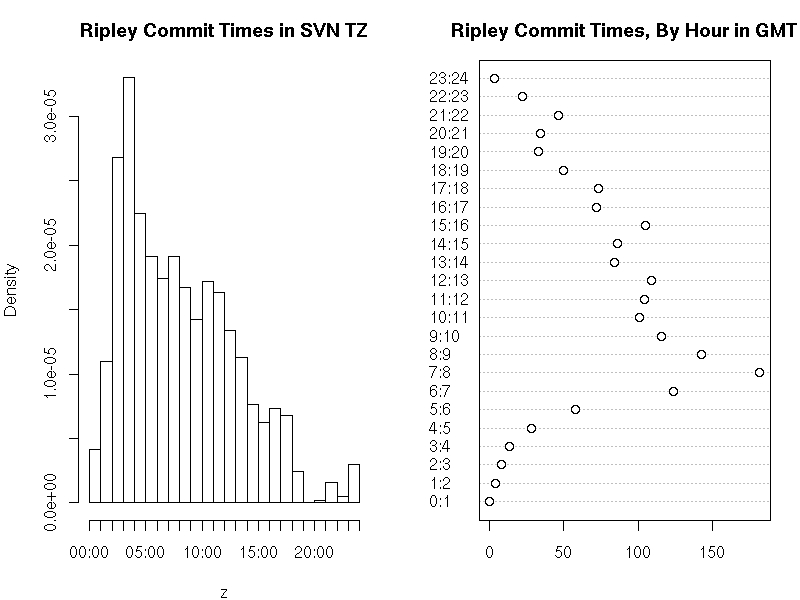
In five lines (that could be shortened to three at the expense of some readibility), the SVN log for R is downloaded directly from the website, the revision authors are extraced and then tabulated by submitter. The relative percentage of Brian Ripley is found to be a staggering 74.8% -- or about three times as much as the other fifteen committers combined. Smokes. [ Oh, and for those who don't know him, he's also got a day job which presumably entails looking after his graduate students at Oxford. Who knows, he may even teach. Kidding aside, he's actually one of the nicest persons you'll ever meet in real life. ] Now yesterday, Simon Jackman who had at first simply repeated Ben's analysis on his own blog followed up with a nice analysis (albeit typeset in a way that rendered the code inoperational, which has now been fixes) that creates both a histogram and a dotplot of commits per hour of the day. Omitting Ben's code which Simon reuses, we have the following for histogram and dotchart:
tod <- unlist(sapply(rx,function(x)strsplit(x,split=" ")[[1]][6]))
tod <- tod[who=="ripley"]
tz <- sub(pattern=".*(-[0-9] 4 ).*",replacement="\\1",x=rx)
tz <- tz[who=="ripley"]
tz <- as.numeric(tz)/100
offset <- 3600*tz
z <- strptime(tod,format="%H:%M:%S")
hist(z,"hours",main="Ripley Commit Times in SVN TZ")
h <- z - offset
h <- format(h,format="%H")
h <- factor(as.numeric(h), levels=0:23)
dotchart(table(h), main="Ripley Commit Times, By Hour in GMT",
         labels=paste(0:23,1:24,sep=":"))
This extracts the commit times, subsets to the ones by Prof. Ripley, extracts the timezones component (as strptime seemingly doesn't do that which is a pain), extracts the tz-less time via strptime into a variable 'z' for which the histogram is drawn. He then corrects the times by the tz offset expressed in seconds, formats is as hour of the day and turns it into a 'factor' (an R data type for qualitative variables which may be ordered as is the case here) and draws a dotplot. This results in the following chart: Simon Jackman's per-hour charts of Brian Ripley's commit patterns Now, nobody has looked at the time series. So we correct this and add the following:
## rather extract both  date and time
dat <- unlist(sapply(rx, function(x)  
  txt <- strsplit(x,split=" ")[[1]]
  paste(txt[5], txt[6])
 ))
## subset on Prof Ripley
dat <- dat[who == "ripley"]
## and convert to POSIXct, correcting by tz as well
datpt <- as.POSIXct(strptime(dat,format="%Y-%m-%d %H:%M:%S")) - offset
## turn into zoo -- we use a constant series of ones as each
## committ is taken as a timestamped event
datzoo <- zoo(1, order.by=datpt)
## and use zoo to aggregate into commits per date
daily <- aggregate(datzoo, as.Date(index(datzoo)), sum)
## now plot as grey bars
plot(daily, col='darkgrey', type='h', lwd=2,
     ylab="Nb of SVN commits, three-week median",
     xlab="R release dates 2.5.0 and 2.5.1 shown in orange",
     main="The amazing Prof. Ripley")
## mark the two R releases of 2007
abline(v=c(as.Date("2007-04-24"),as.Date("2007-06-28")),col='orange',lwd=1.5)
## and do a quick centered rolling median
lines(rollmedian(daily, 21, align="center"), lwd=3)
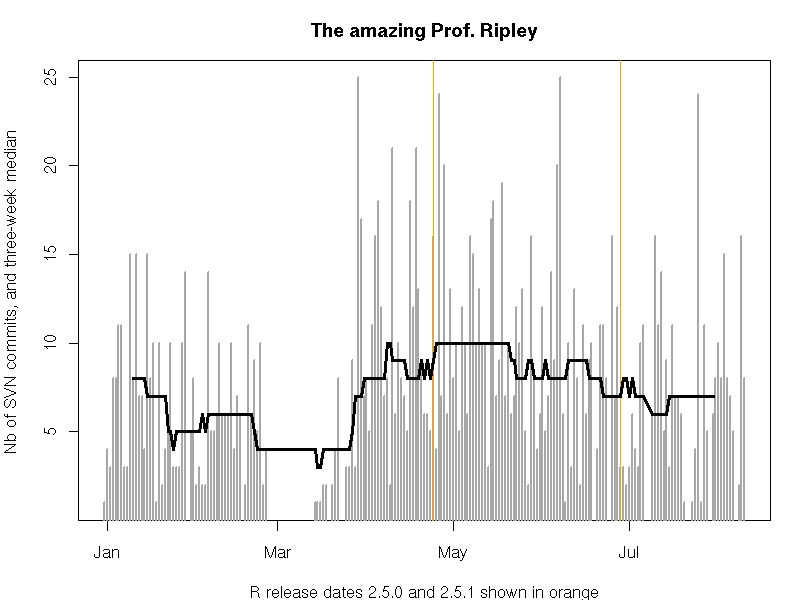
This extracts both date and time, creates a proper R time object (a so-called POSIXct type) from it, fills a zoo ('the' magic class for time series) object with it, uses zoo to aggregate commits per day and plots those in a barchart-alike (I know, I know, ...) plot to which we add the two releases as well as a rolling and centered three-week median (as a real quick hack rather than a proper smooth). Timeseries of Brian Ripley's commit patterns This shows that Prof Ripley averaged about ten commits a day before and after the release of R 2.5.0, and that he has slowed down ever so slightly since then to end up at around a mere seven commits a day. Every day. For the seven-plus months we looked at. So, anyone for analysing his r-help posting frequencies ?

Joey Hess: ikiwiki and spam

One of the reasons I was relictant to write a wiki before starting work on ikiwiki was the wiki/blog spam problem. Now that ikiwiki is reasonably mature, it's interesting to look back at how that turned out. The basic spam prevention mechanism in ikiwiki is the same as the one many wikis use: By default, it requires registration before you can edit a page. This is a pretty small stumbling block for spammers, especially since ikiwiki doesn't bother with email verification. It even prefills the login form with your username and password after you register. It would take about 5 lines of perl to defeat its registration process. Suprisingly, only one spammer has spammed any of my wikis. To defeat that spammer, I added the most common second layer defense against spam: A blacklist. Again I implemented the bare minimum, a way to blacklist a given user and ask them to "go away". Nothing to blacklist IPs, nothing more complex. That was put in place last October and I've had no problems with spam since. Around the same time, I made a change that I feared might open up a whole new class of spam, when I added openid support to ikiwiki. As far as I know, noone with an openid has tried to spam an ikiwiki wiki yet. Ikiwiki did grow one other common spam prevention tool. Josh Triplett added support for a user account creation password, so you have to know the password to get an account at all. This isn't used by default though. The only other possibly anyi-spam measure is that ikiwiki does allow locking down pages so only an admin can edit them, or so they can only be edited via commits to a revision control system. I use these methods for personal stuff like my blog, and might have cut down on the incentive to spam. Spamming a discussion page is just not as interesting as adding spam direct to my blog's rss feed. It seems likely that any new wiki system will have less spam at the beginning, especially if the spammers have to write code to bypass its registration system. That one spammer spparently did so fairly early is suprising. That no others have tried since is also suprising. My ease at blocking the spammer by simply banning them suggests that they were going after the easiest possible targets, and that it's not yet worth their while to work around even the simplest countermeasures. But if so, why did they add support for an entirely new registration system? My guess is that their existing code happened to work with ikiwiki's registration system. (This would take probably 20 lines of perl. ;-) Of course, there's all kinds of counterspam measures that I could implement if needed. By the way, if you use ikiwiki and have had problems with spam, I'm of course interested in fixing that. It'll be interesting to see when additional measures turn out to be needed, as the wiki and sites using it become better known.

11 August 2007

Russell Coker: Is Hand-writing Necessary?

The Washington Post has an article about handwriting, apparently for some university entrance exams in the US 85% of students write their essays in block letters. The article claims that students who have poor writing skills demonstrate lesser ability to construct sentences - and claims that this indicates that there is a link between hand-writing and mental processes. While the article didn’t cover the evidence in much detail I was left wondering whether there were any tests of teaching students to touch type and then assessing them on the same tests. I suspect that increasing the ability to record text in any way would increase the sentence length and the use of long words. While students who can only write slowly will have an incentive to write more briefly. My handwriting is quite poor, I was never able to write quickly or particularly legibly and since completing university I have had little incentive to improve my writing skills. When laptops became cheap enough for me to own one (in 1998) my hand-writing skills decreased and when I started seriously using a PDA about a year ago they decreased again. I don’t believe that my writing skills (in terms of conveying ideas and instruction to other people) have declined during this time. In fact the steadily increasing amount of writing that I have done has improved my skills a lot. I think that children should be taught cursive writing, but it shouldn’t be regarded as especially important - or more important than touch typing! Then there’s the issue of the Dvorak keyboard. If the government wanted to improve the efficiency of the nation (which is what they claim to be doing) then maybe teaching all students touch-typing on a Dvorak keyboard and subsidising the purchase of such keyboards for everyone would be better than some of the current ideas in education. Dvorak keyboards would certainly be better than flag-poles! News reports indicate that hand-writing skills are decreasing dramatically in Japan due to word-processors - and a significant number of students are never learning how to write any significant portion of the Japanese letters. But the sky doesn’t seem to be falling on them either. Mark Greenaway writes about having bad hand-writing and is apparently considering some sort of remedial course. I have to wonder how good Mark’s touch-typing skills are and whether he would benefit more from improvement in that area.

Next.

Previous.