Vincent Bernat: DDoS detection and remediation with Akvorado and Flowspec
Akvorado collects sFlow and IPFIX flows, stores them in a
ClickHouse database, and presents them in a web console. Although it lacks
built-in DDoS detection, it s possible to create one by crafting custom
ClickHouse queries.
DDoS detection
Let s assume we want to detect DDoS targeting our customers. As an example, we
consider a DDoS attack as a collection of flows over one minute targeting a
single customer IP address, from a single source port and matching one
of these conditions:
DDoS detection
Let s assume we want to detect DDoS targeting our customers. As an example, we
consider a DDoS attack as a collection of flows over one minute targeting a
single customer IP address, from a single source port and matching one
of these conditions:
- an average bandwidth of 1 Gbps,
- an average bandwidth of 200 Mbps when the protocol is UDP,
- more than 20 source IP addresses and an average bandwidth of 100 Mbps, or
- more than 10 source countries and an average bandwidth of 100 Mbps.
Here is the SQL query to detect such attacks over the last 5 minutes:
SELECT *
FROM (
  SELECT
    toStartOfMinute(TimeReceived) AS TimeReceived,
    DstAddr,
    SrcPort,
    dictGetOrDefault('protocols', 'name', Proto, '???') AS Proto,
    SUM(((((Bytes * SamplingRate) * 8) / 1000) / 1000) / 1000) / 60 AS Gbps,
    uniq(SrcAddr) AS sources,
    uniq(SrcCountry) AS countries
  FROM flows
  WHERE TimeReceived > now() - INTERVAL 5 MINUTE
    AND DstNetRole = 'customers'
  GROUP BY
    TimeReceived,
    DstAddr,
    SrcPort,
    Proto
)
WHERE (Gbps > 1)
   OR ((Proto = 'UDP') AND (Gbps > 0.2))
   OR ((sources > 20) AND (Gbps > 0.1))
   OR ((countries > 10) AND (Gbps > 0.1))
ORDER BY
  TimeReceived DESC,
  Gbps DESC
Here is an example output1 where two of our users are under attack. One
from what looks like an NTP amplification attack, the other from a DNS
amplification attack:
TimeReceived
DstAddr
SrcPort
Proto
Gbps
sources
countries
2023-02-26 17:44:00
::ffff:203.0.113.206123
UDP
0.102
109
13
2023-02-26 17:43:00
::ffff:203.0.113.206123
UDP
0.130
133
17
2023-02-26 17:43:00
::ffff:203.0.113.6853
UDP
0.129
364
63
2023-02-26 17:43:00
::ffff:203.0.113.206123
UDP
0.113
129
21
2023-02-26 17:42:00
::ffff:203.0.113.206123
UDP
0.139
50
14
2023-02-26 17:42:00
::ffff:203.0.113.206123
UDP
0.105
42
14
2023-02-26 17:40:00
::ffff:203.0.113.6853
UDP
0.121
340
65
DDoS remediation
Once detected, there are at least two ways to stop the attack at the network
level:
- blackhole the traffic to the targeted user (RTBH), or
- selectively drop packets matching the attack patterns (Flowspec).
Traffic blackhole
The easiest method is to sacrifice the attacked user. While this helps the
attacker, this protects your network. It is a method supported by all routers.
You can also offload this protection to many transit providers. This is useful
if the attack volume exceeds your internet capacity.
This works by advertising with BGP a route to the attacked user with a specific
community. The border router modifies the next hop address of these routes to a
specific IP address configured to forward the traffic to a null interface. RFC 7999 defines 65535:666 for this purpose. This is known as a
remote-triggered blackhole (RTBH) and is explained in more detail in RFC 3882.
It is also possible to blackhole the source of the attacks by leveraging
unicast Reverse Path Forwarding (uRPF) from RFC 3704, as explained in RFC 5635. However, uRPF can be a serious tax on your router resources. See
NCS5500 uRPF: Configuration and Impact on Scale for an example of the kind
of restrictions you have to expect when enabling uRPF.
On the advertising side, we can use BIRD. Here is a complete configuration
file to allow any router to collect them:
log stderr all;
router id 192.0.2.1;
protocol device
  scan time 10;

protocol bgp exporter
  ipv4
    import none;
    export where proto = "blackhole4";
   ;
  ipv6
    import none;
    export where proto = "blackhole6";
   ;
  local as 64666;
  neighbor range 192.0.2.0/24 external;
  multihop;
  dynamic name "exporter";
  dynamic name digits 2;
  graceful restart yes;
  graceful restart time 0;
  long lived graceful restart yes;
  long lived stale time 3600;  # keep routes for 1 hour!

protocol static blackhole4
  ipv4;
  route 203.0.113.206/32 blackhole
    bgp_community.add((65535, 666));
   ;
  route 203.0.113.68/32 blackhole
    bgp_community.add((65535, 666));
   ;

protocol static blackhole6
  ipv6;
We use BGP long-lived graceful restart to ensure routes are kept for
one hour, even if the BGP connection goes down, notably during maintenance.
On the receiver side, if you have a Cisco router running IOS XR, you can use the
following configuration to blackhole traffic received on the BGP session. As the
BGP session is dedicated to this usage, The community is not used, but you can
also forward these routes to your transit providers.
router static
 vrf public
  address-family ipv4 unicast
   192.0.2.1/32 Null0 description "BGP blackhole"
  !
  address-family ipv6 unicast
   2001:db8::1/128 Null0 description "BGP blackhole"
  !
 !
!
route-policy blackhole_ipv4_in_public
  if destination in (0.0.0.0/0 le 31) then
    drop
  endif
  set next-hop 192.0.2.1
  done
end-policy
!
route-policy blackhole_ipv6_in_public
  if destination in (::/0 le 127) then
    drop
  endif
  set next-hop 2001:db8::1
  done
end-policy
!
router bgp 12322
 neighbor-group BLACKHOLE_IPV4_PUBLIC
  remote-as 64666
  ebgp-multihop 255
  update-source Loopback10
  address-family ipv4 unicast
   maximum-prefix 100 90
   route-policy blackhole_ipv4_in_public in
   route-policy drop out
   long-lived-graceful-restart stale-time send 86400 accept 86400
  !
  address-family ipv6 unicast
   maximum-prefix 100 90
   route-policy blackhole_ipv6_in_public in
   route-policy drop out
   long-lived-graceful-restart stale-time send 86400 accept 86400
  !
 !
 vrf public
  neighbor 192.0.2.1
   use neighbor-group BLACKHOLE_IPV4_PUBLIC
   description akvorado-1
When the traffic is blackholed, it is still reported by IPFIX and sFlow.
In Akvorado, use ForwardingStatus >= 128 as a filter.
While this method is compatible with all routers, it makes the attack successful
as the target is completely unreachable. If your router supports it, Flowspec
can selectively filter flows to stop the attack without impacting the
customer.
Flowspec
Flowspec is defined in RFC 8955 and enables the transmission of flow
specifications in BGP sessions. A flow specification is a set of matching
criteria to apply to IP traffic. These criteria include the source and
destination prefix, the IP protocol, the source and destination port, and the
packet length. Each flow specification is associated with an action, encoded as an
extended community: traffic shaping, traffic marking, or redirection.
To announce flow specifications with BIRD, we extend our configuration. The
extended community used shapes the matching traffic to 0 bytes per second.
flow4 table flowtab4;
flow6 table flowtab6;
protocol bgp exporter
  flow4
    import none;
    export where proto = "flowspec4";
   ;
  flow6
    import none;
    export where proto = "flowspec6";
   ;
  # [ ]

protocol static flowspec4
  flow4;
  route flow4
    dst 203.0.113.68/32;
    sport = 53;
    length >= 1476 && <= 1500;
    proto = 17;

    bgp_ext_community.add((generic, 0x80060000, 0x00000000));
   ;
  route flow4
    dst 203.0.113.206/32;
    sport = 123;
    length = 468;
    proto = 17;

    bgp_ext_community.add((generic, 0x80060000, 0x00000000));
   ;

protocol static flowspec6
  flow6;
If you have a Cisco router running IOS XR, the configuration may look like
this:
vrf public
 address-family ipv4 flowspec
 address-family ipv6 flowspec
!
router bgp 12322
 address-family vpnv4 flowspec
 address-family vpnv6 flowspec
 neighbor-group FLOWSPEC_IPV4_PUBLIC
  remote-as 64666
  ebgp-multihop 255
  update-source Loopback10
  address-family ipv4 flowspec
   long-lived-graceful-restart stale-time send 86400 accept 86400
   route-policy accept in
   route-policy drop out
   maximum-prefix 100 90
   validation disable
  !
  address-family ipv6 flowspec
   long-lived-graceful-restart stale-time send 86400 accept 86400
   route-policy accept in
   route-policy drop out
   maximum-prefix 100 90
   validation disable
  !
 !
 vrf public
  address-family ipv4 flowspec
  address-family ipv6 flowspec
  neighbor 192.0.2.1
   use neighbor-group FLOWSPEC_IPV4_PUBLIC
   description akvorado-1
Then, you need to enable Flowspec on all interfaces with:
flowspec
 vrf public
  address-family ipv4
   local-install interface-all
  !
  address-family ipv6
   local-install interface-all
  !
 !
!
As with the RTBH setup, you can filter dropped flows with ForwardingStatus >=
128.
DDoS detection (continued)
In the example using Flowspec, the flows were also filtered on the length of the packet:
route flow4
dst 203.0.113.68/32;
sport = 53;
length >= 1476 && <= 1500;
proto = 17;
bgp_ext_community.add((generic, 0x80060000, 0x00000000));
;
This is an important addition: legitimate DNS requests are smaller than this and
therefore not filtered.2 With ClickHouse, you can get the 10th
and 90th percentiles of the packet sizes with quantiles(0.1,
0.9)(Bytes/Packets).
The last issue we need to tackle is how to optimize the request: it may need
several seconds to collect the data and it is likely to consume substantial
resources from your ClickHouse database. One solution is to create a
materialized view to pre-aggregate results:
CREATE TABLE ddos_logs (
TimeReceived DateTime,
DstAddr IPv6,
Proto UInt32,
SrcPort UInt16,
Gbps SimpleAggregateFunction(sum, Float64),
Mpps SimpleAggregateFunction(sum, Float64),
sources AggregateFunction(uniqCombined(12), IPv6),
countries AggregateFunction(uniqCombined(12), FixedString(2)),
size AggregateFunction(quantiles(0.1, 0.9), UInt64)
) ENGINE = SummingMergeTree
PARTITION BY toStartOfHour(TimeReceived)
ORDER BY (TimeReceived, DstAddr, Proto, SrcPort)
TTL toStartOfHour(TimeReceived) + INTERVAL 6 HOUR DELETE ;
CREATE MATERIALIZED VIEW ddos_logs_view TO ddos_logs AS
SELECT
toStartOfMinute(TimeReceived) AS TimeReceived,
DstAddr,
Proto,
SrcPort,
sum(((((Bytes * SamplingRate) * 8) / 1000) / 1000) / 1000) / 60 AS Gbps,
sum(((Packets * SamplingRate) / 1000) / 1000) / 60 AS Mpps,
uniqCombinedState(12)(SrcAddr) AS sources,
uniqCombinedState(12)(SrcCountry) AS countries,
quantilesState(0.1, 0.9)(toUInt64(Bytes/Packets)) AS size
FROM flows
WHERE DstNetRole = 'customers'
GROUP BY
TimeReceived,
DstAddr,
Proto,
SrcPort
The ddos_logs table is using the SummingMergeTree engine. When the table
receives new data, ClickHouse replaces all the rows with the same sorting key,
as defined by the ORDER BY directive, with one row which contains summarized
values using either the sum() function or the explicitly specified aggregate
function (uniqCombined and quantiles in our example).3
Finally, we can modify our initial query with the following one:
SELECT *
FROM (
SELECT
TimeReceived,
DstAddr,
dictGetOrDefault('protocols', 'name', Proto, '???') AS Proto,
SrcPort,
sum(Gbps) AS Gbps,
sum(Mpps) AS Mpps,
uniqCombinedMerge(12)(sources) AS sources,
uniqCombinedMerge(12)(countries) AS countries,
quantilesMerge(0.1, 0.9)(size) AS size
FROM ddos_logs
WHERE TimeReceived > now() - INTERVAL 60 MINUTE
GROUP BY
TimeReceived,
DstAddr,
Proto,
SrcPort
)
WHERE (Gbps > 1)
OR ((Proto = 'UDP') AND (Gbps > 0.2))
OR ((sources > 20) AND (Gbps > 0.1))
OR ((countries > 10) AND (Gbps > 0.1))
ORDER BY
TimeReceived DESC,
Gbps DESC
Gluing everything together
To sum up, building an anti-DDoS system requires to following these steps:
- define a set of criteria to detect a DDoS attack,
- translate these criteria into SQL requests,
- pre-aggregate flows into
SummingMergeTree tables,
- query and transform the results to a BIRD configuration file, and
- configure your routers to pull the routes from BIRD.
A Python script like the following one can handle the fourth step. For each
attacked target, it generates both a Flowspec rule and a blackhole route.
import socket
import types
from clickhouse_driver import Client as CHClient
# Put your SQL query here!
SQL_QUERY = " "
# How many anti-DDoS rules we want at the same time?
MAX_DDOS_RULES = 20
def empty_ruleset():
ruleset = types.SimpleNamespace()
ruleset.flowspec = types.SimpleNamespace()
ruleset.blackhole = types.SimpleNamespace()
ruleset.flowspec.v4 = []
ruleset.flowspec.v6 = []
ruleset.blackhole.v4 = []
ruleset.blackhole.v6 = []
return ruleset
current_ruleset = empty_ruleset()
client = CHClient(host="clickhouse.akvorado.net")
while True:
results = client.execute(SQL_QUERY)
seen =
new_ruleset = empty_ruleset()
for (t, addr, proto, port, gbps, mpps, sources, countries, size) in results:
if (addr, proto, port) in seen:
continue
seen[(addr, proto, port)] = True
# Flowspec
if addr.ipv4_mapped:
address = addr.ipv4_mapped
rules = new_ruleset.flowspec.v4
table = "flow4"
mask = 32
nh = "proto"
else:
address = addr
rules = new_ruleset.flowspec.v6
table = "flow6"
mask = 128
nh = "next header"
if size[0] == size[1]:
length = f"length = int(size[0]) "
else:
length = f"length >= int(size[0]) && <= int(size[1]) "
header = f"""
# Time: t
# Source: address , protocol: proto , port: port
# Gbps/Mpps: gbps:.3 / mpps:.3 , packet size: int(size[0]) <=X<= int(size[1])
# Flows: flows , sources: sources , countries: countries
"""
rules.append(
f""" header
route table
dst address / mask ;
sport = port ;
length ;
nh = socket.getprotobyname(proto) ;
bgp_ext_community.add((generic, 0x80060000, 0x00000000));
;
"""
)
# Blackhole
if addr.ipv4_mapped:
rules = new_ruleset.blackhole.v4
else:
rules = new_ruleset.blackhole.v6
rules.append(
f""" header
route address / mask blackhole
bgp_community.add((65535, 666));
;
"""
)
new_ruleset.flowspec.v4 = list(
set(new_ruleset.flowspec.v4[:MAX_DDOS_RULES])
)
new_ruleset.flowspec.v6 = list(
set(new_ruleset.flowspec.v6[:MAX_DDOS_RULES])
)
# TODO: advertise changes by mail, chat, ...
current_ruleset = new_ruleset
changes = False
for rules, path in (
(current_ruleset.flowspec.v4, "v4-flowspec"),
(current_ruleset.flowspec.v6, "v6-flowspec"),
(current_ruleset.blackhole.v4, "v4-blackhole"),
(current_ruleset.blackhole.v6, "v6-blackhole"),
):
path = os.path.join("/etc/bird/", f" path .conf")
with open(f" path .tmp", "w") as f:
for r in rules:
f.write(r)
changes = (
changes or not os.path.exists(path) or not samefile(path, f" path .tmp")
)
os.rename(f" path .tmp", path)
if not changes:
continue
proc = subprocess.Popen(
["birdc", "configure"],
stdin=subprocess.DEVNULL,
stdout=subprocess.PIPE,
stderr=subprocess.PIPE,
)
stdout, stderr = proc.communicate(None)
stdout = stdout.decode("utf-8", "replace")
stderr = stderr.decode("utf-8", "replace")
if proc.returncode != 0:
logger.error(
" error:\n \n ".format(
"birdc reconfigure",
"\n".join(
[" O: ".format(line) for line in stdout.rstrip().split("\n")]
),
"\n".join(
[" E: ".format(line) for line in stderr.rstrip().split("\n")]
),
)
)
Until Akvorado integrates DDoS detection and mitigation, the ideas presented
in this blog post provide a solid foundation to get started with your own
anti-DDoS system.
-
ClickHouse can export results using Markdown format when
appending
FORMAT Markdown to the query.
-
While most DNS clients should retry with TCP on failures, this is not
always the case: until recently, musl libc did not implement this.
-
The materialized view also aggregates the data at hand, both
for efficiency and to ensure we work with the right data types.
SELECT * FROM ( SELECT toStartOfMinute(TimeReceived) AS TimeReceived, DstAddr, SrcPort, dictGetOrDefault('protocols', 'name', Proto, '???') AS Proto, SUM(((((Bytes * SamplingRate) * 8) / 1000) / 1000) / 1000) / 60 AS Gbps, uniq(SrcAddr) AS sources, uniq(SrcCountry) AS countries FROM flows WHERE TimeReceived > now() - INTERVAL 5 MINUTE AND DstNetRole = 'customers' GROUP BY TimeReceived, DstAddr, SrcPort, Proto ) WHERE (Gbps > 1) OR ((Proto = 'UDP') AND (Gbps > 0.2)) OR ((sources > 20) AND (Gbps > 0.1)) OR ((countries > 10) AND (Gbps > 0.1)) ORDER BY TimeReceived DESC, Gbps DESC
| TimeReceived | DstAddr | SrcPort | Proto | Gbps | sources | countries |
|---|---|---|---|---|---|---|
| 2023-02-26 17:44:00 | ::ffff:203.0.113.206 |
123 | UDP | 0.102 | 109 | 13 |
| 2023-02-26 17:43:00 | ::ffff:203.0.113.206 |
123 | UDP | 0.130 | 133 | 17 |
| 2023-02-26 17:43:00 | ::ffff:203.0.113.68 |
53 | UDP | 0.129 | 364 | 63 |
| 2023-02-26 17:43:00 | ::ffff:203.0.113.206 |
123 | UDP | 0.113 | 129 | 21 |
| 2023-02-26 17:42:00 | ::ffff:203.0.113.206 |
123 | UDP | 0.139 | 50 | 14 |
| 2023-02-26 17:42:00 | ::ffff:203.0.113.206 |
123 | UDP | 0.105 | 42 | 14 |
| 2023-02-26 17:40:00 | ::ffff:203.0.113.68 |
53 | UDP | 0.121 | 340 | 65 |
- blackhole the traffic to the targeted user (RTBH), or
- selectively drop packets matching the attack patterns (Flowspec).
Traffic blackhole
The easiest method is to sacrifice the attacked user. While this helps the
attacker, this protects your network. It is a method supported by all routers.
You can also offload this protection to many transit providers. This is useful
if the attack volume exceeds your internet capacity.
This works by advertising with BGP a route to the attacked user with a specific
community. The border router modifies the next hop address of these routes to a
specific IP address configured to forward the traffic to a null interface. RFC 7999 defines 65535:666 for this purpose. This is known as a
remote-triggered blackhole (RTBH) and is explained in more detail in RFC 3882.
It is also possible to blackhole the source of the attacks by leveraging
unicast Reverse Path Forwarding (uRPF) from RFC 3704, as explained in RFC 5635. However, uRPF can be a serious tax on your router resources. See
NCS5500 uRPF: Configuration and Impact on Scale for an example of the kind
of restrictions you have to expect when enabling uRPF.
On the advertising side, we can use BIRD. Here is a complete configuration
file to allow any router to collect them:
log stderr all;
router id 192.0.2.1;
protocol device
scan time 10;
protocol bgp exporter
ipv4
import none;
export where proto = "blackhole4";
;
ipv6
import none;
export where proto = "blackhole6";
;
local as 64666;
neighbor range 192.0.2.0/24 external;
multihop;
dynamic name "exporter";
dynamic name digits 2;
graceful restart yes;
graceful restart time 0;
long lived graceful restart yes;
long lived stale time 3600; # keep routes for 1 hour!
protocol static blackhole4
ipv4;
route 203.0.113.206/32 blackhole
bgp_community.add((65535, 666));
;
route 203.0.113.68/32 blackhole
bgp_community.add((65535, 666));
;
protocol static blackhole6
ipv6;
We use BGP long-lived graceful restart to ensure routes are kept for
one hour, even if the BGP connection goes down, notably during maintenance.
On the receiver side, if you have a Cisco router running IOS XR, you can use the
following configuration to blackhole traffic received on the BGP session. As the
BGP session is dedicated to this usage, The community is not used, but you can
also forward these routes to your transit providers.
router static
vrf public
address-family ipv4 unicast
192.0.2.1/32 Null0 description "BGP blackhole"
!
address-family ipv6 unicast
2001:db8::1/128 Null0 description "BGP blackhole"
!
!
!
route-policy blackhole_ipv4_in_public
if destination in (0.0.0.0/0 le 31) then
drop
endif
set next-hop 192.0.2.1
done
end-policy
!
route-policy blackhole_ipv6_in_public
if destination in (::/0 le 127) then
drop
endif
set next-hop 2001:db8::1
done
end-policy
!
router bgp 12322
neighbor-group BLACKHOLE_IPV4_PUBLIC
remote-as 64666
ebgp-multihop 255
update-source Loopback10
address-family ipv4 unicast
maximum-prefix 100 90
route-policy blackhole_ipv4_in_public in
route-policy drop out
long-lived-graceful-restart stale-time send 86400 accept 86400
!
address-family ipv6 unicast
maximum-prefix 100 90
route-policy blackhole_ipv6_in_public in
route-policy drop out
long-lived-graceful-restart stale-time send 86400 accept 86400
!
!
vrf public
neighbor 192.0.2.1
use neighbor-group BLACKHOLE_IPV4_PUBLIC
description akvorado-1
When the traffic is blackholed, it is still reported by IPFIX and sFlow.
In Akvorado, use ForwardingStatus >= 128 as a filter.
While this method is compatible with all routers, it makes the attack successful
as the target is completely unreachable. If your router supports it, Flowspec
can selectively filter flows to stop the attack without impacting the
customer.
Flowspec
Flowspec is defined in RFC 8955 and enables the transmission of flow
specifications in BGP sessions. A flow specification is a set of matching
criteria to apply to IP traffic. These criteria include the source and
destination prefix, the IP protocol, the source and destination port, and the
packet length. Each flow specification is associated with an action, encoded as an
extended community: traffic shaping, traffic marking, or redirection.
To announce flow specifications with BIRD, we extend our configuration. The
extended community used shapes the matching traffic to 0 bytes per second.
flow4 table flowtab4;
flow6 table flowtab6;
protocol bgp exporter
flow4
import none;
export where proto = "flowspec4";
;
flow6
import none;
export where proto = "flowspec6";
;
# [ ]
protocol static flowspec4
flow4;
route flow4
dst 203.0.113.68/32;
sport = 53;
length >= 1476 && <= 1500;
proto = 17;
bgp_ext_community.add((generic, 0x80060000, 0x00000000));
;
route flow4
dst 203.0.113.206/32;
sport = 123;
length = 468;
proto = 17;
bgp_ext_community.add((generic, 0x80060000, 0x00000000));
;
protocol static flowspec6
flow6;
If you have a Cisco router running IOS XR, the configuration may look like
this:
vrf public
address-family ipv4 flowspec
address-family ipv6 flowspec
!
router bgp 12322
address-family vpnv4 flowspec
address-family vpnv6 flowspec
neighbor-group FLOWSPEC_IPV4_PUBLIC
remote-as 64666
ebgp-multihop 255
update-source Loopback10
address-family ipv4 flowspec
long-lived-graceful-restart stale-time send 86400 accept 86400
route-policy accept in
route-policy drop out
maximum-prefix 100 90
validation disable
!
address-family ipv6 flowspec
long-lived-graceful-restart stale-time send 86400 accept 86400
route-policy accept in
route-policy drop out
maximum-prefix 100 90
validation disable
!
!
vrf public
address-family ipv4 flowspec
address-family ipv6 flowspec
neighbor 192.0.2.1
use neighbor-group FLOWSPEC_IPV4_PUBLIC
description akvorado-1
Then, you need to enable Flowspec on all interfaces with:
flowspec
vrf public
address-family ipv4
local-install interface-all
!
address-family ipv6
local-install interface-all
!
!
!
As with the RTBH setup, you can filter dropped flows with ForwardingStatus >=
128.
DDoS detection (continued)
In the example using Flowspec, the flows were also filtered on the length of the packet:
route flow4
dst 203.0.113.68/32;
sport = 53;
length >= 1476 && <= 1500;
proto = 17;
bgp_ext_community.add((generic, 0x80060000, 0x00000000));
;
This is an important addition: legitimate DNS requests are smaller than this and
therefore not filtered.2 With ClickHouse, you can get the 10th
and 90th percentiles of the packet sizes with quantiles(0.1,
0.9)(Bytes/Packets).
The last issue we need to tackle is how to optimize the request: it may need
several seconds to collect the data and it is likely to consume substantial
resources from your ClickHouse database. One solution is to create a
materialized view to pre-aggregate results:
CREATE TABLE ddos_logs (
TimeReceived DateTime,
DstAddr IPv6,
Proto UInt32,
SrcPort UInt16,
Gbps SimpleAggregateFunction(sum, Float64),
Mpps SimpleAggregateFunction(sum, Float64),
sources AggregateFunction(uniqCombined(12), IPv6),
countries AggregateFunction(uniqCombined(12), FixedString(2)),
size AggregateFunction(quantiles(0.1, 0.9), UInt64)
) ENGINE = SummingMergeTree
PARTITION BY toStartOfHour(TimeReceived)
ORDER BY (TimeReceived, DstAddr, Proto, SrcPort)
TTL toStartOfHour(TimeReceived) + INTERVAL 6 HOUR DELETE ;
CREATE MATERIALIZED VIEW ddos_logs_view TO ddos_logs AS
SELECT
toStartOfMinute(TimeReceived) AS TimeReceived,
DstAddr,
Proto,
SrcPort,
sum(((((Bytes * SamplingRate) * 8) / 1000) / 1000) / 1000) / 60 AS Gbps,
sum(((Packets * SamplingRate) / 1000) / 1000) / 60 AS Mpps,
uniqCombinedState(12)(SrcAddr) AS sources,
uniqCombinedState(12)(SrcCountry) AS countries,
quantilesState(0.1, 0.9)(toUInt64(Bytes/Packets)) AS size
FROM flows
WHERE DstNetRole = 'customers'
GROUP BY
TimeReceived,
DstAddr,
Proto,
SrcPort
The ddos_logs table is using the SummingMergeTree engine. When the table
receives new data, ClickHouse replaces all the rows with the same sorting key,
as defined by the ORDER BY directive, with one row which contains summarized
values using either the sum() function or the explicitly specified aggregate
function (uniqCombined and quantiles in our example).3
Finally, we can modify our initial query with the following one:
SELECT *
FROM (
SELECT
TimeReceived,
DstAddr,
dictGetOrDefault('protocols', 'name', Proto, '???') AS Proto,
SrcPort,
sum(Gbps) AS Gbps,
sum(Mpps) AS Mpps,
uniqCombinedMerge(12)(sources) AS sources,
uniqCombinedMerge(12)(countries) AS countries,
quantilesMerge(0.1, 0.9)(size) AS size
FROM ddos_logs
WHERE TimeReceived > now() - INTERVAL 60 MINUTE
GROUP BY
TimeReceived,
DstAddr,
Proto,
SrcPort
)
WHERE (Gbps > 1)
OR ((Proto = 'UDP') AND (Gbps > 0.2))
OR ((sources > 20) AND (Gbps > 0.1))
OR ((countries > 10) AND (Gbps > 0.1))
ORDER BY
TimeReceived DESC,
Gbps DESC
Gluing everything together
To sum up, building an anti-DDoS system requires to following these steps:
- define a set of criteria to detect a DDoS attack,
- translate these criteria into SQL requests,
- pre-aggregate flows into
SummingMergeTree tables,
- query and transform the results to a BIRD configuration file, and
- configure your routers to pull the routes from BIRD.
A Python script like the following one can handle the fourth step. For each
attacked target, it generates both a Flowspec rule and a blackhole route.
import socket
import types
from clickhouse_driver import Client as CHClient
# Put your SQL query here!
SQL_QUERY = " "
# How many anti-DDoS rules we want at the same time?
MAX_DDOS_RULES = 20
def empty_ruleset():
ruleset = types.SimpleNamespace()
ruleset.flowspec = types.SimpleNamespace()
ruleset.blackhole = types.SimpleNamespace()
ruleset.flowspec.v4 = []
ruleset.flowspec.v6 = []
ruleset.blackhole.v4 = []
ruleset.blackhole.v6 = []
return ruleset
current_ruleset = empty_ruleset()
client = CHClient(host="clickhouse.akvorado.net")
while True:
results = client.execute(SQL_QUERY)
seen =
new_ruleset = empty_ruleset()
for (t, addr, proto, port, gbps, mpps, sources, countries, size) in results:
if (addr, proto, port) in seen:
continue
seen[(addr, proto, port)] = True
# Flowspec
if addr.ipv4_mapped:
address = addr.ipv4_mapped
rules = new_ruleset.flowspec.v4
table = "flow4"
mask = 32
nh = "proto"
else:
address = addr
rules = new_ruleset.flowspec.v6
table = "flow6"
mask = 128
nh = "next header"
if size[0] == size[1]:
length = f"length = int(size[0]) "
else:
length = f"length >= int(size[0]) && <= int(size[1]) "
header = f"""
# Time: t
# Source: address , protocol: proto , port: port
# Gbps/Mpps: gbps:.3 / mpps:.3 , packet size: int(size[0]) <=X<= int(size[1])
# Flows: flows , sources: sources , countries: countries
"""
rules.append(
f""" header
route table
dst address / mask ;
sport = port ;
length ;
nh = socket.getprotobyname(proto) ;
bgp_ext_community.add((generic, 0x80060000, 0x00000000));
;
"""
)
# Blackhole
if addr.ipv4_mapped:
rules = new_ruleset.blackhole.v4
else:
rules = new_ruleset.blackhole.v6
rules.append(
f""" header
route address / mask blackhole
bgp_community.add((65535, 666));
;
"""
)
new_ruleset.flowspec.v4 = list(
set(new_ruleset.flowspec.v4[:MAX_DDOS_RULES])
)
new_ruleset.flowspec.v6 = list(
set(new_ruleset.flowspec.v6[:MAX_DDOS_RULES])
)
# TODO: advertise changes by mail, chat, ...
current_ruleset = new_ruleset
changes = False
for rules, path in (
(current_ruleset.flowspec.v4, "v4-flowspec"),
(current_ruleset.flowspec.v6, "v6-flowspec"),
(current_ruleset.blackhole.v4, "v4-blackhole"),
(current_ruleset.blackhole.v6, "v6-blackhole"),
):
path = os.path.join("/etc/bird/", f" path .conf")
with open(f" path .tmp", "w") as f:
for r in rules:
f.write(r)
changes = (
changes or not os.path.exists(path) or not samefile(path, f" path .tmp")
)
os.rename(f" path .tmp", path)
if not changes:
continue
proc = subprocess.Popen(
["birdc", "configure"],
stdin=subprocess.DEVNULL,
stdout=subprocess.PIPE,
stderr=subprocess.PIPE,
)
stdout, stderr = proc.communicate(None)
stdout = stdout.decode("utf-8", "replace")
stderr = stderr.decode("utf-8", "replace")
if proc.returncode != 0:
logger.error(
" error:\n \n ".format(
"birdc reconfigure",
"\n".join(
[" O: ".format(line) for line in stdout.rstrip().split("\n")]
),
"\n".join(
[" E: ".format(line) for line in stderr.rstrip().split("\n")]
),
)
)
Until Akvorado integrates DDoS detection and mitigation, the ideas presented
in this blog post provide a solid foundation to get started with your own
anti-DDoS system.
-
ClickHouse can export results using Markdown format when
appending
FORMAT Markdown to the query.
-
While most DNS clients should retry with TCP on failures, this is not
always the case: until recently, musl libc did not implement this.
-
The materialized view also aggregates the data at hand, both
for efficiency and to ensure we work with the right data types.
log stderr all; router id 192.0.2.1; protocol device scan time 10; protocol bgp exporter ipv4 import none; export where proto = "blackhole4"; ; ipv6 import none; export where proto = "blackhole6"; ; local as 64666; neighbor range 192.0.2.0/24 external; multihop; dynamic name "exporter"; dynamic name digits 2; graceful restart yes; graceful restart time 0; long lived graceful restart yes; long lived stale time 3600; # keep routes for 1 hour! protocol static blackhole4 ipv4; route 203.0.113.206/32 blackhole bgp_community.add((65535, 666)); ; route 203.0.113.68/32 blackhole bgp_community.add((65535, 666)); ; protocol static blackhole6 ipv6;
router static vrf public address-family ipv4 unicast 192.0.2.1/32 Null0 description "BGP blackhole" ! address-family ipv6 unicast 2001:db8::1/128 Null0 description "BGP blackhole" ! ! ! route-policy blackhole_ipv4_in_public if destination in (0.0.0.0/0 le 31) then drop endif set next-hop 192.0.2.1 done end-policy ! route-policy blackhole_ipv6_in_public if destination in (::/0 le 127) then drop endif set next-hop 2001:db8::1 done end-policy ! router bgp 12322 neighbor-group BLACKHOLE_IPV4_PUBLIC remote-as 64666 ebgp-multihop 255 update-source Loopback10 address-family ipv4 unicast maximum-prefix 100 90 route-policy blackhole_ipv4_in_public in route-policy drop out long-lived-graceful-restart stale-time send 86400 accept 86400 ! address-family ipv6 unicast maximum-prefix 100 90 route-policy blackhole_ipv6_in_public in route-policy drop out long-lived-graceful-restart stale-time send 86400 accept 86400 ! ! vrf public neighbor 192.0.2.1 use neighbor-group BLACKHOLE_IPV4_PUBLIC description akvorado-1
flow4 table flowtab4; flow6 table flowtab6; protocol bgp exporter flow4 import none; export where proto = "flowspec4"; ; flow6 import none; export where proto = "flowspec6"; ; # [ ] protocol static flowspec4 flow4; route flow4 dst 203.0.113.68/32; sport = 53; length >= 1476 && <= 1500; proto = 17; bgp_ext_community.add((generic, 0x80060000, 0x00000000)); ; route flow4 dst 203.0.113.206/32; sport = 123; length = 468; proto = 17; bgp_ext_community.add((generic, 0x80060000, 0x00000000)); ; protocol static flowspec6 flow6;
vrf public address-family ipv4 flowspec address-family ipv6 flowspec ! router bgp 12322 address-family vpnv4 flowspec address-family vpnv6 flowspec neighbor-group FLOWSPEC_IPV4_PUBLIC remote-as 64666 ebgp-multihop 255 update-source Loopback10 address-family ipv4 flowspec long-lived-graceful-restart stale-time send 86400 accept 86400 route-policy accept in route-policy drop out maximum-prefix 100 90 validation disable ! address-family ipv6 flowspec long-lived-graceful-restart stale-time send 86400 accept 86400 route-policy accept in route-policy drop out maximum-prefix 100 90 validation disable ! ! vrf public address-family ipv4 flowspec address-family ipv6 flowspec neighbor 192.0.2.1 use neighbor-group FLOWSPEC_IPV4_PUBLIC description akvorado-1
flowspec vrf public address-family ipv4 local-install interface-all ! address-family ipv6 local-install interface-all ! ! !
ForwardingStatus >=
128
.
DDoS detection (continued)
In the example using Flowspec, the flows were also filtered on the length of the packet:
route flow4
  dst 203.0.113.68/32;
  sport = 53;
  length >= 1476 && <= 1500;
  proto = 17;

  bgp_ext_community.add((generic, 0x80060000, 0x00000000));
 ;
This is an important addition: legitimate DNS requests are smaller than this and
therefore not filtered.2 With ClickHouse, you can get the 10th
and 90th percentiles of the packet sizes with quantiles(0.1,
0.9)(Bytes/Packets).
The last issue we need to tackle is how to optimize the request: it may need
several seconds to collect the data and it is likely to consume substantial
resources from your ClickHouse database. One solution is to create a
materialized view to pre-aggregate results:
CREATE TABLE ddos_logs (
  TimeReceived DateTime,
  DstAddr IPv6,
  Proto UInt32,
  SrcPort UInt16,
  Gbps SimpleAggregateFunction(sum, Float64),
  Mpps SimpleAggregateFunction(sum, Float64),
  sources AggregateFunction(uniqCombined(12), IPv6),
  countries AggregateFunction(uniqCombined(12), FixedString(2)),
  size AggregateFunction(quantiles(0.1, 0.9), UInt64)
) ENGINE = SummingMergeTree
PARTITION BY toStartOfHour(TimeReceived)
ORDER BY (TimeReceived, DstAddr, Proto, SrcPort)
TTL toStartOfHour(TimeReceived) + INTERVAL 6 HOUR DELETE ;
CREATE MATERIALIZED VIEW ddos_logs_view TO ddos_logs AS
  SELECT
    toStartOfMinute(TimeReceived) AS TimeReceived,
    DstAddr,
    Proto,
    SrcPort,
    sum(((((Bytes * SamplingRate) * 8) / 1000) / 1000) / 1000) / 60 AS Gbps,
    sum(((Packets * SamplingRate) / 1000) / 1000) / 60 AS Mpps,
    uniqCombinedState(12)(SrcAddr) AS sources,
    uniqCombinedState(12)(SrcCountry) AS countries,
    quantilesState(0.1, 0.9)(toUInt64(Bytes/Packets)) AS size
  FROM flows
  WHERE DstNetRole = 'customers'
  GROUP BY
    TimeReceived,
    DstAddr,
    Proto,
    SrcPort
The ddos_logs table is using the SummingMergeTree engine. When the table
receives new data, ClickHouse replaces all the rows with the same sorting key,
as defined by the ORDER BY directive, with one row which contains summarized
values using either the sum() function or the explicitly specified aggregate
function (uniqCombined and quantiles in our example).3
Finally, we can modify our initial query with the following one:
SELECT *
FROM (
  SELECT
    TimeReceived,
    DstAddr,
    dictGetOrDefault('protocols', 'name', Proto, '???') AS Proto,
    SrcPort,
    sum(Gbps) AS Gbps,
    sum(Mpps) AS Mpps,
    uniqCombinedMerge(12)(sources) AS sources,
    uniqCombinedMerge(12)(countries) AS countries,
    quantilesMerge(0.1, 0.9)(size) AS size
  FROM ddos_logs
  WHERE TimeReceived > now() - INTERVAL 60 MINUTE
  GROUP BY
    TimeReceived,
    DstAddr,
    Proto,
    SrcPort
)
WHERE (Gbps > 1)
   OR ((Proto = 'UDP') AND (Gbps > 0.2))
   OR ((sources > 20) AND (Gbps > 0.1))
   OR ((countries > 10) AND (Gbps > 0.1))
ORDER BY
  TimeReceived DESC,
  Gbps DESC
Gluing everything together
To sum up, building an anti-DDoS system requires to following these steps:
- define a set of criteria to detect a DDoS attack,
- translate these criteria into SQL requests,
- pre-aggregate flows into
SummingMergeTree tables,
- query and transform the results to a BIRD configuration file, and
- configure your routers to pull the routes from BIRD.
A Python script like the following one can handle the fourth step. For each
attacked target, it generates both a Flowspec rule and a blackhole route.
import socket
import types
from clickhouse_driver import Client as CHClient
# Put your SQL query here!
SQL_QUERY = " "
# How many anti-DDoS rules we want at the same time?
MAX_DDOS_RULES = 20
def empty_ruleset():
    ruleset = types.SimpleNamespace()
    ruleset.flowspec = types.SimpleNamespace()
    ruleset.blackhole = types.SimpleNamespace()
    ruleset.flowspec.v4 = []
    ruleset.flowspec.v6 = []
    ruleset.blackhole.v4 = []
    ruleset.blackhole.v6 = []
    return ruleset
current_ruleset = empty_ruleset()
client = CHClient(host="clickhouse.akvorado.net")
while True:
    results = client.execute(SQL_QUERY)
    seen =
    new_ruleset = empty_ruleset()
    for (t, addr, proto, port, gbps, mpps, sources, countries, size) in results:
        if (addr, proto, port) in seen:
            continue
        seen[(addr, proto, port)] = True
        # Flowspec
        if addr.ipv4_mapped:
            address = addr.ipv4_mapped
            rules = new_ruleset.flowspec.v4
            table = "flow4"
            mask = 32
            nh = "proto"
        else:
            address = addr
            rules = new_ruleset.flowspec.v6
            table = "flow6"
            mask = 128
            nh = "next header"
        if size[0] == size[1]:
            length = f"length =  int(size[0]) "
        else:
            length = f"length >=  int(size[0])  && <=  int(size[1]) "
        header = f"""
# Time:  t
# Source:  address , protocol:  proto , port:  port
# Gbps/Mpps:  gbps:.3 / mpps:.3 , packet size:  int(size[0]) <=X<= int(size[1])
# Flows:  flows , sources:  sources , countries:  countries
"""
        rules.append(
                f""" header
route  table
  dst  address / mask ;
  sport =  port ;
   length ;
   nh  =  socket.getprotobyname(proto) ;

  bgp_ext_community.add((generic, 0x80060000, 0x00000000));
 ;
"""
        )
        # Blackhole
        if addr.ipv4_mapped:
            rules = new_ruleset.blackhole.v4
        else:
            rules = new_ruleset.blackhole.v6
        rules.append(
            f""" header
route  address / mask  blackhole
  bgp_community.add((65535, 666));
 ;
"""
        )
        new_ruleset.flowspec.v4 = list(
            set(new_ruleset.flowspec.v4[:MAX_DDOS_RULES])
        )
        new_ruleset.flowspec.v6 = list(
            set(new_ruleset.flowspec.v6[:MAX_DDOS_RULES])
        )
        # TODO: advertise changes by mail, chat, ...
        current_ruleset = new_ruleset
        changes = False
        for rules, path in (
            (current_ruleset.flowspec.v4, "v4-flowspec"),
            (current_ruleset.flowspec.v6, "v6-flowspec"),
            (current_ruleset.blackhole.v4, "v4-blackhole"),
            (current_ruleset.blackhole.v6, "v6-blackhole"),
        ):
            path = os.path.join("/etc/bird/", f" path .conf")
            with open(f" path .tmp", "w") as f:
                for r in rules:
                    f.write(r)
            changes = (
                changes or not os.path.exists(path) or not samefile(path, f" path .tmp")
            )
            os.rename(f" path .tmp", path)
        if not changes:
            continue
        proc = subprocess.Popen(
            ["birdc", "configure"],
            stdin=subprocess.DEVNULL,
            stdout=subprocess.PIPE,
            stderr=subprocess.PIPE,
        )
        stdout, stderr = proc.communicate(None)
        stdout = stdout.decode("utf-8", "replace")
        stderr = stderr.decode("utf-8", "replace")
        if proc.returncode != 0:
            logger.error(
                "  error:\n \n ".format(
                    "birdc reconfigure",
                    "\n".join(
                        [" O:  ".format(line) for line in stdout.rstrip().split("\n")]
                    ),
                    "\n".join(
                        [" E:  ".format(line) for line in stderr.rstrip().split("\n")]
                    ),
                )
            )
Until Akvorado integrates DDoS detection and mitigation, the ideas presented
in this blog post provide a solid foundation to get started with your own
anti-DDoS system.
-
ClickHouse can export results using Markdown format when
appending
FORMAT Markdown to the query.
-
While most DNS clients should retry with TCP on failures, this is not
always the case: until recently, musl libc did not implement this.
-
The materialized view also aggregates the data at hand, both
for efficiency and to ensure we work with the right data types.
route flow4 dst 203.0.113.68/32; sport = 53; length >= 1476 && <= 1500; proto = 17; bgp_ext_community.add((generic, 0x80060000, 0x00000000)); ;
CREATE TABLE ddos_logs ( TimeReceived DateTime, DstAddr IPv6, Proto UInt32, SrcPort UInt16, Gbps SimpleAggregateFunction(sum, Float64), Mpps SimpleAggregateFunction(sum, Float64), sources AggregateFunction(uniqCombined(12), IPv6), countries AggregateFunction(uniqCombined(12), FixedString(2)), size AggregateFunction(quantiles(0.1, 0.9), UInt64) ) ENGINE = SummingMergeTree PARTITION BY toStartOfHour(TimeReceived) ORDER BY (TimeReceived, DstAddr, Proto, SrcPort) TTL toStartOfHour(TimeReceived) + INTERVAL 6 HOUR DELETE ; CREATE MATERIALIZED VIEW ddos_logs_view TO ddos_logs AS SELECT toStartOfMinute(TimeReceived) AS TimeReceived, DstAddr, Proto, SrcPort, sum(((((Bytes * SamplingRate) * 8) / 1000) / 1000) / 1000) / 60 AS Gbps, sum(((Packets * SamplingRate) / 1000) / 1000) / 60 AS Mpps, uniqCombinedState(12)(SrcAddr) AS sources, uniqCombinedState(12)(SrcCountry) AS countries, quantilesState(0.1, 0.9)(toUInt64(Bytes/Packets)) AS size FROM flows WHERE DstNetRole = 'customers' GROUP BY TimeReceived, DstAddr, Proto, SrcPort
SELECT * FROM ( SELECT TimeReceived, DstAddr, dictGetOrDefault('protocols', 'name', Proto, '???') AS Proto, SrcPort, sum(Gbps) AS Gbps, sum(Mpps) AS Mpps, uniqCombinedMerge(12)(sources) AS sources, uniqCombinedMerge(12)(countries) AS countries, quantilesMerge(0.1, 0.9)(size) AS size FROM ddos_logs WHERE TimeReceived > now() - INTERVAL 60 MINUTE GROUP BY TimeReceived, DstAddr, Proto, SrcPort ) WHERE (Gbps > 1) OR ((Proto = 'UDP') AND (Gbps > 0.2)) OR ((sources > 20) AND (Gbps > 0.1)) OR ((countries > 10) AND (Gbps > 0.1)) ORDER BY TimeReceived DESC, Gbps DESC
- define a set of criteria to detect a DDoS attack,
- translate these criteria into SQL requests,
- pre-aggregate flows into
SummingMergeTreetables, - query and transform the results to a BIRD configuration file, and
- configure your routers to pull the routes from BIRD.
import socket import types from clickhouse_driver import Client as CHClient # Put your SQL query here! SQL_QUERY = " " # How many anti-DDoS rules we want at the same time? MAX_DDOS_RULES = 20 def empty_ruleset(): ruleset = types.SimpleNamespace() ruleset.flowspec = types.SimpleNamespace() ruleset.blackhole = types.SimpleNamespace() ruleset.flowspec.v4 = [] ruleset.flowspec.v6 = [] ruleset.blackhole.v4 = [] ruleset.blackhole.v6 = [] return ruleset current_ruleset = empty_ruleset() client = CHClient(host="clickhouse.akvorado.net") while True: results = client.execute(SQL_QUERY) seen = new_ruleset = empty_ruleset() for (t, addr, proto, port, gbps, mpps, sources, countries, size) in results: if (addr, proto, port) in seen: continue seen[(addr, proto, port)] = True # Flowspec if addr.ipv4_mapped: address = addr.ipv4_mapped rules = new_ruleset.flowspec.v4 table = "flow4" mask = 32 nh = "proto" else: address = addr rules = new_ruleset.flowspec.v6 table = "flow6" mask = 128 nh = "next header" if size[0] == size[1]: length = f"length = int(size[0]) " else: length = f"length >= int(size[0]) && <= int(size[1]) " header = f""" # Time: t # Source: address , protocol: proto , port: port # Gbps/Mpps: gbps:.3 / mpps:.3 , packet size: int(size[0]) <=X<= int(size[1]) # Flows: flows , sources: sources , countries: countries """ rules.append( f""" header route table dst address / mask ; sport = port ; length ; nh = socket.getprotobyname(proto) ; bgp_ext_community.add((generic, 0x80060000, 0x00000000)); ; """ ) # Blackhole if addr.ipv4_mapped: rules = new_ruleset.blackhole.v4 else: rules = new_ruleset.blackhole.v6 rules.append( f""" header route address / mask blackhole bgp_community.add((65535, 666)); ; """ ) new_ruleset.flowspec.v4 = list( set(new_ruleset.flowspec.v4[:MAX_DDOS_RULES]) ) new_ruleset.flowspec.v6 = list( set(new_ruleset.flowspec.v6[:MAX_DDOS_RULES]) ) # TODO: advertise changes by mail, chat, ... current_ruleset = new_ruleset changes = False for rules, path in ( (current_ruleset.flowspec.v4, "v4-flowspec"), (current_ruleset.flowspec.v6, "v6-flowspec"), (current_ruleset.blackhole.v4, "v4-blackhole"), (current_ruleset.blackhole.v6, "v6-blackhole"), ): path = os.path.join("/etc/bird/", f" path .conf") with open(f" path .tmp", "w") as f: for r in rules: f.write(r) changes = ( changes or not os.path.exists(path) or not samefile(path, f" path .tmp") ) os.rename(f" path .tmp", path) if not changes: continue proc = subprocess.Popen( ["birdc", "configure"], stdin=subprocess.DEVNULL, stdout=subprocess.PIPE, stderr=subprocess.PIPE, ) stdout, stderr = proc.communicate(None) stdout = stdout.decode("utf-8", "replace") stderr = stderr.decode("utf-8", "replace") if proc.returncode != 0: logger.error( " error:\n \n ".format( "birdc reconfigure", "\n".join( [" O: ".format(line) for line in stdout.rstrip().split("\n")] ), "\n".join( [" E: ".format(line) for line in stderr.rstrip().split("\n")] ), ) )
Until Akvorado integrates DDoS detection and mitigation, the ideas presented in this blog post provide a solid foundation to get started with your own anti-DDoS system.
-
ClickHouse can export results using Markdown format when
appending
FORMAT Markdownto the query. - While most DNS clients should retry with TCP on failures, this is not always the case: until recently, musl libc did not implement this.
- The materialized view also aggregates the data at hand, both for efficiency and to ensure we work with the right data types.






 As I've mentioned in the past I keep a work-log, or work-diary, recording my activities every day.
I have a bunch of standard things that I record, but one thing that often ends up happening is that I make references to external bug trackers, be they Jira, Bugzilla, or something else.
Today I hacked up a simple emacs minor-mode for converting these references to hyperlinks, automatically, via the use of regular expressions.
Given this configuration:
As I've mentioned in the past I keep a work-log, or work-diary, recording my activities every day.
I have a bunch of standard things that I record, but one thing that often ends up happening is that I make references to external bug trackers, be they Jira, Bugzilla, or something else.
Today I hacked up a simple emacs minor-mode for converting these references to hyperlinks, automatically, via the use of regular expressions.
Given this configuration:





 Welcome to the 39th post in the relatively randomly recurring rants,
or
Welcome to the 39th post in the relatively randomly recurring rants,
or 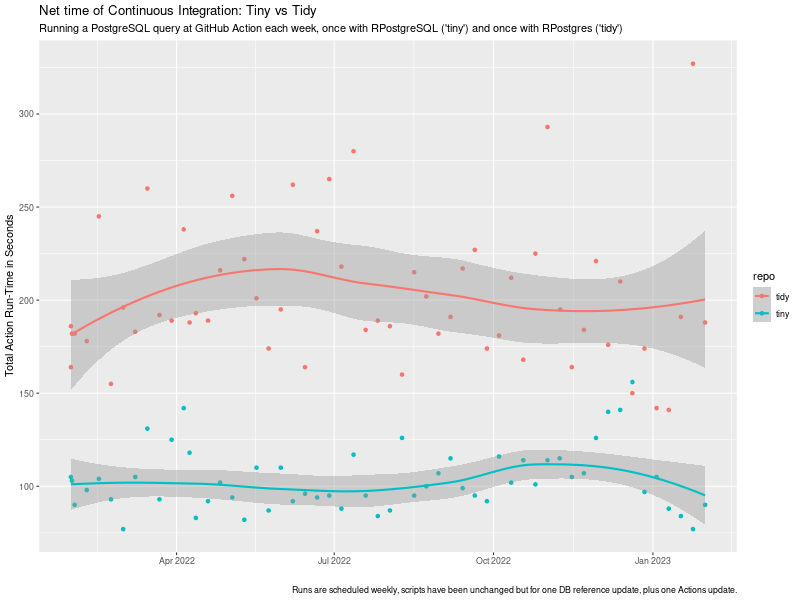 tiny vs tidy ci timing impact
chart
tiny vs tidy ci timing impact
chart