Search Results: "tg"

26 February 2014

Daniel Pocock: MtGox is not Bitcoin

Many people may be looking at the Mt Gox implosion and wondering if this is the end for Bitcoin or even cryptocurrency in general. I don't want to speculate either way. Any currency - cryptocurrency included - largely depends on the confidence of its users and the quality of the systems they put in place. If Mt Gox is insolvent, then it is not really any better - or worse - than the fate of Barings Bank (made famous by Nick Leeson) or the Enron employee pension fund. While I won't speculate on whether people should or should not use Bitcoin, banks themselves have explored these counterparty risk issues many times. One of the solutions they have implemented is called delivery-vs-payment, implemented very widely by Continusously Linked Settlement (CLS Group). This type of solution is likely to be no more or less reliable for crypto-currency as it is for traditional cross-border FX settlement. In practice, one method of implementing this solution involves each counterparty breaking a trade down into smaller units (each being 1% of the full amount, for example) and then making 100 small exchanges instead of one lump sum payment. In this example, neither party can lose more than 1% of the trade value. In comparison, MtGox users may have been speculating with 100% of their cash each time they trade and that is why they have come unstuck.

25 February 2014

Christoph Berg: Trusty and Saucy on apt.postgresql.org

Over the past few weeks, new distributions have been added on apt.postgresql.org: Ubuntu 13.10 codenamed "saucy" and the upcoming Ubuntu LTS release 14.04 codenamed "trusty". Adding non-LTS releases for the benefit of developers using PostgreSQL on their notebooks and desktop machines has been a frequently requested item since we created the repository. I had some qualms about targeting a new Ubuntu release every 6 months, but with having automated more and more parts of the repository infrastructure, and the bootstrapping process now being painless, the distributions are now available for use. Technically, trusty started as empty, so it hasn't all packages yet, but of course all the PostgreSQL server packages are there, along with pgAdmin. Saucy started as a copy of precise (12.04) so it has all packages. Not all packages have been rebuilt for saucy, but the precise packages included (you can tell by the version number ending in .pgdg12.4+12 or .pgdg13.10+1) will work, unless apt complains about dependency problems. I have rebuilt the packages needing it I was aware about (most notably the postgresql-plperl packages) - if you spot problems, please let us know on the mailing list. Needless to say, last week's PostgreSQL server updates are already included in the repository.

24 February 2014

Vincent Bernat: Coping with the TCP TIME-WAIT state on busy Linux servers

TL;DR: Do not enable net.ipv4.tcp_tw_recycle. The Linux kernel documentation is not very helpful about what net.ipv4.tcp_tw_recycle does:
Enable fast recycling TIME-WAIT sockets. Default value is 0. It should not be changed without advice/request of technical experts.
Its sibling, net.ipv4.tcp_tw_reuse is a little bit more documented but the language is about the same:
Allow to reuse TIME-WAIT sockets for new connections when it is safe from protocol viewpoint. Default value is 0. It should not be changed without advice/request of technical experts.
The mere result of this lack of documentation is that we find numerous tuning guides advising to set both these settings to 1 to reduce the number of entries in the TIME-WAIT state. However, as stated by tcp(7) manual page, the net.ipv4.tcp_tw_recycle option is quite problematic for public-facing servers as it won t handle connections from two different computers behind the same NAT device, which is a problem hard to detect and waiting to bite you:
Enable fast recycling of TIME-WAIT sockets. Enabling this option is not recommended since this causes problems when working with NAT (Network Address Translation).
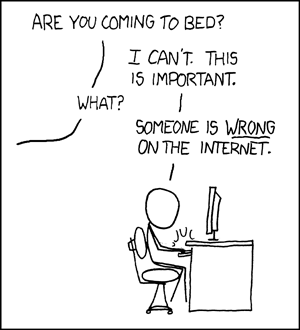
I will provide here a more detailed explanation in the hope to teach people who are wrong on the Internet. xkcd illustration As a sidenote, despite the use of ipv4 in its name, the net.ipv4.tcp_tw_recycle control also applies to IPv6. Also, keep in mind we are looking at the TCP stack of Linux. This is completely unrelated to Netfilter connection tracking which may be tweaked in other ways1.

About TIME-WAIT state Let s rewind a bit and have a close look at this TIME-WAIT state. What is it? See the TCP state diagram below2: TCP state diagram Only the end closing the connection first will reach the TIME-WAIT state. The other end will follow a path which usually permits to quickly get rid of the connection. You can have a look at the current state of connections with ss -tan:
$ ss -tan   head -5
LISTEN     0  511             *:80              *:*     
SYN-RECV   0  0     192.0.2.145:80    203.0.113.5:35449
SYN-RECV   0  0     192.0.2.145:80   203.0.113.27:53599
ESTAB      0  0     192.0.2.145:80   203.0.113.27:33605
TIME-WAIT  0  0     192.0.2.145:80   203.0.113.47:50685

Purpose There are two purposes for the TIME-WAIT state:
  • The most known one is to prevent delayed segments from one connection being accepted by a later connection relying on the same quadruplet (source address, source port, destination address, destination port). The sequence number also needs to be in a certain range to be accepted. This narrows a bit the problem but it still exists, especially on fast connections with large receive windows. RFC 1337 explains in details what happens when the TIME-WAIT state is deficient3. Here is an example of what could be avoided if the TIME-WAIT state wasn t shortened:
Duplicate segments accepted in another connection
  • The other purpose is to ensure the remote end has closed the connection. When the last ACK is lost, the remote end stays in the LAST-ACK state4. Without the TIME-WAIT state, a connection could be reopened while the remote end still thinks the previous connection is valid. When it receives a SYN segment (and the sequence number matches), it will answer with a RST as it is not expecting such a segment. The new connection will be aborted with an error:
Last ACK lost RFC 793 requires the TIME-WAIT state to last twice the time of the MSL. On Linux, this duration is not tunable and is defined in include/net/tcp.h as one minute:
#define TCP_TIMEWAIT_LEN (60*HZ) /* how long to wait to destroy TIME-WAIT
                                  * state, about 60 seconds     */
There have been propositions to turn this into a tunable value but it has been refused on the ground the TIME-WAIT state is a good thing.

Problems Now, let s see why this state can be annoying on a server handling a lot of connections. There are three aspects of the problem:
  • the slot taken in the connection table preventing new connections of the same kind,
  • the memory occupied by the socket structure in the kernel, and
  • the additional CPU usage.
The result of ss -tan state time-wait wc -l is not a problem per se!

Connection table slot A connection in the TIME-WAIT state is kept for one minute in the connection table. This means, another connection with the same quadruplet (source address, source port, destination address, destination port) cannot exist. For a web server, the destination address and the destination port are likely to be constant. If your web server is behind a L7 load-balancer, the source address will also be constant. On Linux, the client port is by default allocated in a port range of about 30,000 ports (this can be changed by tuning net.ipv4.ip_local_port_range). This means that only 30,000 connections can be established between the web server and the load-balancer every minute, so about 500 connections per second. If the TIME-WAIT sockets are on the client side, such a situation is easy to detect. The call to connect() will return EADDRNOTAVAIL and the application will log some error message about that. On the server side, this is more complex as there is no log and no counter to rely on. In doubt, you should just try to come with something sensible to list the number of used quadruplets:
$ ss -tan 'sport = :80'   awk ' print $(NF)" "$(NF-1) '   \
>     sed 's/:[^ ]*//g'   sort   uniq -c
    696 10.24.2.30 10.33.1.64
   1881 10.24.2.30 10.33.1.65
   5314 10.24.2.30 10.33.1.66
   5293 10.24.2.30 10.33.1.67
   3387 10.24.2.30 10.33.1.68
   2663 10.24.2.30 10.33.1.69
   1129 10.24.2.30 10.33.1.70
  10536 10.24.2.30 10.33.1.73
The solution is more quadruplets5. This can be done in several ways (in the order of difficulty to setup):
  • use more client ports by setting net.ipv4.ip_local_port_range to a wider range,
  • use more server ports by asking the web server to listen to several additional ports (81, 82, 83, ),
  • use more client IP by configuring additional IP on the load balancer and use them in a round-robin fashion,
  • use more server IP by configuring additional IP on the web server6.
Of course, a last solution is to tweak net.ipv4.tcp_tw_reuse and net.ipv4.tcp_tw_recycle. Don t do that yet, we will cover those settings later.

Memory With many connections to handle, leaving a socket open for one additional minute may cost your server some memory. For example, if you want to handle about 10,000 new connections per second, you will have about 600,000 sockets in the TIME-WAIT state. How much memory does it represent? Not that much! First, from the application point of view, a TIME-WAIT socket does not consume any memory: the socket has been closed. In the kernel, a TIME-WAIT socket is present in three structures (for three different purposes):
  1. A hash table of connections, named the TCP established hash table (despite containing connections in other states) is used to locate an existing connection, for example when receiving a new segment. Each bucket of this hash table contains both a list of connections in the TIME-WAIT state and a list of regular active connections. The size of the hash table depends on the system memory and is printed at boot:
    $ dmesg   grep "TCP established hash table"
    [    0.169348] TCP established hash table entries: 65536 (order: 8, 1048576 bytes)
    
    It is possible to override it by specifying the number of entries on the kernel command line with the thash_entries parameter. Each element of the list of connections in the TIME-WAIT state is a struct tcp_timewait_sock, while the type for other states is struct tcp_sock7:
    struct tcp_timewait_sock  
        struct inet_timewait_sock tw_sk;
        u32    tw_rcv_nxt;
        u32    tw_snd_nxt;
        u32    tw_rcv_wnd;
        u32    tw_ts_offset;
        u32    tw_ts_recent;
        long   tw_ts_recent_stamp;
     ;
    struct inet_timewait_sock  
        struct sock_common  __tw_common;
        int                     tw_timeout;
        volatile unsigned char  tw_substate;
        unsigned char           tw_rcv_wscale;
        __be16 tw_sport;
        unsigned int tw_ipv6only     : 1,
                     tw_transparent  : 1,
                     tw_pad          : 6,
                     tw_tos          : 8,
                     tw_ipv6_offset  : 16;
        unsigned long            tw_ttd;
        struct inet_bind_bucket *tw_tb;
        struct hlist_node        tw_death_node;
     ;
    
  2. A set of lists of connections, called the death row , is used to expire the connections in the TIME-WAIT state. They are ordered by how much time left before expiration. It uses the same memory space as for the entries in the hash table of connections. This is the struct hlist_node tw_death_node member of struct inet_timewait_sock.
  3. A hash table of bound ports, holding the locally bound ports and the associated parameters, is used to determine if it is safe to listen to a given port or to find a free port in the case of dynamic bind. The size of this hash table is the same as the size of the hash table of connections:
    $ dmesg   grep "TCP bind hash table"
    [    0.169962] TCP bind hash table entries: 65536 (order: 8, 1048576 bytes)
    
    Each element is a struct inet_bind_socket. There is one element for each locally bound port. A TIME-WAIT connection to a web server is locally bound to the port 80 and shares the same entry as its sibling TIME-WAIT connections. On the other hand, a connection to a remote service is locally bound to some random port and does not share its entry.
So, we are only concerned by the space occupied by struct tcp_timewait_sock and struct inet_bind_socket. There is one struct tcp_timewait_sock for each connection in the TIME-WAIT state, inbound or outbound. There is one dedicated struct inet_bind_socket for each outbound connection and none for an inbound connection. A struct tcp_timewait_sock is only 168 bytes while a struct inet_bind_socket is 48 bytes:
$ sudo apt-get install linux-image-$(uname -r)-dbg
[...]
$ gdb /usr/lib/debug/boot/vmlinux-$(uname -r)
(gdb) print sizeof(struct tcp_timewait_sock)
 $1 = 168
(gdb) print sizeof(struct tcp_sock)
 $2 = 1776
(gdb) print sizeof(struct inet_bind_bucket)
 $3 = 48
So, if you have about 40,000 inbound connections in the TIME-WAIT state, it should eat less than 10MB of memory. If you have about 40,000 outbound connections in the TIME-WAIT state, you need to account for 2.5MB of additional memory. Let s check that by looking at the output of slabtop. Here is the result on a server with about 50,000 connections in the TIME-WAIT state, 45,000 of which are outbound connections:
$ sudo slabtop -o   grep -E '(^  OBJS tw_sock_TCP tcp_bind_bucket)'
  OBJS ACTIVE  USE OBJ SIZE  SLABS OBJ/SLAB CACHE SIZE NAME                   
 50955  49725  97%    0.25K   3397       15     13588K tw_sock_TCP            
 44840  36556  81%    0.06K    760       59      3040K tcp_bind_bucket
There is nothing to change here: the memory used by TIME-WAIT connections is really small. If your server need to handle thousands of new connections per second, you need far more memory to be able to efficiently push data to clients. The overhead of TIME-WAIT connections is negligible.

CPU On the CPU side, searching for a free local port can be a bit expensive. The work is done by the inet_csk_get_port() function which uses a lock and iterate on locally bound ports until a free port is found. A large number of entries in this hash table is usually not a problem if you have a lot of outbound connections in the TIME-WAIT state (like ephemeral connections to a memcached server): the connections usually share the same profile, the function will quickly find a free port as it iterates on them sequentially.

Other solutions If you still think you have a problem with TIME-WAIT connections after reading the previous section, there are three additional solutions to solve them:
  • disable socket lingering,
  • net.ipv4.tcp_tw_reuse, and
  • net.ipv4.tcp_tw_recycle.

Socket lingering When close() is called, any remaining data in the kernel buffers will be sent in the background and the socket will eventually transition to the TIME-WAIT state. The application can continue to work immediatly and assume that all data will eventually be safely delivered. However, an application can choose to disable this behaviour, known as socket lingering. There are two flavors:
  1. In the first one, any remaining data will be discarded and instead of closing the connection with the normal four-packet connection termination sequence, the connection will be closed with a RST (and therefore, the peer will detect an error) and will be immediatly destroyed. No TIME-WAIT state in this case.
  2. With the second flavor, if there is any data still remaining in the socket send buffer, the process will sleep when calling close() until either all the data is sent and acknowledged by the peer or the configured linger timer expires. It is possible for a process to not sleep by setting the socket as non-blocking. In this case, the same process happens in the background. It permits the remaining data to be sent during a configured timeout but if the data is succesfully sent, the normal close sequence is run and you get a TIME-WAIT state. And on the other case, you ll get the connection close with a RST and the remaining data is discarded.
In both cases, disabling socket lingering is not a one-size-fits-all solution. It may be used by some applications like HAProxy or Nginx when it is safe to use from the upper protocol point of view. There are good reasons to not disable it unconditionnaly.

net.ipv4.tcp_tw_reuse The TIME-WAIT state prevents delayed segments to be accepted in an unrelated connection. However, on certain conditions, it is possible to assume a new connection s segment cannot be misinterpreted with an old connection s segment. RFC 1323 presents a set of TCP extensions to improve performance over high-bandwidth paths. Among other things, it defines a new TCP option carrying two four-byte timestamp fields. The first one is the current value of the timestamp clock of the TCP sending the option while the second one is the most recent timestamp received from the remote host. By enabling net.ipv4.tcp_tw_reuse, Linux will reuse an existing connection in the TIME-WAIT state for a new outgoing connection if the new timestamp is strictly bigger than the most recent timestamp recorded for the previous connection: an outgoing connection in the TIME-WAIT state can be reused after just one second. How is it safe? The first purpose of the TIME-WAIT state was to avoid duplicate segments to be accepted in an unrelated connection. Thanks to the use of timestamps, such a duplicate segments will come with an outdated timestamp and therefore be discarded. The second purpose was to ensure the remote end is not in the LAST-ACK state because of the lost of the last ACK. The remote end will retransmit the FIN segment until:
  1. it gives up (and tear down the connection), or
  2. it receives the ACK it is waiting (and tear down the connection), or
  3. it receives a RST (and tear down the connection).
If the FIN segments are received in a timely manner, the local end socket will still be in the TIME-WAIT state and the expected ACK segments will be sent. Once a new connection replaces the TIME-WAIT entry, the SYN segment of the new connection is ignored (thanks to the timestamps) and won t be answered by a RST but only by a retransmission of the FIN segment. The FIN segment will then be answered with a RST (because the local connection is in the SYN-SENT state) which will allow the transition out of the LAST-ACK state. The initial SYN segment will eventually be resent (after one second) because there was no answer and the connection will be established without apparent error, except a slight delay: Last ACK lost and timewait reuse It should be noted that when a connection is reused, the TWRecycled counter is increased (despite its name).

net.ipv4.tcp_tw_recycle This mechanism also relies on the timestamp option but affects both incoming and outgoing connections which is handy when the server usually closes the connection first8. The TIME-WAIT state is scheduled to expire sooner: it will be removed after the retransmission timeout (RTO) interval which is computed from the RTT and its variance. You can spot the appropriate values for a living connection with the ss command:
$ ss --info  sport = :2112 dport = :4057
State      Recv-Q Send-Q    Local Address:Port        Peer Address:Port   
ESTAB      0      1831936   10.47.0.113:2112          10.65.1.42:4057    
         cubic wscale:7,7 rto:564 rtt:352.5/4 ato:40 cwnd:386 ssthresh:200 send 4.5Mbps rcv_space:5792
To keep the same guarantees the TIME-WAIT state was providing, while reducing the expiration timer, when a connection enters the TIME-WAIT state, the latest timestamp is remembered in a dedicated structure containing various metrics for previous known destinations. Then, Linux will drop any segment from the remote host whose timestamp is not strictly bigger than the latest recorded timestamp, unless the TIME-WAIT state would have expired:
if (tmp_opt.saw_tstamp &&
    tcp_death_row.sysctl_tw_recycle &&
    (dst = inet_csk_route_req(sk, &fl4, req, want_cookie)) != NULL &&
    fl4.daddr == saddr &&
    (peer = rt_get_peer((struct rtable *)dst, fl4.daddr)) != NULL)  
        inet_peer_refcheck(peer);
        if ((u32)get_seconds() - peer->tcp_ts_stamp < TCP_PAWS_MSL &&
            (s32)(peer->tcp_ts - req->ts_recent) >
                                        TCP_PAWS_WINDOW)  
                NET_INC_STATS_BH(sock_net(sk), LINUX_MIB_PAWSPASSIVEREJECTED);
                goto drop_and_release;
         
 
When the remote host is in fact a NAT device, the condition on timestamps will forbid allof the hosts except one behind the NAT device to connect during one minute because they do not share the same timestamp clock. In doubt, this is far better to disable this option since it leads to difficult to detect and difficult to diagnose problems. The LAST-ACK state is handled in the exact same way as for net.ipv4.tcp_tw_recycle.

Summary The universal solution is to increase the number of possible quadruplets by using, for example, more server ports. This will allow you to not exhaust the possible connections with TIME-WAIT entries. On the server side, do not enable net.ipv4.tcp_tw_recycle unless you are pretty sure you will never have NAT devices in the mix. Enabling net.ipv4.tcp_tw_reuse is useless for incoming connections. On the client side, enabling net.ipv4.tcp_tw_reuse is another almost-safe solution. Enabling net.ipv4.tcp_tw_recycle in addition to net.ipv4.tcp_tw_reuse is mostly useless. And a final quote by W. Richard Stevens, in Unix Network Programming:
The TIME_WAIT state is our friend and is there to help us (i.e., to let old duplicate segments expire in the network). Instead of trying to avoid the state, we should understand it.

  1. Notably, fiddling with net.netfilter.nf_conntrack_tcp_timeout_time_wait won t change anything on how the TCP stack will handle the TIME-WAIT state.
  2. This diagram is licensed under the LaTeX Project Public License 1.3. The original file is available on this page.
  3. The first work-around proposed in RFC 1337 is to ignore RST segments in the TIME-WAIT state. This behaviour is controlled by net.ipv4.rfc1337 which is not enabled by default on Linux because this is not a complete solution to the problem described in the RFC.
  4. While in the LAST-ACK state, a connection will retransmit the last FIN segment until it gets the expected ACK segment. Therfore, it is unlikely we stay long in this state.
  5. On the client side, older kernels also have to find a free local tuple (source address and source port) for each outgoing connection. Increasing the number of server ports or IP won t help in this case. Linux 3.2 is recent enough to be able to share the same local tuple for different destinations. Thanks to Willy Tarreau for his insight on this aspect.
  6. This last solution may seem a bit dumb since you could just use more ports but some servers are not able to be configured this way. The before last solution can also be quite cumbersome to setup, depending on the load-balancing software, but uses less IP than the last solution.
  7. The use of a dedicated memory structure for sockets in the TIME-WAIT is here since Linux 2.6.14. The struct sock_common structure is a bit more verbose and I won t copy it here.
  8. When the server closes the connection first, it gets the TIME-WAIT state while the client will consider the corresponding quadruplet free and hence may reuse it for a new connection.

22 February 2014

Petter Reinholdtsen: New home and release 1.0 for netgroup and innetgr (aka ng-utils)

Many years ago, I wrote a GPL licensed version of the netgroup and innetgr tools, because I needed them in Skolelinux. I called the project ng-utils, and it has served me well. I placed the project under the Hungry Programmer umbrella, and it was maintained in our CVS repository. But many years ago, the CVS repository was dropped (lost, not migrated to new hardware, not sure), and the project have lacked a proper home since then. Last summer, I had a look at the package and made a new release fixing a irritating crash bug, but was unable to store the changes in a proper source control system. I applied for a project on Alioth, but did not have time to follow up on it. Until today. :) After many hours of cleaning and migration, the ng-utils project now have a new home, and a git repository with the highlight of the history of the project. I published all release tarballs and imported them into the git repository. As the project is really stable and not expected to gain new features any time soon, I decided to make a new release and call it 1.0. Visit the new project home on https://alioth.debian.org/projects/ng-utils/ if you want to check it out. The new version is also uploaded into Debian Unstable.

21 February 2014

Riku Voipio: Where the armel buildd time went

Wanna-build, wanna-build, which packages spent most time on armel buildd's since beginning of 2013?

package sum(build_time)
-------------------------+--------------
libreoffice 114 09:16:34
linux 113 02:58:50
gcc-4.8 064 01:21:09
webkitgtk 059 19:09:27
acl2 043 16:40:50
gcc-4.7 028 14:03:53
iceweasel 026 19:02:13
gcc-snapshot 026 01:31:21
openjdk-7 020 02:41:53
php5 019 16:13:22
llvm-toolchain-3.3 017 19:05:38
qt4-x11 017 02:57:09
espresso 016 03:50:37
pypy 015 07:07:25
icedove 014 18:57:08
insighttoolkit4 014 17:16:43
qtbase-opensource-src 014 12:39:09
llvm-toolchain-3.4 012 03:06:15
mono 011 22:30:13
atlas 011 20:40:54
qemu 011 17:11:09
calligra 011 16:05:55
gnuradio 011 15:19:35
resiprocate 011 10:14:56
llvm-toolchain-snapshot 011 02:04:44
libav 010 13:52:03
python2.7 009 18:58:33
ghc 009 18:28:48
gnat-4.8 009 13:59:57
axiom 009 12:40:24
cython 009 00:47:04
openjdk-6 008 16:38:14
oce 008 10:29:20
eglibc 008 06:04:26
ppl 007 20:48:45
root-system 007 17:32:16
openturns 007 10:12:53
gcl 007 08:02:42
gcc-4.6 007 02:50:48
k3d 007 00:36:11
python3.3 007 00:25:42
llvm-toolchain-3.2 007 00:17:59
vtk 006 17:53:28
samba 006 17:17:27
mysql-workbench 006 14:36:46
kde-workspace 006 07:31:12
gmsh 006 04:32:42
psi-plus 006 04:30:08
octave 006 04:17:22
paraview 006 04:13:25
Timeformat is "days HH:MM:SS". Our ridiculously stable mv78x00 buildd's have served well, but has come to become let them rest. Now, to find out how many of these top time consuming packages can build with parallel make and are not doing so already.

14 February 2014

Rudy Godoy: Getting Movistar Peru ZTE MF193 work in Debian

After so many attempts to have my shiny Movistar Peru (Internet M vil) 3G ZTE MF193 modem to work out-of-the-box in Debian jessie (unstable) with NetworkManager, the word frustration was hitting on my head. Even trying to do the right thing, led me to craziness. I gave up on fanzines and decided to take the old-school route. Release wvdial and friends! Trying different combinations for wvdial.conf was no heaven for sure, but I ve found this wonderful guide from Christian Ams ss from Vienna, Austria! that really made a difference. Of course he s talking about the MF180 model but you get the idea. So I m sharing what was different for the MF193. Basically, I ve done the eject and disable CD-ROM thing already, but still no progress. I ve also tried using wvdial to send AT commands to the evasive /dev/ttyUSBX device. Starting from scratch confirmed that I ve done such things properly indeed. I was amused by the fact that I could use screen to talk to the modem! (yo, all the time wasted trying to have minicom and friends play nice) So, let s get to the point. After following this procedure, you should be able to use NetworkManager to connect to the Interwebs using the 3G data service from Movistar Peru.
  1. Step 1 follow the guide
  2. Step 2 Here I had to use /dev/ttyUSB4
  3. Step 3 follow the guide
  4. Unplug your USB modem
  5. Plug your USB modem. This time you should see only /dev/ttyUSB 0,1,2 and /dev/gsmmodem should be missing (not sure if this is a bug). Now /dev/ttyUSB2 is your guy.
  6. Step 4 use /dev/ttyUSB2
  7. Run wvdial from CLI it should connect successfully.
  8. Stop wvdial
  9. Select the Network icon on GNOME3, click on the Mobile Broadband configuration you have, if not create one.
  10. Voil . Happy surfing!
I m pasting my wvdial.conf, just in case.
[Dialer Defaults]
Modem = /dev/ttyUSB2
Username = movistar@datos
Password = movistar
APN = movistar.pe
Phone = *99#
Stupid Mode = 1
Init2 = AT+CGDCONT=4,"IP","movistar.pe"

10 February 2014

Russell Coker: Fingerprints and Authentication

Dustin Kirkland wrote an interesting post about fingerprint authentication [1]. He suggests using fingerprints for identifying users (NOT authentication) and gives an example of a married couple sharing a tablet and using fingerprints to determine who s apps are loaded. In response Tollef Fog Heen suggests using fingerprints for lightweight authentication, such as resuming a session after a toilet break [2]. I think that one of the best comments on the issue of authentication for different tasks is in XKCD comic 1200 [3]. It seems obvious that the division between administrator (who installs new device drivers etc) and user (who does everything from playing games to online banking with the same privileges) isn t working, and never could work well particularly when the user in question installs their own software. I think that one thing which is worth considering is the uses of a signature. A signature can be easily forged in many ways and they often aren t checked well. It seems that there are two broad cases of using a signature, one is to enter into legally binding serious contract such as a mortgage (where wanting to sign is the relevant issue) and the other is cases where the issue doesn t matter so much (EG signing off on a credit card purchase where the parties at risk can afford to lose money on occasion for efficient transactions). Signing is relatively easy but that s because it either doesn t matter much or because it s just a legal issue which isn t connected to authentication. The possibility of serious damage (sending life savings or incriminating pictures to criminals in another jurisdiction) being done instantly never applied to signatures. It seems to me that in many ways signatures are comparable to fingerprints and both of them aren t particularly good for authentication to a computer. In regard to Tollef s ideas about lightweight authentication I think that the first thing that would be required is direct user control over the authentication required to unlock a system. I have read about some Microsoft research into a computer monitoring the office environment to better facilitate the user s requests, an obvious extension to such research would be to have greater unlock requirements if there are more unknown people in the area or if the device is in a known unsafe location. But apart from that sort of future development it seems that having the user request a greater or lesser authentication check either at the time they lock their session or by policy would make sense. Generally users have a reasonable idea about the risk of another user trying to login with their terminal so user should be able to decide that a toilet break when at home only requires a fingerprint (enough to keep out other family members) while a toilet break at the office requires greater authentication. Mobile devices could use GPS location to determine unlock requirements, GPS can be forged, but if your attacker is willing and able to do that then you have a greater risk than most users. Some users turn off authentication on their phone because it s too inconvenient. If they had the option of using a fingerprint most of the time and a password for the times when a fingerprint can t be read then it would give an overall increase in security. Finally it should be possible to unlock only certain applications. Recent versions of Android support widgets on the lock screen so you can perform basic tasks such as checking the weather forecast without unlocking your phone. But it should be possible to have different authentication requirements for various applications. Using a fingerprint scan to allow playing games or reading email in the mailing list folder would be more than adequate security. But reading the important email and using SMS probably needs greater authentication. This takes us back to the XKCD cartoon.

9 February 2014

Jan Dittberner: Going to Chemnitzer Linux-Tage 2014

This year I take care of organizing of the Debian booth at Chemnitzer Linux-Tage 2014 which has been approved a few days ago. The CLT is a yearly (mostly) german speaking Free Software community event which takes place on the weekend of 15th/16th march in Chemnitz (Germany). On the Linux-Live pages you find a lot of projects that will have a booth there and the talk schedule contains many interesting topics. There will also be a key signing event for which you can register until 11th of march. The Wiki page for the Event is already in a good shape. Many things are already organized, but we still have some items left. A lot of people from the Debian community have already told me that they will be there. We will have a Debian Wheezy BabelBox demonstration running on a VirtualBox host that Jan Wagner will provide as well as merchandising (Thanks to Alexander Wirt). Two talks from people on our Wiki page have been accepted by the CLT organizers too: I am happy to meet many nice people from the Free Software community in Chemnitz soon.

6 February 2014

Neil Williams: iMX53 in the home lab

The iMX53 Quick Start Board has been a mainstay of the Debian armhf port and has been part of LAVA until recently. It s a natural choice for seeing how LAVA and Debian can work together more closely. So, in the first steps to getting my home lab running, I set about restoring two of these boards to LAVA support. I will be looking into each of the possible boot methods with these boards, but the way to start is with a LAVA master image on an SD card. With the pause in iMX53 development within LAVA, this raises a couple of issues: LAVA master image on iMX53 The LAVA master image is more recent and can fix these problems. See lava-image-creation preparing a master image
$ git clone git://git.linaro.org/lava/lava-master-image-scripts.git
$ cd lava-master-image-scripts

Use patch -p1 to apply this patch (apologies for the line wrapping in the blog):
diff --git a/lava-create-master b/lava-create-master
index 2e1d0e8..a1e6131 100755
--- a/lava-create-master
+++ b/lava-create-master
@@ -366,7 +366,7 @@ make_master()  
         verbose " * Building vanilla image with linaro-media-create..."
         if ! linaro-media-create \
             --dev $LMC_DEV \
-            --rootfs ext4 \
+            --rootfs ext3 \
             --image-file $CACHE_DIR/pristine-images/$dev-vanilla.img \
             --image-size 1G \
             --align-boot-part \
$ sudo ./lava-create-master imx53 Without the patch applied, I simply removed the SD card, mounted the third partition on my main machine and created a tarball of the contents:
$ sudo mount /dev/mmcblk0p3 /mnt/
$ pushd /mnt
$ sudo tar -czf /tmp/imx53-rootfs.tgz ./*
$ popd
$ sudo umount /mnt/
Reformat p3 to ext3 (or ext2 if you prefer)
$ sudo mkfs.ext3 /dev/mmcblk0p3
Put the rootfs back onto the replacement ext3 partition.
$ sudo mount /dev/mmcblk0p3 /mnt/
$ pushd /mnt
$ sudo tar -xzvf /tmp/imx53-rootfs.tgz
$ popd
$ sudo sync
$ sudo umount /mnt/
The bootscript is buggy, so run:
> run loaduimage
> run mmcboot
Then fix bootscript or you won t be able to reboot: Simplest way may be to set u-boot to ignore boot.scr
> setenv script
> saveenv
> reset
Device configuration in LAVA I found screen to be a bit awkward as a serial connection, (use Ctrl-A : quit) to quit. I tried autologin for the lucid image but that was not needed for the master image which uses the linaro overlay. The PDU commands are for my own setup. The daemon (the machine running the pdu daemon scripts), hostname (the hostname or IP of the PDU itself) and the port numbers will change between labs. Again, the blog has changed the line endings.
device_type = mx53loco
hostname = imx53-01
connection_command = telnet hobbes 4002
#login_prompt = lucid-desktop login:
#password_prompt = Password:
#username = lucid
#password = lucid
hard_reset_command = /usr/bin/pduclient --daemon localhost --hostname pdu --command reboot --port 05
power_off_cmd = /usr/bin/pduclient --daemon localhost --hostname pdu --command off --port 05
power_on_cmd = /usr/bin/pduclient --daemon localhost --hostname pdu --command on --port 05
testboot_offset = 3
Critical testboot_offset is currently undocumented. Without it, you will see:
 ** Partition 4 not valid on device 0 **
You can trace this back in a LAVA test log to:
  setenv bootcmd "fatload mmc 0:4 0x70000000 uImage; fatload mmc 0:4 0x72000000 uInitrd; fatload mmc 0:4 0x71ff0000 board.dtb; bootm 0x70000000 0x72000000 0x71ff0000"
The correct line needs to use mmc 0:5 in each case.
This is what testboot_offset modifies the default is 2.
  setenv bootcmd "fatload mmc 0:4 0x70000000 uImage; fatload mmc 0:5 0x72000000 uInitrd; fatload mmc 0:5 0x71ff0000 board.dtb; bootm 0x70000000 0x72000000 0x71ff0000"
Hacking session in LAVA A hacking session in LAVA is a way of getting an SSH login directly into a deployed test image, as root. It s a test image, so look around, trash stuff, build stuff, reboot the board When you are done, use stop-hacking and the test completes, leaving the master image unchanged, ready for the next rootfs to go onto the test image you were using. This will be improved in later blog entries but as a starter and so that you can play with the SATA drive with a recent installation, this is the JSON for a LAVA job which gives you an SSH session inside the LAVA test image on an iMX53. The test image comes from Linaro releases 12.01. I haven t set up a proxy yet, so to save time, I downloaded it once and used a local file:// URL in the testjob. Note the rootfstype parameter without this, LAVA will helpfully format the partition onto which the rootfs is installed to ext4, with predictable results. (This bug is currently being fixed in LAVA so that LAVA uses the same filesystem as the downloaded image. All part of making LAVA less presumptive.) The smoke-tests-basic testdef is gratuitous and can be removed but this particular run won t be quick it took over an hour to get into the hacking session, but future topics here will improve that so the extra few minutes for the smoke-tests is not a big win. Change the value for GATEWAY to something sane for your network, change the value for PUB_KEY to your SSH public key. Change the image location to something which works for your setup.
 
 "health_check": false,
 "job_name": "iMX53-hacking",
 "logging_level": "DEBUG",
 "device_type": "mx53loco",
 "timeout": 900,
 "actions": [
 
 "command": "deploy_linaro_image",
 "parameters": 
 "image": "file:///home/linaro/lava/mx53loco-ubuntu-desktop.img.gz",
 "rootfstype": "ext3"
 
 ,
 
 "command": "lava_test_shell",
 "parameters": 
 "testdef_repos": [
 
 "git-repo": "git://git.linaro.org/qa/test-definitions.git",
 "testdef": "ubuntu/smoke-tests-basic.yaml"
 ,
 
 "git-repo": "http://git.linaro.org/git/lava-team/hacking-session.git",
 "parameters": 
 "GATEWAY": "10.15.0.1",
 "PUB_KEY": "...."
 ,
 "testdef": "hacking-session-debian.yaml"
 
 ],
 "timeout": 18000
 
 ,
 
 "command": "submit_results_on_host",
 "parameters": 
 "server": "http://sylvester.codehelp/RPC2/",
 "stream": "/anonymous/codehelp/"
 
 
 ]
 
(Use http://jsonlint.com to reformat.) I was part of the way through running debootstrap on the SATA drive when ser2net timed out because I hadn t changed the values at that time. Configuring set2net for LAVA ser2net can run on any machine capable of providing the serial connections, including a dedicated device. Decide on a port range to use on the machine running ser2net. If the device has more than one network interface, ensure that ser2net only offers connections on the relevant interface by prefixing the port with the IP address or hostname. telnet is generally the easiest ser2net state to use with LAVA.
#  ::::
#     TCP port
#            Name   or  number of the TCP/IP port to accept con-
#            nections from for this device.  A port number may
#            be of the form [host,]port, such as 127.0.0.1,2000
#            or localhost,2000.  If this is specified, it will
#            only bind to the IP address specified. Otherwise
#            it will bind to all the ports on the machine.
# 10.15.0.1,4000:telnet:600:/dev/ttyUSB0:115200 8DATABITS NONE 1STOPBIT banner
Clear the timeout or long running jobs will fail.
10.15.0.1,4000:telnet:0:/dev/ttyUSB0:115200 8DATABITS NONE 1STOPBIT banner
10.15.0.1,4001:telnet:0:/dev/ttyUSB1:115200 8DATABITS NONE 1STOPBIT banner
I ve tried relatively carefully to preserve the instructions here from my notes. However, if you do try this yourself and there are problems, let me know and I ll update. I m also planning on putting all of the config files, patches, JSON examples and other code into a git repo fairly soon to make things easier.

Thorsten Glaser: KISS

Just saw this in my INBOX:

    B. The default init system for jessie will be a single /etc/rc script
 

I d certainly vote that


In unrelated news, jupp 2.8 for DOS runs on cable3, which means it ll still run on an original 8088/8086 Update 10.02.2014: The unobfuscated version of cable3 is called 8086tiny under the MIT licence. Thanks to the author for doing that (and not just dumping the IOCCC code) and to RT from the mksh(1) IRC channel for finding it on the net!

5 February 2014

Thomas Koch: shared infrastructure coop

I'm working in a very small web agency with 4 employees, one of them part time and our boss who doesn't do programming. It shouldn't come as a surprise, that our development infrastructure is not perfect. We have many ideas and dreams how we could improve it, but not the time.
Now we have two obvious choices: Either we just do nothing or we buy services from specialized vendors like github, atlassian, travis-ci, heroku, google and others.
Doing nothing does not work for me. But just buying all this stuff doesn't please me either. We'd depend on proprietary software, lock-in effects or one-size-fits-all offerings.
Another option would be to find other small web shops like us, form a cooperative and share essential services. There are thousands of web shops in the same situation like us and we all need the same things: As I said, all of the above is available as commercial offerings. But I'd prefer the following to be satisfied:
Does something like that already exists? There already is the German cooperative hostsharing which is kind of similar but does provide mainly hosting, not services. But I'll ask them next after writing this blog post.
Is your company interested in joining such an effort? Does it sound silly?


3 February 2014

Craig Small: jffnms 0.9.4

JFFNMS version 0.9.4 was released today, this version fixes some bugs that have recently appeared in previous versions.
Alarmed Interfaces and Events

Alarmed Interfaces and Events

The triggers rules editor had a problem where some of the rules clicked off the triggers would not appear or could not be edited correctly. Most of the Admin screens have the ability to sort the rows. This, unfortunately, didn t sort but the functionality has been restored. Most users are probably unaware of this, but the database schema is first created for MySQL and is then converted for PostgreSQL. The conversi0n process is far from ideal and hasn t worked until this release. More testing is required for PostgreSQL support but it should be a lot better.

27 January 2014

Steve Kemp: It is unfortunate that many companies need the same sysadmin jobs carried out

It is unfortunate that I've been exposed to several companies that all need the same kind of problems solving, again and again: A lot of these are solved problems, yet they seem to keep cropping up. I guess the fact I've done some of these things more than once means I'm the local-expert, so that's why I get asked. But still.. There was a time when I thought my Debian Administration site would help solve these kind of problems; that writing documentation would encourage people to do things properly. Certainly it has helped me, and some other people are greatful, but it didn't do enough to help. I'm not sure if the problem is that my documentation is a little ideosyncratic, isn't good enough, or isn't reaching the right kind of people. I suspect a combination of that and scale - You can't walk somebody though the idea of setting up a ten-node database-cluster, they need to suffer, they need to break things, they need to sweat on Christmas Day, at 5AM, as everything goes to hell. Then the next time they'll do it properly. I'd love to take the time to write out recipes in Salt, Ansible, Puppet, Chef, CFengine, Slaughter, whatever, and support them.
Remote. Automated. System management.
Throw in monitoring of metrics, security fixes, and reporting and there's probably a valuable service there. It probably can't happen though, for three main reasons: I did recently write some policies for setting up a two-node Master-Slave MySQL setup, with reporting, monitoring, and custom SMS-based alerts. I guess I'm wondering if I can be cheeky and sell the same work twice. ;)

26 January 2014

Neil Williams: Home server rack

The uses of this particular rack I ll cover in future entries this is about how I made the rack itself, with help from friends (Steve McIntyre & Andy Simpkins). A common theme is making allowances for using dev kit boards ready-to-rack ARM servers are not here yet. My aim was to have 4, possibly 6 ARM dev kit boards running services from home, so there was no need for a standard 42U rack, a 9U rack is enough. Hence:
Wall Mounted 9U 450mm deep 19 inch rack enclosure glass door To run various other services around the house (firewall, file server etc.), a microserver was also necessary:
HP 704941-421 ProLiant Micro Server (AMD Turion II Neo N54L 2.2GHz, 2GB RAM, 250GB HDD, 2 Core, 7th Generation) I chose to mount that on a bookcase beneath the wall mounted rack as it kept all the cables at the bottom of the rack itself. The microserver needed a second gigabit network card fitted to cope with being a firewall as well, if you do the same, ensure you find a suitable card with a low profile bracket. Some are described as being low profile but do not package the low profile bracket, only a low profile card and a full height bracket.
Intel EXPI9301CTBLK PRO1000 Network Card note the low profile bracket in the pack. The first of the dev kit requirements is the lack of boards which can be racked, so shelves are going to be needed, leading on to something to stop the boards wandering across the shelf when the cables are adjusted velcro pads in my case. Second requirement is that dev kit boards are notorious for not rebooting cleanly. Nothing to do with the image being run, the board just doesn t cut power or doesn t come back after cutting power. Sometimes this is down to early revisions of the board, sometimes the board pulls enough power through the USB serial converter to remain alive, whatever the cause, it won t reboot without user involvement. So a PDU becomes necessary remotely controllable. New units tend to be expensive and/or only suitable for larger racks, I managed to find an older 8 port APC unit, something like: (Don t be surprised if that becomes a dead link search for APC Smart Slot Master Switch Power Distribution Unit). Talking of power, I m looking to use SATA drives with these boards and the boards themselves come with a variety of wall wart plugs or USB cables, so a number of IEC sockets are needed not the usual plugs:
Power cable IEC C14 plug 13A socket 25 cm or, for devices which genuinely need 2A to boot (use the 1A for attached SATA or leave empty):

Black Universal 3.1A 15W 5V Dual USB Rapid Mains Charger Plug Check the power output rating of the USB plugs used to connect to the mains as well many are 1A or less. Keep the right plug for the right board.
Power is going to also be a problem if, like me, you want to run SATA drives off boards which support SATA. The lack of a standard case means that ATX power is awkward, so check out some cheap SATA enclosures to get a SATA connector with USB power. I am using these enclosures (prices seem to have risen since I obtained them):

Startech 2.5 inch eSATA USB External Hard Drive Enclosure for SATA HDD Along with these:
eSATA to SATA Serial External Shielded Cable 1m because the iMx53 boards have SATA connectors but the enclosure exports eSATA. Whilst this might seem awkward, the merit of having both eSATA and simple USB power on one enclosure is not to be under-estimated. (Avoid the stiffer black cables space will get tight inside the rack.) Naturally, a 2.5 inch SATA drive is going to be needed for each enclosure, I m using HDD but SSD is also an option. Also, consider simple 2 or 3 way fused adaptors so that the board and the SATA drive can be powered from a single PDU port, this makes rebooting much simpler if the board needs a power supply with integrated plug instead of over USB. Now to the networking (2 x 8 port was cheaper than 1 x 16):
Netgear GS108 8-port Gigabit Ethernet Unmanaged Switch Don t forget the cat5 cables too you ll want lots of short cables, 1m or shorter inside the rack and a few longer ones going to the microserver and wall socket. I used 8x1m. Naturally, on the floor below your rack you are going to put a UPS, so the PDU power then needs to be converted to draw from the UPS via IEC plugs instead of standard mains. I decided to use a 6 gang extension 1m cable with an IEC plug it was the only bit of wiring I had to do and even those are available ready-made if you want to do it that way. Depending on the board, you may need your own serial to USB converters, you ll certainly need some powered USB hubs. I m using a wall mounted 9U rack, so I also needed a masonry drill and 4 heavy duty masonry M8 bolts. The rack comes with a mounting plate which needs to be bolted to the wall but nothing else is included. This step is much easier with someone else to take the weight of the rack as it is guided into the brackets on the mounting plate the bracket may need a little persuasion to allow for the bolt heads to not get in the way during mounting. Once mounted, the holes in the back of the rack allow for plenty of room, it s just getting to that point. The rack has side panels which latch out easily, providing easy maintenance. The glass door can be easily reversed to open from the opposite side. However, the key in the glass door is largely useless. The expectation is that the units in the rack are attached at the front but the dev boards on shelves are not going to be protected by a key in the front door. The key therefore ends up being little more than a handle for the glass door. OK. If you ve got this far, it s a case of putting things together:
Economy Cage Nut Tool 19 inch racking for cagenut extraction Yes, you really do want one. Fine, do without the premium one, but the economy one will save you a lot of (physical) pain. At this stage, it becomes clear that the normal 19 inch server rack shelves don t leave a lot of room at the back of the rack for the cables and there are a lot of cables. Each board has power, USB serial connection and network. The SATA has power too. The PDU has a power lead and you ll need network switches too. The network switches need power and an uplink cable. I positioned the supports in the rack as far forward as possible and attached the shelves to give enough room for the PDU on the base of the rack, the network switches resting on top and the extension bar (with the heavier, stiffer cables) at the back. (I need to bring my shelves another 1 or 2 positions further forward as there is barely enough room for one cable between the shelf and the back of the rack and that makes moving boards around harder than it needs to be.) The PDU defaults to enabling all ports at startup, so connect to it over telnet and turn off the ports before connecting things and sorting out the network interface to what the rest of the lab needs. (I m using a 10. range and the PDU was originally set to use 192.168.1.) That s about it as far as the hardware setup is concerned. Just time to label up each board, note down which PDU port does which device, which serial to USB converter is on which device on the microserver and check the power my initial problem with one board was traced to the inability of the board to power SATA off the on-board USB port even when using the provided 2A power supply. That meant adding a standard mains adaptor to feed both the SATA power and the board power off the one PDU port there is little point powering off the board but not the SATA, or vice versa. I haven t totalled up the expenditure but the biggest expenses were the microserver and the wall mounted rack but don t underestimate how much it will cost to buy 6 IEC plugs, various USB serial converters and how much you may spend on peripheral items. There is quite a lot of room on the 2 shelves for more boards, what will limit the deployment in this rack is space for the cables, especially power. The shorter the power cables, the easier it will be to maintain the devices in the rack. It might be worth looking at a 12U rack, if only to give plenty of space for cables. Once I ve got the software working, I ll describe what this rack will be doing it s got something to do with Debian, ARM, Linux and tests but you ve probably already guessed that much

22 January 2014

Gunnar Wolf: Finally: A student once again

Formally, today is my first day as a student on a formal, scholarized institution Basically for the first time in almost twenty years! Yes, those that know me know that I aspire to live the life of academia. I have worked at public universities for almost all of my adult life (between 1997 and 1999 I worked at a local ISP and at a private school), and have had a minor academic position ( T cnico Acad mico ) for almost ten years. And not having a proper degree limited me from pursuing anything further. Then, in early 2010 I presented the written exam. By late 2010, the corresponding oral exam. That allowed me to get my formal diploma in December 2010. By the end of 2011, I requested to be a teacher in the Engineering Faculty of UNAM, and started teaching Operating Systems a year ago, in January 2012. So, a good advance in the last few years... But I know that if I just sit here, I won't be able to advance my position towards really entering the Sacred Halls of Academia. And there are some rituals I have to comply with. One of those rituals is... Devoting some long time to studying under the formal structures. Ok, so I'm finally a postgraduate student I have enrolled in Especialidad en Seguridad Inform tica y Tecnolog as de la Informaci n, a short (one year) postgraduate program in ESIME Culhuac n, of Instituto Polit cnico Nacional (a small campus of Mexico's second-largest university). Some friends have asked me, why am I starting with a Specialization and not a Masters degree. Some simple reasons: Just as when I went to Tijuana in 2010 to do my written exam, once I got and started with the paperwork, I didn't want to let it go If I postpone it, I will probably lose the push to do it by May-July, when the Masters admission process starts. Also, this specialization can be linked with the masters degree on the same topic given at the same campus. This program is one year long, and the masters two But having them both takes 2.5 years. So, not such a bad deal after all. And finally, because, after such a long time without being scholarized, I fear not having an easy time getting to grips with the discipline. I can commit to overworking myself for a year If it's too much for me, I'll just stay with that degree and give up. I expect to like it and continue... But it's also a safe bet :-) Now, there has to be a downside to picking up this path: Of course, my free time will be harshly reduced. I have reduced my Debian involvement in the last year, as I devoted a huge chunk of my time to teaching and book-writing... This year... We shall see what happens. I can for now only confirm what I have said publicly but inside our team only: I have requested to my peers and to our DPL to step down as a DebConf chair. I love organizing DebConf, but I don't want to be formally committed to a position I just cannot fulfill as I did when I started with it. As for package maintenance, by far most of my packges are team maintained, and those that are not are relatively easy to keep track of. And of course, I'll keep an eye on my keyring-maint duties as well Will even try to link that work with what I do at school! Anyway, lets see what comes now!

21 January 2014

John Goerzen: Married!

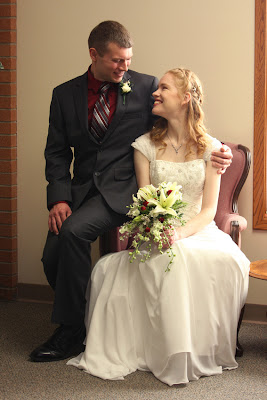
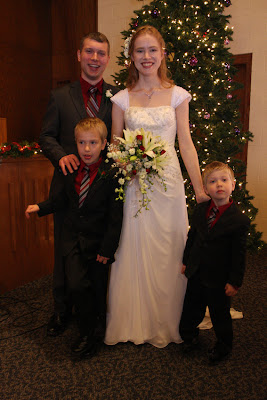
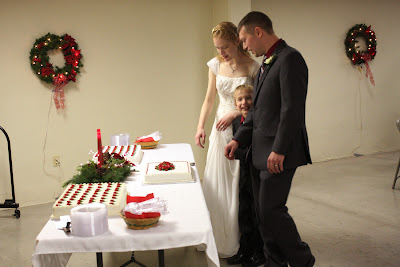
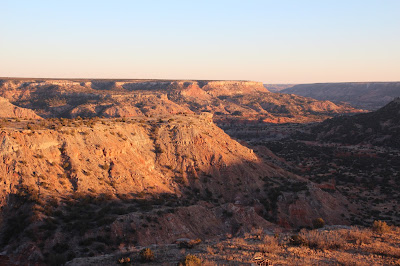
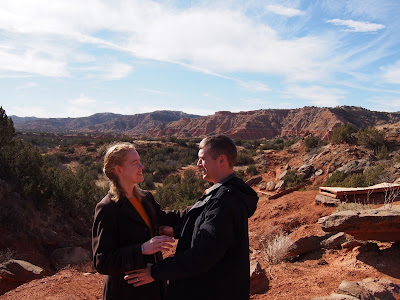
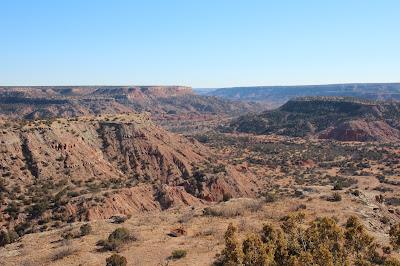
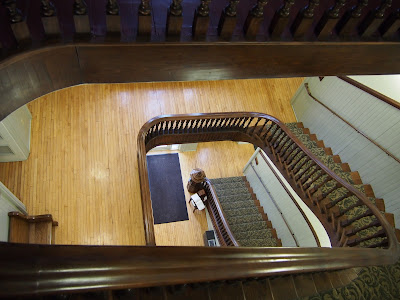
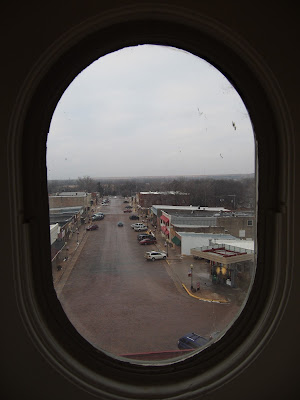
One week before the wedding, to Laura: Mono won t just clear up right away. One week before the wedding, to me: That s going to need stitches. Yes, not long before the wedding, Laura had come down with mononucleosis and I had cut into my finger with a very sharp knife while cutting bread requiring a trip to the emergency room to get stitches. Two days before we got married, instead of moving furniture, I was getting stitches out of my finger. It wasn t the kind of week we had planned. But it was the happiest, most amazing occasion I could have ever imagined. As I wrote last month, I am richly blessed indeed. Our wedding was three days after Christmas. The church was still decorated for Christmas, with the tree in on corner, glittering stars suspended in mid-air on cables from the walls, wreaths and candles in the windows, and it was a joy-filled day. Before the ceremony, we took pictures the only part of the day Jacob and Oliver weren t thrilled with. Nevertheless, we got some fun ones. Laura and I seem to know quite a few pastors between us and not just because Laura is a pastor. My brother officiated with the wedding vows, his wife with scripture and a prayer of blessing, and the church s pastor gave the message. Laura and I wrote in our wedding program, Music has long been a thread running through both our lives. We have enjoyed singing together, playing piano and pennywhistle duets, attending concerts, and even exploring old hymnals. Music is also one of the best ways to have a conversation even a conversation with God. We wrote a page in the program about each of the hymns that were a part of the wedding, and why we picked them. The combined church choirs of my home church and Laura s church sang John Rutter s beautiful arrangement of For the Beauty of the Earth (click here to listen to a different choir). Hearing For the beauty of each hour , For the joy of human love , and Lord of all, to thee we raise this our joyful hymn of praise was perfect for the day. It was with such great happiness that we walked out of the sanctuary, a married couple, to the sound of the congregation singing Joy to the World! Jacob and Oliver were so very excited on our wedding day. They happily explored the church while waiting for things to happen. We had them help us light our unity candle, and they were pleased with that. Jacob loved his suit, which made him look just like me. And they were, of course, delighted with the cake and in the middle of it all. For our honeymoon, we managed to get two weeks of vacation, and spent about half of it at home. We had looked at various options for retreats in the country, but eventually concluded that our house is a retreat in the country, so might as well enjoy it at home. We also went to the Palo Duro Canyon area near Amarillo in the Texas panhandle, staying in a small B&B in Canyon, TX. Palo Duro is the second-largest canyon in North America, and quite colorful year-round. What a beautiful place to go for our honeymoon! By the time we got there, Laura was getting past mono, and we went for hikes in the canyon on two different days hiking a total of 10 miles, including a hike up the side of the canyon. After we got back home, on the last weekday of our honeymoon, we went back to the Flint Hills of Kansas, to some of the same places we had spent our third date. We climbed the windy staircase at the Chase County Courthouse, the oldest courthouse still in use in Kansas. And peered out its famous oval window. We found the last remnant of the old ghost town of Elk, ate at the same restaurant we had that day. It brought back wonderful memories, and it was a good day in itself. Because even though it was a gold, drizzly, overcast day in January, this time, we were married. And this year, Thanksgiving is all year.

20 January 2014

Thorsten Glaser: FOSDEM preparations done.

I ve produced several pin-on buttons to take with me to FOSDEM for giving away (as long as there are any left): Several pin-on buttons I made First row (nice projects), from left to right: MidnightBSD; Glenda, the Plan 9 bunny; Teckids e.V. Second row (The MirOS Project): mksh; the Shilouette D mon; the Triforce (Live+Install CDs for i386 and sparc, with MirGrml); the m (alternative logo, vector) Third row (things originating from tarent): Freedroidz (now a Teckids project); OSIAM (Identity and Access Management); tarent (tarent AG, tarent GmbH), who sponsored production of these buttons Hm jupp needs a button able logo!
FOSDEM meetup

Enrico Zini: terminal-emulators

Quest for a terminal emulator The requirements I need a terminal emulator. This is a checklist of the features that I need: My experience is that getting all of this to work is not being as easy as it seems, so I'm creating this page to track progress. gnome-terminal I've been happily using this for years, and it did everything I needed, until some months ago it started to open new tabs in the terminal's working directory instead of the last tab's working directory. This is a big point of frustration for me. It also started opening https urls with Firefox, although the preferred browser was Chromium. There seemed to be no way to control it: I looked for firefox or iceweasel in all gconf and dconf settings and found nothing. The browser issue was fixed by accident when I used Xfce4's settings application to change the browser from Chromium to Firefox and then back to Chromium. update, thanks to Mathieu Parent, Josh Triplett, Peter De Wachter, Julien Cristau, and Charles Plessy: It is also possible to restore the "new tab opened inside the same directory of the last tab I was in" behaviour, by enabling "run command as a login shell" so that /etc/profile.d/vte.sh is run (thanks Mathieu Parent for the link). That in turn spawned extra cleanup work in my .bashrc/.bash_profile/.profile setup, which has been randomly evolving since even before my first Debian "buzz" system. I found that it was setting PROMPT_COMMAND to something else to set the terminal title, conflicting with what vte.sh wants to do. With regards to loading /etc/profile.d/vte.sh by default, Peter De Watcher sent pointers to relevant bugs: here, here, and here. An alternative strategy is to work using the prompt rather than PROMPT_COMMAND; an example is in Josh Triplett's .bashrc from git://joshtriplett.org/git/home. Josh Triplett also said:
To fix the browser launched for URLs, you either need to use a desktop environment following GNOME's mechanism for setting the default browser, or edit ~/.local/share/applications/mimeapps.list and make sure x-scheme-handler/http, x-scheme-handler/https, and x-scheme-handler/ftp are set to your preferred browser's desktop file basename under [Added Associations].
All my issues with gnome-terminal are now gone and I'm only too happy to go back to it. rxvt-unicode-256color urxvt took some work. This is where I got with configuration:
URxvt.font: xft:Monospace-10:antialias=true
URxvt.foreground: #aaaaaa
URxvt.background: black
URxvt.scrollBar_right: true
URxvt.cursorBlink: true
URxvt.perl-ext-common: default,matcher,tabbedex
URxvt.url-launcher: /usr/bin/x-www-browser
URxvt.matcher.button: 1
URxvt.perl-lib: /home/enrico/.urxvt/perl
URxvt.color0: black
URxvt.color1: #aa0000
URxvt.color2: #00aa00umask
URxvt.color3: #aa5500
URxvt.color4: #0000aa
URxvt.color5: #aa00aa
URxvt.color6: #00aaaa
URxvt.color7: #aaaaaa
URxvt.color8: #555555
URxvt.color9: #ff5555
URxvt.color10: #55ff55
URxvt.color11: #ffff55
URxvt.color12: #5555ff
URxvt.color13: #ff55ff
URxvt.color14: #55ffff
URxvt.color15: #ffffff
I got all of the tab behaviour that I need by "customizing" the tab script (yuck github :( ). Missing sakura Configuration is in .config/sakura/sakura.conf and these bits help:
colorset1_fore=rgb(170,170,170)
colorset1_back=rgb(0,0,0)
colorset1_opacity=99
colorset2_fore=rgb(0,0,0)
colorset2_back=rgb(254,254,254)
colorset2_opacity=99
font=Monospace 10
show_always_first_tab=No
scrollbar=false
fullscreen_key=F11
palette=linux
Missing lxterminal Configuration is in .config/lxterminal/lxterminal.conf and this is relevant to me:
[general]
fontname=DejaVu Sans Mono 10
fgcolor=#aaaaaaaaaaaa
disallowbold=false
cursorblinks=true
tabpos=top
hidescrollbar=false
hidemenubar=true
hideclosebutton=true
disablef10=true
disablealt=true
Also, to open a url directly you control+click it. Missing terminator Configuration is in .config/terminator/config and this is relevant to me:
[global_config]
  use_custom_url_handler = True
  custom_url_handler = x-www-browser
  inactive_color_offset = 1.0
[keybindings]
  close_term = None
  close_window = None
  copy = None
  cycle_next = None
  cycle_prev = None
  go_down = None
  go_next = None
  go_prev = None
  go_up = None
  group_all = None
  group_tab = None
  hide_window = None
  move_tab_left = None
  move_tab_right = None
  new_tab = None
  new_terminator = None
  new_window = None
  next_tab = None
  paste = None
  prev_tab = None
  reset_clear = None
  reset = None
  resize_down = None
  resize_left = None
  resize_right = None
  resize_up = None
  rotate_ccw = None
  rotate_cw = None
  scaled_zoom = None
  search = None
  split_horiz = None
  split_vert = None
  switch_to_tab_1 = <Alt>F1
  switch_to_tab_2 = <Alt>F2
  switch_to_tab_3 = <Alt>F3
  switch_to_tab_4 = <Alt>F4
  switch_to_tab_5 = <Alt>F5
  switch_to_tab_6 = <Alt>F6
  switch_to_tab_7 = <Alt>F7
  switch_to_tab_8 = <Alt>F8
  switch_to_tab_9 = <Alt>F9
  switch_to_tab_10 = <Alt>F10
  toggle_scrollbar = None
  toggle_zoom = None
  ungroup_all = None
  ungroup_tab = None
[profiles]
  <span class="createlink">default</span>
    palette = "#000000:#aa0000:#00aa00:#aa5500:#0000aa:#aa00aa:#00aaaa:#aaaaaa:#555555:#ff5555:#55ff55:#ffff55:#5555ff:#ff55ff:#55ffff:#ffffff"
    copy_on_selection = True
    icon_bell = False
    background_image = None
    show_titlebar = False
Missing update: Richard Hartmann pointed out that terminator's upstream maintainer now changed after the old one didn't have time any more, and it should have a release with a ton of improvements anytime soon. xfce4-terminal Configuration is in .config/xfce4/terminal, and this is relevant to me: terminalrc:
[Configuration]
FontName=Monospace 10
MiscAlwaysShowTabs=FALSE
MiscBell=FALSE
MiscBordersDefault=TRUE
MiscCursorBlinks=FALSE
MiscCursorShape=TERMINAL_CURSOR_SHAPE_BLOCK
MiscDefaultGeometry=80x24
MiscInheritGeometry=FALSE
MiscMenubarDefault=FALSE
MiscMouseAutohide=FALSE
MiscToolbarDefault=FALSE
MiscConfirmClose=TRUE
MiscCycleTabs=TRUE
MiscTabCloseButtons=TRUE
MiscTabCloseMiddleClick=TRUE
MiscTabPosition=GTK_POS_TOP
MiscHighlightUrls=TRUE
ShortcutsNoMenukey=TRUE
ShortcutsNoMnemonics=TRUE
ColorForeground=#aaaaaaaaaaaa
accels.scm:
(gtk_accel_path "<Actions>/terminal-window/goto-tab-1" "<Alt>F1")
(gtk_accel_path "<Actions>/terminal-window/goto-tab-2" "<Alt>F2")
(gtk_accel_path "<Actions>/terminal-window/goto-tab-3" "<Alt>F3")
(gtk_accel_path "<Actions>/terminal-window/goto-tab-4" "<Alt>F4")
(gtk_accel_path "<Actions>/terminal-window/goto-tab-5" "<Alt>F5")
(gtk_accel_path "<Actions>/terminal-window/goto-tab-6" "<Alt>F6")
(gtk_accel_path "<Actions>/terminal-window/goto-tab-7" "<Alt>F7")
(gtk_accel_path "<Actions>/terminal-window/goto-tab-8" "<Alt>F8")
(gtk_accel_path "<Actions>/terminal-window/goto-tab-9" "<Alt>F9")
(gtk_accel_path "<Actions>/terminal-window/goto-tab-10" "<Alt>F10")
(gtk_accel_path "<Actions>/terminal-window/goto-tab-11" "<Alt>F11")
(gtk_accel_path "<Actions>/terminal-window/goto-tab-12" "<Alt>F12")
update: Yves-Alexis Perez points out that to disable the F1 for help in the terminal, you need to remove the accelerator. I tried this and this and didn't have success, but I confess I did not dig too much into it. Although xfce4-terminal -e does not work as I expect, xfce4-terminal registers a wrapper for x-terminal-emulator that does the right thing with respect to -e (also thanks Yves-Alexis Perez). Missing roxterm Configuration is in .config/roxterm.sourceforge.net/ split in several files corresponding to profiles. This is a reasonable starting point for me: Profiles/Default:
[roxterm profile]
colour_scheme=Default
disable_menu_access=1
disable_menu_shortcuts=1
disable_tab_menu_shortcuts=0
tab_close_btn=0
hide_menubar=1
always_show_tabs=0
Colours/Default:
[roxterm colour scheme]
0=#000000000000
1=#aaaa00000000
2=#0000aaaa0000
3=#aaaa55550000
4=#00000000aaaa
5=#aaaa0000aaaa
6=#0000aaaaaaaa
7=#aaaaaaaaaaaa
8=#555555555555
9=#ffff55555555
10=#5555ffff5555
11=#ffffffff5555
12=#55555555ffff
13=#ffff5555ffff
14=#5555ffffffff
15=#ffffffffffff
palette_size=16
foreground=#aaaaaaaaaaaa
background=#000000000000
cursor=#cccccccccccc
bold=
dim=
Shortcuts/Default:
[roxterm shortcuts scheme]
File/New Window=
File/New Tab=
File/Close Window=
File/Close Tab=
Tabs/Previous Tab=
Tabs/Next Tab=
Edit/Copy=
Edit/Paste=
View/Zoom In=<Control>plus
View/Zoom Out=<Control>minus
View/Normal Size=<Control>0
View/Full Screen=F11
View/Scroll Up One Line=
View/Scroll Down One Line=
Help/Help=
Edit/Copy & Paste=
Search/Find...=
Search/Find Next=
Search/Find Previous=
File/New Window With Profile/Default=
File/New Tab With Profile/Default=
Tabs/Select_Tab_0=<Alt>F1
Tabs/Select_Tab_1=<Alt>F2
Tabs/Select_Tab_2=<Alt>F3
Tabs/Select_Tab_3=<Alt>F4
Tabs/Select_Tab_4=<Alt>F5
Tabs/Select_Tab_5=<Alt>F6
Tabs/Select_Tab_6=<Alt>F7
Tabs/Select_Tab_7=<Alt>F8
Tabs/Select_Tab_8=<Alt>F9
Tabs/Select_Tab_9=<Alt>F9
Tabs/Select_Tab_10=<Alt>F10
Tabs/Select_Tab_11=<Alt>F11
Tabs/Select_Tab_12=<Alt>F12
Global:
[roxterm options]
edit_shortcuts=0
prefer_dark_theme=1
colour_scheme=Default
warn_close=1
Missing Nothing of my initial requirements seems to be missing, really, so I'm sticking to it for a while to see what happens. The first itch to scratch is that when the menubar is hidden, the popup menu becomes the entire menubar contents, which does not fit the general use case to have a contextual menu with the most common shortcuts. I'll just declare it useless and get myself used to some new hotkey for starting a new terminal. update: after fixing my issues with gnome-terminal I've switched back to gnome-terminal: its interface feels less clunky as I'm already used to it. Other references Guillem Jover made a similar analysis in 2009, it can be found here. Thomas Koch mentioned that termit should be able to do all I need, and is scriptable in Lua. I like the sound of that, and it's definitely one I should look next time I find myself shopping for terminal emulators.

19 January 2014

Daniel Pocock: Debian solving Drupal's third-party library challenge

The tremendously successful Drupal community observes stringent requirements about many things, in particular, licensing and the prohibition of bundling third-party JavaScript. While these policies may seem onerous at first glance, it turns out there is another project with a written guarantee to provide third-party code in a form that meets the expectations of Drupal and does so in a way that completely automates all that tedious effort into one-click oblivion. I'm talking about the Debian GNU/Linux operating system. Drupal's libraries module The libraries module for Drupal appeared as an initial attempt to help track third-party JavaScript. The module has been available in Debian for almost a year and has recently been provided in the wheezy-backports distribution for people running the stable version of Debian. The library provides a standard way for other modules to reference third-party JavaScript but it still leaves the web master with some manual work to go out and download all the necessary JavaScript and copy it into the right place. This is where Debian comes to the rescue. Using the module in practice I've recently uploaded JSCommunicator to Debian and wanted to provide a convenient way for people to get it in Drupal. Therefore, in addition to providing the JSCommunicator packages, I created an extra package, drupal7-mod-jscommunicator. JSCommunicator itself depends on other JavaScript, specifically, the JsSIP library. I repeated the same process for JsSIP. This gives us the following collection of four related packages:
Third-party library Library itself Drupal module, packaged
JSCommunicator libjs-jscommunicator drupal7-mod-jscommunicator
JsSIP libjs-jssip drupal7-mod-jssip
If you explore the package details in Debian's package catalog you will notice that each package depends on the other packages it requires. Debian's package management utility, apt-get, can transitively resolve all the relationships between this set of packages. In fact, on a newly built server, you can simply run the command:
apt-get install drupal7-mod-jscommunicator
and the apt-get utility will install Apache, MySQL, Drupal itself, the libraries module, all the related JavaScript libraries and the final Drupal module of JSCommunicator itself. It really is that easy. Here is an example of the output displayed by the command on a freshly built server:
# apt-get -d install drupal7-mod-jscommunicator
Reading package lists... Done
Building dependency tree       
Reading state information... Done
The following extra packages will be installed:
  apache2 apache2-bin apache2-data curl dbconfig-common drupal7
  drupal7-mod-jssip drupal7-mod-libraries fontconfig-config fonts-dejavu-core
  javascript-common libaio1 libapache2-mod-php5 libapr1 libaprutil1
  libaprutil1-dbd-sqlite3 libaprutil1-ldap libarchive-extract-perl libc6
  libcurl3 libdbd-mysql-perl libdbi-perl libedit2 libfontconfig1 libgcrypt11
  libgd3 libhtml-template-perl libjbig0 libjpeg8 libjs-jssip libjson-c2
  liblocale-gettext-perl liblog-message-simple-perl liblua5.1-0
  libmodule-pluggable-perl libmysqlclient18 libonig2 libperl4-corelibs-perl
  libpng12-0 libpod-latex-perl libqdbm14 librtmp0 libssh2-1 libterm-ui-perl
  libtext-charwidth-perl libtext-iconv-perl libtext-soundex-perl libtiff5
  libuuid-perl libvpx1 libxml2 libxpm4 locales mysql-client mysql-client-5.5
  mysql-common mysql-server mysql-server-5.5 mysql-server-core-5.5 perl
  perl-base perl-modules php5 php5-cli php5-common php5-gd php5-json
  php5-mysql php5-readline ssl-cert wwwconfig-common
Suggested packages:
  apache2-doc apache2-suexec-pristine apache2-suexec-custom apache2-utils
  php-pear glibc-doc libclone-perl libmldbm-perl libnet-daemon-perl
  libplrpc-perl libsql-statement-perl rng-tools libgd-tools
  libipc-sharedcache-perl libterm-readkey-perl tinyca perl-doc
  libterm-readline-gnu-perl libterm-readline-perl-perl make libb-lint-perl
  libcpanplus-dist-build-perl libcpanplus-perl libfile-checktree-perl
  liblog-message-perl libobject-accessor-perl php5-user-cache
  openssl-blacklist postgresql-client
The following NEW packages will be installed:
  apache2 apache2-bin apache2-data curl dbconfig-common drupal7
  drupal7-mod-jscommunicator drupal7-mod-jssip drupal7-mod-libraries
  fontconfig-config fonts-dejavu-core javascript-common libaio1
  libapache2-mod-php5 libapr1 libaprutil1 libaprutil1-dbd-sqlite3
  libaprutil1-ldap libarchive-extract-perl libcurl3 libdbd-mysql-perl
  libdbi-perl libfontconfig1 libgd3 libhtml-template-perl libjbig0 libjpeg8
  libjs-jssip libjson-c2 liblog-message-simple-perl liblua5.1-0
  libmodule-pluggable-perl libmysqlclient18 libonig2 libperl4-corelibs-perl
  libpng12-0 libpod-latex-perl libqdbm14 librtmp0 libssh2-1 libterm-ui-perl
  libtext-soundex-perl libtiff5 libvpx1 libxpm4 mysql-client mysql-client-5.5
  mysql-common mysql-server mysql-server-5.5 mysql-server-core-5.5 php5
  php5-cli php5-common php5-gd php5-json php5-mysql php5-readline ssl-cert
  wwwconfig-common
The following packages will be upgraded:
  libc6 libedit2 libgcrypt11 liblocale-gettext-perl libtext-charwidth-perl
  libtext-iconv-perl libuuid-perl libxml2 locales perl perl-base perl-modules
12 upgraded, 60 newly installed, 0 to remove and 222 not upgraded.
Need to get 37.2 MB of archives.
After this operation, 152 MB of additional disk space will be used.
Do you want to continue [Y/n]? 
Libraries API in Drupal 8 Contrary to an earlier version of this blog, the libraries module is not joining the core in Drupal 8 however its use has been strongly encouraged for any new modules submitted through the Drupal community approval process. This means there will be further opportunity for Drupal users to consolidate on their use of Debian to completely automate the management of all third-party libraries and modules throughout their Drupal system(s).

18 January 2014

Jonathan McDowell: Fixing my parents' ADSL

I was back at my parents' over Christmas, like usual. Before I got back my Dad had mentioned they'd been having ADSL stability issues. Previously I'd noticed some issues with keeping a connection up for more than a couple of days, but it had got so bad he was noticing problems during the day. The eventual resolution isn't going to surprise anyone who's dealt with these things before, but I went through a number of steps to try and improve things. Firstly, I arranged for a new router to be delivered before I got back. My old Netgear DG834G was still in use and while it didn't seem to have been the problem I'd been meaning to get something with 802.11n instead of the 802.11g it supports for a while. I ended up with a TP-Link TD-W8980, which has dual band wifi, ADSL2+, GigE switch and looked to have some basic OpenWRT support in case I want to play with that in the future. Switching over was relatively simple and as part of that procedure I also switched the ADSL microfilter in use (I've seen these fail before with no apparent cause). Once the new router was up I looked at trying to get some line statistics from it. Unfortunately although it supports SNMP I found it didn't provide the ADSL MIB, meaning I ended up doing some web scraping to get the upstream/downstream sync rates/SNR/attenuation details. Examination of these over the first day indicated an excessive amount of noise on the line. The ISP offer the ability in their web interface to change the target SNR for the line. I increased this from 6db to 9db in the hope of some extra stability. This resulted in a 2Mb/s drop in the sync speed for the line, but as this brought it down to 18Mb/s I wasn't too worried about that. Watching the stats for a further few days indicated that there were still regular periods of excessive noise, so I removed the faceplate from the NTE5 master BT socket, removing all extensions from the line. This resulted in regaining the 2Mb/s that had been lost from increasing the SNR target, and after watching the line for a few days confirmed that it had significantly decreased the noise levels. It turned out that the old external ringer that was already present on the line when my parents' moved in was still connected, although it had stopped working some time previously. Also there was an unused and much spliced extension in place. Removed both of these and replacing the NTE5 faceplate led to a line that was still stable. At the time of writing the connection has been up since before the new year, significantly longer than it had managed for some time. As I said at the start I doubt this comes as a surprise to anyone who's dealt with this sort of line issue before. It wasn't particularly surprising to me (other than the level of the noise present), but I went through each of the steps to try and be sure that I had isolated the root cause and could be sure things were actually better. It turned out that doing the screen scraping and graphing the results was a good way to verify this. Observe: adsl-noise.png The blue/red lines indicate the SNR for the upstream and downstream links - the initial lower area is when this was set to a 6db target, then later is a 9db target. Green are the forward error correction errors divided by 100 (to make everything fit better on the same graph). These are correctable, but still indicate issues. Yellow are CRC errors, indicating something that actually caused a problem. They can be clearly seen to correlate with the FEC errors, which makes sense. Notice the huge difference removing the extensions makes to both of these numbers. Also notice just how clear graphing the data makes things - it was easy to show my parents' the graph and indicate how things had been improved and should thus be better.

Next.

Previous.