Search Results: "tim"

1 January 2014

Christian Perrier: [life] [running] 2013 summary

Yet another yearly summary of my running activities. As I already explained, now running took precedence over free software activities as you'll notice below... So, what happened on that front in 2013 for running bubulle? I finally managed to run 4603 km during the year, which is 1700km more than 2012. Definitively an explosion as I actually ran over 12.5km every day. I added to this 206km with my moutain bike, all of them achieved during December while I was (and still am) suffering from an injury (fatigue fracture). These 4603km were covered in 458 hours, so a bit over 19 days running and very very slightly over 10km/h. It seems that my favourite race type choice is obvious, here: I'm, by very far, privileging, trail races, either in the country or forests in my neighbourhood....or in moutains. As a result, also, the combined positive climb is faily high, too. Though harder to estimate than distance and time, I end up with about 72,900 meters positive climb (to be compared to last year's 33,000 meters...:-)). Clearly, my summer in moutains made the difference, here.... The longest time period without running, this year, has been 3 days. That's really insane...:-). Particularly when one notices that I happened to run *every day* during 40 consecutive days at one moment, between August and September. Who says that running is indeed a full part of my life? To be honest, I actually didn't run since December 11th (while writing this on January 1st) because of my tibia injury...but I did bike, so that's still some kind of sports, right? Indeed, there have been 282 days in this year where I ran (or biked) at least once. Last year was 205 so....drug addiction is still increasing. Most active month: November with 471km. Less active month: February with 334km (which is indeed more than 2012 most active month..:-)) This year was also a year of records: I ran 14 official races during the year : How about next^W this year? Well, my season's peaks are currently being secured: No marathon as of now...:-). Or, indeed one (Paris in April), but more for fun : I hope to complete it in....less than 5 hours...but still in Spongebob Squarepants suit. You may want to watch TV on April 6th..:-) As I wrote last year : all this of course is assuming that no injury comes up. I currently need to recover from the current one, though it doesn't seem as bad as it seemed a few weeks ago. We'll see on January 1st 2015...:-)

Vincent Bernat: Testing infrastructure with serverspec

Checking if your servers are configured correctly can be done with IT automation tools like Puppet, Chef, Ansible or Salt. They allow an administrator to specify a target configuration and ensure it is applied. They can also run in a dry-run mode and report servers not matching the expected configuration. On the other hand, serverspec is a tool to bring the well known RSpec, a testing tool for the Ruby programming language frequently used for test-driven development, to the infrastructure world. It can be used to remotely test server state through an SSH connection. Why one would use such an additional tool? Many things are easier to express with a test than with a configuration change, like for example checking that a service is correctly installed by checking it is listening to some port.

Getting started Good knowledge of Ruby may help but is not a prerequisite to the use of serverspec. Writing tests feels like writing what we expect in plain English. If you think you need to know more about Ruby, here are two short resources to get started: serverspec s homepage contains a short and concise tutorial on how to get started. Please, read it. As a first illustration, here is a test checking a service is correctly listening on port 80:
describe port(80) do
  it   should be_listening  
end
The following test will spot servers still running with Debian Squeeze instead of Debian Wheezy:
describe command("lsb_release -d") do
  it   should return_stdout /wheezy/  
end
Conditional tests are also possible. For example, we want to check the miimon parameter of bond0, but only when the interface is present:
has_bond0 = file('/sys/class/net/bond0').directory?
# miimon should be set to something other than 0, otherwise, no checks
# are performed.
describe file("/sys/class/net/bond0/bonding/miimon"), :if => has_bond0 do
  it   should be_file  
  its(:content)   should_not eq "0\n"  
end
serverspec comes with a complete documentation of available resource types (like port and command) that can be used after the keyword describe. When a test is too complex to be expressed with simple expectations, it can be specified with arbitrary commands. In the below example, we check if memcached is configured to use almost all the available system memory:
# We want memcached to use almost all memory. With a 2GB margin.
describe "memcached" do
  it "should use almost all memory" do
    total = command("vmstat -s   head -1").stdout #  
    total = /\d+/.match(total)[0].to_i
    total /= 1024
    args = process("memcached").args #  
    memcached = /-m (\d+)/.match(args)[1].to_i
    (total - memcached).should be > 0
    (total - memcached).should be < 2000
  end
end
A bit more arcane, but still understandable: we combine arbitrary shell commands (in ) and use of other serverspec resource types (in ).

Advanced use Out of the box, serverspec provides a strong fundation to build a compliance tool to be run on all systems. It comes with some useful advanced tips, like sharing tests among similar hosts or executing several tests in parallel. I have setup a GitHub repository to be used as a template to get the following features:
  • assign roles to servers and tests to roles;
  • parallel execution;
  • report generation & viewer.

Host classification By default, serverspec-init generates a template where each host has its own directory with its unique set of tests. serverspec only handles test execution on remote hosts: the test execution flow (which tests are executed on which servers) is delegated to some Rakefile1. Instead of extracting the list of hosts to test from a directory hiearchy, we can extract it from a file (or from an LDAP server or from any source) and attach a set of roles to each of them:
hosts = File.foreach("hosts")
  .map    line  line.strip  
  .map do  host 
   
    :name => host.strip,
    :roles => roles(host.strip),
   
end
The roles() function should return a list of roles for a given hostname. It could be something as simple as this:
def roles(host)
  roles = [ "all" ]
  case host
  when /^web-/
    roles << "web"
  when /^memc-/
    roles << "memcache"
  when /^lb-/
    roles << "lb"
  when /^proxy-/
    roles << "proxy"
  end
  roles
end
In the snippet below, we create a task for each server as well as a server:all task that will execute the tests for all hosts (in ). Pay attention, in , at how we attach the roles to each server.
namespace :server do
  desc "Run serverspec to all hosts"
  task :all => hosts.map    h  h[:name]   #  
  hosts.each do  host 
    desc "Run serverspec to host # host[:name] "
    ServerspecTask.new(host[:name].to_sym) do  t 
      t.target = host[:name]
      #  : Build the list of tests to execute from server roles
      t.pattern = './spec/ ' + host[:roles].join(",") + ' /*_spec.rb'
    end
  end
end
You can check the list of tasks created:
$ rake -T
rake check:server:all      # Run serverspec to all hosts
rake check:server:web-10   # Run serverspec to host web-10
rake check:server:web-11   # Run serverspec to host web-11
rake check:server:web-12   # Run serverspec to host web-12
Then, you need to modify spec/spec_helper.rb to tell serverspec to fetch the host to test from the environment variable TARGET_HOST instead of extracting it from the spec file name.

Parallel execution By default, each task is executed when the previous one has finished. With many hosts, this can take some time. rake provides the -j flag to specify the number of tasks to be executed in parallel and the -m flag to apply parallelism to all tasks:
$ rake -j 10 -m check:server:all

Reports rspec is invoked for each host. Therefore, the output is something like this:
$ rake spec
env TARGET_HOST=web-10 /usr/bin/ruby -S rspec spec/web/apache2_spec.rb spec/all/debian_spec.rb
......
Finished in 0.99715 seconds
6 examples, 0 failures
env TARGET_HOST=web-11 /usr/bin/ruby -S rspec spec/web/apache2_spec.rb spec/all/debian_spec.rb
......
Finished in 1.45411 seconds
6 examples, 0 failures
This does not scale well if you have dozens or hundreds of hosts to test. Moreover, the output is mangled with parallel execution. Fortunately, rspec comes with the ability to save results in JSON format. Those per-host results can then be consolidated into a single JSON file. All this can be done in the Rakefile:
  1. For each task, set rspec_opts to --format json --out ./reports/current/# target .json. This is done automatically by the subclass ServerspecTask which also handles passing the hostname in an environment variable and a more concise and colored output.
  2. Add a task to collect the generated JSON files into a single report. The test source code is also embedded in the report to make it self-sufficient. Moreover, this task is executed automatically by adding it as a dependency of the last serverspec-related task.
Have a look at the complete Rakefile for more details on how this is done. A very simple web-based viewer can handle those reports2. It shows the test results as a matrix with failed tests in red: Report viewer example Clicking on any test will display the necessary information to troubleshoot errors, including the test short description, the complete test code, the expectation message and the backtrace: Report viewer showing detailed error I hope this additional layer will help making serverspec another feather in the IT cap, between an automation tool and a supervision tool.

  1. A Rakefile is a Makefile where tasks and their dependencies are described in plain Ruby. rake will execute them in the appropriate order.
  2. The viewer is available in the GitHub repository in the viewer/ directory.

Vincent Fourmond: Rubyforge is dead, but ctioga2 goes on...

In the light of the frequent recent downtimes of rubyforge, and thanks to the information from @copiousfreetime, I finally decided to move the hosting of ctioga2 away from rubyforge, to sourceforge. Transition went smooth, git is now the only VCS. Code is hosted at sourceforge and mirrored at github.
Work goes on on ctioga2. I've recently implemented a decent support for histograms. It is already much more powerful than the one in the old ctioga, but it is far from being feature-full. Here's a preview.I'm slowly preparing a new release for ctioga2, that would incorporate quite some fixes since the last time, and quite a few nice features in addition to the histograms. Stay tuned !

Russ Allbery: Review: The Female Man

Review: The Female Man, by Joanna Russ
Publisher: Beacon
Copyright: 1975
Printing: 1986
ISBN: 0-8070-6299-5
Format: Trade paperback
Pages: 214
The Female Man is one of the most famous novels of feminist science fiction, written by a giant of the field. Joanna Russ was one of the strongest writers of the first era of explicitly feminist SF and one of the most challenging. Along with Alice Sheldon (James Tiptree, Jr.) and Sheri Tepper, she's probably the best known author whose approach tended towards the directly confrontational. She was also a noted essayist, critic, and reviewer; her book How to Suppress Women's Writing is one of the most famous works of feminist literary criticism. That said, I wasn't sure what to expect from this book. I'd heard that it was about four different women: Jeannine, Joanna, Janet, and Jael. They're parallels of sorts but from far different cultures, alternate worlds displaced in time. I'd also heard that it was full of biting, accurate sarcasm, which is certainly the case. This is a book written from a place of righteous anger combined with keen social observation and a desire to point out how different the world could be. And how toxic male behavior towards women currently is. What it's not, however, is much of a novel, in the sense of having a clear plot that carries the reader through the book. There is a story of sorts, which revolves around the appearance of Janet in Joanna's time. Janet is a native of Whileaway, an alternate future Earth in which there are no men at all and social organization is significantly different. We get a fairly detailed description of her life and of some Whileaway customs over the course of the book. But they're mixed with excerpts from the lives of both Jeannine (from an alternate past in which the Great Depression never ended) and Joanna. If Janet's story is a sort of utopian alternate future, following the basic model of female separatist societies, Jeannine's is the dystopia drawn from our past. She's locked entirely into traditional gender roles and the desire to catch a man and be a wife. I found her the hardest character to read about by far, largely because she locks herself into the worst constraints of that role. She's almost entirely passive, and she's devoted to a man for whom it's difficult to have any respect at all. Janet is interesting in part because she's not particularly exceptional in either ability or intelligence. She just reflects the Whileaway culture, which leads to some sharp conflicts with the norms of Joanna's time. It's a very effective tactic for alienating the reader from current gender roles (or, at least, roles from the 1970s) and showing how absurd they appear with a different set of starting assumptions. Russ makes the point clearly; this is not a book that tends towards the subtle, although it can be a little hard to track the characters' progress through alternate timelines. Towards the end of the book, they meet the fourth character. (This is not really the sort of book that is possible to spoil by summary.) Jael is by far the most aggressive of any of them, the closest that any of them come to the caricature of a "man-hating feminist." One of the strengths of The Female Man is that, by the time the story reaches her, I at least was feeling quite a lot of sympathy towards her aggressively violent approach, after watching Joanna be put down and Jeannine simper ineffectually. However, it's worth nothing that Janet, the representative of the supposed utopia, does not agree with Jael or her methods, and the relationship between their worlds is interestingly complex. None of the four characters are exactly wrong (although Jeannine comes close); none of them are entirely right either. They're all struggling in different ways with how to define femininity. While the quiet and simplicity of Janet's world has definite appeal, it's the sort of utopia that one isn't sure one would actually want. And Jael has some pointed commentary on how wanting such a world is one thing, but the acts required to create it is quite another. I can see why this book is so well-known. Many of the scenes that show gender relations and male behavior are both painful and funny. Reading it forty years after it was written, it's clear that social norms have changed; men do and say things here that they would no longer be able to get away with, that are clearly from another era. But it's also clear that some of the underlying attitudes have not changed, just been cloaked in different language. And Russ's bluntness here is refreshing: this book does not pull its punches, both in openly ridiculing sexist behavior, and in showing how oppressive it is for women. That said, it didn't work as a story for me, in part because the plot is sketchy at best. It's a collection of individual excerpts and commentary, only some of which are shaped like a story. Much of it feels stream of consciousness, and when cut between three different viewpoints, it's also occasionally confusing. There are also a few too-obvious characters: some of the men, particularly in Jael's section, but also Jeannine, who I never liked even after she starts changing her mind about women's roles. I wanted a bit more story and a bit less introspection. I think this is an important book that's worth reading, and sadly it's not as obsolete as one would like. But I don't think it's entirely successful as a novel. Best treated as a piece of literary history. Rating: 6 out of 10

Andrew Pollock: [life] It's a new year, it's a new me

Well, it's 2014. The annus horribilus of 2013 is behind me. I'm entering 2014 in a much better place (on multiple levels) than I did for 2013. I'm positively excited to see what 2014 brings me. I was very fortunate to have someone I looked up to reach out to help me when my marriage fell apart. One of the things he said to me was "A year from now, you won't recognise yourself". He was right. I am such a different person today than I was a year ago. I'm happier, fitter, more self-confident. I'm focusing on different things in my life. One thing that has been a casualty, has been my geeky pursuits. There were a few times last year where I questioned if I was still a geek. I am. I've just deprioritised it. Instead, I've been putting my own self-care and my daughter above all else, meaning that my running has probably been the one thing I'd call a "hobby" at the moment. I've got some stuff in the pipeline that I'm not quite ready to write about yet, but I'm expecting a rearrangement of my time that will hopefully allow for some more geeky endeavours in 2014. I'm also hoping I can regain some momentum on blogging. Here's what I'd say my goals are, going into 2014: plus some other stuff I'm not ready to talk about yet.

31 December 2013

Paul Tagliamonte: Hy 0.9.12 released

Good morning all my hungover friends. New Hy release - sounds like the perfect thing to do while you re waiting for your headaches to go away. Here s a short-list of the changes (from NEWS) - enjoy!
Changes from Hy 0.9.11
   tl;dr:
    0.9.12 comes with some massive changes,
    We finally took the time to implement gensym, as well as a few
    other bits that help macro writing. Check the changelog for
    what exactly was added. 
    
    The biggest feature, Reader Macros, landed later
    in the cycle, but were big enough to warrent a release on it's
    own. A huge thanks goes to Foxboron for implementing them
    and a massive hug goes out to olasd for providing ongoing
    reviews during the development.
    
    Welcome to the new Hy contributors, Henrique Carvalho Alves,
    Kevin Zita and Kenan B l kba . Thanks for your work so far,
    folks!
    
    Hope y'all enjoy the finest that 2013 has to offer,
      - Hy Society
    * Special thanks goes to Willyfrog, Foxboron and theanalyst for writing
      0.9.12's NEWS. Thanks, y'all! (PT)
    [ Language Changes ]
    * Translate foo? -> is_foo, for better Python interop. (PT)
    * Reader Macros!
    * Operators + and * now can work without arguments
    * Define kwapply as a macro
    * Added apply as a function
    * Instant symbol generation with gensym
    * Allow macros to return None
    * Add a method for casting into byte string or unicode depending on python version
    * flatten function added to language
    * Add a method for casting into byte string or unicode depending on python version
    * Added type coercing to the right integer for the platform
    [ Misc. Fixes ]
    * Added information about core team members
    * Documentation fixed and extended
    * Add astor to install_requires to fix hy --spy failing on hy 0.9.11.
    * Convert stdout and stderr to UTF-8 properly in the run_cmd helper.
    * Update requirements.txt and setup.py to use rply upstream.
    * tryhy link added in documentation and README
    * Command line options documented
    * Adding support for coverage tests at coveralls.io
    * Added info about tox, so people can use it prior to a PR
    * Added the start of hacking rules
    * Halting Problem removed from example as it was nonfree
    * Fixed PyPI is now behind a CDN. The --use-mirrors option is deprecated.
    * Badges for pypi version and downloads.
    [ Syntax Fixes ]
    * get allows multiple arguments
    [ Bug Fixes ]
    *  OSX: Fixes for readline Repl problem which caused HyREPL not allowing 'b'
    * Fix REPL completions on OSX
    *  Make HyObject.replace more resilient to prevent compiler breakage.
    [ Contrib changes ]
    * Anaphoric macros added to contrib
    * Modified eg/twisted to follow the newer hy syntax
    * Added (experimental) profile module

Chris Lamb: 2013: Selected highlights

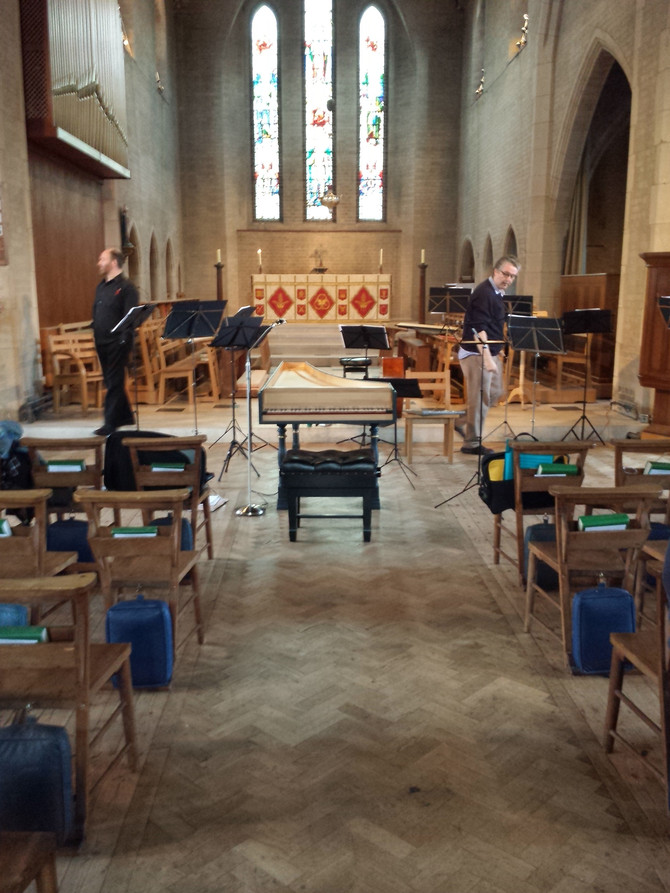
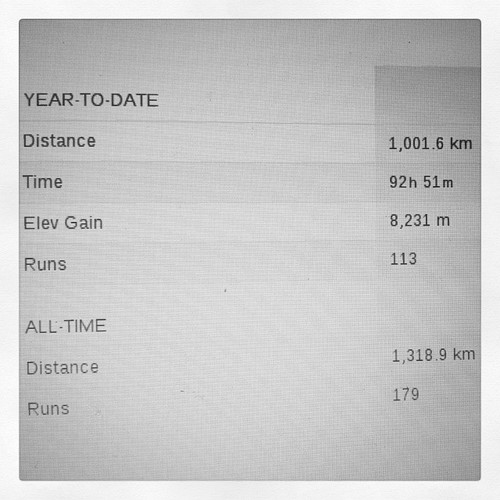
January https://chris-lamb.co.uk/wp-content/2013/highlights/01.jpg Entered monthly 10km races in Regent's Park, reducing my time from 55:07 in January 4th to 43:28 on December 1st. February https://chris-lamb.co.uk/wp-content/2013/highlights/02.jpg Entered the Hell of Ashdown cyclosportive in sub-zero conditions for over 100 miles & 7,500 ft of elevation (actual photo). March https://chris-lamb.co.uk/wp-content/2013/highlights/03.jpg Had my lute returned after it was damaged. April https://chris-lamb.co.uk/wp-content/2013/highlights/04.jpg Had a time-trial bike built and raced my first triathlon, duathlon and aquathlon. May https://chris-lamb.co.uk/wp-content/2013/highlights/05.jpg More biking, including a long ride with my brother. Also performed on the viola da gamba in Bach's St John Passion with Belsize Baroque. June https://chris-lamb.co.uk/wp-content/2013/highlights/06.jpg Two big concerts: Monn's Cello concerto in G minor with the Zadok Baroque Orchestra followed by the Blackfriars Quartet performing Shostakovich's String Quartet No. 8. July https://chris-lamb.co.uk/wp-content/2013/highlights/07.jpg Amongst more triathlon preperation, I performed in a Linden Baroque concert of Handel's Israel in Egypt. August https://chris-lamb.co.uk/wp-content/2013/highlights/08.jpg Raced my biggest event of the year a "Half-Ironman" triathlon hitting my time goal. September https://chris-lamb.co.uk/wp-content/2013/highlights/09.jpg Whilst procrastinating about writing some letters, I created a small service to send letters without a printer. October https://chris-lamb.co.uk/wp-content/2013/highlights/10.jpg Started cooking a little more adventurously. November https://chris-lamb.co.uk/wp-content/2013/highlights/11.jpg Performed Geminiani's arrangement of Corelli's La Folia in the Fitzwilliam Museum with Le Petit Orchestre. December https://chris-lamb.co.uk/wp-content/2013/highlights/12.jpg Ramped up my running volume so I could go over 1000km for the year. (Strava profile)

30 December 2013

Russ Allbery: Init system evaluation thanks

Most people who follow Debian are probably aware that we're currently in the middle of a major debate over the future of Debian's init system. Over the past month, and particularly over the past week, I undertook an evaluation of two of the options in that debate, using one of my packages as a test bed. I also did a lot of reading, filed a few bugs, and asked a bunch of questions. That's an extension of the questions I've been asking and discussions I've been participating in around init systems for the past year plus. I have been keeping my opinions and writeups confined to the relevant Techncial Committee bug report so that they can be read in context with their rebuttals. There are a lot of thoughtful and well-informed opinions here, of which mine are only one, and several of my conclusions have been inaccurate or at least not complete, so the context is important. You can find the full traffic in the Technical Committee bug. Most of the discussion, in a threaded view, is in the Technical Committee archives for December. However, in one of the messages I sent today, I tried to show my appreciation for the people who have assisted with this evaluation over the past week, month, and years, and I think that section deserves broader distribution outside of the ongoing discussion. It is therefore included below. Throughout this evaluation process, my interactions with upstart and systemd upstream developers and Debian packagers have been uniformly excellent. Bug reports filed against both systemd and upstart have received excellent and timely response, and all involved have been quite willing to explain things I've misunderstood, correct my false starts, and discuss technical and practical aspects of their designs. I was particularly impressed by the clear effort that the systemd and upstart maintainers in Debian have put into fully integrating their init systems in such a way that makes them easy to test and use with existing Debian packages. This includes but is not limited to update-rc.d support, invoke-rc.d support, status synchronization with sysvinit, past Policy discussion, and attention to upgrade paths and init-switching use cases. I also want to particularly thank the OpenRC upstream development team for their involvement in this process and their contributions to the discussion. I personally don't think that package is a good match for Debian's needs on Linux, but that's through no fault of the people involved, and I think they would be an excellent upstream if that package looked like a good fit for the needs of any of Debian's non-Linux ports. I also want to thank Petter Reinholdtsen, Roger Leigh, and everyone else who has worked on the sysvinit package over the years, the insserv conversion to dependency-based boot, and the inclusion of LSB support. If it weren't for their hard work, we would be in a far worse position than we are today. It's often hard to see people discussing the inadequacies of something into which you put years of hard work. I want to call attention to their long-term contributions to the distribution, and to the number of Debian systems that have booted through their efforts over the years.

Carl Chenet: Virtual environments with Python 3.3

Follow me on Identi.ca or Twitter One of the major features of Python 3.3 is the new venv module, allowing the creation of Python virtual environments on your system. 1. What is a virtual environment? A virtual environment is a directory dedicated to the execution of your Python applications. Activating your virtual environment will force Python to execute in this directory as the top level of this directory was the root of your file system. The virtual environments are interesting because of the independence they have toward the host they run on, especially when you want to install several versions of Python or if you want to install lots of dependencies without being the system administrator of the host. python-logo-master-v3-TM If you are a Python developer, you must know virtualenv. This really nice application offers a nice way to create Python virtual environment. Moreover it comes with pip already installed in your virtual environment, in order to install other dependencies you need in a really convenience way. Starting from Python 3.3, the module venv of the Python standard library offers the users to create virtual environments. This new feature will encourage all users to create virtual environments to develop their own Python applications, which is a good practice. Thanks to the experiences of several applications being used in the Python community, the module venv was written to be really efficient and widely available. The Python Enhancement Proposal 405 (PEP405) offers a really interesting reading if you wish to find more information about this topic. 2. Creating a virtual environment with Python 3.3 With Python 3.3 comes pyvenv-3.3, allowing to create Python virtual environment:
$ pyvenv-3.3 myvirtualenv
$ cd myvirtualenv/
$ tree .
.
  bin
    activate
    pydoc
    python -> python3.3
    python3 -> python3.3
    python3.3 -> /usr/bin/python3.3
  include
  lib
    python3.3
        site-packages
  pyvenv.cfg
As we can see, three directories were created.
$ cat pyvenv.cfg 
home = /usr/bin
include-system-site-packages = false
version = 3.3.2
Just before moving on, if you want to use the existing modules in your global site-packages directory on your system, the option system-site-packages is available. 3. Activate the virtual environment Lets activate our virtual environment. We need to use the bin/activate file in this environment:
$ source bin/activate 
(myvirtualenv) $
A change in our prompt indicated the good activation of the virtual environment. 4. Installing applications in the virtual environment But playing around with only the default Python interpreter is not really funny. Lets download pip, the Python installer, but before that we need a dependency setuptools:
(myvirtualenv) $ curl https://bitbucket.org/pypa/setuptools/raw/bootstrap/ez_setup.py -o ez_setup.py
 % Total % Received % Xferd Average Speed Time Time Time Current
 Dload Upload Total Spent Left Speed
 100 11356 100 11356 0 0 18507 0 --:--:-- --:--:-- --:--:-- 18495
(myvirtualenv) $ curl https://raw.github.com/pypa/pip/master/contrib/get-pip.py -o get-pip.py
 % Total % Received % Xferd Average Speed Time Time Time Current
 Dload Upload Total Spent Left Speed
 100 543k 100 543k 0 0 685k 0 --:--:-- --:--:-- --:--:-- 685k
Now lets install Setuptools and Pip:
(myvirtualenv) $ python3.3 ez_setup.py
 Downloading https://pypi.python.org/packages/source/s/setuptools/setuptools-2.0.tar.gz
 Extracting in /tmp/tmpxlrv7q
 Now working in /tmp/tmpxlrv7q/setuptools-2.0
 Installing Setuptools
... (lots of lines)...
Installed /tmp/myvirtualenv/lib/python3.3/site-packages/setuptools-2.0-py3.3.egg
 Processing dependencies for setuptools==2.0
 Finished processing dependencies for setuptools==2.0
(myvirtualenv) $ python3.3 get-pip.py
 Downloading/unpacking pip
 Downloading pip-1.4.1.tar.gz (445kB): 445kB downloaded
 Running setup.py egg_info for package pip
 ... (lots of lines)...
 Successfully installed pip
 Cleaning up...
Ok now we re ready to use pip to install anything we need in our virtual environment. Lets think one more second about what we did: we install the Setuptools and the Pip application inside our virtual environment, with nothing written on our main system. Now lets try to install Brebis, the fully automated backup checker, and run it in this environment:
(myvirtualenv) $ pip-3.3 install brebis
 Downloading/unpacking brebis
 Downloading brebis-0.8.tar.gz
 Running setup.py egg_info for package brebis
Installing collected packages: brebis
 Running setup.py install for brebis
 changing mode of build/scripts-3.3/brebis from 644 to 755
changing mode of /tmp/myvirtualenv/bin/brebis to 755
 Successfully installed brebis
 Cleaning up...
We re now ready to launch Brebis, executing in our virtual environment:
(myvirtualenv) $ brebis -h
usage: brebis [-h] [-c DIR] [-C DIR] [-d DELIMITER] [-g] [-G] [-l FILE]
 [-L DIR] [-O DIR] [-v] 
Fully automated backup checker
positional arguments:
 archives archives to check
optional arguments:
 -h, --help show this help message and exit
 -c DIR, --configpath DIR
 the path to the configurations
 -C DIR, --output-conf-dir DIR
 the directory to store the configuration file
 -d DELIMITER, --delimiter DELIMITER
 delimiter of the fields for the list of files
 -g, --gen-list generate a list of files inside a backup
 -G, --gen-full generate the configuration file and the list of files
 for the backup
 -l FILE, --log FILE the log file
 -L DIR, --output-list-dir DIR
 the directory to store the list of files inside an
 archive or tree
 -O DIR, --output-list-and-conf-dir DIR
 the directory to store the configuration file and the
 list of files inside an archive or tree
 -v, --version print the version of this program and exit
For more information: http://www.brebisproject.org
So we get an execution of the Brebis application inside our virtual environment, installed from our virtual environment with tools installed only in the virtual environment. That s a big step that such a feature is now included in the standard library. In the future, you will enjoy the possibility to create new virtual environments for each Python version right out of the box. Moreover, using the upgrade option of the pyvenv command, you will upgrade, if needed, your virtual environment in a really easy and straightforward way, making environments adaptable in time. What about you? What do you think about the Python 3 virtual environments and their features, given your own needs? Feel free to use the comments section of this post.

29 December 2013

Hideki Yamane: creating Ubuntu chroot becomes easier - ubuntu-archive-keyring package in Debian

Hi, I've just uploaded ubuntu-keyring source package to Debian (its RFP was posted in 26th Dec 2007 - wow 6 years ago) and it was accepted quickly (thanks to ftpmasters :-)

If you're using Debian as primary environment and need to rebuild package for Ubuntu, you'd create Ubuntu pbuilder/cowbuilder/chroot environment on your box. But you'll get an error as below.
henrich@hp:~ $ sudo cowbuilder --create --distribution saucy --mirror http://archive.ubuntu.com/ubuntu --basepath /var/cache/pbuilder/saucy
-> Invoking pbuilder
forking: pbuilder create --buildplace /var/cache/pbuilder/saucy --mirror http://archive.ubuntu.com/ubuntu --distribution saucy --no-targz --extrapackages cowdancer
I: Running in no-targz mode
I: Distribution is saucy.
I: Current time: Mon Dec 30 01:00:05 JST 2013
I: pbuilder-time-stamp: 1388332805
I: Building the build environment
I: running debootstrap
/usr/sbin/debootstrap
I: Retrieving Release
I: Retrieving Release.gpg
I: Checking Release signature
E: Release signed by unknown key (key id 3B4FE6ACC0B21F32)
E: debootstrap failed
W: Aborting with an error
pbuilder create failed
forking: rm -rf /var/cache/pbuilder/saucy

"E: Release signed by unknown key (key id 3B4FE6ACC0B21F32)", because your system doesn't know about Ubuntu release key. Okay, then "$ sudo apt-get install ubuntu-archive-keyring" and add "--debootstrapopts "--keyring /usr/share/keyrings/ubuntu-archive-keyring.gpg"" option to cowbuilder.
henrich@hp:~ $ sudo cowbuilder --create --distribution saucy --mirror http://archive.ubuntu.com/ubuntu --basepath /var/cache/pbuilder/saucy --debootstrapopts "--keyring=/usr/share/keyrings/ubuntu-archive-keyring.gpg"
-> Invoking pbuilder
forking: pbuilder create --debootstrapopts --keyring=/usr/share/keyrings/ubuntu-archive-keyring.gpg --buildplace /var/cache/pbuilder/saucy --mirror http://archive.ubuntu.com/ubuntu --distribution saucy --no-targz --extrapackages cowdancer
I: Running in no-targz mode
I: Distribution is saucy.
I: Current time: Mon Dec 30 01:06:30 JST 2013
I: pbuilder-time-stamp: 1388333190
I: Building the build environment
I: running debootstrap
/usr/sbin/debootstrap
I: Retrieving Release
I: Retrieving Release.gpg
I: Checking Release signature
I: Valid Release signature (key id 790BC7277767219C42C86F933B4FE6ACC0B21F32)
I: Retrieving Packages
I: Validating Packages
I: Resolving dependencies of required packages...
I: Resolving dependencies of base packages...
I: Checking component main on http://archive.ubuntu.com/ubuntu...
I: Retrieving apt 0.9.9.1~ubuntu3
I: Validating apt 0.9.9.1~ubuntu3
I: Retrieving base-files 6.12ubuntu4
(snip)
Good :)

note: Just add "--keyring" option (--keyring /usr/share/keyrings/ubuntu-archive-keyring.gpg) doesn't work as expected, bug?

difference with ubuntu-keyring package in Ubuntu

  • Binary package name is "ubuntu-archive-keyring", not "ubuntu-keyring". It's better to use "foobar-archive-keyring" for packages, same as debian-archive-keyring.
  • No udebs. Probably we don't need it.


Steve Kemp: A good week?

This week my small collection of sysadmin tools received a lot of attention; I've no idea what triggered it, but it ended up on the front-page of github as a "trending repository". Otherwise I've recently spent some time "playing about" with some security stuff. My first recent report wasn't deemed worthy of a security update, but it was still a fun one. From the package description rush is described as:
GNU Rush is a restricted shell designed for sites providing only limited access to resources for remote users. The main binary executable is configurable as a user login shell, intended for users that only are allowed remote login to the system at hand.
As the description says this is primarily intended for use by remote users, but if it is installed locally you can read "any file" on the local system. How? Well the program is setuid(root) and allows you to specify an arbitrary configuration file as input. The very very first thing I tried to do with this program was feed it an invalid and unreadable-to-me configuration file. Helpfully there is a debugging option you can add --lint to help you setup the software. Using it is as simple as:
shelob ~ $ rush --lint /etc/shadow
rush: Info: /etc/shadow:1: unknown statement: root:$6$zwJQWKVo$ofoV2xwfsff...Mxo/:15884:0:99999:7:::
rush: Info: /etc/shadow:2: unknown statement: daemon:*:15884:0:99999:7:::
rush: Info: /etc/shadow:3: unknown statement: bin:*:15884:0:99999:7:::
rush: Info: /etc/shadow:4: unknown statement: sys:*:15884:0:99999:7:::
..
How nice? The only mitigating factor here is that only the first token on the line is reported - In this case we've exposed /etc/shadow which doesn't contain whitespace for the interesting users, so it's enough to start cracking those password hashes. If you maintain a setuid binary you must be trying things like this. If you maintain a setuid binary you must be confident in the codebase. People will be happy to stress-test, audit, examine, and help you - just ask. Simple security issues like this are frankly embarassing. Anyway that's enough: #733505 / CVE-2013-6889.

Hideki Yamane: kernel.org stops using bz2

Many upstream provides their source as tar.xz format, and kernel.org also throw bz2 away - "Happy new year and good-bye bzip2".

Debian package (dpkg-deb) uses xz as default since 1.17.0 as I mentioned. If your package uses bz2, now it's a time to switch. And maybe it's good to ask upstream to switch from bzip2 to xz, too.

Gergely Nagy: Introducing the syslog-ng Incubator

When syslog-ng 3.5.1 was released, the existence of the syslog-ng Incubator project was already announced, but I did not go into detail as to why it exists, what is in there, how to build it, or how to use it. The documentation that exists on it is almost non-existent, and what does exist, is usually in the form of a commit message and some example files. But there's nothing on how the things in the Incubator can be used, and what problems they solve.With this post, I will try to ease the situation a little, and provide some insight on how I use some of the things in there, like the Riemann destination.About the IncubatorThe idea for the Incubator existed for a long time, the first incarnation of it was called syslog-ng module collection, and had a different scope: it was a playing field not only for new modules, but updates to existing ones too. The idea was to try out new, possibly experimental features separately from syslog-ng. That didn't work well: it was a nightmare to maintain, and even harder to use. So it never got anywhere, as the developments made there were quickly merged into syslog-ng itself anyway.Then, two years later, I had a need for a new destination, but there was no open development branch to base it against, and forking and maintaining a whole syslog-ng branch for the purpose of a single module sounded like an overkill. So the Incubator was born, from the ashes of the failed module collection.The purpose of the Incubator is to be a place of experimental modules, and an easier way to enter the world syslog-ng development. It's something with far less requirements than syslog-ng (I do not care all that much about portability when it comes to the Incubator, especially not to horrible abominations like HP-UX or AIX), less rules, and more freedom. It's meant to be more developer friendly than syslog-ng proper.It also serves as an example of developing modules completely external to syslog-ng, and parts of it will be used in future posts of mine, to demonstrate the development of new modules.Compiling & InstallationThe first thing we need to do, is to compile whatever we need from the Incubator, unless we happen to have pre-built binaries available (which are going to appear in your usual third-party syslog-ng repositories over the next few weeks). For this, at a minimum, one will need syslog-ng 3.5+ and ivykis installed, along with autotools (autoconf, automake and libtool), pkg-config, bison, and depending on which modules one needs, riemann-c-client and libmongo-client too. Most of these are available packaged in better distributions, but only in recent versions, so one may need to compile those too. They follow a very similar scheme, though.If everything is installed at the standard locations, getting the Incubator to compile is as simple as this:
$ git clone https://github.com/balabit/syslog-ng-incubator.git
$ cd syslog-ng-incubator
$ autoreconf -i
$ ./configure && make && sudo make install
If anything happens to be installed in a non-standard location, one will need to adjust PKG_CONFIG_PATH to help the configure script locate the needed libraries.Once installed (the configure script will figure out where syslog-ng modules are, and modules will be put there), syslog-ng will automatically recognise the new modules. One can make sure that this is the case by running the following command after installation:
$ syslog-ng --module-registry
The PluginsNow that we're over the hard part of compiling and installing the Incubator, lets see what is inside! I will start with the easier things, and move on to the more complicated features as we progress. That is, we'll start with some template functions, have a glance at the trigger source, then explore the rss destination, and finish off with the riemann destination.Template functionsThe Incubator gives us three new template functions, some less useful than the others, and one that's a huge, ugly hack for a problem that I ended up solving in a very different way - without the hack.These functions are the $(or) template function, which takes any number of arguments, and returns the first one that is not empty. The main use case here is that if you have, say, similarly named fields, but some messages have one, the others another, and you want to normalize it, $(or) is one way to do it:
$(or $ HOST  $ HOSTNAME  $ HOST_NAME  "<unknown>")
Another function is $(//), which does the same thing as the built-in $(/) template function: divide its arguments. Except this one works with floating-point numbers only, while the built-in one is for integers exclusively. Using it is simple, too:
$(// $ some_number  3.4)
The last template function provided by the Incubator is $(state), which can be used to maintain global state, that does not depend on log messages. You can set values in here, like counters, from within a template function. It is possible to count the total amount downloaded data when processing a HTTP server log, for example. But it's slow, and there are better ways to do the same thing, syslog-ng really isn't the best tool for this kind of job. If anyone happens to find a use-case for it, please let me know. As for using it, it has two modes: set (with two arguments) and get (with one):
$(state some-variable $ VALUE )
$(state some-variable)
Trigger sourceThe trigger source has many in common with the built-in mark feature: at given intervals, it sends a message. This is mostly a debugging aid, when you want to generate messages without an external tool. It only has two options: trigger-freq() and trigger-message(), which default to 10 and "Trigger source is trigger happy.", respectively. It also accepts a number of common source options such as program-override(), host-override() and tags().To use it, one just needs to set it up like any other source, and bind it to a destination with a log statement:
source s_trigger  
 trigger(
  program-override("trigger")
  tags("trigger-happy")
  trigger-freq(5)
  trigger-message("Beep.")
 );
 ;
Without a program-override() option, messages will be attributed to syslog-ng, which is likely not what you want, even while debugging. Internal messages are usually routed somewhere else.RSS destinationThe RSS destination is an interesting beast. It offers an Atom feed of the last hundred messages routed to the destination. I could very well imagine this being useful in a situation where one already has monitoring set up to listen on various RSS sources - this would be just another. It also works well with most RSS feed readers. The length of the feed is not configurable at this time, and the number of options is limited to port(), title(), entry-title() and entry-description().The first one specifies which port the destination should listen on (it serves one client at a time!); title() can be used to set the title of the feed itself, while entry-title() and entry-description() can be used with templates to fill in the per-message Atom entries.Once we have a suitable path we want to route to the RSS destination (such as critical error messages only), we can set it up like this:
destination d_rss  
 rss(
  port(8192)
  feed-title("Critical errors in the system")
  entry-title("Error from $ PROGRAM  @ $ HOST_FROM  at $ ISODATE ")
  entry-description("$ MESSAGE ")
 );
 ;
Riemann destinationBeing the original motivator for the Incubator, I left this last. This module is the interface between your logs and the Riemann monitoring system. With this, you can take all the legacy applications that are hard to monitor, but provide log files, use syslog-ng's extraordinary log processing power, and send clear and concise events over to Riemann.One can use it to monitor logins, downloads, uploads, exceptions - pretty much anything. Just extract some metric, or state, send it over to Riemann, and that will do the heavy lifting. What exactly can be done, will be worth a separate blog post, so for now, I will give just a very tiny example:
destination d_riemann  
 riemann(
  ttl("120")
  description("syslog-ng internal errors")
  metric(int("$ SEQNUM "))
 );
 ;
Hook it up to a path that collects syslog-ng internal messages, keeps only error messages, and routes it toward this destination:
log  
  source   internal();  ;
  filter   level(err..emerg);  ;
  destination(d_riemann);
 ;
The destination itself has the following options: Closing thoughtsThe Incubator contains one more tool, one which can be used to visualise logs in strange ways. But that's not strictly related to syslog-ng, isn't a module, either, so I will not describe it here right now. The above was quite a lot already, I believe.As a closing thought, I would just like to say that while the Incubator is home for experimental modules, some of them are used in production. Don't be afraid to use them, especially when packages start to arrive to your favourite GNU/Linux distribution!

Russ Allbery: lbcd 3.5.0

This turned out to be a more substantial release than I was originally planning. lbcd is a small daemon that listens to UDP queries and returns system load and usage information and, optionally, service availability. It's designed to work with a software DNS-based load-balancing system that we use at Stanford (lbnamed), but it can also be used in other situations where you want to easily and quickly query the load of systems remotely. Debian is currently debating which new init system to adopt, and lbcd was my test package for adding upstart and systemd support. The goal was to add proper, full support as described by upstream, making use of all relevant features, so that I could get some experience with a complete integration. That is complete in this version: lbcd now supports both systemd's and upstart's readiness synchronization mechanisms (using a -Z flag to raise SIGSTOP for upstart) and supports socket activation with systemd. (upstart's socket activation support is missing numerous features, including IPv6 support and, fatally, SOCK_DGRAM support.) It also installs systemd unit files directly when built on a system with systemd support, which should make life easier for use on Red Hat versions later regardless of what happens with Debian. Of course, while doing that, I kept running across other things that needed to be fixed. For example, systemd's socket activation provides proper support for IPv6, so lbcd should as well. That's now present; that was something I'd been planning on doing for some time. It also supports a -f option to run in the foreground but still log to syslog, something needed by both upstart and systemd to avoid having to use PID files. Since PID files are no longer necessary, lbcd no longer writes one by default (an idiosyncratic choice made by the previous maintainer), and also drops the -s and -r options to stop and restart itself. Adding these to each daemon was an interesting approach, but I think it's better to leave this to the init system. While working on the code, I discovered that lbcd allowed the client to request any of the built-in service probes be run, which meant that a client could cause TCP connects to random local services. While this probably couldn't do any harm other than a DoS attack, it still seemed like a bad idea, and was a "feature" I didn't realize was there. Now, only services specified with the -w or -a options may be queried by a client. I also finally implemented the -l option, which logs each client query, and improved lbcd's recognition of whether someone is on console to allow for modern display manager sessions. The simple client included in the package, lbcdclient, has been completely rewritten using modern Perl. It supports long options, setting the timeout, setting the port, and returns an error on timeout. It no longer supports multiple servers to query on the command line, since the output just gets confusing and I don't think anyone used this feature. It also now supports IPv6 if IO::Socket::INET6 is available. Finally, a typo that prevented compilation on Mac OS X has been fixed. You can get the latest version from the lbcd distribution page.

28 December 2013

Keith Packard: Present-redirect-lifetimes

Object Lifetimes under Present Redirection Present extension redirection passes responsibility for showing application contents from the X server to the compositing manager. This eliminates an extra copy to the composite extension window buffer and also allows the application contents to be shown in the right frame. (Currently, the copy from application buffer to window buffer is synchronized to the application-specified frame, and then a Damage event is delivered to the compositing manager which constructs the screen image using the window buffer and presents that to the screen at least one frame later, which generally adds another frame of delay for the application.) The redirection operation itself is simple just wrap the PresentPixmap request up into an event and send it to the compositing manager. However, the pixmap to be presented is allocated by the application, and hence may disappear at any time. We need to carefully control the lifetime of the pixmap ID and the specific frame contents of the pixmap so that the compositing manager can reliably construct complete frames. We ll separately discuss the lifetime of the specific frame contents from that of the pixmap itself. By the frame contents , I mean the image, as a set of pixel values in the pixmap, to be presented for a specific frame. Present Pixmap contents lifetime After the application is finished constructing a particular frame in a pixmap, it passes the pixmap to the X server with PresentPixmap. With non-redirected Present, the X server is responsible for generating a PresentIdleNotify event once the server is finished using the contents. There are three different cases that the server handles, matching the three different PresentCompleteModes:

  1. Copy. The pixmap contents are not needed after the copy operation has been performed. Hence, the PresentIdleNotify event is generated when the target vblank time has been reached, right after the X server calls CopyArea
  2. Flip. The pixmap is being used for scanout, and so the X server won t be done using it until some other scanout buffer is selected. This can happen as a result of window reconfiguration which makes the displayed window no longer full-screen, but the usual case is when the application presents a subsequent frame for display, and the new frame replaces the old. Thus, the PresentIdleNotify event generally occurs when the target vblank time for the subsequent frame has been reached, right after the subsequent frame s pixmap has been selected for scanout.
  3. Skip. The pixmap contents will never be used, and the X server figures this out when a subsequent frame is delivered with a matching target vblank time. This happens when the subsequent Present operation is queued by the X server.
In the Redirect case, the X server cannot tell when the compositing manager is finished with the pixmap. The same three cases as above apply here, but the results are slightly different:
  1. Composite. The pixmap is being used as a part of the screen image and must be composited with other window pixmaps. In this case, the compositing manager will need to hold onto the pixmap until a subsequent pixmap is provided by the application. Thus, the pixmap will remain needed by the compositing manager until it receives a subsequent PresentRedirectNotify for the same window.
  2. Flip. The compositing manager is free to take the application pixmap and use it directly in a subsequent PresentPixmap operation and let the X server flip to it; this provides a simple way of avoiding an extra copy while not needing to fuss around with unredirecting windows. In this case, the X server will need the pixmap contents until a new scanout pixmap is provided, and the compositing manager will also need the pixmap in case the contents are needed to help construct a subsequent frame.
  3. Skip. In this case, the compositing manager notices that the window s pixmap has been replaced before it was ever used.
In case 2, the X server and the compositing manager will need to agree on when the PresentIdleNotify event should be delivered. In the other two cases, the compositing manager itself will be in charge of that. To let the compositing manager control when the event is delivered, the X server will count the number of PresentPixmap redirection events sent, and the compositing manager will deliver matching PresentIdle requests. PresentIdle
 
    PresentIdle
    pixmap: PIXMAP
 
Errors: Pixmap, Match
Informs the server that the Pixmap passed in a PresentRedirectNotify event is no longer needed by the client. Each PresentRedirectNotify event must be matched by a PresentIdle request for the originating client to receive a PresentIdleNotify event. PresentRedirect pixmap ID lifetimes A compositing manager will want to know the lifetime of the pixmaps delivered in PresentRedirectNotify events to clean up whatever local data it has associated with it. For instance, GL compositing managers will construct textures for each pixmap that need to be destroyed when the pixmap disappears. Some kind of PixmapDestroyNotify event is necessary for this; the alternative is for the compositing manager to constantly query the X server to see if the pixmap IDs it is using are still valid, and even that isn t reliable as the application may re-use pixmap IDs for a new pixmap. It seems like this PixmapDestroyNotify event belongs in the XFixes extension it s a general mechanism that doesn t directly relate to Present. XFixes doesn t currently have any Generic Events associated, but adding that should be fairly straightforward. And then, have the Present extension automatically select for PixmapDestroyNotify events when it delivers the pixmap in a PresentRedirectNotify event so that the client is ensured of receiving the associated PixmapDestroyNotify event. One remaining question I have is whether this is sufficient, or if the compositing manager needs a stable pixmap ID which lives beyond the life of the application pixmap ID. If so, the solution would be to have the X server allocate an internal ID for the pixmap and pass that to the client somehow; presumably in addition to the original pixmap ID. XFixesPixmapSelectInput
XFIXESEVENTID   XID  
    Defines a unique event delivery target for Present
    events. Multiple event IDs can be allocated to provide
    multiple distinct event delivery contexts.
PIXMAPEVENTS   XFixesPixmapDestroyNotify  
 
    XFixesPixmapSelectInput
    eventid: XFIXESEVENTID
    pixmap: PIXMAP
    events: SETofPIXMAPEVENTS
 
Errors: Pixmap, Value
Changes the set of events to be delivered for the target pixmap. A Value error is sent if events contains invalid event selections. XFixesPixmapDestroyNotify
 
    XFixesPixmapDestroyNotify
    type: CARD8         XGE event type (35)
    extension: CARD8        XFixes extension request number
    sequence-number: CARD16
    length: CARD32          0
    evtype: CARD16          XFixes_PixmapDestroyNotify
    eventID: XFIXESEVENTID
    pixmap: pixmap
 
This event is delivered to all clients selecting for it on pixmap when the pixmap ID is destroyed by a client. Note that the pixmap may still be referenced by other objects within the X server, as a window background, GC tile or stipple or Picture drawable (among others), but this event serves to notify the selecting client that the ID is no longer associated with the underlying pixmap.

27 December 2013

John Goerzen: Richly Blessed

It s wedding week! Wedding week! Wedding week! Wedding week! Oh, also Christmas. Oh dad, it s wedding week! I can t believe it! It s finally here! Wedding week! Jacob, age 7, Sunday Oh dad, this is the best Christmas EVER! Jacob, Wednesday Dad, is the wedding TODAY? Oliver, age 4, every morning this week This has certainly been a Christmas like no other. I have never known something to upstage Christmas for Jacob, but apparently a wedding can! Laura and I got to celebrate our first Christmas together this year together, of course, with the boys. We enjoyed a wonderful day in the middle of a busy week, filled with play, family togetherness, warmth, and happiness. At one point, while I was helping the boys with their new model train components, Laura was enjoying playing Christmas tunes on the piano. Every time she d reach the end, Jacob paused, and said, That was awesome! , beating me to it. That s a few days before Christmas Jacob and Oliver demanding snow ice cream, and of course who am I to refuse? Cousins opening presents After his school Christmas program, Jacob has enjoyed singing. Here he is after the Christmas Eve program, where he excitedly ran up into the choir loft, picked up a hymnal, and pretended to sing. And, of course, opening of presents at home. Sometimes I think about how I didn t know life could get this good. Soon Laura and I will be married, and it will be even better. Truly we have been richly blessed.

Asheesh Laroia: New job (what running Debian means to me)

Five weeks ago, I started a new job (Security Engineer, Eventbrite). I accepted the offer on a Friday evening at about 5:30 PM. That evening, my new boss and I traded emails to help me figure out what kind of computer I'd like. Time was of the essence because my start date was very next day, Tuesday. I wrote about how I value pixel count, and then RAM, and then a speedy disk, and then a speedy CPU. I named a few ThinkPad models that could be good, and with advice from the inimitable danjared, I pointed out that some Dell laptops come pre-installed with Ubuntu (which I could easily swap out for Debian). On Monday, my boss replied. Given the options that the IT department supports, he picked out the best one by my metrics: a MacBook Pro. The IT department would set up the company-mandated full-disk encryption and anti-virus scanning. If I wanted to run Linux, I could set up BootCamp or a virtualization solution. As I read the email, my heart nearly stopped. I just couldn't see myself using a Mac. I thought about it. Does it really matter to me enough to call up my boss and undo an IT request that is already in the works, backpedaling on what I claimed was important to me, opting for brand anti-loyalty to Apple over hardware speed? Yes, I thought to myself. I am willing to just not work there if I have to use a Mac. So I called $BOSS, and I asked, "What can we do to not get me a Mac?" It all worked out fine; I use a ThinkPad X1 Carbon running Debian for work now, and it absolutely does everything I need. It does have a slower CPU, fewer pixels, and less RAM, and I am the only person in the San Francisco engineering office not running Mac OS. But it all works. In the process, I thought it made sense to write up some text to $BOSS. Here is how it goes.
Hi $BOSS,

Thanks for hearing my concerns about having a Mac. It would basically be a fairly serious blow to my self image. It's possible I could rationalize it, but it would take a long time, and I'm not sure it would work.

I don't at all need to start work using the computer I'm going to be using for the weeks afterward. I'm OK with using something temporarily that is whatever is available, Mac or non-Mac; I could happily borrow something out of the equipment closet in the short term if there are plans in the works to replace it with something else that makes me productive in the long term.

For full-disk encryption, there are great solutions for this on Linux.

For anti-virus, it seems Symantec AV is available for Linux <http://www.symantec.com/business/support/index?page=content&id=HOWTO17995>.

It sounds like Apple and possibly Lenovo are the only brands that are available through the IT department, but it is worth mentioning that Dell sells perfectly great laptops with Linux pre-installed, such as the XPS 13. I would perfectly happily use that.

If getting me more RAM is the priority, and the T440s is a bad fit for $COMPANY, then the Lenovo X230 would be a great option, and is noticeably less expensive, and it fits 16GB of RAM.

BootCamp and the like are theoretical possibilities on Macs, but one worry I have is that if there were a configuration issue, it might not be worth me spending work time to have me fix my environment, but instead I would be encouraged for efficiency to use Mac OS, which is well-tested on Apple hardware, and then I would basically hate using my computer, which is a strong emotion, but basically how I would feel.

Another issue (less technical) is that if I took my work machine to the kinds of conferences that I go to, like Debconf, I would find myself in the extremely uncomfortable position of advertising for Apple. I am pretty strongly unexcited about doing that.

Relating to the self-image issue is that it means a lot to me to sort of carry the open source community with me as I do my technical work, even if that technical work is not making more open source software. Feeling part of this world that shares software, and Debian in particular where I have a strong feeling of attachment to the community, even while doing something different, is part of what makes using computers fun for me. So it clashes with that to use Mac OS on my main machine, or to feel like I'm externally indistinguishable from people who don't care about this sort of community.

I am unenthusiastic about making your life harder and looking like a prima donna with my possibly obscure requirements.

I am, however, excited to contribute to $COMPANY!

I hope that helps! Probably nothing you couldn't have guessed in here, but I thought it was worth spelling some of that out. Happy to talk more.

-- Asheesh.

26 December 2013

Niels Thykier: Jessie finally has less than 500 RC bugs

I am very pleased to say that RC bug counter for Jessie finally dropped below 500 RC bugs. For comparison, we broke the 700 RC bug curve in the start of November, so that is about 200 RC bugs in about 7-8 weeks (or about 25-28 RC bugs per week). Today, we have about 162 RC bugs on the auto-removal list. Though, I suspect many of the affected packages have reverse dependencies, so their removal from testing may be up 30 days away. Nevertheless, by this time in January, we could be looking at no more than 350 RC bugs left for Jessie.

Russ Allbery: C TAP Harness 2.4

I always enjoy this time of year: lots of peace and quiet and time to work on whatever I feel like focusing on. That's been watching a lot of speedrunning and League of Legends, but also experimenting with systemd and upstart. I've now ported lbcd to both "properly," meaning that I make full use of their features as far as I currently understand them. I have some more packaging work to do, and need to make a release, but of course I started fixing various other things since I was in the code anyway, and now I don't want to release it without some testing. And that prompted another digression, since I didn't have a good test framework for spawning the server and pounding on it. That finally brings this journal entry to its actual topic: a new release of C TAP Harness. This release adds a new pair of functions, diag_file_add() and diag_file_remove(), which tell the TAP library to take the contents of log files as an additional source of diag() messages. This produces much nicer, and more readable, output from test cases that involve forking a background server that produces output to standard output and standard error. That output can be directed to a file and then included in the test output stream, properly tagged and in sequence with the result messages. You can get the latest release from the C TAP Harness distribution page.

25 December 2013

Carl Chenet: X-mas present: Brebis 0.9, the fully automated backup checker, released

Follow me also on Twitter Just in time for this 2013 Christmas, the Brebis Project released Brebis "Bouddhinette" 0.9. Hope you ll enjoy our X-mas present ;) Reminder: Brebis is the fully automated backup checker, a CLI software developed in Python, allowing users to verify the integrity of archives (tar,gz,bz2,lzma,zip) and the state of the files inside the archives. You will find more information about Brebis features on the Brebis Project homepage. What s new? The major features for this release are:
brebis-brown-big-logo

Anisette, the proud mascot of the Brebis Project

The extensive list of the supported features is available on the Brebis Project homepage. Get Brebis The official archive of Brebis 0.9 is available here. Feedback about Brebis What do you think about the Brebis project ? We at the Brebis Project welcome any feedback about Brebis. Feel free to comment on this blog, to subscribe to the Brebis-users mailing list, by Twitter or email me directly at carl.chenet@brebisproject.org
Official website: http://www.brebisproject.org
Mailing-list: http://lists.sourceforge.net/lists/listinfo/brebis-users

Next.

Previous.