Search Results: "nic"

17 November 2009

Florian Maier: another debian bug squasing party at limux office

To celebrate the move to our new office building, there will be another Debian Bug Sqashing Party! The event will take place from 27.11. to 29.11. Here is the Google Maps link. The BSP starts on Friday afternoon at about 17:00. As always, everybody with moderate Unix skills is welcome to participate. Some Debian or programming knowledge is also desirable. For Debian Newbies, there will be a packaging introduction on Friday evening. Please be prepare your Notebooks for a Wireles LAN setup, as we're still not done with the cabling after our move to the new office building last week. Last, but not least i'm glad we will be able to sponsor some pizza for the hungry developer crowd ;-) More information about BSPs is available here:

Pablo Lorenzzoni: Looking for a new programming language to learn

I know it has been a long time since my last post. I am sorry about that, but life has it s complications every now and then (as you know)... Well, on to the article. Recently I had to reimplement in C a prefork server I wrote in Ruby for an internal project at Propus. Not that the Ruby version wasn t enough (after all, although being in Ruby, I was using Unix plumbing, much in the fashion Ryan tell us about in the now famous I like Unicorn because it s Unix article)... The problem is that, in one of our clients, the only version available for Ruby was 1.8.1. Yeah I know But we were not allowed to upgrade and, although it didn t seem at first, the same server presented a nasty memory leak in 1.8.1 that was not present in 1.8.7 and 1.9.1. I still don t know where the problem is I suspect some of the C-to-Ruby glues around TCP sockets might be blamed, but after a couple of days trying to figure it out, I decided it was easier just to reimplement it using C. It actually took less than a day to get the C version going nothing fancy and, apart from memory footprint, just the same functionality and about the same speed of the Ruby version. But it was enough to remind me I really don t like all the scaffolding one has to raise in order to make something useful in C. It s not just a matter of SLOC (of course, C version was more than 3 times longer than Ruby one)... I am talking about all the manual memory management, pointer operations and the disgusting experience of dealing with strings in C. I know some people are addicted to that sort of thing like heroin, but to me it just slows development. This experience made me think about learning a second compiled programming language. I do some Perl, a lot of Python and (of course) most of my work in Ruby, but those are all interpreted languages. For compiled languages I always resorted to C So I am officially looking for a language to learn. So far, the best candidates are OCaml (I got a little excited about JoCaml a few months ago, now I might get serious about it), Haskell, Lisp, Objective-C, Ada, and Vala. Of these, I ve been reading a lot about OCaml It seems a fine and expressive language, with decent foundations, object-oriented extension, broad standard library and (with JoCaml) concurrency Also it might give me the proper excuse to finally wrap my mind around a functional language! People keep me pointing to Java and Erlang Well for using Java I would much prefer using JRuby. Erlang, ITOH, has a weird syntax (at least to me) and it seems much of what makes it great will, eventually, be part of Ruby (or already is using libraries) either that or I ll just wait for Reia to be ready. Besides, neither can be compiled to native code (ok, that argument can be stretched both ways, so just ignore it). So, what do you think? Any advice?

Biella Coleman: The Winners

These are the winners from my yearly class contest : SERIOUS BABY lol ..sometimes Did I just Get Rejected From McDonalds? (Watch to the end) This is one of my all time favorites funny videos and it has a nice catchy tune and I will also post one of my ALL TIME favorites after I show it in class next week.

16 November 2009

Erich Schubert: DebConf 2011 in Munich

We'd like to host DebConf 2011 in Munich, Germany.However, this is a far from trivial challenge:Rent in Munich, in particular for conference rooms, is far from cheap. In my opinion, unless we get some really big sponsor (and I'd still prefer spending sponsor money to fund developer trips to the DebConf instead!), the only chance we have is to get some rooms at the university.However given the development of the recent years (budget etc.), it has become a lot more difficult to actually get rooms at the university for such events. Unless the event is considered to be fully a part of the universitys "work", we might have to pay rent to the university. Which again isn't that affordable.Anyway, if you are in Munich, working at one of the universities, or in any way interested in supporting DebConf 2011 in Munich, please join the DebConf11 Germany mailing list. Also check our meetings scheduled on the DebianMuc Wiki page, currently every Monday, 18:00, at the new LiMux offices in Sonnenstr.P.S. There will also be a Bug Squashing Party in Munich end of November: Munich BSP November 2009

Gunnar Wolf: Personal assessment about myself: Being slow everywhere

Sigh I am starting to fill up my annual report for my real-life work. You know, that chore you must do every year where you score little bullets next to each completed project and talk well about yourself. For my workplace, fortunately, I do not have to lie and convince people I am worth rehiring - As this year I achieved definitividad as a T cnico Acad mico Asociado C de Tiempo Completo at my University, I can say for sure I have long-term job safety. UNAM is the best place for me to work, and I am most grateful Even if I do want to advance for the future, even though I would strongly like at some point to start working in a real academic position My job is mostly operative, limited to keeping things running smoothly in our network and servers. I work in a social sciences (Economics) research institute, and even though I have taken on an interesting project that is viewed from the social sciences I do expect to finish with a very interesting product in the near future, my interest lies in computing as a science. Anyway, back on track This is the time of year to start evaluating many things, many factors, from many different sides. And yes, for me that involves measuring how am I faring in my involvement in the projects I most care about Specifically, Debian, but also several other Free Software projects, even if my involvement in them is mostly organizational. I am once again going through a tough period in my personal life, and the impact it carries is obviously deep. However, I am not fond of finding excuses for my underachievement or underperformance. And that's what I feel now. Even more when I see posts such as Zack's and Tim's status updates, and when I see that we continue to be on a history-high streak of RC bugs. Regarding the several teams I am (at least formally) involved with in Debian, I have been away from the pkg-perl group for far too long... It is still my first group when it comes to identifying myself with - Both as on a personal level, as I consider them as good friends and great people to work with, and I do feel the responsability to share the load with them, as maintaining >1300 packages (even if they are so highly regular) is just not an easy task. But for over a year, my involvement has been basically zero. I have been a bit more active on pkg-ruby-extras, maybe paradoxically as it is a smaller team and with less packages (as I know it is much less probable for somebody to keep my packages in adequate shape if I don't do it)... and also because I am working more with Ruby than Perl nowadays. And finally, about Cherokee, I decided during DebConf9 to redo the packaging to fully use DH7 instead of our old-style quasimanual style. I have had several bursts of activity, and am almost-almost-ready to do the first newstyle upload... But so far, have been unable to do so. Of course, keyring-maint: With Jonathan's help, I have come to terms with most of the processes. Both Jonathan and I have been swamped lately, but at least I think I am finally helping speed up the process instead of holding it down. We do, yes, have several pending updates - but are working our way up the queue, and I hope not to leave people waiting for too long. And yes, we have discussed several ways of documenting and automating several of the tasks we currently sustain, and that should come soon I have been also leaving maybe a bit too much responsability aside on EDUSOL, for which today we are entering the second week of activity, and I'm very sorry to see our server is just too overloaded to even reply to even answer to me And even lacking admin powers myself, I should have worked earlier on setting up redundancy on a more automatic way (as we have an off-site backup we can promote to live and redirect to, but I am unable to do this... Given that I am the techie person on board/the only "professional" sysadmin). This year I also quietly finished the bulk of the Comas rewrite. What? Comas? Still alive? Yes, and you can expect me to show it off to more people soon, and get it used for more conferences. I will talk more about it (and its motivation, and its current status) later on But basically, the only two things that Comas shares in common with the mod_perl-based system most of you got to know (mainly at CONSOL 2004-2008 or at Debconf 5 and 6, although I know of several other conferences which used it) and the current incarnation are The (most) basic database structure and the name. The project underwent a full rewrite, and is now a far more flexible, far easier to install, Ruby-on-Rails based application. And most important, it does no longer involve your name being Gunnar Wolf as a prerequisite for successfully setting it up ;-) Regarding DebConf, I have promoted a Central American MiniDebConf, and we are right on track for holding it in late March in Panam City. Everybody's invited, and we will have (surprise, surprise!) the very professional involvement of Mr. Anto Recio as local team, as it seems he didn't have enough with last year's DebConf9 and wants to suffer further. What am I lacking here? Motivation. I have been quite pessimistic, possibly turning some people away, even though we have a good first sampling of interested people's profiles and expectations. If you want to get involved, tomorrow (Tuesday 17-nov) we will have a meeting at Freenode's #sl-centroamerica, 17:00 GMT-6. Please note we do need involvement from the Central American communities, it is more than just a motivational issue. Last meeting it seemed Anto and I were the only people pushing the MiniDebConf - and frankly, that would be a basis for not even holding it. We need motivation from the very people involved in it! Anyway You can see I have (and it seems to be a constant in my life) a series of contradictions going on. However, the excercise of putting it all into writing helps me understand better where I am standing. When I started writing this post I felt much heavier, much more at a loss Right now I feel I want to refocus my energy on the same projects and teams I have been involved with, yes, but feel it at least more plausible. Hope so.

Clint Adams: Let us all go converse obnoxiously in an art gallery

Some people are going on about personal relationships again. Personal relationships and ego are two things which I consider antithetical to free software ideals and goals, mainly because they tend to promote the justification of ownership and territoriality. In other words, they cause fiefdoms. Ironically, the same thing results from asociality.

Asheesh Laroia: Choosing something to work in Free Software is hard

Debian is primiarly organized into mostly one-person "projects," namely packaging a piece of software. But in the past few days on Planet Debian, there has been discussion about how existing packages in Debian need more help. Tim Retout wrote:
There's a huge role for non-DDs to play in getting fixes into Debian, but as far as I remember, the emphasis of the mentors documentation is on packaging rather than bug fixing.
I think this is a serious problem across Free Software. Open source contributors are grouped into projects. If you're burning out on what you're working on lately, or you are looking to become a new contributor, it's hard to know what projects need your help. As someone who knows Python and Debian packaging, it would be nice to be able to search Debian for Python-language packages that need help. I also think that Tim hit on a really important social point later in his post:
It seems to me that the mentor relationship works better when DDs get to know particular people
Tim's right that personal relationships make a big difference. I got serious about my NM application when I asked someone I already knew to sponsor my packages. But not everyone can be so lucky as to have a Debian Developer as a friend. And many projects aren't as friendly as Debian; there's no official mentorship available. I think that we need to start paying a lot more attention to personal relationships all across Free Software. (I'm working on a web tool in this space. Join me in #openhatch on irc.freenode.net to discuss it, or just stay tuned until I write it up tomorrow.)

John Goerzen: Droid Review Update

It s now been nearly a week since I started using the Droid, and I have some updates from my initial review. Browser First, I, like many reviewers, complained about the lack of multi-touch in the browser, thinking it inferior to the iPhone/iPod Touch as a result. I think I, and all those other reviewers, were mistaken. The great part about the Droid browser is that I can just double-tap on the content column, and it automatically zooms in to the width of that column (hiding left/right navigation or whatever else may be there). Moreover, the Droid browser also seems to render these columns narrower than the iPhone/Touch browser does. So some websites aren t viewable on the iPhone even in landscape mode without horizontal scrolling, but work great on the Droid even in portrait. Perhaps multi-touch pinching is missed in the map, but the utility of it seems far less important now that I ve played with it some. Vibration I complained that the shortcut on the lock screen puts the device into silent mode, with no corresponding shortcut to put it in vibrate mode. That s true, but there s another annoyance: if you enable a lock pattern the Droid version of a power-on password even the shortcut to silent mode is gone. Doh. Now you have to unlock the device before you can put it on silent or vibrate. Cool Stuff in Settings There s some nifty stuff in settings that some reviewers seem to have missed. You can see what services are running, and kill any of them. Even niftier, in the about the device screen, it can show you what s using battery power, and how much. It lists apps, cell modem, wifi, OS, etc. It would be nice if the iPod Touch, with its worse battery life, had this feature; my Android, at least, doesn t seem to really need it, as the battery life is fine. I also appreciate that just about everything on the Droid has more options than on the iPhone/Touch. I was in the Wifi menu on Terah s iPod Touch today, trying to figure out where the rest of the settings where. Then I realized they aren t anywhere; the iPod Touch doesn t have those as configurable options. Consistency and Duplication I get rather annoyed with UIs or devices put similar functionality multiple places. The Droid has a habit of doing this sometimes. Here s an example. Say you want to remove an app. You can, as I did, go to Settings, then Applications, and remove it from there. But later, I was wondering how you can rate applications. I noticed a Downloads screen available from the menu in the Market. That s where you rate it. You can remove apps from there too. Strangely, removing apps from the Downloads screen asks you why you re removing it, but the other screen doesn t. Wonder why that is? Camera I did check out the camera. I have very little experience using cell phone cameras. So I guess I ll say the Droid s camera is far better than the Blackberry Pearl s and far worse than my Digital Rebel. Compared to the Digital Rebel, or even an ancient 35mm camera, it s terrible. Maybe it s typical for a cell phone, and I guess it works in a pinch. I wouldn t rely on it for anything I want a print of.

Andrew Pollock: [life] Blogging on a plane!

Well, here I am, sitting in a chair at 10,000 feet (or whatever the altitude currently is), using WiFi. Writing a blog post. And we still don't have flying cars. I'm on my way to Dallas for the Ubuntu Developer Summit for the 10.04 (Lucid Lynx) release. Being an LTS release, this is of particular interest for what I do at work. Sarah's still in Australia (well she's actually on a flight to LAX as I write), so I took the VTA light rail + shuttle to the airport. I must say, aside from not being particularly speedy, it was a pleasant experience. I've finally cracked open The Audacity of Hope, which I received for Christmas or my birthday last year. I'm really loving the renovated San Jose airport. Now that all of the check-in counters have moved downstairs, they've about quadrupled the space the TSA has, which makes getting through security a much more pleasant experience. Add to that, the nice lady in the Admiral's Club kindly reseating me in an exit row, all by myself, and this is a pretty sweet trip so far. http://www.youtube.com/watch?v=8r1CZTLk-Gk

15 November 2009

Andre Luis Lopes: Fighting temptations : How to convince yourself not to buy when you want to

I m widely know (by my peers, not globaly know, as you may guess) for being a well controlated person when it comes to spending my sacred and beloved money. Actually, I m so well controlated that I m sometimes seen as someone who hates to spend money. Sometimes I m almost convinced that people thinking that way about me are right, but then I get back to my conscious mind and realize that they think like this because people tend not to agree with what they don t practice and, generally speaking, society has been continuosly teaching them to become as consumists as possible. Obviously, I m not completely protected against consumism, as I m human and have as much desires as anyone else, but I think I m doing well on keeping myself from being taken to the path which lead us to bit the bullet and spend our money on something. What contributes to this control also demonstrates how we re used to learn better only from mistakes, as I already spent too much money on things which I initially thought I desperately needed, but which after I realized weren t actually all that much needed after all. I have been trying to avoid wasting money on an e-book reader for months. At the beggining it was a piece of cake, as there wasn t a real option (mind you that I live in Brazil, not in the USA or some other so called first world country). However, in the last few months, the scenario has been changing and it seems that these days there are actually some options available. I have been researching privately about options for months and have become well aware of all the advantages and disavantages of all the options available today. Sorry, I won t be pointing the right option to you, as your best option probably will be different from mine and recommending things isn t the point of this post. Technically speaking, the options available today seems to provide me with what I need. There are no doubts that almost any of them would be good (but not all of them would be the right ) choices and actually would represent a real improvement over the current situation. So, one might ask, why not go ahead and just buy the damn thing ? For most of the people out there, it would seem to be the right thing to do, as I would be doing conscious and well researched purchase after all. Well, I would be doing something good for myself for sure, but the government actually would need to show me some respect and prove me they have some respect for me as well. Amazon, for example, is shipping the Kindle for other countries and Brazil is one of them. I would surely just go ahead and buy it the day the shipment was announced and that was almost what I did. What prevented me from doing so was the insane/absurd takes government is applying on anything one wants to import from another country. Even after converting the price from dollars to the local currency (reais), the price is something like three to four times higher that the original price in the origin country. It s insanely prohibitive for the vast majority of citizens and one could wonder why this is so when this is a device used basically for reading. Mind you that the government has big tax reductions for importing books, for example, which are seen as culture related items and so get to win some advantages over other non-culture related items. To summarize it all, if you want to convince yourself how not to spend money on something, even when you really want to, just do the math regarding the amount of the taxes you would need to pay and I assure you there will be no regrets when latter you think why you did not bought it.

Jonathan McDowell: Playing with an e-reader

I've always preferred dead tree to reading things on screen; I just find it easier. I've tried reading fiction in the past off a laptop and just didn't find it as enjoyable an experience; whether it was the form factor (hard to curl up with a laptop, even a netbook), the quality of the screen or the interface I don't know. Equally with technical documentation if it's something I'm using a lot I prefer a printed copy to flick through. However e-ink based e-readers are becoming much more common and affordable and I figured I should give the whole ebook experience another try.

I spent 3 weeks in October in the Bay Area on work, so I borrowed my Dad's Sony PR505 for the trip. First problem is that it's picky about USB charging - works fine if attached to a computer, but using a Blackberry charger looks like it's fine but then results in what looks like a hanging reader. However once charged it lasts for ages - I charged it before I went and only hooked it up to my laptop once during the trip to transfer some new content onto it. The form factor is also quite good; a bit heavier than a book, but not excessively so. Holdable in one hand, big enough screen that I wasn't squinting at it. Slightly too big physically to easily go in a coat pocket the way a paperback would unfortunately, but perfectly fine for taking to read at breakfast every morning in the hotel.

The screen was also much better than I'd expected. I knew the technology was different and supposed to be easier to read than traditional LCDs, but I was sceptical. Overall I had no problems with it. I was even quite impressed with the Sony's zoom function - one of the PDFs I was reading was too small when view full screen, so I zoomed in so it was readable. The nice feature was that then the "next page" button gave me the next bit of text to read, rather than the actual next page, so it remained very easy to navigate through as I read. A small touch, but very welcome.

This isn't intended to be a review of the Sony reader; that just happened to be the model I was easily able to borrow. I happened to see a Kindle in use on the plane and I was struck by how much bulkier it seemed, though having looked at the relative specs it seems this is entirely due to the keyboard rather than any difference in screen size. The Nook was also announced during my trip and I'd quite like a play with that as it looks quite nice.

Despite my positive experience with the Sony I'm not planning to go out and get one just yet. And that's the lack of sensibly priced content. When I bought my first mp3 player I could take my exising CD collection, rip it and be able to play it on my new device. This meant I got an immediate benefit of having my entire music collection with me all the time, just by buying the player. If I buy an e-reader then in order to get all my existing books on it I have to go and buy them again. What's worse is they'll cost me the same or more than I paid for the paperbacks. I can't go and exchange my Pratchett collection for the electronic versions for a nominal fee. I can't easily scan them in myself and produce some decent ebooks. I can't even go and buy the entire set for 20; I'd have to spend something like ten times that. With mp3s I can continue to buy the real item and also have it on my portable player. Or, while albums still don't seem to be much cheaper electronically than on CD, there is at least the ability to buy a single track if that's all I want. Books don't have a comparison. I'm not going to want to buy a single chapter, am I?

There are some sites out there that can provide cheaper ebooks - Rachel Willmer runs ebookprice.info which lets you compare pricing from different vendors. There's also Project Gutenberg if you're looking for out of copyright books. Finally Peter Corlett pointed me at the Baen Free Library, which I haven't downloaded anything from but will definitely investigate at some point. I still maintain that none of these are enough and that content provision will continue to be a hinderance for e-reader mass adoption until there is some fundemental change in the way its provision is handled.

14 November 2009

Andre Luis Lopes: Public service announcement : A LDAP directory won t do it all by itself

Recently I ve been dealing with requests for LDAP directories configs which clearly demonstrates how little people understand about directories and what they are capable of doing. A significant amount of people I know seems to really get it wrong when it comes to what they want from a directory. Actually, they somehow think that a LDAP directory will do whatever is needed for their application to store, retrieve, validate, authenticate and even take decisions based on no data provided at all. These people think that one should just deploy a directory using the minimum effort approach and suddenly everything will just work. They don t seem to realize that for their application to make use of a directory it should be prepared to do so. They can t accept it when they are told that the directory won t just work and by some unknow enchantment get their systems data stored, validated, authenticated and, shockingly for them, that it won t make their credentials consolidated so lots of different services will out of the box just start working using the same username/password pair. Also, some people don t understand the difference between a LDAP directory and a single sign-on (SSO) system. They don t realize that a directory won t, by itself (i.e. without additional software and some respectable amount of tweaking), provide them the ability to authenticate against it only a single time and have their credentials shared among all their systems. That s it. Said. Don t get me wrong. All that was metioned above is possible, but it isn t done by LDAP alone. LDAP is just a bunch of protocols and a directory is only one nice place to store information. What will be done with this information, how it wll be treated and how it could be used to produce meaningful results are almost always up to the application and/or to some middleware or added plugin/overlay/connector/whatever. Next time someone ask you to install LDAP so I can get rid of all my different username/passwords and use only one instead , be afraid. Be very afraid and present him/her some theorical knowledgment regarding the topic. Or, better said, insert some clue into his/her brain.

13 November 2009

Colin Watson: Tissue of lies

In case it isn't obvious, in "Ubuntu 9.10 SP1 coming in spring 2010", "Ubuman" is blatantly lying in attributing a number of statements to me. None of the text there was written by me, and if you thought any of it was true then you should probably make sure your troll radar is working properly. Nice joke, but try harder next time - it doesn't even look like my writing style. (I wouldn't normally bother to respond, since I'm probably just giving it more publicity, but apparently one or two people may already have been taken in by it. One person was sensible enough to write to me and check the facts.)

Eddy Petrișor: This Sunday, already 5 years...

This Sunday, we celebrate already 5 years since the initiation of the successful Save Carol Park civic action. Back then, the park and the mausoleum were in danger of being destroyed to make room for a cathedral, in spite of special status of the park, the already too low green spaces per capita ratio, in spite of the legal status and in spite of public opposition.

Nice to see it will be celebrated Sunday, 15th at 13:00 at Arenele Romane, and regular people being invited there (linked page in Romanian):

http://remuscernea.ro/2009/11/sarbatorim-5-ani-de-la-salvarea-parcului-carol/

I'll certainly be there!

<iframe frameborder="0" height="350" marginheight="0" marginwidth="0" scrolling="no" src="http://www.openstreetmap.org/export/embed.html?bbox=26.091198,44.41135,26.09513,44.414235&amp;layer=mapnik" style="border: 1px solid black" width="400"></iframe>
View Larger Map

MJ Ray: Congratulations Peter Marks, UK Business Leader of the Year

As well as being a member of TTLLP, I m a member of the Co-operative Group, which (amongst other things) runs the co-operative shops in areas where there is no regional cooperative society, including Weston-super-Mare and Worle. Congratulations to our Chief Executive Peter Marks for being named Business Leader of the Year this week. Co-operatives employ 10% more people in the world than all the multinationals and their subsidiaries put together (according to according to Peter Couchman). It s nice to see our business success being recognised in popular awards.

12 November 2009

Leo 'costela' Antunes: Learning a bit more about ACPI

Ever since my misadventures into ACPI-land with my old laptop I ve been quite curious to better understand how it s all implemented under Linux. I skimmed the ACPI spec and that may have given me some insight on how to hack together a temporary fix to the problem I had then, but it doesn t really count as real understanding. Since I don t currently have the necessary time, I wrote it off as just another one of my many dead-end interests, but I nevertheless remained subscribed to the linux-acpi mailing list and the curiosity was still there, so it was a nice surprise to read a couple of posts by Mathew Garret on the subject, elucidating some bits of technicality, and I just decided to show some appreciation by posting about it! (I figure there s not enough appreciation out there, generally speaking ) Who knows, maybe someday I ll get my act together and be able to contribute some code?

Ingo Juergensmann: Debian Sid, Asterisk and AVM FritzCard B1 PCI

At work I'm currently working on IP telephony with Cisco products, so it's a natural thing to try similar at home as well. I've a AVM Fritz B1 PCI card, hooked up that to the ISDN PSTN and see some calls coming and going in the syslog. Then I installed asterisk packages and now the problems arise:
Is there a current HowTo or a good documentation how to setup asterisk with an AVM Fritz B1 PCI card? There seems to be some older stuff on the net. One describes the installation with CAPI, another one with mISDN. mISDN seems to be missing in Debian for whatever reasons. It would be nice to know for sure what ISDN stack I need to deal with: hisax, CAPI or mISDN.
The next step would be the proper configuration of asterisk, which is already complex enough compared to the commercial products... ;-)

11 November 2009

John Goerzen: In-Depth Review: Motorola Droid (with some iPhone comparisons)

The Motorola Droid A855 is the first Android 2.0 phone. I have been using one since Monday, having switched from a BlackBerry Pearl. I also wrote about Terah s iPod Touch recently, so I ll be making comparisons to it too. Here s my review. Hardware Physically, the device is very nice. It fits well in my hand. It comes in a fairly small box. It s surprisingly heavy for such a small device, but it isn t so heavy as to be a problem. It feels solid, sturdy, and durable throughout. Terah has the most recent iPod Touch 8GB, and compared to that, the Droid is thicker and heavier. The Droid s screen is awesome; a little longer but not as wide as the iPod Touch s. The iPod Touch screen seemed to offer less friction as I d slide my finger over it, which was nice but not a terribly big deal. I don t share some other people s annoyance with the keyboard. It is far better than the BlackBerry Pearl, or many other BlackBerries I ve seen. Along the bottom of the screen are some silkscreened buttons. My gripe with them is that they are easy to accidentally press. I ve done that more than once while using the phone in speakerphone mode, but you can lock the phone keyboard while you re on a call. I also don t share the complaint about battery life. It is excellent compared to the Pearl. Despite having a long-life battery, if I had it charged fully when leaving work at 5PM, by the next morning at 7AM it would often be completely discharged (though sometimes only half discharged). I believe that has to do with my home being in a poor reception area, and it spending a lot of energy looking for signals. In any case, the Droid has impressed me with its battery life and I have no complaints there. The screen, as I said, is brilliant and sharp. It is readable in various lighting conditions. By default, its brightness adjusts with the brightness of the ambient light. That s normally fine, but it can be annoying to stand in front of a light with the Droid in a shadow, watch its screen darken, and then shift a bit and it becomes bright again. There is a setting to disable automatic brightness. Button-wise, it has four physical buttons: the power/lock button at the top, volume up/down on the side, and a camera button on the side. The camera button only works when the phone isn t suspended (locked), and disappointingly can t be remapped to something actually useful. Just beneath the screen are four touch buttons: back, menu, home, and search. These are the ones I complained were easy to accidentally press. MicroSD and USB The Droid comes by default with a 16GB MicroSD card already installed. This is one huge advantage over the iPhone or iPod Touch: you can actually put things on the phone yourself, directly, without having to use iTunes and its limited features. I have, for instance, downloaded a PDF on the Droid and later copied it to my PC. I also copied a KeePassX encrypted password database from my Linux computer to the Android, for use with KeePassDroid. The iPhone/iPod Touch password programs don t support this kind of copying of files from your PC to the device, though one will let you put a database up on a webserver you control and download it from there. Plugging in a MicroUSB cable will start charging the Droid automatically. In order to make the SD card mountable, you must simply drag down the notification bar (which is how you get detail about what it s telling you normally) and touch the USB icon. When the SD is mounted on the computer, the Droid won t see it, of course. Touch the USB icon again to mount it on the Droid again, or just unplug USB. Wireless and Wifi The wifi support works like you might expect: pretty well. The cell phone reception works well, as does its Bluetooth support. It has an easily-activated airplane mode which disables all wireless features, which can then later be re-enabled. You can also individually disable wifi and Bluetooth. Oddly, you can t disable the cell phone network individually. The only way I could find to disable it is via Airplane Mode. User Interface The user interface, overall, is very slick and polished. However, I would have to say it is not as slick and polished as the iPhone/Touch interface. A few of the animated effects have a low framerate, which isn t really a big deal. More of a big deal is that settings and options can be scattered in many different locations, making them hard to track down at times. The device also offers fewer visual cues than the iPhone/Touch, though that is perhaps not significant. Like Apple s device, the Android 2.0 UI offers you three home panels, which you switch between by dragging your finger left and right. The iPhone shows some dots at the bottom of the screen, a standard UI indicator on that device that you can flick left/right, while there is no such indication on the Android. This is somewhat nitpicky though. I would put Android 2.0 and iPhone in the same general class of user interfaces, way above any other such device I ve tried. The Droid has an on-screen keyboard similar to the iPhone/Touch, though somehow it felt like the keys were smaller or easier to mistype. I m not sure why that is; maybe they really are smaller. The physical keyboard can be used at any point too, of course. Background Apps This is an area where Android really shines over iPhone. Android supports background apps everywhere. That means that your weather widget can be always correct, instead of being hardcoded at the factory to show 73 degrees as iPhone s weather icon does until you tap to open it. It means that more apps remember where you were and what you were doing when you switch to/from them. And it means that you can do things while that PDF downloads. Finally, it means that you can have native Jabber clients on the Android without having to do some mess with Apple push notifications plus third party servers, significantly reducing the complexity of such apps. Browser Now moving on to the applications preloaded on the phone, I ll start with the browser. It is, in a word, awesome. It is far faster and reliable than the browser in my N810. Compared to BlackBerries, of course, this is a real browser, not their limited one; and even so, it is still faster. It is also faster than the iPhone/Touch browser, sometimes significantly so. The pinch to zoom feature of the iPhone/Touch is lacking, and it must be said is both useful and pretty. Zooming softkeys appear on the screen when you tap, and do work well. It also automatically zooms if you tap on the page to fill out a form, for instance. The bookmarks save thumbnail images similar to the iPhone, and you can put bookmarks on your home screens as well. Rotating the Droid to landscape orientation causes the browser to also rotate, and on most websites it will also zoom in by default at that point, since it s got a wider orientation and doesn t have to shrink stuff to fit as much. The physical keyboard is very nice for filling in usernames and passwords. iPhone-optimized sites, such as Bloglines, work great on the Android. Though many of them fail to autodetect the Android as an iPhone-like device, and thus you have to manually ferret out their iPhone-optimized URLs. Email This is both a strong and a weak spot of the Droid. First off, it comes with two email client apps preinstalled: one for Gmail, and one for everything else. I haven t used the Gmail one, so this review doesn t consider it. You can connect the email program to your IMAP, POP, SMTP, or Exchange (ActiveSync) accounts in the predictable way. Each account can be configured with its own notification preferences, so you can easily see an icon, vibration, or beep when you get new mail on one account and not the other. All folders on an IMAP account are accessible, which is a very nice feature that is not shared by the BlackBerry. You can view your mail as a unified INBOX if you prefer. In such a few, a thin color bar to the left of each message summary tells you which account it came from by its color. This is a nice way to quickly deal with all new email, wherever it may be from, and ought to be emulated by some desktop clients. You can, of course, also view each account individually. The email program supports attachments, both viewing and sending. It does not appear to have the iPhone/Touch bug if failing to display emails forwarded as attachments. Now to the drawbacks. First of all, it inexplicably doesn t support the IMAP IDLE command. As a result, IMAP accounts are polling-only; there is no near-instant notification of new mail as there is with Exchange accounts, even though IMAP supports that trivially. Like the iPhone/Touch, Android 2.0 s mail program has a great deal of trouble with self-signed SSL certs, or SSL certs that are unusual in any way. Both devices refuse, by default, to talk to mail servers with self-signed SSL certs. Neither one offers to let you add an exception to recognize a particular cert in the manner that the built-in web browser on these devices would do. On the iPhone/Touch, at this point you need to obtain the cert by other means, stick it up on a web server, browse to it from the device, and add it that way. This trick doesn t work on Android 2.0, nor does adding it using the import from SD option. There appears to be absolutely no way to teach the mail program to use a self-signed cert on Android. The good(?) news is that you can choose to have Android accept any certificate. Many people in forums suggest that, and it does let it connect. Of course, it also removes much of the security benefit of using SSL/TLS in the first place, and is a terrible excuse for the lack of proper self-signed cert support. Both iPhone and Android devices have a horrible user experience in this area Quickoffice The Droid comes with some sort of Quickoffice software pre-installed. It can be used to view PDF, Word, and Excel files (at least; maybe more). But it is a rather strange beast. It has no icon on the applications screen. The only way to open Quickoffice is by opening a file that it supports in another app. So, for instance, tap on a PDF in the browser or open a Word attachment in email. I haven t played with it much, but I can say that it s read-only but seems to have high-quality rendering of all document types. Its PDF viewer is glacially slow on any page that has graphics. Flip the page to one with graphics and up pops a progress bar. And good thing too, because it might take 15-30 seconds to render a page. I will be looking for better PDF viewers in the Market; there are quite a few. Lack of file manager And that brings us to the next surprising limitation: there is no built-in file manager. I downloaded a PDF from the browser, and saved it to the SD card, but there was no way to look at it from the phone! Absolutely none. No way to delete it, rename it, etc. Several people recommended Astro, which solved all of those problems. Not having such a program built in is a weird glaring oversight. Of course, the iPhone/Touch doesn t have one built in, but in their case the glaring oversight is not having any files to manage Calender, Contacts, and PIM features This is an area of exceptional strength for the Android. I believe it s got the best PIM features of any mobile device out there, though it s not without its quirks. There are two calendar apps on the Droid, and they both have virtually identical interfaces and feature sets. I am rather at a loss as to why we are burdened with two separate apps. In any case, the app called Calendar works with a local calendar, or with Google Calendar syncing. It supports all the features you d expect, and plenty you wouldn t, including excellent support for meetings, viewing other people s calendars that you ve configured access to on google.com/calendar, viewing subscribed iCal calendars, etc. It has push syncing with Google Calendar, so new events appear in about 10 seconds. It is well-executed and completely flawless in every way I could see. Corporate Calendar is the same, but for hooking into Exchange or Exchange-compatible calendars via ActiveSync. We are evaluating groupware, and have so far tested it with Zimbra and Scalix. It worked well with Zimbra, and not so well with Scalix. That s not to say there were no problems. The meeting invitation emails Corporate Calendar generated appeared to have no body in the Zimbra mail client, or in Thunderbird (though if you look at the raw email, you see it does have a vcal entry in it). Meeting invitations sent to the Android can be displayed in the Email program, but the Email program doesn t offer accept/decline buttons, so you have to manually pull up the event on your calendar to accept or decline it. Other than that, it worked flawlessly with Zimbra. Scalix exhibited several data integrity issues that will probably make it unsuitable for syncing with an Android at this time. There is a built-in Calendar widget you can put on your home screen. It will show you the date and info about your next appointment. I miss the BlackBerry Pearl theme that showed me the next two appointments. There are some apps that claim to do this, but none of them work well. Contacts are also quite powerful. The contacts viewer aggregates your contacts from multiple sources into a single view, which is nice. It can sync in Gmail contacts, ActiveSync, and Facebook contacts. (How s that for a device with corporate and personal appeal?) The viewer works better than Apple s, and creating a new contact lets you choose which source you d like to add it to if you have more than one available. Continuing the trend of many recent devices, the Droid has no task/todo list support built in. Maps I ve heard people be all excited about Google Maps, saying it s the best maps ever in a phone (though I suspect they have forgotten that Garmin has added on a phone to their GPS products in the past). In general, they are probably right. And also they are probably irrelevant. The first thing that must be said is that the maps on the Android, like the iPhone/Touch and other such devices, are not actually installed on the Android. Consequently, for mapping or navigation to work, you must have a data signal, either wifi or CDMA. That immediately turns this into a GPS accessory, not a go-to device, because who wants to be stuck without a working GPS someplace without cell phone reception? (Such as several areas right near my house) I have a Garmin Nuvi 500 (see my review), and despite not being a terribly expensive GPS, it runs circles around the mapping in Android 2.0 (or iPhone for that matter). The 3D display on the Nuvi is very helpful for driving in dense city streets, and that s not available on Android or iPhone. The Nuvi has nice features such as one-touch detour calculation, excellent geocaching integration, accurate and sensitive receiver, etc. I will not be leaving it at home for trips just because the Android supports maps. That said, there is something to be said for having maps of Android s quality. It can be a nice crutch if you re somewhere unfamiliar but didn t expect to be, and thus left your GPS at home. It also can give you routing on transit sources, which Garmin can t, so if you re in an urban area with bus/subway options, the Android maps could be very helpful. I will probably try that out when we re in Chicago next and still pack the Garmin unit for driving around rural Indiana. The Phone The last built-in app to discuss is the phone feature. Yes, the Android is a phone. As expected, the phone integrates well with the system. There is not much of any great interest to discuss here. It s a phone. It integrates with contacts. It works. I use Google Voice, and have had their BlackBerry app for some time now. The Google Voice android app is far nicer. You have the option to make all calls via Google Voice, none via Google Voice, prompt each time, or only international calls via GV (which is presumably cheaper for such than your carrier). A couple of annoyances, though. One is that you have to touch a button to activate the keypad (to send touch-tone digits while you re on a call). It should be activated by default. Android Market vs. App Store I know some people love it, but to me the Apple App Store is like a cross between the sleazy guy selling watches from his car trunk and the tourist trap strip malls that sell 50-cent useless plastic memorabilia for $20. Yes, there are some quality apps in the App Store that aren t overpriced, don t violate your privacy, and do something useful. But you ll have to look hard. It still boggles the mind that most of the secure password storage tools for Android think they need access to the GPS, Internet, and at least one of your contacts, phone number, logs, etc. Yes, you heard me right. A password storage tool wants GPS and Internet access. And, being Apple, we all know how tight they ve locked down the App Store. Emulators are banned. Useful apps get arbitrarily banned at various points. Now, the Android App Market is better than the Apple App Store in the sense that it has a lower percentage of the crappy apps, and perhaps more useful apps, at least to my taste. That s not to say it s without crappy apps. It boggles my mind why most weather applets on the Market think they need to know my phone s status and identity, and why some apps that have nothing to do with the Internet or location services want to know all of the above. I don t install such apps. But there are gems out there. The small 400K weather applets that do what they advertise, and do it well. My absolute favorite is droid48, an emulator for my beloved HP 48GX calculator. Yes, an emulator. You can also find various NES, SNES, and C-64 emulators on the Market; Apple famously removed the latter from their App Store recently. And you re not tied to the Market either; you can install apps from wherever you like. KeePassDroid is another one. It reads the same database as KeePassX for Linux or KeePass (.kdb format only) for Windows. It s a secure password management system, and I can periodically copy the file from my desktop over to the Droid and have all my passwords at my fingertips but encrypted, of course. There is simply nothing that convenient for the iPhone/Touch because the device doesn t permit it. Music and Video I haven t played with these much, but the music player seems to just see MP3s placed anywhere on the SD and presents them as you d expect a music player to do. It looks fully-functional and easy to use. Conclusion Overall, I think the Droid is a very nice phone. It isn t perfect, but it bests the iPhone in a number of areas. I think it s probably the best phone for many right now, and the iPhone for some others. Update Nov 11: Two other annoyances I forgot to mention. One is that the power-button shortcut menu, as well as the lock screen, have a quick shortcut to put the phone into silent mode. Very well. Except, confusingly, these buttons not only enable silent mode but also disable vibrate mode while checking the silent mode checkbox in settings does nothing to vibrate mode. There is no built-in shortcut to enable vibrate mode; you d have to unlock the device, use the volume keys to go down the vibrate. The app Silent Mode Jammer helps with this. Second is that the documentation is as poor as any other cell phone around. For instance, there s a setting that says Voice Privacy. It s a checkbox. The description is Enable enhanced privacy mode. Thanks, but that tells me nothing. Nobody online seems to know either. A few overconfident forum posters claim it s encryption, linking to posts from 2003 about a Sony phone with a checkbox with the same name. Maybe it is encryption, but that is hardly definitive. The bottom line is it s not documented anywhere. Neither of these change my conclusion above though.

10 November 2009

Gunnar Wolf: PieSpy: Modelling IRC interactions

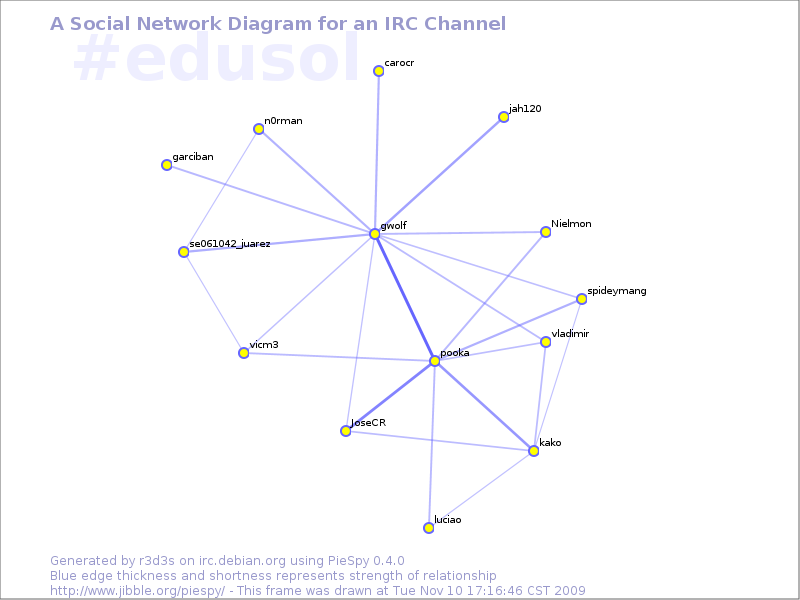
As some of you know, yesterday we started the two weeks of activities for the Fifth On-line Encounter of Free Education, Culture and Software. This year, the main topic for the conference is social networks, but not in the twitter-facebook sense Social networks as ways of understanding and modelling human-to-human interactions. Of course, there is interest from many attendees in using and taking advantage of said social network systems (and others), but the topic is far broader. One of the core tools of EDUSOL, and the only tool that is constantly active through our two weeks of activity, is IRC Which is somewhat of a challenge, as we receive some not-tech-savvy users from all over the world. The first year or two we asked everybody to connect via an IRC client (and we had even decided that it would be a technological filter We thought we would not cater for people without the technical skills to install and use IRC). Life proved us wrong, and we ended up using two web-to-IRC gateways: One of them, via an instance of CGI:IRC, and the other one via a third-party service, Mibbit. Now, the core mind behind EDUSOL is Alejandro Miranda, Pooka; I am not really into education (it is a very interesting topic but far from what I am good at). Pooka has been invovled in on-line communities analysis for several years already, since we worked together at FES Iztacala. For a long time he wanted to graph the interactions at EDUSOL, which was obviously possible given it was all centered on three tools (IRC for live chat, Drupal for generic information and Moodle for the talks and workshops' material This has changed this year, as we are giving much more weight to Drupal and taking it off Moodle), and so last year he was finally able to generate a EDUSOL 2008 conference photo (warning: 2MB image, 4311x3352px), where each person's avatar appears where most of his interactions were. This photo was (unfortunately) achieved using non-free software, but is very much looking at! Now, this year Pooka stumbled upon a great tool, PieSpy (available in Debian package piespy). Piespy generates very interesting interaction graph for IRC channels, as you can see here: Piespy is a bot that sits in the IRC channel logging everything that any given user "says" directly to another one, and graphs it. Not much to say here, only that it generates a very good (and practically real-time) view of what happens on the channel. For this particular channel, and during EDUSOL, you can see here the latest IRC snapshots. Very fun to see - and somewhat addictive how it morphs across time :)
AttachmentSize
EDUSOL 2008 - Conference photo1.97 MB
Current (Monday+Tuesday) interaction graph for our IRC channel39.89 KB

Next.

Previous.