Jonas Smedegaard: BOSS - Barath Operating System Solutions
 Siri and I are on a journey through India and Nepal,
with the aim of learning about needs of Debian derivatives,
to improve Debian and encourage closer integration.
Siri and I are on a journey through India and Nepal,
with the aim of learning about needs of Debian derivatives,
to improve Debian and encourage closer integration.
 Siri and I are now three weeks into our two months journey,
by train through India and by bus in Nepal.
During my Asia 2011 journey I promised myself (and Chandan)
that next visit to India would be together with Siri.
Here we are,
few hours away from next 20 hour train ride towards Hyderabad in South India,
both with running noses from a cold week in Nepal.
Theme of our trip is Debian Pure Blends.
More specifically,
we will meet with distribution developers and designers
to try understand why they fork from (other forks of) Debian,
and how Debian might improve to better serve them
- ideally be able to fully contain such projects within Debian itself.
Distributions we will look into - some more detailed than others - include
 Address space layout
randomization
helps to protect against buffer overflow attacks as it becomes harder for an
attacker to turn a programming error into an exploitable security hole. The
first implementation for Linux is 15 years old. Support in mainline kernel and
toolchains have been available for a good while now. But to work, ASLR also
needs executables to be built as position
independent. And
as Hanno B ck from the fuzzing project gently
reminded me at 32C3, almost no
executables in Debian are built as such, while it is now the default in
Windows, Mac OS X,
OpenBSD, and
Fedora to name
just a few other systems.
PIE has the reputation of having a performance hit. While true, especially for
register constrained architectures like
i386, it makes a difference only for
the executable itself, not any shared library it uses as they are already
built as position independent. Also, several optimizations have been made since
the early days. GCC 5 will reuse the PIC
hard register (which is also good for libraries). On amd64, GCC 5 and binutils
2.26 will do copy
relocations.
More improvements for i386 are being
worked on.
I sincerly believe that users are way more likely to notice a compromised
system than a slightly slower one.
debian/rules:
export DEB_BUILD_MAINT_OPTIONS = hardening=+all
DEB_BUILD_OPTIONS=hardening=+all dpkg-buildpackage. Running lintian
or
hardening-check
can then tell you if the protections have been successfully enabled.
pie and
bindnow. Could we turn them by default and do
binNMUs instead of requiring actions from
maintainers?
I guess the question boils down to: how many packages would require a
(one-liner) change to turn off the pie or bindnow features if they were on by
default?
To get the beginning of an answer, I took the top 502
(according to popcon installations) source
packages shipping non-position independent executables. I've try to rebuild them
enabling all hardening flags through DEB_BUILD_OPTIONS.
Out of 49 packages3:
acpi, bc, bind9, bsd-mailx, bsdmainutils, bzip2, cpio, cron, debianutils, diffutils, dpkg, file, fontconfig, gettext, glib2.0, glibc, gnupg, gzip, hostname, ifupdown, iputils, logrotate, m4, mutt, nano, net-tools, netcat, netkit-ftp, netkit-telnet, os-prober, pam, util-linux.discover, mawk, mlocate, patch.*-static or GRUB: bash, busybox, coreutils, e2fsprogs, grub2, insserv, iptables, kbd, ncurses, newt, openssl, pciutils, perl.DEB_BUILD_OPTIONS=hardening=+all in the environment. Any takers?
SELECT packages.source, MAX(popcon.insts) AS insts
  FROM lintian, popcon, packages
 WHERE lintian.tag = 'hardening-no-pie'
   AND lintian.package_arch = 'amd64'
   AND popcon.package = lintian.package
   AND packages.package = popcon.package
   AND packages.distribution = 'debian'
   AND packages.release = 'sid'
 GROUP BY packages.source
 ORDER BY MAX(popcon.insts) DESC
 LIMIT 50;


 A very short post: This link contains an
interesting exposition of the 50-move rule in chess, and what it means for
various endings. You can probably stop halfway, though; most of it is only
interest for people deeply into endgame theory.
Personally, I think DTZ50, as used by the Syzygy tablebases,
is the best tradeoff for computer chess. It always produces the correct result
(never throws away a win as a draw, or a draw as a loss), but the actual
mates are of suboptimal length and look very strange (e.g., it will happily
give away most of its pieces and then play very tricky endgames to mate).
Then again, if you ever want to swindle against a non-optimal opponent
(ie., try to make the position as hard as possible to play, to possibly
convert e.g. a loss to a draw), you've opened up an entirely new can of worms. :-)
Update: Eric P Smith has written a different explanation
of the DTM50 metric that's probably easier to understand, although it
contains less new information than the other one.
vanderpol.ode):x = x_0 y = dx_0 d_x = y d_y = mu * (1 - x**2) * y - xNote the blank line between the initial conditions and the expression for the derivatives. This is the representation of the form using
y as the derivative of x. The integration variable in QSoas is the time t. You can learn more about how to specify differential equations in QSoas from the manual. The game is now simply to use fit-ode to launch the fit interface, but before that, one needs data to serve as a template, generated using generate-buffer:QSoas> generate-buffer 0 100 1 QSoas> fit-ode vanderpol.odeNow, the fit interface looks like this:

mu... For every modification, hit the Update button, or just Ctrl+U, to see the effect. For data you'd wish to take a closer look at, use the Push current to stack action from the Data... menu, which creates new buffers on the stack. A nice thing is that QSoas keeps the fit parameters as meta-data, which you can see later on using show: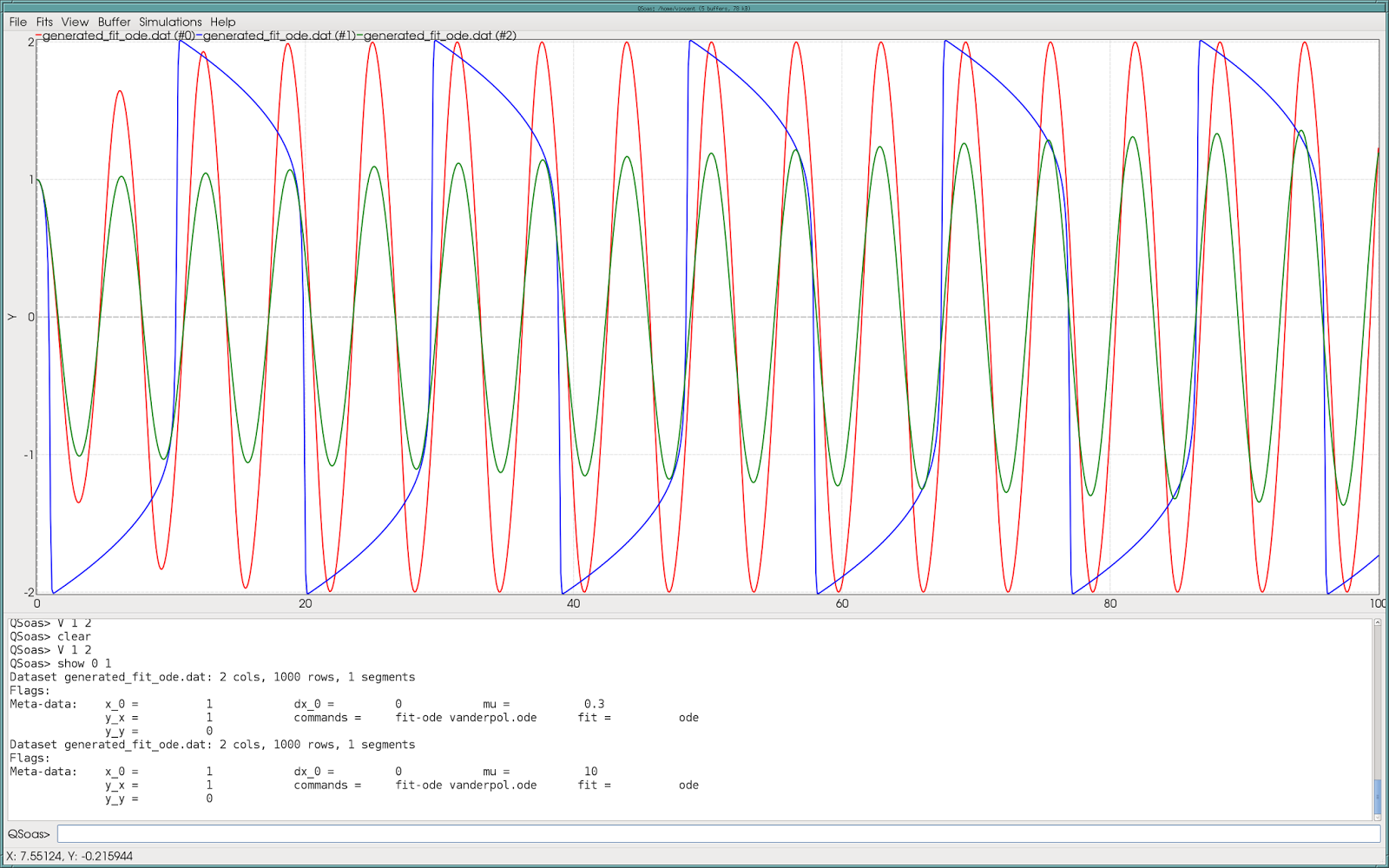
mu in the terminal above ?This feature of QSoas makes it easy to quickly explore the effect of the parameters of a model on the shape of the resulting curve. I have used that very heavily in my research, I hope others will find it useful too. Enjoy !
#ooni IRC channel. Tor also works fine, and could be a great way
to avoid the global surveillance system described later in this
article.
Nevertheless, it still remains to be seen how the internet is censored
in the "real" Cuban internet, outside of the tourist designated
areas - hopefully future visitors or locals can expand on this using
the tools mentioned above, using the regular internet.
Usual care should be taken when using any workaround tools, mentioned
in this post or not, as different regimes over the world have accused,
detained, tortured and killed sometimes for the mere fact of using or
distributing circumvention tools. For example, a Russian developer
was arrested and detained in 2001 by United States' FBI for
exposing vulnerabilities in the Adobe e-books copy protection
mechanisms. Similarly, people distributing Tor and other tools have
been arrested during the period prior to the revolution in Tunisia.
--- 10.0.0.1 ping statistics ---
163 packets transmitted, 31 received, 80% packet loss, time 162391ms
rtt min/avg/max/mdev = 133.700/2669.535/64188.027/11257.336 ms, pipe 65
killall iodine # stop DNS tunnel
nmcli n off # turn off wifi to change MAC address
macchanger -A wlan0 # change MAC address
nmcli n on # turn wifi back on
sleep 3 # wait for wifi to settle
iodine-client-start # restart DNS tunnel
Wifi_Memories_Jibacoa which, for anyone that cares to research, will
give them a location of about 20 square meters where I was located
when connected (there is only one access point in the whole hotel).
Finally, the central portal also knows my MAC address,
a unique identifier for the computer I am using which also reveals
which brand of computer I am using (Mac, Lenovo, etc). While this
address can be changed, very few people know that, let alone how.
This led me to question whether I would be allowed back in Cuba (or
even allowed out!) after publishing this blog post, as it is obvious
that I can be easily identified based on the time this article was
published, my name and other details. Hopefully the Cuban government
will either not notice or not care, but this can be a tricky
situation, obviously. I have heard that Cuban prisons are not the best
hangout place in Cuba, to say the least...
[1034]anarcat@angela:cuba$ speedtest
Retrieving speedtest.net configuration...
Retrieving speedtest.net server list...
Testing from Empresa de Telecomunicaciones de Cuba (152.206.92.146)...
Selecting best server based on latency...
Hosted by LIME (George Town) [391.78 km]: 317.546 ms
Testing download speed........................................
Download: 1.01 Mbits/s
Testing upload speed..................................................
Upload: 1.00 Mbits/s
--- koumbit.org ping statistics ---
122 packets transmitted, 120 received, 1,64% packet loss, time 18731,6ms
rtt min/avg/max/sdev = 127,457/156,097/725,211/94,688 ms
--- google.com ping statistics ---
122 packets transmitted, 121 received, 0,82% packet loss, time 19371,4ms
rtt min/avg/max/sdev = 132,517/160,095/724,971/93,273 ms
--- redcta.org.ar ping statistics ---
122 packets transmitted, 120 received, 1,64% packet loss, time 40748,6ms
rtt min/avg/max/sdev = 303,035/339,572/965,092/97,503 ms
--- ccc.de ping statistics ---
122 packets transmitted, 72 received, 40,98% packet loss, time 19560,2ms
rtt min/avg/max/sdev = 244,266/271,670/594,104/61,933 ms
traceroute to koumbit.net (199.58.80.33), 30 hops max, 60 byte packets
 1  10.156.41.1 (10.156.41.1)  9.724 ms  9.472 ms  9.405 ms
 2  192.168.134.137 (192.168.134.137)  16.089 ms  15.612 ms  15.509 ms
 3  172.31.252.113 (172.31.252.113)  15.350 ms  15.805 ms  15.358 ms
 4  pos6-0-0-agu-cr-1.mpls.enet.cu (172.31.253.197)  15.286 ms  14.832 ms  14.405 ms
 5  172.31.252.29 (172.31.252.29)  13.734 ms  13.685 ms  14.485 ms
 6  200.0.16.130 (200.0.16.130)  14.428 ms  11.393 ms  10.977 ms
 7  200.0.16.74 (200.0.16.74)  10.738 ms  10.019 ms  10.326 ms
 8  ix-11-3-1-0.tcore1.TNK-Toronto.as6453.net (64.86.33.45)  108.577 ms  108.449 ms
1 10.156.41.1 (10.156.41.1) 9.724 ms 9.472 ms 9.405 ms
2 192.168.134.137 (192.168.134.137) 16.089 ms 15.612 ms 15.509 ms
 3  172.31.252.113 (172.31.252.113)  15.350 ms  15.805 ms  15.358 ms
 4  pos6-0-0-agu-cr-1.mpls.enet.cu (172.31.253.197)  15.286 ms  14.832 ms  14.405 ms
 5  172.31.252.29 (172.31.252.29)  13.734 ms  13.685 ms  14.485 ms
 6  200.0.16.130 (200.0.16.130)  14.428 ms  11.393 ms  10.977 ms
 7  200.0.16.74 (200.0.16.74)  10.738 ms  10.019 ms  10.326 ms
/24, or 256 IP
addresses) network allocated to ETECSA, the state telco
in Cuba:
inetnum:     200.0.16/24
status:      allocated
aut-num:     N/A
owner:       EMPRESA DE TELECOMUNICACIONES DE CUBA S.A. (IXP CUBA)
ownerid:     CU-CUBA-LACNIC
responsible: Rafael L pez Guerra
address:     Ave. Independencia y 19 Mayo, s/n,
address:     10600 - La Habana - CH
country:     CU
phone:       +53 7 574242 []
owner-c:     JOQ
tech-c:      JOQ
abuse-c:     JEM52
inetrev:     200.0.16/24
nserver:     NS1.NAP.ETECSA.NET
nsstat:      20160123 AA
nslastaa:    20160123
nserver:     NS2.NAP.ETECSA.NET
nsstat:      20160123 AA
nslastaa:    20160123
created:     20030512
changed:     20140610
8 ix-11-3-1-0.tcore1.TNK-Toronto.as6453.net (64.86.33.45) 108.577 ms 108.449 ms 108.257 ms
traceroute to 192.168.134.138 (192.168.134.138), 30 hops max, 60 byte packets
 1  192.168.134.138 (192.168.134.138)  6.027 ms  5.698 ms  5.596 ms
$ ip route
default via 10.156.41.1 dev wlan0  proto static  metric 1024
10.156.41.0/24 dev wlan0  proto kernel  scope link  src 10.156.41.4
169.254.0.0/16 dev wlan0  scope link  metric 1000
190.6.81.230 in the hotel.
Accessing http://1.1.1.1/ gives you a status page which allows you
to disconnect from the portal. It actually redirects you to
https://192.168.134.138/logout.user. That is also a
self-signed, but different certificate. That
certificate actually reveals the implication of Gemtek which is a
"world-leading provider of Wireless Broadband solutions, offering a
wide range of solutions from residential to business". It is somewhat
unclear if the implication of Gemtek here is deliberate or a
misconfiguration on the part of Cuban officials, especially since the
certificate is self-signed and was issued in 2002. It could be,
however, a trace of the supposed involvement of China in the
development of Cuba's networking systems, although Gemtek is based in
Taiwan, and not in the China mainland.
That IP, in turn, redirects you to the same portal but in a page that
shows you the statistics:
https://www.portal-wifi-temas.nauta.cu/?mac=0024D1717D18&script=logout.user&remain_time=00%3A55%3A52&session_time=00%3A04%3A08&username=151003576287&clientip=10.156.41.21&nasid=Wifi_Memories_Jibacoa&r=ac%2Fpopup
Actualizar redirects you back to the IP address, which
redirects you to the right URL on the portal. The "real" logout is at:
http://192.168.134.138/logout.user?cmd=logout
https://www.portal-wifi-temas.nauta.cu/?&nasid=Wifi_Memories_Jibacoa&nasip=192.168.134.138&clientip=10.156.41.21&mac=EC:55:F9:C5:F2:55&ourl=http%3a%2f%2fgoogle.ca%2f&sslport=443&lang=en-US%2cen%3bq%3d0.8&lanip=10.156.41.1
www.portal-wifi-temas.nauta.cu, 190.6.81.230)192.168.134.138)10.156.41.1)2.4.21 and 2.4.31. Now, to
find out which version of Linux it is running is way more challenging,
and it is possible it is just some custom Linux distribution. Indeed,
the webserver shows up as G4200.GSI.2.22.0155 and the SSH server is
running OpenSSH 3.0.2p1, which is basically prehistoric (2002!)
which corroborates the idea that this is some Gemtek embedded device.
The fact that those devices are running 14 years old software should
be a concern to the people responsible for those networks. There is,
for example, a remote root vulnerability that affects that
specific version of OpenSSH, among
many other vulnerabilities.
15100, the
following digits being 3576 or 4595, presumably depending on the
"batch" that was sent to different hotels, which seems to be batches
of 1000 cards. You can also correlate the UID with the date at which
the card was issued. For example, 15100357XXX cards are all valid
until 19/03/2017, and 151004595XXX cards are all valid until
23/03/2017. Here's the list of UIDs I have seen:
151004595313
151004595974
151003576287
151003576105
151003576097
 After an usually long hiatus, the RcppExamples package has been updated once more: a new version 0.1.7 is now on CRAN.
The RcppExamples provides a handful of short examples detailing by concrete working examples how to set up basic R data structures in C++. In this version, essentially all files (C++, R as well as manual pages) were refreshed, along with the usual set of small changes to bring the package to current
R CMD check standards.
A NEWS extract follows:
Changes in RcppExamples version 0.1.7 (2016-01-23)Courtesy of CRANberries, there is also a diffstat report for the most recent release.
- All examples were updated to use Rcpp Attributes and (where possible) use
const &interfaces.- Updated
DESCRIPTIONfor currentR CMD checkstandards- The Rcpp package is now imported rather than depended upon.
- Added
README.mdas well as.travis.yml.- Also updated and refreshed all manual pages and R files.
This post by Dirk Eddelbuettel originated on his Thinking inside the box blog. Please report excessive re-aggregation in third-party for-profit settings.
What happened in the reproducible
builds effort between January 17th and January 23rd:
-Wdate-time from CPPFLAGS passed to swig enabling several packages to build again.
The switch made in binutils/2.25-6 to use deterministic archives by default had the unfortunate effect of breaking a seldom used feature of make. Manoj Srivastava asked on debian-devel the best way to communicate the changes to Debian users. Lunar quickly came up with a patch that displays a warning when Make encounters deterministic archives. Manoj made it available in make/4.1-2 together with a NEWS file advertising the change.
Following Guillem Jover's comment on the latest patch to make mtimes of packaged files deterministic, Daniel Kahn Gillmor updated and extended the patch adding the --clamp-mtime option to GNU Tar.
Mattia Rizzolo updated texlive-bin in the reproducible experimental repository.
C locale.SOURCE_DATE_EPOCH.reproducible.debian.net to the more general tests.reproducible-builds.org has started. More visual changes are coming. (h01ger)
A plan on how to run tests for F-Droid has been worked out. (hc, mvdan, h01ger) A first step has been made by adding a Jenkins job to setup an F-Droid build environment. (h01ger)
dbgsym package. This means objdump disassembler should output line
numbers for packages built with recent
debhelper as long as the associated
debug package is in the same directory.
As diff tends to consume huge amount of memory on large inputs, diffoscope
has a limit in place to prevent crashes. diffoscope used to display a difference
every time the limit was hit. Because this was confusing in case there were
actually no differences, a hash is now internally computed to only report
a difference when one exists.
Files in archives and other container members are now compared in the original
order. This should not matter in most case but overall give more predictable
results.
Debian .buildinfo
files are
now supported.
Amongst other minor fixes and improvements, diffoscope will now properly compare
symlinks in directories. Thanks Tuomas Tynkkynen for reporting the problem.
-EIL +pedantic) on your packages only to watch lintian drown your terminal. If you have, you would certainly not be the first.
A concrete example with lintian 2.5.40.2:
$ lintian -EIL +pedantic 389-ds-base_1.3.4.5-2_amd64.deb   wc -l
85
Notably, at least 45 of these appeared in 2.5.40 (the hardening-no-bindnow tag):
$ lintian -EIL +pedantic 389-ds-base_1.3.4.5-2_amd64.deb \
  --tags hardening-no-bindnow   wc -l
45
In a single release, we have over doubled the number of tags in the given package. I very much doubt this is the first time such a thing happened. Therefore, we have implemented a per package tag filter in 2.5.40. The filter is applied automatically when stdout is a tty and restricts lintian to emitting no more than 3 concrete instances of a given tag per package. If a fourth tag would have been emitted, the filter replaces it with a how to see all instances message and suppresses further instances in that package. Accordingly, lintian only emits 25 lines (instead of 85) for the example package. It looks something like this:
$ lintian -EIL +pedantic 389-ds-base_1.3.4.5-2_amd64.deb
I: 389-ds-base: spelling-error-in-binary usr/bin/dbscan-bin conents contents
X: 389-ds-base: hardening-no-bindnow usr/bin/dbscan-bin
X: 389-ds-base: hardening-no-bindnow usr/bin/dsktune-bin
X: 389-ds-base: hardening-no-bindnow usr/bin/infadd-bin
X: 389-ds-base: hardening-no-bindnow ... use --no-tag-display-limit to see all (or pipe to a file/program)
I: 389-ds-base: spelling-error-in-binary usr/lib/x86_64-linux-gnu/dirsrv/libns-dshttpd.so.0.0.0 occured occurred
[...]
With this very simple filter in place, the entire lintian output for that single binary now fits on my screen. I am pretty sure the filter could do with additional smarts, but I believe it is a good start.

 While I'm not convinced that encrypting everything by default is
necessarily a good idea, it is certainly true that encryption has its
uses. Unfortunately, for the longest time getting an SSL certificate
from a CA was quite a hassle -- and then I'm not even mentioning the
fact that it would cost money, too. In that light, the letsencrypt
project is a useful alternative: rather than having to dabble with
emails or webforms, letsencrypt does everything by way of a few scripts.
Also, the letsencrypt CA is free to use, in contrast to many other
certificate authorities.
Of course, once you start scripting, it's easy to overdo it. When you go
to the letsencrypt website and try to install their stuff, they point
you to a "letsencrypt-auto" thing, which starts installing a python
virtualenv and loads of other crap, just so we can talk to a server
and get a certificate properly signed. I'm sure that makes sense for
some people, and I'm also sure it makes some things significantly
easier, but honestly, I think it's a bit overkill. Luckily, there is
also a regular letsencrypt script that doesn't do all the virtualenv
stuff, and which is already packaged for
Debian, so
installing that gets us rid of the overkill bits. It's not in stable,
but it is an arch:all package. Unfortunately, not all dependencies are
available in Jessie, but backporting it turned out to be not too complicated.
Once the client is installed, you need to get it to obtain a
certificate, and you need to have the certificate be activated for your
webserver. By default, the letsencrypt client will update your server
configuration for you, and run a temporary webserver, and do a whole lot
of other things that I would rather not see it do. The good news,
though, is that you can switch all that off. If you're willing to let it
write a few files to your DocumentRoot, it can do the whole thing
without any change to your system:
letsencrypt certonly -m <your mailaddress> --accept-tos --webroot -w \
    /path/to/DocumentRoot -d example.com -d www.example.com
-m option (with mail address) and the
--accept-tos option are only required the first time you ever run
letsencrypt. Doing so creates an account for you at letsencrypt.org,
without which you cannot get any certificates. The --accept-tos
option specifies that you accept their terms of
service, which you might want to
read first before blindly accepting.
If all goes well, letsencrypt will tell you that it wrote your account
information and some certificates somewhere under /etc/letsencrypt.
All that's left is to update your webserver configuration so that the
certificates are actually used. No, I won't tell you how that's done --
if you need that information, it's probably better if you just use the
apache or nginx plugin of letsencrypt, which updates your webserver's
configuration automatically. But if you already know how to do so, and
prefer to maintain your configuration by yourself, then it's good to
know that it is at least possible.
Since we specified two -d parameters, the certificate you get from the
letsencrypt CA will have subjectAlternativeName fields, allowing you to
use them for more than one domain name. I specified example.com
and www.example.com as the valid names, but there is nothing in
letsencrypt requiring that the domain names you specify share a
suffix; so yes, it is certainly possible to have multiple domains on a
single certificate, if you want that.
Finally, you need to ensure that your certificates are renewed before
they expire. The easiest way to do that is to add a cronjob, which runs
letsencrypt again; only this time, you'll need slightly different
options:
letsencrypt certonly --renew-by-default --webroot -w \
    /path/to/DocumentRoot -d domain.name.tld -d www.domain.name.tld
--renew-by-default option tells letsencrypt that you want to
renew your certificates, not create new ones. If you specify this, the
old certificate will be revoked, and a new one will be generated, again
with three months validity. The symlinks under /etc/letsencrypt/live
will be updated, so if your webserver's configuration uses those as the
path to your certificates, you don't need to update any configuration
files (although you may need to restart your webserver). You'll also
notice that the -m and --accept-tos options are not specified this
time around; this is because those are only required when you want to
create an account -- once that step has been taken, letsencrypt will
read the necessary information from its configuration files (and
creating a new account for every renewal is just silly).
With that, you now have a working, browser-trusted, certificate.
Update: fix mistake about installing on Jessie. It's possible (I've
done so), but it's been a while and I forgot that I had to recompile
several of letsencrypt's dependencies in order for it to be
installable.
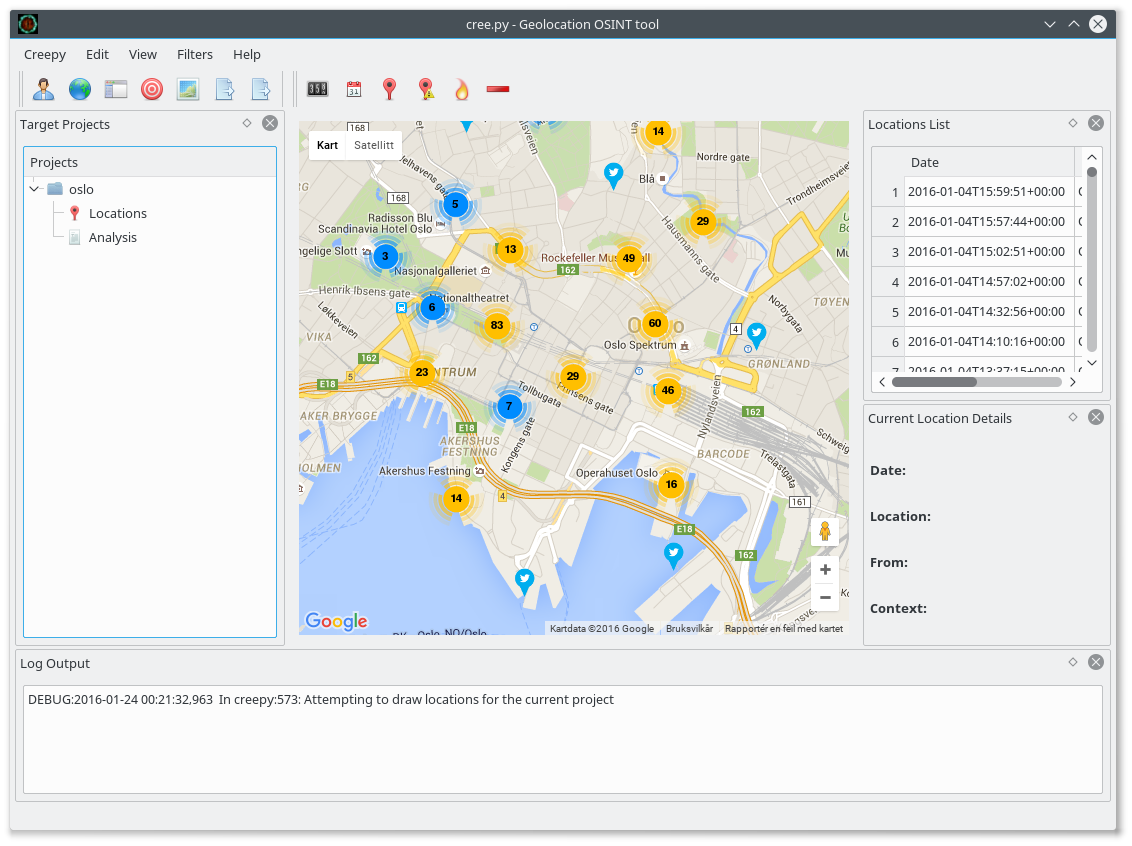 The phone company logs provide a register of locations to check out
when one want to figure out what the tracked person was doing. It is
unavailable for most of us, but provided to selected government
officials, company staff, those illegally buying information from
unfaithful servants and crackers stealing the information. But the
public information can be collected and analysed, and a free software
tool to do so is called
Creepy or Cree.py. I
discovered it when I read
an
article about Creepy in the Norwegian newspaper Aftenposten i
November 2014, and decided to check if it was available in Debian.
The python program was in Debian, but
the version in
Debian was completely broken and practically unmaintained. I
uploaded a new version which did not work quite right, but did not
have time to fix it then. This Christmas I decided to finally try to
get Creepy operational in Debian. Now a fixed version is available in
Debian unstable and testing, and almost all Debian specific patches
are now included
upstream.
The Creepy program visualises geolocation information fetched from
Twitter, Instagram, Flickr and Google+, and allow one to get a
complete picture of every social media message posted recently in a
given area, or track the movement of a given individual across all
these services. Earlier it was possible to use the search API of at
least some of these services without identifying oneself, but these
days it is impossible. This mean that to use Creepy, you need to
configure it to log in as yourself on these services, and provide
information to them about your search interests. This should be taken
into account when using Creepy, as it will also share information
about yourself with the services.
The picture above show the twitter messages sent from (or at least
geotagged with a position from) the city centre of Oslo, the capital
of Norway. One useful way to use Creepy is to first look at
information tagged with an area of interest, and next look at all the
information provided by one or more individuals who was in the area.
I tested it by checking out which celebrity provide their location in
twitter messages by checkout out who sent twitter messages near a
Norwegian TV station, and next could track their position over time,
making it possible to locate their home and work place, among other
things. A similar technique have been
used
to locate Russian soldiers in Ukraine, and it is both a powerful
tool to discover lying governments, and a useful tool to help people
understand the value of the private information they provide to the
public.
The package is not trivial to backport to Debian Stable/Jessie, as
it depend on several python modules currently missing in Jessie (at
least python-instagram, python-flickrapi and
python-requests-toolbelt).
(I have uploaded
the image to
screenshots.debian.net and licensed it under the same terms as the
Creepy program in Debian.)
 Debian 8.3 came out today. As part of this update, Debian installer images for QNAP TS-109, TS-209 and TS-409 are available again. These devices are pretty old but there are still some users. We dropped installer support several years ago because the installer ramdisk was too large to fit in flash. Since then, users had to install Debian 6.0 (squeeze) and upgrade from there. When squeeze was removed from the Debian mirrors recently, I received mail from a number of users.
I investigated a bit and found out that we can bring back the installer thanks to XZ compression and some other changes. The installer is available for jessie and stretch.
A new minor release of RcppEigen is now on CRAN and in Debian. It primarily upgrades to the recent 3.2.7 release of Eigen -- thanks once again to fine work by Yixuan Qiu. We also have one additonal PR by Alexey Stukalow who ensured that the
fastLm() example will work fine with when the Intel MKL is used.
The NEWS file entry follows.
Changes in RcppEigen version 0.3.2.7.0 (2016-01-18)Courtesy of CRANberries, there is also a diffstat report for the most recent release.
- Updated to version 3.2.7 of Eigen
- The fastLm example will not include the Lapack header if MKL is defined (thanks to PR #25 by Alexey Stukalow)
This post by Dirk Eddelbuettel originated on his Thinking inside the box blog. Please report excessive re-aggregation in third-party for-profit settings.
Bradley White from the upstream CCTZ team prepared some more changes in CCTZ itself -- so a new RcppCCTZ version got to CRAN the other day catching up with these changes.
CCTZ is a C++ library for translating between absolute and civil times using the rules of a time zone. It requires only a proper C++11 compiler and the standard IANA time zone data base which standard Unix, Linux, OS X, ... computers tend to have in /usr/share/zoneinfo. RcppCCTZ connects this library to R by relying on Rcpp.
Changes in this version are summarized here:
Changes in version 0.0.3 (2016-01-17)We also have a diff to the previous version thanks to CRANberries. More details, issue tickets etc at the GitHub repository.
- Synchronized with
CCTZupstream.
This post by Dirk Eddelbuettel originated on his Thinking inside the box blog. Please report excessive re-aggregation in third-party for-profit settings.
https://gitlab.com/android-rebuilds/auto/tree/master/sdk-6.0.1and type:
makeThat's all !
 Issues with sam2p and removal
I have been maintaining the Debian package of sam2p for some time.
Unfortunately, the upstream development of that program is no longer
active, and it is using an old custom build chain that no longer works
with recent version of GCC.
This package is currently failing to build from source, and while I
have been able to patch some issues in the past, and it may still be
possible to fix it again, this is not really sustainable.
I am therefore considering to remove sam2p from Debian, unless
someone has a very good reason to keep it and is able and willing to
maintain it.Alternative
sam2p is a raster image conversion tool that can convert PNG and JPEG
to EPS and PDF while keeping their compression, which is mostly useful
to use them in documents compiled with LaTeX. Fortunately, the same can
be done with ImageMagick. If you want to convert to EPS, you have to
specify that you want EPS 2 or 3, otherwise it would produce EPS level 1
which does not provide native raster compression:
% convert debian-openlogo-raster100.png \
          eps3:debian-openlogo-raster100.eps
% convert debian-openlogo-raster100.png \
          debian-openlogo-raster100.pdf
% ls -lh
1.7K debian-openlogo-raster100.png
6.0K debian-openlogo-raster100.eps
8.8K debian-openlogo-raster100.pdf
% convert photograph.jpg eps3:photograph.eps
% convert photograph.jpg photograph.pdf
% ls -lh
657K photograph.jpg
662K photograph.eps
664K photograph.pdf
% convert scanned-document.png eps3:scanned-document.eps
% convert scanned-document.png scanned-document.pdf
140K scanned-document.png
145K scanned-document.eps
150K scanned-document.pdf
This is a bit less efficient than sam2p, as convert seems to add some
fixed overhead, but it does keep the appropriate compression algorithm.
See this documentation
page from ImageMagick for more information.
Using appropriate formats
As a reminder, when writing LaTeX documents, depending on your build
chain, you can use:
 In some cases it might be a good idea to use a reverse proxy in front of a web application. Nginx is a very common solution for this scenario these days. As I started with containers for some of my playgrounds, I decided to go this route.
 When looking around to implement a nginx in front of a Docker web application, in most cases nginx itself is also a Docker container.

# aptitude install nginx
conf.d/docker-ghost.conf.
upstream docker-ghost
  server localhost:2368;
/etc/nginx/nginx.conf but I would recommend to use a config file in /etc/nginx/sites-available/ instead.
server
  listen 80;
  server_name log.cyconet.org;
  include /etc/nginx/snippets/ghost_vhost.conf;
  location /
    proxy_pass                          http://docker-ghost;
    proxy_set_header  Host              $http_host;   # required for docker client's sake
    proxy_set_header  X-Real-IP         $remote_addr; # pass on real client's IP
    proxy_set_header  X-Forwarded-For   $proxy_add_x_forwarded_for;
    proxy_set_header  X-Forwarded-Proto $scheme;
    proxy_read_timeout                  900;
# ln -s ../sites-available/ghost.conf /etc/nginx/sites-enabled/ghost.conf && \
 service nginx configtest && service nginx reload
Next.