Search Results: "tim"

5 February 2014

Sune Vuorela: CMake skeleton for small Qt projects

For small Qt-projects, I have for a long time been using qmake, mostly because qmake -project gives me a working build in most cases, but once the project grows a bit, I have switched to cmake because there is just things there I like better. So, I thought how to start with cmake instead, and ended up writing a small script. I guess I should share it:
#! /bin/sh # Simple script that generates a cmake project file for a Qt project #
# Copyright (c) 2013 Sune Vuorela
#
# Permission is hereby granted, free of charge, to any person
# obtaining a copy of this software and associated documentation
# files (the Software ), to deal in the Software without
# restriction, including without limitation the rights to use,
# copy, modify, merge, publish, distribute, sublicense, and/or sell
# copies of the Software, and to permit persons to whom the
# Software is furnished to do so, subject to the following
# conditions:
#
# The above copyright notice and this permission notice shall be
# included in all copies or substantial portions of the Software.
#
# THE SOFTWARE IS PROVIDED AS IS , WITHOUT WARRANTY OF ANY KIND,
# EXPRESS OR IMPLIED, INCLUDING BUT NOT LIMITED TO THE WARRANTIES
# OF MERCHANTABILITY, FITNESS FOR A PARTICULAR PURPOSE AND
# NONINFRINGEMENT. IN NO EVENT SHALL THE AUTHORS OR COPYRIGHT
# HOLDERS BE LIABLE FOR ANY CLAIM, DAMAGES OR OTHER LIABILITY,
# WHETHER IN AN ACTION OF CONTRACT, TORT OR OTHERWISE, ARISING
# FROM, OUT OF OR IN CONNECTION WITH THE SOFTWARE OR THE USE OR
# OTHER DEALINGS IN THE SOFTWARE.
# CPPFILES= $(ls *.cpp 2>/dev/null) UIFILES= $(ls *.ui 2>/dev/null) QRCFILES= $(ls *.qrc 2>/dev/null) NAME= $(basename $(pwd)) error()
echo ERROR: $@
exit 1
debug()
[ -z "$ DEBUG " ] && return
echo DEBUG: $@ 1>&2
# sanity checks if [ -e "CMakeLists.txt" ]
then
error CMakeLists.txt found. Doing nothing.
fi if [ -z "$ CPPFILES " ]
then
error No cpp files found
fi debug NAME $ NAME
debug CPPFILES $ CPPFILES
debug UIFILES $ UIFILES
debug QRCFILES $ QRCFILES # First part of cmake files
cat >> CMakeLists.txt << __EOHEADER__
project($ NAME ) cmake_minimum_required(VERSION 2.8.11) find_package(Qt5 CONFIG REQUIRED Widgets) set(CMAKE_AUTOMOC ON)
set(CMAKE_INCLUDE_CURRENT_DIR ON) __EOHEADER__ # Handle ui files if any
if [ -n "$ UIFILES " ]
then
cat >> CMakeLists.txt << __EOUI__
set($ NAME _ui $ UIFILES )
qt5_wrap_ui($ NAME _wrapped_ui \$ $ NAME _ui ) __EOUI__ UIWRAPPED="\$ $ NAME _wrapped_ui "
debug prepared UIWRAPPED $ UIWRAPPED
fi # Handle qrc files if any
if [ -n "$ QRCFILES " ]
then cat >> CMakeLists.txt << __EOQRC__
set($ NAME _qrc $ QRCFILES )
qt5_add_resources($ NAME _wrapped_qrc \$ $ NAME _qrc ) __EOQRC__ QRCWRAPPED="\$ $ NAME _wrapped_qrc "
debug prepared QRCWRAPPED $ QRCWRAPPED
fi # Build the actual library
cat >> CMakeLists.txt << __EOCPP__
set($ NAME _src $ CPPFILES ) add_executable($ NAME \$ $ NAME _src $ UIWRAPPED $ QRCWRAPPED ) target_link_libraries($ NAME Qt5::Widgets )
__EOCPP__
I ve saved it locally as cmake-qtproject and it works with at least cmake 2.8.11. I hope wordpress doesn t make too much mess of it. Have fun.

Ricardo Mones: Fixing partridge eggs with industrial duct tape

Human nature is hard to change. Very hard. We can talk about it for ages, but mistakes repeat again and again. In the end it's mostly by mistakes how we learn, so I doubt this could ever be changed without losing our own nature. One of these is trying to fix some social issue with a technical measure. Unfortunately, given the technical orientation of most of the developers, this appears from time to time in our Debian private mailing list, and yesterday I realized it's our own version of Godwin's law:

As a social problem discussion grows longer in debian-private the probability of some developer proposing a technical solution aproaches one.

Not discussing about this problems in debian-private would be a good start, but of course that would only change the name of the list in the above sentence ;-).

Andrew Pollock: [life] Day 9, Kindergarten and cleaning

Another busy day today. I saw my girlfriend off in the morning, and then got stuck into cleaning the bathrooms. I ducked out to Jaycar to have another attempt at getting components. Got home, did some more cleaning, and had my chiropractic adjustment. Then I had my exit interview for work via video conference, and did some administrivia while I still had my work computer. Then the guy from Pack & Send came to take all the work equipment away. Now I feel very disconnected. Had some lunch, did more cleaning. Mum and Dad came around to go with me for pick up today, so they could see the new Kindergarten. Zoe was again fast asleep at pick up, and the kids who were awake were all in the other room eating birthday cake, so we let Zoe wake up as gently as possible and then collected Megan and squeezed everyone into the car and headed home. Zoe and Megan had a great time playing with each other again, and Megan's Dad picked her up at about 4:30pm and I started on dinner. We all had dinner and then Mum and Dad headed off, and I gave Zoe a bath and put her to bed. She was a bit emotional at bedtime, so it took a while to get her settled. Here's hoping she sleeps okay tonight.

4 February 2014

Enrico Zini: debops

Debops What I like the most about being a Developer is building tools to (hopefully) make someone's life better. I like it when my software gets used, and people thank me for it, because there was a need they had that wasn't met before, and thanks to my software now it is being met. I am maintaining software for meteorological research that is soon going to be 10 years old, and is still evolving and getting Real Work done. I like to develop software as if it is going to become a part of human cultural heritage, developing beyond my capacity, eventually surviving me, allowing society to declare that the need, small as it was, is now met, and move on to worry about some other problem. I feel that if I'm not thinking of my software in that way, then I am not being serious. Then I am not developing something fit for other people to use and rely on. This involves Development as much as it involves Operations: tracking security updates for all the components that make up a system. Testing. Quality assurance. Scalability. Stability. Hardening. Monitoring. Maintenance requirements. Deployment and upgrade workflows. Security. I came to learn that the requirements put forward by sysadmins are to be taken seriously, because they are the ones whose phone will ring in the middle of the night when your software breaks. I am also involved in more than one software project. I am responsible for about a dozen web applications deployed out there in the wild, and possibly another dozen of non-web projects, from terabyte-sized specialised archival tools to little utilities that are essential links in someone's complex toolchain. I build my software targeting Debian Stable + Backports. At FOSDEM I noticed that some people consider it uncool. I was perplexed. It provides me with a vast and reasonably recent set of parts to use to build my systems. It provides me with a single bug tracking system for all of them, and tools to track known issues in the systems I deployed. It provides me with a stable platform, with a well documented upgrade path to the next version. It gives me a release rhythm that allows me to enjoy the sweet hum of spinning fans thinking about my next mischief, instead of spending my waking time chasing configuration file changes and API changes deep down in my dependency chain. It allows me to rely on Debian for security updates, so I don't have to track upstream activity for each one of the building blocks of the systems I deploy. It allows me not to worry about a lot of obscure domain specific integration issues. Coinstallability of libraries with different ABI versions. Flawless support for different versions of Python, or Lua, or for different versions of C++ compilers. It has often happened to me to hear someone rant about a frustrating situation, wonder how come it had never happened to me, and realise that someone in Debian, who happens to be more expert than I can possibly be, had thought hard about how to deal with that issue, years before. I know I cannot be an expert of the entire stack from bare iron all the way up, and I have learnt to stand on the shoulders of giants. 'Devops' makes sense for me in that it hints at this cooperation between developers and operators, having constructive communication, knowing that each side has their own needs, trying their best to meet them all. It hints at a perfect world where developers and operators finally come to understand and trust each other's judgement. I don't know that perfect world, but I, a developer, do like to try to understand and trust the judgement of sysadmins. I sympathise with my sysadmin friends who feel that devops is turning into a trend of developers thinking they can do without sysadmins. Reinventing package managers. Bundling dependencies. Building "apps" instead of components. I wish that people who deploy a system built on such premises, have it become so successful that they end up being paid to maintain them for their whole career. That is certainly what I wish and strive for, for me and my own projects. In my experience, a sustainable and maintainable system won't come out of the startup mindset of building something quick&dirty, then sell it and move on to something else. In my experience, the basis for having sustainable and maintainable systems have been well known and tested in Debian, and several other distributions, for over two decades. At FOSDEM, we thought that we need a name for such a mindset. Between beers, that name came to be "debops". (It's not just Debian, though: many other distributions get it right, too)

Russell Coker: Clothing and Phone Cameras

In 2012 I wrote about my jeans from Rivers that fit the largest available phones (and the smaller tablets) in their pockets [1]. Those jeans are still working well for me, I can add the fact that they don t wear out quickly to the list of positive attributes. Recently my sister asked for advice on getting a new phone, she was considering the Samsung Galaxy Note 2 (the phone I m using now) because it apparently takes better pictures than the Nexus 4 she s using. I ve used both those phones and I hadn t noticed a difference in picture quality, but there is some variation in manufacturing and it could be that I ve got a below average Note 2 and a better than average Nexus 4 so I ll assume for the sake of discussion that my sister would actually get an improvement in picture quality by using a Note 2. If you have a phone that doesn t have the picture quality you desire then one option is to buy a phone with a better camera, but you will be limited by issues of physics. A thin phone has a short focal length which means that the lens has to be small and therefore the amount of light that gets to the sensor is small. The Nokia Lumia 1020 has some of the best camera hardware that you ll find in a phone, but it s still only 14.5mm thick where the camera is and that will limit the quality a lot. Any compact camera should be able to beat all phone cameras in terms of picture quality in most areas. The Samsung Galaxy Camera [2] is also worth considering, it has more features than a typical compact camera and good GUI that allows novice photographers to take advantage of it. Also being able to blog your photos directly from the camera could be a useful feature. But the big down-side of a compact camera is that it s not that compact. Most people won t find it convenient to carry a compact camera with them at all times and therefore they might miss a good opportunity to take a photo. The Galaxy Note series of phones also suffer in this regard because they are larger than most phones. If your phone won t fit in your pocket and you have it in your backpack when on the move or on a bench at home then you will probably miss some good photos. As I was at a Rivers store recently I tested my Note 2 in the pockets of women s jeans. Rivers scored very poorly in this regard, one pair of women s jeans had fake pockets (this is just wrong for working clothes) and of the rest only one pair could fit a Note 2. The pair that fit a Note 2 didn t completely enclose the phone, one corner was sticking out, this would probably give a risk of having the phone fall out of the pocket and cause some discomfort to the wearer. I have a pair of shorts with similar size pockets and find it very annoying with the Note 2 in the pocket (for about 10 months of the year I wear jeans so this isn t a big deal). Rivers jeans only count as geeky jeans for male geeks. It s disappointing that with about a dozen different styles of women s jeans there didn t seem to be a single one with pockets of comparable size to the men s jeans. I had to recommend that my sister not get a phone from the Galaxy Note series if taking pictures is a priority due to the apparent difficulty in getting it to fit in a pocket and the probability that she would miss good photos due to this. In past discussions of phone size there have been mentions of the possibility of getting clothing altered. Does anyone have a good experience in getting clothes altered to have bigger pockets or in the case of women s clothing to have fake pockets replaced with real ones?

Diego Escalante Urrelo: Booting Fedora 20 from USB on a black MacBook3,1 (2007)

Here s a trick that is so obvious, I m still hitting my head against the desk. Let s say you want to install an EFI-friendly distribution on your MacBook. However, your MacBook does not detect bootable USB drives on startup (known bug on old Apple hardware). I found a blog post that had success rebuilding the ISO without EFI support and installing in BIOS mode, but I had a clear memory of getting this to work a few months ago without doing that. I just couldn t remember how. Well, turns out that OSX can boot from USB drives as long as you tell it to do so in advance. You can do this in the Boot disk/Startup disk panel in System Settings:
Startup disks panel in OSX
You don t see me complaining that everything on the web is in English, do you?
You only need to select the drive and close the panel, or reboot directly using that handy Reboot button. So considerate of Apple. Important: After you install, or try, your EFI friendly live USB you have to go back to the panel and select your OSX drive again, otherwise your MacBook will keep waiting for the (now gone) USB drive for about 30 seconds on startup. For Debian, the last few times I have just booted with a CD in BIOS mode without problems. After the installation you can configure Debian for EFI boot following this instructions. I haven t tried any other distribution on this machine.

3 February 2014

Evgeni Golov: Monitoring your Puppet nodes using PuppetDB

When you run Puppet, it is very important to monitor whether all nodes have an uptodate catalog and did not miss the last year of changes because of a typo in a manifest or a broken cron-script. The most common solution to this is a script that checks /var/lib/puppet/state/last_run_summary.yaml on each node. While this is nice and easy in a small setup, it can get a bit messy in a bigger environment as you have to do an NRPE call for every node (or integrate the check as a local check into check_mk). Given a slightly bigger Puppet environment, I guess you already have PuppetDB running. Bonuspoints if you already let it save the reports of the nodes via reports = store,puppetdb. Given a central knowledgebase about your Puppet environment one could ask PuppetDB about the last node runs, right? I did not find any such script on the web, so I wrote my own: check_puppetdb_nodes. The script requires a recent (1.5) PuppetDB and a couple of Perl modules (JSON, LWP, Date::Parse, Nagios::Plugin) installed. When run, the script will contact the PuppetDB via HTTP on localhost:8080 (obviously configurable via -H and -p, HTTPS is available via -s) and ask for a list of nodes from the /nodes endpoint of the API. PuppetDB will answer with a list of all nodes, their catalog timestamps and whether the node is deactivated. Based on this result, check_puppetdb_nodes will check the last catalog run of all not deactivated nodes and issue a WARNING notification if there was none in the last 2 hours (-w) or a CRITICAL notification if there was none for 24 hours (-c). As a fresh catalog does not mean that the node was able to apply it, check_puppetdb_nodes will also query the /event-counts endpoint for each node and verify that the node did not report any failures in the last run (for this feature to work, you need reports stored in PuppetDB). You can modify the thresholds for the number of failures that trigger a WARNING/CRITICAL with -W and -C, but I think 1 is quite a reasonable default for a CRITICAL in this case. Using check_puppetdb_nodes you can monitor the health of ALL your Puppet nodes with a singe NRPE call. Or even with zero, if your monitoring host can access PuppetDB directly.

Wouter Verhelst: Waking up

Today is the monday after FOSDEM 2014, and I'm slowly waking up. Being in charge of the video team, and after having spent a whole week preparing followed by a whole weekend stressing about, today is a day of slowly waking up from hibernation and returning gear to various rental companies. At FOSDEM 2013, we had recorded five rooms. Even though we did lose a few talks, I felt pretty good about the whole thing, and I think we did pretty well then. It had been my plan to increase the number of rooms to be recorded from 5 to a reasonably higher number say, 10 or so but someone convinced me to do all of them. I'll readily admit I was afraid. Scratch that, I was terrified. Petrified, that we wouldn't be able to pull it off. For previous editions, we'd kept the number conservative, since video work is a high-risk business: if something goes wrong with volunteers work (say, the heralding volunteer doesn't show up), you find a replacement, or you have a staff member introduce a speaker, and the show will go on. Not so with video work: if something minor goes wrong, you will most likely lose content. If something minor goes wrong in one devroom, I'll deal with it. If something minor goes wrong in 20% of devrooms, that's 4 to 5 devrooms, and I can't deal with it. Moreover, finding enough volunteers to manage the video for five rooms was a challenge last year; I couldn't even begin to imagine how to do so for 22 of them. We did work out a way that didn't seem too far-fetched, and that might work: why not look for volunteers from the devrooms themselves? But then, they couldn't be expected to have the required experience, so we'd have to do a lot of handholding. The week before FOSDEM, four of us sat down in an office in Mechelen, and started preparing. We had a lot to do; and when you do, more jobs keep being added to the pile; TODO lists tend to grow longer, not shorter. Installing servers, testing cameras, setting twinpact dipswitches, configuring laptops. Changing a few tests in the config management system, and having to go over the laptops again. Buying extra gear. Buying yet more extra gear, several times. Buying cardboard boxes when it appeared that the plastic foldable ones we'd ordered wouldn't make it in time, and unloading the pallet of them when it did, after all, so we could load them into the van with all of the other gear. Laminating instruction sheets. Receiving shipments of rented gear. Calling another supplier last minute when one of our other suppliers had contacted us to let us know one of their cameras that they'd promised us had broken down, and couldn't be repaired in time. Calling that last-minute supplier again when we found out that some of the cameras we'd rented could do HDV only (and not DV), and we needed to find more than the ones we'd already asked for. Discovering that his cameras were of the same problematic model and so also couldn't be used. The feeling of relief when he called me a few hours later and told me he'd managed to scrounge up enough cameras to help us out after all. And then it was time to go to the ULB and start setting up everything. On friday, we had a little bit of help, but did have to do most of it ourselves. After setting up everything in every room and testing as much as possible within the time constraints that we had, we picked up the most expensive bits of the gear, brought it down to a safe place, and went home. On saturday and sunday, for me it was mostly a matter of handing out gear to various devrooms, running around to fix various issues, and then in the evening receiving boxes back, using a checklist to ensure everything expected was in the box (and that things not needed would remain in the room, or be sent back). It was exhausting, to the extent that on saturday afternoon, I had to take a bit of time off so I could go and rest. I think it's safe to say that something like this hasn't been done before. FOSDEM is a huge conference; most conferences with multiple rooms don't have more somewhere between 5 and 10 of them. The fact that we have so many more, and the fact that we record all of them, puts FOSDEM video work in a class of its own, to the extent that the professional cameramen I talked to in order to get the right cameras would incredulously ask "what do you need that for?" when I gave them the numbers we needed. As such, I didn't expect, nor was aiming for, perfection. Unfortunately, with video work it is close to impossible to attain perfection; I have told multiple people during the event that I would be happy if we reached 85% of talks recorded at acceptable quality; and though it is much too soon to say for certain, my gut feeling tells m that we've probably achieved that. One thing we hadn't planned for was streaming. During the past three years, FOSDEM enlisted the help and sponsorship of flumotion to get streaming going. Unfortunately, that did not work out this year; and since we already had far too much on our plates with everything else, we decided to forego streaming and focus on recording, only. A few days before the event, however, Steinar Gunderson took it upon himself to fix that. While we couldn't support him a great deal, we could give him access to the secondary laptops (which weren't otherwise doing much anyway) on which he could then do his thing. This was mostly transparent to us; we did communicate to some extent (e.g., when a machine that had been down had fixed and was working again), but he mostly did his thing while we did ours. Full details, for those who want it, in the linked blog post. Today, then, I spent most of my time handling hardware: waiting for other members of FOSDEM to drive the van up to my office; waiting for the laptop rental company to retrieve most of the laptops; waiting for two of the camera rental companies to retrieve their cameras and tripods; driving over to the final camera rental company to return their cameras and tripods; and finally, driving up to the ULB to retrieve the last laptops who had been copying files all night. As I write this, some video files have already been uploaded to the FOSDEM video archive. However, these are extremely low-quality renditions of video snippets that need to be reviewed; they are not ready yet for public consumption. When those files exist, expect an announcement through the main FOSDEM website.

Kees Cook: compiler hardening in Ubuntu and Debian

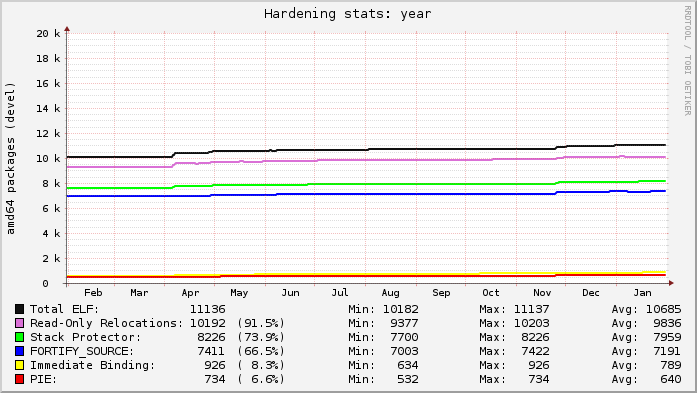
Back in 2006, the compiler in Ubuntu was patched to enable most build-time security-hardening features (relro, stack protector, fortify source). I wasn t able to convince Debian to do the same, so Debian went the route of other distributions, adding security hardening flags during package builds only. I remain disappointed in this approach, because it means that someone who builds software without using the packaging tools on a non-Ubuntu system won t get those hardening features. Think of a sysadmin trying the latest nginx, or a vendor like Valve building games for distribution. On Ubuntu, when you do that ./configure && make you ll get the features automatically. Debian, at the time, didn t have a good way forward even for package builds since it lacked a concept of global package build flags . Happily, a solution (via dh) was developed about 2 years ago, and Debian package maintainers have been working to adopt it ever since. So, while I don t think any distro can match Ubuntu s method of security hardening compiler defaults, it is valuable to see the results of global package build flags in Debian on the package archive. I ve had an on-going graph of the state of build hardening on both Ubuntu and Debian for a while, but only recently did I put together a comparison of a default install. Very few people have all the packages in the archive installed, so it s a bit silly to only look at the archive statistics. But let s start there, just to describe what s being measured. Here s today s snapshot of Ubuntu s development archive for the past year (you can see development opening after a release every 6 months with an influx of new packages):
Here s today s snapshot of Debian s unstable archive for the past year (at the start of May you can see the archive unfreezing after the Wheezy release; the gaps were my analysis tool failing):
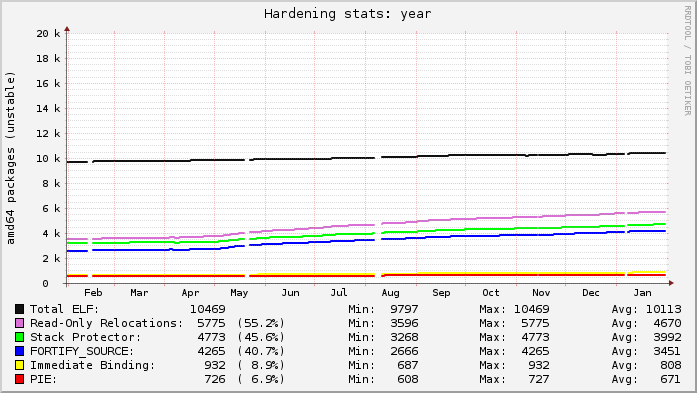
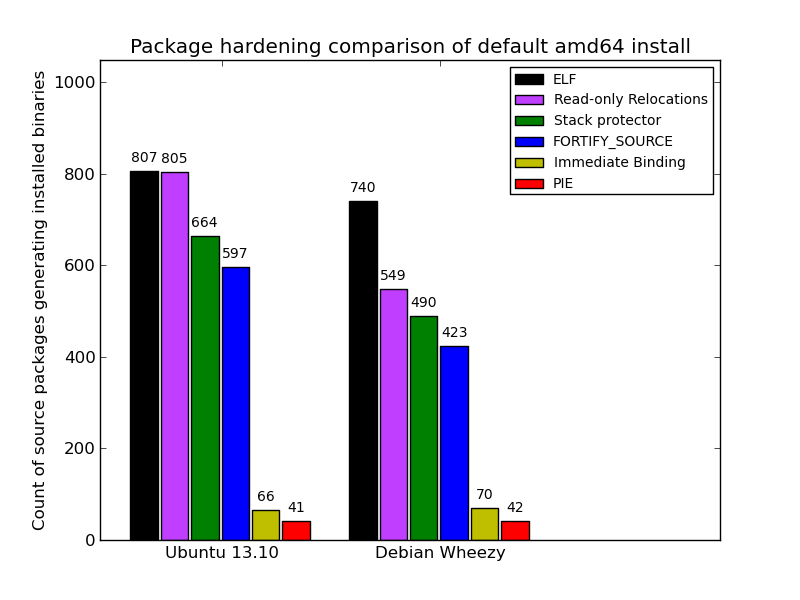
Ubuntu s lines are relatively flat because everything that can be built with hardening already is. Debian s graph is on a slow upward trend as more packages get migrated to dh to gain knowledge of the global flags. Each line in the graphs represents the count of source packages that contain binary packages that have at least 1 hit for a given category. ELF is just that: a source package that ultimately produces at least 1 binary package with at least 1 ELF binary in it (i.e. produces a compiled output). The Read-only Relocations ( relro ) hardening feature is almost always done for an ELF, excepting uncommon situations. As a result, the count of ELF and relro are close on Ubuntu. In fact, examining relro is a good indication of whether or not a source package got built with hardening of any kind. So, in Ubuntu, 91.5% of the archive is built with hardening, with Debian at 55.2%. The stack protector and fortify source features depend on characteristics of the source itself, and may not always be present in package s binaries even when hardening is enabled for the build (e.g. no functions got selected for stack protection, or no fortified glibc functions were used). Really these lines mostly indicate the count of packages that have a sufficiently high level of complexity that would trigger such protections. The PIE and immediate binding ( bind_now ) features are specifically enabled by a package maintainer. PIE can have a noticeable performance impact on CPU-register-starved architectures like i386 (ia32), so it is neither patched on in Ubuntu, nor part of the default flags in Debian. (And bind_now doesn t make much sense without PIE, so they usually go together.) It s worth noting, however, that it probably should be the default on amd64 (x86_64), which has plenty of available registers. Here is a comparison of default installed packages between the most recent stable releases of Ubuntu (13.10) and Debian (Wheezy). It s clear that what the average user gets with a default fresh install is better than what the archive-to-archive comparison shows. Debian s showing is better (74% built with hardening), though it is still clearly lagging behind Ubuntu (99%):

2014, Kees Cook. This work is licensed under a Creative Commons Attribution-ShareAlike 3.0 License.
Creative Commons License

Petter Reinholdtsen: Testing sysvinit from experimental in Debian Hurd

A few days ago I decided to try to help the Hurd people to get their changes into sysvinit, to allow them to use the normal sysvinit boot system instead of their old one. This follow up on the great Google Summer of Code work done last summer by Justus Winter to get Debian on Hurd working more like Debian on Linux. To get started, I downloaded a prebuilt hard disk image from http://ftp.debian-ports.org/debian-cd/hurd-i386/current/debian-hurd.img.tar.gz, and started it using virt-manager. The first think I had to do after logging in (root without any password) was to get the network operational. I followed the instructions on the Debian GNU/Hurd ports page and ran these commands as root to get the machine to accept a IP address from the kvm internal DHCP server:
settrans -fgap /dev/netdde /hurd/netdde 
kill $(ps -ef awk '/[p]finet/   print $2 ')
kill $(ps -ef awk '/[d]evnode/   print $2 ')
dhclient /dev/eth0
After this, the machine had internet connectivity, and I could upgrade it and install the sysvinit packages from experimental and enable it as the default boot system in Hurd. But before I did that, I set a password on the root user, as ssh is running on the machine it for ssh login to work a password need to be set. Also, note that a bug somewhere in openssh on Hurd block compression from working. Remember to turn that off on the client side. Run these commands as root to upgrade and test the new sysvinit stuff:
cat > /etc/apt/sources.list.d/experimental.list <<EOF
deb http://http.debian.net/debian/ experimental main
EOF
apt-get update
apt-get dist-upgrade
apt-get install -t experimental initscripts sysv-rc sysvinit \
    sysvinit-core sysvinit-utils 
update-alternatives --config runsystem
To reboot after switching boot system, you have to use reboot-hurd instead of just reboot, as there is not yet a sysvinit process able to receive the signals from the normal 'reboot' command. After switching to sysvinit as the boot system, upgrading every package and rebooting, the network come up with DHCP after boot as it should, and the settrans/pkill hack mentioned at the start is no longer needed. But for some strange reason, there are no longer any login prompt in the virtual console, so I logged in using ssh instead. Note that there are some race conditions in Hurd making the boot fail some times. No idea what the cause is, but hope the Hurd porters figure it out. At least Justus said on IRC (#debian-hurd on irc.debian.org) that they are aware of the problem. A way to reduce the impact is to upgrade to the Hurd packages built by Justus by adding this repository to the machine:
cat > /etc/apt/sources.list.d/hurd-ci.list <<EOF
deb http://darnassus.sceen.net/~teythoon/hurd-ci/ sid main
EOF
At the moment the prebuilt virtual machine get some packages from http://ftp.debian-ports.org/debian, because some of the packages in unstable do not yet include the required patches that are lingering in BTS. This is the completely list of "unofficial" packages installed:
# aptitude search '?narrow(?version(CURRENT),?origin(Debian Ports))'
i   emacs                   - GNU Emacs editor (metapackage)
i   gdb                     - GNU Debugger
i   hurd-recommended        - Miscellaneous translators
i   isc-dhcp-client         - ISC DHCP client
i   isc-dhcp-common         - common files used by all the isc-dhcp* packages
i   libc-bin                - Embedded GNU C Library: Binaries
i   libc-dev-bin            - Embedded GNU C Library: Development binaries
i   libc0.3                 - Embedded GNU C Library: Shared libraries
i A libc0.3-dbg             - Embedded GNU C Library: detached debugging symbols
i   libc0.3-dev             - Embedded GNU C Library: Development Libraries and Hea
i   multiarch-support       - Transitional package to ensure multiarch compatibilit
i A x11-common              - X Window System (X.Org) infrastructure
i   xorg                    - X.Org X Window System
i A xserver-xorg            - X.Org X server
i A xserver-xorg-input-all  - X.Org X server -- input driver metapackage
#
All in all, testing hurd has been an interesting experience. :) X.org did not work out of the box and I never took the time to follow the porters instructions to fix it. This time I was interested in the command line stuff.

Andrew Pollock: [geek] Yep, I'm still a geek

I did some soldering tonight, and it felt good. I haven't really done much soldering since I built my cat water bowl monitor, and that's going back to the last decade. My apartment building has an intercom-triggered release to the common front door, and the latch has been sticking a bit lately. It stuck today when Megan's Dad came to pick her up, and it stuck when Sarah came to pick up Zoe. It's annoying to have to trek all the way downstairs to let them in and then walk back up again. I decided I'd try and look into what the problem was today after everyone left. A visual inspection of the latch showed nothing obvious, and no one else was home to push the door unlock button for me while I was at the front door, so I decided to have a look at how it worked from within my apartment. I pulled the intercom phone off the wall and identified the two wires that got shorted when you pressed the unlock button, and shorted them by hand with a wire, and sure enough, I could hear the door solenoid releasing. I was thinking to myself, "if only there was a way to trigger this with my phone". I have a RaspberryPi and an Arduino board at my disposal, but I didn't really want to risk frying either of them. Then I remembered that I had a BoArduino that I'd bought at the Maker Faire years ago, but never assembled. I figured it'd make a good sacrificial lamb. So I rummaged around and found it, and busted out the 240v soldering iron I bought recently, but haven't used yet, and set about slapping it together. Man, it was fun. I had it half built before yoga, and finished it off when I got home. It even worked first go. I felt such a sense of accomplishment. The problem is, my general electronics fu is so weak, I'm not sure where to go from here, and my multimeter needs a new battery. I think the voltage on the wire for the intercom is higher than the BoArduino likes. I'd naively thought I could just connect the two wires of interest, one to ground and the other to one of the digital I/O pins, and have the BoArduino act as a switch, but that's not working. If I wire it one way, it unlocks the door instantly, even with the board powered off, and if I wire it the other way, it seems to half power up the board just using the power of the intercom system. So I'm obviously doing something wrong. My plan is to just have the BoArduino simulate pressing the button for 5 seconds at a time, every 10 seconds or so. Then I can be downstairs wiggling the latch to see what's up with it. Or I could just place a maintenance request with the Body Corporate. At least I had fun assembling the BoArduino, and now I have a spare one. It was nice to be able to go from problem to idea to execution in one night, even if the execution failed.

Andrew Pollock: [life] Day 7, Kindergarten again

Today was a pretty quiet day, because Zoe had Kindergarten again. Nominally, I'm supposed to be doing Debian stuff today, but I had some work presentations I wanted to watch while I still had the chance, so I mostly watched them for four hours while blowing the cobwebs out of my development environment. Zoe slept well last night and slept in a little bit to a whopping 6:30am. We got out the door at about 8:05am and by the time I'd got the bike trailer on the bike and made it to Kindergarten it was about 8:30am. Drop off went pretty smoothly. I decided to go for a run after I got back home, so I banged out 5km. My running fitness has been a bit off of late, partially because of the heat, and partially because I just haven't been doing it enough. I need to get back up to 10km as soon as possible so I can try increasing the distance. Both of Megan's parents work, and so I'm helping them out with picking her up on Mondays and Wednesdays. Today was the day of doing that. It was certainly an interesting experience having to wrangle two kids instead of one. Megan's a good kid, so it was no trouble. To kill time, we went to the car wash, where I bought the girls babyccinos while we waited, and then we headed into the Valley so I could check my post office box. After we got home, I attempted to do something I'd seen on Mister Maker. He basically squirted some PVA glue, some paint and some detergent into a cup and then mixed it all up and then blew into it with a straw until the bubbles rose over the top of the cup and pressed down on it with some paper. I used bubble mix instead of detergent because I figured it would have to be as good, but only Zoe's cup really worked as intended. Then, despite much discussion about it, Zoe decided to suck on the straw instead of blow it and so I had to race her off to the bathroom to rinse her mouth out. After that the girls played a bit more on their own, then Zoe wanted to watch TV but Megan didn't, so we painted a butterfly together and then Megan's Dad arrived to pick her up, and Sarah arrived not long after that. I killed some time doing a spontaneous electronics project before yoga and that was my day.

2 February 2014

Gunnar Wolf: CuBox-i4Pro

CuBox-i4Pro
Somewhere back in August or September, I pre-ordered a CuBox-i A nicely finished, completely hackable, and reasonably powerful ARM system, nicely packaged and meant to be used to hack on. A sweet deal! There are four models (you can see the different models' specs here) I went for the top one, and bought a CuBox-i4Pro. That means, I have a US$130 nice little box, with 4 ARM7 cores, 2GB RAM, WiFi, and... well, all of its basic goodies and features. For some more details, look at the CuBox-i block diagram. I got it delivered by early January, and (with no real ARM experience on my side) I finally got to a point where I can, I believe, contribute something to its adoption/usage: How to get a basic Debian system installed and running in it. The ARM world is quite different to the x86 one: Compatibility is much harder, the computing platform does not self-describe properly, and a kernel must first understand how a specific subarchitecture is before being able to boot on it. Somewhere in the CuBox forums (or was it the IRC channel?) I learnt that the upstream Linux kernel does not yet boot on the i.MX6 chip (although support is rumored to be merged for the 3.14 release), so I am using both a kernel and an uBoot bootloader not built for (or by) Debian people. Besides that, the result I will describe is a kosher Debian install. Yes, I know that my orthodox friends and family will say that 99% kosher is taref... But remember I'm never ever that dogmatic. (yeah, right!) Note that there is a prebuilt image you can run if you are so inclined: In the CuBox-i forums and wiki, you will find links to a pre-installed Debian image you can use... But I cannot advise to do so. First, it is IMO quite bloated (you need a 4GB card for a very basic Debian install? Seriously?) Second, it has a whole desktop environment (LXDE, if I recall correctly) and a whole set of packages I will probably not use in this little box. Third, there is a preinstalled user, and that's a no-no (user: debian, password: debian). But, most importantly, fourth: It is a nightly build of the Testing (Jessie) suite... Built back in December. So no, as a Debian Developer, it's not something we should recommend our users to run! So, in the end and after quite a bit of frustration due to my lack of knowledge, here goes the list of steps I followed:
Using the CuBox
On the i2 and i4 models, you can use it either with a USB keyboard and a HDMI monitor, or by a serial consoles (smaller models do not have a serial console). I don't have a HDMI monitor handy (only a projector), so I prefer to use the serial terminal. Important details to avoid frustration: The USB keyboard has to be connected to the lower USB port, or it will be ignored during the boot process. And make sure your serial terminal is configured not to use hardware flow control. Minicom is configured by default to use hardware flow control, so it was not sending any characters to the CuBox. ^A-O gets you to the Minicom configuration, select Serial port setup, and disable it.
Set up the SD card
I created a 2GB partition, but much less can suffice; I'd leave it at least to 1GB to do the base install, although it can be less once the system is set up (more on this later). Partition and format using your usual tools (fdisk+mke2fs, or gparted, or whatever suits your style).
Install the bootloader
I followed up the instructions on this CuBox-i forums thread to get the SPL and uBoot bootloader running. In short, from this Google Drive folder, download the SPL-U-Boot.img.xz file, uncompress it (xz --decompress SPL-U-Boot.img.xz), and write it to the SD card just after the partition map: As root,
# dd if=SPL-U-Boot.img of=/dev/mmcblk0 bs=1024 seek=1.
Actually, to be honest: As I wanted something basic to be able to debug from, I downloaded (from the same Google Drive) the busybox.img.gz file. That's a bit easier to install from: xz --decompress busybox.img.xz, and just dump it into the SD from the beginning (as it does already include a partition table):
# dd if=busybox.img of=/dev/mmcblk0
This card is already bootable and minimal, and allows to debug some bits from the CuBox-i itself (as we will see shortly).
After this step, I created a second partition, as I said earlier. So, my mmcblk0p1 partition holds Busybox, and the second will hold Debian. We are still working from the x86 system, so we mount the SD card in /media/mmcblk0p2
Installing the base system
Without debian-installer to do the heavy lifting, I went for debootstrap. As I ran it from my PC, debootstrap's role will be for this first stage only to download and do a very initial pre-unpacking of the files: Bootstrapping a foreign architecture implies, right, using the --foreign switch:
debootstrap --foreign --arch=armhf wheezy /media/mmcblk0p2 http://http.debian.net/debian
You can add some packages you often use by specifying --include=foo,bar,baz
So, take note notes: This board is capable of running the armhf architecture (HF for Hardware Float). It can also run armel, but I understand it is way slower.
First boot (with busybox)
So, once debootstrap finishes, you are good to go to the real hardware! Unmount the SD card, put it in the little guy, plug your favorite console in (I'm using the serial port), and plug the power in! You should immediately see something like:
  1. U-Boot SPL 2013.10-rc4-gd05c5c7-dirty (Jan 12 2014 - 02:18:28)
  2. Boot Device: SD1
  3. reading u-boot.img
  4. Load image from RAW...
  5. U-Boot 2013.10-rc4-gd05c5c7-dirty (Jan 12 2014 - 02:18:28)
  6. CPU: Freescale i.MX6Q rev1.2 at 792 MHz
  7. Reset cause: POR
  8. Board: MX6-CuBox-i
  9. DRAM: 2 GiB
  10. MMC: FSL_SDHC: 0
  11. In: serial
  12. Out: vga
  13. Err: vga
  14. Net: phydev = 0x0
  15. Phy not found
  16. PHY reset timed out
  17. FEC
  18. (Re)start USB...
  19. USB0: USB EHCI 1.00
  20. scanning bus 0 for devices... 1 USB Device(s) found
  21. scanning usb for storage devices... 0 Storage Device(s) found
  22. scanning usb for ethernet devices... 0 Ethernet Device(s) found
  23. Hit any key to stop autoboot: 3

Let it boot (that means, don't stop autoboot), and you will soon see a familiar #, showing you are root in the busybox environment. Great! Now, mount the Debian partition:
# mount /dev/mmcblk0p2 /mnt
Finishing debootstrap's task
With everything in place, it's time for debootstrap to work. Chroot into the Debian partition:
# chroot /mnt
And ask Debootstrap to finish what it started:
# debootstrap --second-stage
Be patient, as this step takes quite a bit to be finished.
Some extra touches...
After this is done, your Debian system is almost ready to be booted into. Why almost? Because it still does not have any users, does not know its own name nor knows I want to use it via a serial terminal. Three very simple tasks to fix. First two:
  1. # passwd
  2. Enter new UNIX password:
  3. Retype new UNIX password:
  4. passwd: password updated successfully
  5. # echo cubox-i.gwolf.org > /etc/hostname

For the second one, add a line to /etc/inittab specifying the details of the serial console. You can just do this:
# echo 'T0:23:respawn:/sbin/getty -L ttymxc0 115200 vt100' >> /etc/inittab
Boot into Debian!
So, ready to boot Debian? Ok, first exit the chroot shell, to go back to the Busybox shell, unmount the Debian partition, and set the root partition read-only:
  1. # exit
  2. # umount /mnt
  3. # mount / -o remount,ro

Disconnect and connect power, and now, do interrupt the boot process when you see the Hit any key to stop automount prompt. To see the configuration of uboot, you can type printenv We will only modify the parameters given to the kernel:
  1. CuBox-i U-Boot > setenv root /dev/mmcblk0p2 rootfstype=ext3 ro rootwait
  2. CuBox-i U-Boot > boot

So, the kernel will load, and a minimal Debian system will be initialized. In my case, I get the following output:
  1. ** File not found /boot/busyEnv.txt **
  2. 4703740 bytes read in 390 ms (11.5 MiB/s)
  3. ## Booting kernel from Legacy Image at 10000000 ...
  4. Image Name: Linux-3.0.35-8
  5. Image Type: ARM Linux Kernel Image (uncompressed)
  6. Data Size: 4703676 Bytes = 4.5 MiB
  7. Load Address: 10008000
  8. Entry Point: 10008000
  9. Verifying Checksum ... OK
  10. Loading Kernel Image ... OK
  11. Starting kernel ...
  12. Unable to get enet.0 clock
  13. pwm-backlight pwm-backlight.0: unable to request PWM for backlight
  14. pwm-backlight pwm-backlight.1: unable to request PWM for backlight
  15. _regulator_get: get() with no identifier
  16. mxc_sdc_fb mxc_sdc_fb.2: NO mxc display driver found!
  17. INIT: version 2.88 booting
  18. [info] Using makefile-style concurrent boot in runlevel S.
  19. [....] Starting the hotplug events dispatcher: udevd. ok
  20. [....] Synthesizing the initial hotplug events...done.
  21. [....] Waiting for /dev to be fully populated...done.
  22. [....] Activating swap...done.
  23. [....] Cleaning up temporary files... /tmp. ok
  24. [....] Activating lvm and md swap...done.
  25. [....] Checking file systems...fsck from util-linux 2.20.1
  26. done.
  27. [....] Mounting local filesystems...done.
  28. [....] Activating swapfile swap...done.
  29. [....] Cleaning up temporary files.... ok
  30. [....] Setting kernel variables ...done.
  31. [....] Configuring network interfaces...done.
  32. [....] Cleaning up temporary files.... ok
  33. [....] Setting up X socket directories... /tmp/.X11-unix /tmp/.ICE-unix. ok
  34. INIT: Entering runlevel: 2
  35. [info] Using makefile-style concurrent boot in runlevel 2.
  36. [....] Starting enhanced syslogd: rsyslogd. ok
  37. [....] Starting periodic command scheduler: cron. ok
  38. Debian GNU/Linux 7 cubox-i.gwolf.org ttymxc0
  39. cubox-i login:

And that's it, the system is live and ready for my commands!
So, how big is this minimal Debian installed system? I cheated a bit on this, as I had already added emacs and screen to the system, so yours will be a small bit smaller. But anyway Lets clear our cache of downloaded packages, and see the disk usage information:
  1. root@cubox-i:~# apt-get clean
  2. root@cubox-i:~# df -h
  3. Filesystem Size Used Avail Use% Mounted on
  4. rootfs 1008M 347M 611M 37% /
  5. /dev/root 1008M 347M 611M 37% /
  6. devtmpfs 881M 0 881M 0% /dev
  7. tmpfs 177M 132K 177M 1% /run
  8. tmpfs 5.0M 0 5.0M 0% /run/lock
  9. tmpfs 353M 0 353M 0% /run/shm

So, instead of a 4GB install, we have a 350MB one. Great improvement! Now, lets get it to do something useful, in a most Debianic way!

1 February 2014

Alexander Wirt: next stop: FOSDEM 2014

This year I am able to join the Debian Booth on FOSDEM again. I am also looking forward to meet some projects like foreman and many others. I also hope that I find the time to do some listmaster work, like accepting new lists or getting my new solr based search engine for lists.debian.org online. If you want to meet me, try the debian booth or drop me a short mail or twitter message (@formorer).

Keith Packard: No Fosdem

Missing FOSDEM I m afraid Eric and I won t be at FOSDEM this weekend; our flight got canceled, and the backup they offered would have gotten us there late Saturday night. It seemed crazy to fly to Brussels for one day of FOSDEM, so we decided to just stay home and get some work done. Sorry to be missing all of the fabulous FOSDEM adventures and getting to see all of the fun people who attend one of the best conferences around. Hope everyone has a great time, and finds only the best chocolates.

31 January 2014

Steve Kemp: Optimization Recipes

Today I am mostly in my bed suffering from "the plague". Between naps I've worked on a new site a little: Hopefully this will become updated, contributions welcome, and be useful to the world. (Source available on github.)

Daniel Pocock: If you thought systemd proponents were bad....

Just imagine for a moment if something like the iPhone App Store approval process was applied to every application for a domain name. Delays and unexplained rejections killing many great ideas before they even get off the ground. In the worse cases, like that of Greg Hughes, the great firewall of the app store has been used to quash ideas that it appears Apple may have been planning to compete with or copy. If domain applicants had to go through such a process or if other core technologies fell into a rut like that then it would throw Charles Darwin's long established theory of evolution out the window and society would end up eating each other. Once companies had established their position and were happily making money they would do everything possible to stomp out any innovation that may undermine them. This is exactly the kind of non-evolution that has plagued the telecoms sector for many years now. You don't have to look past the price of a simple SMS to see the truth of this situation. Your 160 bytes can cost anywhere between $US0.10 - $US0.50 throughout the western world, even on a network that is otherwise charging maybe $10 per 1MiB (the equivalent of 6,000 text messages) when roaming. One of the compelling features of free software is that it empowers innovation and efficiency. Telecoms executives may argue that by charging you these extortionate fees, they are keeping spam out of your phone. Think again: technologies like XMPP and SIP are doing that even more effectively and without any price to pay. Software for managing buddy lists and algorithms for spam detection put those telecoms executives out of a job. If SIP, XMPP or both become dominant, evolution may succeed yet. Despite having these great technologies available for messaging and multimedia communications and despite having a range of free software success stories in products such as Firefox or whole distributions like Fedora, Debian and its derivatives like Ubuntu, non-free communications solutions like Skype and Viber continue to run rampant in the voice and video domain. As it turns out, this is a very dangerous area for the free software community to neglect. How many people know somebody who tried running Linux but went back to a proprietary solution so they could use a non-free softphone? In these cases, it is not the phone software itself that appeals to the user: it is the people that software lets them communicate with, their friends, family, professional community and beyond. For people who don't truly perceive the benefits of free software or those who don't have the confidence or experience to defend those benefits, the power of Metcalfe's law hits them like a tsunami and violently sweeps away all the rest of the free software they had started to use. While Skype is currently available for some distributions of Linux, it is not free software: amongst other things, there is no published source code and no independent review of the code has been possible. Leveraging the power of Metcalfe's law, the publisher of that software gains significant power over those who choose to install it. Any day now, they could even use it to offer users a one-click "free trial" upgrade to some "Windows Lite" or install other components that obstruct effective upgrades to newer versions of the free operating system. To make an analogy, the potential for dirty tricks in this area is far more scary than the things systemd proponents have been accused of. For those with an interest in solving these problems or at least giving free real-time communications software a try, On the init system issue itself Note: the reference to systemd is not itself an opinion for or against any particular init system in Debian nor is it a suggestion that any one side is badder than any other.

Andrew Pollock: [life] Day 4, Brazilian jiu jitsu, Science Friday and the Lunar New Year

I want Zoe to do one "extra curricular" activity per term this year. Something dance-related, something gymnastics-related and maybe some other form of sport (I'm thinking soccer). My girlfriend and I were wandering through Westfield Carindale on Saturday, and we happened upon a guy from Infinity Martial Arts touting his wares. I thought I'd suss it out, and they had an introductory offer where the sign-up fee and uniform fee were significantly reduced, and they had a pretty flexible timetable. They were just starting up their East Brisbane location, and the close proximity to home along with the reduced price sealed the deal. Long-term, I'd like for Zoe to learn Tae Kwon Do, for self-defense, but BJJ seemed as good as anything to get her introduced to the idea of martial arts. The class for 2-4 year olds was billed as "Fun and Fitness 4 Kids" so it's really a combination of listening to the instructor, some basic gymnastics-style stuff and a little bit of martial arts. We biked over this morning (going up Hawthorne Road is a slog) and got there in about 15 minutes via the direct route. It's in the upstairs of a gym in the middle of an industrial area, but it was pretty easily accessible by bike. They're still waiting on some of the equipment, so the space was a little spartan. It was just Zoe and I and a mother of two not quite 2 year old twin girls taking a trial class. First up, we got her uniform, and she looked so cute. There were pants and a jacket and a belt. I'm going to have to video the instructor tying up the belt next week so I can learn how to do it the right way. The class started with the kids standing on these flat coloured circles ("mushrooms") and effectively playing "Simon Says" ("instructor says") without being caught out. It was a pretty sneaky way of doing a bunch of warm up exercises like rotating the knees and ankles. Zoe did very well, but there were a few that she just point blank refused to do. Next the instructor set up a bunch of "stations" around the room. The first station involved me crouching in a fetal position with a football and Zoe had to try and tip me over to get the football. That was a load of fun. The next station was a few steps and foam-filled vinyl ramp, and Zoe just had to do a somersault down that. The next station was pretty much the same but taller, and Zoe had to do a "sausage roll" on her side down that. The next station was just a small exercise ball and Zoe had to do some "donkey kicks" on it. The final station involved me waving a couple of cut-off pool noodles at arm's length, and Zoe had to run in covering her head and give me a bear hug. We did a few rotations of these stations. It was heaps of fun. Next, the instructor got a whole bunch of ball pit balls of different colours, and scattered them over the floor, and put a basket at each end of the room. The kids were then instructed to retrieve specific colours as fast as possible. Zoe started out trying to get as many as possible in her arms before returning to the basket, but the idea was to do it one ball at a time. A lot of running back and forth. Finally, we did some actual BJJ (I think). It was called the "sleeping crocodile hold" or something like that. I had to lie on my back, and Zoe had to sneak up to me from my side and grapple me with one arm behind my head and the other around my waist and a knee in my side. I have no interest in Zoe learning mixed martial arts, but this class was so much fun. I was feeling a bit tired this morning before we headed out, but by the end of it I was so pumped. It was just the right combination of daddy/daughter rough and tumble, with a bit of gymnastics and following instruction. I'm pretty certain Zoe enjoyed it. I liked that the instructor stopped for a water break between each activity, so the kids were kept well hydrated throughout. We took the "scenic route" home, because we had no particular time constraints. It was more like 25 minutes and involved the Norman Park Greenway. I was so glad we went that way. It was a beautiful ride that I didn't know existed. Very indirect, it involved going through Woolloongabba, Coorparoo and Norman Park, around the back of Coorparoo State High School along the side of Norman Creek. It was semi-wetland conditions.The only part that was a bit annoying was where Norman Avenue met Wynnum Road. It was quite steep and the green light didn't last very long. I had wanted to do story time at Bulimba Library at 10:30am on Fridays, but I'd rather bike home via the Norman Park Greenway instead, because it's a nice ride. I've since decided that I'll just use the story time at the library during wet weather, when we'd be driving to BJJ anyway, and be able to make it to the library in time after class. I've also got to figure out where I'm going to fit doing some Science into the schedule. Fridays are going to be busy I think. I managed to get Zoe down for a nap by a bit after 12:30pm today. She was pretty knackered after the class (as was I from biking home) so I let her watch a bit of TV while I prepared lunch. She was funny, she saw how sweaty I was when we got home, and suggested I take a shower while she watch some TV. I was a bit unprepared for my first Science Friday, though. I'd been considering going to the Sir Thomas Brisbane Planetarium after BJJ, but I discovered it's closed until February 7 for maintenance and an upgrade, so that cunning plan was thwarted. I used her nap time to order 365 Science Experiments and 50 Dangerous Things (you Should Let Your Children Do). I should get plenty of inspiration out of those two. After she woke up, we did the old "vinegar and sodium bicarbonate" trick as our science experiment. I've finally got a use for my Google Labs Founders' Award lab coat. I need to try and find some child-sized safety glasses. The adult ones barely stay on her little nose. After that, we went for a walk to our local toy store to see if they sold child-sized safety glasses (they didn't) and then Zoe watched a little bit of TV and then we walked to the CityCat to go to Teneriffe to catch a bus to Chinatown. I couldn't have timed it better if I tried. Just as we got to Chinatown, they started doing a thing with the Chinese dragons, and I hoisted Zoe up on my shoulders so she could watch. I wasn't sure how she was going to take it, with all the noise from the drums and the dragons themselves, but she was enthralled. We watched other acts and then my girlfriend joined us, and we went to a Chinese restaurant for dinner. I bought Zoe these training chopsticks a while ago, and she's taken to them like a duck to water. I brought them with us so she could use them at the restaurant, and she ate the biggest dinner I've ever seen her eat. After dinner, we caught the tail end of a procession and had some ice cream. We were starting to leave, and there was another dragon, and Zoe was brave enough to go and touch it on her own, for good luck. We then made our way back to the bus. By the time the bus arrived and got us back to Teneriffe, and a CityCat finally arrived, it was very late, but Zoe was pretty good the whole time. It was probably the latest night she's ever had with me while we've been out on the go, and she only got a bit ratty once we were home. It didn't help that she'd forgotten that she'd put Cowie in a cupboard this morning and we burned some more time tracking her down. Today was a fantastic (and very full) day. I enjoyed it a lot, and I think Zoe did too. Fortunately, Fridays won't always be this full on.

30 January 2014

Rudy Godoy: What have we done?

Couple of weeks ago I was in the situation of having to setup up a new laptop. I decided to go with wheezy s DVD installer. So far so good. I didn t expect (somewhere in the lies-I-tell-myself dept.) to have GNOME as the default Debian desktop. However after install I ve figured it was the new GNOME3 everybody was talking about. Before that I ve seen it in Ubuntu systems used by my classmates. I thought yeah, OK GNOME3, I think that s fine for them as a Linux desktop. Turns out that I ve started using the Debian desktop aka GNOME3 and noticed that it was not as bloated as the Ubuntu desktop I ve seen before looked, so I sticked with it, (I thought for a while). Turns out that I did like this new so called GNOME3, the non-window based but an application-based system (that is something that sticks in my head). I liked the way it makes sense as a desktop system, like when you look for applications, documents, connect to networks, use pluggable devices or just configure stuff every time with less and less effort. Good practices and concepts learned from Mac OS X-like environments and for sure taking advantage of the new features the Linux kernel and user-space environment got over the years. So, like one month later I stick with it and it makes sense for me to keep it. I had no chance to try the latest XFCE or KDE, my default choices before this experience. Kudos GNOME team, even after the depictions you guys had on GNOME Shell; as I learned. This whole situation got me into some pondering about the past of the Linux user experience and how we in the community lead people into joining. I remember that when I guy asked: how do I configure this new monitor/VGA card/network card/Etc? the answer was in the lines of: what is the exact chipset model and specific whole product code number that your device has? Putting myself in the shoes of such people or today s people I d say: what are you talking about? what it is a chipset? I mean, like it was too technical that only one guy with more than average knowledge could grasp. From a product perspective this is similar for a car manufacturer tell to a customer to look for the exact layout or design your car s engine has, so that they are able to tell whether is the 82 s model A or 83 s model C. Simplicity on naming and identification was not in the mindset of most of us. This is funny because as technology advances it also becomes more transparent to the customer. So, for instance, today s kids can become really power users of any new technology as if they had, indeed, many pre-set chipsets in their brain. But when going into the details we had to grasp few years ago they have some hard time figuring out the complexity of the product that presents itself on this clean and simple interface. New times, interesting times. Always good to look back. No, I m not getting old.

Andrew Pollock: [life] Day 3, Playgroup

Today was our first expedition to the local Playgroup at the Bulimba Senior Citizen's Centre, an easy 5 minute bike ride from our place. I told Zoe we were going to Playgroup when Sarah dropped her around this morning, and she got very excited and jumped up and down. When Sarah asked her if she knew what Playgroup was, she said "no!" while continuing to jump up and down excitedly. We all laughed. I must have put this on my calendar when I was in Sydney last week, because I had it down for 8:30am, and we rocked up and there wasn't anyone there. A lady arrived to set up for a music class, and she said that the Playgroup didn't usually start until much later, so I figured I'd had a timezone fail and we went for a little bike ride around Bulimba while we waited. The lady who was running the Playgroup arrived at about 9:15am, and so we helped with the set up. Basically lots of toys, a couple of slides and some basic craft stuff. Heaps of the little IKEA round plastic stools. Parents (almost exclusively mothers) started trickling in from 9:30am. I've got a total name overload. We need name tags. Most of the girls seemed to be about 2 and a half, and a lot of the mothers had very young second children. Apparently a mother's group had joined en masse because they all had second children who were crawling, and so meeting in a park wasn't practical any more. Structurally, the first hour or so was just a free for all, and the last half an hour was some songs, a story and some playing under and on a parachute. All in all it was a good morning's activity, and at $20 for the term, nice and cheap. Apparently you're supposed to join Playgroup Queensland as well, for $40, but that takes care of liability insurance and whatnot. If only their website used SSL. Zoe mostly just wanted to play with me. We did a lot of role playing with some dolls, and she checked out the various toys. She loved that there was a stage, and took it upon herself to give an impromptu dance performance for a bit. We also did a little craft activity. She seemed more interested in helping flap the parachute than going under it, but enjoyed having a ride on it when the time came. I've just finished reading How Not to F*** Them Up by Oliver James. It was quite an interesting read, although not particularly applicable for my situation, as it more dealt with the first three years. It was interesting observing a whole bunch of different mothering techniques in action, both in dealing with their toddler children, and how they responded to their second infants. After Playgroup, we biked over to the local toy shop around the corner from home, and grabbed some birthday presents for the birthday party on Saturday and came home for lunch. Chicken quesadillas and some mango (I hadn't realised how much I've missed Queensland mangoes until we moved back, and I'm glad Zoe loves them as well). I got her down for a nap earlier today, and after she woke up, I asked Zoe if she wanted to write on the birthday cards we'd bought for the twins' birthday presents. She said she didn't know how to write her name (which isn't true) and wanted to paint them instead, so we compromised and used some sponge letters to stamp "Z O E" on the cards in paint. Zoe said that Eva's favourite colour was purple and Layla's was pink (or it may have been the other way around), so we stamped one with purple paint and mixed red and white to make something that looked more orange than pink and stamped the other one. Then Zoe wanted to glue the two paper plates together that we'd been using to hold the paint, so we did that, and then she wanted to "hand paint" a cardboard tube, which seemed to involve me directly squirting various colours into her hands and then her "painting" the tube with what was in her hands. The tube quickly ended up a brown/grey colour. All in all, it was a fabulous mess, and fortunately no walls or doors copped any paint on the way to the bathroom to clean up. After that, we cleaned up Zoe's room a bit, which resulted in her going off and playing with her Magna Doodle with Smudge for a bit, and then we played Doctor with her doctor set and then we did some baking. It was a good afternoon, and she only asked to watch TV once, when she first woke up from her nap, and we managed to successfully divert to other much more fun stuff.

Next.

Previous.