Search Results: "ed"

10 October 2016

Arturo Borrero Gonz lez: The day I became Debian Developer

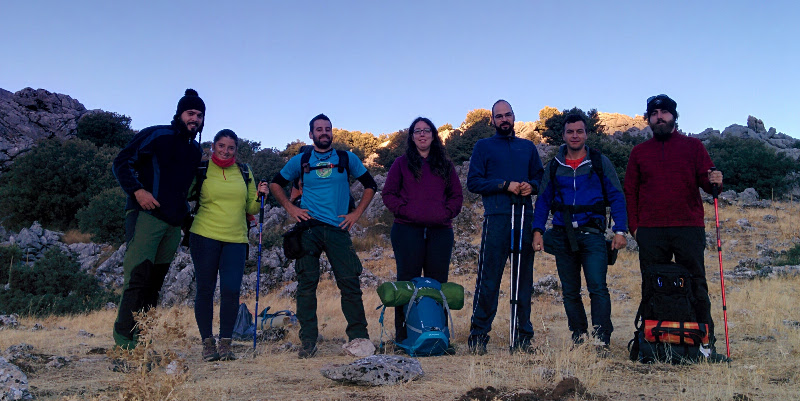
Debian The moment has come. You may contact me now at arturo@debian.org :-) After almost 6 months of tough NM process, the waiting is over. I have achieved the goal I set to myself back in 2011: become Debian Developer. This is a professional and personal victory. I would like to mention many people who have been important for this to happen. But they all know, no need to create a list here. Thanks! This weekend I was doing some hiking in the mountains and had no internet conection at all. When I arrived back home, I discovered an email from Debian System Administrators on behalf of The Debian New Maintainer Team, in which they let me know that my official DD account had been created. During the last 6 month I have been trying to imagine the moment in which the process is finally completed (yes, I have been a bit impatient). At the end, the magical moment in the mountains was followed by the joy of the DD account. Curious how things happen sometimes. Here is a pic of this mountain day, with my adventure friends. I am the first from the left. pic

9 October 2016

Hideki Yamane: Simplest debian/watch file GNOME packages

Simplest (two lines) debian/watch file GNOME-related packages, you can just copy&paste it.
version=4
http://download.gnome.org/sources/@PACKAGE@/([\d\.]+[02468])/@PACKAGE@-@ANY_VERSION@@ARCHIVE_EXT@

Bits from Debian: Debian is participating in the next round of Outreachy!

Following the success of the last round of Outreachy, we are glad to announce that Debian will take part in the program for the next round, with internships lasting from the 6th of December 2016 to the 6th of March 2017. From the official website: Outreachy helps people from groups underrepresented in free and open source software get involved. We provide a supportive community for beginning to contribute any time throughout the year and offer focused internship opportunities twice a year with a number of free software organizations. Currently, internships are open internationally to women (cis and trans), trans men, and genderqueer people. Additionally, they are open to residents and nationals of the United States of any gender who are Black/African American, Hispanic/Latin@, American Indian, Alaska Native, Native Hawaiian, or Pacific Islander. If you want to apply to an internship in Debian, you should take a look at the wiki page, and contact the mentors for the projects listed, or seek more information on the (public) debian-outreach mailing-list. You can also contact the Outreach Team directly. If you have a project idea and are willing to mentor an intern, you can submit a project idea on the Outreachy wiki page. Here's a few words on what the interns for the last round achieved within Outreachy: Debian would not be able to participate in Outreachy without the help of the Software Freedom Conservancy, who provides administrative support for Outreachy, as well as the continued support of Debian's donors, who provide funding for the internships. If you want to donate, please get in touch with one of our trusted organizations. Debian is looking forward to welcoming new interns for the next few months, come join us!

Guido G nther: Debian Fun in September 2016

Debian LTS September marked the seventeenth month I contributed to Debian LTS under the Freexian umbrella. I spent 6 hours (out of 7) working on Other Debian stuff Other Free Software activities

Ben Armstrong: Annual Hike with Ryan: Salt Marsh Trail, 2016

Once again, Ryan Neily and I met last month for our annual hike. This year, to give our aging knees a break, we visited the Salt Marsh Trail for the first time. For an added level of challenge and to access the trail by public transit, we started with the Shearwater Flyer Trail and finished with the Heritage Trail. It was a perfect day both for hiking and photography: cool with cloud cover and a refreshing coastal breeze. The entire hike was over 25 km and took the better part of the day to complete. Good times, great conversations, and I look forward to visiting these beautiful trails again!
Salt Marsh trail hike, 2016. Click to start the slideshow.Salt Marsh trail hike, 2016. Click to start the slideshow.
We start here, on the Shearwater flyer trail.We start here, on the Shearwater flyer trail.
Couldn t ID this bush. The berries are spectacular! A pond to the side of the trail. Different angle for dramatic lighting effect. Rail bridge converted to foot bridge. Cranberries! Reviewing our progress. From the start Map of the Salt Marsh trail ahead. Off we go again! First glimpse through the trees. Appreciating the cloud cover today. Salt-marshy grasses. Never far from rocks in NS. Rocks all laid out in stripes. Lunch & selfie time. Ryan attacking his salad. Vantage point. A bit of causeway coast. Plenty of eel grass. Costal flora. We head for the bridge next. Impressed by the power of the flow beneath. Snapping more marsh shots. Ripples. Gulls, and if you squint, a copter. More ripples. Swift current along this channel. Until it broadens out and slows down. Nearly across. Heron! Sorry it s so tiny. Heron again, before I lost it. Ducks at the head of the Atlantic View trail where we rested and then turned back. Attempt at artsy. Nodding ladies tresses on the way back. Several of them. Sky darkening, but we still have time. A lonely wild rose. The last gasp of late summer. Back across the marshes. A short breather on the Heritage Trail.
Here s the Strava record of our hike:
Facebooktwittergoogle_plusredditpinterestlinkedinmail

Norbert Preining: Reload: Android 7.0 Nougat Root Pokemon Go

Ok, it turned out that a combinations of updates has broken my previous guide on playing Pokemon GO on a rooted Android device. What has happened that the October security update of the Android Nougat has changed the SecurityNet that is used for checking for rooted devices, and at the same time the Magisk rooting system as catapulted itself (hopefully temporarily) into the complete irrelevance by removing the working version and providing an improved version that does neither have SuperSU installed, nor the ability to hide root well done, congratulations. android-nougat-root-poke But there is a way around, and I am now back at the latest security patch level, rooted, and playing Pokemon GO (not very often, no time, though!). My previous guide used Magisk Version 6 to root and hide root. But the recent security updated of Andorid Nougat (October 2016) has rendered Magisk-v6 non-working. I first thought that Magisk-v7 could solve the problem, but I was badly disappointed: After reflashing my device to pristine state, installing Magisk-v7, I suddenly was left with: no SuperSU (that means, X-plore, Titanium Backup etc do not work anymore), nor the ability to hide root for Pokemon Go or banking apps. Great update. Thus, I have decided to remove Magisk completely and make a clean start with SuperSU and suhide (and a GUI for suhide). And it turned out to be more convenient and more standard than Magisk, may it rest in peace (until they fix their stuff together). In the following I assume you have a clean slate Android Nougat device, if not, please see one of the previous guides for hints how to flash back without loosing your user data. Ingredients One need the following few items: Rooting Unzip the CF-Auto-Root-angler-angler-nexus6p.zip and either use the included programs (root-linux.sh, root-mac.sh, root-windows.bat) to root your device, or simply connect your device to your computer, and run (assuming you have adb and fastboot installed):
adb reboot bootloader
sleep 10
fastboot boot image/CF-Auto-Root-angler-angler-nexus6p.img
After that your device will reboot a few times, and you will finally land in your normal Android screen and a new program SuperSU will be available. At this stage you will not be able to play Pokemon GO anymore. Updating SuperSU The version of SuperSU packaged with the CF-AutoRoot is unfortunately too old, so one needs to update using the zip file SR1-SuperSU-v2.78-SR1-20160915123031.zip (or later). Here are two options: Either you use TWRP recovery system, or you install FlashFire (main page, app store page) which allows you to flash zip/ota directly from your Android screen. This time I used for the first time the FlashFire method, and it worked without any problem. Just press the + button in FlashFire, than the Flash zip/ota button, select the SR1-SuperSU-v2.78-SR1-20160915123031.zip, click two times yes, and then wait a bit and a few black screens (don t do anything!) later you will be back in your Nougat environment. Opening the SuperSU app should show you on the Settings tag that the version has been updated to 2.78-SR1. Installing suhide As with the update of SuperSU, install the suhide zip file, smae procedure, nothing special. After this you will be able to add an application (like Pokemon GO) from the command line (shell), but this is not very convenient. Better is to install the suhide GUI from the app store, start it, scroll for Pokemnon GO, add a tick, and you are settled. After that you are free to play Pokemon GO again. At least until the next security update brings again problems. In the long run this is a loosing game, anyway. Enjoy it while you can.

Laura Arjona Reina: New phone: Samsung Galaxy S III phone with Replicant

Thanks to the Bazaar effort of The Guardian Project, I ve been offered a phone to test F-Droid and other free software apps for Android. I accepted the offer, and chose a Samsung Galaxy S III phone with Replicant 4.2.2, installed and shipped by Tehnoetic.
I m using it now as my main phone, and since it uses Android 4.x I m able to install more modern apps than in my old Galaxy Ace (which remains usable with CyanongenMod 7.2 (Android 2.3.7)).
My plans with this new phone are:
  • Test Replicant and free software for Android on it
  • Get more involved in translations of Android apps
  • Get more involved in the F-Droid community
  • Keep an eye on Android tools in Debian
  • Post here in my blog articles about what I ve been doing (and of course report issues and contributions upstream)
Migration to the new phone
I ve migrated my stuff from the old phone to this one. Some notes:
  • Wrote down my list of apps
  • Used Slight Backup for contacts, call logs and messages
  • Periodical has its own backup tool
  • Whatsapp has its own backup tool
  • Exported settings in K-9 Mail
  • Exported Kontalk GPG key
  • Simply Do has its own backup tool
  • I don t use calendars in the phone so I didn t migrate any events (I have Offline Calendar to ad temporary notes/reminders, but that s all)
I moved the SIM card and the SD Card to the new phone and tried the restore tool for each app.
I found out that several apps could not find the backups because they were not looking at the SD Card for the files (seems that they were using internal memory locations). So for recovering my backups, I made new backups in the new phone with the empty apps, then found out where those backups were created (in the internal memory, /storage/emulated/0), and then copied the authentic backup files there (overwriting teh dummy ones), and then used the app to restore the backup.
For some apps (K-9) I had to set again the folder for attachments, since the SD was not anymore in /media/sdcard, now it was in /storage/sdcard1.
Apart from that, everything went well.
I was a bit upset that I could not migrate Kontalk conversations (there is no backup/export tool, and I am not sure where are the files/database stored).
I noticed that although Kontalk is registered using the phone number, and it uses the phone numbers for contacts, it kept working in the old phone (Whatsapp detects when you change to a new phone and kind of deactivates itself in the old one, but that s not the case for Kontalk: it works as any XMPP client (if it s open, it can send/receive messages)).
Replicant 4.2 in a Galaxy S III (i9300)
Here I write some particularities that I found in the phone, mostly bugs or problems. But don t get me wrong: overall I m very happy with it!
I experienced a problem when using the phone to make/receive calls, it seemed that the proximity sensor was not working well. I thought it was a Replicant issue, but later I realized that there was a Tehnoetic sticker that was partially covering the sensor. I removed the sticker and everything worked well.
The phone came with F-Droid installed which is nice. I upgraded to the latest alpha and I m testing the alpha releases since then
I found that I cannot choose where to install apps nor move apps from internal memory to the SD Card: there is no such option in Settings > Apps > Manage Apps (there is such setting in my CyanogenMod 7.2 phone, though). Since my phone is rooted and I have full access to both internal memory and SDCard, and I have plenty of room in the internal memory, I didn t bother too much. I m not sure if this is a bug, a feature, something related to Android 4 or specific to Replicant, o specific to this phone model. Pending to investigate, but low priority.
Replicant is almost fully translated to Spanish, yay!. I only found one untranslated string: You go to Settings > Wireless > Cell Broadcasts, and in the settings page, Cell Broadcasts is untranslated (but the settings themselves are). I still need to find where/how to send a patch for this (not sure if it comes from Android, CyanogenMod, or it s something specific for Replicant. Also, being Android 4.x, I m not sure about the usefulness of reporting such a minimal and unimportant patch upstream ).
When I turn on the phone, I get the Samsung S III splash screen, later the Replicant Splash screen, later the numeric pad to unlock the SIM card. After that, I see the screen lock but when I press the lock to enter the pattern, the screen turns off and on, screen lock appearing again (and I have to press the lock again to enter the pattern). If after unlocking the SIM card I wait a bit, I see the screen lock and again black screen and screen lock, so it s not my tap causing it. Doing like this (waiting a bit for the phone to show the screen lock for 2nd time) is less annoying, but I wonder why this happen and I cannot unlock the screen directly in the first attempt. This is also pending for research, but low priority.
When the phone boots, I find the splash screens too bright (the Samsung Galaxy S III splash, and later the red Replicant one). I don t know if I can change that. I know that other people have created different Replicant splash screens, so maybe I can create one almost black and only the Replicant text in very dark grey. But this is obviously a workaround, not a fix. OTOH, it s an annoying thing just some seconds: when the unlock screen is shown, the phone shows the brightness level that I ve set (usually, the lowest one).
From time to time, I suffer soft reboots:
  1. the phone hangs for 2-3 seconds
  2. then the red Replicant splash screen is shown (the phone is not totally rebooted, because I don t see the Samsung Galaxy S III splash screen and and the SIM card unlock PIN is not requested)
  3. after unlocking the screen, I see a normal desktop (similar to what I see after rebooting the phone: no apps running, and no last used apps history. Time and date are ok, wireless or 3G starts correctly etc).
I ve tried to track the causes of these soft reboots, but I couldn t find anything specific. They are not frequent at all, and when I decide to launch CatLog to try to catch any hint, the phone works perfectly for hours or days :s
Replicant is currently using the fallback Android EGL implementation, which is incomplete. The missing features of this implementation cause multiple issues, which are described in #705. These are the ones that I experience (or I miss):
  • The phone comes with a video editor preinstalled: Movie Studio. I got excited about it, because I was jealous of the small built-in video editor that comes with Whatsapp, but I became sad because Movie Studio does not work
  • The camera does not record video.
  • When I long-press the central button of my phone to see the list of recent apps, I don t see their thumbnails (only the name, and their icons). This is quite unimportant for me, names and icons are enough.
  • The stock Gallery app does not work well: I cannot see thumbnails of the albums. This is not very important, because I installed Gallery.
  • I cannot use Firefox, Orfox and other derivative web browsers (I usually use the stock browser, and I installed Lightning too).
  • I cannot use barcode or QR scanners.
  • My son cannot play Shattered Pixel Dungeon (nor Pixel Dungeon). Fortunately he uses now my old Android 2.x devide for that.
I installed the non-free firmware to be able to use Wifi and tethering, GPS and some other things. This does not fix the graphics problems listed above.
New apps, and translations
Note: when I write about Android apps, I usually link to their pages in the F-Droid website. Here I talk about translations (contributions), so I ll link to their original website or souce code repos. But you can find all those apps in F-Droid too.
As I told before, I installed another gallery app called Gallery and submitted an update to it Spanish translation.
I installed Red Moon to reduce (even more) the screen brightness. At night it s a relieve. Maybe the brightness of the splash screen is not so much, and I perceive them annoying because I got accostumed to Red Moon! I contributed some strings to the Spanish translation.
I liked RadioDroid very much, and I translated the app to Spanish.
I translated Wifi Privacy Police, and I used for some time, but I became tired that it keeps asking all the time that I walk across my workplace (multiple buildings within the same Wifi network, but quite a lot access points ).
I keep on contributing to K-9 Mail to make it 100% translated to Spanish. Now with a modern Android I can move to the development branch (5.1xx releases), and just did it.
I submitted a Spanish translation to DAVDroid, although I m not using it yet (I have to see if my University s Owncloud instance allows to sync contacts and calendar).
I updated the Spanish translation of PassAndroid, although I don t use it yet (I tend to print my train/airplane tickets ). I keep it installed in my phone, just in case.
Other apps that I use
I m testing OwnCloud, NextCloud and NexCloud Beta clients with my University s Owncloud and with Davros in my Sandstorm box (with Davros, I could only make it work installing an old version of Owncloud/Nexcloud client, and then upgrading. See #65).
I didn t get accostumed to Conversations. Not sure why, though. Maybe it s just that I got accostumed to Xabber-Classic, so I upgraded to Xabber. It works like a charm, dark theme, and I can close it easily when I don t want to chat.
I got in love with KDE Connect. Later I realized that I could have been using it in my Android 2.x phone since long
Sometimes I have fun activating Voice Notification and entering the redeslibres XMPP multi user chat at salas.mijabber.es, for example while I m cooking in the kitchen (in that room people talk in Spanish and make many wordplays, mixing Spanish and English, and use tech slang, etc so it s really fun to hear the Spanish-TTS deal with the conversation there!).
More to come
As I told at the beginning of this long post, my plan is to keep on tinkering with the phone, testing and translating apps, and becoming more involved. So expect some more posts about Android in this blog, in the future.
For now, some big things in my TODO:
  • Watching again some videos: DebConf16 videos about Android tools in Debian, FOSDEM talks about Replicant, and some other talks about free software in Android.
  • I track the #fdroid and #fdroid-dev channels in IRC, but I m not very talkative there. I guess I could do more user support.
  • Participate more in the F-Droid (client, server, data) issue trackers (I send reports when the alpha version crashes, and comment on few issues, but I don t triage the issue tracker to find issues that I could reproduce or help to diagnose or contribute to fix).
  • Long time ago I learned to setup an Android development environment and build apps. I would like to re-learn and maybe do some small fixes in unmaintained or near unmaintained apps, and maybe adopt them or join their development teams (I m thinking, for example, in Puma, an Android client for pump.io network, the MediaGoblin app, or the DebianDroid app). And ship new versions of unmaintained apss, including Spanish translations.
We ll see how far I can go!
Comments?
You can comment about this post in this pump.io thread.

Filed under: My experiences and opinion, Tools Tagged: Android, Debian, English, F-Droid

Craig Sanders: Converting to a ZFS rootfs

My main desktop/server machine (running Debian sid) at home has been running XFS on mdadm raid-1 on a pair of SSDs for the last few years. A few days ago, one of the SSDs died. I ve been planning to switch to ZFS as the root filesystem for a while now, so instead of just replacing the failed drive, I took the opportunity to convert it. NOTE: at this point in time, ZFS On Linux does NOT support TRIM for either datasets or zvols on SSD. There s a patch almost ready (TRIM/Discard support from Nexenta #3656), so I m betting on that getting merged before it becomes an issue for me. Here s the procedure I came up with: 1. Buy new disks, shutdown machine, install new disks, reboot. The details of this stage are unimportant, and the only thing to note is that I m switching from mdadm RAID-1 with two SSDs to ZFS with two mirrored pairs (RAID-10) on four SSDs (Crucial MX300 275G at around $100 AUD each, they re hard to resist). Buying four 275G SSDs is slightly more expensive than buying two of the 525G models, but will perform a lot better. When installed in the machine, they ended up as /dev/sdp, /dev/sdq, /dev/sdr, and /dev/sds. I ll be using the symlinks in /dev/disk/by-id/ for the zpool, but for partition and setup, it s easiest to use the /dev/sd? device nodes. 2. Partition the disks identically with gpt partition tables, using gdisk and sgdisk. I need: ZFS On Linux uses partition type bf08 ( Solaris Reserved 1 ) natively, but doesn t seem to care what the partition types are for ZIL and L2ARC. I arbitrarily used bf08 ( Solaris Reserved 2 ) and bf09 ( Solaris Reserved 3 ) for easy identification. I ll set these up later, once I ve got the system booted I don t want to risk breaking my existing zpools by taking away their ZIL and L2ARC (and forgetting to zpool remove them, which I might possibly have done once) if I have to repartition. I used gdisk to interactively set up the partitions:
# gdisk -l /dev/sdp
GPT fdisk (gdisk) version 1.0.1
Partition table scan:
  MBR: protective
  BSD: not present
  APM: not present
  GPT: present
Found valid GPT with protective MBR; using GPT.
Disk /dev/sdp: 537234768 sectors, 256.2 GiB
Logical sector size: 512 bytes
Disk identifier (GUID): 4234FE49-FCF0-48AE-828B-3C52448E8CBD
Partition table holds up to 128 entries
First usable sector is 34, last usable sector is 537234734
Partitions will be aligned on 8-sector boundaries
Total free space is 6 sectors (3.0 KiB)
Number  Start (sector)    End (sector)  Size       Code  Name
   1              40            2047   1004.0 KiB  EF02  BIOS boot partition
   2            2048         2099199   1024.0 MiB  EF00  EFI System
   3         2099200         6293503   2.0 GiB     8300  Linux filesystem
   4         6293504        14682111   4.0 GiB     8200  Linux swap
   5        14682112       455084031   210.0 GiB   BF07  Solaris Reserved 1
   6       455084032       459278335   2.0 GiB     BF08  Solaris Reserved 2
   7       459278336       537234734   37.2 GiB    BF09  Solaris Reserved 3
I then cloned the partition table to the other three SSDs with this little script: clone-partitions.sh
#! /bin/bash
src='sdp'
targets=( 'sdq' 'sdr' 'sds' )
for tgt in "$ targets[@] "; do
  sgdisk --replicate="/dev/$tgt" /dev/"$src"
  sgdisk --randomize-guids "/dev/$tgt"
done
3. Create the mdadm for /boot, the zpool, and and the root filesystem. Most rootfs on ZFS guides that I ve seen say to call the pool rpool, then create a dataset called "$(hostname)-1" and then create a ROOT dataset under that. so on my machine, that would be rpool/ganesh-1/ROOT. Some reverse the order of hostname and the rootfs dataset, for rpool/ROOT/ganesh-1. There might be uses for this naming scheme in other environments but not in mine. And, to me, it looks ugly. So I ll use just $(hostname)/root for the rootfs. i.e. ganesh/root I wrote a script to automate it, figuring I d probably have to do it several times in order to optimise performance. Also, I wanted to document the procedure for future reference, and have scripts that would be trivial to modify for other machines. create.sh
#! /bin/bash
exec &> ./create.log
hn="$(hostname -s)"
base='ata-Crucial_CT275MX300SSD1_'
md='/dev/md0'
md_part=3
md_parts=( $(/bin/ls -1 /dev/disk/by-id/$ base *-part$ md_part ) )
zfs_part=5
# 4 disks, so use the top half and bottom half for the two mirrors.
zmirror1=( $(/bin/ls -1 /dev/disk/by-id/$ base *-part$ zfs_part    head -n 2) )
zmirror2=( $(/bin/ls -1 /dev/disk/by-id/$ base *-part$ zfs_part    tail -n 2) )
# create /boot raid array
mdadm "$md" --create \
    --bitmap=internal \
    --raid-devices=4 \
    --level 1 \
    --metadata=0.90 \
    "$ md_parts[@] "
mkfs.ext4 "$md"
# create zpool
zpool create -o ashift=12 "$hn" \
    mirror "$ zmirror1[@] " \
    mirror "$ zmirror2[@] "
# create zfs rootfs
zfs set compression=on "$hn"
zfs set atime=off "$hn"
zfs create "$hn/root"
zpool set bootfs="$hn/root"
# mount the new /boot under the zfs root
mount "$md" "/$hn/root/boot"
If you want or need other ZFS datasets (e.g. for /home, /var etc) then create them here in this script. Or you can do that later after you ve got the system up and running on ZFS. If you run mysql or postgresql, read the various tuning guides for how to get best performance for databases on ZFS (they both need their own datasets with particular recordsize and other settings). If you download Linux ISOs or anything with bit-torrent, avoid COW fragmentation by setting up a dataset to download into with recordsize=16K and configure your BT client to move the downloads to another directory on completion. I did this after I got my system booted on ZFS. For my db, I stoppped the postgres service, renamed /var/lib/postgresql to /var/lib/p, created the new datasets with:
zfs create -o recordsize=8K -o logbias=throughput -o mountpoint=/var/lib/postgresql \
  -o primarycache=metadata ganesh/postgres
zfs create -o recordsize=128k -o logbias=latency -o mountpoint=/var/lib/postgresql/9.6/main/pg_xlog \
  -o primarycache=metadata ganesh/pg-xlog
followed by rsync and then started postgres again. 4. rsync my current system to it. Logout all user sessions, shut down all services that write to the disk (postfix, postgresql, mysql, apache, asterisk, docker, etc). If you haven t booted into recovery/rescue/single-user mode, then you should be as close to it as possible everything non-esssential should be stopped. I chose not to boot to single-user in case I needed access to the web to look things up while I did all this (this machine is my internet gateway). Then:
hn="$(hostname -s)"
time rsync -avxHAXS -h -h --progress --stats --delete / /boot/ "/$hn/root/"
After the rsync, my 130GB of data from XFS was compressed to 91GB on ZFS with transparent lz4 compression. Run the rsync again if (as I did), you realise you forgot to shut down postfix (causing newly arrived mail to not be on the new setup) or something. You can do a (very quick & dirty) performance test now, by running zpool scrub "$hn". Then run watch zpool status "$hn". As there should be no errorss to correct, you should get scrub speeds approximating the combined sequential read speed of all vdevs in the pool. In my case, I got around 500-600M/s I was kind of expecting closer to 800M/s but that s good enough .the Crucial MX300s aren t the fastest drive available (but they re great for the price), and ZFS is optimised for reliability more than speed. The scrub took about 3 minutes to scan all 91GB. My HDD zpools get around 150 to 250M/s, depending on whether they have mirror or RAID-Z vdevs and on what kind of drives they have. For real benchmarking, use bonnie++ or fio. 5. Prepare the new rootfs for chroot, chroot into it, edit /etc/fstab and /etc/default/grub. This script bind mounts /proc, /sys, /dev, and /dev/pts before chrooting: chroot.sh
#! /bin/sh
hn="$(hostname -s)"
for i in proc sys dev dev/pts ; do
  mount -o bind "/$i" "/$ hn /root/$i"
done
chroot "/$ hn /root"
Change /etc/fstab (on the new zfs root to) have the zfs root and ext4 on raid-1 /boot:
/ganesh/root    /         zfs     defaults                                         0  0
/dev/md0        /boot     ext4    defaults,relatime,nodiratime,errors=remount-ro   0  2
I haven t bothered with setting up the swap at this point. That s trivial and I can do it after I ve got the system rebooted with its new ZFS rootfs (which reminds me, I still haven t done that :). add boot=zfs to the GRUB_CMDLINE_LINUX variable in /etc/default/grub. On my system, that s:
GRUB_CMDLINE_LINUX="iommu=noagp usbhid.quirks=0x1B1C:0x1B20:0x408 boot=zfs"
NOTE: If you end up needing to run rsync again as in step 4. above copy /etc/fstab and /etc/default/grub to the old root filesystem first. I suggest to /etc/fstab.zfs and /etc/default/grub.zfs 6. Install grub Here s where things get a little complicated. Running install-grub on /dev/sd[pqrs] is fine, we created the type ef02 partition for it to install itself into. But running update-grub to generate the new /boot/grub/grub.cfg will fail with an error like this:
/usr/sbin/grub-probe: error: failed to get canonical path of  /dev/ata-Crucial_CT275MX300SSD1_163313AADD8A-part5'.
IMO, that s a bug in grub-probe it should look in /dev/disk/by-id/ if it can t find what it s looking for in /dev/ I fixed that problem with this script: fix-ata-links.sh
#! /bin/sh
cd /dev
ln -s /dev/disk/by-id/ata-Crucial* .
After that, update-grub works fine. NOTE: you will have to add udev rules to create these symlinks, or run this script on every boot otherwise you ll get that error every time you run update-grub in future. 7. Prepare to reboot Unmount proc, sys, dev/pts, dev, the new raid /boot, and the new zfs filesystems. Set the mount point for the new rootfs to / umount-zfs-root.sh
#! /bin/sh
hn="$(hostname -s)"
md="/dev/md0"
for i in dev/pts dev sys proc ; do
  umount "/$ hn /root/$i"
done
umount "$md"
zfs umount "$ hn /root"
zfs umount "$ hn "
zfs set mountpoint=/ "$ hn /root"
zfs set canmount=off "$ hn "
8. Reboot Remember to configure the BIOS to boot from your new disks. The system should boot up with the new rootfs, no rescue disk required as in some other guides the rsync and chroot stuff has already been done. 9. Other notes 10. Useful references Reading these made it much easier to come up with my own method. Highly recommended. Converting to a ZFS rootfs is a post from: Errata

Nathan Handler: Ohio Linux Fest

This weekend, I traveled to Columbus, Ohio to attend Ohio Linux Fest. I departed San Francisco early on Thursday. It was interesting getting to experience the luxurious side of flying as I enjoyed a mimosa in the American Express Centurion lounge for the first time. I even happend to cross paths with Corey Quinn, who was on his way to [DevOpsDays Boise]. While connecting in Houston, I met up with the always awesome Jos Antonio Rey, who was to be my travel companion for this trip. The long day of travel took its toll on us, so we had a lazy Friday morning before checking in for the conference around lunch time. I was not that interested in the afternoon sessions, so I spent the majority of the first day helping out at the Ubuntu booth and catching up with friends and colleagues. The day ended with a nice Happy Hour sponsored by Oracle. Saturday was the main day for the conference. Ethan Galstad, Founder and CEO of Nagios, started the day with a Keynote about Becoming the Next Tech Entrepreneur. Next up was Elizabeth K. Joseph with A Tour of OpenStack Deployment Scenarios. While I ve read plenty about OpenStack, I ve never actually used it before. As a result, this demo and introduction was great to watch. It was entertaining to watch her login to CirrOS with the default password of cubswin:), as the Chicago Cubs are currently playing the San Francisco Giants in the National League Divisional Series (and winning). Unfortunately, I was not able to win a copy of her new Common OpenStack Deployments book, but it was great getting to watch her signing copies for other attendees after all of the hard work that went into writing the book. For lunch, Jos , Elizabeth, and Svetlana Belkin all gathered together for an informal Ubuntu lunch. Finally, it was time for me to give my talk. This was the same talk I gave at FOSSCON, but this time, I had a significantly larger audience. Practice definitely makes perfect, as my delivery was a lot better the second time giving this talk. Afterwards, I had a number of people come up to me to let me know that they really enjoyed the presentation. Pro Tip: If you ever attend a talk, the speaker will really appreciate any feedback you send their way. Even if it is a simple, Thank You , it really means a lot. One of the people who came up to me after the talk was Unit193. We have known each other through Ubuntu for years, but there has never been an opportunity to meet in person. I am proud to be able to say with 99% confidence that he is not a robot, and is in fact a real person. Next up was a lesson about the /proc filesystem. While I ve explored it a bit on my own before, I still learned a few tips and tricks about information that can be gained from the files in this magical directory. Following this was a talk about Leading When You re Not the Boss. It was even partially taught by a dummy (the speaker was a ventriloquist). The last regular talk of the day was one of the more interesting ones I attended. It was a talk by Patrick Shuff from Facebook about how they have built a load balancer than can handle a billion users. The slide deck was well-made with very clear diagrams. The speaker was also very knowledgeable and dealt with the plethora of questions he received. Prior to the closing keynote was a series of lightning talks. These served as a great means to get people laughing after a long day of talks. The closing keynote was given by father and daughter Joe and Lilly Born about The Democratization of Invention. Both of them had very interesting stories, and Lily was quite impressive given her age. We skipped the Nagios After Party in favor of a more casual pizza dinner. Overall, it was a great conference, and I am very glad to have had the opportunity to attend. A big thanks to Canonical and the Ubuntu Community for fudning my travel through the Ubuntu Community Fund and to the Ohio Linux Fest staff for allowing me the opportunity to speak at such a great conference.

8 October 2016

Norbert Tretkowski: Gajim plugins packaged for Debian

Wolfgang Borgert started to package some of the available Gajim plugins for Debian. At the time of writing, the OMEMO, HTTP Upload and URL Image Preview plugins are available in testing and unstable. More plugins will follow.

Joachim Breitner: T430s T460s

Earlier this week, I finally got my new machine that came with my new position at the University of Pennsylvania: A shiny Thinkpad T460s that now replaces my T430s. (Yes, there is a pattern. It continues with T400 and T41p.) I decided to re-install my Debian system from scratch and copy over only the home directory a bit of purification does not hurt. This blog post contains some random notes that might be useful to someone or alternative where I hope someone can tell me how to fix and improve things.

Installation The installation (using debian-installer from a USB drive) went mostly smooth, including LVM on an encrypted partition. Unfortunately, it did not set up grub correctly for the UEFI system to boot, so I had to jump through some hoops (using the grub on the USB drive to manually boot into the installed system, and installing grub-efi from there) until the system actually came up.

High-resolution display This laptop has a 2560 1440 high resolution display. Modern desktop environments like GNOME supposedly handle that quite nicely, but for reasons explained in an earlier post, I do not use a desktop envrionment but have a minimalistic setup based on Xmonad. I managed to get a decent setup now, by turning lots of manual knobs:
  • For the linux console, setting
    FONTFACE="Terminus"
    FONTSIZE="12x24"
    in /etc/default/console-setup yielded good results.
  • For the few GTK-2 applications that I am still running, I set
    gtk-font-name="Sans 16"
    in ~/.gtkrc-2.0. Similarly, for GTK-3 I have
    [Settings]
    gtk-font-name = Sans 16
    in ~/.config/gtk-3.0/settings.ini.
  • Programs like gnome-terminal, Evolution and hexchat refer to the System default document font and System default monospace font . I remember that it was possible to configure these in the GNOME control center, but I could not find any way of configuring these using command line tools, so I resorted to manually setting the font for these. With the help from Alexandre Franke I figured out that the magic incarnation here is:
    gsettings set org.gnome.desktop.interface monospace-font-name 'Monospace 16'
    gsettings set org.gnome.desktop.interface document-font-name 'Serif 16'
    gsettings set org.gnome.desktop.interface font-name 'Sans 16'
  • Firefox seemed to have picked up these settings for the UI, so that was good. To make web pages readable, I set layout.css.devPixelsPerPx to 1.5 in about:config.
  • GVim has set guifont=Monospace\ 16 in ~/.vimrc. The toolbar is tiny, but I hardly use it anyways.
  • Setting the font of Xmonad prompts requires the sytax
    , font = "xft:Sans:size=16"
    Speaking about Xmonad prompts: Check out the XMonad.Prompt.Unicode module that I have been using for years and recently submitted upstream.
  • I launch Chromium (or rather the desktop applications that I use that happen to be Chrome apps) with the parameter --force-device-scale-factor=1.5.
  • Libreoffice seems to be best configured by running xrandr --dpi 194 before hand. This seems also to be read by Firefox, doubling the effect of the font size in the gtk settings, which is annoying. Luckily I do not work with Libreoffice often, so for now I ll just set that manually when needed.
I am not quite satisfied. I have the impression that the 16 point size font, e.g. in Evolution, is not really pretty, so I am happy to take suggestions here. I found the ArchWiki page on HiDPI very useful here.

Trackpoint and Touchpad One reason for me to sticking with Thinkpads is their trackpoint, which I use exclusively. In previous models, I disabled the touchpad in the BIOS, but this did not seem to have an effect here, so I added the following section to /etc/X11/xorg.conf.d/30-touchpad.conf
Section "InputClass"
        Identifier "SynPS/2 Synaptics TouchPad"
        MatchProduct "SynPS/2 Synaptics TouchPad"
        Option "ignore" "on"
EndSection
At one point I left out the MatchProduct line, disabling all input in the X server. Had to boot into recovery mode to fix that. Unfortunately, there is something wrong with the trackpoint and the buttons: When I am moving the trackpoint (and maybe if there is actual load on the machine), mouse button press and release events sometimes get lost. This is quite annoying I try to open a folder in Evolution and accidentially move it. I installed the latest Kernel from Debian experimental (4.8.0-rc8), but it did not help. I filed a bug report against libinput although I am not fully sure that that s the culprit. Update: According to Benjamin Tissoires it is a known firmware bug and the appropriate people are working on a work-around. Until then I am advised to keep my palm of the touchpad. Also, I found the trackpoint too slow. I am not sure if it is simply because of the large resolution of the screen, or because some movement events are also swallowed. For now, I simply changed the speed by writing
SUBSYSTEM=="serio", DRIVERS=="psmouse", ATTRS speed ="120"
to /etc/udev/rules.d/10-trackpoint.rules.

Brightness control The system would not automatically react to pressing Fn-F5 and Fn-F6, which are the keys to adjust the brightness. I am unsure about how and by what software component it should be handled, but the solution that I found was to set
Section "Device"
        Identifier  "card0"
        Driver      "intel"
        Option      "Backlight"  "intel_backlight"
        BusID       "PCI:0:2:0"
EndSection
so that the command line tool xbacklight would work, and then use Xmonad keybinds to perform the action, just as I already do for sound control:
    , ((0, xF86XK_Sleep),       spawn "dbus-send --system --print-reply --dest=org.freedesktop.UPower /org/freedesktop/UPower org.freedesktop.UPower.Suspend")
    , ((0, xF86XK_AudioMute), spawn "ponymix toggle")
    , ((0, 0x1008ffb2  - xF86XK_AudioMicMute - ), spawn "ponymix --source toggle")
    , ((0, xF86XK_AudioRaiseVolume), spawn "ponymix increase 5")
    , ((0, xF86XK_AudioLowerVolume), spawn "ponymix decrease 5")
    , ((shiftMask, xF86XK_AudioRaiseVolume), spawn "ponymix increase 5 --max-volume 200")
    , ((shiftMask, xF86XK_AudioLowerVolume), spawn "ponymix decrease 5")
    , ((0, xF86XK_MonBrightnessUp), spawn "xbacklight +10")
    , ((0, xF86XK_MonBrightnessDown), spawn "xbacklight -10")
The T460s does not actually have a sleep button, that line is a reminiscence from my T430s. I suspend the machine by pressing the power button now, thanks to HandlePowerKey=suspend in /etc/systemd/logind.conf.

Profile Weirdness Something strange happend to my environment variables after the move. It is clearly not hardware related, but I simply cannot explain what has changed: All relevant files in /etc look similar enough. I use ~/.profile to extend the PATH and set some other variables. Previously, these settings were in effect in my whole X session, which is started by lightdm with auto-login, followed by xmonad-session. I could find no better way to fix that than stating . ~/.profile early in my ~/.xmonad/xmonad-session-rc. Very strange.

Charles Plessy: I just finished to read the Imperial Radch trilogy.

I liked it a lot. There are already many comments on Internet (thanks Russ for making me discover these novels), so I will not go into details. And it is hard to summarise without spoiling. In brief: The first tome, Ancillary Justice, makes us visit various worlds and cultures, and give us an impression of what it feels to be a demigod. The main culture does not make a difference between the two sexes, and the grammar of its language does not have genders. This gives an original taste to the story, for instance when the hero speaks a foreign language, he has difficulties to correctly address people without risking to frown them. Unfortunately the English language itself does not use gender very much, so the literary effect is a bit weakened. Perhaps the French translation (which I have not read) could be more interesting in that respect? The second tome, Ancillary Sword, shows us how one can communicate things in a surveillance society without privacy, by subtle variations on how to serve tea. Gallons of tea are drunk in this tome, of which the main interest is the relation between the characters and heir conversations. In the third tome, Ancillary Mercy, asks the question of what makes us human. Among the most interesting characters, there is a kind of synthetic human, who acts as ambassador for an alien race. At first, he indeed behaves completely alien, but in the end, he is not very different from a newborn who would happen by miracle to know how to speak: in the beginning the World makes no sense, but step by step and by experimenting, he deduces how it works. This is how this character ends up understanding that what is called "war" is a complex phenomenon where one of the consequences is a shortage of fish sauce. I was a bit surprised that no book lead us at the heart of the Radch empire, but I just see on Wikipedia that one more novel is in preparation... One can speculate that central Radch resembles to a future dystopian West, in which surveillance of everybody is total and constant, but where people think they are happy, and peace and well-being inside are kept possible thanks to military operations outside, mostly performed by killer robots controlled by artificial intelligences. A not so distant future ? It is a matter of course that there does not seem to by any Free software in the Radch empire. That reminds me that I did not contribute much to Debian while I was reading...

Norbert Preining: Debian/TeX update October 2016: all of TeX Live and Biber 2.6

Finally a new update of many TeX related packages: all the texlive-* including the binary packages, and biber have been updated to the latest release. This upload was delayed by my travels around the world, as well as the necessity to package a new Perl module (libdatetime-calendar-julian-perl) as required by new Biber. Also, my new job leaves me only the weekends for packaging. Anyway, the packages are now uploaded and should appear soon on your friendly local server. texlive2016-debian There are several highlights: The binaries have been patched with several upstream fixes (tex4ht and XeTeX compatibility, as well as various Japanese TeX engine fixes), updated biber and biblatex, and as usual loads of new and updated packages. Last but not least I want to thank one particular author: His package was removed from TeX Live due to the addition of a rather unusual clause in the license. Instead of simply uploading new packages to Debian with the rather important removed, I contacted the author and asked for clarification. And to my great pleasure he immediately answered with an update of the package with fixed license. All of us user of these many packages should be grateful to the authors of the packages who invest loads of their free time into supporting our community. Thanks! Enough now, here as usual the list of new and updated packages with links to their respective CTAN pages. Enjoy. New packages addfont, apalike-german, autoaligne, baekmuk, beamerswitch, beamertheme-cuerna, beuron, biblatex-claves, biolett-bst, cooking-units, cstypo, emf, eulerpx, filecontentsdef, frederika2016, grant, latexgit, listofitems, overlays, phonenumbers, pst-arrow, quicktype, revquantum, richtext, semantic-markup, spalign, texproposal, tikz-page, unfonts-core, unfonts-extra, uspace. Updated packages achemso, acmart, acro, adobemapping, alegreya, allrunes, animate, arabluatex, archaeologie, asymptote, attachfile, babel-greek, bangorcsthesis, beebe, biblatex, biblatex-anonymous, biblatex-apa, biblatex-bookinother, biblatex-chem, biblatex-fiwi, biblatex-gost, biblatex-ieee, biblatex-manuscripts-philology, biblatex-morenames, biblatex-nature, biblatex-opcit-booktitle, biblatex-phys, biblatex-realauthor, biblatex-science, biblatex-true-citepages-omit, bibleref, bidi, chemformula, circuitikz, cochineal, colorspace, comment, covington, cquthesis, ctex, drawmatrix, ejpecp, erewhon, etoc, exsheets, fancyhdr, fei, fithesis, footnotehyper, fvextra, geschichtsfrkl, gnuplottex, gost, gregoriotex, hausarbeit-jura, ijsra, ipaex, jfontmaps, jsclasses, jslectureplanner, latexdiff, leadsheets, libertinust1math, luatexja, markdown, mcf2graph, minutes, multirow, mynsfc, nameauth, newpx, newtxsf, notespages, optidef, pas-cours, platex, prftree, pst-bezier, pst-circ, pst-eucl, pst-optic, pstricks, pstricks-add, refenums, reledmac, rsc, shdoc, siunitx, stackengine, tabstackengine, tagpair, tetex, texlive-es, texlive-scripts, ticket, translation-biblatex-de, tudscr, turabian-formatting, updmap-map, uplatex, xebaposter, xecjk, xepersian, xpinyin. Enjoy.

7 October 2016

Dirk Eddelbuettel: tint 0.0.2: Tint Is Not Tufte

The tint package is now on CRAN. Its name stands for Tint Is Not Tufte and it offers a fresh take on the excellent Tufte-style html (and now also pdf) presentations. As a little teaser, here is what the html variant looks like:
and the full underlying document is available too. For questions or comments use the issue tracker off the GitHub repo.

This post by Dirk Eddelbuettel originated on his Thinking inside the box blog. Please report excessive re-aggregation in third-party for-profit settings.

Petter Reinholdtsen: Isenkram, Appstream and udev make life as a LEGO builder easier

The Isenkram system provide a practical and easy way to figure out which packages support the hardware in a given machine. The command line tool isenkram-lookup and the tasksel options provide a convenient way to list and install packages relevant for the current hardware during system installation, both user space packages and firmware packages. The GUI background daemon on the other hand provide a pop-up proposing to install packages when a new dongle is inserted while using the computer. For example, if you plug in a smart card reader, the system will ask if you want to install pcscd if that package isn't already installed, and if you plug in a USB video camera the system will ask if you want to install cheese if cheese is currently missing. This already work just fine. But Isenkram depend on a database mapping from hardware IDs to package names. When I started no such database existed in Debian, so I made my own data set and included it with the isenkram package and made isenkram fetch the latest version of this database from git using http. This way the isenkram users would get updated package proposals as soon as I learned more about hardware related packages. The hardware is identified using modalias strings. The modalias design is from the Linux kernel where most hardware descriptors are made available as a strings that can be matched using filename style globbing. It handle USB, PCI, DMI and a lot of other hardware related identifiers. The downside to the Isenkram specific database is that there is no information about relevant distribution / Debian version, making isenkram propose obsolete packages too. But along came AppStream, a cross distribution mechanism to store and collect metadata about software packages. When I heard about the proposal, I contacted the people involved and suggested to add a hardware matching rule using modalias strings in the specification, to be able to use AppStream for mapping hardware to packages. This idea was accepted and AppStream is now a great way for a package to announce the hardware it support in a distribution neutral way. I wrote a recipe on how to add such meta-information in a blog post last December. If you have a hardware related package in Debian, please announce the relevant hardware IDs using AppStream. In Debian, almost all packages that can talk to a LEGO Mindestorms RCX or NXT unit, announce this support using AppStream. The effect is that when you insert such LEGO robot controller into your Debian machine, Isenkram will propose to install the packages needed to get it working. The intention is that this should allow the local user to start programming his robot controller right away without having to guess what packages to use or which permissions to fix. But when I sat down with my son the other day to program our NXT unit using his Debian Stretch computer, I discovered something annoying. The local console user (ie my son) did not get access to the USB device for programming the unit. This used to work, but no longer in Jessie and Stretch. After some investigation and asking around on #debian-devel, I discovered that this was because udev had changed the mechanism used to grant access to local devices. The ConsoleKit mechanism from /lib/udev/rules.d/70-udev-acl.rules no longer applied, because LDAP users no longer was added to the plugdev group during login. Michael Biebl told me that this method was obsolete and the new method used ACLs instead. This was good news, as the plugdev mechanism is a mess when using a remote user directory like LDAP. Using ACLs would make sure a user lost device access when she logged out, even if the user left behind a background process which would retain the plugdev membership with the ConsoleKit setup. Armed with this knowledge I moved on to fix the access problem for the LEGO Mindstorms related packages. The new system uses a udev tag, 'uaccess'. It can either be applied directly for a device, or is applied in /lib/udev/rules.d/70-uaccess.rules for classes of devices. As the LEGO Mindstorms udev rules did not have a class, I decided to add the tag directly in the udev rules files included in the packages. Here is one example. For the nqc C compiler for the RCX, the /lib/udev/rules.d/60-nqc.rules file now look like this:
SUBSYSTEM=="usb", ACTION=="add", ATTR idVendor =="0694", ATTR idProduct =="0001", \
    SYMLINK+="rcx-%k", TAG+="uaccess"
The key part is the 'TAG+="uaccess"' at the end. I suspect all packages using plugdev in their /lib/udev/rules.d/ files should be changed to use this tag (either directly or indirectly via 70-uaccess.rules). Perhaps a lintian check should be created to detect this? I've been unable to find good documentation on the uaccess feature. It is unclear to me if the uaccess tag is an internal implementation detail like the udev-acl tag used by /lib/udev/rules.d/70-udev-acl.rules. If it is, I guess the indirect method is the preferred way. Michael asked for more documentation from the systemd project and I hope it will make this clearer. For now I use the generic classes when they exist and is already handled by 70-uaccess.rules, and add the tag directly if no such class exist. To learn more about the isenkram system, please check out my blog posts tagged isenkram. To help out making life for LEGO constructors in Debian easier, please join us on our IRC channel #debian-lego and join the Debian LEGO team in the Alioth project we created yesterday. A mailing list is not yet created, but we are working on it. :) As usual, if you use Bitcoin and want to show your support of my activities, please send Bitcoin donations to my address 15oWEoG9dUPovwmUL9KWAnYRtNJEkP1u1b.

6 October 2016

Joey Hess: keysafe with local shares

If your gpg key is too valuable for you to feel comfortable with backing it up to the cloud using keysafe, here's an alternative that might appeal more. Keysafe can now back up some shares of the key to local media, and other shares to the cloud. You can arrange things so that the key can't be restored without access to some of the local media and some of the cloud servers, as well as your password. For example, I have 3 USB sticks, and there are 3 keysafe servers. So let's make 6 shares total of my gpg secret key and require any 4 of them to restore it. I plug in all 3 USB sticks and look at mount to get the paths to them. Then, run keysafe, to back up the key spread amoung all 6 locations.

keysafe --backup --totalshares 6 --neededshares 4 \
    --add-storage-directory /media/sdc1 \
    --add-storage-directory /media/sdd1 \
    --add-storage-directory /media/sde1
Once it's done, I can remove the USB sticks, and distribute them to secure places. To restore, I need at least one of the USB sticks. (If some of the servers are down, more USB sticks will be needed.) Again I tell keysafe the paths where USB stick(s) are mounted.
keysafe --restore --totalshares 6 --neededshares 4 \
    --add-storage-directory /media/sdb1
Using keysafe this way, physical access to the USB sticks is the first level of defense, and hopefully you'll know if that's breached. The keysafe password is the second level of defense, and cracking that will take a lot of work. Leaving plenty of time to revoke your key, etc, if it comes to that. I feel this is better than the methods I've been using before to back up my most important gpg keys. With paperkey, physical access to the printout immediately exposes the key. With Shamir Secret Sharing and manual distribution of shares, the only second line of defense is the much easier to crack gpg passphrase. Using OpenPGP smartcards is still a more secure option, but you'd need 3 smartcards to reach the same level of redundancy, and it's easier to get your hands on 3 USB sticks than 3 smartcards. There's another benefit to using keysafe this way. It means that sometimes, the data stored on the keysafe servers is not sufficient to crack a key. There's no way to tell, so an attacker risks doing a lot of futile work. If you're not using an OpenPGP smartcard, I encourage you to back up your gpg key with keysafe as described above. Two of the three necessary keysafe servers are now in operation, and I hope to have a full complement of servers soon. (This was sponsored by Thomas Hochstein on Patreon.)

Nathan Handler: FOSSCON

This post is long past due, but I figured it is better late than never. At the start of the year, I set a goal to get more involved with attending and speaking at conferences. Through work, I was able to attend the Southern California Linux Expo (SCALE) in Pasadena, CA in January. I also got to give a talk at O'Relly's Open Source Convention (OSCON) in Austin, TX in May. However, I really wanted to give a talk about my experience contributing in the Ubuntu community. Jos Antonio Rey encouraged me to submit the talk to FOSSCON. While I've been aware of FOSSCON for years thanks to my involvement with the freenode IRC network (which has had a reference to FOSSCON in the /motd for years), I had never actually attended it before. I also wasn't quite sure how I would handle traveling from San Francisco, CA to Philadelphia, PA. Regardless, I decided to go ahead and apply. Fast forward a few weeks, and imagine my surprise when I woke up to an email saying that my talk proposal was accepted. People were actually interested in me and what I had to say. I immediately began researching flights. While they weren't crazy expensive, they were still more money than I was comfortable spending. Luckily, Jos had a solution to this problem as well; he suggested applying for funding through the Ubuntu Community Donations fund. While I've been an Ubuntu Member for over 8 years, I've never used this resource before. However, I was happy when I received a very quick approval. The conference itself was smaller than I was expecting. However, it was packed with lots of friendly and familiar faces of people I've interacted with online and in person over the years at various Open Source events. I started off the day by learning from Jos how to use Juju to quickly setup applications in the cloud. While Juju has definitely come a long way over the last couple of years, and it appears t be quite easy to learn and use, it still appears to be lacking some of the features needed to take full control over how the underlying applications interact with each other. However, I look forward to continuing to watch it grow and mature. Net up, we had a lunch break. There was no catered lunch at this conference, so we decided to get some cheesesteak at Abner's (is any trip to Philadelphia complete without cheesesteak?). Following lunch, I took some time to make a few last minute changes to my presentation and rehearse a bit. Finally, it was time. I got up in front of the audience and gave my presentation. Overall, I was quite pleased. It was not perfect, but for the first time giving the talk, I thought it went pretty well. I will work hard to make it even better for next tme. Following my talk was a series of brief lightning talks prior to the closing keynote. Another long time friend of mine, Elizabeth Krumbach Joseph, was giving the keynote about listening to the needs of your global open source community. While I have seen her speak on several other occassions, I really enjoyed this particular talk. It was full of great examples and anecdotes that were easy for the audience to relate to and start applying to their own communities. After the conference, a few of us went off and played tourist, paying the Liberty Bell a visit before concluding our trip in Philadelpha. Overall, I had a great time as FOSSCON. It was great being re-united with so many friends. A big thank you to Jos for his constant support and encouragement and to Canonical and the Ubuntu Community for helping to make it possible for me to attend this conference. Finally, thanks to the terrific FOSSCON staff for volunteering so much time to put on this great event.

Ben Hutchings: Debian LTS work, September 2016

I was assigned 12.3 hours of work by Freexian's Debian LTS initiative and carried over 1.45 from last month. I was unwell for much of this month and only worked 6 hours on LTS. I returned 7 hours to the pool and carry over 0.75 hours. I wrote and sent the DLA for linux 3.2.81-2, and I discussed various handling of various issues on the debian-lts mailing list. Most of my time was spent working on the long backlog of security issues in imagemagick. I hope to complete this and upload a fixed version this month.

Arturo Borrero Gonz lez: About Pacemaker HA stack in Debian Jessie

Debian - Pacemaker People keep ignoring the status of the Pacemaker HA stack in Debian Jessie. Most people think that they should stick to Debian Wheezy. Why does this happen? Perhaps little or none publicity of the situation. Since some time now, Debian contains a Pacemaker stack which is ready to use in both Debian Jessie and in Debian Stretch. Anyway, let s see what we have so far:
  1. The pacemaker stack was updated in Debian unstable around Feb 2016.
  2. They migrated to Debian testing by that time as well.
  3. Most of the key packages were backported to jessie-backports (if not all).
  4. Therefore, Stretch is ready for the HA stack, and so is Jessie (using backports).
The packages I m refering to are those which I consider the key components of the stack, and by the time of this blogpost, the versions are:
package jessie-backports stretch sid upstream
corosync 2.3.6 2.3.6 2.3.6 2.4.1
pacemaker 1.1.14 1.1.15 1.1.15 1.1.15
crmsh 2.2.0 2.2.1 2.2.1 2.4.1
libqb 1.0 1.0 1.0 1.0
How can you check this by yourself? Here some pointers: I m sure we even have the chance to improve a bit the packages before the release of stretch. There are some packages which are a bit behind the upstream version. In any case: Yes! you can move from Debian Wheezy to Debian Jessie!

Reproducible builds folks: Reproducible Builds: week 75 in Stretch cycle

What happened in the Reproducible Builds effort between Sunday September 25 and Saturday October 1 2016: Statistics For the first time, we reached 91% reproducible packages in our testing framework on testing/amd64 using a determistic build path. (This is what we recommend to make packages in Stretch reproducible.) For unstable/amd64, where we additionally test for reproducibility across different build paths we are at almost 76% again. IRC meetings We have a poll to set a time for a new regular IRC meeting. If you would like to attend, please input your available times and we will try to accommodate for you. There was a trial IRC meeting on Friday, 2016-09-31 1800 UTC. Unfortunately, we did not activate meetbot. Despite this participants consider the meeting a success as several topics where discussed (eg changes to IRC notifications of tests.r-b.o) and the meeting stayed within one our length. Upcoming events Reproduce and Verify Filesystems - Vincent Batts, Red Hat - Berlin (Germany), 5th October, 14:30 - 15:20 @ LinuxCon + ContainerCon Europe 2016. From Reproducible Debian builds to Reproducible OpenWrt, LEDE & coreboot - Holger "h01ger" Levsen and Alexander "lynxis" Couzens - Berlin (Germany), 13th October, 11:00 - 11:25 @ OpenWrt Summit 2016. Introduction to Reproducible Builds - Vagrant Cascadian will be presenting at the SeaGL.org Conference In Seattle (USA), November 11th-12th, 2016. Previous events GHC Determinism - Bartosz Nitka, Facebook - Nara (Japan), 24th September, ICPF 2016. Toolchain development and fixes Michael Meskes uploaded bsdmainutils/9.0.11 to unstable with a fix for #830259 based on Reiner Herrmann's patch. This fixed locale_dependent_symbol_order_by_lorder issue in the affected packages (freebsd-libs, mmh). devscripts/2.16.8 was uploaded to unstable. It includes a debrepro script by Antonio Terceiro which is similar in purpose to reprotest but more lightweight; specific to Debian packages and without support for virtual servers or configurable variations. Packages reviewed and fixed, and bugs filed The following updated packages have become reproducible in our testing framework after being fixed: The following updated packages appear to be reproducible now for reasons we were not able to figure out. (Relevant changelogs did not mention reproducible builds.) Some uploads have addressed some reproducibility issues, but not all of them: Patches submitted that have not made their way to the archive yet: Reviews of unreproducible packages 77 package reviews have been added, 178 have been updated and 80 have been removed in this week, adding to our knowledge about identified issues. 6 issue types have been updated: Weekly QA work As part of reproducibility testing, FTBFS bugs have been detected and reported by: diffoscope development A new version of diffoscope 61 was uploaded to unstable by Chris Lamb. It included contributions from: Post-release there were further contributions from: reprotest development A new version of reprotest 0.3.2 was uploaded to unstable by Ximin Luo. It included contributions from: Post-release there were further contributions from: tests.reproducible-builds.org Misc. This week's edition was written by Ximin Luo, Holger Levsen & Chris Lamb and reviewed by a bunch of Reproducible Builds folks on IRC.

Next.

Previous.