Search Results: "tar"

28 December 2012

Guido G nther: GNOME Shell and On Screen Keyboard

Running Debian on the WeTab with GNOME Shell without an external keyboard works pretty nicely. The on screen keyboard - if enabled via the accessibility menu - folds out automatically in the shell itself within text input fields. To have this within GTK+3/GTK+2 applications you need libcaribou-gtk3-module and libcaribou-gtk-module installed. For other cases I stitched together a small extension that puts a keyboard "Button" prominently into the middle of the panel. Clicking/touching it will fold it out, clicking again will hide it again. You can fetch it from
git clone git://honk.sigxcpu.org/git/gnome-shell-oskb-extension.git ~/.local/share/gnome-shell/extensions/OnScreenKeyboardButton@sigxcpu.org
and activate it via
 gsettings set org.gnome.shell enabled-extensions "['OnScreenKeyboardButton@sigxcpu.org']"
OSK Button Screenshot For kinetic scrolling in Iceweasel I'm currently using Grab and Drag which is not yet packaged for Debian. Thanks to the Debian's GNOME packaging team gnome-shell 3.6 is already available in experimental. This blog is flattr enabled.

Hideki Yamane: How to associate with distribution


I know there is a reason why you rebuild/create your own packages.

  • Unfortunately, there's no official package that is necessary to provide service to your customers
  • distro package is not suitable for your purpose by default
    • maybe since its features
    • maybe since performance issue


However, I want to ask you one question.
Is it necessary that you'd maintain it in your private repository?
Because create custom package repository is a kind of "fork"


  • Of course, you can do folk. But if you don't want to be "upstream", every time you need to follow your upstream to fix bugs, vulnerabilities and introduce new features. Important: Merge cost would become larger and larger from the time you did folk.
  • It's best that if your system can be used "out of box", but you need to modify packages for some reason (as above).
    Then, what would you do? - minimize
    • minimize numbers of private package
      = reduce maintenance cost
    • minimize diff with distro package
      = minimize diff with upstream = reduce maintenance cost

If you could minimize diff with distro, you can update and introduce new attractive features from updated distro package easily (maybe you don't need to maintain your custom package since its feature is merged to upstream).

Yes, you can get Agility.


And, if you would put your package to Debian official repository, we Debian can give you below benefits

  • build daemon with many architectures
  • open bug tracking system
  • world wide mirror network
  • security vulnerabilities tracker
  • users

  1. We can provide build system, including non-x86 arch (none of you have thought arm* architecture become important, right?) You can deal with porting as daily job, no huge jump to support newer architectures. It also brings the view to build cleaner structures in your code.
    It is much work to setup such system, but you can use it without any trouble.
  2. You can get bug report/wishlist/patches from Debian BTS (without any pay for it! :-)
    It will help you to improve software packages, it cannot be sent to you if you would put packages to closed private repository.
  3. Package is mirrored to many repositories in world wide. Robust. You can get binary/source code immediately, anywhere. No need to backup your package source.
  4. Any CVE is tracked. You can analyze security status in your system easily (it means you don't need to pay much money to build such system)
  5. Debian has huge user base. It would work as good "showcase" test (of course, without any pay for it...)


Conclusion)

It's okay to create/modify package. It's FLOSS. As you like! :)

However, to maintain custom package, you need to pay its cost (someone should work for it. If it's in only your own repository, it means you should work, no one can help it).

To maintain packages in distro can reduce its cost, can get many benefit - Less cost, more benefit - why not? Let's get involved to distribution!

Hideki Yamane: maintain is not solely put new version

Sigh.

Some of people are complaining about Debian 7.0 uses linux 3.2. Hey... do you know which kernel version RHEL6 (and CentOS) uses? :-p

- If you want to use latest kernel, you can pull it from git repo
- If you want to use newer kernel version without loong compiling time, then you can pull it from experimental repo easily.
- If you want to make Debian's release kernel newer, then you should work for it - not just complain for it. To get something, someone must pay something for it

Maintain package is not solely put newer version to repo. If you put some package to repo, it should be maintained for 3 years (at least). Hey, you - can you do it? - pick patches to security vulnerabilities and apply it without any regressions 3 years, and maintain newer version for next release.

I know newer version is more attractive for you, but there's a reason to do so.

Russ Allbery: Review: Perl Best Practices

Review: Perl Best Practices, by Damian Conway
Publisher: O'Reilly
Copyright: July 2005
Printing: April 2011
ISBN: 0-596-00173-8
Format: Trade paperback
Pages: 492
I had a rather bad first reaction to this book or, rather, the existence of this book. Some time ago, I started hearing about a new program named perlcritic that served as a lint program for Perl and decided to give it a try. I was taken aback by the flood of diagnostics, but even more taken aback by the fact that most of them were apparently explained only by a reference to a book that I didn't own. It struck me wrong in an open source project and gave me a negative reaction towards the book, which lingered for years. That was exacerbated by discovering that it recommended using use English in some circumstances, something that I consider to be a horrible idea. So, when a coworker recommended it and suggested I really should read it, I was dubious. I'm glad I gave it a chance, since it turns out that nearly all of my objections were based on misunderstandings or false information. (Well, except for the use English part, but more on that in a moment.) Perl Best Practices does provide a lot of advice, explaining that flood of diagnostics, but perlcritic also warns about the same thing repeatedly, inflating a handful of issues into a lot of messages. Most of the recommendations in Perl Best Practices were things I was doing already; most of the rest are entirely sensible. Also, perlcritic does come with complete explanations of its diagnostics once you know where they're hidden (the perldoc of Perl::Critic::Policy modules whose names you can get at by insisting perlcritic divulge them). And, even more delightfully, once I got past my objections, I discovered that Perl Best Practices is one of the best books on coding style that I've read. Coding style is a notoriously difficult subject, since nearly everyone is convinced their personal style is the best (or at least that they don't want to change). Conway acknowledges that up-front, and acknowledges that some things are just arbitrary and consistency with any rule set is better than following some specific rule set. He then spends surprisingly little time on the sorts of things that dominate most coding style discussions (indentation, spacing, commenting, etc.). Instead, this is primarily a book about how to write efficient and transparent Perl code, one that focuses much more on the content and structure of that code than on how it is indented. The best part is that there are no undefended rules here. Perl Best Practices contains 256 separate guidelines, some quite general ("Provide an optimal interface, rather than a minimal one") and some quite specific ("Pass constructor arguments as labeled values, using a hash reference"), but every one of them has a supporting argument and specific reasons behind it. Conway backs up every recommendation with code samples and practical scenarios showing the pluses and minuses of different approaches. This is a book unconcerned with being an authority; rather, it reads like optional advice from a good mentor, complete with insightful discussions on each point raised. You may come away from it disagreeing with Conway's specific recommendation (and I did, in several places), but you'll almost certainly be better-informed about the problem for having read it. Plus, this book is just fun to read. Admittedly, I love this sort of thing; I spend lots of time thinking about coding style in any language, and a lot more time refactoring coding style when working on my own projects to try to achieve clarity and simplicity. But even without sharing my love of the material, I think this book will be a delight for any practicing Perl programmer who hasn't yet read it. Conway clearly has a wealth of experience and years in the trenches of working with other people's Perl code. The examples he draws on are brief, comprehensible, and illuminating. He also gave me a tour of a variety of helper modules and libraries that I didn't know existed. List::Util is the most prominant example; this incredibly helpful supply of list manipulation functions that I've always half-known I wanted but never bothered to write is now part of Perl core (as of 5.7.3), so there's no reason to avoid it. You too can stop using grep when you actually mean first, or rewriting max in ad hoc ways. That does raise two of the rare flaws in this book, though. One is that I disagree (partially) with Conway's willingness to recommend non-core modules. He is a particular champion of the Readonly module over either normal file global variables or use constant, for very good reasons. But making Readonly a prerequisite for all other Perl code that one releases seems a bit annoying (speaking as someone who used to maintain local Perl installations). Maybe this isn't as big of a deal in these days of ubiquitous Linux distributions and willingness to use the CPAN shell, but I still dislike releasing code that depends on a half-dozen (or more) other CPAN modules for reasons of coding convenience and minor readability rather than core functionality. (His advocacy of Sub::Install raised similar objections.) The second flaw is not something Conway could have done anything about: this book is from 2005, and it's now 2012. Now, the Perl ecosystem is now quite mature, so that hampers the book much less than it would a corresponding book about Ruby or even Python. I also aim for compatibility with the oldest thing out there I know someone is still running, so I'm still hesitant to require anything newer than Perl 5.8. But still, this book was written seven years ago, and Perl is now at 5.14. In the meantime, we've seen core language features like given/when added, the addition of state variables, the need for substantial reworking of how Unicode I/O is handled, the addition of the new // operator, and the new package syntax, among many other things. The Perl taught here is a bit dated, and I would love to hear Conway's opinion about when (or if) to use say. Maybe someday we'll get a second edition. There are two other points that I do have to argue with. One is that Conway does advocate, in a limited way, use English. I could almost go along with his recommendation to use it only for those variables that one has to look up, except that in nearly every case there are other options and one can take the much better approach of simply not using those variables at all. But he then writes the remaining examples in the book using $EVAL_ERROR rather than $@, and I'm sorry, but no. One could not construct a more frustrating annoyance for an experienced Perl programmer than sending them on a futile hunt for where the global variable $EVAL_ERROR is defined. One can debate the merits of Larry Wall's original decision to use variables like $_, @_, $?, $!, and $?, but for better or ill this is Perl, and marginal readability gains for inexperienced programmers do not warrant confusing experienced programmers. This is particularly true when the use English variables are completely indistinguishable from normal global variables, and not infrequently look like a global variable that a programmer might choose. The second is more of an amusement that a real disagreement. Conway rightfully points out that Perl OO, and particularly the way that Perl stores object instance data, is awkward, and none of the commonly-used techniques are particularly satisfying. He then introduces a completely new way of doing instance data that, while having some advantages, has a very strange syntax and is utterly unlike how any OO code one finds in the wild is written. While the discussion of the problem that he's trying to solve is still interesting, I think the solutions he proposes will be more of a curiosity than a style that most programmers will adopt. But, those disagreements aside, I thoroughly enjoyed this book. I found it so engrossing that I kept reading it straight through a long train ride rather than switching to fiction halfway, like I do with most programming books. I've since recommended it to several other coworkers, and we're in the process of revising our internal Perl coding style based heavily on it. It's the sort of book that I expect to re-read several times to refresh my memory of Conway's analysis. If you've been avoiding this one due to misconceptions like I had, or because you think it might be too dry, or even just because you're afraid it's outdated, I strongly recommend it. If you're worried about the price of a printed (or electronic) book on this topic and you do Perl programming as part of your job, see if your employer will buy you a copy as training. It's worth it. I've been writing Perl professionally for more than fifteen years, and I learned a ton from this book. (And if it inspires you to change your coding style, take a look at perlcritic. It requires some configuration, and getting started is quite frustrating, but it reliably detects a surprisingly high percentage of the issues discussed here and can help a great deal in making the coding style shift stick until you can build new habits.) Rating: 9 out of 10

Matthew Garrett: Booting signed versions of Linux on Windows 8 machines

Some people have complained that they can't install Linux on new machines because their firmware won't let them choose a boot device. This is part of Windows 8's fast boot support - the keyboard may not be initialised until after the OS has started. To deal with this, insert the install media and reboot your computer. Wait for Windows 8 to start. While holding down shift, click on the power icon and click on restart. When the menu appears, click "Use a device" and then click your install media. If it's listed more than once, choose the one that says "UEFI" in front of it. Your system will now restart and boot off the install media.

comment count unavailable comments

Matthew Garrett: Secure Boot distribution support

It's after Christmas, and some number of people doubtless ended up with Windows 8 PCs and may want to install Linux on them. If you'd like to do that without fiddling with firmware settings, here are your options.

comment count unavailable comments

27 December 2012

Jan Wagner: Roast Goose

This year it turned out that we had to care the first time for ourself about Christmas dinner. So we decided to try a roast goose. Obtaining the goose is a different story and will maybe told later. The second challenge was to select a recipe. We found a great one at Die Rezeptesammlung der Unix-AG

Russ Allbery: Charity review

I'm thankfully in a place where I can afford to give money to charity, and I've slowly built up a set of charities that I give money to. But I've never been that systematic about it. I've had a vague target for how much I want to give, I add new charities when they seem neat, I'll rarely drop a charity when it doesn't seem to be effective, and I probably spread my money out too much. Recently, I followed a chain of blog references and discovered GiveWell, a site that's devoted to doing more in-depth analysis of charities than the basic financial analysis done by sites like Charity Navigator. In particular, they do literature surveys to try to dig into the effectiveness of particular interventions and take a closer look at how effectively a charity can use new donations. After reading quite a bit on their site and some related sites, I sat down yesterday and did a comprehensive review of my goals and principles and then put together a new plan. Some of that may be interesting to other people, so I'll write up that process here. This will be somewhat US-centric, since charities vary a lot by tax regime, but I think some of the general principles will still apply elsewhere. (But most of my specific examples will be US charities.) First, a few basic principles about charitable giving:
  1. Charity goals cannot be evaluated uniformly. Different types of organizations need different criteria. I've found that charities divide generally into ones that are trying to accomplish a specific task and ones that are trying to create political change. For the former, small and quiet organizations are often the best. For the latter, the charity has to get to a certain size before it's part of the conversation, and that involves a different set of tradeoffs.
  2. When you care about efficiency (number of lives saved or quality of life improvement per dollar spent), don't give money to organizations you've heard about via means other than word of mouth or third-party evaluations. This is for a simple reason: if the charity has successfully made you aware of it, that means they're advertising themselves to you. Advertising generally costs quite a bit of money. That's money they're not spending on whatever they're trying to accomplish. Excellent examples are many of the health research and education charities, such as the American Heart Association and the American Lung Association, or the massive disaster relief organizations like the American Red Cross. These are not efficient organizations. If you're trying to get the most impact for your dollar, this isn't a good place to spend it. As a special case of this, please don't ever give money to any organization that produces TV commercials showing starving children in Africa. If the commercial makes you want to give money, that's great; just don't give it to the organization on TV. TV commercials are extremely expensive, and those organizations are notorious for being some of the least efficient charities in existence (in some cases bordering on scams). You'll be lucky if 50% of your money actually goes to Africa, and the money that is spent probably isn't spent wisely.
  3. If your donation gets you a membership that comes with a glossy magazine, remember that means that the organization is spending your money producing that magazine. This is counted as program funding, not administrative costs, in sites like Charity Navigator because the charity probably counts the magazine as part of their educational mission. If you want to subscribe to the magazine and enjoy it, there's not necessarily anything wrong with this. But if you were giving them money to do something else, be aware that money is being used to produce the magazine (and the Christmas cards and the mailing labels and the tote bag) instead of doing things that you might consider program funding. For example, I stopped giving money to the Audubon Foundation because I want my environmental giving to go directly to protecting the environment, not towards printing calendars and making a glossy magazine full of bird pictures. As a counter-example, I consider the Southern Poverty Law Center to be one of the most effective US political charities, despite the fact that they produce a glossy magazine. That's because a large part of their mission is investigative reporting and research, and that magazine is how they publish that research. In this case, I both want to read the magazine and consider the magazine something that I'm happy to fund.
  4. Efficiency isn't everything. For some types of charities, the charity has to be huge in order to be effective. This is particularly true of political charities. For example, the ACLU is not a particularly efficient charity and has several fund-raising practices that I dislike. However, what the ACLU does requires that they have extensive media access and respect from legislators and the judicial system. It cannot be done effectively by a smaller and more efficient organization. Similar principles apply to a lot of political and environmental charities, and to some international aid charities such as Doctors without Borders (M decins Sans Fronti res).
If you're looking to increase the efficiency and effectiveness of your giving according to objective measures, I highly recommend reading through GiveWell's site. They recommend charities that avoid all the pitfalls above. You've probably never heard of them because they don't spend their money on advertising and marketing. However, keep in mind that efficiency isn't everything. With those principles in mind, and after doing a lot of reading on GiveWell, I redid my charity plan by dividing my giving up into five categories with different goals. Services. There are some things that I use that I think should be paid for by tax dollars but aren't, and are instead funded by charitable donations. I don't consider this charity in the same sense as the rest of this list. Rather, I'm paying for what I use plus some extra so that other people who can't afford it can use the service for free. Efficiency doesn't matter as much because there's usually only one organization supporting the thing that I personally use. Examples include my local PBS (public broadcasting) station, the non-profit that works with city government to support the local library system, and the trust that helps maintain the state parks where I go on vacation. Education. This is a special category for me since I regularly give money to the community college I attended. I know the region and the college and have some idea of what they need and what matters to the students there, so I can make specific choices. I give all the money in this category to the same place. Free software. Here, I know that my donations won't be used as efficiently in terms of quality of life as they could be if sent somewhere else, but this is my community and I want to support it because it's my community. Here, as with education, I have a lot more data and can pick and choose places that I think can use my money. Examples here are the Ada Initiative and the Free Software Foundation. Politics. This is the hardest area for efficiency, since it's so difficult to measure effectiveness in any organization where much of the goal of the organization is to persuade politicians or the general public. I try to measure effectiveness by how many concrete actions the organization takes (rather than press releases), which is easiest for organizations like the ACLU or the EFF that file lawsuits or legal documents and requests. As mentioned above, I think the standout in this area is the Southern Poverty Law Center, but political charities are so targeted that I give to multiple charities to cover my range of interests. I've found environmental charities particularly difficult to evaluate, but the one that appears the most effective to me so far is the Environmental Defense Fund, so that's where I concentrate my environmental money. I used to give to small political charities but have given up on that as basically useless, at least for national politics. I think the charity has to be of a minimum size to get anyone in government to listen to them. Poverty and Health. This is where efficiency matters much more than size. GiveWell's analysis is very interesting here, and sadly shows that most interventions either don't work or at least can't be proven to work. Here, I abandoned nearly all of my traditional large charities and have gone almost entirely with GiveWell's recommendations, with two exceptions. I still cycle money through Kiva (a microfinance support charity) because I have a bit of an emotional attachment to it, although microfinance is looking increasingly suspect as an effective charity method and I may yet drop them. And I still give money to Doctors without Borders because, despite being less efficient, I think their size and history has won them an international credibility that lets them get into areas that smaller, more efficient charities wouldn't be able to help. One of GiveWell's recommendations is my new favorite charity: GiveDirectly. All aid charities run a serious risk of having a colonialist bent, where rich countries come into poor countries and build things or tell them how to do things following the priorities of the rich countries. (This is one of the reasons why I prefer medical charities, since they're less susceptible to this.) GiveDirectly identifies the poorest people in a region (using a very transparent process) and transfers money to them directly using the M-Pesa cell system to spend however they choose, with no strings attached other than some due diligence to protect against fraud. This is refreshingly non-paternalistic and makes me far more comfortable than typical aid projects. Originally, I was going to assign money into those buckets and then break the buckets down further, but I ended up not quite doing that. The services bucket is more driven by the services I use than by an even allocation. Of the rest, it goes approximately three shares to poverty and health, two to politics, and one each to education and free software. I think I've managed to eliminate most of the places where I'm giving money to multiple organizations that do the same thing, but I'm still spreading my money rather widely and could stand to focus it more. That's hard, though; there are a lot of different things that I care about, and political charities in particular aren't very interchangeable. I'm currently not giving locally very much, which might be worth changing. The easiest way to do so would be to find a good local food bank and start donating to them (giving cash, not food). For a more comprehensive list of charities I support, see my charities link page.

Tanguy Ortolo: Tiling window managers

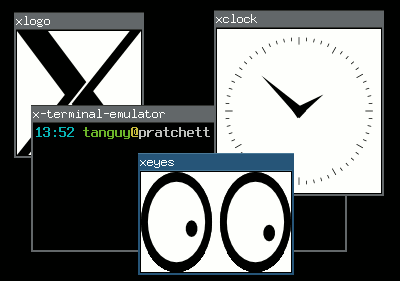
Floating and tiling window managers In the X Window System, the window manager is that piece of software that places your windows and allows you to move them, resize them, hide them, etc. If your windows have titles on top of them, with buttons to close them or reduce them, it is thanks to the window manager. There are two major types of window managers:
Floating window managers
They are the most usual window managers, that allow you to place an size your windows freely on the screen, in a way where they are independent of each other, possibly overlapping, just as you would be able to place sheets of paper on your desk.
Tiling window managers
They are a more elitist type of window manager, that adjust the size and position of the windows so there is no overlapping and no space lost between windows, thus tiling the screen.
Four computer windows managed in floating mode

Floating window management

Four computer windows managed in tiling mode

Tiling window management

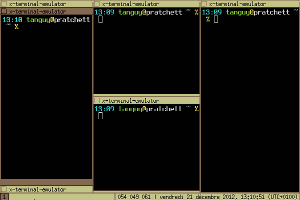
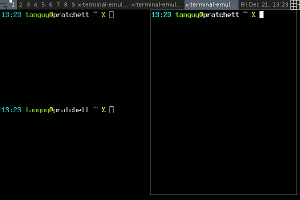
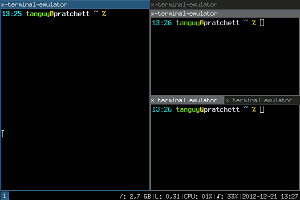
The frontier between these two types is not very tight, because some floating window managers have limited tiling features, and almost all the tiling window manager have floating modes for programs that are not adapted to tiling. For what it is worth, here is a report on my experience with three tiling window managers. Perhaps it may help people that are still hesitating to switch to tiling window management?Using tiling window managers Five years ago I switched to tiling window management, feeling that managing windows was the window manager's job (a quote from larswm). At that time, I started using wmii, then switched to awesome, and now I am trying i3.
Screenshot of the wmii window manager

wmii: three columns, first one stacked ()

Screenshot of the awesome window manager

awesome: fair layout

screenshot of the i3 window manager

i3: three containers, second one stacked, third one tabbed

For people in a hurry, here is a comparative table:
wmii awesome i3
Configuration Shell script Lua script config file
Scriptability any language, 9P-based Lua, API-based any language, socket-based
Layout simple, column-based automatic layout-based flexible, manual tiling-based
Multi-monitor sucks OK OK
Modern stuff XCB, Xft, notification area, dock windows XCB, Xft, notification area
Special features
  • tag-based workspace system
  • XDG convention to locate the config file
  • real framework for customization
  • powerful status bar
wmii wmii is a rather minimalist window manager which used to be part of the suckless project, but is now hosted at Google Code and seems to have lost all its documentation during the move (why is it that all the software I have seen hosted at Google Code or worst, at Launchpad, have almost not documentation, and never, ever a single screenshot?). It uses a column-based layout: you place windows in a number of columns, and for each column you can choose either vertical split, stacking or full column mode. This system is very simple to control flexible enough for most situations, but it does not allow for arbitrary tiling. It is fully scriptable in any language, in an interesting way: it exposes all its functions on a 9P virtual filesystem. In fact, wmii itself only implements window management functions, and all the user interaction logic takes place in a distinct script which calls that functions using that 9P filesystem. wmii comes with a default script, written in shell, which makes it a bit hard to extend, and slow if you start calling external programs such as grep, sed and co. You can script it in any language you like however, and there are some already made implementations in Ruby and Python IIRC. A special feature of wmii is that its workspaces are in fact tags, and that you can tag a window so that it will appear in several ones. While this is interesting, in practice I did not find much use for that feature. It is explicitly minimalist, and the developers used to impose themselves a limit on its numbers of lines of codes (not sure if this is still true with the switch to Google Code). While I was using it, it had no notification area, no support for Xft fonts and it sucked with multiple monitors, which is the reason I switched to awesome. awesome awesome is a very flexible window manager that provides advanced automatic layouts. It has become quite popular, and it has a very well documented wiki. It is not officially a tiling window manager but a framework window manager, and to emphasize on that it start in floating mode by default. I think most people use it in tiling mode however. It uses automatic layouts, that place your windows according to rules, for instance the fair layout, which tiles in columns and rows so that each window occupies a similar space. Thanks to that automation, this system is very easy to control and to get used to, and although it certainly does not allow arbitrary tiling, you can cycle between several available layouts which are suitable for most situations (most of them are entirely automatic, but some have parameters you can modify, such as the number and width of columns), and if you miss one, I think you can even code your own. It is fully scriptable using the Lua language. In fact, just as wmii, the user interaction logic is defined in the configuration file, which allows efficient customization. The Lua API is fully documented, and there is a series of useful libraries to extend the basic configuration in any way you like, which is why awesome calls itself a framework window manager . It is not designed to be minimalist, and it implements some modern stuff, such as using XCB rather than Xlib, a notification area, and specific support for dock or utility-type windows such as GIMP's tools. i3 i3 is a window manager inspired by wmii, although they do not have much in common in my opinion. for what I have seen, I think it would be closer the defunct Ion. It uses a layout based on manual splitting: as you open windows you can choose to split an existing window either vertically or horizontally, leading to arbitrarily complex layouts. In addition to that you can tab or stack windows in containers instead of splitting them. This system is very flexible but it requires more user intervention. In its standard mode of operation, i3 is simply configured in a regular way, which allows to customize the user interaction but not to script it in an arbitrary way. It offers an IPC system that can be used for that however, by the mean of a Unix socket, so it can actually be scripted in any language too if needed, although this possibility is probably not as popular and easy as with wmii and awesome. It implements modern features such as XCB, a notification area and a powerful status bar that uses the standard output of a dedicated program that is easy to replace by your own if you need.

Jamie McClelland: Live video streaming using vp8enc and webm on Debian

The vp8 video codec and webm container format (which are alternates for theora/ogg and h264/flv) are getting lots of attention, especially as more web browsers are supporting html5 - which includes a new video tag that plays video directly in a web page, rather than requiring a plugin. With Google fully behind these new formats (and converting YouTube videos) and even skype using vp8, it seems as though it could supplant h264/flash as the default video codec and container. After years under the boot of the proprietary flash video, this change could usher in a lot of exciting developments. While the shift in formats is also significant for on-demand video, I'm focusing on live streaming in this blog. There are a lot of tools needed to successfully stream a live video. Enough of them support vp8 and webm to create a live video stream, however, not all of the right versions of these tools have landed in Debian. Without any patches or changes, if you try to send a live video stream to icecast using vp8 encoding and webm, you'll get something like this:
0 jamie@animal:~$ gst-launch v4l2src ! video/x-raw,width=320,height=240 ! vp8enc ! webmmux ! shout2send ip=icecast.server port=8000 password=secret mount=/test.webm
WARNING: erroneous pipeline: could not link webmmux0 to shout2send0
1 jamie@animal:~$
I've documented the steps for patching/upgrading gstreamer and icecast2 so you can get a live video stream using vp8 encoding and the webmc container that originates on a Debian wheezy machine using gstreamer and streams to a Debian squeeze server running icecast2. On the workstation, you'll need libshout3 version 2.3.0 or higher, which is at the moment available in experimental and installable without bringing in any dependencies. In addition, you will need to bring in gstreamer1.0 from sid and you will need to rebuild gstreamer1.0-plugins-good after libshout-dev has been installed from experimental. So, begin by adding experimental and sid to your sources list by creating the files /etc/apt/sources.list.d/experimental.list and /etc/apt/sources/lists.d/sid.list with the respective contents:
deb http://mirror.cc.columbia.edu/debian experimental main
and
deb http://mirror.cc.columbia.edu/debian sid main 
deb-src http://mirror.cc.columbia.edu/debian sid main
In order to avoid upgrading your entire machine to sid (experimental packages won't upgrade by default), you'll also need to add the file /etc/apt/preferences.d/sid:
Package: *
Pin: release n=sid
Pin-Priority: 200
Then update and install:
apt-get update
apt-get install -t experimental libshout3
apt-get install gir1.2-clutter-gst-1.0 gir1.2-gst-plugins-base-1.0 gir1.2-gstreamer-1.0 gstreamer0.10-ffmpeg  gstreamer1.0-libav:amd64 gstreamer1.0-plugins-bad:amd64 gstreamer1.0-plugins-base:amd64 gstreamer1.0-plugins-base-apps gstreamer1.0-plugins-good:amd64 gstreamer1.0-pulseaudio:amd64 gstreamer1.0-tools gstreamer1.0-x:amd64 libclutter-gst-1.0-0:amd64 libgstreamer-plugins-bad1.0-0:amd64 libgstreamer-plugins-base1.0-0:amd64 libgstreamer-plugins-base1.0 libgstreamer1.0-0:amd64 libgstreamer1.0
Fortunately, the version of gstreamer1.0-plugins-good in sid includes a fix for a bug patched on November 31, 2012 that allows the use of the webm container. However, for it to work properly gstreamer1.0-plugins-good has to be built against libshout version 2.3.0 or higher (which is in experimental, not sid). Therefore, you have install libshout-dev from experimental and then rebuild gstreamer1.0-plugins-good.
sudo apt-get build-dep gstreamer1.0-plugins-good
sudo apt-get -t experimental install libshout-dev
apt-get source gstreamer1.0-plugins-good
cd gst-plugins-good1.0-1.0.4
dch -v 1.0.4-1+webmmux
fakeroot debian/rules binary
sudo dpkg -i ../gstreamer1.0-plugins-good_1.0.4-1+webmmux_amd64.deb
Now if you try the command, things should work on the client side. When streaming to an icecast2 server running squeeze, I don't get any errors, however, when opening the streaming page via the icecast URL, there is a play button, which can be clicked, but no picture is shown. That's because the version of Icecast2 in squeeze doesn't support either vp8 or webm. On the server side, you will need icecast2 version 2.4beta or higher. This version hasn't landed anywhere in Debian as of this writing. However, you can build it from source by following these steps (the patches I'm removing have all been applied to the new upstream version).
apt-get source icecast2
wget http://downloads.xiph.org/releases/icecast/icecast-2.4-beta.tar.gz
tar -xzvf icecast-2.4-beta.tar.gz
cp -r icecast2-2.3.2/debian icecast-2.3.99.0/
cd icecast-2.3.99.0/
rm debian/patches/ 1001_autotools_avoid_debian-subdir.patch,1002_add_missing_xspf_file,1003_fix_memory_leak.patch,series 
dch -v 2.3.99.0-1
fakeroot debian/rules binary
When you install it, be sure to replace the icecast2.xml configuration file and update it with your server-specific customizations. Hopefully this version of icecast2 will make it to experimental soon. And now... you can successfully stream via:
gst-launch-1.0 v4l2src ! video/x-raw,width=320,height=240 ! vp8enc ! webmmux !  shout2send ip=icecast.server port=8000 password=secret mount=/test.webm
If you want full audio and video, here's a more complete pipeline: gst-launch-1.0 v4l2src ! queue ! video/x-raw,width=320,height=240 ! tee name=tscreen ! queue ! autovideosink tscreen. ! queue ! videorate ! video/x-raw,framerate=25/2 ! queue ! vp8enc ! queue ! webmmux name=mux pulsesrc ! queue ! audioconvert ! vorbisenc ! queue ! queue ! mux. mux. ! queue ! shout2send ip=hobo port=8000 mount=jamie.webm password=secret Unfortunately, since I'm not sure how to deal with the python2.7 vs python3 dependecies, my elegant mobi python script that creates this pipeline for you using python-gtk as been reduced to a crude bash script. Another item on the todo list is opus audio encoding. gstreamer doesn't seem able to use opus in the webm container (although it seems to work with ogg). In the course of this research I found directions for getting gstreamer-1.0 installed on debian independent of packages installed on the system. If you follow the directions above, these steps should not be necessary. I'm including in case you need the latest sources for another reason. Extra steps I needed were:

Hideki Yamane: I don't want "emacsen-*.ex" files

Every time you run dh_make, you would remove "emacsen-*.ex" files. So I've made a patch for it.

26 December 2012

Rudy Godoy: s3tools Simple Storage Service for non-Amazon providers

One of the nicest developments in the cloud arena is the increasing adoption of standards, this of course will impact on maturity and market confidence on such technologies. Amazon, as one of the pioneers, made a good choice on their offering design by making their API implementation public. Now, vendors such as Eucalyptus private/hybrid cloud offering and many other providers can leverage and build upon the specs to offer compatible services without the hassle for their customers to learn a new technology/tool. I ve bare-metal servers siting on Connectria s data-center. A couple of months ago I ve learned about their new cloud storage offering. Since I m working a lot on cloud lately I checked the service. It s was nice to learn they are not re-inventing the wheel but instead implementing Amazon s Simple Storage Service (S3) de-facto standard for cloud storage. Currently there are many S3-compatible tools available both FLOSS and freeware/closed source (Connectria provides a nice list of them). I ve been using s3tools, which is already available in the Debian archive, to interact with S3-compatible services. Usage is pretty straightforward. For my use case I intend to store copies of certain files on my provider s S3 service. I ll need to create buckets to be able to store files. For the ones not very familiar with S3 terminology buckets can be seen as containers or folders (in the desktop paradigm). First thing to do is configure your keys and credentials for accessing S3 from your provider. I do recommend you to use the --configure option to create the $HOME/.s3cfg file because it will put all the available options for a standard S3 service, leaving you the work of just tweaking them based on your needs. You can go and create the file all by yourself if you prefer, of course.
$ sudo aptitude install s3cmd
$ s3cmd --configure
Enter new values or accept defaults in brackets with Enter.
Refer to user manual for detailed description of all options.
Access key and Secret key are your identifiers for Amazon S3
Access Key:
...
You ll be required to enter the access key and the secret key. You ll be asked for a encryption password (use only if you plan to use this feature). Finally, the software will test the configuration against Amazon s service. Since this is not our case it will fail. Tell the configuration instead to not retry configuration and say Y to Save configuration. Now, edit the $HOME/.s3cfg file and set the address for your private/third-party S3 provider. This is done here:
host_base = s3.amazonaws.com
host_bucket = %(bucket)s.s3.amazonaws.com
Change s3.amazonaws.com to your provider s address and the host_bucket configuration also. For my case I had to use:
host_base = rs1.connectria.com
host_bucket = %(bucket)s.rs1.connectria.com
Now, save the file and test the service by listing the available buckets (of course there is none yet).
$ s3cmd ls
If you don t get an error then the tool is properly configured. Now you can create buckets, put files, list, etc.
$ s3cmd mb s3://testbucket
Bucket 's3://testbucket/' created
$ s3cmd put testfile.txt s3://testbucket
testfile.txt -> s3://testbucket/testfile.txt [1 of 1]
8331 of 8331 100% in 1s 7.48 kB/s done
$ s3cmd ls s3://testbucket
2012-12-26 22:09 8331 s3://testbucket/testfile.txt

Russ Allbery: Review: Code Name Verity

Review: Code Name Verity, by Elizabeth Wein
Publisher: Hyperion
Copyright: 2012
ISBN: 1-4231-5219-0
Format: Hardcover
Pages: 339
I don't read very much historical fiction, and I mostly avoid historical fiction from the 20th century. I'm particularly uninterested in reading about Nazis after the saturation programming in places like the History Channel and the number of alternative histories that involve them. I've read enough about World War II to last me a lifetime, and I also avoid books about people being tortured. When Code Name Verity showed up in reviews I read, I was therefore rather dubious: a book set during World War II featuring someone being tortured by Nazis seemed unlikely to appeal to me. But after two steller reviews from reviewers who don't give out top marks easily, I bought a copy with some trepidation. That was one of the best decisions that I've ever made. This is the sort of book that is severely hurt by spoilers. In a moment, I'm going to attempt the impossible dance of giving you a feeling for the book and why I love it so much without spoiling anything. But if you trust my taste in books, let me give you a short warning, and then I suggest you stop reading this review and just go read the book. I avoided as much information about it as possible before reading it and never regretted it. The short warning: This is a book that hurts. lightreads describes it as searing. I think that's a very good term. It's not that it's gruesome; there is torture, but most of it happens off-camera and the focus is on emotional reactions rather than physical description. But the story sneaks up on you with sudden flashes of insight, and parts of it are a gut punch. It's the kind of book that had me in tears for a quarter of the book. It's the kind of book that nearly has me in tears remembering it to write this review. So, you may want to save this one until you are in the mood for that kind of book. But, that warning aside, Code Name Verity is unspeakably brilliant. This is one of the best books I have ever read in my life. I will try to explain more, but if your tastes mostly align with mine, just stop here and go read it.
I AM A COWARD.
That's how Code Name Verity starts: the words of a captured female British agent in Nazi-occupied France. The book opens near the end of her interrogation (and torture). The important information has already been discussed, and now she's likely destined to be executed. For the last set of wireless codes, she's bought herself paper and two weeks to write, and is expected to record everything that she remembers about the British war effort. The pages of this book are that writing (quite literally in the frontpiece and part of the cover, which are beautifully designed). The way she chooses to approach that task is to tell a story about the person whose ID she had when she was captured, a story that becomes the recounting of how she ended up where she is. That story is the heart and soul of this book. It's about the war, yes, and about British operations during the war. But it's a story about airplanes, too, and about the Air Transport Auxiliary, and about women finding a place in the war (with just a bit of a fictional push, detailed by the author in an afterword, although not quite as much of one as you might expect). And it's a story of a friendship, an amazing friendship of two women who would have never met each other if it weren't for the war and its leveling and transcending of normal social separations. It's a story about a friendship of opposites, about two people who find ways to support each other, about two people who see the best in each other. This is quite possibly the best novel about a friendship that I've ever read. This story, by itself, is wonderful. The tone starts light and irreverant, with an undertone of complex despair and defiance that's hard to analyze. One wonders where it's going and whether any of this is relevant, and then it slowly draws in the reader and becomes utterly compelling. But that's only the start of what this book has in store. Wein does some amazing structural things here that turn and broaden and transform, things that absolutely should not be spoiled because experiencing them without advance knowledge is a breathtaking reading experience. And all the parts play off against each other with a confidence that lets Wein understate and even hint at deeper emotions and be completely confident that the reader is right where she wants them to be. It's not a one-trick book, nor is it one that's going to lose you in the structure, but it's a book that opens up layers as you read it and tempts you re-read it immediately with new eyes once you finish it. Except it hurts so much that re-reading it immediately might be more than your heart can take. Perhaps the most astonishing part of this book is the way it hits its emotional notes. It is a masterpiece of showing rather than telling. Wein undersells the emotions in exactly the right way to make them stronger and more effective, avoiding, in the process, multiple traps that I've rarely seen avoided. The ending is absolutely note-perfect to everything that's happened before in a way that I thought, five pages from the end, was going to be impossible to pull off, and gets even better the more that one thinks about it. And the whole book is like that. It's been a month and a half since I read this book, in part because I wasn't sure how to write this review, and I did not, in fact, manage to finish writing it without crying. If I didn't have to be on a train in eight hours from when I'm writing this (a few days before I post it), I'd start reading it again right now. I can't talk about most of the things that make it amazing with anyone who hasn't read it, but it really is that good. Rating: 10 out of 10

Russ Allbery: git-pbuilder 1.29

git-pbuilder is a shell script suitable for use as the builder command in git-buildpackage that simplifies using pbuilder, cowbuilder, or qemubuilder to build packages in a chroot. It's now part of the git-buildpackage Debian package, but I maintain it somewhat separately. This version supports a new environment variable, GIT_PBUILDER_OUTPUT_DIR, that can be set to override the default output location of ".." (the parent directory). It also changes the script to be a bash script and uses arrays to handle the options passed to the builder command so that shell metacharacters in the GIT_PBUILDER_OPTIONS environment variable will hopefully be handled correctly. As part of that change, it also tries to escape any options that will be passed to --debbuildopts to hopefully protect them from the additional layer of shell parsing that they'll be subject to. Thanks to Guido G nther and paul cannon for the patches. I hate having to make the script bash-specific, but trying to get the shell expansion right is otherwise a huge headache. That probably means that it's outlived the usefulness of the original implementation language (which was shell only because this started life as a quick hack). I should probably take the time to rewrite it in either Perl (which I know best) or Python (which is the language the rest of git-buildpackage is written in). But that's for another day. (Here's an excellent case in point for why one shouldn't embed language-specific extensions in the name of an executable that's part of a user interface or configuration interface.) You can get the latest version from my scripts page.

25 December 2012

Cyril Brulebois: X-mas gift

I ve been working on some autotesting features for d-i over the past few weeks, and I ve started lagging behind on my debian-boot@ reading accordingly, by several hundreds of mails. Today s gift to myself: no more unread/unanswered mails in that mailbox! Even if I ve prepared things for a possible d-i wheezy rc1 release around Christmas, several things weren t ready, most notably: grub-installer. Hopefully #696615 will be fixed soonish, probably by asking where to write when /target(/boot) isn t on (hd0). Wanted! Speaking of grub-installer, if anyone can reproduce #681227, I m all ears! Wouter has a workaround for it (only in sid for now), but I d very much like to track down the root cause for that one. It is supposedly reproducible with wheezy beta 4 images and with weekly builds (they use components from testing), all of those are available from the debian-installer website.

Petter Reinholdtsen: How to backport bitcoin-qt version 0.7.2-2 to Debian Squeeze

Let me start by wishing you all marry Christmas and a happy new year! I hope next year will prove to be a good year. Bitcoin, the digital decentralised "currency" that allow people to transfer bitcoins between each other with minimal overhead, is a very interesting experiment. And as I wrote a few days ago, the bitcoin situation in Debian is about to improve a bit. The new debian source package (version 0.7.2-2) was uploaded yesterday, and is waiting in the NEW queue for one of the ftpmasters to approve the new bitcoin-qt package name. And thanks to the great work of Jonas and the rest of the bitcoin team in Debian, you can easily test the package in Debian Squeeze using the following steps to get a set of working packages:
git clone git://git.debian.org/git/collab-maint/bitcoin
cd bitcoin
DEB_MAINTAINER_MODE=1 DEB_BUILD_OPTIONS=noupnp fakeroot debian/rules clean
DEB_BUILD_OPTIONS=noupnp git-buildpackage --git-ignore-new
You might have to install some build dependencies as well. The list of commands should give you two packages, bitcoind and bitcoin-qt, ready for use in a Squeeze environment. Note that the client will download the complete set of bitcoin "blocks", which need around 5.6 GiB of data on my machine at the moment. Make sure your ~/.bitcoin/ directory have lots of spare room if you want to download all the blocks. The client will warn if the disk is getting full, so there is not really a problem if you got too little room, but you will not be able to get all the features out of the client. As usual, if you use bitcoin and want to show your support of my activities, please send Bitcoin donations to my address 15oWEoG9dUPovwmUL9KWAnYRtNJEkP1u1b.

Bastian Blank: New software: LMTP to UUCP gateway

I use UUCP to get my mails. It works fine but lacks support for modern SMTP features like DSN. While it may be possible to bolt support into the the rmail part, both the sendmail interface used to submit mails and the Postfix pipe daemon used to extract mail are not able to do so. So I started a small project to get around this problem. This software uses LMTP to retrieve and SMTP to send all mails. LMTP (a SMTP derivative with support for all extensions) is used to inject mail via a small daemon. The mails are transported using a format similar to batched SMTP to the remote system. It is then injected via SMTP to the local MTA.
Sender LMTP is used to supply mail. As a SMTP derivative, LMTP inherits support for all the available SMTP extensions. The only difference between LMTP and SMTP is the support for one result per recipient after end-of-data. This allow proper handling and mails with multiple recipients without a queue. Mails are supplied to a special LMTP server. This server may currently run from inetd or in foreground by itself. A real daemon mode is not yet implemented. Each mail is submitted to the UUCP queue in its own format. We need to store a lot of meta-data along with the real mail. This data is stored in a custom format.
Protocol All data is transferred using a custom protocol. It is a SMTP derivative, but it is only used in uni-directional communication, so no responses exists. It uses its own Hello command and supports the SMTP commands MAIL, RCPT and DATA. This format allows exactly one mail in each file. An EOF ends the mail transaction. Also all data must be in dot-escaped form like in SMTP.
Hello (UHLO) A sender must start the transaction with this command. It specifies the name of the sender and all requested SMTP extensions. Syntax:
uhlo = "UHLO" SP ( Domain / address-literal ) *( SP ehlo-keyword ) CRLF
The receiver must check if all requested SMTP extensions are available.
Receiver Each mail is submitted by the UUCP system. It calls the supplied receiver tool called rumtp. This tool reads the protocol stream and submits the mail to a local SMTP server. There is no error handling right now in this tool. All errors will create a mail to the local UUCP admin by the UUCP system itself.
License and distribution This package is licensed GPL 3. It is for new distributed via Alioth.

Russ Allbery: Review: A Paradise Built in Hell

Review: A Paradise Built in Hell, by Rebecca Solnit
Publisher: Penguin
Copyright: 2009
Printing: 2010
ISBN: 0-14-311807-2
Format: Trade paperback
Pages: 319
A Paradise Built in Hell is a book with an agenda. Solnit's goal is to convince the reader that nearly everything we're shown in movies and popular culture about human behavior during disasters is wrong. Not only is destructive mass panic unusual verging on nonexistent, spontaneous cooperation and acts of startling courage and resourcefulness are commonplace. The heroes that we hear about afterwards are more the norm than the exception. Disasters are far more likely to bring out the best in people than the worst. They break down barriers and form spontaneous human communities that survivors remember for a lifetime. Rather than natural disasters leading inevitably to an exacerbating human crisis in the absence of strong authority, Solnit argues that they are an amazing human opportunity, and that the most negative and destructive human behavior during crises is not from untrained victims but from the panic of the elites who are supposedly responsible for protecting the public. I think her analysis and presentation is both deeply appealing and deeply flawed. The flaws involve extrapolation and generalization beyond the applicability of her research, and I'll say more about that in a moment. But the appeal is still surprising and satisfying, and I think there's a lot of truth in this book despite its one-sided presentation. I like to tell people, half-jokingly, that I'm an anarchosyndicalist. It's my political alliegance of the heart: the political structure that I know would never work, but that matches the world I want to live in. (I suspect much of the belief in libertarianism is of this form.) Now I have a book to point people at when they ask what the appeal of anarchosyndicalism is. The sense of spontaneous community, of bonding, of reaching out to other people to do something necessary, together, that Solnit describes here in the aftermath of a disaster matches that vision of a world without imposed economic authority, where people spontaneously collaborate to solve problems. A Paradise Built in Hell is structured by disaster, providing a tour of major disasters and their aftermath interspersed with extended musings on what the human reactions mean and how disaster communities functioned. The major disasters discussed are the 1906 San Francisco earthquake, the Halifax explosion, the 1985 Mexico City earthquake, 9/11, and Hurricane Katrina. Solnit moves through them in chronological order, closing the book with Katrina, which had (at least for me) the most infuriating and uplifting mixes of community bonding and elite panic. But both of those factors are present from the beginning in the 1906 earthquake: spontaneous human organization that (from multiple first-hand accounts) transformed people's lives mixed with a military reaction and elite panic that possibly did more damage to the city than the earthquake did. Elite panic is the dark side of Solnit's celebration of human altruism and spontaneous community organization. The primary picture she paints is of ordinary people responding with great courage and creativity and finding, in their reaction, a transformative experience and a sense of purpose that often becomes the most powerful and positive experience of their life. But this is at odds with a deeply-entrenched elite belief in mass panic, in the necessity of keeping information from the public to suppress their reaction, and in the need to re-establish "order." And with that, Solnit is absolutely scathing, and with some justification. Along with detailed accounts of these major disasters, Solnit also gives the reader a tour of the research literature on disasters, research that has shown that the panic and chaos that is at the center of practically every disaster movie ever made is essentially a myth. Mass panic in disasters is not only rare, it's close to non-existent. As you might expect, the handling of Katrina by both the government and by neighboring white communities is the subject of the harshest attacks. The material on Katrina presented here is enough to make anyone want to throw out the current playbook on how we react to disasters (and lest one think Solnit is unfair, her research matches very closely with other research and journalism on Katrina that I've seen from a wide variety of sources). But Solnit shows that this is a pattern: the combination of our media-driven belief in how people will react to disasters combined with the elite need to re-establish control plays out in many major disasters, and almost always negatively. Even in 9/11, the official response in some cases hampered and undermined an already-effective unofficial response. This is very interesting and has concrete implications for public policy around disasters. But where Solnit moves onto thinner anarchosyndicalist ice is the story that she tells about disasters as dramatic upheavals of the established social order that could point to a revolution in how we interact with each other. Solnit is deeply inspired by human altruism during disasters, and her enthusiasm is somewhat contageous, but it was useful to read this book shortly after Bruce Schneier's Liars and Outliers. I think Solnit, in her understandable eagerness to find a way to extend disaster behavior to general life, does not understand the relationships between what Schneier terms moral, reputational, and institutional pressures. And that's the core of why we need to both enable spontaneous human response in disasters and have organized first responders and supporting infrastructure, and why disaster communities will break down when extended beyond the disaster. When I first mentioned A Paradise Built in Hell to my mother, her first reaction was dubiousness due to her memory of the 1977 New York City blackout. There was a disaster that resulted in widespread looting and destruction, rather than the positive reaction Solnit describes. Solnit does have a cogent argument for why looting is poorly analyzed (we don't, for example, distinguish between breaking into stores to get desperately needed supplies and doing so for personal gain) and should not be a priority in a life-threatening disaster. But it's not completely convincing; in some disasters, particularly ones like the 1977 power outage that were not particularly life-threatening, the looting has been the most destructive part of the disaster. Schneier provides what I think is the missing piece, both to this and to why the wonderful behavior during disasters doesn't last into everyday life. During a life-threatening disaster, moral pressures are massively increased. Nearly all of us have self-images and moral beliefs that provide very strong incentives to help others and collaborate in the face of life-threatening emergencies, incentives that override other motives and lead to the sort of behavior that Solnit celebrates. But moral pressures have inherent limitations. That moral reaction applies most strongly to small groups (such as bands of survivors), and will start to break down as larger society re-establishes itself. And disasters, like a power outage, that are not immediately life-threatening will not provoke the same intensification of moral pressures: we don't have strong moral beliefs and internal stories about staying quietly at home during power outages the way that we do for saving people from burning buildings or pulling them out of rubble. Once larger communities have reformed and that short-term emergency reaction has dissipated, the need for institutional pressures (police, law, and formal authority structures) will return. I wish Solnit had been able to read Schneier's book before writing hers. I think his analysis structure provides a healthy dose of realism and perspective to her desire for a self-organizing communal world, and might have blunted her enthusiastic but somewhat unrealistic hopes for finding some key to a revolution in human organization in the heart of disasters. But if A Paradise Built in Hell is unlikely to lead to a radical change in how we organize societies, it should at least provoke a radical rethinking of some of our unnecessary pessimism about our fellow humans. The evidence is substantial and compelling: crisis brings out the best in people, not the worst, and the ordinary people who happen to be around are capable of becoming some of the most amazing disaster response teams that we can imagine. This has numerous mundane implications for social policy. We should consider simple training for the general public, for example, to strengthen that reaction, should allow for it in legal structures and training of first responders (around looting, for instance), and should do everything we can to kill the destructive myth that people cannot be trusted in disasters or that mass panic will be as much of a threat as the disaster. But the best part of this book is that it provides a concrete, well-documented, and well-defended reason to let go of some of our cynicism and to extend a bit of trust to our fellow humans. There sadly aren't earth-shaking implications for everyday society, but there is a wealth of evidence that shows that we're better people in the crunch than we believe we are, or that we expect of others. And the more that we can embrace the dissolution of boundaries and social hierarchies in the middle of disasters, the more we are likely to be surprised by deep human connection and a sense of shared, focused purpose. Solnit is a bit long-winded with her agenda, but that bright hope has stuck with me. Recommended. Rating: 8 out of 10

24 December 2012

Wouter Verhelst: m68k: back from the dead

It's been a few years coming, but the day has finally arrived. Contrary to some rumours which I've had to debunk over the years, the m68k port did not go into limbo because it was kicked out of the archive; instead, it did because recent versions of glibc require support for thread-local storage, a feature that wasn't available on m68k, and nobody with the required time, willingness, and skill set could be found to implement it. This changed a few years back, when some people wrote the required support, because they were paid to do so in order to make recent Linux run on ColdFire processors again. Since ColdFire and m68k processors are sufficiently similar, that meant the technical problem was solved. However, by that time we'd fallen so far behind that essentially, we needed to rebootstrap the port all over again. Doing that is nontrivial, and most of the m68k porters team just didn't have the time or willingness anymore to work on this; and for a while, it seemed like the m68k port was well and truly dead. But then, two things happened. The first thing that happened was called "ARAnyM", short for "Atari Running on Any Machine". An atari emulator, it started supporting running Linux at some point, allowing us to work on the port while on the road, using a laptop something not possible beforehand. While there were some bugs in the emulation of early versions of aranym, these were all fairly quickly fixed, and before long we could run Debian/m68k in the emulator. However, that was still the etch-m68k port on debian-ports.org, some time after Debian etch wasn't even supported anymore; this still required work. The second "thing" that happened was called "Thorsten Glaser". A fresh DD and maintainer of the "mksh" shell, he wanted to make sure his shell would work on all Debian architectures, including the ones on debian-ports.org. When he found out that the m68k port was in a pretty bad shape, he did not, like many before him, shrug and move on; instead, he took it upon himself to start compiling things, just so he could compile his shell. How's that for dedication. Anyway, fast-forward two years, and we're now, finally, at a point where I spent most of today getting buildd up and running on arrakis, one of our oldest buildd hosts. There were some issues while trying that, but it looks like everything is in working order now; and the first package to start building on the first functioning buildd host since a long time (the build of which is still ongoing at the time of this writing) is "babl". Of course, with only one buildd, we'll have no hope whatsoever of ever catching up. But that can be remedied easily by using more than one buildd host... Update: It built! Party!

Bastian Blank: Relaying e-mail over unreliable connections

Introduction I still prefer to handle all my mails at home. I got backup set-up on my own and have anything in direct access. This network is connected to the internet via an end-user DSL connection without a static IP-address and without any useful SLA. However relaying mails over such an unreliable connection is still an unsolved problem. There exists a lot of solutions for this problem. I'm currently building a new e-mail setup, so I tried to collect all the used and maybe possible solutions for the relay problem. I will show some of them.
Don't do it The easiest solution is to just don't try to collect mails at home. This solution is somewhat against the rules, but I know people who prefers it. Access to the mails is usually done with IMAP and a copy is made if needed. This is not really a solution, but it works for many people.
SMTP SMTP is the mail protocol used in the internet. It is used for all public mail exchanges. By itself it can't be used to submit mails to remote destinations With some preparations it can be used to relay mail over unreliable connections. There are three different turn commands in SMTP that can be used to start the mail flow. Two of them will be
VPN or dynamic DNS with TLS with or without extended turn (ETRN) Using SMTP themself is an easy solution. It can relay mails without much hasle But it needs either a fixed or authenticated connection. SMTP can use a fixed connection. This is usually provided by some sort of VPN. The VPN can be encrypted, but does not need to. This allow the MTA to connect to the downstream server if it is available. The other solution is to authenticate the downstream server. Authentication is available via TLS and X.509 certificates. It still needs some way to find it, but with dynamic DNS this is no real problem. Both variants can be combined with the extended turn command. Extended turn allows to request a queue flush for a domain. It can be used to request mails only to be delivered if the downstream server is available at all. This reduces the load on the MTA.
Authenticated turn (ATRN) On-demand mail relay is a rarely supported ESMTP feature. The Authenticated turn command effectively reverses the SMTP connection and allows, after authentication, the flow of mails from the server to the client via standard SMTP. There exists some stand-alone implementations, but no widely used MTA includes an implementation.
POP3/IMAP and fetchmail/getmail All e-mails can be delivered to mailboxes and retrieved by the end-users system and re-injected into the delivery system. Both fetchmail and getmail are able to retrieve mail from POP3 and IMAP servers. They are either directly delivered via a MDA like procmail or maildrop. Otherwise they are submitted via the sendmail interface or SMTP and delivered by the MTA. Neither POP3 nor IMAP have support for meta data like the real recipient or sender.
Mailbox per address The mails for each address are delivered to its own mailbox. This allows proper identification of the recipient address. It still have no real idea of the sender address. Because it needs to poll one mailbox per address, this highers the resources needed on both sides dramatically.
Multi-drop mailbox The mails for all addresses are delivered into one mailbox. The original recipient must be saved in a custom header to allow this information to be restored. Only one mailbox needs to be polled for mail addresses.
UUCP One of the oldest transports used for mail is UUCP. It effectively copies a file to a different system and pipes it into a program. UUCP can be used to transport mails in various ways.
rmail Each mail is copied verbatim to the client. It saves the sender address in form of a "From" pseudo header in the mail itself and supplies the recipient on the command-line. So it have access to both sender and recipient address.
Batched SMTP Batched SMTP transfers old-style SMTP transactions over UUCP The MTA (Exim supports this) or a special tool (in the bsmtpd package) writes this files and after a given time or size they are dispatched via UUCP to the remote system. The bsmtpd packages was removed from Debian some years ago.
Dovecot synchronization Dovecot support bi-directional synchronization of mailbox contents. It holds all data on both sides. The internal log is used to merge changes done on both sides, so it should not loose any data. This synchronization can be used to work with the data on both sides (via Dovecot of cause) or create backups. It needs shell access to the user owning the data on both sides.
Conclusions There is no one size fits all solution for this problem. If you admin the remote system, you can implement any of this solutions If it is managed by someone else you need good luck. Almost all solutions does not support current SMTP features. The one I'm really missing is DSN, aka configurable delivery notices. POP3 and IMAP handle already delivered mail and have no need for this. All UUCP variants does not handle it, because they are much older anyway. Only SMTP itself supports all of its features. I still use rmail over UUCP for my mails at home and it works flawless. UUCP itself runs over SSH, it can compress data on the fly and authenticate using private keys.

Next.

Previous.