Search Results: "tim"

1 March 2014

Francois Marier: Using vnc to do remote tech support over high-latency networks

If you ever find yourself doing a bit of technical support for relatives over the phone, there's nothing like actually seeing what they are doing on their computer. One of the best tools for such remote desktop sharing is vnc. Here's the best setup I have come up with so far. If you have any suggestions, please leave a comment!

Basic vnc configuration First off, you need two things: a vnc server on your relative's machine and a vnc client on yours. Thanks to vnc being an open protocol, there are many choices for both. I eventually settled on x11vnc for the server and ssvnc for the client. They are both available in the standard Debian and Ubuntu repositories. Since I have ssh access on the machine that needs to run the server, I simply login and then run x11vnc. Here's what ~/.x11vnrc contains:
noxdamage
That option appears to be necessary when the desktop to share is running gnome-shell / compiz. Afterwards, I start the client on my laptop with the following command:
ssvncviewer -encodings zrle -scale 1280x775 localhost
The scaling factor is simply the resolution of the client minus any window decorations.

ssh configuration As you can see above, the client is not connecting directly to the server. Instead it's connecting to its own vnc port (localhost:5900). That's because I'm tunelling the traffic through the ssh connection in order to avoid relying on vnc extensions for authentication and encryption. Here's what the client's ~/.ssh/config needs for that simple use case:
Host server.example.com:
  LocalForward 5900 127.0.0.1:5900
If the remote host (which has an internal IP address of 192.168.1.2 in this example) is not connected directly to the outside world and instead goes through a gateway, then your ~/.ssh/config will look like this:
Host gateway.example.com:
  ForwardAgent yes
  LocalForward 5900 192.168.1.2:5900
Host server.example.com:
  ProxyCommand ssh -q -a gateway.example.com nc -q0 %h 22
and the remote host will need to open up a port on its firewall for the gateway (internal IP address of 192.168.1.1 here):
iptables -A INPUT -p tcp --dport 5900 -s 192.168.1.1/32 -j ACCEPT

Optimizing for high-latency networks Since I do most of my tech support over a very high latency network, I tweaked the default vnc settings to reduce the amount of network traffic. I added this to ~/.x11vncrc on the vnc server:
ncache 10
ncache_cr
and changed the client command line to this:
ssvncviewer -compresslevel 9 -quality 3 -bgr233 -encodings zrle -use64 -scale 1280x775 -ycrop 1024 localhost
This decreases image quality (and required bandwidth) and enables client-side caching. The magic 1024 number is simply the full vertical resolution of the remote machine, which sports a vintage 1280x1024 LCD monitor.

John Sullivan: Spritz

Spritz seems like a very interesting way to read quickly. It's the opposite of everything I've read (slowly) about speed reading, which focuses on using peripheral vision and not reading word-by-word. You're supposed to do things like move your eyes straight down the page, taking in whole lines at a time. Interruptions seem like a big problem; interruptions that make me look away, or interruptions in my brain, where I might realize I've not been paying attention for some amount of time. Maybe they should have navigation buttons similar to video players, so you can skip backward 15 seconds at a time. I also do want to go back and review previous pages sometimes for reasons that have nothing to do with interruption, so I wouldn't want word-by-word to be the only way to view a text -- especially when reading nonfiction. I might event want it to work in a mode where you hold down the button on the side of your phone or tablet in order to move the words, and then have them automatically pause when you release. It feels like I'd want a lot of short breaks when reading in this style. It should also be free software, but unfortunately I'm guessing it won't be. I hope someone will make a free software application along these lines -- the basics seem pretty basic.

Sune Vuorela: Diploma thesis about media choice and usage in Free Software communities: I need your help

My hard-working KDE friend Mario asked me to help him to get Debian people to help him with his thesis. Here is what he writes: Dear Free Software contributor* I m currently in the process of writing my diploma thesis. I ve worked hard during the last few weeks and months on a questionnaire which shall collect some data for my thesis. Furthermore the data of this survey will be interesting for the Free Software communities as well. So please take some time or add it to your todo list or, even better, go directly to my questionnaire and help me make a great diploma thesis and improve the Free Software community in some ways. The questionnaire takes some 20 to 30 minutes. At the end of the questionnaire you ll find a way to participate in a draw where you can even win something nice. In a first round I got the feedback that the length of the questionnaire and that some questions (mostly the ones at the beginning of the questionnaire about the 12 different tasks) are quite abstract and difficult. But please try it, try your best and take the time and brain power. The remaining part of the questionnaire [1] (after these two pages with the tasks questions) is quite
easy and quickly done. And you have the possibility to come back to where you
have left filling in the questionnaire after a shorter or longer break. And if there are any questions, feedback or you need help don t hesitate a moment to write me an email or ping me on IRC (freenode.net and oftc.net) as unormal. This survey will be open till Sunday, the 9th of March 2014, 23.59 UTC. Thanks to all for reading and helping and towards the summer of 2014 you can read here what all the data you gave me showed us and where we can learn and improve. Thanks in advance and best regards
Mario Fux * By contributor I mean not just developers but translators, artist, usability
people, documentation writers and many more. Everybody who contributes in one
way or the other to Free Software.

Dirk Eddelbuettel: RcppArmadillo 0.4.100.0

A new minor upstream release 4.100 of the Armadillo templated C++ library for linear algebra was finalised by Conrad yesterday. I rolled up the corresponding RcppArmadillo release 0.4.100.0 which is now on CRAN and will go to Debian shortly.
Changes in RcppArmadillo version 0.4.100.0 (2014-02-28)
  • Upgraded to Armadillo release Version 4.100.0 (Dirt Cruiser)
    • added normalise() for normalising vectors to unit p-norm
    • extended the field class to handle 3D layout
    • extended eigs_sym() and eigs_gen() to obtain eigenvalues of various forms (eg. largest or smallest magnitude)
    • automatic SIMD vectorisation of elementary expressions (eg. matrix addition) when using Clang 3.4+ with -O3 optimisation
    • faster handling of sparse submatrix views
    • workaround for a bug in LAPACK 3.4
Courtesy of CRANberries, there is also a diffstat report for the most recent release As always, more detailed information is on the RcppArmadillo page. Questions, comments etc should go to the rcpp-devel mailing list off the R-Forge page.

This post by Dirk Eddelbuettel originated on his Thinking inside the box blog. Please report excessive re-aggregation in third-party for-profit settings.

Wouter Verhelst: Transitioned to ikiwiki

If you can read this, that means my transition to ikiwiki has happened. I've been interested in ikiwiki ever since Joey first wrote about it back in 2006, but it took me until just recently to finally bite the bullet and migrate to ikiwiki. The plan was to retain everything, including comments, and I've mostly achieved that. Still, a few things were lost along the way: I should note that at this point I've only ported the blog itself, not the rest of my website. While ikiwiki can be used for that as well, the parts outside of my blog are fairly static and don't change all that often. In addition, those bits are set up in an even uglier way, and I didn't want to fix them up just yet. Things I've learned:

Michael Prokop: Jenkins on-demand slave selection through labels

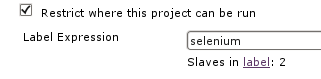
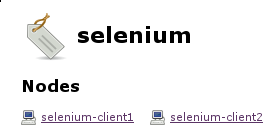
Problem description: One of my customers had a problem with their Selenium tests in the Jenkins continuous integration system. While Perl s Test::WebDriver still worked just fine the Selenium tests using Ruby s selenium-webdriver suddenly reported failures. The problem was caused by Debian wheezy s upgrade of the Iceweasel web browser. Debian originally shipped Iceweasel version 17.0.10esr-1~deb7u1 in wheezy, but during a security-update version 24.3.0esr-1~deb7u1 was brought in through the wheezy-security channel. Because the selenium tests are used in an automated fashion in a quite large and long-running build pipeline we immediately rolled back to Iceweasel version 17.0.10esr-1~deb7u1 so everything can continue as expected. Of course we wanted to get the new Iceweasel version up and running, but we didn t want to break the existing workflow while working on it. This is where on-demand slave selection through labels comes in. Basics: As soon as you re using Jenkins slaves you can instruct Jenkins to run a specific project on a particular (slave) node. By attaching labels to your slaves you can also use a label instead of a specific node name, providing more flexibility and scalability (to e.g. avoid problems if a specific node is down or you want to scale to more systems). Then Jenkins decides which of the nodes providing the according label should be considered for job execution. In the following screenshot a job uses the selenium label to restrict its execution to the slaves providing selenium and currently there are two nodes available providing this label: TIP 1: Visiting $JENKINS_SERVER/label/$label/ provides a list of slaves that provide that given $label (as well as list of projects that use $label in their configuration), like:

TIP 2: Execute the following script on $JENKINS_SERVER/script to get a list of available labels of your Jenkins system:
import hudson.model.*
labels = Hudson.instance.getLabels()
labels.each  label -> println label.name  
Solution: In the according customer setup we re using the swarm plugin (with automated Debian deployment through Grml s netscript boot option, grml-debootstrap + Puppet) to automatically connect our Jenkins slaves to Jenkins master without any manual intervention. The swarm plugin allows you to define the labels through the -labels command line option. By using the NodeLabel Parameter plugin we can configure additional parameters in Jenkins jobs: node and label . The label parameter allows us to execute the jobs on the nodes providing the requested label: This is what we can use to gradually upgrade from the old Iceweasel version to the new one by keeping a given set of slaves at the old Iceweasel version while we re upgrading other nodes to the new Iceweasel version (same for the selenium-server version which we want to also control). We can include the version number of the Iceweasel and selenium-server packages inside the labels we announce through the swarm slaves, with something like:
if [ -r /etc/init.d/selenium-server ] ; then
  FLAGS="selenium"
  ICEWEASEL_VERSION="$(dpkg-query --show --showformat='$ Version ' iceweasel)"
  if [ -n "$ICEWEASEL_VERSION" ] ; then
    ICEWEASEL_FLAG="iceweasel-$ ICEWEASEL_VERSION%%.* "
    EXTRA_FLAGS="$EXTRA_FLAGS $ICEWEASEL_FLAG"
  fi
  SELENIUM_VERSION="$(dpkg-query --show --showformat='$ Version ' selenium-server)"
  if [ -n "$SELENIUM_VERSION" ] ; then
    SELENIUM_FLAG="selenium-$ SELENIUM_VERSION%-* "
    EXTRA_FLAGS="$EXTRA_FLAGS $SELENIUM_FLAG"
  fi
fi
Then by using -labels $FLAGS EXTRA_FLAGS in the swarm invocation script we end up with labels like selenium iceweasel-24 selenium-2.40.0 for the slaves providing the Iceweasel v24 and selenium v2.40.0 Debian packages and selenium iceweasel-17 selenium-2.40.0 for the slaves providing Iceweasel v17 and selenium v2.40.0. This is perfect for our needs, because instead of using the selenium label (which is still there) we can configure the selenium jobs that should continue to work as usual to default to the slaves with the iceweasel-17 label now. The development related jobs though can use label iceweasel-24 and fail as often as needed without interrupting the build pipeline used for production. To illustrate this here we have slave selenium-client2 providing Iceweasel v17 with selenium-server v2.40. When triggering the production selenium job it will get executed on selenium-client2, because that s the slave providing the requested labels: Whereas the development selenium job can point to the slaves providing Iceweasel v24, so it will be executed on slave selenium-client1 here: This setup allowed us to work on the selenium Ruby tests while not conflicting with any production build pipeline. By the time I m writing about this setup we ve already finished the migration to support Iceweasel v24 and the infrastructure is ready for further Iceweasel and selenium-server upgrades.

Russ Allbery: Review: Air Apparent

Review: Air Apparent, by Mark Monmonier
Publisher: University of Chicago
Copyright: 1999
Printing: 2000
ISBN: 0-226-53423-5
Format: Trade paperback
Pages: 232
Subtitled "how meteorologists learned to map, predict, and dramatize the weather," Air Apparent is a history of weather maps. Mapping the weather is a surprisingly new field, dating only from the early 19th century when a combination of scientific understanding and the ability to combine scattered observations made it practical. They're also a particularly tricky problem since weather is inherently three-dimensional, and even to the present day nearly all of our maps are two-dimensional. Monmonier starts with the earliest observational maps and the attempts to use them for prediction and tracks developments up to the late 1990s, with TV weathermen and (simple) interactive web data viewers. I got a copy of this book after Paul Krugman mentioned it. I don't know a lot about weather forecasting or weather maps, but I remembered finding the science of weather fronts and maps of them fascinating in high school, and I hoped I'd get the same feeling from this. Unfortunately, I probably need to stop reading Monmonier's books; they always sound interesting, but I don't enjoy reading them. One thing that's important to know is that this is not a history of meteorology. One can't hold that against the book, of course, because it never claimed to be. But it has just enough of a history of meteorology mixed into its history of map-making to make at least this reader wish he were reading that other book. I like maps, I really do, but I was hoping for either a book that melded a history of the science of weather forecasting with the maps that were used in that science, or a book that dove deep into the effective and ineffective ways to make weather maps (ideally, Edward R. Tufte for maps). This is neither; it's little more or less than a detailed history of the making of weather maps. Each time it gets close to a clear explanation of the underlying meteorology, it finds a map to examine and skips the rest of the explanation. I kept almost understanding the underlying science, but not enough to really understand the goals of the map makers, or why one presentation was better than another, or how those presentations were used to make forecasts or track weather data. I think I would have found this book more interesting in conjunction with a full history of meteorology, but I suspect that a history of meteorology would include enough about the maps to render this book largely redundant for the casual reader. The other problem I had with this book is that it's very dry. Monmonier is clearly trying, and clearly cares a lot about his topic, but the book has no flow. I kept getting lost in the barrage of names, arguments over technique, and struggles for government funding. It's hard to put a finger on why the book didn't grab me; the closest I can come is that it's a book stuffed full of facts. Monmonier did exhaustive historical research on weather map making, saved numerous quotes from original documents, and laid it all out chronologically. That's fine if you just want the information, but I was looking to be entertained in the process, and that didn't happen. I think the problems get worse in the second half of the book, when weather satellites and computers enter the picture and the laborious, manual map-making fall out, although maybe I was just exhausted with the book by then. The early history of weather maps at least has the benefit of showing the logistical struggles behind creating an effective weather service: insufficient observation points, slow communication methods, and the need for skilled map-makers to turn measurements into visual representations. Once computers and satellite photography enter the picture, the science matters even more, and I think the reader needs a better understanding of the underlying science to make sense of the results. Air Apparent has a tendency to provide a brief introduction to the type of data, a detailed chronological history, and then a discussion of the ways of presenting and representing that data, without ever getting the reader to care about the data itself or see how it ties into forecasting. Part of the problem, I suspect, is that the history of meteorology seems to be full of sensible, careful people who largely did sensible, careful things with the data they had available at the time. This is great for the advancement of science, and not so helpful at making a history engrossing. I wish I could say that I was glad I read this book for the information, if not the presentation, but unfortunately I didn't retain much. I needed some sort of structure or frame on which to hang all of the specifics, some sense of story or controversy or at least scientific understanding, and I didn't get it. It took me a couple of months to finish this book because I kept setting it down to read other things, and I only finished it out of a combination of stubbornness and knowledge that other people liked it. If the topic sounds interesting, well, this book exists, and it's gotten several good reviews. But I'm afraid I can't recommend it. Rating: 4 out of 10

Vasudev Kamath: Gzipped response for CSS/JS with Apache and mod_uwsgi

So it may sound normal to receive compressed response for CSS/JS file from Apache2 but what I faced is completely different behavior, here I saw not just body of response but also header are getting compressed and send to browser and browser was unable to interpret the response there by leading page rendered without CSS and JS. That was long story short, so let me explain in detail the case and what I found out. I have hosted SILPA on my VPS using uWSGI. I had used till date using libapache2-mod-proxy-uwsgi plugin for which uWSGI should be using network socket and in Apache2 config I need ProxyPass directive pointing to uwsgi://host:port and everything used to work out of box. There is a drawback for using network socket in uWSGI that is limited amount of ports (65535) and possible clash with other services if we use wrong port number, additionally network sockets will be slower compared to the file socket so yesterday I thought of changing it to file socket and removed socket directive in the ini file for uWSGI application container for SILPA and here is where all problems started. My updated configuration can be seen in our documentation page that is if you are interested to look my configuration file :-).
Problem Reporting We got selected to Gsoc again this year and we have lot of students jumping in our channel #silpa on irc.freenode.net and yesterday night some students reported they are facing 500 internal server error and subsequently others mentioned there is no theme being rendered. I checked and found everything was fine for me only to notice that my browser was using cached content, and when I clear cache there I go everything vanished, no theme no css no javascript just plain html!!!.
Investigation So I thought I should investigate this and fired up firebug on my iceweasel to observe the network traffic. And below is what I observed in firebug network console!. No response headers So you can see no response header in the above image but there is a response and below how is response content visible on firebug. gzipped response Still weird part was when using wget/curl directly to get the CSS I was getting correct reply and the file, which is puzzling. So I went ahead opened the CSS url directly using browser and saved the resulting file. When I used file command on it, output suggested the saved file in gzip compressed!. I went ahead uncompressed it and opened the file and inside it I found response header and the response body! So what just happened? Did apache some how manage to compress entire respone not just response body? The more puzzling question was why did it work when I was using mod_proxy_uwsgi and failed when I switched to mod_uwsgi. I had no clue at this point why this behavior is coming up.
Possible Solution I was still not sure how to resolve this, and started searching in the network but nothing was coming up in search result which can explain me this. And finally I stumbled on a link which is totally unrelated but I saw the word mod_deflate in the content and wandered on my system to see if its enabled. Yes mod_deflate was enabled I just opened the conf file and saw following.
<IfModule mod_deflate.c>
       # these are known to be safe with MSIE 6
       AddOutputFilterByType DEFLATE text/html text/plain text/xml
       # everything else may cause problems with MSIE 6
       AddOutputFilterByType DEFLATE text/css
       AddOutputFilterByType DEFLATE application/x-javascript application/javascript application/ecmascript
       AddOutputFilterByType DEFLATE application/rss+xml
</IfModule>
Interesting so it suggests to compress css, javascript files etc. So I thought possibly its compressing the result of mod_uwsgi, yeah possibly so why not try disabling mod_deflate and check if it works well and good if not I'm not gonna loose anything. So I disabled mod_deflate and voila! Everything is working fine!
What might be the reason for this behavior? Well I'm not exactly sure but here is my assumption. The whole behavior depends on internal implementation of mod_uwsgi and mod_proxy_uwsgi module. To confirm this I switched back to use mod_proxy_uwsgi module and enabled mod_deflate and observed request response in Firebug network console and below is what I observed. Response with mod_proxy_uwsgi So response is still gziped but this time only response body was gziped and Content-Encoding field was set properly which makes browser to properly uncompress the response body and use it. So it seems like there is a difference between mod_uwsgi and mod_proxy_uwsgi implementation. mod_uwsgi was sending the response along with response headers which was compressed by mod_deflate there by rendering browser helpless to interpret the response. But mod_proxy_uwsgi seems to be only sending the response content without response body and this content was later compressed by mod_deflate and proper response headers were set by apache before sending it to browser. So now whose fault is this? Is it the bug in mod_uwsgi or, mod_deflate not being able to exclude response headers from compression? I've no clue! If you have a clue and you want to share it with me, please consider writing to me over email. My details are available in Contacts

Ben Armstrong: Invisible CSS animations on Iceweasel consuming CPU

Thanks to bernat on #debian @ irc.debian.org for helping me track down this bug and devise a workaround. When working on my wife s netbook, I noticed that when idling on Facebook in iceweasel 24.3.0esr-1, the process was taking far too much CPU. I then retested on a wheezy system with the release iceweasel from mozilla.d.n, which at that time was 26, and I later upgraded to 27. Same problem there, too, on both versions. In fact, it seems the slowdown was amplified by the fact that I was running iceweasel in vnc4server, not the worlds most efficient X implementation. Even with all these versions tested, I have yet to file a Debian bug, as I will need some time on a system where the slowdown is noticeable and I m using a current Debian version. But I wanted to post now to give props to bernat for his help. If you think you have this issue, go read his article linked above, which contains the workaround.

28 February 2014

Jon Dowland: Farewell, Interzone

New format IZ New format IZ
I've written before of how much I liked the British SF magazine Interzone. Sadly I decided not to renew my subscription last year, as the focus of my reading has been changing and I've not had enough time to keep on top of it. (This is a consequence of my experiment with goodreads, and I'll write more about that sometime.) Back in October 2012 TTA Press reformatted both Interzone and its sister publication Black Static into a half-size, semi-hard backed shape. The size is similar to the US stalwards Analog and Asimov's, but the cover is harder and glossier and it has a flat spine. I really like the new look, and it's a bit of a shame I didn't complete at least a calendar year's worth of them. I will probably pick up the odd issue now and then, when a name I recognise catches my eye. Perhaps one day I'll have the time and inclination to read short fiction regularly again. I'd still wholeheartedly recommend it (and Black Static) if short fiction is your thing.

Daniel Pocock: Google Summer of Code opportunities in data science and machine learning with Ganglia

As mentioned in my blog on Monday, the Ganglia Project is proud to be part of Google Summer of Code in 2014 The Ganglia team are offering various types of projects and different parts of Ganglia would welcome students with different skills, for example:
Component Skills
gmond agent C
gmond modules C or Python
JMXetric Java
gmetad and rrdtool for storing time series data C
Ganglia web interface JavaScript and jQuery
Ganglia integration (e.g. ganglia-nagios-bridge) Python
Big data right under your nose I have had many queries from students about how to get into data science. Very few students will be lucky enough to get an internship where they can study time-series from the financial markets and experiment making their own trading algorithms. On the other hand, network performance data is everywhere. It is real-time. It is surprisingly similar in some ways to processing financial data and it provides excellent opportunities for students to practice data science skills and make a meaningful contribution to solving real problems. Finding public Ganglia data with Google Many large organizations, including universities, governments and corporations are using Ganglia to gather metrics from all the hosts in their networks. Some of them even expose this data to the public. Here are two Google searches you can use to find them:
Courtesy of Universit Montpellier 2, France Some sites may even expose their data as an XML feed, you can try and extract it by connecting to the Ganglia server on one of these ports
Port Comments
8649 gmond: sends an XML snapshot to anybody who connects
8651 gmetad: sends an XML snapshot to anybody who connects
8651 gmetad: works a little bit like HTTP, returns a subset of the XML snapshot when you make a GET request
You can discover a Ganglia environment in your campus by looking for a gmond process on your machine and the gmond.conf file, often in /etc/gmond.conf or /etc/ganglia/gmond.conf. That file may contain a clue about the name of the host where Ganglia data is aggregated:
udp_send_channel  
  host = ganglia-reports.example.edu
  port = 8649
  ttl = 1
 
This tells you that the host ganglia-reports.example.edu is collecting the data - you could try the URL http://ganglia-reports.example.edu/ganglia/ in a web browser or try connecting to one of the TCP ports 8649, 8651 or 8652 on that host. Here is an example with netcat:
$ nc ganglia-reports.example.edu 8649   grep ^.H
It will return a list of all hosts that Ganglia knows about. Once you have a data feed, you can then configure a gmetad process on your own system to poll the remote system and generate local RRDs for you to study. Install your own Ganglia It is very easy to get your own Ganglia setup. On a Debian or Ubuntu system, just do:
# apt-get update
# apt-get install ganglia-monitor ganglia-webfrontend
On Fedora and RPM-based systems (such as CentOS or RHEL with EPEL) you can do:
# yum install ganglia-gmond ganglia-web
Everything should be autoconfigured. You can then browse to http://localhost/ganglia to see the charts. If you have several hosts with the gmond agent (just the ganglia-monitor.deb or ganglia-gmond.rpm) on the same LAN, they will automatically find each other using multicast and you will see an aggregated report on the machine with the web server. The data is real-time It is important to keep in mind that the data is real-time. This means you can often detect problems in real-time. If this blog appears on slashdot, for example, then that image from Universit Montpellier 2 will be hit many times. The image actually shows the network load on the web server producing the image, so you will see the slashdot effect graphically in the image itself. Processing real-time data is often the most advanced step in any data science exercise. Initially, you may simply log a few days of data to RRD files to start studying a static data set with your tool of choice, whether it is the R project, Weka or Hadoop Once you have a a hypothesis (for example, an algorithm that understands the normal characteristics of each metric) you may then take each new real-time value from the gmetad XML and test it with the algorithm. The algorithm would then raise an alert if any metric on any host deviates from its normal behavior. Mixing in other sources of data Depending upon the computing environment in your campus or organization, you may also be able to get other data sources, such as a list of people logged in to different machines at different times and the processes that each user starts and stops. This might help to make more accurate predictions about when network or computing resources will be under stress. For example, if users bob, alice and eve all appear on the same host, your algorithm might conclude that the load average will reach an excessive level within 15 minutes and send those three users a suggestion to each try other machines. Making a successful application for GSoC 2014 Here are some tips
  • For all organizations/projects
  • For Ganglia and the data science project in particular
    • Join the ganglia-general mailing list and send an email to introduce yourself
    • Try Ganglia on your own Linux system. Use the packages, it is really easy. Send an email to the list with any questions.
    • Explore the source code in github - ask us questions about it. For the data science project, you may also need to look at RRDtool source code and documentation about making a plugin for R (using C)
    • You don't have to do it our way: if you prefer to work with another tool instead of R, please tell us your idea
    • Write some skeleton code or make a diagram to explain what you want to do. While you do this, do you think of any new questions or problems? Make a list of them.
    • We want to give every student a small coding task as a test. Please tell us which language you prefer (e.g. C, Java, Python) so we can give you a suitable test. If you are really keen, follow the link to bugs I reported in Debian, look for one that is easy and try to write a small patch for it - helping fix bugs that annoy your mentor is likely to be a good way to get on the short-list for selection.

Michael Prokop: State of the art Debian/wheezy deployments with GRUB and LVM/SW-RAID/Crypto

Moving from Lilo to GRUB, using LVM as default, etc throughout the last years it was time to evaluate how well LVM works without a separate boot partition, possibly also on top of Software RAID. Big disks are asking for partitioning with GPT, just UEFI isn t my default yet, so I m still defaulting to Legacy BIOS for Debian/wheezy (I expect this to change for Debian/jessie and according hardware approaching at my customers). So what we have and want in this demonstration setup: System used for installation:
root@grml ~ # grml-version
grml64-full 2013.09 Release Codename Hefeknuddler [2013-09-27]
Partition setup:
root@grml ~ # parted /dev/sda
GNU Parted 2.3
Using /dev/sda
Welcome to GNU Parted! Type 'help' to view a list of commands.
(parted) mklabel gpt
(parted) mkpart primary 2048s 4095s
(parted) set 1 bios_grub on
(parted) name 1 "BIOS Boot Partition"
(parted) mkpart primary 4096s 100%
(parted) set 2 raid on
(parted) name 2 "SW-RAID / Linux"
(parted) quit
Information: You may need to update /etc/fstab.
Clone partition layout from sda to all the other disks:
root@grml ~ # for f in  b,c,d  ; sgdisk -R=/dev/sd$f /dev/sda
The operation has completed successfully.
Make sure each disk has its unique UUID:
root@grml ~ # for f in  b,c,d  ; sgdisk -G /dev/sd$f
The operation has completed successfully.
SW-RAID setup:
root@grml ~ # mdadm --create /dev/md0 --verbose --level=raid5 --raid-devices=4 /dev/sd a,b,c,d 2
mdadm: layout defaults to left-symmetric
mdadm: chunk size defaults to 512K
mdadm: size set to 1465004544K
mdadm: Defaulting to version 1.2 metadata
mdadm: array /dev/md0 started.
root@grml ~ #
SW-RAID speedup (system dependent, YMMV):
root@grml ~ # cat /sys/block/md0/md/stripe_cache_size
256
root@grml ~ # echo 16384 > /sys/block/md0/md/stripe_cache_size # 16MB
root@grml ~ # blockdev --getra /dev/md0
6144
root@grml ~ # blockdev --setra 65536 /dev/md0 # 32 MB
root@grml ~ # sysctl dev.raid.speed_limit_max
dev.raid.speed_limit_max = 200000
root@grml ~ # sysctl -w dev.raid.speed_limit_max=9999999999
dev.raid.speed_limit_max = 9999999999
root@grml ~ # sysctl dev.raid.speed_limit_min
dev.raid.speed_limit_min = 1000
root@grml ~ # sysctl -w dev.raid.speed_limit_min=100000
dev.raid.speed_limit_min = 100000
LVM setup:
root@grml ~ # pvcreate /dev/md0
  Physical volume "/dev/md0" successfully created
root@grml ~ # vgcreate homesrv /dev/md0
  Volume group "homesrv" successfully created
root@grml ~ # lvcreate -n rootfs -L4G homesrv
  Logical volume "rootfs" created
root@grml ~ # lvcreate -n bootfs -L1G homesrv
  Logical volume "bootfs" created
Check partition setup + alignment:
root@grml ~ # parted -s /dev/sda print
Model: ATA WDC WD15EADS-00P (scsi)
Disk /dev/sda: 1500GB
Sector size (logical/physical): 512B/512B
Partition Table: gpt
Number  Start   End     Size    File system  Name                 Flags
 1      1049kB  2097kB  1049kB               BIOS Boot Partition  bios_grub
 2      2097kB  1500GB  1500GB               SW-RAID / Linux      raid
root@grml ~ # parted -s /dev/sda unit s print
Model: ATA WDC WD15EADS-00P (scsi)
Disk /dev/sda: 2930277168s
Sector size (logical/physical): 512B/512B
Partition Table: gpt
Number  Start  End          Size         File system  Name                 Flags
 1      2048s  4095s        2048s                     BIOS Boot Partition  bios_grub
 2      4096s  2930276351s  2930272256s               SW-RAID / Linux      raid
root@grml ~ # gdisk -l /dev/sda
GPT fdisk (gdisk) version 0.8.5
Partition table scan:
  MBR: protective
  BSD: not present
  APM: not present
  GPT: present
Found valid GPT with protective MBR; using GPT.
Disk /dev/sda: 2930277168 sectors, 1.4 TiB
Logical sector size: 512 bytes
Disk identifier (GUID): 212E463A-A4E3-428B-B7E5-8D5785141564
Partition table holds up to 128 entries
First usable sector is 34, last usable sector is 2930277134
Partitions will be aligned on 2048-sector boundaries
Total free space is 2797 sectors (1.4 MiB)
Number  Start (sector)    End (sector)  Size       Code  Name
   1            2048            4095   1024.0 KiB  EF02  BIOS Boot Partition
   2            4096      2930276351   1.4 TiB     FD00  SW-RAID / Linux
root@grml ~ # mdadm -E /dev/sda2
/dev/sda3:
          Magic : a92b4efc
        Version : 1.2
    Feature Map : 0x0
     Array UUID : 7ed3b741:0774d529:d5a71c1f:cf942f0a
           Name : grml:0  (local to host grml)
  Creation Time : Fri Jan 31 15:26:12 2014
     Raid Level : raid5
   Raid Devices : 4
 Avail Dev Size : 2928060416 (1396.21 GiB 1499.17 GB)
     Array Size : 4392089088 (4188.62 GiB 4497.50 GB)
  Used Dev Size : 2928059392 (1396.21 GiB 1499.17 GB)
    Data Offset : 262144 sectors
   Super Offset : 8 sectors
          State : clean
    Device UUID : c1e4213b:81822fd1:260df456:2c9926fb
    Update Time : Mon Feb  3 09:41:48 2014
       Checksum : b8af8f6 - correct
         Events : 72
         Layout : left-symmetric
     chunk size : 512k
   Device Role : Active device 0
   Array State : AAAA ('A' == active, '.' == missing)
root@grml ~ # pvs -o +pe_start
  PV         VG      Fmt  Attr PSize PFree 1st PE
  /dev/md0   homesrv lvm2 a--  4.09t 4.09t   1.50m
root@grml ~ # pvs --units s -o +pe_start
  PV         VG      Fmt  Attr PSize       PFree       1st PE
  /dev/md0   homesrv lvm2 a--  8784175104S 8773689344S   3072S
root@grml ~ # pvs -o +pe_start
  PV         VG      Fmt  Attr PSize PFree 1st PE
  /dev/md0   homesrv lvm2 a--  4.09t 4.09t   1.50m
root@grml ~ # pvs --units s -o +pe_start
  PV         VG      Fmt  Attr PSize       PFree       1st PE
  /dev/md0   homesrv lvm2 a--  8784175104S 8773689344S   3072S
root@grml ~ # vgs -o +pe_start
  VG      #PV #LV #SN Attr   VSize VFree 1st PE
  homesrv   1   2   0 wz--n- 4.09t 4.09t   1.50m
root@grml ~ # vgs --units s -o +pe_start
  VG      #PV #LV #SN Attr   VSize       VFree       1st PE
  homesrv   1   2   0 wz--n- 8784175104S 8773689344S   3072S
Cryptsetup:
root@grml ~ # echo cryptsetup >> /etc/debootstrap/packages
root@grml ~ # cryptsetup luksFormat -c aes-xts-plain64 -s 256 /dev/mapper/homesrv-rootfs
WARNING!
========
This will overwrite data on /dev/mapper/homesrv-rootfs irrevocably.
Are you sure? (Type uppercase yes): YES
Enter passphrase:
Verify passphrase:
root@grml ~ # cryptsetup luksOpen /dev/mapper/homesrv-rootfs cryptorootfs
Enter passphrase for /dev/mapper/homesrv-rootfs:
Filesystems:
root@grml ~ # mkfs.ext4 /dev/mapper/cryptorootfs
mke2fs 1.42.8 (20-Jun-2013)
Filesystem label=
OS type: Linux
Block size=4096 (log=2)
Fragment size=4096 (log=2)
Stride=128 blocks, Stripe width=384 blocks
262144 inodes, 1048192 blocks
52409 blocks (5.00%) reserved for the super user
First data block=0
Maximum filesystem blocks=1073741824
32 block groups
32768 blocks per group, 32768 fragments per group
8192 inodes per group
Superblock backups stored on blocks:
        32768, 98304, 163840, 229376, 294912, 819200, 884736
Allocating group tables: done
Writing inode tables: done
Creating journal (16384 blocks): done
Writing superblocks and filesystem accounting information: done
root@grml ~ # mkfs.ext4 /dev/mapper/homesrv-bootfs
mke2fs 1.42.8 (20-Jun-2013)
Filesystem label=
OS type: Linux
Block size=4096 (log=2)
Fragment size=4096 (log=2)
Stride=128 blocks, Stripe width=384 blocks
65536 inodes, 262144 blocks
13107 blocks (5.00%) reserved for the super user
First data block=0
Maximum filesystem blocks=268435456
8 block groups
32768 blocks per group, 32768 fragments per group
8192 inodes per group
Superblock backups stored on blocks:
        32768, 98304, 163840, 229376
Allocating group tables: done
Writing inode tables: done
Creating journal (8192 blocks): done
Writing superblocks and filesystem accounting information: done
Install Debian/wheezy:
root@grml ~ # mount /dev/mapper/cryptorootfs /media
root@grml ~ # mkdir /media/boot
root@grml ~ # mount /dev/mapper/homesrv-bootfs /media/boot
root@grml ~ # grml-debootstrap --target /media --password YOUR_PASSWORD --hostname YOUR_HOSTNAME
 * grml-debootstrap [0.57] - Please recheck configuration before execution:
   Target:          /media
   Install grub:    no
   Using release:   wheezy
   Using hostname:  YOUR_HOSTNAME
   Using mirror:    http://http.debian.net/debian
   Using arch:      amd64
   Important! Continuing will delete all data from /media!
 * Is this ok for you? [y/N] y
[...]
Enable grml-rescueboot (to have easy access to rescue ISO via GRUB):
root@grml ~ # mkdir /media/boot/grml
root@grml ~ # wget -O /media/boot/grml/grml64-full_$(date +%Y.%m.%d).iso http://daily.grml.org/grml64-full_testing/latest/grml64-full_testing_latest.iso
root@grml ~ # grml-chroot /media apt-get -y install grml-rescueboot
[NOTE: We're installing a daily ISO for grml-rescueboot here because the 2013.09 Grml release doesn't work for this LVM/SW-RAID setup while newer ISOs are working fine already. The upcoming Grml stable release is supposed to work just fine, so you will be able to choose http://download.grml.org/grml64-full_2014.XX.iso by then. :)] Install GRUB on all disks and adjust crypttab, fstab + initramfs:
root@grml ~ # grml-chroot /media /bin/bash
(grml)root@grml:/# for f in  a,b,c,d  ; do grub-install /dev/sd$f ; done
(grml)root@grml:/# update-grub
(grml)root@grml:/# echo "cryptorootfs /dev/mapper/homesrv-rootfs none luks" > /etc/crypttab
(grml)root@grml:/# echo "/dev/mapper/cryptorootfs / auto defaults,errors=remount-ro 0   1" > /etc/fstab
(grml)root@grml:/# echo "/dev/mapper/homesrv-bootfs /boot auto defaults 0 0" >> /etc/fstab
(grml)root@grml:/# update-initramfs -k all -u
(grml)root@grml:/# exit
Clean unmounted/removal for reboot:
root@grml ~ # umount /media/boot
root@grml ~ # umount /media/
root@grml ~ # cryptsetup luksClose cryptorootfs
root@grml ~ # dmsetup remove homesrv-bootfs
root@grml ~ # dmsetup remove homesrv-rootfs
NOTE: On a previous hardware installation I had to install GRUB 2.00-22 from Debian/unstable to get GRUB working.
Some metadata from different mdadm and LVM experiments seems to have been left and confused GRUB 1.99-27+deb7u2 from Debian/wheezy (I wasn t able to reproduce this issue in my VM demo/test setup).
Just in cause you might experience the following error message, try GRUB >=2.00-22:
  # grub-install --recheck /dev/sda
  error: unknown LVM metadata header.
  error: unknown LVM metadata header.
  /usr/sbin/grub-probe: error: cannot find a GRUB drive for /dev/mapper/cryptorootfs.  Check your device.map.
  Auto-detection of a filesystem of /dev/mapper/cryptorootfs failed.
  Try with --recheck.
  If the problem persists please report this together with the output of "/usr/sbin/grub-probe --device-map="/boot/grub/device.map"
  --target=fs -v /boot/grub" to <bug-grub@gnu.org>

Andrew Pollock: [life] Day 31, Coochiemudlo Island to Melbourne in one day

Wow, today was pretty crazy in terms of the travel we managed to pack into one day. This morning, Zoe woke up at about 5:30am and jumped into bed with me for a snuggle and another half hour nap. After that we got up. Zoe had been eyeing off the egg cups in the house, and so I'd wanted to do soft-boiled eggs for breakfast. So we doused ourselves in mosquito repellent and raided the chicken coop. I don't think I've ever cooked soft-boiled eggs in my entire adult life, and today wasn't an exception. They came out hard-boiled. Zoe still ate them anyway, she just couldn't do the toast soldier thing. I need to buy some egg cups for home and we can try again. I hear the Thermomix can do boiled eggs. After breakfast and a shower, I got stuck into packing up and cleaning the house, and Zoe watched TV. At 8am she turned off the TV and declared she wanted to play in the yard. It was nice to see that she wanted to do something more than just veg out in front of the TV, without prompting. I had us all packed up by about 8:30am and we were only 5 minutes from where the barge docked, so we drove over to the other end of the island to take a look at the place at high tide. It was quite different from the two days before in the afternoon at low tide. The stick that we'd walked out to was barely above the waterline. Then we drove back to wait in the queue for the barge. The barge journey back was uneventful and we made it back home by 10am, which was about the time I was expecting, and rendezvoused with my girlfriend, and did a fast unpack and repack. We then headed to the airport, arriving comfortably with enough time to check our luggage and get some lunch to take onto the plane. Zoe was great for the flight down. She watched Brave on the in-flight WiFi entertainment on my phone, and got to fit the whole movie in before we landed, but this meant she skipped a nap. By the time we got to Melbourne Airport, she was in the post-tired manic state, but we weren't in any particular rush, so we had a very roundabout trip to baggage claim, and then after we'd acquired some Myki cards, caught a taxi to our accommodation in South Melbourne. After we'd unpacked and settled in, and I'd gotten some supplies from the local convenience store, we caught a tram into Bourke Street to go to Chinatown for dinner, after checking out the view from the observation deck on the 28th floor. We found a great dumpling place, and Zoe really enjoyed the pork dumpling and noodle soup that I ordered for her. She kept alternating between eating the noodles with her training chopsticks and the broth with one of the big spoons. She was getting really over-tired and over-stimulated by this point, so it was quite a bit of cat-herding to get to Chinatown, and more so getting back to a tram to come back. We got home, Zoe had a quick shower and went to bed without a peep. Her room is nice and dark, so I'm hoping that she'll have a bit of a sleep in tomorrow. (Wishful thinking). I'm really quite pleased with how smoothly today's travel went. Everything went off without a hitch.

27 February 2014

Stefano Zacchiroli: moar stats for sources.debian.net

Debian: watch your stats! Over the past few weeks, myself and Matthieu Caneill have worked quite a bit on Debsources. As we have now deployed most of the new features on http://sources.debian.net, it's time for another "What's new with Debsources?" blog post. Here is what's new: Want more? Sure, we'll be happy to! But it'll happen faster if you help. Speaking of which: we've got Debsources into the new contributors game (see announcement) and we're looking forward to mentor new contributors.

Lucas Nussbaum: self-hosting my calendar, follow-up

Following my blog post on the topic, I played a bit with various options. But let s explain my use case (which might be quite specific). I need to deal with three main sources of events: Additionally, I follow some ICS feeds for some colleagues and other events.
I tend to access my calendar mostly on my computer, and sometimes on my N900 phone. None of the web interfaces I looked at enabled me to (1) manage different calendars hosted on different CalDav servers; (2) subscribe to ICS feeds; (3) provide a CalDav interface to synchronize my phone. I ended up using a radicale instance for my personal calendar, which was extremely easy to set up. It s unfortunately a bit slow when there are many events (1600 since 2010 in my case), so I ended up importing only future events, and I will probably have to cleanup from time to time. I switched to using IceDove with the Lightning add-on to manage all my calendars and ICS feeds. It s unfortunately slower and less user-friendly than Google Calendar, but I ll live with it. On my N900, I used syncevolution to synchronize my various CalDav calendars. It works fine, but understanding how to configure it is rather tricky due to the number of concepts involved (templates, databases, servers, contexts, ). The synchronization is quite slow (several minutes for the 400-events Zimbra calendar), but works. I also wanted a way to export my calendars to colleagues (both in a free/busy version, and in a full information version). I quickly hacked something using ruby-agcaldav (which is not packaged in Debian, and required quite a few dependencies, but it was easy to generate packages for all of them using gem2deb the situation with other languages did not look better).
The resulting script is:
require 'agcaldav'
require 'date'
cal = AgCalDAV::Client.new(:uri => 'LABCALDAVSERVER', :user => 'xx', :password => "xx")
ev = cal.find_events(:start => '2014-02-01', :end => '2200-01-01') cal = AgCalDAV::Client.new(:uri => 'RADICALESERVER', :user => 'xx', :password => "xx")
ev2 = cal.find_events(:start => '2014-02-01', :end => '2200-01-01') limit = (Time::now - 7*86400).to_datetime # create new empty calendars
ncpriv = Icalendar::Calendar.new
ncpub = Icalendar::Calendar.new (ev + ev2).each do e
next if e.end < limit # drop old events to keep the calendar small # build event for the free/busy calendar
pe = Icalendar::Event.new
pe.start = e.start
pe.end = e.end
pe.klass = "PRIVATE"
pe.transp = e.transp
ncpriv.add(pe) # build event for the calendar with event information
pube = Icalendar::Event.new
pube.start = e.start
pube.end = e.end
pube.transp = e.transp
if not e.klass == "PRIVATE"
pube.summary = e.summary
pube.location = e.location
end
ncpub.add(pube)
end # export free/busy calendar
fd = File::new('xx.ics', 'w')
fd.puts ncpriv.to_ical
fd.close
# export calendar with event information
fd = File::new('yy-Zeeh9bie.ics', 'w')
fd.puts ncpub.to_ical
fd.close
So, mostly everything works. The only thing that doesn't is that I haven't found a way to subscribe to an ICS feed on my N900. Any ideas?

Steve Kemp: Some direction, some distraction

It seems that several people replied to the effect that they would pay people to take care of applying security updates, or even configuring adhoc things such as wikis, graphite, and MySQL. Not enough people to rely upon, but perhaps there is scope for remote stuff being done in exchange for folding-money. (Of course some of those that replied are in foreign countries which makes receiving payment an annoyance, that's a separate problem though.) Food for thought. In the meantime I've settled into my use of lighttpd, which I've recently migrated to. One interesting thing is that you can set your own "Server Name" directive:
# Set server name/version
server.tag = "lighttpd/(steve)"
This value is used by mod_dirlisting, so for example if you examine a directory which doesn't contain an index.html file you see the server-name. Cute. Well cute unless, or until, somebody sets:
# Set server name/version
server.tag = "<script>alert(3)</script>"
That does indeed show javascript to all your visitors. Not a security problem itself, as you need to be root on the remote site. If you're root in the remote server you could just modify the actual HTML pages being served to include your javascript. That said it's a little icky. The following patch avoids the issue:
--- mod_dirlisting.c.org	2014-02-26 00:14:43.296373275 +0000
+++ mod_dirlisting.c	2014-02-26 00:16:28.332371547 +0000
@@ -618,7 +618,7 @@
 		  else if (buffer_is_empty(con->conf.server_tag))  
 			buffer_append_string_len(out, CONST_STR_LEN(PACKAGE_DESC));
 		  else  
-			buffer_append_string_buffer(out, con->conf.server_tag);
+                        buffer_append_string_encoded(out, CONST_BUF_LEN(con->conf.server_tag), ENCODING_HTML);
 		 
 		buffer_append_string_len(out, CONST_STR_LEN(

Simon Josefsson: Replicant 4.2 on Samsung S3

Since November 2013 I have been using Replicant on my Samsung S3 as an alternative OS. The experience has been good for everyday use. The limits (due to non-free software components) compared to a normal S3 (running vendor ROM or CyanogenMod) is lack of GPS/wifi/bluetooth/NFC/frontcamera functionality although it is easy to get some of that working again, including GPS, which is nice for my geocaching hobby. The Replicant software is stable for being an Android platform; better than my Nexus 7 (2nd generation) tablet which I got around the same time that runs an unmodified version of Android. The S3 has crashed around ten times in these four months. I ve lost track of the number of N7 crashes, especially after the upgrade to Android 4.4. I use the N7 significantly less than the S3, reinforcing my impression that Replicant is a stable Android. I have not had any other problem that I couldn t explain, and have rarely had to reboot the device. The Replicant project recently released version 4.2 and while I don t expect the release to resolve any problem for me, I decided it was time to upgrade and learn something new. I initially tried the official ROM images, and later migrated to using my own build of the software (for no particular reason other than that I could). Before the installation, I wanted to have a full backup of the phone to avoid losing data. I use SMS Backup+ to keep a backup of my call log, SMS and MMS on my own IMAP server. I use oandbackup to take a backup of all software and settings on the phone. I use DAVDroid for my contacts and calendar (using a Radicale server), and reluctantly still use aCal in order to access my Google Calendar (because Google does not implement RFC 5397 properly so it doesn t work with DAVDroid). Alas all that software is not sufficient for backup purposes, for example photos are still not copied elsewhere. In order to have a complete backup of the phone, I m using rsync over the android debug bridge (adb). More precisely, I connect the phone using a USB cable, push a rsyncd configuration file, start the rsync daemon on the phone, forward the TCP/IP port, and then launch rsync locally. The following commands are used: jas@latte:~$ cat rsyncd.conf
address 127.0.0.1
uid = root
gid = root
[root]
path = /
jas@latte:~$ adb push rsyncd.conf /extSdCard/rsyncd.conf
* daemon not running. starting it now on port 5037 *
* daemon started successfully *
0 KB/s (57 bytes in 0.059s)
jas@latte:~$ adb root
jas@latte:~$ adb shell rsync --daemon --no-detach --config=/extSdCard/rsyncd.conf &
jas@latte:~$ adb forward tcp:6010 tcp:873
jas@latte:~$ sudo rsync -av --delete --exclude /dev --exclude /acct --exclude /sys --exclude /proc rsync://localhost:6010/root/ /root/s3-bup/
...
Now feeling safe that I would not lose any data, I remove the SIM card from my phone (to avoid having calls, SMS or cell data interrupt during the installation) and follow the Replicant Samsung S3 installation documentation. Installation was straightforward. I booted up the newly installed ROM and familiarized myself with it. My first reaction was that the graphics felt a bit slower compared to Replicant 4.0, but it is hard to tell for certain. After installation, I took a quick rsync backup of the freshly installed phone, to have a starting point for future backups. Since my IMAP and CardDav/CalDav servers use certificates signed by CACert I first had to install the CACert trust anchors, to get SMS Backup+ and DAVDroid to connect. For some reason it was not sufficient to add only the root CACert certificate, so I had to add the intermediate CA cert as well. To load the certs, I invoke the following commands, selecting Install from SD Card when the menu is invoked (twice). adb push root.crt /sdcard/
adb shell am start -n "com.android.settings/.Settings\"\$\"SecuritySettingsActivity"
adb push class3.crt /sdcard/
adb shell am start -n "com.android.settings/.Settings\"\$\"SecuritySettingsActivity"
I restore apps with oandbackup, and I select a set of important apps that I want restored with settings preserved, including aCal, K9, Xabber, c:geo, OsmAnd~, NewsBlur, Google Authenticator. I install SMS Backup+ from FDroid separately and configure it, SMS Backup+ doesn t seem to want to restore anything if the app was restored with settings using oandbackup. I install and configure the DAVdroid account with the server URL, and watch it populate my address book and calendar with information. After organizing the icons on the launcher screen, and changing the wallpaper, I m up and running with Replicant 4.2. This upgrade effort took me around two evenings to complete, with around half of the time consumed by exploring different ways to do the rsync backup before I settled on the rsync daemon approach. Compared to the last time, when I spent almost two weeks researching various options and preparing for the install, this felt like a swift process.
I spent some time researching how to get the various non-free components running. This is of course sub-optimal, and the Replicant project does not endorse non-free software. Alas there aren t any devices out there that meets my requirements and use only free software. Personally, I feel using a free core OS like Replicant and then adding some non-free components back is a better approach than using CyanogenMod directly, or (horror) the stock ROM. Even better is of course to not add these components back, but you have to decide for yourselves which trade-offs you want to make. The Replicant wiki has a somewhat outdated page on Samsung S3 firmware. Below are my notes for each component, which applies to Replicant 4.2 0001. You need to first prepare your device a bit using these commands, and it is a good idea to reboot the device after installing the files. adb root
adb shell mount -o rw,remount /system
adb shell mkdir /system/vendor/firmware
adb shell chmod 755 /system/vendor/firmware
GPS: The required files are the same as for Replicant 4.0, and using the files from CyanogenMod 10.1.3 works fine. The following commands load them onto the device. Note that this will load code that will execute on your main CPU which is particularly bothersome. There seems to exist a number of different versions of these files, CyanogenMod have the same gpsd and gps.exynos4.so in version 10.1.3 and 10.2 but the libsecril-client.so differs between 10.1.3 and 10.2. All files differ from the files I got with my stock Samsung ROM on this device (MD5 checksums in my previous blog). I have not investigated how these versions differs or which of them should be recommended. I use the files from CyanogenMod 10.1.3 because it matches the Android version and because the files are easily available. adb push cm-10.1.3-i9300/system/bin/gpsd /system/bin/gpsd
adb shell chmod 755 /system/bin/gpsd
adb push cm-10.1.3-i9300/system/lib/hw/gps.exynos4.so /system/lib/hw/gps.exynos4.so
adb push cm-10.1.3-i9300/system/lib/libsecril-client.so /system/lib/libsecril-client.so
adb shell chmod 644 /system/lib/hw/gps.exynos4.so /system/lib/libsecril-client.so
Bluetooth: Only one file has to be installed, apparently firmware loaded onto the Bluetooth chip. Cyanogenmod 10.1.3 and 10.2 contains identical files, which has a string in it BCM4334B0 37.4MHz Class1.5 Samsung D2 . The file I got with my stock ROM has a string in it BCM4334B0 37.4MHz Class1.5 Samsung M0 . I don t know the difference, although I have seen that D2 sometimes refers to the US version of a Samsung device. My device is the international version, but it seems to work anyway. adb push cm-10.1.3-i9300/system/bin/bcm4334.hcd /system/vendor/firmware/bcm4334.hcd
adb shell chmod 644 /system/vendor/firmware/bcm4334.hcd
Front Camera: Two files has to be installed, apparently firmware loaded onto the Camera chip. CyanogenMod 10.1.3 and 10.2 contains identical files, which has a string in it [E4412 520-2012/08/30 17:35:56]OABH30 . The file I got with my stock ROM has a string in it [E4412 533-2012/10/06 14:38:46]OABJ06 . I don t know the difference. adb push cm-10.1.3-i9300/system/vendor/firmware/fimc_is_fw.bin /system/vendor/firmware/fimc_is_fw.bin
adb push cm-10.1.3-i9300/system/vendor/firmware/setfile.bin /system/vendor/firmware/setfile.bin
adb shell chmod 644 /system/vendor/firmware/fimc_is_fw.bin /system/vendor/firmware/setfile.bin
NFC: I m happy that I got NFC to work, this was one of my main issues with Replicant 4.0 (see my earlier blog post). Only one file is needed, however CyanogenMod does not seem to distribute it so you have to get it from your stock ROM or elsewhere. The md5 of the file I have is b9364ba59de1947d4588f588229bae20 (and no I will not send it to you). I have tested it with the YubiKey NEO and the Yubico Authenticator app. adb push clockworkmod/blobs/ee6/7188ca465cf01dd355a92685a42361e113f886ef44e96d371fdaebf57acae /system/vendor/firmware/libpn544_fw.so
adb shell chmod 644 /system/vendor/firmware/libpn544_fw.so
Wifi: I haven t gotten wifi to work, although I have not tried very hard. Loading the CyanogenMod firmwares makes my device find wireless networks, but when I try to authenticate (WPA-PSK2), I get failures. Possibly some other files has to be loaded as well. Update: This blog post has been updated since initial posting to use rsync over adb instead of USB tethering, and to mention that I got the ROM building to work. flattr this!

Andrew Pollock: [life] Day 30, A full day on Coochie

Last night went pretty well. Once I got Zoe to sleep, she slept well, with only a brief wake up around 2am. Any mosquito bites she sustained didn't seem to give her any grief. She woke this morning at 6am. It makes me think the blackout curtains at home aren't really contributing to her sleeping in. We had a lazy start to the day. Zoe watched some TV after breakfast, and after I had a shower, fed some bread crusts to the chickens and then we played with the box of dress up costumes for a little while. After that, we jumped on the bike and went down to check out the trademark of Quirky Cottages, a bunch of converted rail cars and "zoo". There were chickens, geese, guinea pigs, a sheep and a donkey. The rail cars weren't anything much to phone home about (much like the Cow House). In fact the whole affair looked a bit dilapidated. Then we continued on the bike down to the local playground, where Zoe had a swing for a bit. We walked over to the jetty and watched the passenger ferry arrive, and then bought a loaf of bread at the store and biked back to the house. It was too early to have lunch, so we just pottered around in the yard. We inspected the chicken coop, and Zoe played on the swings and swung from the rope swing. We tried and failed to catch a chicken, because Zoe wanted me to pick one up. We had lunch, and then Zoe had some fabulous self-directed imaginative play indoors with the various props the house had to offer, while I put my feet up. Then she declared she wanted to take a nap anyway. After her nap, I wanted to go back to the beach. I'd gotten myself all organised so that we could try and jump on the bike as soon as possible once Zoe woke up, but there was the requisite amount of stuffing around. I'd put Zoe's water shoes on, so she could ride in the trailer in her swim gear ready to go, but she had a mosquito bite on her foot that was giving her grief, so I cut my losses, and took the water shoes off and put her sandals back on, and promptly left the water shoes behind. We got all the way to the beach before I realised, and so we had to go back and get them. Once we finally made it back to the beach, I chose a different location than yesterday, just so we would not have any memories of the mud crab incident to deal with. It turned out to be a good choice, because we had a fabulous time exploring. The tide was even lower than yesterday, and the water was a bit silty, so we didn't do much paddling around in it, instead we explored the rock pools. We found some tiny (1 centimetre and smaller) hermit crabs. These didn't seem to freak Zoe out, and she was even prepared to hold them. We saw some really small mud crabs. Once we were still for a little while heaps of soldier crabs started coming out, right near us. That was pretty cool. On the walk back to the bike, I found a crab claw on the beach, so Zoe got to take that as souvenir. I showed her how the claw opened and closed. I think we'll have to eat a crab in the near future, just so she can get a good look at one up close. I most liked how as the excursion progressed, Zoe became more and more confident with the rocks and the tide pools. Initially she was apprehensive of everything, but starting with the soldier crabs, she'd become more and more comfortable with everything. I'd poke at stuff, she'd poke at stuff. It finished with her being comfortable wandering off to explore on her own. We got home, Zoe had a shower and then I made dinner while she watched TV. We read some stories and so far bedtime appears to have gone pretty smoothly, which is good. I'm feeling quite exhausted. Tomorrow morning we have to pack everything up and be on the 9am barge out of here so we can race home, and repack to fly down to Melbourne for the weekend.

26 February 2014

Vincent Sanders: There are only two hard things in Computer Science: cache invalidation and naming things.

It is the first of these which I have recently been attempting and I think Phil Karlton might have a good point.
What are we talking about?Web browsers are pretty complex beasties but the basic concept is pretty easy to understand. They fetch a bunch of files that make up a web page and render those source files into something suitable for human consumption.

It is also intuitive that fetching all the files that make up a web page, every time you browse to a new page, might be wasteful, especially if most of the files had not changed from the previous page.

In order to address this browsers hang onto copies of these files in case your browsing needs them again, this is known as a source file cache. Caches are a widely used technique throughout many aspects of computer technology but the basic idea is that they trade one resource for another.

In this case we are trading local storage space (memory or disc) for access time. This type of trade may give large benefits due to the large differences in access times (sometimes known as latency) between local and network resources.

For example, if the source files that make up a web page are a Megabyte in size accessed with a 2013 era PC with a 10Mbit connection to the Internet:
From this example it becomes startlingly obvious why a source cache is so desirable. I have greatly simplified the browsers operation here as they usually implement many layers of additional caching in other areas to make the browsing experience subjectively smoother.

And before the observant reader suggests that we could just make the network faster it ought to be mentioned that due to fundamental physical constraints, like the speed of light, it would be unlikely that the average practical network reply will ever drop much below 150,000 s [1] or some 40 times slower than disc. Still a worthwhile gain.
Knowing the cost of everything and the value of nothingHaving shown the benefits it might be nice to think there are no downsides to caching, this is not the case, as I mentioned we are trading storage for time and as in any trade one must expect there to be overheads.

In the case of a browser we face several obstacles. Firstly not every file that goes to make up a web page can be cached. The HTTP specification contains an entire section on caching which contains numerous rules and operations to ensure that only objects that should be cached are and determines for how long they can be kept before going "stale".

A great deal of this complexity comes from just how desirable caching is to network providers. Many ISPs will have web proxy servers to cache requests for all users to reduce their bandwidth usage, or increasingly, to implement content filtering according to the local government censorship rules. The browsers cache must know how to interact with these proxies without getting erroneous results.

Then comes the problem alluded to in the section title. A browsers cache cannot grow indefinitely. Eventually a system would run out of memory and disc if a browser kept every file. To deal with this the cache is limited sometimes by the number of files it holds, but more commonly by size both in memory and on disc.

The caching structure used by a web browser is hierarchical in that it will first evict (move) files from memory to a backing store (disc) and when the disc cache size limit is exceeded files are evicted to the next tier. Which in this case, will involve deleting the local copy (invalidating) and requiring performing a fetch from the network if the file is needed again.

Tardis at the Beeb by Sarah G from flikrWhen the cache size is exceeded the decision is made about what to remove from the cache using a cache strategy or algorithm. The aim of this decision is to discard the data that will not be required again for the longest time.

If we had a blue box with a madman inside, who we could persuade to bring our browsing history back from the future, implementing b l dy's algorithm might be possible. Failing a perfect solution we are reduced to making a judgement based on the information available to us.

This involves computing a cost for replacing each entry in the cache and evicting those with the lowest values. The selected algorithm has a large impact on the effectiveness of the cache and often needs fine tuning for the task at hand.
Never has so little been measured so muchHaving established that caching is useful and that we need to make decisions on what to keep it follows that those decisions must be based on information. This information consists of two main groups:
Maintaining all of this information is a significant part of the overheads involved with caching and a compromise must be struck between having the necessary information to make good caching choices and the cost maintaining that data.
Cache metricsMost cache implementations maintain at least some basic metrics, at the very least how much storage is being used so a decision on if evicting entries from the cache to reclaim space is necessary.

It is also common to keep a record of how well the cache is performing. The cache efficiency (the hit rate) is usually measured as the ratio of successful accesses provided from the cache (a cache hit) to the total number of requests to the cache.

A perfect cache would have all hits and no misses (a hit rate of 1) while using as little storage as possible (but as already noted that requires a special madman). The hit rate can be used to automatically change the behaviour of the eviction algorithm, perhaps using more storage if the hit rate drops too low or changing the eviction frequency.
MetadataEach object must carry with it the data necessary to regain its state when retrieved from the cache. This information is essential for the correct operation of the cache but in of itself provides no direct value.

In the case of browser source data this includes all the headers sent in the original network fetch. These headers are themselves just metadata sent along with the object by the web server which must be preserved.

Two particularly useful value for making a good eviction decision are how long it has been since the object was last used and how many times it has been used. This is because an object that was cached a long time ago and then never used again is much less valuable than one that has recently been repeatedly used.
An ImplementationIt is all very well talking about the general solution but a full understanding can only be gained by examining a real implementation. The NetSurf cache was chosen as it is a suitably small amount of code but still demonstrates all the major design features.
InterfaceThe cache deals with all source data and provides the browser with a single unified object request interface regardless of if the source data can be cached or not. This is useful to hide the implementation details allowing for changes without affecting the rest of the browsers code.

The implementation effectively consists of two lists of objects, those that can be cached and those that cannot. Each object on these lists is reference counted against one or more users and while there is at least one user the source data is maintained in memory.

Objects determined to be non cached are always directly fetched from their source and are immediately released once they have no users remaining.

For cacheable objects an attempt is made to fulfil the request in descending order:
  1. from objects already in memory.
  2. from the backing store.
  3. from a network fetch.
Irrespective of the source of the data the remaining operations on the object (determining freshness etc.) are exactly as if the request had been fulfilled from the network. This approach means the use of the cache is transparent to the object users.
WriteoutObjects are placed in the backing store asynchronously to any other operations. When an object has been fetched from the network a background task is scheduled for when the browser is otherwise idle.

This writeout task constructs a list of all cacheable objects not yet in the backing store, associates a cost value with each object and then proceeds to write those objects to the backing store in highest to lowest value order.
CleaningA periodically scheduled task deals with ensuring the cache is cleaned. This consists of destroying stale objects and arranging fresh objects are not using more memory than the configuration permits.

Memory usage is reduced within the cleaning task by discarding the source data for objects already held in the backing store (where the data can be retrieved relatively cheaply)

Additional memory may be recovered by simply discarding unused objects held only in memory. These objects are usually those which have only recently become unused otherwise the writeout task would have committed them to the backing store.

The most recently used objects are statistically likely to be used again soon, because of this there is a high risk of a cache miss associated with discarding these objects. In order to mitigate this undesirable effect the cleaning heuristic favours using more memory than configured for short periods rather than discarding from memory.
Backing storeThe backing store is a simple key-value database. Each source data object and its metadata (its headers etc.) is associated with a unique key (the URL used to fetch it). The backing store is simply required to store and retrieve the object data associated with the given URL.

The backing store implementation in NetSurf is pluggable, this flexibility is required for dealing with the greatly varying capabilities and limits of the various systems the browser is required to execute on.

A novel aspect of this backing store interface is that if an implementation returns the wrong object it is not considered an error and is simply treated as a cache miss. This is possible because the metadata contains the URL of the stored object enabling object verification.

This behaviour is permitted because techniques which significantly improve key-value store performance (principally key hashing) become available if they are not required to always give the correct answer.

The backing store is also required to manage its size within the configured limits and deal with any filesystem behaviour details.

The reference backing store is trivial in that it performs a hash operation on the input URL, encodes the result with base64url encoding and uses that as the object filename. The length of the hash can be configured allowing use of the reference implementation in any situation where using the filesystem as a database is acceptable.

The reference backing store default hash is SHA-1 yielding almost unique [2] 160 bit key values stored in much the same way as the git DVCS. Note we are not using this hash for its cryptographic properties and at worst a collision will result in the cache being a tiny amount less efficient.
ConclusionHopefully this has shown what a browser source file cache is, why it is useful and a basic understanding of how they are implemented.

I will admit I have glossed over some of the more challenging aspects especially in relation to actually implementing the cache strategy but I hope that the reader will forgive those omissions of detail in a quest for a little more clarity of the general principles.

I would like to thank John-Mark Bell for implementing the NetSurf cache and to Melodie Parry for proof reading and providing feedback.

[1] Speed of light is 3x10^8m/s earth circumference is 4x10^7m, divide circumference by speed gives 133,000 s which gives longest round trip time from anywhere on surface of earth to point furthest from. So assuming a whole megabyte can be transferred in one round trip and allowing for some overhead the lower bound estimate of 150,000 s looks reasonable.

[2] Mathematically speaking this hash would allow us to say that with the current estimated 1x10^11 URLs on the internet the likelihood of a collision is still vanishingly small (at least 1x10^-15)

Daniel Pocock: MtGox is not Bitcoin

Many people may be looking at the Mt Gox implosion and wondering if this is the end for Bitcoin or even cryptocurrency in general. I don't want to speculate either way. Any currency - cryptocurrency included - largely depends on the confidence of its users and the quality of the systems they put in place. If Mt Gox is insolvent, then it is not really any better - or worse - than the fate of Barings Bank (made famous by Nick Leeson) or the Enron employee pension fund. While I won't speculate on whether people should or should not use Bitcoin, banks themselves have explored these counterparty risk issues many times. One of the solutions they have implemented is called delivery-vs-payment, implemented very widely by Continusously Linked Settlement (CLS Group). This type of solution is likely to be no more or less reliable for crypto-currency as it is for traditional cross-border FX settlement. In practice, one method of implementing this solution involves each counterparty breaking a trade down into smaller units (each being 1% of the full amount, for example) and then making 100 small exchanges instead of one lump sum payment. In this example, neither party can lose more than 1% of the trade value. In comparison, MtGox users may have been speculating with 100% of their cash each time they trade and that is why they have come unstuck.

Next.

Previous.