Only one week has passed since the last Debian/TeX Live update, and there is already a new one? The explanation is simple: consolidation of packages and preparation for 2016. The update comprises of uploads of texlive-base, texlive-lang, texlive-extra, texlive-bin, musixtex, pmx, m-tx, xmltex, jadetex. Besides the usual changes it brings a merge back in of several hitherto separately packaged packages.
The details are as follows:
Recently I had a conversation with a programmer who repeated the adage
that programming in perl consists of writing line-noise. This isn't true
but it reminded me of my love of fuzzers. Fuzzers are often used to
generate random input files which are fed to tools, looking for security
problems, segfaults, and similar hilarity.
To the untrained eye the output of most fuzzers is essentially
line-noise, since you often start with a valid input file and start
flipping bits, swapping bytes, and appending garbage.
Anyway this made me wonder what happens if you fed random garbage into a perl
interpreter? I wasn't brave enough to try it, because knowing my luck
the fuzzer would write a program like so:
system( "rm -rf /home/steve" );
But I figured it was still an interesting idea, and I could have a go at
fuzzing something else. I picked gawk, the GNU implementation of
awk because the codebase is pretty small, and I understand it
reasonably well.
Almost immediately my fuzzer found some interesting segfaults and
problems. Here's a nice simple example:
$ gawk 'for (i = ) in steve kemp rocks'
..
gawk: cmd. line:1: fatal error: internal error: segfault
Aborted
I look forward to seeing what happens when other people fuzz perl..
This is a bit of an odd posting since it's about something I've done but is also here to help me explain why I did it and thus perhaps encourage some discussion around the topic within the Kicad community...Recently (as you will know if you follow this blog anywhere it is syndicated) I have started playing with Kicad for the development of some hardware projects I've had a desire for. In addition, some of you may be aware that I used to work for a hardware/software consultancy called Simtec, and there I got to play for a while with an EDA tool called Mentor Designview. Mentor was an expensive, slow, clunky, old-school EDA tool, but I grew to understand and like the workflow. I spent time looking at gEDA and Eagle when I wanted to get back into hardware hacking for my own ends; but neither did I really click with. On the other hand, a mere 10 minutes with Kicad and I knew I had found the tool I wanted to work with long-term. I designed the beer'o'meter project (a flow meter for the pub we are somehow intimately involved with) and then started on my first personal surface-mount project -- SamDAC which is a DAC designed to work with our HiFi in our study at home. As I worked on the SamDAC project, I realised that I was missing a very particular thing from Mentor, something which I had low-level been annoyed by while looking at other EDA tools -- Kicad lacks a mechanism to mark a wire as being linked to somewhere else on the same sheet. Almost all of the EDA tools I've looked at seem to lack this nicety, and honestly I miss it greatly, so I figured it was time to see if I could successfully hack on Kicad. Kicad is written in C++, and it has been mumble mumble years since I last did any C++, either for personal hacking or professionally, so it took a little while for that part of my brain to kick back in enough for me to grok the codebase. Kicad is not a small project, taking around ten minutes to build on my not-inconsiderable computer. And while it beavered away building, I spent time looking around the source code, particularly the schematic editor
eeschema.
To skip ahead a bit, after a couple of days of hacking around, I had a
proof-of-concept for the intra-sheet links which I had been missing from my
days with Mentor, and some ERC (electrical rules checking) to go alongside that
to help produce schematics without unwanted "sharp corners".
In total, I added:
Note, while this story is meant to be taken seriously, it is somewhat contrived, the examples are likely electrical madness, but please just think about the purpose of the checks etc.To help to illustrate the feature and why it exists, I'd like to tell you a somewhat contrived story about Fred. Fred is a schematic capture engineer and his main job is to review schematics generated by his colleagues. Fred and his colleagues work with Kicad (hurrah) but of late they've been having a few issues with being able to cleanly review schematics. Fred's colleagues are not the neatest of engineers. In particular they tend to be quite lazy when it comes to running busses, which are not (for example) address and data busses, around their designs and they tend to simply have wires which end in mid-space and pick up somewhere else on the sheet. All this is perfectly reasonable of course, and Kicad handles it with aplomb. Sadly it seems quite error prone for Fred's workplace. As an example, Fred's colleague Ben has been designing the power supply for a particular board. As with most power supplies, plenty of capacitors are needed to stabilise the regulators and smooth the output. In the example below, the intent is that all of the capacitors are on the
FOO net.
Sadly there's a missing junction and/or slightly misplaced label in the upper
section which means that C2 and C3 simply don't join to the FOO net. This
could easily be missed, but the ERC can't spot it at all since there's more
than one thing on each net, so the pins of the capacitors are connected to
something.
Fred is very sad that this kind of problem can sometimes escape notice by the
schematic designer Ben, Fred himself, and the layout engineer, resulting in
boards which simply do not work. Fred takes it upon himself to request that
the strict wiring checks ERC is made mandatory for all designs, and that the
design engineers be required to use intra-sheet link symbols when they have
signals which wander off to other parts of the sheet like FOO does in the
example. Without any further schematic changes, strict wiring checks enabled
gives the following points of ERC concern for Ben to think about:
As you can see, the ERC is pointing at the wire ends and the warnings are
simply that the wires are dangling and that this is not acceptable. This
warning is very like the pin-not-connected warnings which can be silenced with
an explicit no-connect schematic element. Ben, being a well behaved and gentle
soul, obeys the design edicts from Fred and seeks out the intra-sheet link
symbols, clearing off the ERC markers and then adding intra-sheet links to his
design:
This silences the dangling end ERC check, which is good, however it results
in another ERC warning:
This time, the warning for Ben to deal with is that the intra-sheet links
are pointless. Each exists without a companion to link to because
of the net name hiccough in the top section. It takes Ben a moment to realise
that the mistake which has been made is that a junction is missing in the
top section. He adds the junction and bingo the ERC is clean once more:
Now, this might not seem like much gain for so much effort, but Ben can now be
more confident that the FOO net is properly linked across his design and Fred
can know, when he looks at the top part of the design, that Ben intended for
the FOO net to go somewhere else on the sheet and he can look for it.
Note: This bit is here to remind me of why I did the work, and to hopefully explain a little more about why I think it's worth adding to Kicad...Designers are (one assumes) human beings. As humans we (and I count myself here too) are prone to mistakes. Sadly mistakes are often subtle and could easily be thought of as deliberate if the right thought processes are not followed carefully when reviewing. Anyone who has ever done code review, proofread a document, or performed any such activity, will be quite familiar with the problems which can be introduced by a syntactically and semantically valid construct which simply turns out to be wrong in the greater context. When drawing designs, I often end up with bits of wire sticking out of schematic sections which are not yet complete. Sadly if I sleep between design sessions, I often lose track of whether such a dangling wire is meant to be attached to more stuff, or is simply left because the net is picked up elsewhere on the sheet. With intra-sheet link elements available, if I had intended the latter, I'd have just dropped such an element on the end of the wire before I stopped for the day. Also, when drawing designs, I sometimes forget to label a wire, especially if it has just passed through a filter or current-limiting resistor or similar. As such, even with intra-sheet link elements to show me when I mean for a net to go bimbling off across the sheet, I can sometimes end up with unnamed nets whose capacitors end up not used for anything useful. This is where the ERC comes in. By having the ERC complain if a wire dangles -- the design engineer won't forget to add links (or check more explicitly if the wire is meant to be attached to something else). By having junctions which don't actually link anything warned about, the engineer can't just slap a junction blob down on the end of a wire to silence that warning, since that doesn't mean anything to a reviewer later down the line. By having the ERC warn if a net has exactly one intra-sheet link attached to it, missing net names and errors such as that shown in my contrived example above can be spotted and corrected. Ultimately this entire piece of work is about ensuring that the intent of the design engineer is captured clearly in the schematic. If the design engineer meant to leave that wire dangling because it's joining to another bit of wire elsewhere on the sheet, they can put the intra-sheet links in to show this. The associated ERC checks are there purely to ensure that the validation of this intent is not bypassed accidentally, or deliberately, in order to make the use of this more worthwhile and to increase the usefulness of the ERC on designs where signals jump around on sheets where wiring them up directly would just create a mess.
This is based on joint work with Gregor Aisch and Josh Keller of the New York Times.
A new package gunsales is now on the CRAN network for R. It is based the NYTimes/gunsales repository underlying the excellent New York Times visualizations, first published first in December 2015 and updated with more recent data since.
The analysis takes public government data on gun sales from the National Instant Criminal Background Check System (NICS). The original data is scraped from the pdf, included in the package, and analysed in a cross-section and time-series manner. The standard US Census tool X-13ARIMA-SEATS is used to deseasonalize the timeseries at the national or state level. (Note that Buzzfeed also published data and (Python) code in another GitHub repo.)
As an aside, it was the use of X-13ARIMA-SEATS here -- and its somewhat awkward and manual installation also seen in the initial versions of the code in the NYTimes/gunsales repo -- which lead to the recent work by Christoph Sax and myself. We now provide a new package x13binary on CRAN so that Christoph's excellent seasonal package can simply depend upon it and have a working binary provided and installed ready to use; see the recent blog post for more. The net result is that a package like this new gunsales project can simply depend upon seasonal and also be assurred that x13binary "just works". As Martha would say, "A Good Thing".
Back to the gunsales project. Following the initial publication of the repository with the data and R code in a simple script, I felt compelled to reorganize it as a package. Packages for R, as we teach our students, colleagues, or anybody else who wants to listen are really the best way to bundle code, data, documentation (i.e. vignettes) and tests. All that exists now in the gunsales package.
The package now has one main function, analysis(), which returns a single dataframe object. This dataframe object can then be fed to two plotting functions. The first, plot_gunsales(), will then recreate all the (base R) plots from the original code base. The second, ggplot_gunsales(), does the same but via ggplot2.
This should give anybody the ability to look at the data, study the transformations done, form and maybe test new hypotheses and visualize in manner comparable to the original publication.
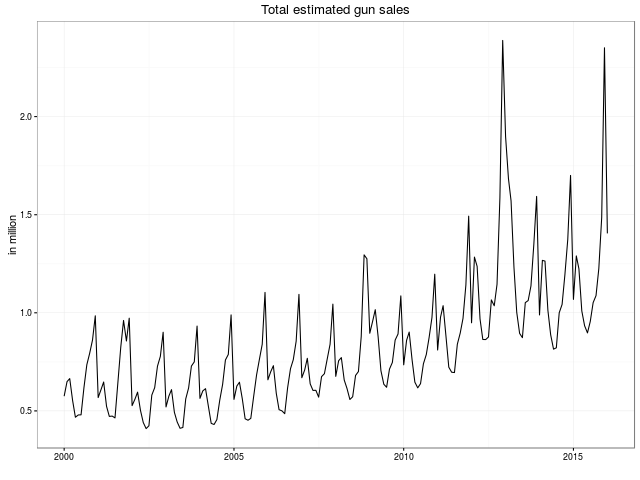
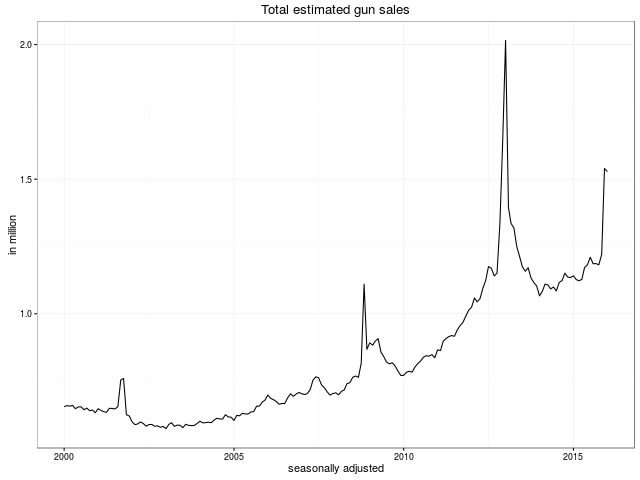
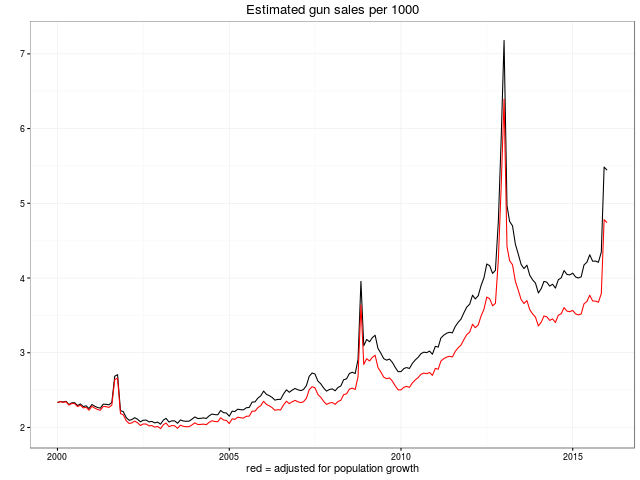
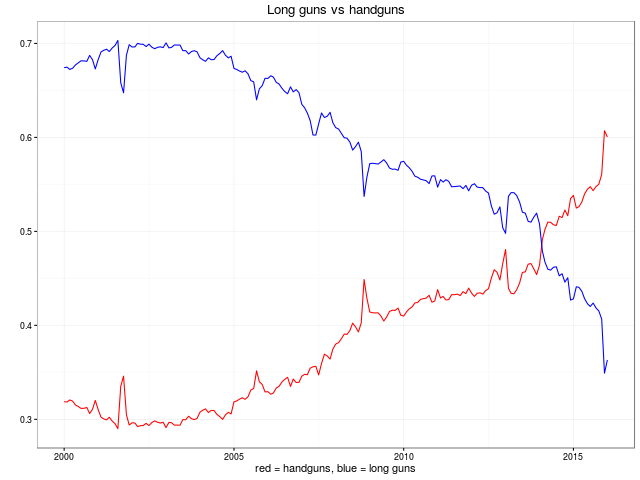
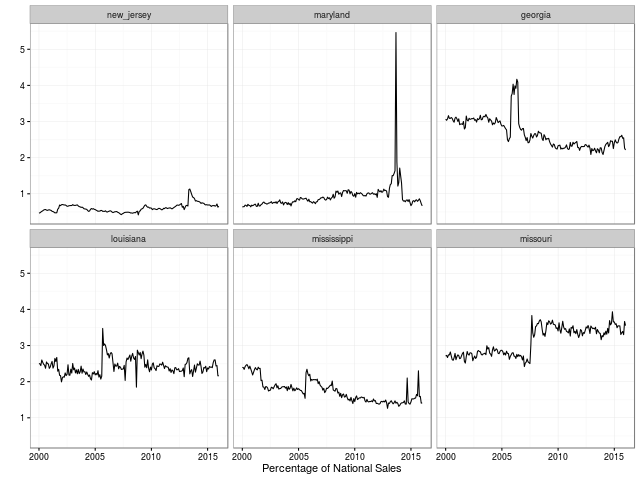
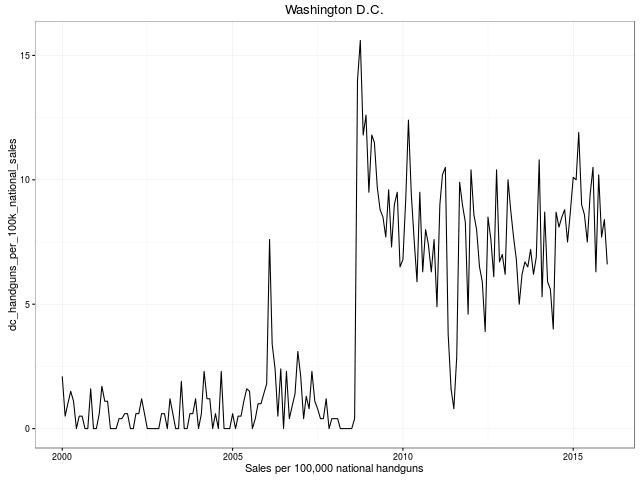
As an amuse gueule, here are the key plots also shown in the main README.md at GitHub:
We look forward to more remixes and analysis of this data. The plan of the GitHub repository is to keep the data set updated as new data points are published.
This post by Dirk Eddelbuettel originated on his Thinking inside the box blog. Please report excessive re-aggregation in third-party for-profit settings.
Device: /dev/disk/by-id/ata-ST3000DM001-1CH166_W1F2QSV6 [SAT], Self-Test Log error count increased from 0 to 1
Meaning it was now time to switch out that disk from the RAID5 array.
Since everytime this happens I have to go and lookup again what to do I've
decided to write it down this time.
I configure SMART to talk about devices by-id (giving me their name and model
number) so first I needed to figure out what the kernel was calling this device
(although mdadm is happy with the by-id path, various other bits are not):
# readlink /dev/disk/by-id/ata-ST3000DM001-1CH166_W1F2QSV6
../../sdd
Next I needed to mark the device as failed in the array:
# mdadm --detail /dev/md0
/dev/md0:
[...]
State : clean
Active Devices : 4
Working Devices : 4
Failed Devices : 0
Spare Devices : 0
[...]
Number Major Minor RaidDevice State
5 8 48 0 active sync /dev/sdd
1 8 32 1 active sync /dev/sdc
6 8 16 2 active sync /dev/sdb
4 8 0 3 active sync /dev/sda
# mdadm --fail /dev/md0 /dev/disk/by-id/ata-ST3000DM001-1CH166_W1F2QSV6
mdadm: set /dev/disk/by-id/ata-ST3000DM001-1CH166_W1F2QSV6 faulty in /dev/md0
# mdadm --detail /dev/md0
/dev/md0:
[...]
Active Devices : 3
Working Devices : 3
Failed Devices : 1
Spare Devices : 0
[...]
Number Major Minor RaidDevice State
0 0 0 0 removed
1 8 32 1 active sync /dev/sdc
6 8 16 2 active sync /dev/sdb
4 8 0 3 active sync /dev/sda
5 8 48 - faulty /dev/sdd
If it had been the RAID subsystem rather than SMART monitoring which had first
spotted the issue then this would have happened already (and I would had
received a different mail from the RAID checks instead of SMART).
Once the disk is marked as failed then actually remove it from the array:
# mdadm --remove /dev/md0 /dev/disk/by-id/ata-ST3000DM001-1CH166_W1F2QSV6
mdadm: hot removed /dev/disk/by-id/ata-ST3000DM001-1CH166_W1F2QSV6 from /dev/md0
And finally tell the kernel to delete the device:
# echo 1 > /sys/block/sdd/device/delete
At this point I can physically swap the disks.
At this point I noticed there were some interesting messages in dmesg, either
from the echo to the delete node in sysfs or from the physical switch of the
disks:
[1779238.656459] md: unbind<sdd>
[1779238.659455] md: export_rdev(sdd)
[1779258.686720] sd 3:0:0:0: [sdd] Synchronizing SCSI cache
[1779258.700507] sd 3:0:0:0: [sdd] Stopping disk
[1779259.377589] ata4.00: disabled
[1779371.126202] ata4: exception Emask 0x10 SAct 0x0 SErr 0x180000 action 0x6 frozen
[1779371.133740] ata4: edma_err_cause=00000020 pp_flags=00000000, SError=00180000
[1779371.141003] ata4: SError: 10B8B Dispar
[1779371.145309] ata4: hard resetting link
[1779371.468708] ata4: SATA link down (SStatus 0 SControl 300)
[1779371.474340] ata4: EH complete
[1779557.416735] ata4: exception Emask 0x10 SAct 0x0 SErr 0x4010000 action 0xe frozen
[1779557.424356] ata4: edma_err_cause=00000010 pp_flags=00000000, dev connect
[1779557.431264] ata4: SError: PHYRdyChg DevExch
[1779557.436008] ata4: hard resetting link
[1779563.357089] ata4: link is slow to respond, please be patient (ready=0)
[1779567.449096] ata4: SRST failed (errno=-16)
[1779567.453316] ata4: hard resetting link
I wonder if I should have used another method to detach the disk, perhaps
poking the controller rather than the disk (which rang a vague bell in my
memory from last time this happened) but in the end the disk is broken and the
kernel seems to have coped so I'm not too worried about it.
It looked like the new disk had already been recognised:
[1779572.593471] scsi 3:0:0:0: Direct-Access ATA HGST HDN724040AL A5E0 PQ: 0 ANSI: 5
[1779572.604187] sd 3:0:0:0: [sdd] 7814037168 512-byte logical blocks: (4.00 TB/3.63 TiB)
[1779572.612171] sd 3:0:0:0: [sdd] 4096-byte physical blocks
[1779572.618252] sd 3:0:0:0: Attached scsi generic sg3 type 0
[1779572.626754] sd 3:0:0:0: [sdd] Write Protect is off
[1779572.631771] sd 3:0:0:0: [sdd] Mode Sense: 00 3a 00 00
[1779572.632588] sd 3:0:0:0: [sdd] Write cache: enabled, read cache: enabled, doesn't support DPO or FUA
[1779572.665609] sdd: unknown partition table
[1779572.671522] sd 3:0:0:0: [sdd] Attached SCSI disk
[1779855.362331] sdd: unknown partition table
So I skipped trying to figure out how to perform a SCSI rescan and went
straight to identifying that the new disk was called:
/dev/disk/by-id/ata-HGST_HDN724040ALE640_PK1338P4GY8ENB
and then tried to do a SMART conveyancing self-test with:
# smartctl -t conveyance /dev/disk/by-id/ata-HGST_HDN724040ALE640_PK1338P4GY8ENB
But this particular drive seems to not support that, so I went straight to
editing /etc/smartd.conf to replace the old disk with the new one and:
# service smartmontools reload
With all that I was ready to add the new disk to the array:
# mdadm --add /dev/md0 /dev/disk/by-id/ata-HGST_HDN724040ALE640_PK1338P4GY8ENB
mdadm: added /dev/disk/by-id/ata-HGST_HDN724040ALE640_PK1338P4GY8ENB
# mdadm --detail /dev/md0
/dev/md0:
[...]
State : clean, degraded, recovering
Active Devices : 3
Working Devices : 4
Failed Devices : 0
Spare Devices : 1
[...]
Rebuild Status : 0% complete
[...]
Number Major Minor RaidDevice State
5 8 48 0 spare rebuilding /dev/sdd
1 8 32 1 active sync /dev/sdc
6 8 16 2 active sync /dev/sdb
4 8 0 3 active sync /dev/sda
# cat /proc/mdstat
Personalities : [raid6] [raid5] [raid4]
md0 : active raid5 sdd[5] sda[4] sdb[6] sdc[1]
5860538880 blocks super 1.2 level 5, 512k chunk, algorithm 2 [4/3] [_UUU]
[>....................] recovery = 0.0% (364032/1953512960) finish=1162.4min speed=28002K/sec
So now all that was left was to wait about 20 hours (with fingers crossed a
second disk didn't die! spoiler: it didn't)
I write documentation first and code second. I've mentioned this from time
to time (previously,
previously) but a reader
pointed out that I've never really explained why I work that way.
It's a way to make my thinking more concrete without diving all the way
into the complexities of the code right away. So sometimes, what I write
down is design documentation, and sometimes it's notes on a bug report[1],
but if what I'm working on is user-visible, I start by writing down the end
user documentation.
Writing things down lets me interact with them as words on a page, which
are more concrete than muddled thoughts in the head, and much easier to
edit and reason about. Code constrains to existing structures; a blank page
frees you to explore and build up new ideas. It's the essay writing
process, applied to software development, with a side effect of making sure
everything is documented.
Also, end-user documentation is best when it doesn't assume that the user
has any prior knowledge. The point in time when I'm closest to
perfect lack of knowledge about something is before I've built it[2].
So, that's the best time to document it.
I understand what I'm trying to tell you better now that I've written it
down than I did when I started. Hopefully you do too.
The kernel spitting the screen is Linux 4.4 Stock Debian.
I maintain an application for bridging various non-Hue lighting systems to something that looks enough like a Hue that an Amazon Echo will still control them. One thing I hadn't really worked on was colour support, so I picked up some cheap bulbs and a bridge. The kit is badged as an iSuper iRainbow001, and it's terrible.
$ sudo systemctl status corosync corosync.service - Corosync Cluster Engine Loaded: loaded (/lib/systemd/system/corosync.service; enabled; vendor preset: enabled) Active: active (running) since mar 2016-02-09 11:01:24 CET; 3h 7min ago Main PID: 14610 (corosync) CGroup: /system.slice/corosync.service 14610 /usr/sbin/corosync -f$ sudo crm statusLast updated: Tue Feb 9 14:11:33 2016 Last change: Tue Feb 9 11:01:48 2016 by hacluster via crmd on node01Stack: corosyncCurrent DC: node01 (version 1.1.14-70404b0) - partition WITHOUT quorum1 node and 0 resources configuredOnline: [ node01 ]
Full list of resources:totem version: 2 cluster_name: lbcluster transport: udpu interface ringnumber: 0 bindnetaddr: 10.0.0.0 mcastaddr: 239.255.1.1 mcastport: 5405 ttl: 1 quorum provider: corosync_votequorum two_node: 1 nodelist node ring0_addr: 10.0.0.1 name: node01 nodeid: 1 node ring0_addr: 10.0.0.2 name: node02 nodeid: 2 logging to_logfile: yes logfile: /var/log/corosync/corosync.log to_syslog: yes timestamp: on $ sudo systemctl status corosync grep active Active: active (running) since mi 2016-02-24 18:54:37 CET; 3min 11s ago$ sudo systemctl status pacemaker grep active Active: active (running) since mi 2016-02-24 18:54:38 CET; 3min 10s ago$ sudo crm statusLast updated: Wed Feb 24 19:01:13 2016 Last change: Wed Feb 24 18:43:32 2016 by hacluster via crmd on node01Stack: corosyncCurrent DC: node02 (version 1.1.14-70404b0) - partition with quorum2 nodes and 0 resources configuredOnline: [ node01 node02 ]Full list of resources:$ sudo crm configure primitive test ocf:heartbeat:IPv6addr params ipv6addr="fe00::200" cidr_netmask="64" nic="eth0" $ sudo crm statusLast updated: Wed Feb 24 19:13:46 2016 Last change: Wed Feb 24 19:11:45 2016 by root via cibadmin on node02Stack: corosyncCurrent DC: node02 (version 1.1.14-70404b0) - partition with quorum2 nodes and 1 resource configuredOnline: [ node01 node02 ]Full list of resources: test (ocf::heartbeat:IPv6addr): Started node01
Since several years ago we've been using php-gettext in phpMyAdmin, but it's about time to change it. The change will not be that big, we're just moving to own fork of that library :-).
You probably ask why to fork? You will probably guess it easily, but to name some reasons:
Filed under: English phpMyAdmin 0 comments
This article starts a series of blogs on my ventures into Android land after having used iOS devices for 6 years. I have never been a strong believer in the Apple ecosystem, and my trials to convince myself to MacBooks and MacPros always ended with installing Linux on them, so I guess I wasn t really the ideal target for iOS. Thus, my iOS devices were also permanently in jailbroken state, otherwise I would feel amputated. But as much as I disliked the lock-in and closed environment of the iOS world, it was from the user perspective surprisingly well done and smooth. So it was with a certain level of tension when I finally switched to Linux^WAndroid.

If you don t want to read on, here the preliminary conclusion: Why didn t I do it earlier! But before we go into details, let me start with my background:
History of my devices
Originally I was a big opponent of smart phones and preferred the Unix-way, one device for one thing. So I had a normal phone and (various) Palm devices (Tungsten X, Tungsten C, and above all my beloved Handera TRGpro). I loved the Palm world and considered it superior to the then smart phone world, until I came to Japan, where the challenge of a proper input method for Japanese and proper Japanese support posed a big hurdle. The Palm devices had a stick and written input fields, but Japanese input was practically impossible and a huge pain. Searching for a word in Japanese was more hurdle then looking it up in a printed dictionary.
In addition, I needed a phone in Japan, so I plunged into the smart phone world and got myself a iPhone (3g). What a world did open for me: easy typing of Japanese, dictionaries, on-the-fly translation, woooow! And above all, I discovered my most beloved and till now one of my most important programs: Flashcards Deluxe. Thanks, and I have to say to 80% thanks to this program my Japanese learning speed has accelerated considerably. There is nothing more important for me than getting drilled in a systematic way.
But I derail, anyway, having Flashcard Deluxe on the iPhone within rather short time I had about 10000 or more flashcards created, and moving on to a different architecture (Android) was for quite some time practically impossible without loosing years of statistics and learning, so I renewed my contract after 2 years together with a iPhone 4s. Another two years passed, and these years brought an Android version of Flashcards Deluxe, as well as Dropbox syncing, so I had no excuse anymore to remain in iOS land, wouldn t it be for an iPhone 5s that was passed to me near the end of my forth year, so I again extended the contract for two years.
Finally, after 6 years of iPhone devices, this January I finally decided it is time to switch to Android. After lots of thinking, comparing, and requesting advice from good friends with more experience in the smart phone market I went for a Google Nexus 6p.
Google Nexus 6p
I will not repeat the specs of this phone as they are widely available on the net. My original plan was a Samsung S6, but after consultation with an expert I decided for an original Google phone for better security support. That left me with the option between a Nexus 5x and 6p, and due to prize differences (prizes of mobiles are ridiculously strange in Japan) I went for the 6p instead of the 5x. One point that made the decision for this slight too big device easy was the fact that it uses a great AMOLED display.
Moving the data
Since I was using Google Calendar and Google Contacts already on the iPhone, moving to the Android phone was far less a hassle than I thought. My contacts and events showed up without a hiccup. Most of the usual apps are nowadays available on both iOS and Android, so the most difficult thing was remembering all the passwords to log into the applications again (SNS like G+, FB, Twitter etc). The same is more or less true for messengers of all kinds (Line, WhatsApp, Threema, etc), but here one is advised to check with the respective web site first to make sure one does not loose all of the important data. Line for example is a stupid ***** that deletes all previous chats on the old phone and does not make them available on the new one. WhatsApp can be converted with a special conversion program. Threema, too allows for transfer of ids.
Move of applications
After that came the hunt for replacement applications for those that are not available as is on Android:
Mail
At first like probably everyone I used the shipped GMail program. It might be good for Google Mail accounts, but for anything else it is just a real pain. Thus, I have searched a bit and finally settled (for now) for K-9 Mail: it is open source, open development, feature rich, and more a hackers type email program, perfectly suited to me.
There is a commercial variant called K@-Mail that says that it improves the user interface and some usability items as well as features, but I didn t see much of an advantage over the original version (which is completely free) and in fact some of my accounts didn t work at all. So I remain with K9 Mail and I think this is a good decision.
Calendar
Managing Calendars is one of the most important task for me. I have been a fervent supporter of DateBk4, DateBk 5, and DateBk 6 on the original Palm series, and when I left the Palm World it was with great pain that I had to loose DateBk. Not only because it was a simply fantastic calendar program that allowed me to keep track of all my climbing routes, festivities, in a much more advanced way than any other Calendering application, but also because the programmer of the DateBk series is running the Dewar Wildlife Trust, a Gorilla rescue group and a lot of the money he makes from the app sales is going to rescue Gorillas.
With the switch to iOS this option was gone, and I first used the built-in calendar application (which is so weak) and later and for long time Pocket Informant Pro. This is a very good program and probably the only one that can compete with DateBk with respect to functionality and usefulness.
During the time of me being locked in in iOS I realized that the world has moved on and a new version of DateBk series for Java was developed, called Pimlical. First only available on Windows, it became later available also on Android and Linux, too.
The following screen shot puts Pimlical on the left, and Pocket Informant on the right. I will write a more detailed comparison in future, in short: PInformant is more streamlined and polished, Pimlical has more configuration option. Practically everything can be adjusted to one s need, and in addition there is also a Desktop application that sync either with Google and the phone, or only with the phone if you want to live off the grid.
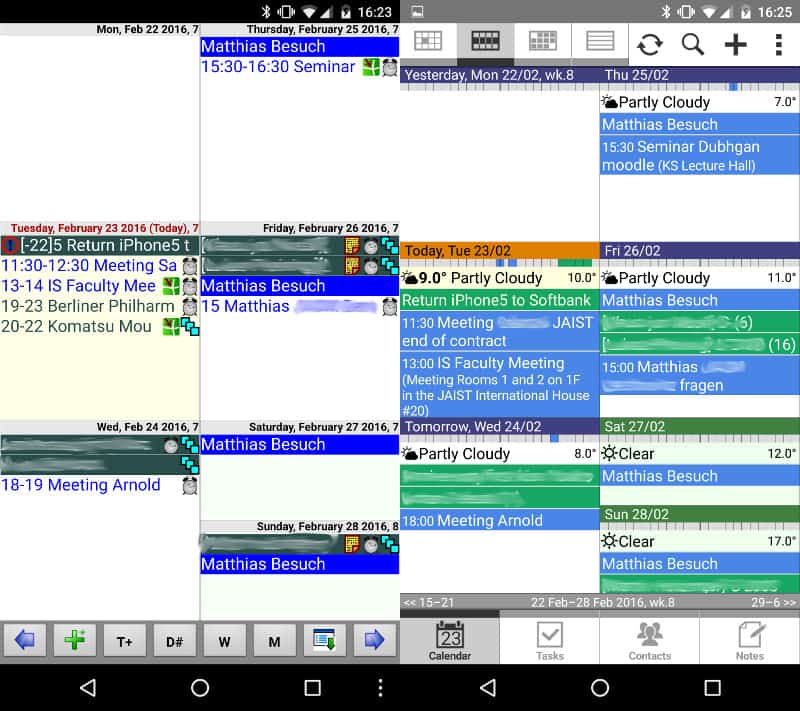
So nowadays on Android I have both Pocket Informant Pro as well as Pimlical, but after a short time I have now switched practically exclusively to Pimlical.
Notes
Here there is pain HUGE PAIN!!! iOS has an excellent applications for notes, called simply Notebooks. This little pearl was my work horse for everything (more or less) memorable. From poems and song texts to bus time tables, from PDF to GIFs, from MarkDown to HTML, everything could be saved into Notebooks, displayed, edited, ordered. And above all it had automatic background sync with Dropbox. So I could drop new files into the respective sub-folder of my Dropbox folder and could be sure I have the files available on my phone when I leave for a trip. And there is a huge bag of features that I haven t even tapped into!
Android is unfortunately not on the list of supported architectures of Notebooks. So I searched far and wide, and without any success. There are all kind of notes, flash colors, overly simple, fast and slow, stylish and plain, but none of them did even provide half of the features of Notebooks. None, not even half.
I still hope I might find the ultimate notes application, or even better would be an Android version of the original Notebooks application (but this is not high on the developers todo list), but for now I am in despair
The Rest
As I said, most apps are nowadays available on both platforms, so there is not much more to do than download the respective Android app and log in again. That worked very nice across practically all apps.
Things I don t like (i.e., which are broken!) on Android
Although a very convenient system and perfectly made to fit my taste, there are some things that are a huge pain (and a big shame on Google to not being able to fix that for long time!):
Japanese fonts when the device is in English interface language
In case you are a foreigner living in Japan and want your Android phone in English, but still read emails, news, etc in Japanese, then Android provides you with the worst, namely Chinese fonts:
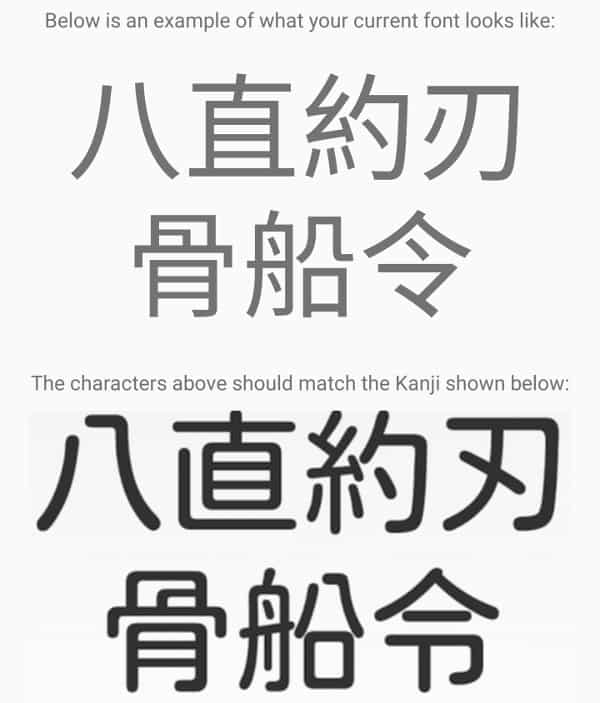
This is a well known problem and I have blogged about fixing the very same problem on Linux (Debian), and the solution is a simple reshuffling in the fontconfig configuration files. There is even an application for it in the Google store, Kanji Fix, but it needs a rooted device (which I haven t done till now my failure!). I can only hope that Google fixes this completely stupid problem in a future version.
The Me problem
Another of these beasty problems: The Android Contacts application has an entry for Me , which unfortunately, no idea why, cannot be linked with my normal me in the list of contacts. There are reports all over the Internet, strange suggestions, and no real solution. Again, a simple thing that should work but doesn t.
Invisible Images folder in MTP mode
A more annoying problem is that the camera folder under Photos does not show up when connecting the device in MTP mode to my computer, and as consequence me being unable to copy photos from the device to my computer.
The solution I am using at the moment is moving the photos with a file manager to a new folder which is visible during MTP communcation, and copy the photos from there.
But this, too, should be something trivial, but alas, despite a lot of posts on the internet I couldn t find a proper solution.
Google Music
As written somewhere else, Google Music has switched from 5 star system to up/down system, which is a huge pain and PITA.
Things I do like (or I discovered) on Android
There are some things I haven t been used/tried on iOS they might be possible which I really like:
Yubikey Neo support
I will write about this in a different blog, but nowadays I have my GPG keys on an hardware token (Yubikey Neo) and the application OpenKeychain on Android works nicely with both K9 Mail and via NFC with my Yubikey. That is a great tool!
Bluetooth streaming
Bluetooth on iOS devices was always a bit broken for me, so connecting my phone to my old car radio I needed radio transmitter that was connected to the cable port of the iPhone. With Android I use a Bluetooth Radio device (receives data via bluetooth, and sends music out via radio waves for a car stereo to receive them). Now if my monthly data limit wouldn t be that low
Debian on Android
Yes, you can have a full Debian system running in your terminal on Android. There are several applications providing this feature, and I am rather surprised how smooth it works.
Conclusion
My preliminary conclusion is that the switch to Android at this time was perfectly timed, and from the technological side I should have done much earlier. In future blogs I will discuss particular instances of this transition in more details.
If you have any suggestion for me, in particular for a good notes taking application, please let me know!
Another minor release of RcppEigen is on CRAN and getting into Debian. The main focus is an upgrade to the recent 3.2.7 release of Eigen which should address another UBSAN issue. And once again Yixuan Qiu did all the heavy lifting.
The NEWS file entry follows.
Changes in RcppEigen version 0.3.2.8.0 (2016-02-23)Courtesy of CRANberries, there is also a diffstat report for the most recent release.
- Updated to version 3.2.8 of Eigen (PR #29 by Yixuan)
This post by Dirk Eddelbuettel originated on his Thinking inside the box blog. Please report excessive re-aggregation in third-party for-profit settings.
I joined the Debian GNU libc team and did my first glibc upload. At that time source-only upload were far from exiting, and I was using a HP 9000 model 715/80 HPPA workstation for my Debian builds.
Still it seems to me like yesterday.
A.pdf, B.pdf and C.pdf) are copies
of multi-page PDFs where I need to sign each page and then send them back.
One of them (let's say C.pdf) needs to be signed on each page except the
last, which needs instead to be signed twice in two special blank spaces.
I have a transparent png with my signature (let's call it signature.png).
Let's start with C.pdf:
# Split C.pdf into single-page PDFs
pdftk C.pdf burst
# Edit a random page in inkscape, add a signature to the corner of the
# page, delete the rest of the contents and save as signature.pdf
inkscape pg_0001.pdf
# Edit the last page in inkscape, add the signatures where needed, save
# as pg_0005-signed.pdf
inkscape pg_0005.pdf
# Stamp the signatures all over all pages but the last one
for f in pg_000[1-4].pdf
do
pdftk $f stamp signature.pdf output basename $f .pdf -signed.pdf
done
# Put it all together
pdftk pg_000*-signed.pdf cat output C-signed.pdf
And now that I have signature.pdf, I can easily process A and B:
pdftk A.pdf stamp signature.pdf output A-signed.pdf
pdftk B.pdf stamp signature.pdf output B-signed.pdf
pdftk is much smarted than that, and it would have been able to extract a
single document with all pages of C.pdf except the last one, but with Italian
bureaucracy it is painful enough to get the job done that afterwards one is
more likely to need eating chocolate to avoid depression, rather than to try
and redo it all again more elegantly.
So, there are times when bureaucracy calls for printing a pile of sheets,
mindlessly sign them all, scan them again, shred them, plant a new tree, and
then finally book a MRI scan of your wrist to assess the state of your carpal
tunnel.
In those times, pdftk and
inkscape can save the day.
Next.