Search Results: "tim"

14 March 2014

Jan Wagner: Chemnitzer Linuxtage 2014 ahead

As Jan has previously announced, the Debian project is maintaining a booth at Chemnitzer Linux-Tage 2014, which is also organized by him. This year we will have merchandising at the booth, which is provided by Alexander Wirt and of course a demo system with Debian wheezy BabelBox as the past years. I'll drop it tomorrow, as I have a conflicting appointment on Saterday, maybe I can attend later on Sunday. In case you have spare time at the weekend ahead, it may be worth to spend it with great lectures and meet nice people over there.

Neil Williams: LAVA server on an arndale

(ARMv7 A15 dual core) I ve covered how I set up my home LAVA lab and how I got two iMX.53 boards running, the next step was to sort out the LAVA server. My initial setup relied on using my Thinkpad as the server. This was somewhat convenient as that s how I develop the code, but didn t help me run jobs like health checks because the laptop was usually somewhere other than on the home LAN. There had been a long-standing problem with using LAVA on ARM the uwsgi support didn t compile but the code being used was old. As the same code has been in Debian for a long time, I suspected that this was fixed with a newer version. So as part of migrating LAVA to django1.6, apache2.4, postgres9.3, django-tables2 0.13 and a few other updated dependencies, I have been using the version of uwsgi from Debian unstable for quite a while without problems on x86. A simple tweak to the LAVA setup scripts and a newer version of uwsgi became available and it builds just fine on armhf. (I haven t tried armel because Linaro is ARMv7 or newer and we don t test with ARMv5/ARMv6 boards, so there s no point in trying armel it s not likely to be an issue for this fix though.) (Only the current lava-deployment-tool methods need to actually compile uwsgi directly from upstream without any patches the packaging which will replace l-d-t uses precompiled binaries, just as any admin would expect.) That initial install was on one of the iMX.53 boards, which ran as slowly as anyone who has used an iMX.53 would expect. I haven t run test jobs on that install, it had a hard enough time serving the frontend. Clearly some more cores would be a good step and when an arndale became available for the home lab, the next step was to get a SATA drive onto the arndale, put Debian unstable on that and then deploy LAVA to the arndale using the Debian packages. As a bonus, these packages are built for django1.6 (using an unreleased branch). Sounds simple enough. It works on iMX.53, it should work on an arndale. Well, it does but only after some unexpected faff. arndale, u-boot and SATA I hate u-boot every single time I ever touch it, the little I know about any other u-boot device is completely useless. Uniformity is a good thing infinite permutations are just rope to hang ourselves with cute embedded nonsense hacks and I m bored of that whole scene. So, boot the arndale, interrupt the bootloader to get to the prompt. What s the first thing most people would want? help. Denied this particular u-boot has been compiled without the ability to display any help messages. u-boot has just sunk further into the depths of please can we have something else which is uniform across devices . OK, well maybe I can get by without help. sata init unknown command sata . (Go away, do something else for a bit.) The arndale isn t one of the newest boards in the ARMv7 world, LAVA has been using them for a while, so someone has probably done some work to fix this . nope. There s a workaround a nice detailed guide by Phil Endecott which details that the kernel needs to continue to be loaded from SD and then the SATA can be used for just the rootfs. Mildly annoyed (I was hoping to be able to update the arndale kernel without the hassle of mounting the SD card at all), the rest was straight-forward. Preparing the SATA and installing Debian Due to the complexity of some of the transitions currently ongoing in Debian ahead of the Jessie release freeze, uwsgi is not in Debian testing right now so this install has to be Debian unstable. That s OK, I ve been running Debian unstable on all my machines for several years now usually updating ~5 times a week.

# parted /dev/sda -s unit mb mktable msdos
# parted /dev/sda -s unit mb mkpart primary 1 -- "-0"
# mkfs.ext4 /dev/sda1
# mount /dev/sda1 /mnt/root/
(note the in the mkpart command, that catches me out most times I try this. Without it, the special -0 gets interpreted as an option to parted but parted doesn t then tell you how to fix it, it just complains about an unknown option.) The SD image I am using is a LAVA master image, based on Ubuntu, so it was easy to put debootstrap onto it.

# apt-get install debootstrap
# debootstrap --arch=armhf sid /mnt/root/ http://ftp.uk.debian.org/debian
# chroot /mnt/root/
Inside the chroot, it s Debian as usual:

apt-get update
apt-get install emdebian-archive-keyring
passwd
emdebian-archive-keyring is a package I (ab)use to sign my LAVA packaging as it has the advantage of being in Debian and Ubuntu going back to the time of Lenny, so it is always available from a repository which has already been authenticated to apt and doesn t involve downloading some random key from a website. I use passwd manually because this rootfs won t be using auto-login, it will have regular users. root passwords can be automated, if necessary. Thinking about login, remember to give the rootfs a usable tty. (The LAVA master image has a nasty habit of mangling editors like nano and vi when used over serial, so I m using echo.) For the arndale you need:

# echo T0:23:respawn:/sbin/getty -L ttySAC2 115200 vt102 >> ./etc/inittab
# echo >> ./etc/securetty
# echo ttySAC2 >> ./etc/securetty
Then to make the hostname useful, adapt this to your needs:

echo 127.0.0.1 arndale.codehelp arndale >> ./etc/hosts
Finally, get the network running at boot and add the LAVA repository:

# echo auto lo eth0 > ./etc/network/interfaces.d/arndale
# echo iface lo inet loopback >> ./etc/network/interfaces.d/arndale
# echo iface eth0 inet dhcp >> ./etc/network/interfaces.d/arndale
# echo deb http://people.linaro.org/~neil.williams/lava sid main >> ./etc/apt/sources.list.d/lava.list
# apt-get update
# exit
Once the LAVA packaging is finalised, the packages will be uploaded to a normal Linaro PPA, I ll update the packages to use an official download location and we ll move to using sane version string handling. For now, the packages are still in development. Code for the packaging is in Alioth but there are issues with anonymous access to the pkg-linaro-lava repositories currently, so I ve also pushed to http://github.com/Linaro if you are interested in building the packages yourself. See also my packaging guide which is also linked from the Links page on my own site. With that done, time to reboot, set the SATA drive as the rootfs using the horrid u-boot and install LAVA.

# reboot
> setenv bootargs console=tty0 console=ttySAC2,115200n8 drm_kms_helper.edid_firmware=edid-1920x1080.fw root=/dev/sda1
> boot
login
# apt-get install postgresql
After this operation, 63.0 MB of additional disk space will be used.

# apt-get install lava-server
After this operation, 231 MB of additional disk space will be used.

# a2dissite 000-default
# a2ensite lava-server
# apache2ctl restart
# service lava-server restart
Take note of the IP address of your new ARM LAVA server and sign in with your regular details, e.g. using OpenID before creating a temporary superuser:

# lava-server manage createsuperuser --username default --email=user@example.com
Choose a temporary password, log out, log in as the temporary superuser, promote your regular user to superuser and default owner of unrestricted devices in the django admin interface. Finally, log out and login as regular user to delete the temporary user. (Yes, that probably could do with some improvement remind me later and I ll see if a known user can be promoted from the command line.) See also Senthil s recent post on LAVA unit tests. Getting those to run without so many steps is also on the TODO list. Results
IP Address: 127.0.0.1
Is Master? : True
Uptime: 6:02:23.700000
Architecture: armv7l
Platform: Linux-3.10.1.0-1-linaro-arndale-armv7l-with-debian-jessie-sid
Insignal Arndale evaluation board based on EXYNOS5250
System memory: 1998MiB
Next! I m working on some code upstream to make it easier to add devices from the command line. The aim is that a set of simple commands will set up an initial device, run a job on that device and submit a result bundle to the LAVA server as job #1. This gives some assurance that everything has gone well. Now I can finally add health checks for the iMX.53 boards and start regular tests on those boards. The cubie boards will wait for a later blog post, there are interesting problems with the bootloader and serial connections. That s a whole different rant.

Michal Čihař: phpMyAdmin participating in GSoC 2014

phpMyAdmin has been accepted for Google Summer of Code 2014. So if you are a student and thinking about how to spend this summer, you might want to join us. As usual, we have prepared dozen of ideas, so in case you are interested, it's really the time to start to work on your application. We require you to contribute before GSoC, so that we can see you can handle the code and our tools. All details you might need are available in our applicant guide. Our requirements might sound strict, but without them, we would drown in hundredths of applications with no clue how to decide, so do your homework and prepare perfect application. If you have any questions, get in touch with us on mailing list and submit the application to to GSoC website.

Filed under: English phpMyAdmin 0 comments Flattr this!

Petter Reinholdtsen: Freedombox on Dreamplug, Raspberry Pi and virtual x86 machine

The Freedombox project is working on providing the software and hardware for making it easy for non-technical people to host their data and communication at home, and being able to communicate with their friends and family encrypted and away from prying eyes. It has been going on for a while, and is slowly progressing towards a new test release (0.2). And what day could be better than the Pi day to announce that the new version will provide "hard drive" / SD card / USB stick images for Dreamplug, Raspberry Pi and VirtualBox (or any other virtualization system), and can also be installed using a Debian installer preseed file. The Debian based Freedombox is now based on Debian Jessie, where most of the needed packages used are already present. Only one, the freedombox-setup package, is missing. To try to build your own boot image to test the current status, fetch the freedom-maker scripts and build using vmdebootstrap with a user with sudo access to become root:
git clone http://anonscm.debian.org/git/freedombox/freedom-maker.git \
  freedom-maker
sudo apt-get install git vmdebootstrap mercurial python-docutils \
  mktorrent extlinux virtualbox qemu-user-static binfmt-support \
  u-boot-tools
make -C freedom-maker dreamplug-image raspberry-image virtualbox-image
Root access is needed to run debootstrap and mount loopback devices. See the README for more details on the build. If you do not want all three images, trim the make line. But note that thanks to a race condition in vmdebootstrap, the build might fail without the patch to the kpartx call. If you instead want to install using a Debian CD and the preseed method, boot a Debian Wheezy ISO and use this boot argument to load the preseed values:
url=http://www.reinholdtsen.name/freedombox/preseed-jessie.dat
But note that due to a recently introduced bug in apt in Jessie, the installer will currently hang while setting up APT sources. Killing the 'apt-cdrom ident' process when it hang a few times during the installation will get the installation going. This affect all installations in Jessie, and I expect it will be fixed soon. Give it a go and let us know how it goes on the mailing list, and help us get the new release published. :) Please join us on IRC (#freedombox on irc.debian.org) and the mailing list if you want to help make this vision come true.

Andrew Pollock: [life] Day 44, Playgroup, laksa and baking

Zoe had Playgroup this morning. We had a little bit of time to kill between when Sarah dropped her off and it was time to bike over to Playgroup, so we went for a little walk to the post box to mail a letter. It was a beautiful morning, so the walk was nice. We biked over to Playgroup. Today I learned from the mother of the boy who was causing issues last week, that he was extremely allergic to everything. They couldn't use egg cartons for their craft activities, for example, because he was allergic to eggs, and even the empty cartons would cause a problem, apparently. That's quite the allergic sensitivity. I'm glad Zoe outgrew her egg allergy. Zoe wanted to do the craft activity first up, so she made another crown, this time for Mummy. I helped roll scraps of crepe paper into balls, and she very carefully glued them onto the points of the crown. She seems to really enjoy mucking around with Clag glue pots. I'll have to get a bottle for home. It reminds of my early primary school days. After that, we just generally mucked around for the rest of Playgroup. She loved the dress up pink lacy skirt again, and wanted to fool around on stage for a bit. One of my ex-co-workers has an occasional yum cha or laksa lunch with a bunch of his ex-co-workers, and I was invited along to laksa at Super Bowl. I figured that since Zoe loves any opportunity to use her chopsticks, and generally loves a good noodle soup, that this could be something I could bring her along to. So straight after Playgroup, we biked over to the Bulimba ferry terminal, locked up the bike, took the ferry across to Teneriffe and jumped on a City Glider bus to Fortitude Valley. We ended up getting there about 30 minutes earlier than everyone else, so I just ordered Zoe some wonton noodle soup and let her have at it while we waited for everyone else to arrive. We all had a BBQ pork laksa, which I personally found a little bit too spicy for my liking, but it was doable. Lunch went well. Zoe was really well behaved, so I'll definitely bring her along again. The next one is supposed to be yum cha, so I think she'll enjoy the selection. Zoe was looking pretty tired by the end of lunch, and we reversed our way back, and biked home from Bulimba. Once we got home, she practically put herself to bed for a nap. Since she was napping pretty late, I didn't let her nap for too long, and she woke up happy. After her nap, I thought we'd do some baking. I wanted to try and make some oatmeal cookies like our friend Bri used to make, so I found a recipe and adapted it to the Thermomix, and we got stuck into it. The joys of having a small child help is that not always do the ingredients wind up where they're supposed to. We had to mill a cup of raw sugar down to white sugar, and I had the cup's worth of sugar in a bowl and asked Zoe to tip the sugar into the Thermomix bowl. Unfortunately, she didn't line up very well, so some of the sugar made it into the Thermomix, but about as much went all over the Thermomix, the counter, the floor, the Guidecraft kitchen helper, everywhere. I've become quite good at taking these sorts of things in my stride, and didn't bat an eyelid. I was actually more bothered by Zoe asking me if I still loved her. After I reassured her I still loved her, even if she accidentally spilled sugar everywhere, and we cleaned up the sugar together, we continued to the point where I realised the dough was supposed to chill in the fridge for at least an hour. This would have meant the cookies wouldn't be ready to hit the oven until right around when Sarah was due to pick up Zoe, so I figured we'd just leave the dough in the fridge and bake the cookies tomorrow. Zoe watched some TV while I cleaned up the kitchen, and then Sarah arrived to pick her up.

13 March 2014

Mario Lang: Living in RAM

I switched to SSD on my home server a few years ago, at a time when SSH was still new and sort of hyped. However, I immediately knew that this type of technology is for me: it is fast and rather silent. SSD storage has this air of being fragile though. You are supposed to not wear it out too much. It's not like in the good old days where you would write to your hard disk without any extra thought.
tmpfs Before I switched to SSD I was already using tmpfs to store /tmp in RAM, for performance reasons mostly. /etc/default/tmpfs:
RAMTMP=yes
Since RAM is relatively cheap these days I have lots of it in my home server.
/var/cache/apt/archives When I switched to SSD, I extended this concept by mounting /var/cache/apt/archives via tmpfs. This is to save disk I/O for package updates. And for a machine running sid which is more or less regularily updated, this saves quite some useless writes to disk. Roughly 100MB per update.
/tmp/src Nowadays, I have almost all of my source code checkouts and build-trees in /tmp/src. myrepos makes this very easy to handle. Simply clone all repositories you are interested in, and remember their details with mr register. After a reboot, all you need to do is:
$ mkdir /tmp/src
$ cd !$
$ mr up
Your repository locations have (likely) been recorded in ~/.mrconfig. Of course there is the danger of accidentally loosing data due to a power outage. However, I feel this leads to a rather clean workflow. Changes need to be pushed anyway. So since you can not trust your local repository to really persist, you are forced to push your changes regularily, which is a good thing! Besides, I have a UPS at home which gives me roughly one hour of backup power. This was enough to sustain every power outage I have witnessed in the past years. Typically, outages are rather short lived in my area, somewhere between a few seconds and 5 minutes. It is rather rare that electricity goes missing for more than half an hour. The only downside of this approach is that from time to time, you will use more bandwidth by re-cloning repositories after a reboot. But really, who needs reboots on Linux? Last time I had half a year uptime, and only rebooted because I wanted to jump from linux 3.8 to 3.13. This approach only works on long-running machines though. It is probably not very useful for a laptop.

12 March 2014

Matthew Garrett: Dealing with Apple ACPI issues

I wrote about Thunderbolt on Apple hardware a while ago. Since then Andreas Noever has somehow managed to write a working Thunderbolt stack, which awesome! But there was still the problem I mentioned of the device not appearing unless you passed acpi_osi="Darwin" on the kernel command line, and a further problem that if you suspended and then resumed it vanished again.

The ACPI _OSI interface is a mechanism for the firmware to determine the OS that the system is running. It turns out that this works fine for operating systems that export fairly static interfaces (Windows, which adds a new _OSI per release) and poorly for operating systems that don't even guarantee any kind of interface stability in security releases (Linux, which claimed to be "Linux" regardless of version until we turned that off). OS X claims to be Darwin and nothing else. As I mentioned before, claiming to be Darwin in addition to Windows was enough to get the Thunderbolt hardware to stay alive after boot, but it wasn't enough to get it powered up again after suspend.

It turns out that there's two sections of ACPI code where this Mac checks _OSI. The first is something like:

if (_OSI("Darwin")) Store 0x2710 OSYS; else if(_OSI("Windows 2009") Store 0x7D9 OSYS; else

ie, if the OS claims to be Darwin, all other strings are ignored. This is called from \_SB._INI(), which is the first ACPI method the kernel executes. The check for whether to power down the Thunderbolt controller occurs after this and then works correctly.

The second version is less helpful. It's more like:

if (_OSI("Darwin")) Store 0x2710 OSYS; if (_OSI("Windows 2009")) Store 0x7D9 OSYS; if

ie, if the OS claims to be both Darwin and Windows 2009 (which Linux will if you pass acpi_osi="Darwin"), the OSYS variable gets set to the Windows 2009 value. This version gets called during PCI initialisation, and once it's run all the other Thunderbolt ACPI calls stop doing anything and the controller gets powered down after suspend/resume. That can be fixed easily enough by special casing Darwin. If the platform requests Darwin before anything else, we'll just stop claiming to be Windows.

Phew. Working Thunderbolt! (Well, almost - _OSC fails and so we disable PCIe hotplug, but that's easy to work around). But boo, no working battery. Apple do something very strange with their ACPI battery interface. If you're running anything that doesn't claim to be Darwin, Apple expose an ACPI Control Method battery. Control Method interfaces abstract the complexity away into either ACPI bytecode or system management traps - the OS simply calls an ACPI method, magic happens and it gets an answer back. If you claim to be Darwin, Apple remove that interface and instead expose the raw ACPI Smart Battery System interface. This provides an i2c bus over which the OS must then speak the Smart Battery System protocol, allowing it to directly communicate with the battery.

Linux has support for this, but it seems that this wasn't working so well and hadn't been for years. Loading the driver resulted in modprobe hanging until a timeout occurred, and most accesses to the battery would (a) take forever and (b) probably fail. It also had the nasty habit of breaking suspend and resume, which was unfortunate since getting Thunderbolt working over suspend and resume was the whole point of this exercise.

So. I modified the sbs driver to dump every command it sent over the i2c bus and every response it got. Pretty quickly I found that the failing operation was a write - specifically, a write used to select which battery should be connected to the bus. Interestingly, Apple implemented their Control Method interface by just using ACPI bytecode to speak the SBS protocol. Looking at the code in question showed that they never issued any writes, and the battery worked fine anyway. So why were we writing? SBS provides a command to tell you the current state of the battery subsystem, including which battery (out of a maximum of 4) is currently selected. Unsurprisingly, calling this showed that the battery we wanted to talk to was already selected. We then asked the SBS manager to select it anyway, and the manager promptly fell off the bus and stopped talking to us. In keeping with the maxim of "If hardware complains when we do something, and if we don't really need to do that, don't do that", this makes it work.

Working Thunderbolt and working battery. We're even getting close to getting switchable GPU support working reasonably, which is probably just going to involve rewriting the entirety of fbcon or something similarly amusing.

comment count unavailable comments

Vasudev Kamath: Working around type system of Go with unsafe

Go language has a strong type system unlike C, and some times this will be head ache when we want to interact with C data types with Cgo or just to convert a Go type to lets say byte slice. I recently faced the same problem and after poking around things, I learned the Go provides unsafe package which can be used to work around the Go's type system.

Problem Recently I started using Cgo to use some C library I had to write some tools for development and testing. The reason I chose Go for this was prototyping and writing some quick tools is much easier in Go than done in C. The C library had some function which takes pointer to array types and fills it with some values. The problem I was facing here was how to create a C array in Go. Go does have array but its largely used as internal representation for much efficient type called slice and I can't directly cast a byte slice into an C array. Second problem I had was I had to store arbitrary Go types like float (float32,float64) and int (int32, int64) etc. into C array. So in brief, the problems that needed to solve are
  1. Find a way to convert byte slice from Go into C array and vice versa.
  2. Find a way to convert and store Go types into a C array.
Solution Basically C array are sequence of memory location which can be statically or dynamically allocated. In Cgo its possible to access C standard library functions for memory allocation, so why not use it. The memory allocation function then returns the pointer to starting of allocated memory, we can use this pointer to write Go's bytes into the memory location and bytes from memory location into Go's slice. The pointer returned by C allocation functions are not directly usable for memory dereferencing in Go, here is where unsafe package kicks in. We will cast the return of C allocation function as unsafe.Pointer type and from the documentation of unsafe package,
  1. A pointer value of any type can be converted to a Pointer.
  2. A Pointer can be converted to a pointer value of any type.
  3. A uintptr can be converted to a Pointer.
  4. A Pointer can be converted to a uintptr.
So we can then cast unsafe.Pointer to uintptr which is the Go type which is large enough to hold any memory address in Go and can be used for pointer arithmetic just like we do in C (of course with some more castings). Below I'm pasting a simplified code in C which I wrote for this post.
#ifndef __BYTETEST_H__
#define __BYTETEST_H__
typedef unsigned char UBYTE;
extern void ArrayReadFunc(UBYTE *arrayout);
extern void ArrayWriteFunc(UBYTE *arrayin);
#endif
#include "bytetest.h"
#include <stdio.h>
#include <string.h>
void ArrayReadFunc(UBYTE *arrayout)
 
     UBYTE array[20] =  1, 2, 3, 4,5, 6, 7, 8, 9, 10,
                        11, 12, 13, 14, 15, 16, 17,
                        18, 19, 20 ;
     memcpy(arrayout, array, 20);
 
void ArrayWriteFunc(UBYTE *arrayin)
 
     UBYTE array[20];
     memcpy(array, arrayin, 20);
     printf("Byte slice array received from Go:\n");
     for(int i = 0; i < 20; i ++) 
             printf("%d ", array[i]);
      
     printf("\n");
 
Functions are written just for this post and they don't really do anything. As you can see ArrayReadFunc takes a pointer to array and fills it with content of another array using memcpy. Function ArrayWriteFunc on other hand takes pointer to array and copies its content to internal array. I've added print logic to ArrayWriteFunc just to show that values passed from Go are making it here. Below is the Go code which uses the above C files passes byte slice to get value out of C code and array made of byte slice to C function to send values in.
package main
/*
#cgo CFLAGS: -std=c99
#include "bytetest.h"
#include <stdlib.h>
*/
import "C"
import (
     "fmt"
     "unsafe"
)
func ReadArray() unsafe.Pointer  
       var outArray = unsafe.Pointer (C.calloc(20,1))
       C.ArrayReadFunc((*C.UBYTE)(outArray))
       return outArray
 
func WriteArray(inArray unsafe.Pointer)  
       C.ArrayWriteFunc((*C.UBYTE)(inArray))
 
func CArrayToByteSlice(array unsafe.Pointer, size int) []byte  
       var arrayptr = uintptr(array)
       var byteSlice = make([]byte, size)
       for i := 0; i < len(byteSlice); i ++  
               byteSlice[i] = byte(*(*C.UBYTE)(unsafe.Pointer(arrayptr)))
               arrayptr ++
        
       return byteSlice
 
func ByteSliceToCArray (byteSlice []byte) unsafe.Pointer  
       var array = unsafe.Pointer(C.calloc(C.size_t(len(byteSlice)), 1))
       var arrayptr = uintptr(array)
       for i := 0; i < len(byteSlice); i ++  
              *(*C.UBYTE)(unsafe.Pointer(arrayptr)) = C.UBYTE(byteSlice[i])
              arrayptr ++
        
       return array
 
func main() 
        carray := ReadArray()
        defer C.free(carray)
        carraybytes := CArrayToByteSlice(carray, 20)
        fmt.Println("C array converted to byte slice:")
        for i := 0; i < len(carraybytes); i ++  
                fmt.Printf("%d ", carraybytes[i])
         
        fmt.Println()
        gobytes := []byte 21, 22, 23, 24, 25, 26, 27, 28, 29, 30,
                31, 32, 33, 34, 35, 36, 37, 38, 39, 40 
        gobytesarray := ByteSliceToCArray(gobytes)
        defer C.free(gobytesarray)
        WriteArray(gobytesarray)
 
Functions ReadArray and WriteArray are just wrapper to the calls to C counter parts ArrayReadFunc and ArrayWriteFunc. ReadArray returns unsafe.Pointer which is allocated C array and should be freed by caller. WriteArray takes unsafe.Pointer which is pointing to memory location containing C array. Now the functions of interest are CArrayToByteSlice and ByteSliceToCArray. It should be pretty clear from the above code to understand what is happening in these functions. Still I will just put explain them briefly. ByteSliceToCArray allocates a C array using calloc from C standard library. It then creates a uintptr, a pointer type in Go which is used to dereference the each memory location and store bytes from the input byte slice in them. CArrayToByteSlice on other hands creates a uintptr type by casting input unsafe.Pointer type and then uses this pointer type to dereference values from memoy and store it in byte slice with suitable casting. So lets build the code and run it and see the output:
C array converted to byte slice:
1 2 3 4 5 6 7 8 9 10 11 12 13 14 15 16 17 18 19 20
Byte slice array received from Go:
21 22 23 24 25 26 27 28 29 30 31 32 33 34 35 36 37 38 39 40
So yes it actually works and values are moving across C and Go. This solves first problem in hand next is converting arbitrary Go types into byte slices. There are many cases where we would like to convert an arbitrary Go types like (int, float) into bytes. One such use case I found was when writing a TCP client for communicating with a Server written using C speaking custom protocol. Here I'm just going to show how to convert types like float, int to byte slice, I've not tried converting structures but it is certainly possible. Below is the function which can convert int32,float32 into byte slice it can also be extended for other types.
func CopyValueToByte(value interface ) []byte  
     var valptr uintptr
     var slice []byte
     switch t := value.(type)  
     case int32:
             i := value.(int32)
             valptr = uintptr(unsafe.Pointer(&i))
             slice = make([]byte, unsafe.Sizeof(i))
     case float32:
             f := value.(float32)
             valptr = uintptr(unsafe.Pointer(&f))
             slice = make([]byte, unsafe.Sizeof(f))
     default:
             fmt.Fprintf(os.Stderr,"Unsupported type: %T\n", t)
             os.Exit(1)
      
     for i := 0; i < len(slice); i++  
             slice[i] = byte(*(*byte)(unsafe.Pointer(valptr)))
             valptr++
      
     return slice
 
This function is generic which can take various types of value. First we will use Go's type assertion to determine the type and creates a uintptr pointer for the value and allocates byte slice depending on the size of the value as calculated using unsafe.Sizeof. Later it uses the pointer to dereference value from memory location and copies each byte into byte slice. The idea used here is every type is represented as certain number of bytes in the memory. Below is the entire program.
package main
import (
     "fmt"
     "unsafe"
     "os"
)
func CopyValueToByte(value interface ) []byte  
     var valptr uintptr
     var slice []byte
     switch t := value.(type)  
     case int32:
             i := value.(int32)
             valptr = uintptr(unsafe.Pointer(&i))
             slice = make([]byte, unsafe.Sizeof(i))
     case float32:
             f := value.(float32)
             valptr = uintptr(unsafe.Pointer(&f))
             slice = make([]byte, unsafe.Sizeof(f))
     default:
             fmt.Fprintf(os.Stderr,"Unsupported type: %T\n", t)
             os.Exit(1)
      
     for i := 0; i < len(slice); i++  
             slice[i] = byte(*(*byte)(unsafe.Pointer(valptr)))
             valptr++
      
     return slice
 
func main()  
     a := float32(-10.3)
     floatbytes := CopyValueToByte(a)
     fmt.Println("Float value as byte slice:")
     for i := 0; i < len(floatbytes); i++  
             fmt.Printf("%x ", floatbytes[i])
      
     fmt.Println()
     b := new(float32)
     bptr := uintptr(unsafe.Pointer(b))
     for i := 0; i < len(floatbytes); i++  
             *(*byte)(unsafe.Pointer(bptr)) = floatbytes[i]
             bptr++
      
     fmt.Printf("Byte value copied to float var: %f\n", *b)
 
The above conversion can also be achieved using encoding/binary package provided by Go. But its been told to me that it makes things pretty slow.
Conclusion So goes unsafe.Pointer is really powerful thing which allows us to work around the Go's type system but as package documentation says it should be used with care
PS: I'm not really sure if its recommended to use allocation functions from C standard library, I will wait for expert gophers to comment on that.

John Goerzen: Agile Is Dead (Long Live Agility)

In an intriguing post, PragDave laments how empty the word agile has become. To paraphrase, I might say he s put words to a nagging feeling I ve had: that there are entire books about agile, conferences about agile, hallway conversations I ve heard about whether somebody is doing this-or-that agile practice correctly. Which, when it comes down to it, means that they re not being agile. If process and tools, even if they re labeled as agile processes and tools, are king, then we ve simply replaced one productivity-impairing dictator with another. And he makes this bold statement:
Here is how to do something in an agile fashion: What to do:
  • Find out where you are
  • Take a small step towards your goal
  • Adjust your understanding based on what you learned
  • Repeat
How to do it: When faced with two or more alternatives that deliver roughly the same value, take the path that makes future change easier. Those four lines and one practice encompass everything there is to know about effective software development.
He goes on to dive into that a bit, of course, but I think this man has a rare gift of expressing something complicated so succinctly. I am inclined to believe he is right.

Petter Reinholdtsen: How to add extra storage servers in Debian Edu / Skolelinux

On larger sites, it is useful to use a dedicated storage server for storing user home directories and data. The design for handling this in Debian Edu / Skolelinux, is to update the automount rules in LDAP and let the automount daemon on the clients take care of the rest. I was reminded about the need to document this better when one of the customers of Skolelinux Drift AS, where I am on the board of directors, asked about how to do this. The steps to get this working are the following:
  1. Add new storage server in DNS. I use nas-server.intern as the example host here.
  2. Add automoun LDAP information about this server in LDAP, to allow all clients to automatically mount it on reqeust.
  3. Add the relevant entries in tjener.intern:/etc/fstab, because tjener.intern do not use automount to avoid mounting loops.
DNS entries are added in GOsa , and not described here. Follow the instructions in the manual (Machine Management with GOsa in section Getting started). Ensure that the NFS export points on the server are exported to the relevant subnets or machines:
root@tjener:~# showmount -e nas-server
Export list for nas-server:
/storage         10.0.0.0/8
root@tjener:~#
Here everything on the backbone network is granted access to the /storage export. With NFSv3 it is slightly better to limit it to netgroup membership or single IP addresses to have some limits on the NFS access. The next step is to update LDAP. This can not be done using GOsa , because it lack a module for automount. Instead, use ldapvi and add the required LDAP objects using an editor.
ldapvi --ldap-conf -ZD '(cn=admin)' -b ou=automount,dc=skole,dc=skolelinux,dc=no
When the editor show up, add the following LDAP objects at the bottom of the document. The "/&" part in the last LDAP object is a wild card matching everything the nas-server exports, removing the need to list individual mount points in LDAP.
add cn=nas-server,ou=auto.skole,ou=automount,dc=skole,dc=skolelinux,dc=no
objectClass: automount
cn: nas-server
automountInformation: -fstype=autofs --timeout=60 ldap:ou=auto.nas-server,ou=automount,dc=skole,dc=skolelinux,dc=no
add ou=auto.nas-server,ou=automount,dc=skole,dc=skolelinux,dc=no
objectClass: top
objectClass: automountMap
ou: auto.nas-server
add cn=/,ou=auto.nas-server,ou=automount,dc=skole,dc=skolelinux,dc=no
objectClass: automount
cn: /
automountInformation: -fstype=nfs,tcp,rsize=32768,wsize=32768,rw,intr,hard,nodev,nosuid,noatime nas-server.intern:/&
The last step to remember is to mount the relevant mount points in tjener.intern by adding them to /etc/fstab, creating the mount directories using mkdir and running "mount -a" to mount them. When this is done, your users should be able to access the files on the storage server directly by just visiting the /tjener/nas-server/storage/ directory using any application on any workstation, LTSP client or LTSP server.

Andrew Pollock: [life] Day 43, a lovely lazy day, until we got on the bike

Zoe slept through the night again last night. Two nights of uninterrupted sleep has been totally amazing! We had a slower start to the day because we didn't have to be anywhere. I've been meaning to do a massive cull of Zoe's wardrobe for a while, and this morning seemed like as good an opportunity as any, so after TV, I managed to get Zoe to cooperate with trying on clothes for about an hour. She really enjoyed pulling everything out of her wardrobe and putting it all back again neatly. After that, she asked me if I could make her a bus out of the last remaining moving box, so I managed to make something approximating a bus. The port-a-robe boxes are really rather handy for this sort of thing. The balcony is starting to look like a cardboard box shanty town, with a cubby house, a rocket and now a bus. I think we need to host a few more play dates so they all get a good work out. It was time for lunch after that. I'd had a bucket of caramel popcorn, which I used for the journey to Coochiemudlo the other week. Zoe had asked me how popcorn was made, so I had resolved to make popcorn with her sometime soon. Yesterday at the health food shop, I opportunistically noticed some popping corn, so I grabbed a small bag of it. It turned out that buying peanut oil was good for more than just making peanut butter, as it came in handy today for popping corn. I've never popped corn before, aside from occasionally getting a bag of the microwave stuff, so it was a fun experience to do it "from scratch". It turned out pretty well, with only a few burned ones and a few unpopped ones. It'd be fun to try and dry out a corn cob and totally do it from scratch. After that I tried to get Zoe to take a nap, but it didn't work out so well, so after her quiet time we cleaned up her bedroom and generally fooled around for a bit. Throughout the day, Zoe did lots of little bouts of self-directed play. She dredged up this little wooden xylophone that we'd made in the US from a Kiwi Crate and had a great time banging away on it until she stood on it and broke it. The doctor's kit got a good workout. It was just a really nice, relaxing day at home. Zoe's Kindergarten was having a play date meet-and-greet in the park, for all the parents to meet each other. It was a fair way from home, but there was a nice, albeit circuitous, bike path to get there, and I decided to try and bike there, without really properly estimating the distance or length of time it would take. The play date was due to start at 3:30pm, and I was planning on leaving at 3pm. We were about 5 minutes late getting out of the door. I think it ended up taking us about 50 minutes to get there. It was a beautiful ride though, once we got onto the Bulimba Creek bikeway, through the Minippi Parklands. It would have been the longest ride Zoe's had on the bike, and she wasn't fazed at all. The play date itself was nice. For some reason, I'm a bit shy about going and introducing myself to the mothers (I kept wanting to write "other mothers"), but I sucked it up and made a few introductions. I'm terrible about remembering names though. At least I've got a few faces I can say hi to at drop off and pick up now. Sarah met us at the park and hung out for a bit as well, and then Zoe and her left together and I biked back home. I was feeling pretty good, and thought I'd try and bang out a run when I got home, but I didn't end up having the fuel in the tank, and blew up after about 1.5km.

11 March 2014

Steve Kemp: Discovering back-end servers automatically?

Recently I've been pondering how to do service discovery. Pretend you have a load balancer which accepts traffic and routes incoming requests to different back-ends. The loadbalancer might be pound, varnish, haproxy, nginx, or similar. The back-ends might be node applications, apache, or similar. The typical configuration of the load-balancer will read:
# forward
# backends
backend web1    .host = "10.0.0.4";  
backend web2    .host = "10.0.0.6";  
backend web3    .host = "10.0.0.5";  
#  afterword
I've seen this same setup in many situations, and while it can easily be imagined that there might be "random HTTP servers" on your (V)LAN which shouldn't receive connections it seems like a pain to keep updating the backends. Using UDP/multicast broadcasts it is trivial to announce "Hey I'm a HTTP-server with the name 'foo'", and it seems to me that this should allow seamless HTTP load-balancing. To be more explicit - this is normal: What I'd like to propose is another step: i.e. This allows backends to be removed from service when they go offline but also to be added when they come online. Without the load-balancer needing its configuration to be updated. This means you'd not give a static list of back-ends to your load-balancer, instead you'd say "Route traffic to any service that adfvertises itself with the tag 'foo'.". VLANS, firewalls, multicast, udp, all come into play, but in theory this strikes me as being useful, obvious, and simple. (Failure cases? Well if the "announcer" dies then the backend won't get traffic routed to it. Just like if the backend were offline. And clearly if a backend is announced, but not receiving HTTP-requests it would be dropped as normal.) If I get the time this evening I'll sit down and look at some load-balancer source code to see if any are written in such a way that I could add this "broadcast discovery" as a plugin/minor change.

Steve Langasek: My CuBox-i has arrived

A couple of weeks ago, Gunnar Wolf mentioned on IRC that his CuBox-i4 had arrived. This resulted in various jealous noises from me; having heard about this device making the rounds at the Kernel Summit, I ordered one for myself back in December, as part of the long-delayed HDification of our home entertainment system and coinciding with the purchase of a new Samsung SmartTV. We've been running an Intel Coppermine Celeron for a decade as a MythTV frontend and encoder (hardware-assisted with a PVR-250), which is fine for SD video, but really doesn't cut it for anything HD. So after finally getting a TV that would showcase HD in all its glory, I figured it was time to upgrade from an S-Video-out, barely-limping-along tower machine to something more modern with HDMI out, eSATA, hardware video decoding, and whose biggest problem is it's so small that it threatens to get lost in the wiring! Since placing the order, I've been bemused to find that the SmartTV is so smart that it has had a dramatic impact on how we consume media; between that and our decision to not be a boiled frog in the face of DISH Network's annual price increase, the MythTV frontend has become a much less important part of our entertainment center, well before I ever got a chance to lay hands on the intended replacement hardware. But that's a topic for another day. Anyway, the CuBox-i4 finally arrived in the mail on Friday, so of course I immediately needed to start hacking on it! Like Gunnar, who wrote last week about his own experience getting a "proper" Debian install on the box, I'm not content with running a binary distribution image prepared by some third party; I expect my hardware toys to run official distro packages assembled using official distro tools and, if at all possible, distributed on official distro images for a minimum of hassle. Whereas Gunnar was willing to settle for using third-party binaries for the bootloader and kernel, however, I'm not inclined to do any such thing. And between my stint at Linaro a few years ago and the recent work on Ubuntu for phones, I do have a little knowledge of Linux on ARM (probably just enough to be dangerous), so I set to work trying to get the CuBox-i4 bootable with stock Debian unstable. Being such a cutting-edge piece of hardware, that does pose some challenges. Support for the i.MX6 chip is in the process of being upstreamed to U-Boot, but the support for the CuBox-i devices isn't there yet, nor is the support for SPL on i.MX6 (which allows booting the variants of the CuBox-i with a single U-Boot build, instead of requiring a different bootloader build for each flavor). The CuBox-i U-Boot that SolidRun makes available (with source at github) is based on U-Boot 2013.10-rc4, so more than a full release behind Debian unstable, and the patches there don't apply to U-Boot 2014.01 without a bit of effort. But if it's worth doing, it's worth doing right, so I've taken the time to rebase the CuBox-i patches on top of 2014.01, publishing the results of the rebase to my own github repository and submitting a bug to the Debian U-Boot maintainers requesting its inclusion. The next step is to get a Debian kernel that not only works, but fully supports the hardware out of the box (a 3.13 generic arm kernel will boot on the machine, but little things like ethernet and hdmi don't work yet). I've created a page in the Debian wiki for tracking the status of this work.

Andrew Pollock: [life] Day 42, a good night's sleep, Kindergarten, make up swim class and dinner with Nana

Zoe slept through the night for the first time in recent memory, and was up at around 6am. It was lovely. I'm thinking the slightly lower temperature helped. I'm definitely going to explore air conditioning for the bedrooms before next Summer. I'd picked up some egg cups on the weekend, so we did soft boiled eggs in the Thermomix for breakfast. They turned out lovely this time, and Zoe seemed to enjoy eating hers. She dressed herself while they were cooking. Her Kindergarten t-shirts arrived yesterday, so now she looks like all the other kids. It's very cute. It rained on and off in the morning, and I was in two minds about whether to chance it on the bike or not. As it happened we ended up messing around a bit before leaving, so we drove, and it was a good call, because it started raining again as we pulled out of the driveway. Drop off was super smooth. Megan had been away yesterday, but was back today, so Zoe was very happy to see her. My financial advisor came out for a chat about investments mid-morning, and then I got stuck into my US taxes. I will not miss having to do these tax returns. The 2013 one is going to be particularly complicated by the fact we sold our home and were only in the country for like 80 days. I biked over to Kindergarten to pick up Zoe, as the weather had improved. Surprisingly, she was awake, but her teacher said she'd just woken up from a nap. We managed to clear out pretty quickly. I stopped at the health food shop on the way home to get some peanut oil for the dinner I was making. Due to a miscommunication, Zoe had missed her Saturday swim class. I explained to the swim school the error, and they were kind enough to allow Zoe to have a make up class anyway, so we went to that after Kindergarten. Zoe wanted to do some more practice riding her bike. She's got a little 10 inch bike with no training wheels and a gyrobike front wheel. We haven't had a lot of success learning to ride to date, due to a combination of her height and just time, so it was interesting that she decided today she wanted to do some more practice. She wanted to "ride" her bike from home to the park on the way to swim class, but I managed to convince her to walk the bike to the park. It turns out even walking the bike is a bit of a challenge for her, so I ended up carrying it most of the way. It's heavy. We got to the park, and had a bit of a run with the bike. I'm glad I decided to take her knee pads and elbow pads, because she did stack it fairly decently, but managed to survive mostly unscathed. To her credit, she even got back on the bike again. She's a tough kid. Once we made it to the playground, she lost all interest in the bike, and we had about 15 minutes to kill before we needed to continue to the pool. We walked/carried the bike from the park to the pool, and the make up class Zoe ended up in was Megan's regular class, so the girls had a great time together. After swim class, we walked back home. Zoe's Nana was coming over for dinner, and I wanted to make a satay chicken dish. I'd bought some peanuts from the Peanut Wagon on Sunday, when I was in Nanango for my uncle's 90th birthday party, and I wanted to try making peanut butter from scratch in the Thermomix, and use that to make the satay sauce. Long story short, dinner wasn't super great. I'd made a satay chicken in the Thermomix previously, but I couldn't find the recipe I used last time. I used this recipe tonight, but didn't really follow it properly because I was trying to cut corners due to the time. I tried cooking wild rice in the microwave and it was a total flop. The satay chicken itself turned out okay, but it was a shame about the rice. It was cool making my own peanut butter. Zoe had a great time playing with her Nana, and after we dropped her off at the train station went to bed without a peep.

Ian Wienand: Tenvis IP391W meta-page

Recently I purchased a Tenvis IP391W-HD camera. I would be unlikely to recommend it. The price is certainly right and the picture quality is quite good. The Android and iPhone apps do work to watch the stream live. However, the interface is terrible and almost useless without Internet Explorer. There is a RTSP stream (rtsp://admin:password@ip) which VLC can seem to handle, but not mplayer. The recording format (.h264) is not viewable by VLC or mplayer and all I could find is a Windows .exe to convert them to an .avi. The motion detection gets troubled by the dark. It would really only be useful for something permanently well-lit. It did send me emails via gmail. I have got it recording to a NFS server, but I don't have a lot of confidence in the reliability of it. I think I have it configured to record in 3600-second blocks (given the interface, it's hard to tell if I've set it up to the network, or to the internal flash, etc), but it seems to intersperse 60 minute recordings with random small recordings. Given the whole idea of a security camera is to record the unexpected, you want a lot of confidence you're actually recording, which you don't get with this. You can see below it recorded 3 hour blocks, then started going a little crazy...
-rw-r--r-- 1 nobody nogroup  69M Mar 11 01:25 0-003035.v264
-rw-r--r-- 1 nobody nogroup  69M Mar 11 02:25 0-013049.v264
-rw-r--r-- 1 nobody nogroup  69M Mar 11 03:26 0-023103.v264
-rw-r--r-- 1 nobody nogroup 5.9M Mar 11 03:31 0-033117.v264
-rw-r--r-- 1 nobody nogroup 1.5M Mar 11 03:40 0-034350.v264
-rw-r--r-- 1 nobody nogroup  17M Mar 11 04:02 0-035259.v264
-rw-r--r-- 1 nobody nogroup 306K Mar 11 04:10 0-041548.v264
-rw-r--r-- 1 nobody nogroup 4.9M Mar 11 04:23 0-042457.v264
There is a support forum, where I found the following files scattered in various posts. From what I can tell, they are the latest as of this writing. I can confirm they work with my IP391W-HD, which the system tells me is GM8126 hardware and came with firmware 1.2.8.3.
  • 1.3.3.3.pk2 - firmware (b56f211a569fb03a37d13b706c660dcb)
  • web.pk2 - a UI update that includes dropbox support. This is really for the model that has pan and tilt, so those buttons don't work. (0e42e42bd6f8034e87dcd443dcc3594d)
  • V264ToAVIen.exe - converts the output to an AVI file that mplayer will play (with some complaints) (9c5a858aa454fed4a0186cf244c0d234)
www.modern.ie offers free limited-time Windows VM's which will work to upload this firmware. Just make sure you use a bridged network in the VM; I'm guessing the firmware ActiveX control tells the camera to TFTP the data from it, which doesn't work via NAT. Somewhat worryingly, you can telnet to it and get a login prompt (TASTECH login). So it has a built-in backdoor you can't disable. There have been some efforts to hack the device. leecher@dose.0wnz.at did an excellent job reverse engineering the .pk2 format and writing tenvis_pack.c (no license, I'm generously assuming public domain). I used this to recreate the firmware above with a telnet daemon listening with a shell on port 2525 (no password, just telnet to it)
It's interesting to poke around, but it seems like the whole thing is really driven by a binary called ipc8126
/ # ipc8126 --help
*** TAS-Tech IPCAM/DVS
*** Version: 1.3.3.3
*** Release date: 2013-08-05 15:48:32
In general, I'd say hackability is quite low. Warning : any of the above might turn your camera into a paperweight. It worked for me, but that's all I can say...

10 March 2014

Andrew Pollock: [life] Day 41, Running, Kindergarten, baking

I got up not as early as I'd have liked, and did the first 10km run I've done for a while, with my new shoes and the orthotics in them. It was a bit cooler, and despite not being particularly well hydrated, I lasted the distance, and managed to complete it in under an hour. I'm a long way off my best time at the moment, but I'm hoping as it cools down my running fitness will improve. I ended up doing a bunch of startup-related stuff today, instead of Debian stuff. It felt good to make some vaguely forward progress, even if it was just business operations planning stuff. I picked up Zoe from Kindergarten by bike. We'd both confirmed with her several times since Friday as to which mode of transport she wanted to use to come home, and she'd indicated the bike. Zoe was asleep as usual, but woke up pretty easily. The Kindergarten has indicated that they want everyone out of the centre by 2:30pm, which makes it a bit of a challenge to rouse a deeply sleeping child and exit the centre in 10 minutes. I managed to sunscreen her while she was still horizontal, so that sped things up, and it helped greatly that she didn't have a post-nap meltdown. One of her class mates and her mother were hanging around waiting for her big brother to finish school, and the bike trailer tends to be a good conversation starter, so we chatted for a little bit before leaving. It was nice to properly meet another parent, and I'm glad to see Zoe's started learning some of her class mates names. I had a kale, carrot and apple juice for lunch today, and as I hate wasting the pulp out of the juicer, I'd previously found a nice muffin recipe that I could use the kale and carrot pulp in. I'd previously baked a batch of mini muffins for Zoe's lunches, and was pleased that she liked them. We were getting a bit low, so I thought we'd bake another batch this afternoon, so that's what we did after we got home. Once they were in the oven, Zoe went off to watch TV and I made a start on dinner. Bedtime went nice and smoothly tonight.

Matthew Garrett: The simple things in life

I've spent a while trying to make GPU switching work more reliably on Apple hardware, and got to the point where my Retina MBP now comes up with X running on Intel regardless of what the firmware wanted to do (test patches here. But in the process I'd introduced an additional GPU switch which added another layer of flicker to the boot process. I spent some time staring at driver code and poking registers trying to figure out how I could let i915 probe EDID from the panel without switching the display over and made no progress at all.

And then I realised that nouveau already has all the information that i915 wants, and maybe we could just have the Switcheroo code hand that over instead of forcing i915 to probe again. Sigh.

comment count unavailable comments

9 March 2014

Wouter Verhelst: Accepted for LOADays 2014

My talk proposal for LOADays 2014 has been accepted. That makes the fifth consecutive time I'll be speaking there. I like this little event; it's small but always seems to come with some good content. And as someone who's ended up being a system administrator for most of my career, I can always find something interesting to talk about. This time around, my talk will be about debian-installer automation. I plan to explain a bit how d-i is structured internally so as to help people understand better how things work, and will then run a little demo on how we used preseeding to install the 45 laptops for FOSDEM with (almost) no user input. I've also decided to use libreoffice impress this time around, so I can try out the impress remote. Let's see how it goes. See you there?

Lisandro Dami&aacute;n Nicanor P&eacute;rez Meyer: Porting Qt 4 apps to Qt 5: an example with QAntenna

As a followup for my previous blog post, I decided to port QAntenna to Qt 5. Here's my experience.

First of all, I ran Qt 5's qmake:

qmake -qt5

Then I just ran make:

make

The first error that appeared was that QFileDialog does not has a setFilters() method. I couldn't find this on on the C++ API change page but looking at the class' documentation I found it was renamed to setSectionsMovable(). Fine, let's just change that and continue compiling.

The next errors came all from the same class QHeaderView. This time the changes are documented in the above linked page, so it was a matter to replace setMovable() with setSectionsMovable() and setResizeMode() with setSectionResizeMode(). Fixed, let's continue.

The following error turned out to be the last one: toAscii() has been deprecated in favor of toLatin1(). Once this was fixed voil , QAntenna is running with Qt 5.

Easy, wasn't it?

I have just pushed the new version to Debian unstable.

8 March 2014

Lisandro Dami&aacute;n Nicanor P&eacute;rez Meyer: Does your app use Qt4? You better start porting it to Qt5

As you might know, Qt 4 is now in bug-fixes-only maintenance mode. This means that only bug fixes are allowed to be pushed to Qt 4's repository, but no new features.

On the other hand, Qt 5 is already here. Porting existing apps from Qt 4 to Qt 5 is actually easier than it was to port Qt 3 stuff to Qt 4. Take a look at this Qt project's wiki page for more info. Also pay attention at the links at the bottom of it under "Recommended Reading".

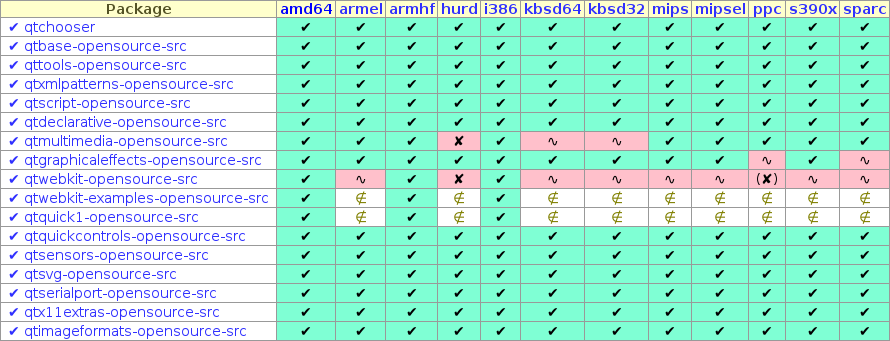
Some time ago I blogged about the 5.2.0 status in Debian experimental. We currently have it in testing with a much better status:


And we also have 5.2.1 in experimental with an even better status:

Note: qttools is FTBFS in armhf just because of some symbols changes, it will be fixed on the next upload.
Don't be afraid of getting it from experimental! Take a look at this blog post to know how to compile with Qt 5 in Debian.

BonusI have also uploaded Qt Creator built against Qt 5 to experimental. I plan to push it to unstable with Qt 5.2.1.

Next.

Previous.