Search Results: "mak"

14 May 2012

Benjamin Mako Hill: Date Arithmetic

When I set an alarm, my clock, now running on the computer in my pocket, is smart enough to tell me how much time will pass until the alarm is scheduled to sound. This has eliminated the old problem of sleeping past meetings before being surprised by an alarm precisely half a day after I had originally planned to wake. The price has been having to know exactly how little I will sleep: a usually depressing fact that had previously been obscured by my difficulty doing time arithmetic in my most somnolent moments.

Benjamin Mako Hill: Diamond Clarity

I3 I2 I1 SI2 SI1 VS2 VS1 VVS2 VVS1 IF FL
The GIA diamond clarity scale, shown above, is rather opaque.

13 May 2012

Jamie McClelland: Sparkleshare

Sparkleshare is a file sharing utility that keeps folders in sync on multiple computers in a similar fashion to the commercial and proprietary Dropbox. Sparkleshare recently released a Windows client, finally allowing me to start switching my co-workers at the Progressive Technology Project away from Dropbox. Overall, I'm very impressed. In particular, I appreciate the Sparkleshare authors' decision to build on top of existing tools (git for storage and revision control, ssh for transport, and ssh public key infrastructure for authorization and authentication). That means I don't have to learn new tools and protocols to debug and it means Sparkleshare can focus on the file sharing pieces. Despite my overall enthusiasm, I do have some serious concerns. Protecting your credentials A researcher found a startling security flaw in Dropbox - if you can copy a particular file from a user's computer to your own computer, you can impersonate them flawlessly, accessing all their Dropbox files without having to know the user's password. Unfortunately, Sparkleshare suffers from this same vulnerability if you use the default configuration. When you first install Sparkleshare, it creates a password-less ssh private/public key pair and then makes the public part easily accessible to you so you can add it to your server (or gitorious account, etc). Very convenient. But it also means that all an attacker needs to do is copy your private key (and your Sparkleshare configuration file) and they get complete control over your files. This problem is easily avoided. If you are running Linux or Mac OS X and you have your own key loaded in your ssh agent, Sparkleshare will happily use that key. So - simply by using your existing (presumably password-protected key) on your remote Sparkleshare servers, you can mitigate this problem. Sparkleshare will still load your Sparkleshare generated key, but if you don't provide that key with access to anything, no harm is done. Confirming each use of your key However... that leads to a new problem. If you are like me, your ssh agent is configured to ask for a confirmation every time your key is used. And, Sparkleshare regularly polls the remote git repository for changes. At best repeatedly clicking to confirm is tedious. At worst, it prevents you from intelligently rejecting malicious requests, thus defeating the whole purpose of the check. It is possible to launch Sparkleshare via ssh-agent in an environment in which you are not requiring the confirmation when Sparkleshare uses your key, but still requiring it for all other uses. However, given the trade offs, I've decided to add a password to my Sparkleshare provided ssh key rather than using my existing key: ssh-keygen -p -f ~/.config/sparkleshare/sparkleshare.jamie@progressivetech.org.key Now, I am prompted to enter my passphrase when I start Sparkleshare and don't have to confirm every use of the key. And, I continue to confirm each use of my main key. git was designed to store code, not documents Just because something is designed for one purpose doesn't mean it can't be used for another. However, there are a few limitations. Large files are one. git can handle files over 100MB, but may run into memory problems. I had to alter the git windowMemory setting, raising it higher than the size of the largest file. Another problem is disk space. Since git keeps full revision history on every machine, you have to download more data than just the files that are checked out. The more edits you make to a repository, the more disk space beyond what is checked out is needed (and deleting files won't help). Lastly, you can't use file modification times. With git, the file modification time will depend on when you checkout the files. With some fancy hook writing, you could tweak things so that the file modification date is the same as the commit date, but that still won't help you if you add an existing directory to Sparkleshare because all the files will have the same commit time. This "bug" has been reported to git and it has been rejected because mucking with the modification time of files can have bad results when you are using make to compile code. As Linus colorfully put it:
I'm sorry. If you don't see how it's WRONG to set a datestamp back to something that will make a simple "make" miscompile your source tree, 
I don't know what definition of "wrong" you are talking about.
It's WRONG.
It's STUPID.
And it's totally INFEASIBLE to implement.
Well, did I mention that git was designed for source code? No server validation Of all the problems I encountered, this one is by far the most serious. Perusing ~/.config/sparkleshare/debug.log is very informative. On a default installation, after you have added a project, you'll see:
19:32:27 [Fetcher][/home/jamie/SparkleShare/.tmp/bar] Fetching folder: ssh://foo@bar.org/foo/bar
19:32:27 [Fetcher] Disabled host key checking for bar.org
Wah. Once the project is added, whatever key fingerprint is given is stuffed into your ~/.ssh/known_hosts file. Host key checking is only disabled when you initially create the project, so if you connect to the proper server the first time, you are protected from subsequent man-in-the-middle attacks. However... if the initial fingerprint is wrong, your personal ssh configuration is now poisoned. This seems like a very bad idea. I've opened a debian bug to address it.

Petter Reinholdtsen: Debian Edu interview: J rgen Leibner

It has been a few busy weeks for me, but I am finally back to publish another interview with the people behind Debian Edu and Skolelinux. This time it is one of our German developers, who have helped out over the years to make sure both a lot of major but also a lot of the minor details get right before release. Who are you, and how do you spend your days? My name is J rgen Leibner, I'm 49 years old and living in Bielefeld, a town in northern Germany. I worked nearly 20 years as certified engineer in the department for plant design and layout of an international company for machinery and equipment. Since 2011 I'm a certified technical writer (tekom e.V.) and doing technical documentations for a steam turbine manufacturer. From April this year I will manage the department of technical documentation at a manufacturer of automation and assembly line engineering. My first contact with linux was around 1993. Since that time I used it at work and at home repeatedly but not exclusively as I do now at home since 2006. How did you get in contact with the Skolelinux/Debian Edu project? Once a day in the early year of 2001 when I wanted to fetch my daughter from primary school, there was a teacher sitting in the middle of 20 old computers trying to boot them and he failed. I helped him to get them booting. That was seen by the school director and she asked me if I would like to manage that the school gets all that old computers in use. I answered: "Yes". Some weeks later every of the 10 classrooms had one computer running Windows98. I began to collect old computers and equipment as gifts and installed the first computer room with a peer-to-peer network. I did my work at school without being payed in my spare time and with a lot of fun. About one year later the school was connected to Internet and a local area network was installed in the school building. That was the time to have a server and I knew it must be a Linux server to be able to fulfil all the wishes of the teachers and being able to do this in a transparent and economic way, without extra costs for things like licence and software. So I searched for a school server system running under Linux and I found a couple of people nearby who founded 'skolelinux.de'. It was the Skolelinux prerelease 32 I first tried out for being used at the school. I managed the IT of that school until the municipal authority took over the IT management and centralised the services for all schools in Bielefeld in December of 2006. What do you see as the advantages of Skolelinux/Debian Edu? When I'm looking back to the beginning, there were other advantages for me as today. In the past there were advantages like: Today some of the advantages has been lost, changed or new ones came up in this way: What do you see as the disadvantages of Skolelinux/Debian Edu? Which free software do you use daily? I use Debian stable on my home server and on my little desktop computer. On my laptop I use Debian testing/sid. The applications I use on my laptop and my desktop are Open/Libre-office, Iceweasel, KMail, DigiKam, Amarok, Dolphin, okular and all the other programs I need from the KDE environment. On console I use newsbeuter, mutt, screen, irssi and all the other famous and useful tools. My home server provides mail services with exim, dovecot, roundcube and mutt over ssh on the console, file services with samba, NFS, rsync, web services with apache, moinmoin-wiki, multimedia services with gallery2 and mediatomb and database services with MySQL for me and the whole family. I probably forgot something. Which strategy do you believe is the right one to use to get schools to use free software? I believe, we should provide concepts for IT companies to integrate Debian Edu into their product portfolio with use cases for different countries and areas all over the world.

Matthew Palmer: vmdksync helps you escape from VMware

When I wrote lvmsync late last year, I didn t realise I was being typecast. Before too long, I realised that the logic that I d implemented for lvmsync would also help me with a separate migration project I d been dreading getting the day job off VMware. Back in the early days of virtualisation, management made the decision to run VMware, for all the usual reasons ( commercially supported! , industry standard! , and so on). Unsurprisingly (to me, anyway) it didn t take too long for management to realise that it wasn t the best choice for us. When you ve got umpty-billion dollars to spend on hardware, software, and support, VMware might be the right option (although Amazon doesn t seem to think so). Anchor s company culture, on the other hand, is build around smart staff, simple systems over dumb staff, smart vendors , because no vendor is ever going to care about our customers as much as we do. So VMware was never going to work for us. Unfortunately, as happens all too often, once VMware was in place, there was very little motivation to get rid of it and move those customers onto the chosen replacement (that we were deploying all new customers on). I happen to think this is a terrible attitude in general one that makes life so much harder in the long term. I believe strongly in retrofitting old systems to keep them up-to-date with the current state of the art, and keeping technical debt under control. But, I wasn t running the show back when we stopped putting new customers on VMware, so the few VMware servers we had stayed around far longer than they should have. Recently, though, bad things started to happen. The VMware servers were starting to fall apart. The Windows machine we had to keep around to use the VMware management console started crapping out, and when the choice was between doing unspeakable things to Windows, and just ditching VMware well, it wasn t much of a choice. The only remaining question was how to do the migration off VMware with the least amount of downtime to our customers. I was really quite surprised that nobody out in Internet land appeared to have come up with a simple, robust tool to do this. Sure, some vendors had all-singing, all-dancing toolkits that cost ridiculous amounts of money, required you to install their agent on the machine involved, and promised the earth, but it all smelt of snakeoil and bullshit. In true hacker style, then, I decided to write something myself. The model I came up with mirrored lvmsync s quite closely because that one worked, and it turned out to be surprisingly easy to implement once I managed to reverse-engineer the file format (VMware has a PDF spec of a bunch of it s file formats, but whoever wrote it was enough of an evil genius to make it utterly incomprehensible to anyone who doesn t already know the file format, whilst making perfect sense to anyone who already does). The result: vmdksync. It is nothing but 80-odd lines of ruby whose sole purpose is to take a delta.vmdk file and write the changes that are stored in that file to a file or block device that is a copy of the flat.vmdk file that you can copy while the VM is still running (after you ve made a snapshot, of course). It helped me provide a painless migration path away from VMware, and I d be really pleased if it helped some other people do the same. Share and enjoy!

12 May 2012

DebConf team: Report from our visit to Managua, Nicaragua (Posted by Holger Levsen)

I ve send a mail today with a summary of some of my experiences in Managua and tiny bits of Nicaragua late April / early May 2012. If you are considering going to DebConf12 (which you obviously should do as you are reading this!) go and read this mail, as it includes a thematically sorted list of impressions and advice written by Gunnar, Norman, Leo, Felix and myself, which should give you some better idea about DebConf12 in Managua! While I spent 14 days in Nicaragua in total, for the last three days I was joined by Gunnar Wolf, to make sure my impressions about the local team, the status of the preparations and everything were correct. Our visit also seems to have been very motivating to local team members, whom I ve seen really enthusiastic to welcome a huge Debian crowd for the first DebConf in Central America in just a few weeks! At the last DebConf12 IRC meeting I summarized it like this: in very short: my two weeks were great, I had a great vacation, met many members of the localteam, which is way bigger then it seems on irc, saw and liked UCA (Universidad Centroamericana, the DebConf12 venue), had zillions of reunions (meetings, see schedule wiki page) and met many nice people and a very hot & interesting country+capital with great countryside. The deadline for sponsored accomodation ends in three days - so if you haven t registered yet, hurry up, DebCamp starts in 49 days! :-) (After that registration is still possible, but you will need to pay for your costs yourself.) We re looking forward to see you there and have a great DebConf together! Hopefully we sweat together while Wheezy is frozen :-D

Ben Armstrong: Collaborative editing, the missing Vim feature (pentadactyl + etherpad?)

Do you wish, like I do, you could edit collaboratively in Vim? This feature is number 10 on the Vim voting page, so it seems I m not alone. How about Pentadactyl coupled with any of the existing web-based collaborative editors, such as Etherpad? OK, so it s not quite Vim, and there are some rough edges to this particular pairing, but I m finding it s good enough for my needs. It even gives me a Vim-like editing experience while other participants use the default Etherpad editor. Yes, I know about whiteboard.debian.net, but for the past three years I have been using a single instance of Etherpad with my family to maintain a shopping list to which we all make contributions. First of all, that s not a Debian activity, so to make the switch, I d need to make a personal clone of the service for our personal use. But more importantly, we find Etherpad features such as colours for different participants and the timeline are just too useful to give up on. On the other hand, the less the web editor interferes with your web browser s default textarea behaviour, the easier time Pentadactyl is going to have. Indeed, I asked on #pentadactyl @ irc.oftc.net about some problems I was having and I was told flat out that Pentadactyl does not work with graphical web editors. So, you may wish to use another web-based collaborative editor for this reason. That being said, I did learn a few things about helping Pentadactyl get along better with Etherpad, so if you would like to try it yourself, read on. The key to getting started was to enter text edit mode within the textarea with <C-t>. For the most part, this behaves like Vim normal mode . I am still learning, but many basic motion and editing keys behave just as they would in Vim. Fantastic! However, the moment I tried to :undo I hit my first problem. Using the latest release version of Pentadactyl (1.0rc1 at time of writing), pressing "u" to :undo produced no visible result. I tried the latest daily build as well, and only saw a marginally more helpful "Node not found" error message displayed in the status area. But it turns out you can use passthrough mode to use the textarea s own undo. Just :tmap u <C-v><C-z> and we re back in business again. I m still experimenting with this setup, so the jury s still out on whether I ll stick with it, or whether the remaining incompatibilities between Pentadactyl and Etherpad will drive me nuts. But it looks promising. Clearly, judicious use of :autocmd to always start in text edit mode and bind that undo key whenever I enter the site will help make the experience even better. If you try it out yourself, I d love to hear how things went for you. Or if you have found an even better solution that works for you, do share.

Joachim Breitner: 10 years of using Debian

Today, it must have been exactly 10 years that I started using Debian. The story of how I came to Debian shows some of its strengths, so I ll use this occasion to share it. I spent the first half of 2002 as an high-school exchange student in Wenatchee, USA. I was already a user of Linux at that time: I made my first contact roughly in 1996 and did my first installation at home two years later, but all that time I was dual-booting and my main system was a well-arranged Windows 98. The machine was a regular tower PC, but nevertheless I put the computer into my trunk when I flew to the US. It took away most of the space, and I had to put some of my cloths inside the case. So I was there, happily using my Windows and my manually set up Linux From Scratch until one day the inevitable happened; inevitable at least until you start doing backups: On April 30th, my hard drive crashed, and took the two systems together with 4 years of personal data with it. Two weeks later I had a new hard drive and was pondering my options. I did plan to install Windows again; at that time Windows XP was just released. But I wanted a German version of Windows, which would be hard to get there. Also, I did not want to use Linux from Scratch any more, and wanted to make a well-founded choice of a distribution. On the other hand, I really wanted to get my machine up and running quickly, to be able to read my mail more comfortably. I had heard that Debian had good support for network installations (downloading a full 700MB CD was something to avoid at that time), so I grabbed some netinst images, burned a CD, and quickly installed Debian. I was planning to use the system for about two weeks. I did not pay any particular attention to the setup. Heck, I even picked from my Simpsons sidekick machine naming scheme one that I would not miss being used up ( barney ). Nevertheless, I was using this installation for many years (and many upgrades), until I eventually switched to using laptops. In fact, that very installation is still on the machine somewhere and works. I did install Windows XP a few weeks later as well, but hardly used it. So May 12th of 2002 was when I turned into a full-time Linux and Debian user. I soon became interested in Debian the project and started to contribute. But that is another story for another ten year anniversary blog post, most likely on October 21, 2013...

Flattr this post

Steve Kemp: On working from home

Recently an ex-colleague of mine changed jobs and suggested that I write something about the pros and cons of working from home. I've thought about this subject, off and on, for a few years and frustratingly I think most of the pros and the cons are the same: I live in a two-bedroom flat in Edinburgh. (Having just spent thousands on a new bathroom I don't expect I'll be moving any time soon. A rough budget of 40-50,000 would let me convert my attic into two/three rooms. So there is growth potential!) In my flat I have made one of the bedrooms an office. The office contains: One PC is for work. One PC is for me. One phone is for work. One phone is my own. Every working day I switch on the work router, the work phone, the work PC around 09:30. I then work, taking a lunch-break between either 12:00-13:00 or 13:00-14:00, until 18:00 at which point I switch off the work toys. I ignore my personal PC during the working day with the exception that it is the source of my music. I can reach across and hit the appropriate multi-media keys to select Play/Pause/Next Track/Previous Track/Volume Up/Volume Down. (When thenever the work-phone rings the first ring is ignored as I scramble to hit "Mute" or "Pause"..!) So what are some of the advantages/drawbacks? Well I'm at home. So the environment is one that I've made myself, and enjoy. The music is mine. The colour-scheme is mine. The pictures on the walls are mine. I have a Steve-loving chair. There is no soulless air-conditioning, no horrible cubicles, and no noisy people talking. The downside? No people talking. If I didn't leave my house at lunchtime I'd speak to zero people face to face in an average working day. That took a while for me to notice, but it is not nice. Since I work from home "the commute" takes seconds. I tend to get out of bed and wander straight to the desk. I'll work non-stop, then get dressed around lunchtime so that I can go out for lunch. Hail, Rain, Snow, or Sunshine I leave the house for lunch every single day (unless waiting for an atypical delivery). Because if I didn't I'd have no human contact. In the afternoon if it is a nice day I'll get undressed again, because I can, so why the hell not? Providing you're focussed working from home has several advantages that I can think of - I've no qualms about setting the washing machine going before I start work knowing that I can "spare" five minutes to empty it later in the day. Similarly I've no concern about ordering (even large) items, because I know what time the postman comes, and I know I'm never going to be out and miss a delivery. When I first started working from home I had a laptop instead of a PC and there were mornings when I worked, lazily, from my bed, or from my sofa whilst watching TV. That didn't last for long because I just didn't do a good job. I think I got away with it in the sense that I don't think people noticed, but I expect if it had lasted for longer it would have been quickly apparent. I stopped because the line was blurring between "home life" and "work life". Having a dedicated working area is essential in keeping me focussed. I don't do "home things" when I'm in "work time" - with very rare exceptions. Yes I wander around and pace if I'm thinking, yes I make more tea and coffee than I would in a real office, and yes I might open windows, phone a friend, read my gas meter, washup dishes, or similar as I'm "making coffee". But on the whole it only works if I work when I'm working. I could save money by using my work-internet instead of paying for personal-internet, but keeping the two links separate is another way of being focussed. I don't do "dodgy" things on the internet, on the whole (haha), but if I do I'd want to be damn sure that that was via my link and not the work-link - and having two PCs and two network links I know that is the case. There have been times when the work link has broken and I've used my personal link + openvpn to continue working, or at the very least re-join our internal chatroom and say "Internet down, brb". As a system administrator there are times when I have to do things either early in the morning, late at night, or even during a weekend. I guess a final advantage is that this is not a struggle - providing I don't schedule such operations at times when I'm in the pub, meeting friends, or taking pictures of cute strangers, it isn't a struggle to say "I'll do this after 8pm tonight", or set the alarm early. No long walk to an office, and if I've already got food cooking for my tea I can eat it nearby whilst still configuring things and testing sites/services/machines. So pros: I'm in my own environment, I don't worry about receiving parcels, meter-readings, and have wonderfully pleasant music all day. Ancillory bonuses are really side-effects of being in my environment: I have my good coffee, my nice cups, I can eat food I enjoy. etc, etc. Cons: You must be dedicated. You must be focussed lest you give in to temptation and cease working for minutes/hours at a time. You lose part of your home space - I can't turn this room into a childrens bedroom, for example. Nothing earth-shattering. I've done this for five years now, and although I was a little skeptical initially I thought "Why not?" It has worked out well and I think if I ever did need to leave my current position I'd have no hesitation about working from home in the future. Finally it has to be said that when I've had partners in my life they've traditionally been the type to wake up later than me. I get significant brownie points for being able to wake them up around 10/11AM with a cup of hot coffee & breakfast in bed every morning. By virtue of having a separate space I can close the door and not be disturbed by them walking around. I'm sure I've forgotten things - but as an initial pass the benefits and disadvantages of working from home are the same: You're in your own house. ObQuote: "Explorers in the further regions of experience." - HellRaiser

11 May 2012

Michal &#268;iha&#345;: Pootle vs. Weblate

As Weblate 1.0 is out, it's time to compare it to existing solutions. As first I've chosen Pootle as this is tool which we have been using for quite some time and I used it as an inspiration for Weblate. First of all, both Weblate and Pootle use same backend for manipulating with translation files - Translate Toolkit. On the way I've learned that I've chosen different way of manipulating with backend files, what seem to lead to much smaller changes (no more reformatting of whole po file as Pootle does). Also Weblate does not suffer from some Pootle issues like not properly handling changes to fuzzy flag, which has bitten us several times at phpMyAdmin. Another shared thing is web framework Django. For me it was obvious choice as I like writing application with it. The biggest difference here is that Weblate relies on Django admin interface for maintenance, while Pootle has everything in it's interface. Pootle has great advantage here for having consistent interface for everything, what was sacrificed in Weblate for less code to maintain (while having powerful Django admin interface). Also sharing same framework allows quite easy migration of user accounts. Now let's functional side of things - this is where I've tried to take all good things I've seen in Pootle, while adding features I've missed there. What makes biggest difference here are project/subproject classification in Weblate, which was originally started as way to handle more project branches, but proved to be useful for translating related projects as well. This allows automatic propagation of changes across project, what is really great for translating more branches of same program or different interfaces to same functionality (eg. GUI application and command line tool). The other big difference (and I would say key feature of Weblate) is Git integration - all changes are commited to Git with correct authorship, it can help in merging po files or automatically pull upstream changes (eg. from GitHub). This all makes integration into (Git based) development process really easy. Other features like consistency checks or dictionary (terminology) are quite similar, though different. There is more consistency checks in Pootle, but the main reason was that I found some of them too annoying. User dictionaries are still pretty basic in Weblate and that's definitely something what should improve in future versions. On configuration side, Pootle is much more flexible. The main reason here is that I've never used most of the options there. So there are no per project settings of checks or privileges. There is also no way to add language from Weblate - usually adding translation is not just matter of adding appropriate po file, but also other steps, which anyway had to be done manually. So Weblate leaves this up to user. On the other side as soon as new language pops up in Git repository, it is shown in the interface. Both projects have quite good documentation - Pootle has most things covered on wiki while Weblate relies on separate documentation. However there are definitely some bits missing on both sides. PS: If you want to want to have more "facts" in comparison, you can check Ohloh :-).

Filed under: English Weblate 0 comments Flattr this!

10 May 2012

Lars Wirzenius: Obnam 0.28 (backup program)

I've just released version 0.28 of Obnam, my backup application. The relevant part of NEWS:

Jo Shields: Sleeping with the enemy: my life with Windows Phone

In my last blog post about smartphones, I urged the universe at large to help maintain a variety of ecosystems, to help foster competition and originality amongst vendors and the same day I hit publish, WebOS was killed. Apparently the universe hates me. Since then, a few things have changed. My main phone since the day of its release was the HP Pre 3, running WebOS and whilst I still have a soft spot for the OS, the Pre 3 was simply too buggy for me to use full time. The main issue is that I use my phone as an MP3 player in the car but the Pre 3 would pause playback at the end of a track every half dozen tracks or so making it impossible to drive the 85 miles to work without needing to root around in the armrest and poke a touchscreen. Not something I really want to do whilst moving and ultimately too big a papercut to deal with. So, come the new year, I moved on to my next device, a Nokia N9 running MeeGo Harmattan. Ultimately, this was an even bigger failure for me than the Pre 3 was, and I lasted maybe two weeks with it before giving up and going back to the HP. Beyond massive usability errors in the software (especially the braindead unkillable pop-up demanding Internet access, even when none is available), the worst for me was how it handled the MP3 player task. My usual way of working is to have the phone hooked up to the stereo with a 3.5mm jack, and the car switches to headset Bluetooth profile to handle calls this is pretty common on cars too old to support A2DP profile (Stereo music-capable headphones). WebOS and Android are fine with this but not the N9. The N9, instead, will output all audio through the last connected audio device, regardless of how much that might not be helpful. Get in car, start music playing, plug in cable, start engine and it plays audio for about three seconds before the Bluetooth connects, and it switches to outputting music via the Headset bluetooth profile (not something that my car can do). Unplug and replug the cable, and music works but incoming calls are silent until I disconnect the 3.5mm jack, as it outputs the headset audio through the headphone socket. I just couldn t deal with this big a step back from WebOS as far as my workflow goes, and gave up. So, where next? Well, a funny thing happened a co-worker with generally very good instincts regarding consumer electronics usability told me that his housemate had just bought a Nokia Lumia 800 Windows phone (the WP7-based cousin to the N9) and loved it. Enough that said co-worker was considering getting one himself. This was a very strange thing to hear, especially from an iPhone owner, about a Microsoft product. I d been generally interested in WP7 on an academic level for a while, but to hear that degree of praise of the actual product was interesting. Also interesting, and roughly simultaneous, was seeing Sajid Anwar s reverse engineering of the proprietary Zune file transfer protocol go from theory into an actual set of libmtp patches. So if the capability to use Banshee to transfer music on is here or near and it can t be as braindead as Harmattan when it comes to headphone/bluetooth behaviour, then why not jump ship and squeeze a handset out of Orange? About a week after my co-worker replaced his iPhone with a Lumia 800, I bought one too. So where to begin? Well, I ll begin at the start: WP7 is a joy to use. It really just is. It s the first mobile OS to try something radically different in the UI department for years. Everyone else these days (especially Android) builds iPhone rip-offs to varying degrees, and even the iPhone interface has a lot in common with the old old OLD interfaces found on the dumb Nokia phones of the 1990s. WP7 has an interface which provides just the right level of passively visible information and interactivity, and manages to do it with an elegance that no Android home screen filled with widgets will ever manage. The uncluttered screens are easy to read, and the Metro usability paradigms are trivial to pick up and learn. Without a doubt I d recommend WP7 to friends and family from a usability perspective, and the Microsoft engineers and designers responsible for cooking up the WP7 interface are worthy of praise. And I m not the only one saying this Apple co-founder Steve Woz Wozniak recently came out with a similar line. That s the good. There s also some bad, make no mistake. I m going to cover all the reasons WP7 sucks over several paragraphs. But overall, a smartphone is a device which I expect to suck the question is how bad the suck is, and whether it gets in the way of me using the device for what I need at the time. Moreso than MeeGo, moreso than Android, and even WebOS (and I m still a big WebOS fan), WP7 has more good points than bad points. But there s still some room for improvement, and some room for caution and since I know there are a few Microsoft folks following me on Twitter, I m going to go over my prescription for continued platform success. Oh, one more thing before I start: I know WP7 isn t Free Software. As an end user, I really don t care about that. I just want something that works something I didn t get from WebOS and Harmattan, both of which are primarily Free Software stacks. I m not saying there s a causal relationship there, or that a mobile OS can t be both Free Software and good just that as an end user, my favourite platform right now is non-Free. Take from that whatever you like. It s also vitally important, as Free Software folks, never to lose sight of what the other players in the market are up to. If you can t objectively assess why people are using a proprietary option by using it & recognising its good points (i.e. what to steal & what to improve) then you can t hope to win over users. So. WP7 s downsides in detail. In-place updates. Seriously guys, even Apple can manage this now. Why can t Windows Phone? I understand that making backups is smart and all updates come with a mandatory backup but I really shouldn t be tied to a PC to update a post-PC device. Also, those backups are useless, since they cannot be restored onto replacement devices in the case of failure or theft, so fix that too. Update all the things. An iPhone sold in June 2009 still has access to the latest iOS releases. Android phones are notorious for shipping with an outdated version of the OS, then getting at most one major update over the phone s lifetime (usually the device is abandoned by its manufacturer within months of release). Which camp does Microsoft want to align with, there? Every Windows phone 7 device released should receive Windows Phone 8, even with some features disabled. Anything less is punishing every existing customer, in the hope that you ll attract new ones not a winning strategy for a fringe platform whose biggest evangelists are its users. Fix IMAP. IMAP isn t hard. Yet WP7 never seems to work properly with a subset of my mail, never showing the message body & just saying Downloading forever. Fix it. Bing sucks. Bing s search results are terrible. Either do something to make them bearable, or allow me to pick which search engine I get when I hit the search button. A Google live tile isn t the same thing. Make killing apps easier. I know you stole the WebOS card view for multitasking (hold the back button) please also steal the WebOS ability to close apps. I don t want to have to go into an app and bash back repeatedly until it quits. This is particularly annoying for Internet Explorer. Make reinstalling apps easier. If I want to install every app I previously had installed on a new device, without restoring a backup, this should be easy. There are third party apps which try to plug this gap. Find a way to support copyleft. I d like to port a few C# apps to WP7, but because they re LGPL, I can t. The code s copyright holders would have no issue with their code being on WP7, as long as end users have a mechanism to replace the libraries, so why not find a way to allow this? e.g. when compiling an app, let me mark a library as user-replaceable , then allow for some mechanism where an end user can replace those assemblies with their own version. Let me use multiple Google calendars. WP7 only lets me add/see appointments on my default Google calendar. I want to add/see things on my wife s calendar, which is shared with me. WebOS can do this. MTP-Z is the devil. I do not need or want encrypted end to end communication between my PC and my camera device, to transfer a photo off. I do not need or want encrypted end to end communication between my PC and my MP3 player to transfer a photo on. Let s be honest, the only reason for MTP-Z is to enforce DRM on Zune-rented music tracks and honestly, there s no good reason to require MTP-Z for *all* communications if all you want to do is protect one folder or file extension. Now, since MTP-Z theoretically forces me to use Zune for many tasks better handled by other apps, now I get to write multiple criticisms of Zune s desktop app and as long as MTP-Z is enforced, every Zune failing is a Windows Phone failing too. Zune: Support Windows codec infrastructure, and transcode where needed. Windows Media Player can play Ogg Vorbis files. No, not out of the box, but if one installs the required codecs. Zune should support the same files as WMP if you want to ensure people don t try to copy files to a portable device which are not supported on that device, then you should have an API in place to allow for pluggable seamless transcoding of files as required Banshee allows me to do this (e.g. to copy files I have as .flac to devices which do not support it). Zune: Search my tracks, not the web. Zune s searching is terrible it doesn t do as-you-type searches, and when I hit enter, matches from my collection are given a tiny little space compared to matches from the Zune music store. Let me easily pick the track I feel like listening to, don t make it a chore Zune: Let s solve metadata together. I absolutely love how nicely the Zune app on desktop and on phone shifts as appropriate to the currently playing artist (e.g. changing the lock screen to an image of the artist in question). However, Zune doesn t make it obvious how to set an album s metadata to support this, and it s particularly frustrating when it s a minor difference of spelling causing a track not to get the nice treatment e.g. UNKLE versus U.N.K.L.E. . Either start making heavy use of audio fingerprinting services like MusicBrainz to fill in metadata, or allow me to search for fully supported artists when filling in track metadata Zune: Random playlists are useless on devices. I like smart playlists. In Banshee, I have one to pick 12GB of random tracks, which I can sync to my phone. I can t do this with Zune. If I try to just sync all my random music to my phone, it errors out due to lack of space. If I have a random playlist, the random selection changes multiple times during a sync resetting the sync, wiping out half the tracks that were transferred on, and starting again. As a result, the sync goes on for literally hours, never ending up with more than a gig or so of tracks on the phone. Random playlists should be freezable, so I can transfer them to my device in peace, then get a new random selection when I want. So, that s my list of miserable failure and it s still a less painful list than any other mobile OS I ve used. Perhaps one day Android will approach being usable, perhaps Blackberry s BBX will actually appeal to human beings rather than corporate IT managers, and perhaps Mozilla s delightfully named Boot to Gecko will get some traction. Who knows. All I know is, My Lumia 800 is the best phone I think I ve ever owned, and it s important for anyone working in the mobile space to understand why.

DebConf team: Submit your greatest ideas as a DebConf12 talk (read: Call for Papers reminder) (Posted by Gunnar Wolf)

DebConf12 is drawing closer and closer! Have you ever been to a DebConf? You will surely agree with us: It s a life-changing event! It s one of the greatest geek gatherings in the world! It s something you can t afford on missing out! It s wait.. Oh, sorry, I had my spam mode set to highest. But still, that does not make it any less true. And one third of May has already passed. This means that the first deadlines are just around the corner: next Tuesday (15-may), sponsored registration will close, so make sure to register before it s too late. But wait wasn t this about the call for papers? Right, that s not the point of my post, I wandered off again. I m sorry, I just visited Managua last weekend (Holger will soon tell you about our visit), and it s impossible to keep the mind off the excitement. I wanted to ask you to share your greatest, latest ideas or projects. DebConf is about many things But one of its most important features is its rich set of talks, usually with very high and interesting contents in the technical, social, organizational levels Or several of them at once. As always, you will be able to submit talks until a day before you present it. However, it s best for your intended audience to know bits about your proposed topic, possibly even to share some information beforehand, so that the exposition can be as smooth as possible and the interaction during the talk even more And this is specially true for BoF sessions. However, we do have one advertised deadline: Talks submitted up to June 1st will be considered to be pre-scheduled. This means, to be part of the officially announced program, and have guaranteed coverage of our (always great) video team. DebConf Tracks But maybe you don t feel comfortable presenting a topic. Or you are, but you think it would be important to have several thematically related talks be grouped together. And if you are interested in this group of talks, you will probably know who would be more interesting to invite to present the topics - And will be able to prod them to do so. You can request to coordinate a track. That will ensure you get a contiguous block of timeslots for the talks you schedule, and do a great contribution to DebConf. To add your track, please mail talks@debconf.org. Please, specially if you do so in the few days following May 9, send me a copy to gwolf@gwolf.org, as it seems the alias is not yet set up. Tutorials and mentoring This year, we will have a high number of very motivated attendees from the many countries in the Central American region who want to get started in helping Debian, but have not yet found how to do it. Usually we would see local communities as prime material for DebianDay However, many of them are more interested in getting hands-on tutorials and be mentored into contributing to Debian. So, if you are part of a team working on a given aspect of Debian, or want to get people involved into your project, register it in the Tutorials and mentoring track. See you all soon, very soon, in tropical Managua for the hottest DebConf ever! (oh For those who remember days long past in Helsinki: There is even a sauna! ;-) And it s GREAT)

9 May 2012

Gintautas Miliauskas: Haskell online typechecker (2)

haskellonline.org, my recent experiment to make learning Haskell easier, has been doing quite well. More than a thousand people have checked the site out since my last blog post. Yay!

I have since prettied up the interface a little bit. The editor now highlights not just the line, but also the error token itself. Simple code folding is now available too: try clicking in the gutter (near the line numbers) on the first line of a multiline definition.

Kudos to Marijn Haverbeke, author of CodeMirror, the Javascript code editing component, which made it possible to write and deploy haskellonline.org in a weekend rather than a month.

8 May 2012

Iustin Pop: pbuilder and binary-arch packages

Just got bitten by this, so note to self: Yes, I'm talking about Debian bug #671981. Fun!

Vincent Sanders: NetSurf at a show

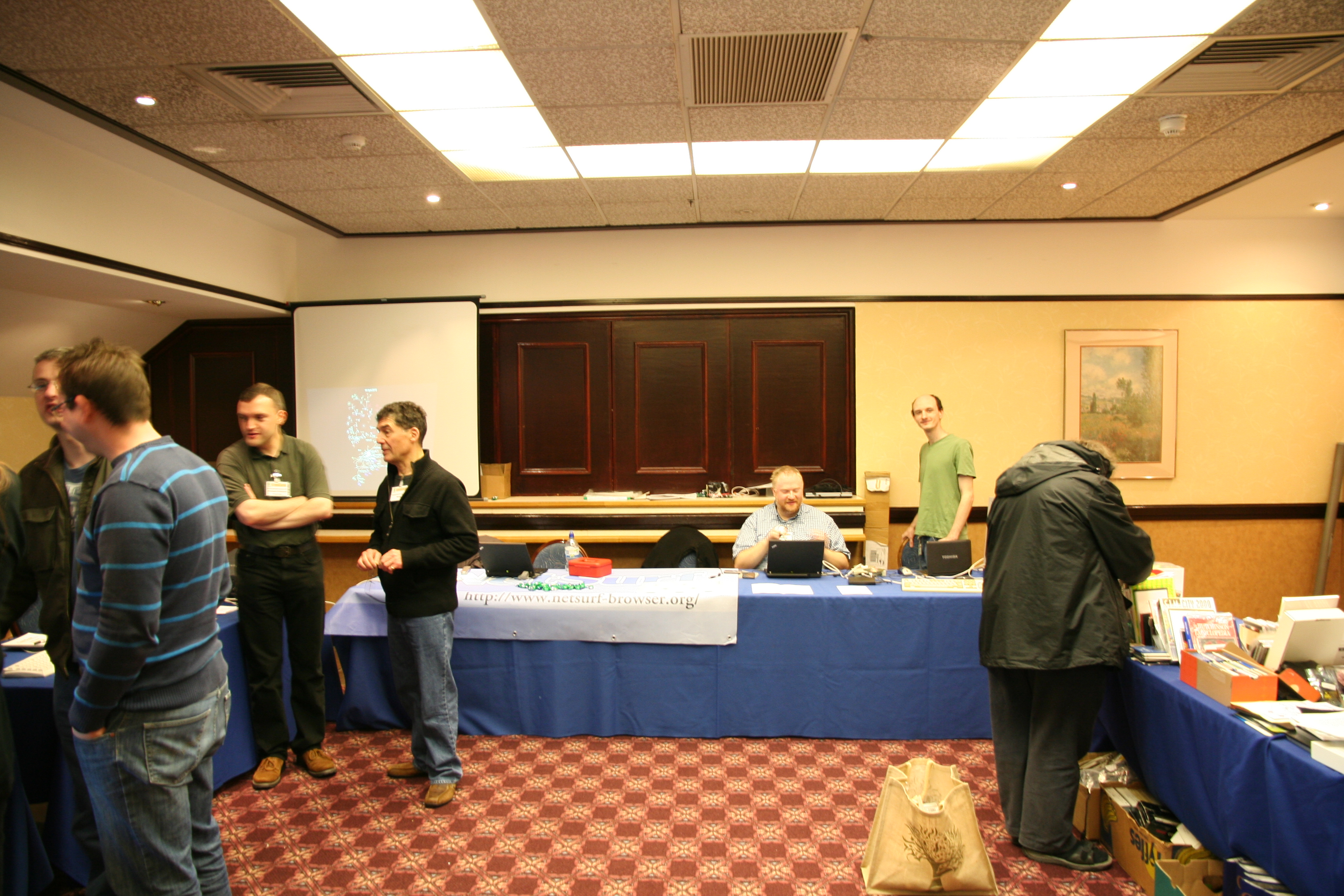
The wakefield RISC OS show is an event the NetSurf project has attended for a long time. in fact since 2005 when the "stand" was a name on an A4 sheet through 2006, 2007, 2008, 2009, 2010 to 2011 we have always been present.

The event has changed in that time from a large affair with many exhibitors to a small specialist interest event with a handful of stands. I took some pictures this year which give a fair impression of the event.

We were seriously considering not attending this year as 2011 had seen us barely break even on donations versus expenses to attend. However we decided that the projects annual Grey Ox Inn post event dinner was probably worth making the effort.

So we all met up in a hotel just off the M1 near Wakefield and set up our table. And although NetSurf as a project now has much more usage on other platforms we still represent the principle browser for the RISC OS platform!

We had a pleasant time, talked to a lot of users and made our expenses back in donations. Overall an amusing Saturday. Based on the size of the event and number and age of the attendees, I fear the RISC OS may be destined for the history books.

Vincent Sanders: Repaying a debt

Some debts are merely financial and some easily repaid but some require repayment in kind . Few debts are more important to me personally than a favour earned by a good friend.

Several years ago, before I started this blog, I replaced the kitchen in my house. Finances were tight at the time and I had to do the entire refit with only limited professional help. Because of this I imposed upon Mark Hymers and Steve Gran to come and assist me. They worked tirelessly for three days over a bank holiday for no immediate reward.

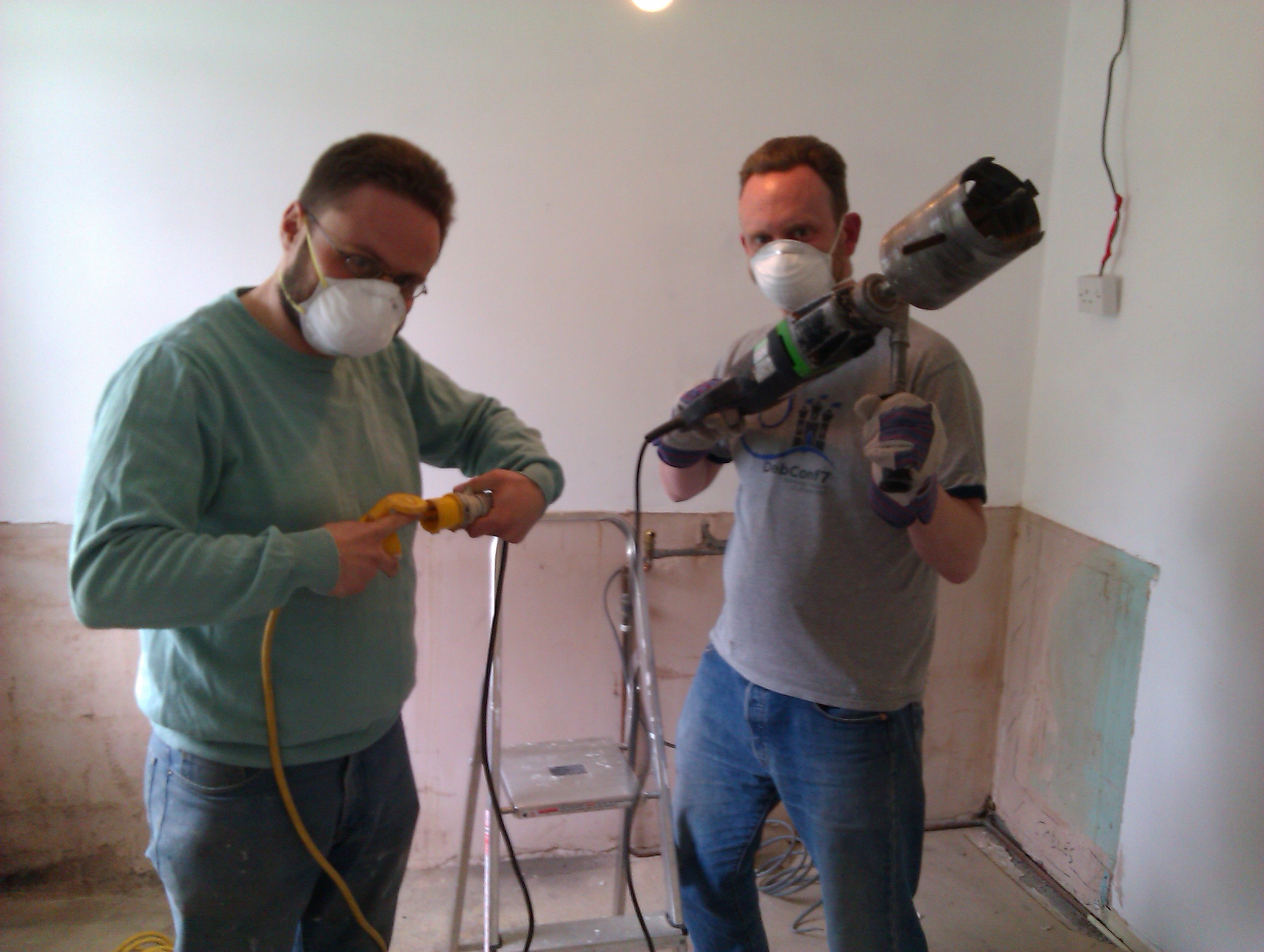
Mark and Steve with a drill
This weekend I had the opportunity to assist Mark with his own kitchen refit and reply my debt.

Although the challenges have been different on this build they were, nonetheless present, including walls which were most definitely not square and affixing cabinets 10mm too high so the doors could not close.

We also got to make a hole for a 125mm extractor which was physically demanding and not a little tiring (Steve actually wielding the drill had a fabulous aim)

I took some photos to document the process which has resulted in an image which is positively threatening, though the two of them are nice people really!

All in all a pleasant weekend with friends, the whole favour thing was really moot, I would have done it for a friend anyway.

7 May 2012

Lars Wirzenius: Quality of discussion in free software development

The Online Photographer has a meta-article on some discussion in the photography world. Summary: someone wrote an opinion piece on one site, and people on the discussion forum of another site got his name wrong, possibly repeatedly. And the quality of the discussion went down from there. The quality of the discourse of free software development is frequently of some concern. Debian has a reputation as being a host to, er, particularly vigorous discussions. That reputation is not unwarranted, but, I think, we've improved a lot since 2005. The problem is hardly restricted to Debian, however. How can we improve this? I don't know. As a community, I'm not even sure we agree what the problems are. Here's my list. Insults, personal attacks, and other such outrageously bad behavior is uncommon. It crosses the line so clearly it becomes easy to deal with; I don't think handling this needs much attention. What can we do about this? I'm not sure. I have, for the time being, abandonded Debian mailing lists as a way to influence what goes on in the project, but that's just a way for me to clear some space in my head and time in my day to actually do things. My pet hypothetical solution of the day is that mailing lists might raise the quality of the debates by limiting the number of messages written by each person per day in each thread. This might, I think, induce people to write with more thought and put more effort into making each message count.

Cyril Brulebois: Debian XSF News #12

Time for a DXN#11 follow-up.
  1. The recent xserver-xorg-input-synaptics rc4 upload solved a lot of issues, but the 1.6.0 release (just uploaded) should fix some more. Enjoy!
  2. I ve also uploaded a new xorg-server, merging from upstream server-1.12-branch to get many XI2.2 bug fixes, along with an infinite loop bug fix (also seen with synaptics).
  3. Many drivers can no longer work on ia64 due to the recent changes, so we requested they be removed, which happened promptly!
  4. All XSF-maintained packages build happily against X server 1.12, meaning users can get back to running apt-get dist-upgrade blindly without having to fear the consequences. Pro tip: when you see something like xserver-xorg go away during a dist-upgrade, think twice before confirming!
  5. xf86-input-mtrack was recently fixed; xf86-video-glamo and xf86-video-msm fail to build (#671028, #671806), so they stay uninstallable for now. Thankfully nothing appears to depend on them, so they can be temporarily removed from testing if needs be.
  6. In the meanwhile, xserver-xorg-video-intel 2.19 was released. It will probably land into experimental first, until the new server and its drivers make it into testing.
  7. Andreas Beckmann asked me to mention the status of the binary drivers, so here is my take about them: fglrx still doesn t support X server 1.12 (LOL!). The other, big fat blobby driver is installable, and supposed to work.

6 May 2012

Stefano Zacchiroli: overlapping bits from the DPL for April 2012

Just posted to d-d-a, here is the monthly report about my DPL activities.
Dear project members,
last bits of the past DPL term and first bits of the current term, all in one. Here is a report of what has happened in DPL land last April. Highlight: call for DPL helpers Before the report, though, let me point out that your friendly neighborhood DPL could use some help. As discussed during campaign, there are some intrinsic transparency and scalability limits in the DPL institution, when run by a single person. Before trying something new to fix that, I'd like to give a last try to an old "tactic": calling for help. If you're considering running for DPL or if you're simply interested in the job the DPL does and willing to help with that, please let me know. Ideally, if I find a group of people I'm happy to work with, I'd like to set up periodic IRC meetings with all "DPL helpers" to publicly discuss items in the DPL agenda and share the work-load. Ongoing discussions A big topic of last month has been the proposal by Francesca Ciceri to publish a diversity statement for the Debian Project. After a lively discussion on -project, we reached consensus on a text, and I've been happy to help with that. To finalize statement publication we now need to vote on it with a GR. I've helped drafting a corresponding GR proposal that has already been posted to -vote by Francesca. A final one, looking for seconds, will be posted there soon. Wrapping up March discussions on a revenue sharing agreement with DuckDuckGo, I've announced my intention to finalize the agreement and have done so shortly thereafter. The Iceweasel maintainer has deployed the corresponding search engine query string and other web browser maintainers could do the same, if they want to. In April I've also spent some time to move forward the long running conflict on Python maintenance, reported to the tech-ctte more than 2 years ago. With the help of people on the -python mailing list, I've now submitted to the tech-ctte an up to date list of potential maintenance teams. I hope the tech-ctte now have all the information needed to come to a decision. Speaking of which, I'm also discussing with tech-ctte members the possibility of having periodic ctte meetings; the idea is to ensure that outstanding issues are periodically reassessed, improving the reliability of tech-ctte decision times. I've also discussed at length with members of the pkg-multimedia-maintainers team the relationships with the unofficial debian-multimedia.org (d-m.o) repository, that have been a cause of tension for Debian multimedia users and maintainers for quite some time. On behalf of the team and of the Project I've now reached out to the d-m.o maintainer, hoping to come to some sort of amicable agreement on which packages belong where. Hardware replacement As anticipated in last report, I've started approving hardware purchases to implement the yearly hardware replacement plan prepared by DSA. During April I've approved requests to buy servers to replace the machines running the bugs-master, bugs-mirror, and UDD services. The total expected expenditure is about 15'000 USD. Communication I've delivered my classic Debian "18^W 19 years" talk at UNIVPM, a polytechnic university in center Italy; slides are available. I've then been contacted by people from the European Synchrotoron in Grenoble who, beside having recently migrated their infrastructure to Debian, are looking into organizing a workshop on Debian usage for large science facilities. I've been happy to help out providing a list of potential topics and speakers for the event. Also as anticipated last month, the Debian Project has been present at the OpenStack summit. Loic Dachary has represented Debian at the event and provided a nice report about his experience there. Speaking of which, I've also coordinated a news release about the availability of cloud technologies in Wheezy, taking the chance to point out the relationships between what Debian stands for and the ability to deploy your own private cloud. Sprints April has been a rather calm month on the sprint front, with the notable exception of the I18n team who is organizing a sprint for June in Paris. Miscellanea Thanks for reading thus far,
HDH! (Happy Debian Hacking)
PS the boring day-to-day activity log for April is available at master:/srv/leader/news/bits-from-the-DPL.txt.201204

Next.

Previous.