Search Results: "mak"

13 June 2012

MJ Ray: Bibliohack London

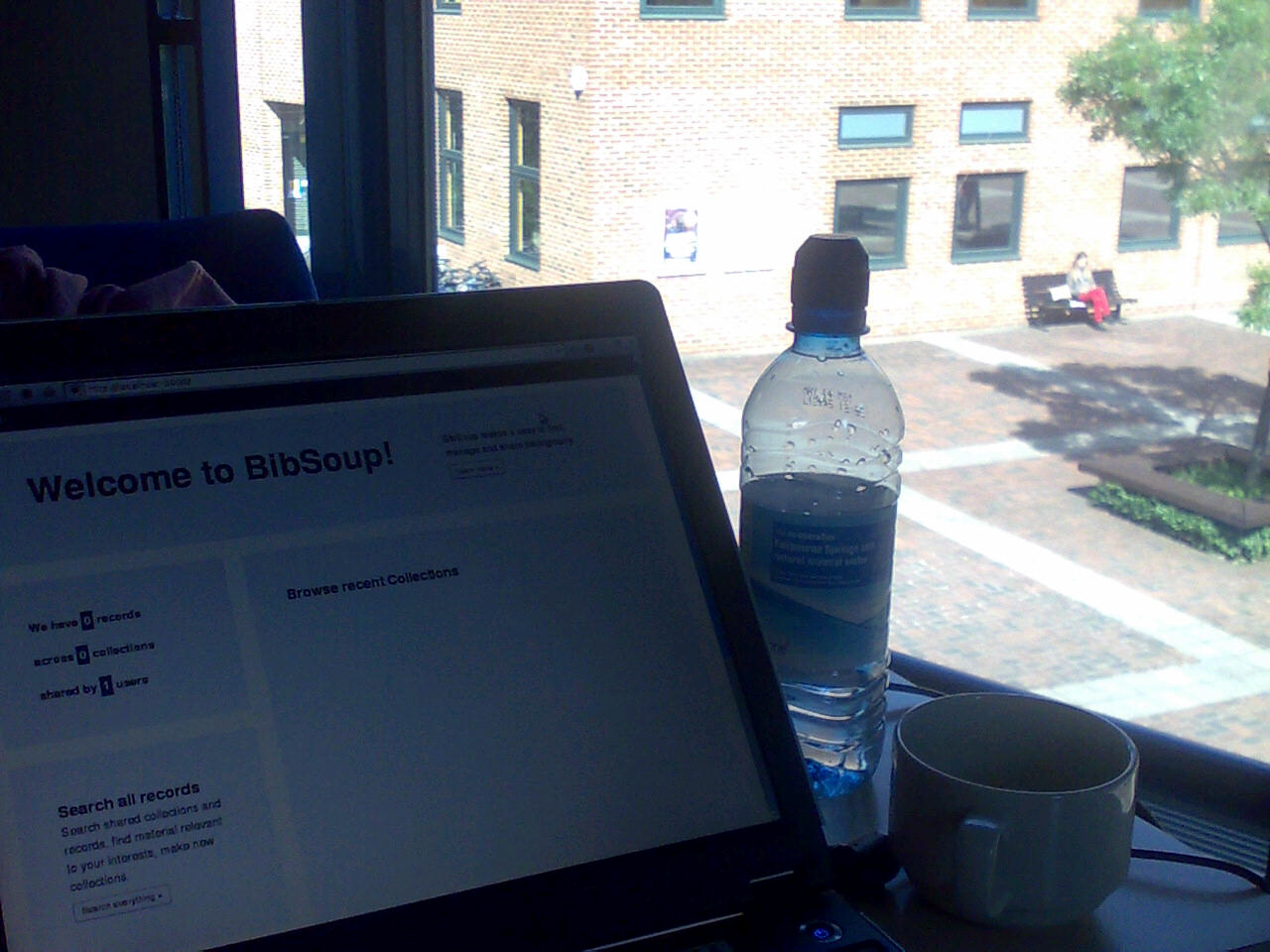
Well this isn t Edinburgh. This is London calling. More from kohacon later. 20120613_164236.jpg Today I was at OKFN s bibliohack . There were several interesting projects there and it was a good opportunity to get back into coding, metadata and APIs after thinking about conference practicalities for too long. BibSoup and its biblioserver software was my chosen hack. I didn t really make the most of it because I had to workaround broken wifi drivers that I hadn t noticed before, and I had to fix a broken java install that I did know about. BibSoup is mostly python and I think web.py, but it uses elasticsearch which is java. Oh and it s python 2.7 with virtualenv which is, erm, entertaining to get working on debian 6.0, as far as I can tell: I installed python2.7 from testing, backport python-virtualenv and I don t think anything broke. The approach to a hackfest was very different to kohacon s. Whereas people at kohacon hackfest were gathered around tables, moving to the talks table(s) when there was a talk they wanted, bibliohack started off classroom-style and didn t gather into workgroups until after coffee. The so-called non-coders were shunted off elsewhere after the welcome to do I-don t-know-what (maybe Library Co-op will write about it) and weren t seen again until the day s end. There were some nudging comments about being able to hack late into the night, which I m not sure is healthy if you ve done a full day. I left feeling a bit unsettled and disconnected from reality, although I got what I wanted from it playing with some new tech that we can maybe do good things with: thanks OKFN!


12 June 2012

Bernd Zeimetz: bug squashing party in Salzburg

bsp_2012_salzburg Just as a little reminder, the Bug Squashing Party in Salzburg will start in three days. We still have sponsored accomodation for five four people left, so don't hesitate to come! Squashing as many RC bugs for Wheezy as possible is on the TODO list for the weekend! Also we'll work on making Debian a proper Spacewalk client. This might be a bit too late for Wheezy, but there will be backports :) See YOU in Salzburg!

11 June 2012

Petter Reinholdtsen: Debian Edu - some ideas for the future versions

During my work on Debian Edu based on Squeeze, I came across some issues that should be addressed in the Wheezy release. I finally found time to wrap up my notes and provide quick summary of what I found, with a bit explanation. I guess we will discover more as we continue to work on the Wheezy version.

Maximilian Attems: 1.5M CPU hours in 2012

1.5M CPU hours runs on the Vienna Scientific Cluster by my 3D+3V hard expanding loops code. It is simulating the Chromo-Weibel instability of a non-Abelian plasma in an 1d expanding background to account for the expansion of a Quark-Gluon plasma fireball in a heavy ion collision. The code is parallellised using Open MPI and one single run roughly needs 0.5TB memory to hold all the needed 5-dimensional matrices and ~ 72h to complete. The resulting heavy operation is of course matrix multiplication of those physical and auxilliary fields. I tried to use git-annex on the resulting physical fields data output of ~ 150Gb and 300k files. Currently I do prefer git itself for it's speed and it only doubles the amounted space. I'm thrilled to see that git annex is still considering this "semi-extreme" usecase of lots of data files as it would help collaborators to have partial checkouts for laptop usage and quick checks. As the git-annex kickstarter is a rocket, i'd add my wish to see the current symlink mess go: desymlink git-annex. Now it is the time to properly analyse all this data and get the full 3d paper follow up on Instabilities of an anisotropically expanding non-Abelian plasma: 1D+3V discretized hard-loop simulations (previous paper) out maybe soon. (;

10 June 2012

Gregor Herrmann: RC bugs 2012/23

here's the list of RC bugs I've worked on during the last week:

C.J. Adams-Collier: Spinning up a telco with Asterisk

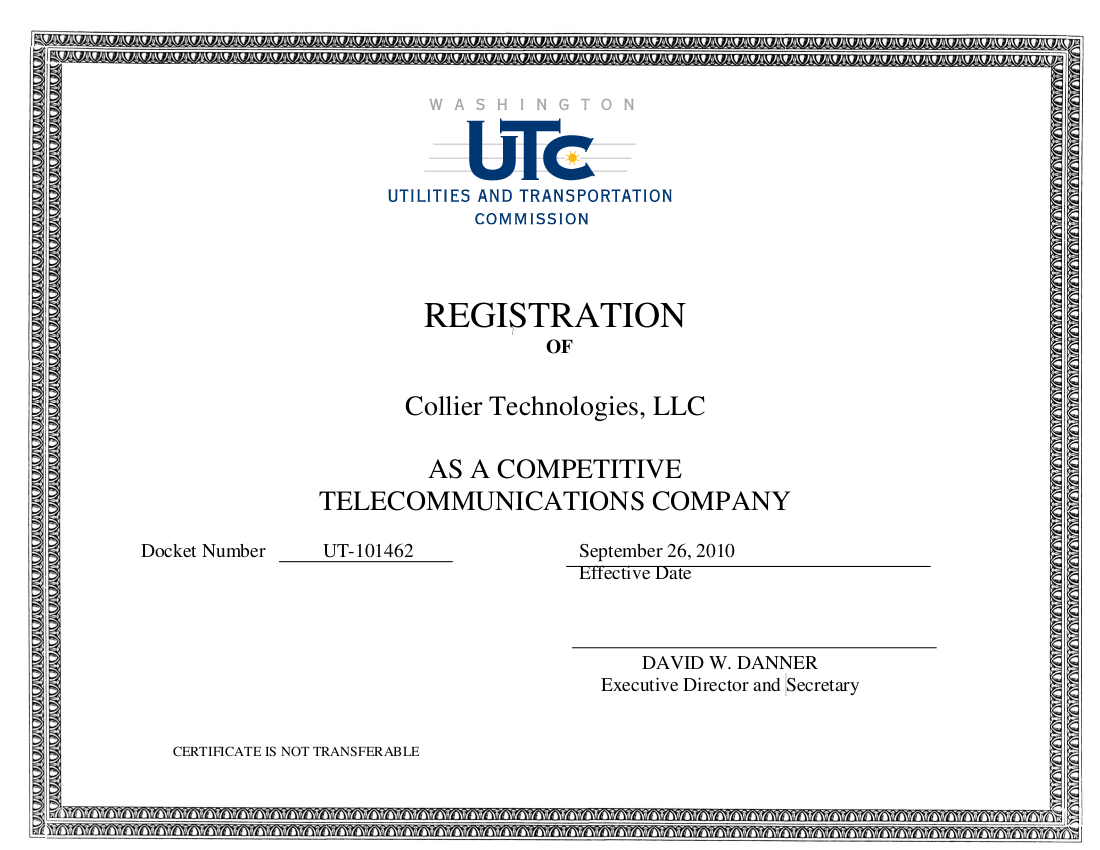
Back in 2010 our family moved to an island in an archipelago in the very top left of the US s continental 48. Before moving, we did some research regarding high speed network access. There are a number of ISPs in the county, and even one headquartered on our particular island. But we found that the location where we were moving was in a location that was only serviced by 1.5Mbit DSL. We had been spoiled in our previous two locations and had seen bittorrent swarms reach over 1 megabyte (8Mbit) per second. Our bill said 12 down and 2 up and I wouldn t be surprised if we achieved that. At any rate, we were disappointed by the speeds available and I wanted to do something to increase the availability of higher speed network access. Some of my friends from the North American Network Operators Group (NANOG) told me that one way to improve the infrastructure would be to get involved with telecommunications provisioning as a Competitive Local Exchange Carrier (CLEC). With the above in mind, I did some research and found that in my state, the authority which certifies and regulates telecommunication companies is the Washington Utilities and Transportation Commission (UTC). I found the application forms on their web site, filled them in, filed the appropriate documents with the appropriate departments and received a certificate in the mail shortly thereafter. We have since filed annual reports as required by regulations. And with the regulatory bits out of the way, we re now left with only the technical details. We have established collocation of some equipment near our state s central telecommunications facility at the Westin Building. Technically speaking, the equipment is not in the Westin, but at a facility connected to the Westin by multiple 10Gbit links. Close enough for me. On this equipment, we re running a Debian Squeeze Xen virtual machine and Digium s Asterisk packages:
cjac@sip0:/etc/asterisk$ grep -B1 -A3 Digium /etc/apt/sources.list
#
#  Digium asterisk packages
#
deb http://packages.asterisk.org/deb squeeze main
deb-src http://packages.asterisk.org/deb squeeze main
cjac@sip0:/etc/asterisk$ dpkg -l   grep digium
ii  asterisk                           1:1.8.11.1-1digium1~squeeze  Open Source Private Branch Exchange (PBX)
ii  asterisk-config                    1:1.8.11.1-1digium1~squeeze  Configuration files for Asterisk
ii  asterisk-core-sounds-en-gsm        1.4.21-1digium1~squeeze      asterisk PBX sound files - English/gsm
ii  asterisk-voicemail                 1:1.8.11.1-1digium1~squeeze  simple voicemail support for the Asterisk PBX
We saved up our nickles and dimes to purchase a 24-port analog telephony adapter (ATA). At the recommendation of one of the denizens of the #asterisk IRC channel on Freenode, we decided on the GrandStream GXW4024. It is pretty simple to configure them to register with the Asterisk server using SIP. The only problem we had was getting the RTP streams, and specifically their dynamically negotiated service ports, to traverse the NATting routers. We currently have no public IPv4 address space at the facility which hosts the ATA and so the rest of the internet sees all traffic originating from this facility as sourced from a single IP address. In order for this to work, the edge NAT/router device (in our case, BIG-IP LTM) needs to map its external L4 ports (TCP and UDP) to the ports of internal hosts so that traffic can flow correctly. This works fine for traffic which originates from internal hosts and is destined to hosts on the outside, but does not work so well when hosts on the outside wish to establish connections to hosts on the inside. Call management sessions established with the SIP protocol fall in the former category, but call media (voice, video, txt) sessions established with the RTP protocol fall into the latter; the host and port used to carry the media data are negotiated during the SIP session and the media socket is established out of band. The problem occurs when the call server (on the outside) attempts to establish an RTP stream with the caller (on the inside). The call server attempts to connect to the caller using the IP address from which it connected. The problem is that this address belongs to the NATting router, not the caller, and the router is not expecting the incoming request. To get around the NAT problem, we temporarily configured an OpenVPN tunnel to extend our L2 network segment. Our long-term solution will be to provision an Asterisk server in the same facility as the ATA and then register with it instead of the server in the exterior facility. Calls will then be switched at the local facility and the upstream link will be established using the IAX2 protocol, which does not suffer from the same NAT problems. All of the above provides us with the ability to make voice calls between the 24 channels of the ATA and any other SIP client which happens to be registered with our call server. This is all well and good, but we want to allow our customers to call the rest of the world. Enter our upstream provider, Threshold Communications, Inc. These folks are experienced and professional and have helped us successfully establish both outbound and inbound calling for very reasonable monthly costs. The call quality is indistinguishable from the lines provisioned by the local bell company, and inter-operates flawlessly with the Asterisk call server stack. Because calls transit our Asterisk server, we can add additional features such voicemail, speech to text, DTMF-driven menus, or call forwarding, for instance. We could even theoretically set up autopatch service using amateur frequencies or launch perl scripts to automate arbitrary fancyness. Our next step is to finish configuration of our 12-channel ZyXEL AAM1212 DSLAM modules so that we can deliver ADSL service over the same copper pairs as we deliver voice.

Philipp Kern: s390x accepted as release architecture

Yay, so we made it: s390x got added as a release architecture. What this means:
This will also help other 64bit big-endian ports (like powerpc64 and sparc64) to enter the archive more easily, as most issues left are indeed related to endianness, not to specialities of the System z hardware.
Many thanks go to Aur lien Jarno, without whom this would not have been possible. I also want to take this opportunity to thank all our s390(x) machine sponsors: ZIVIT, IIC@KIT and Marist College. There are not many mainframe owners who let free software projects work on their machines.

9 June 2012

Erich Schubert: DMOZ dieing

Sometime in the late 1990s I became a DMOZ editor for my local area. At that time, when the internet was a nieche thing and I was still a kid, I was actually operating a web site that had a similar goal as the corresponding category for a non-profit organization.
In the following years, I would occasionally log in, try to review some pages. It was a really scary experience: it was still exactly the same, web 0.5 experience. You had a spreadsheet type of view, tons of buttons, and it would take like 10 page loads to just review a single site. A lot of the time, you would end up search a more appropriate category, copy the URL, replace some URL-encoded special characters, paste it in one out of 30 fields on the form just to move the suggested site to a more appropriate category. Most of the edits would be by bots that detected a dead link and disabled it by moving it to the review stage. While at the same time, every SEO manual said you need to be listed on DMOZ, so people would mass-submit all kinds of stuff to DMOZ in any category that it could in any way fit in.
Then AOL announced DMOZ 2.0. And everybody probably thought: about time to refresh the UI and make everything more usable. But it didn't. First of all, it came late (announced in 2008, actually delivered sometime in 2010), then it was incredibly buggy in the beginning. They re-launched 2.0 at least two times. For quite some time, editors would be unable to login.
When DMOZ 2.0 came, my account was already "inactive", but I was able to get it re-activated. And it still looked the same. I read they changed from Times to Arial, and probably changed some CSS. But other than that, it was still as complicated to edit links as you could make it. So I did just a few changes then lost interest largely again.
During the last year I must have tried to give it another try multiple times. But my account had expired again, and I never got a reply to my reinstatement request.
A year ago finall Google Directory - the most prominent use of DMOZ/ODP data, although the users were totally unaware of it - was discontinued, too.
So by now, DMOZ seems to be as dead as it can get (they don't even bother to answer former contributors that want to get reinstated). The links are old, and if it weren't for bots to disable dead sites, it would probably look like an internet graveyard. But this poses an interesting question: will someone come up with a working "web 2.0 social" idea of the "directory" concept (I'm not talking about Digg and these classic "social bookmarking" dead ducks)? Something that strikes the right balance of on one hand the web page admins (and the SEO gold diggers) being allowed to promote their sites (and keep the data accurate) and at the same time crowd-sourcing the quality control, while also opening the data? To some extend, Facebook and Google+ can do this, but they're largely walled gardens. But they don't have real social quality assurance; money is key there.

8 June 2012

Lars Wirzenius: Obnam 1.0 (backup software); a story in many words

tl;dr: Version 1.0 of Obnam, my snapshotting, de-duplicating, encrypting backup program is released. See the end of this announcement for the details. Where we see the hero in his formative years; parental influence From the very beginning, my computing life has involved backups. In 1984, when I was 14, my father was an independent telecommunications consultant, which meant he needed a personal computer for writing reports. He bought a Luxor ABC-802, a Swedish computer with a Z80 microprocessor and two floppy drives. My father also taught me how to use it. When I needed to save files, he gave me not one, but two floppies, and explained that I should store my files one one, and then copy them to the other one every now and then. Later on, over the years, I've made backups from a hard disk (30 megabytes!) to a stack of floppies, to a tape drive installed into a floppy interface (400 megabytes!), to a DAT drive, and various other media. It was always a bit tedious. The start of the quest; lengthy justification for NIH In 2004, I decided to do a full backup, by burning a copy of all my files onto CD-R disks. It took me most of the day. Afterwards, I sat admiring the large stack of disks, and realized that I would not ever do that again. I'm too lazy for that. That I had done it once was an aberration in the space-time continuum. Switching to DVD-Rs instead CD-Rs would reduce to the number of disks to burn, but not enough: it would still take a stack of them. I needed something much better. I had a little experience with tape drives, and that was enough to convince me that I didn't want them. Tape drives are expensive hardware, and the tapes also cost money. If the drive goes bad, you have to get a compatible one, or all your backups are toast. The price per gigabyte was coming down fast for hard drives, and it was clear that they were about to be very competitive with tapes for price. I looked for backup programs that I could use for disk based backups. rsync, of course, was the obvious choice, but there were others. I ended up doing what many geeks do: I wrote my own wrapper around rsync. There's hundred, possibly thousands, of such wrappers around the Internet. I also got the idea that doing a startup to provide online backup space would be a really cool thing. However, I didn't really do anything about that until 2007. More on that later. The rsync wrapper script I wrote used hardlinked directory trees to provide a backup history, though not in the smart way that backuppc does it. The hardlinks were wonderful, because they were cheap, and provided de-duplication. They were also quite cumbersome, when I needed to move my backups to a new disk the first time. It turned out that a lot of tools deal very badly with directory trees with large numbers of hardlinks. I also decided I wanted encrypted backups. This led me to find duplicity, which is a nice program that does encrypted backups, but I had issues with some of its limitations. To fix those limitations, I would have had to re-design and possibly re-implement the entire program. The biggest limitation was that it treated backups as full backup, plus a sequence of incremental backups, which were deltas against the previous backup. Delta based incrementals make sense for tape drives. You run a full backup once, then incremental deltas for every day. When enough time has passed since the full backup, you do a new full backup, and then future incrementals are based on that. Repeat forever. I decided that this makes no sense for disk based backups. If I already have backed up a file, there's no point in making me backup it again, since it's already there on the same hard disk. It makes even less sense for online backups, since doing a new full backup would require me to transmit all the data all over again, even though it's already on the server. The first battle I could not find a program that did what I wanted to do, and like every good NIHolic, I started writing my own. After various aborted attempts, I started for real in 2006. Here is the first commit message:
revno: 1
committer: Lars Wirzenius <liw@iki.fi>
branch nick: wibbr
timestamp: Wed 2006-09-06 18:35:52 +0300
message:
  Initial commit.
wibbr was the placeholder name for Obnam until we came up with something better. We was myself and Richard Braakman, who was going to be doing the backup startup with me. We eventually founded the company near the end of 2006, and started doing business in 2007. However, we did not do very much business, and ran out of money in September 2007. We ended the backup startup experiment. That's when I took a job with Canonical, and Obnam became a hobby project of mine: I still wanted a good backup tool. In September 2007, Obnam was working, but it was not very good. For example, it was quite slow and wasteful of backup space. That version of Obnam used deltas, based on the rsync algorithm, to backup only changes. It did not require the user to do full and incremental backups manually, but essentially created an endless sequence of incrementals. It was possible to remove any generation, and Obnam would manage the deltas as necessary, keeping the ones needed for the remaining generations, and removing the rest. Obnam made it look as if each generation was independent of each other. The wasteful part was the way in which metadata about files was stored: each generation stored the full list of filenames and their permissions and other inode fields. This turned out to be bigger than my daily delta. The lost years; getting lost in the forest For the next two years, I did a little work on Obnam, but I did not make progress very fast. I changed the way metadata was stored, for example, but I picked another bad way of doing it: the new way was essentially building a tree of directory and file nodes, and any unchanged subtrees were shared between generations. This reduced the space overhead per generation, but made it quite slow to look up the metadata for any one file. The final battle; finding cows in the forest In 2009 I decided to leave Canonical and after that, my Obnam hobby picked up in speed again. Below is a table of the number of commits per year, from the very first commit (bzr log -n0 awk '/timestamp:/ print $3 ' sed 's/-.*//' uniq -c awk ' print $2, $1 ' tac):
2006 466
2007 353
2008 402
2009 467
2010 616
2011 790
2012 282
During most of 2010 and 2011 I was unemployed, and happily hacking Obnam, while moving to another country twice. I don't recommend that as a way to hack on hobby projects, but it worked for me. After Canonical, I decided to tackle the way Obnam stores data from a new angle. Richard told me about the copy-on-write (or COW) B-trees that btrfs uses, originally designed by Ohad Rodeh (see his paper for details), and I started reading about that. It turned out that they're pretty ideal for backups: each B-tree stores data about one generation. To start a new generation, you clone the previous generation's B-tree, and make any modifications you need. I implemented the B-tree library myself, in Python. I wanted something that was flexible about how and where I stored data, which the btrfs implementation did not seem to give me. (Also, I worship at the altar of NIH.) With the B-trees, doing file deltas from the previous generation no longer made any sense. I realized that it was, in any case, a better idea to store file data in chunks, and re-use chunks in different generations as needed. This makes it much easier to manage changes to files: with deltas, you need to keep a long chain of deltas and apply many deltas to reconstruct a particular version. With lists of chunks, you just get the chunks you need. The spin-off franchise; lost in a maze of dependencies, all alike In the process of developing Obnam, I have split off a number of helper programs and libraries: I have found it convenient to keep these split off, since I've been able to use them in other projects as well. However, it turns out that those installing Obnam don't like this: it would probably make sense to have a fat release with Obnam and all dependencies, but I haven't bothered to do that yet. The blurb; readers advised about blatant marketing The strong points of Obnam are, I think: Backups may be stored on local hard disks (e.g., USB drives), any locally mounted network file shares (NFS, SMB, almost anything with remotely Posix-like semantics), or on any SFTP server you have access to. What's not so strong is backing up online over SFTP, particularly with long round trip times to the server, or many small files to back up. That performance is Obnam's weakest part. I hope to fix that in the future, but I don't want to delay 1.0 for it. The big news; readers sighing in relief I am now ready to release version 1.0 of Obnam. Finally. It's been a long project, much longer than I expected, and much longer than was really sensible. However, it's ready now. It's not bug free, and it's not as fast as I would like, but it's time to declare it ready for general use. If nothing else, this will get more people to use it, and they'll find the remaining problems faster than I can do on my own. I have packaged Obnam for Debian, and it is in unstable, and will hopefully get into wheezy before the Debian freeze. I provide packages built for squeeze on my own repository, see the download page. The changes in the 1.0 release compared to the previous one: The future; not including winning lottery numbers I expect to get a flurry of bug reports in the near future as new people try Obnam. It will take a bit of effort dealing with that. Help is, of course, welcome! After that, I expect to be mainly working on Obnam performance for the foreseeable future. There may also be a FUSE filesystem interface for restoring from backups, and a continous backup version of Obnam. Plus other features, too. I make no promises about how fast new features and optimizations will happen: Obnam is a hobby project for me, and I work on it only in my free time. Also, I have a bunch of things that are on hold until I get Obnam into shape, and I may decide to do one of those things before the next big Obnam push. Where; the trail of an errant hacker I've developed Obnam in a number of physical locations, and I thought it might be interesting to list them: Espoo, Helsinki, Vantaa, Kotka, Raahe, Oulu, Tampere, Cambridge, Boston, Plymouth, London, Los Angeles, Auckland, Wellington, Christchurch, Portland, New York, Edinburgh, Manchester, San Giorgio di Piano. I've also hacked on Obnam in trains, on planes, and once on a ship, but only for a few minutes on the ship before I got seasick. Thank you; sincerely SEE ALSO

Matthew Garrett: The security of Secure Boot

The other complaint about UEFI Secure Boot is that it doesn't add any security. There's two aspects to this - people either think it'll be quickly broken, or people think that the public availability of signing services will render it useless.
Will Secure Boot be broken?Almost certainly, yes. I'd put a significant amount of money on it. The most obvious avenue of attack is probably a malformed FAT on a USB stick, or alternatively a programmable USB device that can trigger undesired behaviour in the USB stack. If you're really lucky then you might be able to corrupt the filesystem on the EFI system partition in such a way that this happens on every boot, even if there's no USB hardware connected. It's possible that there'll be a bug in the binary validation process and a cleverly designed binary may be able to validate even though it contains unsigned code. Various vendors will probably manage to produce signed option ROMs that rely on unsigned data in such a way that they can be forced to misbehave. But most of these attacks will either involve physical access or depend on the target machine having a specific piece of hardware installed, and I'd also put money on each of them being quickly fixed once they're found. And, eventually, people will run out of new attacks.

People desperately want to believe that the Secure Boot implementation is fundamentally broken, and that's just not true. It's based on well-tested encryption technology. You calculate a SHA256 of the binary you want to sign. You encrypt that hash with the private half of a 2048-bit RSA key. You embed the encrypted hash in the binary. When someone tries to run the binary you decrypt the hash with the public key in your firmware. You then calculate the hash of the binary and compare the two. If they match then you know that (a) whoever signed the binary had access to the private half of a key you trust, and (b) the binary hasn't been modified since then.

The difference between Secure Boot and things like CSS or WEP is that Secure Boot uses existing cryptographic techniques and has been designed by people who actually understand how they work. Precisely the same technology is used in Microsoft's driver signing, and people decided it was easier to steal a key from Realtek than it was to break the underlying technology. Unless there's a crippling bug in the implementation that nobody's noticed yet, the only real way to attack this is to either force a SHA256 collision (achievable with current technology, as long as you're willing to spend many orders of magnitude more time than the universe has existed) or break RSA (which would also mean that SSL is broken). If anyone can do either of these things then we are so unbelievably fucked that Secure Boot should not be the thing you're most worried about.

So, in summary: Yes, Secure Boot will be broken. And then it will be fixed. And after this happens a few times, there will be no further breaks.
Everyone can sign, so what's the pointAnyone can pay $99 and get their binaries signed. So why won't malware authors just do that? For starters, you'll need to provide some form of plausible ID for Verisign to authenticate you and hand over access. So, sure, you provide some sort of fake ID. That's the kind of thing that tends to irritate local authorities - not only are you talking about breaking into a bunch of computers, you're talking about committing the sort of crime that results in genuinely bad things happening to you if you get caught. And secondly, the only way you get access to the system is using some physical smartcards that Verisign send you. So you've also had to hand over an actual physical address, and even if you've used some sort of redirection service that's still going to make it easier to track you down. You're taking some fairly significant real-world risks.

But ok, you're willing to do that and you obtain a signing key and you sign some malware. You'll infect some number of machines. But eventually you'll be noticed, and then Microsoft produce a key revocation blob and vendors push it out via their OS update mechanisms. If your malware was basically harmless then that's probably the end of it, but if you were using it as the basis for an attack on people's banking details then a lot of people are suddenly going to be very interested in the person who bought that key, and also your malware isn't going to be able to infect any more machines.

To put this in perspective - Windows is the dominant desktop operating system. If you want to run a botnet or steal people's bank details then Windows is the obvious thing to attack. Windows security has now improved to the point where it's not massively straightforward to do that from userspace, so the logical thing to do would be to run your malware in the kernel. The easiest way to do that would be to load a driver, but Windows won't load unsigned drivers. So you'd need a signed driver. How do you get one? With the same $99 access to the Microsoft signing service that you'd use for signing an EFI binary.

Anyone could already use the signing service to attack Windows. But people haven't. The Stuxnet authors thought it was easier to steal a key from a real hardware vendor than it was to buy their own key. So, yes, in theory an attacker could obtain signing services. But the real world evidence suggests that that's not how they behave.
SummarySecure Boot is unlikely to be broken via fundamental flaws in its implementation, and there's no evidence that public availability of the signing service will result in an explosion of boot level malware.

comment count unavailable comments

7 June 2012

Philipp Kern: Adding zFCP drives on Debian GNU/Linux

If you want to add System z zFCP drives to a Debian GNU/Linux system, you first need to make the HBA known to the system. For this you add an (initially empty) file with the (lowercase) device ID of the zFCP HBA to /etc/sysconfig/hardware. There should already be files for the ECKD/FBA disks and the network adapters.

Then you need to list the drives to initialize by placing the following array in it with a list of WWPN:LUN, seperated by spaces within the parentheses:

ZFCP_DEVICES=(0x1234567890abcdef:0x4000400000000000)

Please keep in mind that the WWPN and LUN need to be specified in hex and again entirely in lower case. This will cause hwup ccw 0.0.4000 (with 4000 being the CHPID) to instruct the HBA to add the drive after setting it online. Then you should regenerate your initrd, so that it happens on-boot, by running update-initramfs -u -k all.

With current kernels the available WWPNs should be probed and listed in /sys/bus/ccw/devices/0.0.4000 without further intervention after the HBA is initialized.

Sadly there's no way to set up a zFCP disk in debian-installer.

6 June 2012

Petter Reinholdtsen: Web service to look up HP and Dell computer hardware support status

A few days ago I reported how to get the support status out of Dell using an unofficial and undocumented SOAP API, which I since have found out was discovered by Daniel De Marco in february. Combined with my web scraping code for HP, Dell and IBM from 2009, I got inspired and wrote a web service based on Scraperwiki to make it easy to look up the support status and get a machine readable result back. This is what it look like at the moment when asking for the JSON output:
% GET https://views.scraperwiki.com/run/computer-hardware-support-status/?format=json&vendor=Dell&servicetag=2v1xwn1
supportstatus( "servicetag": "2v1xwn1", "warrantyend": "2013-11-24", "shipped": "2010-11-24", "scrapestamputc": "2012-06-06T20:26:56.965847", "scrapedurl": "http://143.166.84.118/services/assetservice.asmx?WSDL", "vendor": "Dell", "productid": "" )
%
It currently support Dell and HP, and I am hoping for help to add support for other vendors. The python source is available on Scraperwiki and I welcome help with adding more features.

Craig Small: pam bugs hurt

I did some upgrades of what seemed like a million packages today on my debian sid computer. I was doing this remotely and when I tried to ssh back in I got kicked out after entering my password, hmmm. OK, so I waited until I could get in front of it and tried to login to the console and was greeted with the message Cannot make/remove an entry and kicked out, even as root; double hmmm. So it was boot into single user time which, thankfully worked. bash loaded ok so it wasn t a shell problem. However su failed which means we are into pam problem territory. I found a bug report that sounded like my problem, but with no clear solution except upgrade in Ubuntu. The solution was pretty simple for me. It s something funky with /etc/pam.d/common-sesssion and a simple /usr/sbin/pam-auth-update fixed it for me.

5 June 2012

Axel Beckert: Finding similar but not identical files

There are quite some tools to find duplicate files in Debian and depending on the task I use either hardlink (see this blog posting), fdupes (if I need output with all identical files on one line; see example below), or duff (if it has to be performant). But for code deduplication in historically grown code you sometimes need a tool which does not only find identical files, but also those which just differ in a few blanks or blank lines. I found two tools in Debian which can give you some kind of percentage of similarity: simhash (which is btw. orphaned; upstream homepage) and similarity-tester (upstream homepage). simhash has the shorter name and hecne sounds more usable on the command-line. But it seems only be able to compare two files at once and also only after first computing and writing down its similarity hash to a file. Not really usable for those one-liner cases on the command-line. similarity-tester has the longer name (and one which made me suspect that it may be a GUI tool), but provides what I was looking for:
$ find . -type f   sim_text -ipTt 75
This lists all files in the current directory which have at 75% ( -t 75 ) in common with another file in the list of files. The option -i causes sim_text to read the files to compare from standard input; -p causes sim_text to just output the similarity percentage; and -T suppresses the per-file list of found tokens. I used similarity-tester s sim_text tool to compare natural langauge as most of the files, I had to test, are shell scripts. But similarity-tester also provides tools to test the similarity of code in specific programming languages, namely C, Java, Pascal, Modula-2, Lisp and Miranda. Example output from the xen-tools project (after I already did a lot of code deduplication):
./intrepid/30-disable-gettys consists for 100 % of ./edgy/30-disable-gettys material
./edgy/30-disable-gettys consists for 100 % of ./intrepid/30-disable-gettys material
./common/90-make-fstab-rpm consists for 98 % of ./centos-5/90-make-fstab material
./centos-5/90-make-fstab consists for 98 % of ./common/90-make-fstab-rpm material
./gentoo/55-create-dev consists for 91 % of ./dapper/55-create-dev material
./dapper/55-create-dev consists for 90 % of ./gentoo/55-create-dev material
./gentoo/55-create-dev consists for 88 % of ./common/55-create-dev material
./common/90-make-fstab-deb consists for 87 % of ./common/90-make-fstab-rpm material
./common/90-make-fstab-rpm consists for 85 % of ./common/90-make-fstab-deb material
./common/30-disable-gettys consists for 81 % of ./karmic/30-disable-gettys material
./intrepid/80-install-kernel consists for 78 % of ./edgy/80-install-kernel material
./edgy/30-disable-gettys consists for 76 % of ./karmic/30-disable-gettys material
./karmic/30-disable-gettys consists for 76 % of ./edgy/30-disable-gettys material
./common/50-setup-hostname-rpm consists for 76 % of ./gentoo/50-setup-hostname material
Depending on the length of possible filenames and amount of files this can be made more readable using the column utility from the bsdmainutils package and reversed by using tac from the coreutils package:
$ find . -type f   sim_text -ipTt 75   tac   column -t
./common/50-setup-hostname-rpm  consists  for  76   %  of  ./gentoo/50-setup-hostname    material
./karmic/30-disable-gettys      consists  for  76   %  of  ./edgy/30-disable-gettys      material
./edgy/30-disable-gettys        consists  for  76   %  of  ./karmic/30-disable-gettys    material
./intrepid/80-install-kernel    consists  for  78   %  of  ./edgy/80-install-kernel      material
./common/30-disable-gettys      consists  for  81   %  of  ./karmic/30-disable-gettys    material
./common/90-make-fstab-rpm      consists  for  85   %  of  ./common/90-make-fstab-deb    material
./common/90-make-fstab-deb      consists  for  87   %  of  ./common/90-make-fstab-rpm    material
./gentoo/55-create-dev          consists  for  88   %  of  ./common/55-create-dev        material
./dapper/55-create-dev          consists  for  90   %  of  ./gentoo/55-create-dev        material
./gentoo/55-create-dev          consists  for  91   %  of  ./dapper/55-create-dev        material
./centos-5/90-make-fstab        consists  for  98   %  of  ./common/90-make-fstab-rpm    material
./common/90-make-fstab-rpm      consists  for  98   %  of  ./centos-5/90-make-fstab      material
./edgy/30-disable-gettys        consists  for  100  %  of  ./intrepid/30-disable-gettys  material
./intrepid/30-disable-gettys    consists  for  100  %  of  ./edgy/30-disable-gettys      material
Compared to that, fdupes only finds the two 100% identical files:
$ fdupes -r1 . 
./intrepid/30-disable-gettys ./edgy/30-disable-gettys 
But fdupes helped me already a lot to find the first bunch of identical files in xen-tools. :-)

4 June 2012

Steve McIntyre: Small children on long-haul flights...

...should be banned. On the flight back from Hong Kong to London, a collection of about half a dozen small children conspired to cry, shout, wail and shriek nigh-on constantly. For twelve hours. :-( I think it's incredibly selfish to take kids on planes when they're too young to understand what's going on, or to behave reliably. Children make noise, that's natural and expected. Forcing hundreds of other people around you to deal with that noise in an enclosed space for extended periods with no way to escape is just wrong, in my opinion. </rant>
Steve McIntyre: Wandering around Hong Kong

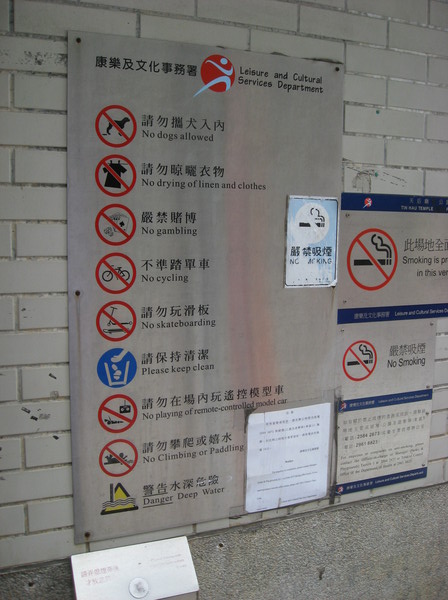
Jo and I flew in to HK a few days early for the Linaro conference, so we got some time to ourselves for doing touristy stuff. That was a good plan - we got to see quite a lot of Kowloon for a couple of days, then we wandered over to Hong Kong island itself for a day. Jo also had more time during the week while I was in the sessions at the conference. Hong Kong is a busy place, very densely packed at all times of day and night that we could see. The first impression we got on the taxi from the airport on day one was that it was a city full of tower blocks - huge numbers of apartments stacked very closely together for living space. That makes sense, I guess, with the large population in such a small space. There are houses around with more space for people to live, but they are understandably very expensive. Later on in Kowloon, we got to meet lots of the local street vendors, mostly offering us "Copy Rolex", "Fake handbag" and the like. Even "Sharp trousers" at one point. We decided not to try them out... :-) We saw lots and lots of very expensive shops downtown, crammed into huge shopping centres in the tourist area. As an antidote for all of that, we headed up to the "Golden Computer Arcade" to go browsing around the vast array of tiny technology stalls and shops there. Picked up some nice cheap laptop memory and some SD cards there. Yay! Across on Hong Kong island itself on Sunday, we found my grandfather's grave then rode around on the trams for a while to get a good view of the city, including a democracy protest that happened to be on that day! We had a quick look around Tin Hau Temple, where we found a very specific set of rules for visitors:

temple rules I can only guess that they must have been terrified by gangs of kids racing their RC cars at one point! We finished the day by heading up to Victoria Peak for the sunset view and some dinner, then back to the hotel. Killing time in a shopping centre waiting for the bus to turn up, we found a truly astonishing little item on sale, a Solar Queen!

solar queen Apparently this gift has a solar panel on the handbag to provide power to a little motor in the Queen's hand to make her wave to her subjects. We decided that we'd somehow have to live without such a delight in our lives... :-) HK was a cool place to visit. It still feels very British in some ways, as you'd expect from an ex-colony (power sockets are still the same as ours, driving on the left, everybody spoke English, etc.) but utterly alien in others (the climate, working public transport *grin*). I look forwards to heading out there again!
Steve McIntyre: Visiting my grandfather in Hong Kong

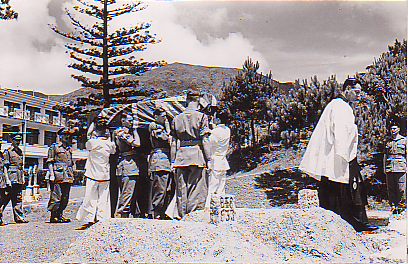
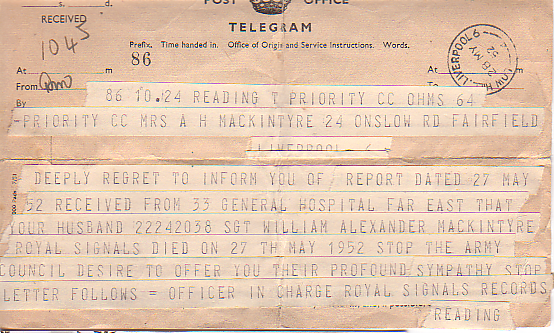
I never met my father's father, as he died many years before I was born. He was a soldier in the British Army and was killed in an accident in Burma in the 1950s. I'm told that back then the Army did not repatriate casualties as a matter of course like they do today, so none of the family got to see his funeral or even visit the grave. Like many of the military casualties in the Far East, he was buried in the Colonial Cemetery in Hong Kong. A few photographs were sent to my grandmother of the ceremony and the headstone, but that's all we ever saw.

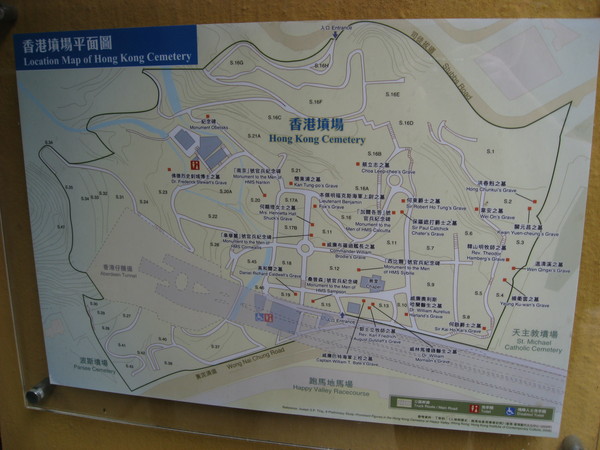
telegramfuneral Fast forward to 2012. I travelled to Hong Kong for a conference (Linaro Connect, more about that later...). I looked up the details of where grandad was laid to rest, and found a major coincidence. He was killed on 27th May 1952, almost exactly 60 years ago! I resolved to go to find him on 27th May 2012 to make the most of this lucky anniversary. Wikipedia told me that in the intervening years the Colonial Cemetery had been renamed to Happy Valley Cemetery, then simply Hong Kong Cemetery, and repurposed from military to civilian use. Jo and I bought some flowers and headed over to Happy Valley on Hong Kong Island on Sunday afternoon. We found a very large cemetery with a helpful map posted to show the different sections, but nothing to tell us where we should be looking. One of the attendants at the office on site looked at the details we had and shrugged to say "sorry, can't help". Ah well, nobody said this was going to be very easy... What we found after a few minutes was that the graves weren't laid out in any obviously logical fashion. In any given small area, you'd find people buried from roughly the same period, but people for any given period could (and would) be scattered across multiple sections at all corners of the site. Great, time for an exhaustive search then. I started combing the site, checking all the markers I could find that looked anything like the tiny grainy black and white photo we had of grandad's headstone.

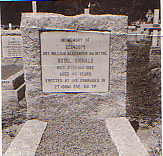
cemeteryheadstone Almost two hours later, I eventually found him. Two hours of heavy work: the cemetery is built on the side of quite a steep hill, and the prevailing weather was very hot with 100% humidity. But, I forgot all that as we eventually stumbled across the correct grave in (no exaggeration!) the very last part of the last section of the site, 20a.
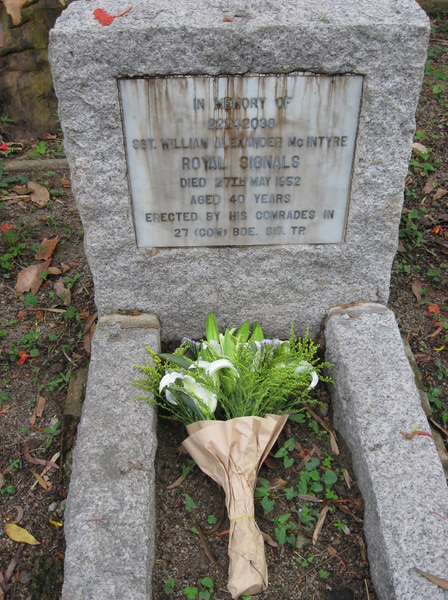
grave I was relieved at this point: as things had taken so long, I had started to worry that maybe the grave had been moved or the headstone damaged and lost. But no, I found the man who had gone off to war leaving my dad and aunt as small children. We took some photos and took note of where we had found the final resting place of Sergeant William Alexander McIntyre of the Royal Signals, a man I never met in life but clearly a very important member of our family.

John Sullivan: To nook

My curiosity was definitely nookd by this story. While this doesn't seem to have been an act of censorship or anything nefarious by Barnes and Noble itself, this does point to just how terrifying ebooks can be if we aren't careful. In the future, when we are dealing with the entirety of human knowledge, we better be careful with the find and replace function. And we better make sure we control our computer systems so that other people can't nook us without our permission. See also: As someone who read War and Peace in paper form, much of it in bed, I definitely empathized with this:
Some weeks ago I decided that I wanted to read Tolstoy's War and Peace. Lou Ann loaned me her copy. At more than 1100 pages, reading it in bed required as much strength as balancing a box of bricks in my hands. In my senior years I have developed arthritis in my thumbs, which made the effort not only difficult, but painful.

Benjamin Mako Hill: Why Facebook's Network Effects are Overrated

A lot of people interested in free software, and user autonomy and network services are very worried about Facebook. Folks are worried for the same reason that so many investors are interested: the networks effects brought by hundreds of millions of folks signed up to use the service. Network effects -- the concept that a good or service increases in value as more people use it -- are not a new problem for free software. Software developers target Microsoft Windows because that is where the large majority of users are. Users with no love for Microsoft and who are otherwise sympathetic to free software use Windows because programs they need will only run there. Folks worried about Facebook are afraid for similar reasons. Sure, you can close down your Facebook account and move to Diaspora. But who will you talk to there? You can already hear people complaining about Facebook the same way they've been complaining about Windows or Office for years. People feel that their hands are tied and that their software, and their social network, will be determined by what everybody is doing. I'm worried about Facebook. But I'm not too intimidated by Facebook's network effects for two reasons. First, using Facebook doesn't preclude using anything else. Twitter has enormous overlapping functionality with Facebook. Sure, people use the systems very differently. But they both ask you to create lists of friends and followers and are designed around sending and receiving short status messages. Millions of people do both and both systems are thriving. For the millions of people who use both Facebook and Twitter, the two services have had to negotiate their marginal utility in a world they share with the other one. People decide that Twitter is for certain types of short messages and Facebook is for others. But these arrangements shift over time. And the relationships between services aren't always peaceful coexistence. Remember Friendster? Remember Orkut? Remember Tribe? Remember MySpace? MySpace, and all the others, are great examples of how social networks die. They very slowly fade away. MySpace users signed up for Facebook accounts and used both. They almost never just switched. Over time, as one platform became more attractive than the other, for many complicated reasons, attention and activity shifted. People logged in on MySpace less and Facebook more and, eventually, realized they were effectively no longer MySpace users. Anyone that has been on the Internet long enough to watch a few of these shifts from one platform to another knows that they're not abrupt -- even if they can be set in motion by a particular event or action. Users of social networking sites simply don't have to choose in the way that a person choosing to boot Windows and GNU/Linux does. I'm sure the vast majority of people with Diaspora accounts use Facebook actively. This is not a problem for Diaspora. It is how Diaspora -- or whatever else eventually achieves what many of us hoped Diaspora would -- could win. Second, Facebook is for the ephemeral. Facebook is primarily used for information that was produced very recently. This week if not today. If not this hour. Facebook has an enormous amount of data that users have fed it that may be hard to get out and move somewhere else. But most people don't care very much about having any regular access to the large majority of this information. What people care deeply about is having access to the data that they and their friends created today. And that data can just as easily be created somewhere else tomorrow. Or, with the right tools, created just as easily in both places. Compare this to something like Windows where moving away would require learning, converting, and perhaps even writing, new software. Perhaps even in new programming languages that most developers don't know yet. Compared to Windows, a migration away from Facebook will be easy. Facebook's photo galleries are an example of an important place where this holds less well. Social network information -- i.e., the list of who is friends with who -- is another example of something that is persistently valuable. That said, people really enjoy the act of finding and friending. Indeed, this process was part of the initial draw of Facebook and other social networks. None of this means that Facebook is over. It doesn't even mean that its ascendancy will be slowed. What it does mean is that Facebook is vulnerable to the next thing more than many technology firms that have benefited from network effects in the past. If users are given compelling reasons to switch to something else, they can with less trouble and they will. That compelling reason might be a new social network with better features or an awesome distributed architecture that allows freedom for users and the ability of those users to benefit from new and fantastic things that Facebook's overseers would never let them have and without the things Facebook's users suffer through today. Or it might be a sexier proprietary box to store users' private information. It doesn't mean that I'm not worried about Facebook. I remain deeply worried. It's just not very hard for me to imagine the end.

3 June 2012

Sandro Tosi: How to migrate your entire Google account to a new one

I've been using a Google account since years, but having a "more serious" one along. The time has come to make the switch and elect the other as main one.

Google has a lot of services, and I'm using several of them, so changing the main account requires to migrate data of those services to the new account, given it's not possible to merge two accounts. To know the full list of services your account is signed in, go to your Account Product page. Some migrations are easy, others hell no: so I'm writing this post to keep track of the migration as it's going on.

First of all, there's a really good post about this migration at LifeHacker: it contains a lot of info I'm using here, but not all the services I need. Additionally, Google has a list of services and methods to migrate from one account to another.

Just to be generic, I'll call AccountSRC the original account and AccountDST the one I want to migrate to.

Migrate GMail

GMail is probably the most important service I have, and also the most difficult one to migrate. I have a lot of filters, so the first step is to migrate them:
  1. Login into GMail for AccountSRC
  2. Gear icon > Settings > Labs
  3. Enable the "Filter import/export" plugin
  4. Reload GMail to enable the plugin (if not done automatically)
  5. Gear icon > Settings > Filters
  6. At the bottom of the page, Select all
  7. Export: this will download an XML file with the filters in it
  8. Login into GMail for AccountDST
  9. Enable "Filter import/export" plugin
  10. Load the file containing the saved filters
  11. Import all (or select which one) filters; this will also create automatically the labels defined in the filters.
I currently have a forward rule from AccountDST to AccountSRC: so let's revert the forward direction: from AccountSRC to AccountDST. This will allow the new account to receive the mails sent to the old one.
  1. Login into GMail for AccountDST
  2. Gear icon > Forwarding and POP/IMAP > Disable forwarding: this will stop redirecting mails from AccountDST to AccountSRC
  3. Login into GMail for AccountSRC
  4. Gear icon > Forwarding and POP/IMAP > add a forwarding address
  5. Enter AccountDST as the address to forward mails to
  6. A verification code is sent to AccountDST and you'll need to enter that code in AccountSRC to verify you have access to both mailboxes
  7. Once verified, select "Forward a copy of incoming mail to" to AccountDST and to delete the GMail copy on AccountSRC
There's no automatic way to migrate all your settings from the old GMail account to the new one, so you'll have to comparing settings pages to set what you had before to AccountDST. I suggest to first enable the labs you have on AccountSRC, and then go thru every page and report the configurations.

Did I forget something? yes, the hardest part: migrate mails! There are a lot of guides about migrating mails, the way I prefer is thru IMAP and Thunderbird (as described here): you'll move IMAP folders, and since they are equivalent to GMail labels, you'll automatically get your email with the correct labels (yes, the same mail appears in several folders, one for each label, and moving an email from one folder will not remove it from all the others).
  1. Enable IMAP access on both AccountSRC and AccountDST
  2. Open Thunderbird (or Icedove if you're on Debian like me) and register both accounts
  3. You can now start moving folders/emails from AccountSRC to AccountDST
    1. Copying a (missing) folder, will automatically create a label with the same name
    2. Moving a mail from the same folders on the two accounts will add the label called with the name of the folder to that email
  4. Be ready, it's a LOOOOONG process, but it's safe and it guarantees a perfect result
With the method above you have all the labels you had before, but not the label colors (and I have a lot :( ).

Another tool that's would be interesting to evaluate for this task is Gmvault.


Migrate Contacts

Contacts are available inside GMail:
  1. Login into GMail for AccountSRC
  2. On the combobox on top-left, select Contacts
  3. More > Export
  4. Export all the contacts in Google CSV, since it's specific to be re-imported
  5. Login into GMail for AccountDST
  6. Contacts > More > Import
  7. Select the previously saved file and import it

Migrate Reader

Migrating Reader subscriptions is easy:
  1. Login into Reader for AccountSRC
  2. Reader Settings -> Import/export
  3. Export your subscriptions in OPML format
  4. Now login into Reader for AccountDST
  5. Reader Settings -> Import/export
  6. And import the saved OPML file
Sadly, that doesn't migrate your starred items, but there's a (long & manual) solution here.


Migrate Blogger

Login to Blogger for AccountSRC; then, for each blog you have there do this dance:
  1. Select the blog
  2. Go into Settings > Permissions
  3. Add AccountDST as a new author: this will send an email to AccountDST GMail account
  4. Accept the invitation (this will ask you to create a new Blogger account for AccountDST if you don't already have one)
  5. Go back to to Blogger with AccountSRC
  6. Blog > Settings > Permissions
  7. Grand admin rights to AccountDST
At this point, both AccountSRC and AccountDST have admin rights; you can leave it as it is, or remove AccountSRC and so only AccountDST will be the admin (other shares should be kept unchanged). The same procedure is described in this Google support answer.

What can't be migrated as easily are all the profile settings you've done on AccountSRC. So profile information, blogs followed and so on have to be migrated by hand: boring but they are just few things, doable in a bunch of minutes.


Migrate Android phone

Android phones require a primary Google account to work, and of course my phone uses AccountSRC. Several sources say the only way to change primary account is to factory reset the phone. But since new market app supports multiple accounts and Android 4.0 (Ice Cream Sandwich) not longer needs a primary account, I just waited for the update to ICS to come.

What you really need to do is to add a new account, AccountDST, to Settings > Account & Sync, and all the Google apps on the phone will be able to use the new account (you might need to select what to sync, and the new account from inside each app).


Migrate Calendar

Even with Calendar the settings will have to be migrated by hand: they are just in one page, so just keep two windows opened and keep switching to sync them. The calendars are easy to move over: for the main calendar:
  1. Login into Calendars for AccountSRC
  2. Go into Settings > Calendars tab
  3. Select export calendars: this will download an archive of your calendars in a zip file; you will need to extract all the ics files from that zip archive so you'll have the main calendar readily available
  4. Login into Calendars for AccountDST
  5. Settings > Calendars tab
  6. Import the main calendar
for the other calendars you can do this way:
  1. Login into Calendars for AccountSRC
  2. Settings > Calendars tab
  3. Share the calendar with AccountDST and give it "Make changes AND manage sharing" right - the new account will have full control over that calendar

Migrate Docs

The procedure to migrate documents in Google Docs (now Google Drive) is described here, and it boils down to:
  1. Login into Docs for AccountSRC
  2. Select all the documents
  3. Share them with AccountDST
  4. In the same window select AccountDST as "is owner"
and you've got all the docs as owned by the new account.


Migrate Groups

There's no way to migrate all your Groups subscriptions from one account to another (if not playing with alternate email address, but it was too risky to try it), so you'll have to migrate all of them by hand.

On the other hand, if you've created some groups, that's possible to move them to the new account:
  1. Login into Groups for AccountSRC
  2. Enter in the "manage" area for the groups you've created
  3. Manage members > Invite members
  4. Invite AccountDST
  5. Accept the invitation, clicking on the email sent to AccountDST account
  6. Go back into AccountSRC manage area
  7. Select the AccountDST account
  8. Edit the subscription and set "Membership type" to "owner": now AccountDST is the owner of the list

Migrate Analytics

The process to migrate the account on Google Analytics is similar to Groups:
  1. Login into Analytics for AccountSRC
  2. Select Admin on top-right, then for each account you have
  3. Select the account, select "Users" tab, click on "+ New User"
  4. Enter AccountDST into the "Email Address" field and give that account the "Administrator" role
  5. Save
  6. Now AccountDST is able to access the same data on Analytics as AccountSRC

Migrate Picasa

To transfer your whole Picasa account follow these steps (as also described in this support post):
  1. Login into Picasa for AccountSRC
  2. Click on the gear on top-right > Photo Settings > Privacy and permissions
  3. On the "Migrate account" line click on "Migrate my photos"
  4. Insert AccountDST into the box for destination address
  5. In case you're using picasa to store blogger photos, also select the tick below
  6. At this point, AccountSRC will receive an email: copy the link in a session where you've logged in as AccountDST and then visit the page: that will start the process
  7. Wait until the transfer is completed: you'll receive an email to AccountDST when it's done

Migrate Google+

I'm not exactly a heavy user of G+ but I have some circles I'd like to move over (also because Reader sharing now works with G+ and it's a feature I user a lot), this is a process to move circles and contacts; as stated there, there's no way to move shared items and stuff (sad!).


Migrate AdSense

It's not possible to migrate the current AdSense account: you have to register a new one. When you do, it's possible that Google notice the new account is for the same person of the first one, and will ask to close the old account on AdSense in favor of the new one.


Migrate Alert

Alerts allows to export the list of alerts you've created but it's not possible to import that list in another Google account, so you'll have to recreate them from scratch (I had just a few so it was a matter of 1 minute or so).


Migrate Zoho Notebook

If you still miss Google Notebook (why big-G you let it die? couldn't you open-sourced it? it was so awesome! anyway...), you probably know that there are two main alternatives to it: Evernote and Zoho Notebook. I decided to go with Zoho (I'm not entirely happy with it, but it's running for now), and given it allows to login with Google account, it was currently using AccountSRC, so I need to migrate that too:
  1. Login into Zoho Notebook for AccountSRC
  2. My Account > Profile > Email address
  3. "Add new email" and add AccountDST, it will send a confirmation email
  4. Then "Make Primary" on AccountDST, so now the new account can login into Zoho notebook with the Google info and have all the notes there.

Migrate Bookmarks

Google provides a guide to migrate Bookmarks from one account to another that basically is:
  1. Login into Bookmarks for AccountSRC
  2. Click on Export bookmarks and it will save an HTML file with the bookmarks in it
  3. Import the file in a browser
  4. Use the Google toolbar to import in into AccountDST
That's kinda ugly way, but it seems to work.


Re-enable Web History

If you used History, then you need to re-enable it on the new account:
  1. Login into History for AccountDST
  2. Click on "Turn Web History on" to enable Web History on the new account
but it seems to be impossible to export/import or migrate the history from one account to another, that's a shame: years and years of stats lost.


Migrate Books

Books doesn't allow to migrate the contents between accounts, so you'll have to do it by hand:
  1. Select one book from AccountSRC, copying its link
  2. Go to AccountDST and navigate to the copied link
  3. Add the book to the right category, as it was before.

Migrate Webmaster Tools

Google released a document that describes how to migrate to another account; it's similar to Analytics and Groups migration.

In addition to that, you might also want to become an owner, that will give full control on the sites.


Did I forget some services? Let me know!

Everyone has a different experience with Google products, so in case you want me to let know how you migrated from one account to another for a product I didn't mentioned, just leave a comment and I'll edit the post (to be as complete as possible).

Next.

Previous.