Search Results: "spa"

21 February 2009

Pablo Lorenzzoni: Git basics: reversing the 'git sucks' effect

I ve been using git this last few days and I am still working on a workflow for my projects. Unfortunately, as others have noticed, git violates POLS is so many ways, it ends up being hard to get. Creating a remote repository seems to be the first thing to bite a developer switching to git (mainly if coming from a centralized SCM). I have not decided which is the best way of doing it, but I ve been using git-daemon via inetd and a path in my remote hosting holding all my repositories for public pulling, and ssh for pushing. Here is how to create it:

local$ ssh spectra@remotehost
remotehost$ mkdir /var/git/myproject.git
remotehost$ cd /var/git/myproject.git
remotehost$ git --bare init 
remotehost$ logout
local$ cd myproject
local$ git remote add remotehost spectra@remotehost:/var/git/myproject.git
local$ git push remotehost master
...
otherlocal$ git clone git://remotelocal/myproject.git
otherlocal$ cd myproject
otherlocal$ git remote add remotehost spectra@remotehost:/var/git/myproject.git
(hack hack hack)
otherlocal$ git push remotehost master
Now everybody can pull your repository at git://remotehost/myproject.git and you can push and pull to it via ssh. Note that you have to setup git-daemon, which is pretty straight forward. I am using it as an inetd daemon, but you can use it as a standalone one. Debian has a package which does just that. Now, some people think logging in a remote server just to create an empty repository is too much. Well repositories are just .git directories. It happens that you can push for the first time by rsyncing your .git with a remote host:

local$ cd myproject
local$ rsync -a .git/ spectra@remotehost:/var/git/myproject.git
local$ git remote add remotehost spectra@remotehost:/var/git/myproject.git
(hack hack hack)
local$ git push remotehost master
(Apparently you can push using rsync every time, but it s regarded as wiser to keep your probably crappy local repository commits separated from the public repository otherwise commit messages like Please, don t use this code are likely to pop up everywhere :) ). Now, I don t know if this have side effects, but it works :-) Another thing to notice is that git is more directed at pulling than pushing. This may be because of its designer: the way Linus works is by pulling changes from others repositories and not by letting others push em into his one. And this is another violation of POLS for most of the people, who is used to commit their changes into some remote repository. Rather than that, people using git would expose their own repositories in order to have it pulled by others. I also agree with most of the git critics wrt git commands There s a lot of examples and I am not going deeper in this but I think it was a bad choice calling checkout what git does when told to checkout , for instance. Yes, I know different tools, different ways of seeing it but everyone was already used to what centralized SCMs call their operations, and I think it would only help git adopting same names for the same operations, and inventing new ones for those proper of decentralized operations. Anyway, once you get it (and I have not completely got it yet), it seems all flow as expected. If this adaptation fails, there s still Easy Git to the rescue! One last thing that I think contribute to the git sucks effect: git-svn. This is a great tool, but it was built from git s point of view Given it s intended as a glue for Subversion newcomers, it would benefit more from being built from svn s point of view. This was mentioned by a colleague developer in my company, when he just couldn t understand why one have to git svn rebase instead of a simple update. So git-svn also suffers of the bad command naming habit git do. Of course, that given that you came from this environment (I am sure git and git-svn makes perfect sense for Linus & cia :-) ). I have not tried yet, but yap seems to be targeted on providing an alternative to git-svn.

20 February 2009

Mike Hommey: The niceties of proprietary software

On a deployment I m currently working on, I ve seen two different cases of proprietary software use leading to both madness and sadness, which are just so typical that I can t resist to tell you. Keep in mind, for the rest of this reading, that the whole platform is running under Solaris 10 x86-64. The first case is a data quality management software that we will keep anonymous. The editor promised before the deployment began that they had a version of the software for the operating system that we would be using. Well, it turned out they do have a Solaris version for sparc, and a x86-64 version for Linux. No Solaris x86-64 version, and no way to get a rebuild in a timely fashion. The second case is a content management software that we will keep anonymous. It comes in the form of a java web application and a java application container. Part of integrating this software involves a proprietary plugin for Apache HTTPd that acts as a mix of mod_proxy_balancer, mod_disk_cache, and htcacheclean, as well as a cache invalidator. Originally, the java web application was supposed to be installed within a JBoss Application Server instead of the editor provided container, and Apache HTTPd would reverse proxy requests to the JBoss server. This means we already had an Apache HTTPd in place (latest version ; 2.2.11 at the time), and since we have x86-64 processors, it was built as a 64-bits binary. Contrary to the first case, this time, we had a Solaris x86 binary. Yes, you read correctly: x86 ; 32-bits only. After going through the pain of rebuilding Apache HTTPd in 32-bits (there are various reasons why we don t use sunfreeware software), it turned out the module was a 2.0 ABI module not compatible with the 2.2 ABI. It also turned out there was a 2.2 ABI version of the module for Solaris sparc. It finally worked after another build of Apache HTTPd, a 2.0.63 release, this time. The more you get used to free software, the more these kind of things get frustrating.

Theodore Ts'o: Aligning filesystems to an SSD s erase block size

I recently purchased a new toy, an Intel X25-M SSD, and when I was setting it up initially, I decided I wanted to make sure the file system was aligned on an erase block boundary. This is a generally considered to be a Very Good Thing to do for most SSD s available today, although there s some question about how important this really is for Intel SSD s more on that in a moment. It turns out this is much more difficult than you might first think most of Linux s storage stack is not set up well to worry about alignment of partitions and logical volumes. This is surprising, because it s useful for many things other than just SSD s. This kind of alignment is important if you are using any kind of hardware or software RAID, for example, especially RAID 5, because if writes are done on stripe boundaries, it can avoid a read-modify-write overhead. In addition, the hard drive industry is planning on moving to 4096 byte sectors instead of the way-too-small 512 byte sectors at some point in the future. Linux s default partition geometry of 255 heads and 63 sectors/track means that there are 16065 (512 byte) sectors per cylinder. The initial round of 4k sector disks will emulate 512 byte disks, but if the partitions are not 4k aligned, then the disk will end up doing a read/modify/write on two internal 4k sectors for each singleton 4k file system write, and that would be unfortunate. Vista has already started working around this problem, since it uses a default partitioning geometry of 240 heads and 63 sectors/track. This results in a cylinder boundary which is divisible by 8, and so the partitions (with the exception of the first, which is still misaligned unless you play some additional tricks) are 4k aligned. So this is one place where Vista is ahead of Linux . unfortunately the default 255 heads and 63 sectors is hard coded in many places in the kernel, in the SCSI stack, and in various partitioning programs; so fixing this will require changes in many places. However, with SSD s (remember SSD s? This is a blog post about SSD s ) you need to align partitions on at least 128k boundaries for maximum efficiency. The best way to do this that I ve found is to use 224 (32*7) heads and 56 (8*7) sectors/track. This results in 12544 (or 256*49) sectors/cylinder, so that each cylinder is 49*128k. You can do this by doing starting fdisk with the following options when first partitioning the SSD: # fdisk -H 224 -S 56 /dev/sdb The first partition will only be aligned on a 4k boundary, since in order to be compatible with MS-DOS, the first partition starts on track 1 instead of track 0, but I didn t worry too much about that since I tend to use the first partition for /boot, which tends not to get modified much. You can go into expert mode with fdisk and force the partition to begin on an 128k alignment, but many Linux partition tools will complain about potential compatibility problems (which are obsolete warnings, since the systems that would have booting systems with these issues haven t been made in about ten years), but I didn t needed to do that, so I didn t worry about it. So I created a 1 gigabyte /boot partition as /dev/sdb1, and allocated the rest of the SSD for use by LVM as /dev/sdb2. And that s where I ran into my next problem. LVM likes to allocate 192k for its header information, and 192k is not a multiple of 128k. So if you are creating file systems as logical volumes, and you want those volume to be properly aligned you have to tell LVM that it should reserve slightly more space for its meta-data, so that the physical extents that it allocates for its logical volumes are properly aligned. Unfortunately, the way this is done is slightly baroque: # pvcreate metadatasize 250k /dev/sdb2
Physical volume /dev/sdb2 successfully created Why 250k and not 256k? I can t tell you sometimes the LVM tools aren t terribly intuitive. However, you can test to make sure that physical extents start at the proper offset by using: # pvs /dev/sdb2 -o+pe_start
PV VG Fmt Attr PSize PFree 1st PE
/dev/sdb2 lvm2 73.52G 73.52G 256.00K If you use a metadata size of 256k, the first PE will be at 320k instead of 256k. There really ought to be an pe-align option to pvcreate, which would be far more user-friendly, but, we have to work with the tools that we have. Maybe in the next version of the LVM support tools . Once you do this, we re almost done. The last thing to do is to create the file system. As it turns out, if you are using ext4, there is a way to tell the file system that it should try to align files so they match up with the RAID stripe width. (These techniques can be used for RAID disks as well). If your SSD has an 128k erase block size, and you are creating the file system with the default 4k block size, you just have to specify a strip width when you create the file system, like so: # mke2fs -t ext4 -E stripe-width=32,resize=500G /dev/ssd/root (The resize=500G limits the number of blocks reserved for resizing this file system so that the guaranteed number size that the file system can be grown via online resize is 500G. The default is 1000 times the initial file system size, which is often far too big to be reasonable. Realistically, the file system I am creating is going to be used for a desktop device, and I don t foresee needing to resize it beyond 500G, so this saves about a 50 megabytes or so. Not a huge deal, but waste not, want not , as the saying goes.) With e2fsprogs 1.41.4, the journal will be 128k aligned, as will the start of the file system, and with the stripe-width specified, the ext4 allocator will try to align block writes to the stripe width where that makes sense. So this is as good as it gets without kernel changes to make the block and inode allocators more SSD aware, something which I hope to have a chance to look at.

horizontal separator All of this being said, it s time to revisit this question is all of this needed for a smart , better by design next-generation SSD such as Intel s? Aligning your file system on an erase block boundary is critical on first generation SSD s, but the Intel X25-M is supposed to have smarter algorithms that allow it to reduce the effect of write-amplification. The details are a little bit vague, but presumably there is a mapping table which maps sectors (at some internal sector size we don t know for sure whether it s 512 bytes or some larger size) to individual erase blocks. If the file system sends a series of 4k writes for file system blocks 10, 12, 13, 32, 33, 34, 35, 64, 65, 66, 67, 96, 97, 98, 99, followed by a barrier operation, a traditional SSD might do read/modify/write on four 128k erase blocks one covering the blocks 0-31, another for the blocks 32-63, and so on. However, the Intel SSD will simply write a single 128k block that indicates where the latest versions of blocks 10, 12, 13, 32, 33, 34, 35, 64, 65, 66, 67, 96, 97, 98, and 99 can be found. This technique tends to work very well. However, over time, the table will get terribly fragmented, and depending on whether the internal block sector size is 512 or 4k (or something in between), there could be a situation where all but one or two of the internal sectors on the disks have been mapped away to other erase blocks, leading to fragmentation of the erase blocks. This is not just a theoretical problem; there are reports from the field that this happens relatively easy. For example, see Allyn Malventano s Long-term performance analysis of Intel Mainstream SSDs and Marc Prieur s report from BeHardware.com which includes an official response from Intel regarding this phenomenon. Laurent Gilson posted on the Linux-Thinkpad mailing list that when he tried using the X25-M to store commit journals for a database, that after writing 170% of the capacity of an Intel SSD, the small writes caused the write performance to go through the floor. More troubling, Allyn Malventano indicated that if the drive is abused for too long with a mixture of small and large writes, it can get into a state where the performance degredation is permanent, and even a series of large writes apparently does not restore the drive s function only an ATA SECURITY ERASE command to completely reset the mapping table seems to help. So, what can be done to prevent this? Allyn s review speculates that aligning writes to erase write boundaries can help I m not 100% sure this is true, but without detailed knowledge of what is going on under the covers in Intel s SSD, we won t know for sure. It certainly can t hurt, though, and there is a distinct possibility that the internal sector size is larger than 512 bytes, which means the default partitioning scheme of 255 heads/63 sectors is probably not a good idea. (Even Vista has moved to a 240/63 scheme, which gives you 8k alignment of partitions; I prefer 224/56 partitioning, since the days when BIOS s used C/H/S I/O are long gone.) The Ext3 and Ext4 file system tend to defer meta-data writes by pinning them until a transaction commit; this definitely helps, and ext4 allows you to configure an erase block boundary, which should also be helpful. Enabling laptop mode will discourage writing to the disk except in large blocks, which probably helps significantly as well. And avoiding fsync() in applications will also be helpful, since a cache flush operation will force the SSD to write to an erase block even if it isn t completely filled. Beyond that, clearly some experimentation will be needed. My current thinking is to use a standard file system aging workload, and then performing an I/O benchmark to see if there has been any performance degradation. I can then vary various file system tuning parameters and algorithms, confirm whether or not a heavy fsync workload makes the performance worse. In the long term, hopefully Intel will release a firmware update which adds support for ATA TRIM/DISCARD commands, which will allow the file system to inform the SSD that various blocks have been deleted and no longer need to be preserved by the SSD. I suspect this will be a big help, if the SSD knows that certain sectors no longer need to be preserved, it can avoid copying them when trying to defragment the SSD. Given how expensive the X25-M SSD s are, I hope that there will be a firmware update to support this, and that Intel won t leave its early adopters high and dry by only offering this functionality in newer models of the SSD. If they were to do that, it would leave many of these early adopters, especially your humble writer (who paid for his SSD out of his own pocket), to be quite grumpy indeed. Hopefully, though, it won t come to that. Update: I ve since penned a follow-up post Should Filesystems Be Optimized for SSD s? Related posts (automatically generated):

  1. Should Filesystems Be Optimized for SSD s? In one of the comments to my last blog entry,...
  2. Fast ext4 fsck times This wasn t one of the things we were explicitly engineering...

Theodore Ts'o: Aligning filesystems to an SSD s erase block size

I recently purchased a new toy, an Intel X25-M SSD, and when I was setting it up initially, I decided I wanted to make sure the file system was aligned on an erase block boundary. This is a generally considered to be a Very Good Thing to do for most SSD s available today, although there s some question about how important this really is for Intel SSD s more on that in a moment. It turns out this is much more difficult than you might first think most of Linux s storage stack is not set up well to worry about alignment of partitions and logical volumes. This is surprising, because it s useful for many things other than just SSD s. This kind of alignment is important if you are using any kind of hardware or software RAID, for example, especially RAID 5, because if writes are done on stripe boundaries, it can avoid a read-modify-write overhead. In addition, the hard drive industry is planning on moving to 4096 byte sectors instead of the way-too-small 512 byte sectors at some point in the future. Linux s default partition geometry of 255 heads and 63 sectors/track means that there are 16065 (512 byte) sectors per cylinder. The initial round of 4k sector disks will emulate 512 byte disks, but if the partitions are not 4k aligned, then the disk will end up doing a read/modify/write on two internal 4k sectors for each singleton 4k file system write, and that would be unfortunate. Vista has already started working around this problem, since it uses a default partitioning geometry of 240 heads and 63 sectors/track. This results in a cylinder boundary which is divisible by 8, and so the partitions (with the exception of the first, which is still misaligned unless you play some additional tricks) are 4k aligned. So this is one place where Vista is ahead of Linux . unfortunately the default 255 heads and 63 sectors is hard coded in many places in the kernel, in the SCSI stack, and in various partitioning programs; so fixing this will require changes in many places. However, with SSD s (remember SSD s? This is a blog post about SSD s ) you need to align partitions on at least 128k boundaries for maximum efficiency. The best way to do this that I ve found is to use 224 (32*7) heads and 56 (8*7) sectors/track. This results in 12544 (or 256*49) sectors/cylinder, so that each cylinder is 49*128k. You can do this by doing starting fdisk with the following options when first partitioning the SSD: # fdisk -H 224 -S 56 /dev/sdb The first partition will only be aligned on a 4k boundary, since in order to be compatible with MS-DOS, the first partition starts on track 1 instead of track 0, but I didn t worry too much about that since I tend to use the first partition for /boot, which tends not to get modified much. You can go into expert mode with fdisk and force the partition to begin on an 128k alignment, but many Linux partition tools will complain about potential compatibility problems (which are obsolete warnings, since the systems that would have booting systems with these issues haven t been made in about ten years), but I didn t needed to do that, so I didn t worry about it. So I created a 1 gigabyte /boot partition as /dev/sdb1, and allocated the rest of the SSD for use by LVM as /dev/sdb2. And that s where I ran into my next problem. LVM likes to allocate 192k for its header information, and 192k is not a multiple of 128k. So if you are creating file systems as logical volumes, and you want those volume to be properly aligned you have to tell LVM that it should reserve slightly more space for its meta-data, so that the physical extents that it allocates for its logical volumes are properly aligned. Unfortunately, the way this is done is slightly baroque: # pvcreate metadatasize 250k /dev/sdb2
Physical volume /dev/sdb2 successfully created Why 250k and not 256k? I can t tell you sometimes the LVM tools aren t terribly intuitive. However, you can test to make sure that physical extents start at the proper offset by using: # pvs /dev/sdb2 -o+pe_start
PV VG Fmt Attr PSize PFree 1st PE
/dev/sdb2 lvm2 73.52G 73.52G 256.00K If you use a metadata size of 256k, the first PE will be at 320k instead of 256k. There really ought to be an pe-align option to pvcreate, which would be far more user-friendly, but, we have to work with the tools that we have. Maybe in the next version of the LVM support tools . Once you do this, we re almost done. The last thing to do is to create the file system. As it turns out, if you are using ext4, there is a way to tell the file system that it should try to align files so they match up with the RAID stripe width. (These techniques can be used for RAID disks as well). If your SSD has an 128k erase block size, and you are creating the file system with the default 4k block size, you just have to specify a strip width when you create the file system, like so: # mke2fs -t ext4 -E stripe-width=32,resize=500G /dev/ssd/root (The resize=500G limits the number of blocks reserved for resizing this file system so that the guaranteed number size that the file system can be grown via online resize is 500G. The default is 1000 times the initial file system size, which is often far too big to be reasonable. Realistically, the file system I am creating is going to be used for a desktop device, and I don t foresee needing to resize it beyond 500G, so this saves about a 50 megabytes or so. Not a huge deal, but waste not, want not , as the saying goes.) With e2fsprogs 1.41.4, the journal will be 128k aligned, as will the start of the file system, and with the stripe-width specified, the ext4 allocator will try to align block writes to the stripe width where that makes sense. So this is as good as it gets without kernel changes to make the block and inode allocators more SSD aware, something which I hope to have a chance to look at.

horizontal separator All of this being said, it s time to revisit this question is all of this needed for a smart , better by design next-generation SSD such as Intel s? Aligning your file system on an erase block boundary is critical on first generation SSD s, but the Intel X25-M is supposed to have smarter algorithms that allow it to reduce the effect of write-amplification. The details are a little bit vague, but presumably there is a mapping table which maps sectors (at some internal sector size we don t know for sure whether it s 512 bytes or some larger size) to individual erase blocks. If the file system sends a series of 4k writes for file system blocks 10, 12, 13, 32, 33, 34, 35, 64, 65, 66, 67, 96, 97, 98, 99, followed by a barrier operation, a traditional SSD might do read/modify/write on four 128k erase blocks one covering the blocks 0-31, another for the blocks 32-63, and so on. However, the Intel SSD will simply write a single 128k block that indicates where the latest versions of blocks 10, 12, 13, 32, 33, 34, 35, 64, 65, 66, 67, 96, 97, 98, and 99 can be found. This technique tends to work very well. However, over time, the table will get terribly fragmented, and depending on whether the internal block sector size is 512 or 4k (or something in between), there could be a situation where all but one or two of the internal sectors on the disks have been mapped away to other erase blocks, leading to fragmentation of the erase blocks. This is not just a theoretical problem; there are reports from the field that this happens relatively easy. For example, see Allyn Malventano s Long-term performance analysis of Intel Mainstream SSDs and Marc Prieur s report from BeHardware.com which includes an official response from Intel regarding this phenomenon. Laurent Gilson posted on the Linux-Thinkpad mailing list that when he tried using the X25-M to store commit journals for a database, that after writing 170% of the capacity of an Intel SSD, the small writes caused the write performance to go through the floor. More troubling, Allyn Malventano indicated that if the drive is abused for too long with a mixture of small and large writes, it can get into a state where the performance degredation is permanent, and even a series of large writes apparently does not restore the drive s function only an ATA SECURITY ERASE command to completely reset the mapping table seems to help. So, what can be done to prevent this? Allyn s review speculates that aligning writes to erase write boundaries can help I m not 100% sure this is true, but without detailed knowledge of what is going on under the covers in Intel s SSD, we won t know for sure. It certainly can t hurt, though, and there is a distinct possibility that the internal sector size is larger than 512 bytes, which means the default partitioning scheme of 255 heads/63 sectors is probably not a good idea. (Even Vista has moved to a 240/63 scheme, which gives you 8k alignment of partitions; I prefer 224/56 partitioning, since the days when BIOS s used C/H/S I/O are long gone.) The Ext3 and Ext4 file system tend to defer meta-data writes by pinning them until a transaction commit; this definitely helps, and ext4 allows you to configure an erase block boundary, which should also be helpful. Enabling laptop mode will discourage writing to the disk except in large blocks, which probably helps significantly as well. And avoiding fsync() in applications will also be helpful, since a cache flush operation will force the SSD to write to an erase block even if it isn t completely filled. Beyond that, clearly some experimentation will be needed. My current thinking is to use a standard file system aging workload, and then performing an I/O benchmark to see if there has been any performance degradation. I can then vary various file system tuning parameters and algorithms, confirm whether or not a heavy fsync workload makes the performance worse. In the long term, hopefully Intel will release a firmware update which adds support for ATA TRIM/DISCARD commands, which will allow the file system to inform the SSD that various blocks have been deleted and no longer need to be preserved by the SSD. I suspect this will be a big help, if the SSD knows that certain sectors no longer need to be preserved, it can avoid copying them when trying to defragment the SSD. Given how expensive the X25-M SSD s are, I hope that there will be a firmware update to support this, and that Intel won t leave its early adopters high and dry by only offering this functionality in newer models of the SSD. If they were to do that, it would leave many of these early adopters, especially your humble writer (who paid for his SSD out of his own pocket), to be quite grumpy indeed. Hopefully, though, it won t come to that. Update: I ve since penned a follow-up post Should Filesystems Be Optimized for SSD s? Related posts (automatically generated):

  1. Should Filesystems Be Optimized for SSD s? In one of the comments to my last blog entry,...
  2. Fast ext4 fsck times This wasn t one of the things we were explicitly engineering...

Wouter Verhelst: New toys

Got myself a new laptop this week. Not that the other one broke down or some such, but it was getting old; and its single-core 1.3Ghz PowerPC was starting to be somewhat slow in comparison to what's available on the market today. Additionally, while it was still functional, there were some issues with wear-out; for instance, sometimes the battery would just fall out while I was walking around with it, or the network cable connection would not fit entirely, and similar minor problems The new one is quite a bargain; 2G of RAM, 2Ghz Core2Duo, one of those newfangled 'n' wireless network interfaces, plenty of diskspace, and other interesting things; and all that for only 600ish. You'd say it's a netbook, but it isn't although I guess the low price of those netbook systems is pulling down the bottom line of these machines. Anyway. After using it for slightly more than a day, I'm quite happy with it. I did have to upgrade a few packages in order to make all the hardware work properly; for instance, kernel 2.6.26 does not yet support the wireless (so I'm running 2.6.28 now), and the X.org in unstable can only get at the screen in vesa mode, which means I'm running the 7.4 X.org packages from experimental. But overall, most of it (that I care about) works flawlessly. With a single exception: I have no audio. The weird thing is, the audio chipset is recognized, and I can play around with alsamixer; but no matter, there is no sound. Which is kindof annoying. It doesn't appear that I'm the only one with this problem (witness this debugging page on the alsa wiki), so I'm sure I'll get there. Eventually. Oh wel. While fetching the laptop, I was told that the NSLU2 which I had on backorder had arrived, so I took that with me, too. Add to that the 160G disk that I'd fetched earlier, and the USB NIC that I also got, and the Thecus N2100 that's still running at my parents' place will soon be moved to my home again and its 500G RAID1 with it. Whee.

Chris Lawrence: Be still my heart

From the description of the memisc package for R:
One of the aims of this package is to make life easier for useRs who deal with survey data sets. It provides an infrastructure for the management of survey data including value labels, definable missing values, recoding of variables, production of code books, and import of (subsets of) SPSS and Stata files. Further, it provides functionality to produce tables and data frames of arbitrary descriptive statistics and (almost) publication-ready tables of regression model estimates. Also some convenience tools for graphics, programming, and simulation are provided. [emphasis added]
How did I miss this package before? It makes analyzing NES data heck, any data with value labels and missing values in R an almost sane thing to do.

19 February 2009

Adeodato Sim : Blogging in Spanish

I ve decided I m going to blog in Spanish from time to time (1, 2). These will be posts personal in nature, and I don t think I ll be sending them to Planeta Debian. I ve also reworked (with some pain) the list of feeds in my blog. Apart from the feed with all content, there is now:

18 February 2009

Lior Kaplan: How to make an open source kindergarten


If you can read Hebrew, you ll find the original story at . Otherwise, you re welcome to read the post. Vitali Perchonok was asked to check the computer is his city of Kiryat Gat, he found a lot of old PCs (P1 and P2) with windows 98 and DOS games that don t work. He decided to find a way to use the computers with open source software. He found that he can run Gcompris, an educational software suite comprising of numerous activities for children aged 2 to 10, on the old computers. Now he just needs to update the Hebrew translation (last updated at 2005). Along side the translation he fixed bugs, recorded new sounds and replaced some of the graphics (all with the help of a few friends). To wrap it all, he decided to create a liveCD for the program, and this was the beginning of KG-Live. The changes were sent upstream and should be included in the next release. Today, the project waits for approval from the Israeli Ministry of Education, before distributing the software officially to the kindergartens. Posted in Free software applications, i18n & l10n, Israeli Community, Proud to use free software Tagged: education, free software, gcompris

Julian Andres Klode: Python modules, licenses, and more


Today, I want to present you some things I have asked myself and some ideas about them. You should not expect the information to be correct. Therefore, if you find mistakes, please leave a comment. Copyright statements / Comments MIT license: The above copyright notice and this permission notice shall be included in all copies or substantial portions of the Software. - If you had a python module released under the MIT license, and this is in the comment of the module and you somehow ship only pyc or pyo files, you would be violating the license by not including the copyright notice, because these files do not contain the modules. This is also true for many other licenses, but this seems to be the best example. If you include this in the docstrings, you would only violate such license terms if you distribute bytecode created with the -OO option. This also does not apply if the code is a program which prints the license (eg. via a commandline license option). GPL vs LGPL Is there any difference at all? The LGPL requires you to publish all changes you make to the code, while the GPL also requires you to publish source files you have created. This also means that you can t link a non-free program to a GPL library, but you can link it to a LGPL library. Because Python modules are not linked to each other, everything you do is normally considered a use of the module. Therefore, if there is a module G released under the GPL, and a module X released under a different, incompatible license X, you would still be able to use the facilities provided by the module G. This also effects subclassing classes of G in X. Due to the enormous flexibility provided by Python you can easily break the intented rules of the GPL. Instead of editing the class definition you subclass the class and edit it. You can also replace stuff inside the module G during run-time, simply by setting the relevant attributes. In summary, Python makes it very easy to work around the restrictions of the GPL, therefore, using the LGPL instead of the GPL makes no sense. You can t give others more rights than they already have. You would just make it easier for others in case they want to write new code and want to copy some of yours. What about the AGPL? The AGPL exposes (compared to the GPL3) further restrictions on using the software on eg. websites. It is intended for programs which may be used by SaaS providers. Like with the GPL, the enormous flexibility of Python compensates most of the restrictions the license. BTW, which license to choose? I normally choose to release my programs and modules, etc. under the terms of the GNU General Public License, version 3 (or at your option) any later version. But it also depends on the size of the project. When I work on small scripts, like hardlink, I generally choose the MIT license. This is also somehow related to the fact that I don t want to have a license which takes more than 50% of the size of my project. This is actually a bit different to what Bruce Perens does. Bruce recommends 3 types of licenses. The first one is what he calls the gift license. He recommends the Apache License 2.0, because it provides better protection from software patent lawsuites . The MIT license is another example for this type of license. While not providing the patent protection, this is not that critical for persons like me who live in Germany. Furthermore, the number of patents possibly infringed by the code is proportional to the amount of code. The second type he recommends is a sharing-with-rules license, like the GPL 3. Like him, I mostly use this license for my code. Sometimes I also use the GPL 2, but only when I am required to do so, or because of tradition. In generally, I only upgrade software from GPL-2+ to GPL-3+ when I introduce new features, not for bug fixes or similar. The third type he describes is the in-between license , like the LGPL. As I pointed out above, this type of license is not much different than the GPL, at least if applied to Python modules. Therefore, I never release any Python module under such a license. Things may be different for C libraries (and others), but I never released one. Documentation, etc. Well, I license all my documentation under the same license as the software. This makes it easier for the user because he does not need to read yet another license (at least if he reads all the licenses of the software he uses). If I distribute non-code content independent of code, I generally choose a Creative Commons License (CC-BY-SA 3.0, CC-BY 3.0), Germany. This also has an effect on this blog. From now on, all content (ever) provided by me via this blog is licensed under the terms of the Creative Commons Attribution-Share Alike 3.0 Germany, unless a different license information is included as part of the post. The design and comments from other persons are not included. Why I wrote this Really, I don t know. Maybe I just want to write something, maybe I want to write these things down, so I can read them. Anyway, please tell me if I my conclusions/ideas are wrong. Update 1: There was a mistake should expect the information to be correct , fixed now: should not expect [...] . I may be wrong with the GPL vs. LGPL thing, have not completely checked this. (2009-02-18 19:18 CET) Update 2: Seems the GPL vs LGPL thing is not correct, as written by Anonymous and Bruce. (2009-02-18 19:26 CET) Posted in General

John Goerzen: How To Think About Compression, Part 2

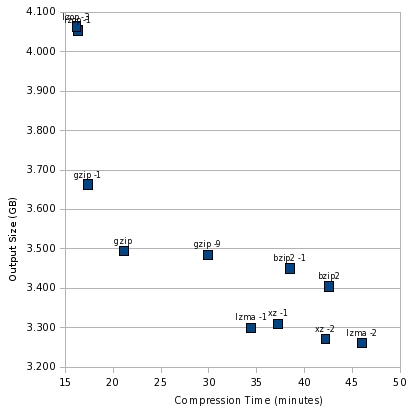
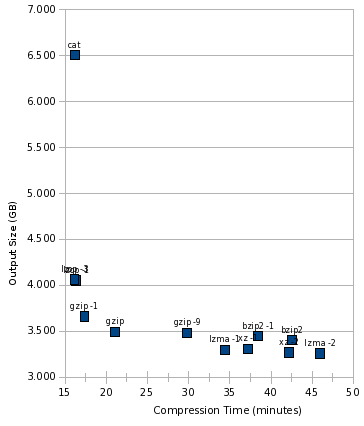
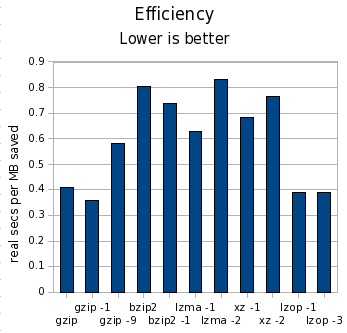
Yesterday, I posted part 1 of how to think about compression. If you haven t read it already, take a look now, so this post makes sense. Introduction In the part 1 test, I compressed a 6GB tar file with various tools. This is a good test if you are writing an entire tar file to disk, or if you are writing to tape. For part 2, I will be compressing each individual file contained in that tarball individually. This is a good test if you back up to hard disk and want quick access to your files. Quite a few tools take this approach rdiff-backup, rdup, and backuppc are among them. We can expect performance to be worse both in terms of size and speed for this test. The compressor tool will be executed once per file, instead of once for the entire group of files. This will magnify any startup costs in the tool. It will also reduce compression ratios, because the tools won t have as large a data set to draw on to look for redundancy. To add to that, we have the block size of the filesystem 4K on most Linux systems. Any file s actual disk consumption is always rounded up to the next multiple of 4K. So a 5-byte file takes up the same amount of space as a 3000-byte file. (This behavior is not unique to Linux.) If a compressor can t shrink enough space out of a file to cross at least one 4K barrier, it effectively doesn t save any disk space. On the other hand, in certain situations, saving one byte of data could free 4K of disk space. So, for the results below, I use du to calculate disk usage, which reflects the actual amount of space consumed by files on disk. The Tools Based on comments in part 1, I added tests for lzop and xz to this iteration. I attempted to test pbzip2, but it would have taken 3 days to complete, so it is not included here more on that issue below. The Numbers Let s start with the table, using the same metrics as with part 1:
Tool MB saved Space vs. gzip Time vs. gzip Cost
gzip 3081 100.00% 100.00% 0.41
gzip -1 2908 104.84% 82.34% 0.36
gzip -9 3091 99.72% 141.60% 0.58
bzip2 3173 97.44% 201.87% 0.81
bzip2 -1 3126 98.75% 182.22% 0.74
lzma -1 3280 94.44% 163.31% 0.63
lzma -2 3320 93.33% 217.94% 0.83
xz -1 3270 94.73% 176.52% 0.68
xz -2 3309 93.63% 200.05% 0.76
lzop -1 2508 116.01% 77.49% 0.39
lzop -2 2498 116.30% 76.59% 0.39
As before, in the MB saved column, higher numbers are better; in all other columns, lower numbers are better. I m using clock seconds here on a dual-core machine. The cost column is clock seconds per MB saved. Let s draw some initial conclusions: The Pretty Charts Now, let s look at an illustration of this. As before, the sweet spot is the lower left, and the worst spot is the upper right. First, let s look at the compression tools themselves: compress2-zoomed At the extremely fast, but not as good compression, end is lzop. gzip is still the balanced performer, bzip2 still looks really bad, and lzma -1 is still the best high-compression performer. Now, let s throw cat into the mix: compress2-big Here s something notable, that this graph makes crystal clear: lzop was just as fast as cat. In other words, it is likely that lzop was faster than the disk, and using lzop compression would be essentially free in terms of time consumed. And finally, look at the cost: compress2-efficiency What happened to pbzip2? I tried the parallel bzip2 implementation just like last time, but it ran extremely slow. Interestingly, pbzip2 < notes.txt > notes.txt.bz2 took 1.002 wall seconds, but pbzip2 notes.txt finished almost instantaneously. This 1-second startup time for pbzip2 was a killer, and the test would have taken more than 3 days to complete. I killed it early and omitted it from my results. Hopefully this bug can be fixed. I didn t expect pbzip2 to help much in this test, and perhaps even to see a slight degradation, but not like THAT. Conclusions As before, the difference in time was far more significant than the difference in space. By compressing files individually, we lost about 400MB (about 7%) space compared to making a tar file and then combining that. My test set contained 270,101 files. gzip continues to be a strong all-purpose contender, posting fast compression time and respectable compression ratios. lzop is a very interesting tool, running as fast as cat and yet turning in reasonable compression though 25% worse than gzip on its default settings. gzip -1 was almost as fast, though, and compressed better. If gzip weren t fast enough with -6, I d be likely to try gzip -1 before using lzop, since the gzip format is far more widely supported, and that s important to me for backups. These results still look troubling for bzip2. lzma -1 continued to turn in far better times and compression ratios that bzip2. Even bzip2 -1 couldn t match the speed of lzma -1, and compressed barely better than gzip. I think bzip2 would be hard-pressed to find a comfortable niche anywhere by now. As before, you can download my spreadsheet with all the numbers behind these charts and the table.

17 February 2009

Gunnar Wolf: Inviting: First VC for the EDUSOL 2009 Seminar - Thursday, Feb 26

It's time to drive some buzz this way ;-) Although this post will only be a pointer towards the Spanish post I made on Planeta EDUSOL, for reasons soon to become obvious. In any case, the information I'm posting here is not exactly the same. Can you read Spanish? Please go on to the invitation for the first videoconference for the EDUSOL Seminar. This year, we the organizers of the On-line Encounter of Education and Free Software (EDUSOL) are aiming higher - we are not "just" having a two-week encounter at the end of the year - We are having an all-year-long Seminar, focusing on the collaborative construction of knowledge. People from quite distinct backgrounds will be part of this project, and we aim to drive it towards the publication of a book. We (mainly, Alejandro Miranda and me) have been quite busy bootstrapping this seminar, getting the proposed authors, thinking over the intended communication channels and ways, and setting up the needed infrastructure) and are ready to start the public-facing activities. We will be having monthly videoconferencing sessions, the last Thursday each month, 16:00-18:00 Mexico Central time (currently GMT-6; GMT-5 after the beginning of April). The VC sessions will be also relayed through Ogg streams, and we will have an IRC channel available to offer full interactivity for those who do not have access to a H.323 VC setup. This first session will be moderated by Victor Manuel Mart nez; the speakers will be Alejandro Miranda and myself - The topics we will present are: If you have access to videoconferencing facilities, please get in touch with Carlos Cruz, the Videoconferences Coordinator at the Economic Research Institute, as soon as possible for all the needed coordination.

Gunnar Wolf: Yay for Lenny! (But nay for installation media)

Yay! This blog post is not strictly speaking news anymore - But for those who don't know it yet, three days ago Debian 5.0 Lenny was released, after 22 months of work (plus fun, plus flamewars, plus everything that makes a Free Software lover tick). And, of course, that makes us all very happy and proud. As always, upgrading is a breeze. Hats off specially to Wolfgang and everybody who worked towards the great release notes - No, it is not a simple task, by far. And I _do_ feel ashamed I didn't even beep that way :-( So, many of us are in the middle of planning/executing our servers' migrations. So far, I'm amazed for good. Even hairy issues such as firmware removal are magically and beautifully taken care of - i.e. my firewall kindly informed me during update that I would need to install the non-free firmware for my BNX2 (Broadcom) network interfaces, and I was just a package away from absolute happiness. Lets see what happens next Friday, as I will be upgrading our storage+application server (which is _way_ more complex than the servers I've dealt with so far). Anyway... But what good is a blog post if you are not ranting? Many people recognize me as one of the most Debian-connected people in Mexico, and that's very good. And yes, besides being a Debian Developer, I am a co-sysadmin for the main Debian mirror in Mexico. Some people have already asked me for CD-ROMs and DVDs. Of course, if I had a BluRay drive, I'm sure I'd also get requests for it. People: Do you really want such media? Think again... Do you really want 31 CDs or five DVDs for your favorite architecture? Ok, maybe many will say "nah, just give me the first one" - Then, do you want to limit your Debian experience to just the software that lives on the first 1/31th (or 1/5th) of it all? Of course there are many situations where it is desirable. Low bandwidth users, or people with no regular connectivity, will be much better served by suitable media from which to install. However, most of us (computer geeks living in Mexico City - Yes, that's the people contacting me) have at least a 1Mbps connection at home. People, just get the Netinst or Businesscard (180 or 40MB) images and download whatever is left via the network. Debian is extremely network-friendly. And, believe me, even if packages are sorted by popularity (and that's why most people will be happy with the first DVD if needed), you never know if you will want precisely a package that sits towards the lonely tail of popularity. And, yes, I did have my CD images handy for the Potato, Woody and Sarge cycles - but increasingly, it became easier for me just to ask apt-get to fetch stuff from the web (which is done without me moving from my comfy chair while I do anything else) than asking apt-get to ask me to go search for the f.*ing CD which I left dont-remember-where. Anyway... I'm not saying I won't burn your CDs - If you want them, please tell me in advance and come to my office, I'll be glad to give you some Debian disks. But spare the environment. We don't need to burn more and more disks. Use the network, be a better human being!

Wouter Verhelst: RedHat sucks

So a customer of mine needs to use RedHat. It's not their choice, the choice was forced upon them by the people who wrote the tools they need to use. The new version of this particular tool which they wanted to use requires RHEL5, and they're currently running RHEL4. So I had to upgrade their systems from RHEL4 to RHEL5. No sweat, right? Yeah, right. RedHat has this nice 'Red Hat Network', where you can manage your servers, and remotely mark packages for upgrade. You can also, by way of a command line tool, say that you want it to upgrade from one release to another. This can't be done remotely, which sortof makes sense; upgrading from one release to another might cause problems that you really really don't want if you don't have an immediate shell. So you should use 'up2date --upgrade-to-release=5' to upgrade from RHEL4 to RHEL5. Except that that doesn't work. For some reason, RedHat chose not to support in-place upgrades from RedHat 4 to RedHat 5. Instead, you have to download installation media, boot from them (thereby inducing downtime) and select 'upgrade' in the installer. Which part of this distribution is "Enterprise", again? Oh well. So I download the first ISO, and start the upgrade process. Surely that'll work, right? Hah. No, I really need all six images. So I download them, and start again. Some minutes into the installation, the HP iLO session that I'm using times out, and takes my Virtual CD device with it. As such, the installer-in-upgrade-mode obviously can't find the CD-ROM anymore, and produces a read error. This is totally normal. The system provides me with a 'retry' button. That button doesn't work. That is to say, it works, but after two or so files, the installation goes to a grinding halt. I had to reboot, and start over. So after rebooting, changing my iLO session settings so the timeout is at 120 minutes (the maximum) rather than 30 minutes (what appears to be the default), and I restart the upgrade process, making sure to click in the iLO interface every once in a while to keep it active. When it's somewhere at 80% and 3 hours into the upgrade process (god, why does that have to take so long?), it suddenly finds itself out of disk space. Well, shit happens, of course; guess there's nothing to blame RedHat with that one. But the way this situation is handled, is beyond my comprehension: The only 'recover' option is 'reboot'. There's no 'retry'. I don't mind diving to a second console, mucking about a bit on the mounted partition, and doing 'retry', but the installer doesn't even offer me that option. Instead, I have to choose 'reboot'. Never mind that the system is halfway through an installation process and might be totally and utterly broken, and not even bootable. Well, that's what rescue modes on installation media are for, I guess, but still. After cleaning out some old files that aren't needed anymore and going back to the installer, you'd suppose that the system could figure out what it'd already done, and continue from there, right? Well, no, it can't. It starts over from scratch, thereby forcing me to sit and wait for another three hours. Times like these make me remember why I'm a Debian developer, and not a RedHat one. Why I chose not to finish that Linux From Scratch project that I'd started after using RedHat for three years and about six months before becoming a Debian Developer. Why I stopped hitting my computer screen around that time. Stupid piece of shit. disclaimer: this is all IMAO, and you don't have to agree with me. But what's a blog for, if not to rant? ;-)

Joey Hess: new project

So, I've had this plan for ages to follow up with what I did with my nslu2, and hide a Debian box inside a working stereo. Finally I've started work on this little project. I bought a cheap stereo with CD/tape/radio, mostly on the criteria: I got lucky.. after removing the CD drive, ripping out the battery compartment, and making other modifications to the interior of the case, I had just enough space to fit the qnap board, with centimeters to spare in some places, and millimeters in others. It fits perfectly. The board's LEDs and reset button will be accessible via the CD slot. I was able to keep the radio and amp working. Wiring up a USB sound card to that was easy. I could have kept the cassette deck working, but since I don't have any more of that media, I stripped it, and am planning to put a USB hub in there, accessible by pressing Stop/Eject. ;-) It seems I will even have a fair bit of empty space. Pondering adding a small UPS. Or, I might toss in an access point.

John Goerzen: How To Think About Compression

and the case against bzip2 Compression is with us all the time. I want to talk about general-purpose lossless compression here. There is a lot of agonizing over compression ratios: the size of output for various sizes of input. For some situations, this is of course the single most important factor. For instance, if you re Linus Torvalds putting your code out there for millions of people to download, the benefit of saving even a few percent of file size is well worth the cost of perhaps 50% worse compression performance. He compresses a source tarball once a month maybe, and we are all downloading it thousands of times a day. On the other hand, when you re doing backups, the calculation is different. Your storage media costs money, but so does your CPU. If you have a large photo collection or edit digital video, you may create 50GB of new data in a day. If you use a compression algorithm that s too slow, your backup for one day may not complete before your backup for the next day starts. This is even more significant a problem when you consider enterprises backing up terabytes of data each day. So I want to think of compression both in terms of resulting size and performance. Onward Starting Point I started by looking at the practical compression test, which has some very useful charts. He has charted savings vs. runtime for a number of different compressors, and with the range of different settings for each. If you look at his first chart, you ll notice several interesting things: All this was very interesting, but had one limitation: it applied only to the gimp source tree, which is something of a best-case scenario for compression tools. A 6GB Test
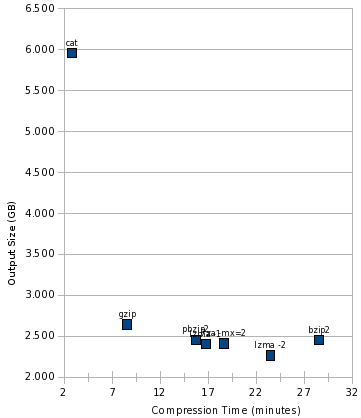
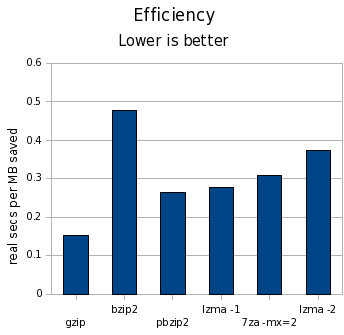
I wanted to try something a bit more interesting. I made an uncompressed tar file of /usr on my workstation, which comes to 6GB of data. My /usr contains highly compressible data such as header files and source code, ELF binaries and libraries, already-compressed documentation files, small icons, and the like. It is a large, real-world mix of data. In fact, every compression comparison I saw was using data sets less than 1GB in size hardly representative of backup workloads. Let s start with the numbers:
Tool MB saved Space vs. gzip Time vs. gzip Cost
gzip 3398 100.00% 100.00% 0.15
bzip2 3590 92.91% 333.05% 0.48
pbzip2 3587 92.99% 183.77% 0.26
lzma -1 3641 91.01% 195.58% 0.28
lzma -2 3783 85.76% 273.83% 0.37
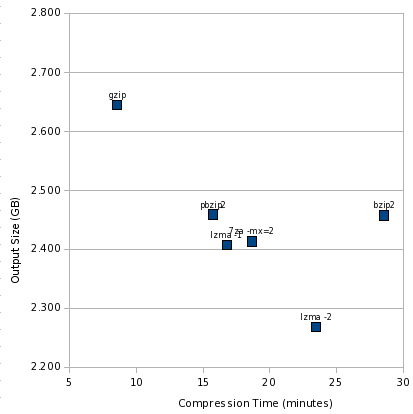
In the MB saved column, higher numbers are better; in all other columns, lower numbers are better. I m using clock seconds here on a dual-core machine. The cost column is clock seconds per MB saved. What does this tell us? Some Pretty Charts First, let s see how the time vs. size numbers look: compress-zoomed Like the other charts, the best area is the lower left, and worst is upper right. It s clear we have two outliers: gzip and bzip2. And a cluster of pretty similar performers. This view somewhat magnifies the differences, though. Let s add cat to the mix: compress-big And finally, look at the cost: compress-efficiency Conclusions First off, the difference in time is far larger than the difference in space. We re talking a difference of 15% at the most in terms of space, but orders of magnitude for time. I think this pretty definitively is a death knell for bzip2. lzma -1 can achieve better compression in significantly less time, and lzma -2 can achieve significantly better compression in a little less time. pbzip2 can help even that out in terms of clock time on multicore machines, but 7za already has a parallel LZMA implementation, and it seems only a matter of time before /usr/bin/lzma gets it too. Also, if I were to chart CPU time, the numbers would be even less kind to pbzip2 than to bzip2. bzip2 does have some interesting properties, such as resetting everything every 900K, which could provide marginally better safety than any other compressor here though I don t know if lzma provides similar properties, or could. I think a strong argument remains that gzip is most suitable for backups in the general case. lzma -1 makes a good contender when space is at more of a premium. bzip2 doesn t seem to make a good contender at all now that we have lzma. I have also made my spreadsheet (OpenOffice format) containing the raw numbers and charts available for those interested. Update Part 2 of this story is now available, which considers more compression tools, and looks at performance compressing files individually rather than the large tar file.

16 February 2009

Russell Coker: Xen and Lenny

Debian GNU/Linux 5.0 AKA Lenny has just been released [1]. One of the features that is particularly noteworthy is that Xen has been updated and now works fully and correctly on the 2.6.26 kernel (see the Debian Wiki page about Xen for details [2]). This may not sound exciting, but I know that a lot of people put a lot of work into getting this going, and for a long time in Unstable it wasn t working well. I ve just upgraded three Xen servers from Etch to Lenny (actually one was Etch kernel with Lenny user-space), and they all worked! Those three servers were all running the i386 architecture, the next thing to do is to try it out with the AMD64 architecture. One of my plans is to try the latest Debian kernel on the server I use in Germany, but I ll try on a few other AMD64 machines first.

Jon Dowland: hard sf

"Hard SF" is a sub-genre of Science Fiction where "Science" is key. It's very hard to draw solid lines around stories that are examples of Hard SF, but it's easier to provide examples of things which are not: "Star Wars", for example, where space ships, travel and light sabres are window-dressing around a fantasy story. If you look at the Wikipedia article on Hard SF, in particular it's edit history, you will see people continually argue back and forth. Editor Jonathan Strahan recently asked for some recommendations of Hard SF authors to be included in a new Hard SF anthology. I stumbled across this via sfsignal. There are some good comments at both sites, and a fair amount of disagreement over whether certain authors should be considered Hard SF authors or not. Alastair Reynolds was cited by people several times. I really enjoy much of Reynold's writing, but I wouldn't consider it Hard SF. I argued this point and Reynolds himself joined the discussion.
This page is a draft.

Paul van Tilburg: Post-FOSDEM 2009

I have attended FOSDEM again this year. Most of all, it was nice to see everyone again, especially the Collabora crew. Besides having fun while hanging out with them again, I must say FOSDEM was quite a motivation boost too! I feel motivated again to work on Ruby packaging. The whole RubyGem mess and other less-specific Ruby-related messes keep draining my motivation. This feels very conflicting, since I like the language very much. The upcoming transition to Ruby 1.9.1 will be quite a challenge and I hope that we can finally work out a nice, actual Ruby policy for Squeeze. A few days ago I have also joined the pkg-gstreamer team, mainly to work on Elisa packaging. Elisa is a nice-looking media center application that I am using on my HTPC(Home Theater PC). Debian s experimental suite now contains an up-to-date version of Elisa, try it out if you want. Elisa 0.5.27 So, why is Elisa not in unstable yet. Well, Elisa has a plugin system which also features auto-updates. While this is very nice on platforms such as Windows, it is not really nice for Debian. I have been working to get this updating disabled by default. Once I am sure (hopefully by the time 0.5.28 gets released) that it is in order, I wil upload it to unstable. Meanwhile I am planning to work on some Elisa plugins to add some features that I feel are missing. First of all I need webradio a la Rhythmbox in there. Then something to watch TV: a MythTV frontend-plugin, via UPnp, or whatever works. Finally it might be nice to have to have a plugin to setup video-conferencing using Telepathy. I m quite sure some of these things are lying around somewhere, more about that later.

15 February 2009

Michael Prokop: Debian GNU/Linux 5.0 codename Lenny - News for sysadmins

Alright, Debian GNU/Linux 5.0 AKA as Lenny has been released. Time for a Debian unstable unfreeze party! 8-) What does the new stable release bring for system administrators? I ll give an overview what news you might expect when upgrading from Debian GNU/Linux 4.0, codename Etch (released on 8th April 2007) to the current version Debian GNU/Linux 5.0, codename Lenny (released on 14th February 2009). I try to avoid duplicated information so make sure to read the release announcement and the official release notes for Lenny beforehand. Noteworthy Changes Virtualisation Virtualisation related new tools: Desktop oriented packages like virtualbox and qemu are available as well of course. Noteworthy Updates This is a (selective) list of some noteworthy updates: New packages Lenny ships over 7000 new packages. Lists of new/removed/replaced packages are available online. I ll name 238 sysadmin related packages that might be worth a look. (Note: I don t list addon stuff like optional server-modules, docs-only and kernel-source related packages. I plan to present some of the following packages in more detail in separate blog entries.) Further Ressources

Mike Hommey: Testing small upgrades with namespaces and unionfs

If you are following this blog, you probably remember per-process namespaces. Today, I m going to tell you how I did use them in the process of preparing this server to be upgraded to Lenny. I must say I was not using the most recent stuff on this server, and this is why I needed such preparation. First, this server is still running with php4. And well, the following line in the apt-get dist-upgrade output got my full attention (emphasis mine):
The following packages will be REMOVED:
cacti libapache2-mod-php4 libarchive-tar-perl libcurl3-openssl-dev
libgssapi2 libpci2 librpm4 libssp0 linux-kernel-headers modutils php4-mysql
While this server is not important enough not to be broken for a couple hours, I do like to test procedures that could help on servers that are. The first thing I needed to do on this server was obviously to upgrade php. But we all know how php applications are not fully compatible with all versions of php, so I also needed to test the upgrade was not breaking anything. On a server you don t care much about, you can just upgrade, test if all is okay, and be done with it. Obviously, if all is not okay, your visitors will see it, and you may also have a bad time downgrading. Another way to perform the upgrade is to have a similarly installed server on the side, test and validate the upgrade there, and replicate the upgrade on the production server if everything is fine. However, that does require additional resources, and possibly to setup them if they don t already exist. A cheaper way to do the above is to do it on the production server, both in-place and on the side (you ll see what I mean), using unionfs and per-process namespaces. Full containers could be used instead of per-process namespaces (such as openvz, vserver or lxc), but they still require much more setup, especially when you don t use them in the first place. Chroots could work just as well as per-process namespaces, but one of the ideas here is to expose the per-process namespaces feature, and allow for improvement of this procedure with pid and network namespaces, which are not available in Etch (where I m starting from), but are in Lenny. Unionfs allows to merge several directories into a single one, accessing some read-only, and others read-write. Installing unionfs is as easy as running the following command:
apt-get install unionfs-modules- uname -r
I won t describe all the kinds of setups that are possible with unionfs, but only one typical use case, which is what we will be using here:
# mkdir /tmp/root-cow
# mount -t unionfs -o dirs=/tmp/root-cow:/=ro none /mnt
The first thing we do here is to create an empty directory. Next, we merge it with the root filesystem (/), that we will keep read-only (meaning unionfs won t allow itself to write there), and mount the merged filesystem under /mnt. none could just be anything, as there is no device to be mounted. The result, in /mnt, is just something that looks like the root filesystem:
# ls /
bin boot dev etc home initrd lib media mnt opt proc root sbin srv sys tmp usr var
# ls /mnt
bin boot dev etc home initrd lib media mnt opt proc root sbin srv sys tmp usr var
But creating or modifying a file will do so in /tmp/root-cow:
# echo a > /mnt/a
# cat /a
cat: /a: No such file or directory
# cat /tmp/root-cow/a
a
# echo foo.com > /mnt/etc/mailname
# cat /etc/mailname
glandium.org
# cat /tmp/root-cow/etc/mailname
foo.com
# find /tmp/root-cow
/tmp/root-cow
/tmp/root-cow/etc
/tmp/root-cow/etc/mailname
/tmp/root-cow/a
Keep in mind that it doesn t include submounts, though:
# ls /var
backups cache lib local lock log mail opt run spool tmp www
# ls /mnt/var
This means we ll have to also mount /var, /proc, /dev, and /sys. That s enough testing for now, and we ll first do some cleanup before going after the real job:
# umount /mnt
# rm -rf /tmp/root-cow
Using the newns utility from my first post on per-process namespaces, let s create a new namespace to keep our testing private, and populate it with the necessary mount points:
# newns
# umount /tmp
# mount -t tmpfs tmpfs /tmp
# mkdir /tmp/root-cow /tmp/var-cow
# mount -t unionfs -o dirs=/tmp/root-cow:/=ro none /mnt
# mount -t unionfs -o dirs=/tmp/var-cow:/var=ro none /mnt/var
# cd /mnt
# pivot_root . mnt
# mount --move /mnt/proc /proc
# mount --move /mnt/sys /sys
# mount --move /mnt/lib/init/rw /lib/init/rw
# mount --move /mnt/tmp /tmp
# mount --move /mnt/dev /dev
The second and third statements are useful to avoid sharing /tmp with the main namespace, which means the directories we create in the fourth statement won t be visible in /tmp outside this namespace. The fifth and sixth statements put the union filesystems in place. As my system only has a separate /var filesystem (no /usr, and I don t care about /home here), I only need to setup these two. Feel free to add more union filesystems as necessary. The pivot_root call allows to switch to the unionfs ed root: everything under /mnt (/mnt and /mnt/var in our case) will be remounted under /, while what was under / is remounter under /mnt under the new root.
This means, in our case, that we have / and /var as union filesystems, while the old / and /var are respectively in /mnt and /mnt/var. It also means /dev, /proc, /sys and other filesystems are remounted as /mnt/dev, /mnt/proc, /mnt/sys, etc., which is why we next mount --move all of them to a better place in our namespace. Once all this setup is done, we are ready to do our php upgrade test. As Etch doesn t have support for neither PID namespaces nor network namespaces, we ll still have some conflicts with the main namespace for TCP port binding and process handling, so we need to be a little careful:
# rm /var/run/apache2.pid
# echo Listen 8080 > /etc/apache2/ports.conf
With these changes, we can now safely start apache2 in this namespace, at the same time the main apache2 runs in the main namespace:
# /etc/init.d/apache2 start
Now, there are actually 2 problems showing up in apache in this setup. The first one is that displaying static files doesn t work. At all. It appears unionfs doesn t support sendfile(). Which is fine. But apache doesn t check for sendfile() s error cases and doesn t fallback to a working solution when sendfile() doesn t work. So we have to manually disable it:
# echo EnableSendfile off > /etc/apache2/conf.d/sendfile.conf
The second one is that access to the mysql socket doesn t work properly under the unionfs. I didn t want to investigate further, so I only worked around the issue by forcing to use the socket outside the unionfs:
# mount --bind /mnt/var/run/mysqld /var/run/mysqld
Finally, we can test and validate our php upgrade:
# apt-get install php5-mysql php5-cli php5-snmp libapache2-mod-php5
# /etc/init.d/apache2 restart
# apt-get remove --purge php4-common
Note that installing libapache2-mod-php5 will remove libapache2-mod-php4, and apache2 gets restarted, taking into account this change. But the php modules (php5-mysql and php5-snmp) install is only going to happen after that, and no apache2 restart is triggered then, which leaves a half working php setup
Also note that the cacti setup in etch supposes php4 is installed, using a IfModule statement against mod_php4.c and none for mod_php5.c, which means a part of its setup doesn t work out of the box (most notably, the DirectoryIndex). Once all is validated, all we need to do is to stop apache2 and exit from the namespace. The union filesystems and temporary filesystems are then automagically cleaned-up and the namespace disappears as well as all modifications we just did, since all processes using the namespace ended. We are now free to upgrade on the production server, as we know all the side effects. I ll now be able to upgrade to Lenny without php getting removed.

Next.

Previous.