Hello
Systemd is powerful, but
creating a new service is a task that require creating several files in non obvious location (like
/etc/systemd/system or
~/.local/share/systemd/user/). Each file features 2 or more sections (e.g.
[Unit],
[Service]). And each section supports a lot of parameters.
Creating such Systemd configuration files can be seen as a daunting task for beginners.
cme project aims to make this task easier by providing a GUI that:
- shows all existing services in a single screen
- shows all possible sections and parameters with their documentation
- validates the content of each parameter (if possible)
For instance, on my laptop, the command
cme edit systemd-user shows 2 custom services ( free-imap-tunnel@ and gmail-imap-tunnel@ ) with:

The GUI above shows the units for my custom systemd files:
$ ls ~/.config/systemd/user/
free-imap-tunnel@.service
free-imap-tunnel.socket
gmail-imap-tunnel@.service
gmail-imap-tunnel.socket
sockets.target.wants
and the units installed by Debian packages:
$ find /usr/lib/systemd/user/ -maxdepth 1 \
  '(' -name '*.service' -o -name '*.socket' ')' \
  -printf '%f\n'  sort  head -15
at-spi-dbus-bus.service
colord-session.service
dbus.service
dbus.socket
dirmngr.service
dirmngr.socket
glib-pacrunner.service
gpg-agent-browser.socket
gpg-agent-extra.socket
gpg-agent.service
gpg-agent.socket
gpg-agent-ssh.socket
obex.service
pulseaudio.service
pulseaudio.socket
The screenshot above shows the content of the service defined by the following file:
$ cat ~/.config/systemd/user/free-imap-tunnel@.service
[Unit]
Description=Tunnel IMAPS connections to Free with Systemd
[Service]
StandardInput=socket
# no need to install corkscrew
ExecStart=-/usr/bin/socat - PROXY:127.0.0.1:imap.free.fr:993,proxyport=8888
Note that empty parameters are not shown because the hide empty value checkbox on top right is enabled.
Likewise, cme is able to edit system files like user files with
sudo cme edit systemd:
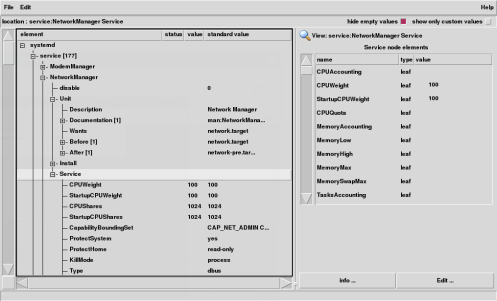
For more details on how to use the GUI to edit systemd files, please see:
Using a GUI may not be your cup of tea.
cme can also be used as a validation tool. Let s add a parameter with an excessive value to my service:
$ echo "CPUShares = 1000000" >> ~/.local/share/systemd/user/free-imap-tunnel@.service
And check the file with
cme:
$ cme check systemd-user
cme: using Systemd model
loading data
Configuration item 'service:"free-imap-tunnel@" Service CPUShares' has a wrong value:
        value 1000000 > max limit 262144
ok, let s fix this with
cme. The wrong value can either be deleted:
$ cme modify systemd-user 'service:"free-imap-tunnel@" Service CPUShares~'
cme: using Systemd model
Changes applied to systemd-user configuration:
- service:"free-imap-tunnel@" Service CPUShares: '1000000' -> ''
Or modified:
$ cme modify systemd-user 'service:"free-imap-tunnel@" Service CPUShares=2048'
cme: using Systemd model
Changes applied to systemd-user configuration:
- service:"free-imap-tunnel@" Service CPUShares: '1000000' -> '2048'
You can also view the specification of a service using cme:
$ cme dump systemd-user 'service:"free-imap-tunnel@"'---
Service:
  CPUShares: 2048
  ExecStart:
    - '-/usr/bin/socat -  PROXY:127.0.0.1:imap.free.fr:993,proxyport=8888'
  StandardInput: socket
Unit:
  Description: Tunnel IMAPS connections to Free with Systemd
The output above matches the content of the service configuration file:
$ cat ~/.local/share/systemd/user/free-imap-tunnel@.service
## This file was written by cme command.
## You can run 'cme edit systemd-user' to modify this file.
## You may also modify the content of this file with your favorite editor.
[Unit]
Description=Tunnel IMAPS connections to Free with Systemd
[Service]
StartupCPUWeight=100
CPUShares=2048
StartupCPUShares=1024
StandardInput=socket
# no need to install corkscrew now
ExecStart=-/usr/bin/socat -  PROXY:127.0.0.1:imap.free.fr:993,proxyport=8888
Last but not least, you can use cme shell if you want an interactive ui but cannot use a graphical interface:
$ cme shell systemd-user
cme: using Systemd model
 >:$ cd service:"free-imap-tunnel@"  Service
 >: service:"free-imap-tunnel@" Service $ ll -nz Exec*
name        type   value

ExecStart   list   -/usr/bin/socat -  PROXY:127.0.0.1:imap.free.fr:993,proxyport=8888
 >: service:"free-imap-tunnel@" Service $ ll -nz
name               type      value

StartupCPUWeight   integer   100
CPUShares          integer   2048
StartupCPUShares   integer   1024
StandardInput      enum      socket
ExecStart          list      -/usr/bin/socat -  PROXY:127.0.0.1:imap.free.fr:993,proxyport=8888
 >: service:"free-imap-tunnel@" Service $ set CPUShares=1024
 >: service:"free-imap-tunnel@" Service $ ll -nz CPUShares
name        type      value

CPUShares   integer   1024
 >: service:"free-imap-tunnel@" Service $ quit
Changes applied to systemd-user configuration:
- service:"free-imap-tunnel@" Service CPUShares: '2048' -> '1024'
write back data before exit ? (Y/n)
Currently, only service, socket and timer units are supported. Please
create a bug report on github if you need more.
Installation instructions are detailed at the beginning of
Managing Systemd configuration with cme wiki page.
As all softwares,
cme probably has bugs. Please
report any issue you might have with it.
For more information:
All in all, systemd is quite complex to setup. I hope I made a little bit easier to deal with.
All the best
Tagged:
config-model,
configuration,
Perl,
systemd 
 Every year since 2012, I typeset the problems and solutions for the German math event Tag der Mathematik, which is organized by the Zentrum f r Mathematik and reaches 1600 students from various parts of Germany. For that, I often reach to the LaTeX drawing package TikZ, and I really like the sober aesthetics of a nicely done TikZ drawing. So mostly for my own enjoyment, I collect the prettiest here.
On a global scale they are still rather mundane, and for really impressive and educating examples, I recommend the TikZ Gallery.


 Idea via
 Big news: RcppTOML now works on Windows too!
This package had an uneventful 2016 without a single update. Release 0.0.5 had come out
 Falling off the cliff is always a surprise. I know it's there; I've been
living next to it for months. I chart its outline daily. Avoiding it has
become routine, and so comfortable, and so failing to avoid it surprises.
Monday evening around 10 pm, the laptop starts draining down from 100%.
House battery, which has been steady around 11.5-10.8 volts since well
before Winter solstice, and was in the low 10's, has plummeted to 8.5 volts.
With the old batteries, the cliff used to be at 7 volts, but now, with
new batteries but fewer, it's in a surprising place, something like
10 volts, and I fell off it.
Weather forecast for the week ahead is much like the previous week:
Maybe a couple sunny afternoons, but mostly no sun at all.
Falling off the cliff is not all bad. It shakes things up. It's a good
opportunity to disconnect, to read paper books, and think long
winter thoughts. It forces some flexability.
I have an auxillary battery for these situations. With its own little
portable solar panel, it can charge the laptop and run it for around 6
hours. But it takes it several days of winter sun to charge back up.
That's enough to get me through the night. Then I take a short trip, and
glory in one sunny afternoon. But I know that won't get me out of the hole,
the batteries need a sunny week to recover. This evening, I expect to lose
power again, and probably tomorrow evening too.
Luckily, my goal for the week was to write slides for two talks, and I've
been able to do that despite being mostly offline, and sometimes
decomputered.
And, in a few days I will be jetting off to Australia! That should give
the batteries a perfect chance to recover.
Previously:
 Today


 My monthly report covers a large part of what I have been doing in the free software world. I write it for
 I apologize to all potential readers of this blog for not writing a comprehensive Introduction post with details of the project I am taking part in during my internship, as well as some story about how I ended up there.
Let me just say that I was a Debian user for years when I discovered it is taking part in Outreachy as one of organisations. Their
 A Safe and Happy New Year to all.


 So that was 2016! Here s a summary of what I got up to on my computer(s) in December, a check of how I went against my plan, and the TODO list for the next month or so.
With a short holiday to Oslo, Christmas holidays, Christmas parties (at work and with Alexander at school, football etc.), travelling to Brussels with work, birthdays (Alexander & Antje), I missed a lot of deadlines, and failed to reach most of my Free Software goals (including my goals for new & updated packages in Debian Stretch the soft freeze is in a couple of days). To top it all off, I lost my grandmother at the ripe old age of 93. Rest in peace Nana. I wish I could have made it to the funeral, but it is sometimes tough living on the other side of the world to your family.
Debian
