Matthew Palmer: Aaargh! Wikis!
 You know you've got a bad wiki when you start pining for "the good
old days" of MediaWiki. Yes, this wiki I need to use is that bad.
You know you've got a bad wiki when you start pining for "the good
old days" of MediaWiki. Yes, this wiki I need to use is that bad.
 Back in the US, crashing with
 kernelslacker and marvelling at the fact that Snoop Dogg has a reality TV show on bringing up kids. It also seems that the cosmetics industry has solved the cancer problem, based on the number of adverts that show magic moisturiser molecules appearing to repair DNA.
... is Donna
Benjamin and her army of mignons.
I'm going to have the mental image of a large collection of steaks wrapped
in bacon marching around a parade ground stuck in my head all day
now.
As Internet-connected people, we tend to interact with a lot of
people who aren't necessarily geographically co-located. Hence
today's cool little program I found: gworldclock. You pick
an arbitrary number of timezones to have in your list, and the
current time in all of them is displayed in a neat list, quietly
ticking away regularly. Small? Yes. Trivial? Getting close to
it. Really Useful? You betcha. It also has a very tidy
'rendezvous' mode, where you choose a time, a timezone (from your
list of selected timezones) and it shows the corresponding time in
all of your other chosen timezones. Again, something that 20
minutes of coding will probably produce, but the whole point of this
open source thing is not having to re-invent the wheel...
The 'g' does indicate a GTK application, but there is a
kworldclock for people who wouldn't be seen dead with a GTK
application on their desktop, and a console-only version,
tzclock, for anyone who lives the text-mode life.
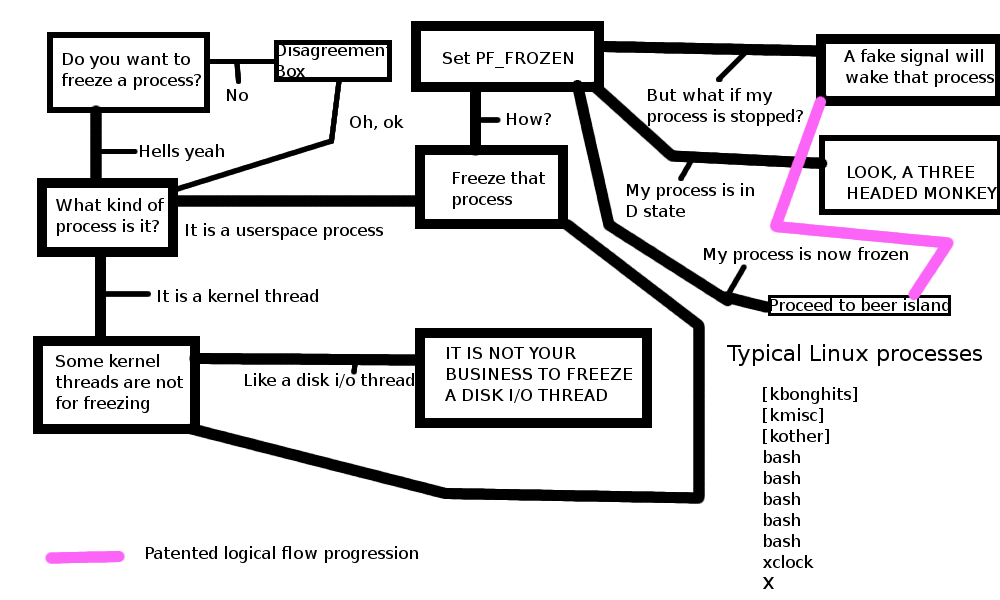
Hello! I am in San Francisco. Offers of beer, entertainment and marriage will be given appropriate consideration. Interestingly, moving from Melbourne to here seems to have left me back on GMT, which I'm sure isn't quite what I want.Slides for my presentation on the Linux suspend to disk implementation are here. The presentation itself should be linked off the programme at some point, but for now here's a representative preview slide:
 This article is kind of interesting - it's a claim from a conservation group that using PCs to perform climate modelling is preferable to leaving them idle. The figures they provide are based on this brouchure from Tufts University, which provides an average power consumption per computer of 120 Watts and CO2 production of 1500 pounds per year. That gives a figure of 12.5 pounds of CO2 per Watt year.Partial OLPC unboxing:

 Wow, I think I got more "search results" than Google from yesterday's lazyweb
search on HTML formatting. <grin> It turned out to be quite
simple, as over 40 people were kind enough to point out to me -- in HTML,
images are textual, "inline" elements, and so they get treated like text,
in that if there's whitespace (any amount) between them, the browser
treats them as separate "words" and puts some space in there. That also
explains why they moved depending on the font size I chose -- the size of
inter-word spacing is, of course, dependent on your font size.
I'd like to thank everyone who responded and helped me out. In addition
to getting the answer to my problem (which was simply "remove all whitespace
between the image tags and butt them right up next to each other", like
this: <img ... /><img ... /><img ... />) I got a couple of other
useful related tips (like switching the images to display: block
and then treating them like a div with floating and such).
As much as it pains me to say it, though, I think I'll be following the
tip given to me by one respondant: "just use tables". Yes, the gods of
good web design shall smite me, but it is insanely difficult to get a
really good, cross-browser layout happening using just CSS. It was fun
to play the tweaking game the first couple of times (my blog layout is
all CSS, for example, and my
brigade's website, which I recently re-did, is all CSS), but each of
those took me hours to get what are, at the end of the day,
pretty basic and not particularly good looking sites. When all is said
and done, it's just too damned hard.
CSS is a lovely principle, but between browser bugs and an insanely
complex standard in practice, it's not nearly so fun.
Today's case in point: I want three images stuck right next to each
other. I've got an example
of the sort of thing I want to do -- in that example, I want the three
coloured squares to be adjacent, not separated by several pixels of
whitespace, and for there to be no white between the boxes and the bottom
border.
In order to make this happen, at the moment, I've got to set negative
right and bottom margins, which to me is just completely screwed up --
negative margins, to me, means overlap, not adjacency. What makes it
even worse is that different browsers need different pixel counts. So
far I've tested on IE6 and Firefox 1.5.
The thing that really does my head in, though, is that fact if I
change the font size the gap changes. So somewhere inside of both IE6
and Firefox 1.5, there's some relative size getting in the way of just
sticking pictures next to each other.
Update: I've been given the solution. Thanks to the 50 or so people who responded; it's great to know there's so many helpful people out there.
It's interesting to compare the "marketing features" of proprietary
version control systems and the FOSS equivalents. For example, I
happened to stumble across SourceGear Vault,
and I have to say that the feature list, as given, doesn't impress me
particularly.
When the most impressive features you can think to mention are things
like "All repository data is stored in a SQL Server database" and "the
checkin operation is atomic", I'm thinking you're probably not a serious
competitor against some of the truly state-of-the-art systems that are
commonly used in the open source world. Based on the advertised
features, I'd say that Vault probably doesn't compare favourably to SVN,
let alone bzr or darcs.
Overall, I don't think we're doing so badly in the innovation stakes.
<grin>
How often have you said to yourself "this programming language's if
statement is too flexible, I need to make it more rigid, and with a
syntax nobody else understands"?
If you've ever said that to yourself, then take a look at this Rails plugin.
From the brief description of the plugin:
Allows developers to execute or not execute given code block depending on a set of conditions, written in intuitive manner. Especially useful within view templates, where it can eliminate the need for multiple if ... else ... statements.That screams "overkill" to me, but for the sake of my morbid curiousity (and on the very, very off chance that it's something not entirely ridiculous) I took a look at the detailed documentation. At least there is detailed documentation for this plugin. I didn't get any further than the first example, though. Take a look at this monster:
How often do you find yourself writing something like that in your views:Hopefully, most people out there answered a resounding "no" to that last question. A plugin which causes you to write just as many lines and very nearly as many characters, whilst using a completely different minilanguage to what every Ruby programmer already knows, does not sound "much better" to me. Ruby people tend to love little minilanguages to get things done, but this... I just don't have the words to properly describe it. I'm going to start a list of "poison plugins" -- ones that, if I see any of them in or around the code of a Rails project I'm looking at working on, immediately doubles the hourly rate and the time estimates. Stupidity is toxic, and working with hazardous substances is always more expensive. Other current candidates include the old-world auth generator I gutted while I was at Vquence, and annotate_models -- the former because it's shocking code, and the latter because anyone who uses it has some seriously scary ideas about what constitutes acceptable documentation and development practices.<% if current_user != :false && (current_user.administrator? current_user == @profile.user) %> <%= button_to('Big Red Button', destroy_everything_path) %> <% else %> <%= button_to('Hands off!!!', access_denied_path) %> <% end %>It works, but, you know, it's not what you would call beautiful, is it? What about something like that:<% access.to_administrator.or_user_of(@profile) do %> <%= button_to('Big Red Button', destroy_everything_path) %> <% end.else do %> <%= button_to('Hands off!!!', access_denied_path) %> <% end %>At least conditions are looking much better, aren't they?
As much for my reference as anything else. Am I missing anything obvious I ought to be at? April-June seems oddly empty, which I guess gives me an opportunity to actually sort my life out. OLS loses on the basis of the beer in Portland being better than the beer in Ottawa. Posting does not imply a contract. Attendance of Matthew may go up as well as down. Statutory rights are unaffected.JAVA_HOME=/usr/lib/jvm/java-gcj CLASSPATH=/usr/share/java/esd.jar:/usr/share/java/jsch.jar jh_build weirdx.jar srcThis command will compile all the Java files under src , set the classpath in the manifest and build it all into weirdx.jar. A couple of other options are worth mentioning. If this jar contains an application rather than a library then the -m or --main option can be used to set the Main-Class attribute in the manifest which will allow the resulting jar file to be be executed jh_build also provides a --clean parameter which should be called in the clean target of debian/rules . jh_libs For library packages Debian Java policy currently requires that the libraries be installed to /usr/share/java in a versioned format and with an unversioned symlink. jh_libs will take a jar and correctly install it. As with debhelper programs, this can either take a jar as a parameter, or read a list of jars from a file in the Debian directory. It also follows the -p , -i and -s semantics of debhelper for selecting which packages to install the jar to. When operating on a package, jh_libs will read the list of library jars from debian/package.jlibs or debian/jlibs . The jlibs file is a list of jars to install, one per line, and works exactly the same as listing them on the command line. Each jar is installed to debian/package/usr/share/java/ in the appropriate versioned and unversioned forms. jh_depends jh_depends works like dpkg-shlibdeps, but for jar files. For each jar in the package it takes the jars on which it depends and finds the packages to which they belong. These are included in the debhelper substvars as $ java:Depends . The control file can then just list that variable which is filled in automatically. This is done by reading the Class-Path attribute from the manifest of each jar. Jar files should include this attribute to prevent applications which use them from needing a full recursive classpath in their startup scripts and to prevent unneccessary transitions when the library changes its dependencies. If the package is not built with jh_build and the upstream build system doesn't set it correctly then jh_manifest can be used to fix this. If the application uses executable jars (see Runtime support below) then jh_depends will also add the appropriate depends on jarwrapper and the correct Java runtime. jh_manifest Many upstream build systems do not set the Class-Path attribute in the jars they create. This leads to several unwanted problems, such as expanding the classpath which applications have to use and introducing unneccessary transitions. They also may not set the Main-Class attribute. Both of these are required for running jars with the -jar parameter. jh_manifest can fix the manifest files of jars. It can either read from a manifest file in the Debian directory or run in a mode which updates all the jars with the CLASSPATH environment variable. The manifest files can either be debian/package.manifest or debian/manifest . The format of this file is a list of jars and indented below each one a list of manifest elements to set:
usr/share/weirdx/weirdx.jar:
 Main-Class: com.jcraft.weirdx.WeirdX
 Debian-Java-Home: /usr/lib/jvm/java-gcj
jh_exec The Runtime support section below describes running executable jars directly. jh_exec will scan package directories for jars in the paths, or symlinks to jar from the paths, and ensure that they have been set executable if necessary. jh_makepkg jh_makepkg will create template Debian packages for Java programs and libraries similar to dh-make . It should be run in the source directory and it will create the orig.tar.gz and most of the files in the Debian directory, which need only small changes neccessary to build the package. java-propose-classpath Some upstreams have complicated classpaths which may not be obvious to the packager when using jh_manifest to set the Class-Path attribute. java-propose-classpath will unpack a jar and look at the symbols imported to the class files, then scan all the jars in /usr/share/java . This shouldn't be run in the build since it is slow, and there may be ambiguities that the packager must resolve. It is still very useful for the packager as most of the time it will get it right automatically. Runtime support Javatools also provides some runtime support. Unlike compiled programs, or purely interpreted programs with hash-bang lines, Java programs cannot be directly executed. Many upstreams expect them to be run using java -jar jarname or java classname . This is not generally acceptible in systems which expect to just be able to run the command or launch it from a menu. As a result, many packagers are writing wrapper scripts which just call java with the correct classpath, jar and main class. jarwrapper There is an alternative to wrapper scripts, however. The binfmt_misc kernel module allows the kernel to call out to a program in userspace to execute specific types of file. jarwrapper registers itself as a handler for executable jars. This is done by reading values from the manifest file. In order for executable jars to work the following attributes must or may be defined in the manifest. These attributes can be set using jh_build and jh_manifest .
Source: jsch
Section: libs
Priority: optional
Maintainer: Matthew Johnson
Build-Depends: debhelper (>= 5), javahelper, java-gcj-compat-dev, libzlib-java
Standards-Version: 3.7.3
Homepage: http://www.jcraft.com/jsch/
Package: libjsch-java
Architecture: all
Depends: $ java:Depends , $ misc:Depends
Description: Java secure channel
 JSch is a pure Java implementation of SSH2. JSch allows you to
 connect to an sshd server and use port forwarding, X11 forwarding,
 file transfer, etc., and you can integrate its functionality
 into your own Java programs. JSch is licensed under a BSD style
 license.
debian/rules
#!/usr/bin/make -f
export JAVA_HOME=/usr/lib/jvm/java-gcj
export CLASSPATH=/usr/share/java/zlib.jar
build: build-stamp
build-stamp:
	dh_testdir
	jh_build jsch.jar src
	touch $@
clean:
	dh_testdir
	dh_testroot
	jh_build --clean
	dh_clean
	rm -f build-stamp jsch.jar
install: build
	dh_testdir
	dh_testroot
	dh_clean -k
	dh_installdirs
binary-arch: build install
	# Java packages are arch: all, nothing to do here
binary-indep: build install
	# Create the package here
	dh_testdir
	dh_testroot
	dh_clean -k
	dh_install -i
	dh_installdocs -i
	dh_installchangelogs -i
	dh_javadoc -i --sourcedir=src
	jh_libs -i
	jh_depends -i
	dh_compress -i
	dh_fixperms -i
	dh_installdeb -i
	dh_gencontrol -i
	dh_md5sums -i
	dh_builddeb -i
binary: binary-indep binary-arch
.PHONY: build clean binary-indep binary-arch binary install
debian/libjsch-java.jlibs
jsch.jarSample Application Packaging debian/control
Source: salliere
Section: misc
Priority: optional
Maintainer: Matthew Johnson
Build-Depends: debhelper (>= 5), java-gcj-compat-dev, fastjar,
               libmatthew-debug-java, libcsv-java,
               libitext-java, javahelper
Standards-Version: 3.7.3
Package: salliere
Architecture: all
Depends: $ java:Depends , $ misc:Depends
Description: Short Description
 Long Description
debian/rules
#!/usr/bin/make -f
export JAVA_HOME=/usr/lib/jvm/java-gcj
export CLASSPATH=/usr/share/java/csv.jar:/usr/share/java/debug-disable.jar:/usr/share/java/itext.jar
build: build-stamp
build-stamp:
   dh_testdir
   # Build the package
   jh_build salliere.jar src
   touch $@
clean:
   dh_testdir
   dh_testroot
   jh_build --clean
   dh_clean
   rm -f build-stamp salliere.jar
install: build
   dh_testdir
   dh_testroot
   dh_clean -k
   dh_installdirs
binary-arch: build install
   # Java packages are arch: all, nothing to do here
binary-indep: build install
   # Create the package here
   dh_testdir
   dh_testroot
   dh_clean -k
   dh_install -i
   dh_installdocs -i
   dh_installchangelogs -i
   jh_manifest -i
   dh_link -i
   jh_exec -i
   jh_depends -i
   dh_compress -i
   dh_fixperms -i
   dh_installdeb -i
   dh_gencontrol -i
   dh_md5sums -i
   dh_builddeb -i
binary: binary-indep binary-arch
.PHONY: build clean binary-indep binary-arch binary install
debian/salliere.install
salliere.jar usr/share/sallieredebian/salliere.links
usr/share/salliere/salliere.jar usr/bin
A conversation at lunch today inspired me to work on a quick estimate of the amount of power wasted on animation and Flash-laden MySpace profiles. My conservative estimate is somewhere in the region of 320 kiloWatts, which is much less than I'd have expected. This is probably skewed by me carrying out the test on a laptop - I'd guess that it'll be worse on desktops, but I need to do some more testing to be sure (ideally involving a Watts-up and a serial connection so it can be done without a ridiculous amount of pain). By changing a couple of assumptions it's quite easy to get it up into the megaWatt range, but we're still talking "That's quite a pile of money" rather than "That's a sizable proportion of the US electricity output".  The problems are now fixed, thanks to a tip from Julian.
I really appreciate that you've written tests for your software; it raises
the chances that you're not a screaming moron by a few points. However,
please understand that you may not be the last person on earth who may
wish to benefit from the test suite, and DOCUMENT HOW TO RUN THE FUCKING
TEST SUITE. I'm currently into my third hour of trying to work out what
precise set of dependencies and incantations is required to make your test
suite run.
Bonus hate is available for that subset of these people who reject patches
that don't come with suitable additions to the test suite.
Next.