In my last post, Badri and I reached Kuala Lumpur - the capital of Malaysia - on the 7th of December 2024. We stayed in Bukit Bintang, the entertainment district of the city. Our accommodation was pre-booked at Manor by Mingle , a hostel where I had stayed for a couple of nights in a dormitory room earlier in February 2024.
We paid 4937 rupees (the payment was online, so we paid in Indian rupees) for 3 nights for a private room. From the Terminal Bersepadu Selatan (TBS) bus station, we took the metro to the Plaza Rakyat LRT station, which was around 500 meters from the hostel. Upon arriving at the hostel, we presented our passports at their request, followed by a 20 ringgit (400 rupee) deposit which would be refunded once we returned the room keys at checkout.
Manor by Mingle - the hostel where we stayed at during our KL transit. Photo by Ravi Dwivedi. Released under the CC-BY-SA 4.0.
Our room was upstairs and it had a bunk bed. I had seen bunk beds in dormitories before, but this was my first time seeing a bunk bed in a private room. The room did not have any toilets, so we had to use shared toilets.
Unusually, the hostel was equipped with a pool. It also had a washing machine with dryers - this was one of the reasons we chose this hostel, because we were traveling light and hadn t packed too many clothes. The machine and dryer cost 10 ringgits (200 rupees) per use, and we only used it once. The hostel provided complimentary breakfast, which included coffee. Outside of breakfast hours, there was also a paid coffee machine.
During our stay, we visited a gurdwara - a place of worship for Sikhs - which was within walking distance from our hostel. The name of the gurdwara was Gurdwara Sahib Mainduab. However, it wasn t as lively as I had thought. The gurdwara was locked from the inside, and we had to knock on the gate and call for someone to open it. A man opened the gate and invited us in.
The gurdwara was small, and there was only one other visitor - a man worshipping upstairs. We went upstairs briefly, then settled down on the first floor.
We had some conversations with the person downstairs who kindly made chai for us. They mentioned that the langar (community meal) is organized on every Friday, which was unlike the gurdwaras I have been to where the langar is served every day. We were there for an hour before we left.
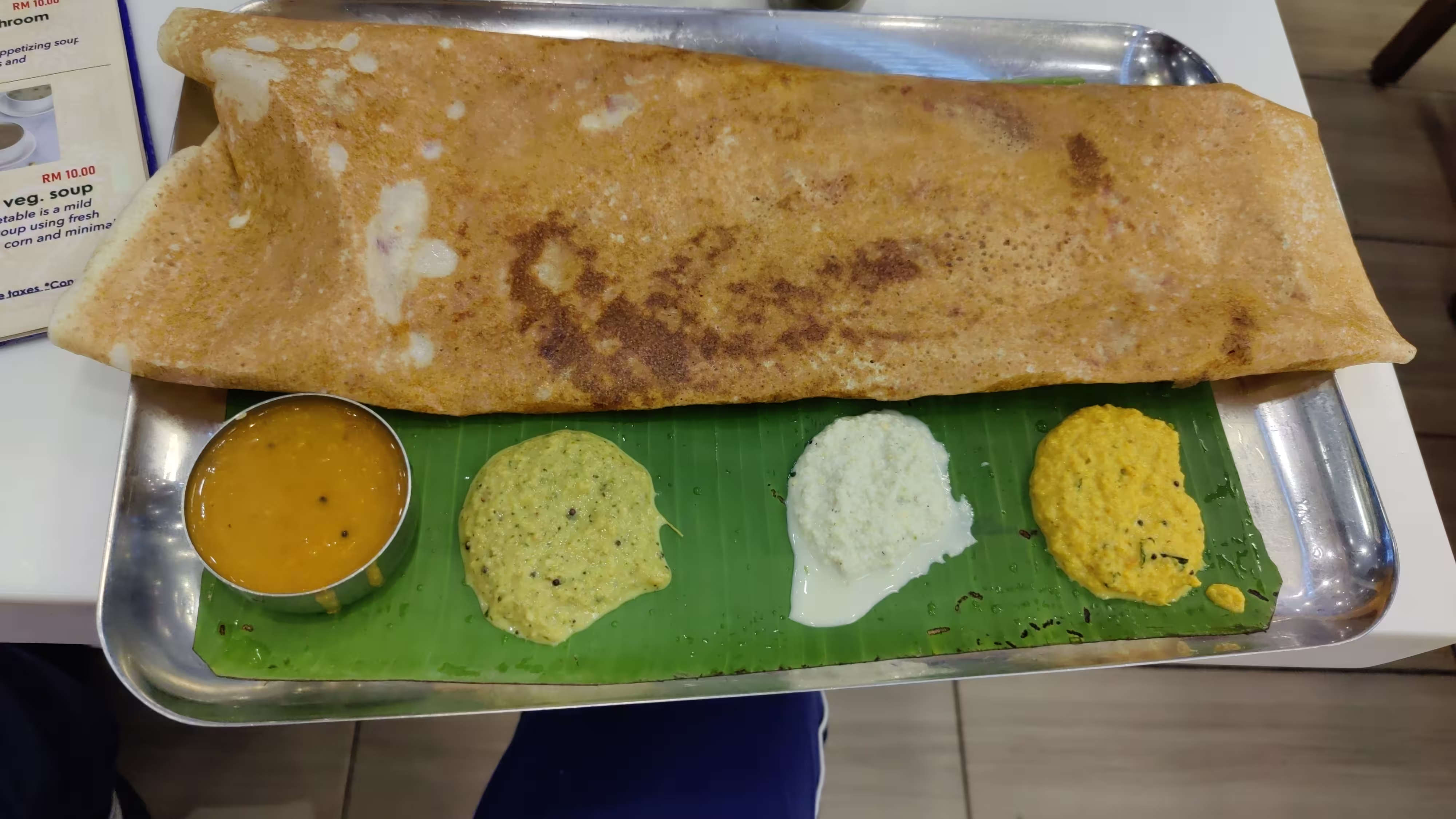
We also went to Adyar Ananda Bhavan (a restaurant chain) near our hostel to try the chain in Malaysia. The chain is famous in Southern India and also known by its short name A2B. We ordered
an onion dosa for 10 ringgits (200 rupees),
1 masala tea for 6 ringgits (120 rupees),
2 pooris for 8 ringgits (160 rupees) and
1 plate potato bajji for 7 ringgits (140 rupees).
Dosa served at Adyar Ananda Bhavan. Photo by Ravi Dwivedi. Released under the CC-BY-SA 4.0.
All this came down to around 33 ringgits (including taxes), i.e. around 660 rupees. We also purchased some snacks such as murukku from there for our trip.
We had planned a day trip to Malacca, but had to cancel it due to rain. We didn t do a lot in Kuala Lumpur, and it ended up acting as a transit point for us to other destinations: flights from Kuala Lumpur were cheaper than Singapore, and in one case a flight via Kuala Lumpur was even cheaper than a direct flight!
We paid 15,000 rupees in total for the following three flights:
Kuala Lumpur to Brunei,
Brunei to Kuala Lumpur, and
Kuala Lumpur to Ho Chi Minh City (Vietnam).
These were all AirAsia flights. The cheap tickets, however, did not include any checked-in luggage, and the cabin luggage weight limit was 7 kg. We also bought quite some stuff in Kuala Lumpur and Singapore, leading to an increase in the weight of our luggage.
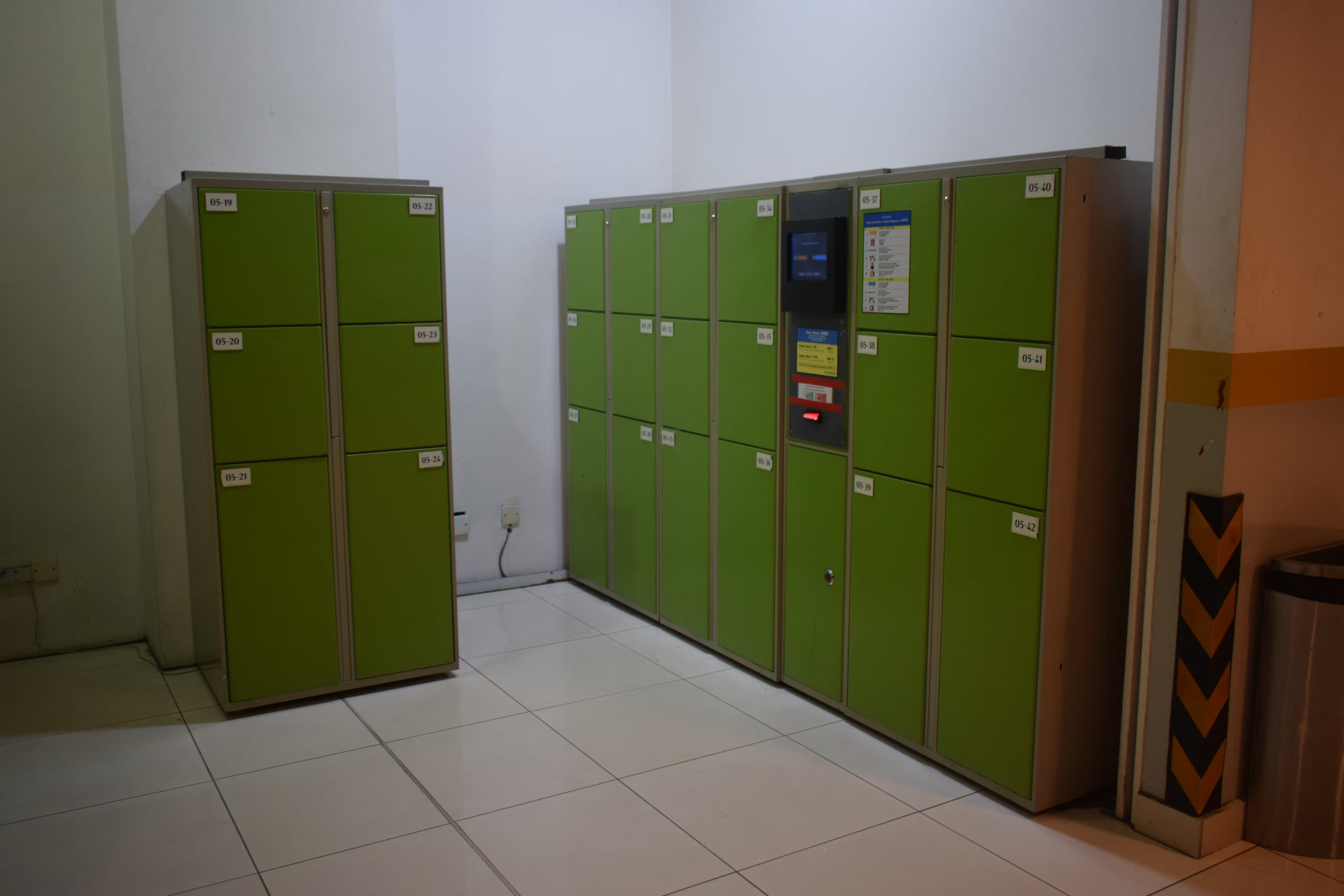
We estimated that it would be cheaper for us to take only essential items such as clothes, cameras, and laptops, and to leave behind souvenirs and other non-essentials in lockers at the TBS bus stand in Kuala Lumpur, than to pay more for check-in luggage. It would take 140 ringgits for us to add a checked-in bag from Kuala Lumpur to Bandar Seri Begawan and back, while the cost for lockers was 55 ringgits at the rate of 5 ringgits every six hours.
We had seen these lockers when we alighted at the bus stand while coming from Johor Bahru. There might have been lockers in the airport itself as well, which would have been more convenient as we were planning to fly back in soon, but we weren t sure about finding lockers at the airport and we didn t want to waste time looking.
We had an early morning flight for Brunei on the 10th of December. We checked out from our hostel on the night of the 9th of December, and left for TBS to take a bus to the airport. We took a metro from the nearest metro station to TBS. Upon reaching there, we put our luggage in the lockers. The lockers were automated and there was no staff there to guide us.
Lockers at TBS bus station. Photo by Ravi Dwivedi. Released under the CC-BY-SA 4.0.
We bought a ticket for the airport bus from a counter at TBS for 26 ringgits for both of us. In order to give us tickets, the person at the counter asked for our passports, and we handed it over to them promptly. Since paying in cash did not provide any extra anonymity, I would advise others to book these buses online.
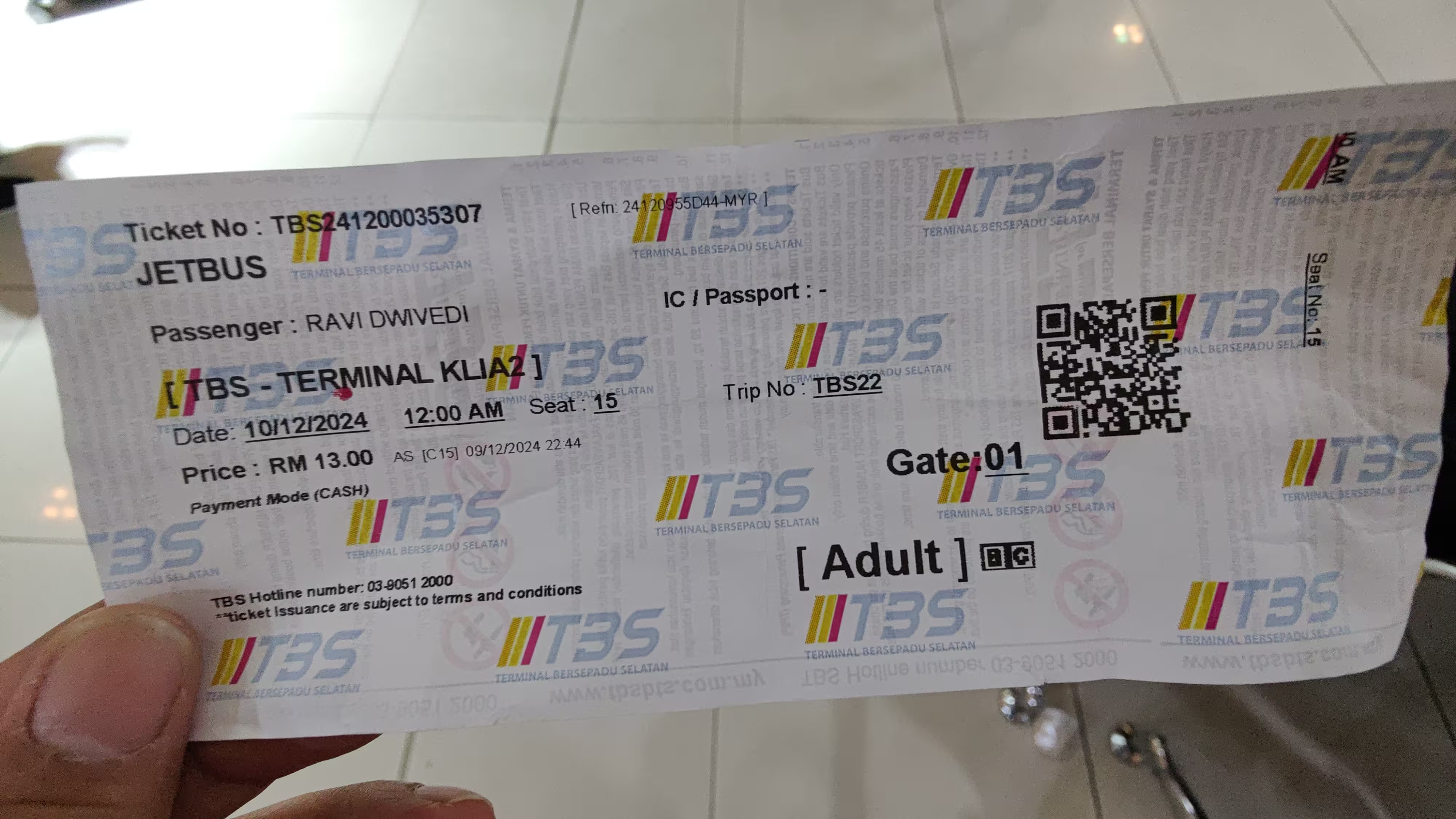
In Malaysia, you also need a boarding pass for buses. The bus terminal had kiosks for getting these printed, but they were broken and we had to go to a counter to obtain them. The boarding pass mentioned our gate number and other details such as our names and departure time of the bus. The company was Jet Bus.
My boarding pass for the bus to the airport in Kuala Lumpur. Photo by Ravi Dwivedi. Released under the CC-BY-SA 4.0.
To go to our boarding gate, we had to scan our boarding pass to let the AFC gates open. Then we went downstairs, leading into the waiting area. It had departure boards listing the bus timings and their respective gates. We boarded our bus around 10 minutes before the departure time - 00:00 hours. It departed at its scheduled time and took 45 minutes to reach KL Airport Terminal 2, where we alighted.
We reached 6 hours before our flight s departure time of 06:30. We stopped at a convenience store at the airport to have some snacks. Then we weighed our bags at a weighing machine to check whether we were within the weight limit. It turned out that we were.
We went to an AirAsia counter to get our boarding passes. The lady at our counter checked our Brunei visas carefully and looked for any Brunei stamps on the passports to verify whether we had used that visa in the past. However, she didn t weigh our bags to check whether they were within the limit, and gave us our boarding passes.
We had more than 4 hours to go before our flight. This was the downside of booking an early morning flight - we weren t able to get a full night s sleep.
A couple of hours before our flight time, we were hanging around our boarding gate. The place was crowded, so there were no seats available. There were no charging points. There was a Burger King outlet there which had some seating space and charging points. As we were hungry, we ordered two cups of cappuccino coffee (15.9 ringgits) and one large french fries (8.9 ringgits) from Burger King. The total amount was 24 ringgits.
When it was time to board the flight, we went to the waiting area for our boarding gates. Soon, we boarded the plane. It took 2.5 hours to reach the Brunei International Airport in the capital city of Bandar Seri Begawan.
View of Kuala Lumpur from the aeroplane. Photo by Ravi Dwivedi. Released under the CC-BY-SA 4.0.
Stay tuned for our experiences in Brunei!
Credits: Thanks to Badri, Benson and Contrapunctus for reviewing the draft.
I guess it is about time I posted a new summary of the free
software and open culture activites and projects I have been involved
in the last year. The days have been so packed the last year that I
have failed with my intention to post at least one blog post per
month, so this summary became rather long. I am sorry about this.
This year was the year I got tired of the lack of new releases of
the multimedia related libraries published via
Xiph, and I decided to wrap up the
current state and make the releases myself. In a burst of activity
early this year, I collected and tested patches, coordinated with
other developers and finally made new tarballs and release
announcement for theora, and
new tarball releases for
liboggz,
kate and
fishsound.
This upstreamed several patches accumulated in Debian and other Linux
distributions for the last 15 years or so.
To change the world and the future, it is important to start with the
kids, and one such avenue of change have been created by the current
president of FSF Europe, Matthias Kirschner. He wrote a book for
children, Ada & Zangemann, and I
have been involved in its translation framework for the entire year.
The source code has been transformed to
Docbook and I have been conducting
and coordinating translations into Norwegian Bokm l and Nynorsk, as
well as preparing paper editions of the book and an animation
movie with Norwegian voices. The Bokm l edition is very close to
ready, and will be available early in 2026, and the movie release will
follow shortly after this. I intend announce this on my blog and
elsewhere when this happen. Please get in touch if you want to help
spread the word about this book in Norwegian. I hope we can get the
author to Norway when making the Norwegian releases.
This year I continued a push for the system I made a few years ago to
improve hardware dongle handling on Linux. The
Isenkram system use
hardware mapping information provided by relevant packages using the
AppStream system to propose which Linux distribution packages to
install on a given machine to support dongles like cameras, finger
print readers, smart card readers, LEGO controllers, ECC memory and
other hardware. I have followed up on the list of packages providing
such mapping, either to get it into Debian or to upstream the
necessary metadata. I am not sure if we are at a point where package
maintainers on their own add such information to their packages, but
there are
Debian
lintian reports suggesting it and I have
send
patches to all packages I am aware of that should include such
mappings. Most of the patches are included in Debian now, only 27 was
left the last time I checked.
As part of my involvement with Debian, I continued my push to get
all orphaned packages without a version control repository migrated to
git. I am not sure how many packages I went through, but it was in the
range of 200-300 packages. In addition to this I updated, sponsored,
pushed maintainers for updates
upstreamed patches for and fixed RC issues with
battery-stats,
bs1770gain,
isenkram,
libonvif,
mfiutil,
opensnitch,
simplescreenrecorder,
vlc-plugin-bittorrent
and wakeonlan. I've
also followed up LEGO related packages, dahdi support for Asterisk,
llama.cpp and whisper.cpp in particular for the AMD GPU I was donated
by AMD, as well as tried yet again to convince the upstream developers
of the photogrammetric
workstion e-foto to get their program into a state that could be
included in Debian.
As I do not buy into the story that it is great to expose oneself to
the whims of and priorities of commercial entities to have access to
cultural expressions like films and music, I still maintain a huge
collection of movies. For this to work well, I have ended up as part
of the people maintaining
lsdvd upstream and
wrapped up a new release fixing several crash bugs caused by DVDs with
intentionally broken metadata, and introduced code to list a DVD ID in
the lsdvd output. Related to this, I have also worked some add-ons
for my main video and music player, and took over upstream maintenance
of the Invidious
add-on, which sadly stopped working for non-authenticated users
when web scrapers made it impossible for Invidious installations to
provide a open API, as well as contributed to the
NRK and
projector
control add-ons.
As part of my involvement in the Norwegian archiving community and
standardisation work, we organised a Noark 5 workshop this spring
discussing
how
to decide what to keep and what to delete in digital archives. We
finally managed to apply for Noark 5 certification for the free
software archive API
Nikita,
as well as worked to test and improve the performance of Nikita
together with people on my day job at the university.
Manufacturing using Free Software is still a focus for me, and I
have continued my involved with the
LinuxCNC community, organising a developer gathering this summer
with the help and sponsoring from the initial start in 2023 from
NUUG Foundation and sponsoring
from Debian and
Redpill-Linpro. We
plan to repeat the event also in 2026, but this time NUUG Foundation
have told us they do not want a role, so we have found another
friendly organisation to handle the money.
A popular machine controller with LinuxCNC is the MESA set of
electronics, which is centred around a FPGA which now can be
programmed using only Free Software. We discussed during this summers
gathering how hard it would be to compile the current FPGA source
using a Free Software tool chain, and I started looking into this,
locating tools to transform the VHDL source into something the Yosys
tool chain can handle. Still lot to do there, and I hope to get
further next year.
An important part of Free Software manufacturing is the ability to
design parts and create programs that can be passed to machines making
parts, also known as CAD/CAM. The most prominent project for this is
FreeCAD, and I have been both
pushing to get opencamlib integrated with it in Debian as well as
fixing bugs in the handling of Fanuc controlled machines, do make it
easier to generate instructions for machines I have access to. I
expect to also continue this also next year.
This year the UN conference Internet Governance Forum (IGF) was
held in Norway, and I tried my best to get a stand for the Norwegian
Unix Users Group (NUUG) there. Sadly the effort failed, due to lack
of interest with the NUUG Board, but I was happy to see several
members at least attend some of the activities related to IGF. Sadly
to participate at IGF one need to hand over quite private information,
so I decided not to participate in any of the closed forum events
myself. Related to NUUG I have been a member of the election board
proposing board member candidates to the general assembly, and been
part of the program committee of the
"Big Tech m
vekk" (Big Tech must go away) festival organised by Attac in
concert with NUUG and EFN. I've also assisted the Norwegian open TV
channel Frikanalen with access to
their machines located in a machine room at the university.
Related to the University, I have become involved in a
small
team of students working to build and program robots for the
Robocup@Home competition. For 2026 we also plan to use the new features of
FreeCAD to make parts for the open hardware robot arm
OpenArm. This is also the group
that will handle the money for the LinuxCNC gathering in 2026. Also
related to the university I was looking into the Linux security
auditing system Falco earlier this year, making improvements to the
detection rules. This activity is on hold at the moment, and do not
expect to continue with this in 2026.
I will most likely have to cut down a bit on my free software and
open culture activities going forward, as NUUG Foundation, who have
funded one day a week for such activities for several years no, sadly
have decided they do not want to continue doing this. I am very
grateful for their contributions over the years, both with freeing up
time for me and supporting several events and projects where I have
been involved or taken the initiative on. Now they are reorganizing
with more focus on paperwork and applications.
As usual, if you use Bitcoin and want to show your support of my
activities, please send Bitcoin donations to my address
15oWEoG9dUPovwmUL9KWAnYRtNJEkP1u1b.
Disappointments this year included 28 Years Later (Danny Boyle, 2025), Cover-Up (Laura Poitras & Mark Obenhaus, 2025), Bugonia (Yorgos Lanthimos, 2025) and Caught Stealing (Darren Aronofsky, 2025).
Older releases
ie. Films released before 2024, and not including rewatches from previous years.
Debusine is a tool designed for Debian developers and Operating
System developers in general. This post describes how Debusine stores
and manages files.
Debusine has been designed to run a network of workers that can
perform various tasks that consume and produce artifacts .
The artifact itself is a collection of files structured into an
ontology of artifact types.
This generic architecture should be suited to many sorts of build & CI
problems.
We have implemented artifacts to support building a Debian-like
distribution, but the foundations of Debusine aim to be more general
than that.
For example a package build task takes a debian:source-package as
input and produces some debian:binary-packages and a
debian:package-build-log as output.
This generalized approach is quite different to traditional Debian APT
archive implementations, which typically required having the archive
contents on the filesystem.
Traditionally, most Debian distribution management tasks happen within
bespoke applications that cannot share much common infrastructure.
File Stores
Debusine s files themselves are stored by the File
Store layer.
There can be multiple file stores configured, with different policies.
Local storage is useful as the initial destination for uploads to
Debusine, but it has to be backed up manually and might not scale to
sufficiently large volumes of data.
Remote storage such as S3 is also available.
It is possible to serve a file from any store, with policies for which
one to prefer for downloads and uploads.
Administrators can set policies for which file stores to use at the
scope level, as well as policies for populating and draining stores
of files.
Artifacts
As mentioned above, files are collected into Artifacts. They combine:
a set of files with names (including potentially parent directories)
key-value data in a schema specified by the category and stored as a
JSON-encoded dictionary.
Within the stores, files are content-addressed: a file with a given
SHA-256 digest is only stored once in any given store, and may be
retrieved by that digest.
When a new artifact is created, its files are uploaded to Debusine as
needed.
Some of the files may already be present in the Debusine instance.
In that case, if the file is already part of the artifact s workspace,
then the client will not need to re-upload the file.
But if not, it must be reuploaded to avoid users obtaining unauthorized
access to existing file contents in another private workspace or
multi-tenant scope.
Because the content-addressing makes storing duplicates cheap, it s
common to have artifacts that overlap files.
For example a debian:upload will contain some of the same files as
the related debian:source-package as well as the .changes file.
Looking at the debusine.debian.net instance that we run, we can see
a content-addressing savings of 629 GiB across our (currently) 2 TiB
file store.
This is somewhat inflated by the Debian Archive import, that did not
need to bother to share artifacts between suites.
But it still shows reasonable real-world savings.
APT Repository Representation
Unlike a traditional Debian APT repository management tool, the source
package and binary packages are not stored directly in the pool of an
APT repository on disk on the debusine server.
Instead we abstract the repository into a debian:suitecollection within the Debusine database.
The collection contains the artifacts that make up the APT repository.
To ensure that it can be safely represented as a valid URL structure (or
files on disk) the suite collection maintains an index of the pool
filenames of its artifacts.
Suite collections can combine into a debian:archive collection that
shares a common file pool.
Debusine collections can keep an historical record of when things were
added and removed. This, combined with the database-backed
collection-driven repository representation makes it very easy to
provide APT-consumable snapshot views to every point in a repository s
history.
Expiry
While a published distribution probably wants to keep the full history
of all its package builds, we don t need to retain all of the output of
all QA tasks that were run. Artifacts can have an expiration delay
or inherit one from their workspace.
Once this delay has expired, artifacts which are not being held in any
collection are eligible to be automatically cleaned up.
QA work that is done in a workspace that has automatic artifact expiry,
and isn t publishing the results to an APT suite, will safely
automatically expire.
Daily Vacuum
A daily vacuum task handles all of the file periodic maintenance for
file stores.
It does some cleanup of working areas, a scan for unreferenced & missing
files, and enforces file store policies.
The policy work could be copying files for backup or moving files
between stores to keep them within size limits (e.g. from a local upload
store into a general cloud store).
In Conclusion
Debusine provides abstractions for low-level file storage and object
collections.
This allows storage to be scalable beyond a single filesystem and highly
available.
Using content-addressed storage minimizes data duplication within a
Debusine instance.
For Debian distributions, storing the archive metadata entirely in a
database made providing built-in snapshot support easy in Debusine.
Same as last year, this is a summary of what I ve been up to throughout the year.
See also the recap/retrospection published by my friends (antiz, jvoisin, orhun).
Uploaded 467 packages to Arch Linux
Most of them being reproducible, meaning I provably didn t abuse my position of compiling the binaries
35 of them are signal-desktop
29 of them are metasploit
Made 53 uploads to Debian
All of them being related to my work in the debian-rust team, that I ve been a part of since 2018
Also applied for Debian Developer status (with 4 Debian Developers advocating for me)
Made 14 commits in Alpine Linux aports
13 of them being package releases
Made 2 commits in NixOS nixpkgs
Also joined their Github org
Made 4 commits in homebrew-core
With special focus on polishing the Rust development experience for the RP2040 microcontroller
Lost Onion, my cat of 13 years, to inoperable cancer. He has been with me throughout my entire open source journey (sometimes being credited as co-author) and who looked after me for my entire adult life. You won t be forgotten.
Developed 6 hand-held games with embedded Rust, most of them being birthday gifts for people close to me
embedded-graphics-colorcast a library I developed so I can keep using embedded-mono-img on ST7789/ILI9486 screens - I used tinybmp in one project but it was fairly slow
ch32v003-demo to demo and document the lowend ch32v003 RISC-V microcontroller, with devboards that are commonly sold for 0.50-0.70 on AliExpress (it s cute but lacks the required 5.1k resistors on the USB-C configuration pins that tell the host to provide 5V, so it won t work with many USB-C chargers, which is quite annoying)
embedded-savegame an atomic/transactional savegame library, with powerfail-safety and wear-leveling, optimized for flash and EEPROM storage
djb2 a very lightweight non-cryptographic checksum algorithm that replaced my use of CRC32 in the embedded-savegame library, to make it more suitable for the ch32v003
As in previous, years we took another look back at what changed in Phosh in 2025
and instead of just updating our notes why not again share it again here:
The Phosh developers focus from day one was to make devices running Phosh daily drivable without
having to resort to any proprietary OSes as a fallback. This year showed improvements in some
important areas people rely on like cell broadcasts and emergency calls, further improving usability
and starting some ground work we ll need for some upcoming features.
Dark Ambitions is a science fiction romance novella set in Michelle
Diener's Class 5 series, following the events of Dark Matters. It returns to Rose as the protagonist and in that
sense is a sequel to Dark Horse, but you
don't have to remember that book in detail to read this novella.
Rose and Dav (and the Class 5 ship Sazo) are escorting an exploration team
to a planet that is being evaluated for settlement. Rose has her heart set
on going down to the planet, feeling the breeze, and enjoying the plant
life. Dav and his ship are called away to deal with a hostage situation.
He tries to talk her out of going down without him, but Rose is having
none of it. Predictably, hijinks ensue.
This is a very slight novella dropped into the middle of the series but
not (at least so far as I can tell) important in any way to the overall
plot. It provides a bit of a coda to Rose's story from Dark Horse,
but given that Rose has made cameos in all of the other books, readers
aren't going to learn much new here. According to the Amazon blurb, it was
originally published in the Pets in Space 5 anthology. The pet in
question is a tiny creature a bit like a flying squirrel that Rose rescues
and that then helps Rose in exactly the way that you would predict in this
sort of story.
This is so slight and predictable that it's hard to find enough to say
about it to write a review. Dav is protective in a way that I found
annoying and kind of sexist. Rose doesn't let that restrict her decisions,
but seems to find this behavior more charming than I did. There is a tiny
bit of Rose being awesome but a bit more damsel in distress than the
series usually goes for. The cute animal is cute. There's the obligatory
armory scene with another round of technomagical weapons that I think has
appeared in every book in this series. It all runs on rather obvious
rails.
There is a subplot involving Rose feeling some mysterious illness while on
the planet that annoyed me entirely out of proportion to how annoying it
is objectively, mostly because mysterious illnesses tend to ramp up my
anxiety, which is not a pleasant reading emotion. This objection is
probably specific to me.
This is completely skippable. I was told that in advance and thus only
have myself to blame, but despite my completionist streak, I wish I'd
skipped it. We learn one piece of series information that will probably
come up in the future, but it's not the sort of information that would
lead me to seek out a story about it. Otherwise, there's nothing wrong
with it, really, but it would be a minor and entirely forgettable chapter
in a longer novel, padded out with a cute animal and Dav trying to be
smothering.
Not recommended just because you probably have something better to do with
that reading time (reading the next full book of the series, for example),
but there's nothing wrong with this if you want to read it anyway.
Followed by Dark Class.
Rating: 5 out of 10
Here s my monthly but brief update about the activities I ve done in the FOSS world.
Debian
Whilst I didn t get a chance to do much, here are still a few things that I worked on:
Prepared security update for wordpress for trixie and bookworm.
A few discussions with the new DFSG team, et al.
Assited a few folks in getting their patches submitted via Salsa.
Mentoring for newcomers.
Moderation of -project mailing list.
Ubuntu
I joined Canonical to work on Ubuntu full-time back in February 2021.
Whilst I can t give a full, detailed list of things I did, here s a quick TL;DR of what I did:
ceph: Affected by CVE-2024-47866, using the argument x-amz-copy-source to put an object and specifying an empty string as its content leads to the RGW daemon crashing, resulting in a DoS attack.
[LTS]: Whilst the patch is straightforward, backports are a bit tricky. Also trying to backport the fix for CVE-2022-0670. The update has been prepared as of December 16th and awaiting Thomas Goirand s review.
knot-resolver: Affected by CVE-2023-26249, CVE-2023-46317, and CVE-2022-40188, leading to Denial of Service.
[LTS]: The patches aren t very trivial, with
CVE-2023-46317 reverting much of the patch for CVE-2023-26249. And then it had to be re-adjusted a bit for v5.3.1. The backports are ready as of December 23rd and awaiting Jakub or Santiago s review.
adminer: Affected by CVE-2023-45195 and CVE-2023-45196, leading to SSRF and DoS, respectively.
[ELTS]: I picked it up again and the patches were already ready in Git. I ve reached out to Alexandre for a quick review and smoke test before we can release it for buster.
u-boot: Affected by CVE-2025-24857, where boot code access control flaw in U-Boot allowing arbitrary code execution via physical access.
[ELTS]: As it s only affected the version in stretch, I ve started the work to find the fixing commits and prepare a backport. Not much progress there, I ll roll it over to January.
ruby-rack: There were multiple vulnerabilities reported in Rack, leading to DoS (memory exhaustion) and proxy bypass.
[ELTS]: After completing the work for LTS myself, Bastien picked it up for ELTS and reached out about an upstream regression and we ve been doing some exchanges. Bastien has done most of the work backporting the patches but needs a review and help backporting CVE-2025-61771.
Other Activities
Frontdesk from 01-12-2025 to 07-12-2025.
Auto EOL d a bunch of packages.
Marked CVE-2025-12084/python2.7 as end-of-life for bullseye, buster, and stretch.
Marked CVE-2025-12084/jython as end-of-life for bullseye.
Marked CVE-2025-13992/chromium as end-of-life for bullseye.
Marked apache2 CVEs as postponed for bullseye, buster, and stretch.
Marked CVE-2025-13654/duc as postponed for bullseye and buster.
Marked CVE-2025-32900/kdeconnect as ignored for bullseye.
Marked CVE-2025-12084/pypy3 as postponed for bullseye.
Marked CVE-2025-14104/util-linux as postponed for bullseye, buster, and stretch.
Marked several CVEs for fastdds as postponed for bullseye.
Marked several CVEs for pytorch as postponed for bullseye.
Marked CVE-2025-2486/edk2 as postponed for bullseye.
Marked CVE-2025-6172 7,9 /golang-1.15 as postponed for bullseye.
Marked CVE-2025-65637/golang-logrus as postponed for bullseye.
Marked CVE-2025-12385/qtdeclarative-opensource-src ,gles as postponed for bullseye, buster, and stretch.
Marked TEMP-0000000-D08402/rust-maxminddb as postponed for bullseye.
Added the following packages to d,e la-needed.txt:
liblivemedia, sogo.
During my triage, I had to make the bin/elts-eol script robust to determine the lts_admin repository - did a back and forth with Emilio about this on the list.
I claimed php-horde-css-parser to work on CVE-2020-13756 for buster and did almost all the work only to realize that the patch already existed in buster and the changelog confirmed that it was intentionally fixed.
After speaking with Andreas Henriksson, we figured that the CVE ID was missed when the ELA was generated and so I fixed that via 87afaaf19ce56123bc9508d9c6cd5360b18114ef and 5621431e84818b4e650ffdce4c456daec0ee4d51 in the ELTS security tracker to reflect the situation.
Participated in a thread which I started last month around using Salsa CI for E/LTS packages and if we plan to sunset it in favor of using Debusine. The plan for now is to keep it around as it s still beneficial and Debusine is still in its early phase.
Did a lot of back and forth with Helmut about debusine uploads on #debian-elts.
While debugging a failure in dcut uploads, I ran into an SSH compatibility issue on deb-master.freexian.com that could be fixed on the server-side. I shared all my findings to Freexian s sysadmin team.
A minimal fix on the server side would be one of:
PubkeyAcceptedAlgorithms -ssh-dss
or explicitly restricting to modern algorithms, e.g.:
Jelly on #debian-lts reported that all my DLA mails had broken GMail s DKIM signature. So I set up sending replies from @debian.org and that seems to have fixed that! \o/
[LTS] Attended a rather short monthly LTS meeting on Jitsi. Summary here.
[E/LTS] Monitored discussions on mailing lists, IRC, and all the documentation updates.
We re currently thinking of renovating our study/home office. I ll likely write
more about that project. Embarking on it reminded me that I d taken a photo of
the state of it nearly a year ago and forgot to post it, so here it is.
Home workspace, January 2025
When I took that pic last January, it had been three years since the last one,
and the major difference was a reduction in clutter. I've added a lava lamp (charity
shop find) and Rob Sheridan print. We got rid of the
PO NG chair (originally bought
for breast feeding) so we currently have no alternate seating besides the desk chair.
As much as I love my vintage mahogany writing desk, our current thinking is
it s likely to go. I m exploring whether we could fit in two smaller desks: one
main one for the computer, and another workbench for play: the
synthesiser, Amiga, crafting and 3d
printing projects, etc.
Heyo,
In production Kubernetes environments, access control becomes critical when multiple services share the same cluster. I recently faced this exact scenario: a GKE cluster hosting multiple services across different namespaces, where a new team needed access to maintain and debug their service-but only their service.
The requirement was straightforward yet specific: grant external users the ability to exec into pods, view logs, and forward ports, but restrict this access to a single namespace within a single GKE cluster. No access to other clusters in the Google Cloud project, and no access to other namespaces.
The Solution
Achieving this granular access control requires combining Google Cloud IAM with Kubernetes RBAC (Role-Based Access Control). Here s how to implement it:
Step 2: Grant IAM Access via Tags
Add an IAM policy binding that grants users access to resources with your specific tag. The Kubernetes Engine Viewer role (roles/container.viewer) provides sufficient base permissions without granting excessive access.
Step 3: Create a Kubernetes ClusterRole
Define a ClusterRole that specifies the exact permissions needed:
Apply both configurations using kubectl apply -f <filename>.
How It Works
This approach creates a two-layer security model:
GCP IAM controls which clusters users can access using resource tags
Kubernetes RBAC controls what users can do within the cluster and limits their scope to specific namespaces
The result is a secure, maintainable solution that grants teams the access they need without compromising the security of other services in your cluster.
Machine is a far-future space opera. It is a loose sequel to
Ancestral Night, but you do not have to
remember the first book to enjoy this book and they have only a couple of
secondary characters in common. There are passing spoilers for
Ancestral Night in the story, though, if you care.
Dr. Brookllyn Jens is a rescue paramedic on Synarche Medical Vessel
I Race To Seek the Living. That means she goes into dangerous
situations to get you out of them, patches you up enough to not die, and
brings you to doctors who can do the slower and more time-consuming work.
She was previously a cop (well, Judiciary, which in this universe is
mostly the same thing) and then found that medicine, and specifically the
flagship Synarche hospital Core General, was the institution in all the
universe that she believed in the most.
As Machine opens, Jens is boarding the Big Rock Candy
Mountain, a generation ship launched from Earth during the bad era before
right-minding and joining the Synarche, back when it looked like humanity
on Earth wouldn't survive. Big Rock Candy Mountain was discovered
by accident in the wrong place, going faster than it was supposed to be
going and not responding to hails. The Synarche ship that first discovered
and docked with it is also mysteriously silent. It's the job of Jens and
her colleagues to get on board, see if anyone is still alive, and rescue
them if possible.
What they find is a corpse and a disturbingly servile early AI guarding a
whole lot of people frozen in primitive cryobeds, along with odd
artificial machinery that seems to be controlled by the AI. Or possibly
controlling the AI.
Jens assumes her job will be complete once she gets the cryobeds and the
AI back to Core General where both the humans and the AI can be treated by
appropriate doctors. Jens is very wrong.
Machine is Elizabeth Bear's version of a James White
Sector General novel. If one reads this book
without any prior knowledge, the way that I did, you may not realize this
until the characters make it to Core General, but then it becomes obvious
to anyone who has read White's series. Most of the standard Sector General
elements are here: A vast space station with rings at different gravity
levels and atmospheres, a baffling array of species, and the ability to
load other people's personalities into your head to treat other species at
the cost of discomfort and body dysmorphia. There's a gruff supervisor, a
fragile alien doctor, and a whole lot of idealistic and well-meaning
people working around complex interspecies differences. Sadly, Bear does
drop White's entertainingly oversimplified species classification codes;
this is the correct call for suspension of disbelief, but I kind of missed
them.
I thoroughly enjoy the idea of the Sector General series, so I was
delighted by an updated version that drops the sexism and the doctor/nurse
hierarchy and adds AIs, doctors for AIs, and a more complicated political
structure. The hospital is even run by a sentient tree, which is an
inspired choice.
Bear, of course, doesn't settle for a relatively simple James White
problem-solving plot. There are interlocking, layered problems here,
medical and political, immediate and structural, that unwind in ways that
I found satisfyingly twisty. As with Ancestral Night, Bear has some
complex points to make about morality. I think that aspect of the story
was a bit less convincing than Ancestral Night, in part because
some of the characters use rather bizarre tactics (although I will grant
they are the sort of bizarre tactics that I could imagine would be used by
well-meaning people using who didn't think through all of the possible
consequences). I enjoyed the ethical dilemmas here, but they didn't grab
me the way that Ancestral Night did. The setting, though, is even
better: An interspecies hospital was a brilliant setting when James White
used it, and it continues to be a brilliant setting in Bear's hands.
It's also worth mentioning that Jens has a chronic inflammatory disease
and uses an exoskeleton for mobility, and (as much as I can judge while
not being disabled myself) everything about this aspect of the character
was excellent. It's rare to see characters with meaningful disabilities in
far-future science fiction. When present at all, they're usually treated
like Geordi's sight: something little different than the differential
abilities of the various aliens, or even a backdoor advantage. Jens has a
true, meaningful disability that she has to manage and that causes a
constant cognitive drain, and the treatment of her assistive device is
complex and nuanced in a way that I found thoughtful and satisfying.
The one structural complaint that I will make is that Jens is an
astonishingly talkative first-person protagonist, particularly for an
Elizabeth Bear novel. This is still better than being inscrutable, but she
is prone to such extended philosophical digressions or infodumps in the
middle of a scene that I found myself wishing she'd get on with it already
in a few places. This provides good characterization, in the sense that
the reader certainly gets inside Jens's head, but I think Bear didn't get
the balance quite right.
That complaint aside, this was very fun, and I am certainly going to keep
reading this series. Recommended, particularly if you like James White, or
want to see why other people do.
The most important thing in the universe is not, it turns out, a
single, objective truth. It's not a hospital whose ideals you love,
that treats all comers. It's not a lover; it's not a job. It's not
friends and teammates.
It's not even a child that rarely writes me back, and to be honest I
probably earned that. I could have been there for her. I didn't know
how to be there for anybody, though. Not even for me.
The most important thing in the universe, it turns out, is a complex
of subjective and individual approximations. Of tries and fails. Of
ideals, and things we do to try to get close to those ideals.
It's who we are when nobody is looking.
Trixie ships Gimp 3.0.4 and the 3.x series has gotten incompatible to XSane, the common frontend for scanners on Linux.
Hence the maintainer, J rg Frings-F rst, has disabled the Gimp integration temporarily in response to a Debian bug #1088080.
There seems to be no tracking bug for getting the functionality back but people have been commenting on Debian bug #993293 as that is ... loosely related .
There are two options to get the Scanning functionality back in Trixie until this is properly resolved by an updated XSane in Debian (e.g. via trixie-backports):
Lee Yingtong Li (RunasSudo) has created a Python script that calls XSane as a cli application and published it at https://yingtongli.me/git/gimp-xsanecli/. This worked okish for me but needed me to find the scan in /tmp/ a number of times. This is a good stop-gap script if you need to scan from Gimp $now and look for a quick solution.
Upstream has completed the necessary steps to get XSane working as a Gimp 3.x plugin at https://gitlab.com/sane-project/frontend/xsane. Unfortunately compiling this is a bit involved but I made a version that can be dropped into /usr/local/bin or $HOME/bin and works alongside Gimp and the system-installed XSane.
So:
sha256sum /usr/local/bin/xsane-1.0.0-fit-003
# result needs to be af04c1a83c41cd2e48e82d04b6017ee0b29d555390ca706e4603378b401e91b2
sudo chmod +x /usr/local/bin/xsane-1.0.0-fit-003
# Link the executable into the Gimp plugin directory as the user running Gimp: mkdir -p $HOME/.config/GIMP/3.0/plug-ins/xsane/ ln -s /usr/local/bin/xsane-1.0.0-fit-003 $HOME/.config/GIMP/3.0/plug-ins/xsane/
During my PhD, on a sunny summer s day, I copied some papers to read onto an iPad
and cycled down to an outdoor cafe next to the beach. armed with a coffee and
an ice cream, I sat and enjoyed the warmth. The only problem was that due to the
bright sunlight, I couldn t see a damn thing.
In 2021
I decided to take the plunge and buy the Remarkable 2 that has been heavily
advertised at the time. Over the next four or so years, I made good use of it
to
read papers;
read drafts of my own papers and chapters;
read a small number of technical books;
use as a daily planner;
take meeting notes for work, PhD and later, personal matters.
I didn t buy the remarkable stylus or folio cover instead opting for a (at the
time, slightly cheaper) LAMY AL-star
EMR.
And a fantastic fabric sleeve cover from Emmerson
Gray.
I installed a hack which let me use the Lamy s button to activate an eraser and
also added a bunch of other tweaks. I wouldn t recommend that specific hack
anymore as there are safer alternatives (personally untested, but e.g. https://github.com/isaacwisdom/RemarkableLamyEraser)
Pros: the writing experience is unparalleled. Excellent. I enjoy writing with
fountain pens on good paper but that experience comes with inky fingers, dried
up nibs, and a growing pile of paper notebooks. The remarkable is very nearly
as good without those drawbacks.
Cons: lower contrast than black on white paper and no built in illumination. It
needs good light to read. Almost the opposite problem to the iPad! I ve tried a
limited number of external clip on lights but nothing is frictionless to use.
The traditional two-column, wide margin formatting for academic papers is a bad
fit for the remarkable s size (just as it is for computer display sizes. Really
is it good for anything people use anymore?). You can pinch to zoom which is
OK, or pre-process papers (with e.g. Briss) to reframe them to be more suitable but that s
laborious.
The newer model, the Remarkable Paper Pro, might address both those issues: its bigger; has
illumination and has also added colour which would be a nice to have. It s also
a lot more expensive.
I had considered selling on the tablet after I finished my PhD. My current plan,
inspired to some extent by my former colleague
Aleksey Shipil v, who makes great use of his,
is to have a go at using it more often, to see if it continues to provide value
for me: more noodling out thoughts for work tasks, more drawings (e.g. plans for
3D models) and more reading of tech books.
AI and Secure Messaging Don't Mix
Over on the ACLU's Free Future blog,
I just published an article titled AI and Secure Messaging Don't Mix.
The blogpost assumes for the sake of the argument that people might actually want to have an AI involved in their personal conversations,
and explores why Meta's Private Processing
doesn't offer the level of assurance that they want it to offer.
In short, the promises of "confidential cloud computing" are built on shaky foundations, especially against adversaries as powerful as Meta themselves.
If you really want AI in your chat, the baseline step for privacy preservation is to include it in your local compute base, not to use a network service!
But these operators clearly don't value private communication as much as they value binding you to their services.
But let's imagine some secure messenger that actually does put message confidentiality first --
and imagine they had integrated some sort of AI capability into the messenger.
That at least bypasses the privacy questions around AI use.
Would you really want to talk with your friends, as augmented by their local AI, though?
Would you want an AI, even one running locally with perfect privacy, intervening in your social connections?
What if it summarized your friend's messages to you in a way that led you to misunderstand (or ignore) an important point your friend had made?
What if it encouraged you to make an edgy joke that comes across wrong?
Or to say something that seriously upsets a friend?
How would you respond?
How would you even know that it had happened?
My handle is dkg.
More times than i can count, i've had someone address me in a chat as "dog" and then cringe and apologize and blame their spellchecker/autocorrect.
I can laugh these off because the failure mode is so obvious and transparent -- and repeatable.
(also, dogs are awesome, so i don't really mind!)
But when our attention (and our responses!) are being shaped and molded by these plausibility engines, how will we even know that mistakes are being made?
What if the plausibility engine you've hooked into your messenger embeds subtle (or unsubtle!) bias?
Don't we owe it to each other to engage with actual human attention?
That s right: everyone struggles. You could be working on a project only to find a mountain of new things to learn, or your code might keep failing until you start to doubt yourself. I feel like that sometimes, wondering if I m good enough. But in those moments, I whisper to myself: You don t know it yet; once you do, it will get easy.
While contributing to the Debian openQA project, there was so much to learn, from understanding what Debian actually is to learning the various installation methods and image types. I then had to tackle the installation and usage of openQA itself. I am incredibly grateful for the installation guideprovided by Roland Clobus and the documentation on writing code for openQA.
Overcoming Technical Hurdles
Even with amazing guides, I hit major roadblocks. Initially, I was using Windows with VirtualBox, but openQA couldn t seem to run the tests properly. Despite my mentors (Roland and Phil) suggesting alternatives, the issues persisted. I actually installed openQA twice on VirtualBox and realized that if you miss even one small step in the installation, it becomes very difficult to move forward. Eventually, I took the big step and dual-booted my machine to Linux. Even then, the challenges didn t stop. My openQA Virtual Machine (VM) ran out of allocated space and froze, halting my testing. I reached out on the IRC chat and received the help I needed to get back on track.
My Research Line-up
When I m struggling for information, I follow my go-to first step for research, followed by other alternatives:
Google: This is my first stop. It helped me navigate the switch to a Linux OS and troubleshoot KVM connection issues for the VM. Whether it s an Ubuntu forum or a technical blog, I skim through until I find what can help.
The Upstream Documentation: If Google doesn t have the answer, I go straight to the official openQA documentation. This is a goldmine. It explains functions, how to use them, and lists usable test variables.
The Debian openQA UI: While working on the apps_startstop tests, I look at previous similar tests on openqa.debian.net/tests. I checked the Settings tab to see exactly what variables were used and how the test was configured.
I also had to learn the basics of the Perl programming language during the four-week contribution stage. While we don t need to be Perl experts, I found it essential to understand the logic so I can explain my work to others.
I ve spent a lot of time studying the codebase, which is time-consuming but incredibly valuable. For example, my apps_startstop test command originally used a long list of applications via ENTRYPOINT. I began to wonder if there was a more efficient way. With Roland s guidance, I explored the main.pm file. This helped me understand how the apps_startstop function works and how it calls variables. I also noticed there are utility functions that are called in tests. I also check them and try to understand their function, so I know if I need them or not.
I know I still have a lot to learn, and yes, the doubt still creeps in sometimes. But I am encouraged by the support of my mentors and the fact that they believe in my ability to contribute to this project. If you re struggling too, just remember: you don t know it yet; once you do, it will get easy.
I bought a NanoKVM. I d heard some of the stories about how terrible it was beforehand, and some I didn t learn about until afterwards, but at 52, including VAT + P&P, that seemed like an excellent bargain for something I was planning to use in my home network environment.
Let s cover the bad press first. apalrd did a video, entitled NanoKVM: The S stands for Security (Armen Barsegyan has a write up recommending a PiKVM instead that lists the objections raised in the video). Matej Kova i wrote an article about the hidden microphone on a Chinese NanoKVM. Various other places have picked up both of these and still seem to be running with them, 10 months later.
Next, let me explain where I m coming from here. I have over 2 decades of experience with terrible out-of-band access devices. I still wince when I think of the Sun Opteron servers that shipped with an iLOM that needed a 32-bit Windows browser in order to access it (IIRC some 32 bit binary JNI blob). It was a 64 bit x86 server from a company who, at the time, still had a major non-Windows OS. Sheesh. I do not assume these devices are fit for exposure to the public internet, even if they come from reputable vendors. Add into that the fact the NanoKVM is very much based on a development board (the LicheeRV Nano), and I felt I knew what I was getting into here.
And, as a TL;DR, I am perfectly happy with my purchase. Sipeed have actually dealt with a bunch of apalrd s concerns (GitHub ticket), which I consider to be an impressive level of support for this price point. Equally the microphone is explained by the fact this is a 52 device based on a development board. You re giving it USB + HDMI access to a host on your network, if you re worried about the microphone then you re concentrating on the wrong bit here.
I started out by hooking the NanoKVM up to my Raspberry Pi classic, which I use as a serial console / network boot tool for working on random bits of hardware. That meant the NanoKVM had no access to the outside world (the Pi is not configured to route, or NAT, for the test network interface), and I could observe what went on. As it happens you can do an SSH port forward of port 80 with this sort of setup and it all works fine - no need for the NanoKVM to have any external access, and it copes happily with being accessed as http://localhost:8000/ (though you do need to choose MJPEG as the video mode, more forwarding or enabling HTTPS is needed for an H.264 WebRTC session).
IPv6 is enabled in the kernel. My test setup doesn t have a router advertisements configured, but I could connect to the web application over the v6 link-local address that came up automatically.
My device reports:
Image version:              v1.4.1
Application version:        2.2.9
That s recent, but the GitHub releases page has 2.3.0 listed as more recent.
Out of the box it s listening on TCP port 80. SSH is not running, but there s a toggle to turn it on and the web interface offers a web based shell (with no extra authentication over the normal login). On first use I was asked to set a username + password. Default access, as you d expect from port 80, is HTTP, but there s a toggle to enable HTTPS. It generates a self signed certificate - for me it had the CN localhost but that might have been due to my use of port forwarding. Enabling HTTPS does not disable HTTP, but HTTP just redirects to the HTTPS URL.
As others have discussed it does a bunch of DNS lookups, primarily for NTP servers but also for cdn.sipeed.com. The DNS servers are hard coded:
This is actually restored on boot from /boot/resolv.conf, so if you want changes to persist you can just edit that file. NTP is configured with a standard set of pool.ntp.org services in /etc/ntp.conf (this does not get restored on reboot, so can just be edited in place). I had dnsmasq on the Pi setup to hand out DNS + NTP servers, but both were ignored (though actually udhcpc does write the DNS details to /etc/resolv.conf.dhcp).
My assumption is the lookup to cdn.sipeed.com is for firmware updates (as I bought the NanoKVM cube it came fully installed, so no need for a .so download to make things work); when working DNS was provided I witness attempts to connect to HTTPS. I ve not bothered digging further into this. I did go grab the latest.zip being served from the URL, which turned out to be v2.2.9, matching what I have installed, not the latest on GitHub.
I note there s an iptables setup (with nftables underneath) that s not fully realised - it seems to be trying to allow inbound HTTP + WebRTC, as well as outbound SSH, but everything is default accept so none of it gets hit. Setting up a default deny outbound and tweaking a little should provide a bit more reassurance it s not going to try and connect out somewhere it shouldn t.
It looks like updates focus solely on the KVM application, so I wanted to take a look at the underlying OS. This is buildroot based:
The kernel reports itself as 5.10.4-tag-. Somewhat ancient, but actually an LTS kernel. Except we re now up to 5.10.247, so it obviously hasn t been updated in some time.
TBH, this is what I expect (and fear) from embedded devices. They end up with some ancient base OS revision and a kernel with a bunch of hacks that mean it s not easily updated. I get that the margins on this stuff are tiny, but I do wish folk would spend more time upstreaming. Or at least updating to the latest LTS point release for their kernel.
The SSH client/daemon is full-fat OpenSSH:
~ # sshd -V
OpenSSH_9.6p1, OpenSSL 3.1.4 24 Oct 2023
There are a number of CVEs fixed in later OpenSSL 3.1 versions, though at present nothing that looks too concerning from the server side. Yes, the image has tcpdump + aircrack installed. I m a little surprised at aircrack (the device has no WiFi and even though I know there s a variant that does, it s not a standard debug tool the way tcpdump is), but there s a copy of GNU Chess in there too, so it s obvious this is just a kitchen-sink image. FWIW it looks like the buildroot config is here.
Sadly the UART that I believe the bootloader/kernel are talking to is not exposed externally - the UART pin headers are for UART1 + 2, and I d have to open up the device to get to UART0. I ve not yet done this (but doing so would also allow access to the SD card, which would make trying to compile + test my own kernel easier).
In terms of actual functionality it did what I d expect. 1080p HDMI capture was fine. I d have gone for a lower resolution, but I think that would have required tweaking on the client side. It looks like the 2.3.0 release allows EDID tweaking, so I might have to investigate that. The keyboard defaults to a US layout, which caused some problems with the symbol until I reconfigured the target machine not to expect a GB layout.
There s also the potential to share out images via USB. I copied a Debian trixie netinst image to /data on the NanoKVM and was able to select it in the web interface and have it appear on the target machine easily. There s also the option to fetch direct from a URL in the web interface, but I was still testing without routable network access, so didn t try that. There s plenty of room for images:
The NanoKVM also appears as an RNDIS USB network device, with udhcpd running on the interface. IP forwarding is not enabled, and there s no masquerading rules setup, so this doesn t give the target host access to the management LAN by default. I guess it could be useful for copying things over to the target host, as a more flexible approach than a virtual disk image.
One thing to note is this makes for a bunch of devices over the composite USB interface. There are 3 HID devices (keyboard, absolute mouse, relative mouse), the RNDIS interface, and the USB mass storage. I had a few occasions where the keyboard input got stuck after I d been playing about with big data copies over the network and using the USB mass storage emulation. There is a HID-only mode (no network/mass storage) to try and help with this, and a restart of the NanoKVM generally brought things back, but something to watch out for. Again I see that the 2.3.0 application update mentions resetting the USB hardware on a HID reset, which might well help.
As I stated at the start, I m happy with this purchase. Would I leave it exposed to the internet without suitable firewalling? No, but then I wouldn t do so for any KVM. I wanted a lightweight KVM suitable for use in my home network, something unlikely to see heavy use but that would save me hooking up an actual monitor + keyboard when things were misbehaving. So far everything I ve seen says I ve got my money s worth from it.
Hello there . Today will be an in depth review on my work with the Debian OpenQA images testing team. I will highlight the struggles that I have had so far during my Outreachy internship.
The OpenQA images testing team uses OpenQA to automatically install images e.g. Gnome Images. The images are then tested using tests written in Perl. My current tasks include speech install and capture all audio. I am also installing Live Gnome image to Windows using BalenaEtcher then testing it. A set of similar tasks will also be collaborated on. While working on tasks, I have to go through the guides. I also learn how Perl works so as to edit and create tests. For every change made, I have to re-run the job in developer mode. I have to create needles that have matches and click co-ordinates. I have been stuck on some of these instances:
During installation, my job would not process a second HDD I had added. Roland Clobus , one of my mentors from the team gave me a variable to work with. The solution was adding NUMDISKS=2 as part of the command.
While working on a file, one of the needles would only work after file edits. Afterwards it would fail to assert_and_click . What kept bugging me was why it was passing after the first instance then failing after. The solution was adding a wait_still_screen to the code. This would ensure any screen changes loaded first before clicking happened.
I was stuck on finding the keys that would be needed for a context menu. I added button => right in the assert_and_click code.
Windows 11 installation was constantly failing. Roland pointed out he was working on it so I had to use Windows 10.
Windows 10 Virtual Machine does not connect to the internet because of update restrictions. I had to switch to Linux Virtual Machine for a download job.
When I get stuck, at times I seek guidance from the mentors. I still look for solutions in the documentation. Here are some of the documentation that have helped me get through some of these challenges.
OpenQA official documentation https://open.qa/docs/ . This documentation is very comprehensive. I used it recently to read about PUBLISH_HDD_n to save the updated version of a HDD_n I am using.
OpenQA test API documentation https://open.qa/api/testapi/ . This documentation shows me which parameters to use. I have used it recently to find how to right click on a mouse and special characters.
OpenQA repository in Gitlab https://salsa.debian.org/qa/openqa/openqa-tests-debian . I go through the Perl tests. Understand how they work . Then integrate my tests using the a similar manner so that it would look uniform.
OpenQa tests https://openqa.debian.net/tests. I use these tests to find machine settings. I also find test sequences and the assets I would need to create similar tests. I used it recently to look at how graphical login was being implemented then shutdown.
The list above are the documentation that are supposed to be used for these tests and finding solutions. If I don t find anything within these, I then ask Roland for help. I try to go through the autoinst documentation that are from the links provided in the Gitlab README.md file : https://salsa.debian.org/qa/openqa/openqa-tests-debian/-/blob/debian/README.md . They are also comprehensive but are very technical .
In general, I get challenges but there is always a means to solve them through documentation provided. The mentors are also very helpful whenever we get challenges. I have gained team contribution skills , upgraded my git skills, learned Perl and how to test using OpenQA. I am still polishing on how to make my needles better. My current progress is thus good. We learn one day at a time.
Email interface of the Debian bug tracker
The main interface of the Debian bug tracker, at http://bugs.debian.org, is e-mail, and modifications are made to existing bugs by sending an email to an address like 873518@bugs.Debian.org.
The web interface allows to browse bugs, but any addition to the bug itself will require an email client.
This sounds a bit weird in 2025, as http REST clients with Oauth access tokens for command line tools interacting with online resources are today the norm.
However we should remember the Debian project goes back to 1993 and the bug tracker software debugs, was released in 1994.
REST itself was first introduced in 2000, six years later.
In any case, using an email client to create or modify bug reports is not a bad idea per se:
the internet mail protocol, SMTP, is a well known and standardized protocol defined in an IETF RFC.
no need for account creation and authentication, you just need an email address to interact. There is a risk of spam, but in my experience this has been very low. When authentication is needed, Debian Developpers sign their work with their private GPG key.
you can use the bug tracker using the interface of your choice: webmail, graphical mail clients like Thunderbird or Evolution, text clients like Mutt or Pine, or command line tools like bts.
A system wide minimal Mail Transfer Agent to send mail
We can configure bts as a SMTP client, with username and password. In SMTP client mode, we would need to enter the SMTP settings from our
mailserviceprovider.
The other option is to configure a Mail Transfer Agent (MTA) which provides a system wide sendmail interface, that all command line and automation tools can use send email. For instance reportbug and git send-email are able to use the sendmail interface.
Why a sendmail interface ? Because sendmail used to be the default MTA of Unix back in the days, thus many programs sending mails expect something which looks like sendmail locally.
A popular, maintained and packaged minimal MTA is msmtp, we are going to use it.
msmtp installation and configuration
Installation is just an apt away:
You can follow this blog post to configure msmtp, including saving your mail account credentials in the Gnome keyring.
Once installed, you can verify that msmtp-mta created a sendmail symlink.
$ ls -l /usr/sbin/sendmail
lrwxrwxrwx 1 root root 12 16 avril  2025 /usr/sbin/sendmail -> ../bin/msmtp
bts, git-send-email and reportbug will pipe their output to /usr/sbin/sendmail and msmtp will send the email in the background.
Testing with with a simple mail client
Debian comes out of the box with a primitive mail client, bsd-mailx that you can use to test your MTA set up.
If you have configured msmtp correctly you send an email to yourself using
$ echo "hello world" mail -s "my mail subject" user@domain.org
Now you can open bugs for Debian with reportbug, tag them with bts and send git formated patches from the command line with git send-email.
As a follow up from my last post about my 8K TV [1] I tested out a Samsung 65 QN900C Neo QLED 8K that s on sale in JB Hifi. According to the JB employee I spoke to they are running out the last 8K TVs and have no plans to get more.
In my testing of that 8K TV YouTube had a 3840*2160 viewport which is better than the 1920*1080 of my Hisense TV. When running a web browser the codeshack page reported it as 1920*1080 with a 1.25* pixel density (presumably a configuration option) that gave a usable resolution of 1536*749.
The JB Hifi employee wouldn t let me connect my own device via HDMI but said that it would work at 8K. I said so if I buy it I can return it if it doesn t do 8K HDMI? and then he looked up the specs and found that it would only do 4K input on HDMI. It seems that actual 8K resolution might work on a Samsung streaming device but that s not very useful particularly as there probably isn t much 8K content on any streaming service.
Basically that Samsung allegedly 8K TV only works at 4K at best.
It seems to be impossible to buy an 8K TV or monitor in Australia that will actually display 8K content. ASUS has a 6K 32 monitor with 6016*3384 resolution for $2016 [2]. When counting for inflation $2016 wouldn t be the most expensive monitor I ve ever bought and hopefully prices will continue to drop.
Rumour has it that there are 8K TVs available in China that actually take 8K input. Getting one to Australia might not be easy but it s something that I will investigate.
Also I m trying to sell my allegedly 8K TV.
 Manor by Mingle - the hostel where we stayed at during our KL transit. Photo by Ravi Dwivedi. Released under the CC-BY-SA 4.0.
 Dosa served at Adyar Ananda Bhavan. Photo by Ravi Dwivedi. Released under the CC-BY-SA 4.0.
 Lockers at TBS bus station. Photo by Ravi Dwivedi. Released under the CC-BY-SA 4.0.
 My boarding pass for the bus to the airport in Kuala Lumpur. Photo by Ravi Dwivedi. Released under the CC-BY-SA 4.0.
 View of Kuala Lumpur from the aeroplane. Photo by Ravi Dwivedi. Released under the CC-BY-SA 4.0.
 Here are my favourite books and movies that I read and watched throughout 2025.









 As in


 We re currently thinking of renovating our study/home office. I ll likely write
more about that project. Embarking on it reminded me that I d taken a photo of
the state of it nearly a year ago and forgot to post it, so here it is.

 Trixie ships
 .
There are two options to get the Scanning functionality back in Trixie until this is properly resolved by an updated XSane in Debian (e.g. via trixie-backports):
Lee Yingtong Li (RunasSudo) has created a Python script that calls XSane as a cli application and published it at


 I bought a
 . Today will be an in depth review on my work with the Debian OpenQA images testing team. I will highlight the struggles that I have had so far during my Outreachy internship.
The OpenQA images testing team uses OpenQA to automatically install images e.g. Gnome Images. The images are then tested using tests written in Perl. My current tasks include speech install and capture all audio. I am also installing Live Gnome image to Windows using BalenaEtcher then testing it. A set of similar tasks will also be collaborated on. While working on tasks, I have to go through the guides. I also learn how Perl works so as to edit and create tests. For every change made, I have to re-run the job in developer mode. I have to create needles that have matches and click co-ordinates. I have been stuck on some of these instances:
