
Search Results: "dpk"

27 December 2010

Jose Luis Rivas Contreras: Follow-up: pino0.3+cmake (and now librest)

Last night I made some changes to what I made for compiling pino0.3: patched CMakeLists.txt so uses rest-0.7 and rest-extras-0.7 and now the last issue is not a problem anymore, but now the error is that can t found them while compiling (here s in paste.debian if you can t see it nicely formatted):
/usr/bin/cmake -E cmake_progress_report "/tmp/buildd/pino-0.3+hg~20101225/obj-i486-linux-gnu/CMakeFiles" 47
[  2%] Generating src/stream_abstract.c, src/globals.c, src/twitter_favorites_stream.c, src/meta_row.c, src/search_interface.c, src/search_dialog.c, src/text_input.c, src/template.c, src/identica_create_dialog.c, src/updates_cell_renderer.c, src/stream_state.c, src/twitter_stream_mentions.c, src/accounts.c, src/accounts_types.c, src/main.c, src/hig_table.c, src/main_window.c, src/twitter_parser.c, src/twitter_recursive_reply.c, src/utils.c, src/identica_account.c, src/settings.c, src/visual_style.c, src/status_choose_bar.c, src/time_utils.c, src/status_box.c, src/menu_indicator.c, src/account_abstract.c, src/stream_meta.c, src/streams_types.c, src/content_view.c, src/img_cache.c, src/tree_widget.c, src/twitter_stream_public.c, src/icon_with_status_cell_renderer.c, src/account_state.c, src/create_dialog_generic.c, src/twitter_create_dialog.c, src/twitter_stream_abstract.c, src/status.c, src/twitter_stream_home.c, src/twitter_account.c, src/pino_enums.c, src/twitter_stream_search.c
/usr/bin/valac -C -b /tmp/buildd/pino-0.3+hg~20101225 -d /tmp/buildd/pino-0.3+hg~20101225/obj-i486-linux-gnu --pkg=glib-2.0 --pkg=gobject-2.0 --pkg=gtk+-2.0 --pkg=gee-1.0 --pkg=gio-2.0 --pkg=libnotify --pkg=libsoup-2.4 --pkg=libxml-2.0 --pkg=webkit-1.0 --pkg=unique-1.0 --pkg=rest-0.7 --pkg=rest-extras-0.7 --thread -g --save-temps -D LIBINDICATE /tmp/buildd/pino-0.3+hg~20101225/src/stream_abstract.vala /tmp/buildd/pino-0.3+hg~20101225/src/globals.vala /tmp/buildd/pino-0.3+hg~20101225/src/twitter_favorites_stream.vala /tmp/buildd/pino-0.3+hg~20101225/src/meta_row.vala /tmp/buildd/pino-0.3+hg~20101225/src/search_interface.vala /tmp/buildd/pino-0.3+hg~20101225/src/search_dialog.vala /tmp/buildd/pino-0.3+hg~20101225/src/text_input.vala /tmp/buildd/pino-0.3+hg~20101225/src/template.vala /tmp/buildd/pino-0.3+hg~20101225/src/identica_create_dialog.vala /tmp/buildd/pino-0.3+hg~20101225/src/updates_cell_renderer.vala /tmp/buildd/pino-0.3+hg~20101225/src/stream_state.vala /tmp/buildd/pino-0.3+hg~20101225/src/twitter_stream_mentions.vala /tmp/buildd/pino-0.3+hg~20101225/src/accounts.vala /tmp/buildd/pino-0.3+hg~20101225/src/accounts_types.vala /tmp/buildd/pino-0.3+hg~20101225/src/main.vala /tmp/buildd/pino-0.3+hg~20101225/src/hig_table.vala /tmp/buildd/pino-0.3+hg~20101225/src/main_window.vala /tmp/buildd/pino-0.3+hg~20101225/src/twitter_parser.vala /tmp/buildd/pino-0.3+hg~20101225/src/twitter_recursive_reply.vala /tmp/buildd/pino-0.3+hg~20101225/src/utils.vala /tmp/buildd/pino-0.3+hg~20101225/src/identica_account.vala /tmp/buildd/pino-0.3+hg~20101225/src/settings.vala /tmp/buildd/pino-0.3+hg~20101225/src/visual_style.vala /tmp/buildd/pino-0.3+hg~20101225/src/status_choose_bar.vala /tmp/buildd/pino-0.3+hg~20101225/src/time_utils.vala /tmp/buildd/pino-0.3+hg~20101225/src/status_box.vala /tmp/buildd/pino-0.3+hg~20101225/src/menu_indicator.vala /tmp/buildd/pino-0.3+hg~20101225/src/account_abstract.vala /tmp/buildd/pino-0.3+hg~20101225/src/stream_meta.vala /tmp/buildd/pino-0.3+hg~20101225/src/streams_types.vala /tmp/buildd/pino-0.3+hg~20101225/src/content_view.vala /tmp/buildd/pino-0.3+hg~20101225/src/img_cache.vala /tmp/buildd/pino-0.3+hg~20101225/src/tree_widget.vala /tmp/buildd/pino-0.3+hg~20101225/src/twitter_stream_public.vala /tmp/buildd/pino-0.3+hg~20101225/src/icon_with_status_cell_renderer.vala /tmp/buildd/pino-0.3+hg~20101225/src/account_state.vala /tmp/buildd/pino-0.3+hg~20101225/src/create_dialog_generic.vala /tmp/buildd/pino-0.3+hg~20101225/src/twitter_create_dialog.vala /tmp/buildd/pino-0.3+hg~20101225/src/twitter_stream_abstract.vala /tmp/buildd/pino-0.3+hg~20101225/src/status.vala /tmp/buildd/pino-0.3+hg~20101225/src/twitter_stream_home.vala /tmp/buildd/pino-0.3+hg~20101225/src/twitter_account.vala /tmp/buildd/pino-0.3+hg~20101225/src/pino_enums.vala /tmp/buildd/pino-0.3+hg~20101225/src/twitter_stream_search.vala /tmp/buildd/pino-0.3+hg~20101225/src/vapi/config.vapi
error: rest-0.7 not found in specified Vala API directories or GObject-Introspection GIR directories
error: rest-extras-0.7 not found in specified Vala API directories or GObject-Introspection GIR directories
Compilation failed: 2 error(s), 0 warning(s)
make[3]: *** [src/stream_abstract.c] Error 1
make[3]: Leaving directory  /tmp/buildd/pino-0.3+hg~20101225/obj-i486-linux-gnu'
make[2]: *** [CMakeFiles/pino.dir/all] Error 2
make[2]: Leaving directory  /tmp/buildd/pino-0.3+hg~20101225/obj-i486-linux-gnu'
make[1]: *** [all] Error 2
make[1]: Leaving directory  /tmp/buildd/pino-0.3+hg~20101225/obj-i486-linux-gnu'
dh_auto_build: make -j1 returned exit code 2
make: *** [build] Error 2
dpkg-buildpackage: error: debian/rules build gave error exit status 2
E: Failed autobuilding of package
I: unmounting /var/cache/pbuilder/ccache filesystem
I checked and found out that librest doesn t ships the gir files so downloaded sources for librest and made a patched version that ships gir files (rest and rest-extras) but nothing changed. Any suggests, anyone?

26 December 2010

Jose Luis Rivas Contreras: Dear lazyweb: cmake + pino 0.3 little issue

I was trying to build pino 0.3 with the help of debian-sources of pino 0.2+ and found myself with this little issue:
-- checking for module 'unique-1.0 >= 1.0'
--   found unique-1.0 , version 1.1.6
-- checking for module 'gtkspell-2.0 >= 2.0'
--   found gtkspell-2.0 , version 2.0.16
-- checking for module 'rest-0.6 >= 0.6'
--   package 'rest-0.6 >= 0.6' not found
CMake Error at /usr/share/cmake-2.8/Modules/FindPkgConfig.cmake:266 (message):
  A required package was not found
Call Stack (most recent call first):
  /usr/share/cmake-2.8/Modules/FindPkgConfig.cmake:320 (_pkg_check_modules_internal)
  CMakeLists.txt:62 (pkg_check_modules)
-- checking for module 'rest-extras-0.6 >= 0.6'
--   package 'rest-extras-0.6 >= 0.6' not found
CMake Error at /usr/share/cmake-2.8/Modules/FindPkgConfig.cmake:266 (message):
  A required package was not found
Call Stack (most recent call first):
  /usr/share/cmake-2.8/Modules/FindPkgConfig.cmake:320 (_pkg_check_modules_internal)
  CMakeLists.txt:63 (pkg_check_modules)
-- checking for module 'indicate >= 0.3'
--   found indicate , version 0.4.1
-- libindicate found, support enabled...
-- Configuring incomplete, errors occurred!
dh_auto_configure: cmake .. -DCMAKE_INSTALL_PREFIX=/usr -DCMAKE_VERBOSE_MAKEFILE=ON -DCMAKE_EXE_LINKER_FLAGS=-Wl,--as-needed returned exit code 1
make[1]: *** [override_dh_auto_configure] Error 2
make[1]: Leaving directory  /tmp/buildd/pino-0.3+hg~20101225'
So, OK. Build-depend on librest-dev and librest-extras-dev and problem solved I thought, but no. It kept giving this error even trying with librest-0.7-0 and lib-rest-extras-0.7-0 installed. Anyone can throw a light on this?

22 December 2010

Jonathan McDowell: Why Linux? (Part 4: Package Management)

(This is part of a series of posts on Why Linux?) I've run a number of distros in my time. I ended up on Debian near the end of 1999, and part of the drive for that was the number of packages available in one centralised location. Decent package management is a definite strength of Linux (or FreeBSD) over proprietary operating systems. It derives from the freedom aspect, but means you can end up with one source for all (or most) of your software, that's compiled against the same set of libraries, with one way to track what owns what. This may not seem like a big thing, especially if you're a hobbyist or are coming from a Windows background. Reinstalling is often seen as a necessary regular requirement. Personally I've got better things to do with my time. If I want to try out a piece of software I want to be able to install it safe in the knowledge I know exactly what files it owns and where there are. And I want it to be able to tell me what other common components it needs that I might not already have. Then if I decide it's not for me I can cleanly remove it and anything else it pulled in that I no longer need. Don't underestimate this. This is useful on all of my machines. I can query the version number of everything installed. I can check for updates with one command (no need for every piece of installed software to have its own updater implementation). Software can share libraries correctly rather than stashing their own private copies, meaning I get bug fixes and security updates. (Yes, sometimes authors bundle even in the Linux world. Stop it.) I'm a developer. I tend to interact with a lot of different systems, of different types. It's really handy to have access to a wide range of tools to help me with that, know that there's legally no problem with me installing them, be able to do so with a single command and, should they turn out to be unsuitable, know I can cleanly remove them with another single command. This is a definite win in the work context. Equally I've been a sysadmin for multiple machines at once. Being able to login to each of them and check that everything is up to date is damn handy. Being able to easily install software for customers tends to make you popular too. And being able to rebuild boxes (or build additional boxes to share load) with the same setup is a lot easier with a decent package manager too. And, to pre-empt any responses about how a lot of this is possible under, say, Windows, yes, it is. I've spent some time in the past building packages for commercial deployment using Novadigm's Radia tool. I'm aware that Windows integral package management has also got better over time. I still think dpkg/apt (or rpm/yum) is far more powerful. And, for the end user, mostly easier as well - distros are building pre-prepared packages for you, rather than you having to do it yourself like with Radia.

18 December 2010

Felipe Sateler: CDBS -- An introduction

It seems the current trend is to use short-form dh. Some people have even thought that dh has superseded CDBS. Since I prefer CDBS for my own packaging, I will say that no, CDBS is not being deprecated and in fact has been active. Packaging with CDBS is very simple. I'll try to explain how it works, and how to package with it. This may turn into a blog post series, but I won't promise anything.

CDBS is a set of makefiles that do several tasks that are common while packaging software, so that you don't have to repeat them over and over on each package. The makefiles are classified into 2 groups: classes and rules. Classes implement the rules required for building and installing software. These are classes because they can and do inherit from others. For example, there is the makefile class, and the autotools, qmake and cmake classes inherit from it, and the gnome and kde (which is for kde 3) classes inherits from the autotools class. Rules implement several other general purpose rules that don't depend on the toolchain used to build the package. For example, there is the debhelper rules file, which takes care of creating the debian package using the usual dh_* commands. There are several rules files which do all sorts of useful stuff, from running license checks to downloading new upstream releases. If this post transforms into a series, we may look into some of them. For now, I'll demonstrate how to use CDBS to package some simple software (only the debian/rules file, of course).

The first task while running creating debian/rules is determining which build system the software uses. I will use qutecsound package as a guide. So, first things first, we start using CDBS!
#!/usr/bin/make -f

# Uncomment this to turn on verbose mode.
#export DH_VERBOSE=1

include /usr/share/cdbs/1/rules/debhelper.mk
include /usr/share/cdbs/1/class/qmake.mk


Now this would be all that is required if qutecsound where a standard qmake package where nothing needs to be customized. Alas, this is not the case. First, there are some variables that need to be passed to qmake to appropriately configure the build. Also, the projects .pro file is not standard-named. How do we fix this? The CDBS way of overriding this kind of behavior is through the use of variables. Since we are using the qmake class, we will be overriding variables named DEB_QMAKE_*:
DEB_QMAKE_CONFIG_VAL += build64
DEB_QMAKE_ARGS = qcs.pro


We add a configuration value (because CDBS is setting other config values), and we set the extra arguments to qmake.

Now, there is a problem: the resulting binary is not created with the name we want. How do we change that? We could patch the source to avoid that, but it is far easier to add a rule to the makefile to do that. We will modify the build to rename the file at the end (and then clean it up on clean because the upstream makefile will not spot it):
build/qutecsound::
[ -f bin/qutecsound ] mv bin/qutecsound-d bin/qutecsound

clean::
rm -f bin/qutecsound


So what did we just do? We extended the build and clean rules with extra stuff to do. In CDBS each package listed in debian/control gets a build/package rule (and several others at different stages of the build) so that one can add stuff specific to each package (this will be much more useful when dpkg finally learns about build-arch and build-indep).

For the final touch, we want to do a few more things. First, we want to ensure that we are using QT4's qmake, because the build will fail if QT3's is used. Second, since I created a manpage for the command, I want to install it. Finally, we want to use parallel building when the user has specified it, to build the project faster. How to do that? Again, via variables:
QMAKE = qmake-qt4
DEB_BUILD_PARALLEL = 1
DEB_INSTALL_MANPAGES_qutecsound = debian/qutecsound.1


CDBS creates several variables for each of the packages listed in debian/control, so we can customize each package build. In our case, this variable is passed to dh_installman from the debhelper rules file (CDBS will invoke the debhelper tools once for each binary package).

After all this we now have the complete debian/rules of a relatively simple package. How does it look like? Like this:
#!/usr/bin/make -f

# Uncomment this to turn on verbose mode.
#export DH_VERBOSE=1

include /usr/share/cdbs/1/rules/debhelper.mk
include /usr/share/cdbs/1/class/qmake.mk

QMAKE = qmake-qt4
DEB_QMAKE_CONFIG_VAL += build64
DEB_QMAKE_ARGS = qcs.pro
DEB_BUILD_PARALLEL = 1

DEB_INSTALL_MANPAGES_qutecsound = debian/qutecsound.1

build/qutecsound::
[ -f bin/qutecsound ] mv bin/qutecsound-d bin/qutecsound

clean::
rm -f bin/qutecsound

Tags: cdbs, packaging

17 December 2010

Raphaël Hertzog: Avoid a newbie packager mistake: don t build your Debian packages with dpkg -b

In the last years, I have seen many people try to use dpkg --build to create Debian packages. Indeed, if you look up dpkg s and dpkg-deb s manual pages, this option seems to be what you have to use:
-b, --build directory [archive directory] Creates a debian archive from the filesystem tree stored in directory. directory must have a DEBIAN subdirectory, which contains the control information files such as the control file itself. This directory will not appear in the binary package s filesystem archive, but instead the files in it will be put in the binary package s control information area.
And indeed, dpkg-deb is what ultimately creates the .deb files (aka binary packages). But it s a low-level tool that you should not call yourself. If you want to properly package a new software, you should rather create a Debian source package that will transform upstream source code into policy-compliant binary packages. Creating a source package also involves preparing a directory tree (but with a debian sub-directory), it s probably more complicated than calling dpkg -b on a manually crafted directory. But the result is much more versatile: the tools used bring value by dynamically analyzing/modifying the files within your package (for example, the dependencies on C libraries that your package needs are automatically inserted). If this is news to you, you might want to check out the New Maintainers Guide and the Debian Policy.
Found it useful? Be sure to not miss other packaging tips (or lessons), click here to subscribe to my free newsletter and get new articles by email.

10 comments Liked this article? Click here. My blog is Flattr-enabled.

15 December 2010

Raphaël Hertzog: Howto to rebuild Debian packages

Being able to rebuild an existing Debian package is a very useful skill. It s a prerequisite for many tasks that an admin might want to perform at some point: enable a feature that is disabled in the official Debian package, rebuild a source package for another suite (for example build a Debian Testing package for use on Debian Stable, we call that backporting), include a bug fix that upstream developers prepared, etc. Discover the 4 steps to rebuild a Debian package. 1. Download the source package The preferred way to download source packages is to use APT. It can download them from the source repositories that you have configured in /etc/apt/sources.list, for example:
deb-src http://ftp.debian.org/debian unstable main contrib non-free
deb-src http://ftp.debian.org/debian testing main contrib non-free
deb-src http://ftp.debian.org/debian stable main contrib non-free
Note that the lines start with deb-src instead of the usual deb . This tells APT that we are interested in the source packages and not in the binary packages. After an apt-get update you can use apt-get source publican to retrieve the latest version of the source package publican . You can also indicate the distribution where the source package must be fetched with the syntax package/distribution . apt-get source publican/testing will grab the source package publican in the testing distribution and extract it in the current directory (with dpkg-source -x, thus you need to have installed the dpkg-dev package).
$ apt-get source publican/testing
Reading package lists... Done
Building dependency tree
Reading state information... Done
NOTICE: 'publican' packaging is maintained in the 'Git' version control system at:
git://git.debian.org/collab-maint/publican.git
Need to get 727 kB of source archives.
Get:1 http://nas/debian/ squeeze/main publican 2.1-2 (dsc) [2253 B]
Get:2 http://nas/debian/ squeeze/main publican 2.1-2 (tar) [720 kB]
Get:3 http://nas/debian/ squeeze/main publican 2.1-2 (diff) [4728 B]
Fetched 727 kB in 0s (2970 kB/s)
dpkg-source: info: extracting publican in publican-2.1
dpkg-source: info: unpacking publican_2.1.orig.tar.gz
dpkg-source: info: unpacking publican_2.1-2.debian.tar.gz
$ ls -dF publican*
publican-2.1/                 publican_2.1-2.dsc
publican_2.1-2.debian.tar.gz  publican_2.1.orig.tar.gz
If you don t want to use APT, or if the source package is not hosted in an APT source repository, you can download a complete source package with dget -u dsc-url where dsc-url is the URL of the .dsc file representing the source package. dget is provided by the devscripts package. Note that the -u option means that the origin of the source package is not verified before extraction. 2. Install the build-dependencies Again APT can do the grunt work for you, you just have to use apt-get build-dep foo to install the build-dependencies for the last version of the source package foo. It supports the same syntactic sugar than apt-get source so that you can run apt-get build-dep publican/testing to install the build-dependencies required to build the testing version of the publican source package. If you can t use APT for this, enter the directory where the source package has been unpacked and run dpkg-checkbuilddeps. It will spit out a list of unmet build dependencies (if there are any, otherwise it will print nothing and you can go ahead safely). With a bit of copy and paste and a apt-get install invocation, you ll install the required packages in a few seconds. 3. Do whatever changes you need I won t detail this step since it depends on your specific goal with the rebuild. You might have to edit debian/rules, or to apply a patch. But one thing is sure, if you have made any change or have recompiled the package in a different environment, you should really change its version number. You can do this with dch --local foo (again from the devscripts package), replace foo by a short name identifying you as the supplier of the updated version. It will update debian/changelog and invite you to write a small entry documenting your change. 4. Build the package The last step is also the simplest one now that everything is in place. You must be in the directory of the unpacked source package.
Now run either debuild -us -uc (recommended, requires the devscripts package) or directly dpkg-buildpackage -us -uc . The -us -uc options avoid the signature step in the build process that would generate a (harmless) failure at the end if you have no GPG key matching the name entered in the top entry of the Debian changelog.
$ cd publican-2.1
$ debuild -us -uc
 dpkg-buildpackage -rfakeroot -D -us -uc
dpkg-buildpackage: export CFLAGS from dpkg-buildflags (origin: vendor): -g -O2
dpkg-buildpackage: export CPPFLAGS from dpkg-buildflags (origin: vendor):
dpkg-buildpackage: export CXXFLAGS from dpkg-buildflags (origin: vendor): -g -O2
dpkg-buildpackage: export FFLAGS from dpkg-buildflags (origin: vendor): -g -O2
dpkg-buildpackage: export LDFLAGS from dpkg-buildflags (origin: vendor):
dpkg-buildpackage: source package publican
dpkg-buildpackage: source version 2.1-2rh1
dpkg-buildpackage: source changed by Rapha l Hertzog <hertzog>
 dpkg-source --before-build publican-2.1
dpkg-buildpackage: host architecture i386
[...]
dpkg-deb: building package  publican' in  ../publican_2.1-2rh1_all.deb'.
 dpkg-genchanges  >../publican_2.1-2rh1_i386.changes
dpkg-genchanges: not including original source code in upload
 dpkg-source --after-build publican-2.1
dpkg-buildpackage: binary and diff upload (original source NOT included)
Now running lintian...
Finished running lintian.
The build is over, the updated source and binary packages have been generated in the parent directory.
$ cd ..
$ ls -dF publican*
publican-2.1/                    publican_2.1-2rh1.dsc
publican_2.1-2.debian.tar.gz     publican_2.1-2rh1_i386.changes
publican_2.1-2.dsc               publican_2.1-2rh1_source.changes
publican_2.1-2rh1_all.deb        publican_2.1.orig.tar.gz
publican_2.1-2rh1.debian.tar.gz
Do you want to read more tutorials like this one? Click here to subscribe to my free newsletter, you can opt to receive future articles by email.

11 comments Liked this article? Click here. My blog is Flattr-enabled.

10 December 2010

Rapha&#235;l Hertzog: People behind Debian: David Kalnischkies, an APT developer

The two first interviews were dedicated to long-time Debian developers. This time I took the opposite approach, I interviewed David Kalnischkies who is not (yet) a Debian developer. But he s contributing to one of the most important software within Debian the APT package manager since 2009. You can already see him in many places in Debian sharing his APT knowledge when needed. English is not his native language and he s a bit shy, but he accepted the interview nevertheless. I would like to thank him for the efforts involved and I hope his story can inspire some people to take the leap and just start helping My questions are in bold, the rest is by David. Who are you? I am David Kalnischkies, 22 years old, living in the small town Erbach near Wiesbaden in Germany and I m studying computer science at the TU Darmstadt. Furthermore I am for more than half a decade now young group leader of my hometown. I never intended to get into this position, but it has similarities with my career in this internet-thingy here. I don t remember why, but in April 2009 I was at a stage that some simple bugs in APT annoyed me so much that I grabbed the source, and most importantly I don t know why I did it but I published my changes in Mai with #433007, a few more bugs and even a branch on launchpad. And this public branch got me into all this trouble in June: I got a mail from Mr. package managment Michael Vogt regarding this branch A few days later I joined an IRC session with him and closely after that my name appeared for the first time in a changelog entry. It s a strange but also addicting feeling to read your own name in an unfamiliar place. And even now after many IRC discussions, bugfixes and features, three Ubuntu Developer Summits and a Google Summer of Code in Debian, my name still appear in places I have never even thought about e.g. in an interview. What s your biggest achievement within Debian? I would like to answer MultiArch in APT as it was my Google Summer of Code project, but as it has (not much) use for the normal user at this point will hopefully change for wheezy I chose three smaller things in squeeze s APT that many people don t even know yet: If your impression is now that I only do APT stuff: that s completely right, but that s already more than enough for me for now as the toolchain behind the short name APT contains so many tools and use cases that you always have something different. You re an active member of the APT development team. Are there plans for APT in Debian Wheezy? What features can we expect? That s very hard to answer, as the team is too small to be able to really plan something. I mean, you can have fancy plans and everything and half a second later someone arrives on the mailing list with a small question which eats days of development time just for debugging But right now the TODO list contains (in no particular order): We will see what will get real for wheezy and what is postponed, but one thing is sure: more will be done for wheezy if you help! If you could spend all your time on Debian, what would you work on? I would spend it on APT s debbugs count zero would be cool to look at! We make progress in this regard, but with the current velocity we will reach it in ten years or so. Reading more mailing lists would be interesting, as I am kind of an information junky. Maintaining a package could be interesting to share the annoyance of a maintainer with handcrafted dependencies just to notice that APT doesn t get it in the way I intended it to be. Through, to make it feel real I need to train a few new APT contributors before so they can point my mistake out, but this unfortunately doesn t depend so much on time but on victims Maybe I could even be working on getting an official status. Beside that, I would love to be able to apt-get dist-upgrade the increasing mass of systems I and many others carry around in their pockets. In regards to my phone, this is already fixed, but there is much room for improvements. What s the biggest problem of Debian? You need to be lucky. You need to talk at the right time to the right person. That s not really a debian-only problem as such, but in a global project full of volunteers you can see it clearly as there are plenty of opportunities to be unlucky. For example, it s unlikely that an interview would be made with me now if Michael had not contacted me in June 2009. In a big project like Debian, you are basically completely lost without a mentor guiding you, so things like the debian-mentors list are good projects, but I am pretty certain they could benefit from some more helping hands. The other thing which I consider a problem is that and I read from time to time some people don t care for translations. That s bad. Yes, a developer is able to read English, otherwise s/he couldn t write code or participate on the mailinglists. Still, I personally prefer to use a translated application if I have the chance as it s simply easier for me to read in my mother tongue, not only because I am dyslexic, but because my mind still thinks in German and not in English. Yes, I could personally fix that by thinking in English only from now on, but its a quite big problem to convince my family which is not really familiar with tech-stuff to use something if they can t understand what is written on screen. It was hard enough to tell my mother how to write an SMS in a German interface. My phone with English words all over the place would be completely unusable for her despite the fact that my phone is powered by Debian and better for the task from a technical point of view. You are not yet an official Debian developer/maintainer, but you re already perceived in the community as one the most knowledgeable person about APT. It s a great start! What s your advice to other people who want to start contributing to Debian in general, and to APT in particular? It was never a goal in my life to start contributing . My goal was and still is to make my life easier by letting the computer work for me. At some point APT hindered the success of this goal, so it needed to be fixed. I didn t expect to open pandora s box. So, my advice is simple: Just start. Ignore the warning signs telling you that this is not easy. They are just telling you that you do something useful. Only artificial problems are easy. Further more, contribution to APT, dpkg or any other existing package is in no way harder than opening an ITP and working on your own, and it s cooler as you have a similar minded team around you to talk to. :) APT didn t accept release codenames as target release was one of the first things I fixed. If I had asked someone if that would be a good starting point the answer would have been a clear no , but I didn t search for a good starting point As a kid I can start playing football by just walking on the field and play or I can sit near the field, watching the others play, while analyzing which position would be the best for me to start ruling out one by one as the technical requirements seem too high Oh bicycle kick that sounds complicated I can t do that Julian Andreas Klode is working on a APT replacement, there s also Cupt by Eugene V. Lyubimkin. Both projects started because their authors are not satisfied with APT, they find APT s code difficult to hack partly due to the usage of C++. Do you share their concerns and what s your opinion on those projects? I don t think C++ is a concern in this regard, after all cupt is currently rewritten to C++0x and APT2 started in vala and is now C + glib last time I checked at least. I personally think that something is wrong if we need to advertise an application by saying in which language it is written The major problem for APT is probably that the code is old : APT does its job for more than 12 years now, under different maintainers with an always changing environment around it: so there are lines in APT which date from a time when nobody knew what a Breaks dependency is, that packages can have long descriptions which can be translated or even that package archives can be signed with a gpg key! And yet we take all those for granted today. APT has proven to adapt to these changes in the environment and became in this process very popular. So I don t think the point is near (if it will come at all) that APT can go into retirement as it is completely replaced by something else. The competitors one the other hand have their first 12 years still to go. And it will be interesting to see how they will evolve and what will be the state of the art in 2022 But you asked what I think about the competitors: I prefer the revolution from inside simply because I can see effects faster as more users will profit from it now. Cupt and co. obviously prefer the normal revolution. The goal is the same, creating the best package manager tool, but the chosen way to the goal is different. aptitude and cupt have an interactive resolver for example: that s something I dislike personally, for others that is the ultimate killer feature. cupt reading the same preference file as APT will have a different pinning result, which we should consider each time someone mentions the word drop-in replacement . APT2 isn t much more than the name which I completely dislike currently from a user point of view, so I can t really comment on that. All of them make me sad as each line invested in boilerplate code like configuration file parsing would be in my eyes better be spent in a bugfix or new feature instead, but I am not here to tell anyone what they should do in their free time But frankly, I don t see them really as competitors: I use the tools I use, if other do that too that s good, if not that s their problem. :) The thing that annoys me really are claims like plan is to remove APT by 2014 as this generates a vi vs. emacs like atmosphere we don t need. If some people really think emacs is a good editor who cares? I really hope we all can drink a beer in 2022 in Milliways, the restaurant at the end of the package universe, remembering the good old 2010 ;) Is there someone in Debian that you admire for his contributions? No, not one, many! Michael Vogt who has nearly the monopole of package manager maintainer by being upstream of APT, synaptics and software center to name only the biggest and still has the time to answer even the dumbest of my questions. :) Jason Gunthorpe for being one of the initial developers behind deity who I will probably never meet in person beside in old comments and commit logs. Christian Perrier for caring so much about translations. Obey Arthur Liu as a great admin for Debian s participation in Google s Summer of Code. Paul Wise for doing countless reviews on debian-mentors which are a good source of information not only for the maintainer of the package under review. I guess I need to stop here because you asked for just one. So let s end with some big words instead: I am just a little cog in the big debian wheel
Thank you to David Kalnischkies for the time spent answering my questions. I hope you enjoyed reading his answers as I did. Subscribe to my newsletter to get my monthly summary of the Debian/Ubuntu news and to not miss further interviews. You can also follow along on Identi.ca, Twitter and Facebook.

3 comments Liked this article? Click here. My blog is Flattr-enabled.

Kumar Appaiah: Further update on DuckDuckGo Debian goodies

As a follow up to my previous post on the same topic, now DuckDuckGo supports what I wanted:Someone rightly pointed out in my last post that anyone can have these customizations in any good browser. That is correct, but often, I use a browser in a machine where my custom quick-searches are not available, but a quick access to my search engine is. In such situations, I find this useful. I thought some others might like it too. :-)

8 December 2010

Joey Hess: </flash>

Wow, it's been 3 months since I stopped using flash.
dpkg.log.3.gz:2010-09-14 11:24:35 purge flashplugin-nonfree 1:2.8.1 1:2.8.1
At the time, there were known, open security holes in flash, and Adobe had announced a fix date -- rather far in the future. It made a lot of sense to remove flash at least temporarily. I never found a compelling reason to reinstall it. I've missed out on a small amount of content, and had to do a little more to get at other content. But it's been worth it to not need to worry about flash slowing pages to a crawl, being insecure, bypassing cookie management, and being generally nasty, proprietary software. Between youtube's html5 beta and Vimeo's easy link on every page to switch to html5, I have no trouble seeing most videos. One annoyance is when someone embeds a video somewhere using only the flash player, and also doesn't link to its page -- but I am seeing more youtube embeds being done with html5 recently. Youtube is also still inconsistent with some videos not yet being encoded in html5, and so I have to pull out youtube-dl occasionally to download and watch something. On the audio side, links to sound files are everywhere, and use of html5 <audio> is also very common. The only thing I ever miss is Super Mario Bros. Crossover. I look forward to the day when the only use of flash is to play such historical roms in MAME.

1 December 2010

Pietro Abate: bypassing the apt-get solver

Here at mancoosi we have been working for quite a while to promote and advance solver technology for FOSS distributions. We are almost at the end of the project and it is important to make the mancoosi technology relevant for the community. On goal of the project is to provide a prototype that uses part of the results of mancoosi that can based to install/remove/upgrade packages on a user machine. We certainly don't want to create yet another meta installer. This would be very time consuming and certainly going beyond the scope of the project. The idea is to create a prototype, that can work as an apt-get drop in replacement that will allow everybody to play with different solvers and installation criteria. A very first integration step is a small shell script apt-mancoosi that tries to put together different tools that we have implemented during the project. Roberto wrote extensively about his experience with apt-mancoosi a while ago showing that somehow the mancoosi tools are already usable, as proof of concept, to experiment with all solvers participating to the Misc competition. On notable obstacle we encountered with apt-mancoosi is how to pipe the result of an external solver to apt-get to effectively install the packages proposed as solution. Apt-mancoosi fails to be a drop-in replacement for apt-get exactly for this reason. The "problem" is quite simple : The idea at the beginning was to pass to apt-get, on the command line, a request that effectively represents a complete solution. We expected that, since this was already a locked-down solution, apt-get would have just installed all packages without any further modification to the proposed installation set. Of course, since apt-get is designed to satisfy a user request, and not just to install packages, we quickly realized that our evil plan was doomed to failure. The only option left, was to use libapt directly, but the idea of programming in c++ quickly made me to desist. After a bit of research (not that much after all), I finally found a viable solution to our problems in ''python-apt'' that is a low level and wrapper around libapt. This definitely made my day. Now the juicy details. the problem was to convince apt to completely bypass the solver part and just call the installer. First a small intro. python-apt has an extensive documentation with a couple of tutorials. Using python-apt is actually pretty easy (some snippet from the python-apt doco) :
import apt

# First of all, open the cache
cache = apt.Cache()
# Now, lets update the package list
cache.update()
here we open the cache (apt.Cache is a wrapper around the low level binding in the apt_pkg module), then we update the package list. This is equivalent to apt-get update . Installing a package is equally easy :
import apt
cache = apt.Cache()
pkg = cache['python-apt']

# Mark python-apt for install
pkg.mark_install()

# Now, really install it
cache.commit()
Now, the method mark_install of the module package will effectively run the solver to resolve and mark all the dependencies of the package python-apt. This is the default behavior when apt-get is used on the command line. This method has however three optional arguments that are just what I was looking for, that is autoFix, autoInst and fromUser . The explanation from the python-apt doco is quite clear.
mark_install(*args, **kwds)
Mark a package for install.
If autoFix is True, the resolver will be run, trying to fix broken packages. This is the default.
If autoInst is True, the dependencies of the packages will be installed automatically. This is the default.
If fromUser is True, this package will not be marked as automatically installed. This is the default. Set it to False if you want to be able to automatically remove the package at a later stage when no other package depends on it.
What we want is to set autoFix and autoInst to false to completely bypass the solver. So imagine that an external solver can give use a string of the form : bash+ dash=1.4 baobab- that basically asks to install bash to the newest version, dash at version 1.4 and remove baobab. Suppose also that this is a complete solution, that is, all dependencies are satisfied and there are no conflicts. The work flow of mpm (mancoosi package manager) is as follows : We already have a first prototype on the mancoosi svn. It's not released yet as we are waiting to do more testing, add more options and make it stable enough for testing. Maybe one day, this will be uploaded to debian. This is the trace of a successful installation of a package in a lenny chroot. The solver used here is the p2 solver
dev:~/mpm# ./mpm.py -c apt.conf install baobab
Running p2cudf-paranoid-1.6 solver ...
Validate solution ...
loading CUDF ...
loading solution ...
Summary of proposed changes:
new: 30
removed: 0
replaced: 0
upgraded: 0
downgraded: 0
unsatisfied recommends:: 8
changed: 30
uptodate: 322
notuptodate: 116

New packages: baobab (2.30.0-2) dbus-x11 (1.2.24-3) gconf2 (2.28.1-5)
gconf2-common (2.28.1-5) gnome-utils-common (2.30.0-2)
libatk1.0-0 (1.30.0-1) libcairo2 (1.8.10-6) libdatrie1 (0.2.4-1)
libdbus-glib-1-2 (0.88-2) libgconf2-4 (2.28.1-5) libgtk2.0-0 (2.20.1-2)
libgtk2.0-common (2.20.1-2) libgtop2-7 (2.28.1-1) libgtop2-common (2.28.1-1)
libidl0 (0.8.14-0.1) libjasper1 (1.900.1-7+b1) liborbit2 (1:2.14.18-0.1)
libpango1.0-0 (1.28.3-1) libpango1.0-common (1.28.3-1)
libpixman-1-0 (0.16.4-1) libthai-data (0.1.14-2) libthai0 (0.1.14-2)
libtiff4 (3.9.4-5) libxcb-render-util0 (0.3.6-1) libxcb-render0 (1.6-1)
libxcomposite1 (1:0.4.2-1) libxcursor1 (1:1.1.10-2) libxrandr2 (2:1.3.0-3)
psmisc (22.11-1) shared-mime-info (0.71-3)
Removed packages:
Replaced packages:
Upgraded packages:

Selecting previously deselected package libatk1.0-0.
(Reading database ... 28065 files and directories currently installed.)
Unpacking libatk1.0-0 (from .../libatk1.0-0_1.30.0-1_i386.deb) ...
Selecting previously deselected package libpixman-1-0.
Unpacking libpixman-1-0 (from .../libpixman-1-0_0.16.4-1_i386.deb) ...
Selecting previously deselected package libxcb-render0.
Unpacking libxcb-render0 (from .../libxcb-render0_1.6-1_i386.deb) ...
Selecting previously deselected package libxcb-render-util0.
Unpacking libxcb-render-util0 (from .../libxcb-render-util0_0.3.6-1_i386.deb) ...
Selecting previously deselected package libcairo2.
Unpacking libcairo2 (from .../libcairo2_1.8.10-6_i386.deb) ...
Selecting previously deselected package libdbus-glib-1-2.
Unpacking libdbus-glib-1-2 (from .../libdbus-glib-1-2_0.88-2_i386.deb) ...
Selecting previously deselected package libidl0.
Unpacking libidl0 (from .../libidl0_0.8.14-0.1_i386.deb) ...
Selecting previously deselected package liborbit2.
Unpacking liborbit2 (from .../liborbit2_1%3a2.14.18-0.1_i386.deb) ...
Selecting previously deselected package gconf2-common.
Unpacking gconf2-common (from .../gconf2-common_2.28.1-5_all.deb) ...
Selecting previously deselected package libgconf2-4.
Unpacking libgconf2-4 (from .../libgconf2-4_2.28.1-5_i386.deb) ...
Selecting previously deselected package libgtk2.0-common.
Unpacking libgtk2.0-common (from .../libgtk2.0-common_2.20.1-2_all.deb) ...
Selecting previously deselected package libjasper1.
Unpacking libjasper1 (from .../libjasper1_1.900.1-7+b1_i386.deb) ...
Selecting previously deselected package libpango1.0-common.
Unpacking libpango1.0-common (from .../libpango1.0-common_1.28.3-1_all.deb) ...
Selecting previously deselected package libdatrie1.
Unpacking libdatrie1 (from .../libdatrie1_0.2.4-1_i386.deb) ...
Selecting previously deselected package libthai-data.
Unpacking libthai-data (from .../libthai-data_0.1.14-2_all.deb) ...
Selecting previously deselected package libthai0.
Unpacking libthai0 (from .../libthai0_0.1.14-2_i386.deb) ...
Selecting previously deselected package libpango1.0-0.
Unpacking libpango1.0-0 (from .../libpango1.0-0_1.28.3-1_i386.deb) ...
Selecting previously deselected package libtiff4.
Unpacking libtiff4 (from .../libtiff4_3.9.4-5_i386.deb) ...
Selecting previously deselected package libxcomposite1.
Unpacking libxcomposite1 (from .../libxcomposite1_1%3a0.4.2-1_i386.deb) ...
Selecting previously deselected package libxcursor1.
Selecting previously deselected package libxrandr2.
Unpacking libxrandr2 (from .../libxrandr2_2%3a1.3.0-3_i386.deb) ...
Selecting previously deselected package shared-mime-info.
Unpacking shared-mime-info (from .../shared-mime-info_0.71-3_i386.deb) ...
Selecting previously deselected package libgtk2.0-0.
Unpacking libgtk2.0-0 (from .../libgtk2.0-0_2.20.1-2_i386.deb) ...
Selecting previously deselected package libgtop2-common.
Unpacking libgtop2-common (from .../libgtop2-common_2.28.1-1_all.deb) ...
Selecting previously deselected package libgtop2-7.
Unpacking libgtop2-7 (from .../libgtop2-7_2.28.1-1_i386.deb) ...
Selecting previously deselected package psmisc.
Unpacking psmisc (from .../psmisc_22.11-1_i386.deb) ...
Selecting previously deselected package dbus-x11.
Unpacking dbus-x11 (from .../dbus-x11_1.2.24-3_i386.deb) ...
Selecting previously deselected package gconf2.
Unpacking gconf2 (from .../gconf2_2.28.1-5_i386.deb) ...
Selecting previously deselected package gnome-utils-common.
Unpacking gnome-utils-common (from .../gnome-utils-common_2.30.0-2_all.deb) ...
Selecting previously deselected package baobab.
Unpacking baobab (from .../baobab_2.30.0-2_i386.deb) ...
Processing triggers for man-db ...
Setting up libatk1.0-0 (1.30.0-1) ...
Setting up libpixman-1-0 (0.16.4-1) ...
Setting up libxcb-render0 (1.6-1) ...
Setting up libxcb-render-util0 (0.3.6-1) ...
Setting up libcairo2 (1.8.10-6) ...
Setting up libdbus-glib-1-2 (0.88-2) ...
Setting up libidl0 (0.8.14-0.1) ...
Setting up liborbit2 (1:2.14.18-0.1) ...
Setting up gconf2-common (2.28.1-5) ...

Creating config file /etc/gconf/2/path with new version
Setting up libgconf2-4 (2.28.1-5) ...
Setting up libgtk2.0-common (2.20.1-2) ...
Setting up libjasper1 (1.900.1-7+b1) ...
Setting up libpango1.0-common (1.28.3-1) ...
Cleaning up font configuration of pango...
Updating font configuration of pango...
Cleaning up category xfont..
Updating category xfont..
Setting up libdatrie1 (0.2.4-1) ...
Setting up libthai-data (0.1.14-2) ...
Setting up libthai0 (0.1.14-2) ...
Setting up libpango1.0-0 (1.28.3-1) ...
Setting up libtiff4 (3.9.4-5) ...
Setting up libxcomposite1 (1:0.4.2-1) ...
Setting up libxcursor1 (1:1.1.10-2) ...
Setting up libxrandr2 (2:1.3.0-3) ...
Setting up shared-mime-info (0.71-3) ...
Setting up libgtk2.0-0 (2.20.1-2) ...
Setting up libgtop2-common (2.28.1-1) ...
Setting up libgtop2-7 (2.28.1-1) ...
Setting up psmisc (22.11-1) ...
Setting up dbus-x11 (1.2.24-3) ...
Setting up gconf2 (2.28.1-5) ...
update-alternatives: using /usr/bin/gconftool-2 to provide /usr/bin/gconftool (gconftool) in auto mode.
Setting up gnome-utils-common (2.30.0-2) ...
Setting up baobab (2.30.0-2) ...
Broken: 0
InstCount: 30
DelCount: 0
dev:~/mpm#
I think we'll keep working on this python prototype for a while, but this is not certainly what we want to propose to the community. The mancoosi package manager is probably going to be written in Ocaml and integrated with dose3 and libcudf. This will allow us to gain speed and have a solid language to develop with (nothing against python, but we don't feel that a scripting language is suitable for an essential component as a package manager). Time will tell. For the moment this is just vapor-ware ...

30 November 2010

Sergio Talens-Oliag: The FreakyWall (Part 3: Packages)

In this post I'll describe the changes made to the kernel and some of the Squeeze packages for the Freaky Wall. The plan is to submit whishlist bugs to the BTS on the hope of having all what is needed for this project available on Debian after the Squeeze release, as my feeling is that a freeze is not the right time to push this changes... ;) I'm giving access here to all the changes made to the source packages, but if anyone wants the binary packages (amd64 only) send me an email and I'll give you the URL of an apt repository that contains all the modified packages (it's the one at work, that contains other modified packages) or, if there is interest, I can put them on people.debian.org. Kernel To be able to build the firewall we need a kFreeBSD kernel with some options not compiled on the version distributed with Debian. To compile the kernel I've followed the procedure described on the following debian-bsd mailing list post: http://lists.debian.org/debian-bsd/2010/09/msg00023.html Basically I've done the following:
    apt-get build-dep kfreebsd-8
    apt-get source kfreebsd-8
    cd kfreebsd-8-8.1
    cat >> debian/arch/amd64/amd64.config << EOF
    # Add pflog, pfsync, ALTQ and CARP support
    # ----------------------------------------
    # http://www.freebsd.org/doc/en_US.ISO8859-1/books/handbook/firewalls-pf.html
    device      pf
    device      pflog
    device      pfsync
    options         ALTQ
    options         ALTQ_CBQ        # Class Bases Queuing (CBQ)
    options         ALTQ_RED        # Random Early Detection (RED)
    options         ALTQ_RIO        # RED In/Out
    options         ALTQ_HFSC       # Hierarchical Packet Scheduler (HFSC)
    options         ALTQ_PRIQ       # Priority Queuing (PRIQ)
    options         ALTQ_NOPCC      # Required for SMP build
    # http://www.freebsd.org/doc/en_US.ISO8859-1/books/handbook/carp.html
    device      carp
    EOF
    vi debian/changelog 
    dpkg-buildpackage -B -uc
Once the package was built I installed the new kernel package and rebooted the machine. Utilities To be able to use some utilities related to pf I have built patched versions of three packages: On the next post I'll describe how I've configured the system, the network interfaces and the different utilities patched and compiled on this post.

28 November 2010

Gregor Herrmann: RC bugs 2010/46 - 2010/47

this time my report on my work on RC bugs contains the list of what I did during the bug squashing party in bern. thanks to the nice guys from switzerland, france, & italy for the great time, & especially to gaudenz for organising the meeting!

25 November 2010

Rapha&#235;l Hertzog: People behind Debian: Colin Watson, the tireless man-db maintainer and a debian-installer developer

Colin Watson is not a high-profile Debian figure, you rarely see him on mailing lists but he cares a lot about Debian and you will see him on Debconf videos sharing many thoughtful comments. I have the pleasure to work with him on dpkg as he maintains the package in Ubuntu, but he does a lot of more interesting things. I also took the opportunity to ask some Ubuntu specific questions since he s worked for Canonical since the start. Read on. My questions are in bold, the rest is by Colin. Who are you? Hi. I m 32 years old, grew up in Belfast in Northern Ireland, but have been living in Cambridge, England, since I was 18. I m married with a stepson and a daughter. I became interested in Debian due to the critical mass of Debian work happening in Cambridge at the time (and perhaps more immediately because my roommate was running Debian: hey, what s that? ), started doing random bits of development in 2000, and joined as a developer in 2001 (a really exciting time, with lots of new people joining who became integral parts of the project). I d only really been intending to do QA work and various bits of packaging around the edges, and maybe some work on the BTS, but then Fabrizio Polacco died and I took over man-db from him, and it sort of snowballed from there. I graduated from university shortly before becoming a Debian developer. I worked for a web server company (Zeus), then a hardware cryptography company (nCipher), before moving to work for Canonical in 2004, since when I ve been working full-time on Ubuntu. By this point, I suspect that going back to work in an office every day would be pretty tough. What s your biggest achievement within Debian or Ubuntu? One thing I should say: I rarely start projects. Firstly I don t think I m very good at it, and secondly I much prefer coming on to an existing project and worrying away at all the broken bits, often after other people have got bored and wandered off to the next new and shiny thing. That s probably why I ended up in the GNU/Linux distribution world in the first place, rather than doing lots of upstream development from the start I like being able to polish things into a finished product that we can give to end users. So, I ve had my fingers in a lot of pies over the years, doing ongoing maintenance and fixing lots of bugs. I think the single project I m most proud of would have to be my work on the Debian installer. I joined that team in early 2004 (a few months before Canonical started up) partly because I was a release assistant at the time and it was an obvious hot-spot, and partly because I thought it d be a good idea to make sure it worked well on the shiny new G4 PowerBook I d just treated myself to. I ended up as one of the powerpc d-i port maintainers for a while (no longer, as that machine is dead), but I ve done a lot of core work as well: much of the work to put progress bars in front of absolutely everything that used to have piles of text output, rescue mode, the current kernel selection framework, a good deal of udev support, several significant debconf extensions, lots of os-prober work, and I think I can claim to be one of the few people who understands the partitioner almost top to bottom. :-) d-i is the very first thing many of our users see, and has a huge range of uses, from simple desktop installs to massive corporate deployments; it s unspeakably important that it works well, and it s a testament to its design that it s been able to trundle along without actually very much serious refactoring for the best part of five years now. I have a soft spot for man-db too. It was my first major project in Debian, starting out from an embarrassingly broken state, and is now nice and stable to the point where I recently had time to spawn a useful generic library out of it (libpipeline). What are your plans for Debian Wheezy? d-i has a lot of code to deal with disks and partitions. Of course a lot of it is in the partitioner, and for that we use libparted so we don t have to worry very much about the minutiae of device naming. But there are several other cases where we do need to care about naming, mainly before the partitioner when detecting disks, and after the partitioner when installing the boot loader. Back in etch, we introduced list-devices , which abstracted away the disk naming assumptions involved in hardware detection. In wheezy, I would like to take all the messy, duplicated, and error-prone code that handles disk naming in the boot loader installers, and design a simple interface to cover all of them. This has only got more important following the addition of the kFreeBSD and Hurd d-i ports in squeeze, but it bites us every time we notice that, say, CCISS arrays aren t handled consistently, and it s a pain to test all that duplicated code. I d also like to spread the use of libpipeline through C programs in the archive, which I think has potential to eliminate a class of security vulnerabilities in a much simpler way than was previously available. If you could spend all your time on Debian, what would you work on? I would love to systematically reduce the need for the current mass of boot loaders. There s a significant cost to having so much variation across architectures here: it s work that needs to be done in N different places, the wildly differing configuration means that d-i has to have huge piles of code to manage them all differently, and there are a bunch of strange arbitrary limitations on what you can do. The reason I m working on GRUB 2 is that, in my view, it s the project with the best chance of centralising all this duplicated work into a single place, and making it easier to bring up new hardware in future (in a way that doesn t compromise software freedom, as many proprietary boot loaders of the kind often found on phones do). Of course, with flexibility tends to come complexity, and some people have a natural objection to that and prefer something simpler. The things I don t quite have time to do here are to figure out a coherent way to address the specific over-complexity problems people have with the configuration framework while still keeping the flexibility we need, and to do enough QA and porting work to be able to roll out GRUB 2 at installation time to all the Debian architectures it theoretically supports. What s the biggest problem of Debian? Backbiting, and too much playing the man rather than the ball. With one or two honourable exceptions, I ve largely stopped reading most Debian mailing lists since it just never seems a productive way to spend time compared to writing code and fixing bugs; and yet I m conscious that they re one of the primary means of communication for the project and I m derelict in not taking part in them. I do find it a bit frustrating that people are seen primarily in terms of their affiliations. I suppose it s natural for people to see me as an Ubuntu guy , but I don t really see myself that way: I ve been working on Debian for nearly twice as long as I ve been working on Ubuntu, and, while I care a great deal about both projects, I ve put far more of my own personal time into Debian and I try to make sure that a decent number of the things I m involved with there aren t to do with work. Work/life separation is a good thing, not that I m very good at it. Generally speaking, when I m working on Debian, I m doing so as a Debian developer, because I want Debian to be better. When that s not the case, if it matters, I try to indicate it explicitly. You re working for Canonical since Ubuntu s inception. If you were Mark Shuttleworth, is there something that you would have done differently? We had many good intentions when we founded Ubuntu. We also had a huge amount of work to deliver, to the point where it wasn t at all clear whether it would be possible (the warty release was named based on the expectations of it, after all, and came out much more usable than we d dared to hope). In hindsight, it might have helped to be quieter about our good intentions, so that we could exceed expectations rather than in some cases failing to meet them. That might have set a very different tone early on. (Personally, I m happy I m not Mark. The decisions in my office are much easier to take.) It seems to me that the community part of Ubuntu is much more eager to cooperate with Debian than the corporate part. It s probably just that more and more Canonical employees are not former Debian contributors. Do you also have this feeling? Are there processes in place to ensure everybody at Canonical is trying to do the right thing towards Debian cooperation? Just to be clear, I m wearing my own hat here which, ironically, is a fedora rather than a company hat. It makes sense for Canonical to be taking on more non-Debian folks; after all, we can t simply hire from the Debian community forever, and a variety of backgrounds is healthy. As you say, it may well be natural that Ubuntu developers who don t work for Canonical are more likely to have a Debianish background, as it tends to take something significant to get people to switch to a very different family of GNU/Linux distributions, and changing jobs is one of the most obvious of those things. Certainly, there was a definite sense among the early developers that we were all part of the Debian family and cared about the success of Debian as well. As Ubuntu has developed its own identity, people involved in it now tend to care primarily about the success of Ubuntu. At the same time, pragmatically, it s still true that getting code changes into Debian is one of the most economical ways to land them; changes made in Debian or upstream land once and tend to stay in place, while changes made only in Ubuntu incur an ongoing merge overhead, which is not at all trivial. In many ways it s human nature to try to fulfil your immediate goals in the most direct way possible. If your goal is to deliver changes to Ubuntu users, then it s natural to concentrate on that rather than looking at the bigger picture (which takes experience). Debian developers often fail to send changes upstream for much the same reason, although there s more variation there because they re normally working on Debian of their own volition and thus tend to have wider goals; the economics are more or less parallel though. Thus, I think the best way to improve things is to make it the path of least resistance for Ubuntu developers to send changes to Debian. We re already seeing how this works with the Ubuntu MOTU group; if you send a patch for review, or work on merging a package from Debian, very often the response includes have you sent these changes to Debian? . We re working on both streamlining our code review through a regular patch pilot programme and requiring more code review for changes in general, so I think this will be a good opportunity to ask more people to work with Debian when they propose changes to Ubuntu. For myself, this may be obvious, but I notice that I m much better at getting changes into Debian when I already have commit access to the Debian package in question. All the work on improving collaborative maintenance in Debian can only help, for Ubuntu as well as for everyone else. It doesn t make so much difference for large changes that require extensive discussion, but there are lots of small changes too. Canonical is upstream of many software projects (unity, indicators infrastructure, etc.). Why aren t those software immediately packaged in Debian? Do you think we can get this to change? I m not sure what the right approach is here, particularly as I haven t been involved with much of that on the Ubuntu side. I suspect it would be helpful to look at this in a similar way to Ubuntu changes in general. It s understandable that those developers have getting changes into Ubuntu as their first goal. And yet, having code in Debian offers a wider, and often technically adept, audience, and most developers like having their code reach a wider audience even if it s not their first priority, particularly if that audience is likely to be able to help with finding problems and fixing bugs. It should be seen as something beneficial to both distributions. The hardest problems will be with things that aren t merely optional add-ons (which should generally be fairly non-controversial in Debian, given the breadth of the archive in general the existence of things like bzr and germinate as Debian packages was never a hard question), but which require changes in established packages. For example, gnome-power-manager in Ubuntu is built with application indicator support, and that s an important part of having a good indicator-based panel: a lot of the point of indicators is consistency. Since I do very little desktop work myself, I don t know exactly what would be involved in making it possible to choose this system based on a Debian desktop, but I think it s probably a bit more complicated than just making sure all the new packages exist in Debian too. Obviously you have to start somewhere. Is there someone in Debian that you admire for his contributions? Christian Perrier is absolutely tireless and has done superb things for the state of translations in Debian. And Russ Allbery, even aside from his fine ongoing work on policy, Lintian, and Kerberos, is a constant voice of sanity and calmness. Release management is incredibly hard work, as I know from my own experience, and anyone who can sustain involvement in it for a long period is somebody pretty special. Steve Langasek and I got involved at about the same time but he outlasted me by quite a few years. He deserves some kind of medal for everything he s done there.
Thank you to Colin for the time spent answering my questions. I hope you enjoyed reading his answers as I did. Subscribe to my newsletter to get my monthly summary of the Debian/Ubuntu news and to not miss further interviews. You can also follow along on Identi.ca, Twitter and Facebook.

11 comments Liked this article? Click here. My blog is Flattr-enabled.

24 November 2010

Sergio Talens-Oliag: The Freaky Wall (Part 2: Initial Installation)

For the Freaky Wall I have installed a Debian GNU/kFreeBSD system using the installer with ZFS support announced on: http://robertmh.wordpress.com/2010/09/06/debian-installer-with-zfs/ I used the mini.iso found on: http://people.debian.org/~rmh/zfs/kfreebsd-amd64/monolithic/mini.iso the 12th of October of 2010; as I had some problems and reported them to Robert is possible that the current image solves part of them. Installation plan I did a standard installation on a machine with two hard disks, but only used the first one from the installer. The plan was to use ZFS with RAID-1, but current versions of grub do not support booting from a ZFS + RAID file system, so I had to use the same technique used for Linux for a long time; three partitions: a swap partition, a small /boot partition and a big partition for /; / and /boot were formated to use ZFS. First reboot After the installation the system failed to boot because of a bug when building the /boot/grub/grub.cfg (some routes were missing a //@ prefix); to be able to boot Iwe edited the config on the grub prompt and later fixed the file:
    --- grub.cfg.orig       2010-10-13 16:40:39.000000000 +0200
    +++ grub.cfg    2010-10-13 18:38:47.535436766 +0200
    @@ -64,7 +64,7 @@
            set root='(hd0,1)'
            search --no-floppy --fs-uuid --set a371979bb836d1fe
            echo                    'Loading kernel of FreeBSD 8.1-1-amd64 ...'
    -       kfreebsd                /kfreebsd-8.1-1-amd64.gz
    +       kfreebsd                //@/kfreebsd-8.1-1-amd64.gz
            insmod part_msdos
            insmod zfs
            set root='(hd0,3)'
    @@ -75,7 +75,7 @@
            insmod zfs
            set root='(hd0,1)'
            search --no-floppy --fs-uuid --set a371979bb836d1fe
    -       kfreebsd_module         /zfs/zpool.cache type=/boot/zfs/zpool.cache
    +       kfreebsd_module         //@/zfs/zpool.cache type=/boot/zfs/zpool.cache
            set kFreeBSD.vfs.root.mountfrom=zfs:dkfbf1-ad4s3
            set kFreeBSD.vfs.root.mountfrom.options=rw
      
I haven't tested the installer since that day, but I believe that the current ZFS installer was fixed by Robert to deal with that problem. Once the system was booted I had to fix a couple of things: Adjusting ZFS to do RAID-1 On the second disk I created the same partitions as the ones on the first disk using parted; the final result was:
    # parted -l     
    Model: ST3250620NS/3BKS (ide)
    Disk /dev/ad6: 250GB
    Sector size (logical/physical): 512B/512B
    Partition Table: msdos
    Number  Start   End     Size    Type     File system  Flags
     1      1049kB  256MB   255MB   primary
     2      256MB   4256MB  4000MB  primary
     3      4256MB  250GB   246GB   primary
    Model: ST3250620NS/3BKS (ide)
    Disk /dev/ad4: 250GB
    Sector size (logical/physical): 512B/512B
    Partition Table: msdos
    Number  Start   End     Size    Type     File system     Flags
      1      1049kB  256MB   255MB   primary
      2      256MB   4256MB  4000MB  primary  linux-swap(v1)
      3      4256MB  250GB   246GB   primary
To use the second partition of both disks as swap I added the following to /etc/fstab:
    /dev/ad4s2      none            swap    sw              0       0
    /dev/ad6s2      none            swap    sw              0       0
To configure the mirroring for the root file system I did the following:
    zpool attach dkfbf1-ad4s3 ad4s3 ad6s3
As the /boot can't work as a replica I adjusted it to make two copies of every file:
    zfs   set copies=2     dkfbf1-ad4s1
Leaving the second disk copy alone, although my plan is to configure it to hold a copy of the /boot partition synchronized with rsync each night. After all those changes the system didn't boot, as the grub-pc generates a buggy /boot/grub/grub.cfg; the problem is on the /etc/grub.d/10_kfreebsd section:
    ### BEGIN /etc/grub.d/10_kfreebsd ###
    menuentry 'Debian GNU/kFreeBSD, with kFreeBSD 8.1-1-amd64' --class debian \
      --class gnu-kfreebsd --class gnu --class os  
          insmod part_msdos
          insmod zfs
          set root='(hd0,1)'
          search --no-floppy --fs-uuid --set a371979bb836d1fe
          echo 'Loading kernel of FreeBSD 8.1-1-amd64 ...'
          kfreebsd /kfreebsd-8.1-1-amd64.gz
          set kFreeBSD.vfs.root.mountfrom=unknown:/dev/ad4s3
          set kFreeBSD.vfs.root.mountfrom.options=rw
     
    ### END /etc/grub.d/10_kfreebsd ###
To fix it there has to be a copy of the modules for ZFS on the boot partition (in my case I moved the /lib/modules directory to /boot and created a link on the root partition to the new directory):
    cd /boot
    mkdir lib
    mv /lib/modules lib
    cd /lib
    ln -s ../boot/lib/modules
And instead of fixing the /etc/grub.d/10_kfreebsd code I wrote a new script (/etc/grub.d/09_zfs_kfreebsd) that creates the right config for my current configuration on the grub.cfg file:
    #!/bin/sh
    prefix=/usr
    exec_prefix=$ prefix 
    bindir=$ exec_prefix /bin
    libdir=$ exec_prefix /lib
    . $ libdir /grub/grub-mkconfig_lib
    prepare_boot_cache="$(prepare_grub_to_access_device $ GRUB_DEVICE_BOOT    sed -e "s/^/\t/")"
    kfreebsd_versions="$(ls /lib/modules/)"
    zfs_root_device="$(zfs list   awk '/\/$/   print $1  '   head -1)"
    for kversion in $kfreebsd_versions; do
      cat << EOF
    # Entry when using ZFS (we have issues with /etc/grub.d/10_kfreebsd)
    menuentry 'Debian GNU/kFreeBSD, with kFreeBSD $kversion and ZFS' --class debian --class gnu-kfreebsd --class gnu --class os  
    $ prepare_boot_cache 
          echo                    'Loading kernel of FreeBSD $kversion ...'
          kfreebsd                //@/kfreebsd-$kversion.gz
          kfreebsd_module_elf     //@/lib/modules/$kversion/opensolaris.ko
          kfreebsd_module_elf     //@/lib/modules/$kversion/zfs.ko
          kfreebsd_module         //@/zfs/zpool.cache type=/boot/zfs/zpool.cache
          set kFreeBSD.vfs.root.mountfrom=zfs:$zfs_root_device
          set kFreeBSD.vfs.root.mountfrom.options=rw
     
    EOF
    done
I solved the problem this way to have a working solution that does not break with squeeze upgrades, assuming that a future grub-pc package will deal well with my config and I'll be able to remove this script, but I guess I'll have to install it from backports. The entry generated by the script when called from update-grub will be similar to:
    ### BEGIN /etc/grub.d/09_zfs-kfreebsd ###
    # Entry when using ZFS (we have issues with /etc/grub.d/10_kfreebsd)
    menuentry 'Debian GNU/kFreeBSD, with kFreeBSD 8.1-1-amd64 @ ITI' --class debian --class gnu-kfreebsd --class gnu --class os  
          insmod part_msdos
          insmod zfs
          set root='(hd0,1)'
          search --no-floppy --fs-uuid --set a371979bb836d1fe
          echo                    'Loading kernel of FreeBSD 8.1-1-amd64 ...'
          kfreebsd                //@/kfreebsd-8.1-1-amd64.gz
          kfreebsd_module_elf     //@/lib/modules/8.1-1-amd64/opensolaris.ko
          kfreebsd_module_elf     //@/lib/modules/8.1-1-amd64/zfs.ko
          kfreebsd_module         //@/zfs/zpool.cache type=/boot/zfs/zpool.cache
          set kFreeBSD.vfs.root.mountfrom=zfs:dkfbf1-ad4s3
          set kFreeBSD.vfs.root.mountfrom.options=rw
     
    ### END /etc/grub.d/10_iti-kfreebsd ###
And after rebooting the machine with this new configuration the system boots OK. On my next post I'll continue explaining how to compile a kernel that supports the use of the OpenBSD Packet Filter and related technologies (CARP, pflog, etc.).

Axel Beckert: Useful but Unknown Unix Tools: cut

Just recently someone asked on #debian.de how to extract the 3rd to 8th character out of some string. That reminded me that the GNU Coreutils tool cut is also quite unknown. The solution to his problem is:
$ echo Hurzlipuh   cut -c3-8
rzlipu
My favourite usage of cut is to restrict the output of programs which can t do that themselves to 80 columns (common terminal width):
$ dpkg -l   grep -i macro   cut -c-80
ii  docbook-to-man                                       1:2.0.0-28             
ii  latex-cjk-common                                     4.8.2+git20090105-5    
ii  m4                                                   1.4.14-3               
ii  mp4h                                                 1.3.1-5                
rc  swfdec-gnome                                         2.28.0-1               
cut can cut out columns based on characters (-c), bytes (-b), fields (-f) delimited by tab (or the delimiter given by -d). After many comments: Yes, dpkg -l is capable of restricting and even fitting its output to the number of available columns if $COLUMNS is passed as environment variable. (And $COLUMNS is set by default in the shell, but not exported as environment variable as it may change on terminal resize or WINCH signal.)

18 November 2010

Rapha&#235;l Hertzog: 4 tips to maintain a 3.0 (quilt) Debian source package in a VCS

Most Debian packages are managed with a version control system (VCS) like git, subversion, bazaar or mercurial. The particularities of the 3.0 (quilt) source format are not without consequences in terms of integration with the VCS. I ll give you some tips to have a smoother experience. All the samples given in the article assume that you use git as version control system. 1. Add .pc to the VCS ignore list .pc is the directory used by quilt to store its internal data (list of applied patches, backup of modified files). It s also created by dpkg-source so that quilt knows that the patches are in debian/patches (and not in patches which is the default directory used by quilt). For that reason, the directory is kept even if you unapply all the patches. However you don t want to store this directory in your repository, so it s best to put it in the VCS ignore list. With git you simply do:
$ echo ".pc" >>.gitignore
$ git add .gitignore
$ git commit -m "Ignore quilt dir"
The .gitignore file is ignored by dpkg-source, so you re not adding any noise to the generated source package. 2. Unapply patches after the build If you store upstream sources with non-applied patches (most people do), and if you don t build packages in a temporary build directory, then you probably want to unapply the patches after the build so that your repository is again in a clean status. You can do this by adding unapply-patches to debian/source/local-options:
$ echo "unapply-patches" >>debian/source/local-options
$ git add debian/source/local-options
$ git commit -m "Unapply patches after build"
svn-buildpackage always builds in a temporary directory so the repository is left exactly like it was before the build, this option is thus useless. git-buildpackage can also be told to build in a temporary directory with --git-export-dir=../build-area/ (the directory ../build-area/ is the one used by svn-buildpackage, so this option makes git-buildpackage behave like svn-buildpackage in that respect). 3. Manage your quilt patches as a git branch Instead of using quilt to manage the Debian-specific patches, it s possible to use git itself. git-buildpackage comes with gbp-pq ( Git-BuildPackage Patch Queue ): it can export the quilt serie in a git branch that you can manipulate like you want. Each commit represents a patch, so you want to rebase that branch to edit intermediary commits. Check out the upstream documentation of this tool to learn how to work with it. There s an alternative tool as well: git-dpm. Its website explains the principle very well. It s a more complicated than gbp-pq but it has the advantage of keeping the history of all branches used to generate the quilt series of all Debian releases. You might want to read a review made by Sam Hartman, it explains the limits of this tool. 4. Document how to review the changes One of the main benefit of this new source format is that it s easy to review changes because upstream changes are kept as separate patches properly documented (ideally using the DEP-3 format). With the tools above, the commit message becomes the patch header. Thus it s important to write meaningful commit messages. This works well as long as your workflow considers the Debian patches as a branch that you rebase on top of the upstream sources at each release. Some maintainers don t like this workflow and prefer to have the Debian changes applied directly in the packaging branch. They switch to a new upstream version by merging it in their packaging branch. In that case, it s difficult to generate a quilt serie out of the VCS. Instead, you should instruct dpkg-source to store all the changes in a single patch (which is then similar to the good old .diff.gz) and document in the header of that patch how the changes can be better reviewed, for example in the VCS web interface. You do the former with the --single-debian-patch option and the latter by writing the header in debian/source/patch-header:
$ echo "single-debian-patch" >> debian/source/local-options
$ cat >debian/source/patch-header <<END
This patch contains all the Debian-specific
changes mixed together. To review them
separately, please inspect the VCS history
at http://git.debian.org/?=collab-maint/foo.git
<put details="details" here="here" more="more">
END
Subscribe to this blog by RSS, by email or on Facebook.

11 comments Liked this article? Click here. My blog is Flattr-enabled.

15 November 2010

Neil Williams: Documenting Emdebian - intro

Developers are not usually the right people to write documentation, but in an effort to encourage more Debian folk to consider Emdebian, I'm starting an intermittent series of blog posts to describe how Emdebian works and how it fits with Debian. Emdebian has a variety of ideas and experiments but the principle distribution, to be released alongside Debian Squeeze, is Emdebian Grip. This post, I'll cover the basic stuff. Feel free to let me know if there are particular issues you'd like covered. In particular, if the documentation on the Emdebian Grip website needs improving, let us know.
What's Emdebian Grip all about?
Simply a smaller Debian. Smaller packages, smaller downloads, smaller sets of packages, smaller installation sizes and smaller update sizes; yet always and completely binary compatible with Debian. Every backtrace from an Emdebian Grip device will match the backtrace on a Debian machine of the same architecture, package version etc. Packages can be mixed trivially (with some allowances for strict dependencies like -dbg packages). The name is a derivative of Squeeze - to make Debian smaller, we take a hold of it; Grip it.
Is it cross-building?
NO. Emdebian Grip is not recompiled (natively or cross), it is processed. Packages natively built in Debian are unpacked, files removed and repacked on the server before being included into the Emdebian repositories. dpkg and perl do all the work, not gcc.
What gets taken out?
Translations move out of the source packages and into TDebs (organised by locale) and compiled .mo files are then removed from the binary packages. Manpages and other documentation is lost entirely, copyright is compressed and changelogs are removed. None of the binary files are touched. The SHA256 sum of your /usr/bin/foo executable in Debian will be precisely the same in Emdebian, the same applies to libraries.
How is it done?
The emdebian-grip-server package in Debian processes the package and treats every architecture in the same way. (This allows Emdebian to carry unofficial ports like SH4, armhf etc.)
Why not filter stuff with dpkg?
The straight answer is that there usually isn't room to download the large package first in order to strip it on device. Also, filtering on device is slow. Stripping the package on the server means that the work is only done once. Every Emdebian device is saved the effort of filtering the files one machine at a time. Grip effectively does what dpkg filtering does, just it does it on the server, repacking the results into a new .deb. Instead of every device doing the task again and again, the server does it once.
Why is my pet package not included?
Emdebian restricts the number of packages which are included in the repositories (less than 10% of Debian packages will be included in Emdebian Grip 2.0 which is based on Debian 6.0 "squeeze") but provides tools which can be used (on device or on the desktop) to prepare any other package for installation on an Emdebian Grip device. There is no need for the machine preparing the package to be of the same architecture as the intended device because all processing is architecture-neutral.
Who decides which packages get included?
Me, basically. The merits of adding particular packages is usually discussed on the debian-embedded mailing list. Typical criteria (in rough order) include:
  1. Subjectively suitable for an embedded device (so OpenOffice.org does not qualify)

  2. most, if not all, dependencies already included in Grip

  3. already available in Debian testing

  4. not in a state of churn in Debian (rapid upload cycles, frequent library transitions etc.)
  5. not particularly buggy in Debian

Can I convert Debian to Emdebian Grip
Yes - simply add Emdebian to your apt sources list and watch as your next upgrade releases tens of megabytes of space.
What are these em1 version suffixes?
Emdebian modifies Debian packages, albeit in an architecture-independent manner, by removing files. The resulting packages are therefore different to the originals, albeit containing compatible binaries. Hence, the Emdebian processing adds the em1 version suffix to show which version is installed. Adding the suffix also means that every Emdebian package is considered to be an upgrade compared to the equivalent Debian package, if both exist in your apt sources.
How is Emdebian Grip installed?
It is possible to use Debian Installer (we provide pre-seeding files to help this process) or create a simple tarball using multistrap if that is more suitable for your device.
What about Recommends: ?
Debian defaults to installing all packages listed as Recommends in the package metadata. Emdebian simply drops the entire Recommends field when processing the package. Suggests is also omitted. This dramatically shortens dependency chains and gives developers full control over which packages are installed. It is important here to consider the embedded device user interface. Recommends exists to support those users who need the extra parts of the package, the bells and whistles. Embedded devices strictly control which parts of the package is actually exposed to the user - there is no need for a menu or a desktop. Users can only access the functionality exposed by the device, so no bells and whistles - just the base system and whatever you choose to expose as part of the interface. Rather than require all Emdebian devices to turn off Recommends individually, Emdebian simply drops Recommends at the server and allows the developer to cherry-pick which packages to add.

More to follow . . .

Rapha&#235;l Hertzog: Save disk space by excluding useless files with dpkg

Most packages contain files that you don t need: for example translations in languages that you don t understand, or documentation that you don t read. Wouldn t it be nice if you could get rid of them and save a few megabytes? Good news: since dpkg 1.15.8 you can! dpkg has two options --path-include=glob-pattern and --path-exclude=glob-pattern that control what files are installed or not. The pattern work the same than what you re used to on the shell (see the glob(7) manual page). Passing those options on the command-line would be impractical, so the best way to use them is to put them in a file in /etc/dpkg/dpkg.cfg.d/. Beware, the order of the options does matter: when a file matches several options, the last one makes the decision. A typical usage is to first exclude a directory and then to re-include parts of that directory that you want to keep. For example if you want to drop gettext translations and translated manual pages except French, you could put this in /etc/dpkg/dpkg.cfg.d/excludes:

# Drop locales except French
path-exclude=/usr/share/locale/*
path-include=/usr/share/locale/fr/*
path-include=/usr/share/locale/locale.alias
# Drop translated manual pages except French
path-exclude=/usr/share/man/*
path-include=/usr/share/man/man[1-9]/*
path-include=/usr/share/man/fr*/*
Note that the files will vanish progressively every time that a package is upgraded. If you want to save space immediately, you have to reinstall the packages present in your system. aptitude reinstall or apt-get --reinstall install might help. In theory with aptitude you can even do aptitude reinstall ~i but it tends to not work because one package is not available (either because it was installed manually or because the installed version has been superseded by a newer version on the mirror).
Found it useful? Click here to see how you can encourage me to provide more articles like this one.

8 comments Liked this article? Click here. My blog is Flattr-enabled.

13 November 2010

Josselin Mouette: cowbuilder and eatmydata

If you use pbuilder, you probably already use cowbuilder too, in order to save on chroot instantiation time. You also probably use ccache in order to save on compilation time. If you do that, the longest time taken by your build is, by far, the time needed to install the build-dependencies, because dpkg likes to fsync() every file it writes. It s a good thing it does that on your main system, but in a disposable chroot you really, really don t care what happens to it if the system crashes. Thanks to Mike, I discovered eatmydata, and tried it with cowbuilder. If you want to try it out, add this to your pbuilderrc file:
EXTRAPACKAGES="eatmydata"
if [ -z "$LD_PRELOAD" ]; then
  LD_PRELOAD=/usr/lib/libeatmydata/libeatmydata.so
else
  LD_PRELOAD="$LD_PRELOAD":/usr/lib/libeatmydata/libeatmydata.so
fi
export LD_PRELOAD
You will also need to install eatmydata in your chroot, unless you want to regenerate it from scratch. And now you can enjoy your super-fast builds.

8 November 2010

Rapha&#235;l Hertzog: 5 reasons why a Debian package is more than a simple file archive

Folder with gearsYou re probably manipulating Debian packages everyday, but do you know what those files are? This article will show you their bowels Surely they are more than file archives otherwise we would just use TAR archives (you know those files ending with .tar.gz). Let s have a look! 1. It s two TAR file archives in an AR file archive! A .deb file is actually an archive using the AR format, you can manipulate it with the ar command. This archive contains 3 files, you can check it yourself, download any .deb file and run ar t on it:
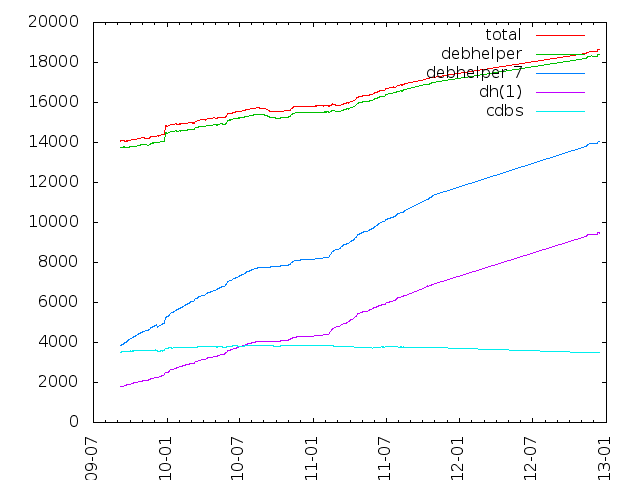
$ ar t gwibber_2.31.91-1_all.deb
debian-binary
control.tar.gz
data.tar.gz
debian-binary is a text file indicating the version of the format of the .deb file, the current version is 2.0 .
$ ar p gwibber_2.31.91-1_all.deb debian-binary
2.0
data.tar.gz contains the real files of the package, the content of that archive gets installed in your root directory when you run dpkg --unpack . But the most interesting part which truly makes .deb files more than a file archive is the last file. control.tar.gz contains meta-information used by the package manager. What are they?
$ ar p gwibber_2.31.91-1_all.deb control.tar.gz   tar tzf -
./
./postinst
./prerm
./preinst
./postrm
./conffiles
./md5sums
./control
2. It contains meta-information defining the package and its relationships The control file within the control.tar.gz archive is the most fundamental file. It contains basic information about the package like its name, its version, its description, the architecture it runs on, who is maintaining it and so on. It also contains dependency fields so that the package manager can ensure that everything needed by the package is installed before-hand. If you want to learn more about those fields, you can check Binary control files in the Debian Policy. Those information end up in /var/lib/dpkg/status once the package is installed. 3. It contains maintainer scripts so that everything can just work out of the box At various steps of the installation/upgrade/removal process, dpkg is executing the maintainer scripts provided by the package: Note that this description is largely simplified. In fact the scripts are executed on many other occasions with different parameters. There s an entire chapter of the Debian Policy dedicated to this topic. But you might find this wiki page easier to grasp: http://wiki.debian.org/MaintainerScripts. While this looks scary, it s a very important feature. It s required to cope with non-backwards compatible upgrades, to provide automatic configuration, to create system users on the fly, etc. 4. Configuration files are special files Unpacking a file archive overwrites the previous version of the files. This is the desired behavior when you upgrade a package, except for configuration files. You prefer not to loose your customizations, don t you? That s why packages can list configuration files in the conffiles file provided by control.tar.gz. That way dpkg will deal with them in a special way. 5. You can always add new meta-information And in fact many tools already exploit the possibility to provide supplementary files in control.tar.gz: Once installed, those files are kept by dpkg in /var/lib/dpkg/info/package.* along with maintainer scripts.
If you want to read more articles like this one, click here to subscribe to my free newsletter. You can also follow me on Identi.ca, Twitter and Facebook.

19 comments Liked this article? Click here. My blog is Flattr-enabled.

Next.

Previous.