Search Results: "ag"

23 July 2016

Mateus Bellomo: Send/receive text messages to buddies

Some weeks ago I ve implemented the option to send a text message from telepathy-resiprocate Empathy. At that time I just implemented it at apps/telepathy/TextChannel class which wasn t the ideal. Now, with a better understand of the resip/recon and resip/dum APIs, I was able to move this implementation there. Besides that I also have implemented the option to receive a text message. For that I have done some changes at resip/recon/ConversationManager and resip/recon/UserAgent classes, along some other. The complete changes could be seen at [1]. This branch also holds modifications related to send/receive presence. This is necessary since to send a message to a contact he/she should be online. There is still work to be done specially checking the possible error cases but at least we could see a first prototype working. Follow some images:
textChannel_JitsiAccount logged in with Jitsi
textChannel_EmpathyAccount logged in with Empathy using telepathy-resiprocate
[1] https://github.com/resiprocate/resiprocate/compare/master MateusBellomo:mateus-presence-text

22 July 2016

Norbert Preining: Yukio Mishima The Temple of the Golden Pavilion

A masterpiece of modern Japanese literature: Yukio Mishima ( ) The Temple of the Golden Pavilion ( ). The fictional story about the very real arson attack that destroyed the Golden Pavilion in 1950.
mishima-golden-temple A bit different treatise on beauty and ugliness!
How shall I put it? Beauty yes, beauty is like a decayed tooth. It rubs against one s tongue, it hangs there, hurting one, insisting on its own existence, finally [ ] the tooth extracted. Then, as one looks at the small, dirty, brown, blood-stained tooth lying in one s hand, one s thoughts are likely to be as follows: Is this it?
Mizoguchi, a stutterer, is from young years on taken by a near mystical imagination of the Golden Pavilion, influence by his father who considers it the most beautiful object in the world. After his father s death he moves to Kyoto and becomes acolyte in the temple. He develops a friendship with Kashiwagi, who uses his clubfeet to make women feel sorry for him and make them fall in love with his clubfeet, as he puts it. Kashiwagi also puts Mizoguchi onto the first tracks of amorous experiences, but Mizoguchi invariably turns out to be impotent but not due to his stuttering, but due to the image of the Golden Pavilion appearing in the essential moment and destroying every chance.
Yes, this was really the coast of the Sea of Japan! Here was the source of all my unhappiness, of all my gloomy thoughts, the origin of all my ugliness and all my strength. It was a wild sea.
Mizoguchi is getting more and more mentally about his relation with the head monk, neglects his studies, and after a stark reprimand he escapes to the north coast, from where he is brought back by police to the temple. He decides to burn down the Golden Pavilion, which has taken more and more command of his thinking and doing. He carries out the deed with the aim to burn himself in the top floor, but escapes in the last second to retreat into the hills to watch the spectacle.
Closely based on the true story of the arsonist of the Golden Pavilion, whom Mishima even visited in prison, the book is a treatise about beauty and ugly.
At his trial he [the real arsonist] said: I hate myself, my evil, ugly, stammering self. Yet he also said that he did not in any way regret having burned down the Kinkakuji.
Nancy Wilson Ross in the preface
Mishima is master in showing these two extremes by contrasting the refined qualities of Japanese culture flower arrangement, playing the shakuhachi, with immediate outburst of contrasting behavior: cold and brutal recklessness. Take for example the scene were Kashiwagi is arranging flowers, stolen by Mizoguchi from the temple grounds, while Mizoguchi is playing the flute. They also discuss koans and various interpretations. Enters the Ikebana teacher, and mistress of Kashiwagi. She congratulates Kashiwagi to his excellent arrangement, which he answers coldly by quitting their relationship, both as teacher as well as mistress, and telling her not to see him again in a formal style. She, still ceremonially kneeling, suddenly destroys the flower arrangement, only to be beaten and thrown out by Kashiwagi. And the beauty and harmony has turned to ugliness and hate in seconds. Beauty and Ugliness, two sides of the same medal, or inherently the same, because it is only up to the point of view. Mishima ingeniously plays with this duality, and leads us through the slow and painful development of Mizoguchi to the bitter end, which finally gives him freedom, freedom from the force of beauty. Sometimes seeing how our society is obsessed with beauty I cannot get rid of the feeling that there are far more Mizoguchis at heart.

Paul Tagliamonte: HOPE 11

I ll be at HOPE 11 this year - if anyone else will be around, feel free to send me an email! I won t have a phone on me (so texting only works if you use Signal!) Looking forward for a chance to see everyone soon!

Russell Coker: 802.1x Authentication on Debian

I recently had to setup some Linux workstations with 802.1x authentication (described as Ethernet authentication ) to connect to a smart switch. The most useful web site I found was the Ubuntu help site about 802.1x Authentication [1]. But it didn t describe exactly what I needed so I m writing a more concise explanation. The first thing to note is that the authentication mechanism works the same way as 802.11 wireless authentication, so it s a good idea to have the wpasupplicant package installed on all laptops just in case you need to connect to such a network. The first step is to create a wpa_supplicant config file, I named mine /etc/wpa_supplicant_SITE.conf. The file needs contents like the following:
network= 
 key_mgmt=IEEE8021X
 eap=PEAP
 identity="USERNAME"
 anonymous_identity="USERNAME"
 password="PASS"
 phase1="auth=MD5"
 phase2="auth=CHAP password=PASS"
 eapol_flags=0
 
The first difference between what I use and the Ubuntu example is that I m using eap=PEAP , that is an issue of the way the network is configured, whoever runs your switch can tell you the correct settings for that. The next difference is that I m using auth=CHAP and the Ubuntu example has auth=PAP . The difference between those protocols is that CHAP has a challenge-response and PAP just has the password sent (maybe encrypted) over the network. If whoever runs the network says that they don t store unhashed passwords or makes any similar claim then they are almost certainly using CHAP. Change USERNAME and PASS to your user name and password. wpa_supplicant -c /etc/wpa_supplicant_SITE.conf -D wired -i eth0 The above command can be used to test the operation of wpa_supplicant.
Successfully initialized wpa_supplicant
eth0: Associated with 00:01:02:03:04:05
eth0: CTRL-EVENT-EAP-STARTED EAP authentication started
eth0: CTRL-EVENT-EAP-PROPOSED-METHOD vendor=0 method=25
TLS: Unsupported Phase2 EAP method 'CHAP'
eth0: CTRL-EVENT-EAP-METHOD EAP vendor 0 method 25 (PEAP) selected
eth0: CTRL-EVENT-EAP-PEER-CERT depth=0 subject=''
EAP-MSCHAPV2: Authentication succeeded
EAP-TLV: TLV Result - Success - EAP-TLV/Phase2 Completed
eth0: CTRL-EVENT-EAP-SUCCESS EAP authentication completed successfully
eth0: CTRL-EVENT-CONNECTED - Connection to 00:01:02:03:04:05 completed [id=0 id_str=]
Above is the output of a successful test with wpa_supplicant. I replaced the MAC of the switch with 00:01:02:03:04:05. Strangely it doesn t like CHAP but is automatically selecting MSCHAPV2 and working, maybe anything other than PAP would do.
auto eth0
iface eth0 inet dhcp
  wpa-driver wired
  wpa-conf /etc/wpa_supplicant_SITE.conf
Above is a snippet of /etc/network/interfaces that works with this configuration.

Dirk Eddelbuettel: RcppCCTZ 0.0.5

Version 0.0.5 of RcppCCTZ arrived on CRAN a couple of days ago. It reflects an upstream fixed made a few weeks ago. CRAN tests revealed that g++-6 was tripping over one missing #define; this was added upstream and I subsequently synchronized with upstream. At the same time the set of examples was extended (see below). Somehow useR! 2016 got in the way and while working on the then-incomplete examples during the traveling I forgot to release this until CRAN reminded me that their tests still failed. I promptly prepared the 0.0.5 release but somehow failed to update NEWS files etc. They are correct in the repo but not in the shipped package. Oh well. CCTZ is a C++ library for translating between absolute and civil times using the rules of a time zone. In fact, it is two libraries. One for dealing with civil time: human-readable dates and times, and one for converting between between absolute and civil times via time zones. It requires only a proper C++11 compiler and the standard IANA time zone data base which standard Unix, Linux, OS X, ... computers tend to have in /usr/share/zoneinfo. RcppCCTZ connects this library to R by relying on Rcpp. Two good examples are now included, and shown here. The first one tabulates the time difference between New York and London (at a weekly level for compactness):
R> example(tzDiff)
tzDiffR> # simple call: difference now
tzDiffR> tzDiff("America/New_York", "Europe/London", Sys.time())
[1] 5
tzDiffR> # tabulate difference for every week of the year
tzDiffR> table(sapply(0:52, function(d) tzDiff("America/New_York", "Europe/London",
tzDiff+                                       as.POSIXct(as.Date("2016-01-01") + d*7))))
 4  5 
 3 50 
R> 
Because the two continents happen to spring forward and fall backwards between regular and daylight savings times, there are, respectively, two and one week periods where the difference is one hour less than usual. A second example shifts the time to a different time zone:
R> example(toTz)
toTzR> toTz(Sys.time(), "America/New_York", "Europe/London")
[1] "2016-07-14 10:28:39.91740 CDT"
R> 
Note that because we return a POSIXct object, it is printed by R with the default (local) TZ attribute (for "America/Chicago" in my case). A more direct example asks what time it is in my time zone when it is midnight in Tokyo:
R> toTz(ISOdatetime(2016,7,15,0,0,0), "Japan", "America/Chicago")
[1] "2016-07-14 15:00:00 CDT"
R>
More changes will come in 0.0.6 as soon as I find time to translate the nice time_tool (command-line) example into an R function. Changes in this version are summarized here:
Changes in version 0.0.5 (2016-07-09)
  • New utility example functions toTz() and tzDiff
  • Synchronized with small upstream change for additional #ifdef for compiler differentiation
We also have a diff to the previous version thanks to CRANberries. More details are at the RcppCCTZ page; code, issue tickets etc at the GitHub repository.

This post by Dirk Eddelbuettel originated on his Thinking inside the box blog. Please report excessive re-aggregation in third-party for-profit settings.

Martin Michlmayr: Debian on Seagate Personal Cloud and Seagate NAS

The majority of NAS devices supported in Debian are based on Marvell's Kirkwood platform. This platform is quite dated now and can only run Debian's armel port. Debian now supports the Seagate Personal Cloud and Seagate NAS devices. They are based on Marvell's Armada 370, a platform which can run Debian's armhf port. Unfortunately, even the Armada 370 is a bit dated now, so I would not recommend these devices for new purchases. If you have one already, however, you now have the option to run native Debian. There are some features I like about the Seagate NAS devices: If you have a Seagate Personal Cloud and Seagate NAS, you can follow the instructions on the Debian wiki. If Seagate releases more NAS devices on Marvell's Armada platform, I intend to add Debian support.

21 July 2016

Vincent Fourmond: QSoas version 2.0 is out / QSoas paper

I thought it would come before that, but I've finally gotten around releasing version 2.0 of my data analysis program, QSoas !
It provides significant improvements to the fit interface, in particular for multi-buffer fits, with a Multi fit engine that performs very well for large multibuffer fits, a spreadsheet editor for fit parameters, and more usability improvements. It also features the definition of fits with distribution of values of one of the fit parameter, and new built-in fits. In addition, QSoas version 2.0 features new commands to derive data, to flag buffers and handle large multi-column datasets, and improvements of existing commands. The full list of changes since version 1.0 can be found there.
As before, you can download the source code from our website, and purchase the pre-built binaries following the links from that page too.In addition, I am glad to announce that QSoas is now described in a recent publication, Fourmond, Anal. Chem., 2016, 88, 5050-5052. Please cite this publication if you used QSoas to process your data.

Reproducible builds folks: Reproducible builds: week 62 in Stretch cycle

What happened in the Reproducible Builds effort between June 26th and July 2nd 2016: Read on to find out why we're lagging some weeks behind ! GSoC and Outreachy updates Toolchain fixes With the doxygen upload we are now down to only 2 modified packages in our repository: dpkg and rdfind. Weekly reports delay and the future of statistics To catch up with our backlog of weekly reports we have decided to skip some of the statistics for this week. We might publish them in a future report, or we might switch to a format where we summarize them more (and which we can create (even) more automatically), we'll see. We are doing these weekly statistics because we believe it's appropriate and useful to credit people's work and make it more visible. What do you think? We would love to hear your thoughts on this matter! Do you read these statistics? Somewhat? Actually, thanks to the power of notmuch, Holger came up with what you can see below, so what's missing for this week are the uploads fixing irreprodubilities. Which we really would like to show for the reasons stated above and because we really really need these uploads to happen ;-) But then we also like to confirm the bugs are really gone, which (atm) requires manual checking, and to look for the words "reproducible" and "deterministic" (and spelling variations) in debian/changelogs of all uploads, to spot reproducible work not tracked via the BTS. And we still need to catch up on the backlog of weekly reports. Bugs submitted with reproducible usertags It seems DebCamp in Cape Town was hugely successful and made some people get a lot of work done: 61 bugs have been filed with reproducible builds usertags and 60 of them had patches: Package reviews 437 new reviews have been added (though most of them were just linking the bug, "only" 56 new issues in packages were found), an unknown number has been been updated and 60 have been removed in this week, adding to our knowledge about identified issues. 4 new issue types have been found: Weekly QA work 98 FTBFS bugs have been reported by Chris Lamb and Santiago Vila. diffoscope development strip-nondeterminism development tests.reproducible-builds.org Misc. This week's edition was written by Mattia Rizzolo, Reiner Herrmann, Ceridwen and Holger Levsen and reviewed by a bunch of Reproducible builds folks on IRC.

20 July 2016

Daniel Pocock: How many mobile phone accounts will be hijacked this summer?

Summer vacations have been getting tougher in recent years. Airlines cut into your precious vacation time with their online check-in procedures and a dozen reminder messages, there is growing concern about airport security and Brexit has already put one large travel firm into liquidation leaving holidaymakers in limbo. If that wasn't all bad enough, now there is a new threat: while you are relaxing in the sun, scammers fool your phone company into issuing a replacement SIM card or transferring your mobile number to a new provider and then proceed to use it to take over all your email, social media, Paypal and bank accounts. The same scam has been appearing around the globe, from Britain to Australia and everywhere in between. Many of these scams were predicted in my earlier blog SMS logins: an illusion of security (April 2014) but they are only starting to get publicity now as more aspects of our lives are at risk, scammers are ramping up their exploits and phone companies are floundering under the onslaught. With the vast majority of Internet users struggling to keep their passwords out of the wrong hands, many organizations have started offering their customers the option of receiving two-factor authentication codes on their mobile phone during login. Rather than making people safer, this has simply given scammers an incentive to seize control of telephones, usually by tricking the phone company to issue a replacement SIM or port the number. It also provides a fresh incentive for criminals to steal phones while cybercriminals have been embedding code into many "free" apps to surreptitiously re-route the text messages and gather other data they need for an identity theft sting. Sadly, telephone networks were never designed for secure transactions. Telecoms experts have made this clear numerous times. Some of the largest scams in the history of financial services exploited phone verification protocols as the weakest link in the chain, including a $150 million heist reminiscent of Ocean's 11. For phone companies, SMS messaging came as a side-effect of digital communications for mobile handsets. It is less than one percent of their business. SMS authentication is less than one percent of that. Phone companies lose little or nothing when SMS messages are hijacked so there is little incentive for them to secure it. Nonetheless, like insects riding on an elephant, numerous companies have popped up with a business model that involves linking websites to the wholesale telephone network and dressing it up as a "security" solution. These companies are able to make eye-watering profits by "purchasing" text messages for $0.01 and selling them for $0.02 (one hundred percent gross profit), but they also have nothing to lose when SIM cards are hijacked and therefore minimal incentive to take any responsibility. Companies like Google, Facebook and Twitter have thrown more fuel on the fire by encouraging and sometimes even demanding users provide mobile phone numbers to "prove they are human" or "protect" their accounts. Through these antics, these high profile companies have given a vast percentage of the population a false sense of confidence in codes delivered by mobile phone, yet the real motivation for these companies does not appear to be security at all: they have worked out that the mobile phone number is the holy grail in cross-referencing vast databases of users and customers from different sources for all sorts of creepy purposes. As most of their services don't involve any financial activity, they have little to lose if accounts are compromised and everything to gain by accurately gathering mobile phone numbers from as many users as possible.
Can you escape your mobile phone while on vacation? Just how hard is it to get a replacement SIM card or transfer/port a user's phone number while they are on vacation? Many phone companies will accept instructions through a web form or a phone call. Scammers need little more than a user's full name, home address and date of birth: vast lists of these private details are circulating on the black market, sourced from social media, data breaches (99% of which are never detected or made public), marketing companies and even the web sites that encourage your friends to send you free online birthday cards. Every time a company has asked me to use mobile phone authentication so far, I've opted out and I'll continue to do so. Even if somebody does hijack my phone account while I'm on vacation, the consequences for me are minimal as it will not give them access to any other account or service, can you and your family members say the same thing? What can be done?
  • Opt-out of mobile phone authentication schemes.
  • Never give the mobile phone number to web sites unless there is a real and pressing need for them to call you.
  • Tell firms you don't have a mobile phone or that you share your phone with your family and can't use it for private authentication.
  • If you need to use two-factor authentication, only use technical solutions such as smart cards or security tokens that have been engineered exclusively for computer security. Leave them in a locked drawer or safe while on vacation. Be wary of anybody who insists on SMS and doesn't offer these other options.
  • Rather than seeking to "protect" accounts, simply close some or all social media accounts to reduce your exposure and eliminate the effort of keeping them "secure" and updating "privacy" settings.
  • If your bank provides a relationship manager or other personal contact, this
    can also provide a higher level of security as they get to know you.
Previous blogs on SMS messaging, security and two factor authentication, including my earlier blog SMS Logins: an illusion of security.

Michal Čihař: New projects on Hosted Weblate

For almost two months I found very little time to process requests to host free software on Hosted Weblate. Today the queue has been emptied, what means that you can find many new translations there. To make it short, here is list of new projects: PS: If you didn't receive reply for your hosting request today, it was probably lost, so don't hesitate to ask again.

Filed under: Debian English Weblate 0 comments

Shirish Agarwal: Debconf 16 and My Experience with Debian

It has been often said that you should continually try new things in life so that a. Unlike the fish you do not mistake the pond to be the sea. b. You see other people, other types and ways of living and being which you normally won t in your day-to-day existence. With both of those as mantras I decided to take a leap into the unknown. I was unsure both about the visa process as well as the travel bit as I was traveling to an unknown place and although I had done some research about the place I was unsure about the authenticity of whatever is/was shared on the web. During the whole journey both to and fro, I couldn t sleep a wink. The Doha airport is huge. There are 5 Concourses, A, B , C, D, E and around 30+ gates in each Concourse. The ambition of the small state is something to be reckoned with. Almost 95% of the blue workers in the entire airport were of Asian sub-continent. While the Qatari Rial is 19 times stronger to us, the workers I suspect are worse-off than people doing similar things back home. Add to that the sharia law, even for all the money in the world, I wouldn t want to settle therein. Anyways, during the journey, a small surprise awaited me, Ritesh Raj Saraff, a DD was also traveling to Debconf. We bumped into each other while going to see the Doha City, courtesy Al-Hamad International Airport. I would probably share a bit more about Doha and my experiences with the city in upcoming posts. Cut to Cape Town, South Africa, we landed in the city half an hour after our scheduled time and then we sped along to University of Cape Town (UCT) which was to become our home for the next 13 odd days. The first few days were a whirlwind as there were new people to meet, old people whom I knew only as an e-mail id or an IRC nickname turned out to be real people and you have to try to articulate yourself in English, which is not a native language of mine. During Debcamp I was fortunate to be able visit some of the places and the wiki page had a lot of places which I knew I wouldn t be able to complete unless I had 15 days unlimited time and money to go around so didn t even try. I had gone with few goals in mind :- a. Do some documentation of the event In this I failed completely as just the walk from the venue to where the talks were energy-draining for me. Apart from that, you get swept in meeting new people and talking about one of million topics in Debian which interest you or the other person and while they are fulfilling, it is and was both physically and emotionally draining for me (in a good way). Bernelle (one of the organizers) had warned us of this phenomenon but you disregard it as you know you have a limited time-frame in which to meet and greet people and it is all a over-whelming experience. b. Another goal was to meet my Indian brethren who had left the country around 60~100 years mostly as slaves of East India company In this I was partially successful. I met a couple of beautiful ladies who had either a father or a mother who was Indian while the other was of African heritage. It seemed in them a yearning to know the culture but from what little they had, only Bollywood and Indian cuisine was what they could make of Indian culture. One of the girls, ummm women to be more truer, shared a somewhat grim tale. She had both an African boyfriend as well as Indian boyfriend in her life and in both cases, she was rejected by the boy s parents because she wasn t pure enough. This was deja vu all over again as the same thing can be seen here happening in casteism so there wasn t any advice I could give but just nod in empathy. What was sort of relevation was when their parents or grandparents came, the name and surnames were thrown off and the surname was just the place from where they belong. From the discussions it emerged that there were also lot of cases of forced conversions to Christianity during that era as well as temptations of a better life. As shared, this goal succeeded partially, as I was actually interested in their parents or grand-parents to know the events that shaped the Indian diaspora over there. While the children know only of today, yester-years could only be known by those people who made the unwilling perilous journey to Africa. I had also wanted to know more about Gandhiji s role in that era but alas, that part of history would have to wait for another day as I guess, both those goals would only have met had I visited Durban but that was not to be. I had applied for one talk My Experience with Debian and one workshop for Installation of Debian on systems. The My Experience with Debian was aimed at newbies and I had thought of using show-and-tell to share the differences between proprietary Operating Systems and a FOSS distribution such as Debian. I was going to take simple things such as changelogs, apt-listbugs, real-time knowledge of updates and upgrades as well as /etc/apt/sources.list to share both the versatility of the Debian desktop and real improvements than what proprietary Operating Systems had to offer. But I found myself engaging with Debian Developers (DD s) rather than the newbies so had to change the orientation and fundamentals of the talk on the fly. I knew or suspected rather that the old idea would not work as it would just be repeating to the choir. With that in the back of mind, and the idea that perhaps they would not be so aware of the politics and events which happened in India over the last couple of decades, I tried to share what little I was able to recollect what little I was able to remember about those times. Apart from that, I was also highly conscious that I had been given just the before lunch slot aka You are in the way of my lunch slot. So I knew I had to speak my piece as quickly as possible being as clear as can be. Later, I did get feedback that I was fast and seeing it through couple of times, do agree that I could have done a better job. What s done is done and the only thing I could do to salvage it a bit is to make a presentation which I am sharing as below. my_experience_with_debian Would be nice if somebody could come up with a lighter template for presentations. For reference the template I have taken it from is shared at https://wiki.debian.org/Presentations . Some pictures from the presentation. vlcsnap-00004 me_sharing my_experience_with_debian You can find the video at http://meetings-archive.debian.net/pub/debian-meetings/2016/debconf16/My_Experience_with_Debian.webm This is by no means the end of the Debconf16 experience, but actually the starting. I hope to share more of my thoughts, ideas and get as much feedback from all the wonderful people I met during Debconf.
Filed under: Miscellenous Tagged: #Debconf16, Doha, My talk, Qatar

Steinar H. Gunderson: Solskogen 2016 videos

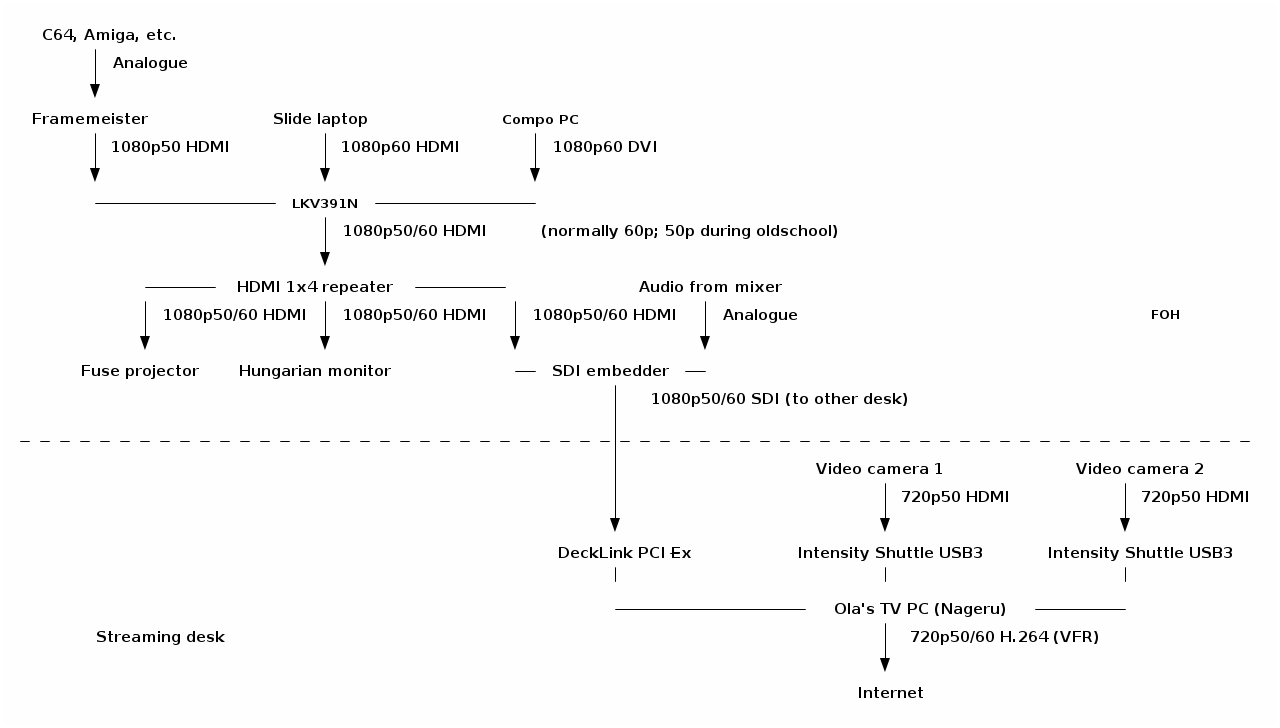
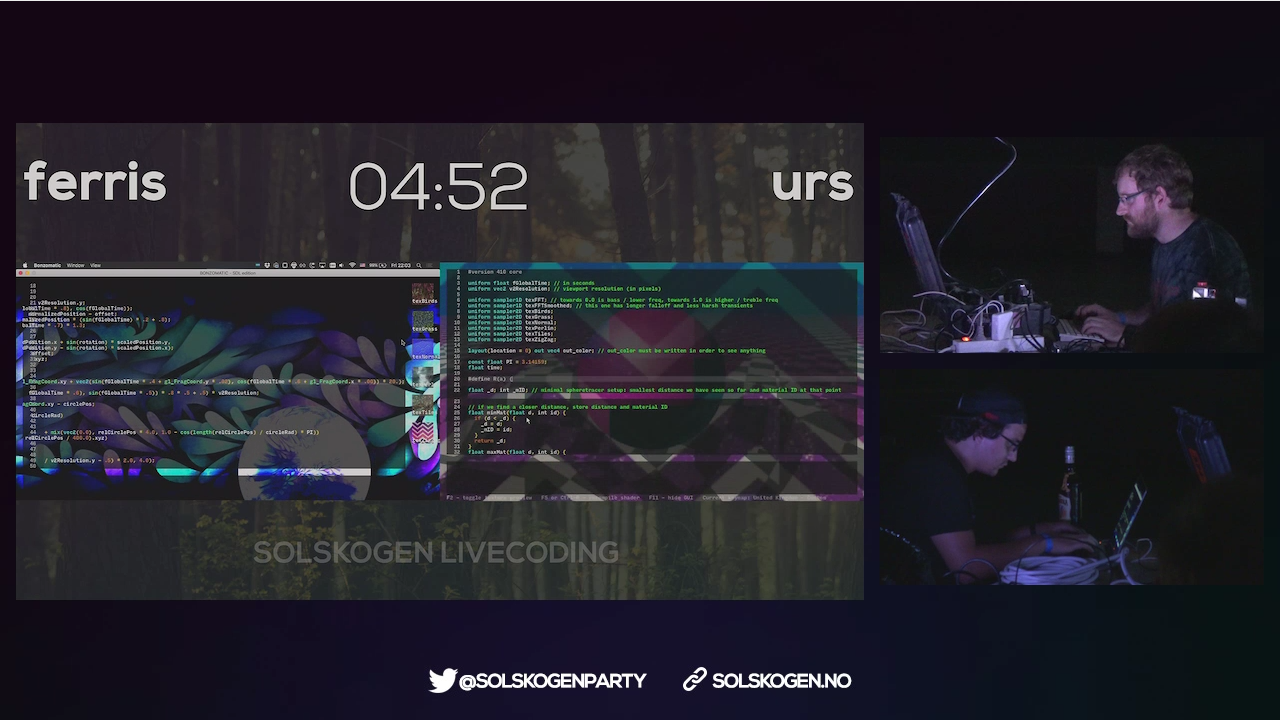
I just published the videos from Solskogen 2016 on Youtube; you can find them all in this playlist. The are basically exactly what was being sent out on the live stream, frame for frame, except that the audio for the live shader compos has been remastered, and of course a lot of dead time has been cut out (the stream was sending over several days, but most of the time, only the information loop from the bigscreen). YouTube doesn't really support the variable 50/60 Hz frame rate we've been using well as far as I can tell, but mostly it seems to go to some 60 Hz upconversion, which is okay enough, because the rest of your setup most likely isn't free-framerate anyway. Solskogen is interesting in that we're trying to do a high-quality stream with essentially zero money allocated to it; where something like Debconf can use 2500 for renting and transporting equipment (granted, for two or three rooms and not our single stream), we're largely dependent on personal equipment as well as borrowing things here and there. (I think we borrowed stuff from more or less ten distinct places.) Furthermore, we're nowhere near the situation of two cameras, a laptop, perhaps a few microphones ; not only do you expect to run full 1080p60 to the bigscreen and switch between that and information slides for each production, but an Amiga 500 doesn't really have an HDMI port, and Commodore 64 delivers an infamously broken 50.12 Hz signal that you really need to deal with carefully if you want it to not look like crap. These two factors together lead to a rather eclectic setup; here, visualized beautifully from my ASCII art by ditaa: Solskogen 2016 A/V setup diagram Of course, for me, the really interesting part here is near the end of the chain, with Nageru, my live video mixer, doing the stream mixing and encoding. (There's also Cubemap, the video reflector, but honestly, I never worry about that anymore. Serving 150 simultaneous clients is just not something to write home about anymore; the only adjustment I would want to make would probably be some WebSockets support to be able to deal with iOS without having to use a secondary HLS stream.) Of course, to make things even more complicated, the live shader compo needs two different inputs (the two coders' laptops) live on the bigscreen, which was done with two video capture cards, text chroma-keyed on top from Chroma, and OBS, because the guy controlling the bigscreen has different preferences from me. I would take his screen in as a dirty feed and then put my own stuff around it, like this: Solskogen 2016 shader compo screenshot (Unfortunately, I forgot to take a screenshot of Nageru itself during this run.) Solskogen was the first time I'd really used Nageru in production, and despite super-extensive testing, there's always something that can go wrong. And indeed there was: First of all, we discovered that the local Internet line was reduced from 30/10 to 5/0.5 (which is, frankly, unusable for streaming video), and after we'd half-way fixed that (we got it to 25/4 or so by prodding the ISP, of which we could reserve about 2 for video demoscene content is really hard to encode, so I'd prefer a lot more) Nageru started crashing. It wasn't even crashes I understood anything of. Generally it seemed like the NVIDIA drivers were returning GL_OUT_OF_MEMORY on things like creating mipmaps; it's logical that they'd be allocating memory, but we had 6 GB of GPU memory and 16 GB of CPU memory, and lots of it was free. (The PC we used for encoding was much, much faster than what you need to run Nageru smoothly, so we had plenty of CPU power left to run x264 in, although you can of course always want more.) It seemed to be mostly related to zoom transitions, so I generally avoided those and ran that night's compos in a more static fashion. It wasn't until later that night (or morning, if you will) that I actually understood the bug (through the godsend of the NVX_gpu_memory_info extension, which gave me enough information about the GPU memory state that I understood I wasn't leaking GPU memory at all); I had set Nageru to lock all of its memory used in RAM, so that it would never ever get swapped out and lose frames for that reason. I had set the limit for lockable RAM based on my test setup, with 4 GB of RAM, but this setup had much more RAM, a 1080p60 input (which uses more RAM, of course) and a second camera, all of which I hadn't been able to test before, since I simply didn't have the hardware available. So I wasn't hitting the available RAM, but I was hitting the amount of RAM that Linux was willing to lock into memory for me, and at that point, it'd rather return errors on memory allocations (including the allocations the driver needed to make for its texture memory backings) than to violate the never swap contract. Once I fixed this (by simply increasing the amount of lockable memory in limits.conf), everything was rock-stable, just like it should be, and I could turn my attention to the actual production. Often during compos, I don't really need the mixing power of Nageru (it just shows a single input, albeit scaled using high-quality Lanczos3 scaling on the GPU to get it down from 1080p60 to 720p60), but since entries come in using different sound levels (I wanted the stream to conform to EBU R128, which it generally did) and different platforms expect different audio work (e.g., you wouldn't put a compressor on an MP3 track that was already mastered, but we did that on e.g. SID tracks since they have nearly zero ability to control the overall volume), there was a fair bit of manual audio tweaking during some of the compos. That, and of course, the live 50/60 Hz switches were a lot of fun: If an Amiga entry was coming up, we'd 1. fade to a camera, 2. fade in an overlay saying we were switching to 50 Hz so have patience, 3. set the camera as master clock (because the bigscreen's clock is going to go away soon), 4. change the scaler from 60 Hz to 50 Hz (takes two clicks and a bit of waiting), 5. change the scaler input in Nageru from 1080p60 to 1080p50, 6. steps 3,2,1 in reverse. Next time, I'll try to make that slightly smoother, especially as the lack of audio during the switch (it comes in on the bigscreen SDI feed) tended to confuse viewers. So, well, that was a lot of fun, and it certainly validated that you can do a pretty complicated real-life stream with Nageru. I have a long list of small tweaks I want to make, though; nothing beats actual experience when it comes to improving processes. :-)

Daniel Stender: Theano in Debian: maintenance, BLAS and CUDA

I'm glad to announce that we have the current release of Theano (0.8.2) in Debian unstable now, it's on its way into the testing branch and the Debian derivatives, heading for Debian 9. The Debian package is maintained in behalf of the Debian Science Team. We have a binary package with the modules in the Python 2.7 import path (python-theano), if you want or need to stick to that branch a little longer (as a matter of fact, in the current popcon stats it's the most installed package), and a package running on the default Python 3 version (python3-theano). The comprehensive documentation is available for offline usage in another binary package (theano-doc). Although Theano builds its extensions on run time and therefore all binary packages contain the same code, the source package generates arch specific packages1 for the reason that the exhaustive test suite could run over all the architectures to detect if there are problems somewhere (#824116). what's this? In a nutshell, Theano is a computer algebra system (CAS) and expression compiler, which is implemented in Python as a library. It is named after a Classical Greek female mathematician and it's developed at the LISA lab (located at MILA, the Montreal Institute for Learning Algorithms) at the Universit de Montr al. Theano tightly integrates multi-dimensional arrays (N-dimensional, ND-array) from NumPy (numpy.ndarray), which are broadly used in Scientific Python for the representation of numeric data. It features a declarative Python based language with symbolic operations for the functional definition of mathematical expressions, which allows to create functions that compute values for them. Internally the expressions are represented as directed graphs with nodes for variables and operations. The internal compiler then optimizes those graphs for stability and speed and then generates high-performance native machine code to evaluate resp. compute these mathematical expressions2. One of the main features of Theano is that it's capable to compute also on GPU processors (graphical processor unit), like on custom graphic cards (e.g. the developers are using a GeForce GTX Titan X for benchmarks). Today's GPUs became very powerful parallel floating point devices which can be employed also for scientific computations instead of 3D video games3. The acronym "GPGPU" (general purpose graphical processor unit) refers to special cards like NVIDIA's Tesla4, which could be used alike (more on that below). Thus, Theano is a high-performance number cruncher with an own computing engine which could be used for large-scale scientific computations. If you haven't came across Theano as a Pythonistic professional mathematician, it's also one of the most prevalent frameworks for implementing deep learning applications (training multi-layered, "deep" artificial neural networks, DNN) around5, and has been developed with a focus on machine learning from the ground up. There are several higher level user interfaces build in the top of Theano (for DNN, Keras, Lasagne, Blocks, and others, or for Python probalistic programming, PyMC3). I'll seek for some of them also becoming available in Debian, too. helper scripts Both binary packages ship three convenience scripts, theano-cache, theano-test, and theano-nose. Instead of them being copied into /usr/bin, which would result into a binaries-have-conflict violation, the scripts are to be found in /usr/share/python-theano (python3-theano respectively), so that both module packages of Theano can be installed at the same time. The scripts could be run directly from these folders, e.g. do $ python /usr/share/python-theano/theano-nose to achieve that. If you're going to heavy use them, you could add the directory of the flavour you prefer (Python 2 or Python 3) to the $PATH environment variable manually by either typing e.g. $ export PATH=/usr/share/python-theano:$PATH on the prompt, or save that line into ~/.bashrc. Manpages aren't available for these little helper scripts6, but you could always get info on what they do and which arguments they accept by invoking them with the -h (for theano-nose) resp. help flag (for theano-cache). running the tests On some occasions you might want to run the testsuite of the installed library, like to check over if everything runs fine on your GPU hardware. There are two different ways to run the tests (anyway you need to have python ,3 -nose installed). One is, you could launch the test suite by doing $ python -c 'import theano; theano.test() (or the same with python3 to test the other flavour), that's the same what the helper script theano-test does. However, by doing it that way some particular tests might fail by raising errors also for the group of known failures. Known failures are excluded from being errors if you run the tests by theano-nose, which is a wrapper around nosetests, so this might be always the better choice. You can run this convenience script with the option --theano on the installed library, or from the source package root, which you could pull by $ sudo apt-get source theano (there you have also the option to use bin/theano-nose). The script accept options for nosetests, so you might run it with -v to increase verbosity. For the tests the configuration switch config.device must be set to cpu. This will also include the GPU tests when a proper accessible device is detected, so that's a little misleading in the sense of it doesn't mean "run everything on the CPU". You're on the safe side if you run it always like this: $ THEANO_FLAGS=device=cpu theano-nose, if you've set config.device to gpu in your ~/.theanorc. Depending on the available hardware and the used BLAS implementation (see below) it could take quite a long time to run the whole test suite through, on the Core-i5 in my laptop that takes around an hour even excluded the GPU related tests (which perform pretty fast, though). Theano features a couple of switches to manipulate the default configuration for optimization and compilation. There is a rivalry between optimization and compilation costs against performance of the test suite, and it turned out the test suite performs a quicker with lesser graph optimization. There are two different switches available to control config.optimizer, the fast_run toggles maximal optimization, while fast_compile runs only a minimal set of graph optimization features. These settings are used by the general mode switches for config.mode, which is either FAST_RUN by default, or FAST_COMPILE. The default mode FAST_RUN (optimizer=fast_run, linker=cvm) needs around 72 minutes on my lower mid-level machine (on un-optimized BLAS). To set mode=FAST_COMPILE (optimizer=fast_compile, linker=py) brings some boost for the performance of the test suite because it runs the whole suite in 46 minutes. The downside of that is that C code compilation is disabled in this mode by using the linker py, and also the GPU related tests are not included. I've played around with using the optimizer fast_compile with some of the other linkers (c py and cvm, and their versions without garbage collection) as alternative to FAST_COMPILE with minimal optimization but also machine code compilation incl. GPU testing. But to my experience, fast_compile without another than the linker py results in some new errors and failures of some tests on amd64, and this might the case also on other architectures, too. By the way, another useful feature is DebugMode for config.mode, which verifies the correctness of all optimizations and compares the C to Python results. If you want to have detailed info on the configuration settings of Theano, do $ python -c 'import theano; print theano.config' less, and check out the chapter config in the library documentation in the documentation. cache maintenance Theano isn't a JIT (just-in-time) compiler like Numba, which generates native machine code in the memory and executes it immediately, but it saves the generated native machine code into compiledirs. The reason for doing it that way is quite practical like the docs explain, the persistent cache on disk makes it possible to avoid generating code for the same operation, and to avoid compiling again when different operations generate the same code. The compiledirs by default are located within $(HOME)/.theano/. After some time the folder becomes quite large, and might look something like this:
$ ls ~/.theano
compiledir_Linux-4.5--amd64-x86_64-with-debian-stretch-sid--2.7.11+-64
compiledir_Linux-4.5--amd64-x86_64-with-debian-stretch-sid--2.7.12-64
compiledir_Linux-4.5--amd64-x86_64-with-debian-stretch-sid--2.7.12rc1-64
compiledir_Linux-4.5--amd64-x86_64-with-debian-stretch-sid--3.5.1+-64
compiledir_Linux-4.5--amd64-x86_64-with-debian-stretch-sid--3.5.2-64
compiledir_Linux-4.5--amd64-x86_64-with-debian-stretch-sid--3.5.2rc1-64
If the used Python version changed like in this example you might to want to purge obsolete cache. For working with the cache resp. the compiledirs, the helper theano-cache comes in handy. If you invoke it without any arguments the current cache location is put out like ~/.theano/compiledir_Linux-4.5--amd64-x86_64-with-debian-stretch-sid--2.7.12-64 (the script is run from /usr/share/python-theano). So, the compiledirs for the old Python versions in this example (11+ and 12rc1) can be removed to free the space they occupy. All compiledirs resp. cache directories meaning the whole cache could be erased by $ theano-cache basecompiledir purge, the effect is the same as by performing $ rm -rf ~/.theano. You might want to do that e.g. if you're using different hardware, like when you got yourself another graphics card. Or habitual from time to time when the compiledirs fill up so much that it slows down processing with the harddisk being very busy all the time, if you don't have an SSD drive available. For example, the disk space of build chroots carrying (mainly) the tests completely compiled through on default Python 2 and Python 3 consumes around 1.3 GB (see here). BLAS implementations Theano needs a level 3 implementation of BLAS (Basic Linear Algebra Subprograms) for operations between vectors (one-dimensional mathematical objects) and matrices (two-dimensional objects) carried out on the CPU. NumPy is already build on BLAS and pulls the standard implementation (libblas3, soure package: lapack), but Theano links directly to it instead of using NumPy as intermediate layer to reduce the computational overhead. For this, Theano needs development headers and the binary packages pull libblas-dev by default, if any other development package of another BLAS implementation (like OpenBLAS or ATLAS) isn't already installed, or pulled with them (providing the virtual package libblas.so). The linker flags could be manipulated directly through the configuration switch config.blas.ldflags, which is by default set to -L/usr/lib -lblas -lblas. By the way, if you set it to an empty value, Theano falls back to using BLAS through NumPy, if you want to have that for some reason. On Debian, there is a very convenient way to switch between BLAS implementations by the alternatives mechanism. If you have several alternative implementations installed at the same time, you can switch from one to another easily by just doing:
$ sudo update-alternatives --config libblas.so
There are 3 choices for the alternative libblas.so (providing /usr/lib/libblas.so).
  Selection    Path                                  Priority   Status
------------------------------------------------------------
* 0            /usr/lib/openblas-base/libblas.so      40        auto mode
  1            /usr/lib/atlas-base/atlas/libblas.so   35        manual mode
  2            /usr/lib/libblas/libblas.so            10        manual mode
  3            /usr/lib/openblas-base/libblas.so      40        manual mode
Press <enter> to keep the current choice[*], or type selection number:
The implementations are performing differently on different hardware, so you might want to take the time to compare which one does it best on your processor (the other packages are libatlas-base-dev and libopenblas-dev), and choose that to optimize your system. If you want to squeeze out all which is in there for carrying out Theano's computations on the CPU, another option is to compile an optimized version of a BLAS library especially for your processor. I'm going to write another blog posting on this issue. The binary packages of Theano ship the script check_blas.py to check over how well a BLAS implementation performs with it, and if everything works right. That script is located in the misc subfolder of the library, you could locate it by doing $ dpkg -L python-theano grep check_blas (or for the package python3-theano accordingly), and run it with the Python interpreter. By default the scripts puts out a lot of info like a huge perfomance comparison reference table, the current setting of blas.ldflags, the compiledir, the setting of floatX, OS information, the GCC version, the current NumPy config towards BLAS, NumPy location and version, if Theano linked directly or has used the NumPy binding, and finally and most important, the execution time. If just the execution time for quick perfomance comparisons is needed this script could be invoked with -q. Theano on CUDA The function compiler of Theano works with alternative backends to carry out the computations, like the ones for graphics cards. Currently, there are two different backends for GPU processing available, one docks onto NVIDIA's CUDA (Compute Unified Device Architecture) technology7, and another one for libgpuarray, which is also developed by the Theano developers in parallel. The libgpuarray library is an interesting alternative for Theano, it's a GPU tensor (multi-dimensional mathematical object) array written in C with Python bindings based on Cython, which has the advantage of running also on OpenCL8. OpenCL, unlike CUDA9, is full free software, vendor neutral and overcomes the limitation of the CUDA toolkit being only available for amd64 and the ppc64el port (see here). I've opened an ITP on libgpuarray and we'll see if and how this works out. Another reason for it would be great to have it available is that it looks like CUDA currently runs into problems with GCC 610. More on that, soon. Here's a litle checklist for setting up your CUDA device so that you don't have to experience something like this:
$ THEANO_FLAGS=device=gpu,floatX=float32 python ./cat_dog_classifier.py 
WARNING (theano.sandbox.cuda): CUDA is installed, but device gpu is not available (error: Unable to get the number of gpus available: no CUDA-capable device is detected)
hardware check For running Theano on CUDA you need an NVIDIA graphics card which is capable of doing that. You can recheck if your device is supported by CUDA here. When the hardware isn't too old (CUDA support started with GeForce 8 and Quadro X series) or too strange I think it isn't working only in exceptional cases. You can check your model and if the device is present in the system on the bare hardware level by doing this:
$ lspci   grep -i nvidia
04:00.0 3D controller: NVIDIA Corporation GM108M [GeForce 940M] (rev a2)
If a line like this doesn't get returned, your device most probably is broken, or not properly connected (ouch). If rev ff appears at the end of the line that means the device is off meaning powered down. This might be happening if you have a laptop with Optimus graphics hardware, and the related drivers have switched off the unoccupied device to safe energy11. kernel module Running CUDA applications requires the proprietary NVIDIA driver kernel module to be loaded into the kernel and working. If you haven't already installed it for another purpose, the NVIDIA driver and the CUDA toolkit are both in the non-free section of the Debian archive, which is not enabled by default. To get non-free packages you have to add non-free (and it's better to do so, also contrib) to your package source in /etc/apt/sources.list, which might then look like this:
deb http://httpredir.debian.org/debian/ testing main contrib non-free
After doing that, perform $ apt-cache update to update the package lists, and there you go with the non-free packages. The headers of the running kernel are needed to compile modules, you can get them together with the NVIDIA kernel module package by running:
$ sudo apt-get install linux-headers-$(uname -r) nvidia-kernel-dkms build-essential
DKMS will then build the NVIDIA module for the kernel and does some other things on the system. When the installation has finished, it's generally advised to reboot the system completely. troubleshooting If you have problems with the CUDA device, it's advised to verify if the following things concerning the NVIDIA driver resp. kernel module are in order: blacklist nouveau Check if the default Nouveau kernel module driver (which blocks the NVIDIA module) for some reason still gets loaded by doing $ lsmod grep nouveau. If nothing gets returned, that's right. If it's still in the kernel, just add blacklist nouveau to /etc/modprobe.d/blacklist.conf, and update the booting ramdisk with sudo update-initramfs -u afterwards. Then reboot once more, this shouldn't be the case then anymore. rebuild kernel module To fix it when the module haven't been properly compiled for some reason you could trigger a rebuild of the NVIDIA kernel module with $ sudo dpkg-reconfigure nvidia-kernel-dkms. When you're about to send your hardware in to repair because everything looks all right but the device just isn't working, that really could help (own experience). After the rebuild of the module or modules (if you have a few kernel packages installed) has completed, you could recheck if the module really is available by running:
$ sudo modinfo nvidia-current
filename:       /lib/modules/4.4.0-1-amd64/updates/dkms/nvidia-current.ko
alias:          char-major-195-*
version:        352.79
supported:      external
license:        NVIDIA
alias:          pci:v000010DEd00000E00sv*sd*bc04sc80i00*
alias:          pci:v000010DEd*sv*sd*bc03sc02i00*
alias:          pci:v000010DEd*sv*sd*bc03sc00i00*
depends:        drm
vermagic:       4.4.0-1-amd64 SMP mod_unload modversions 
parm:           NVreg_Mobile:int
It should be something similiar to this when everything is all right. reload kernel module When there are problems with the GPU, maybe the kernel module isn't properly loaded. You could recheck if the module has been properly loaded by doing
$ lsmod   grep nvidia
nvidia_uvm             73728  0
nvidia               8540160  1 nvidia_uvm
drm                   356352  7 i915,drm_kms_helper,nvidia
The kernel module could be loaded resp. reloaded with $ sudo nvidia-modprobe (that tool is from the package nvidia-modprobe). unsupported graphics card Be sure that you graphics cards is supported by the current driver kernel module. If you have bought new hardware, that's quite possible to come out being a problem. You can get the version of the current NVIDIA driver with:
$ cat /proc/driver/nvidia/version 
NVRM version: NVIDIA UNIX x86_64 Kernel Module 352.79  Wed Jan 13 16:17:53 PST 2016
GCC version:  gcc version 5.3.1 20160528 (Debian 5.3.1-21)
Then, google the version number like nvidia 352.79, this should get you onto an official driver download page like this. There, check for what's to be found under "Supported Products". I you're stuck with that there are two options, to wait until the driver in Debian got updated, or replace it with the latest driver package from NVIDIA. That's possible to do, but something more for experienced users. occupied graphics card The CUDA driver cannot work while the graphical interface is busy like by processing the graphical display of your X.Org server. Which kernel driver actually is used to process the desktop could be examined by this command:12
$ grep '(II).*([0-9]):' /var/log/Xorg.0.log
[    37.700] (II) intel(0): Using Kernel Mode Setting driver: i915, version 1.6.0 20150522
[    37.700] (II) intel(0): SNA compiled: xserver-xorg-video-intel 2:2.99.917-2 (Vincent Cheng <vcheng@debian.org>)
 ... 
[    39.808] (II) intel(0): switch to mode 1920x1080@60.0 on eDP1 using pipe 0, position (0, 0), rotation normal, reflection none
[    39.810] (II) intel(0): Setting screen physical size to 508 x 285
[    67.576] (II) intel(0): EDID vendor "CMN", prod id 5941
[    67.576] (II) intel(0): Printing DDC gathered Modelines:
[    67.576] (II) intel(0): Modeline "1920x1080"x0.0  152.84  1920 1968 2000 2250  1080 1083 1088 1132 -hsync -vsync (67.9 kHz eP)
This example shows that the rendering of the desktop is performed by the graphical device of the Intel CPU, which is just like it's needed for running CUDA applications on your NVIDIA graphics card, if you don't have another one. nvidia-cuda-toolkit With the Debian package of the CUDA toolkit everything pretty much runs out of the box for Theano. Just install it with apt-get, and you're ready to go, the CUDA backend is the default one. Pycuda is also a suggested dependency of the binary packages, it could be pulled together with the CUDA toolkit. The up-to-date CUDA release 7.5 is of course available, with that you have Maxwell architecture support so that you can run Theano on e.g. a GeForce GTX Titan X with 6,2 TFLOPS on single precision13 at an affordable price. CUDA 814 is around the corner with support for the new Pascal architecture15. Like the GeForce GTX 1080 high-end gaming graphics card already has 8,23 TFLOPS16. When it comes to professional GPGPU hardware like the Tesla P100 there is much more computational power available, scalable by multiplication of cores resp. cards up to genuine little supercomputers which fit on a desk, like the DGX-117. Theano can use multiple GPUs for calculations to work with highly scaled hardware, I'll write another blog post on this issue. Theano on the GPU It's not difficult to run Theano on the GPU. Only single precision floating point numbers (float32) are supported on the GPU, but that is sufficient for deep learning applications. Theano uses double precision floats (float64) by default, so you have to set the configuration variable config.floatX to float32, like written on above, either with the THEANO_FLAGS environment variable or better in your .theanorc file, if you're going to use the GPU a lot. Switching to the GPU actually happens with the config.device configuration variable, which must be set to either gpu or gpu0, gpu1 etc., to choose a particular one if multiple devices are available. Here's is a little test script check1.py, it's taken from the docs and slightly altered. You can run that script either with python or python3 (there was a single test failure on the Python 3 package, so the Python 2 library might be a little more stable currently). For comparison, here's an example on how it perfoms on my hardware, one time on the CPU, one more time on the GPU:
$ THEANO_FLAGS=floatX=float32 python ./check1.py 
[Elemwise exp,no_inplace (<TensorType(float32, vector)>)]
Looping 1000 times took 4.481719 seconds
Result is [ 1.23178029  1.61879337  1.52278066 ...,  2.20771813  2.29967761
  1.62323284]
Used the cpu
$ THEANO_FLAGS=floatX=float32,device=gpu python ./check1.py 
Using gpu device 0: GeForce 940M (CNMeM is disabled, cuDNN not available)
[GpuElemwise exp,no_inplace (<CudaNdarrayType(float32, vector)>), HostFromGpu(GpuElemwise exp,no_inplace .0)]
Looping 1000 times took 1.164906 seconds
Result is [ 1.23178029  1.61879349  1.52278066 ...,  2.20771813  2.29967761
  1.62323296]
Used the gpu
If you got a result like this you're ready to go with Theano on Debian, training computer vision classifiers or whatever you want to do with it. I'll write more on for what Theano could be used, soon.

  1. Some ports are disabled because they are currently not supported by Theano. There are NotImplementedErrors and other errors in the tests on the numpy.ndarray object being not aligned. The developers commented on that, see here. And on some ports the build flags -m32 resp. -m64 of Theano aren't supported by g++, the build flags can't be manipulated easily.
  2. Theano Development Team: "Theano: a Python framework for fast computation of mathematical expressions"
  3. Marc Couture: "Today's high-powered GPUs: strong for graphics and for maths". In: RTC magazine June 2015, pp. 22 25
  4. Ogier Maitre: "Understanding NVIDIA GPGPU hardware". In: Tsutsui/Collet (eds.): Massively parallel evolutionary computation on GPGPUs. Berlin, Heidelberg: Springer 2013, pp. 15-34
  5. Geoffrey French: "Deep learing tutorial: advanved techniques". PyData London 2016 presentation
  6. Like the description of the Lintian tag binary-without-manpage says, that's not needed for them being in /usr/share.
  7. Tom. R. Halfhill: "Parallel processing with CUDA: Nvidia's high-performance computing platform uses massive multithreading". In: Microprocessor Report January 28, 2008
  8. Faber et.al: "Parallelwelten: GPU-Programmierung mit OpenCL". In: C't 26/2014, pp. 160-165
  9. For comparison, see: Valentine Sinitsyn: "Feel the taste of GPU programming". In: Linux Voice February 2015, pp. 106-109
  10. https://lists.debian.org/debian-devel/2016/07/msg00004.html
  11. If Optimus (hybrid) graphics hardware is present (like commonly today on PC laptops), Debian launches the X-server on the graphics processing unit of the CPU, which is ideal for CUDA. The problem with Optimus actually is the graphics processing on the dedicated GPU. If you are using Bumblebee, the Python interpreter which you want to run Theano on has be to be started with the launcher primusrun, because Bumblebee powers the GPU down with the tool bbswitch every time it isn't used, and I think also the kernel module of the driver is dynamically loaded.
  12. Thorsten Leemhuis: "Treiberreviere. Probleme mit Grafiktreibern f r Linux l sen": In: C't Nr.2/2013, pp. 156-161
  13. Martin Fischer: "4K-Rakete: Die schnellste Single-GPU-Grafikkarte der Welt". In C't 13/2015, pp. 60-61
  14. http://www.heise.de/developer/meldung/Nvidia-CUDA-8-bringt-Optimierungen-fuer-die-Pascal-Architektur-3164254.html
  15. Martin Fischer: "All In: Nvidia enth llt die GPU-Architektur 'Pascal'". In: C't 9/2016, pp. 30-31
  16. Martin Fischer: "Turbo-Pascal: High-End-Grafikkarte f r Spieler: GeForce GTX 1080". In: C't 13/2016, pp. 100-103
  17. http://www.golem.de/news/dgx-1-nvidias-supercomputerchen-mit-8x-tesla-p100-1604-120155.html

19 July 2016

Michael Prokop: DebConf16 in Capetown/South Africa: Lessons learnt

DebConf 16 in Capetown/South Africa was fantastic for many reasons. My Capetown/South Africa/Culture/Flight related lessons: My technical lessons from DebConf16: BTW, thanks to the video team the recordings from the sessions are available online.

Joey Hess: Re: Debugging over email

Lars wrote about the remote debugging problem.
I write free software and I have some users. My primary support channels are over email and IRC, which means I do not have direct access to the system where my software runs. When one of my users has a problem, we go through one or more cycles of them reporting what they see and me asking them for more information, or asking them to try this thing or that thing and report results. This can be quite frustrating. I want, nay, need to improve this.
This is also something I've thought about on and off, that affects me most every day. I've found that building the test suite into the program, such that users can run it at any time, is a great way to smoke out problems. If a user thinks they have problem A but the test suite explodes, or also turns up problems B C D, then I have much more than the user's problem report to go on. git annex test is a good example of this. Asking users to provide a recipe to reproduce the bug is very helpful; I do it in the git-annex bug report template, and while not all users do, and users often provide a reproducion recipe that doesn't quite work, it's great in triage to be able to try a set of steps without thinking much and see if you can reproduce the bug. So I tend to look at such bug reports first, and solve them more quickly, which tends towards a virtuous cycle. I've noticed that reams of debugging output, logs, test suite failures, etc can be useful once I'm well into tracking a problem down. But during triage, they make it harder to understand what the problem actually is. Information overload. Being able to reproduce the problem myself is far more valuable than this stuff. I've noticed that once I am in a position to run some commands in the environment that has the problem, it seems to be much easier to solve it than when I'm trying to get the user to debug it remotely. This must be partly psychological? Partly, I think that the feeling of being at a remove from the system, makes it harder to think of what to do. And then there are the times where the user pastes some output of running some commands and I mentally skip right over an important part of it. Because I didn't think to run one of the commands myself. I wonder if it would be helpful to have a kind of ssh equivilant, where all commands get vetted by the remote user before being run on their system. (And the user can also see command output before it gets sent back, to NACK sending of personal information.) So, it looks and feels a lot like you're in a mosh session to the user's computer (which need not have a public IP or have an open ssh port at all), although one with a lot of lag and where rm -rf / doesn't go through.

Lars Wirzenius: Debugging over email

I write free software and I have some users. My primary support channels are over email and IRC, which means I do not have direct access to the system where my software runs. When one of my users has a problem, we go through one or more cycles of them reporting what they see and me asking them for more information, or asking them to try this thing or that thing and report results. This can be quite frustrating. I want, nay, need to improve this. I've been thinking about this for a while, and talking with friends about it, and here's my current ideas. First idea: have a script that gathers as much information as possible, which the user can run. For example, log files, full configuration, full environment, etc. The user would then mail the output to me. The information will need to be anonymised suitably so that no actual secrets are leaked. This would be similar to Debian's package specific reportbug scripts. Second idea: make it less likely that the user needs help solving their issue, with better error messages. This would require error messages to have sufficient explanation that a user can solve their problem. That doesn't necessarily mean a lot of text, but also code that analyses the situation when the error happens to include things that are relevant for the problem resolving process, and giving error messages that are as specific as possible. Example: don't just fail saying "write error", but make the code find out why writing caused an error. Third idea: in addition to better error messages, might provide diagnostics tools as well. A friend suggested having a script that sets up a known good set of operations and verifies they work. This would establish a known-working baseline, or smoke test, so that we can rule things like "software isn't completely installed". Do you have ideas? Mail me (liw@liw.fi) or tell me on identi.ca (@liw) or Twitter (@larswirzenius).

Dirk Eddelbuettel: Rcpp 0.12.6: Rolling on

The sixth update in the 0.12.* series of Rcpp has arrived on the CRAN network for GNU R a few hours ago, and was just pushed to Debian. This 0.12.6 release follows the 0.12.0 release from late July, the 0.12.1 release in September, the 0.12.2 release in November, the 0.12.3 release in January, the 0.12.4 release in March, and the 0.12.5 release in May --- making it the tenth release at the steady bi-montly release frequency. Just like the previous release, this one is once again more of a refining maintenance release which addresses small bugs, nuisances or documentation issues without adding any major new features. That said, some nice features (such as caching support for sourceCpp() and friends) were added. Rcpp has become the most popular way of enhancing GNU R with C or C++ code. As of today, 703 packages on CRAN depend on Rcpp for making analytical code go faster and further. That is up by about fourty packages from the last release in May! Similar to the previous releases, we have contributions from first-time committers. Artem Klevtsov made na_omit run faster on vectors without NA values. Otherwise, we had many contributions from "regulars" like Kirill Mueller, James "coatless" Balamuta and Dan Dillon as well as from fellow Rcpp Core contributors. Some noteworthy highlights are encoding and string fixes, generally more robust builds, a new iterator-based approach for vectorized programming, the aforementioned caching for sourceCpp(), and several documentation enhancements. More details are below.
Changes in Rcpp version 0.12.6 (2016-07-18)
  • Changes in Rcpp API:
    • The long long data type is used only if it is available, to avoid compiler warnings (Kirill M ller in #488).
    • The compiler is made aware that stop() never returns, to improve code path analysis (Kirill M ller in #487 addressing issue #486).
    • String replacement was corrected (Qiang in #479 following mailing list bug report by Masaki Tsuda)
    • Allow for UTF-8 encoding in error messages via RCPP_USING_UTF8_ERROR_STRING macro (Qin Wenfeng in #493)
    • The R function Rf_warningcall is now provided as well (as usual without leading Rf_) (#497 fixing #495)
  • Changes in Rcpp Sugar:
    • Const-ness of min and max functions has been corrected. (Dan Dillon in PR #478 fixing issue #477).
    • Ambiguities for matrix/vector and scalar operations have been fixed (Dan Dillon in PR #476 fixing issue #475).
    • New algorithm header using iterator-based approach for vectorized functions (Dan in PR #481 revisiting PR #428 and addressing issue #426, with futher work by Kirill in PR #488 and Nathan in #503 fixing issue #502).
    • The na_omit() function is now faster for vectors without NA values (Artem Klevtsov in PR #492)
  • Changes in Rcpp Attributes:
    • Add cacheDir argument to sourceCpp() to enable caching of shared libraries across R sessions (JJ in #504).
    • Code generation now deals correctly which packages containing a dot in their name (Qiang in #501 fixing #500).
  • Changes in Rcpp Documentation:
    • A section on default parameters was added to the Rcpp FAQ vignette (James Balamuta in #505 fixing #418).
    • The Rcpp-attributes vignette is now mentioned more prominently in question one of the Rcpp FAQ vignette.
    • The Rcpp Quick Reference vignette received a facelift with new sections on Rcpp attributes and plugins begin added. (James Balamuta in #509 fixing #484).
    • The bib file was updated with respect to the recent JSS publication for RProtoBuf.
Thanks to CRANberries, you can also look at a diff to the previous release. As always, even fuller details are on the Rcpp Changelog page and the Rcpp page which also leads to the downloads page, the browseable doxygen docs and zip files of doxygen output for the standard formats. A local directory has source and documentation too. Questions, comments etc should go to the rcpp-devel mailing list off the R-Forge page.

This post by Dirk Eddelbuettel originated on his Thinking inside the box blog. Please report excessive re-aggregation in third-party for-profit settings.

18 July 2016

John Goerzen: Building a home firewall: review of pfsense

For some time now, I ve been running OpenWRT on an RT-N66U device. I initially set that because I had previously been using my Debian-based file/VM server as a firewall, and this had some downsides: every time I wanted to reboot that, Internet for the whole house was down; shorewall took a fair bit of care and feeding; etc. I ve been having indications that all is not well with OpenWRT or the N66U in the last few days, and some long-term annoyances prompted me to search out a different solution. I figured I could buy an embedded x86 device, slap Debian on it, and be set. The device I wound up purchasing happened to have pfsense preinstalled, so I thought I d give it a try. As expected, with hardware like that to work with, it was a lot more capable than OpenWRT and had more features. However, I encountered a number of surprising issues. The biggest annoyance was that the system wouldn t allow me to set up a static DHCP entry with the same IP for multiple MAC addresses. This is a very simple configuration in the underlying DHCP server, and OpenWRT permitted it without issue. It is quite useful so my laptop has the same IP whether connected by wifi or Ethernet, and I have used it for years with no issue. Googling it a bit turned up some rather arrogant pfsense people saying that this is broken and poor design, and that your wired and wireless networks should be on different VLANs anyhow. They also said just give it the same hostname for the different IPs but it rejects this too. Sigh. I discovered, however, that downloading the pfsense backup XML file, editing the IP within, and re-uploading it gets me what I want with no ill effects! So then I went to set up DNS. I tried to enable the DNS Forwarder , but it wouldn t let me do that while the DNS Resolver was still active. Digging in just a bit, it appears that the DNS Forwarder and DNS Resolver both provide forwarding and resolution features; they just have different underlying implementations. This is not clear at all in the interface. Next stop: traffic shaping. Since I use VOIP for work, this is vitally important for me. I dove in, and found a list of XML filenames for wizards: one for Dedicated Links and another for Multiple Lan/Wan . Hmmm. Some Googling again turned up that everyone suggests using the Multiple Lan/Wan wizard. Fine. I set it up, and notice that when I start an upload, my download performance absolutely tanks. Some investigation shows that outbound ACKs aren t being handled properly. The wizard had created a qACK queue, but neglected to create a packet match rule for it, so ACKs were not being dealt with appropriately. Fixed that with a rule of my own design, and now downloads are working better again. I also needed to boost the bandwidth allocated to qACK (setting it to 25% seemed to do the trick). Then there was the firewall rules. The interface section is first-match-wins, whereas the floating section is last-match-wins. This is rather non-obvious. Getting past all the interface glitches, however, the system looks powerful, solid, and well-engineered under the hood, and fairly easy to manage.

17 July 2016

Lisandro Dami n Nicanor P rez Meyer: KDEPIM ready to be more broadly tested

As was posted a couple of weeks ago, the latest version of KDEPIM has been uploaded to unstable.

All packages are now uploaded and built and we believe this version is ready to be more broadly tested.

If you run unstable but have refrained from installing the kdepim packages up to now, we would appreciate it if you go ahead and install them now, reporting any issues that you may find.

Given that this is a big update that includes quite a number of plugins and libraries, it's strongly recommended that you restart your KDE session after updating the packages.

Happy hacking,

The Debian Qt/KDE Team.

Note lun jul 18 08:58:53 ART 2016: Link fixed and s/KDE/KDEPIM/.

Iustin Pop: Energy bar restored!

So, I've been sick. Quite sick, as for the past ~2 weeks I wasn't able to bike, run, work or do much beside watch movies, look at photos and play some light games (ARPGs rule in this case, all you need to do is keep the left mouse button pressed). It was supposed to be only a light viral infection, but it took longer to clear out than I expected, probably due to it happening right after my dental procedure (and possibly me wanting to restart exercise too soon, to fast). Not fun, it felt like the thing that refills your energy/mana bar in games broke. I simply didn't feel restored, despite sleeping a lot; 2-3 naps per day sound good as long as they are restorative, if they're not, sleeping is just a chore. The funny thing is that recovery happened so slow, that when I finally had energy it took me by surprise. It was like oh, wait, I can actually stand and walk without feeling dizzy! Wohoo! As such, yesterday was a glorious Saturday I was therefore able to walk a bit outside the house this weekend and feel like having a normal cold, not like being under a cursed: -4 vitality spell. I expect the final symptoms to clear out soon, and that I can very slowly start doing some light exercise again. Not tomorrow, though In the meantime, I'm sharing a picture from earlier this year that I found while looking through my stash. Was walking in the forest in Pontresina on a beatiful sunny day, when a sudden gust of wind caused a lot of the snow on the trees to fly around and make it look a bit magical (photo is unprocessed beside conversion from raw to jpeg, this is how it was straight out of the camera): Winter in the forest Why a winter photo? Because that's exactly how cold I felt the previous weekend: 30 C outside, but I was going to the doctor in jeans and hoodie and cap, shivering

Next.

Previous.