Search Results: "ms"

27 December 2013

Russell Coker: Sound Device Order with ALSA

One problem I have had with my new Dell PowerEdge server/workstation [1] is that sound doesn t work correctly. When I initially installed it things were OK but after installing a new monitor sound stopped working. The command aplay -l showed the following:
**** List of PLAYBACK Hardware Devices ****
card 0: Generic [HD-Audio Generic], device 3: HDMI 0 [HDMI 0]
Subdevices: 1/1
Subdevice #0: subdevice #0
card 1: Speaker [Logitech USB Speaker], device 0: USB Audio [USB Audio]
Subdevices: 1/1
Subdevice #0: subdevice #0 So the HDMI sound hardware (which had no speakers connected) became ALSA card 0 (default playback) and the USB speakers became card 1. It should be possible to convert KDE to use card 1 and then have other programs inherit this, but I wasn t able to configure that with Debian/Wheezy. My first attempt at solving this was to blacklist the HDMI and motherboard drivers (as suggested by Lindsay on the LUV mailing list). I added the following to /etc/modprobe.d/hdmi-blacklist.conf:
blacklist snd_hda_codec_hdmi
blacklist snd_hda_intel Blacklisting the drivers works well enough. But the problem is that I will eventually want to install HDMI speakers to get better quality than the old Logitech portable USB speakers and it would be convenient to have things just work. Jason white suggested using the module options to specify the ALSA card order. The file /etc/modprobe.d/alsa-base.conf in Debian comes with an entry specifying that the USB driver is never to be card 0, which is exactly what I don t want. So I commented out the previous option for snd-usb-audio and put in the following ones to replace it:
# make USB 0 and HDMI/Intel anything else
options snd-usb-audio index=0
options snd_hda_codec_hdmi=-2
options snd_hda_intel=-2 Now I get the following from aplay -l and both KDE and mplayer will play to the desired card by default:
**** List of PLAYBACK Hardware Devices ****
card 0: Speaker [Logitech USB Speaker], device 0: USB Audio [USB Audio]
Subdevices: 1/1
Subdevice #0: subdevice #0
card 1: Generic [HD-Audio Generic], device 3: HDMI 0 [HDMI 0]
Subdevices: 1/1
Subdevice #0: subdevice #0

Asheesh Laroia: New job (what running Debian means to me)

Five weeks ago, I started a new job (Security Engineer, Eventbrite). I accepted the offer on a Friday evening at about 5:30 PM. That evening, my new boss and I traded emails to help me figure out what kind of computer I'd like. Time was of the essence because my start date was very next day, Tuesday. I wrote about how I value pixel count, and then RAM, and then a speedy disk, and then a speedy CPU. I named a few ThinkPad models that could be good, and with advice from the inimitable danjared, I pointed out that some Dell laptops come pre-installed with Ubuntu (which I could easily swap out for Debian). On Monday, my boss replied. Given the options that the IT department supports, he picked out the best one by my metrics: a MacBook Pro. The IT department would set up the company-mandated full-disk encryption and anti-virus scanning. If I wanted to run Linux, I could set up BootCamp or a virtualization solution. As I read the email, my heart nearly stopped. I just couldn't see myself using a Mac. I thought about it. Does it really matter to me enough to call up my boss and undo an IT request that is already in the works, backpedaling on what I claimed was important to me, opting for brand anti-loyalty to Apple over hardware speed? Yes, I thought to myself. I am willing to just not work there if I have to use a Mac. So I called $BOSS, and I asked, "What can we do to not get me a Mac?" It all worked out fine; I use a ThinkPad X1 Carbon running Debian for work now, and it absolutely does everything I need. It does have a slower CPU, fewer pixels, and less RAM, and I am the only person in the San Francisco engineering office not running Mac OS. But it all works. In the process, I thought it made sense to write up some text to $BOSS. Here is how it goes.
Hi $BOSS,

Thanks for hearing my concerns about having a Mac. It would basically be a fairly serious blow to my self image. It's possible I could rationalize it, but it would take a long time, and I'm not sure it would work.

I don't at all need to start work using the computer I'm going to be using for the weeks afterward. I'm OK with using something temporarily that is whatever is available, Mac or non-Mac; I could happily borrow something out of the equipment closet in the short term if there are plans in the works to replace it with something else that makes me productive in the long term.

For full-disk encryption, there are great solutions for this on Linux.

For anti-virus, it seems Symantec AV is available for Linux <http://www.symantec.com/business/support/index?page=content&id=HOWTO17995>.

It sounds like Apple and possibly Lenovo are the only brands that are available through the IT department, but it is worth mentioning that Dell sells perfectly great laptops with Linux pre-installed, such as the XPS 13. I would perfectly happily use that.

If getting me more RAM is the priority, and the T440s is a bad fit for $COMPANY, then the Lenovo X230 would be a great option, and is noticeably less expensive, and it fits 16GB of RAM.

BootCamp and the like are theoretical possibilities on Macs, but one worry I have is that if there were a configuration issue, it might not be worth me spending work time to have me fix my environment, but instead I would be encouraged for efficiency to use Mac OS, which is well-tested on Apple hardware, and then I would basically hate using my computer, which is a strong emotion, but basically how I would feel.

Another issue (less technical) is that if I took my work machine to the kinds of conferences that I go to, like Debconf, I would find myself in the extremely uncomfortable position of advertising for Apple. I am pretty strongly unexcited about doing that.

Relating to the self-image issue is that it means a lot to me to sort of carry the open source community with me as I do my technical work, even if that technical work is not making more open source software. Feeling part of this world that shares software, and Debian in particular where I have a strong feeling of attachment to the community, even while doing something different, is part of what makes using computers fun for me. So it clashes with that to use Mac OS on my main machine, or to feel like I'm externally indistinguishable from people who don't care about this sort of community.

I am unenthusiastic about making your life harder and looking like a prima donna with my possibly obscure requirements.

I am, however, excited to contribute to $COMPANY!

I hope that helps! Probably nothing you couldn't have guessed in here, but I thought it was worth spelling some of that out. Happy to talk more.

-- Asheesh.

26 December 2013

Clint Adams: A Very evapi Christmas

Nema no e

Ian Campbell: Running ARM Grub on U-boot on Qemu

At the Mini-debconf in Cambridge back in November there was an ARM Sprint (which Hector wrote up as a Bits from ARM porters mail). During this there a brief discussion about using GRUB as a standard bootloader, particularly for ARM server devices. This has the advantage of providing a more "normal" (which in practice means "x86 server-like") as well as flexible solution compared with the existing flash-kernel tool which is often used on ARM. On ARMv7 devices this will more than likely involve chain loading from the U-Boot supplied by the manufacturer. For test and development it would be useful to be able to set up a similar configuration using Qemu. Cross-compilers Although this can be built and run on an ARM system I am using a cross compiler here. I'm using gcc-linaro-arm-linux-gnueabihf-4.8-2013.08_linux from Linaro, which can be downloaded from the linaro-toolchain-binaries page on Launchpad. (It looks like 2013.10 is the latest available right now, I can't see any reason why that wouldn't be fine). Once the cross-compiler has been downloaded unpack it somewhere, I will refer to the resulting gcc-linaro-arm-linux-gnueabihf-4.8-2013.08_linux directory as $CROSSROOT. Make sure $CROSSROOT/bin (which contains arm-linux-gnueabihf-gcc etc) is in your $PATH. Qemu I'm using the version packaged in Jessie, which is 1.7.0+dfsg-2. We need both qemu-system-arm for running the final system and qemu-user to run some of the tools. I'd previously tried an older version of qemu (1.6.x?) and had some troubles, although they may have been of my own making... Das U-boot for Qemu First thing to do is to build a suitable u-boot for use in the qemu emulated environment. Since we need to make some configuration changes we need to build from scratch. Start by cloning the upstream git tree:
$ git clone git://git.denx.de/u-boot.git
$ cd u-boot
I am working on top of e03c76c30342 "powerpc/mpc85xx: Update CONFIG_SYS_FSL_TBCLK_DIV for T1040" dated Wed Dec 11 12:49:13 2013 +0530. We are going to use the Versatile Express Cortex-A9 u-boot but first we need to enable some additional configuration options: You can add all these to include/configs/vexpress_common.h:
#define CONFIG_API
#define CONFIG_SYS_MMC_MAX_DEVICE   1
#define CONFIG_CMD_EXT2
#define CONFIG_CMD_ECHO
Or you can apply the patch which I sent upstream:
$ wget -O - http://patchwork.ozlabs.org/patch/304786/raw   git apply --index
$ git commit -m "Additional options for grub-on-uboot"
Finally we can build u-boot:
$ make CROSS_COMPILE=arm-linux-gnueabihf- vexpress_ca9x4_config
$ make CROSS_COMPILE=arm-linux-gnueabihf-
The result is a u-boot binary which we can load with qemu. GRUB for ARM Next we can build grub. Start by cloning the upstream git tree:
$ git clone git://git.sv.gnu.org/grub.git
$ cd grub
By default grub is built for systems which have RAM at address 0x00000000. However the Versatile Express platform which we are targeting has RAM starting from 0x60000000 so we need to make a couple of modifications. First in grub-core/Makefile.core.def we need to change arm_uboot_ldflags, from:
-Wl,-Ttext=0x08000000
to
-Wl,-Ttext=0x68000000
and second we need make a similar change to include/grub/offsets.h changing GRUB_KERNEL_ARM_UBOOT_LINK_ADDR from 0x08000000 to 0x68000000. Now we are ready to build grub:
$ ./autogen.sh
$ ./configure --host arm-linux-gnueabihf
$ make
Now we need to build the final grub "kernel" image, normally this would be taken care of by grub-install but because we are cross building grub we cannot use this and have to use grub-mkimage directly. However the version we have just built is for the ARM target and not for host we are building things on. I've not yet figured out how to build grub for ARM while building the tools for the host system (I'm sure it is possible somehow...). Luckily we can use qemu to run the ARM binary:
$ cat load.cfg
set prefix=(hd0)
$ qemu-arm -r 3.11 -L $CROSSROOT/arm-linux-gnueabihf/libc \
    ./grub-mkimage -c load.cfg -O arm-uboot -o core.img -d grub-core/ \
    fat ext2 probe terminal scsi ls linux elf msdospart normal help echo
Here we create load.cfg which is the setup script which will be built into the grub kernel, our version just sets the root device so that grub can find the rest of its configuration. Then we use qemu-arm-static to invoke grub-mkimage. The "-r 3.11" option tells qemu to pretend to be a 3.11 kernel (which is required by the libc used by our cross compiler, without this you will get a fatal: kernel too old message) and "-L $CROSSROOT/..." tells it where to find the basic libraries, such as the dynamic linker (luckily grub-mkimage doesn't need much in the way of libraries so we don't need a full cross library environment. The grub-mkimage command passes in the load.cfg and requests an output kernel targeting arm-uboot, core.img is the output file and the modules are in grub-core (because we didn't actually install grub in the target system, normally these would be found in /boot/grub). Lastly we pass in a list of default modules to build into the kernel, including filesystem drivers (fat, ext2), disk drivers (scsi), partition handling (msdos), loaders (linux, elf), the menu system (normal) and various other bits and bobs. So after all the we now have our grub kernel in core.img. Putting it all together Before we can launch qemu we need to create various disk images. Firstly we need some images for the 2 64M flash devices:
$ dd if=/dev/zero of=pflash0.img bs=1M count=64
$ dd if=/dev/zero of=pflash1.img bs=1M count=64
We will initialise these later from the u-boot command line. Secondly we need an image for the root filesystem on an MMC device. I'm using a FAT formatted image here simply for the convenience of using mtools to update the images during development.
$ dd if=/dev/zero of=mmc.img bs=1M count=16
$ /sbin/mkfs.vfat mmc.img
Thirdly we need a kernel, device tree and grub configuration on our root filesystem. For the first two I extracted them from the standard armmp kernel flavour package. I used the backports.org version 3.11-0.bpo.2-armmp version and extracted /boot/vmlinuz-3.11-0.bpo.2-armmp as vmlinuz and /usr/lib/linux-image-3.11-0.bpo.2-armmp/vexpress-v2p-ca9.dtb as dtb. Then I hand coded a simple grub.cfg:
menuentry 'Linux'  
        echo "Loading vmlinuz"
        set root='hd0'
        linux /vmlinuz console=ttyAMA0 ro debug
        devicetree /dtb
 
In a real system the kernel and dtb would be provided by the kernel packages and grub.cfg would be generated by update-grub. Now that we have all the bits we need copy them into the root of mmc.img. Since we are using a FAT formatted image we can use mcopy from the mtools package.
$ mcopy -v -o -n -i mmc.img core.img dtb vmlinuz grub.cfg ::
Finally after all that we can run qemu passing it our u-boot binary and the mmc and flash images and requesting a Cortex-A9 based Versatile Express system with 1GB of RAM:
$ qemu-system-arm -M vexpress-a9 -kernel u-boot -m 1024m -sd mmc.img \
    -nographic -pflash pflash0.img -pflash pflash1.img
Then at the VExpress# prompt we can configure the default bootcmd to load grub and save the environment to the flash images. The backslash escapes (\$ and \;) should be included as written here so that e.g. the variables are only evaluated when bootcmd is evaluated and not immediately when setting bootcmd and the bootm is set as part of bootcmd instead of executed immediately:
VExpress# setenv bootcmd fatload mmc 0:0 \$ loadaddr  core.img \; bootm \$ loadaddr 
VExpress# saveenv
Now whenever we boot the system it will automatically load boot grub from the mmc and launch it. Grub in turn will load the Linux binary and DTB and launch those. I haven't actually configure Linux with a root filesystem here so it will eventually panic after failing to find root. Future work The most pressing issue is the hard coded load address built in to the grub kernel image. This is something which needs to be discussed with the upstream grub maintainers as well as the Debian package maintainers. Now that the ARM packages have hit Debian (in experimental in the 2.02~beta2-1 package) I also plan to start looking at debian-installer integration as well as updating flash-kernel to setup the chain load of grub instead of loading a kernel directly.

25 December 2013

Michael Stapelberg: Hosting for Debian Code Search provided by Rackspace

For a number of weeks now, I have been forwarding traffic being sent to codesearch.debian.net to an instance of Debian Code Search running at Rackspace s public cloud offering. I feel like it s overdue to announce how they have been supporting the project and what that means. Context First of all, let s provide some context. Debian Code Search was launched in November 2012, hosted entirely on my private server. Since DebConf 13, I am in contact with DSA in order to get Code Search running on a DSA-provided machine and make it an official Debian service. Code Search runs best on flash storage, and only with adequate resources can we enable some use cases (e.g. package-level results) and make sure the existing use cases work at all (we currently have timeouts for some queries). Unfortunately, flash storage is scarce in Debian, hence we couldn t get any for Code Search. At some point, I got the suggestion to ask Rackspace for help, since they are quite friendly to the Open Source community. They agreed to help us out with a generous amount of resources in their public cloud offering! This means I can run Code Search at Rackspace the way it is meant to be run: with the index sharded onto 6 different machines and the source code being searched on fast flash storage. Concerns Now, when using third-party infrastructure, there are always two big concerns: proprietary infrastructure and vendor lock-in. As for the proprietary aspect, Rackspace s public cloud offering is based on OpenStack, which is FOSS. Granted, they have a couple of extensions that are not (yet?) released in OpenStack, but those are minor details and any automation that we use can trivially be ported to any other OpenStack offering. Who knows, maybe in the future we use OpenStack in Debian, too? Given the OpenStack situation, I am not concerned about vendor lock-in. However, to specifically address this concern and err on the side of caution, attention will be paid to keep Code Search able to run on non-cloud infrastructure, such that we can run our own instance on DSA-provided hardware. My current intention is that this instance will be the fall-back that we can use should there ever be problems with Rackspace. So far, however, I am very happy with Rackspace s stability. Future There are a number of improvements waiting: for users in the United States, traffic first goes to my server in Europe and then back to Rackspace in the US. Eventually, we should get rid of this indirection. Perhaps we can also spin up another instance in Europe eventually. Furthermore, Rackspace recently announced new available hardware, which we are not yet making use of. I expect a big speed-up, but will have to do some careful benchmarking. Also, I have some interesting performance data, which will be shared in subsequent blog posts. Stay tuned :). Conclusion I d like to thank Rackspace very much for their generous support of the Debian project and Code Search in particular. I hope you look forward to the upcoming posts with more details. Also, to be perfectly clear about it: I also thank DSA for their help, and hope they will continue working with me to have our independent (yet slower) instance of Code Search running on Debian hardware.

Petter Reinholdtsen: Debian Edu interview: Dominik George

The Debian Edu / Skolelinux project consist of both newcomers and old timers, and this time I was able to get an interview with a newcomer in the project who showed up on the IRC channel a few weeks ago to let us know about his successful installation of Debian Edu Wheezy in his School. Say hello to Dominik George. Who are you, and how do you spend your days? I am a 23 year-old student from Germany who has spent half of his life with open source. In "real life", I am, as already mentioned, a student in the fields of Computer Science, Electrical Engineering, Information Technologies and Anglistics. Due to my (only partially voluntary) huge engagement in the open source world, these things are a bit vacant right now however. I also have been working as a project teacher at a Gymasnium (public school) for various years now. I took up that work some time around 2005 when still attending that school myself and have continued it until today. I also had been running the (kind of very advanced) network of that school together with a team of very interested and talented students in the age of 11 to 15 years, who took the chance to learn a lot about open source and networking before I left the school to help building another school's informational education concept from scratch. That said, one might see me as a kind of "glue" between school kids and the elderly of teachers as well as between the open source ecosystem and the (even more complex) educational ecosystem. When I am not busy with open source or education, I like Geocaching and cycling. How did you get in contact with the Skolelinux / Debian Edu project? I think that happened some time around 2009 when I first attended FrOSCon and visited the project booth. I think I wasn't too interested back then because I used to have an attitude of disliking software that does too much stuff on its own. Maybe I was too inexperienced to realise the upsides of an "out-of-the-box" solution ;). The first time I actively talked to Skolelinux people was at OpenRheinRuhr 2011 when the BiscuIT project, a home-grewn software used by my school for various really cool things from timetables and class contact lists to lunch ordering, student ID card printing and project elections first got to a stage where it could have been published. I asked the Skolelinux guys running the booth if the project were interested in it and gave a small demonstration, but there wasn't any real feedback and the guys seemed rather uninterested. After I left the school where I developed the software, it got mostly lost, but I am now reimplementing it for my new school. I have reusability and compatibility in mind, and I hop there will be a new basis for contributing it to the Skolelinux project ;)! What do you see as the advantages of Skolelinux / Debian Edu? The most important advantage seems to be that it "just works". After overcoming some minor (but still very annoying) glitches in the installer, I got a fully functional, working school network, without the month-long hassle I experienced when setting all that up from scratch in earlier years. And above that, it rocked - I didn't have any real hardware at hand, because the school was just founded and has no money whatsoever, so I installed a combined server (main server, terminal services and workstation) in a VM on my personal notebook, bridging the LTSP network interface to the ethernet port, and then PXE-booted the Windows notebooks that were lying around from it. I could use 8 clients without any performance issues, by using a tiny little VM on a tiny little notebook. I think that's enough to say that it rocks! Secondly, there are marketing reasons. Life's bad, and so no politician will ever permit a setup described as "Debian, an universal operating system, with some really cool educational tools" while they will be jsut fine with "Skolelinux, a single-purpose solution for your school network", even if both turn out to be the very same thing (yes, this is unfair towards the Skolelinux project, and must not be taken too seriously - you get the idea, anyway). What do you see as the disadvantages of Skolelinux / Debian Edu? I have not been involved with Skolelinux long enough to really answer this question in a fair way. Thus, please allow me to put it in other words: "What do you expect from Skolelinux to keep liking it?" I can list a few points about that: I'm really sorry I cannot say much more about that :(! Which free software do you use daily? First of all, all software I use is free and open. I have abandoned all non-free software (except for firmware on my darned phone) this year. I run Debian GNU/Linux on all PC systems I use. On that, I mostly run text tools. I use mksh as shell, jupp as very advanced text editor (I even got the developer to help me write a script/macro based full-featured student management software with the two), mcabber for XMPP and irssi for IRC. For that overly coloured world called the WWW, I use Iceweasel (Firefox). Oh, and mutt for e-mail. However, while I am personally aware of the fact that text tools are more efficient and powerful than anything else, I also use (or at least operate) some tools that are suitable to bring open source to kids. One of these things is Jappix, which I already introduced to some kids even before they got aware of Facebook, making them see for themselves that they do not need Facebook now ;). Which strategy do you believe is the right one to use to get schools to use free software? Well, that's a two-sided thing. One side is what I believe, and one side is what I have experienced. I believe that the right strategy is showing them the benefits. But that won't work out as long as the acceptance of free alternatives grows globally. What I mean is that if all the kids are almost forced to use Windows, Facebook, Skype, you name it at home, they will not see why they would want to use alternatives at school. I have seen students take seat in front of a fully-functional, modern Debian desktop that could do anything their Windows at home could do, and they jsut refused to use it because "Linux sucks". It is something that makes the council of our city spend around 600000 to buy software - not including hardware, mind you - for operating school networks, and for installing a system that, as has been proved, does not work. For those of you readers who are good at maths, have you already found out how many lives could have been saved with that money if we had instead used it to bring education to parts of the world that need it? I have, and found it to be nothing less dramatic than plain criminal. That said, the only feasible way appears to be the bottom up method. We have to bring free software to kids and parents. I have founded an association named Teckids here in Germany that does just that. We organise several events for kids and adolescents in the area of free and open source software, for example the FrogLabs, which share staff with Teckids and are the youth programme of the Free and Open Source Software Conference (FrOSCon). We do a lot more than most other conferences - this year, we first offered the FrogLabs as a holiday camp for kids aged 10 to 16. It was a huge success, with approx. 30 kids taking part and learning with and about free software through a whole weekend. All of us had a lot of fun, and the results were really exciting. Apart from that, we are preparing a campaign that is supposed to bring the message of free alternatives to stuff kids use every day to them and their parents, e.g. the use of Jabber / Jappix instead of Facebook and Skype. To make that possible, we are planning to get together a team of clever kids who understand very well what their peers need and can bring it across to them. So we will have a peer-driven network of adolescents who teach each other and collect feedback from the community of minors. We then take that feedback and our own experience to work closely with open source projects, such as Skolelinux or Jappix, at improving their software in a way that makes it more and more attractive for the target group. At least I hope that we will have good cooperation with Skolelinux in the future ;)! So in conclusion, what I believe is that, if it weren't for the world being so bad, it should be very clear to the political decision makers that the only way to go nowadays is free software for various reasons, but I have learnt that the only way that seems to work is bottom up.

24 December 2013

Gergely Nagy: Some free software are really free

I read a post titled "Free software is NOT Free", and that triggered a few thoughts, which I would like to share here. While the post has some good thoughts, there are points in it which I disagree with strongly. You see, I've been writing free software almost half my life, most of the things I contributed to various projects, and the vast majority of my own projects, were made because it made me feel good. Because I scratched an itch, and sharing filled me with a sense of accomplishment.I always had bills to pay, and I have a day job to get that kind of thing sorted, yet, I do not believe that the quality of my free software work suffers because of that. Do I have less time? Yes, I do. But slower pace does not mean lesser quality - more often than not, I found that slower pace leads to better considerations, more care given to each change, because fixing it later, fast, is much more costly, so you make sure that your improvements will stand the trial of time.But I digress. I want to share a different view on the topic, based on my own experiences.When I first got into free software, I was young, bright-eyed, full of hopes and illusions of grandieur. I did my part of small contributions here and there, and every bit of "Thanks!", every bit of feedback - be it criticism or rejection - contributed to my development. This part of the free software culture is still important to me, and remains a major factor behind my desire to work on free software. Later on, there came another revelation: people actually use the stuff I write! That's an awesome feeling too, but with it, comes a burden too: supporting users, and trying to cater to every need that arises. To combat this, to not drown, you need to learn to say "No". It is hard, but as maintainer of a project, it's your task to keep it maintainable, and you need to know your limits. Would it be better if you could fulfil every wish? If you could do everything you ever dreamed of? You may think the answer is yes, but you're wrong. The answer is "No".Not everything needs to be done, not every wish needs to come true. As always, there's a balance. Limiting the amount of time that can be spent on a project helps keep that balance. And when balance is found, the project becomes more mature, maintenance stops being a chore you do not want to do, but have to, and instead becomes something you actually enjoy. We are human beings, we dream and wish for a lot, and we have a hard time realising our limits. That makes us feel sad, sometimes even inadequate. Having less time puts us into a different position, where were are forced to reevaluate how we spend the little free time we have. In the long run, I believe that is good for free software.But there's an even better way to approach the problem! You want to work on your projects, right? Yet, you also want to pay your bills. And you are a fan of free (as in freedom) software. When I found myself in a position like that, when I was looking for work, I was looking at companies which are friendly towards free software, and even have a few on their portfolio. Working for such a company allows me to be happy with myself, by not betraying my own beliefs, and on the side, still spend time on my own things.When I spend my day working on free software, I feel energised, and during lunch break, I can look through my plans for my own projects (some of which are related to my work too, which makes it even easier to spend time on them), plan ahead, and go home with a head full of ideas. No exhaustion after a daunting day of hacking proprietary software, with a sinking heart. No feeling guilty of not taking good care of your projects, because you do take care! You just do it on your own terms.So this is my suggestion to independent free software hackers: find a free software friendly company, that allows - or even encourages - you to work on your own things too. That way, you can pay your bills, and work on your hobbies, and best of all: keep them as hobbies, so it does not become a burden. When a hobby becomes your job, that often leaves a sour taste behind, when you can't fulfil every need, or fix every issue.Get a free software day-job, and keep your hobby as such, and everyone benefits. You get to keep your sanity, and users will receive better care, because the developers do what they love, and not what they have to.You give up some of your freedoms, yes, by not being independent. But being independent is not always the right choice. For some people, it may well be, for some, not so much. My experience over the past 15 years or so, is that independence brings a lot more headache than I'm willing to deal with. I'd rather work for a free software friendly company, where, after three years, I get paid to write and contribute to free software, and take care of my personal projects on the side, than try do all of it on my own.None of the software I wrote is worth a full salary, and none of them requires me to work full time on them, either. I could, mind you, I have enough ideas lined up to keep me busy for years. But do I want to? Do I want to burn myself out?No. The day job satisfies my hunger for contributing to a widely used piece of software, and my hobby projects satisfy my exploratory needs. I'm happy this way, and I'm very happy that thanks to the work and dedication of some amazing people, we got this far, that one can have a day job and independent projects too, that are all free software, without having to depend on fairly unreliable sources, such as donations (mind you, donations are a nice extra).There are, of course, different situations, and different people. What works for one, may not work for the other. This is what worked for me, and I felt the need to share it, lest anyone thinks that the world's darker than it really is.

23 December 2013

Russ Allbery: Review: The Death of Bees

Review: The Death of Bees, by Lisa O'Donnell
Publisher: HarperCollins
Copyright: 2012
Printing: 2013
ISBN: 0-06-220984-1
Format: Hardcover
Pages: 309
This is the first definite hit from my Powell's Indiespensable subscription, and a good example of why I subscribe. I never would have read or even heard of this book without it, and I thoroughly enjoyed it. Marnie and Nellie are sisters living in a housing estate in Glasgow's Maryhill district. Neither of their parents ever held regular jobs, although one does quickly learn their father had been earning money distributing drugs. The story opens, rather shockingly, with the death of both parents: their father smothered in his bed, and their mother, a day later, after refusing to notify anyone of their father's death, by hanging herself in the garden shed. In fear of being taken by social services and then separated, particularly given Nellie's unusual way of interacting with the world (she talks, and writes, like a woman in the 1950s trying to sound high-class), the girls bury both bodies in the back garden and tell everyone their parents just went on an unannounced trip without them. It wouldn't be the first time. Marnie is 15 and a year away from being legally an adult, at which point she can take custody of Nellie (who is 12) and keep them together. In the meantime, they just have to keep their parents' deaths secret and figure out how to keep food on the table and social services away. Their next-door neighbor is a formerly-closeted older gay man named Lennie who is known as the neighborhood pervert after he was arrested getting a blow job from an underage male prostitute. Both girls are quite understandably suspicious of him, but he's also the first person to notice that something is wrong and to start trying to help. The book is told in many short chapters, each written by one of Marnie, Nellie, or Lennie in their own voice. You might have guessed from the plot summary that this book needs a few warnings, but I want to emphasize that more. This is a book that opens with decaying corpses, including a few rather-too-vivid images from its transport and from Marnie's later (unnamed) post-traumatic stress. Marnie is quite sexually active, and both girls have had a nasty background full of things that I preferred not to think too much about. Most of the worst bits are only alluded to and are kept off-camera, but there's still quite a lot of background nastiness and desperation here. The Death of Bees is blunt and forthright to the point that it repeatedly made me cringe, and that sort of thing usually doesn't bother me in books. That said, this is not a horror novel, even though it contains horror. You could describe it as darkly comic, although none of the comedy is the sort that makes one laugh, except perhaps in startled surprise. The adjectives that come to mind are fierce, compassionate, empathetic, tough, and courageous. The author is completely on the side of the three protagonists, all of whom are deeply hurt in their own ways but all of whom are trying as hard as they can to support each other. I have rarely read a book that made me care as much about the characters. It's the kind of story that makes one want to passionately defend them, particularly once the one real villain, in the form of a do-gooding outsider, makes his appearance. And the reader and the author aren't alone. One of the things I loved about this book is that it doesn't artificially isolate the characters. Marnie has friends, and while Marnie doesn't always notice for Marnie, this is just her life, and many things of significance to the reader are just more of daily life for her this book is full of unexpected acts of small kindness. The surrounding characters are themselves all dealing with their own troubles and not in a great position to help anyone, and yet somehow they manage. Even Nellie, who has a great deal of difficulty interacting with other people her own age, gets unexpected help from people she thinks can't stand her. I think it's very telling that about the only character here who is entirely unsympathetic is the one who claims to be the most moral and virtuous. Unfortunately, from my perspective, this book has one major flaw: the ending. Thankfully, the ending isn't bad; if it were, it would have completely destroyed my enjoyment of the book. By the time one gets through this story, having something bad happen to these girls would break your heart. The ending does deliver the necessary catharsis, but it is far, far too short. O'Donnell builds up tension mercilessly, pushing the story down a path that's clearly desperately wrong for both of the girls, and doesn't let the story climax happen until about ten pages from the end. We get all of a page or two of denouement, and then the novel is over. I am, admittedly, a "Scouring of the Shire" sort of person. I like long denouements, particularly if I've gone through hell with the characters. I like getting to spend some happy time with them. But even for those who don't enjoy that as much as I do, I think this ending was too short. O'Donnell does an amazing job building sympathy and empathy throughout the story, and I didn't want to have to fill in all of the happily ever after from my own imagination. Maybe it would have been hard to do without getting too sentimental or without dulling some of the sharp edges of the story, but I would have really appreciated another ten pages. As is, it felt like the novel abruptly and unceremoniously dumped me out on the ground. But, that aside, this is an excellent character story. It's one that I would be careful about recommending; parts of it are extremely dark and nasty, and you have to take Marnie on her own terms for the story to work. But it's beautifully written and thoroughly engaging, and I'm very glad to have read it. Rating: 8 out of 10

B lint R czey: Introducing XBMC from Debian

available from unstable, and hopefully soon from testing, too! The longer story: The xbmc package has been uninstallable and unbuildable in Debian unstable for quite some time. Mainly due to differing preferences of the XBMC project and Debian. Original XBMC source includes several embedded libraries, some patched to work with XBMC perfectly and to provide the best user experience the XBMC project prefers building XBMC with those libraries. In Debian, on the other hand, the recommended practice is not embedding libraries, but using the packaged versions instead to reduce the amount of security updates in case a library needs a security related fix, to save space on mirrors and to avoid divergence between the embedded versions of the libraries. One consequence of using externally packaged libraries is the need for making XMBC work with newer versions of the external libraries even when the embedded one would still work perfectly or (in some cases) there are even breakages due to changing APIs or new bugs in the library. XBMC depends on many libraries and the changes to them in Debian used to break one or another XBMC use case from time to time. The XBMC project received many direct bug reports from users of the Debian-shipped XBMC package which were harder than necessary to handle due to the lack of clear differentiation from the .deb packages provided directly by
them and using the embedded libraries. To help both users and developers the xbmc package starts using the XBMC from Debian name on the main screen and in the logs, the version number used inside the application is set to the Debian package s version, and README.Debian directs users of the package to Debian s BTS instead of XBMC s forums. The most notable difference between XBMC and XBMC from Debian is that XBMC uses
its embedded patched FFmpeg, while XBMC from Debian uses libav. If movies play too slow, too fast, without sound or too loud, you should definitely check BTS first. ;-) Happy Holidays and don t stay too much in front of the screen if XBMC from Debian happens to work for hours without any crash! :-)

Russell Coker: Political Advocacy in Clubs

One topic that often gets discussed when it s near election time is whether clubs and societies should be political . Some organisations are limited in what they can do, for example in some jurisdictions religious organisations can theoretically lose their tax exempt status if they advocate for one party. In practice any organisation that has a wide membership will have a variety of political views represented so a policy of directly supporting one candidate or party is likely to lose some members. A common practice among some clubs is to send questionnaires to parties before elections. This might cause a policy change in the parties that do whatever it takes to get votes (as opposed to the parties who devise policy based on principle). But it also provides members a list of how the parties compare on the basis of the criteria that matter to the club. I think that organisations such as Linux Australia [1] and the Linux Users of Victoria [2] should send such questionnaires and publish an analysis of the results. I previously suggested a few questions that could be asked [3], the last one received some negative comments for being too tabloid but the others got some agreement. But obviously there would need to be some discussion about which questions are in scope and how they should be asked. Such a discussion would take a while and would need to be started well before an election was called, I think if we start now we should be able to get it done before the next federal election is called. There is one Australian political party that has a consistent record of having IT policies that are in line with the general aims of Linux Australia and which also has policies that meet the social standards that are generally agreed by most of the membership (EG opposing discrimination). But I know that there are some members of the Linux community who advocate various forms of discrimination and would vote accordingly so advocating for that party would get some negative reactions. But if someone wants to vote for a party that advocates discrimination against minority groups I don t think that there s any harm in providing information to allow them to vote for a pro-discrimination party that has a reasonable IT policy. In any case it doesn t seem likely that we can get most of the membership of an organisation like Linux Australia to agree on what parties are unacceptable, so sending a questionnaire to all parties avoids that debate. I would like to see this sort of thing done by LUGs for all state and territory elections. I will be involved in the process with LUV for the Victorian elections, but I have to just hope that my blog posts inspire people in other states and territories if anyone has already started on this then please let me know. I will also be involved with getting this done for the federal elections with Linux Australia, hopefully this post will help get people interested in that.

Russell Coker: The Nexus 5

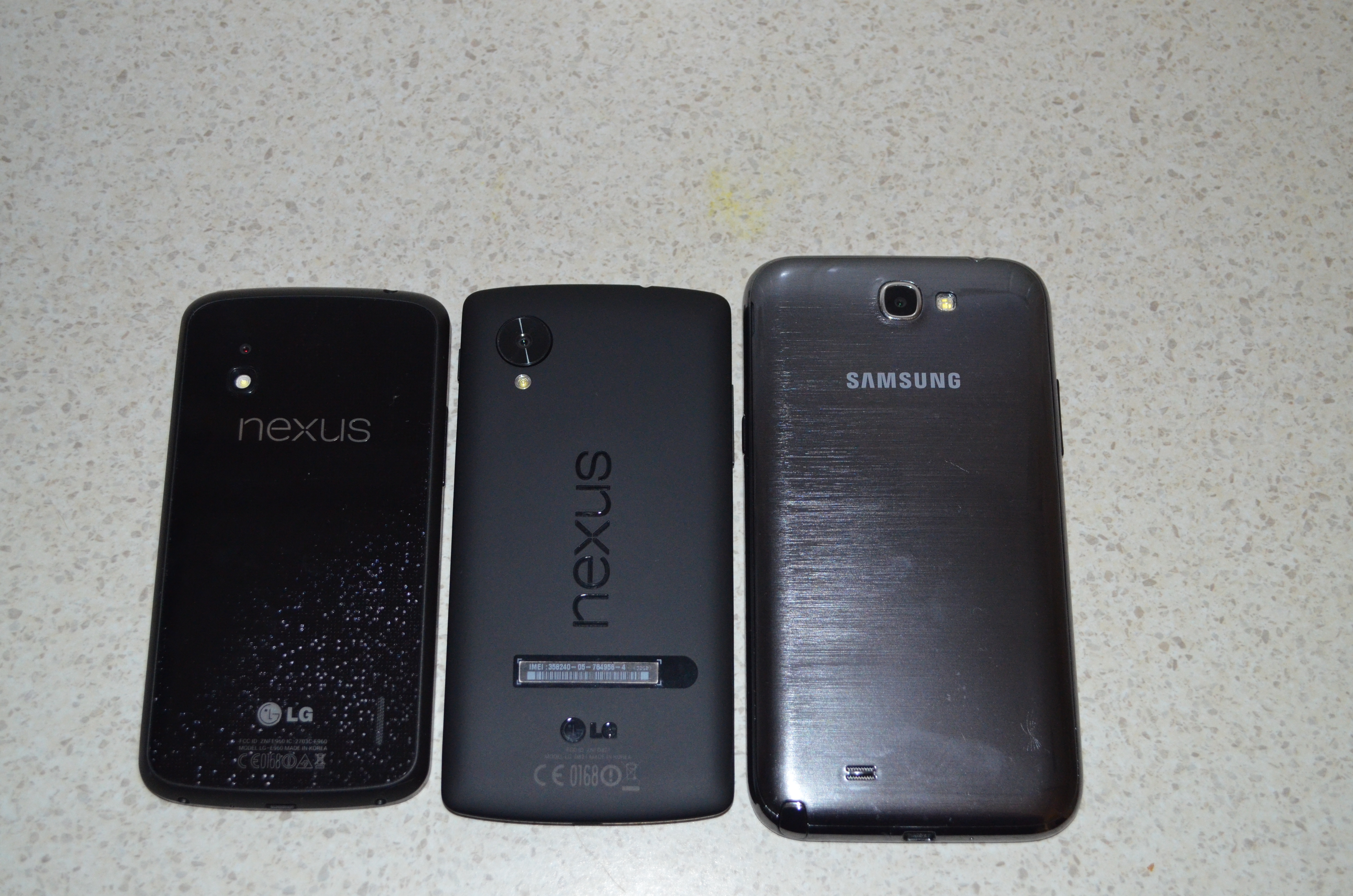
The Nexus 5 is the latest Android phone to be endorsed by Google (and manufactured by LG). It s getting good reviews and the price is good for the specs. I just bought one for my wife, I got her the 32G version because when I bought her a Nexus 4 at the start of the year [1] I chose the 8G version and regretted it ever since. The size of apps is always increasing (some Android games need more than 1G of storage) and higher resolution screens drives the use of high resolution video. Appearance back of Nexus 4, Nexus 5, and Samsung Galaxy Note 2front of Nexus 4, Nexus 5, and Samsung Galaxy Note 2 Above I have pictures of the Nexus 4, the Nexus 5, and the Samsung Galaxy Note 2. The photo of the phone backs captures part of the sparkling pattern on the back of the Nexus 4 and it looks much better in real life (IMHO) because it shimmers as you move the phone. The Nexus 4 looks so good that there s even a transparent case specifically designed to show off the rear panel [2]. It doesn t seem likely that anyone will design such a transparent case for the Nexus 5, it s a good phone to cover up IMHO. The Note 2 isn t the most attractive phone, but I think it has a streamlined elegance of being optimised for it s function. The Nexus 5 has it s camera sticking out, it would be better if they had just made the entire phone thicker and given it a bigger battery but for people who don t want good battery life I guess it s a way of providing a better focal length without making the phone thicker. Sticking the IMEI number on the back of the phone will be useful on rare occasions (and might be a security issue on more occasions) but it definitely makes the phone less attractive. Full HD The quality of the Full HD (1920*1080) display is obvious. The text is slightly clearer when viewing maps and the graphics in Ingress look nicer. Before I used the Nexus 5 I didn t think that there would be any benefit in having such a high resolution in a phone but now I realise that I was wrong. The higher resolution is clearly better. Chris Chavez wrote an article for Phandroid about a rumored Samsung phone with a 2560*1440 display [3]. If such a device had a 6.6 display (IE a new version of the Galaxy Mega) then it would have the same dot-pitch as the Nexus 5. If such a device had a 5.5 display (like the Galaxy Note 3) then it would have a 15% greater DPI than the Nexus 5. It seems that a higher DPI provides a real benefit and this is probably the biggest reason to choose the Nexus 5 over the Nexus 4 and most other Android devices. Comparing with the Nexus 4 The Nexus 5 has the same amount of RAM (2G), a slightly larger display (4.95 vs 4.7 ), higher resolution (a big deal), faster CPU and GPU, and optical zoom. Faster CPU isn t usually going to be a big deal (apart from the fact that more CPU power is needed as well as more GPU power to drive the higher resolution display). The Nexus 5 can come with 16G or 32G of storage while the Nexus 4 has options of 8G and 16G. If you want more than 16G of storage then that s a real benefit for the Nexus 5, but if you only need 16G then it s not an issue. It seems that when playing Ingress on a Nexus 5 it s more likely that running another program (such as Google Hangouts) will cause Ingress to be reloaded than it does on a Nexus 4 or a Galaxy Note 2. While I haven t done a good comparison of the Nexus 4 and the Nexus 5 in this regard I ve compared the Galaxy Note 2 and the Nexus 5 well. My Galaxy Note 2 (which has many daemons running) is much less likely to cause a reload of Ingress (IE have run low on memory and terminated Ingress) than the Nexus 5 my wife is using (which has very little running). So it seems that the OS build on the Nexus 5 uses more memory than the Galaxy Note 2. The Nexus 5 has Gorilla Glass 3 vs Gorilla Glass 2 on the Nexus 4. As my older Android phones with Gorilla Glass 1 (Galaxy S and Sony Ericsson Xperia X10i) didn t get any scratches that matter I don t think this is a benefit for me. Maybe if I lived near a beach I d care more about this. I think that the most significant benefit of the Nexus 5 over the Nexus 4 is the higher resolution display. The optical zoom should provide a theoretical benefit when taking photos, whether that results in better pictures in practice would probably depend on how you hold your phone, the available light, and other factors. I think that if it was possible to buy a Nexus 4 at a sensible price (IE something less than the $250 that Google last charged) then for most people the Nexus 4 would be a better choice than the Nexus 5. But as ebay is full of Nexus 4 phones selling for a higher prices than the Nexus 5 it seems that buying a Nexus 5 is the only option. The range of phones that Kogan sells [4] doesn t have anything for the same price that compares on features. Heat The heat produced by the Nexus 5 is significant and noticable. After some light Ingress playing on a cold day my Galaxy Note 2 with a gel case (that keeps it warm) reported itself as having a battery temperature of 34C. My wife s Nexus 5 reported a temperature of 43C. While the thermometer in the phone might not be the most accurate I don t think there was an accuracy problem, holding my wife s phone was unpleasant and felt like it could burn my hand if I held it tight (40C is the minimum temperature for burns). It seems that a Nexus 5 isn t a good choice if you want to play Ingress in a warm part of the world (EG most of Australia in summer). Also heat dissipated is directly proportional to power use which is going to be a problem for a phone that doesn t permit replacing it s battery. Conclusion I m quite disappointed with the Nexus 5. I expected it to be at least as good as the Nexus 4 in every way and better in many ways. Instead it s not always as good as the Nexus 4 and the ways that it is better won t necessarily provide benefits for everyone. The heat and power use problems are really going to hurt the use of it. But I guess we can always hope that Google release a new Android build that reduces the power use, they might even have a new build that uses less RAM too. I would not consider getting a Nexus 5 for my own use. For my use the Note 2 is clearly more suitable, the larger screen more than compensates for the clarity that the Nexus 5 gets from it s high resolution display. Also I REALLY like having a hardware home button. I ll probably get a Note 3 when the price drops, I m not interested in paying $649 for a phone and I m also not interested in replacing a phone that s less than a year old. So maybe I ll get a Note 3 in the second half of next year.

22 December 2013

Francois Marier: Creating a Linode-based VPN setup using OpenVPN on Debian or Ubuntu

Using a Virtual Private Network is a good way to work-around geoIP restrictions but also to protect your network traffic when travelling with your laptop and connecting to untrusted networks. While you might want to use Tor for the part of your network activity where you prefer to be anonymous, a VPN is a faster way to connect to sites that already know you. Here are my instructions for setting up OpenVPN on Debian / Ubuntu machines where the VPN server is located on a cheap Linode virtual private server. They are largely based on the instructions found on the Debian wiki. An easier way to setup an ad-hoc VPN is to use sshuttle but for some reason, it doesn't seem work on Linode or Rackspace virtual servers.

Generating the keys Make sure you run the following on a machine with good entropy and not a VM! I personally use a machine fitted with an Entropy Key. The first step is to install the required package:
sudo apt-get install openvpn
Then, copy the following file in your home directory (no need to run any of this as root):
mkdir easy-rsa
cp -ai /usr/share/doc/openvpn/examples/easy-rsa/2.0/ easy-rsa/
cd easy-rsa/2.0
and put something like this in your ~/easy-rsa/2.0/vars:
export KEY_SIZE=2084
export KEY_COUNTRY="NZ"
export KEY_PROVINCE="AKL"
export KEY_CITY="Auckland"
export KEY_ORG="fmarier.org"
export KEY_EMAIL="francois@fmarier.org"
export KEY_CN=hafnarfjordur.fmarier.org
export KEY_NAME=hafnarfjordur.fmarier.org
export KEY_OU=VPN
Create this symbolic link:
ln -s openssl-1.0.0.cnf openssl.cnf
and generate the keys:
. ./vars
./clean-all
./build-ca
./build-key-server server  # press ENTER at every prompt, no password
./build-key akranes  # "akranes" as Name, no password
./build-dh
/usr/sbin/openvpn --genkey --secret keys/ta.key

Configuring the server On my server, a Linode VPS called hafnarfjordur.fmarier.org, I installed the openvpn package:
apt-get install openvpn
and then copied the following files from my high-entropy machine:
cp ca.crt dh2048.pem server.key server.crt ta.key /etc/openvpn/
chown root:root /etc/openvpn/*
chmod 600 /etc/openvpn/ta.key /etc/openvpn/server.key
Then I took the official configuration template:
cp /usr/share/doc/openvpn/examples/sample-config-files/server.conf.gz /etc/openvpn/
gunzip /etc/openvpn/server.conf.gz
and set the following in /etc/openvpn/server.conf:
dh dh2048.pem
push "redirect-gateway def1 bypass-dhcp"
push "dhcp-option DNS 74.207.241.5"
push "dhcp-option DNS 74.207.242.5"
tls-auth ta.key 0
cipher AES-128-CBC
user nobody
group nogroup
(These DNS servers are the ones I found in /etc/resolv.conf on my Linode VPS.) Finally, I added the following to these configuration files:
  • /etc/sysctl.conf:
    net.ipv4.ip_forward=1
    
  • /etc/rc.local (just before exit 0):
    iptables -t nat -A POSTROUTING -s 10.8.0.0/24 -o eth0 -j MASQUERADE
    
  • /etc/default/openvpn:
    AUTOSTART="all"
    
and ran sysctl -p before starting OpenVPN:
/etc/init.d/openvpn start
If the server has a firewall, you'll need to open up this port:
iptables -A INPUT -p udp --dport 1194 -j ACCEPT

Configuring the client The final piece of this solution is to setup my laptop, akranes, to connect to hafnarfjordur by installing the relevant Network Manager plugin:
apt-get install network-manager-openvpn-gnome
The laptop needs these files from the high-entropy machine:
cp ca.crt akranes.crt akranes.key ta.key /etc/openvpn/
chown root:francois /etc/openvpn/akranes.key /etc/openvpn/ta.key
chmod 640 /etc/openvpn/ta.key /etc/openvpn/akranes.key
and my own user needs to have read access to the secret keys. To create a new VPN, right-click on Network-Manager and add a new VPN connection of type "OpenVPN":
  • Gateway: hafnarfjordur.fmarier.org
  • Type: Certificates (TLS)
  • User Certificate: /etc/openvpn/akranes.crt
  • CA Certificate: /etc/openvpn/ca.crt
  • Private Key: /etc/openvpn/akranes.key
  • Available to all users: NO
then click the "Avanced" button and set the following:
  • General
    • Use LZO data compression: YES
  • Security
    • Cipher: AES-128-CBC
    • HMAC Authentication: Default
  • TLS Authentication
    • Subject Match: server
    • Verify peer (server) certificate usage signature: YES
    • Remote peer certificate TLS type: Server
    • Use additional TLS authentication: YES
    • Key File: /etc/openvpn/ta.key
    • Key Direction: 1

Debugging If you run into problems, simply take a look at the logs while attempting to connect to the server:
tail -f /var/log/syslog
on both the server and the client. In my experience, searching for the error messages you find in there is usually enough to solve the problem.

Next steps The next thing I'm going to add to this VPN setup is a local unbound DNS resolver that will be offered to all clients. Is there anything else you have in your setup and that I should consider adding to mine?

Russ Allbery: Review: They Had to Go Out

Review: They Had to Go Out, by Gary J. Hudson
Publisher: Xlibris
Copyright: 2008
ISBN: 1-4363-8132-0
Format: Trade paperback
Pages: 165
They Had to Go Out, as noted on the cover, is the story of the tragedy of the Triumph and the Mermaid, a marine incident that occurred off the Oregon coast of the United States near the mouth of the Columbia River on January 12, 1961. But it's also much more than that. It's a detailed and thoroughly-researched account of a Coast Guard rescue operation, starting with background on the two coastal lifeboat stations and the types of ships involved. It covers everything from crew backgrounds to equipment issues to the general shape of the subsequent inquiry, and in the process provides a wealth of detailed information about the nature of Coast Guard rescue operations and the technology and equipment available at the time. But, beyond that, it's a gripping story, in part because of the authenticity of the authorial voice. Gary Hudson spent twenty years in the Coast Guard, ten on coastal lifeboat stations like the ones in this book, and was assigned to Point Adams (the primary station involved in this story) until 12 days before the incident, when he transferred to a light station for unrelated reasons. The writing is rough, the paragraphs are not always well-organized, the punctuation doesn't always end up in the right place, and it could have used an editor (Xlibris is a printing service company for self-publishing). But he understands the subject matter completely, and he clearly spent years of effort putting together all the details of the story. The first few chapters, where he establishes the necessary background and tells a few related stories, feel quite rough, but once he gets into the heart of the story, the rough prose stops mattering. Obviously, one of the things that makes this story so appealing is that it's a gripping human story, with the unconstructed and unexpected twists and turns of reality rather than a plot. Hudson has lived the life of the people he's writing about and can put many of their fears and thoughts into words. He captures some of what it would feel like to be out on the water in the middle of the worst seas that most of them had ever seen. And reality is unpredictable. I'm avoiding giving the exact details of what happened and I would recommend not researching the incident on Google if you plan to read this book; there's a lot of drama here, and spoilers are possible. Hudson's factual, detailed narrative style gives the reader a lot of material with which to build mental pictures, and he preserves the drama and the human impact of the story by telling it in straight chronological order. The writing is rough, but he shows a talent for pacing and perspective in the way he weaves together the viewpoints of multiple Coast Guard stations and ship crews. This is also a case study and an accident report, put together with extensive research and scope, but made approachable for the average reader. Hudson takes out the dryness and technical language and weaves the events into a narrative, but he doesn't lose much of the detail. You can know nothing at all about ships or Coast Guard operations and come away from this book with strong opinions about self-righting capabilities (and, more to the point, accurate communication to crews of the capabilities of their vessels). And, by showing a full day of Coast Guard operations (admittedly, a very unusual and difficult day), Hudson also provides the previously unfamiliar reader with a great "day in the life" picture of what Coast Guard lifesaving operations at their most dangerous look like (or at least looked like; one also gets a sense of just how much has improved, and how important the improvements are, in the final chapters). Finally, unlike most accident reports, Hudson carries the story through to the immediate family impact (which may well bring you to tears) and then, given forty years of hindsight, some of the subsequent effects on the people involved. I really liked this. One of the aspects of stories like this that often gets short shrift is that the people involved carry the incident with them for the rest of their lives, often with profound impact. Unlike a movie, where the movie ends and the characters disappear as soon as the primary action is complete, real life has messy and lingering endings, and I think Hudson manages to capture some of that feeling. Some of the best non-fiction books are not written by professional writers. Instead, they're written by people who have both expertise and passion for a particular topic and who know or teach themselves enough about telling a story to manage to get that expertise and passion out on paper. Hudson puts every aspect of this day into the book, from the people to the family impact, from the questionable decisions to the equipment failures and shortages, from the initial conditions through the inquiry and up to the subsequent impact on the lives of the people involved (including, sadly, the Coast Guard's lack of understanding of how to help people with traumatic stress). Some of the paragraphs clunk, some of the sentence construction is awkward, and some of the short biographies are a bit lost in details, but Hudson's desire to tell the complete truth as he was able to reconstruct it, and his deep empathy and understanding of how it felt to the people involved, shine through and carry this book. This is great stuff, and worth seeking out. Recommended. Rating: 9 out of 10

21 December 2013

Russell Coker: Links December 2013

Andres Lozano gave an interesting TED talk about the use of electrodes inside the brain (deep brain stimulation) to treat Alzheimers disease, Parkinson s disease, and depression [1]. Daniel Pocock wrote an interesting post commenting on some bad political decisions being made in Australia titled Evacuating Australia [2]. You can read that as a suggestion to leave Australia or to try and make Australia better. Marco Tempest gave an interesting TED talk about Nikola Tesla [3]. The presentation method is one that I ve never seen before so I recommend watching the talk even if you already know all about Tesla. Charmian Gooch gave an interesting TED talk about global corruption [4]. I think we need people to send the information on shell company ownership to organisations like Wikileaks. The punishment for leaking such information would be a lot less than Chelsea Manning is getting and the chance of getting caught is also low. Rich Mogul wrote an interesting and insightful article for Macworld about the Apple approach to security problems [5]. To avoid the problem of users disabling security features they work to make the secure way of doing things EASIER for the user. That won t work with all security problems but it s something we need to think about when working on computer security. Ray Raphael gave an interesting TED talk about the parts of the US revolution that don t appear in history books [6]. He warns the listener to beware of the narrative forms, but another way to interpret his talk is that you should present your version of history in the narrative form that is best accepted. That lesson is well known and it s easy to see history being deliberately distorted in most media outlets. Will Wright gave an interesting TED talk about how he designed the game Spore and his ideas about games in general [7]. Spore is a really good game. Chris Lintott gave an interesting TED talk about crowd-sourced astronomy titled How to Discover a Planet from Your Sofa [8]. He referenced the Zooniverse.org site which lists many crowd-sourced science projects [9]. Jake Socha gave an interesting TED talk about flying snakes, you have to see this to believe it [10]. Nikita Bier gave an interesting TED talk about his webapp to analyse economic policies [11]. Apparently 60% of people were going to vote in their best economic interest before seeing his site and 66% would do so afterwards that could change an election result. Anya Kamenetz wrote an interesting article for Salon about The Iliad Project which aims to use Indigogo to help identify new anti-biotics [12]. The current ways of discovering anti-biotics aren t working, lets hope this one does. Peter Finocchiaro wrote an interesting Salon article about how right-wing politicians in the US were opposed to Nelson Mandela [13] racism meets anti-communism. Katie McDonough wrote an interesting Salon article about Rick Santorum and Bill O Reilly comparing Obamacare to apartheid while supposedly honoring Nelson Mandela [14], Katie also notes that Nelson enshrined universal healthcare in the South African constitution something all countries should do. Mary Elizabeth Williams wrote a Salon article about Susan Boyle s announcement about being diagnosed with Asperger Syndrome [15]. Not a surprise though, some people can be diagnosed with Autism by merely watching them on TV. Amelia Hill wrote an article for The Guardian/The Observer about the educational results of Home Schooling [16]. Apparently Home-Schooled kids learn significantly more and home-educated children of working-class parents achieved considerably higher marks in tests than the children of professional, middle-class parents and that gender differences in exam results disappear among home-taught children . Wow, Home Schooling beats gender and class problems! I m sure it s even better for GLBT kids too. Robert Reich wrote an interesting Salon article about the way rich people in the US give tax-deductable (taxpayer supported) donations to charities that benefit themselves [17]. Dan Savage wrote a very funny review of Sarah Palin s latest Christmas book, one classic quote is why should I have to read the whole thing? Lord knows Sarah Palin didn t write the whole thing [18]. He makes a good point that we should use the term happy holidays instead of happy Christmas just to show that we aren t assholes.

Daniel Kahn Gillmor: Kevin M. Igoe should step down from CFRG Co-chair

I've said recently that pervasive surveillance is wrong. I don't think anyone from the NSA should have a leadership position in the development or deployment of Internet communications, because their interests are at odds with the interest of the rest of the Internet. But someone at the NSA is in exactly such a position. They ought to step down. Here's the background: The Internet Research Task Force (IRTF) is a body tasked with research into underlying concepts, themes, and technologies related to the Internet as a whole. They act as a research organization that cooperates and complements the engineering and standards-setting activities of the Internet Engineering Task Force (IETF). The IRTF is divided into issue-specific research groups, each of which has a Chair or Co-Chairs who have "wide discretion in the conduct of Research Group business", and are tasked with organizing the research and discussion, ensuring that the group makes progress on the relevant issues, and communicating the general sense of the results back to the rest of the IRTF and the IETF. One of the IRTF's research groups specializes in cryptography: the Crypto Forum Research Group (CFRG). There are two current chairs of the CFRG: David McGrew <mcgrew@cisco.com> and Kevin M. Igoe <kmigoe@nsa.gov>. As you can see from his e-mail address, Kevin M. Igoe is affiliated with the National Security Agency (NSA). The NSA itself actively tries to weaken cryptography on the Internet so that they can improve their surveillance, and one of the ways they try to do so is to "influence policies, standards, and specifications". On the CFRG list yesterday, Trevor Perrin requested the removal of Kevin M. Igoe from his position as Co-chair of the CFRG. Trevor's specific arguments rest heavily on the technical merits of a proposed cryptographic mechanism called Dragonfly key exchange, but I think the focus on Dragonfly itself is the least of the concerns for the IRTF. I've seconded Trevor's proposal, and asked Kevin directly to step down and to provide us with information about any attempts by the NSA to interfere with or subvert recommendations coming from these standards bodies. Below is my letter in full:
From: Daniel Kahn Gillmor <dkg@fifthhorseman.net>
To: cfrg@ietf.org, Kevin M. Igoe <kmigoe@nsa.gov>
Date: Sat, 21 Dec 2013 16:29:13 -0500
Subject: Re: [Cfrg] Requesting removal of CFRG co-chair
On 12/20/2013 11:01 AM, Trevor Perrin wrote:
> I'd like to request the removal of Kevin Igoe from CFRG co-chair.
Regardless of the conclusions that anyone comes to about Dragonfly
itself, I agree with Trevor that Kevin M. Igoe, as an employee of the
NSA, should not remain in the role of CFRG co-chair.
While the NSA clearly has a wealth of cryptographic knowledge and
experience that would be useful for the CFRG, the NSA is apparently
engaged in a series of attempts to weaken cryptographic standards and
tools in ways that would facilitate pervasive surveillance of
communication on the Internet.
The IETF's public position in favor of privacy and security rightly
identifies pervasive surveillance on the Internet as a serious problem:
https://www.ietf.org/media/2013-11-07-internet-privacy-and-security.html
The documents Trevor points to (and others from similar stories)
indicate that the NSA is an organization at odds with the goals of the IETF.
While I want the IETF to continue welcoming technical insight and
discussion from everyone, I do not think it is appropriate for anyone
from the NSA to be in a position of coordination or leadership.
----
Kevin, the responsible action for anyone in your position is to
acknowledge the conflict of interest, and step down promptly from the
position of Co-Chair of the CFRG.
If you happen to also subscribe to the broad consensus described in the
IETF's recent announcement -- that is, if you care about privacy and
security on the Internet -- then you should also reveal any NSA activity
you know about that attempts to subvert or weaken the cryptographic
underpinnings of IETF protocols.
Regards,
	--dkg
I'm aware that an abdication by Kevin (or his removal by the IETF chair) would probably not end the NSA's attempts to subvert standards bodies or weaken encryption. They could continue to do so by subterfuge, for example, or by private influence on other public members. We may not be able to stop them from doing this in secret, and the knowledge that they may do so seems likely to cast a pall of suspicion over any IETF and IRTF proceedings in the future. This social damage is serious and troubling, and it marks yet another cost to the NSA's reckless institutional disregard for civil liberties and free communication. But even if we cannot rule out private NSA influence over standards bodies and discussion, we can certainly explicitly reject any public influence over these critical communications standards by members of an institution so at odds with the core principles of a free society. Kevin M. Igoe, please step down from the CFRG Co-chair position. And to anyone (including Kevin) who knows about specific attempts by the NSA to undermine the communications standards we all rely on: please blow the whistle on this kind of activity. Alert a friend, a colleague, or a journalist. Pervasive surveillance is an attack on all of us, and those who resist it are heroes.

Niels Thykier: Getting out of the way

I have decided to step down as main maintainer of Lintian and pass the baton to Bastien Roucari s. This is actually fairly old news, since I announced this almost a month ago. However, I was not very vocal about it until now (so do not be surprised if you had not heard of this before). In the past month, I never once regretted having stepped down. If anything, I should probably have done it a bit earlier. Beyond the lack of motivation, I also realised that I had become an all talk and no do -maintainer. The kind that I have been advocating against publicly. This may sound weird to a lot of people, who knows me as the Lintian guy or Mr. Lintian (or whatever Lintian-related nickname people gave me). But the fact is that Bastien has done more for Lintian in the past month than I have in the past two. Despite stepping down as main developer, I have not left Lintian completely. I am still around for helping/explaining, uploading and keeping lintian.debian.org running.

Christian Perrier: So, what's up with bubulle in Debian?

This is the end of the year and time for me to look back and summarize what happened to my Debian life during 2013. In short, it clearly seems that this year is the "year after peak of involvment" year. Up to 2010 included, my involvment in Debian constantly increased. 2011 and 2012 have seen some kind of stagnation with still some high involvment in some areas (i18n obviously, DebConf-related stuff, font packaging...) but already some reduction in others (D-I for instance...where the overall involvment of Debian developers is nos quite low, Kibi excepted). But, clearly, in 2013, something changed. And, indeed, it's easy to see what happened. In 2007, I started to motivate myself to resume my practice of sports (I used to be a well-trained volleyball player back in 80's) and I started running. More and more and more and more. 992km in 2008, 1700km in 2009 (and my first marathon), 2200km in 2010 (and my first ultras), 2500km in 2011 (and my first 80km), 2900km in 2012 (and more ultras) and....about 4700km in 2013 (with many many firsts). What changed is now obvious. Running and sports (and related activites such as a lot of socializing with other runners) took over free software activities. Last summer and autumn made it clear, indeed. While I was attending my 10th DebConf in a row (I think we're very few people to have achieved this), it was not my summer's "peak". I spent some great time in Switzerland, still enjoyed a lot meeting again with old and new friends from all over the world. I did some good hacking and achived quite some good things over there. But, still, that was not what I will keep from this summer because.....I had two great moutain races in July and August and *this* is what I'll keep. So, here we are: I'm reducing my involvment in Debian, obviously. Some things are handed over to other people, formally or informally. Some other things will indeed wait for someone to pick them up....or might slowly die as it sometimes happens in this project. I will very probably not attend DebConf14 in Portland even though I have been among the people who were enthusiastic when we picked that bid. But the dates conflict with the Ultra Tour du Mont-Blanc races in Chamonix, where I'll hopefully try to complete my first "over 100km" race in moutains. I will probably decline being part of the Debconf bids team for DC15 as well as the sponsoring team. I nearly stopped working on Samba packages and will not attend SambaXP in May. That's my challenge now. I don't want to completely quit this project and it's indeed harder than it seems, when one's involvment is going down. I'm currently trying to find the right balance to still stay involved in what has been a great part of my life in the last 15-20 years. For instance, I'll try to successfully mentor two applicants from the Outreach Program for Women. Or still continue to work occasionnally on font packages. Or still continue to manage D-I i18n. But you'll be seeing (and hearing) me less. The challenge is to still continue seeing and hearing me about Debian and free software and it's indeed less easy than it seems. I hope I'll succeed.

Kees Cook: DOM scraping

For a long time now I ve used mechanize (via either Perl or Python) for doing website interaction automation. Stuff like playing web games, checking the weather, or reviewing my balance at the bank. However, as the use of javascript continues to increase, it s getting harder and harder to screen-scrape without actually processing DOM events. To do that, really only browsers are doing the right thing, so getting attached to an actual browser DOM is generally the only way to do any kind of web interaction automation. It seems the thing furthest along this path is Selenium. Initially, I spent some time trying to make it work with Firefox, but gave up. Instead, this seems to work nicely with Chrome via the Chrome WebDriver. And even better, all of this works out of the box on Ubuntu 13.10 via python-selenium and chromium-chromedriver. Running /usr/lib/chromium-browser/chromedriver2_server from chromium-chromedriver starts a network listener on port 9515. This is the WebDriver API that Selenium can talk to. When requests are made, chromedriver2_server spawns Chrome, and all the interactions happen against that browser. Since I prefer Python, I avoided the Java interfaces and focused on the Python bindings:
#!/usr/bin/env python
import sys
from selenium import webdriver
from selenium.common.exceptions import NoSuchElementException
from selenium.webdriver.common.keys import Keys
caps = webdriver.DesiredCapabilities.CHROME
browser = webdriver.Remote("http://localhost:9515", caps)
browser.get("https://bank.example.com/")
assert "My Bank" in browser.title
try:
    elem = browser.find_element_by_name("userid")
    elem.send_keys("username")
    elem = browser.find_element_by_name("password")
    elem.send_keys("wheee my password" + Keys.RETURN)
except NoSuchElementException:
    print "Could not find login elements"
    sys.exit(1)
assert "Account Balances" in browser.title
xpath = "//div[text()='Balance']/../../td[2]/div[contains(text(),'$')]"
balance = browser.find_element_by_xpath(xpath).text
print balance
browser.close()
This would work pretty great, but if you need to save any state between sessions, you ll want to be able to change where Chrome stores data (since by default in this configuration, it uses an empty temporary directory via --user-data-dir=). Happily, various things about the browser environment can be controlled, including the command line arguments. This is configurable by expanding the desired capabilities variable:
caps = webdriver.DesiredCapabilities.CHROME
caps["chromeOptions"] =  
        "args": ["--user-data-dir=/home/user/somewhere/to/store/your/session"],
     
A great thing about this is that you get to actually watch the browser do its work. However, in cases where this interaction is going to be fully automated, you likely won t have a Xorg session running, so you ll need to wrap the WebDriver in one (since it launches Chrome). I used Xvfb for this:
#!/bin/bash
# Start WebDriver under fake X and wait for it to be listening
xvfb-run /usr/lib/chromium-browser/chromedriver2_server &
pid=$!
while ! nc -q0 -w0 localhost 9515; do
    sleep 1
done
the-chrome-script
rc=$?
# Shut down WebDriver
kill $pid
exit $rc
Alternatively, all of this could be done in the python script too, but I figured it s easier to keep the support infrastructure separate from the actual test script itself. I actually leave the xvfb-run call external too, so it s easier to debug the browser in my own X session. One bug I encountered was that the WebDriver s cache of the browser s DOM can sometimes get out of sync with the actual browser s DOM. I didn t find a solution to this, but managed to work around it. I m hoping later versions fix this. :)

2013, Kees Cook. This work is licensed under a Creative Commons Attribution-ShareAlike 3.0 License.
Creative Commons License

20 December 2013

Lars Wirzenius: Configuring gitano

I recently set up a Gitano instance as http://git.liw.fi/. Gitano is a very nice git server, which adds user and group management and access control in front of git itself, and keeps all configuration in git, where it's traceable and auditable nicely. It's also a command line based thing, rather than a slow, resource-hungry web application, and so much more to my liking. Daniel, the Gitano upstream, has a "gitano-all" source tree for creating an unofficial Gitano Debian package, which includes cgit, a fast git web interface. This is not ever going to be accepted in Debian, of course, but it makes it easier to install Gitano on your server. This hanky-panky is needed because Gitano and cgit both use libgit2, and that's a library without a stable API at this time. This makes is difficult to package for Debian. cgit seems to embed other such projects as well. Anyway, once you've installed the Gitano software (and cgit, if you want that), there's the matter of setting up a Gitano instance. Each Gitano instance is its own Unix user, accessed over ssh. Thus, one machine can host any number of Gitano instances, and they'll be nicely isolated from each other by normal Unix setup. Each instance manages its own set of Gitano users and group, which only exist within that instance. Users are identified by ssh public keys: there are no passwords. Here's my slightly edited checklist for setting up a Gitano instance. It assumes Gitano and cgit and their dependencies are installed. Setup Gitano itself: Setup a git daemon for public git repositories:
git stream tcp nowait nobody /usr/bin/git 
git daemon --inetd 
--interpolated-path=/home/git/repos/%D /home/git/repos
Setup cgit and Apache:
# CGIT stuff
DirectoryIndex /cgi-bin/cgit/cgit.cgi
Alias /cgit.png /usr/share/cgit/htdocs/cgit.png
Alias /cgit.css /usr/share/cgit/htdocs/cgit.css
<Directory "/home/git/repos">
    Options FollowSymlinks Indexes
    Allow from all
    AllowOverride none
    Order allow,deny
</Directory>
# Enable caching of up to 1000 output entriess
cache-size=1000
# Specify some default clone prefixes
clone-prefix=git://testgit
# Specify the css url
css=/cgit.css
# Specify the logo url
logo=/cgit.png
# Show extra links for each repository on the index page
enable-index-links=1
# Show number of affected files per commit on the log pages
enable-log-filecount=1
# Show number of added/removed lines per commit on the log pages
enable-log-linecount=1
# Set the title and heading of the repository index page
root-title=testgit
root-desc=Lars's test git repositories
# Allow download of tar.gz, tar.bz2 and zip-files
snapshots=tar.gz
#source-filter=/usr/lib/cgit/filters/syntax-highlighting.sh
remove-suffix=1
enable-git-config=1
strict-export=git-daemon-export-ok
scan-path=/home/git/repos
##
## List of common mimetypes
##
mimetype.git=image/git
mimetype.html=text/html
mimetype.jpg=image/jpeg
mimetype.pdf=application/pdf
mimetype.png=image/png
mimetype.svg=image/svg+xml
Finally, you should review, and possibly alter, Gitano access control rules. Some Gitano commands: Happy hacking. PS. I wrote a yarn test suite for my Gitano ACL, which may be interesting if you're new to Gitano.

Riku Voipio: Replicant on Galaxy S3

I recently got my self and Galaxy S3 for testing out Replicant, an android image made out of only open source components. Why Galaxy S3? It is well supported in Replicant, almost every driver is already open source. The hardware specs are acceptable, 1.4Ghz quad core, 1GB ram, microsd, and all the peripheral chips one expects for a phone. Galaxy S3 has sold insanely (50 million units supposedly), meaning I won't run out of accessories and aftermarket spare parts any time soon. The massive installed base also means a huge potential user community. S3 is still available as new, with two years of warranty. Why notWhile the S3 is still available new, it is safe to assume production is ending already - 1.5 year old product is ancient history in mobile world! It remains to be seen how much the massive user base will defend against the obsolescence. Upstream kernel support for "old" cpu is open question, replicant is still basing kernel on vendor kernel. Bootloader is unlocked, but it can't be changed due to trusted^Wtreacherous computing, preventing things like boot from sd card. Finally, not everything is open source, the GPU (mali) driver while being reverse engineered, is taking it's time - and the GPS hasn't been reversed yet. Installing replicant Before install, from the original installation, you might want to take a copy of firmware files (since replicant won't provide them). enable developer mode on the S3 and:
sudo apt-get install android-tools
mkdir firmware
adb pull /system/vendor/firmware/
adb pull /system/etc/wifi
After then, just follow official replicant install guide for S3. If you don't mind closed source firmwares, post-install you need to push the firmware files back:

adb shell
mount -o remount,rw /system
adb push . /system/vendor/firmware
Here was my first catch, the wifi firmwares from jelly bean based image were not compatible with older ICS based replicant. Using replicant
Booting to replicant is fast, few seconds to the pin screen. You are treated with the standard android lockscreen, usual slide/pin/pattern options are available. Basic functions like phone, sms and web browsing have icons from the homescreen and work without a hitch. Likewise camera seems to work, really the only smartphone feature missing is GPS. Sidenote - this image looks a LOT better on the S3 than on my thinkpad. No wonder people are flocking to phones and tablets when laptop makers use such crappy components.
The grid menu has the standard android AOSP opensource applications in the ICS style menu with the extra of f-droid icon - which is the installer for open source applications. F-droid is it's own project that complements replicant project by maintaining a catalog of Free Software.
F-droid brings hundreds of open source applications not only for replicant, but for any other android users, including platforms with android compatibility, such as Jolla's Sailfish OS. Of course f-droid client is open source, like the f-droid server (in Debian too). F-droid server is not just repository management, it can take care of building and deploying android apps.
The WebKit based android browser renders web sites without issues, and if you are not happy with, you can download Firefox from f-droid. Many websites will notice you are mobile, and provide mobile web sites, which is sometimes good and sometimes annoying. Worse, some pages detect you are android and only offer you to load their closed android app for viewing the page. OTOH I am already viewing their closed source website, so using closed source app to view it isn't much worse. This keyboard is again the android standard one, but for most unixy people the hacker's keyboard with arrow buttons and ctrl/alt will probably be the one you want. Closing thoughts While using replicant has been very smooth, the lack of GPS is becoming a deal-breaker. I could just copy the gpsd from cyanogen, like some have done, but it kind of beats the purpose of having replicant on the phone. So it might be that I move back to cyanogen, unless I find time to help reverse engineering the BCM4751 GPS.

Next.

Previous.