Simon Josefsson: Offline GnuPG Master Key and Subkeys on YubiKey NEO Smartcard
I have moved to a new OpenPGP key. There are many tutorials and blog posts on GnuPG key generation around, but none of them matched exactly the setup I wanted to have. So I wrote down the steps I took, to remember them if I need to in the future. Briefly my requirements were as follows:
user@debian:~$ sudo service pcscd restart Start gnupg-agent and setup the environment variable for this session:
- The new master GnuPG key is on an USB stick.
- The USB stick is only ever used on an offline computer.
- There are subkeys stored on a YubiKey NEO smartcard for daily use.
- I want to generate the subkeys using GnuPG so I have a backup.
- Some non-default hash/cipher preferences encoded into the public key.
/media/FA21-BEC7 so you will have to replace that path with something that points to your USB stick. Open a terminal since the rest of this writeup will be done from a terminal window.
GnuPG configuration
Set your GnuPG home directory to point at the USB memory device. You will need to do this in every terminal windows you open that you want to use GnuPG in.
user@debian:~$ export GNUPGHOME=/media/FA21-BEC7/gnupghome
user@debian:~$ mkdir $GNUPGHOME
user@debian:~$
The GnuPG defaults (as of version 1.4.16) to rank SHA1 higher than SHA384, SHA512, and SHA224 in the default hash preference list. To be precise, the default hash preference order is SHA256, SHA1, SHA384, SHA512, SHA224. I consider SHA1 broken so I don t advertise it all, although I believe that will not prevent some implementations of using SHA1 anyway since it is the mandatory to implement hash algorithm. Regarding symmetric ciphers, the default order is AES256, AES192, AES128, CAST5, 3DES. I don t like ciphers with 64-bit block lengths, so I don t advertise them but similarily, I believe this will not prevent some implementations of using CAST5 or 3DES anyway. I also advertise support for Twofish and Camellia in case someone wants to use them, they are 128-bit block length and relatively modern ciphers after all. The default-preference-list keyword is used to override the default settings, which will be recorded into any newly generated keys. GnuPG self-sign keys with SHA1 by default, and I prefer to use a member of the SHA2 family, hence the cert-digest-algo keyword. Further down below we will use the GnuPG Agent to talk to the smartcard, so configure GnuPG to use it with the use-agent keyword. GnuPG prints ugly warning messages about locking (
gpg: DBG: locking for /media/FA21-BEC7/gnupghome/secring.gpg.lock' done via O_EXCL), presumably because of the VFAT filesystem, so I use lock-never to silence that.
user@debian:~$ cat > $GNUPGHOME/gpg.conf
default-preference-list SHA512 SHA384 SHA256 SHA224 AES256 AES192 AES CAMELLIA256 CAMELLIA192 CAMELLIA128 TWOFISH
cert-digest-algo SHA512
use-agent
lock-never
user@debian:~$
Generate master key Below I will use a 3744 bit RSA key, where the key size is selected based on the assumption that people will focus efforts to crack RSA keys on the usual power-of-two key sizes. I have chosen to not generate an encryption key, since I will use subkeys on a smartcard. With my old B565716F key I noticed that sometimes people will encrypt to my main encryption key even though I have encryption subkeys. Presumably this happens due to implementation flaws or user configuration mistakes. It could happen intentionally if someone had a public key from me with an expired subkeys but not expired main keys. This could be a reason to use the same expiration day for all your keys. Still, I chose to not generate an encryption key at all at this point. For additional protection, I m using a passphrase on the key.
user@debian:~$ gpg --gen-key
gpg (GnuPG) 1.4.12; Copyright (C) 2012 Free Software Foundation, Inc.
This is free software: you are free to change and redistribute it.
There is NO WARRANTY, to the extent permitted by law.
gpg: keyring  /media/FA21-BEC7/gnupghome/secring.gpg' created
gpg: keyring  /media/FA21-BEC7/gnupghome/pubring.gpg' created
Please select what kind of key you want:
   (1) RSA and RSA (default)
   (2) DSA and Elgamal
   (3) DSA (sign only)
   (4) RSA (sign only)
Your selection? 4
RSA keys may be between 1024 and 4096 bits long.
What keysize do you want? (2048) 3744
Requested keysize is 3744 bits
Please specify how long the key should be valid.
         0 = key does not expire
        = key expires in n days
      w = key expires in n weeks
      m = key expires in n months
      y = key expires in n years
Key is valid for? (0) 100
Key expires at Fri 26 Sep 2014 10:50:22 PM UTC
Is this correct? (y/N) y
You need a user ID to identify your key; the software constructs the user ID
from the Real Name, Comment and Email Address in this form:
    "Heinrich Heine (Der Dichter) "
Real name: Simon Josefsson
Email address: simon@josefsson.org
Comment:
You selected this USER-ID:
    "Simon Josefsson "
Change (N)ame, (C)omment, (E)mail or (O)kay/(Q)uit? o
You need a Passphrase to protect your secret key.
We need to generate a lot of random bytes. It is a good idea to perform
some other action (type on the keyboard, move the mouse, utilize the
disks) during the prime generation; this gives the random number
generator a better chance to gain enough entropy.
...
gpg: /media/FA21-BEC7/gnupghome/trustdb.gpg: trustdb created
gpg: key 1C5C4717 marked as ultimately trusted
public and secret key created and signed.
gpg: checking the trustdb
gpg: 3 marginal(s) needed, 1 complete(s) needed, PGP trust model
gpg: depth: 0  valid:   1  signed:   0  trust: 0-, 0q, 0n, 0m, 0f, 1u
gpg: next trustdb check due at 2014-09-26
pub   3744R/1C5C4717 2014-06-18 [expires: 2014-09-26]
      Key fingerprint = EF0A 1996 7B3B 4BAD 9D5C  A97F 1A44 08DD 1C5C 4717
uid                  Simon Josefsson
Note that this key cannot be used for encryption.  You may want to use
the command "--edit-key" to generate a subkey for this purpose.
user@debian:~$
Add photo
I m in the process of creating a better JPEG photo, so I skipped this step for my new key. However the notes here are correct anyway.
user@debian:~$ gpg --edit-key 1C5C4717
gpg (GnuPG) 1.4.12; Copyright (C) 2012 Free Software Foundation, Inc.
This is free software: you are free to change and redistribute it.
There is NO WARRANTY, to the extent permitted by law.
Secret key is available.
pub  3744R/1C5C4717  created: 2014-06-18  expires: 2014-09-26  usage: SC
                     trust: ultimate      validity: ultimate
[ultimate] (1). Simon Josefsson
gpg> addphoto
Pick an image to use for your photo ID.  The image must be a JPEG file.
Remember that the image is stored within your public key.  If you use a
very large picture, your key will become very large as well!
Keeping the image close to 240x288 is a good size to use.
Enter JPEG filename for photo ID: /media/FA21-BEC7/simon-gpg.jpg
Is this photo correct (y/N/q)? y
You need a passphrase to unlock the secret key for
user: "Simon Josefsson "
3744-bit RSA key, ID 1C5C4717, created 2014-06-18
pub  3744R/1C5C4717  created: 2014-06-18  expires: 2014-09-26  usage: SC
                     trust: ultimate      validity: ultimate
[ultimate] (1). Simon Josefsson
[ unknown] (2)  [jpeg image of size 6048]
gpg> save
user@debian:~$
Add another identity
Most people have multiple email addresses, and this needs to be reflected in the GnuPG key. Use the primary command to specify your main User ID.
user@debian:~$ gpg --edit-key 1C5C4717
gpg (GnuPG) 1.4.12; Copyright (C) 2012 Free Software Foundation, Inc.
This is free software: you are free to change and redistribute it.
There is NO WARRANTY, to the extent permitted by law.
Secret key is available.
pub  3744R/1C5C4717  created: 2014-06-18  expires: 2014-09-26  usage: SC
                     trust: ultimate      validity: ultimate
[ultimate] (1). Simon Josefsson
[ultimate] (2)  [jpeg image of size 6048]
gpg> adduid
Real name: Simon Josefsson
Email address: simon@yubico.com
Comment:
You selected this USER-ID:
    "Simon Josefsson "
Change (N)ame, (C)omment, (E)mail or (O)kay/(Q)uit? o
You need a passphrase to unlock the secret key for
user: "Simon Josefsson "
3744-bit RSA key, ID 1C5C4717, created 2014-06-18
pub  3744R/1C5C4717  created: 2014-06-18  expires: 2014-09-26  usage: SC
                     trust: ultimate      validity: ultimate
[ultimate] (1)  Simon Josefsson
[ultimate] (2)  [jpeg image of size 6048]
[ unknown] (3). Simon Josefsson
gpg> uid 1
pub  3744R/1C5C4717  created: 2014-06-18  expires: 2014-09-26  usage: SC
                     trust: ultimate      validity: ultimate
[ultimate] (1)* Simon Josefsson
[ultimate] (2)  [jpeg image of size 6048]
[ unknown] (3). Simon Josefsson
gpg> primary
You need a passphrase to unlock the secret key for
user: "Simon Josefsson "
3744-bit RSA key, ID 1C5C4717, created 2014-06-18
pub  3744R/1C5C4717  created: 2014-06-18  expires: 2014-09-26  usage: SC
                     trust: ultimate      validity: ultimate
[ultimate] (1)* Simon Josefsson
[ultimate] (2)  [jpeg image of size 6048]
[ unknown] (3)  Simon Josefsson
gpg> save
user@debian:~$
Create a revocation certificate
It is good practice to generate a revocation certificate in case you lose your key. Store this in a safe place, possibly printed out on paper.
user@debian:~$ gpg --output $GNUPGHOME/../revocation-certificate.txt --gen-revoke 1C5C4717
sec  3744R/1C5C4717 2014-06-18 Simon Josefsson
Create a revocation certificate for this key? (y/N) y
Please select the reason for the revocation:
  0 = No reason specified
  1 = Key has been compromised
  2 = Key is superseded
  3 = Key is no longer used
  Q = Cancel
(Probably you want to select 1 here)
Your decision? 1
Enter an optional description; end it with an empty line:
> Created during key creation, emergency use only.
>
Reason for revocation: Key has been compromised
Created during key creation, emergency use only.
Is this okay? (y/N) y
You need a passphrase to unlock the secret key for
user: "Simon Josefsson "
3744-bit RSA key, ID 1C5C4717, created 2014-06-18
ASCII armored output forced.
Revocation certificate created.
Please move it to a medium which you can hide away; if Mallory gets
access to this certificate he can use it to make your key unusable.
It is smart to print this certificate and store it away, just in case
your media become unreadable.  But have some caution:  The print system of
your machine might store the data and make it available to others!
user@debian:~$
Make a backup of the master key To have an easy way to move back and forward in time in GnuPG, I both export the key to a stable data format and keep a backup of the actual GnuPG home directory.
user@debian:~$ gpg -a --export-secret-keys 1C5C4717 > $GNUPGHOME/../masterkey.txt
user@debian:~$ cp -a $GNUPGHOME $GNUPGHOME-backup-masterkey
user@debian:~$
Create subkeys Now I will generate three keys that will go onto the smartcard. I have chosen to generate these using GnuPG and then move the keys onto the smartcards, instead of generating the keys directly on the card. The difference is that with this approach, I get a backup of the keys and can import them to another key in the future if I need to. Each key has its own purpose: Signature, Encryption, and Authentication. Smartcards typically have limitation on key sizes, so I select 2048 as a widely supported size. Expert mode is required to generate authentication subkeys.
user@debian:~$ gpg --expert --edit-key 1C5C4717
gpg (GnuPG) 1.4.12; Copyright (C) 2012 Free Software Foundation, Inc.
This is free software: you are free to change and redistribute it.
There is NO WARRANTY, to the extent permitted by law.
Secret key is available.
pub  3744R/1C5C4717  created: 2014-06-18  expires: 2014-09-26  usage: SC
                     trust: ultimate      validity: ultimate
[ultimate] (1). Simon Josefsson
[ultimate] (2)  [jpeg image of size 6048]
[ultimate] (3)  Simon Josefsson
gpg> addkey
Key is protected.
You need a passphrase to unlock the secret key for
user: "Simon Josefsson "
3744-bit RSA key, ID 1C5C4717, created 2014-06-18
Please select what kind of key you want:
   (3) DSA (sign only)
   (4) RSA (sign only)
   (5) Elgamal (encrypt only)
   (6) RSA (encrypt only)
   (7) DSA (set your own capabilities)
   (8) RSA (set your own capabilities)
Your selection? 4
RSA keys may be between 1024 and 4096 bits long.
What keysize do you want? (2048)
Requested keysize is 2048 bits
Please specify how long the key should be valid.
         0 = key does not expire
        = key expires in n days
      w = key expires in n weeks
      m = key expires in n months
      y = key expires in n years
Key is valid for? (0) 100
Key expires at Fri 26 Sep 2014 11:03:16 PM UTC
Is this correct? (y/N) y
Really create? (y/N) y
We need to generate a lot of random bytes. It is a good idea to perform
some other action (type on the keyboard, move the mouse, utilize the
disks) during the prime generation; this gives the random number
generator a better chance to gain enough entropy.
..+++++
....+++++
pub  3744R/1C5C4717  created: 2014-06-18  expires: 2014-09-26  usage: SC
                     trust: ultimate      validity: ultimate
sub  2048R/72D5245B  created: 2014-06-18  expires: 2014-09-26  usage: S
[ultimate] (1). Simon Josefsson
[ultimate] (2)  [jpeg image of size 6048]
[ultimate] (3)  Simon Josefsson
gpg> addkey
Key is protected.
You need a passphrase to unlock the secret key for
user: "Simon Josefsson "
3744-bit RSA key, ID 1C5C4717, created 2014-06-18
Please select what kind of key you want:
   (3) DSA (sign only)
   (4) RSA (sign only)
   (5) Elgamal (encrypt only)
   (6) RSA (encrypt only)
   (7) DSA (set your own capabilities)
   (8) RSA (set your own capabilities)
Your selection? 6
RSA keys may be between 1024 and 4096 bits long.
What keysize do you want? (2048)
Requested keysize is 2048 bits
Please specify how long the key should be valid.
         0 = key does not expire
        = key expires in n days
      w = key expires in n weeks
      m = key expires in n months
      y = key expires in n years
Key is valid for? (0) 100
Key expires at Fri 26 Sep 2014 11:03:31 PM UTC
Is this correct? (y/N) y
Really create? (y/N) y
We need to generate a lot of random bytes. It is a good idea to perform
some other action (type on the keyboard, move the mouse, utilize the
disks) during the prime generation; this gives the random number
generator a better chance to gain enough entropy.
......+++++
Not enough random bytes available.  Please do some other work to give
the OS a chance to collect more entropy! (Need 7 more bytes)
.+++++
pub  3744R/1C5C4717  created: 2014-06-18  expires: 2014-09-26  usage: SC
                     trust: ultimate      validity: ultimate
sub  2048R/72D5245B  created: 2014-06-18  expires: 2014-09-26  usage: S
sub  2048R/A11F46D2  created: 2014-06-18  expires: 2014-09-26  usage: E
[ultimate] (1). Simon Josefsson
[ultimate] (2)  [jpeg image of size 6048]
[ultimate] (3)  Simon Josefsson
gpg> addkey
Key is protected.
You need a passphrase to unlock the secret key for
user: "Simon Josefsson "
3744-bit RSA key, ID 1C5C4717, created 2014-06-18
Please select what kind of key you want:
   (3) DSA (sign only)
   (4) RSA (sign only)
   (5) Elgamal (encrypt only)
   (6) RSA (encrypt only)
   (7) DSA (set your own capabilities)
   (8) RSA (set your own capabilities)
Your selection? 8
Possible actions for a RSA key: Sign Encrypt Authenticate
Current allowed actions: Sign Encrypt
   (S) Toggle the sign capability
   (E) Toggle the encrypt capability
   (A) Toggle the authenticate capability
   (Q) Finished
Your selection? s
Possible actions for a RSA key: Sign Encrypt Authenticate
Current allowed actions: Encrypt
   (S) Toggle the sign capability
   (E) Toggle the encrypt capability
   (A) Toggle the authenticate capability
   (Q) Finished
Your selection? e
Possible actions for a RSA key: Sign Encrypt Authenticate
Current allowed actions:
   (S) Toggle the sign capability
   (E) Toggle the encrypt capability
   (A) Toggle the authenticate capability
   (Q) Finished
Your selection? a
Possible actions for a RSA key: Sign Encrypt Authenticate
Current allowed actions: Authenticate
   (S) Toggle the sign capability
   (E) Toggle the encrypt capability
   (A) Toggle the authenticate capability
   (Q) Finished
Your selection? q
RSA keys may be between 1024 and 4096 bits long.
What keysize do you want? (2048)
Requested keysize is 2048 bits
Please specify how long the key should be valid.
         0 = key does not expire
        = key expires in n days
      w = key expires in n weeks
      m = key expires in n months
      y = key expires in n years
Key is valid for? (0) 100
Key expires at Fri 26 Sep 2014 11:03:59 PM UTC
Is this correct? (y/N) y
Really create? (y/N) y
We need to generate a lot of random bytes. It is a good idea to perform
some other action (type on the keyboard, move the mouse, utilize the
disks) during the prime generation; this gives the random number
generator a better chance to gain enough entropy.
+++++
Not enough random bytes available.  Please do some other work to give
the OS a chance to collect more entropy! (Need 56 more bytes)
+++++
pub  3744R/1C5C4717  created: 2014-06-18  expires: 2014-09-26  usage: SC
                     trust: ultimate      validity: ultimate
sub  2048R/72D5245B  created: 2014-06-18  expires: 2014-09-26  usage: S
sub  2048R/A11F46D2  created: 2014-06-18  expires: 2014-09-26  usage: E
sub  2048R/D6987A02  created: 2014-06-18  expires: 2014-09-26  usage: A
[ultimate] (1). Simon Josefsson
[ultimate] (2)  [jpeg image of size 6048]
[ultimate] (3)  Simon Josefsson
gpg> save
user@debian:~$
Export subkeys for backup
This is a good time to save a restore point for your key. Note in the output of --list-secret-keys the keywords sec and ssb which means the main key and the subkeys are available. If the secret keyring contained only stubs, it would be sec> and sec#.
user@debian:~$ gpg --list-keys
/media/FA21-BEC7/gnupghome/pubring.gpg
--------------------------------------
pub   3744R/1C5C4717 2014-06-18 [expires: 2014-09-26]
uid                  Simon Josefsson
uid                  [jpeg image of size 6048]
uid                  Simon Josefsson
sub   2048R/72D5245B 2014-06-18 [expires: 2014-09-26]
sub   2048R/A11F46D2 2014-06-18 [expires: 2014-09-26]
sub   2048R/D6987A02 2014-06-18 [expires: 2014-09-26]
user@debian:~$ gpg --list-secret-keys
/media/FA21-BEC7/gnupghome/secring.gpg
--------------------------------------
sec   3744R/1C5C4717 2014-06-18 [expires: 2014-09-26]
uid                  Simon Josefsson
uid                  [jpeg image of size 6048]
uid                  Simon Josefsson
ssb   2048R/72D5245B 2014-06-18
ssb   2048R/A11F46D2 2014-06-18
ssb   2048R/D6987A02 2014-06-18
user@debian:~$ gpg -a --export-secret-keys 1C5C4717 > $GNUPGHOME/../mastersubkeys.txt
user@debian:~$ gpg -a --export-secret-subkeys 1C5C4717 > $GNUPGHOME/../subkeys.txt
user@debian:~$ cp -a $GNUPGHOME $GNUPGHOME-backup-mastersubkeys
user@debian:~$
Configure machine for smartcards The YubiKey NEO requires that RSA keys are imported with some additional parameters, used for CRT speedups. This was fixed in GnuPG 2.0.22. Unfortunately, it is not fixed in GnuPG 1.x. However, GnuPG 1.x can use gpg-agent and scdaemon from GnuPG to communicate with the smartcard. So let s work around the limitation in GnuPG 1.x by installing parts from GnuPG 2.x and use those. You will need to install the following packages: gnupg-agent, libpth20, pinentry-curses, libccid, pcscd, scdaemon, libksba8. Make sure that scdaemon is version 2.0.22 or later (get it from backports). I downloaded these packages and put them on the USB stick. Unfortunately, libccid in Debian is a bit outdated, and does not contain the USB device vendor/product ID in /etc/libccid_Info.plist. You will need to manually add this, and restart pcscd. user@debian:~$ sudo gedit /etc/libccid_Info.plist
user@debian:~$ sudo service pcscd restart Start gnupg-agent and setup the environment variable for this session:
user@debian:~$ gpg-agent --daemon
gpg-agent[22556]: directory  /media/FA21-BEC7/gnupghome/private-keys-v1.d' created
GPG_AGENT_INFO=/tmp/gpg-wGji5C/S.gpg-agent:22557:1; export GPG_AGENT_INFO;
gpg-agent[22557]: gpg-agent (GnuPG) 2.0.22 started
user@debian:~$ GPG_AGENT_INFO=/tmp/gpg-wGji5C/S.gpg-agent:22557:1; export GPG_AGENT_INFO;
user@debian:~$
Prepare YubiKey NEO Make sure you have a recent firmware version, 3.1.8 or later; use
lsusb -v to find out.
Make sure the device is in OTP/CCID or CCID mode, use ykpersonalize -m from the YubiKey Personalization project to switch.
Make sure you have the OpenPGP applet loaded properly, otherwise see the YubiKey NEO OpenPGP applet project on installing it. You may want to set a proper Application ID, see herlo s ssh-gpg-smartcard-config github repository for some hints.
Configure OpenPGP applet
This also changes the PIN and Admin codes.
user@debian:~$ gpg --card-edit
Application ID ...: D2760001240102000060000000420000
Version ..........: 2.0
Manufacturer .....: unknown
Serial number ....: 00000042
Name of cardholder: [not set]
Language prefs ...: [not set]
Sex ..............: unspecified
URL of public key : [not set]
Login data .......: [not set]
Signature PIN ....: forced
Key attributes ...: 2048R 2048R 2048R
Max. PIN lengths .: 127 127 127
PIN retry counter : 3 3 3
Signature counter : 0
Signature key ....: [none]
Encryption key....: [none]
Authentication key: [none]
General key info..: [none]
gpg/card> admin
Admin commands are allowed
gpg/card> passwd
gpg: OpenPGP card no. D2760001240102000060000000420000 detected
1 - change PIN
2 - unblock PIN
3 - change Admin PIN
4 - set the Reset Code
Q - quit
Your selection? 3
PIN changed.
1 - change PIN
2 - unblock PIN
3 - change Admin PIN
4 - set the Reset Code
Q - quit
Your selection? 1
PIN changed.
1 - change PIN
2 - unblock PIN
3 - change Admin PIN
4 - set the Reset Code
Q - quit
Your selection? q
gpg/card> name
Cardholder's surname: Josefsson
Cardholder's given name: Simon
gpg/card> lang
Language preferences: sv
gpg/card> url
URL to retrieve public key: https://josefsson.org/1c5c4717.txt
gpg/card> sex
Sex ((M)ale, (F)emale or space): m
gpg/card> login
Login data (account name): jas
gpg/card>
Application ID ...: D2760001240102000060000000420000
Version ..........: 2.0
Manufacturer .....: unknown
Serial number ....: 00000042
Name of cardholder: Simon Josefsson
Language prefs ...: sv
Sex ..............: male
URL of public key : https://josefsson.org/1c5c4717.txt
Login data .......: jas
Signature PIN ....: forced
Key attributes ...: 2048R 2048R 2048R
Max. PIN lengths .: 127 127 127
PIN retry counter : 3 3 3
Signature counter : 0
Signature key ....: [none]
Encryption key....: [none]
Authentication key: [none]
General key info..: [none]
gpg/card> quit
user@debian:~$
Move subkeys to YubiKey NEO Moving subkeys to a NEO is a destructive operation, so make sure you took backups of the subkeys as above. After this step, your GnuPG keyring will contain stubs for the subkeys.
user@debian:~$ gpg --edit-key 1C5C4717
gpg (GnuPG) 1.4.12; Copyright (C) 2012 Free Software Foundation, Inc.
This is free software: you are free to change and redistribute it.
There is NO WARRANTY, to the extent permitted by law.
Secret key is available.
pub  3744R/1C5C4717  created: 2014-06-18  expires: 2014-09-26  usage: SC
                     trust: ultimate      validity: ultimate
sub  2048R/72D5245B  created: 2014-06-18  expires: 2014-09-26  usage: S
sub  2048R/A11F46D2  created: 2014-06-18  expires: 2014-09-26  usage: E
sub  2048R/D6987A02  created: 2014-06-18  expires: 2014-09-26  usage: A
[ultimate] (1). Simon Josefsson
[ultimate] (2)  [jpeg image of size 6048]
[ultimate] (3)  Simon Josefsson
gpg> toggle
sec  3744R/1C5C4717  created: 2014-06-18  expires: 2014-09-26
ssb  2048R/72D5245B  created: 2014-06-18  expires: never
ssb  2048R/A11F46D2  created: 2014-06-18  expires: never
ssb  2048R/D6987A02  created: 2014-06-18  expires: never
(1)  Simon Josefsson
(2)  [jpeg image of size 6048]
(3)  Simon Josefsson
gpg> key 1
sec  3744R/1C5C4717  created: 2014-06-18  expires: 2014-09-26
ssb* 2048R/72D5245B  created: 2014-06-18  expires: never
ssb  2048R/A11F46D2  created: 2014-06-18  expires: never
ssb  2048R/D6987A02  created: 2014-06-18  expires: never
(1)  Simon Josefsson
(2)  [jpeg image of size 6048]
(3)  Simon Josefsson
gpg> keytocard
Signature key ....: [none]
Encryption key....: [none]
Authentication key: [none]
Please select where to store the key:
   (1) Signature key
   (3) Authentication key
Your selection? 1
You need a passphrase to unlock the secret key for
user: "Simon Josefsson "
2048-bit RSA key, ID 72D5245B, created 2014-06-18
sec  3744R/1C5C4717  created: 2014-06-18  expires: 2014-09-26
ssb* 2048R/72D5245B  created: 2014-06-18  expires: never
                     card-no: 0060 00000042
ssb  2048R/A11F46D2  created: 2014-06-18  expires: never
ssb  2048R/D6987A02  created: 2014-06-18  expires: never
(1)  Simon Josefsson
(2)  [jpeg image of size 6048]
(3)  Simon Josefsson
gpg> key 1
sec  3744R/1C5C4717  created: 2014-06-18  expires: 2014-09-26
ssb  2048R/72D5245B  created: 2014-06-18  expires: never
                     card-no: 0060 00000042
ssb  2048R/A11F46D2  created: 2014-06-18  expires: never
ssb  2048R/D6987A02  created: 2014-06-18  expires: never
(1)  Simon Josefsson
(2)  [jpeg image of size 6048]
(3)  Simon Josefsson
gpg> key 2
sec  3744R/1C5C4717  created: 2014-06-18  expires: 2014-09-26
ssb  2048R/72D5245B  created: 2014-06-18  expires: never
                     card-no: 0060 00000042
ssb* 2048R/A11F46D2  created: 2014-06-18  expires: never
ssb  2048R/D6987A02  created: 2014-06-18  expires: never
(1)  Simon Josefsson
(2)  [jpeg image of size 6048]
(3)  Simon Josefsson
gpg> keytocard
Signature key ....: EF34 D1F7 95C0 3392 E52A  54FE DFF1 6372 72D5 245B
Encryption key....: [none]
Authentication key: [none]
Please select where to store the key:
   (2) Encryption key
Your selection? 2
You need a passphrase to unlock the secret key for
user: "Simon Josefsson "
2048-bit RSA key, ID A11F46D2, created 2014-06-18
sec  3744R/1C5C4717  created: 2014-06-18  expires: 2014-09-26
ssb  2048R/72D5245B  created: 2014-06-18  expires: never
                     card-no: 0060 00000042
ssb* 2048R/A11F46D2  created: 2014-06-18  expires: never
                     card-no: 0060 00000042
ssb  2048R/D6987A02  created: 2014-06-18  expires: never
(1)  Simon Josefsson
(2)  [jpeg image of size 6048]
(3)  Simon Josefsson
gpg> key 2
sec  3744R/1C5C4717  created: 2014-06-18  expires: 2014-09-26
ssb  2048R/72D5245B  created: 2014-06-18  expires: never
                     card-no: 0060 00000042
ssb  2048R/A11F46D2  created: 2014-06-18  expires: never
                     card-no: 0060 00000042
ssb  2048R/D6987A02  created: 2014-06-18  expires: never
(1)  Simon Josefsson
(2)  [jpeg image of size 6048]
(3)  Simon Josefsson
gpg> key 3
sec  3744R/1C5C4717  created: 2014-06-18  expires: 2014-09-26
ssb  2048R/72D5245B  created: 2014-06-18  expires: never
                     card-no: 0060 00000042
ssb  2048R/A11F46D2  created: 2014-06-18  expires: never
                     card-no: 0060 00000042
ssb* 2048R/D6987A02  created: 2014-06-18  expires: never
(1)  Simon Josefsson
(2)  [jpeg image of size 6048]
(3)  Simon Josefsson
gpg> keytocard
Signature key ....: EF34 D1F7 95C0 3392 E52A  54FE DFF1 6372 72D5 245B
Encryption key....: E24D 5135 C2FC 905C 8995  ACD8 EC96 9E77 A11F 46D2
Authentication key: [none]
Please select where to store the key:
   (3) Authentication key
Your selection? 3
You need a passphrase to unlock the secret key for
user: "Simon Josefsson "
2048-bit RSA key, ID D6987A02, created 2014-06-18
sec  3744R/1C5C4717  created: 2014-06-18  expires: 2014-09-26
ssb  2048R/72D5245B  created: 2014-06-18  expires: never
                     card-no: 0060 00000042
ssb  2048R/A11F46D2  created: 2014-06-18  expires: never
                     card-no: 0060 00000042
ssb* 2048R/D6987A02  created: 2014-06-18  expires: never
                     card-no: 0060 00000042
(1)  Simon Josefsson
(2)  [jpeg image of size 6048]
(3)  Simon Josefsson
gpg> save
user@debian:~$
Take another backup
Can you tell yet that I like having backup options? Note that the subkeys are now marked ssb> indicating they are stubs for a smartcard key.
user@debian:~$ gpg --list-secret-keys
/media/FA21-BEC7/gnupghome/secring.gpg
--------------------------------------
sec   3744R/1C5C4717 2014-06-18 [expires: 2014-09-26]
uid                  Simon Josefsson
uid                  [jpeg image of size 6048]
uid                  Simon Josefsson
ssb>  2048R/72D5245B 2014-06-18
ssb>  2048R/A11F46D2 2014-06-18
ssb>  2048R/D6987A02 2014-06-18
user@debian:~$ gpg -a --export-secret-keys 1C5C4717 > $GNUPGHOME/../masterstubs.txt
user@debian:~$ gpg -a --export-secret-subkeys 1C5C4717 > $GNUPGHOME/../subkeysstubs.txt
user@debian:~$ gpg -a --export 1C5C4717 > $GNUPGHOME/../publickey.txt
user@debian:~$ cp -a $GNUPGHOME $GNUPGHOME-backup-masterstubs
Transfer to daily machine Copy publickey.txt to your day-to-day laptop and import it.
jas@latte:~$ gpg --import < publickey.txt
gpg: key 1C5C4717: public key "Simon Josefsson " imported
gpg: Total number processed: 1
gpg:               imported: 1  (RSA: 1)
jas@latte:~$
Insert the YubiKey NEO and generate secret key stubs:
jas@latte:~$ gpg --card-status
Application ID ...: D2760001240102000060000000420000
Version ..........: 2.0
Manufacturer .....: unknown
Serial number ....: 00000042
Name of cardholder: Simon Josefsson
Language prefs ...: sv
Sex ..............: male
URL of public key : https://josefsson.org/1c5c4717.txt
Login data .......: jas
Signature PIN ....: forced
Key attributes ...: 2048R 2048R 2048R
Max. PIN lengths .: 0 0 0
PIN retry counter : 0 0 0
Signature counter : 0
Signature key ....: EF34 D1F7 95C0 3392 E52A  54FE DFF1 6372 72D5 245B
      created ....: 2014-06-18 23:03:16
Encryption key....: E24D 5135 C2FC 905C 8995  ACD8 EC96 9E77 A11F 46D2
      created ....: 2014-06-18 23:03:31
Authentication key: 2768 2EF9 415C 19FC F0CC  9CA5 DA81 BA39 D698 7A02
      created ....: 2014-06-18 23:03:59
General key info..: pub  2048R/72D5245B 2014-06-18 Simon Josefsson
sec#  3744R/1C5C4717  created: 2014-06-18  expires: 2014-09-26
ssb>  2048R/72D5245B  created: 2014-06-18  expires: 2014-09-26
                      card-no: 0060 00000042
ssb>  2048R/A11F46D2  created: 2014-06-18  expires: 2014-09-26
                      card-no: 0060 00000042
ssb>  2048R/D6987A02  created: 2014-06-18  expires: 2014-09-26
                      card-no: 0060 00000042
jas@latte:~$
Now you should have a offline master key with subkey stubs. Note that the master key is not available (sec#) and the subkeys are stubs for smartcard keys (ssb>).
jas@latte:~$ gpg --list-secret-keys 1c5c4717
sec#  3744R/1C5C4717 2014-06-18 [expires: 2014-09-26]
uid                  Simon Josefsson
uid                  [jpeg image of size 6048]
uid                  Simon Josefsson
ssb>  2048R/72D5245B 2014-06-18 [expires: 2014-09-26]
ssb>  2048R/A11F46D2 2014-06-18 [expires: 2014-09-26]
ssb>  2048R/D6987A02 2014-06-18 [expires: 2014-09-26]
jas@latte:~$
Mark the key as ultimately trusted.
jas@latte:~$ gpg --edit-key 1c5c4717
gpg (GnuPG) 1.4.12; Copyright (C) 2012 Free Software Foundation, Inc.
This is free software: you are free to change and redistribute it.
There is NO WARRANTY, to the extent permitted by law.
Secret key is available.
pub  3744R/1C5C4717  created: 2014-06-18  expires: 2014-09-26  usage: SC
                     trust: unknown       validity: unknown
sub  2048R/72D5245B  created: 2014-06-18  expires: 2014-09-26  usage: S
sub  2048R/A11F46D2  created: 2014-06-18  expires: 2014-09-26  usage: E
sub  2048R/D6987A02  created: 2014-06-18  expires: 2014-09-26  usage: A
[ unknown] (1). Simon Josefsson
[ unknown] (2)  [jpeg image of size 6048]
[ unknown] (3)  Simon Josefsson
gpg> trust
pub  3744R/1C5C4717  created: 2014-06-18  expires: 2014-09-26  usage: SC
                     trust: unknown       validity: unknown
sub  2048R/72D5245B  created: 2014-06-18  expires: 2014-09-26  usage: S
sub  2048R/A11F46D2  created: 2014-06-18  expires: 2014-09-26  usage: E
sub  2048R/D6987A02  created: 2014-06-18  expires: 2014-09-26  usage: A
[ unknown] (1). Simon Josefsson
[ unknown] (2)  [jpeg image of size 6048]
[ unknown] (3)  Simon Josefsson
Please decide how far you trust this user to correctly verify other users' keys
(by looking at passports, checking fingerprints from different sources, etc.)
  1 = I don't know or won't say
  2 = I do NOT trust
  3 = I trust marginally
  4 = I trust fully
  5 = I trust ultimately
  m = back to the main menu
Your decision? 5
Do you really want to set this key to ultimate trust? (y/N) y
pub  3744R/1C5C4717  created: 2014-06-18  expires: 2014-09-26  usage: SC
                     trust: ultimate      validity: unknown
sub  2048R/72D5245B  created: 2014-06-18  expires: 2014-09-26  usage: S
sub  2048R/A11F46D2  created: 2014-06-18  expires: 2014-09-26  usage: E
sub  2048R/D6987A02  created: 2014-06-18  expires: 2014-09-26  usage: A
[ unknown] (1). Simon Josefsson
[ unknown] (2)  [jpeg image of size 6048]
[ unknown] (3)  Simon Josefsson
Please note that the shown key validity is not necessarily correct
unless you restart the program.
gpg> quit
jas@latte:~$
Signing keys
This needs to be done using your master key, since it is your certification key that will be used. So boot the Live CD and make the usual GnuPG configurations. Below I m signing my own old key (0xB565716F) so the output may look a bit confusing with me signing my own key, but there is really two different keys involved here. The same process apply if you want to sign someone else s key too.
Before signing the key, you need to put the public key on a USB stick and move it to the secure machine. On your laptop:
jas@latte:~$ gpg -a --export b565716f > /media/KINGSTON/b565716f.txt
jas@latte:~$
On the disconnected machine:
user@debian:~$ gpg --import < /media/KINGSTON/b565716f.txt
gpg: key B565716F: public key "Simon Josefsson " imported
gpg: Total number processed: 1
gpg:               imported: 1  (RSA: 1)
gpg: 3 marginal(s) needed, 1 complete(s) needed, PGP trust model
gpg: depth: 0  valid:   1  signed:   0  trust: 0-, 0q, 0n, 0m, 0f, 1u
gpg: next trustdb check due at 2014-09-26
user@debian:~$ gpg --sign-key b565716f
pub  1280R/B565716F  created: 2002-05-05  expires: 2014-11-10  usage: SC
                     trust: unknown       validity: unknown
sub  2048R/105E722E  created: 2012-03-13  expires: 2014-11-10  usage: S
sub  2048R/728AB82C  created: 2012-03-13  expires: 2014-11-10  usage: E
sub  2048R/9394F626  created: 2012-03-13  expires: 2014-11-10  usage: A
sub  1280R/4D5D40AE  created: 2002-05-05  expires: 2014-11-10  usage: E
sub  1024R/09CC4670  created: 2006-03-18  expired: 2011-05-23  usage: A
sub  1024R/AABB1F7B  created: 2006-03-18  expired: 2011-05-23  usage: S
sub  1024R/A14C401A  created: 2006-03-18  expired: 2011-05-23  usage: E
[ unknown] (1). Simon Josefsson
[ unknown] (2)  Simon Josefsson
[ revoked] (3)  Simon Josefsson
Really sign all user IDs? (y/N) y
User ID "Simon Josefsson " is revoked.  Unable to sign.
pub  1280R/B565716F  created: 2002-05-05  expires: 2014-11-10  usage: SC
                     trust: unknown       validity: unknown
 Primary key fingerprint: 0424 D4EE 81A0 E3D1 19C6  F835 EDA2 1E94 B565 716F
     Simon Josefsson
     Simon Josefsson
This key is due to expire on 2014-11-10.
Are you sure that you want to sign this key with your
key "Simon Josefsson " (1C5C4717)
Really sign? (y/N) y
You need a passphrase to unlock the secret key for
user: "Simon Josefsson "
3744-bit RSA key, ID 1C5C4717, created 2014-06-18
user@debian:~$
Then export the newly signed key back to your laptop for further distribution.
user@debian:~$ gpg -a --export b565716f > /media/KINGSTON/signed-b565716f.txt
user@debian:~$
On your laptop, either email it encrypted to the other person, or upload it to keyservers directly depending on your preference. By emailing it encrypted to the other person, they need to prove posession of the key before receiving your signature. In my case, I m the other person, so I just import the signed key and then send the key:
jas@latte:~$ gpg --import < /media/KINGSTON/signed-b565716f.txt
jas@latte:~$ gpg --send-keys b565716f
Key transition Since I'm migrating from an key to a new, I sign my new key using my old key, and publish that signature on keyservers. This allows people to trust my new key more easily. To let the world know about your key transition, I created a key transition statement. The transition statement should be signed by both keys. I created a new temporary GnuPG home directory and imported both master keys, and clearsigned the file. Note that I used "54265e8c!" to make GnuPG use the master key for signing rather than a subkey, which it would normally do.
user@debian:~$ export GNUPGHOME=/tmp/kts
user@debian:~$ mkdir $GNUPGHOME
user@debian:~$ gpg --import b565716f.txt
gpg: WARNING: unsafe permissions on homedir  /tmp/kts'
gpg: keyring  /tmp/kts/secring.gpg' created
gpg: keyring  /tmp/kts/pubring.gpg' created
gpg: key B565716F: secret key imported
gpg: /tmp/kts/trustdb.gpg: trustdb created
gpg: key B565716F: public key "Simon Josefsson " imported
gpg: Total number processed: 1
gpg:               imported: 1  (RSA: 1)
gpg:       secret keys read: 1
gpg:   secret keys imported: 1
user@debian:~$ gpg --import /media/FA21-AE97/secret-master-subkeys.txt
gpg: WARNING: unsafe permissions on homedir  /tmp/kts'
gpg: key 54265E8C: secret key imported
gpg: key 54265E8C: public key "Simon Josefsson " imported
gpg: Total number processed: 1
gpg:               imported: 1  (RSA: 1)
gpg:       secret keys read: 1
gpg:   secret keys imported: 1
user@debian:~$ cat key-transition-2014-06-22-unsigned.txt   gpg --clearsign --personal-digest-preferences "SHA512" --local-user b565716f --local-user 54265e8c! > key-transition-2014-06-22.txt
gpg: WARNING: unsafe permissions on homedir  /tmp/kts'
You need a passphrase to unlock the secret key for
user: "Simon Josefsson "
3744-bit RSA key, ID 54265E8C, created 2014-06-22

You need a passphrase to unlock the secret key for
user: "Simon Josefsson "
1280-bit RSA key, ID B565716F, created 2002-05-05
user@debian:~$
My statement is available as https://josefsson.org/key-transition-2014-06-22.txt if you want to download the signed text file directly. Feel free to base your own document on it, as I based mine on earlier examples.
 I used to read Slashdot, many many years ago. However, when they
started to do more and more "Your rights online" articles, I gradually
stopped to read them.
Someone just sent me a link to a slashdot article:
 I just did some Debian package review in a somewhat unusual way, and I
wanted to share that. I'm hoping other Debian developers (and other free
software contributors) that need to review others' contributions can
learn something from this, and that I can use this blog post as a way to
find out if other people are doing something similar.
It was pretty exciting! At the end of it, I joined #debian-mentors to talk
about how my cool process. Someone summarized it very accurately:
 Ten days ago,
 When I gave my Haskell Bytes talk on the runtime representation of Haskell values the first time,
 The press picked up the recent

 Researching this further, it
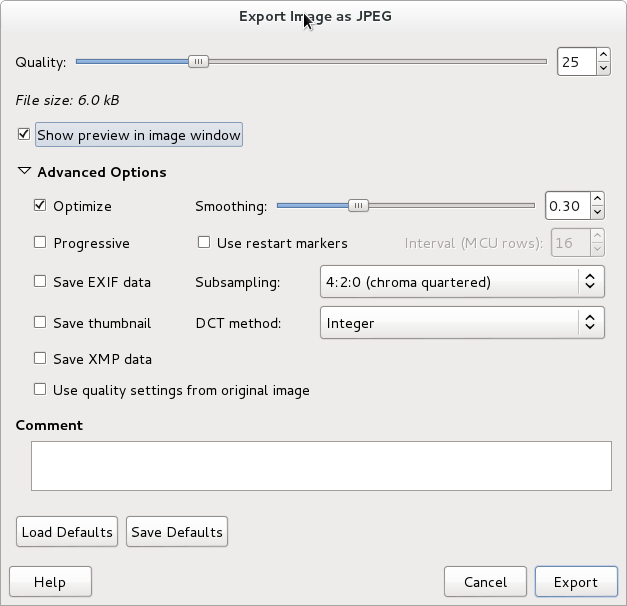 Eventually, I managed to get a photo that I was reasonable happy with. It is 240 288 and is 6048 bytes large.
 If anyone has further information, or opinions, on what image sizes makes sense for OpenPGP photos, let me know. Ideas on how to reduce size of JPEG images further without reducing quality as much would be welcome.

 Five years ago
 Transitions
There is huge ongoing work on package transitions. Take a look at our

 KDE
We will ship with at least KDE Applications 4.13, maybe some 4.14 things as well (if we are lucky, since Tanglu will likely be in feature-freeze when this stuff is released). The other KDE parts will remain on their latest version from the 4.x series. For Tanglu 3, we might update KDE SC 4.x to KDE Frameworks 5 and use Plasma 5 though.
GNOME
Due to the lack manpower on the GNOME flavor, GNOME will ship in the same version available in Debian Sid maybe with some stuff pulled from Experimental, where it makes sense. A GNOME flavor is planned to be available.
Common infrastructure
We currently run with systemd 208, but a switch to 210 is planned. Tanglu 2 also targets the X.org server in version 1.16. For more changes, stay tuned. The kernel release for Bartholomea is also not yet decided.
Artwork
Work on the default Tanglu 2 design has started as well any artwork submissions are most welcome!
Tanglu joins the OIN
The Tanglu project is now a proud member (licensee) of the



 Yesterday, the Belgian team played against Algeria, and won 2-1. Before
the match, there was some criticism about coach Wilmots' decision not
to field a number of top players in the team at the start of the match.
Today, some journalists -- including, apparently, some Russian
journalists -- seem to think that the team didn't play all that well,
and that the Belgian team could be beaten by a better team.
I don't think that's the case; I think the strategy of Wilmots was a
stroke of genius.
The Algerian coach fielded a wall of 5 defenders, and played a pretty
good counter game. When the Belgian team had posession -- for about 65%
of the time during the entire match -- the Algerians returned every
man to their own half of the field. Whenever one of the Belgian strikers
came close to the Algerian penalty area, at least two Algerian players
would be near and block them off.
How does one win from a team that doesn't want to give you a millimeter
of room? One way is to wear them out, and that's exactly what the team
did: by keeping the pressure on the Algerian defense, the Algerian
defense had to run a lot. Running a lot makes you tired, and if you're
tired you make mistakes, or you can't follow a fresh substitute player.
During half-time, it was reported that Wilmots had relayed the message
to his players that "the bench will make the difference". And indeed it
did; some time into through the second half, Wilmots substituted three
players -- two strikers and one offensive midfielder -- with the top
players he'd kept on the bench. Two of these three players made the
difference, scoring two goals to end up with 2-1.
Reading some articles today, it seems like many analysts think that this
was a spur of the moment thing by Wilmots; but I think it's more likely
that this was a deliberate strategy. Making the opposing defense run a
lot is certainly a good strategy; but the downside of that is that your
own offensive players will need to run a lot, too. If you can swap those
out for top players on the bench...
It'll be interesting to see the next matches.
 TeleGPS Battery Life
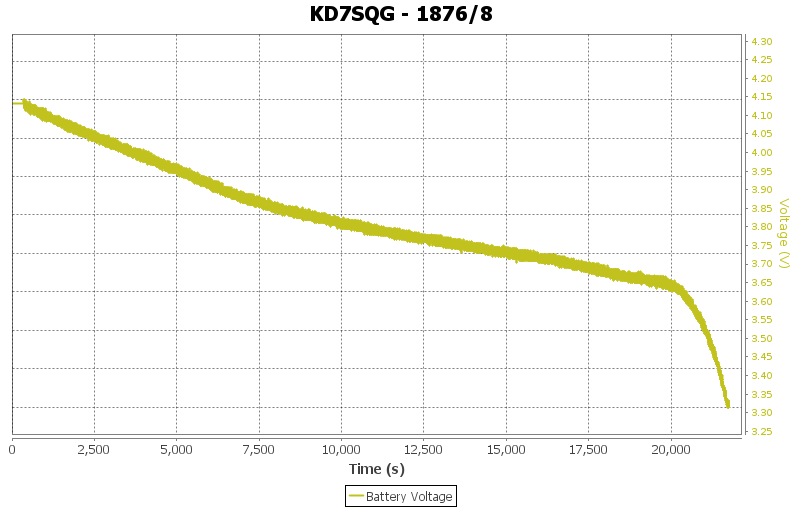
I charged up one of the


 I used to work for